

Implementación de iPSK (Identity Pre-Shared Key) para redes IoT seguras
Esta guía autorizada detalla cómo implementar la arquitectura Identity Pre-Shared Key (iPSK) para asegurar entornos IoT empresariales. Proporciona pasos de implementación accionables, estrategias de segmentación de VLAN y marcos de cumplimiento para operadores de red en los sectores de hospitalidad, retail y sector público.
🎧 Escucha esta guía
Ver transcripción
Resumen Ejecutivo
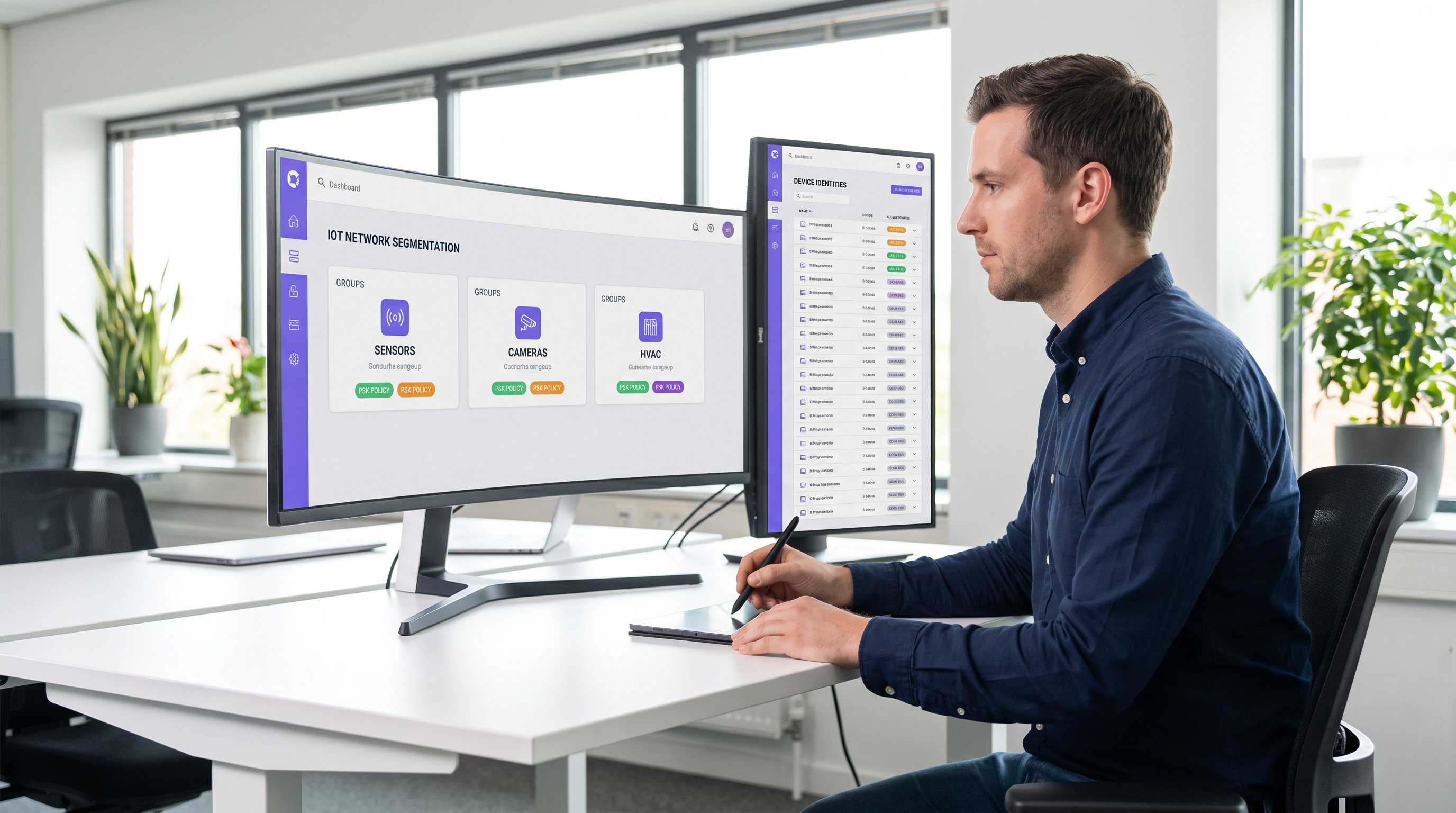
Asegurar el borde inalámbrico empresarial ha evolucionado de la gestión de laptops de empleados al control de miles de dispositivos IoT sin interfaz (headless). Las redes WPA2-Personal tradicionales, que dependen de una única frase de contraseña compartida universalmente, crean perfiles de riesgo inaceptables para los recintos modernos. Un solo dispositivo comprometido o una contraseña compartida exponen todo el segmento de red, violando los marcos de cumplimiento y complicando la respuesta ante incidentes.
Identity Pre-Shared Key (iPSK) resuelve esto asignando credenciales únicas a dispositivos individuales o grupos funcionales, manteniendo un único SSID. Al integrarse con un servidor RADIUS, iPSK asigna dinámicamente Redes de Área Local Virtuales (VLANs) y aplica políticas de acceso granulares a nivel de punto de acceso. Esta arquitectura elimina la necesidad de complejos suplicantes 802.1X en el hardware IoT, proporcionando segmentación de grado empresarial sin fricción operativa.
Para directores de TI y arquitectos de red en Hospitalidad , Retail y recintos públicos, iPSK es el puente definitivo entre una seguridad robusta y una implementación de IoT fluida. Esta guía detalla la arquitectura, las fases de implementación y las mejores prácticas operativas necesarias para desplegar iPSK a escala.
Análisis Técnico Profundo
Las limitaciones de la autenticación heredada
En las implementaciones empresariales convencionales, los equipos de TI enfrentan una dicotomía: usar 802.1X para un acceso robusto basado en la identidad, o usar WPA2/WPA3-Personal (Pre-Shared Key) por simplicidad. Si bien 802.1X es el estándar de oro para terminales corporativos —detallado en nuestra guía sobre Autenticación 802.1X: Asegurando el acceso a la red en dispositivos modernos — requiere un suplicante, del cual la mayoría de los dispositivos IoT (termostatos inteligentes, señalización digital, Sensors ) carecen fundamentalmente.
Recurrir a una red PSK estándar crea un entorno plano y no segmentado. Si se descubre una vulnerabilidad en una marca específica de smart TV, toda la red está en riesgo. Rotar la clave requiere intervenir cada dispositivo en ese SSID, una tarea operativamente prohibitiva en un hotel de 500 habitaciones o en una extensa propiedad de retail.
La arquitectura iPSK
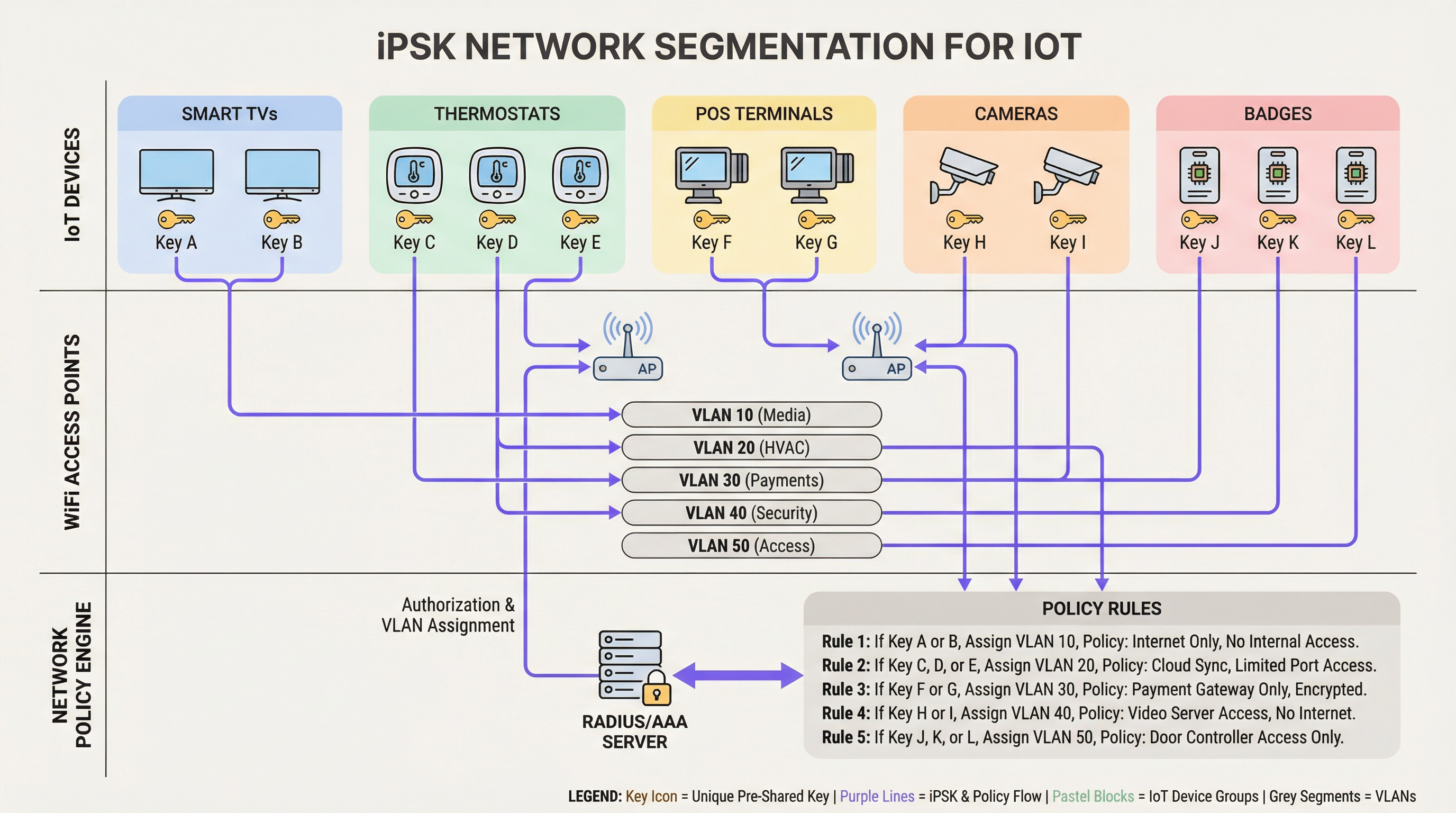
iPSK (también conocido como Multiple PSK o Dynamic PSK, según el proveedor) introduce la identidad al modelo PSK. La arquitectura se basa en cuatro componentes principales:
- Puntos de acceso inalámbricos (APs) / Controladores: La infraestructura de borde debe ser compatible con iPSK, interceptando la solicitud de asociación del cliente y pasando la dirección MAC y la PSK al servidor de autenticación.
- Servidor RADIUS (Motor de políticas): El servidor de autenticación (por ejemplo, Cisco ISE, Aruba ClearPass, FreeRADIUS) actúa como la fuente de verdad. Valida la PSK contra la dirección MAC del dispositivo o el perfil de grupo.
- Asignación dinámica de VLAN: Tras una autenticación exitosa, el servidor RADIUS devuelve un mensaje
Access-Acceptque contiene atributos RADIUS estándar (comoTunnel-Type=VLANyTunnel-Private-Group-Id). El AP coloca dinámicamente al cliente en la VLAN designada. - Punto de aplicación de políticas: Los firewalls o switches de Capa 3 aplican Listas de Control de Acceso (ACLs) a la VLAN asignada, restringiendo el movimiento lateral y la salida a internet.
WPA3 e iPSK
Las implementaciones modernas de iPSK deben aprovechar WPA3-Personal donde el soporte del cliente lo permita. WPA3 introduce la Autenticación Simultánea de Iguales (SAE), reemplazando el vulnerable saludo de cuatro vías (four-way handshake) de WPA2. SAE protege contra ataques de diccionario fuera de línea, asegurando que incluso si un atacante captura el saludo, no pueda forzar la PSK por fuerza bruta. Los APs empresariales líderes admiten el modo de transición WPA3, lo que permite que los clientes WPA2 y WPA3 coexistan en el mismo SSID habilitado para iPSK.
Guía de Implementación
La implementación de iPSK requiere una planificación metódica para evitar la interrupción del servicio. Se recomienda el siguiente enfoque por fases para entornos empresariales.
Fase 1: Descubrimiento y clasificación de dispositivos
Antes de alterar las configuraciones de red, establezca un inventario exhaustivo de todos los dispositivos IoT inalámbricos. Categorice los dispositivos según su función, proveedor y acceso a la red requerido. Las clasificaciones comunes en entornos de recintos incluyen:
- Pagos y POS: Terminales de tarjetas, tablets POS móviles (Alta seguridad, alcance PCI).
- Gestión de Edificios (BMS): Controladores de HVAC, iluminación inteligente, sensores ambientales (Solo internos, sin acceso a internet).
- Servicios para Huéspedes: Smart TVs, dispositivos de casting, asistentes de voz (Acceso a internet, aislados de las redes internas).
- Seguridad: Cámaras IP inalámbricas, controladores de acceso a puertas (Alto ancho de banda, solo servidores de grabación internos).
Fase 2: Preparación de la infraestructura
Configure la red cableada subyacente para admitir la nueva estrategia de segmentación. Proporcione las VLANs requeridas en su estructura de conmutación y defina reglas estrictas de enrutamiento inter-VLAN. Se debe aplicar una postura de denegación por defecto a todas las VLANs de IoT, permitiendo explícitamente solo el tráfico necesario (por ejemplo, permitir que las terminales POS lleguen a pasarelas de pago específicas a través del puerto 443).
Asegúrese de que su servidor RADIUS sea de alta disponibilidad. iPSK introduce una dependencia crítica de RADIUS para cada asociación de cliente. Despliegue nodos RADIUS redundantes, idealmente distribuidos geográficamente si gestiona una arquitectura WAN de múltiples sitios. Para más información sobre el diseño de redes de área amplia, revise Los beneficios principales de SD WAN para las empresas modernas .
Fase 3: Configuración de RADIUS y WLAN
Dentro de su motor de políticas RADIUS, cree grupos de dispositivos que correspondan a sus clasificaciones. Genere PSKs aleatorias de alta entropía (mínimo 20 caracteres) para cada grupo o dispositivo individual. Asocie estas PSKs a sus respectivos IDs de VLAN a través de perfiles de autorización RADIUS.
En el controlador inalámbrico, configure un único SSID (por ejemplo, Venue_IoT) y habilite el filtrado MAC con autenticación RADIUS. Configure el SSID para aceptar VLANs asignadas por RADIUS (a menudo denominado 'AAA Override').
Fase 4: Piloto y migración
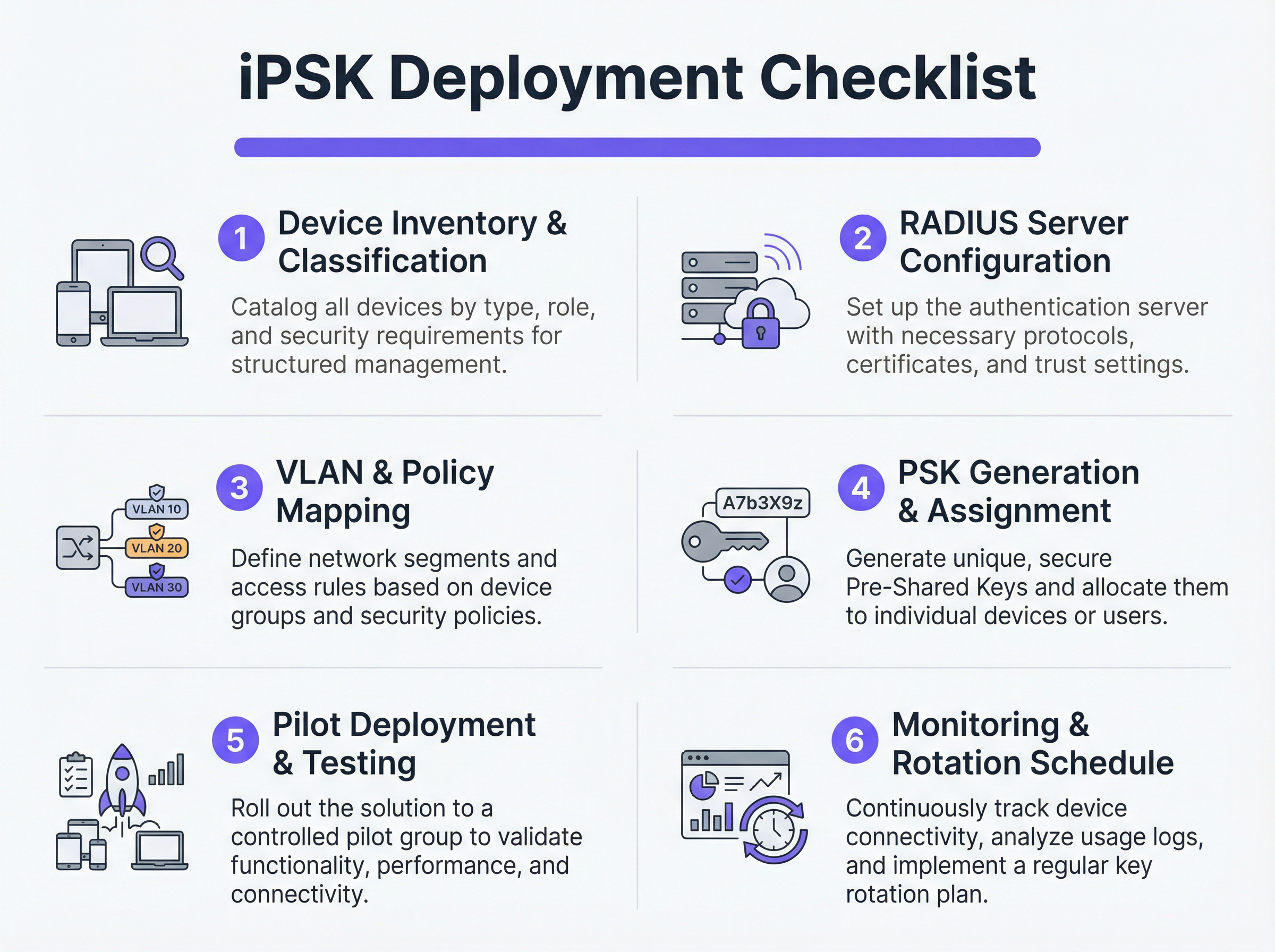
No intente una migración de corte inmediato. Seleccione un sitio piloto representativo o un grupo de dispositivos específico. Proporcione las nuevas PSKs a los dispositivos piloto y monitoree los registros de RADIUS. Verifique que los dispositivos se estén autenticando correctamente, recibiendo la asignación de VLAN adecuada y funcionando según lo esperado dentro de su segmento de red restringido.
Una vez validado, proceda con un despliegue gradual. Aproveche las plataformas de Gestión de Dispositivos Móviles (MDM) para enviar los nuevos perfiles de red a los dispositivos compatibles y coordine con los equipos de instalaciones para actualizar manualmente el hardware IoT sin interfaz.
Mejores Prácticas
- Implementar un respaldo de denegación por defecto: Si un dispositivo se conecta con una PSK válida pero su dirección MAC no es reconocida por el servidor RADIUS, asígnelo a una VLAN de 'cuarentena' con cero acceso a la red. Esto evita que dispositivos no autorizados se aprovechen de claves conocidas.
- Automatizar la gestión del ciclo de vida de las claves: Depender de hojas de cálculo para gestionar cientos de PSKs es una vulnerabilidad crítica. Utilice plataformas RADIUS impulsadas por API o portales dedicados de gestión de iPSK para automatizar la generación, rotación y revocación de claves.
- Limitar los riesgos de suplantación de MAC: Si bien iPSK es significativamente más seguro que el PSK estándar, a menudo depende de las direcciones MAC como parte de la vinculación de identidad. Debido a que las direcciones MAC pueden ser suplantadas, combine iPSK con perfiles continuos y detección de anomalías. Si un dispositivo que se autentica como un termostato inteligente muestra de repente patrones de tráfico similares a los de una laptop Windows, el sistema debe revocar el acceso automáticamente.
- Integrar con analíticas: Envíe los registros de autenticación y la telemetría de red a su plataforma de WiFi Analytics . Esto proporciona a los operadores de recintos inteligencia accionable sobre el estado, la densidad y la utilización de los dispositivos.
Resolución de Problemas y Mitigación de Riesgos
Modos de falla comunes
- Tiempo de espera/Inaccesibilidad de RADIUS: Si el AP no puede comunicarse con el servidor RADIUS, los clientes no podrán autenticarse. Mitigación: Implemente el equilibrio de carga del servidor RADIUS y asegúrese de que las funciones de supervivencia local (como el almacenamiento de credenciales en caché en el AP o el controlador local) estén habilitadas para la infraestructura crítica.
- Agotamiento del pooling de VLAN: En entornos densos, asignar demasiados dispositivos a una sola subred /24 puede agotar los alcances de DHCP. Mitigación: Use el pooling de VLAN dentro del perfil de autorización RADIUS para distribuir a los clientes en múltiples subredes manteniendo la misma política lógica.
- Problemas de roaming del cliente: Algunos dispositivos IoT heredados tienen dificultades con el roaming rápido (802.11r) cuando la asignación dinámica de VLAN está activa. Mitigación: Si el roaming no es necesario (por ejemplo, para una smart TV fija), desactive 802.11r en el SSID de IoT para maximizar la compatibilidad. Para una comprensión más profunda de las capacidades de los AP, consulte Definición de puntos de acceso inalámbricos: Su guía definitiva para 2026 .
ROI e Impacto en el Negocio
La implementación de iPSK ofrece retornos medibles en los dominios de seguridad, operaciones y cumplimiento.
- Alcance de auditoría reducido: Al segmentar definitivamente los dispositivos que manejan PCI y PII en VLANs aisladas, las organizaciones reducen drásticamente el alcance y el costo de las auditorías de cumplimiento (por ejemplo, PCI DSS, HIPAA).
- Eficiencia operativa: Consolidar múltiples SSIDs dedicados (uno para POS, uno para AV, uno para instalaciones) en un único SSID habilitado para iPSK reduce la interferencia de canal adyacente, mejora el rendimiento general de RF y simplifica la experiencia del huésped. Esto es crucial para ofrecer las Soluciones modernas de WiFi para hospitalidad que sus huéspedes merecen .
- Contención de incidentes: En caso de que un dispositivo se vea comprometido, los equipos de seguridad pueden revocar instantáneamente la PSK específica o poner en cuarentena la VLAN asociada sin afectar el resto de las operaciones del recinto.
Términos clave y definiciones
iPSK (Identity Pre-Shared Key)
A wireless authentication method that allows multiple unique passwords to be used on a single SSID, with each password tying the device to a specific identity, VLAN, and policy.
Used by IT teams to secure headless IoT devices that cannot support enterprise 802.1X authentication.
RADIUS (Remote Authentication Dial-In User Service)
A networking protocol that provides centralized Authentication, Authorization, and Accounting (AAA) management for users or devices connecting to a network service.
Acts as the policy engine in an iPSK deployment, verifying the password and telling the access point which VLAN to assign.
Dynamic VLAN Assignment
The process where a network switch or access point places a connecting device into a specific Virtual LAN based on credentials provided during authentication, rather than the physical port or SSID.
Essential for network segmentation, allowing payment terminals and smart TVs to share an SSID but remain on completely separate networks.
Headless Device
A piece of hardware (like a sensor, thermostat, or camera) that lacks a traditional user interface, screen, or keyboard.
These devices cannot easily run the complex software (supplicants) required for standard enterprise security, making iPSK the ideal solution.
MAC Spoofing
A technique where a malicious actor changes the factory-assigned Media Access Control (MAC) address of their network interface to impersonate a legitimate device.
A key risk in IoT networks; IT teams must use behavioral profiling alongside iPSK to detect when a laptop is pretending to be a printer.
SAE (Simultaneous Authentication of Equals)
The secure key establishment protocol used in WPA3, which replaces the WPA2 four-way handshake and protects against offline dictionary attacks.
When deploying modern iPSK, utilizing WPA3/SAE ensures that even if an attacker captures the connection traffic, they cannot crack the password.
Endpoint Profiling
The continuous analysis of a device's network behavior, HTTP user agents, and traffic patterns to accurately determine its manufacturer, model, and operating system.
Used to validate that a device connecting to the network is actually what it claims to be, adding a layer of security beyond just the password.
PCI DSS Scope
The subset of an organization's network, systems, and personnel that store, process, or transmit cardholder data, and are therefore subject to strict security audits.
By using iPSK to force all payment terminals onto an isolated VLAN, organizations drastically shrink their PCI scope, saving time and money on compliance.
Casos de éxito
A 400-room luxury hotel is deploying new smart TVs, wireless VoIP phones for housekeeping, and a fleet of mobile POS terminals for the pool bar. They currently use three separate SSIDs with standard WPA2 passwords. The IT Director wants to consolidate to a single SSID while ensuring the POS terminals meet PCI compliance. How should they architect the iPSK solution?
- Create three distinct device groups in the RADIUS server: 'Guest_Media', 'Staff_VoIP', and 'Retail_POS'.
- Generate a unique PSK for each group (or ideally, unique PSKs per device if the management platform supports it).
- Map 'Guest_Media' to VLAN 100 (Internet only, client isolation enabled).
- Map 'Staff_VoIP' to VLAN 200 (Access to internal PBX server, QoS tags applied).
- Map 'Retail_POS' to VLAN 300 (Strict ACLs allowing only outbound traffic to the payment gateway over port 443; no lateral movement).
- Broadcast a single SSID ('Hotel_IoT') with iPSK enabled. When a POS terminal connects using its specific PSK, the RADIUS server dynamically assigns it to VLAN 300, instantly satisfying PCI segmentation requirements.
A large retail chain uses iPSK for their digital signage and inventory scanners. During a routine audit, the security team discovers that an employee brought a personal gaming console from home, entered the PSK intended for the digital signage, and successfully connected to the network. How can this be prevented in the future?
The network team must implement MAC-to-PSK binding within the RADIUS policy.
- Update the RADIUS configuration so that authentication requires both the correct PSK AND a MAC address that exists in the authorized 'Digital_Signage' endpoint database.
- Implement a 'Default-Deny' or 'Quarantine' authorization profile. If a device presents the correct PSK but an unknown MAC address, the RADIUS server should return an Access-Accept but assign the device to a dead-end VLAN (e.g., VLAN 999) with no DHCP or routing.
- Enable endpoint profiling to detect MAC spoofing (e.g., identifying if a device claiming to be a Samsung display is exhibiting the network behavior of an Xbox).
Análisis de escenarios
Q1. You are deploying iPSK across a stadium environment for 500 digital signage displays. You have the option to generate one unique PSK for all 500 displays (Group PSK) or 500 individual PSKs (Unique PSK per device). Which approach should you choose, and what is the primary operational trade-off?
💡 Sugerencia:Consider what happens if a single display is stolen or compromised, versus the administrative overhead of managing the initial deployment.
Mostrar enfoque recomendado
You should aim for Unique PSK per device if your RADIUS and MDM tooling supports automated provisioning. This provides the highest security: if one display is compromised, you revoke a single key without affecting the other 499. However, the operational trade-off is significant administrative overhead during deployment. If automated provisioning is not available, a Group PSK (one key for all 500 displays) is acceptable, provided it is combined with strict MAC address authorization and endpoint profiling to prevent credential sharing.
Q2. During an iPSK pilot deployment, smart thermostats are successfully authenticating and receiving their correct VLAN assignment from the RADIUS server. However, they are failing to obtain an IP address. Laptops placed on the same SSID (for testing) connect and get an IP without issue. What is the most likely cause?
💡 Sugerencia:Think about how access points handle broadcast traffic and client roaming features that legacy IoT devices might not understand.
Mostrar enfoque recomendado
The most likely cause is an incompatibility with 802.11r (Fast BSS Transition). Many legacy IoT devices, including smart thermostats, do not understand the 802.11r Information Elements in the AP's beacon frames and will fail to complete the DHCP process or associate properly, even if the RADIUS authentication succeeds. The solution is to disable 802.11r on the specific SSID used for IoT devices, as stationary sensors do not require fast roaming capabilities.
Q3. A retail client wants to use iPSK to secure their mobile POS tablets. They insist on using a cloud-based RADIUS provider. What architectural risk does this introduce, and how must the network engineer mitigate it?
💡 Sugerencia:Consider the path the authentication request must take and what happens if the WAN link goes down.
Mostrar enfoque recomendado
Using a cloud RADIUS provider introduces a hard dependency on the WAN connection for local authentication. If the retail store's internet connection drops, the APs cannot reach the RADIUS server, meaning mobile POS tablets cannot authenticate or roam, halting sales. The engineer must mitigate this by enabling local survivability features on the branch APs or controllers (such as caching recent successful authentications) or deploying a local, lightweight RADIUS proxy/replica at the branch site.
Conclusiones clave
- ✓iPSK eliminates the shared-password vulnerability of standard WPA2/WPA3-Personal networks by assigning unique keys to devices or groups.
- ✓It enables dynamic VLAN assignment and policy enforcement for headless IoT devices that cannot support 802.1X supplicants.
- ✓A comprehensive device inventory is the mandatory first step before configuring RADIUS policies or network segments.
- ✓Deployments must include a default-deny or quarantine VLAN for devices that present valid keys but fail MAC authorization.
- ✓iPSK significantly reduces compliance audit scope (e.g., PCI DSS) by physically and logically isolating sensitive devices on the network.




