

Implementazione di iPSK (Identity Pre-Shared Key) per reti IoT sicure
Questa guida autorevole descrive in dettaglio come implementare l'architettura Identity Pre-Shared Key (iPSK) per proteggere gli ambienti IoT aziendali. Fornisce passaggi operativi per il deployment, strategie di segmentazione VLAN e framework di conformità per gli operatori di rete nei settori hospitality, retail e pubblico.
🎧 Ascolta questa guida
Visualizza trascrizione
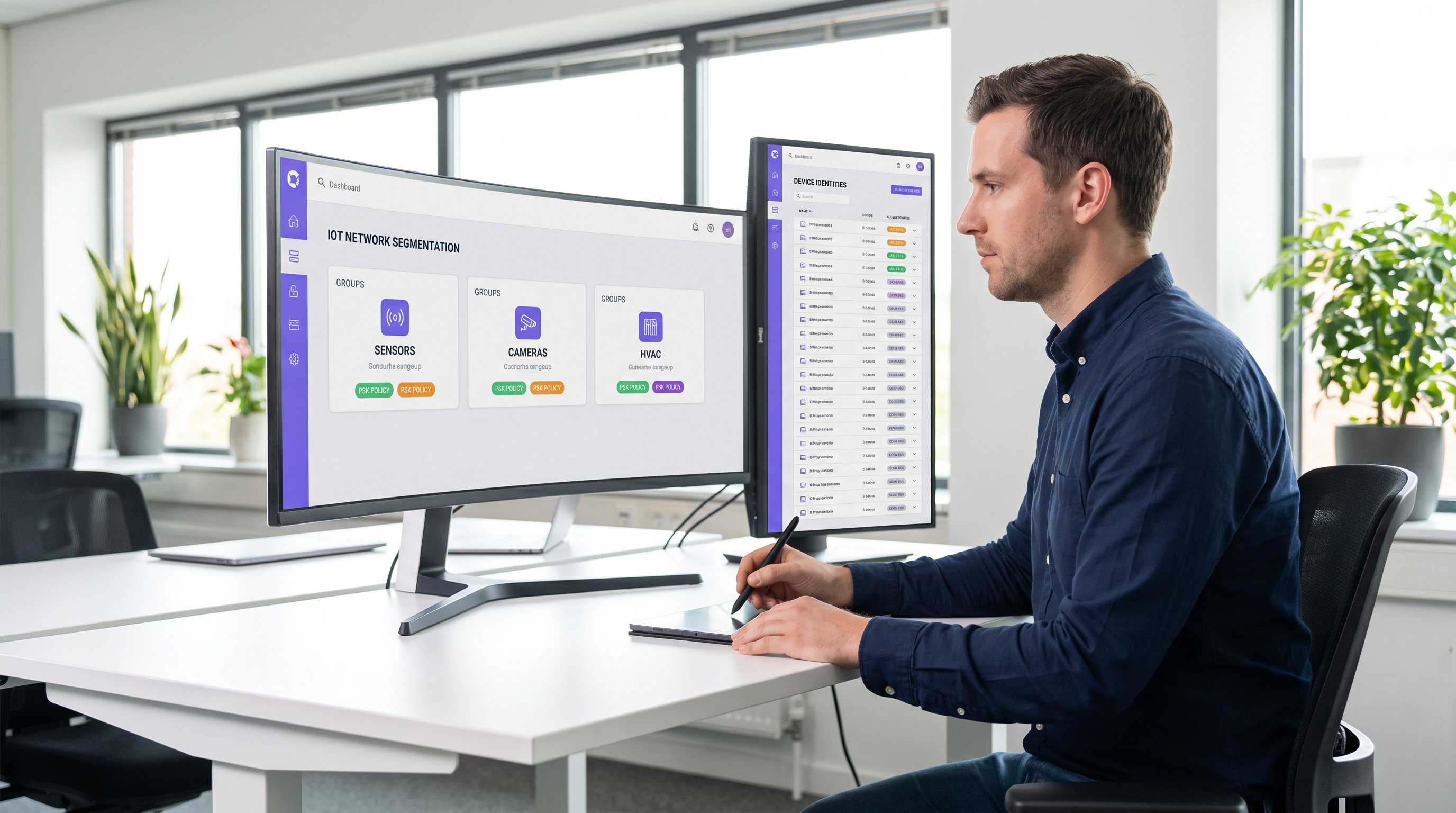
Sintesi operativa
La protezione del perimetro wireless aziendale si è evoluta dalla gestione dei laptop dei dipendenti al controllo di migliaia di dispositivi IoT headless. Le reti WPA2-Personal tradizionali, che si affidano a una singola passphrase condivisa universalmente, creano profili di rischio inaccettabili per le strutture moderne. Un singolo dispositivo compromesso o una password condivisa espongono l'intero segmento di rete, violando i framework di conformità e complicando la risposta agli incidenti.
L'Identity Pre-Shared Key (iPSK) risolve questo problema assegnando credenziali univoche a singoli dispositivi o gruppi funzionali, mantenendo al contempo un unico Service Set Identifier (SSID). Integrandosi con un server RADIUS, l'iPSK assegna dinamicamente le Virtual Local Area Networks (VLAN) e applica policy di accesso granulari a livello di access point. Questa architettura elimina la necessità di complessi supplicant 802.1X sull'hardware IoT, fornendo una segmentazione di livello enterprise senza attriti operativi.
Per i direttori IT e gli architetti di rete nei settori Hospitality , Retail e nei luoghi pubblici, l'iPSK rappresenta il ponte definitivo tra una sicurezza robusta e un deployment IoT fluido. Questa guida dettaglia l'architettura, le fasi di implementazione e le best practice operative necessarie per distribuire l'iPSK su larga scala.
Approfondimento tecnico
I limiti dell'autenticazione legacy
Nei deployment aziendali convenzionali, i team IT si trovano di fronte a una dicotomia: utilizzare 802.1X per un accesso robusto basato sull'identità, o utilizzare WPA2/WPA3-Personal (Pre-Shared Key) per semplicità. Sebbene l'802.1X sia lo standard di riferimento per gli endpoint aziendali — come dettagliato nella nostra guida sull' Autenticazione 802.1X: Proteggere l'accesso alla rete sui dispositivi moderni — esso richiede un supplicant, di cui la maggior parte dei dispositivi IoT (termostati intelligenti, segnaletica digitale, Sensors ) è fondamentalmente priva.
Ripiegare su una rete PSK standard crea un ambiente piatto e non segmentato. Se viene scoperta una vulnerabilità in una specifica marca di smart TV, l'intera rete è a rischio. La rotazione della chiave richiede l'intervento su ogni singolo dispositivo su quell'SSID, un'operazione proibitiva in un hotel da 500 camere o in un vasto complesso retail.
L'architettura iPSK
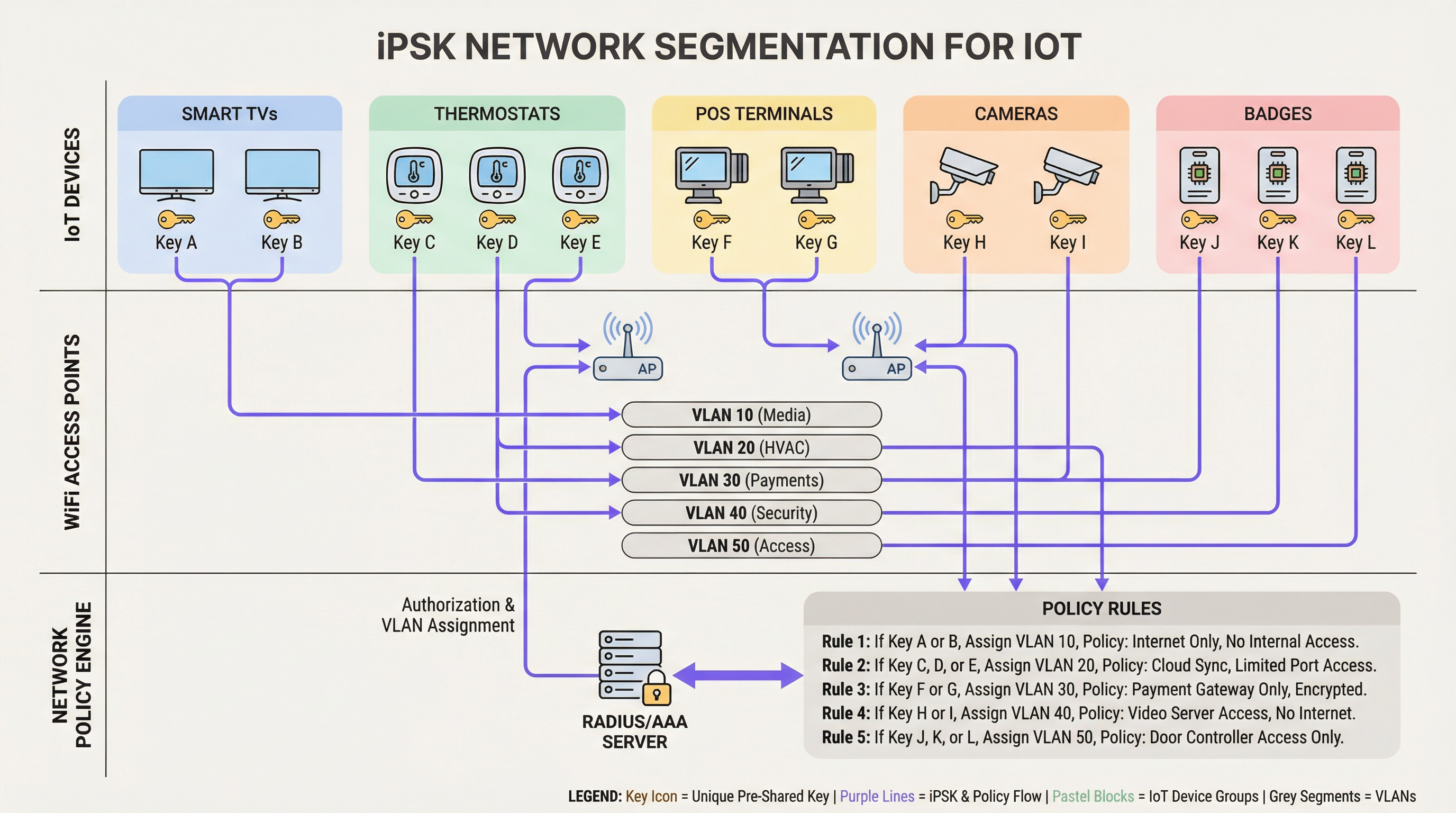
L'iPSK (noto anche come Multiple PSK o Dynamic PSK, a seconda del vendor) introduce l'identità nel modello PSK. L'architettura si basa su quattro componenti principali:
- Wireless Access Points (AP) / Controller: L'infrastruttura di bordo deve supportare l'iPSK, intercettando la richiesta di associazione del client e passando l'indirizzo MAC e la PSK al server di autenticazione.
- Server RADIUS (Motore di policy): Il server di autenticazione (ad es. Cisco ISE, Aruba ClearPass, FreeRADIUS) funge da fonte di verità. Convalida la PSK rispetto all'indirizzo MAC del dispositivo o al profilo del gruppo.
- Assegnazione dinamica della VLAN: In seguito a un'autenticazione riuscita, il server RADIUS restituisce un messaggio
Access-Acceptcontenente gli attributi RADIUS standard (comeTunnel-Type=VLANeTunnel-Private-Group-Id). L'AP colloca dinamicamente il client sulla VLAN designata. - Punto di applicazione delle policy: I firewall o gli switch Layer 3 applicano le Access Control Lists (ACL) alla VLAN assegnata, limitando i movimenti laterali e l'uscita verso Internet.
WPA3 e iPSK
I moderni deployment iPSK dovrebbero sfruttare WPA3-Personal dove il supporto dei client lo consente. WPA3 introduce la Simultaneous Authentication of Equals (SAE), sostituendo il vulnerabile handshake a quattro vie di WPA2. La SAE protegge dagli attacchi a dizionario offline, garantendo che anche se un utente malintenzionato cattura l'handshake, non possa forzare la PSK. Gli AP enterprise leader supportano la modalità di transizione WPA3, consentendo ai client WPA2 e WPA3 di coesistere sullo stesso SSID abilitato per iPSK.
Guida all'implementazione
Il deployment dell'iPSK richiede una pianificazione metodica per evitare interruzioni del servizio. Per gli ambienti aziendali si raccomanda il seguente approccio graduale.
Fase 1: Discovery e classificazione dei dispositivi
Prima di modificare le configurazioni di rete, stabilite un inventario completo di tutti i dispositivi IoT wireless. Categorizzate i dispositivi in base alla funzione, al fornitore e all'accesso alla rete richiesto. Le classificazioni comuni negli ambienti aperti al pubblico includono:
- Pagamenti e POS: Terminali per carte, tablet POS mobili (Alta sicurezza, ambito PCI).
- Building Management (BMS): Controller HVAC, illuminazione intelligente, sensori ambientali (Solo interni, nessun accesso a Internet).
- Servizi per gli ospiti: Smart TV, dispositivi di casting, assistenti vocali (Accesso a Internet, isolati dalle reti interne).
- Sicurezza: Telecamere IP wireless, controller per l'accesso alle porte (Elevata larghezza di banda, solo server di registrazione interni).
Fase 2: Preparazione dell'infrastruttura
Configurate la rete cablata sottostante per supportare la nuova strategia di segmentazione. Predisponete le VLAN richieste attraverso il vostro switching fabric e definite regole di routing inter-VLAN rigorose. Una postura di "default-deny" dovrebbe essere applicata a tutte le VLAN IoT, consentendo esplicitamente solo il traffico necessario (ad es. consentendo ai terminali POS di raggiungere specifici gateway di pagamento sulla porta 443).
Assicuratevi che il vostro server RADIUS sia ad alta disponibilità. L'iPSK introduce una dipendenza critica dal RADIUS per ogni associazione client. Distribuite nodi RADIUS ridondanti, idealmente distribuiti geograficamente se gestite un'architettura WAN multi-sito. Per saperne di più sulla progettazione di reti geografiche, consultate I principali vantaggi della SD WAN per le aziende moderne .
Fase 3: Configurazione RADIUS e WLAN
All'interno del vostro motore di policy RADIUS, create gruppi di dispositivi corrispondenti alle vostre classificazioni. Generate PSK casuali ad alta entropia (minimo 20 caratteri) per ogni gruppo o singolo dispositivo. Mappate queste PSK ai rispettivi ID VLAN tramite i profili di autorizzazione RADIUS.
Sul controller wireless, configurate un singolo SSID (ad es. Venue_IoT) e abilitate il filtraggio MAC con autenticazione RADIUS. Configurate l'SSID per accettare le VLAN assegnate dal RADIUS (spesso definito 'AAA Override').
Fase 4: Progetto pilota e migrazione
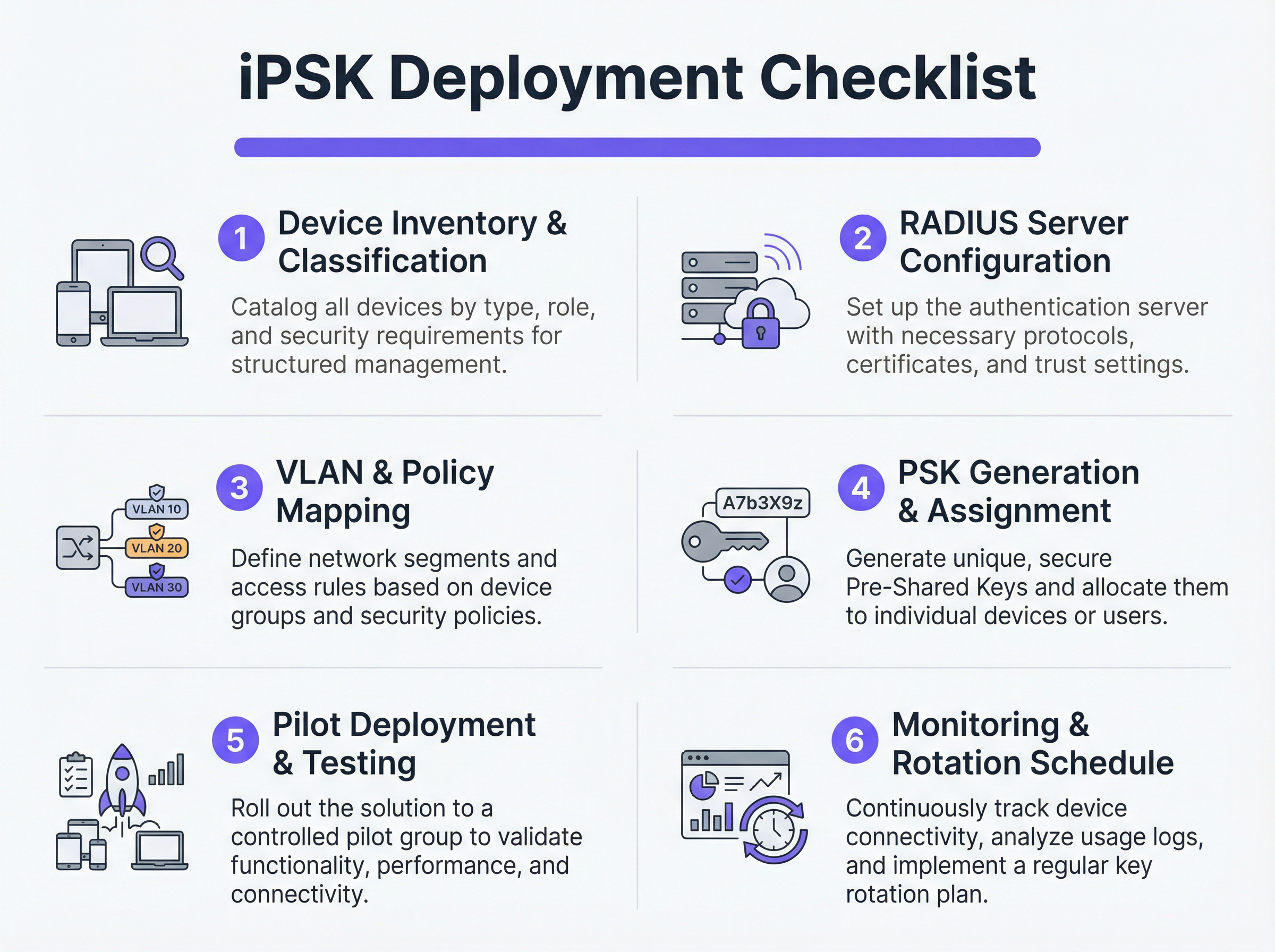
Non tentate una migrazione immediata di tipo "flash-cut". Selezionate un sito pilota rappresentativo o uno specifico gruppo di dispositivi. Fornite le nuove PSK ai dispositivi pilota e monitorate i log RADIUS. Verificate che i dispositivi si autentichino correttamente, ricevano l'assegnazione della VLAN corretta e funzionino come previsto all'interno del loro segmento di rete limitato.
Una volta convalidato, procedete con un rollout graduale. Sfruttate le piattaforme di Mobile Device Management (MDM) per inviare i nuovi profili di rete ai dispositivi compatibili e coordinatevi con i team tecnici per aggiornare manualmente l'hardware IoT headless.
Best practice
- Implementare un fallback Default-Deny: Se un dispositivo si connette con una PSK valida ma il suo indirizzo MAC non è riconosciuto dal server RADIUS, assegnatelo a una VLAN di 'quarantena' con accesso alla rete nullo. Ciò impedisce ai dispositivi non autorizzati di sfruttare chiavi note.
- Automazione della gestione del ciclo di vita delle chiavi: Affidarsi a fogli di calcolo per gestire centinaia di PSK è una vulnerabilità critica. Utilizzate piattaforme RADIUS basate su API o portali di gestione iPSK dedicati per automatizzare la generazione, la rotazione e la revoca delle chiavi.
- Limitare i rischi di MAC Spoofing: Sebbene l'iPSK sia significativamente più sicuro della PSK standard, spesso si affida agli indirizzi MAC come parte del legame di identità. Poiché gli indirizzi MAC possono essere contraffatti, combinate l'iPSK con la profilazione continua e il rilevamento delle anomalie. Se un dispositivo autenticato come termostato intelligente mostra improvvisamente modelli di traffico simili a quelli di un laptop Windows, il sistema dovrebbe revocare automaticamente l'accesso.
- Integrazione con gli Analytics: Inviate i log di autenticazione e la telemetria di rete alla vostra piattaforma di WiFi Analytics . Ciò fornisce agli operatori delle strutture informazioni utili sulla salute, la densità e l'utilizzo dei dispositivi.
Risoluzione dei problemi e mitigazione dei rischi
Modalità di guasto comuni
- Timeout/Irreperibilità del RADIUS: Se l'AP non riesce a raggiungere il server RADIUS, i client non riusciranno ad autenticarsi. Mitigazione: Implementate il bilanciamento del carico del server RADIUS e assicuratevi che le funzioni di sopravvivenza locale (come il caching delle credenziali sull'AP o sul controller locale) siano abilitate per l'infrastruttura critica.
- Esaurimento del pool VLAN: In ambienti densi, l'assegnazione di troppi dispositivi a una singola sottorete /24 può esaurire gli scope DHCP. Mitigazione: Utilizzate il pooling delle VLAN all'interno del profilo di autorizzazione RADIUS per distribuire i client su più sottoreti mantenendo la stessa policy logica.
- Problemi di roaming dei client: Alcuni dispositivi IoT legacy hanno difficoltà con il roaming veloce (802.11r) quando è attiva l'assegnazione dinamica della VLAN. Mitigazione: Se il roaming non è richiesto (ad es. per una smart TV fissa), disabilitate l'802.11r sull'SSID IoT per massimizzare la compatibilità. Per una comprensione più approfondita delle capacità degli AP, consultate Definizione di Wireless Access Points: La vostra guida definitiva per il 2026 .
ROI e impatto sul business
L'implementazione dell'iPSK offre ritorni misurabili in termini di sicurezza, operazioni e conformità.
- Riduzione dell'ambito di audit: Segmentando definitivamente i dispositivi che gestiscono dati PCI e PII su VLAN isolate, le organizzazioni riducono drasticamente l'ambito e i costi degli audit di conformità (ad es. PCI DSS, GDPR).
- Efficienza operativa: Il consolidamento di più SSID dedicati (uno per i POS, uno per l'AV, uno per i servizi) in un unico SSID abilitato per iPSK riduce l'interferenza co-canale, migliora le prestazioni RF complessive e semplifica l'esperienza degli ospiti. Questo è fondamentale per offrire le Moderne soluzioni WiFi per l'Hospitality che i vostri ospiti meritano .
- Contenimento degli incidenti: In caso di compromissione di un dispositivo, i team di sicurezza possono revocare istantaneamente la PSK specifica o mettere in quarantena la VLAN associata senza impattare sul resto delle operazioni della struttura.
Termini chiave e definizioni
iPSK (Identity Pre-Shared Key)
A wireless authentication method that allows multiple unique passwords to be used on a single SSID, with each password tying the device to a specific identity, VLAN, and policy.
Used by IT teams to secure headless IoT devices that cannot support enterprise 802.1X authentication.
RADIUS (Remote Authentication Dial-In User Service)
A networking protocol that provides centralized Authentication, Authorization, and Accounting (AAA) management for users or devices connecting to a network service.
Acts as the policy engine in an iPSK deployment, verifying the password and telling the access point which VLAN to assign.
Dynamic VLAN Assignment
The process where a network switch or access point places a connecting device into a specific Virtual LAN based on credentials provided during authentication, rather than the physical port or SSID.
Essential for network segmentation, allowing payment terminals and smart TVs to share an SSID but remain on completely separate networks.
Headless Device
A piece of hardware (like a sensor, thermostat, or camera) that lacks a traditional user interface, screen, or keyboard.
These devices cannot easily run the complex software (supplicants) required for standard enterprise security, making iPSK the ideal solution.
MAC Spoofing
A technique where a malicious actor changes the factory-assigned Media Access Control (MAC) address of their network interface to impersonate a legitimate device.
A key risk in IoT networks; IT teams must use behavioral profiling alongside iPSK to detect when a laptop is pretending to be a printer.
SAE (Simultaneous Authentication of Equals)
The secure key establishment protocol used in WPA3, which replaces the WPA2 four-way handshake and protects against offline dictionary attacks.
When deploying modern iPSK, utilizing WPA3/SAE ensures that even if an attacker captures the connection traffic, they cannot crack the password.
Endpoint Profiling
The continuous analysis of a device's network behavior, HTTP user agents, and traffic patterns to accurately determine its manufacturer, model, and operating system.
Used to validate that a device connecting to the network is actually what it claims to be, adding a layer of security beyond just the password.
PCI DSS Scope
The subset of an organization's network, systems, and personnel that store, process, or transmit cardholder data, and are therefore subject to strict security audits.
By using iPSK to force all payment terminals onto an isolated VLAN, organizations drastically shrink their PCI scope, saving time and money on compliance.
Casi di studio
A 400-room luxury hotel is deploying new smart TVs, wireless VoIP phones for housekeeping, and a fleet of mobile POS terminals for the pool bar. They currently use three separate SSIDs with standard WPA2 passwords. The IT Director wants to consolidate to a single SSID while ensuring the POS terminals meet PCI compliance. How should they architect the iPSK solution?
- Create three distinct device groups in the RADIUS server: 'Guest_Media', 'Staff_VoIP', and 'Retail_POS'.
- Generate a unique PSK for each group (or ideally, unique PSKs per device if the management platform supports it).
- Map 'Guest_Media' to VLAN 100 (Internet only, client isolation enabled).
- Map 'Staff_VoIP' to VLAN 200 (Access to internal PBX server, QoS tags applied).
- Map 'Retail_POS' to VLAN 300 (Strict ACLs allowing only outbound traffic to the payment gateway over port 443; no lateral movement).
- Broadcast a single SSID ('Hotel_IoT') with iPSK enabled. When a POS terminal connects using its specific PSK, the RADIUS server dynamically assigns it to VLAN 300, instantly satisfying PCI segmentation requirements.
A large retail chain uses iPSK for their digital signage and inventory scanners. During a routine audit, the security team discovers that an employee brought a personal gaming console from home, entered the PSK intended for the digital signage, and successfully connected to the network. How can this be prevented in the future?
The network team must implement MAC-to-PSK binding within the RADIUS policy.
- Update the RADIUS configuration so that authentication requires both the correct PSK AND a MAC address that exists in the authorized 'Digital_Signage' endpoint database.
- Implement a 'Default-Deny' or 'Quarantine' authorization profile. If a device presents the correct PSK but an unknown MAC address, the RADIUS server should return an Access-Accept but assign the device to a dead-end VLAN (e.g., VLAN 999) with no DHCP or routing.
- Enable endpoint profiling to detect MAC spoofing (e.g., identifying if a device claiming to be a Samsung display is exhibiting the network behavior of an Xbox).
Analisi degli scenari
Q1. You are deploying iPSK across a stadium environment for 500 digital signage displays. You have the option to generate one unique PSK for all 500 displays (Group PSK) or 500 individual PSKs (Unique PSK per device). Which approach should you choose, and what is the primary operational trade-off?
💡 Suggerimento:Consider what happens if a single display is stolen or compromised, versus the administrative overhead of managing the initial deployment.
Mostra l'approccio consigliato
You should aim for Unique PSK per device if your RADIUS and MDM tooling supports automated provisioning. This provides the highest security: if one display is compromised, you revoke a single key without affecting the other 499. However, the operational trade-off is significant administrative overhead during deployment. If automated provisioning is not available, a Group PSK (one key for all 500 displays) is acceptable, provided it is combined with strict MAC address authorization and endpoint profiling to prevent credential sharing.
Q2. During an iPSK pilot deployment, smart thermostats are successfully authenticating and receiving their correct VLAN assignment from the RADIUS server. However, they are failing to obtain an IP address. Laptops placed on the same SSID (for testing) connect and get an IP without issue. What is the most likely cause?
💡 Suggerimento:Think about how access points handle broadcast traffic and client roaming features that legacy IoT devices might not understand.
Mostra l'approccio consigliato
The most likely cause is an incompatibility with 802.11r (Fast BSS Transition). Many legacy IoT devices, including smart thermostats, do not understand the 802.11r Information Elements in the AP's beacon frames and will fail to complete the DHCP process or associate properly, even if the RADIUS authentication succeeds. The solution is to disable 802.11r on the specific SSID used for IoT devices, as stationary sensors do not require fast roaming capabilities.
Q3. A retail client wants to use iPSK to secure their mobile POS tablets. They insist on using a cloud-based RADIUS provider. What architectural risk does this introduce, and how must the network engineer mitigate it?
💡 Suggerimento:Consider the path the authentication request must take and what happens if the WAN link goes down.
Mostra l'approccio consigliato
Using a cloud RADIUS provider introduces a hard dependency on the WAN connection for local authentication. If the retail store's internet connection drops, the APs cannot reach the RADIUS server, meaning mobile POS tablets cannot authenticate or roam, halting sales. The engineer must mitigate this by enabling local survivability features on the branch APs or controllers (such as caching recent successful authentications) or deploying a local, lightweight RADIUS proxy/replica at the branch site.
Punti chiave
- ✓iPSK eliminates the shared-password vulnerability of standard WPA2/WPA3-Personal networks by assigning unique keys to devices or groups.
- ✓It enables dynamic VLAN assignment and policy enforcement for headless IoT devices that cannot support 802.1X supplicants.
- ✓A comprehensive device inventory is the mandatory first step before configuring RADIUS policies or network segments.
- ✓Deployments must include a default-deny or quarantine VLAN for devices that present valid keys but fail MAC authorization.
- ✓iPSK significantly reduces compliance audit scope (e.g., PCI DSS) by physically and logically isolating sensitive devices on the network.




