

Mise en œuvre de l'iPSK (Identity Pre-Shared Key) pour des réseaux IoT sécurisés
Ce guide de référence détaille comment implémenter l'architecture Identity Pre-Shared Key (iPSK) pour sécuriser les environnements IoT d'entreprise. Il fournit des étapes de déploiement concrètes, des stratégies de segmentation VLAN et des cadres de conformité pour les opérateurs de réseaux dans l'hôtellerie, le retail et le secteur public.
🎧 Écouter ce guide
Voir la transcription
Résumé exécutif
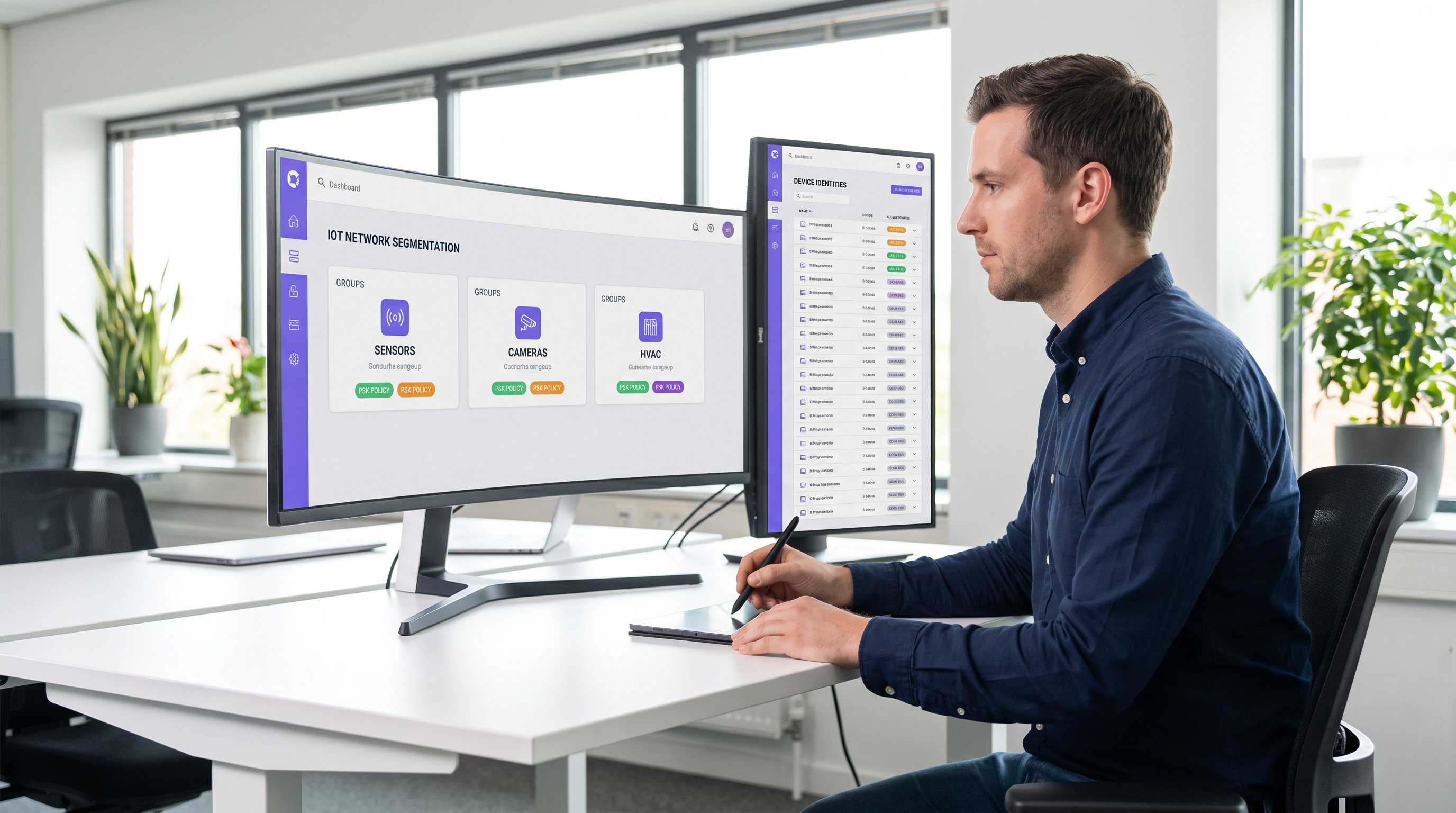
La sécurisation de la périphérie sans fil en entreprise a évolué, passant de la gestion des ordinateurs portables des employés à la gouvernance de milliers d'appareils IoT headless. Les réseaux WPA2-Personnel traditionnels, qui reposent sur une phrase secrète unique et partagée universellement, créent des profils de risque inacceptables pour les sites modernes. Un seul appareil compromis ou un mot de passe partagé expose l'ensemble du segment de réseau, violant les cadres de conformité et compliquant la réponse aux incidents.
L'Identity Pre-Shared Key (iPSK) résout ce problème en attribuant des identifiants uniques à des appareils individuels ou à des groupes fonctionnels tout en conservant un seul SSID. En s'intégrant à un serveur RADIUS, l'iPSK attribue dynamiquement des réseaux locaux virtuels (VLAN) et applique des politiques d'accès granulaires au niveau du point d'accès. Cette architecture élimine le besoin de suppliants 802.1X complexes sur le matériel IoT, offrant une segmentation de classe entreprise sans friction opérationnelle.
Pour les directeurs informatiques et les architectes réseau dans l' Hôtellerie , le Retail et les lieux publics, l'iPSK est le pont définitif entre une sécurité robuste et un déploiement IoT fluide. Ce guide détaille l'architecture, les phases de mise en œuvre et les meilleures pratiques opérationnelles requises pour déployer l'iPSK à grande échelle.
Analyse technique approfondie
Les limites de l'authentification héritée
Dans les déploiements d'entreprise conventionnels, les équipes informatiques sont confrontées à une dichotomie : utiliser le 802.1X pour un accès robuste basé sur l'identité, ou utiliser le WPA2/WPA3-Personnel (Pre-Shared Key) pour la simplicité. Bien que le 802.1X soit la référence pour les terminaux d'entreprise — détaillé dans notre guide sur l' Authentification 802.1X : Sécuriser l'accès réseau sur les appareils modernes — il nécessite un suppliant, ce dont la plupart des appareils IoT (thermostats intelligents, affichage dynamique, Capteurs ) sont fondamentalement dépourvus.
Se replier sur un réseau PSK standard crée un environnement plat et non segmenté. Si une vulnérabilité est découverte dans une marque spécifique de smart TV, l'ensemble du réseau est menacé. La rotation de la clé nécessite d'intervenir sur chaque appareil de ce SSID, une tâche opérationnellement prohibitive dans un hôtel de 500 chambres ou un vaste parc de points de vente.
L'architecture iPSK
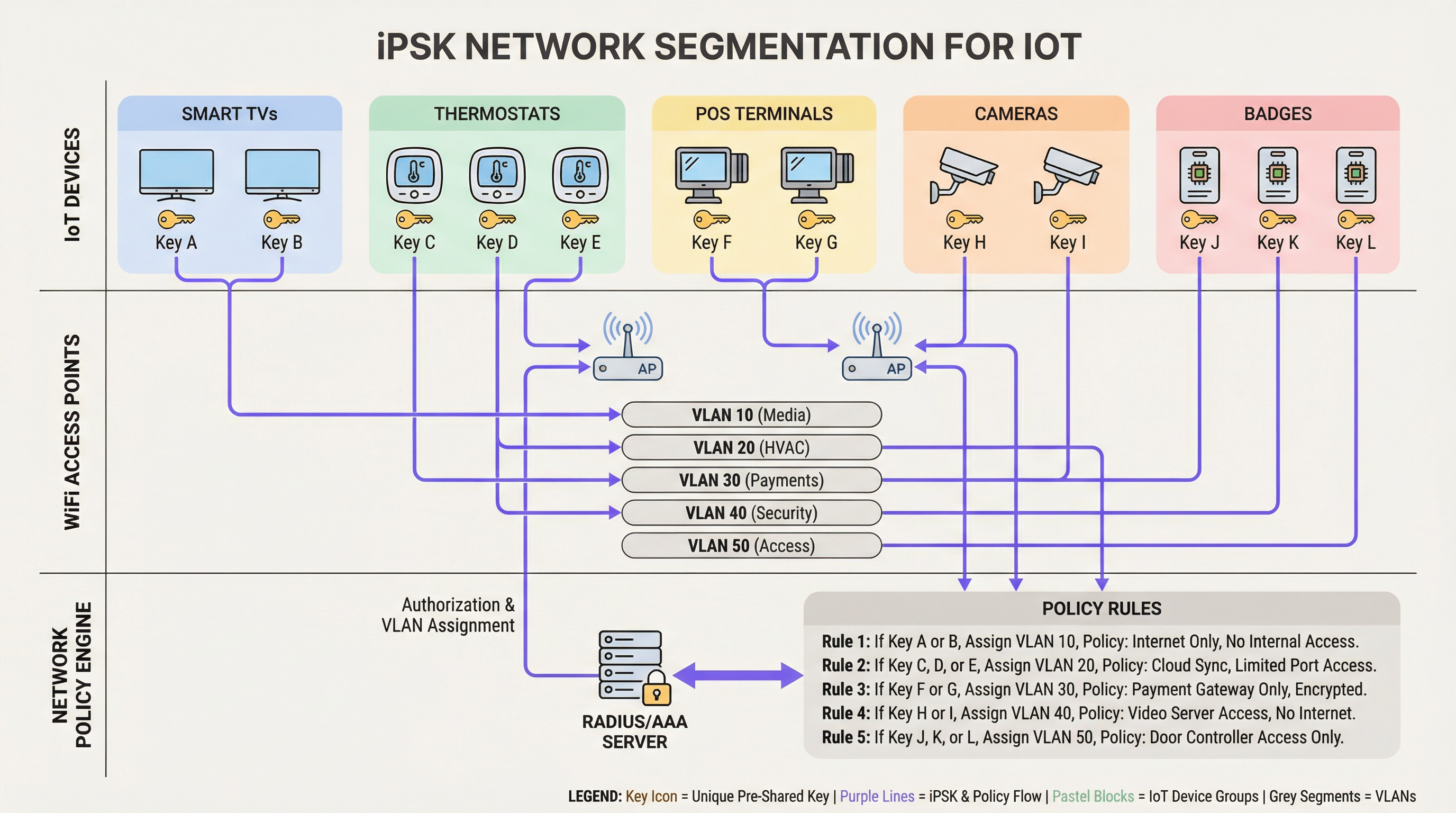
L'iPSK (également connu sous le nom de Multiple PSK ou Dynamic PSK, selon le fournisseur) introduit l'identité dans le modèle PSK. L'architecture repose sur quatre composants de base :
- Points d'accès sans fil (AP) / Contrôleurs : L'infrastructure de périphérie doit prendre en charge l'iPSK, en interceptant la demande d'association du client et en transmettant l'adresse MAC et la PSK au serveur d'authentification.
- Serveur RADIUS (Moteur de politique) : Le serveur d'authentification (ex: Cisco ISE, Aruba ClearPass, FreeRADIUS) agit comme source de vérité. Il valide la PSK par rapport à l'adresse MAC de l'appareil ou au profil de groupe.
- Attribution dynamique de VLAN : Une fois l'authentification réussie, le serveur RADIUS renvoie un message
Access-Acceptcontenant des attributs RADIUS standard (tels queTunnel-Type=VLANetTunnel-Private-Group-Id). L'AP place dynamiquement le client sur le VLAN désigné. - Point d'application des politiques : Les pare-feu ou les commutateurs de couche 3 appliquent des listes de contrôle d'accès (ACL) au VLAN attribué, limitant les mouvements latéraux et la sortie vers Internet.
WPA3 et iPSK
Les déploiements iPSK modernes devraient exploiter le WPA3-Personnel lorsque le support client le permet. Le WPA3 introduit l'authentification simultanée d'égaux (SAE), remplaçant la poignée de main à quatre voies vulnérable du WPA2. Le SAE protège contre les attaques par dictionnaire hors ligne, garantissant que même si un attaquant capture la poignée de main, il ne peut pas forcer la PSK par force brute. Les principaux AP d'entreprise prennent en charge le mode de transition WPA3, permettant aux clients WPA2 et WPA3 de coexister sur le même SSID compatible iPSK.
Guide de mise en œuvre
Le déploiement de l'iPSK nécessite une planification méthodique pour éviter toute interruption de service. L'approche progressive suivante est recommandée pour les environnements d'entreprise.
Phase 1 : Découverte et classification des appareils
Avant de modifier les configurations réseau, établissez un inventaire complet de tous les appareils IoT sans fil. Catégorisez les appareils en fonction de leur fonction, de leur fournisseur et de l'accès réseau requis. Les classifications courantes dans les environnements de sites incluent :
- Paiement et POS : Terminaux de paiement, tablettes POS mobiles (Haute sécurité, périmètre PCI).
- Gestion technique du bâtiment (GTB) : Contrôleurs CVC, éclairage intelligent, capteurs environnementaux (Interne uniquement, pas d'accès Internet).
- Services aux clients : Smart TV, appareils de diffusion (casting), assistants vocaux (Accès Internet, isolés des réseaux internes).
- Sécurité : Caméras IP sans fil, contrôleurs d'accès aux portes (Bande passante élevée, serveurs d'enregistrement internes uniquement).
Phase 2 : Préparation de l'infrastructure
Configurez le réseau filaire sous-jacent pour prendre en charge la nouvelle stratégie de segmentation. Provisionnez les VLAN requis sur votre infrastructure de commutation et définissez des règles de routage inter-VLAN strictes. Une posture de refus par défaut (default-deny) doit être appliquée à tous les VLAN IoT, en autorisant explicitement uniquement le trafic nécessaire (ex: autoriser les terminaux POS à atteindre des passerelles de paiement spécifiques via le port 443).
Assurez-vous que votre serveur RADIUS est hautement disponible. L'iPSK introduit une dépendance critique vis-à-vis de RADIUS pour chaque association de client. Déployez des nœuds RADIUS redondants, idéalement répartis géographiquement si vous gérez une architecture WAN multisite. Pour en savoir plus sur la conception de réseaux étendus, consultez Les principaux avantages du SD WAN pour les entreprises modernes .
Phase 3 : Configuration RADIUS et WLAN
Dans votre moteur de politique RADIUS, créez des groupes d'appareils correspondant à vos classifications. Générez des PSK aléatoires à haute entropie (minimum 20 caractères) pour chaque groupe ou appareil individuel. Mappez ces PSK à leurs ID de VLAN respectifs via des profils d'autorisation RADIUS.
Sur le contrôleur sans fil, configurez un seul SSID (ex: Venue_IoT) et activez le filtrage MAC avec authentification RADIUS. Configurez le SSID pour accepter les VLAN attribués par RADIUS (souvent appelé « AAA Override »).
Phase 4 : Pilote et migration
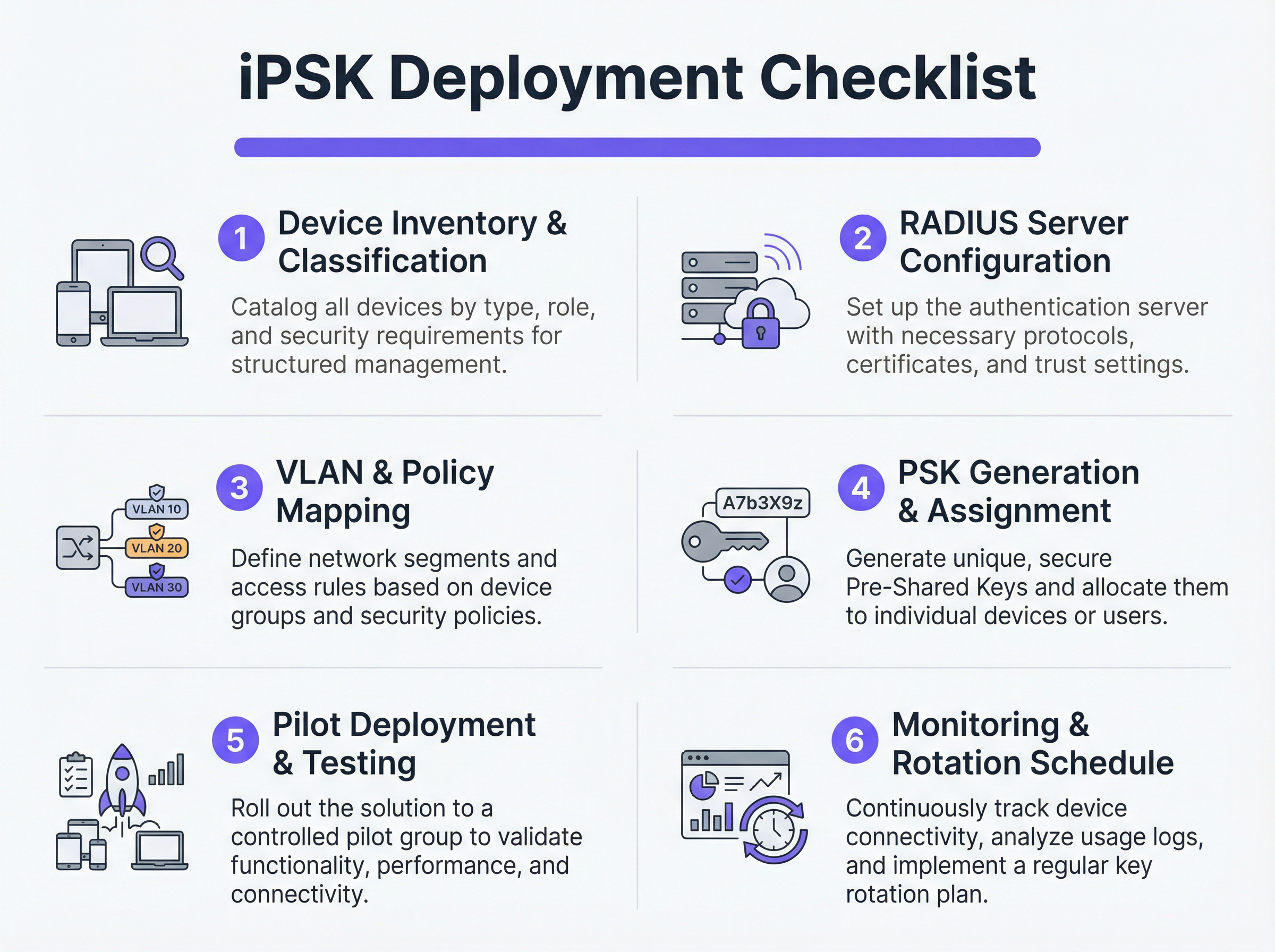
Ne tentez pas une migration brutale. Sélectionnez un site pilote représentatif ou un groupe d'appareils spécifique. Provisionnez les nouvelles PSK sur les appareils pilotes et surveillez les journaux RADIUS. Vérifiez que les appareils s'authentifient avec succès, reçoivent l'attribution de VLAN correcte et fonctionnent comme prévu dans leur segment de réseau restreint.
Une fois validé, procédez à un déploiement progressif. Utilisez les plateformes de gestion des appareils mobiles (MDM) pour pousser les nouveaux profils réseau vers les appareils compatibles, et coordonnez-vous avec les équipes techniques pour mettre à jour manuellement le matériel IoT headless.
Meilleures pratiques
- Implémenter un repli par défaut (Default-Deny) : Si un appareil se connecte avec une PSK valide mais que son adresse MAC n'est pas reconnue par le serveur RADIUS, affectez-le à un VLAN de « quarantaine » sans aucun accès réseau. Cela empêche les appareils non autorisés de profiter de clés connues.
- Automatiser la gestion du cycle de vie des clés : S'appuyer sur des feuilles de calcul pour gérer des centaines de PSK est une vulnérabilité critique. Utilisez des plateformes RADIUS pilotées par API ou des portails de gestion iPSK dédiés pour automatiser la génération, la rotation et la révocation des clés.
- Limiter les risques d'usurpation d'adresse MAC : Bien que l'iPSK soit nettement plus sécurisé que le PSK standard, il repose souvent sur les adresses MAC pour la liaison d'identité. Les adresses MAC pouvant être usurpées, combinez l'iPSK avec un profilage continu et une détection d'anomalies. Si un appareil s'authentifiant comme un thermostat intelligent présente soudainement des schémas de trafic ressemblant à un ordinateur portable Windows, le système doit automatiquement révoquer l'accès.
- Intégrer aux analyses : Transmettez les journaux d'authentification et la télémétrie réseau à votre plateforme d' Analyses WiFi . Cela fournit aux exploitants de sites des informations exploitables concernant la santé, la densité et l'utilisation des appareils.
Dépannage et atténuation des risques
Modes de défaillance courants
- Délai d'attente/Inaccessibilité RADIUS : Si l'AP ne peut pas atteindre le serveur RADIUS, les clients ne pourront pas s'authentifier. Atténuation : Implémentez l'équilibrage de charge du serveur RADIUS et assurez-vous que les fonctionnalités de survie locale (telles que la mise en cache des identifiants sur l'AP ou le contrôleur local) sont activées pour l'infrastructure critique.
- Épuisement du pool de VLAN : Dans les environnements denses, l'attribution d'un trop grand nombre d'appareils à un seul sous-réseau /24 peut épuiser les étendues DHCP. Atténuation : Utilisez le pooling de VLAN dans le profil d'autorisation RADIUS pour répartir les clients sur plusieurs sous-réseaux tout en conservant la même politique logique.
- Problèmes d'itinérance client : Certains appareils IoT hérités ont des difficultés avec l'itinérance rapide (802.11r) lorsque l'attribution dynamique de VLAN est en jeu. Atténuation : Si l'itinérance n'est pas requise (ex: pour une smart TV fixe), désactivez le 802.11r sur le SSID IoT pour maximiser la compatibilité. Pour une compréhension plus approfondie des capacités des AP, voir Définition des points d'accès sans fil : Votre guide ultime 2026 .
ROI et impact commercial
La mise en œuvre de l'iPSK offre des rendements mesurables dans les domaines de la sécurité, des opérations et de la conformité.
- Réduction du périmètre d'audit : En segmentant définitivement les appareils traitant des données PCI et PII sur des VLAN isolés, les organisations réduisent considérablement la portée et le coût des audits de conformité (ex: PCI DSS, HIPAA).
- Efficacité opérationnelle : La consolidation de plusieurs SSID dédiés (un pour le POS, un pour l'audiovisuel, un pour les installations) en un seul SSID compatible iPSK réduit les interférences co-canal, améliore les performances RF globales et simplifie l'expérience client. C'est crucial pour offrir des Solutions WiFi hôtelières modernes que vos clients méritent .
- Confinement des incidents : En cas de compromission d'un appareil, les équipes de sécurité peuvent instantanément révoquer la PSK spécifique ou mettre en quarantaine le VLAN associé sans affecter le reste des opérations du site.
Termes clés et définitions
iPSK (Identity Pre-Shared Key)
A wireless authentication method that allows multiple unique passwords to be used on a single SSID, with each password tying the device to a specific identity, VLAN, and policy.
Used by IT teams to secure headless IoT devices that cannot support enterprise 802.1X authentication.
RADIUS (Remote Authentication Dial-In User Service)
A networking protocol that provides centralized Authentication, Authorization, and Accounting (AAA) management for users or devices connecting to a network service.
Acts as the policy engine in an iPSK deployment, verifying the password and telling the access point which VLAN to assign.
Dynamic VLAN Assignment
The process where a network switch or access point places a connecting device into a specific Virtual LAN based on credentials provided during authentication, rather than the physical port or SSID.
Essential for network segmentation, allowing payment terminals and smart TVs to share an SSID but remain on completely separate networks.
Headless Device
A piece of hardware (like a sensor, thermostat, or camera) that lacks a traditional user interface, screen, or keyboard.
These devices cannot easily run the complex software (supplicants) required for standard enterprise security, making iPSK the ideal solution.
MAC Spoofing
A technique where a malicious actor changes the factory-assigned Media Access Control (MAC) address of their network interface to impersonate a legitimate device.
A key risk in IoT networks; IT teams must use behavioral profiling alongside iPSK to detect when a laptop is pretending to be a printer.
SAE (Simultaneous Authentication of Equals)
The secure key establishment protocol used in WPA3, which replaces the WPA2 four-way handshake and protects against offline dictionary attacks.
When deploying modern iPSK, utilizing WPA3/SAE ensures that even if an attacker captures the connection traffic, they cannot crack the password.
Endpoint Profiling
The continuous analysis of a device's network behavior, HTTP user agents, and traffic patterns to accurately determine its manufacturer, model, and operating system.
Used to validate that a device connecting to the network is actually what it claims to be, adding a layer of security beyond just the password.
PCI DSS Scope
The subset of an organization's network, systems, and personnel that store, process, or transmit cardholder data, and are therefore subject to strict security audits.
By using iPSK to force all payment terminals onto an isolated VLAN, organizations drastically shrink their PCI scope, saving time and money on compliance.
Études de cas
A 400-room luxury hotel is deploying new smart TVs, wireless VoIP phones for housekeeping, and a fleet of mobile POS terminals for the pool bar. They currently use three separate SSIDs with standard WPA2 passwords. The IT Director wants to consolidate to a single SSID while ensuring the POS terminals meet PCI compliance. How should they architect the iPSK solution?
- Create three distinct device groups in the RADIUS server: 'Guest_Media', 'Staff_VoIP', and 'Retail_POS'.
- Generate a unique PSK for each group (or ideally, unique PSKs per device if the management platform supports it).
- Map 'Guest_Media' to VLAN 100 (Internet only, client isolation enabled).
- Map 'Staff_VoIP' to VLAN 200 (Access to internal PBX server, QoS tags applied).
- Map 'Retail_POS' to VLAN 300 (Strict ACLs allowing only outbound traffic to the payment gateway over port 443; no lateral movement).
- Broadcast a single SSID ('Hotel_IoT') with iPSK enabled. When a POS terminal connects using its specific PSK, the RADIUS server dynamically assigns it to VLAN 300, instantly satisfying PCI segmentation requirements.
A large retail chain uses iPSK for their digital signage and inventory scanners. During a routine audit, the security team discovers that an employee brought a personal gaming console from home, entered the PSK intended for the digital signage, and successfully connected to the network. How can this be prevented in the future?
The network team must implement MAC-to-PSK binding within the RADIUS policy.
- Update the RADIUS configuration so that authentication requires both the correct PSK AND a MAC address that exists in the authorized 'Digital_Signage' endpoint database.
- Implement a 'Default-Deny' or 'Quarantine' authorization profile. If a device presents the correct PSK but an unknown MAC address, the RADIUS server should return an Access-Accept but assign the device to a dead-end VLAN (e.g., VLAN 999) with no DHCP or routing.
- Enable endpoint profiling to detect MAC spoofing (e.g., identifying if a device claiming to be a Samsung display is exhibiting the network behavior of an Xbox).
Analyse de scénario
Q1. You are deploying iPSK across a stadium environment for 500 digital signage displays. You have the option to generate one unique PSK for all 500 displays (Group PSK) or 500 individual PSKs (Unique PSK per device). Which approach should you choose, and what is the primary operational trade-off?
💡 Astuce :Consider what happens if a single display is stolen or compromised, versus the administrative overhead of managing the initial deployment.
Afficher l'approche recommandée
You should aim for Unique PSK per device if your RADIUS and MDM tooling supports automated provisioning. This provides the highest security: if one display is compromised, you revoke a single key without affecting the other 499. However, the operational trade-off is significant administrative overhead during deployment. If automated provisioning is not available, a Group PSK (one key for all 500 displays) is acceptable, provided it is combined with strict MAC address authorization and endpoint profiling to prevent credential sharing.
Q2. During an iPSK pilot deployment, smart thermostats are successfully authenticating and receiving their correct VLAN assignment from the RADIUS server. However, they are failing to obtain an IP address. Laptops placed on the same SSID (for testing) connect and get an IP without issue. What is the most likely cause?
💡 Astuce :Think about how access points handle broadcast traffic and client roaming features that legacy IoT devices might not understand.
Afficher l'approche recommandée
The most likely cause is an incompatibility with 802.11r (Fast BSS Transition). Many legacy IoT devices, including smart thermostats, do not understand the 802.11r Information Elements in the AP's beacon frames and will fail to complete the DHCP process or associate properly, even if the RADIUS authentication succeeds. The solution is to disable 802.11r on the specific SSID used for IoT devices, as stationary sensors do not require fast roaming capabilities.
Q3. A retail client wants to use iPSK to secure their mobile POS tablets. They insist on using a cloud-based RADIUS provider. What architectural risk does this introduce, and how must the network engineer mitigate it?
💡 Astuce :Consider the path the authentication request must take and what happens if the WAN link goes down.
Afficher l'approche recommandée
Using a cloud RADIUS provider introduces a hard dependency on the WAN connection for local authentication. If the retail store's internet connection drops, the APs cannot reach the RADIUS server, meaning mobile POS tablets cannot authenticate or roam, halting sales. The engineer must mitigate this by enabling local survivability features on the branch APs or controllers (such as caching recent successful authentications) or deploying a local, lightweight RADIUS proxy/replica at the branch site.
Points clés à retenir
- ✓iPSK eliminates the shared-password vulnerability of standard WPA2/WPA3-Personal networks by assigning unique keys to devices or groups.
- ✓It enables dynamic VLAN assignment and policy enforcement for headless IoT devices that cannot support 802.1X supplicants.
- ✓A comprehensive device inventory is the mandatory first step before configuring RADIUS policies or network segments.
- ✓Deployments must include a default-deny or quarantine VLAN for devices that present valid keys but fail MAC authorization.
- ✓iPSK significantly reduces compliance audit scope (e.g., PCI DSS) by physically and logically isolating sensitive devices on the network.




