

सुरक्षित IoT नेटवर्क्ससाठी iPSK (Identity Pre-Shared Key) लागू करणे
हे अधिकृत मार्गदर्शक एंटरप्राइझ IoT वातावरणांना सुरक्षित करण्यासाठी Identity Pre-Shared Key (iPSK) आर्किटेक्चर कसे लागू करावे याचे तपशील देते. हे हॉस्पिटॅलिटी, रिटेल आणि सार्वजनिक क्षेत्रातील नेटवर्क ऑपरेटर्ससाठी कृतीयोग्य उपयोजन पायऱ्या, VLAN विभागणी धोरणे आणि अनुपालन फ्रेमवर्क्स प्रदान करते.
🎧 हे मार्गदर्शक ऐका
ट्रान्सक्रिप्ट पहा
कार्यकारी सारांश
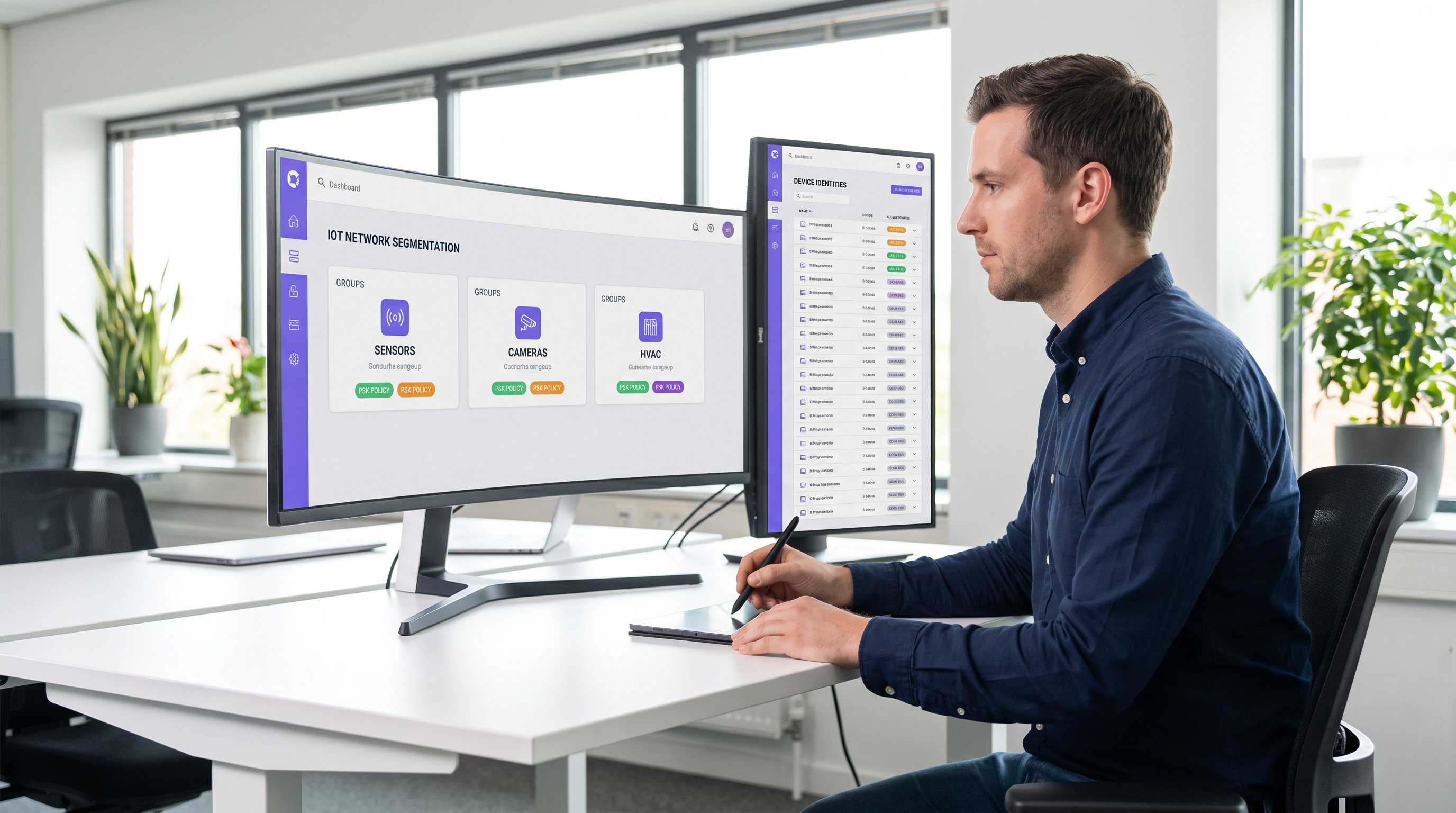
एंटरप्राइझ वायरलेस एज सुरक्षित करणे हे कर्मचाऱ्यांच्या लॅपटॉप व्यवस्थापित करण्यापासून हजारो हेडलेस IoT उपकरणांचे नियमन करण्यापर्यंत विकसित झाले आहे. पारंपारिक WPA2-Personal नेटवर्क्स, जे एकाच, सार्वत्रिकपणे शेअर केलेल्या पासफ्रेजवर अवलंबून असतात, आधुनिक ठिकाणांसाठी अस्वीकार्य जोखीम प्रोफाइल तयार करतात. एकच तडजोड केलेले उपकरण किंवा शेअर केलेला पासवर्ड संपूर्ण नेटवर्क सेगमेंट उघड करतो, ज्यामुळे अनुपालन फ्रेमवर्क्सचे उल्लंघन होते आणि घटनेच्या प्रतिसादात गुंतागुंत निर्माण होते.
Identity Pre-Shared Key (iPSK) एकाच Service Set Identifier (SSID) राखून वैयक्तिक उपकरणांना किंवा कार्यात्मक गटांना युनिक क्रेडेंशियल्स नियुक्त करून याचे निराकरण करते. RADIUS सर्व्हरशी समाकलित होऊन, iPSK डायनॅमिकरित्या Virtual Local Area Networks (VLANs) नियुक्त करते आणि ॲक्सेस पॉइंट स्तरावर ग्रॅन्युलर ॲक्सेस धोरणे लागू करते. हे आर्किटेक्चर IoT हार्डवेअरवर जटिल 802.1X सप्लिकंट्सची आवश्यकता दूर करते, ऑपरेशनल घर्षणाशिवाय एंटरप्राइझ-ग्रेड विभागणी प्रदान करते.
हॉस्पिटॅलिटी , रिटेल आणि सार्वजनिक ठिकाणांमधील IT संचालक आणि नेटवर्क आर्किटेक्ट्ससाठी, iPSK हे मजबूत सुरक्षा आणि अखंड IoT उपयोजन यांच्यातील निश्चित पूल आहे. हे मार्गदर्शक आर्किटेक्चर, अंमलबजावणीचे टप्पे आणि मोठ्या प्रमाणावर iPSK तैनात करण्यासाठी आवश्यक असलेल्या सर्वोत्तम ऑपरेशनल पद्धतींचा तपशील देते.
तांत्रिक सखोल माहिती
लेगसी ऑथेंटिकेशनच्या मर्यादा
पारंपारिक एंटरप्राइझ उपयोजनांमध्ये, IT टीम्सना द्वैताचा सामना करावा लागतो: मजबूत ओळख-आधारित प्रवेशासाठी 802.1X वापरा किंवा साधेपणासाठी WPA2/WPA3-Personal (Pre-Shared Key) वापरा. 802.1X हे कॉर्पोरेट एंडपॉइंट्ससाठी सुवर्ण मानक असताना—ज्याचे तपशील आमच्या 802.1X ऑथेंटिकेशन: आधुनिक उपकरणांवर नेटवर्क प्रवेश सुरक्षित करणे मार्गदर्शकामध्ये दिले आहेत—त्यासाठी सप्लिकंटची आवश्यकता असते, जी बहुतेक IoT उपकरणांमध्ये (स्मार्ट थर्मोस्टॅट्स, डिजिटल साइनेज, सेन्सर्स ) मूलभूतपणे नसते.
मानक PSK नेटवर्कवर परत जाण्यामुळे एक सपाट, अविभाजित वातावरण तयार होते. जर स्मार्ट टीव्हीच्या विशिष्ट ब्रँडमध्ये असुरक्षितता आढळली, तर संपूर्ण नेटवर्क धोक्यात येते. की (key) बदलण्यासाठी त्या SSID वरील प्रत्येक उपकरणाला स्पर्श करणे आवश्यक असते, जे ५०० खोल्यांच्या हॉटेलमध्ये किंवा विस्तीर्ण रिटेल इस्टेटमध्ये ऑपरेशनलदृष्ट्या प्रतिबंधात्मक कार्य आहे.
iPSK आर्किटेक्चर
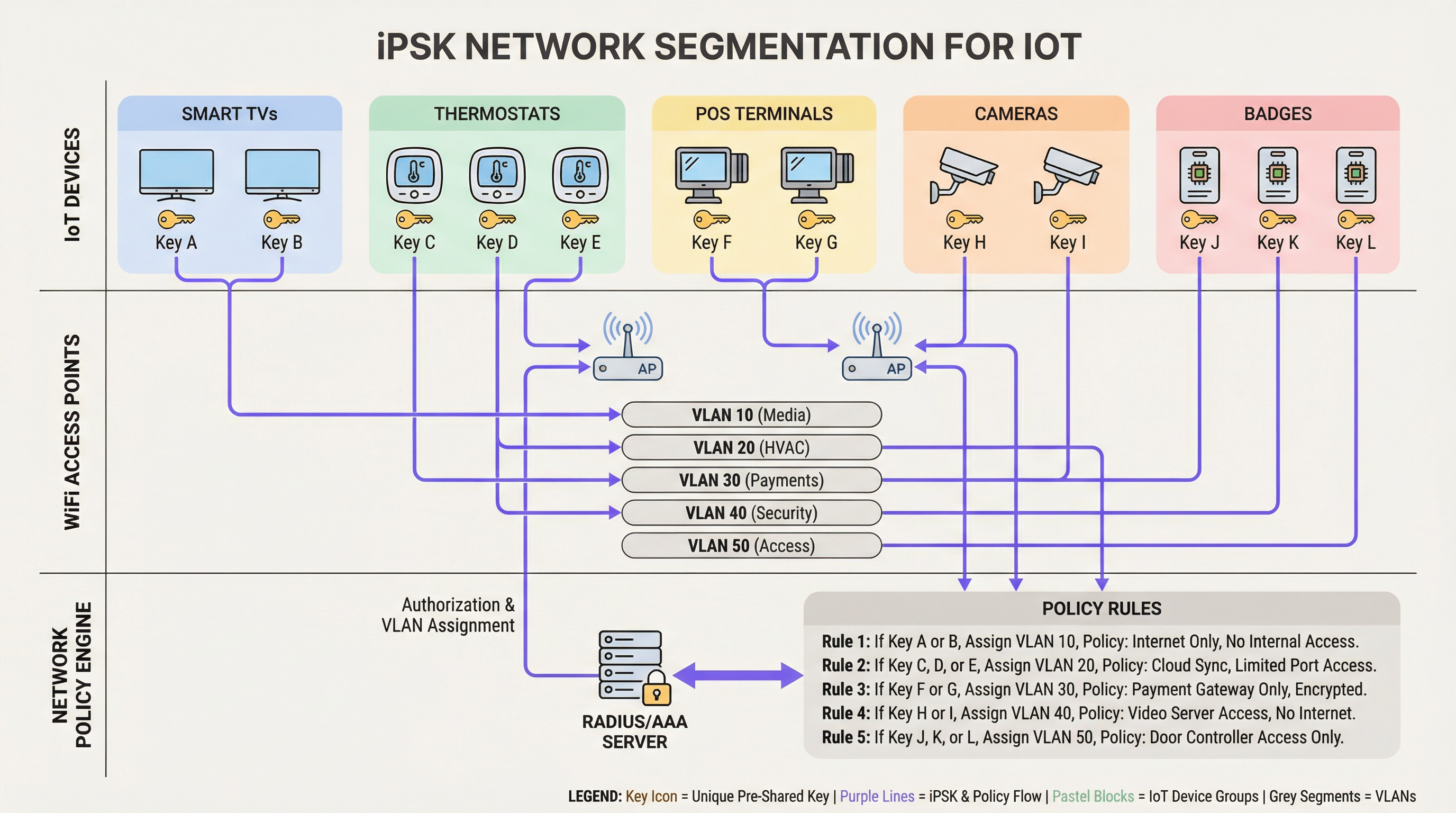
iPSK (विक्रेत्यावर अवलंबून Multiple PSK किंवा Dynamic PSK म्हणूनही ओळखले जाते) PSK मॉडेलमध्ये ओळख (identity) समाविष्ट करते. आर्किटेक्चर चार मुख्य घटकांवर अवलंबून असते:
- वायरलेस ॲक्सेस पॉइंट्स (APs) / कंट्रोलर्स: एज इन्फ्रास्ट्रक्चरने iPSK ला सपोर्ट करणे आवश्यक आहे, क्लायंटची असोसिएशन विनंती रोखून धरली पाहिजे आणि MAC ॲड्रेस आणि PSK ऑथेंटिकेशन सर्व्हरकडे पाठवला पाहिजे.
- RADIUS सर्व्हर (पॉलिसी इंजिन): ऑथेंटिकेशन सर्व्हर (उदा. Cisco ISE, Aruba ClearPass, FreeRADIUS) सत्याचा स्रोत म्हणून कार्य करतो. हे उपकरणाच्या MAC ॲड्रेस किंवा ग्रुप प्रोफाइलच्या विरूद्ध PSK प्रमाणित करते.
- डायनॅमिक VLAN असाइनमेंट: यशस्वी ऑथेंटिकेशनवर, RADIUS सर्व्हर मानक RADIUS गुणधर्म (जसे की
Tunnel-Type=VLANआणिTunnel-Private-Group-Id) असलेलाAccess-Acceptसंदेश परत पाठवतो. AP डायनॅमिकरित्या क्लायंटला नियुक्त केलेल्या VLAN वर ठेवतो. - पॉलिसी एन्फोर्समेंट पॉइंट: फायरवॉल्स किंवा लेयर ३ स्विचेस नियुक्त केलेल्या VLAN वर ॲक्सेस कंट्रोल लिस्ट्स (ACLs) लागू करतात, ज्यामुळे लॅटरल हालचाल आणि इंटरनेट इग्रेस मर्यादित होते.
WPA3 आणि iPSK
आधुनिक iPSK उपयोजनांनी जिथे क्लायंट सपोर्ट असेल तिथे WPA3-Personal चा लाभ घ्यावा. WPA3 मध्ये Simultaneous Authentication of Equals (SAE) सादर केले आहे, जे WPA2 च्या असुरक्षित फोर-वे हँडशेकची जागा घेते. SAE ऑफलाइन डिक्शनरी हल्ल्यांपासून संरक्षण करते, हे सुनिश्चित करते की जरी एखाद्या हल्लेखोराने हँडशेक कॅप्चर केला तरीही ते PSK वर ब्रूट-फोर्स हल्ला करू शकत नाहीत. आघाडीचे एंटरप्राइझ APs WPA3 ट्रान्झिशन मोडला सपोर्ट करतात, ज्यामुळे WPA2 आणि WPA3 क्लायंट एकाच iPSK-सक्षम SSID वर एकत्र राहू शकतात.
अंमलबजावणी मार्गदर्शक
iPSK तैनात करण्यासाठी सेवा व्यत्यय टाळण्यासाठी पद्धतशीर नियोजनाची आवश्यकता आहे. एंटरप्राइझ वातावरणासाठी खालील टप्प्याटप्प्याने दृष्टिकोन शिफारसीय आहे.
टप्पा १: उपकरण शोध आणि वर्गीकरण
नेटवर्क कॉन्फिगरेशन बदलण्यापूर्वी, सर्व वायरलेस IoT उपकरणांची सर्वसमावेशक यादी तयार करा. कार्य, विक्रेता आणि आवश्यक नेटवर्क प्रवेशावर आधारित उपकरणांचे वर्गीकरण करा. ठिकाणच्या वातावरणातील सामान्य वर्गीकरणांमध्ये हे समाविष्ट आहे:
- पेमेंट आणि POS: कार्ड टर्मिनल्स, मोबाईल POS टॅब्लेट्स (उच्च सुरक्षा, PCI-व्याप्ती).
- बिल्डिंग मॅनेजमेंट (BMS): HVAC कंट्रोलर्स, स्मार्ट लाइटिंग, पर्यावरणीय सेन्सर्स (केवळ अंतर्गत, इंटरनेट प्रवेश नाही).
- अतिथी सेवा: स्मार्ट टीव्ही, कास्टिंग उपकरणे, व्हॉइस असिस्टंट (इंटरनेट प्रवेश, अंतर्गत नेटवर्क्सपासून वेगळे).
- सुरक्षा: वायरलेस IP कॅमेरे, डोअर ॲक्सेस कंट्रोलर्स (उच्च बँडविड्थ, केवळ अंतर्गत रेकॉर्डिंग सर्व्हर).
टप्पा २: पायाभूत सुविधांची तयारी
नवीन विभागणी धोरणास समर्थन देण्यासाठी अंतर्निहित वायर्ड नेटवर्क कॉन्फिगर करा. तुमच्या स्विचिंग फॅब्रिकमध्ये आवश्यक VLANs ची तरतूद करा आणि कडक इंटर-VLAN राउटिंग नियम परिभाषित करा. सर्व IoT VLANs वर 'डिफॉल्ट-डिनाय' पवित्रा लागू केला पाहिजे, ज्यामध्ये केवळ आवश्यक ट्रॅफिकला स्पष्टपणे परवानगी दिली पाहिजे (उदा. POS टर्मिनल्सना पोर्ट ४४३ वर विशिष्ट पेमेंट गेटवेपर्यंत पोहोचण्याची परवानगी देणे).
तुमचा RADIUS सर्व्हर उच्च उपलब्धतेचा असल्याची खात्री करा. iPSK प्रत्येक क्लायंट असोसिएशनसाठी RADIUS वर कठोर अवलंबित्व निर्माण करते. रिडंडंट RADIUS नोड्स तैनात करा, आदर्शपणे मल्टी-साइट WAN आर्किटेक्चर व्यवस्थापित करत असल्यास भौगोलिकदृष्ट्या वितरित करा. वाइड-एरिया नेटवर्क डिझाइनबद्दल अधिक माहितीसाठी, आधुनिक व्यवसायांसाठी मुख्य SD WAN फायदे पहा.
टप्पा ३: RADIUS आणि WLAN कॉन्फिगरेशन
तुमच्या RADIUS पॉलिसी इंजिनमध्ये, तुमच्या वर्गीकरणाशी संबंधित उपकरण गट तयार करा. प्रत्येक गटासाठी किंवा वैयक्तिक उपकरणासाठी उच्च-एन्ट्रॉपी (किमान २० वर्ण), यादृच्छिक PSKs व्युत्पन्न करा. RADIUS ऑथोरायझेशन प्रोफाइल्सद्वारे हे PSKs त्यांच्या संबंधित VLAN IDs वर मॅप करा.
वायरलेस कंट्रोलरवर, एकच SSID (उदा. Venue_IoT) कॉन्फिगर करा आणि RADIUS ऑथेंटिकेशनसह MAC फिल्टरिंग सक्षम करा. RADIUS-नियुक्त VLANs स्वीकारण्यासाठी SSID कॉन्फिगर करा (ज्याला सहसा 'AAA Override' म्हटले जाते).
टप्पा ४: पायलट आणि स्थलांतर
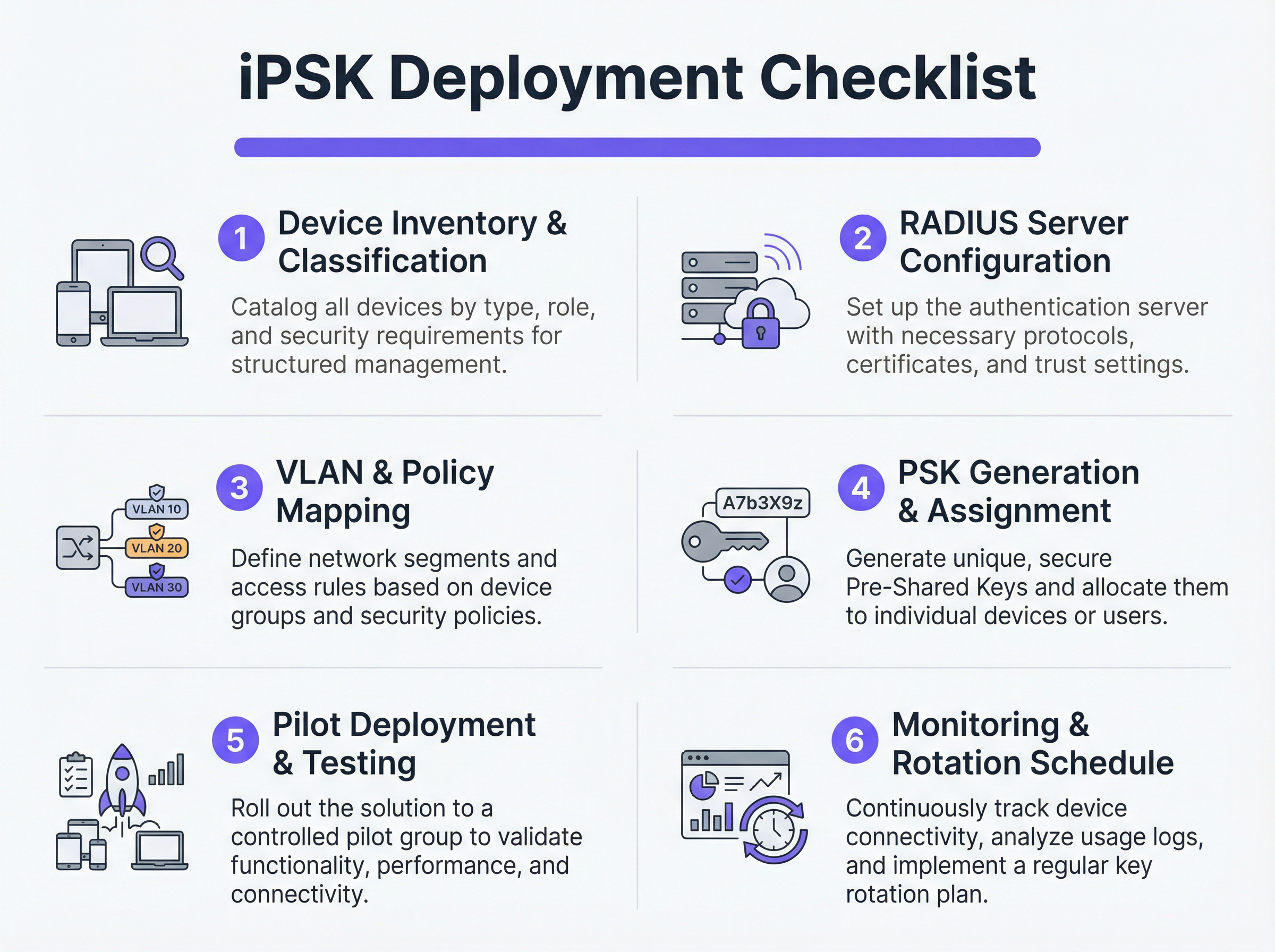
फ्लॅश-कट स्थलांतराचा प्रयत्न करू नका. एक प्रतिनिधी पायलट साइट किंवा विशिष्ट उपकरण गट निवडा. पायलट उपकरणांना नवीन PSKs प्रदान करा आणि RADIUS लॉग्सचे निरीक्षण करा. उपकरणे यशस्वीरित्या ऑथेंटिकेट होत आहेत, योग्य VLAN असाइनमेंट प्राप्त करत आहेत आणि त्यांच्या प्रतिबंधित नेटवर्क सेगमेंटमध्ये अपेक्षेप्रमाणे कार्य करत आहेत याची पडताळणी करा.
एकदा प्रमाणित झाल्यानंतर, टप्प्याटप्प्याने रोलआउटसह पुढे जा. सक्षम उपकरणांवर नवीन नेटवर्क प्रोफाइल पुश करण्यासाठी मोबाईल डिव्हाइस मॅनेजमेंट (MDM) प्लॅटफॉर्मचा लाभ घ्या आणि हेडलेस IoT हार्डवेअर व्यक्तिचलितपणे अपडेट करण्यासाठी सुविधा टीम्सशी समन्वय साधा.
सर्वोत्तम पद्धती
- डिफॉल्ट-डिनाय फॉलबॅक लागू करा: जर एखादे उपकरण वैध PSK सह कनेक्ट झाले परंतु त्याचा MAC ॲड्रेस RADIUS सर्व्हरद्वारे ओळखला गेला नाही, तर त्याला शून्य नेटवर्क प्रवेश असलेल्या 'क्वारंटाइन' VLAN मध्ये नियुक्त करा. हे अनधिकृत उपकरणांना ज्ञात की (keys) वर पिगीबॅकिंग करण्यापासून प्रतिबंधित करते.
- की लाइफसायकल मॅनेजमेंट स्वयंचलित करा: शेकडो PSKs व्यवस्थापित करण्यासाठी स्प्रेडशीट्सवर अवलंबून राहणे ही एक गंभीर असुरक्षितता आहे. की जनरेशन, रोटेशन आणि रिव्होकेशन स्वयंचलित करण्यासाठी API-चालित RADIUS प्लॅटफॉर्म किंवा समर्पित iPSK व्यवस्थापन पोर्टल्सचा वापर करा.
- MAC स्पूफिंग जोखीम मर्यादित करा: iPSK मानक PSK पेक्षा लक्षणीयरीत्या अधिक सुरक्षित असले तरी, ते सहसा ओळख बाइंडिंगचा भाग म्हणून MAC ॲड्रेसवर अवलंबून असते. MAC ॲड्रेस स्पूफ केले जाऊ शकत असल्याने, iPSK ला सतत प्रोफाइलिंग आणि विसंगती शोधण्यासह एकत्रित करा. जर स्मार्ट थर्मोस्टॅट म्हणून ऑथेंटिकेट होणारे उपकरण अचानक विंडोज लॅपटॉपसारखे ट्रॅफिक पॅटर्न दर्शवू लागले, तर सिस्टमने स्वयंचलितपणे प्रवेश रद्द केला पाहिजे.
- ॲनालिटिक्ससह समाकलित करा: ऑथेंटिकेशन लॉग्स आणि नेटवर्क टेलिमेट्री तुमच्या WiFi ॲनालिटिक्स प्लॅटफॉर्ममध्ये फीड करा. हे ठिकाण ऑपरेटर्सना उपकरणाचे आरोग्य, घनता आणि वापराबद्दल कृतीयोग्य बुद्धिमत्ता प्रदान करते.
ट्रबलशूटिंग आणि जोखीम कमी करणे
सामान्य बिघाड मोड
- RADIUS टाइमआउट/पोहोचण्यायोग्य नसणे: जर AP RADIUS सर्व्हरपर्यंत पोहोचू शकला नाही, तर क्लायंट ऑथेंटिकेट होण्यात अपयशी ठरतील. निवारण: RADIUS सर्व्हर लोड बॅलेंसिंग लागू करा आणि गंभीर पायाभूत सुविधांसाठी स्थानिक सर्व्हायव्हेबिलिटी वैशिष्ट्ये (जसे की AP किंवा स्थानिक कंट्रोलरवर क्रेडेंशियल्स कॅशिंग करणे) सक्षम असल्याची खात्री करा.
- VLAN पूलिंग संपणे: दाट वातावरणात, एकाच /24 सबनेटला खूप जास्त उपकरणे नियुक्त केल्याने DHCP स्कोप संपू शकतात. निवारण: समान लॉजिकल पॉलिसी राखून क्लायंटला एकाधिक सबनेट्समध्ये वितरित करण्यासाठी RADIUS ऑथोरायझेशन प्रोफाइलमध्ये VLAN पूलिंग वापरा.
- क्लायंट रोमिंग समस्या: जेव्हा डायनॅमिक VLAN असाइनमेंट चालू असते तेव्हा काही लेगसी IoT उपकरणे फास्ट रोमिंग (802.11r) सह संघर्ष करतात. निवारण: जर रोमिंगची आवश्यकता नसेल (उदा. स्थिर स्मार्ट टीव्हीसाठी), तर सुसंगतता वाढवण्यासाठी IoT SSID वर 802.11r अक्षम करा. AP क्षमतेच्या सखोल समजून घेण्यासाठी, वायरलेस ॲक्सेस पॉइंट्स व्याख्या: तुमचे अंतिम २०२६ मार्गदर्शक पहा.
ROI आणि व्यवसायावर होणारा परिणाम
iPSK लागू केल्याने सुरक्षा, ऑपरेशन्स आणि अनुपालन क्षेत्रांमध्ये मोजण्यायोग्य परतावा मिळतो.
- ऑडिट व्याप्ती कमी झाली: PCI आणि PII-हाताळणाऱ्या उपकरणांना विलग केलेल्या VLANs वर निश्चितपणे विभागून, संस्था अनुपालन ऑडिटची (उदा. PCI DSS, HIPAA) व्याप्ती आणि खर्च लक्षणीयरीत्या कमी करतात.
- ऑपरेशनल कार्यक्षमता: एकाधिक उद्देश-निर्मित SSIDs (एक POS साठी, एक AV साठी, एक सुविधांसाठी) एकाच iPSK-सक्षम SSID मध्ये एकत्रित केल्याने को-चॅनेल हस्तक्षेप कमी होतो, एकूण RF कार्यक्षमता सुधारते आणि अतिथी अनुभव सुलभ होतो. तुमच्या पाहुण्यांसाठी पात्र असलेली आधुनिक हॉस्पिटॅलिटी WiFi सोल्यूशन्स वितरीत करण्यासाठी हे महत्त्वपूर्ण आहे.
- घटनेचे नियंत्रण: उपकरणाशी तडजोड झाल्यास, सुरक्षा टीम्स उर्वरित ठिकाणच्या ऑपरेशन्सवर परिणाम न करता त्वरित विशिष्ट PSK रद्द करू शकतात किंवा संबंधित VLAN क्वारंटाइन करू शकतात.
महत्त्वाच्या संज्ञा आणि व्याख्या
iPSK (Identity Pre-Shared Key)
A wireless authentication method that allows multiple unique passwords to be used on a single SSID, with each password tying the device to a specific identity, VLAN, and policy.
Used by IT teams to secure headless IoT devices that cannot support enterprise 802.1X authentication.
RADIUS (Remote Authentication Dial-In User Service)
A networking protocol that provides centralized Authentication, Authorization, and Accounting (AAA) management for users or devices connecting to a network service.
Acts as the policy engine in an iPSK deployment, verifying the password and telling the access point which VLAN to assign.
Dynamic VLAN Assignment
The process where a network switch or access point places a connecting device into a specific Virtual LAN based on credentials provided during authentication, rather than the physical port or SSID.
Essential for network segmentation, allowing payment terminals and smart TVs to share an SSID but remain on completely separate networks.
Headless Device
A piece of hardware (like a sensor, thermostat, or camera) that lacks a traditional user interface, screen, or keyboard.
These devices cannot easily run the complex software (supplicants) required for standard enterprise security, making iPSK the ideal solution.
MAC Spoofing
A technique where a malicious actor changes the factory-assigned Media Access Control (MAC) address of their network interface to impersonate a legitimate device.
A key risk in IoT networks; IT teams must use behavioral profiling alongside iPSK to detect when a laptop is pretending to be a printer.
SAE (Simultaneous Authentication of Equals)
The secure key establishment protocol used in WPA3, which replaces the WPA2 four-way handshake and protects against offline dictionary attacks.
When deploying modern iPSK, utilizing WPA3/SAE ensures that even if an attacker captures the connection traffic, they cannot crack the password.
Endpoint Profiling
The continuous analysis of a device's network behavior, HTTP user agents, and traffic patterns to accurately determine its manufacturer, model, and operating system.
Used to validate that a device connecting to the network is actually what it claims to be, adding a layer of security beyond just the password.
PCI DSS Scope
The subset of an organization's network, systems, and personnel that store, process, or transmit cardholder data, and are therefore subject to strict security audits.
By using iPSK to force all payment terminals onto an isolated VLAN, organizations drastically shrink their PCI scope, saving time and money on compliance.
केस स्टडीज
A 400-room luxury hotel is deploying new smart TVs, wireless VoIP phones for housekeeping, and a fleet of mobile POS terminals for the pool bar. They currently use three separate SSIDs with standard WPA2 passwords. The IT Director wants to consolidate to a single SSID while ensuring the POS terminals meet PCI compliance. How should they architect the iPSK solution?
- Create three distinct device groups in the RADIUS server: 'Guest_Media', 'Staff_VoIP', and 'Retail_POS'.
- Generate a unique PSK for each group (or ideally, unique PSKs per device if the management platform supports it).
- Map 'Guest_Media' to VLAN 100 (Internet only, client isolation enabled).
- Map 'Staff_VoIP' to VLAN 200 (Access to internal PBX server, QoS tags applied).
- Map 'Retail_POS' to VLAN 300 (Strict ACLs allowing only outbound traffic to the payment gateway over port 443; no lateral movement).
- Broadcast a single SSID ('Hotel_IoT') with iPSK enabled. When a POS terminal connects using its specific PSK, the RADIUS server dynamically assigns it to VLAN 300, instantly satisfying PCI segmentation requirements.
A large retail chain uses iPSK for their digital signage and inventory scanners. During a routine audit, the security team discovers that an employee brought a personal gaming console from home, entered the PSK intended for the digital signage, and successfully connected to the network. How can this be prevented in the future?
The network team must implement MAC-to-PSK binding within the RADIUS policy.
- Update the RADIUS configuration so that authentication requires both the correct PSK AND a MAC address that exists in the authorized 'Digital_Signage' endpoint database.
- Implement a 'Default-Deny' or 'Quarantine' authorization profile. If a device presents the correct PSK but an unknown MAC address, the RADIUS server should return an Access-Accept but assign the device to a dead-end VLAN (e.g., VLAN 999) with no DHCP or routing.
- Enable endpoint profiling to detect MAC spoofing (e.g., identifying if a device claiming to be a Samsung display is exhibiting the network behavior of an Xbox).
परिस्थिती विश्लेषण
Q1. You are deploying iPSK across a stadium environment for 500 digital signage displays. You have the option to generate one unique PSK for all 500 displays (Group PSK) or 500 individual PSKs (Unique PSK per device). Which approach should you choose, and what is the primary operational trade-off?
💡 संकेत:Consider what happens if a single display is stolen or compromised, versus the administrative overhead of managing the initial deployment.
शिफारस केलेला दृष्टिकोन दाखवा
You should aim for Unique PSK per device if your RADIUS and MDM tooling supports automated provisioning. This provides the highest security: if one display is compromised, you revoke a single key without affecting the other 499. However, the operational trade-off is significant administrative overhead during deployment. If automated provisioning is not available, a Group PSK (one key for all 500 displays) is acceptable, provided it is combined with strict MAC address authorization and endpoint profiling to prevent credential sharing.
Q2. During an iPSK pilot deployment, smart thermostats are successfully authenticating and receiving their correct VLAN assignment from the RADIUS server. However, they are failing to obtain an IP address. Laptops placed on the same SSID (for testing) connect and get an IP without issue. What is the most likely cause?
💡 संकेत:Think about how access points handle broadcast traffic and client roaming features that legacy IoT devices might not understand.
शिफारस केलेला दृष्टिकोन दाखवा
The most likely cause is an incompatibility with 802.11r (Fast BSS Transition). Many legacy IoT devices, including smart thermostats, do not understand the 802.11r Information Elements in the AP's beacon frames and will fail to complete the DHCP process or associate properly, even if the RADIUS authentication succeeds. The solution is to disable 802.11r on the specific SSID used for IoT devices, as stationary sensors do not require fast roaming capabilities.
Q3. A retail client wants to use iPSK to secure their mobile POS tablets. They insist on using a cloud-based RADIUS provider. What architectural risk does this introduce, and how must the network engineer mitigate it?
💡 संकेत:Consider the path the authentication request must take and what happens if the WAN link goes down.
शिफारस केलेला दृष्टिकोन दाखवा
Using a cloud RADIUS provider introduces a hard dependency on the WAN connection for local authentication. If the retail store's internet connection drops, the APs cannot reach the RADIUS server, meaning mobile POS tablets cannot authenticate or roam, halting sales. The engineer must mitigate this by enabling local survivability features on the branch APs or controllers (such as caching recent successful authentications) or deploying a local, lightweight RADIUS proxy/replica at the branch site.
महत्त्वाचे निष्कर्ष
- ✓iPSK eliminates the shared-password vulnerability of standard WPA2/WPA3-Personal networks by assigning unique keys to devices or groups.
- ✓It enables dynamic VLAN assignment and policy enforcement for headless IoT devices that cannot support 802.1X supplicants.
- ✓A comprehensive device inventory is the mandatory first step before configuring RADIUS policies or network segments.
- ✓Deployments must include a default-deny or quarantine VLAN for devices that present valid keys but fail MAC authorization.
- ✓iPSK significantly reduces compliance audit scope (e.g., PCI DSS) by physically and logically isolating sensitive devices on the network.




