

Autenticación WiFi sin contraseña: Más allá de las claves precompartidas
Esta guía ofrece a los gerentes de TI, arquitectos de red y directores de operaciones de recintos una hoja de ruta práctica para eliminar las contraseñas de WiFi compartidas y migrar a una autenticación basada en identidad y certificados. Cubre las fallas de seguridad y cumplimiento de las redes basadas en PSK, la arquitectura técnica de 802.1X y EAP-TLS, y el papel de Identity PSK (iPSK) como una tecnología de transición crítica para dispositivos IoT y heredados. Los operadores de recintos en hotelería, retail y el sector público encontrarán estrategias de migración accionables, escenarios de implementación reales y resultados comerciales medibles para justificar la inversión.
🎧 Escucha esta guía
Ver transcripción

Resumen Ejecutivo
La clave precompartida (PSK) ha sido el mecanismo predeterminado para asegurar las redes inalámbricas en recintos empresariales durante más de dos décadas. En un hotel de 200 habitaciones, una cadena nacional de retail o un centro de convenciones que recibe a miles de visitantes, la contraseña de WiFi compartida es un elemento familiar: impresa en tarjetas de acceso, mostrada en pantallas y susurrada en las recepciones. Sin embargo, esta ubicuidad oculta una vulnerabilidad crítica: las PSK no proporcionan identidad, ni rastro de auditoría, ni capacidad de revocación significativa a escala.
Para los líderes de TI que operan bajo PCI DSS, GDPR o mandatos de seguridad internos, la contraseña compartida ya no es una posición defendible. Esta guía presenta el caso de negocio y la hoja de ruta técnica para migrar a la autenticación WiFi sin contraseña, específicamente IEEE 802.1X con autenticación basada en certificados EAP-TLS, respaldada por Identity PSK (iPSK) como mecanismo de transición para dispositivos que no pueden soportar protocolos de autenticación empresarial. Ya sea que esté gestionando Guest WiFi en un complejo hotelero o asegurando una red de retail que abarca cientos de ubicaciones, el camino a seguir es claro, alcanzable y medible.
Análisis Técnico Profundo
Por qué las PSK fallan a escala empresarial
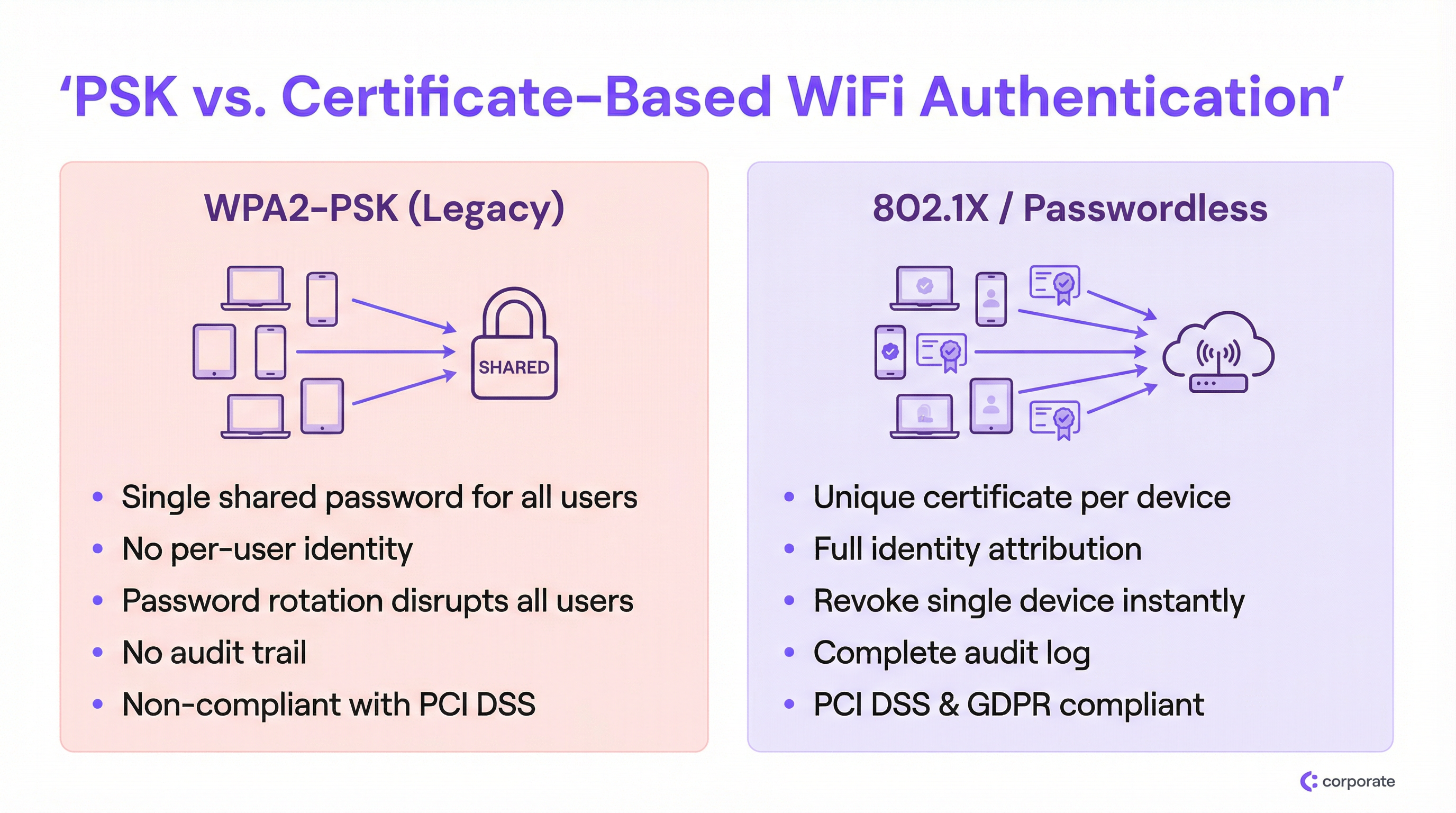
La falla fundamental de WPA2-PSK en un entorno empresarial es la desvinculación completa del acceso a la red de la identidad del usuario. Cuando cada dispositivo utiliza la misma clave criptográfica, la red no puede distinguir entre un empleado legítimo, un dispositivo IoT comprometido o un actor de amenazas externo que obtuvo la contraseña de una fotografía en redes sociales.
Esto crea tres problemas compuestos que se agravan a medida que el despliegue escala:
1. Atribución de identidad nula. Los registros de red bajo un despliegue de PSK solo registran direcciones MAC, no al usuario real ni al propietario del dispositivo. Durante un incidente de seguridad, esto ciega por completo a los equipos de TI. Se puede ver que un dispositivo se comporta de manera anómala, pero no se puede determinar de quién es el dispositivo o qué función comercial cumple.
2. El dilema de la revocación. Si un empleado se retira en circunstancias difíciles o se reporta la pérdida de un dispositivo, la única solución disponible bajo un modelo de PSK compartida es cambiar la contraseña de cada uno de los dispositivos de la red. En un entorno de Hotelería concurrido (un hotel con 300 dispositivos del personal, 200 sensores IoT y 50 terminales de punto de venta), una rotación de contraseñas es un evento operativo de varias horas que los equipos de TI evitarán a toda costa. El resultado son contraseñas que permanecen sin cambios durante años.
3. Fallas de cumplimiento. El requisito 8.2 de PCI DSS exige que el acceso a los sistemas en el entorno de datos de los titulares de tarjetas esté vinculado a una cuenta de usuario individual. Una contraseña compartida es, por definición, no conforme. Del mismo modo, el principio de responsabilidad de GDPR requiere que las organizaciones demuestren el control sobre quién puede acceder a los sistemas que procesan datos personales. Una contraseña de WiFi compartida no proporciona tal evidencia.
La arquitectura 802.1X
IEEE 802.1X es el estándar de control de acceso a la red basado en puertos que sustenta la seguridad WiFi empresarial. En lugar de una simple verificación de contraseña en el punto de acceso, 802.1X introduce un marco de autenticación de tres partes:
| Rol | Componente | Función |
|---|---|---|
| Suplicante | Dispositivo cliente (laptop, teléfono) | Presenta credenciales para solicitar acceso a la red |
| Autenticador | Punto de acceso inalámbrico | Pasa las credenciales al servidor de autenticación; aplica la decisión de acceso |
| Servidor de autenticación | Servidor RADIUS | Valida las credenciales contra un proveedor de identidad; devuelve una decisión de acceso |
El punto de acceso actúa como un punto de aplicación de políticas, no como un tomador de decisiones. Esta separación de funciones es arquitectónicamente significativa: significa que la lógica de autenticación, los datos de identidad y las políticas de acceso residen centralmente, no distribuidos en docenas de puntos de acceso. Para despliegues en múltiples sitios, esto es transformador. Para una exploración más profunda de las opciones de arquitectura RADIUS, consulte nuestra Guía de decisión para equipos de TI: RADIUS en la nube vs. RADIUS local .
EAP-TLS: El estándar de oro para la autenticación WiFi sin contraseña
Si bien 802.1X admite múltiples tipos de credenciales a través del Protocolo de Autenticación Extensible (EAP), la verdadera experiencia sin contraseña se logra mediante EAP-TLS (Transport Layer Security). EAP-TLS se basa completamente en certificados digitales para la autenticación mutua: el cliente presenta un certificado al servidor y el servidor presenta un certificado al cliente, estableciendo confianza en ambas direcciones.
El ciclo de vida del certificado funciona de la siguiente manera:
- Una Autoridad de Certificación (CA), ya sea interna (Microsoft AD CS) o basada en la nube (SCEP/NDES a través de Intune), emite un certificado de cliente único para cada dispositivo gestionado.
- El certificado se aprovisiona en el dispositivo automáticamente a través de MDM (Intune, Jamf o similar).
- Cuando el dispositivo se conecta al SSID 802.1X, presenta este certificado al servidor RADIUS.
- El servidor RADIUS valida el certificado contra la cadena de confianza de la CA y verifica la Lista de Revocación de Certificados (CRL) o el respondedor OCSP).
- Si es válido, el servidor RADIUS devuelve un Access-Accept, incluyendo opcionalmente atributos de asignación de VLAN.
Esta arquitectura elimina por completo el robo de credenciales. No hay contraseña que interceptar, replicar o pescar (phishing). La revocación es quirúrgica: eliminar un certificado de la CRL o desactivar la cuenta de usuario en el proveedor de identidad (Azure AD, Okta, Google Workspace) bloquea instantáneamente ese dispositivo específico sin afectar a ningún otro usuario.
Identity PSK (iPSK): La tecnología de transición crítica
La barrera más significativa para la adopción total de 802.1X es el panorama heterogéneo de dispositivos en los recintos empresariales. Las Smart TV, terminales POS inalámbricas, cámaras IP, Sensores ambientales y dispositivos médicos o industriales heredados suelen carecer del suplicante de software necesario para procesar certificados EAP-TLS. Forzar estos dispositivos a un SSID de PSK compartida socavaría toda la migración.
Identity PSK (iPSK) —también comercializada como Multiple PSK (MPSK) o Dynamic PSK (DPSK) por varios proveedores— resuelve esto de manera elegante. Desde la perspectiva del dispositivo, se está conectando a una red WPA2/WPA3-Personal estándar usando una contraseña. Desde la perspectiva de la red, el servidor RADIUS ha asignado una clave criptográfica única a la dirección MAC de ese dispositivo específico o grupo de usuarios. El punto de acceso aplica este mapeo, asegurando que la clave de cada dispositivo solo otorgue acceso al segmento de red autorizado de ese dispositivo.
Para un entorno de Retail , esto significa que cada escáner de código de barras inalámbrico puede tener su propia iPSK única, asignada a una VLAN de IoT dedicada. Si roban un escáner, solo se revoca su clave específica. El resto de la red no se ve afectado.
Guía de Implementación
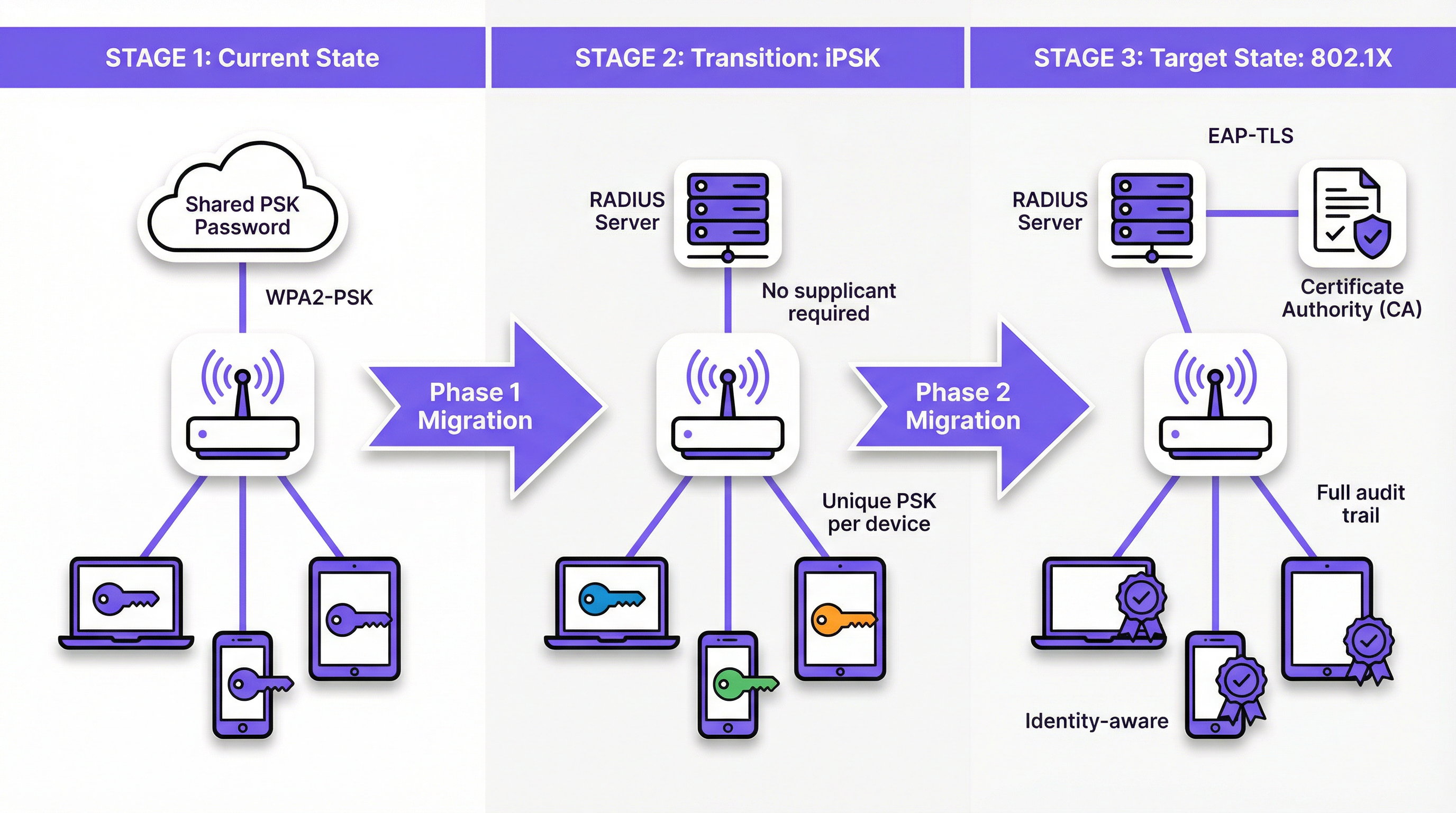
Fase 1: Descubrimiento y segmentación
Antes de modificar cualquier configuración de red, realice una auditoría exhaustiva de dispositivos utilizando su plataforma de WiFi Analytics . El objetivo es categorizar cada dispositivo conectado en uno de tres grupos:
- Dispositivos gestionados: Laptops, tablets y teléfonos corporativos inscritos en un MDM. Estos son candidatos para EAP-TLS 802.1X completo.
- Dispositivos BYOD: Dispositivos personales de empleados o smartphones de invitados. Estos requieren un portal de incorporación sin fricciones para aprovisionar certificados o credenciales únicas.
- Dispositivos Headless/IoT: Smart TV, terminales POS, impresoras, sensores y cualquier dispositivo sin interfaz de usuario o suplicante 802.1X. Estos son candidatos para iPSK.
Esta segmentación impulsa cada decisión arquitectónica posterior. No la omita.
Fase 2: Desplegar iPSK para IoT y dispositivos heredados
Configure su servidor RADIUS para admitir iPSK creando mapeos de MAC a PSK para todos los dispositivos headless. La mayoría de las plataformas RADIUS de grado empresarial (incluidas las soluciones RADIUS en la nube) admiten esto de forma nativa. Asigne cada grupo de dispositivos a una VLAN adecuada a través de atributos RADIUS (Tunnel-Type, Tunnel-Medium-Type, Tunnel-Private-Group-ID).
Para recintos con grandes parques de IoT, como un hotel con cientos de dispositivos inteligentes en las habitaciones, integre su servidor RADIUS con el Sistema de Gestión de Propiedades (PMS) o el Sistema de Gestión de Edificios (BMS) para automatizar el aprovisionamiento de iPSK cuando se pongan en servicio nuevos dispositivos.
Fase 3: Desplegar 802.1X para dispositivos gestionados
Para los dispositivos gestionados por MDM, la migración debe ser completamente transparente para el usuario final. Configure su MDM para enviar lo siguiente simultáneamente:
- El certificado de cliente (emitido por su CA a través de SCEP o NDES).
- El perfil de WiFi que especifica el SSID 802.1X, EAP-TLS como método de autenticación y el certificado del servidor RADIUS para la validación del servidor.
Una vez desplegado el perfil, los dispositivos se autenticarán automáticamente en el nuevo SSID 802.1X en segundo plano. Mantenga el SSID de PSK heredado en paralelo durante el periodo de transición, monitoreando la adopción a través de sus registros RADIUS.
Fase 4: Portal de incorporación BYOD
Para los dispositivos personales de los empleados y el acceso de invitados, despliegue un portal de incorporación a la red. La experiencia del usuario debe ser: conectarse a un SSID de incorporación temporal → autenticarse con el SSO corporativo → el portal aprovisiona automáticamente el certificado y el perfil de WiFi → el dispositivo se conecta sin problemas al SSID 802.1X. Este proceso no debe requerir conocimientos técnicos por parte del usuario. Consulte Soluciones modernas de WiFi para hotelería que sus huéspedes merecen para conocer los principios de diseño de portales aplicables a despliegues orientados a invitados.
Fase 5: Desmantelar el SSID de PSK heredado
Una vez que el monitoreo confirme que todos los dispositivos han migrado al SSID 802.1X o a un SSID habilitado para iPSK, programe el desmantelamiento de la red de PSK compartida heredada. Comunique la fecha de corte a las partes interesadas con anticipación y mantenga un plan de reversión para las primeras 48 horas.
Mejores Prácticas
Nunca confíe en el MAC Authentication Bypass (MAB) para la seguridad. Aunque el MAB se utiliza ampliamente para la incorporación de IoT, no proporciona seguridad real. Las direcciones MAC se transmiten en texto plano y se falsifican fácilmente. Cualquier atacante que pueda observar la dirección MAC de un dispositivo puede suplantarlo. Prefiera siempre iPSK, que aplica una clave criptográfica única, sobre MAB.
Automatice la gestión del ciclo de vida de los certificados. Los certificados caducan. Un certificado de cliente caducado es indistinguible de uno revocado desde la perspectiva de la red: el dispositivo simplemente pierde la conectividad. Implemente alertas proactivas en sus plataformas PKI y MDM para renovar los certificados mucho antes de su fecha de vencimiento. Un certificado de 90 días con una ventana de renovación de 30 días es una configuración común y sensata.
Valide el certificado del servidor RADIUS en los clientes. Una configuración que se pasa por alto con frecuencia es instruir al suplicante para que valide el certificado del servidor RADIUS. Sin esto, los dispositivos son vulnerables a ataques de AP falsos donde un atacante monta un servidor RADIUS falso para recolectar credenciales. Configure siempre la CA de confianza y el nombre del certificado del servidor en el perfil de WiFi enviado por el MDM.
Implemente la asignación dinámica de VLAN desde el primer día. Aproveche los atributos de autorización RADIUS para segmentar a los usuarios y dispositivos en las VLAN adecuadas según su identidad o pertenencia a grupos. Los dispositivos del personal, los dispositivos de invitados, los dispositivos IoT y las terminales POS nunca deben compartir un dominio de difusión. Esto limita el movimiento lateral en caso de un compromiso.
Alinéese con WPA3-Enterprise para nuevos despliegues. Para nuevos despliegues de puntos de acceso, especifique WPA3-Enterprise (modo de 192 bits) en los requisitos de adquisición. Esto proporciona algoritmos criptográficos compatibles con la Suite CNSA y elimina vulnerabilidades heredadas. Revise Definición de puntos de acceso inalámbricos: Su guía definitiva para 2026 para obtener orientación sobre la selección de hardware. Para consideraciones de integración de SD-WAN, consulte Los beneficios principales de SD WAN para las empresas modernas .
Resolución de problemas y mitigación de riesgos
Interrupciones por expiración de certificados
Esta es la causa más común de fallas en los despliegues de 802.1X después del lanzamiento. Síntomas: los dispositivos pierden repentinamente la conectividad WiFi en masa, generalmente en una fecha específica. Causa raíz: los certificados del cliente o del servidor RADIUS han caducado.
Mitigación: Implemente un monitoreo que alerte al equipo de TI cuando cualquier certificado de la cadena (raíz de la CA, intermedio, servidor o una proporción significativa de certificados de cliente) esté a menos de 60 días de caducar. Automatice la renovación de certificados de cliente a través de MDM/SCEP.
Alta disponibilidad del servidor RADIUS
Si el servidor RADIUS no está localizable, ningún dispositivo puede autenticarse y toda la red inalámbrica se vuelve inaccesible. En un entorno de hotel o retail, esto es una falla operativa crítica.
Mitigación: Despliegue al menos dos servidores RADIUS (primario y secundario) configurados como un par de conmutación por error (failover). Para RADIUS en la nube, asegúrese de que el proveedor ofrezca una arquitectura geográficamente redundante con un SLA que cumpla con sus requisitos operativos. Configure todos los puntos de acceso para que intenten conectarse al servidor RADIUS secundario dentro de los 3 a 5 segundos posteriores a un tiempo de espera del primario.
Mala configuración del suplicante en dispositivos BYOD
Cuando los usuarios configuran manualmente sus dispositivos para 802.1X (en lugar de usar un portal de incorporación automatizado), con frecuencia seleccionan el tipo de EAP incorrecto, omiten la validación del certificado del servidor o ingresan cadenas de identidad incorrectas. Esto genera un alto volumen de tickets de soporte.
Mitigación: Elimine por completo la configuración manual. Todos los dispositivos BYOD deben incorporarse a través del portal automatizado, que envía un perfil de WiFi completo y validado. Desactive la opción para que los usuarios agreguen manualmente el SSID 802.1X.
Rotación de direcciones MAC de dispositivos IoT
Los sistemas operativos móviles modernos (iOS 14+, Android 10+) utilizan direcciones MAC aleatorias por defecto, lo que rompe los mapeos de MAC a PSK de iPSK.
Mitigación: Para los dispositivos BYOD gestionados por la empresa, use el MDM para desactivar la aleatorización de MAC en el SSID corporativo. Para los dispositivos IoT de consumo, configure el dispositivo para que use una dirección MAC persistente en sus ajustes de red. Para los dispositivos de invitados, use un flujo de incorporación independiente que aprovisione una credencial única en lugar de depender del mapeo de direcciones MAC.
ROI e Impacto Comercial
El caso de negocio para migrar a la autenticación WiFi sin contraseña es convincente en múltiples dimensiones:
| Área de impacto | Status Quo con PSK | Post-migración |
|---|---|---|
| Costo de rotación de contraseñas | 4–8 horas de tiempo de TI por rotación, multiplicado por el número de sitios | Cero: no hay contraseña compartida que rotar |
| Seguridad en la desvinculación | Manual, disruptiva, a menudo retrasada | Automatizada, instantánea, cero disrupción para otros |
| Respuesta a incidentes | No se puede atribuir el tráfico a un usuario específico | Atribución de identidad completa, aislamiento instantáneo de dispositivos |
| Postura de cumplimiento | No cumple con PCI DSS Req. 8.2 | Cumple; rastro de auditoría completo disponible |
| Volumen de tickets de soporte | Alto: contraseñas compartidas, confusión por rotación | Bajo: incorporación automatizada, sin contraseñas que olvidar |
Para una cadena de retail de 50 ubicaciones que rota una PSK compartida trimestralmente, el ahorro operativo por sí solo (al eliminar cuatro eventos anuales de rotación de contraseñas en 50 sitios) puede representar cientos de horas de tiempo de TI al año. El valor de la mitigación del riesgo de cumplimiento es más difícil de cuantificar, pero significativamente más impactante: un hallazgo de brecha de PCI DSS relacionado con controles de acceso inadecuados puede resultar en multas, penalizaciones de esquemas de tarjetas y costos de remediación que superan con creces el costo de la migración.
Más allá de la seguridad, las redes conscientes de la identidad desbloquean una inteligencia operativa significativa. Cuando cada dispositivo tiene una identidad, su plataforma de WiFi Analytics puede proporcionar datos más ricos sobre tipos de dispositivos, tiempos de permanencia y patrones de uso de la red. Estos datos alimentan directamente la optimización de los recintos, las decisiones de personal y el tipo de experiencias personalizadas que los centros de Transporte y los grandes recintos deben ofrecer cada vez más.
Moverse más allá de la contraseña compartida no es simplemente una actualización de seguridad. Es una inversión fundamental en la madurez operativa y la resiliencia de su infraestructura de red.
Términos clave y definiciones
Pre-Shared Key (PSK)
A single password shared among all users and devices to authenticate to a WiFi network using WPA2-Personal or WPA3-Personal.
The legacy default for venue WiFi. Operationally simple to deploy but fundamentally insecure at enterprise scale due to the absence of per-user identity and the impossibility of targeted revocation.
IEEE 802.1X
An IEEE standard for port-based network access control that provides an authentication mechanism for devices attempting to connect to a LAN or WLAN, requiring each device to authenticate individually against a central authentication server.
The foundational standard for enterprise WiFi security. IT teams encounter this when replacing shared passwords with identity-based access control, and it is a prerequisite for EAP-TLS deployment.
EAP-TLS (Extensible Authentication Protocol — Transport Layer Security)
An 802.1X authentication method that uses digital certificates on both the client device and the authentication server for mutual authentication, with no password involved.
The gold standard for passwordless WiFi. Considered the most secure EAP method because it eliminates credential theft entirely — there is no password to phish, replay, or brute-force.
RADIUS (Remote Authentication Dial-In User Service)
A networking protocol providing centralised Authentication, Authorisation, and Accounting (AAA) management for network access. In WiFi deployments, the RADIUS server sits between the access point and the Identity Provider.
The core infrastructure component of any 802.1X deployment. IT teams must decide between on-premise RADIUS (e.g., Microsoft NPS) and cloud RADIUS solutions, a decision that significantly impacts integration complexity and operational overhead.
Identity PSK (iPSK)
A WiFi authentication feature that assigns a unique pre-shared key to each individual device or user group via a RADIUS server, while presenting as a standard WPA2/WPA3-Personal network to connecting devices.
The critical transition technology for securing IoT and legacy devices that cannot support 802.1X supplicants. Provides per-device identity and revocation without requiring any changes to the connecting device.
Supplicant
The software component on a client device (laptop, smartphone) that implements the EAP protocol and communicates with the authenticator (access point) to present credentials during 802.1X authentication.
IoT devices, legacy POS terminals, and many consumer electronics lack a supplicant, which is the primary reason they cannot use standard 802.1X and require alternatives such as iPSK.
MAC Authentication Bypass (MAB)
A network access method that grants connectivity based solely on a device's MAC (Media Access Control) address, without any cryptographic credential.
Widely used as a fallback for headless devices but inherently insecure, as MAC addresses are broadcast in plain text and easily spoofed. Should be replaced by iPSK wherever possible.
Dynamic VLAN Assignment
A RADIUS authorisation feature that instructs the access point to place an authenticated device into a specific Virtual LAN (VLAN) based on the user's identity, group membership, or device type, as determined by the RADIUS server.
Essential for network segmentation in multi-tenant or mixed-use environments. Ensures that guest devices, corporate laptops, IoT sensors, and POS terminals are automatically isolated from each other without requiring separate physical SSIDs for each segment.
Certificate Revocation List (CRL)
A regularly published list maintained by a Certificate Authority (CA) that identifies certificates that have been revoked before their scheduled expiry date.
The mechanism by which RADIUS servers verify that a client certificate has not been revoked. IT teams must ensure RADIUS servers can reach the CRL distribution point; an inaccessible CRL can cause authentication failures or security gaps depending on the configured fail-open/fail-closed policy.
EAP-PEAP (Protected Extensible Authentication Protocol)
An 802.1X authentication method that creates an encrypted TLS tunnel and then authenticates the user with a username and password inside that tunnel.
A common stepping stone from PSK to full certificate authentication. More secure than PSK but still relies on passwords, making it vulnerable to credential theft. EAP-TLS is the preferred end-state for passwordless deployments.
Casos de éxito
A 300-room luxury hotel currently uses a single shared WPA2-PSK for all back-of-house staff devices: tablets for housekeeping, wireless POS terminals for food and beverage, and maintenance laptops. The IT Director needs to secure this network to comply with PCI DSS within the current quarter but cannot afford any downtime for operational staff. How should they approach the migration?
The migration should proceed in four steps, running the new and legacy networks in parallel throughout the transition.
Step 1 — Deploy Cloud RADIUS. Implement a cloud-based RADIUS server integrated with the hotel's Azure Active Directory. This provides the authentication backbone without requiring on-premise hardware.
Step 2 — Implement iPSK for POS Terminals and IoT. For the wireless POS terminals that cannot support 802.1X supplicants, configure the RADIUS server to issue unique iPSKs based on each terminal's MAC address. Assign all POS devices to a dedicated VLAN isolated from the general staff network. This immediately addresses PCI DSS segmentation requirements without touching the devices themselves.
Step 3 — MDM Deployment for Tablets and Laptops. Use the hotel's MDM (Intune) to silently push EAP-TLS certificates and the new 802.1X WiFi profile to the housekeeping tablets and maintenance laptops. Devices will automatically migrate to the new SSID without any user action required.
Step 4 — Monitor and Decommission. Run the legacy PSK SSID alongside the new 802.1X and iPSK SSIDs for two weeks. Monitor RADIUS authentication logs to confirm all devices have migrated. Once confirmed, disable the legacy SSID.
Expected outcome: PCI DSS compliance achieved within six weeks; zero operational downtime; IT team gains full device identity visibility and per-device revocation capability.
A national retail chain with 500 locations uses a shared WPA2-PSK for the corporate back-office WiFi network. When an area manager leaves the company, IT must coordinate a password change across all stores, which frequently results in store managers being locked out and losing access to inventory management systems during trading hours. The CISO wants to eliminate this risk entirely. What is the recommended architecture?
The solution is a full 802.1X deployment with EAP-TLS, integrated with the company's Okta Identity Provider.
Architecture:
- Deploy a cloud RADIUS service integrated with Okta via RADIUS proxy or native RADIUS protocol.
- Use Intune to push client certificates and the 802.1X WiFi profile to all corporate-managed Windows laptops and tablets across all 500 locations.
- Configure the RADIUS server to perform dynamic VLAN assignment based on Okta group membership (e.g., Store Manager, Area Manager, IT Admin).
Offboarding Integration:
- When HR deactivates a departing employee's Okta account, the RADIUS server immediately rejects any new authentication attempts from that user's certificate.
- The employee loses WiFi access across all 500 locations simultaneously, within seconds of account deactivation.
- All other employees remain connected without interruption.
BYOD Consideration:
- For employees who access the corporate WiFi on personal devices, deploy a self-service onboarding portal authenticated via Okta SSO. The portal provisions a unique certificate to the personal device, which is also tied to the Okta account and revoked automatically on offboarding.
Análisis de escenarios
Q1. A university campus needs to secure the wireless network in student dormitories. Students bring a mix of laptops, smartphones, gaming consoles, and smart speakers. The university wants to ensure each student's devices are isolated from other students' devices, but cannot install MDM profiles on personal equipment. Which authentication strategy should be deployed, and how should device isolation be achieved?
💡 Sugerencia:Gaming consoles and smart speakers lack 802.1X supplicants. Consider how iPSK combined with dynamic VLAN assignment can achieve per-student isolation without requiring MDM.
Mostrar enfoque recomendado
Deploy an iPSK solution integrated with a self-service onboarding portal. Students authenticate to the portal using their university SSO credentials and register the MAC addresses of their devices (including consoles and smart speakers, which lack 802.1X supplicants). The RADIUS server generates a unique iPSK for each student and maps all registered MAC addresses to that student's key. Dynamic VLAN assignment places all devices using a given student's iPSK into a personal micro-segment or private VLAN (PVLAN), preventing lateral communication between students' devices. For laptops and smartphones that support 802.1X, the onboarding portal can optionally provision a certificate and WiFi profile for EAP-TLS, providing stronger security for those devices while maintaining iPSK compatibility for consoles and smart speakers.
Q2. A hospital is auditing its wireless network for HIPAA compliance. They discover that 50 wireless infusion pumps are connected using a shared WPA2-PSK because the vendor states the pumps do not support EAP-TLS. The security team proposes moving the pumps to MAC Authentication Bypass (MAB) on an open (unencrypted) network segment to remove the shared password from the clinical environment. Is this the correct approach? If not, what should they do instead?
💡 Sugerencia:Evaluate the security implications of removing encryption versus the risk of MAC address spoofing. Consider what iPSK provides that MAB does not.
Mostrar enfoque recomendado
No. Moving to MAB on an open network is a significant security regression. It removes over-the-air encryption entirely, meaning all traffic from the infusion pumps — including any clinical data — is transmitted in plain text and can be intercepted by anyone within radio range. Additionally, MAC addresses are trivially spoofed, meaning an attacker could impersonate a pump to gain access to the clinical network segment. The correct approach is iPSK. The infusion pumps will connect to what appears to be a standard WPA2-PSK network, maintaining over-the-air encryption. The RADIUS server assigns a unique, complex PSK to each pump's MAC address. This provides individual device identity (each pump is distinguishable in logs), targeted revocation (a single pump can be isolated without affecting others), and maintained encryption — all without requiring any changes to the pump firmware or vendor support.
Q3. You have successfully deployed 802.1X with EAP-TLS for 2,000 corporate-managed laptops. You manually tested one laptop and it connected perfectly. You then used your MDM to push the WiFi profile to all 2,000 devices. The following morning, the helpdesk receives hundreds of calls reporting that no laptops can connect to the corporate WiFi. What are the two most likely root causes, and how do you diagnose and resolve each?
💡 Sugerencia:EAP-TLS requires two things from the client: a valid client certificate to present to the server, and the ability to validate the server's certificate. Consider whether the MDM push may have delivered the WiFi profile without the necessary certificates.
Mostrar enfoque recomendado
The two most likely root causes are: (1) The MDM pushed the WiFi profile but failed to provision the client certificates to the devices. The profile instructs the supplicant to use EAP-TLS, but without a client certificate to present, authentication fails immediately. Diagnose by checking the MDM deployment report for certificate provisioning status and reviewing the RADIUS server logs for 'no certificate presented' errors. Resolve by ensuring the MDM certificate profile (SCEP or PKCS) is deployed as a dependency before the WiFi profile. (2) The devices do not trust the RADIUS server's certificate. The WiFi profile specifies EAP-TLS but does not include the trusted CA certificate for server validation, causing the supplicant to reject the RADIUS server's certificate. Diagnose by checking supplicant logs on an affected device for 'server certificate validation failed' errors. Resolve by adding the root CA certificate (or the specific RADIUS server certificate) to the trusted certificates section of the MDM WiFi profile. The manual test succeeded because the test device may have had the CA certificate already installed from a previous configuration, or server validation was not enforced during the manual test.
Q4. A conference centre hosts 200 events per year, ranging from day-long trade shows to week-long residential conferences. Each event has a different organiser who requires branded WiFi for their attendees. Currently, the venue creates a new shared PSK for each event. The venue's IT manager wants to move to a more scalable, secure model. What architecture would you recommend?
💡 Sugerencia:Consider the temporary, event-scoped nature of access and the need for branding. Think about how iPSK combined with a captive portal can serve both requirements.
Mostrar enfoque recomendado
Implement a dynamic iPSK model integrated with the venue's event management system. For each event, the system automatically generates a unique iPSK scoped to the event's duration. Attendees receive this key via the event registration confirmation or the organiser's branded onboarding portal. The RADIUS server maps the event's iPSK to a dedicated VLAN for that event, ensuring complete isolation between concurrent events. When the event ends, the iPSK is automatically expired, requiring no manual cleanup. For organisers who require a branded captive portal experience, deploy a portal layer on top of the iPSK SSID that presents the organiser's branding before granting full network access. This model eliminates the manual PSK management overhead, provides per-event network isolation, and gives the IT team a complete audit trail of which devices connected to which event.
Conclusiones clave
- ✓Shared PSKs provide zero identity attribution — the network cannot distinguish between a legitimate user and a threat actor, making audit trails and compliance impossible.
- ✓IEEE 802.1X with EAP-TLS is the enterprise standard for passwordless WiFi, replacing passwords with unique digital certificates that cannot be phished, replayed, or shared.
- ✓Identity PSK (iPSK) is the essential transition technology for IoT and legacy devices that lack 802.1X supplicants — it provides per-device identity and targeted revocation without requiring any changes to the connecting device.
- ✓Never use MAC Authentication Bypass (MAB) as a security control — MAC addresses are trivially spoofed; always prefer iPSK for headless device authentication.
- ✓Automate certificate lifecycle management via MDM and PKI integration; expired certificates are the most common cause of post-deployment 802.1X outages.
- ✓Migration should be phased: discover and segment devices first, bridge IoT to iPSK, migrate managed devices to EAP-TLS via MDM, then decommission the legacy PSK SSID.
- ✓Moving to identity-based authentication unlocks downstream benefits beyond security: richer WiFi analytics, automated offboarding, dynamic network segmentation, and a defensible compliance posture under PCI DSS and GDPR.




