

Authentification WiFi sans mot de passe : Dépasser les clés pré-partagées
Ce guide fournit aux responsables IT, aux architectes réseau et aux directeurs d'exploitation de sites une feuille de route pratique pour éliminer les mots de passe WiFi partagés et migrer vers une authentification basée sur l'identité et les certificats. Il couvre les failles de sécurité et de conformité des réseaux basés sur PSK, l'architecture technique de 802.1X et EAP-TLS, ainsi que le rôle de l'Identity PSK (iPSK) en tant que technologie de transition critique pour l'IoT et les appareils hérités. Les exploitants de sites dans l'hôtellerie, le retail et le secteur public y trouveront des stratégies de migration exploitables, des scénarios de mise en œuvre réels et des résultats commerciaux mesurables pour justifier l'investissement.
🎧 Écouter ce guide
Voir la transcription

Résumé analytique
La clé pré-partagée (PSK) est le mécanisme par défaut pour sécuriser les réseaux sans fil dans les entreprises depuis plus de deux décennies. Dans un hôtel de 200 chambres, une chaîne de retail nationale ou un centre de conférence accueillant des milliers de visiteurs, le mot de passe WiFi partagé est un élément familier — imprimé sur les cartes magnétiques, affiché sur les écrans et chuchoté aux réceptions. Pourtant, cette omniprésence masque une vulnérabilité critique : les PSK ne fournissent aucune identité, aucune piste d'audit et aucune capacité de révocation significative à grande échelle.
Pour les responsables IT opérant sous les mandats PCI DSS, GDPR ou les politiques de sécurité internes, le mot de passe partagé n'est plus une position défendable. Ce guide présente l'analyse de rentabilité et la feuille de route technique pour migrer vers l'authentification WiFi sans mot de passe — spécifiquement la norme IEEE 802.1X avec l'authentification par certificat EAP-TLS, soutenue par l'Identity PSK (iPSK) comme mécanisme de transition pour les appareils ne supportant pas les protocoles d'authentification d'entreprise. Que vous gériez le Guest WiFi d'un parc hôtelier ou que vous sécurisiez un réseau de retail couvrant des centaines de sites, la voie à suivre est claire, réalisable et mesurable.
Analyse technique approfondie
Pourquoi les PSK échouent à l'échelle de l'entreprise
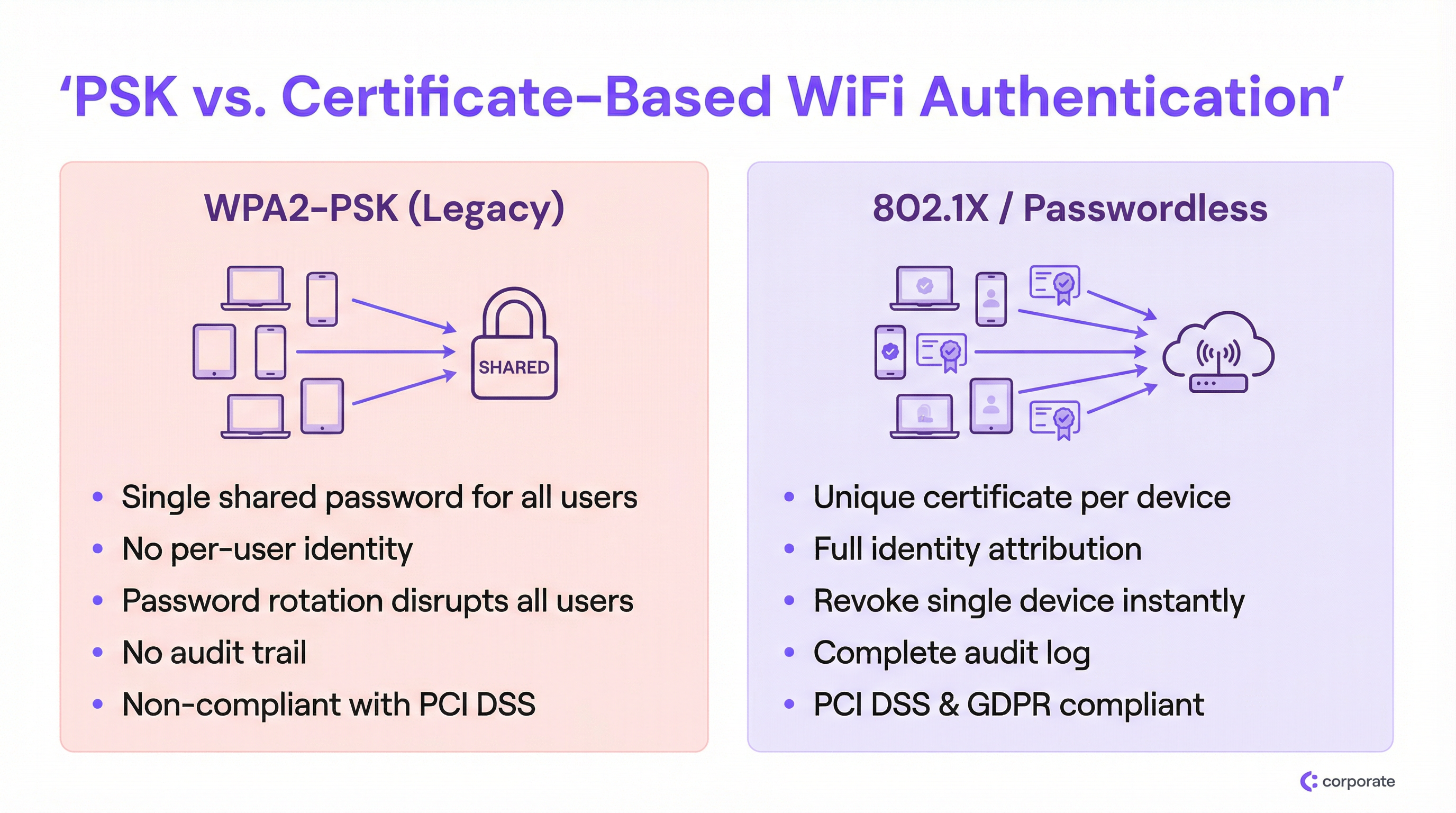
Le défaut fondamental du WPA2-PSK dans un environnement d'entreprise est le découplage complet entre l'accès au réseau et l'identité de l'utilisateur. Lorsque chaque appareil utilise la même clé cryptographique, le réseau ne peut pas distinguer un employé légitime, un appareil IoT compromis ou un acteur malveillant externe ayant obtenu le mot de passe via une photo sur les réseaux sociaux.
Cela crée trois problèmes cumulatifs qui s'aggravent avec l'expansion du déploiement :
1. Absence d'attribution d'identité. Les journaux réseau sous un déploiement PSK n'enregistrent que les adresses MAC, pas l'utilisateur réel ou le propriétaire de l'appareil. Lors d'un incident de sécurité, cela aveugle complètement les équipes IT. Vous pouvez voir qu'un appareil se comporte de manière anormale ; vous ne pouvez pas déterminer à qui il appartient ni quelle fonction métier il remplit.
2. Le dilemme de la révocation. Si un employé part dans des circonstances difficiles ou si un appareil est déclaré perdu, la seule remédiation disponible sous un modèle PSK partagé est de changer le mot de passe pour chaque appareil du réseau. Dans un environnement Hôtellerie actif — un hôtel avec 300 appareils du personnel, 200 capteurs IoT et 50 terminaux de point de vente — une rotation de mot de passe est un événement opérationnel de plusieurs heures que les équipes IT éviteront à tout prix. Résultat : les mots de passe restent inchangés pendant des années.
3. Échecs de conformité. L'exigence 8.2 de PCI DSS stipule que l'accès aux systèmes dans l'environnement des données de titulaires de cartes doit être lié à un compte utilisateur individuel. Un mot de passe partagé est, par définition, non conforme. De même, le principe de responsabilité du GDPR exige que les organisations démontrent le contrôle sur les personnes accédant aux systèmes traitant des données personnelles. Un mot de passe WiFi partagé ne fournit aucune preuve de ce type.
L'architecture 802.1X
IEEE 802.1X est la norme de contrôle d'accès réseau par port qui sous-tend la sécurité WiFi en entreprise. Plutôt qu'une simple vérification de mot de passe au point d'accès, 802.1X introduit un cadre d'authentification à trois parties :
| Rôle | Composant | Fonction |
|---|---|---|
| Supplicant | Appareil client (ordinateur, téléphone) | Présente les identifiants pour demander l'accès au réseau |
| Authentificateur | Point d'accès sans fil | Transmet les identifiants au serveur d'authentification ; applique la décision d'accès |
| Serveur d'authentification | Serveur RADIUS | Valide les identifiants auprès d'un fournisseur d'identité ; renvoie une décision d'accès |
Le point d'accès agit comme un point d'application de la politique, et non comme un décideur. Cette séparation des responsabilités est structurellement significative : elle signifie que la logique d'authentification, les données d'identité et les politiques d'accès résident toutes de manière centralisée, et non distribuées sur des dizaines de points d'accès. Pour les déploiements multi-sites, c'est une transformation majeure. Pour une exploration plus approfondie des options d'architecture RADIUS, consultez notre Cloud RADIUS vs RADIUS sur site : Guide de décision pour les équipes IT .
EAP-TLS : La référence absolue pour l'authentification WiFi sans mot de passe
Bien que 802.1X supporte plusieurs types d'identifiants via le protocole EAP (Extensible Authentication Protocol), la véritable expérience sans mot de passe est obtenue via EAP-TLS (Transport Layer Security). EAP-TLS repose entièrement sur des certificats numériques pour l'authentification mutuelle — le client présente un certificat au serveur, et le serveur présente un certificat au client, établissant une confiance bidirectionnelle.
Le cycle de vie du certificat fonctionne comme suit :
- Une autorité de certification (CA) — interne (Microsoft AD CS) ou basée sur le cloud (SCEP/NDES via Intune) — émet un certificat client unique pour chaque appareil géré.
- Le certificat est provisionné automatiquement sur l'appareil via un MDM (Intune, Jamf ou similaire).
- Lorsque l'appareil se connecte au SSID 802.1X, il présente ce certificat au serveur RADIUS.
- Le serveur RADIUS valide le certificat par rapport à la chaîne de confiance de la CA et vérifie la liste de révocation de certificats (CRL) ou le répondeur OCSP.
- S'il est valide, le serveur RADIUS renvoie un Access-Accept, incluant éventuellement des attributs d'assignation de VLAN.
Cette architecture élimine totalement le vol d'identifiants. Il n'y a aucun mot de passe à intercepter, à rejouer ou à hameçonner. La révocation est chirurgicale : supprimer un certificat de la CRL ou désactiver le compte utilisateur dans le fournisseur d'identité (Azure AD, Okta, Google Workspace) bloque instantanément cet appareil spécifique sans affecter aucun autre utilisateur.
Identity PSK (iPSK) : La technologie de transition critique
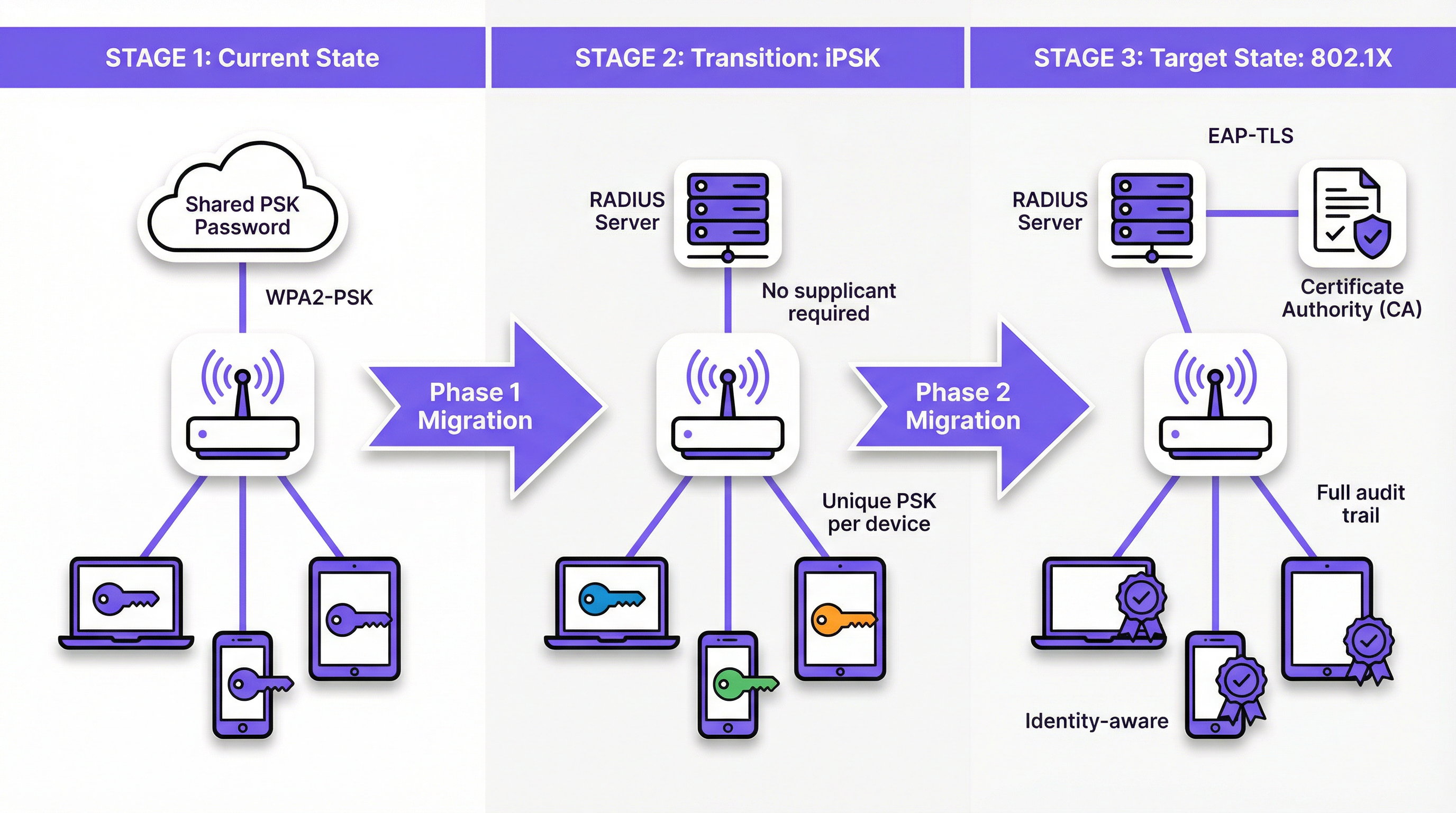
L'obstacle le plus important à l'adoption complète de 802.1X est le paysage hétérogène des appareils dans les sites d'entreprise. Les Smart TV, les terminaux de point de vente sans fil, les caméras IP, les Capteurs environnementaux et les anciens appareils médicaux ou industriels manquent souvent du supplicant logiciel requis pour traiter les certificats EAP-TLS. Forcer ces appareils sur un SSID PSK partagé compromettrait toute la migration.
L'Identity PSK (iPSK) — également commercialisé sous le nom de Multiple PSK (MPSK) ou Dynamic PSK (DPSK) par divers fournisseurs — résout ce problème avec élégance. Du point de vue de l'appareil, il se connecte à un réseau WPA2/WPA3-Personal standard à l'aide d'un mot de passe. Du point de vue du réseau, le serveur RADIUS a attribué une clé cryptographique unique à l'adresse MAC ou au groupe d'utilisateurs de cet appareil spécifique. Le point d'accès applique ce mappage, garantissant que la clé de chaque appareil n'accorde l'accès qu'au segment de réseau autorisé pour cet appareil.
Pour un environnement de Retail , cela signifie que chaque scanner de code-barres sans fil peut avoir son propre iPSK unique, assigné à un VLAN IoT dédié. Si un scanner est volé, seule sa clé spécifique est révoquée. Le reste du réseau n'est pas affecté.
Guide de mise en œuvre
Phase 1 : Découverte et segmentation
Avant de modifier toute configuration réseau, effectuez un audit complet des appareils à l'aide de votre plateforme WiFi Analytics . L'objectif est de classer chaque appareil connecté dans l'une des trois catégories suivantes :
- Appareils gérés : Ordinateurs portables, tablettes et téléphones d'entreprise inscrits dans un MDM. Ce sont les candidats pour le 802.1X EAP-TLS complet.
- Appareils BYOD : Appareils personnels des employés ou smartphones des invités. Ils nécessitent un portail d'intégration fluide pour provisionner des certificats ou des identifiants uniques.
- Appareils sans interface/IoT : Smart TV, terminaux de point de vente, imprimantes, capteurs et tout appareil sans interface utilisateur ou supplicant 802.1X. Ce sont les candidats pour l'iPSK.
Cette segmentation guide chaque décision architecturale ultérieure. Ne l'ignorez pas.
Phase 2 : Déployer l'iPSK pour l'IoT et les appareils hérités
Configurez votre serveur RADIUS pour supporter l'iPSK en créant des mappages MAC-vers-PSK pour tous les appareils sans interface. La plupart des plateformes RADIUS de classe entreprise (y compris les solutions cloud RADIUS) supportent cela nativement. Assignez chaque groupe d'appareils au VLAN approprié via les attributs RADIUS (Tunnel-Type, Tunnel-Medium-Type, Tunnel-Private-Group-ID).
Pour les sites disposant d'un parc IoT important — comme un hôtel avec des centaines d'appareils de chambre intelligents — intégrez votre serveur RADIUS au système de gestion de propriété (PMS) ou au système de gestion technique du bâtiment (GTB) pour automatiser le provisionnement iPSK lors de la mise en service de nouveaux appareils.
Phase 3 : Déployer le 802.1X pour les appareils gérés
Pour les appareils gérés par MDM, la migration doit être entièrement transparente pour l'utilisateur final. Configurez votre MDM pour pousser simultanément :
- Le certificat client (émis par votre CA via SCEP ou NDES).
- Le profil WiFi spécifiant le SSID 802.1X, EAP-TLS comme méthode d'authentification, et le certificat du serveur RADIUS pour la validation du serveur.
Une fois le profil déployé, les appareils s'authentifieront automatiquement sur le nouveau SSID 802.1X en arrière-plan. Maintenez l'ancien SSID PSK en parallèle pendant la période de transition, en surveillant l'adoption via vos journaux RADIUS.
Phase 4 : Portail d'intégration BYOD
Pour les appareils personnels des employés et l'accès des invités, déployez un portail d'intégration réseau. L'expérience utilisateur doit être : connexion à un SSID d'intégration temporaire → authentification avec le SSO de l'entreprise → le portail provisionne automatiquement le certificat et le profil WiFi → l'appareil se connecte de manière transparente au SSID 802.1X. Ce processus ne doit nécessiter aucune connaissance technique de la part de l'utilisateur. Consultez Solutions WiFi hôtelières modernes que vos clients méritent pour les principes de conception de portail applicables aux déploiements destinés aux clients.
Phase 5 : Déclassement de l'ancien SSID PSK
Une fois que la surveillance confirme que tous les appareils ont migré vers le SSID 802.1X ou un SSID compatible iPSK, planifiez le déclassement de l'ancien réseau PSK partagé. Communiquez la date de basculement aux parties prenantes à l'avance et maintenez un plan de retour en arrière pour les premières 48 heures.
Bonnes pratiques
Ne comptez jamais sur le MAC Authentication Bypass (MAB) pour la sécurité. Bien que le MAB soit largement utilisé pour l'intégration de l'IoT, il n'offre aucune sécurité réelle. Les adresses MAC sont transmises en texte clair et sont facilement usurpées. Tout attaquant capable d'observer l'adresse MAC d'un appareil peut s'en faire passer pour lui. Préférez toujours l'iPSK, qui impose une clé cryptographique unique, au MAB.
Automatisez la gestion du cycle de vie des certificats. Les certificats expirent. Un certificat client expiré est indiscernable d'un certificat révoqué du point de vue du réseau — l'appareil perd simplement la connectivité. Mettez en œuvre des alertes proactives dans vos plateformes PKI et MDM pour renouveler les certificats bien avant leur date d'expiration. Un certificat de 90 jours avec une fenêtre de renouvellement de 30 jours est une configuration courante et judicieuse.
Validez le certificat du serveur RADIUS sur les clients. Une configuration fréquemment négligée consiste à demander au supplicant de valider le certificat du serveur RADIUS. Sans cela, les appareils sont vulnérables aux attaques de points d'accès malveillants où un attaquant installe un faux serveur RADIUS pour récolter des identifiants. Configurez toujours la CA de confiance et le nom du certificat du serveur dans le profil WiFi poussé par le MDM.
Implémentez l'assignation dynamique de VLAN dès le premier jour. Tirez parti des attributs d'autorisation RADIUS pour segmenter les utilisateurs et les appareils dans les VLAN appropriés en fonction de leur identité ou de leur appartenance à un groupe. Les appareils du personnel, les appareils des invités, les appareils IoT et les terminaux de point de vente ne devraient jamais partager le même domaine de diffusion. Cela limite les déplacements latéraux en cas de compromission.
Alignez-vous sur le WPA3-Enterprise pour les nouveaux déploiements. Pour les nouveaux déploiements de points d'accès, spécifiez le WPA3-Enterprise (mode 192 bits) dans les exigences d'achat. Cela fournit des algorithmes cryptographiques conformes à la suite CNSA et élimine les vulnérabilités héritées. Consultez Définition des points d'accès sans fil : Votre guide ultime 2026 pour obtenir des conseils sur la sélection du matériel. Pour les considérations d'intégration SD-WAN, voir Les principaux avantages du SD WAN pour les entreprises modernes .
Dépannage et atténuation des risques
Pannes dues à l'expiration des certificats
C'est la cause la plus fréquente d'échec des déploiements 802.1X après le lancement. Symptômes : les appareils perdent soudainement la connectivité WiFi en masse, généralement à une date précise. Cause profonde : les certificats clients ou du serveur RADIUS ont expiré.
Atténuation : Mettez en œuvre une surveillance qui alerte l'équipe IT lorsque n'importe quel certificat de la chaîne (racine de la CA, intermédiaire, serveur ou une proportion significative de certificats clients) est à moins de 60 jours de l'expiration. Automatisez le renouvellement des certificats clients via MDM/SCEP.
Haute disponibilité du serveur RADIUS
Si le serveur RADIUS est injoignable, aucun appareil ne peut s'authentifier et l'ensemble du réseau sans fil devient inaccessible. Dans un hôtel ou un environnement de retail, il s'agit d'une défaillance opérationnelle critique.
Atténuation : Déployez au minimum deux serveurs RADIUS (primaire et secondaire) configurés comme une paire de basculement. Pour le cloud RADIUS, assurez-vous que le fournisseur propose une architecture géographiquement redondante avec un SLA répondant à vos exigences opérationnelles. Configurez tous les points d'accès pour tenter de joindre le serveur RADIUS secondaire dans les 3 à 5 secondes suivant un délai d'attente du primaire.
Mauvaise configuration du supplicant sur les appareils BYOD
Lorsque les utilisateurs configurent manuellement leurs appareils pour le 802.1X (plutôt que d'utiliser un portail d'intégration automatisé), ils sélectionnent fréquemment le mauvais type d'EAP, ignorent la validation du certificat du serveur ou saisissent des chaînes d'identité incorrectes. Cela génère un volume élevé de tickets d'assistance.
Atténuation : Éliminez totalement la configuration manuelle. Tous les appareils BYOD doivent être intégrés via le portail automatisé, qui pousse un profil WiFi complet et validé. Désactivez l'option permettant aux utilisateurs d'ajouter manuellement le SSID 802.1X.
Rotation des adresses MAC des appareils IoT
Les systèmes d'exploitation mobiles modernes (iOS 14+, Android 10+) utilisent des adresses MAC aléatoires par défaut, ce qui casse les mappages MAC-vers-PSK de l'iPSK.
Atténuation : Pour les appareils BYOD gérés par l'entreprise, utilisez le MDM pour désactiver la randomisation MAC sur le SSID de l'entreprise. Pour les appareils IoT grand public, configurez l'appareil pour utiliser une adresse MAC persistante dans ses paramètres réseau. Pour les appareils des invités, utilisez un flux d'intégration séparé qui provisionne un identifiant unique plutôt que de s'appuyer sur le mappage d'adresse MAC.
ROI et impact commercial
L'analyse de rentabilité pour la migration vers l'authentification WiFi sans mot de passe est convaincante sur plusieurs dimensions :
| Domaine d'impact | Statu quo PSK | Après migration |
|---|---|---|
| Coût de rotation des mots de passe | 4 à 8 heures de temps IT par rotation, multipliées par le nombre de sites | Zéro — aucun mot de passe partagé à renouveler |
| Sécurité du départ des employés | Manuel, perturbateur, souvent retardé | Automatisé, instantané, zéro perturbation pour les autres |
| Réponse aux incidents | Impossible d'attribuer le trafic à un utilisateur spécifique | Attribution complète de l'identité, isolation instantanée de l'appareil |
| Posture de conformité | Non conforme à PCI DSS Req. 8.2 | Conforme ; piste d'audit complète disponible |
| Volume de tickets d'assistance | Élevé — partage de mot de passe, confusion lors des rotations | Faible — intégration automatisée, plus de mots de passe à oublier |
Pour une chaîne de retail de 50 points de vente effectuant une rotation trimestrielle d'un PSK partagé, l'économie opérationnelle seule — l'élimination de quatre événements annuels de rotation de mot de passe sur 50 sites — peut représenter des centaines d'heures de temps IT par an. La valeur de l'atténuation des risques de conformité est plus difficile à quantifier mais nettement plus impactante : une conclusion de violation PCI DSS liée à des contrôles d'accès inadéquats peut entraîner des amendes, des pénalités de réseaux de cartes et des coûts de remédiation qui éclipsent le coût de la migration.
Au-delà de la sécurité, les réseaux conscients de l'identité débloquent une intelligence opérationnelle significative. Lorsque chaque appareil possède une identité, votre plateforme WiFi Analytics peut fournir des données plus riches sur les types d'appareils, les temps de présence et les modèles d'utilisation du réseau. Ces données alimentent directement l'optimisation des sites, les décisions de personnel et le type d'expériences personnalisées que les hubs de Transport et les grands sites sont de plus en plus censés offrir.
Dépasser le mot de passe partagé n'est pas seulement une mise à niveau de sécurité. C'est un investissement fondamental dans la maturité opérationnelle et la résilience de votre infrastructure réseau.
Termes clés et définitions
Pre-Shared Key (PSK)
A single password shared among all users and devices to authenticate to a WiFi network using WPA2-Personal or WPA3-Personal.
The legacy default for venue WiFi. Operationally simple to deploy but fundamentally insecure at enterprise scale due to the absence of per-user identity and the impossibility of targeted revocation.
IEEE 802.1X
An IEEE standard for port-based network access control that provides an authentication mechanism for devices attempting to connect to a LAN or WLAN, requiring each device to authenticate individually against a central authentication server.
The foundational standard for enterprise WiFi security. IT teams encounter this when replacing shared passwords with identity-based access control, and it is a prerequisite for EAP-TLS deployment.
EAP-TLS (Extensible Authentication Protocol — Transport Layer Security)
An 802.1X authentication method that uses digital certificates on both the client device and the authentication server for mutual authentication, with no password involved.
The gold standard for passwordless WiFi. Considered the most secure EAP method because it eliminates credential theft entirely — there is no password to phish, replay, or brute-force.
RADIUS (Remote Authentication Dial-In User Service)
A networking protocol providing centralised Authentication, Authorisation, and Accounting (AAA) management for network access. In WiFi deployments, the RADIUS server sits between the access point and the Identity Provider.
The core infrastructure component of any 802.1X deployment. IT teams must decide between on-premise RADIUS (e.g., Microsoft NPS) and cloud RADIUS solutions, a decision that significantly impacts integration complexity and operational overhead.
Identity PSK (iPSK)
A WiFi authentication feature that assigns a unique pre-shared key to each individual device or user group via a RADIUS server, while presenting as a standard WPA2/WPA3-Personal network to connecting devices.
The critical transition technology for securing IoT and legacy devices that cannot support 802.1X supplicants. Provides per-device identity and revocation without requiring any changes to the connecting device.
Supplicant
The software component on a client device (laptop, smartphone) that implements the EAP protocol and communicates with the authenticator (access point) to present credentials during 802.1X authentication.
IoT devices, legacy POS terminals, and many consumer electronics lack a supplicant, which is the primary reason they cannot use standard 802.1X and require alternatives such as iPSK.
MAC Authentication Bypass (MAB)
A network access method that grants connectivity based solely on a device's MAC (Media Access Control) address, without any cryptographic credential.
Widely used as a fallback for headless devices but inherently insecure, as MAC addresses are broadcast in plain text and easily spoofed. Should be replaced by iPSK wherever possible.
Dynamic VLAN Assignment
A RADIUS authorisation feature that instructs the access point to place an authenticated device into a specific Virtual LAN (VLAN) based on the user's identity, group membership, or device type, as determined by the RADIUS server.
Essential for network segmentation in multi-tenant or mixed-use environments. Ensures that guest devices, corporate laptops, IoT sensors, and POS terminals are automatically isolated from each other without requiring separate physical SSIDs for each segment.
Certificate Revocation List (CRL)
A regularly published list maintained by a Certificate Authority (CA) that identifies certificates that have been revoked before their scheduled expiry date.
The mechanism by which RADIUS servers verify that a client certificate has not been revoked. IT teams must ensure RADIUS servers can reach the CRL distribution point; an inaccessible CRL can cause authentication failures or security gaps depending on the configured fail-open/fail-closed policy.
EAP-PEAP (Protected Extensible Authentication Protocol)
An 802.1X authentication method that creates an encrypted TLS tunnel and then authenticates the user with a username and password inside that tunnel.
A common stepping stone from PSK to full certificate authentication. More secure than PSK but still relies on passwords, making it vulnerable to credential theft. EAP-TLS is the preferred end-state for passwordless deployments.
Études de cas
A 300-room luxury hotel currently uses a single shared WPA2-PSK for all back-of-house staff devices: tablets for housekeeping, wireless POS terminals for food and beverage, and maintenance laptops. The IT Director needs to secure this network to comply with PCI DSS within the current quarter but cannot afford any downtime for operational staff. How should they approach the migration?
The migration should proceed in four steps, running the new and legacy networks in parallel throughout the transition.
Step 1 — Deploy Cloud RADIUS. Implement a cloud-based RADIUS server integrated with the hotel's Azure Active Directory. This provides the authentication backbone without requiring on-premise hardware.
Step 2 — Implement iPSK for POS Terminals and IoT. For the wireless POS terminals that cannot support 802.1X supplicants, configure the RADIUS server to issue unique iPSKs based on each terminal's MAC address. Assign all POS devices to a dedicated VLAN isolated from the general staff network. This immediately addresses PCI DSS segmentation requirements without touching the devices themselves.
Step 3 — MDM Deployment for Tablets and Laptops. Use the hotel's MDM (Intune) to silently push EAP-TLS certificates and the new 802.1X WiFi profile to the housekeeping tablets and maintenance laptops. Devices will automatically migrate to the new SSID without any user action required.
Step 4 — Monitor and Decommission. Run the legacy PSK SSID alongside the new 802.1X and iPSK SSIDs for two weeks. Monitor RADIUS authentication logs to confirm all devices have migrated. Once confirmed, disable the legacy SSID.
Expected outcome: PCI DSS compliance achieved within six weeks; zero operational downtime; IT team gains full device identity visibility and per-device revocation capability.
A national retail chain with 500 locations uses a shared WPA2-PSK for the corporate back-office WiFi network. When an area manager leaves the company, IT must coordinate a password change across all stores, which frequently results in store managers being locked out and losing access to inventory management systems during trading hours. The CISO wants to eliminate this risk entirely. What is the recommended architecture?
The solution is a full 802.1X deployment with EAP-TLS, integrated with the company's Okta Identity Provider.
Architecture:
- Deploy a cloud RADIUS service integrated with Okta via RADIUS proxy or native RADIUS protocol.
- Use Intune to push client certificates and the 802.1X WiFi profile to all corporate-managed Windows laptops and tablets across all 500 locations.
- Configure the RADIUS server to perform dynamic VLAN assignment based on Okta group membership (e.g., Store Manager, Area Manager, IT Admin).
Offboarding Integration:
- When HR deactivates a departing employee's Okta account, the RADIUS server immediately rejects any new authentication attempts from that user's certificate.
- The employee loses WiFi access across all 500 locations simultaneously, within seconds of account deactivation.
- All other employees remain connected without interruption.
BYOD Consideration:
- For employees who access the corporate WiFi on personal devices, deploy a self-service onboarding portal authenticated via Okta SSO. The portal provisions a unique certificate to the personal device, which is also tied to the Okta account and revoked automatically on offboarding.
Analyse de scénario
Q1. A university campus needs to secure the wireless network in student dormitories. Students bring a mix of laptops, smartphones, gaming consoles, and smart speakers. The university wants to ensure each student's devices are isolated from other students' devices, but cannot install MDM profiles on personal equipment. Which authentication strategy should be deployed, and how should device isolation be achieved?
💡 Astuce :Gaming consoles and smart speakers lack 802.1X supplicants. Consider how iPSK combined with dynamic VLAN assignment can achieve per-student isolation without requiring MDM.
Afficher l'approche recommandée
Deploy an iPSK solution integrated with a self-service onboarding portal. Students authenticate to the portal using their university SSO credentials and register the MAC addresses of their devices (including consoles and smart speakers, which lack 802.1X supplicants). The RADIUS server generates a unique iPSK for each student and maps all registered MAC addresses to that student's key. Dynamic VLAN assignment places all devices using a given student's iPSK into a personal micro-segment or private VLAN (PVLAN), preventing lateral communication between students' devices. For laptops and smartphones that support 802.1X, the onboarding portal can optionally provision a certificate and WiFi profile for EAP-TLS, providing stronger security for those devices while maintaining iPSK compatibility for consoles and smart speakers.
Q2. A hospital is auditing its wireless network for HIPAA compliance. They discover that 50 wireless infusion pumps are connected using a shared WPA2-PSK because the vendor states the pumps do not support EAP-TLS. The security team proposes moving the pumps to MAC Authentication Bypass (MAB) on an open (unencrypted) network segment to remove the shared password from the clinical environment. Is this the correct approach? If not, what should they do instead?
💡 Astuce :Evaluate the security implications of removing encryption versus the risk of MAC address spoofing. Consider what iPSK provides that MAB does not.
Afficher l'approche recommandée
No. Moving to MAB on an open network is a significant security regression. It removes over-the-air encryption entirely, meaning all traffic from the infusion pumps — including any clinical data — is transmitted in plain text and can be intercepted by anyone within radio range. Additionally, MAC addresses are trivially spoofed, meaning an attacker could impersonate a pump to gain access to the clinical network segment. The correct approach is iPSK. The infusion pumps will connect to what appears to be a standard WPA2-PSK network, maintaining over-the-air encryption. The RADIUS server assigns a unique, complex PSK to each pump's MAC address. This provides individual device identity (each pump is distinguishable in logs), targeted revocation (a single pump can be isolated without affecting others), and maintained encryption — all without requiring any changes to the pump firmware or vendor support.
Q3. You have successfully deployed 802.1X with EAP-TLS for 2,000 corporate-managed laptops. You manually tested one laptop and it connected perfectly. You then used your MDM to push the WiFi profile to all 2,000 devices. The following morning, the helpdesk receives hundreds of calls reporting that no laptops can connect to the corporate WiFi. What are the two most likely root causes, and how do you diagnose and resolve each?
💡 Astuce :EAP-TLS requires two things from the client: a valid client certificate to present to the server, and the ability to validate the server's certificate. Consider whether the MDM push may have delivered the WiFi profile without the necessary certificates.
Afficher l'approche recommandée
The two most likely root causes are: (1) The MDM pushed the WiFi profile but failed to provision the client certificates to the devices. The profile instructs the supplicant to use EAP-TLS, but without a client certificate to present, authentication fails immediately. Diagnose by checking the MDM deployment report for certificate provisioning status and reviewing the RADIUS server logs for 'no certificate presented' errors. Resolve by ensuring the MDM certificate profile (SCEP or PKCS) is deployed as a dependency before the WiFi profile. (2) The devices do not trust the RADIUS server's certificate. The WiFi profile specifies EAP-TLS but does not include the trusted CA certificate for server validation, causing the supplicant to reject the RADIUS server's certificate. Diagnose by checking supplicant logs on an affected device for 'server certificate validation failed' errors. Resolve by adding the root CA certificate (or the specific RADIUS server certificate) to the trusted certificates section of the MDM WiFi profile. The manual test succeeded because the test device may have had the CA certificate already installed from a previous configuration, or server validation was not enforced during the manual test.
Q4. A conference centre hosts 200 events per year, ranging from day-long trade shows to week-long residential conferences. Each event has a different organiser who requires branded WiFi for their attendees. Currently, the venue creates a new shared PSK for each event. The venue's IT manager wants to move to a more scalable, secure model. What architecture would you recommend?
💡 Astuce :Consider the temporary, event-scoped nature of access and the need for branding. Think about how iPSK combined with a captive portal can serve both requirements.
Afficher l'approche recommandée
Implement a dynamic iPSK model integrated with the venue's event management system. For each event, the system automatically generates a unique iPSK scoped to the event's duration. Attendees receive this key via the event registration confirmation or the organiser's branded onboarding portal. The RADIUS server maps the event's iPSK to a dedicated VLAN for that event, ensuring complete isolation between concurrent events. When the event ends, the iPSK is automatically expired, requiring no manual cleanup. For organisers who require a branded captive portal experience, deploy a portal layer on top of the iPSK SSID that presents the organiser's branding before granting full network access. This model eliminates the manual PSK management overhead, provides per-event network isolation, and gives the IT team a complete audit trail of which devices connected to which event.
Points clés à retenir
- ✓Shared PSKs provide zero identity attribution — the network cannot distinguish between a legitimate user and a threat actor, making audit trails and compliance impossible.
- ✓IEEE 802.1X with EAP-TLS is the enterprise standard for passwordless WiFi, replacing passwords with unique digital certificates that cannot be phished, replayed, or shared.
- ✓Identity PSK (iPSK) is the essential transition technology for IoT and legacy devices that lack 802.1X supplicants — it provides per-device identity and targeted revocation without requiring any changes to the connecting device.
- ✓Never use MAC Authentication Bypass (MAB) as a security control — MAC addresses are trivially spoofed; always prefer iPSK for headless device authentication.
- ✓Automate certificate lifecycle management via MDM and PKI integration; expired certificates are the most common cause of post-deployment 802.1X outages.
- ✓Migration should be phased: discover and segment devices first, bridge IoT to iPSK, migrate managed devices to EAP-TLS via MDM, then decommission the legacy PSK SSID.
- ✓Moving to identity-based authentication unlocks downstream benefits beyond security: richer WiFi analytics, automated offboarding, dynamic network segmentation, and a defensible compliance posture under PCI DSS and GDPR.




