

पासवर्डलेस WiFi ऑथेंटिकेशन: प्री-शेयर्ड कीज़ (PSK) से आगे बढ़ना
यह गाइड IT प्रबंधकों, नेटवर्क आर्किटेक्ट्स और वेन्यू ऑपरेशंस डायरेक्टर्स को शेयर्ड WiFi पासवर्ड को समाप्त करने और पहचान-आधारित, सर्टिफिकेट-संचालित ऑथेंटिकेशन पर माइग्रेट करने के लिए एक व्यावहारिक रोडमैप प्रदान करती है। इसमें PSK-आधारित नेटवर्क की सुरक्षा और अनुपालन विफलताओं, 802.1X और EAP-TLS के तकनीकी आर्किटेक्चर, और IoT और लेगेसी डिवाइसों के लिए एक महत्वपूर्ण ट्रांज़िशन तकनीक के रूप में Identity PSK (iPSK) की भूमिका को कवर किया गया है। हॉस्पिटैलिटी, रिटेल और सार्वजनिक क्षेत्र के वेन्यू ऑपरेटर्स को निवेश को सही ठहराने के लिए व्यावहारिक माइग्रेशन रणनीतियाँ, वास्तविक कार्यान्वयन परिदृश्य और मापने योग्य व्यावसायिक परिणाम मिलेंगे।
🎧 इस गाइड को सुनें
ट्रांसक्रिप्ट देखें

कार्यकारी सारांश
प्री-शेयर्ड की (PSK) दो दशकों से अधिक समय से एंटरप्राइज़ वेन्यू में वायरलेस नेटवर्क को सुरक्षित करने के लिए डिफ़ॉल्ट तंत्र रहा है। 200 कमरों वाले होटल, एक राष्ट्रीय रिटेल चेन, या हजारों आगंतुकों की मेजबानी करने वाले सम्मेलन केंद्र में, शेयर्ड WiFi पासवर्ड एक परिचित चीज़ है — जो की-कार्ड पर प्रिंट होता है, स्क्रीन पर प्रदर्शित होता है, और फ्रंट डेस्क पर बताया जाता है। फिर भी यह सर्वव्यापकता एक महत्वपूर्ण भेद्यता को छिपाती है: PSK बड़े पैमाने पर कोई पहचान, कोई ऑडिट ट्रेल और कोई सार्थक रिवोकेशन (निरस्तीकरण) क्षमता प्रदान नहीं करते हैं।
PCI DSS, GDPR, या आंतरिक सुरक्षा शासनादेशों के तहत काम करने वाले IT लीडर्स के लिए, शेयर्ड पासवर्ड अब बचाव योग्य स्थिति नहीं है। यह गाइड पासवर्डलेस WiFi ऑथेंटिकेशन — विशेष रूप से EAP-TLS सर्टिफिकेट-आधारित ऑथेंटिकेशन के साथ IEEE 802.1X — पर माइग्रेट करने के लिए व्यावसायिक मामला और तकनीकी रोडमैप प्रस्तुत करती है, जो उन डिवाइसों के लिए ट्रांज़िशन तंत्र के रूप में Identity PSK (iPSK) द्वारा समर्थित है जो एंटरप्राइज़ ऑथेंटिकेशन प्रोटोकॉल का समर्थन नहीं कर सकते हैं। चाहे आप किसी होटल एस्टेट में Guest WiFi का प्रबंधन कर रहे हों या सैकड़ों स्थानों पर फैले रिटेल नेटवर्क को सुरक्षित कर रहे हों, आगे का रास्ता स्पष्ट, प्राप्त करने योग्य और मापने योग्य है।
तकनीकी गहन विश्लेषण
एंटरप्राइज़ स्केल पर PSK क्यों विफल होते हैं
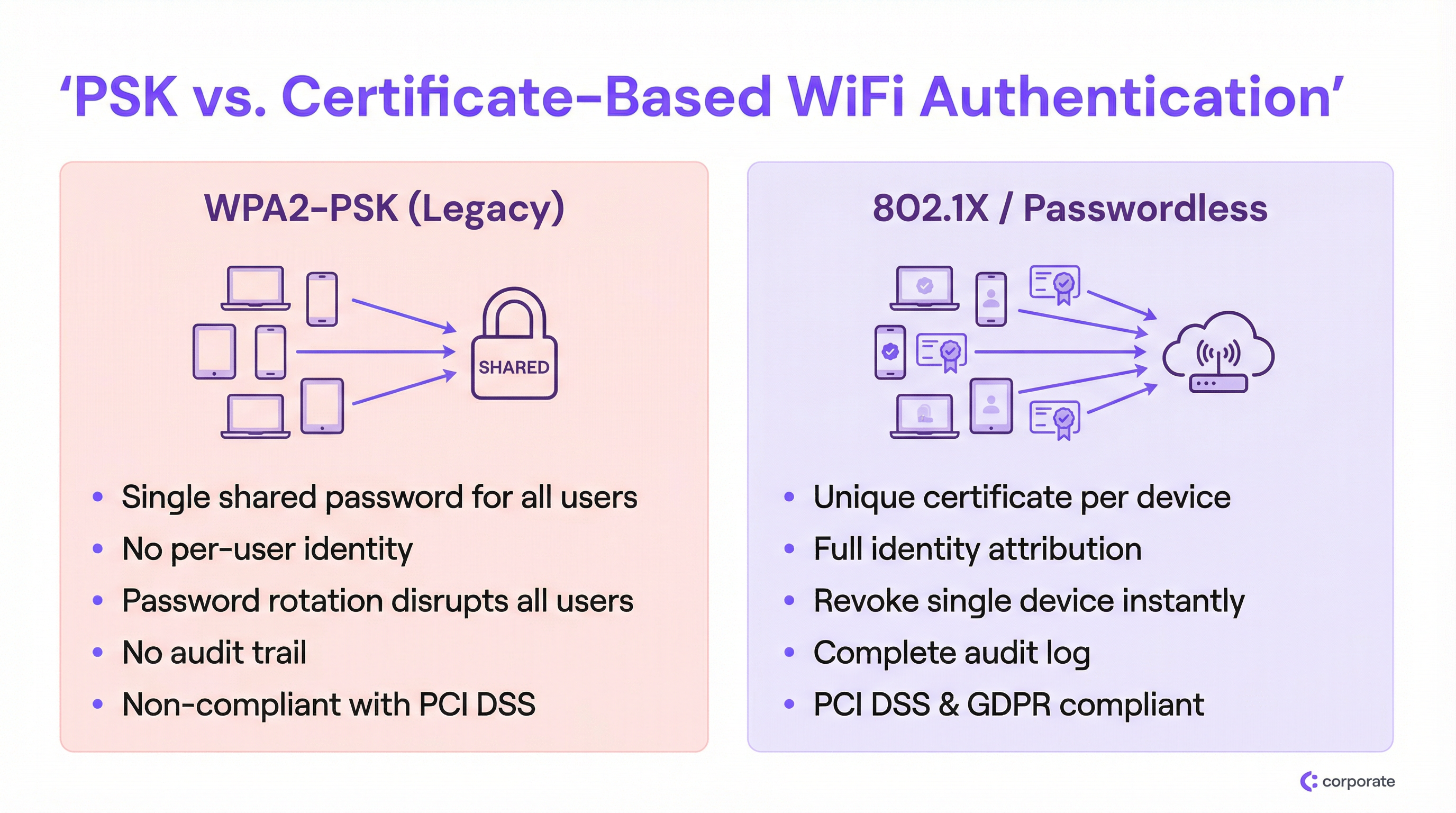
एंटरप्राइज़ सेटिंग में WPA2-PSK की मौलिक खामी नेटवर्क एक्सेस का उपयोगकर्ता की पहचान से पूरी तरह से अलग होना है। जब प्रत्येक डिवाइस एक ही क्रिप्टोग्राफ़िक की (key) का उपयोग करता है, तो नेटवर्क एक वैध कर्मचारी, एक समझौता किए गए IoT डिवाइस, या एक बाहरी खतरे वाले व्यक्ति के बीच अंतर नहीं कर सकता है जिसने सोशल मीडिया पर एक तस्वीर से पासवर्ड प्राप्त किया है।
यह तीन जटिल समस्याएँ पैदा करता है जो परिनियोजन (deployment) बढ़ने के साथ और अधिक गंभीर हो जाती हैं:
1. शून्य पहचान एट्रिब्यूशन। PSK परिनियोजन के तहत नेटवर्क लॉग केवल MAC एड्रेस रिकॉर्ड करते हैं, वास्तविक उपयोगकर्ता या डिवाइस के मालिक को नहीं। सुरक्षा घटना के दौरान, यह IT टीमों को पूरी तरह से अंधेरे में रखता है। आप देख सकते हैं कि एक डिवाइस असामान्य व्यवहार कर रहा है; लेकिन आप यह निर्धारित नहीं कर सकते कि वह किसका डिवाइस है या वह किस व्यावसायिक कार्य के लिए है।
2. रिवोकेशन (निरस्तीकरण) की दुविधा। यदि कोई कर्मचारी कठिन परिस्थितियों में नौकरी छोड़ता है या किसी डिवाइस के खो जाने की सूचना मिलती है, तो शेयर्ड PSK मॉडल के तहत उपलब्ध एकमात्र समाधान नेटवर्क पर प्रत्येक डिवाइस के लिए पासवर्ड बदलना है। एक व्यस्त Hospitality वातावरण में — 300 स्टाफ डिवाइस, 200 IoT सेंसर और 50 पॉइंट-ऑफ-सेल टर्मिनलों वाले होटल में — पासवर्ड रोटेशन एक कई घंटों का ऑपरेशनल इवेंट है जिससे IT टीमें हर कीमत पर बचना चाहेंगी। इसका परिणाम यह होता है कि पासवर्ड सालों तक अपरिवर्तित रहते हैं।
3. अनुपालन विफलताएं। PCI DSS आवश्यकता 8.2 यह आदेश देती है कि कार्डधारक डेटा वातावरण में सिस्टम तक पहुंच एक व्यक्तिगत उपयोगकर्ता खाते से जुड़ी होनी चाहिए। एक शेयर्ड पासवर्ड, परिभाषा के अनुसार, गैर-अनुपालनकारी है। इसी तरह, GDPR का जवाबदेही सिद्धांत संगठनों को यह प्रदर्शित करने की आवश्यकता देता है कि व्यक्तिगत डेटा को प्रोसेस करने वाले सिस्टम तक कौन पहुंच सकता है, इस पर उनका नियंत्रण है। एक शेयर्ड WiFi पासवर्ड ऐसा कोई प्रमाण प्रदान नहीं करता है।
802.1X आर्किटेक्चर
IEEE 802.1X पोर्ट-आधारित नेटवर्क एक्सेस कंट्रोल मानक है जो एंटरप्राइज़ WiFi सुरक्षा का आधार है। एक्सेस पॉइंट पर एक साधारण पासवर्ड जांच के बजाय, 802.1X तीन-पक्षीय ऑथेंटिकेशन फ्रेमवर्क पेश करता है:
| भूमिका | घटक | कार्य |
|---|---|---|
| सप्लीकेंट (Supplicant) | क्लाइंट डिवाइस (लैपटॉप, फोन) | नेटवर्क एक्सेस का अनुरोध करने के लिए क्रेडेंशियल प्रस्तुत करता है |
| ऑथेंटिकेटर (Authenticator) | वायरलेस एक्सेस पॉइंट | ऑथेंटिकेशन सर्वर को क्रेडेंशियल पास करता है; एक्सेस निर्णय को लागू करता है |
| ऑथेंटिकेशन सर्वर | RADIUS सर्वर | आइडेंटिटी प्रोवाइडर के विरुद्ध क्रेडेंशियल को मान्य करता है; एक्सेस निर्णय लौटाता है |
एक्सेस पॉइंट एक पॉलिसी एनफोर्समेंट पॉइंट के रूप में कार्य करता है, न कि निर्णय लेने वाले के रूप में। चिंताओं का यह पृथक्करण आर्किटेक्चर की दृष्टि से महत्वपूर्ण है: इसका मतलब है कि ऑथेंटिकेशन लॉजिक, पहचान डेटा और एक्सेस नीतियां सभी केंद्रीय रूप से स्थित होती हैं, न कि दर्जनों एक्सेस पॉइंट्स पर वितरित। मल्टी-साइट परिनियोजन के लिए, यह परिवर्तनकारी है। RADIUS आर्किटेक्चर विकल्पों के विस्तृत विवरण के लिए, हमारा Cloud RADIUS बनाम On-Premise RADIUS: IT टीमों के लिए निर्णय गाइड देखें।
EAP-TLS: पासवर्डलेस WiFi ऑथेंटिकेशन के लिए गोल्ड स्टैंडर्ड
जबकि 802.1X एक्सटेंसिबल ऑथेंटिकेशन प्रोटोकॉल (EAP) के माध्यम से कई क्रेडेंशियल प्रकारों का समर्थन करता है, वास्तविक पासवर्डलेस अनुभव EAP-TLS (Transport Layer Security) के माध्यम से प्राप्त किया जाता है। EAP-TLS पूरी तरह से आपसी ऑथेंटिकेशन के लिए डिजिटल सर्टिफिकेट पर निर्भर करता है — क्लाइंट सर्वर को एक सर्टिफिकेट प्रस्तुत करता है, और सर्वर क्लाइंट को एक सर्टिफिकेट प्रस्तुत करता है, जिससे दोनों दिशाओं में विश्वास स्थापित होता है।
सर्टिफिकेट लाइफसाइकिल निम्नानुसार कार्य करता है:
- एक सर्टिफिकेट अथॉरिटी (CA) — या तो आंतरिक (Microsoft AD CS) या क्लाउड-आधारित (Intune के माध्यम से SCEP/NDES) — प्रत्येक प्रबंधित डिवाइस को एक विशिष्ट क्लाइंट सर्टिफिकेट जारी करती है।
- MDM (Intune, Jamf, या समान) के माध्यम से डिवाइस पर सर्टिफिकेट स्वचालित रूप से प्रोविज़न किया जाता है।
- जब डिवाइस 802.1X SSID से जुड़ता है, तो वह RADIUS सर्वर को यह सर्टिफिकेट प्रस्तुत करता है।
- RADIUS सर्वर CA की ट्रस्ट चेन के विरुद्ध सर्टिफिकेट को मान्य करता है और सर्टिफिकेट रिवोकेशन लिस्ट (CRL) या OCSP रिस्पॉन्डर की जांच करता है।
- यदि मान्य है, तो RADIUS सर्वर Access-Accept लौटाता है, जिसमें वैकल्पिक रूप से VLAN असाइनमेंट एट्रिब्यूट्स शामिल होते हैं।
यह आर्किटेक्चर क्रेडेंशियल चोरी को पूरी तरह से समाप्त कर देता है। इंटरसेप्ट, रिप्ले या फ़िश करने के लिए कोई पासवर्ड नहीं है। रिवोकेशन सर्जिकल है: CRL से सर्टिफिकेट को हटाना या अक्षम करना Identity Provider (Azure AD, Okta, Google Workspace) में उपयोगकर्ता खाता किसी अन्य उपयोगकर्ता को प्रभावित किए बिना तुरंत उस विशिष्ट डिवाइस को ब्लॉक कर देता है।
Identity PSK (iPSK): महत्वपूर्ण ट्रांज़िशन तकनीक
पूर्ण 802.1X अपनाने में सबसे महत्वपूर्ण बाधा एंटरप्राइज़ स्थानों में विषम डिवाइस परिदृश्य है। स्मार्ट टीवी, वायरलेस POS टर्मिनल, IP कैमरे, पर्यावरणीय Sensors , और पुराने मेडिकल या औद्योगिक उपकरणों में अक्सर EAP-TLS सर्टिफिकेट को प्रोसेस करने के लिए आवश्यक सॉफ्टवेयर सप्लीकेंट की कमी होती है। इन उपकरणों को साझा PSK SSID पर मजबूर करने से पूरा माइग्रेशन कमजोर हो जाएगा।
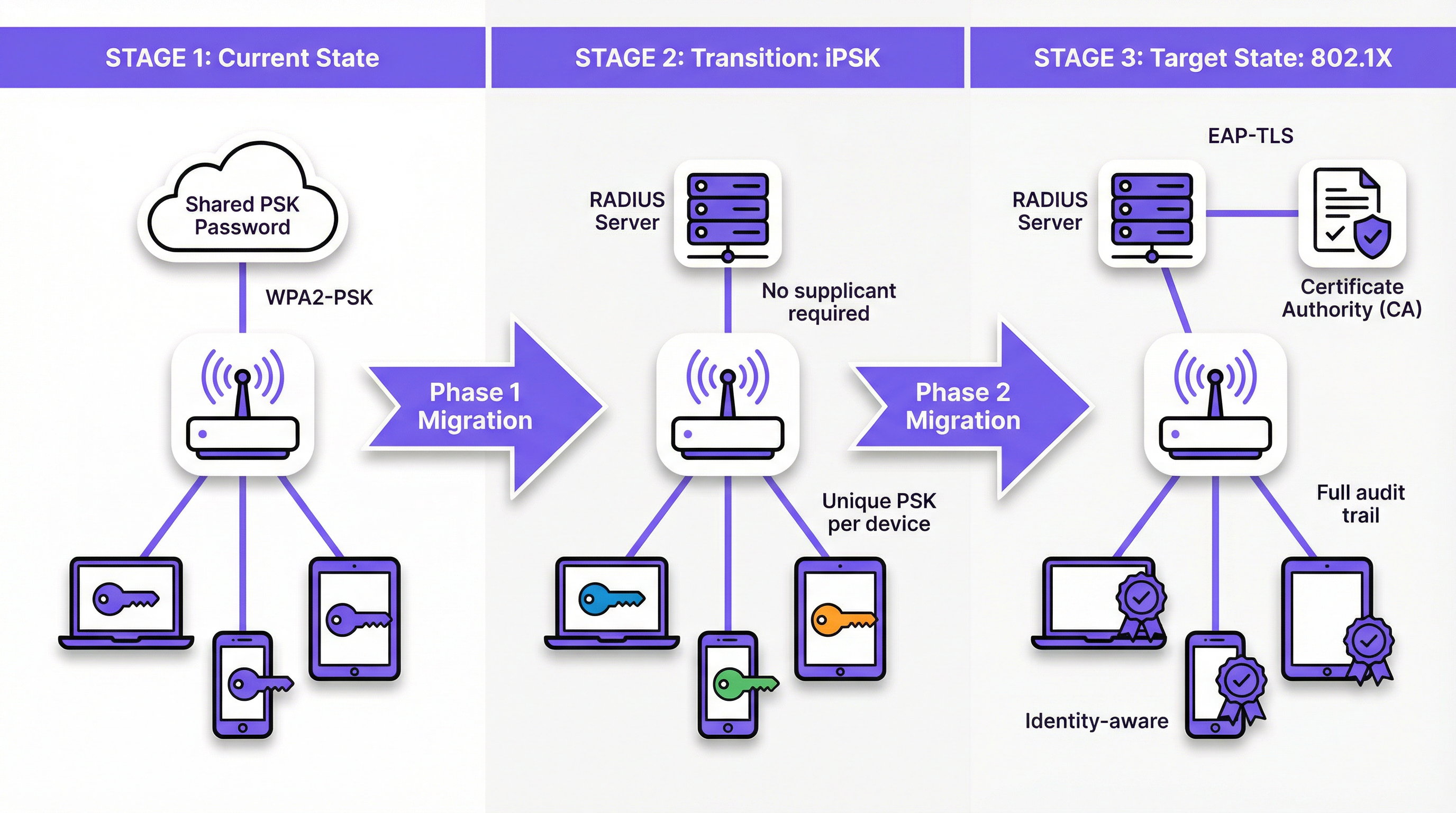
Identity PSK (iPSK) — जिसे विभिन्न विक्रेताओं द्वारा Multiple PSK (MPSK) या Dynamic PSK (DPSK) के रूप में भी विपणन किया जाता है — इसे खूबसूरती से हल करता है। डिवाइस के दृष्टिकोण से, यह पासवर्ड का उपयोग करके एक मानक WPA2/WPA3-Personal नेटवर्क से जुड़ रहा है। नेटवर्क के दृष्टिकोण से, RADIUS सर्वर ने उस विशिष्ट डिवाइस के MAC एड्रेस या उपयोगकर्ता समूह को एक अद्वितीय क्रिप्टोग्राफिक कुंजी सौंपी है। एक्सेस पॉइंट इस मैपिंग को लागू करता है, यह सुनिश्चित करता है कि प्रत्येक डिवाइस की कुंजी केवल उस डिवाइस के अधिकृत नेटवर्क सेगमेंट तक पहुंच प्रदान करती है।
एक Retail वातावरण के लिए, इसका मतलब है कि प्रत्येक वायरलेस बारकोड स्कैनर का अपना अनूठा iPSK हो सकता है, जो एक समर्पित IoT VLAN को सौंपा गया है। यदि कोई स्कैनर चोरी हो जाता है, तो केवल उसकी विशिष्ट कुंजी रद्द कर दी जाती है। शेष नेटवर्क अप्रभावित रहता है।
कार्यान्वयन गाइड
चरण 1: डिस्कवरी और सेगमेंटेशन
किसी भी नेटवर्क कॉन्फ़िगरेशन को संशोधित करने से पहले, अपने WiFi Analytics प्लेटफॉर्म का उपयोग करके एक व्यापक डिवाइस ऑडिट करें। लक्ष्य प्रत्येक कनेक्टेड डिवाइस को तीन श्रेणियों में से एक में वर्गीकृत करना है:
- Managed Devices: कॉर्पोरेट लैपटॉप, टैबलेट और फोन जो MDM में नामांकित हैं। ये पूर्ण EAP-TLS 802.1X के लिए उम्मीदवार हैं।
- BYOD Devices: कर्मचारी के व्यक्तिगत डिवाइस या गेस्ट स्मार्टफोन। इन्हें सर्टिफिकेट या अद्वितीय क्रेडेंशियल प्रदान करने के लिए एक घर्षण रहित ऑनबोर्डिंग पोर्टल की आवश्यकता होती है।
- Headless/IoT Devices: स्मार्ट टीवी, POS टर्मिनल, प्रिंटर, सेंसर और कोई भी डिवाइस जिसमें यूजर इंटरफेस या 802.1X सप्लीकेंट नहीं है। ये iPSK के लिए उम्मीदवार हैं।
यह सेगमेंटेशन हर बाद के आर्किटेक्चरल निर्णय को संचालित करता है। इसे छोड़ें नहीं।
चरण 2: IoT और पुराने उपकरणों के लिए iPSK तैनात करें
सभी हेडलेस उपकरणों के लिए MAC-to-PSK मैपिंग बनाकर iPSK का समर्थन करने के लिए अपने RADIUS सर्वर को कॉन्फ़िगर करें। अधिकांश एंटरप्राइज़-ग्रेड RADIUS प्लेटफॉर्म (क्लाउड RADIUS समाधानों सहित) मूल रूप से इसका समर्थन करते हैं। RADIUS एट्रिब्यूट्स (Tunnel-Type, Tunnel-Medium-Type, Tunnel-Private-Group-ID) के माध्यम से प्रत्येक डिवाइस समूह को एक उपयुक्त VLAN असाइन करें।
बड़े IoT एस्टेट वाले स्थानों के लिए — जैसे कि सैकड़ों स्मार्ट रूम डिवाइस वाला होटल — नए उपकरणों के चालू होने पर iPSK प्रोविजनिंग को स्वचालित करने के लिए अपने RADIUS सर्वर को प्रॉपर्टी मैनेजमेंट सिस्टम (PMS) या बिल्डिंग मैनेजमेंट सिस्टम (BMS) के साथ एकीकृत करें।
चरण 3: प्रबंधित उपकरणों के लिए 802.1X तैनात करें
MDM-प्रबंधित उपकरणों के लिए, माइग्रेशन अंतिम उपयोगकर्ता के लिए पूरी तरह से पारदर्शी होना चाहिए। एक साथ निम्नलिखित को पुश करने के लिए अपने MDM को कॉन्फ़िगर करें:
- क्लाइंट सर्टिफिकेट (SCEP या NDES के माध्यम से आपके CA द्वारा जारी)।
- WiFi प्रोफाइल जो 802.1X SSID, प्रमाणीकरण विधि के रूप में EAP-TLS, और सर्वर सत्यापन के लिए RADIUS सर्वर सर्टिफिकेट निर्दिष्ट करता है।
एक बार प्रोफाइल तैनात हो जाने के बाद, डिवाइस बैकग्राउंड में नए 802.1X SSID पर स्वचालित रूप से प्रमाणित हो जाएंगे। ट्रांज़िशन अवधि के दौरान समानांतर में पुराने PSK SSID को चलाएं, अपने RADIUS लॉग के माध्यम से इसे अपनाने की निगरानी करें।
चरण 4: BYOD ऑनबोर्डिंग पोर्टल
कर्मचारी के व्यक्तिगत उपकरणों और गेस्ट एक्सेस के लिए, एक नेटवर्क ऑनबोर्डिंग पोर्टल तैनात करें। उपयोगकर्ता का अनुभव ऐसा होना चाहिए: एक अस्थायी ऑनबोर्डिंग SSID से कनेक्ट करें → कॉर्पोरेट SSO के साथ प्रमाणित करें → पोर्टल स्वचालित रूप से सर्टिफिकेट और WiFi प्रोफाइल प्रदान करता है → डिवाइस निर्बाध रूप से 802.1X SSID से जुड़ जाता है। इस प्रक्रिया के लिए उपयोगकर्ता से किसी तकनीकी ज्ञान की आवश्यकता नहीं होनी चाहिए। गेस्ट-फेसिंग डिप्लॉयमेंट के लिए लागू पोर्टल डिज़ाइन सिद्धांतों के लिए Modern Hospitality WiFi Solutions Your Guests Deserve देखें।
चरण 5: पुराने PSK SSID को बंद करें
एक बार जब निगरानी पुष्टि कर देती है कि सभी डिवाइस या तो 802.1X SSID या iPSK-सक्षम SSID पर माइग्रेट हो गए हैं, तो पुराने साझा PSK नेटवर्क को बंद करने का समय निर्धारित करें। हितधारकों को कटओवर की तारीख के बारे में पहले से सूचित करें और पहले 48 घंटों के लिए रोलबैक योजना बनाए रखें।
सर्वोत्तम प्रथाएं
सुरक्षा के लिए कभी भी MAC Authentication Bypass (MAB) पर भरोसा न करें। हालांकि MAB का व्यापक रूप से IoT ऑनबोर्डिंग के लिए उपयोग किया जाता है, यह कोई वास्तविक सुरक्षा प्रदान नहीं करता है। MAC एड्रेस प्लेन टेक्स्ट में प्रसारित होते हैं और आसानी से स्पूफ किए जा सकते हैं। कोई भी हमलावर जो डिवाइस के MAC एड्रेस को देख सकता है, वह उसका रूप धारण कर सकता है। हमेशा MAB के बजाय iPSK को प्राथमिकता दें, जो एक अद्वितीय क्रिप्टोग्राफिक कुंजी लागू करता है।
सर्टिफिकेट लाइफसाइकिल मैनेजमेंट को स्वचालित करें। सर्टिफिकेट समाप्त हो जाते हैं। एक समाप्त क्लाइंट सर्टिफिकेट नेटवर्क के दृष्टिकोण से रद्द किए गए सर्टिफिकेट से अलग नहीं होता है — डिवाइस बस कनेक्टिविटी खो देता है। समाप्ति तिथि से काफी पहले सर्टिफिकेट को रिन्यू करने के लिए अपने PKI और MDM प्लेटफॉर्म में सक्रिय अलर्टिंग लागू करें। 30-दिन की रिन्यूअल विंडो के साथ 90-दिवसीय सर्टिफिकेट एक सामान्य और समझदारी भरा कॉन्फ़िगरेशन है।
क्लाइंट्स पर RADIUS सर्वर सर्टिफिकेट को वैलिडेट करें। एक अक्सर अनदेखा किया जाने वाला कॉन्फ़िगरेशन सप्लीकेंट को RADIUS सर्वर के सर्टिफिकेट को वैलिडेट करने का निर्देश देना है। इसके बिना, डिवाइस दुष्ट AP हमलों के प्रति संवेदनशील होते हैं जहां एक हमलावर क्रेडेंशियल इकट्ठा करने के लिए एक नकली RADIUS सर्वर खड़ा करता है। हमेशा MDM द्वारा पुश किए गए WiFi प्रोफाइल में विश्वसनीय CA और सर्वर सर्टिफिकेट नाम कॉन्फ़िगर करें।
पहले दिन से डायनेमिक VLAN असाइनमेंट लागू करें। उपयोगकर्ताओं और उपकरणों को उनकी पहचान या समूह सदस्यता के आधार पर उपयुक्त VLAN में विभाजित करने के लिए RADIUS ऑथोराइजेशन एट्रिब्यूट्स का लाभ उठाएं। स्टाफ डिवाइस, गेस्ट डिवाइस, IoT डिवाइस, और POS टर्मिनल को कभी भी ब्रॉडकास्ट डोमेन साझा नहीं करना चाहिए। यह सुरक्षा उल्लंघन की स्थिति में लैटरल मूवमेंट को सीमित करता है।
नए डिप्लॉयमेंट के लिए WPA3-Enterprise के साथ संरेखित करें। नए एक्सेस पॉइंट डिप्लॉयमेंट के लिए, खरीद आवश्यकताओं में WPA3-Enterprise (192-बिट मोड) निर्दिष्ट करें। यह CNSA सुइट-अनुपालन क्रिप्टोग्राफिक एल्गोरिदम प्रदान करता है और पुरानी कमजोरियों को समाप्त करता है। हार्डवेयर चयन मार्गदर्शन के लिए Wireless Access Points Definition Your Ultimate 2026 Guide देखें। SD-WAN एकीकरण के विचारों के लिए, The Core SD WAN Benefits for Modern Businesses देखें।
समस्या निवारण और जोखिम शमन
सर्टिफिकेट एक्सपायरी आउटेज
लॉन्च के बाद 802.1X डिप्लॉयमेंट विफलताओं का यह सबसे आम कारण है। लक्षण: डिवाइस अचानक सामूहिक रूप से WiFi कनेक्टिविटी खो देते हैं, आमतौर पर एक विशिष्ट तिथि पर। मूल कारण: क्लाइंट या RADIUS सर्वर सर्टिफिकेट एक्सपायर हो गए हैं।
शमन: ऐसी मॉनिटरिंग लागू करें जो IT टीम को तब सचेत करे जब चेन में कोई भी सर्टिफिकेट (CA रूट, इंटरमीडिएट, सर्वर, या क्लाइंट सर्टिफिकेट का एक महत्वपूर्ण हिस्सा) एक्सपायरी के 60 दिनों के भीतर हो। MDM/SCEP के माध्यम से क्लाइंट सर्टिफिकेट रिन्यूअल को ऑटोमेट करें।
RADIUS सर्वर हाई अवेलेबिलिटी
यदि RADIUS सर्वर पहुंच योग्य नहीं है, तो कोई भी डिवाइस ऑथेंटिकेट नहीं कर सकता है, और पूरा वायरलेस नेटवर्क दुर्गम हो जाता है। होटल या रिटेल वातावरण में, यह एक गंभीर परिचालन विफलता है।
शमन: फेलओवर पेयर के रूप में कॉन्फ़िगर किए गए कम से कम दो RADIUS सर्वर (प्राइमरी और सेकेंडरी) तैनात करें। क्लाउड RADIUS के लिए, सुनिश्चित करें कि प्रदाता एक भौगोलिक रूप से रिडंडेंट आर्किटेक्चर प्रदान करता है जिसमें SLA आपकी परिचालन आवश्यकताओं को पूरा करता है। प्राइमरी टाइमआउट के 3–5 सेकंड के भीतर सेकेंडरी RADIUS सर्वर पर प्रयास करने के लिए सभी एक्सेस पॉइंट्स को कॉन्फ़िगर करें।
BYOD डिवाइसेस पर सप्लिकेंट मिसकॉन्फ़िगरेशन
जब उपयोगकर्ता 802.1X के लिए अपने डिवाइस को मैन्युअल रूप से कॉन्फ़िगर करते हैं (स्वचालित ऑनबोर्डिंग पोर्टल का उपयोग करने के बजाय), वे अक्सर गलत EAP टाइप चुनते हैं, सर्वर सर्टिफिकेट वैलिडेशन छोड़ देते हैं, या गलत पहचान स्ट्रिंग दर्ज करते हैं। इससे हेल्पडेस्क टिकटों की संख्या बढ़ जाती है।
शमन: मैन्युअल कॉन्फ़िगरेशन को पूरी तरह से समाप्त करें। सभी BYOD डिवाइस को स्वचालित पोर्टल के माध्यम से ऑनबोर्ड किया जाना चाहिए, जो एक पूर्ण, मान्य WiFi प्रोफाइल पुश करता है। उपयोगकर्ताओं के लिए मैन्युअल रूप से 802.1X SSID जोड़ने के विकल्प को अक्षम करें।
IoT डिवाइस MAC एड्रेस रोटेशन
आधुनिक मोबाइल ऑपरेटिंग सिस्टम (iOS 14+, Android 10+) डिफ़ॉल्ट रूप से रैंडमाइज्ड MAC एड्रेस का उपयोग करते हैं, जो iPSK MAC-टू-PSK मैपिंग को तोड़ देता है।
शमन: कॉर्पोरेट-प्रबंधित BYOD डिवाइसेस के लिए, कॉर्पोरेट SSID पर MAC रैंडमाइजेशन को अक्षम करने के लिए MDM का उपयोग करें। कंज्यूमर IoT डिवाइसेस के लिए, डिवाइस को उसकी नेटवर्क सेटिंग्स में एक स्थायी MAC एड्रेस का उपयोग करने के लिए कॉन्फ़िगर करें। गेस्ट डिवाइसेस के लिए, एक अलग ऑनबोर्डिंग फ्लो का उपयोग करें जो MAC एड्रेस मैपिंग पर भरोसा करने के बजाय एक विशिष्ट क्रेडेंशियल प्रदान करता है।
ROI और व्यावसायिक प्रभाव
पासवर्डलेस WiFi ऑथेंटिकेशन पर माइग्रेट करने का व्यावसायिक मामला कई आयामों में आकर्षक है:
| प्रभाव क्षेत्र | PSK यथास्थिति | माइग्रेशन के बाद |
|---|---|---|
| पासवर्ड रोटेशन लागत | प्रति रोटेशन IT समय के 4–8 घंटे, साइट संख्या से गुणा | शून्य — रोटेट करने के लिए कोई साझा पासवर्ड नहीं |
| ऑफबोर्डिंग सुरक्षा | मैन्युअल, विघटनकारी, अक्सर विलंबित | स्वचालित, तत्काल, दूसरों के लिए शून्य व्यवधान |
| इंसिडेंट रिस्पॉन्स | ट्रैफ़िक को किसी विशिष्ट उपयोगकर्ता से नहीं जोड़ा जा सकता | पूर्ण पहचान एट्रिब्यूशन, तत्काल डिवाइस आइसोलेशन |
| अनुपालन स्थिति | PCI DSS Req. 8.2 के साथ गैर-अनुपालन | अनुपालन; पूर्ण ऑडिट ट्रेल उपलब्ध |
| हेल्पडेस्क टिकट वॉल्यूम | उच्च — पासवर्ड साझाकरण, रोटेशन भ्रम | कम — स्वचालित ऑनबोर्डिंग, भूलने के लिए कोई पासवर्ड नहीं |
त्रैमासिक रूप से साझा PSK को रोटेट करने वाली 50-लोकेशन वाली रिटेल चेन के लिए, केवल परिचालन बचत — 50 साइटों पर चार वार्षिक पासवर्ड रोटेशन इवेंट्स को समाप्त करना — प्रति वर्ष सैकड़ों घंटों के IT समय का प्रतिनिधित्व कर सकती है। अनुपालन जोखिम शमन मूल्य को मापना कठिन है लेकिन यह काफी अधिक प्रभावशाली है: अपर्याप्त एक्सेस कंट्रोल से संबंधित PCI DSS उल्लंघन के निष्कर्ष के परिणामस्वरूप जुर्माना, कार्ड स्कीम पेनल्टी और सुधार लागत हो सकती है जो माइग्रेशन की लागत को बौना कर देती है।
सुरक्षा के अलावा, पहचान-जागरूक नेटवर्क महत्वपूर्ण परिचालन इंटेलिजेंस को अनलॉक करते हैं। जब हर डिवाइस की एक पहचान होती है, तो आपका WiFi Analytics प्लेटफॉर्म डिवाइस प्रकार, ड्वेल टाइम और नेटवर्क उपयोग पैटर्न पर समृद्ध डेटा प्रदान कर सकता है। यह डेटा सीधे वेन्यू ऑप्टिमाइज़ेशन, स्टाफिंग निर्णयों और उस तरह के व्यक्तिगत अनुभवों में मदद करता है जिनकी Transport हब और बड़े वेन्यू से तेजी से उम्मीद की जा रही है।
साझा पासवर्ड से आगे बढ़ना केवल एक सुरक्षा अपग्रेड नहीं है। यह आपके नेटवर्क इंफ्रास्ट्रक्चर की परिचालन परिपक्वता और लचीलेपन में एक बुनियादी निवेश है।
मुख्य शब्द और परिभाषाएं
Pre-Shared Key (PSK)
A single password shared among all users and devices to authenticate to a WiFi network using WPA2-Personal or WPA3-Personal.
The legacy default for venue WiFi. Operationally simple to deploy but fundamentally insecure at enterprise scale due to the absence of per-user identity and the impossibility of targeted revocation.
IEEE 802.1X
An IEEE standard for port-based network access control that provides an authentication mechanism for devices attempting to connect to a LAN or WLAN, requiring each device to authenticate individually against a central authentication server.
The foundational standard for enterprise WiFi security. IT teams encounter this when replacing shared passwords with identity-based access control, and it is a prerequisite for EAP-TLS deployment.
EAP-TLS (Extensible Authentication Protocol — Transport Layer Security)
An 802.1X authentication method that uses digital certificates on both the client device and the authentication server for mutual authentication, with no password involved.
The gold standard for passwordless WiFi. Considered the most secure EAP method because it eliminates credential theft entirely — there is no password to phish, replay, or brute-force.
RADIUS (Remote Authentication Dial-In User Service)
A networking protocol providing centralised Authentication, Authorisation, and Accounting (AAA) management for network access. In WiFi deployments, the RADIUS server sits between the access point and the Identity Provider.
The core infrastructure component of any 802.1X deployment. IT teams must decide between on-premise RADIUS (e.g., Microsoft NPS) and cloud RADIUS solutions, a decision that significantly impacts integration complexity and operational overhead.
Identity PSK (iPSK)
A WiFi authentication feature that assigns a unique pre-shared key to each individual device or user group via a RADIUS server, while presenting as a standard WPA2/WPA3-Personal network to connecting devices.
The critical transition technology for securing IoT and legacy devices that cannot support 802.1X supplicants. Provides per-device identity and revocation without requiring any changes to the connecting device.
Supplicant
The software component on a client device (laptop, smartphone) that implements the EAP protocol and communicates with the authenticator (access point) to present credentials during 802.1X authentication.
IoT devices, legacy POS terminals, and many consumer electronics lack a supplicant, which is the primary reason they cannot use standard 802.1X and require alternatives such as iPSK.
MAC Authentication Bypass (MAB)
A network access method that grants connectivity based solely on a device's MAC (Media Access Control) address, without any cryptographic credential.
Widely used as a fallback for headless devices but inherently insecure, as MAC addresses are broadcast in plain text and easily spoofed. Should be replaced by iPSK wherever possible.
Dynamic VLAN Assignment
A RADIUS authorisation feature that instructs the access point to place an authenticated device into a specific Virtual LAN (VLAN) based on the user's identity, group membership, or device type, as determined by the RADIUS server.
Essential for network segmentation in multi-tenant or mixed-use environments. Ensures that guest devices, corporate laptops, IoT sensors, and POS terminals are automatically isolated from each other without requiring separate physical SSIDs for each segment.
Certificate Revocation List (CRL)
A regularly published list maintained by a Certificate Authority (CA) that identifies certificates that have been revoked before their scheduled expiry date.
The mechanism by which RADIUS servers verify that a client certificate has not been revoked. IT teams must ensure RADIUS servers can reach the CRL distribution point; an inaccessible CRL can cause authentication failures or security gaps depending on the configured fail-open/fail-closed policy.
EAP-PEAP (Protected Extensible Authentication Protocol)
An 802.1X authentication method that creates an encrypted TLS tunnel and then authenticates the user with a username and password inside that tunnel.
A common stepping stone from PSK to full certificate authentication. More secure than PSK but still relies on passwords, making it vulnerable to credential theft. EAP-TLS is the preferred end-state for passwordless deployments.
केस स्टडीज
A 300-room luxury hotel currently uses a single shared WPA2-PSK for all back-of-house staff devices: tablets for housekeeping, wireless POS terminals for food and beverage, and maintenance laptops. The IT Director needs to secure this network to comply with PCI DSS within the current quarter but cannot afford any downtime for operational staff. How should they approach the migration?
The migration should proceed in four steps, running the new and legacy networks in parallel throughout the transition.
Step 1 — Deploy Cloud RADIUS. Implement a cloud-based RADIUS server integrated with the hotel's Azure Active Directory. This provides the authentication backbone without requiring on-premise hardware.
Step 2 — Implement iPSK for POS Terminals and IoT. For the wireless POS terminals that cannot support 802.1X supplicants, configure the RADIUS server to issue unique iPSKs based on each terminal's MAC address. Assign all POS devices to a dedicated VLAN isolated from the general staff network. This immediately addresses PCI DSS segmentation requirements without touching the devices themselves.
Step 3 — MDM Deployment for Tablets and Laptops. Use the hotel's MDM (Intune) to silently push EAP-TLS certificates and the new 802.1X WiFi profile to the housekeeping tablets and maintenance laptops. Devices will automatically migrate to the new SSID without any user action required.
Step 4 — Monitor and Decommission. Run the legacy PSK SSID alongside the new 802.1X and iPSK SSIDs for two weeks. Monitor RADIUS authentication logs to confirm all devices have migrated. Once confirmed, disable the legacy SSID.
Expected outcome: PCI DSS compliance achieved within six weeks; zero operational downtime; IT team gains full device identity visibility and per-device revocation capability.
A national retail chain with 500 locations uses a shared WPA2-PSK for the corporate back-office WiFi network. When an area manager leaves the company, IT must coordinate a password change across all stores, which frequently results in store managers being locked out and losing access to inventory management systems during trading hours. The CISO wants to eliminate this risk entirely. What is the recommended architecture?
The solution is a full 802.1X deployment with EAP-TLS, integrated with the company's Okta Identity Provider.
Architecture:
- Deploy a cloud RADIUS service integrated with Okta via RADIUS proxy or native RADIUS protocol.
- Use Intune to push client certificates and the 802.1X WiFi profile to all corporate-managed Windows laptops and tablets across all 500 locations.
- Configure the RADIUS server to perform dynamic VLAN assignment based on Okta group membership (e.g., Store Manager, Area Manager, IT Admin).
Offboarding Integration:
- When HR deactivates a departing employee's Okta account, the RADIUS server immediately rejects any new authentication attempts from that user's certificate.
- The employee loses WiFi access across all 500 locations simultaneously, within seconds of account deactivation.
- All other employees remain connected without interruption.
BYOD Consideration:
- For employees who access the corporate WiFi on personal devices, deploy a self-service onboarding portal authenticated via Okta SSO. The portal provisions a unique certificate to the personal device, which is also tied to the Okta account and revoked automatically on offboarding.
परिदृश्य विश्लेषण
Q1. A university campus needs to secure the wireless network in student dormitories. Students bring a mix of laptops, smartphones, gaming consoles, and smart speakers. The university wants to ensure each student's devices are isolated from other students' devices, but cannot install MDM profiles on personal equipment. Which authentication strategy should be deployed, and how should device isolation be achieved?
💡 संकेत:Gaming consoles and smart speakers lack 802.1X supplicants. Consider how iPSK combined with dynamic VLAN assignment can achieve per-student isolation without requiring MDM.
अनुशंसित दृष्टिकोण दिखाएं
Deploy an iPSK solution integrated with a self-service onboarding portal. Students authenticate to the portal using their university SSO credentials and register the MAC addresses of their devices (including consoles and smart speakers, which lack 802.1X supplicants). The RADIUS server generates a unique iPSK for each student and maps all registered MAC addresses to that student's key. Dynamic VLAN assignment places all devices using a given student's iPSK into a personal micro-segment or private VLAN (PVLAN), preventing lateral communication between students' devices. For laptops and smartphones that support 802.1X, the onboarding portal can optionally provision a certificate and WiFi profile for EAP-TLS, providing stronger security for those devices while maintaining iPSK compatibility for consoles and smart speakers.
Q2. A hospital is auditing its wireless network for HIPAA compliance. They discover that 50 wireless infusion pumps are connected using a shared WPA2-PSK because the vendor states the pumps do not support EAP-TLS. The security team proposes moving the pumps to MAC Authentication Bypass (MAB) on an open (unencrypted) network segment to remove the shared password from the clinical environment. Is this the correct approach? If not, what should they do instead?
💡 संकेत:Evaluate the security implications of removing encryption versus the risk of MAC address spoofing. Consider what iPSK provides that MAB does not.
अनुशंसित दृष्टिकोण दिखाएं
No. Moving to MAB on an open network is a significant security regression. It removes over-the-air encryption entirely, meaning all traffic from the infusion pumps — including any clinical data — is transmitted in plain text and can be intercepted by anyone within radio range. Additionally, MAC addresses are trivially spoofed, meaning an attacker could impersonate a pump to gain access to the clinical network segment. The correct approach is iPSK. The infusion pumps will connect to what appears to be a standard WPA2-PSK network, maintaining over-the-air encryption. The RADIUS server assigns a unique, complex PSK to each pump's MAC address. This provides individual device identity (each pump is distinguishable in logs), targeted revocation (a single pump can be isolated without affecting others), and maintained encryption — all without requiring any changes to the pump firmware or vendor support.
Q3. You have successfully deployed 802.1X with EAP-TLS for 2,000 corporate-managed laptops. You manually tested one laptop and it connected perfectly. You then used your MDM to push the WiFi profile to all 2,000 devices. The following morning, the helpdesk receives hundreds of calls reporting that no laptops can connect to the corporate WiFi. What are the two most likely root causes, and how do you diagnose and resolve each?
💡 संकेत:EAP-TLS requires two things from the client: a valid client certificate to present to the server, and the ability to validate the server's certificate. Consider whether the MDM push may have delivered the WiFi profile without the necessary certificates.
अनुशंसित दृष्टिकोण दिखाएं
The two most likely root causes are: (1) The MDM pushed the WiFi profile but failed to provision the client certificates to the devices. The profile instructs the supplicant to use EAP-TLS, but without a client certificate to present, authentication fails immediately. Diagnose by checking the MDM deployment report for certificate provisioning status and reviewing the RADIUS server logs for 'no certificate presented' errors. Resolve by ensuring the MDM certificate profile (SCEP or PKCS) is deployed as a dependency before the WiFi profile. (2) The devices do not trust the RADIUS server's certificate. The WiFi profile specifies EAP-TLS but does not include the trusted CA certificate for server validation, causing the supplicant to reject the RADIUS server's certificate. Diagnose by checking supplicant logs on an affected device for 'server certificate validation failed' errors. Resolve by adding the root CA certificate (or the specific RADIUS server certificate) to the trusted certificates section of the MDM WiFi profile. The manual test succeeded because the test device may have had the CA certificate already installed from a previous configuration, or server validation was not enforced during the manual test.
Q4. A conference centre hosts 200 events per year, ranging from day-long trade shows to week-long residential conferences. Each event has a different organiser who requires branded WiFi for their attendees. Currently, the venue creates a new shared PSK for each event. The venue's IT manager wants to move to a more scalable, secure model. What architecture would you recommend?
💡 संकेत:Consider the temporary, event-scoped nature of access and the need for branding. Think about how iPSK combined with a captive portal can serve both requirements.
अनुशंसित दृष्टिकोण दिखाएं
Implement a dynamic iPSK model integrated with the venue's event management system. For each event, the system automatically generates a unique iPSK scoped to the event's duration. Attendees receive this key via the event registration confirmation or the organiser's branded onboarding portal. The RADIUS server maps the event's iPSK to a dedicated VLAN for that event, ensuring complete isolation between concurrent events. When the event ends, the iPSK is automatically expired, requiring no manual cleanup. For organisers who require a branded captive portal experience, deploy a portal layer on top of the iPSK SSID that presents the organiser's branding before granting full network access. This model eliminates the manual PSK management overhead, provides per-event network isolation, and gives the IT team a complete audit trail of which devices connected to which event.
मुख्य निष्कर्ष
- ✓Shared PSKs provide zero identity attribution — the network cannot distinguish between a legitimate user and a threat actor, making audit trails and compliance impossible.
- ✓IEEE 802.1X with EAP-TLS is the enterprise standard for passwordless WiFi, replacing passwords with unique digital certificates that cannot be phished, replayed, or shared.
- ✓Identity PSK (iPSK) is the essential transition technology for IoT and legacy devices that lack 802.1X supplicants — it provides per-device identity and targeted revocation without requiring any changes to the connecting device.
- ✓Never use MAC Authentication Bypass (MAB) as a security control — MAC addresses are trivially spoofed; always prefer iPSK for headless device authentication.
- ✓Automate certificate lifecycle management via MDM and PKI integration; expired certificates are the most common cause of post-deployment 802.1X outages.
- ✓Migration should be phased: discover and segment devices first, bridge IoT to iPSK, migrate managed devices to EAP-TLS via MDM, then decommission the legacy PSK SSID.
- ✓Moving to identity-based authentication unlocks downstream benefits beyond security: richer WiFi analytics, automated offboarding, dynamic network segmentation, and a defensible compliance posture under PCI DSS and GDPR.




