

PEAP-MSCHAPv2: Por qué sigue siendo común, por qué es riesgoso y cómo migrar
Una guía de referencia técnica detallada sobre las vulnerabilidades críticas de seguridad de PEAP-MSCHAPv2, incluyendo ataques de "evil twin" y captura de credenciales. Proporciona una hoja de ruta práctica y neutral para que los equipos de TI migren las redes WiFi empresariales a una autenticación EAP-TLS segura basada en certificados.
🎧 Escucha esta guía
Ver transcripción
Resumen Ejecutivo
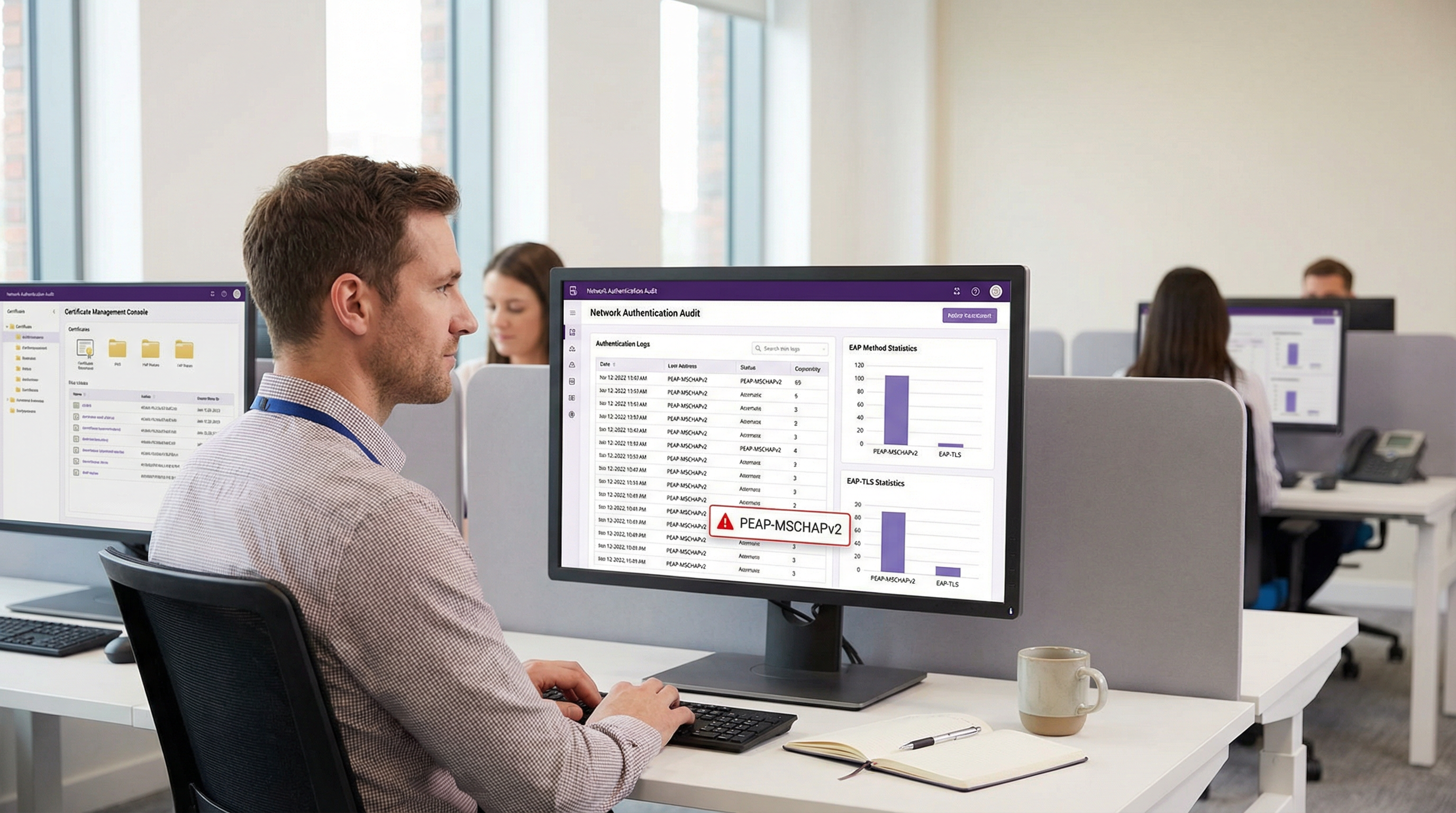
A pesar de las vulnerabilidades criptográficas bien documentadas, PEAP-MSCHAPv2 sigue siendo el método EAP más implementado para la autenticación WiFi empresarial en los sectores de hospitalidad, retail y público. Su prevalencia continua se debe a la facilidad de implementación —específicamente su integración nativa con Active Directory— más que a su eficacia en seguridad. Sin embargo, el perfil de riesgo ha cambiado drásticamente. Las herramientas de explotación automatizadas han democratizado el ataque "evil twin", permitiendo a los actores de amenazas capturar y descifrar hashes de desafío-respuesta de MSCHAPv2 con un esfuerzo mínimo, lo que conduce directamente al compromiso de credenciales de Active Directory.
Para los directores de TI y arquitectos de red, el mandato es claro: PEAP-MSCHAPv2 ya no es adecuado para ningún entorno sujeto a marcos de cumplimiento como PCI DSS o GDPR. Esta guía proporciona un análisis crítico de los vectores de ataque específicos dirigidos a PEAP-MSCHAPv2 y describe una ruta de migración pragmática y por fases hacia EAP-TLS. Al aprovechar las soluciones modernas de Mobile Device Management (MDM) y de infraestructura de clave pública (PKI) en la nube, las organizaciones pueden realizar la transición a una autenticación robusta basada en certificados sin interrumpir las operaciones comerciales ni alienar los dispositivos heredados.
Inmersión Técnica: La Anatomía de la Vulnerabilidad
Para entender por qué PEAP-MSCHAPv2 debe ser descontinuado, es necesario examinar su arquitectura criptográfica subyacente. MSCHAPv2 (Microsoft Challenge Handshake Authentication Protocol versión 2) fue diseñado a finales de la década de 1990 y se basa en el algoritmo de hash MD4 y el Estándar de Cifrado de Datos (DES) [1]. Ambos se consideran obsoletos según los estándares criptográficos modernos.
La Falla Criptográfica
La debilidad fundamental radica en cómo MSCHAPv2 maneja el hash NT de la contraseña del usuario. El protocolo divide una clave de 21 bytes derivada del hash NT en tres claves DES de 7 bytes. Crucialmente, la tercera clave solo utiliza dos bytes significativos del hash, rellenando el resto con bytes nulos. Esta falla estructural reduce la complejidad criptográfica de manera exponencial.
En 2012, el investigador de seguridad Moxie Marlinspike demostró que el handshake de MSCHAPv2 podía descifrarse de forma determinista reduciendo el problema al descifrado de una sola clave DES [2]. Utilizando servicios de descifrado basados en la nube o equipos GPU modernos que ejecutan herramientas como hashcat, un atacante puede recuperar la contraseña de Active Directory en texto plano a partir de un handshake capturado en cuestión de horas, independientemente de la complejidad de la contraseña.
El Vector de Ataque Evil Twin
La debilidad criptográfica se explota en entornos reales mediante el ataque "evil twin". En un escenario típico en una oficina corporativa o un recinto de Hospitalidad :
- Despliegue de AP no autorizado: El atacante despliega un punto de acceso (AP) no autorizado que transmite el SSID corporativo objetivo (por ejemplo, "Staff-WiFi").
- Dominio de la señal: El AP no autorizado opera con una potencia de transmisión más alta, obligando a los dispositivos cliente cercanos a asociarse con él en lugar de con la infraestructura legítima.
- Autenticación RADIUS falsa: Cuando el cliente inicia el túnel PEAP, el AP no autorizado actúa como proxy de la solicitud hacia un servidor RADIUS controlado por el atacante (como hostapd-wpe).
- Fallo en la validación del certificado: El servidor RADIUS no autorizado presenta un certificado digital autofirmado o no verificado. Si el dispositivo cliente está mal configurado para omitir la validación estricta del certificado del servidor —o si el usuario simplemente hace clic en "Aceptar" en un aviso de confianza— se establece el túnel.
- Captura de credenciales: El cliente transmite el desafío-respuesta de MSCHAPv2 a través del túnel comprometido. El atacante captura el hash y termina la conexión.
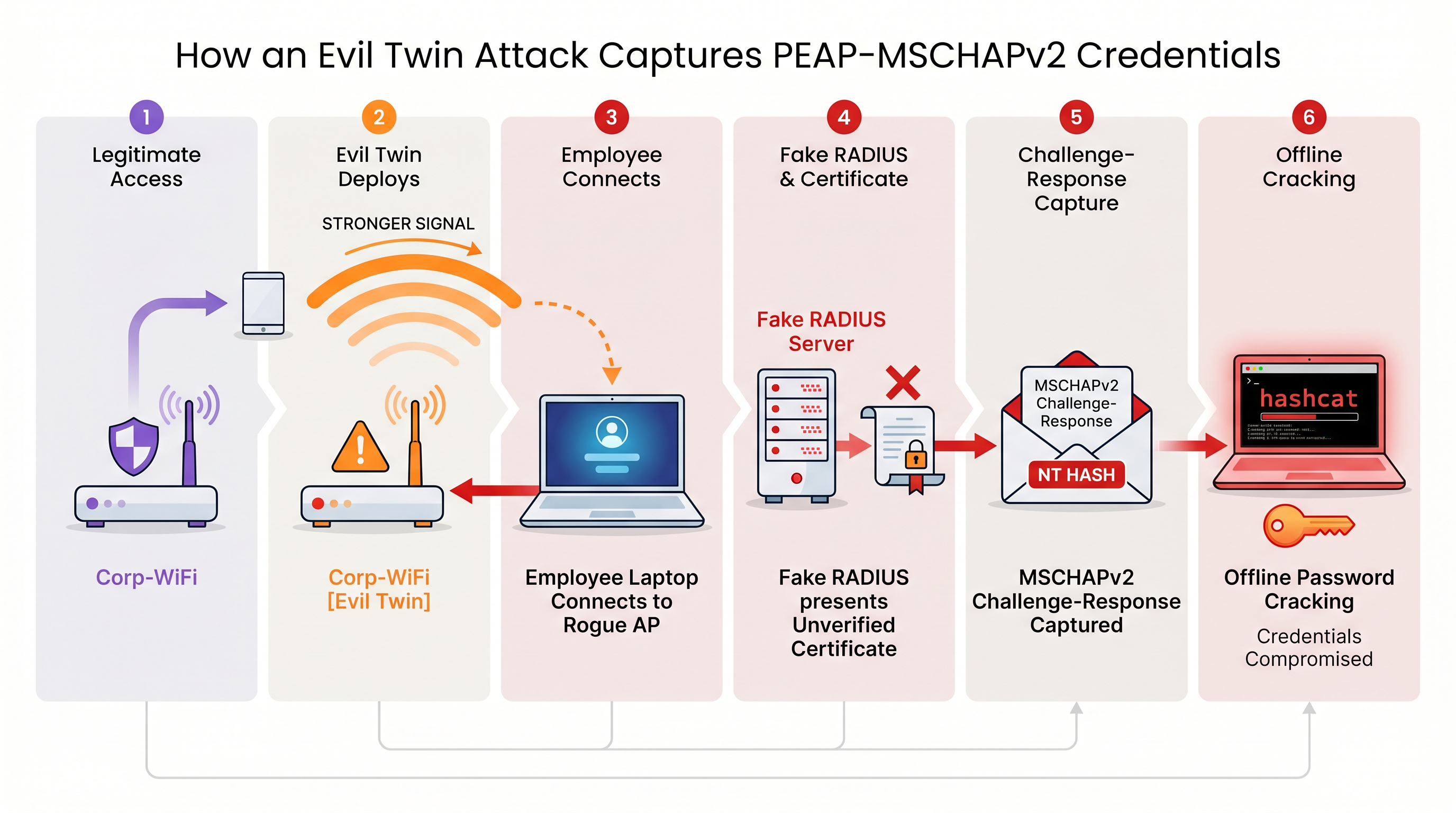
Sin una validación estricta del certificado del servidor aplicada a nivel de endpoint, cada dispositivo que utiliza PEAP-MSCHAPv2 es vulnerable a esta técnica de captura de credenciales. Esto es particularmente preocupante para los entornos de Retail donde las redes de gestión interna a menudo comparten proximidad física con los espacios públicos.
Guía de Implementación: Migrando a EAP-TLS
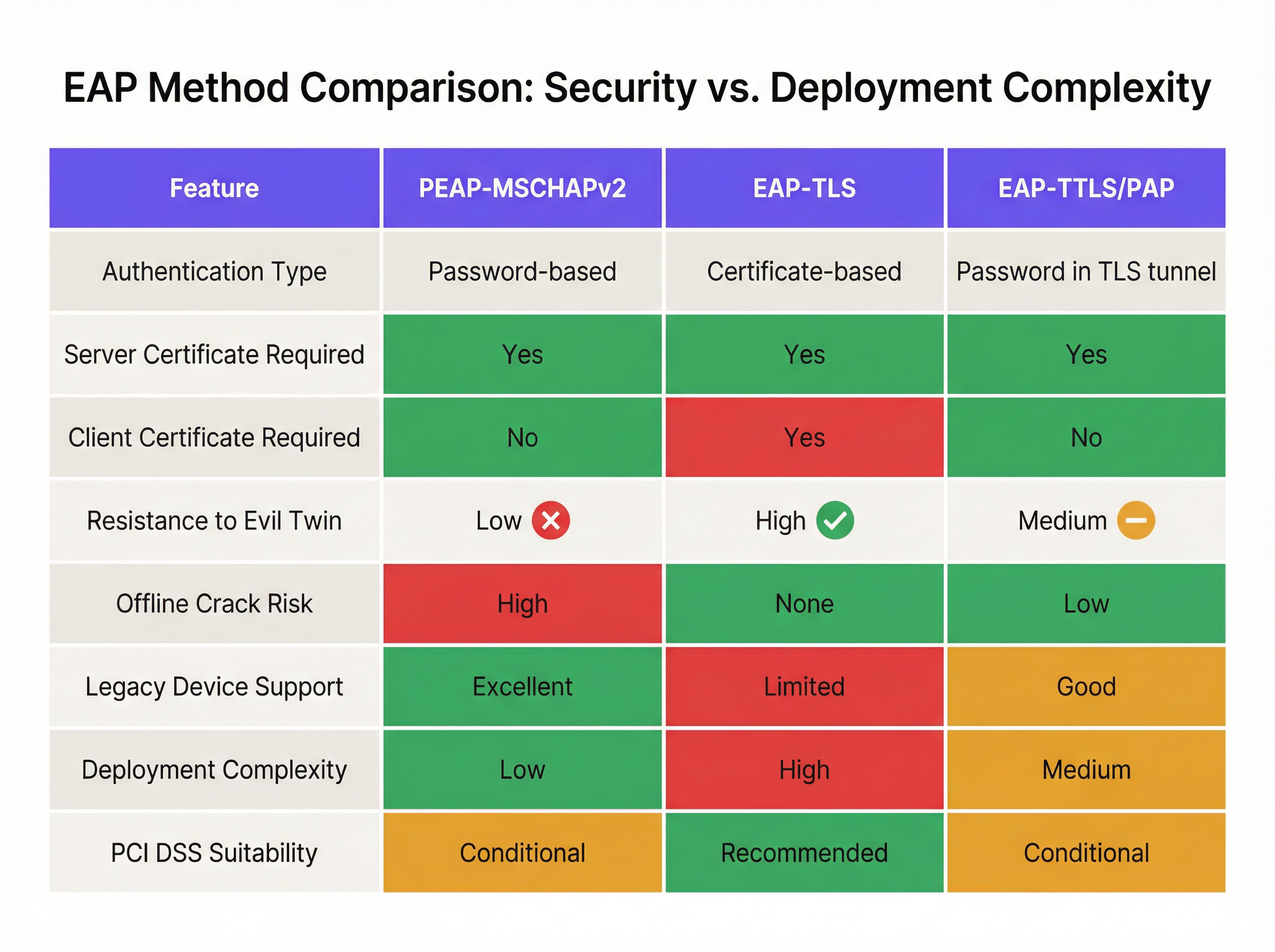
La mitigación definitiva para las vulnerabilidades de MSCHAPv2 es la migración a EAP-TLS (Extensible Authentication Protocol-Transport Layer Security). EAP-TLS exige la autenticación mutua: tanto el servidor RADIUS como el dispositivo cliente deben presentar certificados digitales válidos. Dado que no se transmiten ni se generan hashes de contraseñas durante el handshake, EAP-TLS es totalmente inmune a los ataques de diccionario fuera de línea y altamente resistente a la suplantación por "evil twin".
Históricamente, la barrera para la adopción de EAP-TLS era la complejidad de implementar una infraestructura de clave pública (PKI) local. Hoy en día, la PKI en la nube y las integraciones modernas de MDM han simplificado el proceso.
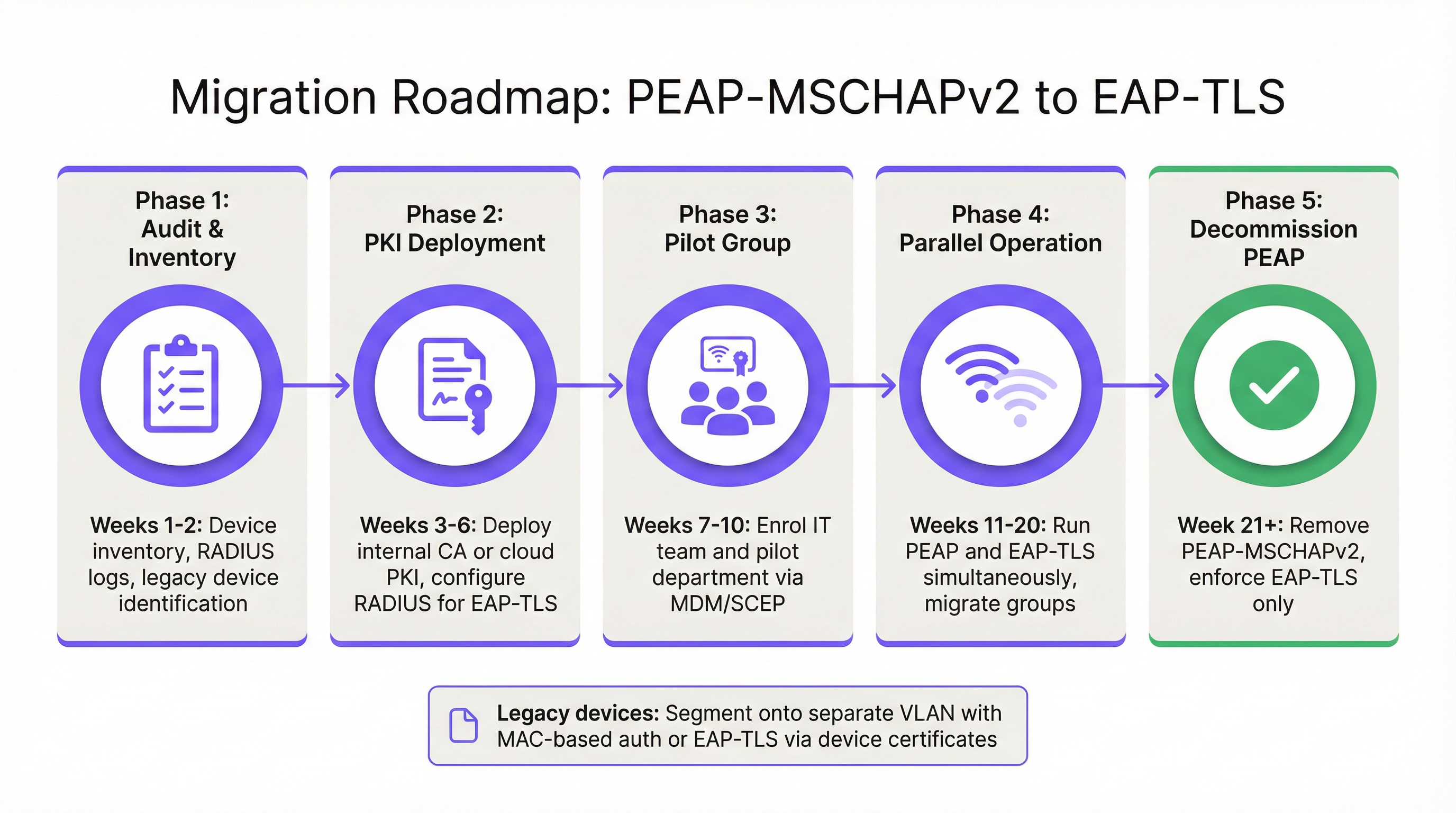
Fase 1: Auditoría e Inventario
Antes de alterar las políticas de autenticación, realice una auditoría exhaustiva de sus registros RADIUS actuales (por ejemplo, Cisco ISE, Aruba ClearPass o Windows NPS). Identifique todos los dispositivos que se autentican actualmente a través de PEAP. Categorice estos dispositivos en dos grupos:
- Dispositivos gestionados: Laptops, tablets y smartphones corporativos inscritos en una plataforma MDM (por ejemplo, Intune, Jamf).
- Dispositivos no gestionados/heredados: Sensores IoT, terminales de punto de venta antiguos, escáneres de códigos de barras o dispositivos BYOD que no admiten la inscripción de certificados.
Fase 2: Despliegue de PKI y Configuración de RADIUS
Implemente una solución PKI para emitir certificados de cliente y servidor. Las plataformas PKI nativas de la nube pueden integrarse directamente con Entra ID o Google Workspace, eliminando la necesidad de una pesada infraestructura local de Microsoft AD CS. Configure su servidor RADIUS para aceptar la autenticación EAP-TLS. Crucialmente, configure la política de red para admitir tanto PEAP como EAP-TLS simultáneamente en el mismo SSID durante el periodo de transición.
Fase 3: Distribución de Certificados vía MDM
Aproveche su plataforma MDM para distribuir silenciosamente certificados de cliente a los dispositivos gestionados utilizando protocolos como SCEP (Simple Certificate Enrollment Protocol). Simultáneamente, envíe una carga útil de perfil WiFi actualizada a través de MDM que indique a los dispositivos priorizar EAP-TLS para el SSID corporativo. Esto garantiza una transición sin intervención para los usuarios finales.
Fase 4: Manejo de Dispositivos Heredados
Los dispositivos heredados que no pueden soportar EAP-TLS nunca deben dictar la postura de seguridad de la red corporativa principal. En su lugar, segmente estos dispositivos en una VLAN dedicada. Implemente MAC-based Authentication Bypass (MAB) combinado con listas de control de acceso (ACL) estrictas para garantizar que estos dispositivos solo puedan comunicarse con los servidores internos específicos requeridos para su función.
Mejores Prácticas y Cumplimiento
Mantener un entorno inalámbrico empresarial seguro requiere el cumplimiento continuo de los estándares de la industria.
- Aplique la validación del certificado del servidor: Si debe mantener temporalmente PEAP-MSCHAPv2, use MDM para aplicar el anclaje estricto del certificado del servidor en todos los endpoints. Evite que los usuarios confíen manualmente en certificados desconocidos.
- Descontinúe WPA2-Personal: Asegúrese de que todo el acceso corporativo dependa de 802.1X (WPA2/WPA3-Enterprise). Las claves precompartidas (PSK) deben limitarse estrictamente a redes IoT aisladas.
- Alineación con PCI DSS: Para los establecimientos que procesan pagos, el Requisito 4 de PCI DSS exige una criptografía fuerte para transmitir datos de titulares de tarjetas a través de redes inalámbricas. El PCI Security Standards Council recomienda explícitamente EAP-TLS para una autenticación robusta [3].
- Monitoree analíticas: Utilice plataformas como WiFi Analytics de Purple para monitorear el estado de la red, identificar patrones de conexión anómalos y asegurar que los dispositivos heredados no intenten acceder a subredes restringidas.
ROI e Impacto en el Negocio
El retorno de la inversión para migrar a EAP-TLS se mide principalmente en la mitigación de riesgos. Un ataque "evil twin" exitoso contra PEAP-MSCHAPv2 produce credenciales válidas de Active Directory, proporcionando a los actores de amenazas acceso inicial a la red corporativa. El impacto financiero de una brecha de datos resultante, el despliegue de ransomware o una multa regulatoria (como bajo el GDPR) supera con creces el costo operativo de implementar una PKI en la nube y actualizar los perfiles de MDM.
Además, la autenticación basada en certificados reduce significativamente el volumen de tickets de soporte técnico relacionados con el vencimiento y bloqueo de contraseñas. Al migrar a EAP-TLS, los equipos de TI eliminan la fricción del acceso WiFi basado en contraseñas, ofreciendo una experiencia de conectividad fluida y segura que respalda las arquitecturas modernas de red zero-trust.
Referencias
[1] Microsoft Security Response Center. "Debilidades en la autenticación MS-CHAPv2". Agosto de 2012. [2] Marlinspike, Moxie. "Derrotando VPNs PPTP y WPA2 Enterprise con MS-CHAPv2". DEF CON 20, 2012. [3] PCI Security Standards Council. "Suplemento de información: Directrices inalámbricas de PCI DSS".
Términos clave y definiciones
PEAP (Protected Extensible Authentication Protocol)
An EAP method that encapsulates the authentication process within a secure TLS tunnel to protect the inner authentication credentials from being intercepted over the air.
Widely used because it only requires a server-side certificate, making it easier to deploy than mutually authenticated methods.
MSCHAPv2
The inner authentication protocol commonly used inside a PEAP tunnel, which relies on a challenge-response mechanism using the NT hash of the user's password.
The primary source of vulnerability in PEAP deployments due to its reliance on outdated MD4 hashing and DES encryption.
EAP-TLS
An EAP method requiring mutual authentication, where both the RADIUS server and the client device present digital certificates to prove their identity.
The industry gold standard for enterprise WiFi security, immune to offline dictionary and evil twin attacks.
Evil Twin Attack
A wireless attack where a rogue access point mimics a legitimate corporate SSID to trick client devices into connecting, allowing the attacker to intercept traffic or capture authentication credentials.
The primary vector used by attackers to capture MSCHAPv2 handshakes from vulnerable PEAP deployments.
RADIUS (Remote Authentication Dial-In User Service)
A networking protocol that provides centralized Authentication, Authorization, and Accounting (AAA) management for users who connect and use a network service.
The core server infrastructure (like Cisco ISE or NPS) that processes 802.1X authentication requests from access points.
PKI (Public Key Infrastructure)
A set of roles, policies, hardware, software, and procedures needed to create, manage, distribute, use, store, and revoke digital certificates.
The foundational infrastructure required to deploy EAP-TLS, increasingly delivered via cloud-native SaaS platforms.
MDM (Mobile Device Management)
Software that allows IT administrators to control, secure, and enforce policies on smartphones, tablets, and endpoints.
Essential for EAP-TLS migrations, as it is used to silently push client certificates and strict WiFi profiles to corporate devices.
MAB (MAC Authentication Bypass)
A port-based access control method that authenticates devices based on their MAC address rather than requiring a username/password or certificate.
Used as a fallback mechanism to authenticate legacy 'headless' devices (like printers) that cannot support 802.1X protocols.
Casos de éxito
A 400-room hotel chain is currently using PEAP-MSCHAPv2 for its back-of-house staff network. The IT director wants to migrate to EAP-TLS but is concerned about 50 legacy handheld inventory scanners that run an outdated OS and do not support certificate enrollment. How should the network architect handle this migration without breaking inventory operations?
The network architect should implement a segmented approach. First, deploy a cloud PKI and configure the central RADIUS server to accept both EAP-TLS and PEAP-MSCHAPv2. Use the hotel's MDM platform to push client certificates and an updated EAP-TLS WiFi profile to all modern staff laptops and tablets. For the 50 legacy scanners, create a dedicated, hidden SSID mapped to an isolated VLAN. Configure MAC-based Authentication Bypass (MAB) for these specific scanner MAC addresses on the RADIUS server. Apply strict network ACLs to this VLAN so the scanners can only reach the inventory database server and nothing else. Once all modern devices are using EAP-TLS, disable PEAP-MSCHAPv2 on the primary staff network.
A retail organisation has rolled out Windows 11 22H2 to its corporate fleet. The IT helpdesk is suddenly receiving tickets that users cannot connect to the corporate WPA2-Enterprise WiFi network, which uses PEAP-MSCHAPv2. What is the likely cause, and what is the immediate remediation?
The likely cause is the introduction of Windows Defender Credential Guard, which is enabled by default in Windows 11 22H2 and newer. Credential Guard isolates and protects NTLM password hashes and Kerberos Ticket Granting Tickets. Because PEAP-MSCHAPv2 requires access to the NT hash to generate the challenge-response, Credential Guard intentionally breaks this authentication method to prevent credential theft. The immediate remediation is to accelerate the migration to EAP-TLS, which uses certificate-based authentication and is fully compatible with Credential Guard. A temporary, less secure workaround would be disabling Credential Guard via Group Policy, but this is strongly discouraged as it weakens the overall OS security posture.
Análisis de escenarios
Q1. You are auditing a newly acquired subsidiary's wireless network. They use PEAP-MSCHAPv2. The IT manager claims they are secure from evil twin attacks because they have hidden the SSID and disabled SSID broadcasting. Is their network secure from credential capture?
💡 Sugerencia:Consider how client devices behave when configured to connect to hidden networks, and whether hiding an SSID prevents a rogue AP from spoofing it.
Mostrar enfoque recomendado
No, the network is not secure. Hiding the SSID (disabling beacon frames) provides zero cryptographic security. In fact, devices configured to connect to hidden networks actively broadcast probe requests containing the SSID name, effectively announcing the hidden network to any attacker listening. An attacker can easily capture the SSID name, spin up an evil twin AP broadcasting that exact SSID, and execute the standard MSCHAPv2 credential capture attack. The only defense is strict server certificate validation or migrating to EAP-TLS.
Q2. During an EAP-TLS migration pilot, you push client certificates to 20 Windows laptops via Intune. However, authentication fails for all 20 devices. The RADIUS server logs show 'Client Certificate Not Trusted'. The client certificates were issued by your new Cloud PKI. What critical configuration step was missed?
💡 Sugerencia:For mutual authentication to work, both sides must trust the entity that issued the other side's certificate.
Mostrar enfoque recomendado
The RADIUS server has not been configured to trust the Root CA of the new Cloud PKI. While the laptops have the correct client certificates, when they present them to the RADIUS server, the server rejects them because it does not have the Cloud PKI's Root/Intermediate certificates in its local trust store. You must import the public Root CA certificate of the Cloud PKI into the RADIUS server's trusted certificate authorities store.
Q3. Your organisation mandates EAP-TLS for the corporate WiFi. A senior executive insists on connecting their personal, unmanaged iPad to the corporate network to access internal financial dashboards. How do you accommodate this request while maintaining the EAP-TLS security posture?
💡 Sugerencia:Consider the prerequisites for EAP-TLS and the definition of a 'managed' device.
Mostrar enfoque recomendado
You cannot securely accommodate this request on the primary corporate network without compromising the EAP-TLS architecture. EAP-TLS requires a client certificate. Because the iPad is unmanaged (BYOD), the IT department cannot securely push a certificate via MDM. Allowing the executive to manually install a certificate introduces significant risk and administrative overhead. The correct approach is to deny access to the corporate SSID. Instead, the executive should connect to the Guest WiFi and use a secure corporate VPN (which supports modern MFA/SAML authentication) to access internal resources, or the device must be enrolled in the corporate MDM to receive a certificate.
Conclusiones clave
- ✓PEAP-MSCHAPv2 relies on obsolete cryptography (MD4 and DES) that can be trivially cracked offline.
- ✓The protocol is highly vulnerable to 'Evil Twin' attacks if endpoint devices do not strictly validate the RADIUS server certificate.
- ✓Modern Windows updates (Credential Guard) are actively breaking MSCHAPv2 authentication to prevent hash theft.
- ✓EAP-TLS is the definitive replacement, offering mutual authentication via digital certificates and immunity to offline cracking.
- ✓Cloud PKI and modern MDM platforms have drastically reduced the complexity and cost of deploying EAP-TLS.
- ✓Legacy devices incompatible with EAP-TLS must be segmented onto dedicated, restricted VLANs rather than degrading primary network security.




