

PEAP-MSCHAPv2: Por que ainda é comum, por que é arriscado e como migrar
Um guia de referência técnica abrangente detalhando as vulnerabilidades críticas de segurança do PEAP-MSCHAPv2, incluindo ataques evil twin e captura de credenciais. Ele fornece um roteiro prático e neutro em relação a fornecedores para que as equipes de TI migrem redes WiFi corporativas para a autenticação segura EAP-TLS baseada em certificados.
🎧 Ouça este Guia
Ver Transcrição
Resumo Executivo
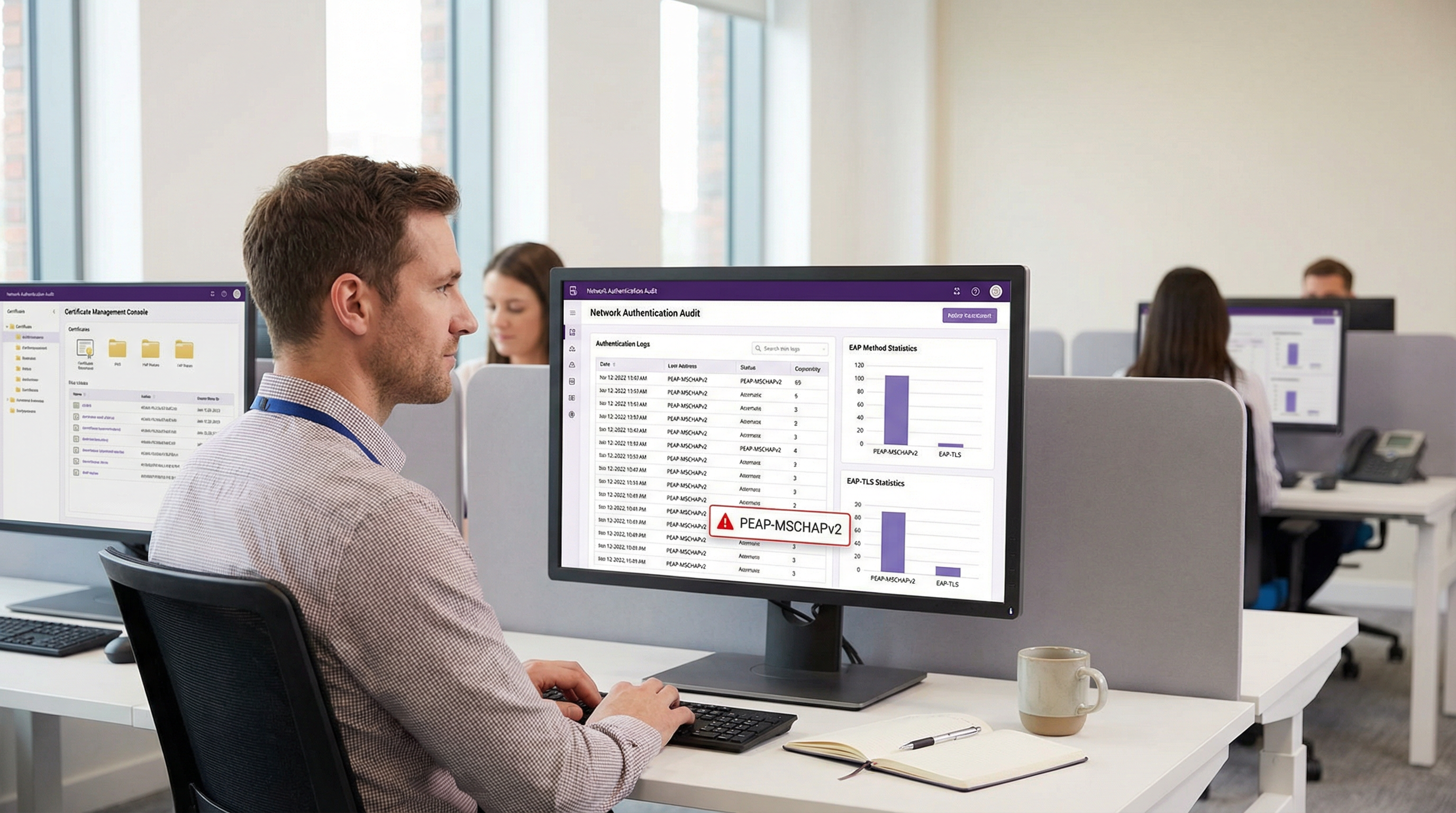
Apesar das vulnerabilidades criptográficas bem documentadas, o PEAP-MSCHAPv2 continua sendo o método EAP mais amplamente implantado para autenticação WiFi corporativa nos setores de hospitalidade, varejo e público. Sua prevalência contínua é impulsionada pela facilidade de implantação — especificamente sua integração nativa com o Active Directory — e não pela eficácia da segurança. No entanto, o perfil de risco mudou drasticamente. Ferramentas de exploração automatizadas transformaram o ataque "evil twin" em uma commodity, permitindo que atores de ameaças capturem e quebrem hashes de desafio-resposta MSCHAPv2 com esforço trivial, levando diretamente ao comprometimento de credenciais do Active Directory.
Para diretores de TI e arquitetos de rede, o mandato é claro: o PEAP-MSCHAPv2 não é mais adequado para o propósito em qualquer ambiente sujeito a frameworks de conformidade como PCI DSS ou GDPR. Este guia fornece uma análise crítica dos vetores de ataque específicos que visam o PEAP-MSCHAPv2 e descreve um caminho de migração pragmático e em fases para o EAP-TLS. Ao aproveitar soluções modernas de Gerenciamento de Dispositivos Móveis (MDM) e Infraestrutura de Chave Pública (PKI) em nuvem, as organizações podem fazer a transição para uma autenticação robusta baseada em certificados sem interromper as operações comerciais ou alienar dispositivos legados.
Mergulho Técnico: A Anatomia da Vulnerabilidade
Para entender por que o PEAP-MSCHAPv2 deve ser descontinuado, deve-se examinar sua arquitetura criptográfica subjacente. O MSCHAPv2 (Microsoft Challenge Handshake Authentication Protocol versão 2) foi projetado no final da década de 1990 e depende do algoritmo de hash MD4 e do Data Encryption Standard (DES) [1]. Ambos são considerados obsoletos pelos padrões criptográficos modernos.
A Falha Criptográfica
A fraqueza fundamental reside em como o MSCHAPv2 lida com o hash NT da senha do usuário. O protocolo divide uma chave de 21 bytes derivada do hash NT em três chaves DES de 7 bytes. Crucialmente, a terceira chave utiliza apenas dois bytes significativos do hash, preenchendo o restante com bytes nulos. Essa falha estrutural reduz a complexidade criptográfica exponencialmente.
Em 2012, o pesquisador de segurança Moxie Marlinspike demonstrou que o handshake MSCHAPv2 poderia ser quebrado de forma determinística, reduzindo o problema a uma única quebra de chave DES [2]. Usando serviços de quebra baseados em nuvem ou plataformas de GPU modernas executando ferramentas como hashcat, um invasor pode recuperar a senha em texto simples do Active Directory a partir de um handshake capturado em questão de horas, independentemente da complexidade da senha.
O Vetor de Ataque Evil Twin
A fraqueza criptográfica é explorada na prática através do ataque "evil twin". Em um cenário típico em um escritório corporativo ou local de Hospitalidade :
- Implantação de AP Falso (Rogue AP): O invasor implanta um ponto de acesso falso transmitindo o SSID corporativo de destino (ex: "Staff-WiFi").
- Dominância de Sinal: O AP falso opera com uma potência de transmissão mais alta, coagindo os dispositivos clientes próximos a se associarem a ele em vez da infraestrutura legítima.
- Autenticação RADIUS Falsa: Quando o cliente inicia o túnel PEAP, o AP falso encaminha a solicitação para um servidor RADIUS controlado pelo invasor (como o hostapd-wpe).
- Falha na Validação de Certificado: O servidor RADIUS falso apresenta um certificado digital autoassinado ou não verificado. Se o dispositivo cliente estiver mal configurado para ignorar a validação estrita do certificado do servidor — ou se o usuário simplesmente clicar em "Aceitar" em um aviso de confiança — o túnel é estabelecido.
- Captura de Credenciais: O cliente transmite o desafio-resposta MSCHAPv2 através do túnel comprometido. O invasor captura o hash e encerra a conexão.
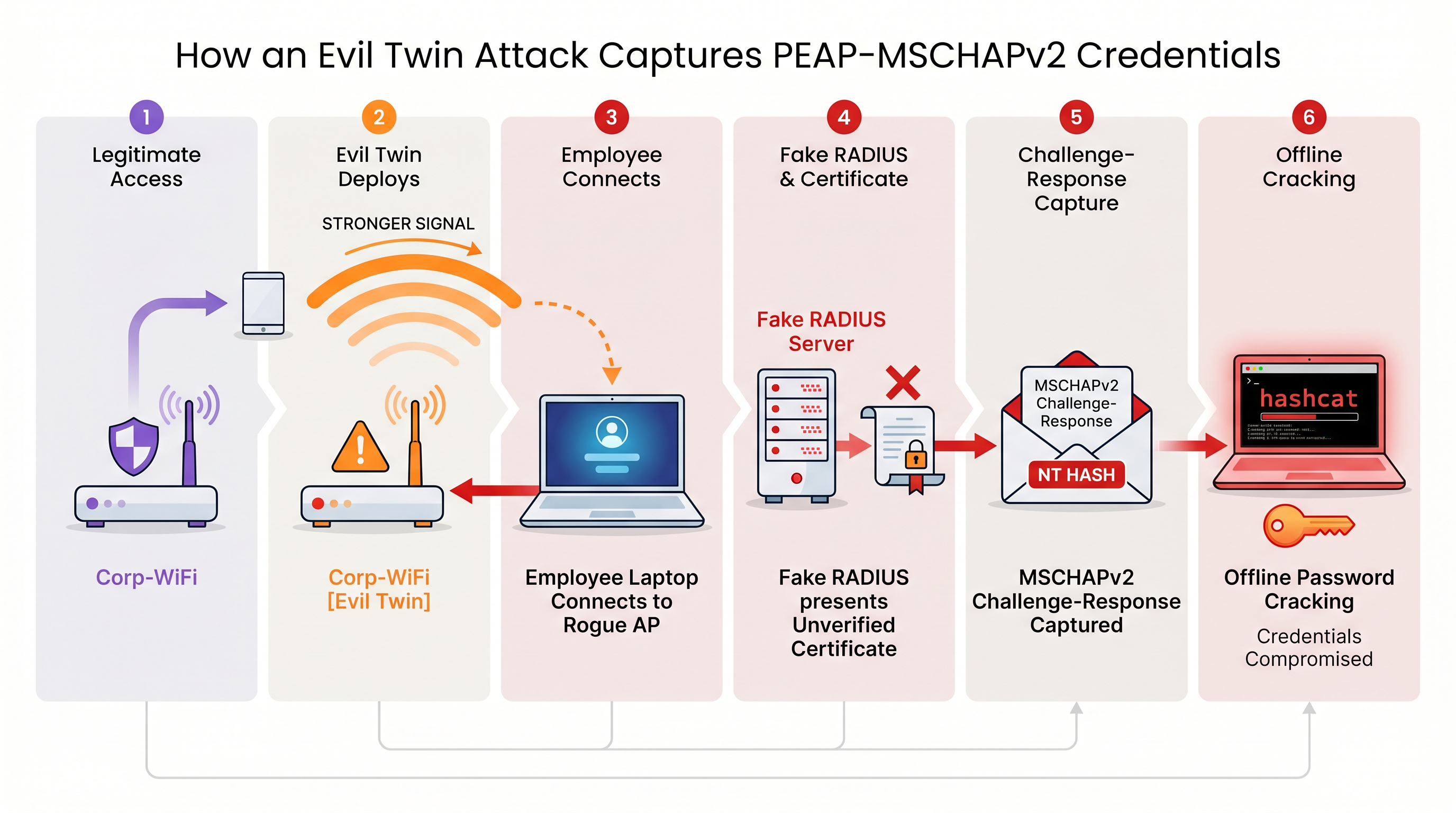
Sem a validação estrita do certificado do servidor aplicada no nível do endpoint, cada dispositivo que usa PEAP-MSCHAPv2 está vulnerável a essa técnica de captura de credenciais. Isso é particularmente preocupante para ambientes de Varejo , onde as redes operacionais muitas vezes compartilham proximidade física com espaços públicos.
Guia de Implementação: Migrando para EAP-TLS
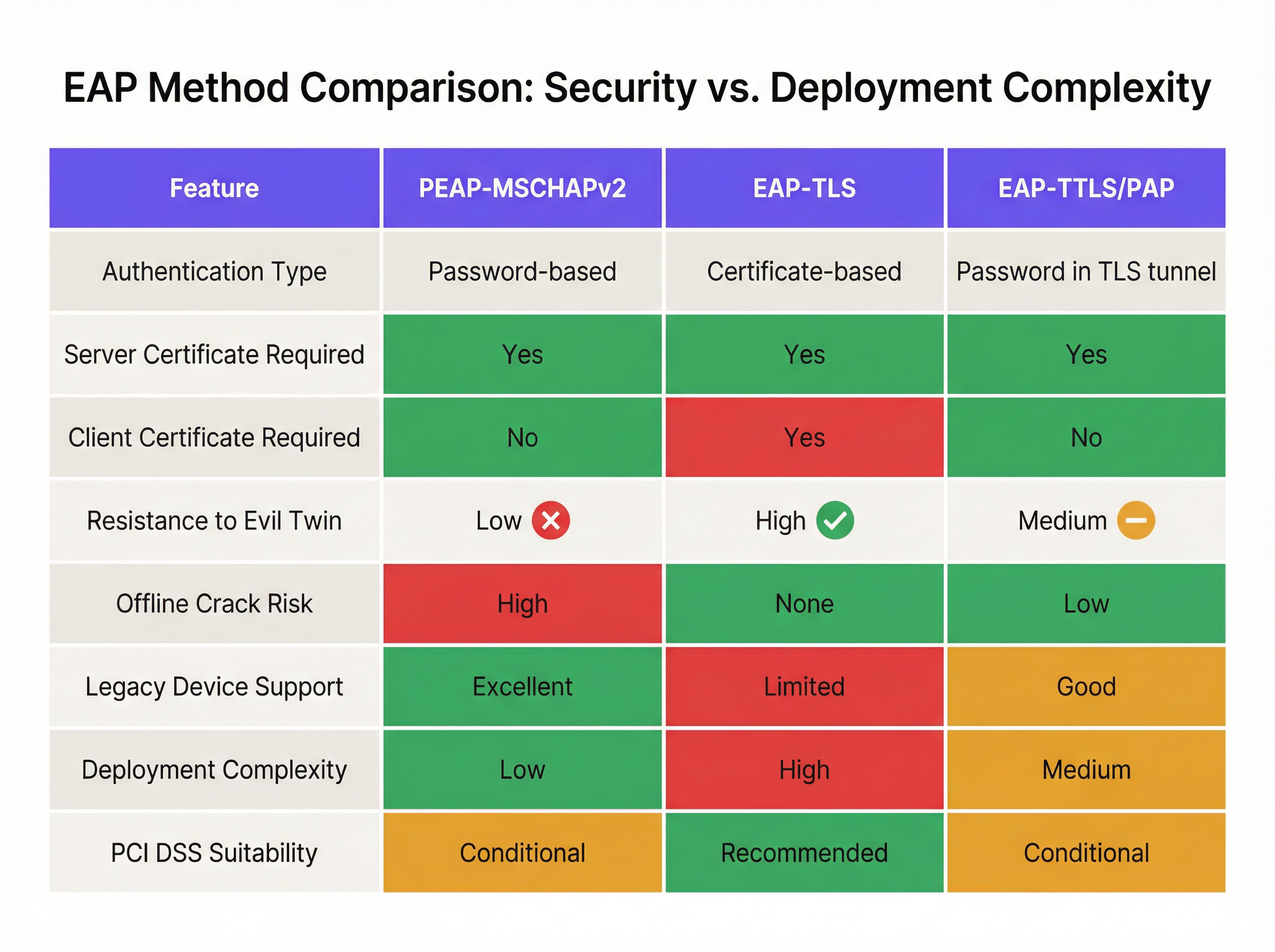
A mitigação definitiva para as vulnerabilidades do MSCHAPv2 é a migração para o EAP-TLS (Extensible Authentication Protocol-Transport Layer Security). O EAP-TLS exige autenticação mútua: tanto o servidor RADIUS quanto o dispositivo cliente devem apresentar certificados digitais válidos. Como nenhuma senha é transmitida ou transformada em hash durante o handshake, o EAP-TLS é inteiramente imune a ataques de dicionário offline e altamente resistente a falsificações de evil twin.
Historicamente, a barreira para a adoção do EAP-TLS era a complexidade de implantar uma Infraestrutura de Chave Pública (PKI) local. Hoje, a PKI em nuvem e as integrações modernas de MDM simplificaram o processo.
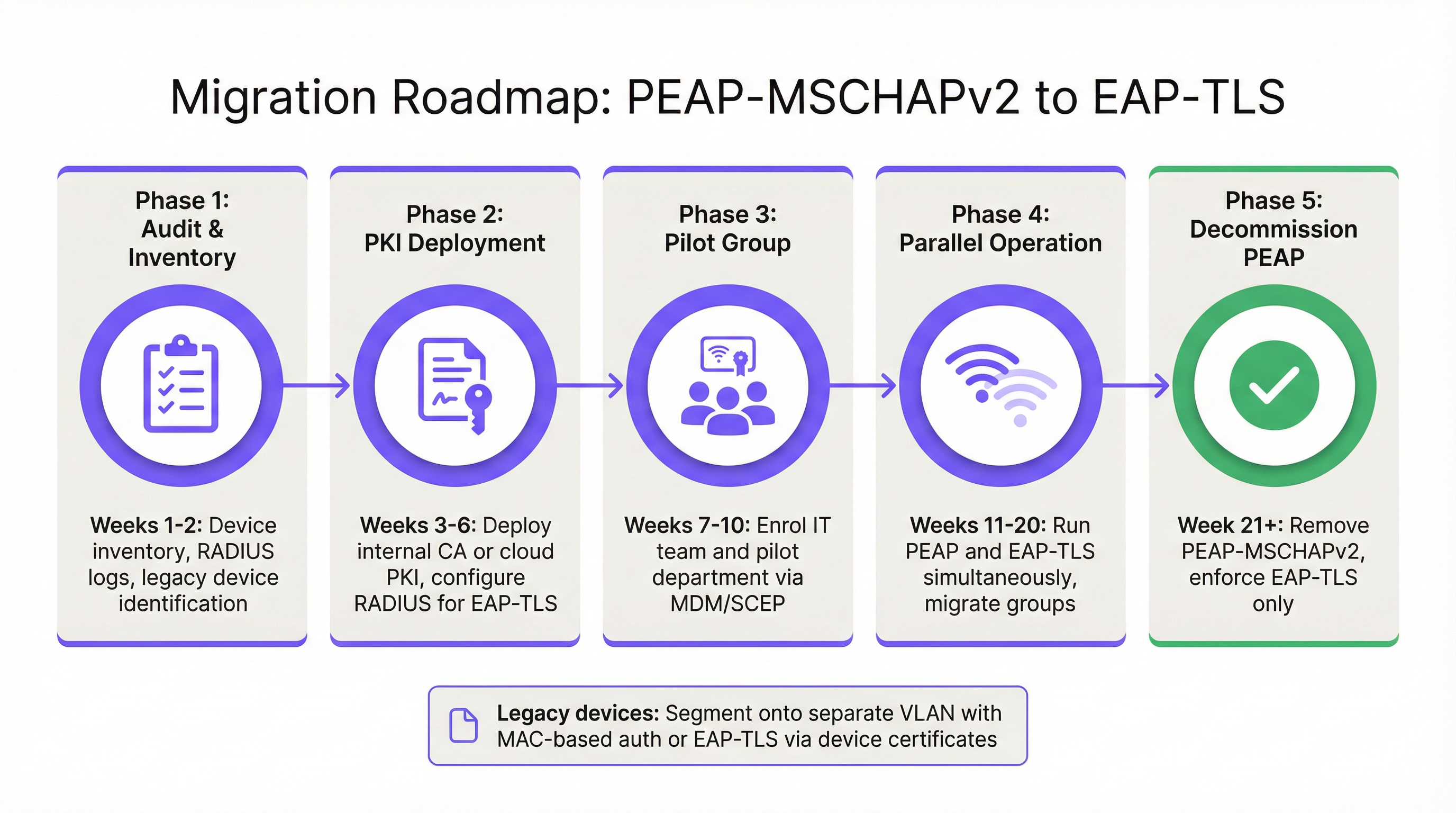
Fase 1: Auditoria e Inventário
Antes de alterar as políticas de autenticação, realize uma auditoria abrangente de seus logs RADIUS atuais (ex: Cisco ISE, Aruba ClearPass ou Windows NPS). Identifique todos os dispositivos que se autenticam atualmente via PEAP. Categorize esses dispositivos em dois grupos:
- Dispositivos Gerenciados: Laptops, tablets e smartphones corporativos registrados em uma plataforma MDM (ex: Intune, Jamf).
- Dispositivos Não Gerenciados/Legados: Sensores IoT, terminais de ponto de venda antigos, scanners de código de barras ou dispositivos BYOD que não suportam o registro de certificados.
Fase 2: Implantação de PKI e Configuração de RADIUS
Implante uma solução de PKI para emitir certificados de cliente e servidor. Plataformas de PKI nativas da nuvem podem se integrar diretamente ao Entra ID ou Google Workspace, eliminando a necessidade de uma infraestrutura pesada de Microsoft AD CS local. Configure seu servidor RADIUS para aceitar a autenticação EAP-TLS. Crucialmente, configure a política de rede para suportar tanto PEAP quanto EAP-TLS simultaneamente no mesmo SSID durante o período de transição.
Fase 3: Distribuição de Certificados via MDM
Aproveite sua plataforma MDM para distribuir silenciosamente certificados de cliente para dispositivos gerenciados usando protocolos como SCEP (Simple Certificate Enrollment Protocol). Simultaneamente, envie uma carga de perfil WiFi atualizada via MDM que instrua os dispositivos a priorizar o EAP-TLS para o SSID corporativo. Isso garante uma transição zero-touch para os usuários finais.
Fase 4: Lidando com Dispositivos Legados
Dispositivos legados que não suportam EAP-TLS nunca devem ditar a postura de segurança da rede corporativa principal. Em vez disso, segmente esses dispositivos em uma VLAN dedicada. Implemente o MAC-based Authentication Bypass (MAB) combinado com Listas de Controle de Acesso (ACLs) estritas para garantir que esses dispositivos só possam se comunicar com os servidores internos específicos necessários para sua função.
Melhores Práticas e Conformidade
Manter um ambiente sem fio corporativo seguro requer adesão contínua aos padrões da indústria.
- Impor a Validação de Certificado do Servidor: Se você precisar manter temporariamente o PEAP-MSCHAPv2, use o MDM para impor o pinning estrito de certificado do servidor em todos os endpoints. Impeça que os usuários confiem manualmente em certificados desconhecidos.
- Descontinuar o WPA2-Personal: Garanta que todo o acesso corporativo dependa de 802.1X (WPA2/WPA3-Enterprise). As Chaves Pré-Compartilhadas (PSK) devem ser estritamente limitadas a redes IoT isoladas.
- Alinhar-se ao PCI DSS: Para locais que processam pagamentos, o Requisito 4 do PCI DSS exige criptografia forte para transmitir dados de titulares de cartão em redes sem fio. O PCI Security Standards Council recomenda explicitamente o EAP-TLS para uma autenticação robusta [3].
- Monitorar Analytics: Utilize plataformas como o WiFi Analytics da Purple para monitorar a integridade da rede, identificar padrões de conexão anômalos e garantir que dispositivos legados não estejam tentando acessar sub-redes restritas.
ROI e Impacto nos Negócios
O retorno sobre o investimento para a migração para o EAP-TLS é medido principalmente na mitigação de riscos. Um ataque evil twin bem-sucedido contra o PEAP-MSCHAPv2 produz credenciais válidas do Active Directory, fornecendo aos atores de ameaças acesso inicial à rede corporativa. O impacto financeiro de uma violação de dados resultante, implantação de ransomware ou multa regulatória (como sob a GDPR) supera vastamente o custo operacional de implantar uma PKI em nuvem e atualizar perfis de MDM.
Além disso, a autenticação baseada em certificados reduz significativamente o volume de tickets de suporte relacionados a expirações de senha e bloqueios. Ao migrar para o EAP-TLS, as equipes de TI eliminam o atrito do acesso WiFi baseado em senha, entregando uma experiência de conectividade contínua e segura que suporta arquiteturas de rede zero-trust modernas.
Referências
[1] Microsoft Security Response Center. "Fraquezas na autenticação MS-CHAPv2." Agosto de 2012. [2] Marlinspike, Moxie. "Derrotando VPNs PPTP e WPA2 Enterprise com MS-CHAPv2." DEF CON 20, 2012. [3] PCI Security Standards Council. "Suplemento de Informação: Diretrizes de WiFi do PCI DSS."
Termos-Chave e Definições
PEAP (Protected Extensible Authentication Protocol)
An EAP method that encapsulates the authentication process within a secure TLS tunnel to protect the inner authentication credentials from being intercepted over the air.
Widely used because it only requires a server-side certificate, making it easier to deploy than mutually authenticated methods.
MSCHAPv2
The inner authentication protocol commonly used inside a PEAP tunnel, which relies on a challenge-response mechanism using the NT hash of the user's password.
The primary source of vulnerability in PEAP deployments due to its reliance on outdated MD4 hashing and DES encryption.
EAP-TLS
An EAP method requiring mutual authentication, where both the RADIUS server and the client device present digital certificates to prove their identity.
The industry gold standard for enterprise WiFi security, immune to offline dictionary and evil twin attacks.
Evil Twin Attack
A wireless attack where a rogue access point mimics a legitimate corporate SSID to trick client devices into connecting, allowing the attacker to intercept traffic or capture authentication credentials.
The primary vector used by attackers to capture MSCHAPv2 handshakes from vulnerable PEAP deployments.
RADIUS (Remote Authentication Dial-In User Service)
A networking protocol that provides centralized Authentication, Authorization, and Accounting (AAA) management for users who connect and use a network service.
The core server infrastructure (like Cisco ISE or NPS) that processes 802.1X authentication requests from access points.
PKI (Public Key Infrastructure)
A set of roles, policies, hardware, software, and procedures needed to create, manage, distribute, use, store, and revoke digital certificates.
The foundational infrastructure required to deploy EAP-TLS, increasingly delivered via cloud-native SaaS platforms.
MDM (Mobile Device Management)
Software that allows IT administrators to control, secure, and enforce policies on smartphones, tablets, and endpoints.
Essential for EAP-TLS migrations, as it is used to silently push client certificates and strict WiFi profiles to corporate devices.
MAB (MAC Authentication Bypass)
A port-based access control method that authenticates devices based on their MAC address rather than requiring a username/password or certificate.
Used as a fallback mechanism to authenticate legacy 'headless' devices (like printers) that cannot support 802.1X protocols.
Estudos de Caso
A 400-room hotel chain is currently using PEAP-MSCHAPv2 for its back-of-house staff network. The IT director wants to migrate to EAP-TLS but is concerned about 50 legacy handheld inventory scanners that run an outdated OS and do not support certificate enrollment. How should the network architect handle this migration without breaking inventory operations?
The network architect should implement a segmented approach. First, deploy a cloud PKI and configure the central RADIUS server to accept both EAP-TLS and PEAP-MSCHAPv2. Use the hotel's MDM platform to push client certificates and an updated EAP-TLS WiFi profile to all modern staff laptops and tablets. For the 50 legacy scanners, create a dedicated, hidden SSID mapped to an isolated VLAN. Configure MAC-based Authentication Bypass (MAB) for these specific scanner MAC addresses on the RADIUS server. Apply strict network ACLs to this VLAN so the scanners can only reach the inventory database server and nothing else. Once all modern devices are using EAP-TLS, disable PEAP-MSCHAPv2 on the primary staff network.
A retail organisation has rolled out Windows 11 22H2 to its corporate fleet. The IT helpdesk is suddenly receiving tickets that users cannot connect to the corporate WPA2-Enterprise WiFi network, which uses PEAP-MSCHAPv2. What is the likely cause, and what is the immediate remediation?
The likely cause is the introduction of Windows Defender Credential Guard, which is enabled by default in Windows 11 22H2 and newer. Credential Guard isolates and protects NTLM password hashes and Kerberos Ticket Granting Tickets. Because PEAP-MSCHAPv2 requires access to the NT hash to generate the challenge-response, Credential Guard intentionally breaks this authentication method to prevent credential theft. The immediate remediation is to accelerate the migration to EAP-TLS, which uses certificate-based authentication and is fully compatible with Credential Guard. A temporary, less secure workaround would be disabling Credential Guard via Group Policy, but this is strongly discouraged as it weakens the overall OS security posture.
Análise de Cenário
Q1. You are auditing a newly acquired subsidiary's wireless network. They use PEAP-MSCHAPv2. The IT manager claims they are secure from evil twin attacks because they have hidden the SSID and disabled SSID broadcasting. Is their network secure from credential capture?
💡 Dica:Consider how client devices behave when configured to connect to hidden networks, and whether hiding an SSID prevents a rogue AP from spoofing it.
Mostrar Abordagem Recomendada
No, the network is not secure. Hiding the SSID (disabling beacon frames) provides zero cryptographic security. In fact, devices configured to connect to hidden networks actively broadcast probe requests containing the SSID name, effectively announcing the hidden network to any attacker listening. An attacker can easily capture the SSID name, spin up an evil twin AP broadcasting that exact SSID, and execute the standard MSCHAPv2 credential capture attack. The only defense is strict server certificate validation or migrating to EAP-TLS.
Q2. During an EAP-TLS migration pilot, you push client certificates to 20 Windows laptops via Intune. However, authentication fails for all 20 devices. The RADIUS server logs show 'Client Certificate Not Trusted'. The client certificates were issued by your new Cloud PKI. What critical configuration step was missed?
💡 Dica:For mutual authentication to work, both sides must trust the entity that issued the other side's certificate.
Mostrar Abordagem Recomendada
The RADIUS server has not been configured to trust the Root CA of the new Cloud PKI. While the laptops have the correct client certificates, when they present them to the RADIUS server, the server rejects them because it does not have the Cloud PKI's Root/Intermediate certificates in its local trust store. You must import the public Root CA certificate of the Cloud PKI into the RADIUS server's trusted certificate authorities store.
Q3. Your organisation mandates EAP-TLS for the corporate WiFi. A senior executive insists on connecting their personal, unmanaged iPad to the corporate network to access internal financial dashboards. How do you accommodate this request while maintaining the EAP-TLS security posture?
💡 Dica:Consider the prerequisites for EAP-TLS and the definition of a 'managed' device.
Mostrar Abordagem Recomendada
You cannot securely accommodate this request on the primary corporate network without compromising the EAP-TLS architecture. EAP-TLS requires a client certificate. Because the iPad is unmanaged (BYOD), the IT department cannot securely push a certificate via MDM. Allowing the executive to manually install a certificate introduces significant risk and administrative overhead. The correct approach is to deny access to the corporate SSID. Instead, the executive should connect to the Guest WiFi and use a secure corporate VPN (which supports modern MFA/SAML authentication) to access internal resources, or the device must be enrolled in the corporate MDM to receive a certificate.
Principais Conclusões
- ✓PEAP-MSCHAPv2 relies on obsolete cryptography (MD4 and DES) that can be trivially cracked offline.
- ✓The protocol is highly vulnerable to 'Evil Twin' attacks if endpoint devices do not strictly validate the RADIUS server certificate.
- ✓Modern Windows updates (Credential Guard) are actively breaking MSCHAPv2 authentication to prevent hash theft.
- ✓EAP-TLS is the definitive replacement, offering mutual authentication via digital certificates and immunity to offline cracking.
- ✓Cloud PKI and modern MDM platforms have drastically reduced the complexity and cost of deploying EAP-TLS.
- ✓Legacy devices incompatible with EAP-TLS must be segmented onto dedicated, restricted VLANs rather than degrading primary network security.




