

PEAP-MSCHAPv2 : Pourquoi il est encore courant, pourquoi il est risqué et comment s'en affranchir
Un guide de référence technique complet détaillant les vulnérabilités de sécurité critiques de PEAP-MSCHAPv2, y compris les attaques "evil twin" et la capture d'identifiants. Il fournit une feuille de route pratique et neutre vis-à-vis des fournisseurs pour permettre aux équipes IT de migrer les réseaux WiFi d'entreprise vers une authentification EAP-TLS sécurisée, basée sur des certificats.
🎧 Écouter ce guide
Voir la transcription
Résumé exécutif
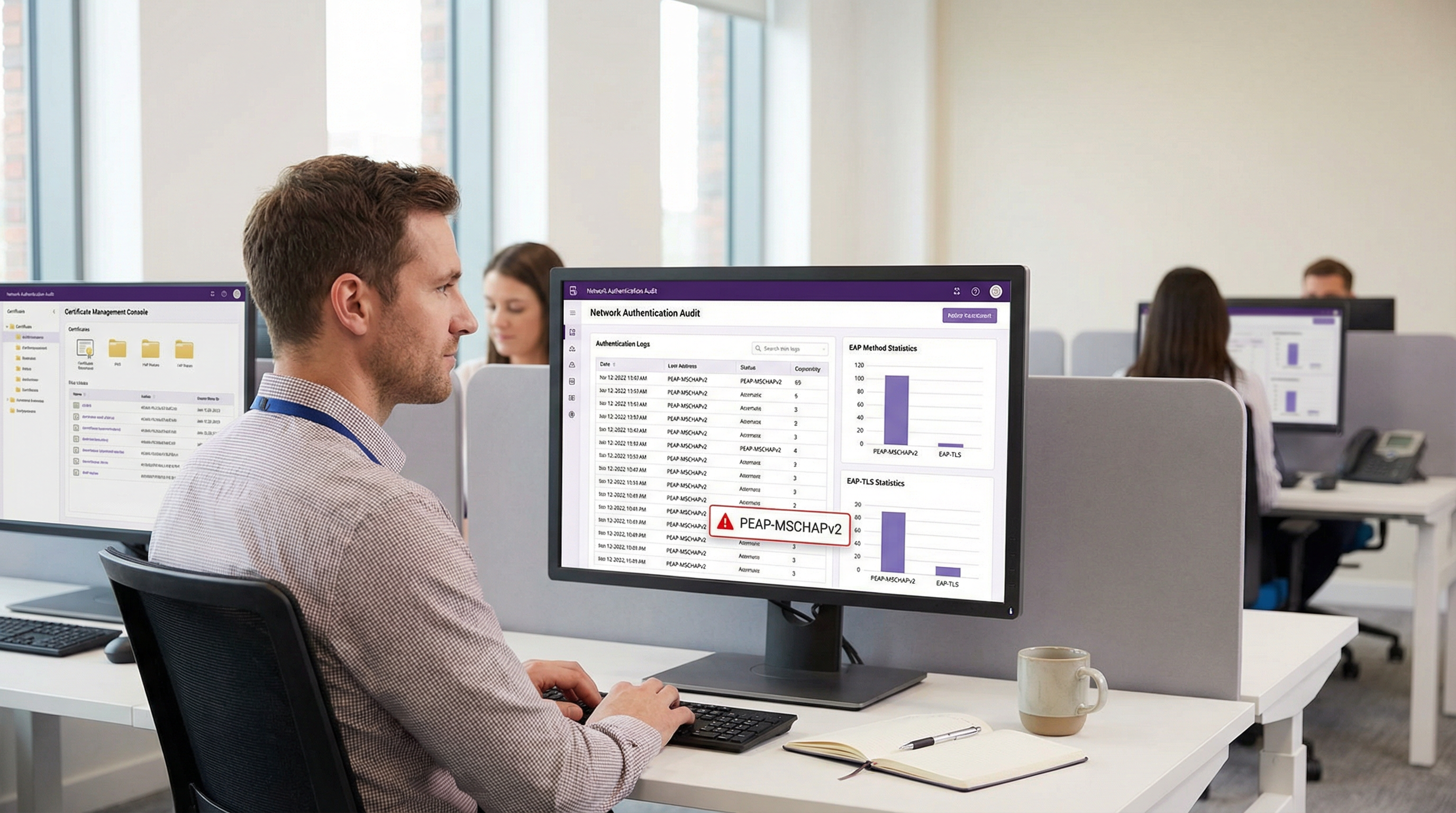
Malgré des vulnérabilités cryptographiques bien documentées, PEAP-MSCHAPv2 reste la méthode EAP la plus largement déployée pour l'authentification WiFi d'entreprise dans les secteurs de l'hôtellerie, du commerce de détail et du secteur public. Sa prévalence continue est dictée par la facilité de déploiement — spécifiquement son intégration native avec Active Directory — plutôt que par son efficacité sécuritaire. Cependant, le profil de risque a radicalement changé. Les outils d'exploitation automatisés ont banalisé l'attaque "evil twin", permettant aux acteurs malveillants de capturer et de casser les hachages de défi-réponse MSCHAPv2 avec un effort dérisoire, menant directement à la compromission des identifiants Active Directory.
Pour les directeurs IT et les architectes réseau, le mandat est clair : PEAP-MSCHAPv2 n'est plus adapté à aucun environnement soumis à des cadres de conformité tels que PCI DSS ou GDPR. Ce guide propose une analyse critique des vecteurs d'attaque spécifiques ciblant PEAP-MSCHAPv2 et trace un chemin de migration pragmatique et progressif vers EAP-TLS. En s'appuyant sur les solutions modernes de Mobile Device Management (MDM) et d'infrastructure à clés publiques (PKI) dans le cloud, les organisations peuvent passer à une authentification robuste basée sur des certificats sans perturber les opérations commerciales ni exclure les appareils hérités.
Analyse technique approfondie : l'anatomie de la vulnérabilité
Pour comprendre pourquoi PEAP-MSCHAPv2 doit être abandonné, il faut examiner son architecture cryptographique sous-jacente. MSCHAPv2 (Microsoft Challenge Handshake Authentication Protocol version 2) a été conçu à la fin des années 1990 et repose sur l'algorithme de hachage MD4 et le standard de chiffrement DES (Data Encryption Standard) [1]. Les deux sont considérés comme obsolètes selon les normes cryptographiques modernes.
La faille cryptographique
La faiblesse fondamentale réside dans la manière dont MSCHAPv2 gère le hachage NT du mot de passe de l'utilisateur. Le protocole divise une clé de 21 octets dérivée du hachage NT en trois clés DES de 7 octets. Crucialement, la troisième clé n'utilise que deux octets significatifs du hachage, complétant le reste par des octets nuls. Cette faille structurelle réduit la complexité cryptographique de manière exponentielle.
En 2012, le chercheur en sécurité Moxie Marlinspike a démontré que le handshake MSCHAPv2 pouvait être cassé de manière déterministe en réduisant le problème au cassage d'une seule clé DES [2]. En utilisant des services de cassage basés sur le cloud ou des plateformes GPU modernes exécutant des outils comme hashcat, un attaquant peut récupérer le mot de passe Active Directory en clair à partir d'un handshake capturé en quelques heures, quelle que soit la complexité du mot de passe.
Le vecteur d'attaque "Evil Twin"
La faiblesse cryptographique est exploitée dans la nature via l'attaque "evil twin". Dans un scénario typique au sein d'un bureau d'entreprise ou d'un établissement de l' Hôtellerie :
- Déploiement d'un point d'accès pirate : L'attaquant déploie un point d'accès pirate diffusant le SSID d'entreprise cible (ex: "Staff-WiFi").
- Dominance du signal : Le point d'accès pirate fonctionne à une puissance d'émission plus élevée, forçant les appareils clients à proximité à s'y associer plutôt qu'à l'infrastructure légitime.
- Fausse authentification RADIUS : Lorsque le client initialise le tunnel PEAP, le point d'accès pirate relaie la requête vers un serveur RADIUS contrôlé par l'attaquant (tel que hostapd-wpe).
- Échec de la validation du certificat : Le serveur RADIUS pirate présente un certificat numérique auto-signé ou non vérifié. Si l'appareil client est mal configuré pour contourner la validation stricte du certificat du serveur — ou si l'utilisateur clique simplement sur "Accepter" lors d'une invite de confiance — le tunnel est établi.
- Capture des identifiants : Le client transmet le défi-réponse MSCHAPv2 via le tunnel compromis. L'attaquant capture le hachage et met fin à la connexion.
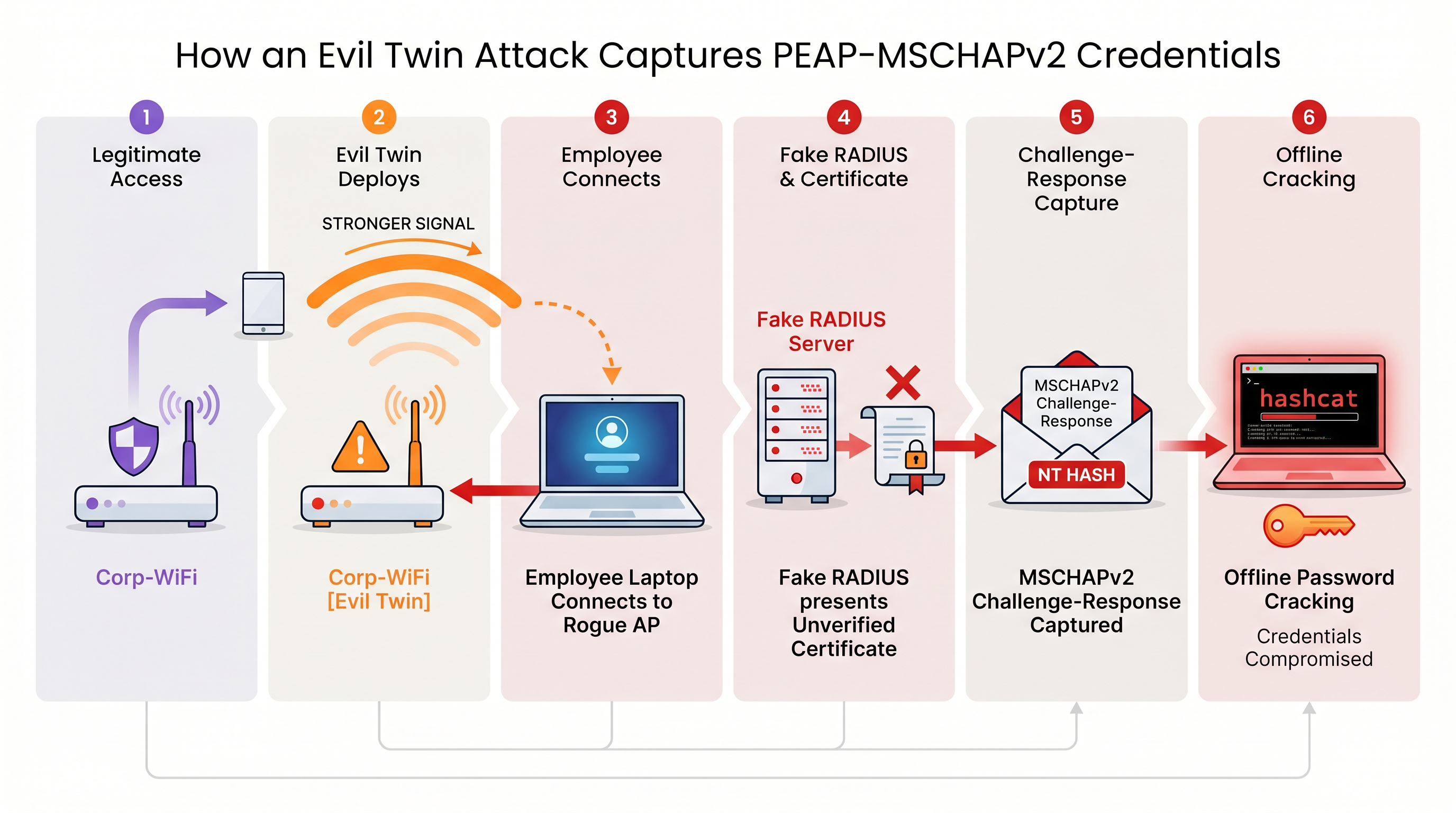
Sans une validation stricte du certificat du serveur imposée au niveau du terminal, chaque appareil utilisant PEAP-MSCHAPv2 est vulnérable à cette technique de capture d'identifiants. Ceci est particulièrement préoccupant pour les environnements du Commerce de détail où les réseaux de gestion partagent souvent une proximité physique avec les espaces publics.
Guide de mise en œuvre : migrer vers EAP-TLS
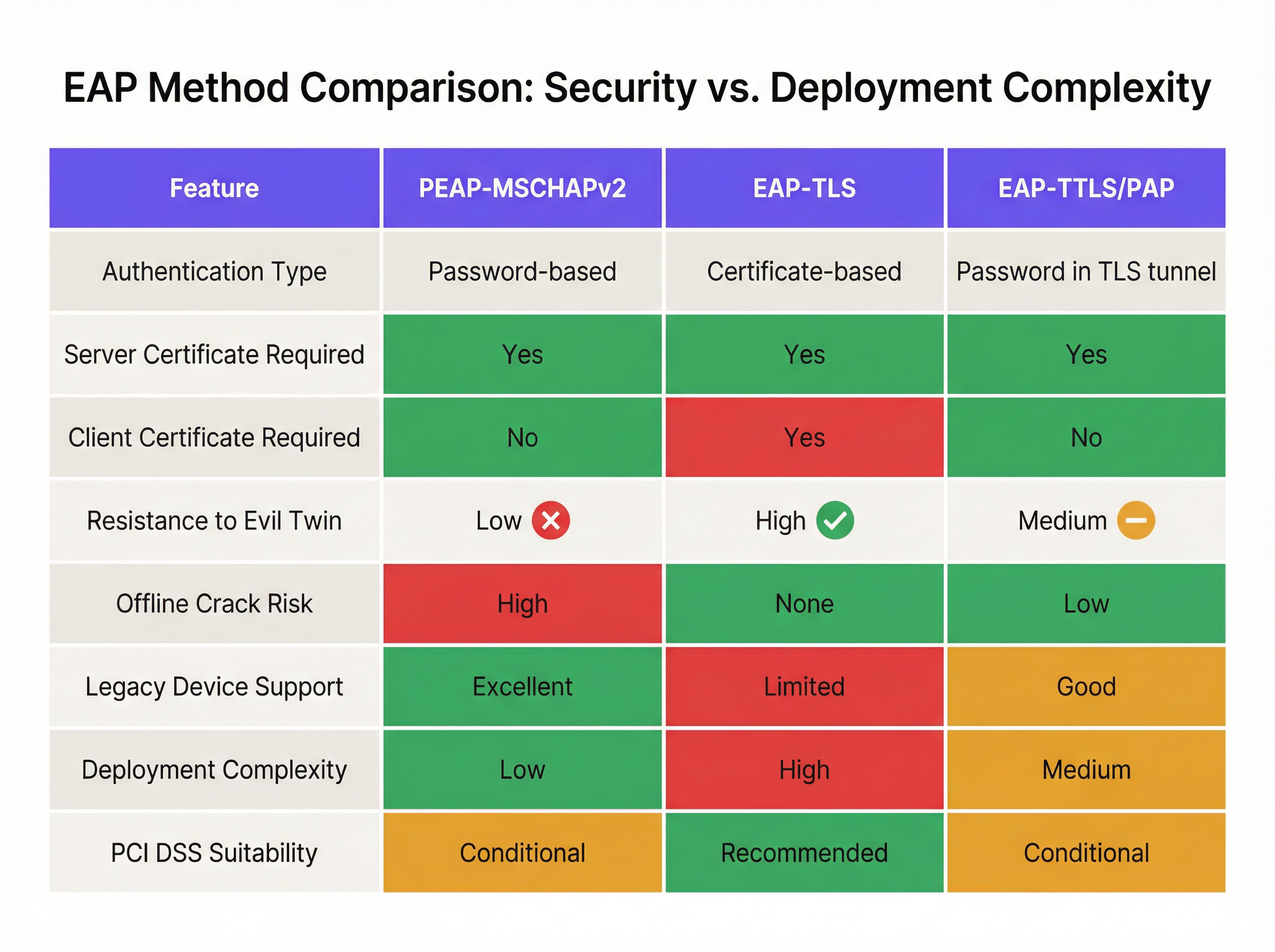
L'atténuation définitive des vulnérabilités MSCHAPv2 est la migration vers EAP-TLS (Extensible Authentication Protocol-Transport Layer Security). EAP-TLS impose une authentification mutuelle : le serveur RADIUS et l'appareil client doivent tous deux présenter des certificats numériques valides. Comme aucun mot de passe n'est transmis ou haché pendant le handshake, EAP-TLS est entièrement immunisé contre les attaques par dictionnaire hors ligne et hautement résistant à l'usurpation par "evil twin".
Historiquement, l'obstacle à l'adoption d'EAP-TLS était la complexité du déploiement d'une infrastructure à clés publiques (PKI) sur site. Aujourd'hui, la PKI cloud et les intégrations MDM modernes ont simplifié le processus.
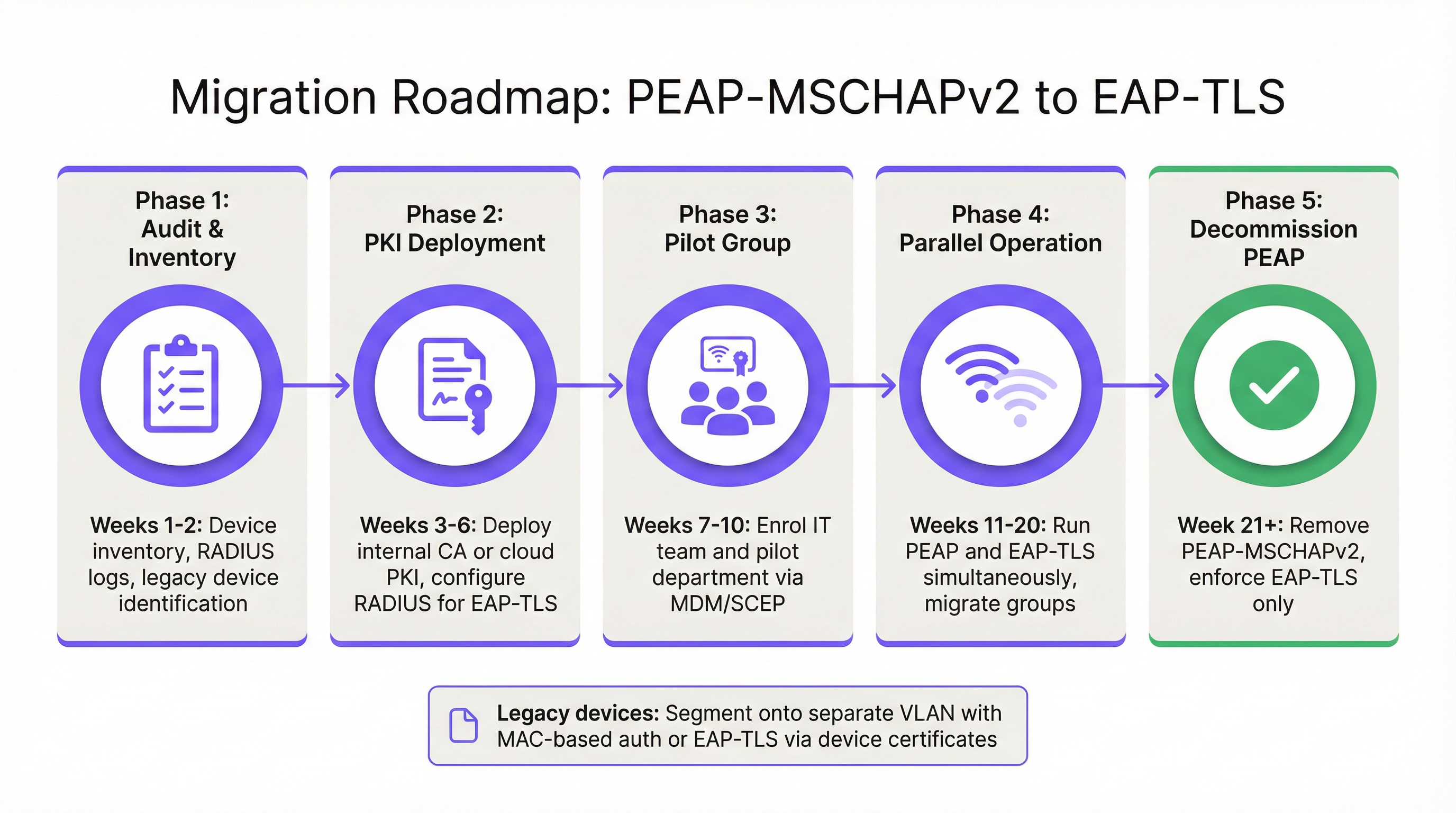
Phase 1 : Audit et inventaire
Avant de modifier les politiques d'authentification, effectuez un audit complet de vos journaux RADIUS actuels (ex: Cisco ISE, Aruba ClearPass ou Windows NPS). Identifiez tous les appareils s'authentifiant actuellement via PEAP. Catégorisez ces appareils en deux groupes :
- Appareils gérés : Ordinateurs portables, tablettes et smartphones d'entreprise enregistrés dans une plateforme MDM (ex: Intune, Jamf).
- Appareils non gérés/hérités : Capteurs IoT, anciens terminaux de point de vente, scanners de codes-barres ou appareils BYOD ne pouvant pas supporter l'enregistrement de certificats.
Phase 2 : Déploiement de la PKI et configuration RADIUS
Déployez une solution PKI pour émettre des certificats clients et serveurs. Les plateformes PKI natives du cloud peuvent s'intégrer directement avec Entra ID ou Google Workspace, éliminant le besoin d'une infrastructure Microsoft AD CS lourde sur site. Configurez votre serveur RADIUS pour accepter l'authentification EAP-TLS. Crucialement, configurez la politique réseau pour supporter simultanément PEAP et EAP-TLS sur le même SSID pendant la période de transition.
Phase 3 : Distribution des certificats via MDM
Utilisez votre plateforme MDM pour distribuer silencieusement les certificats clients aux appareils gérés en utilisant des protocoles comme SCEP (Simple Certificate Enrollment Protocol). Parallèlement, déployez un profil WiFi mis à jour via MDM qui demande aux appareils de prioriser EAP-TLS pour le SSID d'entreprise. Cela garantit une transition sans intervention pour les utilisateurs finaux.
Phase 4 : Gestion des appareils hérités
Les appareils hérités ne pouvant pas supporter EAP-TLS ne devraient jamais dicter la posture de sécurité du réseau d'entreprise principal. Au lieu de cela, segmentez ces appareils sur un VLAN dédié. Implémentez le MAC-based Authentication Bypass (MAB) combiné à des listes de contrôle d'accès (ACL) strictes pour garantir que ces appareils ne peuvent communiquer qu'avec les serveurs internes spécifiques requis pour leur fonction.
Bonnes pratiques et conformité
Le maintien d'un environnement sans fil d'entreprise sécurisé nécessite une adhésion continue aux normes de l'industrie.
- Imposer la validation du certificat du serveur : Si vous devez temporairement maintenir PEAP-MSCHAPv2, utilisez le MDM pour imposer un épinglage strict du certificat du serveur sur tous les terminaux. Empêchez les utilisateurs de faire confiance manuellement à des certificats inconnus.
- Abandonner le WPA2-Personal : Assurez-vous que tous les accès d'entreprise reposent sur le 802.1X (WPA2/WPA3-Enterprise). Les clés pré-partagées (PSK) doivent être strictement limitées aux réseaux IoT isolés.
- S'aligner sur PCI DSS : Pour les établissements traitant des paiements, l'exigence 4 de PCI DSS impose une cryptographie forte pour la transmission des données des titulaires de cartes sur les réseaux sans fil. Le PCI Security Standards Council recommande explicitement EAP-TLS pour une authentification robuste [3].
- Surveiller les analyses : Utilisez des plateformes comme WiFi Analytics de Purple pour surveiller la santé du réseau, identifier les schémas de connexion anormaux et vous assurer que les appareils hérités ne tentent pas d'accéder à des sous-réseaux restreints.
ROI et impact commercial
Le retour sur investissement de la migration vers EAP-TLS se mesure principalement par l'atténuation des risques. Une attaque "evil twin" réussie contre PEAP-MSCHAPv2 permet d'obtenir des identifiants Active Directory valides, offrant aux acteurs malveillants un accès initial au réseau d'entreprise. L'impact financier d'une violation de données, d'un déploiement de ransomware ou d'une amende réglementaire (comme sous le GDPR) dépasse largement le coût opérationnel du déploiement d'une PKI cloud et de la mise à jour des profils MDM.
De plus, l'authentification basée sur des certificats réduit considérablement le volume de tickets au support technique liés aux expirations et aux verrouillages de mots de passe. En passant à EAP-TLS, les équipes IT éliminent les frictions de l'accès WiFi par mot de passe, offrant une expérience de connectivité fluide et sécurisée qui soutient les architectures réseau modernes de type zero-trust.
Références
[1] Microsoft Security Response Center. "Faiblesses de l'authentification MS-CHAPv2." Août 2012. [2] Marlinspike, Moxie. "Vaincre les VPN PPTP et le WPA2 Enterprise avec MS-CHAPv2." DEF CON 20, 2012. [3] PCI Security Standards Council. "Supplément d'information : Directives sans fil PCI DSS."
Termes clés et définitions
PEAP (Protected Extensible Authentication Protocol)
An EAP method that encapsulates the authentication process within a secure TLS tunnel to protect the inner authentication credentials from being intercepted over the air.
Widely used because it only requires a server-side certificate, making it easier to deploy than mutually authenticated methods.
MSCHAPv2
The inner authentication protocol commonly used inside a PEAP tunnel, which relies on a challenge-response mechanism using the NT hash of the user's password.
The primary source of vulnerability in PEAP deployments due to its reliance on outdated MD4 hashing and DES encryption.
EAP-TLS
An EAP method requiring mutual authentication, where both the RADIUS server and the client device present digital certificates to prove their identity.
The industry gold standard for enterprise WiFi security, immune to offline dictionary and evil twin attacks.
Evil Twin Attack
A wireless attack where a rogue access point mimics a legitimate corporate SSID to trick client devices into connecting, allowing the attacker to intercept traffic or capture authentication credentials.
The primary vector used by attackers to capture MSCHAPv2 handshakes from vulnerable PEAP deployments.
RADIUS (Remote Authentication Dial-In User Service)
A networking protocol that provides centralized Authentication, Authorization, and Accounting (AAA) management for users who connect and use a network service.
The core server infrastructure (like Cisco ISE or NPS) that processes 802.1X authentication requests from access points.
PKI (Public Key Infrastructure)
A set of roles, policies, hardware, software, and procedures needed to create, manage, distribute, use, store, and revoke digital certificates.
The foundational infrastructure required to deploy EAP-TLS, increasingly delivered via cloud-native SaaS platforms.
MDM (Mobile Device Management)
Software that allows IT administrators to control, secure, and enforce policies on smartphones, tablets, and endpoints.
Essential for EAP-TLS migrations, as it is used to silently push client certificates and strict WiFi profiles to corporate devices.
MAB (MAC Authentication Bypass)
A port-based access control method that authenticates devices based on their MAC address rather than requiring a username/password or certificate.
Used as a fallback mechanism to authenticate legacy 'headless' devices (like printers) that cannot support 802.1X protocols.
Études de cas
A 400-room hotel chain is currently using PEAP-MSCHAPv2 for its back-of-house staff network. The IT director wants to migrate to EAP-TLS but is concerned about 50 legacy handheld inventory scanners that run an outdated OS and do not support certificate enrollment. How should the network architect handle this migration without breaking inventory operations?
The network architect should implement a segmented approach. First, deploy a cloud PKI and configure the central RADIUS server to accept both EAP-TLS and PEAP-MSCHAPv2. Use the hotel's MDM platform to push client certificates and an updated EAP-TLS WiFi profile to all modern staff laptops and tablets. For the 50 legacy scanners, create a dedicated, hidden SSID mapped to an isolated VLAN. Configure MAC-based Authentication Bypass (MAB) for these specific scanner MAC addresses on the RADIUS server. Apply strict network ACLs to this VLAN so the scanners can only reach the inventory database server and nothing else. Once all modern devices are using EAP-TLS, disable PEAP-MSCHAPv2 on the primary staff network.
A retail organisation has rolled out Windows 11 22H2 to its corporate fleet. The IT helpdesk is suddenly receiving tickets that users cannot connect to the corporate WPA2-Enterprise WiFi network, which uses PEAP-MSCHAPv2. What is the likely cause, and what is the immediate remediation?
The likely cause is the introduction of Windows Defender Credential Guard, which is enabled by default in Windows 11 22H2 and newer. Credential Guard isolates and protects NTLM password hashes and Kerberos Ticket Granting Tickets. Because PEAP-MSCHAPv2 requires access to the NT hash to generate the challenge-response, Credential Guard intentionally breaks this authentication method to prevent credential theft. The immediate remediation is to accelerate the migration to EAP-TLS, which uses certificate-based authentication and is fully compatible with Credential Guard. A temporary, less secure workaround would be disabling Credential Guard via Group Policy, but this is strongly discouraged as it weakens the overall OS security posture.
Analyse de scénario
Q1. You are auditing a newly acquired subsidiary's wireless network. They use PEAP-MSCHAPv2. The IT manager claims they are secure from evil twin attacks because they have hidden the SSID and disabled SSID broadcasting. Is their network secure from credential capture?
💡 Astuce :Consider how client devices behave when configured to connect to hidden networks, and whether hiding an SSID prevents a rogue AP from spoofing it.
Afficher l'approche recommandée
No, the network is not secure. Hiding the SSID (disabling beacon frames) provides zero cryptographic security. In fact, devices configured to connect to hidden networks actively broadcast probe requests containing the SSID name, effectively announcing the hidden network to any attacker listening. An attacker can easily capture the SSID name, spin up an evil twin AP broadcasting that exact SSID, and execute the standard MSCHAPv2 credential capture attack. The only defense is strict server certificate validation or migrating to EAP-TLS.
Q2. During an EAP-TLS migration pilot, you push client certificates to 20 Windows laptops via Intune. However, authentication fails for all 20 devices. The RADIUS server logs show 'Client Certificate Not Trusted'. The client certificates were issued by your new Cloud PKI. What critical configuration step was missed?
💡 Astuce :For mutual authentication to work, both sides must trust the entity that issued the other side's certificate.
Afficher l'approche recommandée
The RADIUS server has not been configured to trust the Root CA of the new Cloud PKI. While the laptops have the correct client certificates, when they present them to the RADIUS server, the server rejects them because it does not have the Cloud PKI's Root/Intermediate certificates in its local trust store. You must import the public Root CA certificate of the Cloud PKI into the RADIUS server's trusted certificate authorities store.
Q3. Your organisation mandates EAP-TLS for the corporate WiFi. A senior executive insists on connecting their personal, unmanaged iPad to the corporate network to access internal financial dashboards. How do you accommodate this request while maintaining the EAP-TLS security posture?
💡 Astuce :Consider the prerequisites for EAP-TLS and the definition of a 'managed' device.
Afficher l'approche recommandée
You cannot securely accommodate this request on the primary corporate network without compromising the EAP-TLS architecture. EAP-TLS requires a client certificate. Because the iPad is unmanaged (BYOD), the IT department cannot securely push a certificate via MDM. Allowing the executive to manually install a certificate introduces significant risk and administrative overhead. The correct approach is to deny access to the corporate SSID. Instead, the executive should connect to the Guest WiFi and use a secure corporate VPN (which supports modern MFA/SAML authentication) to access internal resources, or the device must be enrolled in the corporate MDM to receive a certificate.
Points clés à retenir
- ✓PEAP-MSCHAPv2 relies on obsolete cryptography (MD4 and DES) that can be trivially cracked offline.
- ✓The protocol is highly vulnerable to 'Evil Twin' attacks if endpoint devices do not strictly validate the RADIUS server certificate.
- ✓Modern Windows updates (Credential Guard) are actively breaking MSCHAPv2 authentication to prevent hash theft.
- ✓EAP-TLS is the definitive replacement, offering mutual authentication via digital certificates and immunity to offline cracking.
- ✓Cloud PKI and modern MDM platforms have drastically reduced the complexity and cost of deploying EAP-TLS.
- ✓Legacy devices incompatible with EAP-TLS must be segmented onto dedicated, restricted VLANs rather than degrading primary network security.




