

PEAP-MSCHAPv2: Perché è ancora comune, perché è rischioso e come evolvere
Una guida tecnica di riferimento completa che dettaglia le vulnerabilità critiche di sicurezza di PEAP-MSCHAPv2, inclusi gli attacchi evil twin e la cattura delle credenziali. Fornisce una roadmap pratica e neutrale rispetto ai vendor per i team IT per migrare le reti WiFi aziendali verso l'autenticazione sicura EAP-TLS basata su certificati.
🎧 Ascolta questa guida
Visualizza trascrizione
Sintesi Esecutiva
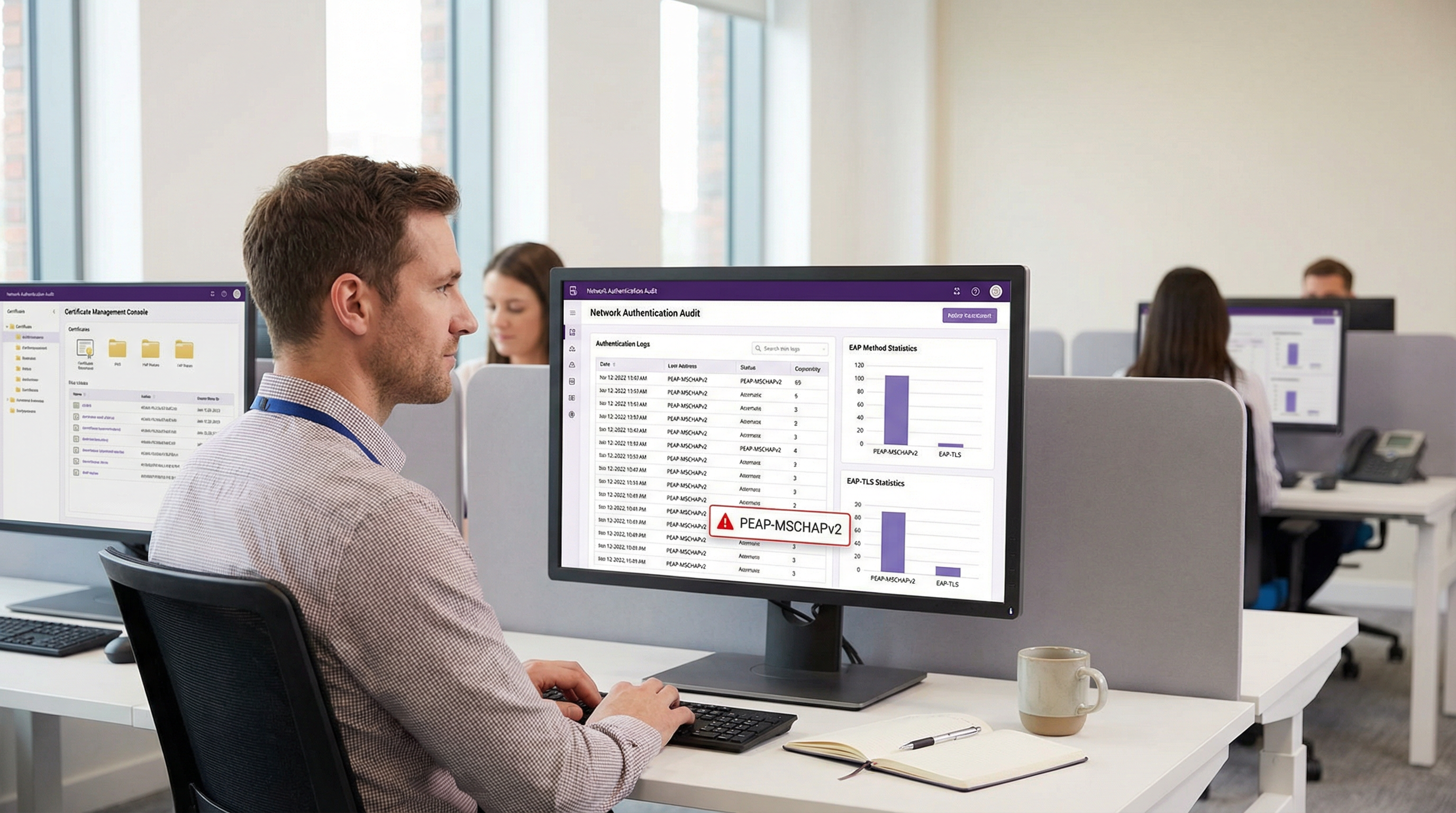
Nonostante le vulnerabilità crittografiche ben documentate, PEAP-MSCHAPv2 rimane il metodo EAP più diffuso per l'autenticazione WiFi aziendale nei settori dell'ospitalità, del retail e pubblico. La sua continua prevalenza è guidata dalla facilità di implementazione — in particolare la sua integrazione nativa con Active Directory — piuttosto che dall'efficacia della sicurezza. Tuttavia, il profilo di rischio è cambiato drasticamente. Gli strumenti di sfruttamento automatizzati hanno reso l'attacco "evil twin" una minaccia comune, consentendo agli attori delle minacce di catturare e decifrare gli hash challenge-response di MSCHAPv2 con uno sforzo minimo, portando direttamente alla compromissione delle credenziali di Active Directory.
Per i direttori IT e gli architetti di rete, il mandato è chiaro: PEAP-MSCHAPv2 non è più idoneo allo scopo in alcun ambiente soggetto a framework di conformità come PCI DSS o GDPR. Questa guida fornisce un'analisi critica dei vettori di attacco specifici che prendono di mira PEAP-MSCHAPv2 e delinea un percorso di migrazione pragmatico e graduale verso EAP-TLS. Sfruttando le moderne soluzioni di Mobile Device Management (MDM) e Public Key Infrastructure (PKI) in cloud, le organizzazioni possono passare a una solida autenticazione basata su certificati senza interrompere le operazioni aziendali o alienare i dispositivi legacy.
Approfondimento Tecnico: L'Anatomia della Vulnerabilità
Per capire perché PEAP-MSCHAPv2 deve essere deprecato, è necessario esaminare la sua architettura crittografica sottostante. MSCHAPv2 (Microsoft Challenge Handshake Authentication Protocol versione 2) è stato progettato alla fine degli anni '90 e si basa sull'algoritmo di hashing MD4 e sul Data Encryption Standard (DES) [1]. Entrambi sono considerati obsoleti dagli standard crittografici moderni.
Il Difetto Crittografico
La debolezza fondamentale risiede nel modo in cui MSCHAPv2 gestisce l'hash NT della password dell'utente. Il protocollo divide una chiave di 21 byte derivata dall'hash NT in tre chiavi DES da 7 byte. Fondamentalmente, la terza chiave utilizza solo due byte significativi dell'hash, riempiendo il resto con byte nulli. Questo difetto strutturale riduce esponenzialmente la complessità crittografica.
Nel 2012, il ricercatore di sicurezza Moxie Marlinspike ha dimostrato che l'handshake MSCHAPv2 poteva essere violato in modo deterministico riducendo il problema alla violazione di una singola chiave DES [2]. Utilizzando servizi di cracking basati su cloud o moderni sistemi GPU che eseguono strumenti come hashcat, un attaccante può recuperare la password in chiaro di Active Directory da un handshake catturato in poche ore, indipendentemente dalla complessità della password.
Il Vettore di Attacco Evil Twin
La debolezza crittografica viene sfruttata nel mondo reale tramite l'attacco "evil twin". In uno scenario tipico in un ufficio aziendale o in una struttura Hospitality :
- Distribuzione di un AP Rogue: L'attaccante distribuisce un access point non autorizzato che trasmette l'SSID aziendale di destinazione (ad esempio, "Staff-WiFi").
- Dominanza del Segnale: L'AP rogue opera a una potenza di trasmissione più elevata, costringendo i dispositivi client vicini ad associarsi ad esso invece che all'infrastruttura legittima.
- Falsa Autenticazione RADIUS: Quando il client avvia il tunnel PEAP, l'AP rogue inoltra la richiesta a un server RADIUS controllato dall'attaccante (come hostapd-wpe).
- Fallimento della Validazione del Certificato: Il server RADIUS rogue presenta un certificato digitale auto-firmato o non verificato. Se il dispositivo client è configurato in modo errato per bypassare la validazione rigorosa del certificato del server — o se l'utente clicca semplicemente su "Accetta" a una richiesta di attendibilità — il tunnel viene stabilito.
- Cattura delle Credenziali: Il client trasmette il challenge-response MSCHAPv2 attraverso il tunnel compromesso. L'attaccante cattura l'hash e termina la connessione.
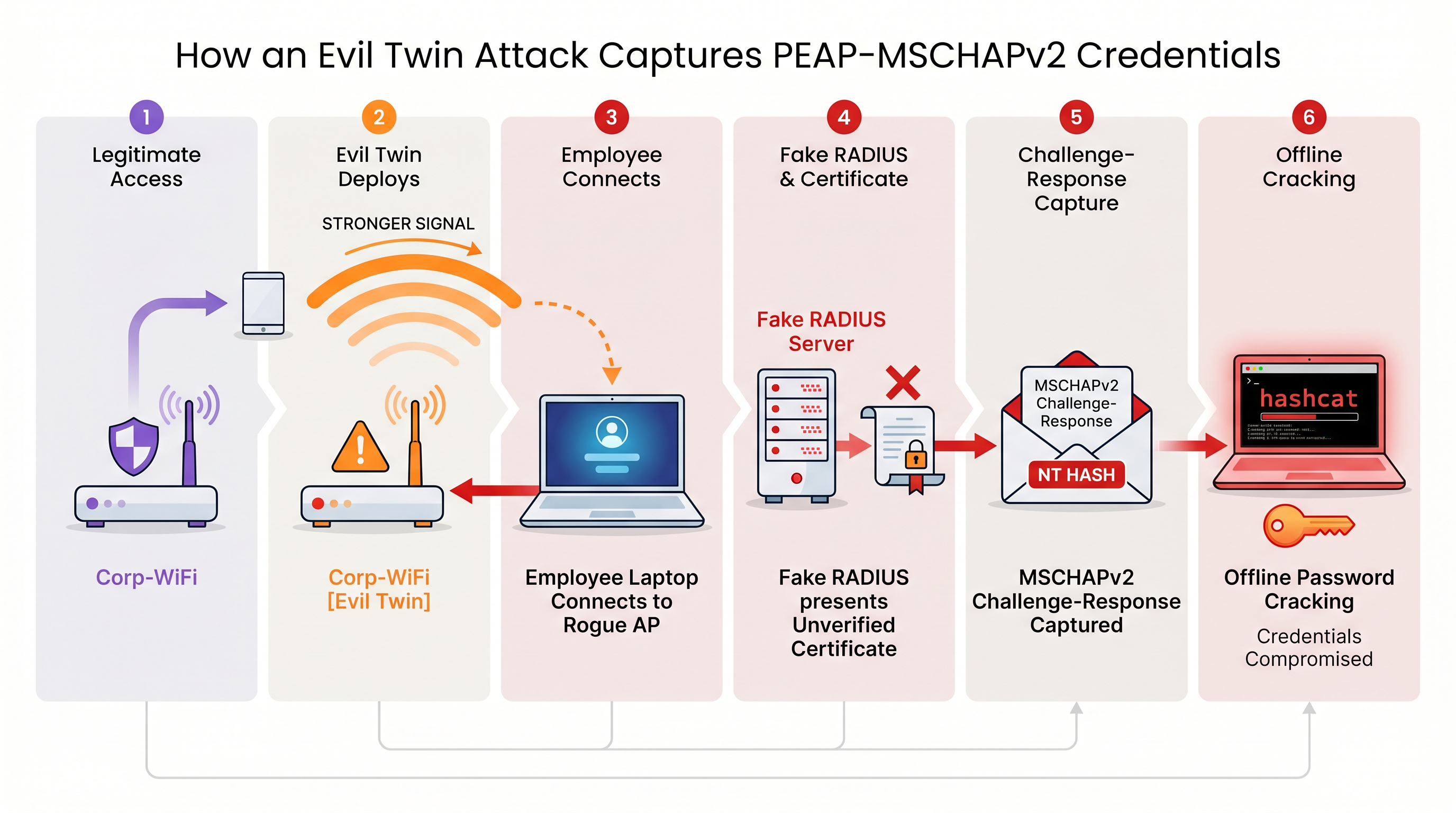
Senza una rigorosa validazione del certificato del server imposta a livello di endpoint, ogni dispositivo che utilizza PEAP-MSCHAPv2 è vulnerabile a questa tecnica di cattura delle credenziali. Ciò è particolarmente preoccupante per gli ambienti Retail dove le reti del back-office condividono spesso la vicinanza fisica con gli spazi pubblici.
Guida all'Implementazione: Migrazione a EAP-TLS
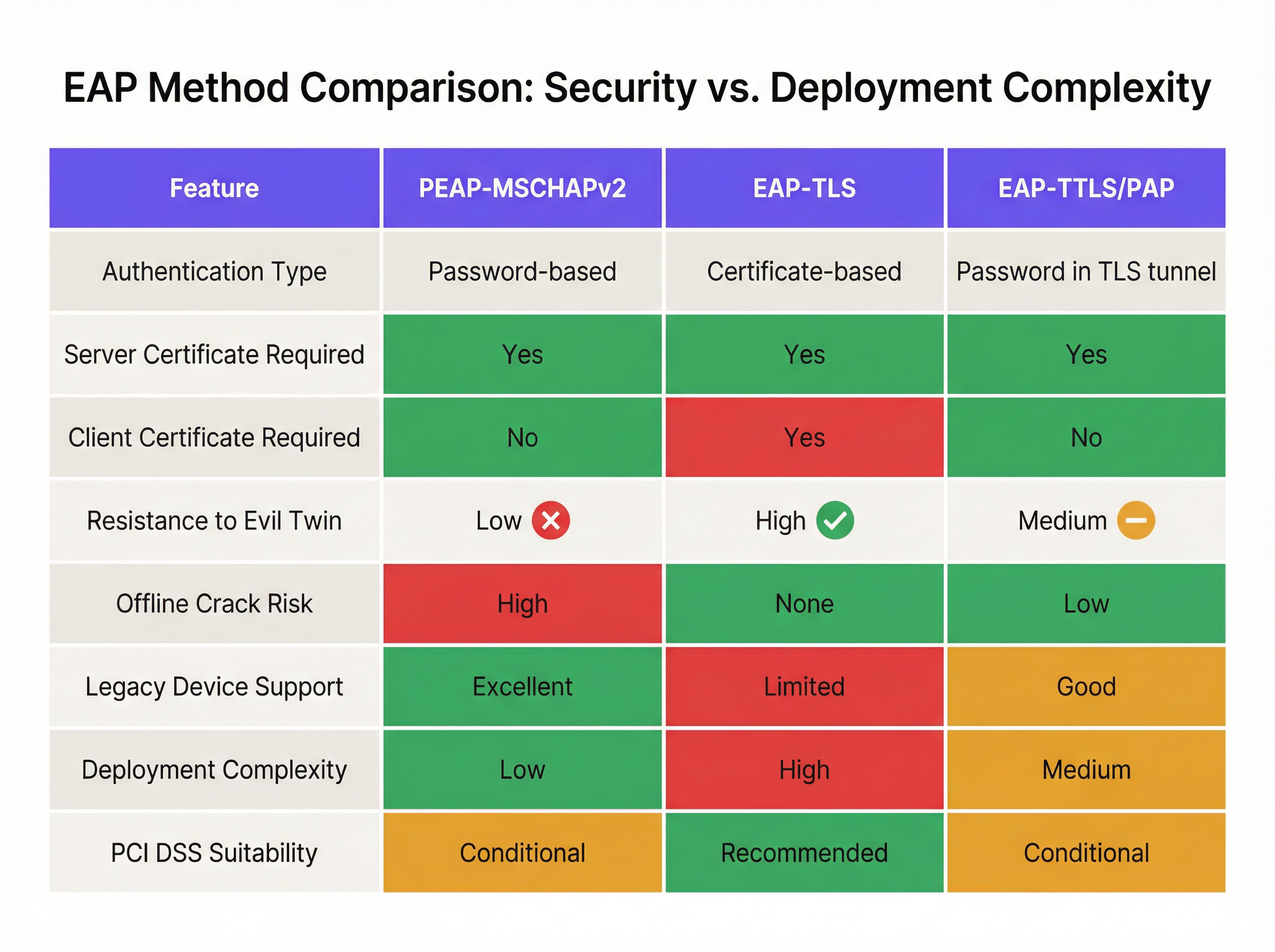
La mitigazione definitiva per le vulnerabilità di MSCHAPv2 è la migrazione a EAP-TLS (Extensible Authentication Protocol-Transport Layer Security). EAP-TLS impone l'autenticazione reciproca: sia il server RADIUS che il dispositivo client devono presentare certificati digitali validi. Poiché non vengono trasmesse o hashate password durante l'handshake, EAP-TLS è del tutto immune agli attacchi a dizionario offline e altamente resistente allo spoofing evil twin.
Storicamente, l'ostacolo all'adozione di EAP-TLS era la complessità di implementare una Public Key Infrastructure (PKI) on-premise. Oggi, la PKI in cloud e le moderne integrazioni MDM hanno semplificato il processo.
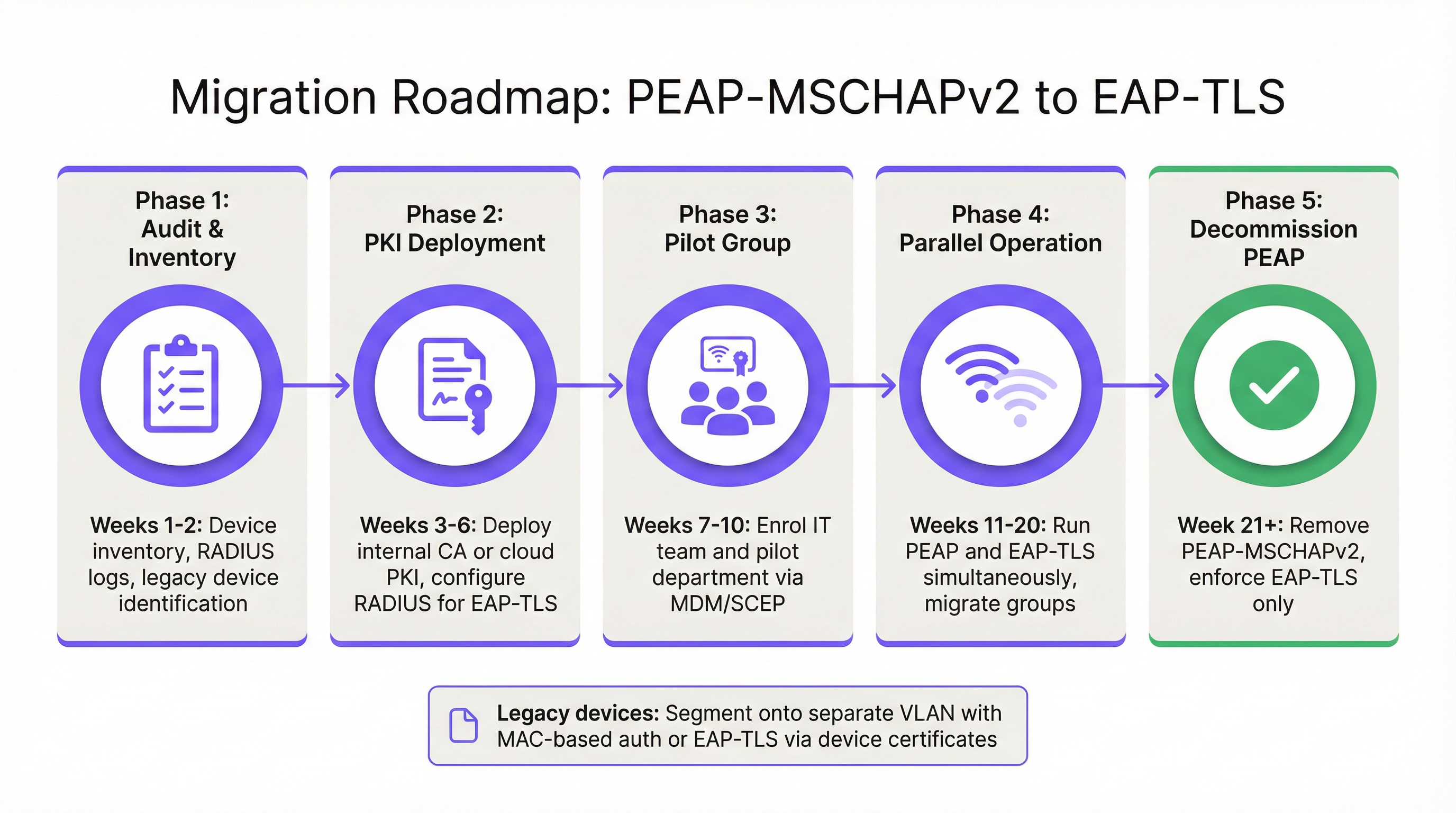
Fase 1: Audit e Inventario
Prima di modificare le policy di autenticazione, esegui un audit completo dei log RADIUS correnti (ad esempio, Cisco ISE, Aruba ClearPass o Windows NPS). Identifica tutti i dispositivi che si autenticano attualmente tramite PEAP. Categorizza questi dispositivi in due gruppi:
- Dispositivi Gestiti: Laptop, tablet e smartphone aziendali registrati in una piattaforma MDM (ad esempio, Intune, Jamf).
- Dispositivi non Gestiti/Legacy: Sensori IoT, vecchi terminali point-of-sale, scanner di codici a barre o dispositivi BYOD che non possono supportare la registrazione dei certificati.
Fase 2: Distribuzione PKI e Configurazione RADIUS
Distribuisci una soluzione PKI per emettere certificati client e server. Le piattaforme PKI cloud-native possono integrarsi direttamente con Entra ID o Google Workspace, eliminando la necessità di una pesante infrastruttura Microsoft AD CS on-premise. Configura il tuo server RADIUS per accettare l'autenticazione EAP-TLS. Fondamentalmente, configura la network policy per supportare contemporaneamente sia PEAP che EAP-TLS sullo stesso SSID durante il periodo di transizione.
Fase 3: Distribuzione dei Certificati tramite MDM
Sfrutta la tua piattaforma MDM per distribuire silenziosamente i certificati client ai dispositivi gestiti utilizzando protocolli come SCEP (Simple Certificate Enrollment Protocol). Contemporaneamente, invia un payload del profilo WiFi aggiornato tramite MDM che istruisca i dispositivi a dare priorità a EAP-TLS per l'SSID aziendale. Ciò garantisce una transizione zero-touch per gli utenti finali.
Fase 4: Gestione dei Dispositivi Legacy
I dispositivi legacy che non possono supportare EAP-TLS non dovrebbero mai dettare la postura di sicurezza della rete aziendale primaria. Invece, segmenta questi dispositivi su una VLAN dedicata. Implementa il MAC-based Authentication Bypass (MAB) combinato con Access Control Lists (ACL) rigorose per garantire che questi dispositivi possano comunicare solo con i server interni specifici richiesti per la loro funzione.
Best Practice e Conformità
Mantenere un ambiente wireless aziendale sicuro richiede l'adesione continua agli standard di settore.
- Imponi la Validazione del Certificato del Server: Se devi mantenere temporaneamente PEAP-MSCHAPv2, usa l'MDM per imporre il pinning rigoroso del certificato del server su tutti gli endpoint. Impedisci agli utenti di considerare attendibili manualmente certificati sconosciuti.
- Depreca WPA2-Personal: Assicurati che tutti gli accessi aziendali si basino su 802.1X (WPA2/WPA3-Enterprise). Le Pre-Shared Keys (PSK) dovrebbero essere rigorosamente limitate a reti IoT isolate.
- Allineati con PCI DSS: Per i locali che elaborano pagamenti, il requisito 4 di PCI DSS impone una crittografia forte per la trasmissione dei dati dei titolari di carta su reti wireless. Il PCI Security Standards Council raccomanda esplicitamente EAP-TLS per un'autenticazione robusta [3].
- Monitora gli Analytics: Utilizza piattaforme come WiFi Analytics di Purple per monitorare lo stato della rete, identificare modelli di connessione anomali e garantire che i dispositivi legacy non tentino di accedere a sottoreti limitate.
ROI e Impatto Aziendale
Il ritorno sull'investimento per la migrazione a EAP-TLS si misura principalmente nella mitigazione del rischio. Un attacco evil twin riuscito contro PEAP-MSCHAPv2 produce credenziali di Active Directory valide, fornendo agli attori delle minacce l'accesso iniziale alla rete aziendale. L'impatto finanziario di una conseguente violazione dei dati, della distribuzione di ransomware o di una sanzione normativa (come ai sensi del GDPR) supera di gran lunga il costo operativo della distribuzione di una PKI in cloud e dell'aggiornamento dei profili MDM.
Inoltre, l'autenticazione basata su certificati riduce significativamente il volume dei ticket all'helpdesk relativi alla scadenza e al blocco delle password. Passando a EAP-TLS, i team IT eliminano l'attrito dell'accesso WiFi basato su password, offrendo un'esperienza di connettività fluida e sicura che supporta le moderne architetture di rete zero-trust.
Riferimenti
[1] Microsoft Security Response Center. "Weaknesses in MS-CHAPv2 authentication." Agosto 2012. [2] Marlinspike, Moxie. "Defeating PPTP VPNs and WPA2 Enterprise with MS-CHAPv2." DEF CON 20, 2012. [3] PCI Security Standards Council. "Information Supplement: PCI DSS Wireless Guidelines."
Termini chiave e definizioni
PEAP (Protected Extensible Authentication Protocol)
An EAP method that encapsulates the authentication process within a secure TLS tunnel to protect the inner authentication credentials from being intercepted over the air.
Widely used because it only requires a server-side certificate, making it easier to deploy than mutually authenticated methods.
MSCHAPv2
The inner authentication protocol commonly used inside a PEAP tunnel, which relies on a challenge-response mechanism using the NT hash of the user's password.
The primary source of vulnerability in PEAP deployments due to its reliance on outdated MD4 hashing and DES encryption.
EAP-TLS
An EAP method requiring mutual authentication, where both the RADIUS server and the client device present digital certificates to prove their identity.
The industry gold standard for enterprise WiFi security, immune to offline dictionary and evil twin attacks.
Evil Twin Attack
A wireless attack where a rogue access point mimics a legitimate corporate SSID to trick client devices into connecting, allowing the attacker to intercept traffic or capture authentication credentials.
The primary vector used by attackers to capture MSCHAPv2 handshakes from vulnerable PEAP deployments.
RADIUS (Remote Authentication Dial-In User Service)
A networking protocol that provides centralized Authentication, Authorization, and Accounting (AAA) management for users who connect and use a network service.
The core server infrastructure (like Cisco ISE or NPS) that processes 802.1X authentication requests from access points.
PKI (Public Key Infrastructure)
A set of roles, policies, hardware, software, and procedures needed to create, manage, distribute, use, store, and revoke digital certificates.
The foundational infrastructure required to deploy EAP-TLS, increasingly delivered via cloud-native SaaS platforms.
MDM (Mobile Device Management)
Software that allows IT administrators to control, secure, and enforce policies on smartphones, tablets, and endpoints.
Essential for EAP-TLS migrations, as it is used to silently push client certificates and strict WiFi profiles to corporate devices.
MAB (MAC Authentication Bypass)
A port-based access control method that authenticates devices based on their MAC address rather than requiring a username/password or certificate.
Used as a fallback mechanism to authenticate legacy 'headless' devices (like printers) that cannot support 802.1X protocols.
Casi di studio
A 400-room hotel chain is currently using PEAP-MSCHAPv2 for its back-of-house staff network. The IT director wants to migrate to EAP-TLS but is concerned about 50 legacy handheld inventory scanners that run an outdated OS and do not support certificate enrollment. How should the network architect handle this migration without breaking inventory operations?
The network architect should implement a segmented approach. First, deploy a cloud PKI and configure the central RADIUS server to accept both EAP-TLS and PEAP-MSCHAPv2. Use the hotel's MDM platform to push client certificates and an updated EAP-TLS WiFi profile to all modern staff laptops and tablets. For the 50 legacy scanners, create a dedicated, hidden SSID mapped to an isolated VLAN. Configure MAC-based Authentication Bypass (MAB) for these specific scanner MAC addresses on the RADIUS server. Apply strict network ACLs to this VLAN so the scanners can only reach the inventory database server and nothing else. Once all modern devices are using EAP-TLS, disable PEAP-MSCHAPv2 on the primary staff network.
A retail organisation has rolled out Windows 11 22H2 to its corporate fleet. The IT helpdesk is suddenly receiving tickets that users cannot connect to the corporate WPA2-Enterprise WiFi network, which uses PEAP-MSCHAPv2. What is the likely cause, and what is the immediate remediation?
The likely cause is the introduction of Windows Defender Credential Guard, which is enabled by default in Windows 11 22H2 and newer. Credential Guard isolates and protects NTLM password hashes and Kerberos Ticket Granting Tickets. Because PEAP-MSCHAPv2 requires access to the NT hash to generate the challenge-response, Credential Guard intentionally breaks this authentication method to prevent credential theft. The immediate remediation is to accelerate the migration to EAP-TLS, which uses certificate-based authentication and is fully compatible with Credential Guard. A temporary, less secure workaround would be disabling Credential Guard via Group Policy, but this is strongly discouraged as it weakens the overall OS security posture.
Analisi degli scenari
Q1. You are auditing a newly acquired subsidiary's wireless network. They use PEAP-MSCHAPv2. The IT manager claims they are secure from evil twin attacks because they have hidden the SSID and disabled SSID broadcasting. Is their network secure from credential capture?
💡 Suggerimento:Consider how client devices behave when configured to connect to hidden networks, and whether hiding an SSID prevents a rogue AP from spoofing it.
Mostra l'approccio consigliato
No, the network is not secure. Hiding the SSID (disabling beacon frames) provides zero cryptographic security. In fact, devices configured to connect to hidden networks actively broadcast probe requests containing the SSID name, effectively announcing the hidden network to any attacker listening. An attacker can easily capture the SSID name, spin up an evil twin AP broadcasting that exact SSID, and execute the standard MSCHAPv2 credential capture attack. The only defense is strict server certificate validation or migrating to EAP-TLS.
Q2. During an EAP-TLS migration pilot, you push client certificates to 20 Windows laptops via Intune. However, authentication fails for all 20 devices. The RADIUS server logs show 'Client Certificate Not Trusted'. The client certificates were issued by your new Cloud PKI. What critical configuration step was missed?
💡 Suggerimento:For mutual authentication to work, both sides must trust the entity that issued the other side's certificate.
Mostra l'approccio consigliato
The RADIUS server has not been configured to trust the Root CA of the new Cloud PKI. While the laptops have the correct client certificates, when they present them to the RADIUS server, the server rejects them because it does not have the Cloud PKI's Root/Intermediate certificates in its local trust store. You must import the public Root CA certificate of the Cloud PKI into the RADIUS server's trusted certificate authorities store.
Q3. Your organisation mandates EAP-TLS for the corporate WiFi. A senior executive insists on connecting their personal, unmanaged iPad to the corporate network to access internal financial dashboards. How do you accommodate this request while maintaining the EAP-TLS security posture?
💡 Suggerimento:Consider the prerequisites for EAP-TLS and the definition of a 'managed' device.
Mostra l'approccio consigliato
You cannot securely accommodate this request on the primary corporate network without compromising the EAP-TLS architecture. EAP-TLS requires a client certificate. Because the iPad is unmanaged (BYOD), the IT department cannot securely push a certificate via MDM. Allowing the executive to manually install a certificate introduces significant risk and administrative overhead. The correct approach is to deny access to the corporate SSID. Instead, the executive should connect to the Guest WiFi and use a secure corporate VPN (which supports modern MFA/SAML authentication) to access internal resources, or the device must be enrolled in the corporate MDM to receive a certificate.
Punti chiave
- ✓PEAP-MSCHAPv2 relies on obsolete cryptography (MD4 and DES) that can be trivially cracked offline.
- ✓The protocol is highly vulnerable to 'Evil Twin' attacks if endpoint devices do not strictly validate the RADIUS server certificate.
- ✓Modern Windows updates (Credential Guard) are actively breaking MSCHAPv2 authentication to prevent hash theft.
- ✓EAP-TLS is the definitive replacement, offering mutual authentication via digital certificates and immunity to offline cracking.
- ✓Cloud PKI and modern MDM platforms have drastically reduced the complexity and cost of deploying EAP-TLS.
- ✓Legacy devices incompatible with EAP-TLS must be segmented onto dedicated, restricted VLANs rather than degrading primary network security.




