

RADIUS Accounting: Seguimiento de sesiones, uso y registros de auditoría
Esta guía proporciona una referencia técnica exhaustiva sobre RADIUS accounting: cómo registra los datos de inicio, finalización y actualizaciones provisionales de las sesiones WiFi, qué atributos se capturan y cómo aprovechar esos datos para auditorías de seguridad, cumplimiento de GDPR y planificación de capacidad. Es una lectura esencial para los equipos de operaciones de red y seguridad que necesitan registros de auditoría defendibles de los eventos de autenticación WiFi, y para los operadores de recintos que buscan integrar los datos de sesión en plataformas SIEM y tableros de analítica.
🎧 Escucha esta guía
Ver transcripción
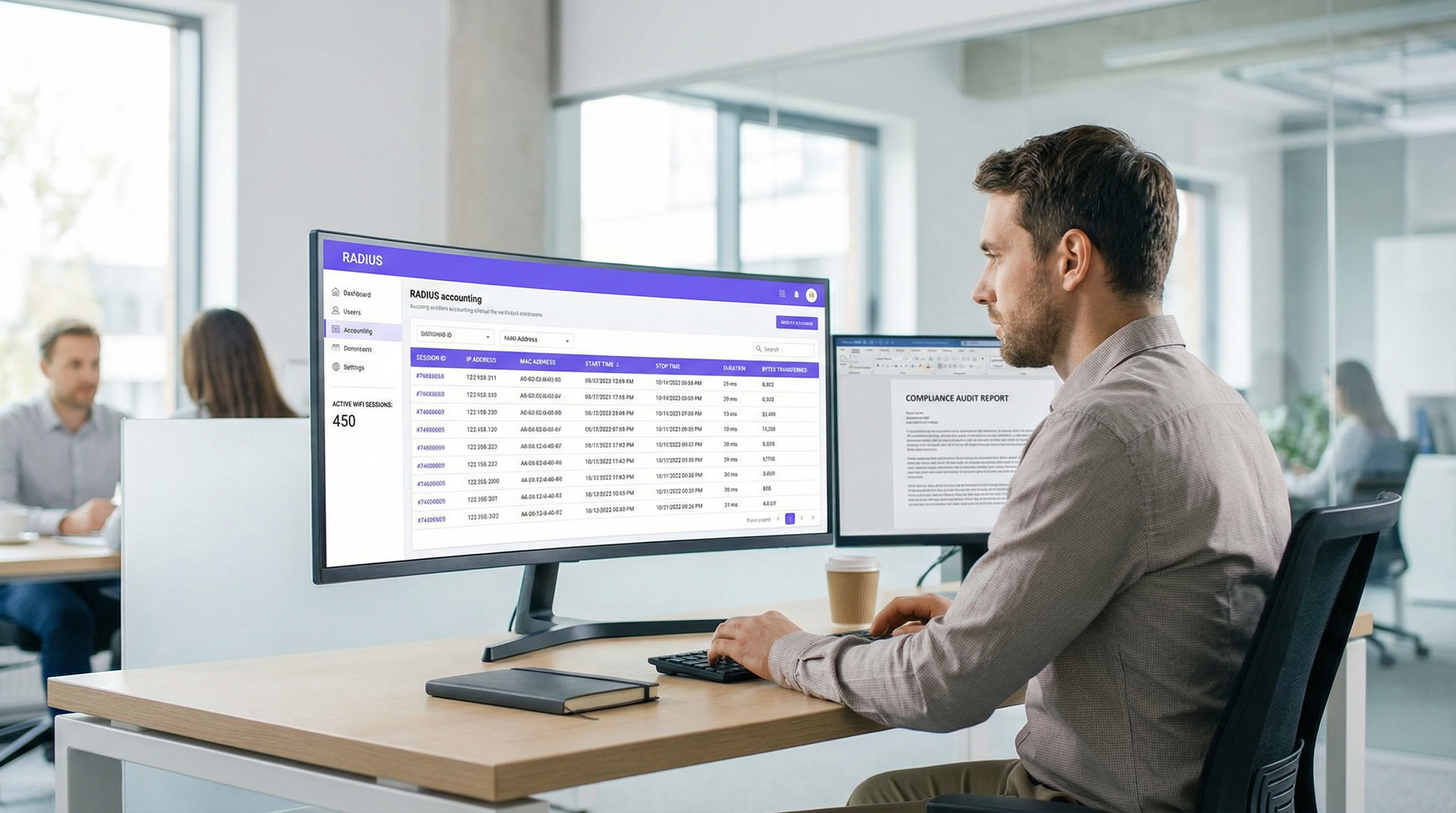
Resumen ejecutivo
Para los equipos de TI y operaciones de red empresariales, autenticar a los usuarios en una red WiFi es solo la mitad de la batalla. Una vez que un dispositivo está conectado, comprender qué hace ese dispositivo —cuánto tiempo permanece conectado, cuántos datos consume y cuándo se desconecta— es fundamental para la seguridad, la planificación de la capacidad y el cumplimiento normativo. Aquí es donde RADIUS accounting se vuelve indispensable. Mientras que la autenticación RADIUS gestiona el quién y el cómo del acceso a la red, RADIUS accounting registra meticulosamente el qué, el cuándo y el cuánto.
Esta guía ofrece un análisis técnico profundo de RADIUS accounting, explorando la mecánica de los paquetes Start, Stop e Interim-Update, y los atributos que los hacen valiosos. Describe cómo los operadores de recintos en Hospitalidad , Retail y otros sectores pueden aprovechar estos datos para mantener registros de auditoría sólidos, garantizar el cumplimiento de GDPR y alimentar con inteligencia accionable a las plataformas SIEM o sistemas de WiFi Analytics . Al dominar RADIUS accounting, los arquitectos de red pueden transformar los registros de sesión sin procesar en activos estratégicos que impulsan la eficiencia operativa y mitigan el riesgo.
Análisis técnico profundo
RADIUS Accounting vs. Autenticación RADIUS
RADIUS (Remote Authentication Dial-In User Service), definido en RFC 2865 y ampliado para accounting en RFC 2866 , opera bajo un modelo cliente-servidor. En un despliegue WiFi empresarial típico, el Punto de Acceso (AP) o el Controlador de LAN Inalámbrica (WLC) actúa como el Servidor de Acceso a la Red (NAS), es decir, el cliente RADIUS. El servidor RADIUS (por ejemplo, FreeRADIUS, Cisco ISE, Aruba ClearPass) recibe y procesa las solicitudes.
La distinción entre autenticación y accounting es fundamental:
| Dimensión | Autenticación RADIUS | RADIUS Accounting |
|---|---|---|
| Propósito | Verificar identidad y otorgar/denegar acceso | Registrar el uso y la actividad de la sesión |
| Puerto UDP | 1812 | 1813 |
| Referencia RFC | RFC 2865 | RFC 2866 |
| Tipos de paquetes | Access-Request, Access-Accept, Access-Reject | Accounting-Request (Start/Stop/Interim) |
| Datos capturados | Credenciales, asignación de VLAN, política | Tiempo de sesión, bytes transferidos, dirección IP |
| Rol de cumplimiento | Control de acceso | Registro de auditoría, interceptación legal |
Para los equipos que despliegan Guest WiFi a escala, ambas funciones son necesarias, pero el accounting es lo que permite mantener el cumplimiento y una postura defendible.
Los tres tipos de paquetes de accounting
RADIUS accounting se basa en tres tipos principales de paquetes Accounting-Request, cada uno definido por el atributo Acct-Status-Type:
Start (Acct-Status-Type = 1): Enviado por el NAS cuando un usuario se conecta con éxito y comienza una sesión. Establece el registro base en la base de datos de accounting, capturando la identidad del usuario, la dirección MAC del dispositivo, la dirección IP asignada y el AP al que se conectó el usuario.
Interim-Update (Acct-Status-Type = 3): Enviado periódicamente durante una sesión activa. Estos paquetes proporcionan instantáneas del uso actual: bytes transferidos, duración de la sesión y recuento de paquetes. Actúan como un latido (heartbeat) para confirmar que la sesión sigue activa y proporcionan visibilidad de las sesiones de larga duración sin esperar a la desconexión.
Stop (Acct-Status-Type = 2): Enviado cuando la sesión termina, ya sea por una desconexión iniciada por el usuario, un reinicio del AP, un tiempo de espera por inactividad o un tiempo de espera de la sesión. Contiene las estadísticas finales y acumulativas de toda la sesión.
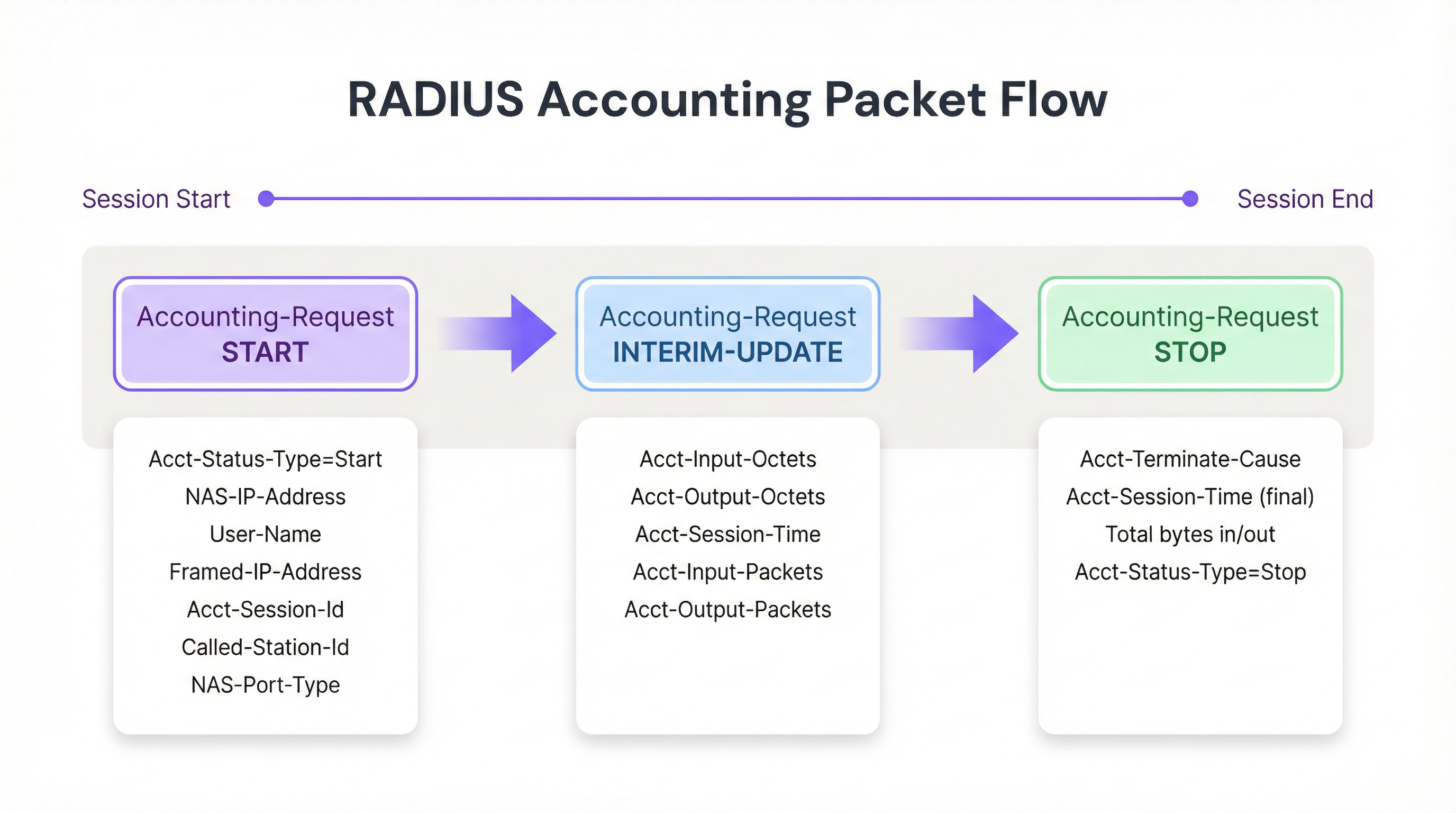
Figura 1: El ciclo de vida de los paquetes de RADIUS accounting a lo largo de una sesión WiFi.
Atributos clave de accounting
Para rastrear sesiones de manera efectiva y crear registros de auditoría defendibles, el NAS completa los paquetes Accounting-Request con atributos específicos. Los siguientes son los más significativos operativamente:
| Atributo | Descripción | Relevancia para el cumplimiento |
|---|---|---|
| Acct-Session-Id | Identificador de sesión único generado por el NAS | Clave primaria para correlacionar registros Start, Interim y Stop |
| User-Name | Identidad autenticada (nombre de usuario o dirección MAC) | Vincula la sesión a un usuario o dispositivo específico |
| NAS-IP-Address | Dirección IP del AP o WLC que informa | Identifica el segmento de red y la ubicación física |
| Framed-IP-Address | Dirección IP asignada al dispositivo cliente | Crítico para correlacionar con registros de firewall y proxy web |
| Calling-Station-Id | Dirección MAC del dispositivo cliente | Identidad a nivel de dispositivo para el registro de auditoría |
| Called-Station-Id | Dirección MAC del AP y SSID | Identifica el radio y la red específicos a los que se conectó el usuario |
| Acct-Input-Octets | Bytes recibidos del cliente | Monitoreo de ancho de banda y planificación de capacidad |
| Acct-Output-Octets | Bytes enviados al cliente | Monitoreo de ancho de banda y planificación de capacidad |
| Acct-Session-Time | Duración de la sesión en segundos | Analítica de tiempo de permanencia y facturación |
| Acct-Terminate-Cause | Razón por la que terminó la sesión | Resolución de problemas y detección de anomalías |
Para los equipos que trabajan con Autenticación 802.1X , el atributo User-Name contendrá la identidad autenticada del intercambio EAP, proporcionando un registro de auditoría más rico que el MAC Authentication Bypass (MAB) por sí solo.
Guía de implementación
Desplegar una infraestructura de RADIUS accounting robusta requiere una configuración cuidadosa tanto a nivel del NAS como del servidor RADIUS. El siguiente es un enfoque neutral respecto al proveedor para establecer un flujo de accounting confiable.
Paso 1: Configurar el NAS (Puntos de Acceso / Controladores)
La configuración del NAS es donde fallan la mayoría de los despliegues. Los administradores a menudo configuran la autenticación correctamente pero dejan el accounting en la configuración predeterminada o desactivado por completo.
- Definir el servidor de accounting: Especifique la dirección IP del servidor RADIUS y el secreto compartido para el puerto UDP 1813. En despliegues de alta disponibilidad, configure un servidor de accounting secundario para evitar la pérdida de datos si el primario deja de estar disponible.
- Habilitar Interim Updates: Este es el paso de configuración más importante. Establezca un intervalo adecuado; normalmente de 10 a 15 minutos para despliegues empresariales. Los intervalos más cortos (por ejemplo, 1 minuto) proporcionan datos más granulares pero generan una carga de escritura insostenible a escala; los intervalos más largos (por ejemplo, 30 minutos) reducen la sobrecarga pero retrasan la visibilidad de las sesiones activas.
- Garantizar la sincronización de la hora: Configure NTP en todos los dispositivos NAS y en el servidor RADIUS. Las marcas de tiempo precisas son innegociables para los registros de auditoría y la correlación SIEM. Un desfase de reloj de 5 minutos puede invalidar un registro de auditoría en un escenario de interceptación legal.
Paso 2: Configurar el servidor RADIUS
- Integración de base de datos: Configure el servidor RADIUS para registrar los datos de accounting en una base de datos relacional estructurada (por ejemplo, PostgreSQL, MySQL) en lugar de archivos de texto planos. El almacenamiento estructurado permite realizar consultas e indexaciones eficientes, así como la integración con sistemas posteriores. Asegúrese de que existan índices en
Acct-Session-Id,User-Name,Framed-IP-Addressy la marca de tiempo de inicio de la sesión. - Políticas de retención de datos: Implemente scripts automatizados de archivo o purga alineados con sus requisitos de cumplimiento. El Artículo 5(1)(e) de GDPR exige que los datos se conserven no más tiempo del necesario; sin embargo, las regulaciones de interceptación legal en muchas jurisdicciones pueden exigir una retención de hasta 12 meses.
Paso 3: Construir el flujo de datos
Para maximizar el valor de los datos de accounting, estos deben exportarse a plataformas de consumo donde puedan ser consultados, correlacionados y visualizados.
- Integración SIEM: Configure el servidor RADIUS o la base de datos subyacente para reenviar los registros a su SIEM (por ejemplo, Splunk, Microsoft Sentinel, IBM QRadar) utilizando Syslog o una API REST. Esto permite a los equipos de seguridad correlacionar los eventos de autenticación WiFi con bloqueos de firewall, alertas de detección de intrusos o activadores de prevención de pérdida de datos.
- Integración de analítica: Envíe los datos de sesión a plataformas como WiFi Analytics de Purple para transformar los bytes y las direcciones MAC sin procesar en información accionable sobre la afluencia, el tiempo de permanencia y los periodos de mayor uso. Esto es particularmente valioso para los operadores de Retail y Hospitalidad que necesitan alinear el personal y la inversión en infraestructura con los patrones de uso reales.
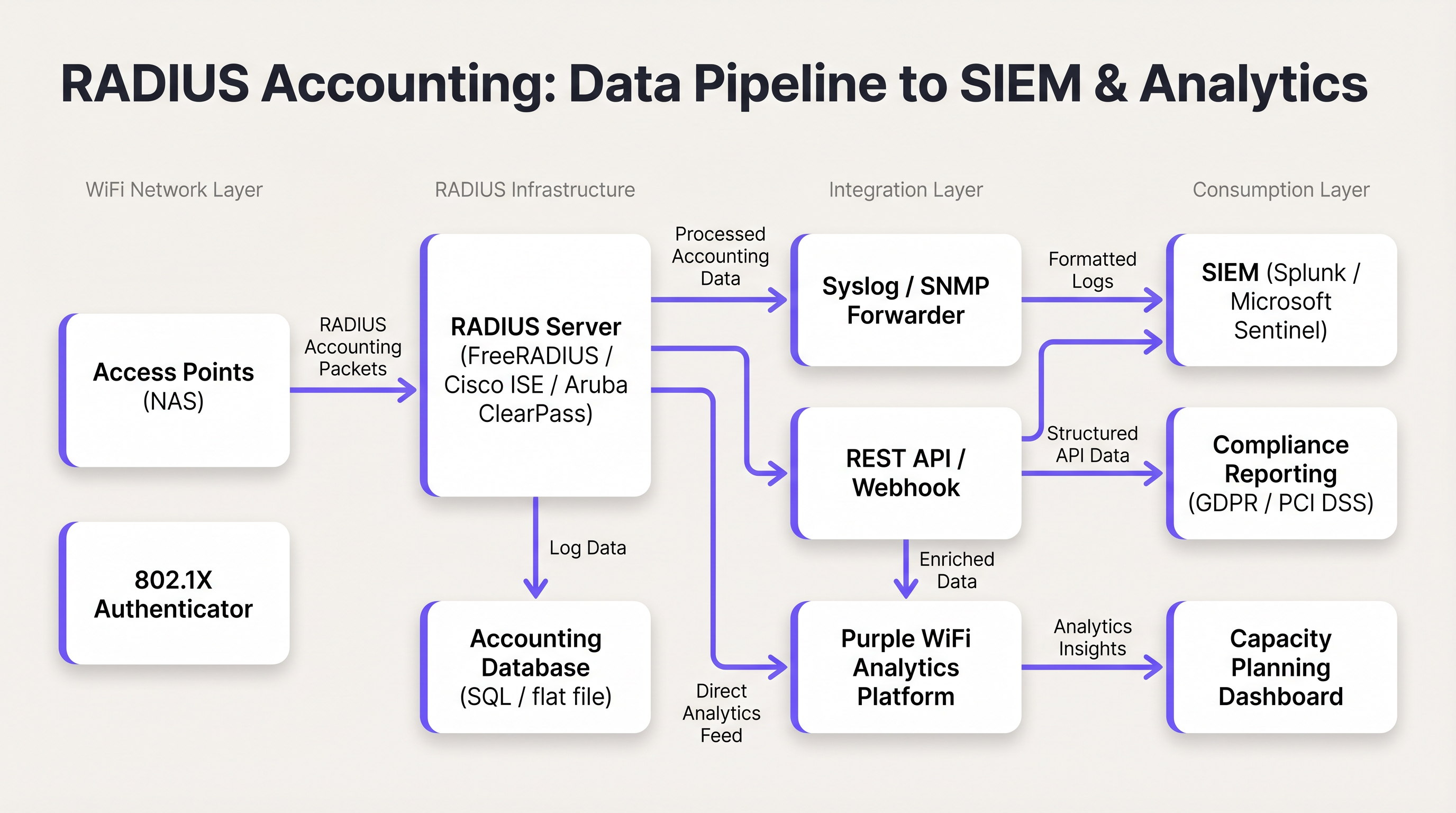
Figura 2: El flujo de datos de RADIUS accounting desde los Puntos de Acceso hasta las plataformas SIEM y de analítica.
Mejores prácticas
Utilice siempre Interim Updates. Confiar únicamente en los paquetes Start y Stop crea puntos ciegos operativos. Una conexión caída o una falla de energía en el AP puede evitar que se envíe un paquete Stop, dejando una sesión obsoleta en la base de datos indefinidamente. Las actualizaciones provisionales proporcionan el mecanismo para detectar y cerrar estas sesiones obsoletas. La regla general: si una sesión no ha enviado una actualización provisional en un plazo de dos a tres veces el intervalo configurado, trátela como terminada.
Correlacione RADIUS Accounting con los registros DHCP. RADIUS accounting proporciona la Framed-IP-Address, pero los tiempos de concesión de DHCP pueden ser más cortos que la duración de las sesiones en algunos entornos. Mantener los registros DHCP junto con los registros RADIUS proporciona un registro de auditoría más resistente, particularmente en recintos de alta densidad donde el reciclaje de direcciones IP es frecuente.
Asegure el transporte con RadSec. El tráfico RADIUS tradicional se transmite sobre UDP con un cifrado mínimo; solo el campo de la contraseña del usuario está ofuscado. En despliegues distribuidos, especialmente aquellos que abarcan múltiples sitios o servidores RADIUS alojados en la nube, utilice RadSec (RADIUS sobre TLS, definido en RFC 6614) o túneles IPsec para proteger los datos de accounting en tránsito. Este es un requisito bajo PCI DSS 4.0 para cualquier red que maneje datos de titulares de tarjetas.
Monitoree la cola de accounting. Si el servidor RADIUS deja de estar disponible, los dispositivos NAS pondrán los paquetes de accounting en cola localmente. Monitoree la longitud de esta cola; una cola llena resultará en paquetes descartados y pérdida de datos de auditoría. Configure alertas sobre la profundidad de la cola e implemente un servidor de accounting secundario para despliegues de alta disponibilidad.
Separe los servidores de autenticación y accounting a escala. En despliegues que superan los 5,000 usuarios concurrentes, la carga de escritura del accounting puede degradar los tiempos de respuesta de la autenticación. Los servidores de accounting dedicados con instancias de base de datos separadas evitan este conflicto.
Resolución de problemas y mitigación de riesgos
El problema de la sesión obsoleta
Síntoma: La base de datos RADIUS muestra que un usuario ha estado conectado durante 48 horas, pero el recinto cerró durante la noche.
Causa raíz: El NAS no pudo enviar un paquete Stop —normalmente debido a una falla de energía, reinicio del AP o interrupción de la red— y el paquete nunca fue recibido por el servidor RADIUS.
Mitigación: Implemente un script de limpieza de sesiones muertas en el servidor RADIUS. El script debe escanear periódicamente las sesiones activas donde el último paquete recibido (Start o Interim-Update) sea más antiguo que un umbral definido (por ejemplo, 2.5 veces el intervalo de actualización provisional). Las sesiones que superen este umbral deben cerrarse forzosamente con un registro Stop sintético, anotando la causa de terminación como 'Lost-Carrier' o 'Admin-Reset'.
Alta carga de CPU e E/S en el servidor RADIUS
Síntoma: Los tiempos de respuesta de autenticación se degradan durante las horas pico; el servidor RADIUS informa una alta carga de CPU y E/S de disco.
Causa raíz: Un intervalo de actualización provisional demasiado agresivo (por ejemplo, 1 minuto) en miles de AP genera un volumen insostenible de escrituras en la base de datos.
Mitigación: Aumente el intervalo de actualización provisional a 15 minutos. Verifique que la base de datos de accounting tenga los índices adecuados. Considere separar la autenticación y el accounting en instancias de servidor dedicadas. Evalúe si una base de datos de series temporales (por ejemplo, InfluxDB) es más apropiada que una base de datos relacional para datos de accounting de alto volumen.
Falta de Framed-IP-Address en los registros de accounting
Síntoma: Existen registros de RADIUS accounting, pero el campo Framed-IP-Address está vacío o ausente, lo que imposibilita la correlación IP-a-MAC.
Causa raíz: El NAS puede estar enviando el paquete Start antes de que DHCP haya asignado una dirección IP al cliente. La IP solo está disponible después de que se completa el intercambio DHCP.
Mitigación: Configure el NAS para retrasar el envío del paquete Start hasta después de la asignación de DHCP, si la plataforma lo permite. Alternativamente, confíe en los paquetes Interim-Update, que se envían después de la asignación de DHCP y contendrán la Framed-IP-Address. Asegúrese de que sus consultas de auditoría tengan esto en cuenta verificando los registros Interim-Update si el registro Start carece de una IP.
ROI e impacto empresarial
La implementación de un RADIUS accounting robusto ofrece un valor empresarial medible en tres dimensiones:
Mitigación de riesgos legales y de cumplimiento. En caso de un incidente de seguridad, una solicitud de acceso a datos por parte del interesado bajo GDPR o una orden de interceptación legal, los registros de accounting precisos proporcionan el registro de auditoría necesario para identificar qué usuario o dispositivo poseía una dirección IP específica en un momento determinado. Sin esto, las organizaciones se enfrentan a posibles sanciones regulatorias bajo GDPR (hasta el 4% de la facturación anual global) y daños a la reputación. El costo de implementar una infraestructura de accounting adecuada es una fracción del costo de una sola acción de cumplimiento regulatorio.
Planificación de capacidad y ROI de infraestructura. Al analizar las tendencias de Acct-Input-Octets y Acct-Output-Octets a lo largo del tiempo, los arquitectos de red pueden identificar patrones de consumo de ancho de banda, periodos de mayor uso y los AP o SSID específicos que generan la mayor carga. Estos datos informan directamente las decisiones de actualización de WAN y las estrategias de ubicación de AP, asegurando que la inversión en infraestructura se dirija a donde ofrece el mayor impacto. Para centros de Transporte y grandes recintos, esto puede representar ahorros significativos en gastos de capital.
Analítica mejorada e inteligencia del recinto. Cuando los datos de sesión RADIUS se combinan con plataformas como WiFi Analytics y Sensors de Purple, los datos de accounting sin procesar se transforman en inteligencia del recinto. Las métricas de tiempo de permanencia derivadas de la duración de la sesión, la identificación de visitantes recurrentes a partir del historial de Calling-Station-Id y el análisis de ocupación máxima a partir del recuento de sesiones concurrentes se vuelven disponibles. Para los operadores de Hospitalidad , estos datos informan directamente los modelos de personal, la ubicación de alimentos y bebidas (F&B) y las estrategias de personalización de marketing. Para obtener más contexto sobre cómo la infraestructura WiFi sustenta estas capacidades, consulte nuestras guías sobre Puntos de acceso inalámbricos y Soluciones modernas de WiFi para hospitalidad .
Términos clave y definiciones
RADIUS Accounting
The process of collecting and recording data about user network resource consumption, including session start and end times, data volume transferred, and IP address assignment. Defined in RFC 2866.
Essential for billing, capacity planning, GDPR compliance, and maintaining security audit trails in any enterprise WiFi deployment.
Acct-Status-Type
A RADIUS attribute (Attribute ID 40) that indicates the purpose of an accounting packet. Values include Start (1), Stop (2), and Interim-Update (3).
Used by the RADIUS server to determine whether to create a new session record, update an existing one, or close it. The most fundamental attribute in any accounting packet.
Interim-Update
A periodic RADIUS accounting packet sent by the NAS during an active session to report current usage statistics, including bytes transferred and session duration.
Critical for tracking long-lived sessions and detecting stale sessions if a client disconnects unexpectedly without sending a Stop packet.
Acct-Session-Id
A unique string generated by the NAS to identify a specific user connection instance. This value is consistent across all accounting packets (Start, Interim-Update, Stop) for the same session.
The primary key used to correlate all accounting records belonging to the same session. Without this, it is impossible to reconstruct a complete session history.
NAS (Network Access Server)
The device — typically a Wireless Access Point or Wireless LAN Controller — that controls physical access to the network and acts as the RADIUS client, generating and sending accounting packets.
The NAS is responsible for the accuracy and completeness of accounting data. Misconfiguration at the NAS level (e.g., disabled accounting, missing attributes) cannot be remediated at the RADIUS server level.
Framed-IP-Address
The IP address assigned to the client device for the duration of the session, included in RADIUS accounting packets.
Critical for correlating RADIUS accounting logs with other network logs such as firewall, web proxy, or DNS logs. The absence of this attribute makes IP-to-device correlation impossible.
Calling-Station-Id
Typically the MAC address of the client device connecting to the network, formatted as a colon-separated hexadecimal string (e.g., AA:BB:CC:DD:EE:FF).
Used to identify the specific hardware device, regardless of the IP address it is assigned. The device-layer anchor of the audit trail.
Acct-Terminate-Cause
An attribute included in Stop packets that specifies the reason a session ended. Common values include User-Request, Lost-Carrier, Idle-Timeout, Session-Timeout, and Admin-Reset.
Valuable for troubleshooting connectivity issues and for anomaly detection — for example, a high rate of Lost-Carrier terminations on a specific AP may indicate a hardware or interference problem.
RadSec
RADIUS over TLS (Transport Layer Security), defined in RFC 6614. Provides encrypted and authenticated transport for RADIUS packets, replacing the traditional UDP-based transport.
Required in any deployment where RADIUS traffic traverses untrusted networks (e.g., internet-connected cloud RADIUS servers). Increasingly mandated by PCI DSS 4.0 for cardholder data environments.
Casos de éxito
A 300-room hotel with conference facilities is deploying a new guest WiFi network. The IT manager needs to ensure that the deployment meets GDPR requirements for data minimisation and audit trail completeness, while also providing the marketing team with dwell time and repeat visitor analytics. The hotel uses a cloud-hosted RADIUS server and Cisco Meraki APs.
The deployment should be configured as follows. On the Meraki dashboard, navigate to Network-wide > RADIUS servers and add the cloud RADIUS server on port 1813 with a strong shared secret. Enable accounting and set the interim update interval to 15 minutes. On the RADIUS server, configure accounting to write to a PostgreSQL database with the following schema: session_id (primary key), user_name, nas_ip, framed_ip, calling_station_id, called_station_id, session_start, session_end, input_octets, output_octets, terminate_cause. Implement a data retention policy that automatically archives records older than 12 months to cold storage and purges records older than 24 months, documented in the hotel's GDPR Record of Processing Activities. Configure a Purple WiFi Analytics integration to ingest the session data, enabling the marketing team to access dwell time reports and repeat visitor frequency dashboards. Ensure NTP is synchronised across all Meraki APs and the RADIUS server to within 1 second.
A retail chain with 150 stores needs to comply with PCI DSS 4.0 requirements for network access monitoring. Their point-of-sale terminals use MAC Authentication Bypass (MAB) on the WiFi network. The security team has received a request from their QSA (Qualified Security Assessor) to demonstrate that they can identify which specific POS terminal accessed the payment network at any given time, using only a source IP address and timestamp from a firewall log.
The solution requires a three-component integration. First, verify that all Wireless LAN Controllers are configured to include the Framed-IP-Address attribute in RADIUS accounting packets. This is not always enabled by default and must be explicitly configured. Second, integrate the RADIUS accounting database with the SIEM platform (e.g., Splunk). Create a lookup table in Splunk that maps Framed-IP-Address and session time ranges to Calling-Station-Id (MAC address). Third, create a Splunk saved search that accepts a source IP and timestamp as inputs and returns the corresponding MAC address, NAS-IP-Address (identifying the store and AP), and User-Name from the RADIUS accounting records. The QSA can then be demonstrated this workflow: given a firewall log entry showing source IP 10.5.12.44 at 14:23:07 on a specific date, the search returns the MAC address of the POS terminal, the AP it was connected to, and the store location.
Análisis de escenarios
Q1. A hotel IT manager notices that the WiFi analytics dashboard shows very few active users during the day, even though the lobby and restaurant are visibly busy. However, the historical reports for the previous day show a massive spike in data usage. The RADIUS server logs confirm that Start packets are being received, but the database shows very few Interim-Update records. What is the most likely misconfiguration, and how would you resolve it?
💡 Sugerencia:Consider how data usage is reported during an active session versus at the point of disconnection.
Mostrar enfoque recomendado
The most likely cause is that Interim-Updates are disabled or not configured on the Wireless LAN Controller. Without interim updates, the RADIUS server only receives a Start packet when the user connects and a Stop packet when they disconnect. The analytics dashboard cannot display current usage because no in-session data is being reported. Once users leave and disconnect, the Stop packets arrive with the total accumulated data, causing the delayed spike in historical reports. The resolution is to enable Interim-Updates on the WLC and set an appropriate interval — 15 minutes is recommended for a hotel environment. After enabling, verify that the RADIUS server is receiving Interim-Update packets by checking the accounting database for records with Acct-Status-Type = 3.
Q2. During a security incident investigation, your SIEM has flagged that an IP address on the guest WiFi network accessed a known command-and-control server at 09:47:23 on a specific date. You need to identify the physical device responsible. Your DHCP lease time is set to 30 minutes. Describe the exact query logic you would use against the RADIUS accounting database to identify the device.
💡 Sugerencia:IP addresses are not static. You must use a time-range query, not a point-in-time lookup, and account for DHCP lease recycling.
Mostrar enfoque recomendado
You must query the RADIUS accounting database for sessions where: (1) the Framed-IP-Address equals the flagged IP address, AND (2) the session_start timestamp is earlier than or equal to 09:47:23, AND (3) either the session_end timestamp is later than or equal to 09:47:23, OR the session_end is NULL (session still active at query time). If multiple sessions match (possible with a 30-minute DHCP lease), review the Interim-Update records to confirm which session was actively reporting usage at 09:47:23. The matching session record will contain the Calling-Station-Id (MAC address of the device) and the User-Name (authenticated identity, if 802.1X was used). Cross-reference the MAC address with your device inventory or DHCP server logs to identify the physical device and its owner.
Q3. You are the network architect for a conference centre that hosts events with up to 8,000 concurrent WiFi users. Your current RADIUS server is experiencing database write saturation during peak events, causing authentication delays of 3-5 seconds. Your current interim update interval is set to 2 minutes. Describe a multi-step remediation plan that addresses both the immediate performance issue and the underlying architectural risk.
💡 Sugerencia:Consider both configuration changes and architectural changes. The goal is to maintain audit trail completeness while reducing write load.
Mostrar enfoque recomendado
The remediation plan should address three layers. First, as an immediate fix, increase the interim update interval from 2 minutes to 15 minutes on all Wireless Controllers. This reduces the accounting write load by approximately 87% (from one write per 2 minutes to one per 15 minutes per session), which should immediately relieve the database I/O pressure. Second, separate the authentication and accounting workloads onto dedicated server instances. The authentication server handles Access-Request/Accept/Reject packets, while a dedicated accounting server handles Accounting-Request packets and writes to a separate database. This prevents accounting write load from affecting authentication response times. Third, for the underlying architectural risk, evaluate whether a time-series database (e.g., InfluxDB or TimescaleDB) is more appropriate than a relational database for the accounting workload. Time-series databases are optimised for high-volume sequential writes and time-range queries, which matches the accounting data pattern exactly. Migrate accounting writes to the time-series database while retaining the relational database for compliance reporting queries.
Conclusiones clave
- ✓RADIUS accounting (RFC 2866) is distinct from authentication: it records session usage data — duration, bytes transferred, IP assignment — rather than making access control decisions.
- ✓The three packet types — Start, Interim-Update, and Stop — must all be configured and operational for a complete audit trail. Interim-Updates are the most commonly missed configuration.
- ✓The Acct-Session-Id, Framed-IP-Address, and Calling-Station-Id attributes form the minimum viable audit trail, enabling IP-to-device correlation for compliance and security investigations.
- ✓Stale sessions (caused by missing Stop packets) must be managed with a dead-session cleanup script using the 2.5x interim update interval rule.
- ✓RADIUS accounting data must be exported to a structured database and integrated with a SIEM and analytics platform to deliver its full compliance and operational value.
- ✓For PCI DSS, GDPR, and lawful intercept compliance, the ability to tie an IP address to a MAC address at a specific point in time is the core requirement that RADIUS accounting fulfils.
- ✓At scale (5,000+ concurrent users), separate authentication and accounting server instances and consider a time-series database for accounting writes to prevent performance degradation.




