

RADIUS Accounting: सेशन्स, वापर आणि ऑडिट लॉग ट्रॅक करणे
हे मार्गदर्शक RADIUS accounting वरील एक सर्वसमावेशक तांत्रिक संदर्भ प्रदान करते — ते WiFi सेशन सुरू होणे, थांबणे आणि अंतरिम-अपडेट डेटा कसा रेकॉर्ड करते, कोणते गुणधर्म (attributes) कॅप्चर केले जातात आणि सुरक्षा ऑडिटिंग, GDPR अनुपालन आणि क्षमता नियोजनासाठी त्या डेटाचा कसा लाभ घ्यावा. WiFi ऑथेंटिकेशन इव्हेंट्समधून बचाव करण्यायोग्य ऑडिट ट्रेल्सची आवश्यकता असलेल्या नेटवर्क ऑपरेशन्स आणि सुरक्षा टीम्ससाठी आणि SIEM प्लॅटफॉर्म आणि ॲनालिटिक्स डॅशबोर्डमध्ये सेशन डेटा एकत्रित करू इच्छिणाऱ्या वेन्यू ऑपरेटर्ससाठी हे वाचन आवश्यक आहे.
🎧 हे मार्गदर्शक ऐका
ट्रान्सक्रिप्ट पहा
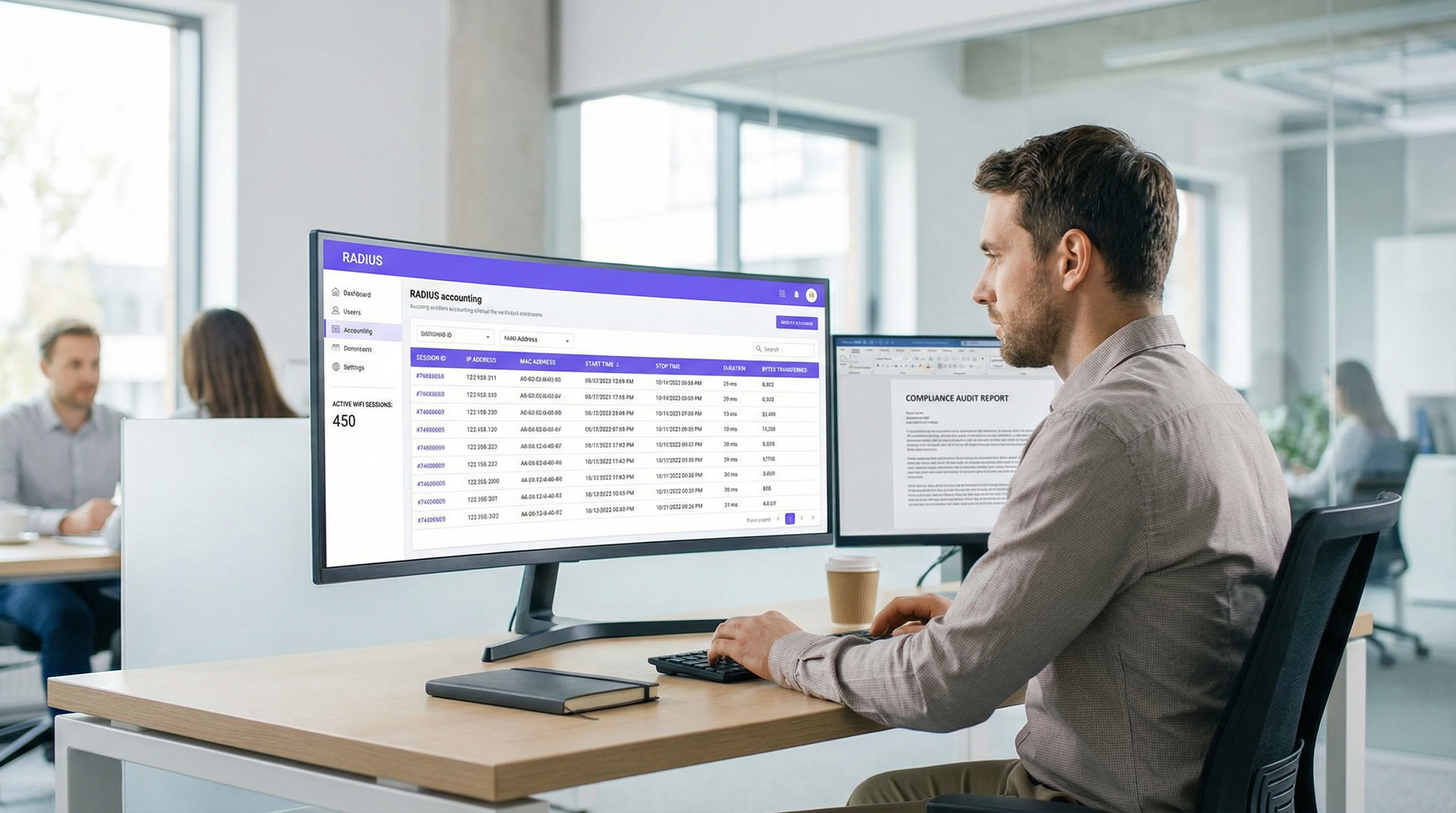
कार्यकारी सारांश
एंटरप्राइझ IT आणि नेटवर्क ऑपरेशन्स टीम्ससाठी, युजर्सना WiFi नेटवर्कवर ऑथेंटिकेट करणे ही केवळ अर्धी लढाई आहे. एकदा डिव्हाइस कनेक्ट झाले की, ते डिव्हाइस काय करते — ते किती काळ कनेक्ट राहते, किती डेटा वापरते आणि ते कधी डिस्कनेक्ट होते — हे समजून घेणे सुरक्षा, क्षमता नियोजन आणि नियामक अनुपालनासाठी महत्त्वपूर्ण आहे. येथेच RADIUS accounting अपरिहार्य ठरते. तर RADIUS ऑथेंटिकेशन नेटवर्क ॲक्सेसच्या कोण आणि कसे हाताळते, तर RADIUS accounting काय, कधी आणि किती याचे बारकाईने रेकॉर्ड ठेवते.
हे मार्गदर्शक RADIUS accounting मध्ये तांत्रिक सखोल माहिती प्रदान करते, Start, Stop आणि Interim-Update पॅकेट्सची यंत्रणा आणि त्यांना मौल्यवान बनवणारे गुणधर्म शोधते. Hospitality , Retail आणि इतर क्षेत्रांतील वेन्यू ऑपरेटर्स मजबूत ऑडिट ट्रेल्स राखण्यासाठी, GDPR अनुपालन सुनिश्चित करण्यासाठी आणि SIEM प्लॅटफॉर्म किंवा WiFi Analytics सिस्टममध्ये कृती करण्यायोग्य इंटेलिजन्स फीड करण्यासाठी या डेटाचा कसा लाभ घेऊ शकतात हे यात रेखांकित केले आहे. RADIUS accounting मध्ये प्रभुत्व मिळवून, नेटवर्क आर्किटेक्ट्स कच्च्या सेशन लॉग्सना धोरणात्मक मालमत्तेत रूपांतरित करू शकतात जे ऑपरेशनल कार्यक्षमता वाढवतात आणि जोखीम कमी करतात.
तांत्रिक सखोल माहिती
RADIUS Accounting विरुद्ध RADIUS Authentication
RADIUS (Remote Authentication Dial-In User Service), जे RFC 2865 मध्ये परिभाषित केले आहे आणि RFC 2866 मध्ये अकाउंटिंगसाठी विस्तारित केले आहे, क्लायंट-सर्व्हर मॉडेलवर कार्य करते. एका ठराविक एंटरप्राइझ WiFi उपयोजनामध्ये, ॲक्सेस पॉइंट (AP) किंवा वायरलेस LAN कंट्रोलर (WLC) Network Access Server (NAS) — म्हणजेच RADIUS क्लायंट म्हणून कार्य करतो. RADIUS सर्व्हर (उदा. FreeRADIUS, Cisco ISE, Aruba ClearPass) विनंत्या प्राप्त करतो आणि त्यावर प्रक्रिया करतो.
ऑथेंटिकेशन आणि अकाउंटिंगमधील फरक मूलभूत आहे:
| परिमाण | RADIUS Authentication | RADIUS Accounting |
|---|---|---|
| उद्देश | ओळख सत्यापित करणे आणि प्रवेश देणे/नकार देणे | सेशन वापर आणि क्रियाकलाप रेकॉर्ड करणे |
| UDP पोर्ट | 1812 | 1813 |
| RFC संदर्भ | RFC 2865 | RFC 2866 |
| पॅकेट प्रकार | Access-Request, Access-Accept, Access-Reject | Accounting-Request (Start/Stop/Interim) |
| कॅप्चर केलेला डेटा | क्रेडेंशियल्स, VLAN असाइनमेंट, पॉलिसी | सेशन वेळ, ट्रान्सफर केलेले बाइट्स, IP ॲड्रेस |
| अनुपालन भूमिका | ॲक्सेस कंट्रोल | ऑडिट ट्रेल, कायदेशीर इंटरसेप्ट |
मोठ्या प्रमाणावर Guest WiFi तैनात करणाऱ्या टीम्ससाठी, दोन्ही फंक्शन्स आवश्यक आहेत — परंतु अकाउंटिंग हेच तुम्हाला अनुपालन आणि बचावात्मक ठेवते.
तीन अकाउंटिंग पॅकेट प्रकार
RADIUS accounting तीन प्राथमिक Accounting-Request पॅकेट प्रकारांवर अवलंबून असते, जे प्रत्येक Acct-Status-Type गुणधर्माद्वारे परिभाषित केले जातात:
Start (Acct-Status-Type = 1): जेव्हा युजर यशस्वीरित्या कनेक्ट होतो आणि सेशन सुरू होते तेव्हा NAS द्वारे पाठवले जाते. हे अकाउंटिंग डेटाबेसमध्ये बेसलाइन रेकॉर्ड स्थापित करते, युजरची ओळख, डिव्हाइस MAC ॲड्रेस, नियुक्त केलेला IP ॲड्रेस आणि युजर ज्या AP शी कनेक्ट झाला आहे ते कॅप्चर करते.
Interim-Update (Acct-Status-Type = 3): सक्रिय सेशन दरम्यान वेळोवेळी पाठवले जाते. ही पॅकेट्स सध्याच्या वापराचे चालू स्नॅपशॉट्स प्रदान करतात — ट्रान्सफर केलेले बाइट्स, सेशन कालावधी आणि पॅकेट संख्या. सेशन अजूनही सक्रिय असल्याची पुष्टी करण्यासाठी ते हार्टबीट म्हणून कार्य करतात आणि डिस्कनेक्शनची वाट न पाहता दीर्घकाळ चालणाऱ्या सेशन्समध्ये दृश्यमानता प्रदान करतात.
Stop (Acct-Status-Type = 2): जेव्हा सेशन समाप्त होते तेव्हा पाठवले जाते — मग ते युजरने सुरू केलेले डिस्कनेक्ट असो, AP रीबूट असो, आयडल टाइमआउट असो किंवा सेशन टाइमआउट असो. यामध्ये संपूर्ण सेशनची अंतिम, एकत्रित आकडेवारी असते.
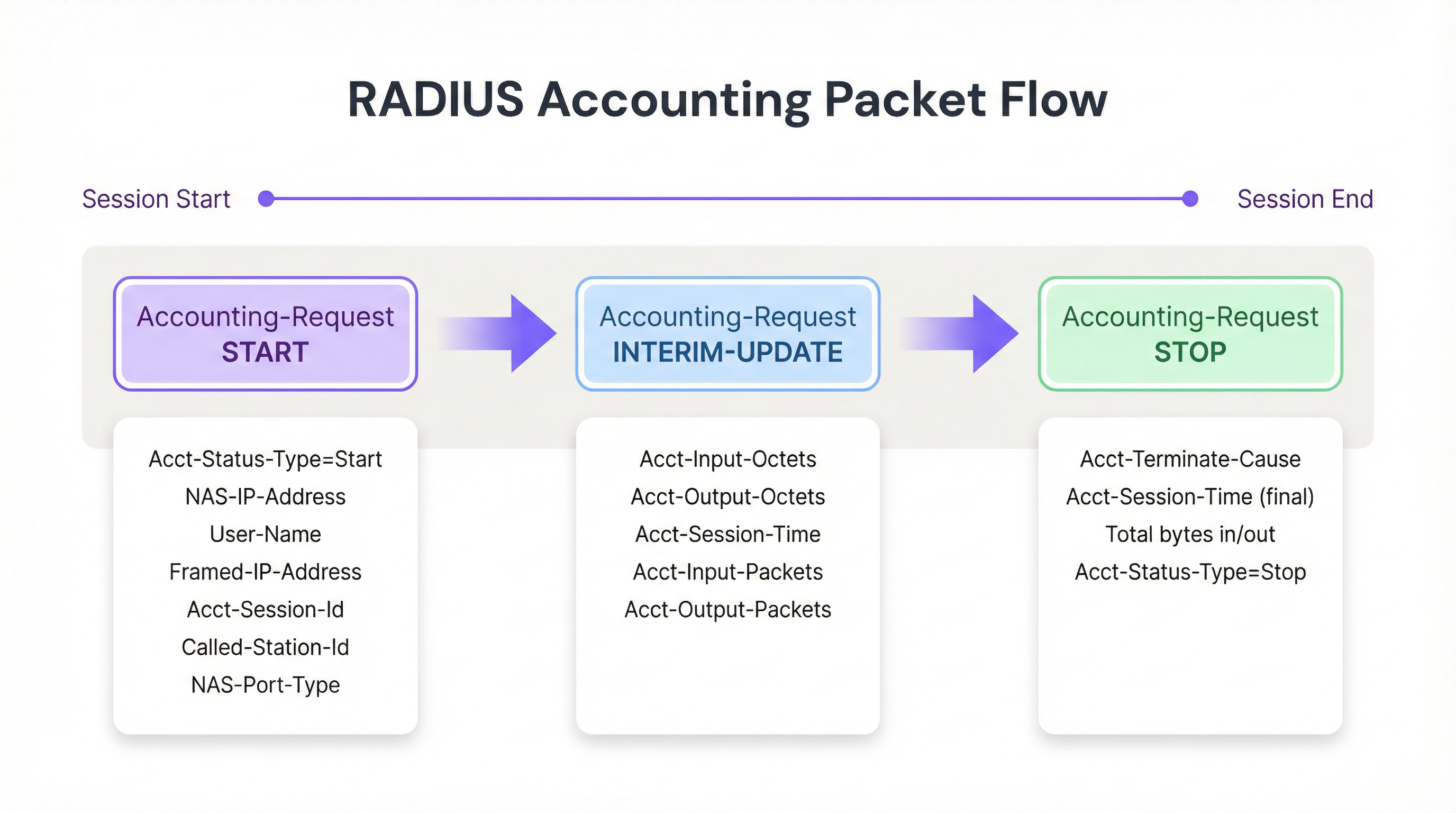
आकृती १: WiFi सेशनमधील RADIUS accounting पॅकेट लाइफसायकल.
मुख्य अकाउंटिंग गुणधर्म
सेशन्स प्रभावीपणे ट्रॅक करण्यासाठी आणि बचावात्मक ऑडिट लॉग तयार करण्यासाठी, NAS विशिष्ट गुणधर्मांसह Accounting-Request पॅकेट्स भरते. खालील सर्वात ऑपरेशनलदृष्ट्या महत्त्वपूर्ण आहेत:
| गुणधर्म | वर्णन | अनुपालन प्रासंगिकता |
|---|---|---|
| Acct-Session-Id | NAS द्वारे व्युत्पन्न केलेला युनिक सेशन आयडेंटिफायर | Start, Interim आणि Stop रेकॉर्ड्सशी परस्पर संबंध जोडण्यासाठी प्राथमिक की |
| User-Name | ऑथेंटिकेटेड ओळख (युजरनेम किंवा MAC ॲड्रेस) | सेशनला विशिष्ट युजर किंवा डिव्हाइसशी मॅप करते |
| NAS-IP-Address | रिपोर्टिंग AP किंवा WLC चा IP ॲड्रेस | नेटवर्क सेगमेंट आणि भौतिक स्थान ओळखते |
| Framed-IP-Address | क्लायंट डिव्हाइसला नियुक्त केलेला IP ॲड्रेस | फायरवॉल आणि वेब प्रॉक्सी लॉग्सशी परस्पर संबंध जोडण्यासाठी महत्त्वपूर्ण |
| Calling-Station-Id | क्लायंट डिव्हाइसचा MAC ॲड्रेस | ऑडिट ट्रेलसाठी डिव्हाइस-लेयर ओळख |
| Called-Station-Id | AP आणि SSID चा MAC ॲड्रेस | युजर ज्या विशिष्ट रेडिओ आणि नेटवर्कशी कनेक्ट झाला आहे ते ओळखते |
| Acct-Input-Octets | क्लायंटकडून प्राप्त झालेले बाइट्स | बँडविड्थ मॉनिटरिंग आणि क्षमता नियोजन |
| Acct-Output-Octets | क्लायंटला पाठवलेले बाइट्स | बँडविड्थ मॉनिटरिंग आणि क्षमता नियोजन |
| Acct-Session-Time | सेकंदात सेशन कालावधी | ड्वेल टाइम ॲनालिटिक्स आणि बिलिंग |
| Acct-Terminate-Cause | सेशन संपण्याचे कारण | ट्रबलशूटिंग आणि विसंगती शोधणे |
802.1X Authentication सोबत काम करणाऱ्या टीम्ससाठी, User-Name गुणधर्मामध्ये EAP एक्सचेंजमधील ऑथेंटिकेटेड ओळख असेल, जी केवळ MAC Authentication Bypass (MAB) पेक्षा अधिक समृद्ध ऑडिट ट्रेल प्रदान करते.
अंमलबजावणी मार्गदर्शक
एक मजबूत RADIUS accounting इन्फ्रास्ट्रक्चर तैनात करण्यासाठी NAS आणि RADIUS सर्व्हर या दोन्ही स्तरांवर काळजीपूर्वक कॉन्फिगरेशन आवश्यक आहे. विश्वसनीय अकाउंटिंग पाइपलाइन स्थापित करण्यासाठी खालील विक्रेता-तटस्थ दृष्टिकोन आहे.
पायरी १: NAS कॉन्फिगर कराS (Access Points / Controllers)
NAS कॉन्फिगरेशनमध्येच बहुतेक डिप्लॉयमेंट्स अयशस्वी होतात. ॲडमिनिस्ट्रेटर अनेकदा ऑथेंटिकेशन योग्यरित्या कॉन्फिगर करतात परंतु अकाउंटिंग डीफॉल्ट सेटिंग्जवर सोडतात किंवा पूर्णपणे अक्षम करतात.
- अकाउंटिंग सर्व्हर परिभाषित करा: RADIUS सर्व्हरचा IP ॲड्रेस आणि UDP पोर्ट 1813 साठी शेअर केलेले सिक्रेट निर्दिष्ट करा. हाय-अवेलेबिलिटी डिप्लॉयमेंट्समध्ये, प्रायमरी सर्व्हर अनरिचेबल झाल्यास डेटा गमावू नये म्हणून दुय्यम अकाउंटिंग सर्व्हर कॉन्फिगर करा.
- अंतरिम अपडेट्स सक्षम करा: ही सर्वात महत्त्वाची कॉन्फिगरेशन पायरी आहे. योग्य इंटरव्हल सेट करा — एंटरप्राइझ डिप्लॉयमेंट्ससाठी सामान्यतः 10 ते 15 मिनिटे. कमी इंटरव्हल (उदा. 1 मिनिट) अधिक तपशीलवार डेटा प्रदान करतात परंतु मोठ्या प्रमाणावर अनसस्टेनेबल राइट लोड निर्माण करतात; जास्त इंटरव्हल (उदा. 30 मिनिटे) ओव्हरहेड कमी करतात परंतु सक्रिय सेशन्सची दृश्यमानता उशिरा मिळते.
- वेळ सिंक्रोनाइझेशन सुनिश्चित करा: सर्व NAS डिव्हाइसेस आणि RADIUS सर्व्हरवर NTP कॉन्फिगर करा. ऑडिट लॉग्स आणि SIEM कोरिलेशनसाठी अचूक टाइमस्टॅम्प्स अनिवार्य आहेत. कायदेशीर इंटरसेप्टच्या परिस्थितीत 5-मिनिटांचा क्लॉक ड्रिफ्ट ऑडिट ट्रेल अवैध ठरू शकतो.
पायरी 2: RADIUS सर्व्हर कॉन्फिगर करा
- डेटाबेस इंटिग्रेशन: RADIUS सर्व्हरला अकाउंटिंग डेटा फ्लॅट टेक्स्ट फाइल्सऐवजी स्ट्रक्चर्ड रिलेशनल डेटाबेसमध्ये (उदा. PostgreSQL, MySQL) लॉग करण्यासाठी कॉन्फिगर करा. स्ट्रक्चर्ड स्टोरेज कार्यक्षम क्वेरींग, इंडेक्सिंग आणि डाउनस्ट्रीम सिस्टम्ससह इंटिग्रेशन सक्षम करते.
Acct-Session-Id,User-Name,Framed-IP-Addressआणि सेशन स्टार्ट टाइमस्टॅम्पवर इंडेक्स असल्याची खात्री करा. - डेटा रिटेंशन पॉलिसी: तुमच्या कंप्लायन्स आवश्यकतांनुसार स्वयंचलित आर्काइव्हल किंवा पर्ज स्क्रिप्ट्स लागू करा. GDPR कलम 5(1)(e) नुसार डेटा आवश्यकतेपेक्षा जास्त काळ न ठेवणे आवश्यक आहे; तथापि, अनेक अधिकारक्षेत्रांमधील कायदेशीर इंटरसेप्ट नियम (उदा. यूकेचा इन्व्हेस्टिगेटरी पॉवर्स ॲक्ट 2016) 12 महिन्यांपर्यंत डेटा ठेवण्याची आवश्यकता भासू शकते.
पायरी 3: डेटा पाइपलाइन तयार करा
अकाउंटिंग डेटाचे मूल्य वाढवण्यासाठी, तो अशा प्लॅटफॉर्मवर एक्सपोर्ट केला पाहिजे जिथे तो क्वेरी, कोरिलेट आणि व्हिज्युअलाइज केला जाऊ शकतो.
- SIEM इंटिग्रेशन: Syslog किंवा REST API वापरून तुमच्या SIEM (उदा. Splunk, Microsoft Sentinel, IBM QRadar) कडे लॉग फॉरवर्ड करण्यासाठी RADIUS सर्व्हर किंवा मूळ डेटाबेस कॉन्फिगर करा. हे सुरक्षा टीम्सना WiFi ऑथेंटिकेशन इव्हेंट्सना फायरवॉल ब्लॉक्स, इंट्र्यूजन डिटेक्शन अलर्ट्स किंवा डेटा लॉस प्रिव्हेंशन ट्रिगर्सशी कोरिलेट करण्यास सक्षम करते.
- ॲनालिटिक्स इंटिग्रेशन: रॉ बाइट्स आणि MAC ॲड्रेसना फूटफॉल, ड्वेल टाइम आणि पीक युसेज कालावधीबद्दल कृती करण्यायोग्य इनसाइट्समध्ये रूपांतरित करण्यासाठी सेशन डेटा Purple च्या WiFi Analytics सारख्या प्लॅटफॉर्मवर फीड करा. हे विशेषतः Retail आणि Hospitality ऑपरेटर्ससाठी मौल्यवान आहे ज्यांना त्यांच्या स्टाफिंग आणि इन्फ्रास्ट्रक्चर गुंतवणुकीला वास्तविक वापराच्या पॅटर्नशी जुळवून घ्यायचे आहे.
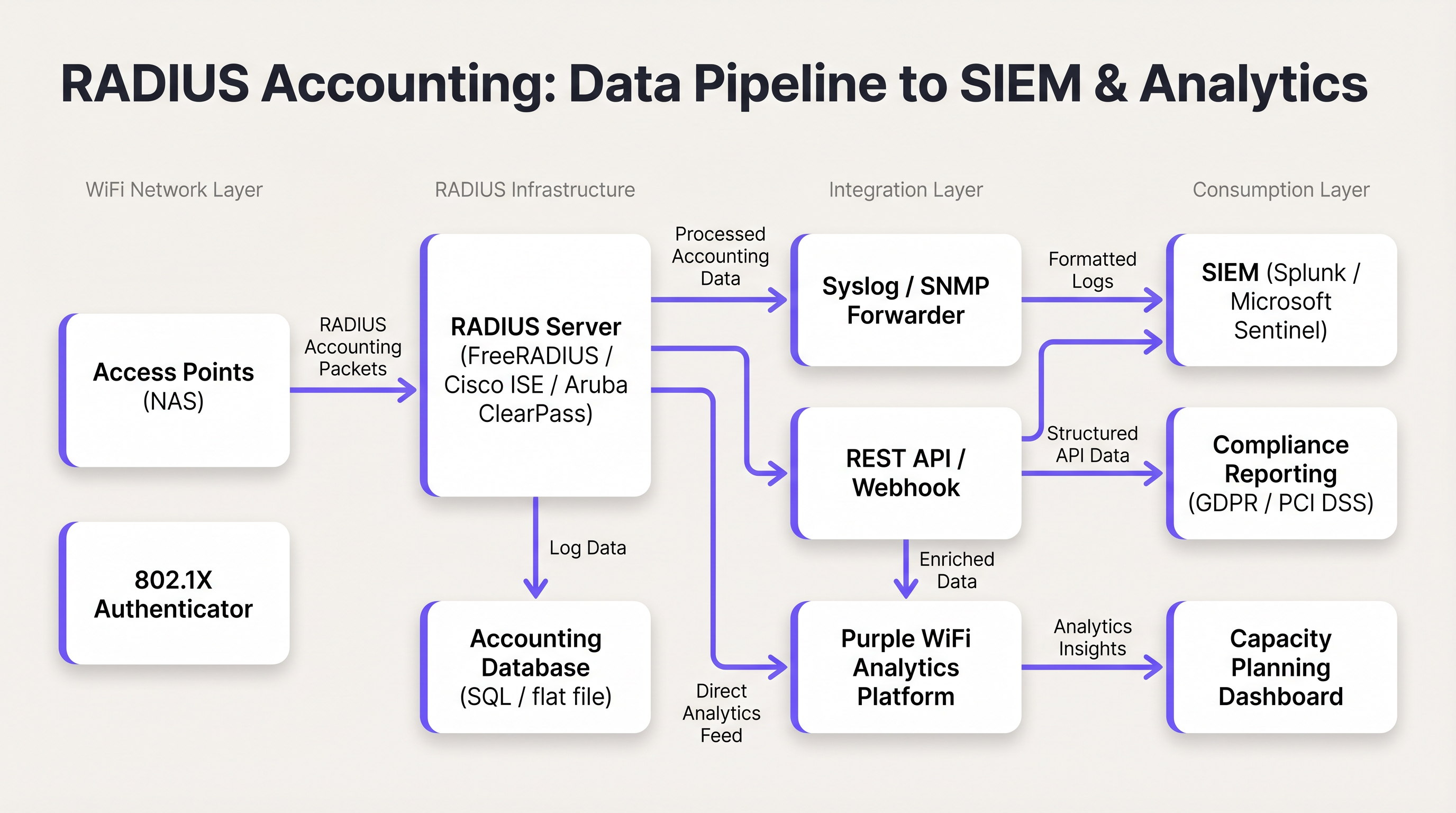
आकृती 2: Access Points पासून SIEM आणि ॲनालिटिक्स प्लॅटफॉर्मपर्यंतची RADIUS अकाउंटिंग डेटा पाइपलाइन.
सर्वोत्तम पद्धती
नेहमी अंतरिम अपडेट्स वापरा. केवळ स्टार्ट आणि स्टॉप पॅकेट्सवर अवलंबून राहिल्याने ऑपरेशनल ब्लाइंड स्पॉट्स तयार होतात. ड्रॉप झालेले कनेक्शन किंवा AP पॉवर फेल्युअरमुळे स्टॉप पॅकेट पाठवण्यापासून रोखले जाऊ शकते, ज्यामुळे डेटाबेसमध्ये कायमस्वरूपी जुने सेशन राहू शकते. अंतरिम अपडेट्स हे जुने सेशन्स शोधण्यासाठी आणि बंद करण्यासाठी यंत्रणा प्रदान करतात. ढोबळ नियम: जर एखाद्या सेशनने कॉन्फिगर केलेल्या इंटरव्हलच्या दोन ते तीन पट वेळेत अंतरिम अपडेट पाठवले नसेल, तर ते टर्मिनेट झाले आहे असे समजा.
RADIUS अकाउंटिंगला DHCP लॉग्सशी कोरिलेट करा. RADIUS अकाउंटिंग Framed-IP-Address प्रदान करते, परंतु काही वातावरणात DHCP लीज टाइम सेशनच्या कालावधीपेक्षा कमी असू शकतो. RADIUS लॉग्ससह DHCP लॉग्स राखल्याने अधिक लवचिक ऑडिट ट्रेल मिळतो, विशेषतः उच्च-घनता असलेल्या ठिकाणी जिथे IP ॲड्रेस रिसायकलिंग वारंवार होते.
RadSec सह ट्रान्सपोर्ट सुरक्षित करा. पारंपारिक RADIUS ट्रॅफिक किमान एन्क्रिप्शनसह UDP वर प्रसारित केले जाते — फक्त युजर पासवर्ड फील्ड अस्पष्ट (obfuscated) केले जाते. डिस्ट्रिब्युटेड डिप्लॉयमेंट्समध्ये, विशेषतः एकाधिक साइट्स किंवा क्लाउड-होस्ट केलेल्या RADIUS सर्व्हरवर पसरलेल्या ठिकाणी, ट्रान्झिटमधील अकाउंटिंग डेटा संरक्षित करण्यासाठी RadSec (RFC 6614 मध्ये परिभाषित केलेले RADIUS over TLS) किंवा IPsec टनेल वापरा. कार्डधारक डेटा हाताळणाऱ्या कोणत्याही नेटवर्कसाठी PCI DSS 4.0 अंतर्गत ही एक आवश्यकता आहे.
अकाउंटिंग क्यू (Queue) मॉनिटर करा. जर RADIUS सर्व्हर अनरिचेबल झाला, तर NAS डिव्हाइसेस अकाउंटिंग पॅकेट्स स्थानिक पातळीवर क्यूमध्ये ठेवतील. या क्यूच्या लांबीवर लक्ष ठेवा; क्यू पूर्ण भरल्यास पॅकेट्स ड्रॉप होतील आणि ऑडिट डेटा गमावला जाईल. क्यू डेप्थवर अलर्टिंग कॉन्फिगर करा आणि हाय-अवेलेबिलिटी डिप्लॉयमेंट्ससाठी दुय्यम अकाउंटिंग सर्व्हर लागू करा.
मोठ्या प्रमाणावर ऑथेंटिकेशन आणि अकाउंटिंग सर्व्हर वेगळे करा. 5,000 पेक्षा जास्त समवर्ती युजर्स असलेल्या डिप्लॉयमेंट्समध्ये, अकाउंटिंगमधील राइट लोड ऑथेंटिकेशन रिस्पॉन्स टाइम कमी करू शकतो. स्वतंत्र डेटाबेस इन्स्टन्ससह समर्पित अकाउंटिंग सर्व्हर हा संघर्ष टाळतात.
ट्रबलशूटिंग आणि जोखीम कमी करणे
स्टेल सेशन (Stale Session) समस्या
लक्षण: RADIUS डेटाबेस दाखवतो की एक युजर 48 तासांपासून कनेक्टेड आहे, परंतु ठिकाण रात्रभर बंद होते.
मूळ कारण: NAS स्टॉप पॅकेट पाठवण्यात अयशस्वी झाले — सामान्यतः पॉवर फेल्युअर, AP रीबूट किंवा नेटवर्क व्यत्ययामुळे — आणि पॅकेट RADIUS सर्व्हरला कधीही मिळाले नाही.
उपाय: RADIUS सर्व्हरवर डेड-सेशन क्लीनअप स्क्रिप्ट लागू करा. स्क्रिप्टने वेळोवेळी अशा सक्रिय सेशन्ससाठी स्कॅन केले पाहिजे जिथे शेवटचे प्राप्त झालेले पॅकेट (Start किंवा Interim-Update) परिभाषित थ्रेशोल्डपेक्षा जुने आहे (उदा. अंतरिम अपडेट इंटरव्हलच्या 2.5 पट). या थ्रेशोल्डपेक्षा जास्त काळ असलेल्या सेशन्सना सिंथेटिक स्टॉप रेकॉर्डसह सक्तीने बंद केले पाहिजे, ज्यामध्ये टर्मिनेशनचे कारण 'Lost-Carrier' किंवा 'Admin-Reset'.
उच्च RADIUS सर्व्हर CPU आणि I/O लोड
लक्षण: गर्दीच्या वेळी ऑथेंटिकेशन रिस्पॉन्स टाइम कमी होतो; RADIUS सर्व्हर उच्च CPU आणि डिस्क I/O रिपोर्ट करतो.
मूळ कारण: हजारो APs वर अत्यंत आक्रमक अंतरिम अपडेट इंटरव्हल (उदा. 1 मिनिट) डेटाबेस राइट्सचे न पेलणारे प्रमाण निर्माण करते.
निवारण: अंतरिम अपडेट इंटरव्हल 15 मिनिटांपर्यंत वाढवा. अकाउंटिंग डेटाबेसमध्ये योग्य इंडेक्स असल्याची खात्री करा. ऑथेंटिकेशन आणि अकाउंटिंगला समर्पित सर्व्हर इन्स्टन्सवर वेगळे करण्याचा विचार करा. हाय-व्हॉल्यूम अकाउंटिंग डेटासाठी रिलेशनल डेटाबेसपेक्षा टाइम-सिरीज डेटाबेस (उदा. InfluxDB) अधिक योग्य आहे का याचे मूल्यांकन करा.
अकाउंटिंग रेकॉर्ड्समध्ये Framed-IP-Address गहाळ असणे
लक्षण: RADIUS अकाउंटिंग रेकॉर्ड्स अस्तित्वात आहेत, परंतु Framed-IP-Address फील्ड रिकामे किंवा गहाळ आहे, ज्यामुळे IP-to-MAC कोरिलेशन अशक्य होते.
मूळ कारण: DHCP ने क्लायंटला IP ॲड्रेस नियुक्त करण्यापूर्वी NAS 'Start' पॅकेट पाठवत असावे. DHCP एक्सचेंज पूर्ण झाल्यानंतरच IP उपलब्ध होतो.
निवारण: प्लॅटफॉर्म सपोर्ट करत असल्यास, DHCP असाइनमेंट होईपर्यंत 'Start' पॅकेट पाठवण्यास उशीर करण्यासाठी NAS कॉन्फिगर करा. पर्यायाने, 'Interim-Update' पॅकेट्सवर अवलंबून राहा, जे DHCP असाइनमेंटनंतर पाठवले जातात आणि त्यामध्ये Framed-IP-Address असेल. जर 'Start' रेकॉर्डमध्ये IP नसेल, तर 'Interim-Update' रेकॉर्ड्स तपासून तुमच्या ऑडिट क्वेरीजमध्ये याची नोंद असल्याची खात्री करा.
ROI आणि व्यावसायिक प्रभाव
मजबूत RADIUS अकाउंटिंग लागू केल्याने तीन आयामांमध्ये मोजता येण्याजोगे व्यावसायिक मूल्य मिळते:
कॉम्प्लायन्स आणि कायदेशीर जोखीम कमी करणे. सुरक्षा घटना घडल्यास, GDPR अंतर्गत डेटा सब्जेक्ट ॲक्सेस विनंती किंवा कायदेशीर इंटरसेप्ट ऑर्डर आल्यास, अचूक अकाउंटिंग लॉग्स विशिष्ट वेळी कोणत्या वापरकर्त्याने किंवा डिव्हाइसने विशिष्ट IP ॲड्रेस धारण केला होता हे ओळखण्यासाठी आवश्यक ऑडिट ट्रेल प्रदान करतात. याशिवाय, संस्थांना GDPR अंतर्गत संभाव्य नियामक दंड (जागतिक वार्षिक उलाढालीच्या 4% पर्यंत) आणि प्रतिष्ठेचे नुकसान सहन करावे लागते. योग्य अकाउंटिंग इन्फ्रास्ट्रक्चर लागू करण्याचा खर्च हा एका नियामक अंमलबजावणी कारवाईच्या खर्चाच्या तुलनेत नगण्य आहे.
कॅपॅसिटी प्लॅनिंग आणि इन्फ्रास्ट्रक्चर ROI. कालांतराने Acct-Input-Octets आणि Acct-Output-Octets ट्रेंड्सचे विश्लेषण करून, नेटवर्क आर्किटेक्ट्स बँडविड्थ वापराचे पॅटर्न, पीक युसेज कालावधी आणि सर्वाधिक लोड निर्माण करणारे विशिष्ट APs किंवा SSIDs ओळखू शकतात. हा डेटा थेट WAN अपग्रेड निर्णय आणि AP प्लेसमेंट स्ट्रॅटेजीजची माहिती देतो, ज्यामुळे इन्फ्रास्ट्रक्चर गुंतवणूक जिथे सर्वात जास्त परिणाम देते तिथे निर्देशित केली जाते. वाहतूक हब आणि मोठ्या ठिकाणांसाठी, हे महत्त्वपूर्ण भांडवली खर्च बचतीचे प्रतिनिधित्व करू शकते.
वर्धित ॲनालिटिक्स आणि वेन्यू इंटेलिजन्स. जेव्हा RADIUS सेशन डेटा Purple च्या WiFi Analytics आणि Sensors सारख्या प्लॅटफॉर्मसह एकत्रित केला जातो, तेव्हा रॉ अकाउंटिंग डेटा वेन्यू इंटेलिजन्समध्ये रूपांतरित होतो. सेशन कालावधीवरून मिळवलेले ड्वेल टाइम मेट्रिक्स, Calling-Station-Id हिस्ट्रीवरून वारंवार येणाऱ्या अभ्यागतांची ओळख आणि कॉन्करंट सेशन काउंट्सवरून पीक ऑक्युपन्सी विश्लेषण सर्व उपलब्ध होतात. हॉस्पिटॅलिटी ऑपरेटर्ससाठी, हा डेटा थेट स्टाफिंग मॉडेल्स, F&B प्लेसमेंट आणि मार्केटिंग पर्सनलायझेशन स्ट्रॅटेजीजची माहिती देतो. WiFi इन्फ्रास्ट्रक्चर या क्षमतांना कसे आधार देते यावरील अधिक संदर्भासाठी, आमचे Wireless Access Points आणि Modern Hospitality WiFi Solutions वरील मार्गदर्शक पहा.
महत्त्वाच्या संज्ञा आणि व्याख्या
RADIUS Accounting
The process of collecting and recording data about user network resource consumption, including session start and end times, data volume transferred, and IP address assignment. Defined in RFC 2866.
Essential for billing, capacity planning, GDPR compliance, and maintaining security audit trails in any enterprise WiFi deployment.
Acct-Status-Type
A RADIUS attribute (Attribute ID 40) that indicates the purpose of an accounting packet. Values include Start (1), Stop (2), and Interim-Update (3).
Used by the RADIUS server to determine whether to create a new session record, update an existing one, or close it. The most fundamental attribute in any accounting packet.
Interim-Update
A periodic RADIUS accounting packet sent by the NAS during an active session to report current usage statistics, including bytes transferred and session duration.
Critical for tracking long-lived sessions and detecting stale sessions if a client disconnects unexpectedly without sending a Stop packet.
Acct-Session-Id
A unique string generated by the NAS to identify a specific user connection instance. This value is consistent across all accounting packets (Start, Interim-Update, Stop) for the same session.
The primary key used to correlate all accounting records belonging to the same session. Without this, it is impossible to reconstruct a complete session history.
NAS (Network Access Server)
The device — typically a Wireless Access Point or Wireless LAN Controller — that controls physical access to the network and acts as the RADIUS client, generating and sending accounting packets.
The NAS is responsible for the accuracy and completeness of accounting data. Misconfiguration at the NAS level (e.g., disabled accounting, missing attributes) cannot be remediated at the RADIUS server level.
Framed-IP-Address
The IP address assigned to the client device for the duration of the session, included in RADIUS accounting packets.
Critical for correlating RADIUS accounting logs with other network logs such as firewall, web proxy, or DNS logs. The absence of this attribute makes IP-to-device correlation impossible.
Calling-Station-Id
Typically the MAC address of the client device connecting to the network, formatted as a colon-separated hexadecimal string (e.g., AA:BB:CC:DD:EE:FF).
Used to identify the specific hardware device, regardless of the IP address it is assigned. The device-layer anchor of the audit trail.
Acct-Terminate-Cause
An attribute included in Stop packets that specifies the reason a session ended. Common values include User-Request, Lost-Carrier, Idle-Timeout, Session-Timeout, and Admin-Reset.
Valuable for troubleshooting connectivity issues and for anomaly detection — for example, a high rate of Lost-Carrier terminations on a specific AP may indicate a hardware or interference problem.
RadSec
RADIUS over TLS (Transport Layer Security), defined in RFC 6614. Provides encrypted and authenticated transport for RADIUS packets, replacing the traditional UDP-based transport.
Required in any deployment where RADIUS traffic traverses untrusted networks (e.g., internet-connected cloud RADIUS servers). Increasingly mandated by PCI DSS 4.0 for cardholder data environments.
केस स्टडीज
A 300-room hotel with conference facilities is deploying a new guest WiFi network. The IT manager needs to ensure that the deployment meets GDPR requirements for data minimisation and audit trail completeness, while also providing the marketing team with dwell time and repeat visitor analytics. The hotel uses a cloud-hosted RADIUS server and Cisco Meraki APs.
The deployment should be configured as follows. On the Meraki dashboard, navigate to Network-wide > RADIUS servers and add the cloud RADIUS server on port 1813 with a strong shared secret. Enable accounting and set the interim update interval to 15 minutes. On the RADIUS server, configure accounting to write to a PostgreSQL database with the following schema: session_id (primary key), user_name, nas_ip, framed_ip, calling_station_id, called_station_id, session_start, session_end, input_octets, output_octets, terminate_cause. Implement a data retention policy that automatically archives records older than 12 months to cold storage and purges records older than 24 months, documented in the hotel's GDPR Record of Processing Activities. Configure a Purple WiFi Analytics integration to ingest the session data, enabling the marketing team to access dwell time reports and repeat visitor frequency dashboards. Ensure NTP is synchronised across all Meraki APs and the RADIUS server to within 1 second.
A retail chain with 150 stores needs to comply with PCI DSS 4.0 requirements for network access monitoring. Their point-of-sale terminals use MAC Authentication Bypass (MAB) on the WiFi network. The security team has received a request from their QSA (Qualified Security Assessor) to demonstrate that they can identify which specific POS terminal accessed the payment network at any given time, using only a source IP address and timestamp from a firewall log.
The solution requires a three-component integration. First, verify that all Wireless LAN Controllers are configured to include the Framed-IP-Address attribute in RADIUS accounting packets. This is not always enabled by default and must be explicitly configured. Second, integrate the RADIUS accounting database with the SIEM platform (e.g., Splunk). Create a lookup table in Splunk that maps Framed-IP-Address and session time ranges to Calling-Station-Id (MAC address). Third, create a Splunk saved search that accepts a source IP and timestamp as inputs and returns the corresponding MAC address, NAS-IP-Address (identifying the store and AP), and User-Name from the RADIUS accounting records. The QSA can then be demonstrated this workflow: given a firewall log entry showing source IP 10.5.12.44 at 14:23:07 on a specific date, the search returns the MAC address of the POS terminal, the AP it was connected to, and the store location.
परिस्थिती विश्लेषण
Q1. A hotel IT manager notices that the WiFi analytics dashboard shows very few active users during the day, even though the lobby and restaurant are visibly busy. However, the historical reports for the previous day show a massive spike in data usage. The RADIUS server logs confirm that Start packets are being received, but the database shows very few Interim-Update records. What is the most likely misconfiguration, and how would you resolve it?
💡 संकेत:Consider how data usage is reported during an active session versus at the point of disconnection.
शिफारस केलेला दृष्टिकोन दाखवा
The most likely cause is that Interim-Updates are disabled or not configured on the Wireless LAN Controller. Without interim updates, the RADIUS server only receives a Start packet when the user connects and a Stop packet when they disconnect. The analytics dashboard cannot display current usage because no in-session data is being reported. Once users leave and disconnect, the Stop packets arrive with the total accumulated data, causing the delayed spike in historical reports. The resolution is to enable Interim-Updates on the WLC and set an appropriate interval — 15 minutes is recommended for a hotel environment. After enabling, verify that the RADIUS server is receiving Interim-Update packets by checking the accounting database for records with Acct-Status-Type = 3.
Q2. During a security incident investigation, your SIEM has flagged that an IP address on the guest WiFi network accessed a known command-and-control server at 09:47:23 on a specific date. You need to identify the physical device responsible. Your DHCP lease time is set to 30 minutes. Describe the exact query logic you would use against the RADIUS accounting database to identify the device.
💡 संकेत:IP addresses are not static. You must use a time-range query, not a point-in-time lookup, and account for DHCP lease recycling.
शिफारस केलेला दृष्टिकोन दाखवा
You must query the RADIUS accounting database for sessions where: (1) the Framed-IP-Address equals the flagged IP address, AND (2) the session_start timestamp is earlier than or equal to 09:47:23, AND (3) either the session_end timestamp is later than or equal to 09:47:23, OR the session_end is NULL (session still active at query time). If multiple sessions match (possible with a 30-minute DHCP lease), review the Interim-Update records to confirm which session was actively reporting usage at 09:47:23. The matching session record will contain the Calling-Station-Id (MAC address of the device) and the User-Name (authenticated identity, if 802.1X was used). Cross-reference the MAC address with your device inventory or DHCP server logs to identify the physical device and its owner.
Q3. You are the network architect for a conference centre that hosts events with up to 8,000 concurrent WiFi users. Your current RADIUS server is experiencing database write saturation during peak events, causing authentication delays of 3-5 seconds. Your current interim update interval is set to 2 minutes. Describe a multi-step remediation plan that addresses both the immediate performance issue and the underlying architectural risk.
💡 संकेत:Consider both configuration changes and architectural changes. The goal is to maintain audit trail completeness while reducing write load.
शिफारस केलेला दृष्टिकोन दाखवा
The remediation plan should address three layers. First, as an immediate fix, increase the interim update interval from 2 minutes to 15 minutes on all Wireless Controllers. This reduces the accounting write load by approximately 87% (from one write per 2 minutes to one per 15 minutes per session), which should immediately relieve the database I/O pressure. Second, separate the authentication and accounting workloads onto dedicated server instances. The authentication server handles Access-Request/Accept/Reject packets, while a dedicated accounting server handles Accounting-Request packets and writes to a separate database. This prevents accounting write load from affecting authentication response times. Third, for the underlying architectural risk, evaluate whether a time-series database (e.g., InfluxDB or TimescaleDB) is more appropriate than a relational database for the accounting workload. Time-series databases are optimised for high-volume sequential writes and time-range queries, which matches the accounting data pattern exactly. Migrate accounting writes to the time-series database while retaining the relational database for compliance reporting queries.
महत्त्वाचे निष्कर्ष
- ✓RADIUS accounting (RFC 2866) is distinct from authentication: it records session usage data — duration, bytes transferred, IP assignment — rather than making access control decisions.
- ✓The three packet types — Start, Interim-Update, and Stop — must all be configured and operational for a complete audit trail. Interim-Updates are the most commonly missed configuration.
- ✓The Acct-Session-Id, Framed-IP-Address, and Calling-Station-Id attributes form the minimum viable audit trail, enabling IP-to-device correlation for compliance and security investigations.
- ✓Stale sessions (caused by missing Stop packets) must be managed with a dead-session cleanup script using the 2.5x interim update interval rule.
- ✓RADIUS accounting data must be exported to a structured database and integrated with a SIEM and analytics platform to deliver its full compliance and operational value.
- ✓For PCI DSS, GDPR, and lawful intercept compliance, the ability to tie an IP address to a MAC address at a specific point in time is the core requirement that RADIUS accounting fulfils.
- ✓At scale (5,000+ concurrent users), separate authentication and accounting server instances and consider a time-series database for accounting writes to prevent performance degradation.




