

RADIUS Accounting: Tracciamento delle Sessioni, Utilizzo e Log di Audit
Questa guida fornisce un riferimento tecnico completo sul RADIUS accounting: come registra i dati di inizio, fine e aggiornamento intermedio delle sessioni WiFi, quali attributi vengono acquisiti e come sfruttare tali dati per l'audit di sicurezza, la conformità al GDPR e la pianificazione della capacità. È una lettura essenziale per i team di operazioni di rete e sicurezza che necessitano di audit trail difendibili dagli eventi di autenticazione WiFi, e per i gestori di location che desiderano integrare i dati delle sessioni nelle piattaforme SIEM e nelle dashboard di analisi.
🎧 Ascolta questa guida
Visualizza trascrizione
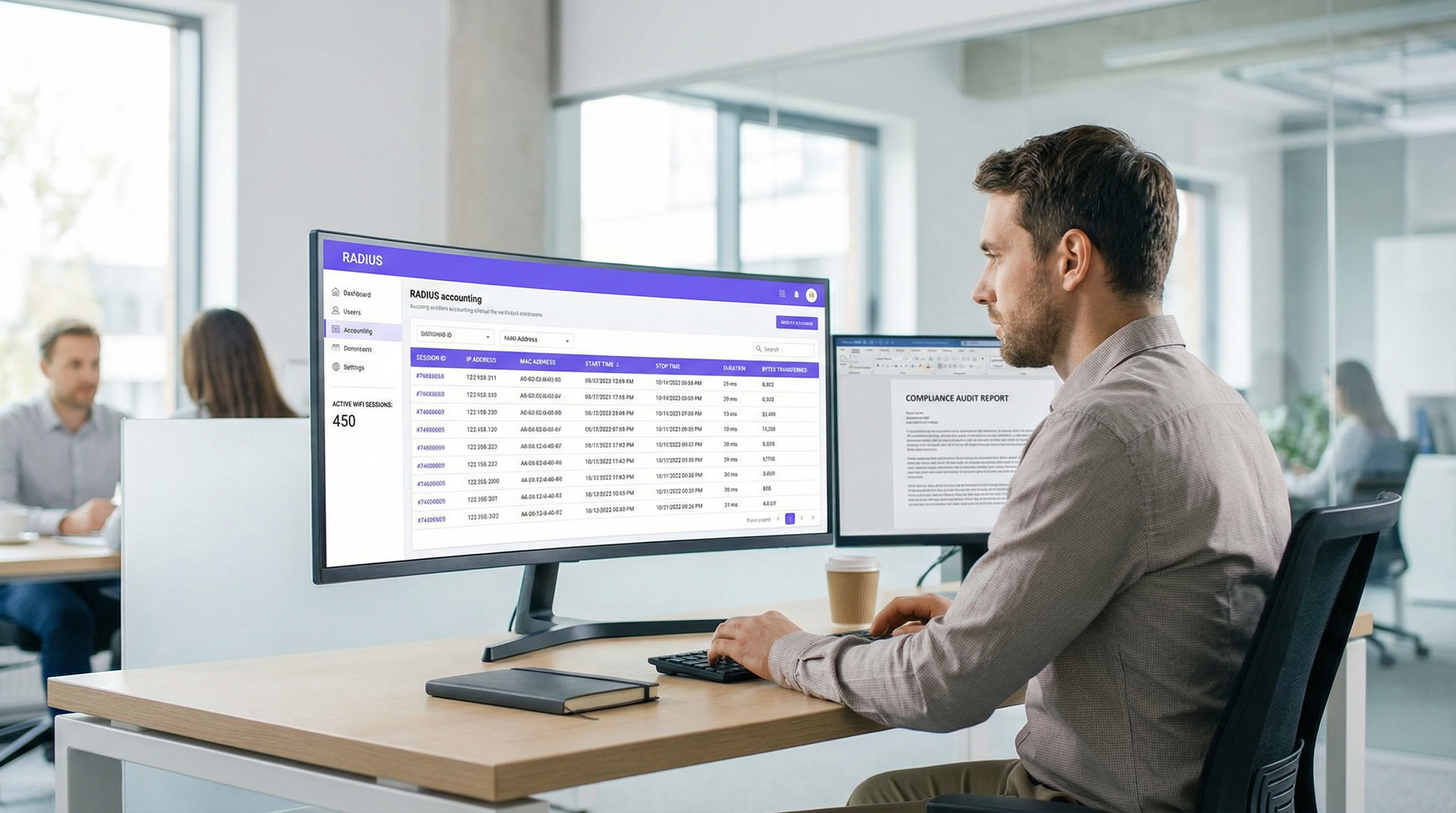
Sintesi operativa
Per i team IT aziendali e le operazioni di rete, l'autenticazione degli utenti su una rete WiFi è solo metà della battaglia. Una volta che un dispositivo è connesso, capire cosa fa quel dispositivo — quanto tempo rimane connesso, quanti dati consuma e quando si disconnette — è fondamentale per la sicurezza, la pianificazione della capacità e la conformità normativa. È qui che il RADIUS accounting diventa indispensabile. Mentre l'autenticazione RADIUS gestisce il chi e il come dell'accesso alla rete, il RADIUS accounting registra meticolosamente il cosa, il quando e il quanto.
Questa guida fornisce un approfondimento tecnico sul RADIUS accounting, esplorando i meccanismi dei pacchetti Start, Stop e Interim-Update e gli attributi che li rendono preziosi. Descrive come i gestori di location nei settori Hospitality , Retail e altri settori possano sfruttare questi dati per mantenere audit trail robusti, garantire la conformità al GDPR e fornire intelligence operativa alle piattaforme SIEM o ai sistemi di WiFi Analytics . Padroneggiando il RADIUS accounting, gli architetti di rete possono trasformare i log grezzi delle sessioni in asset strategici che guidano l'efficienza operativa e mitigano i rischi.
Approfondimento tecnico
RADIUS Accounting vs. RADIUS Authentication
Il RADIUS (Remote Authentication Dial-In User Service), definito in RFC 2865 ed esteso per l'accounting in RFC 2866 , opera su un modello client-server. In una tipica implementazione WiFi aziendale, l'Access Point (AP) o il Wireless LAN Controller (WLC) funge da Network Access Server (NAS) — il client RADIUS. Il server RADIUS (ad esempio, FreeRADIUS, Cisco ISE, Aruba ClearPass) riceve ed elabora le richieste.
La distinzione tra autenticazione e accounting è fondamentale:
| Dimensione | RADIUS Authentication | RADIUS Accounting |
|---|---|---|
| Scopo | Verificare l'identità e concedere/negare l'accesso | Registrare l'utilizzo e l'attività della sessione |
| Porta UDP | 1812 | 1813 |
| Riferimento RFC | RFC 2865 | RFC 2866 |
| Tipi di pacchetto | Access-Request, Access-Accept, Access-Reject | Accounting-Request (Start/Stop/Interim) |
| Dati acquisiti | Credenziali, assegnazione VLAN, policy | Durata sessione, byte trasferiti, indirizzo IP |
| Ruolo conformità | Controllo accessi | Audit trail, intercettazione legale |
Per i team che distribuiscono il Guest WiFi su larga scala, entrambe le funzioni sono necessarie, ma l'accounting è ciò che garantisce conformità e difendibilità.
I tre tipi di pacchetto di accounting
Il RADIUS accounting si basa su tre tipi principali di pacchetti Accounting-Request, ciascuno definito dall'attributo Acct-Status-Type:
Start (Acct-Status-Type = 1): Inviato dal NAS quando un utente si connette con successo e inizia una sessione. Stabilisce il record di base nel database di accounting, acquisendo l'identità dell'utente, l'indirizzo MAC del dispositivo, l'indirizzo IP assegnato e l'AP a cui l'utente si è connesso.
Interim-Update (Acct-Status-Type = 3): Inviato periodicamente durante una sessione attiva. Questi pacchetti forniscono istantanee dell'utilizzo corrente: byte trasferiti, durata della sessione e conteggio dei pacchetti. Fungono da heartbeat per confermare che la sessione è ancora attiva e forniscono visibilità sulle sessioni di lunga durata senza attendere la disconnessione.
Stop (Acct-Status-Type = 2): Inviato quando la sessione termina, sia a causa di una disconnessione avviata dall'utente, di un riavvio dell'AP, di un timeout di inattività o di un timeout di sessione. Contiene le statistiche finali cumulative per l'intera sessione.
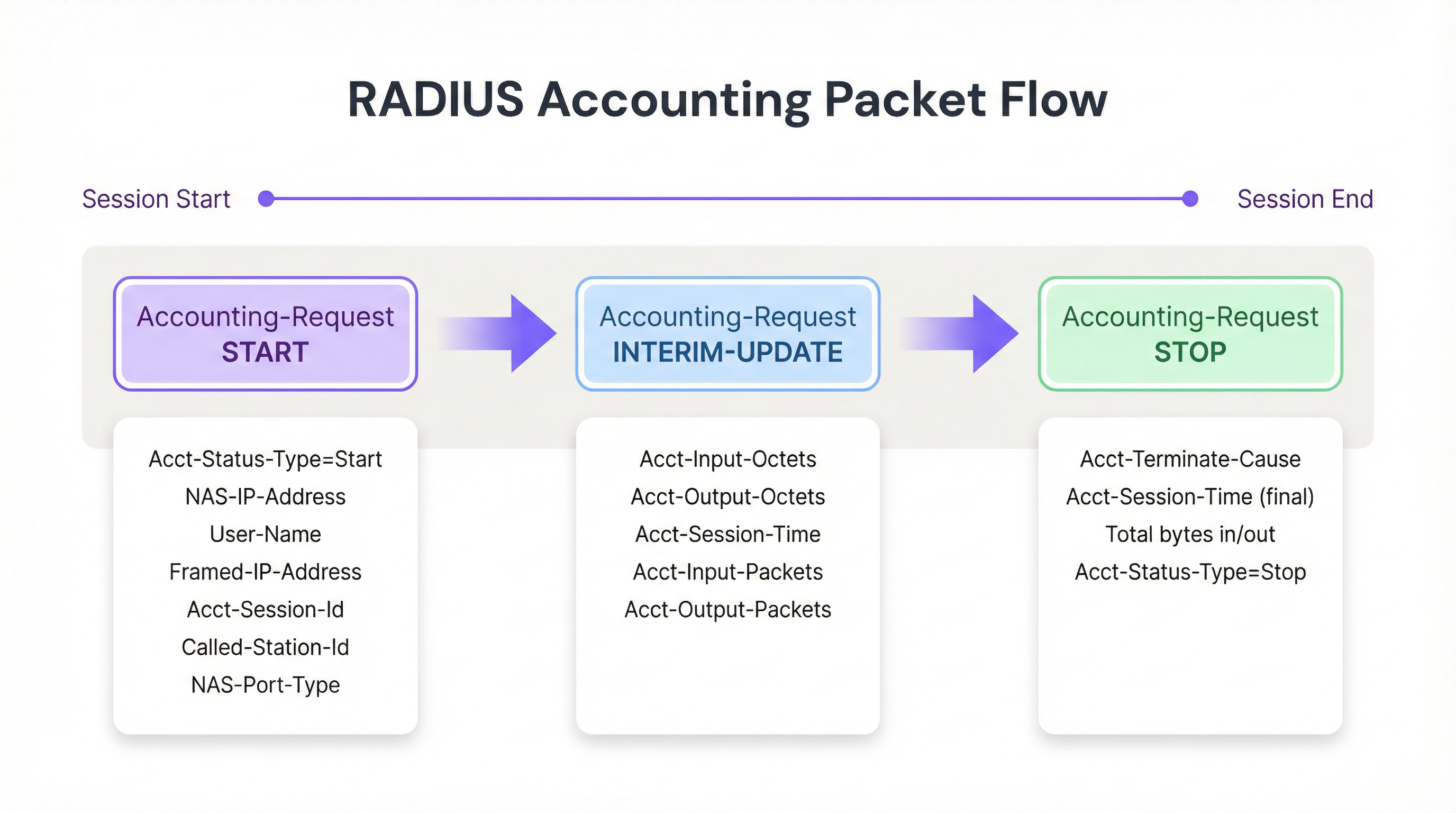
Figura 1: Il ciclo di vita dei pacchetti RADIUS accounting durante una sessione WiFi.
Attributi chiave di accounting
Per tracciare efficacemente le sessioni e creare log di audit difendibili, il NAS popola i pacchetti Accounting-Request con attributi specifici. I seguenti sono i più significativi dal punto di vista operativo:
| Attributo | Descrizione | Rilevanza per la conformità |
|---|---|---|
| Acct-Session-Id | Identificatore univoco della sessione generato dal NAS | Chiave primaria per correlare i record Start, Interim e Stop |
| User-Name | Identità autenticata (nome utente o indirizzo MAC) | Mappa la sessione a un utente o dispositivo specifico |
| NAS-IP-Address | Indirizzo IP dell'AP o WLC segnalante | Identifica il segmento di rete e la posizione fisica |
| Framed-IP-Address | Indirizzo IP assegnato al dispositivo client | Fondamentale per la correlazione con i log del firewall e del proxy web |
| Calling-Station-Id | Indirizzo MAC del dispositivo client | Identità a livello di dispositivo per l'audit trail |
| Called-Station-Id | Indirizzo MAC dell'AP e SSID | Identifica la radio e la rete specifica a cui l'utente si è connesso |
| Acct-Input-Octets | Byte ricevuti dal client | Monitoraggio della larghezza di banda e pianificazione della capacità |
| Acct-Output-Octets | Byte inviati al client | Monitoraggio della larghezza di banda e pianificazione della capacità |
| Acct-Session-Time | Durata della sessione in secondi | Analisi del tempo di permanenza e fatturazione |
| Acct-Terminate-Cause | Motivo della fine della sessione | Risoluzione dei problemi e rilevamento di anomalie |
Per i team che lavorano con l' Autenticazione 802.1X , l'attributo User-Name conterrà l'identità autenticata dallo scambio EAP, fornendo un audit trail più ricco rispetto al solo MAC Authentication Bypass (MAB).
Guida all'implementazione
L'implementazione di un'infrastruttura di RADIUS accounting robusta richiede un'attenta configurazione sia a livello di NAS che di server RADIUS. Di seguito è riportato un approccio indipendente dal fornitore per stabilire una pipeline di accounting affidabile.
Passaggio 1: Configurare il NAS (Access Point / Controller)
La configurazione del NAS è il punto in cui la maggior parte delle implementazioni fallisce. Gli amministratori spesso configurano correttamente l'autenticazione ma lasciano l'accounting alle impostazioni predefinite o lo disabilitano del tutto.
- Definire il server di accounting: Specificare l'indirizzo IP del server RADIUS e il segreto condiviso per la porta UDP 1813. Nelle implementazioni ad alta disponibilità, configurare un server di accounting secondario per prevenire la perdita di dati se il primario diventa irraggiungibile.
- Abilitare gli Interim Update: Questo è il passaggio di configurazione più importante. Impostare un intervallo appropriato, in genere da 10 a 15 minuti per le implementazioni aziendali. Intervalli più brevi (ad esempio, 1 minuto) forniscono dati più granulari ma generano un carico di scrittura insostenibile su larga scala; intervalli più lunghi (ad esempio, 30 minuti) riducono il sovraccarico ma ritardano la visibilità sulle sessioni attive.
- Garantire la sincronizzazione dell'ora: Configurare l'NTP su tutti i dispositivi NAS e sul server RADIUS. Timestamp accurati non sono negoziabili per i log di audit e la correlazione SIEM. Un disallineamento dell'orologio di 5 minuti può invalidare un audit trail in uno scenario di intercettazione legale.
Passaggio 2: Configurare il server RADIUS
- Integrazione del database: Configurare il server RADIUS per registrare i dati di accounting in un database relazionale strutturato (ad esempio, PostgreSQL, MySQL) anziché in file di testo piatti. L'archiviazione strutturata consente interrogazioni efficienti, indicizzazione e integrazione con i sistemi a valle. Assicurarsi che esistano indici su
Acct-Session-Id,User-Name,Framed-IP-Addresse sul timestamp di inizio sessione. - Policy di conservazione dei dati: Implementare script automatizzati di archiviazione o eliminazione in linea con i requisiti di conformità. L'Articolo 5(1)(e) del GDPR richiede che i dati siano conservati non più del necessario; tuttavia, le normative sull'intercettazione legale in molte giurisdizioni possono richiedere una conservazione fino a 12 mesi.
Passaggio 3: Costruire la pipeline dei dati
Per massimizzare il valore dei dati di accounting, questi devono essere esportati verso piattaforme di consumo dove possono essere interrogati, correlati e visualizzati.
- Integrazione SIEM: Configurare il server RADIUS o il database sottostante per inoltrare i log al proprio SIEM (ad esempio, Splunk, Microsoft Sentinel, IBM QRadar) utilizzando Syslog o una REST API. Ciò consente ai team di sicurezza di correlare gli eventi di autenticazione WiFi con i blocchi del firewall, gli avvisi di rilevamento delle intrusioni o i trigger di prevenzione della perdita di dati.
- Integrazione Analytics: Inviare i dati delle sessioni a piattaforme come WiFi Analytics di Purple per trasformare byte grezzi e indirizzi MAC in insight operativi riguardanti l'affluenza, il tempo di permanenza e i periodi di picco di utilizzo. Ciò è particolarmente prezioso per gli operatori Retail e Hospitality che devono allineare il personale e gli investimenti infrastrutturali ai modelli di utilizzo effettivi.
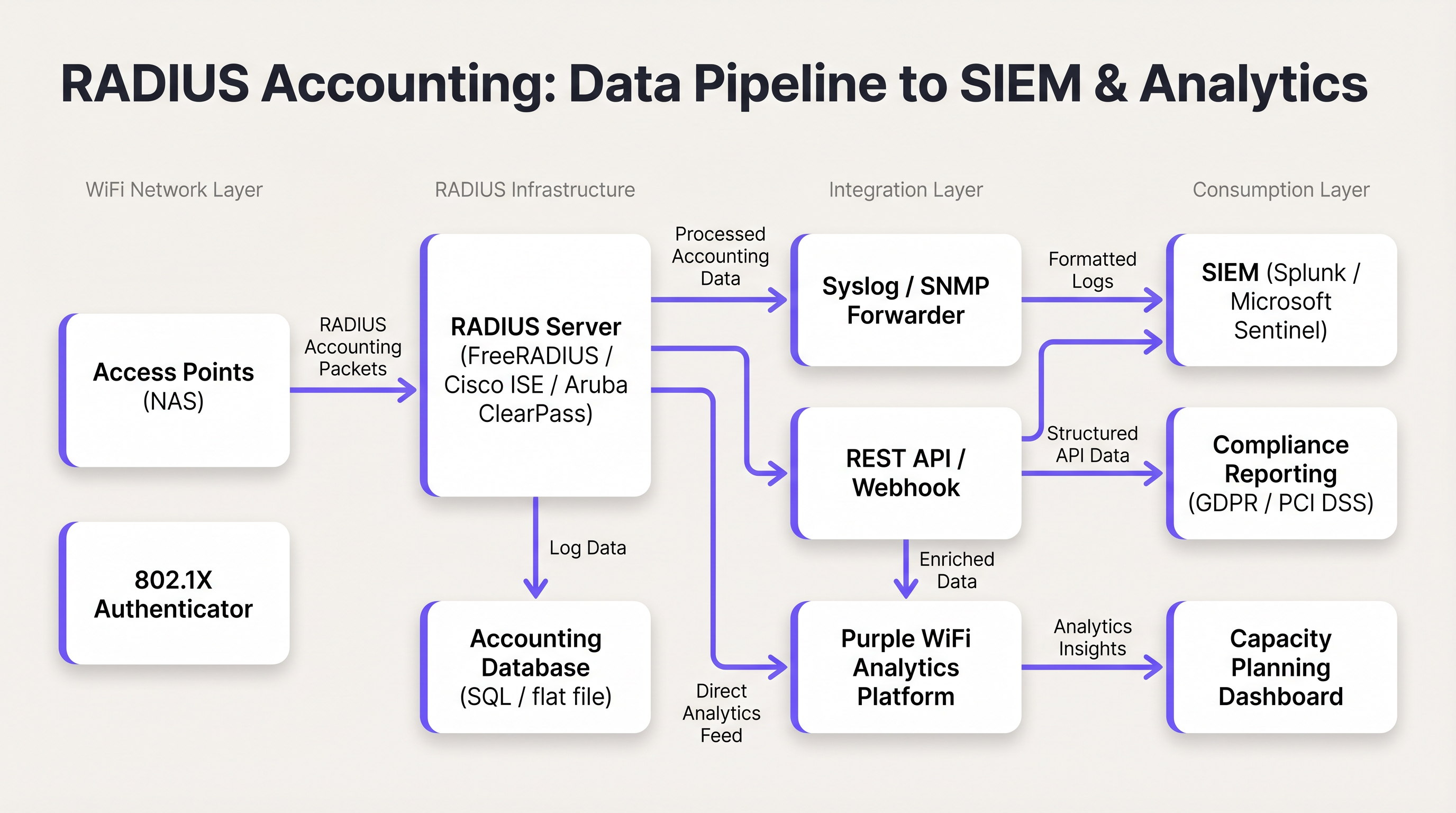
Figura 2: La pipeline dei dati di RADIUS accounting dagli Access Point alle piattaforme SIEM e di analisi.
Best Practice
Utilizzare sempre gli Interim Update. Affidarsi esclusivamente ai pacchetti Start e Stop crea punti ciechi operativi. Una connessione interrotta o un guasto all'alimentazione dell'AP potrebbero impedire l'invio di un pacchetto Stop, lasciando una sessione obsoleta nel database a tempo indeterminato. Gli aggiornamenti intermedi forniscono il meccanismo per rilevare e chiudere queste sessioni. Regola empirica: se una sessione non ha inviato un aggiornamento intermedio entro due o tre volte l'intervallo configurato, considerarla terminata.
Correlare il RADIUS Accounting con i log DHCP. Il RADIUS accounting fornisce il Framed-IP-Address, ma i tempi di lease DHCP possono essere più brevi della durata delle sessioni in alcuni ambienti. Mantenere i log DHCP insieme ai log RADIUS fornisce un audit trail più resiliente, in particolare in location ad alta densità dove il riciclo degli indirizzi IP è frequente.
Proteggere il trasporto con RadSec. Il traffico RADIUS tradizionale viene trasmesso su UDP con una crittografia minima — solo il campo della password utente è offuscato. Nelle implementazioni distribuite, in particolare quelle che abbracciano più siti o server RADIUS ospitati in cloud, utilizzare RadSec (RADIUS su TLS, definito in RFC 6614) o tunnel IPsec per proteggere i dati di accounting in transito. Questo è un requisito previsto dalla normativa PCI DSS 4.0 per qualsiasi rete che gestisca dati di titolari di carta.
Monitorare la coda di accounting. Se il server RADIUS diventa irraggiungibile, i dispositivi NAS metteranno in coda i pacchetti di accounting localmente. Monitorare la lunghezza di questa coda; una coda piena comporterà la perdita di pacchetti e di dati di audit. Configurare avvisi sulla profondità della coda e implementare un server di accounting secondario per implementazioni ad alta disponibilità.
Separare i server di autenticazione e accounting su larga scala. Nelle implementazioni che superano i 5.000 utenti simultanei, il carico di scrittura derivante dall'accounting può degradare i tempi di risposta dell'autenticazione. Server di accounting dedicati con istanze di database separate prevengono questo conflitto.
Risoluzione dei problemi e mitigazione dei rischi
Il problema della sessione obsoleta
Sintomo: Il database RADIUS mostra che un utente è connesso da 48 ore, ma la location ha chiuso durante la notte.
Causa principale: Il NAS non è riuscito a inviare un pacchetto Stop — in genere a causa di un'interruzione di corrente, un riavvio dell'AP o un'interruzione della rete — e il pacchetto non è mai stato ricevuto dal server RADIUS.
Mitigazione: Implementare uno script di pulizia delle sessioni inattive sul server RADIUS. Lo script dovrebbe scansionare periodicamente le sessioni attive in cui l'ultimo pacchetto ricevuto (Start o Interim-Update) è più vecchio di una soglia definita (ad esempio, 2,5 volte l'intervallo di aggiornamento intermedio). Le sessioni che superano questa soglia dovrebbero essere chiuse forzatamente con un record Stop sintetico, indicando come causa della terminazione 'Lost-Carrier' o 'Admin-Reset'.
Carico elevato di CPU e I/O del server RADIUS
Sintomo: I tempi di risposta dell'autenticazione peggiorano durante le ore di punta; il server RADIUS segnala un elevato utilizzo di CPU e I/O del disco.
Causa principale: Un intervallo di aggiornamento intermedio troppo aggressivo (ad esempio, 1 minuto) su migliaia di AP genera un volume insostenibile di scritture sul database.
Mitigazione: Aumentare l'intervallo di aggiornamento intermedio a 15 minuti. Verificare che il database di accounting abbia indici appropriati. Considerare la separazione di autenticazione e accounting su istanze server dedicate. Valutare se un database di serie temporali (ad esempio, InfluxDB) sia più appropriato di un database relazionale per dati di accounting ad alto volume.
Framed-IP-Address mancante nei record di accounting
Sintomo: Esistono record di RADIUS accounting, ma il campo Framed-IP-Address è vuoto o assente, rendendo impossibile la correlazione IP-MAC.
Causa principale: Il NAS potrebbe inviare il pacchetto Start prima che il DHCP abbia assegnato un indirizzo IP al client. L'IP è disponibile solo dopo il completamento dello scambio DHCP.
Mitigazione: Configurare il NAS per ritardare l'invio del pacchetto Start fino a dopo l'assegnazione DHCP, se la piattaforma lo supporta. In alternativa, fare affidamento sui pacchetti Interim-Update, che vengono inviati dopo l'assegnazione DHCP e conterranno il Framed-IP-Address. Assicurarsi che le query di audit ne tengano conto controllando i record Interim-Update se il record Start manca di un IP.
ROI e impatto aziendale
L'implementazione di un RADIUS accounting robusto offre un valore aziendale misurabile su tre dimensioni:
Mitigazione del rischio legale e di conformità. In caso di incidente di sicurezza, di una richiesta di accesso dell'interessato ai sensi del GDPR o di un ordine di intercettazione legale, log di accounting accurati forniscono l'audit trail necessario per identificare quale utente o dispositivo possedeva uno specifico indirizzo IP in un momento specifico. Senza questo, le organizzazioni affrontano potenziali sanzioni normative ai sensi del GDPR (fino al 4% del fatturato annuo globale) e danni alla reputazione. Il costo dell'implementazione di una corretta infrastruttura di accounting è una frazione del costo di una singola azione sanzionatoria.
Pianificazione della capacità e ROI dell'infrastruttura. Analizzando le tendenze di Acct-Input-Octets e Acct-Output-Octets nel tempo, gli architetti di rete possono identificare i modelli di consumo della larghezza di banda, i periodi di picco di utilizzo e gli AP o SSID specifici che generano il carico maggiore. Questi dati informano direttamente le decisioni di aggiornamento della WAN e le strategie di posizionamento degli AP, garantendo che l'investimento infrastrutturale sia diretto dove produce il massimo impatto. Per gli hub di Trasporto e le grandi location, ciò può rappresentare un risparmio significativo in termini di spese in conto capitale.
Analisi avanzata e Venue Intelligence. Quando i dati delle sessioni RADIUS vengono combinati con piattaforme come WiFi Analytics e Sensors di Purple, i dati grezzi di accounting vengono trasformati in intelligenza per la location. Diventano disponibili metriche sul tempo di permanenza derivate dalla durata della sessione, l'identificazione dei visitatori ricorrenti dalla cronologia del Calling-Station-Id e l'analisi dell'occupazione di picco dai conteggi delle sessioni simultanee. Per gli operatori dell'industria Hospitality , questi dati informano direttamente i modelli di personale, il posizionamento di cibo e bevande e le strategie di personalizzazione del marketing. Per ulteriori informazioni su come l'infrastruttura WiFi supporti queste capacità, consulta le nostre guide sui Wireless Access Points e sulle Soluzioni WiFi moderne per l'Hospitality .
Termini chiave e definizioni
RADIUS Accounting
The process of collecting and recording data about user network resource consumption, including session start and end times, data volume transferred, and IP address assignment. Defined in RFC 2866.
Essential for billing, capacity planning, GDPR compliance, and maintaining security audit trails in any enterprise WiFi deployment.
Acct-Status-Type
A RADIUS attribute (Attribute ID 40) that indicates the purpose of an accounting packet. Values include Start (1), Stop (2), and Interim-Update (3).
Used by the RADIUS server to determine whether to create a new session record, update an existing one, or close it. The most fundamental attribute in any accounting packet.
Interim-Update
A periodic RADIUS accounting packet sent by the NAS during an active session to report current usage statistics, including bytes transferred and session duration.
Critical for tracking long-lived sessions and detecting stale sessions if a client disconnects unexpectedly without sending a Stop packet.
Acct-Session-Id
A unique string generated by the NAS to identify a specific user connection instance. This value is consistent across all accounting packets (Start, Interim-Update, Stop) for the same session.
The primary key used to correlate all accounting records belonging to the same session. Without this, it is impossible to reconstruct a complete session history.
NAS (Network Access Server)
The device — typically a Wireless Access Point or Wireless LAN Controller — that controls physical access to the network and acts as the RADIUS client, generating and sending accounting packets.
The NAS is responsible for the accuracy and completeness of accounting data. Misconfiguration at the NAS level (e.g., disabled accounting, missing attributes) cannot be remediated at the RADIUS server level.
Framed-IP-Address
The IP address assigned to the client device for the duration of the session, included in RADIUS accounting packets.
Critical for correlating RADIUS accounting logs with other network logs such as firewall, web proxy, or DNS logs. The absence of this attribute makes IP-to-device correlation impossible.
Calling-Station-Id
Typically the MAC address of the client device connecting to the network, formatted as a colon-separated hexadecimal string (e.g., AA:BB:CC:DD:EE:FF).
Used to identify the specific hardware device, regardless of the IP address it is assigned. The device-layer anchor of the audit trail.
Acct-Terminate-Cause
An attribute included in Stop packets that specifies the reason a session ended. Common values include User-Request, Lost-Carrier, Idle-Timeout, Session-Timeout, and Admin-Reset.
Valuable for troubleshooting connectivity issues and for anomaly detection — for example, a high rate of Lost-Carrier terminations on a specific AP may indicate a hardware or interference problem.
RadSec
RADIUS over TLS (Transport Layer Security), defined in RFC 6614. Provides encrypted and authenticated transport for RADIUS packets, replacing the traditional UDP-based transport.
Required in any deployment where RADIUS traffic traverses untrusted networks (e.g., internet-connected cloud RADIUS servers). Increasingly mandated by PCI DSS 4.0 for cardholder data environments.
Casi di studio
A 300-room hotel with conference facilities is deploying a new guest WiFi network. The IT manager needs to ensure that the deployment meets GDPR requirements for data minimisation and audit trail completeness, while also providing the marketing team with dwell time and repeat visitor analytics. The hotel uses a cloud-hosted RADIUS server and Cisco Meraki APs.
The deployment should be configured as follows. On the Meraki dashboard, navigate to Network-wide > RADIUS servers and add the cloud RADIUS server on port 1813 with a strong shared secret. Enable accounting and set the interim update interval to 15 minutes. On the RADIUS server, configure accounting to write to a PostgreSQL database with the following schema: session_id (primary key), user_name, nas_ip, framed_ip, calling_station_id, called_station_id, session_start, session_end, input_octets, output_octets, terminate_cause. Implement a data retention policy that automatically archives records older than 12 months to cold storage and purges records older than 24 months, documented in the hotel's GDPR Record of Processing Activities. Configure a Purple WiFi Analytics integration to ingest the session data, enabling the marketing team to access dwell time reports and repeat visitor frequency dashboards. Ensure NTP is synchronised across all Meraki APs and the RADIUS server to within 1 second.
A retail chain with 150 stores needs to comply with PCI DSS 4.0 requirements for network access monitoring. Their point-of-sale terminals use MAC Authentication Bypass (MAB) on the WiFi network. The security team has received a request from their QSA (Qualified Security Assessor) to demonstrate that they can identify which specific POS terminal accessed the payment network at any given time, using only a source IP address and timestamp from a firewall log.
The solution requires a three-component integration. First, verify that all Wireless LAN Controllers are configured to include the Framed-IP-Address attribute in RADIUS accounting packets. This is not always enabled by default and must be explicitly configured. Second, integrate the RADIUS accounting database with the SIEM platform (e.g., Splunk). Create a lookup table in Splunk that maps Framed-IP-Address and session time ranges to Calling-Station-Id (MAC address). Third, create a Splunk saved search that accepts a source IP and timestamp as inputs and returns the corresponding MAC address, NAS-IP-Address (identifying the store and AP), and User-Name from the RADIUS accounting records. The QSA can then be demonstrated this workflow: given a firewall log entry showing source IP 10.5.12.44 at 14:23:07 on a specific date, the search returns the MAC address of the POS terminal, the AP it was connected to, and the store location.
Analisi degli scenari
Q1. A hotel IT manager notices that the WiFi analytics dashboard shows very few active users during the day, even though the lobby and restaurant are visibly busy. However, the historical reports for the previous day show a massive spike in data usage. The RADIUS server logs confirm that Start packets are being received, but the database shows very few Interim-Update records. What is the most likely misconfiguration, and how would you resolve it?
💡 Suggerimento:Consider how data usage is reported during an active session versus at the point of disconnection.
Mostra l'approccio consigliato
The most likely cause is that Interim-Updates are disabled or not configured on the Wireless LAN Controller. Without interim updates, the RADIUS server only receives a Start packet when the user connects and a Stop packet when they disconnect. The analytics dashboard cannot display current usage because no in-session data is being reported. Once users leave and disconnect, the Stop packets arrive with the total accumulated data, causing the delayed spike in historical reports. The resolution is to enable Interim-Updates on the WLC and set an appropriate interval — 15 minutes is recommended for a hotel environment. After enabling, verify that the RADIUS server is receiving Interim-Update packets by checking the accounting database for records with Acct-Status-Type = 3.
Q2. During a security incident investigation, your SIEM has flagged that an IP address on the guest WiFi network accessed a known command-and-control server at 09:47:23 on a specific date. You need to identify the physical device responsible. Your DHCP lease time is set to 30 minutes. Describe the exact query logic you would use against the RADIUS accounting database to identify the device.
💡 Suggerimento:IP addresses are not static. You must use a time-range query, not a point-in-time lookup, and account for DHCP lease recycling.
Mostra l'approccio consigliato
You must query the RADIUS accounting database for sessions where: (1) the Framed-IP-Address equals the flagged IP address, AND (2) the session_start timestamp is earlier than or equal to 09:47:23, AND (3) either the session_end timestamp is later than or equal to 09:47:23, OR the session_end is NULL (session still active at query time). If multiple sessions match (possible with a 30-minute DHCP lease), review the Interim-Update records to confirm which session was actively reporting usage at 09:47:23. The matching session record will contain the Calling-Station-Id (MAC address of the device) and the User-Name (authenticated identity, if 802.1X was used). Cross-reference the MAC address with your device inventory or DHCP server logs to identify the physical device and its owner.
Q3. You are the network architect for a conference centre that hosts events with up to 8,000 concurrent WiFi users. Your current RADIUS server is experiencing database write saturation during peak events, causing authentication delays of 3-5 seconds. Your current interim update interval is set to 2 minutes. Describe a multi-step remediation plan that addresses both the immediate performance issue and the underlying architectural risk.
💡 Suggerimento:Consider both configuration changes and architectural changes. The goal is to maintain audit trail completeness while reducing write load.
Mostra l'approccio consigliato
The remediation plan should address three layers. First, as an immediate fix, increase the interim update interval from 2 minutes to 15 minutes on all Wireless Controllers. This reduces the accounting write load by approximately 87% (from one write per 2 minutes to one per 15 minutes per session), which should immediately relieve the database I/O pressure. Second, separate the authentication and accounting workloads onto dedicated server instances. The authentication server handles Access-Request/Accept/Reject packets, while a dedicated accounting server handles Accounting-Request packets and writes to a separate database. This prevents accounting write load from affecting authentication response times. Third, for the underlying architectural risk, evaluate whether a time-series database (e.g., InfluxDB or TimescaleDB) is more appropriate than a relational database for the accounting workload. Time-series databases are optimised for high-volume sequential writes and time-range queries, which matches the accounting data pattern exactly. Migrate accounting writes to the time-series database while retaining the relational database for compliance reporting queries.
Punti chiave
- ✓RADIUS accounting (RFC 2866) is distinct from authentication: it records session usage data — duration, bytes transferred, IP assignment — rather than making access control decisions.
- ✓The three packet types — Start, Interim-Update, and Stop — must all be configured and operational for a complete audit trail. Interim-Updates are the most commonly missed configuration.
- ✓The Acct-Session-Id, Framed-IP-Address, and Calling-Station-Id attributes form the minimum viable audit trail, enabling IP-to-device correlation for compliance and security investigations.
- ✓Stale sessions (caused by missing Stop packets) must be managed with a dead-session cleanup script using the 2.5x interim update interval rule.
- ✓RADIUS accounting data must be exported to a structured database and integrated with a SIEM and analytics platform to deliver its full compliance and operational value.
- ✓For PCI DSS, GDPR, and lawful intercept compliance, the ability to tie an IP address to a MAC address at a specific point in time is the core requirement that RADIUS accounting fulfils.
- ✓At scale (5,000+ concurrent users), separate authentication and accounting server instances and consider a time-series database for accounting writes to prevent performance degradation.




