
Access Point बनाम Router: व्यावसायिक नेटवर्किंग के लिए एक गाइड
यह व्यापक गाइड Access Point और Router के बीच तकनीकी अंतरों की खोज करती है, जो व्यावसायिक वातावरण के लिए व्यावहारिक परिनियोजन रणनीतियाँ प्रदान करती है। यह IT प्रबंधकों और स्थल ऑपरेटरों को स्केलेबल, सुरक्षित और उच्च प्रदर्शन वाले वायरलेस नेटवर्क को डिजाइन करने के लिए आवश्यक ज्ञान से लैस करती है।
इस गाइड को सुनें
पॉडकास्ट ट्रांसक्रिप्ट देखें
हमारी मुख्य श्रृंखला का हिस्सा: Guest WiFi Guide →
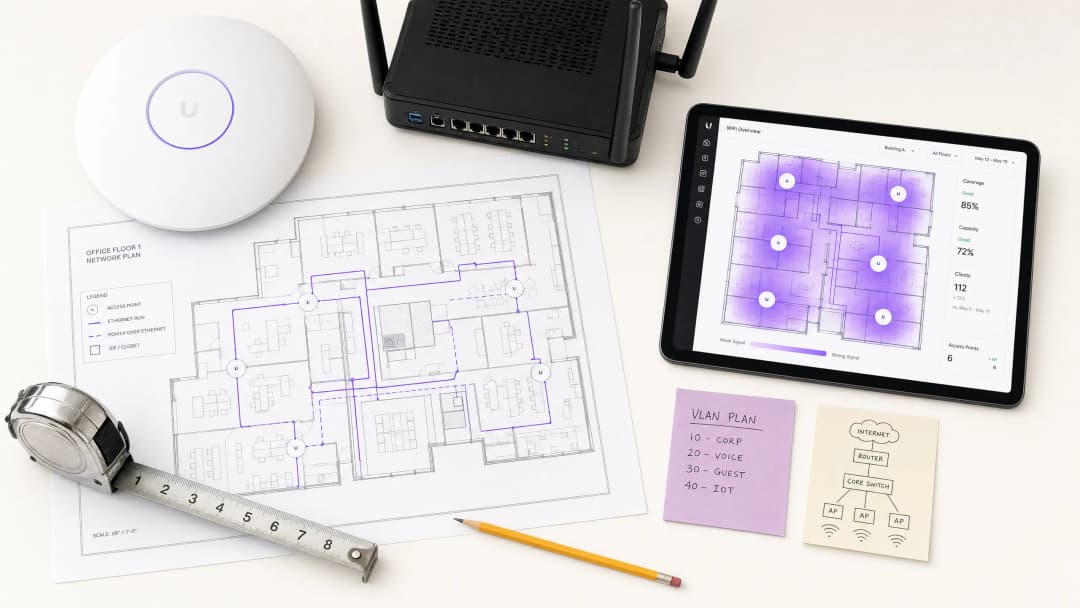
कार्यकारी सारांश (Executive Summary)
व्यावसायिक स्थलों की देखरेख करने वाले CTOs और नेटवर्क आर्किटेक्ट्स के लिए, एक एक्सेस पॉइंट (AP) और एक राउटर के बीच का अंतर स्केलेबल इन्फ्रास्ट्रक्चर डिज़ाइन के लिए मौलिक है। जबकि उपभोक्ता परिवेश अक्सर ऑल-इन-वन उपकरणों के साथ इन सीमाओं को धुंधला कर देते हैं, एंटरप्राइज़ डिप्लॉयमेंट को उच्च उपलब्धता, सुरक्षा और प्रदर्शन सुनिश्चित करने के लिए कर्तव्यों के सख्त अलगाव की आवश्यकता होती है। एक राउटर OSI Layer 3 पर काम करता है, जो IP ट्रैफ़िक को निर्देशित करता है और नेटवर्क सीमाओं को प्रबंधित करता है, जबकि एक एक्सेस पॉइंट Layer 2 पर कार्य करता है, जो वायर्ड LAN के लिए एक वायरलेस ब्रिज के रूप में कार्य करता है।
समर्पित APs के साथ एक मजबूत आर्किटेक्चर को लागू करना निर्बाध रोमिंग, उन्नत VLAN सेग्मेंटेशन और Guest WiFi और WiFi Analytics जैसे एंटरप्राइज़ प्लेटफ़ॉर्म के साथ एकीकरण को सक्षम बनाता है। यह मार्गदर्शिका Hospitality , Retail और अन्य उच्च-घनत्व वाले वातावरणों में लचीले वायरलेस नेटवर्क के निर्माण के लिए आवश्यक तकनीकी विशिष्टताओं, डिप्लॉयमेंट तौर-तरीकों और जोखिम शमन रणनीतियों का विवरण देती है। हम यह पता लगाएंगे कि लीगेसी सेटअप से कंट्रोलर-आधारित AP डिप्लॉयमेंट में कैसे ट्रांज़िशन किया जाए जो WPA3 और IEEE 802.1X जैसे आधुनिक मानकों का समर्थन करते हैं।
गहन तकनीकी विश्लेषण (Technical Deep-Dive)
OSI मॉडल संचालन और मुख्य कार्य
एक राउटर और एक एक्सेस पॉइंट के बीच का मौलिक अंतर OSI मॉडल के भीतर उनकी परिचालन परत (operational layer) में निहित है। एक राउटर एक Layer 3 (नेटवर्क लेयर) डिवाइस है। इसकी प्राथमिक जिम्मेदारी विभिन्न IP सबनेट्स के बीच पैकेट को रूट करना है, जो आमतौर पर लोकल एरिया नेटवर्क (LAN) और वाइड एरिया नेटवर्क (WAN) के बीच की सीमा को प्रबंधित करता है। राउटर नेटवर्क एड्रेस ट्रांसलेशन (NAT), DHCP सेवाओं और फ़ायरवॉल नियमों को संभालते हैं। वे डेटा पैकेट के लिए इष्टतम पथ निर्धारित करने के लिए राउटिंग टेबल बनाए रखते हैं।
इसके विपरीत, एक एक्सेस पॉइंट एक Layer 2 (डेटा लिंक लेयर) डिवाइस है। यह एक ब्रिज के रूप में कार्य करता है, जो वायर्ड ईथरनेट फ्रेम को वायरलेस 802.11 फ्रेम में परिवर्तित करता है। एक AP ट्रैफ़िक को रूट नहीं करता है, IP पते असाइन नहीं करता है, या NAT को प्रबंधित नहीं करता है। यह इन कार्यों को संभालने के लिए एक अपस्ट्रीम राउटर या कोर स्विच पर निर्भर करता है। एक एंटरप्राइज़ वातावरण में, बड़े क्षेत्रों में निरंतर कवरेज प्रदान करने के लिए APs को मेश या कंट्रोलर-प्रबंधित आर्किटेक्चर में तैनात किया जाता है, जिससे क्लाइंट बिना अपना IP पता खोए या कनेक्शन टूटे बिना एक्सेस पॉइंट्स के बीच निर्बाध रूप से रोम कर सकते हैं।

स्केलेबिलिटी और क्लाइंट डेंसिटी
कंज्यूमर-ग्रेड वायरलेस राउटर कम-डेंसिटी वाले वातावरण के लिए डिज़ाइन किए जाते हैं, जो आमतौर पर CPU और मेमोरी की सीमाओं के कारण परफॉर्मेंस में गिरावट आने से पहले 15-30 समवर्ती उपकरणों का समर्थन करते हैं। Retail या Transport हब जैसे व्यावसायिक स्थानों में, क्लाइंट डेंसिटी आसानी से प्रति ज़ोन सैकड़ों उपकरणों से अधिक हो सकती है। एंटरप्राइज़ APs को प्रति एक्सेस पॉइंट 100-500+ समवर्ती क्लाइंट्स का समर्थन करने के लिए समर्पित रेडियो चिपसेट और हाई-गेन एंटेना के साथ तैयार किया जाता है। वे हाई-डेंसिटी ट्रैफ़िक को कुशलतापूर्वक प्रबंधित करने के लिए MU-MIMO (मल्टी-यूज़र, मल्टीपल इनपुट, मल्टीपल आउटपुट) और OFDMA (ऑर्थोगोनल फ्रीक्वेंसी-डिवीजन मल्टीपल एक्सेस) जैसी उन्नत सुविधाओं का उपयोग करते हैं।
नेटवर्क आर्किटेक्चर और सेगमेंटेशन
व्यावसायिक नेटवर्क के लिए एक महत्वपूर्ण आवश्यकता लॉजिकल सेगमेंटेशन है। एक मानक आर्किटेक्चर में WAN कनेक्टिविटी को संभालने वाला एक एज राउटर शामिल होता है, जो एक कोर लेयर 3 स्विच से जुड़ा होता है, जो फिर PoE (पावर ओवर ईथरनेट) एक्सेस स्विचों को वितरित करता है। APs इन PoE स्विचों से जुड़ते हैं। यह डिज़ाइन कई VLANs (वर्चुअल लोकल एरिया नेटवर्क) के कार्यान्वयन की अनुमति देता है। उदाहरण के लिए, एक AP कई SSIDs प्रसारित कर सकता है, जो एक कॉर्पोरेट SSID को VLAN 10 (802.1X प्रमाणीकरण का उपयोग करके) और एक गेस्ट SSID को VLAN 20 (एक Captive Portal का उपयोग करके) से मैप करता है। PCI-DSS और GDPR जैसे मानकों के अनुपालन के लिए यह आइसोलेशन अत्यंत महत्वपूर्ण है।

अपने विशिष्ट सेटअप को लेकर कोई सवाल हैं?
हमारी टीम 80,000 से अधिक वेन्यू में वेन्यू ऑपरेटरों, IT मैनेजरों और नेटवर्क इंजीनियरों के साथ काम करती है। 20 मिनट का कॉल बुक करें और हम आपको दिखाएंगे कि आपके जैसे अन्य लोगों ने इसे कैसे हल किया।
कार्यान्वयन गाइड
1. आवश्यकताओं का संकलन और साइट सर्वे
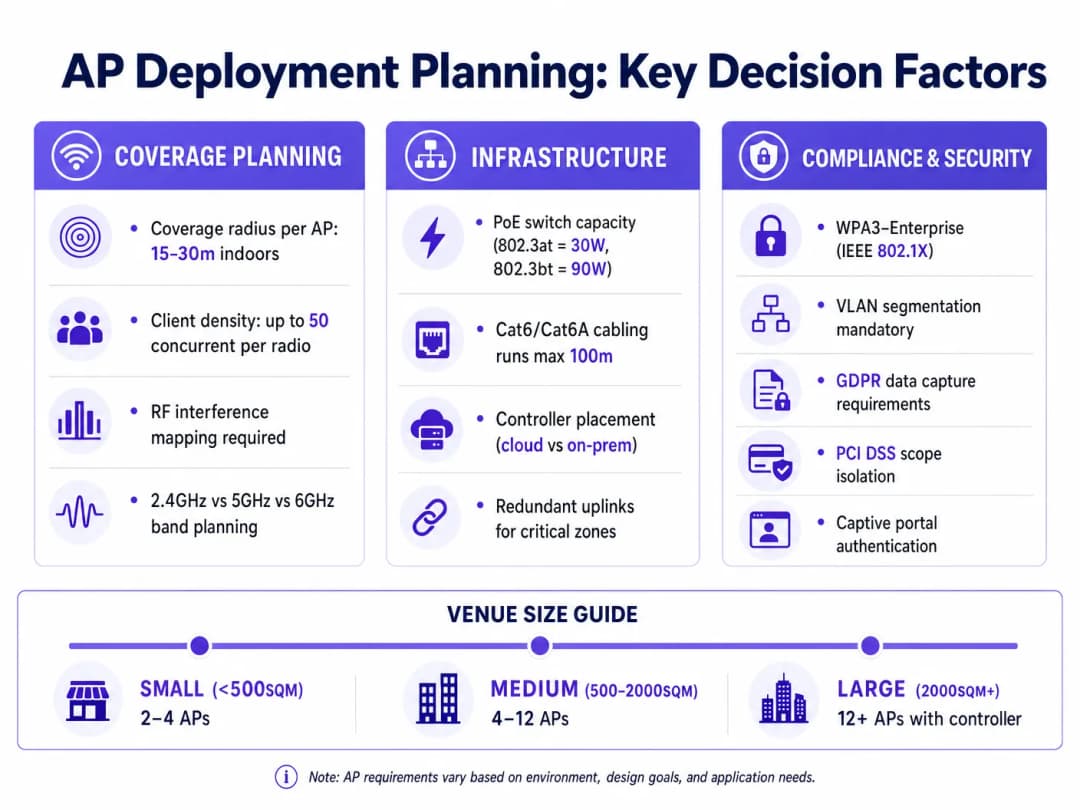
APs को तैनात करने से पहले, एक पूर्वानुमानित और भौतिक साइट सर्वे अनिवार्य है। इसमें RF (रेडियो फ्रीक्वेंसी) बाधाओं, एटेन्युएशन ज़ोन और हाई-डेंसिटी वाले क्षेत्रों की पहचान करने के लिए स्थान का मानचित्रण करना शामिल है। इस चरण के लिए Ekahau या AirMagnet जैसे उपकरण मानक हैं। इसका उद्देश्य सह-चैनल हस्तक्षेप को कम करते हुए, पूरे कवरेज क्षेत्र में न्यूनतम सिग्नल शक्ति (आमतौर पर -65 dBm) सुनिश्चित करने के लिए APs के इष्टतम प्लेसमेंट को निर्धारित करना है।
2. इन्फ्रास्ट्रक्चर की तैयारी
एंटरप्राइज़ APs को डेटा कनेक्टिविटी और पावर दोनों के लिए PoE की आवश्यकता होती है। सुनिश्चित करें कि एक्सेस स्विच आवश्यक PoE मानक का समर्थन करते हैं (जैसे, मानक APs के लिए 802.3at/PoE+, या उच्च-प्रदर्शन WiFi 6E/7 APs के लिए 802.3bt/PoE++)। मल्टी-गीगाबिट थ्रूपुट का समर्थन करने के लिए केबल रन में Cat6 या Cat6A केबलिंग का उपयोग किया जाना चाहिए, जो 100-मीटर की लंबाई सीमा का पालन करता हो।
3. कंट्रोलर कॉन्फ़िगरेशन और प्रोविज़निंग
आधुनिक एंटरप्राइज APs को एक केंद्रीय कंट्रोलर के माध्यम से प्रबंधित किया जाता है, जो हार्डवेयर-आधारित (ऑन-प्रिमाइसेस) या क्लाउड-होस्टेड हो सकता है। कंट्रोलर AP प्रोविजनिंग, फर्मवेयर अपडेट और रेडियो रिसोर्स मैनेजमेंट (RRM) को संभालता है। RRM आरएफ (RF) वातावरण को अनुकूलित करने के लिए AP ट्रांसमिट पावर और चैनल असाइनमेंट को गतिशील रूप से समायोजित करता है। इस चरण के दौरान, आवश्यक SSIDs, VLAN टैग और प्रमाणीकरण विधियों को कॉन्फ़िगर करें। गेस्ट नेटवर्क के लिए, फर्स्ट-पार्टी डेटा कैप्चर करने के लिए कंट्रोलर को एक Captive Portal समाधान के साथ एकीकृत करें, जैसा कि How To Improve Guest Satisfaction: The Ultimate Playbook में विस्तार से बताया गया है।
सर्वोत्तम प्रथाएं
- रूटिंग को वायरलेस एक्सेस से अलग करें: व्यावसायिक परिवेश में रूटिंग और हाई-डेंसिटी वायरलेस एक्सेस दोनों को संभालने के लिए कभी भी एक ही डिवाइस पर निर्भर न रहें। समर्पित एज राउटर्स/फ़ायरवॉल और अलग APs का उपयोग करें।
- कड़ा VLAN सेगमेंटेशन लागू करें: कॉर्पोरेट ट्रैफ़िक, IoT डिवाइस और गेस्ट नेटवर्क को अलग-अलग VLANs पर अलग करें। सुनिश्चित करें कि पीयर-टू-पीयर संचार को रोकने के लिए गेस्ट नेटवर्क पर क्लाइंट आइसोलेशन सक्षम है।
- WPA3 और 802.1X पर मानकीकरण करें: आंतरिक नेटवर्क के लिए, IEEE 802.1X प्रमाणीकरण (RADIUS/EAP) के साथ WPA3-Enterprise को अनिवार्य करें। निर्बाध गेस्ट एक्सेस के लिए, OpenRoaming जैसी तकनीकों पर विचार करें, क्योंकि Purple इन सेवाओं के लिए एक मुफ्त पहचान प्रदाता के रूप में कार्य करता है।
- केवल कवरेज ही नहीं, बल्कि क्षमता के लिए योजना बनाएं: केवल कवरेज के लिए डिज़ाइन करने से अक्सर हाई-डेंसिटी वाले क्षेत्रों में प्रदर्शन की समस्याएं होती हैं। AP डेंसिटी का निर्धारण करते समय अपेक्षित समवर्ती क्लाइंट्स की संख्या और एप्लिकेशन थ्रूपुट आवश्यकताओं को ध्यान में रखें।
समस्या निवारण और जोखिम न्यूनीकरण
को-चैनल इंटरफेरेंस (CCI)
CCI तब होता है जब निकटता में स्थित कई APs एक ही चैनल पर काम करते हैं, जिससे उन्हें ट्रांसमिट करने से पहले एक-दूसरे का इंतजार करना पड़ता है (CSMA/CA)। न्यूनीकरण: वायरलेस कंट्रोलर के माध्यम से गतिशील चैनल असाइनमेंट का उपयोग करें। 2.4GHz बैंड में, पूरी तरह से गैर-अतिव्यापी (non-overlapping) चैनलों (1, 6, 11) का उपयोग करें। अधिक गैर-अतिव्यापी चैनलों की उपलब्धता के कारण हाई-कैपेसिटी डिप्लॉयमेंट के लिए 5GHz और 6GHz बैंड को प्राथमिकता दें।
अनधिकृत एक्सेस पॉइंट्स (Rogue Access Points)
कर्मचारी या दुर्भावनापूर्ण कर्ता सुरक्षा नियंत्रणों को दरकिनार करते हुए कॉर्पोरेट नेटवर्क में अनधिकृत APs प्लग कर सकते हैं। न्यूनीकरण: अनधिकृत उपकरणों का पता लगाने और उन्हें रोकने के लिए एंटरप्राइज APs पर वायरलेस इंट्रूजन प्रिवेंशन सिस्टम (WIPS) सक्षम करें। अनधिकृत उपकरणों को LAN से कनेक्ट होने से रोकने के लिए सभी वायर्ड स्विच पोर्ट पर पोर्ट सुरक्षा (802.1X) लागू करें।
Captive Portal विफलताएं
अतिथि उपयोगकर्ताओं का प्रमाणीकरण विफल हो सकता है या उन्हें कैप्टिव पोर्टल स्पैश पेज प्राप्त होने में समस्या आ सकती है, जिससे उपयोगकर्ता अनुभव खराब होता है। समाधान: सुनिश्चित करें कि DNS और DHCP सेवाएं अत्यधिक उपलब्ध हों। कैप्टिव पोर्टल को रेंडर करने के लिए आवश्यक डोमेन (Walled Garden) को व्हाइटलिस्ट करें, विशेष रूप से तब जब सोशल लॉगिन या बाहरी पहचान प्रदाताओं का उपयोग किया जा रहा हो। निर्बाध प्रमाणीकरण पर अधिक जानकारी के लिए, देखें How a WiFi assistant Enables Passwordless Access in 2026 ।
ROI और व्यावसायिक प्रभाव
उपभोक्ता-ग्रेड राउटर्स के बजाय एक समर्पित AP आर्किटेक्चर में निवेश करने से महत्वपूर्ण व्यावसायिक रिटर्न मिलता है।
सबसे पहले, यह जोखिम को कम करता है। उचित सेगमेंटेशन और एंटरप्राइज-ग्रेड सुरक्षा प्रोटोकॉल डेटा ब्रीच की संभावना को कम करते हैं, जिससे संगठन गंभीर वित्तीय और प्रतिष्ठित नुकसान से बच जाता है। जब POS सिस्टम को अतिथि ट्रैफ़िक से अलग रखा जाता है, तो PCI-DSS का अनुपालन सरल हो जाता है।
दूसरा, यह डेटा मॉनिटाइजेशन और बेहतर ग्राहक जुड़ाव को सक्षम बनाता है। एक मजबूत AP डिप्लॉयमेंट Purple के WiFi Analytics जैसे उन्नत प्लेटफॉर्मों की नींव है। विश्वसनीय, उच्च-प्रदर्शन अतिथि WiFi प्रदान करके, स्थान मूल्यवान फर्स्ट-पार्टी डेटा कैप्चर कर सकते हैं, फुटफॉल पैटर्न का विश्लेषण कर सकते हैं, और लक्षित मार्केटिंग अभियान वितरित कर सकते हैं। यह नेटवर्क को लागत केंद्र से राजस्व-उत्पन्न करने वाली संपत्ति में बदल देता है, जिससे निष्ठा बढ़ती है और लाइफटाइम कस्टमर वैल्यू में वृद्धि होती है। सार्वजनिक क्षेत्र के अनुप्रयोगों के लिए, मजबूत बुनियादी ढांचा उन पहलों का समर्थन करता है जिन पर Purple Appoints Iain Fox as VP Growth – Public Sector to Drive Digital Inclusion and Smart City Innovation में चर्चा की गई है।
मुख्य परिभाषाएं
Access Point (AP)
एक नेटवर्किंग डिवाइस जो वायरलेस डिवाइसों को वायर्ड लोकल एरिया नेटवर्क (LAN) से जोड़ता है, जो OSI लेयर 2 पर काम करता है।
व्यावसायिक स्थलों में स्केलेबल वायरलेस कवरेज प्रदान करने के लिए मूलभूत निर्माण खंड।
Router
एक लेयर 3 डिवाइस जो कंप्यूटर नेटवर्क के बीच डेटा पैकेट अग्रेषित करता है, IP एड्रेस और NAT का प्रबंधन करता है।
स्थल के LAN को इंटरनेट से जोड़ने के लिए नेटवर्क के किनारे पर उपयोग किया जाता है।
VLAN (Virtual Local Area Network)
नेटवर्क उपकरणों का एक तार्किक समूह जो इस तरह व्यवहार करता है जैसे कि वे एक ही भौतिक नेटवर्क पर हों, चाहे उनका भौतिक स्थान कुछ भी हो।
सुरक्षा और PCI अनुपालन बनाए रखने के लिए कॉर्पोरेट सिस्टम से अतिथि ट्रैफ़िक को अलग करने के लिए आवश्यक।
PoE (Power over Ethernet)
एक तकनीक जो ट्विस्टेड-पेयर ईथरनेट केबलिंग पर डेटा के साथ-साथ विद्युत शक्ति भी पारित करती है।
अलग से बिजली के आउटलेट की आवश्यकता के बिना AP को छतों या दीवारों पर स्थापित करने की अनुमति देता है।
Captive Portal
एक वेब पेज जिसे सार्वजनिक-पहुंच नेटवर्क के उपयोगकर्ता को एक्सेस दिए जाने से पहले देखने और बातचीत करने के लिए बाध्य होना पड़ता है।
प्रथम-पक्ष डेटा कैप्चर करने, सेवा की शर्तों को लागू करने और लक्षित मार्केटिंग प्रदान करने के लिए उपयोग किया जाता है।
SSID (Service Set Identifier)
802.11 वायरलेस लोकल एरिया नेटवर्क (WLAN) से जुड़ा प्राथमिक नाम।
उपयोगकर्ता अपने उपकरणों पर उपलब्ध WiFi नेटवर्क खोजते समय जो देखते हैं।
वायरलेस कंट्रोलर
एक केंद्रीकृत प्रबंधन डिवाइस या सॉफ्टवेयर जो कई एक्सेस पॉइंट्स को कॉन्फ़िगर, मॉनिटर और अपडेट करता है।
बड़े परिनियोजन के प्रबंधन, निर्बाध रोमिंग सुनिश्चित करने और RF प्रदर्शन को अनुकूलित करने के लिए महत्वपूर्ण घटक।
802.1X
पोर्ट - आधारित नेटवर्क एक्सेस कंट्रोल (PNAC) के लिए एक IEEE मानक, जो LAN और WLAN के लिए प्रमाणित पहुंच प्रदान करता है।
कॉर्पोरेट वायरलेस नेटवर्क को सुरक्षित करने के लिए सबसे बेहतरीन मानक, जो RADIUS या एक्टिव डायरेक्टरी जैसे पहचान प्रदाताओं के साथ एकीकृत होता है।
हल किए गए उदाहरण
एक 200 कमरों वाला होटल अपने नेटवर्क को अपग्रेड कर रहा है। वर्तमान सेटअप ब्रिज मोड में कॉन्फ़िगर किए गए 20 उपभोक्ता-ग्रेड वायरलेस Router का उपयोग करता है, जिससे कनेक्शन टूटने और धीमी गति के बारे में लगातार मेहमानों की शिकायतें आती हैं। IT टीम को इस बुनियादी ढांचे को फिर से कैसे डिजाइन करना चाहिए?
- सभी उपभोक्ता-ग्रेड Router हटाएँ। 2. WAN कनेक्टिविटी और NAT को संभालने के लिए एक समर्पित एंटरप्राइज एज फ़ायरवॉल/Router तैनात करें। 3. IDF क्लोजेट में PoE+ एक्सेस स्विच इंस्टॉल करें। 4. AP प्लेसमेंट निर्धारित करने के लिए एक प्रेडिक्टिव RF सर्वे करें। 5. गलियारों और उच्च-घनत्व वाले क्षेत्रों (लॉबी, कॉन्फ्रेंस रूम) में एंटरप्राइज-ग्रेड, सीलिंग-माउंटेड AP तैनात करें। 6. AP को प्रबंधित करने के लिए क्लाउड-होस्टेड वायरलेस कंट्रोलर को कॉन्फ़िगर करें। 7. अलग VLAN बनाएँ: VLAN 10 (कॉर्पोरेट, WPA3-Enterprise), VLAN 20 (अतिथि, Captive Portal के साथ ओपन SSID), VLAN 30 (IoT/ताले)। 8. अतिथि VLAN पर क्लाइंट आइसोलेशन सक्षम करें।
एक बड़ी रिटेल चेन 50 स्टोरों में अपने अतिथि WiFi के माध्यम से स्थान-आधारित एनालिटिक्स और लक्षित मार्केटिंग लागू करना चाहती है। वर्तमान में उनके पास प्रत्येक स्टोर में बुनियादी ISP-प्रदान किए गए Router हैं।
- ISP Router को एंटरप्राइज ब्रांच फ़ायरवॉल से बदलें जो HQ में वापस SD-WAN और VPN कनेक्टिविटी के लिए सक्षम हों। 2. स्थानीय PoE स्विच द्वारा संचालित, वर्ग फुट के आधार पर प्रति स्टोर 3 - 5 एंटरप्राइज AP तैनात करें। 3. एक केंद्रीय क्लाउड कंट्रोलर के माध्यम से सभी स्टोरों में SSID कॉन्फ़िगरेशन को मानकीकृत करें। 4. अतिथि SSID को Purple के Guest WiFi प्लेटफॉर्म के साथ एकीकृत करें। 5. एनालिटिक्स प्लेटफॉर्म पर उपस्थिति डेटा (प्रोब अनुरोध) अग्रेषित करने के लिए AP को कॉन्फ़िगर करें। 6. ग्राहक जनसांख्यिकी और ऑप्ट-इन को कैप्चर करने के लिए Captive Portal सेट अप करें।
अभ्यास प्रश्न
Q1. एक स्टेडियम के IT निदेशक को 50,000 सीटों के लिए WiFi कवरेज प्रदान करने की आवश्यकता है। वर्तमान प्रस्ताव में प्रत्येक 50 मीटर पर उच्च श्रेणी के प्रोज़्यूमर WiFi राउटर का उपयोग करने का सुझाव दिया गया है। इस प्रस्ताव का मूल्यांकन करें।
संकेत: कवरेज और क्षमता के बीच के अंतर, और रोमिंग के लिए आवश्यक OSI लेयर कार्यों पर विचार करें।
मॉडल उत्तर देखें
यह प्रस्ताव पूरी तरह से त्रुटिपूर्ण है। प्रोज़्यूमर राउटर उच्च-घनत्व वाले वातावरण के लिए डिज़ाइन नहीं किए गए हैं और उनमें हजारों समवर्ती कनेक्शनों को संभालने के लिए CPU/मेमोरी की कमी होती है। इसके अलावा, कई राउटर तैनात करने से राउटिंग संघर्ष (डबल NAT) पैदा होगा और निर्बाध रोमिंग बाधित होगी, क्योंकि उपयोगकर्ताओं को राउटर कवरेज क्षेत्रों के बीच स्थानांतरित होने पर हर बार एक नया IP पता प्राप्त करना होगा। सही दृष्टिकोण एक केंद्रीय वायरलेस कंट्रोलर द्वारा प्रबंधित, दिशात्मक एंटेना के साथ उच्च-घनत्व वाले उद्यम Access Points को तैनात करना है, जो सभी एक मजबूत कोर राउटिंग इन्फ्रास्ट्रक्चर से जुड़े हों।
Q2. एक रिटेल चेन मार्केटिंग डेटा एकत्र करने के लिए Purple के Guest WiFi प्लेटफॉर्म को लागू कर रही है। उन्हें यह सुनिश्चित करने की आवश्यकता है कि यह नया गेस्ट नेटवर्क उनके पॉइंट-ऑफ-सेल (POS) सिस्टम को खतरे में न डाले। इसके लिए आवश्यक आर्किटेक्चरल दृष्टिकोण क्या है?
संकेत: लेयर 2 और लेयर 3 पर लॉजिकल सेगमेंटेशन के बारे में सोचें।
मॉडल उत्तर देखें
नेटवर्क को VLAN सेगमेंटेशन का उपयोग करना चाहिए। APs को एक समर्पित Guest SSID ब्रॉडकास्ट करना चाहिए जो एक विशिष्ट VLAN (जैसे, VLAN 20) से मैप किया गया हो, जबकि POS सिस्टम एक अलग VLAN (जैसे, VLAN 30) पर काम करते हों। एज फ़ायरवॉल/राउटर को एक्सेस कंट्रोल लिस्ट (ACLs) के साथ कॉन्फ़िगर किया जाना चाहिए जो Guest VLAN और POS VLAN के बीच ट्रैफ़िक राउटिंग को पूरी तरह से प्रतिबंधित करती हैं। इसके अतिरिक्त, गेस्ट डिवाइसों को एक-दूसरे से संचार करने से रोकने के लिए Guest SSID पर क्लाइंट आइसोलेशन सक्षम होना चाहिए।
Q3. एक नए कार्यालय की स्थापना के लिए साइट सर्वेक्षण के दौरान, इंजीनियर को पड़ोसी व्यवसायों से 2.4GHz बैंड पर महत्वपूर्ण हस्तक्षेप (इंटरफेरेंस) दिखाई देता है। इसे कम करने के लिए AP परिनियोजन को कैसे कॉन्फ़िगर किया जाना चाहिए?
संकेत: बैंड स्टीयरिंग और चैनल प्लानिंग पर विचार करें।
मॉडल उत्तर देखें
मुख्य उपाय वायरलेस कंट्रोलर पर 'Band Steering' का उपयोग करना है, जो डुअल-बैंड क्लाइंट्स को साफ और उच्च-क्षमता वाले 5GHz या 6GHz बैंड से जुड़ने के लिए प्रोत्साहित करता है। 2.4GHz रेडियो के लिए, कंट्रोलर के रेडियो रिसोर्स मैनेजमेंट (RRM) को केवल गैर-ओवरलैपिंग चैनलों (1, 6, 11) का उपयोग करने और सह-चैनल हस्तक्षेप को न्यूनतम करने के लिए ट्रांसमिट पावर को गतिशील रूप से समायोजित करने के लिए कॉन्फ़िगर किया जाना चाहिए। अत्यधिक मामलों में, शोर को कम करने के लिए कुछ APs पर 2.4GHz रेडियो को पूरी तरह से अक्षम किया जा सकता है।
इस श्रृंखला में आगे पढ़ें
Access Points के लिए Power over Ethernet (PoE): एक कार्यान्वयन गाइड
यह गाइड इंफ्रास्ट्रक्चर तकनीशियनों, नेटवर्क आर्किटेक्ट्स और IT निर्णयकर्ताओं को होटल, रिटेल एस्टेट, स्टेडियम और सार्वजनिक क्षेत्र की सुविधाओं सहित एंटरप्राइज परिसरों में Power over Ethernet (PoE) access points को तैनात करने के लिए एक निश्चित तकनीकी संदर्भ प्रदान करती है। इसमें 802.3af से लेकर 802.3bt तक के IEEE मानक, पावर बजट गणना, केबलिंग आवश्यकताएं, VLAN सेगमेंटेशन और सुरक्षा अनुपालन शामिल हैं, जिसमें ठोस कार्यान्वयन परिदृश्य और मापने योग्य ROI बेंचमार्क शामिल हैं। PoE आर्किटेक्चर को समझना किसी भी [Guest WiFi](/guest-wifi) या [WiFi Analytics](/guest-wifi-marketing-analytics-platform) परिनियोजन के लिए बुनियादी है, क्योंकि फिजिकल लेयर की विश्वसनीयता सीधे डेटा कैप्चर की गुणवत्ता, उपयोगकर्ता अनुभव और परिचालन अपटाइम को निर्धारित करती है।
Mesh Network बनाम Access Points: बड़े स्थानों के लिए कौन सा बेहतर है?
यह तकनीकी गाइड बड़े पैमाने के स्थानों के लिए मेश नेटवर्क और पारंपरिक वायर्ड एक्सेस पॉइंट्स के बीच एक निश्चित तुलना प्रदान करती है, जिसमें आर्किटेक्चर, प्रदर्शन ट्रेड-ऑफ और तैनाती रणनीति शामिल है। यह IT प्रबंधकों, नेटवर्क आर्किटेक्ट्स और CTOs को हॉस्पिटैलिटी, रिटेल, इवेंट्स और सार्वजनिक क्षेत्र के वातावरण के लिए उच्च-प्रदर्शन, अनुपालन वाले WiFi बुनियादी ढांचे को डिजाइन करने के लिए व्यावहारिक रूपरेखा से लैस करती है। यह गाइड इन आर्किटेक्चरल निर्णयों को Purple के हार्डवेयर-अज्ञेयवादी गेस्ट WiFi और एनालिटिक्स प्लेटफॉर्म पर भी मैप करती है, जो यह प्रदर्शित करता है कि कैसे सही बुनियादी ढांचे का चयन मापने योग्य व्यावसायिक परिणामों को संचालित करता है।
WiFi रिपीटर बनाम एक्सटेंडर: एंटरप्राइज उपयोग के मामले
यह तकनीकी संदर्भ मार्गदर्शिका एंटरप्राइज वातावरण के लिए WiFi रिपीटर और एक्सटेंडर के बीच एक निश्चित तुलना प्रदान करती है। यह IT प्रबंधकों और नेटवर्क आर्किटेक्ट्स को विशिष्ट स्थान आवश्यकताओं के लिए सही हार्डवेयर तैनात करने के लिए आवश्यक निर्णय फ्रेमवर्क से लैस करती है, जिससे इष्टतम प्रदर्शन, अनुपालन और ROI सुनिश्चित होता है।
अपने विशिष्ट सेटअप को लेकर कोई सवाल हैं?
हमारी टीम 80,000 से अधिक वेन्यू में वेन्यू ऑपरेटरों, IT मैनेजरों और नेटवर्क इंजीनियरों के साथ काम करती है। 20 मिनट का कॉल बुक करें और हम आपको दिखाएंगे कि आपके जैसे अन्य लोगों ने इसे कैसे हल किया।