

WiFi para Convidados vs WiFi para Funcionários: Melhores Práticas de Segmentação de Rede
This guide provides an authoritative technical reference for IT managers and network architects on the critical practice of separating guest and staff WiFi through network segmentation. It covers the security risks of running a flat, unsegmented network, the technical architecture of VLAN-based isolation, and vendor-neutral implementation guidance for hospitality, retail, and public-sector venues. The guide demonstrates how proper segmentation simultaneously mitigates data breach risk, satisfies compliance mandates such as PCI DSS and GDPR, and enables guest WiFi to become a revenue-generating business asset.
🎧 Ouça este Guia
Ver Transcrição

Resumo Executivo
Para qualquer empresa que opere um local voltado ao público — seja um hotel, rede de varejo, estádio ou centro de conferências —, fornecer WiFi tanto para convidados quanto para funcionários é um requisito operacional básico. No entanto, implantar esses serviços em uma arquitetura de rede única e compartilhada introduz riscos significativos e frequentemente subestimados. Um dispositivo de convidado comprometido pode se tornar um ponto de articulação para um invasor acessar recursos corporativos confidenciais, incluindo sistemas de Ponto de Venda (PDV), servidores internos e dados de clientes. Isso não apenas compromete a integridade dos dados, mas também coloca a organização em violação direta de mandatos de conformidade como PCI DSS e GDPR, levando a severas penalidades financeiras e danos à reputação.
A segmentação de rede adequada não é um luxo de TI; é um controle de segurança fundamental. Ao isolar logicamente o tráfego de convidados do tráfego interno de funcionários usando tecnologias como VLANs e SSIDs separados, as organizações podem criar uma postura de segurança robusta. Este guia serve como uma referência prática e neutra em relação a fornecedores para gerentes de TI e arquitetos de rede, detalhando o business case, a arquitetura técnica e as melhores práticas de implementação para implantar uma estratégia de WiFi segmentada que protege os ativos corporativos enquanto oferece uma experiência perfeita tanto para convidados quanto para funcionários.
Aprofundamento Técnico
O princípio central da separação do WiFi de convidados e funcionários é a segmentação de rede, uma abordagem de design que divide uma rede de computadores em sub-redes menores e isoladas. Cada sub-rede, ou segmento, atua como sua própria rede lógica, permitindo que os administradores controlem o fluxo de tráfego entre elas com precisão. No contexto do WiFi, isso é mais comumente alcançado por meio de uma combinação de Service Set Identifiers (SSIDs) e Virtual LANs (VLANs).
SSID e VLAN: Os Componentes Principais
Um Service Set Identifier (SSID) é o nome público de uma Wireless Local Area Network (WLAN). Um único ponto de acesso (AP) pode transmitir vários SSIDs simultaneamente, permitindo atender a diferentes grupos de usuários a partir do mesmo hardware físico. Por exemplo, um AP no saguão de um hotel poderia transmitir tanto "HotelGuestWiFi" quanto "HotelStaffServices". Embora isso forneça uma separação superficial visível aos usuários finais, é insuficiente por si só. Sem um isolamento adicional na camada de rede, dispositivos conectados a SSIDs diferentes no mesmo AP ainda poderiam se comunicar entre si na Camada 2 do modelo OSI.
É aqui que a tecnologia de Virtual LAN (VLAN) fornece a camada crítica de aplicação. Uma VLAN permite que um administrador de rede crie agrupamentos lógicos de dispositivos, independentemente de sua localização física. O tráfego de cada VLAN é marcado com um identificador exclusivo à medida que atravessa o backbone da rede — um processo definido pelo padrão IEEE 802.1Q. Switches e roteadores de rede usam essas marcações para aplicar regras de controle de acesso, garantindo que o tráfego da VLAN de convidados não possa alcançar a VLAN de funcionários ou qualquer outro segmento crítico da rede interna.
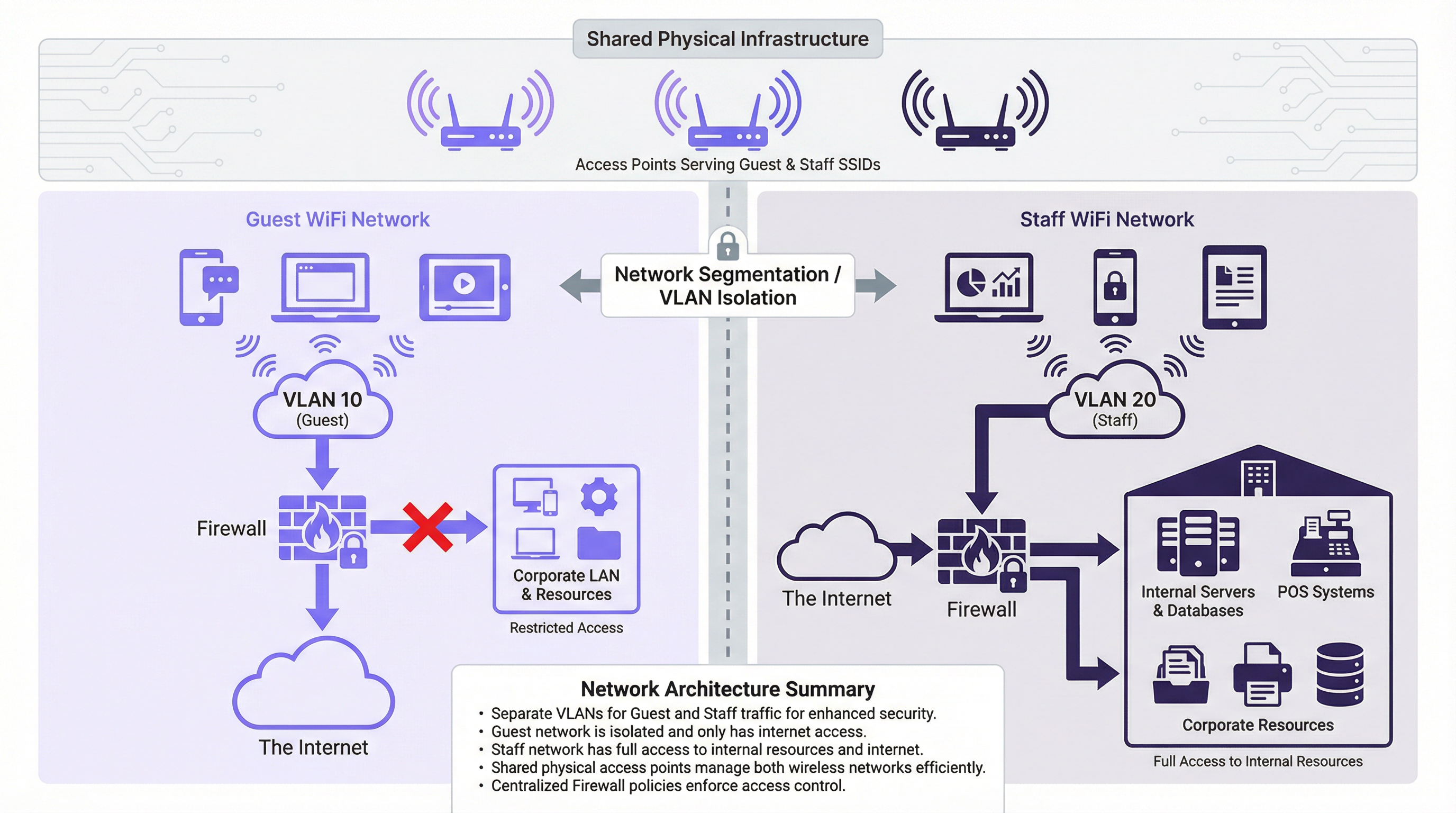
Conforme ilustrado no diagrama de arquitetura acima, os dispositivos de convidados se conectam ao SSID "Guest", que é mapeado para a VLAN 10. Esta VLAN é configurada no firewall para permitir apenas acesso direto à internet. Todo o tráfego destinado à LAN corporativa interna — incluindo servidores, bancos de dados e sistemas de PDV — é explicitamente negado. Por outro lado, os dispositivos de funcionários se conectam ao SSID "Staff", mapeado para a VLAN 20. Esta VLAN recebe acesso protegido por firewall e controlado por políticas tanto à internet quanto aos recursos internos específicos necessários para cada função da equipe. Essa estratégia de contenção é a base de um ambiente de múltiplas redes seguro.
Padrões e Protocolos de Segurança
A segmentação eficaz depende de protocolos de segurança robustos para proteger os dados em trânsito e autenticar os usuários adequadamente para seu segmento de rede.
O WPA3 (Wi-Fi Protected Access 3) é o padrão de segurança atual para redes sem fio, substituindo o WPA2. Para a rede de funcionários, a implantação do WPA3-Enterprise é a melhor prática. Ele usa a autenticação IEEE 802.1X, que exige que cada usuário apresente credenciais exclusivas — normalmente gerenciadas por meio de um servidor RADIUS (Remote Authentication Dial-In User Service) integrado a um serviço de diretório, como o Microsoft Active Directory. Isso permite o controle de acesso baseado em funções e fornece um rastro claro e auditável de quem se conectou à rede e quando. Para a rede de convidados, o WPA3-Personal fornece criptografia forte para a transmissão over-the-air, mas um Captive Portal é o mecanismo padrão para a integração de usuários, aceitação de termos e captura de dados em conformidade com o GDPR.
O Isolamento de Cliente é um recurso crítico que deve ser habilitado em todos os pontos de acesso voltados para convidados. Ele impede que dispositivos sem fio conectados ao mesmo SSID se comuniquem diretamente entre si na Camada 2. Sem esse controle, um agente mal-intencionado sentado no saguão de um hotel poderia atacar trivialmente os dispositivos de outros convidados no mesmo segmento de rede.
Guia de Implementação
A implantação de uma rede WiFi segmentada segue um processo estruturado, desde o planejamento até a validação.
Passo 1: Planejamento e Design da Rede. Comece mapeando todos os recursos internos — servidores de arquivos, gateways de pagamento, dispositivos IoT, sistemas de gerenciamento de equipe — e classificando-os por sensibilidade. Defina as funções dos usuários (Convidado, Recepção, Back Office, Administrador de TI) e os recursos de rede específicos que cada função exige. Estabeleça uma estratégia de numeração de VLANs. Uma abordagem comum e escalável é: VLAN 10 (Convidados), VLAN 20 (Equipe Corporativa), VLAN 30 (Dispositivos de PDV/Pagamento), VLAN 40 (Dispositivos IoT), VLAN 99 (Gerenciamento de Rede).
Passo 2: Configuração de Hardware. Certifique-se de que todos os pontos de acesso suportem múltiplos SSIDs e marcação de VLAN IEEE 802.1Q. Configure as portas do switch que se conectam aos APs como portas trunk, que transportam tráfego para várias VLANs simultaneamente. As portas que se conectam a dispositivos finais de propósito único devem ser configuradas como portas de acesso atribuídas a uma única VLAN. O roteador ou firewall é o ponto central de aplicação. Crie Listas de Controle de Acesso (ACLs) explícitas para cada VLAN: negue todo o tráfego da VLAN 10 para a LAN corporativa por padrão; permita apenas o tráfego necessário da VLAN 20 para recursos internos específicos em portas específicas.

Passo 3: Configuração do SSID. Para o SSID de Convidados, configure o WPA3-Personal e habilite o Isolamento de Cliente. Implante um Captive Portal para apresentar os termos de serviço e capturar o consentimento do usuário em conformidade com o GDPR. Para o SSID de Funcionários, configure o WPA3-Enterprise e aponte a autenticação para o seu servidor RADIUS. Considere não transmitir o SSID de funcionários para reduzir sua visibilidade para usuários não autorizados.
Passo 4: Teste e Validação. Conecte um dispositivo de teste à rede de convidados e confirme se ele pode acessar a internet, mas não pode fazer ping ou acessar qualquer intervalo de endereços IP internos. Conecte um dispositivo de teste à rede de funcionários e verifique se ele pode acessar seus recursos designados, mas está bloqueado para recursos fora de sua política definida. Realize testes de taxa de transferência (throughput) em ambas as redes para confirmar se a alocação de largura de banda é apropriada.
Melhores Práticas
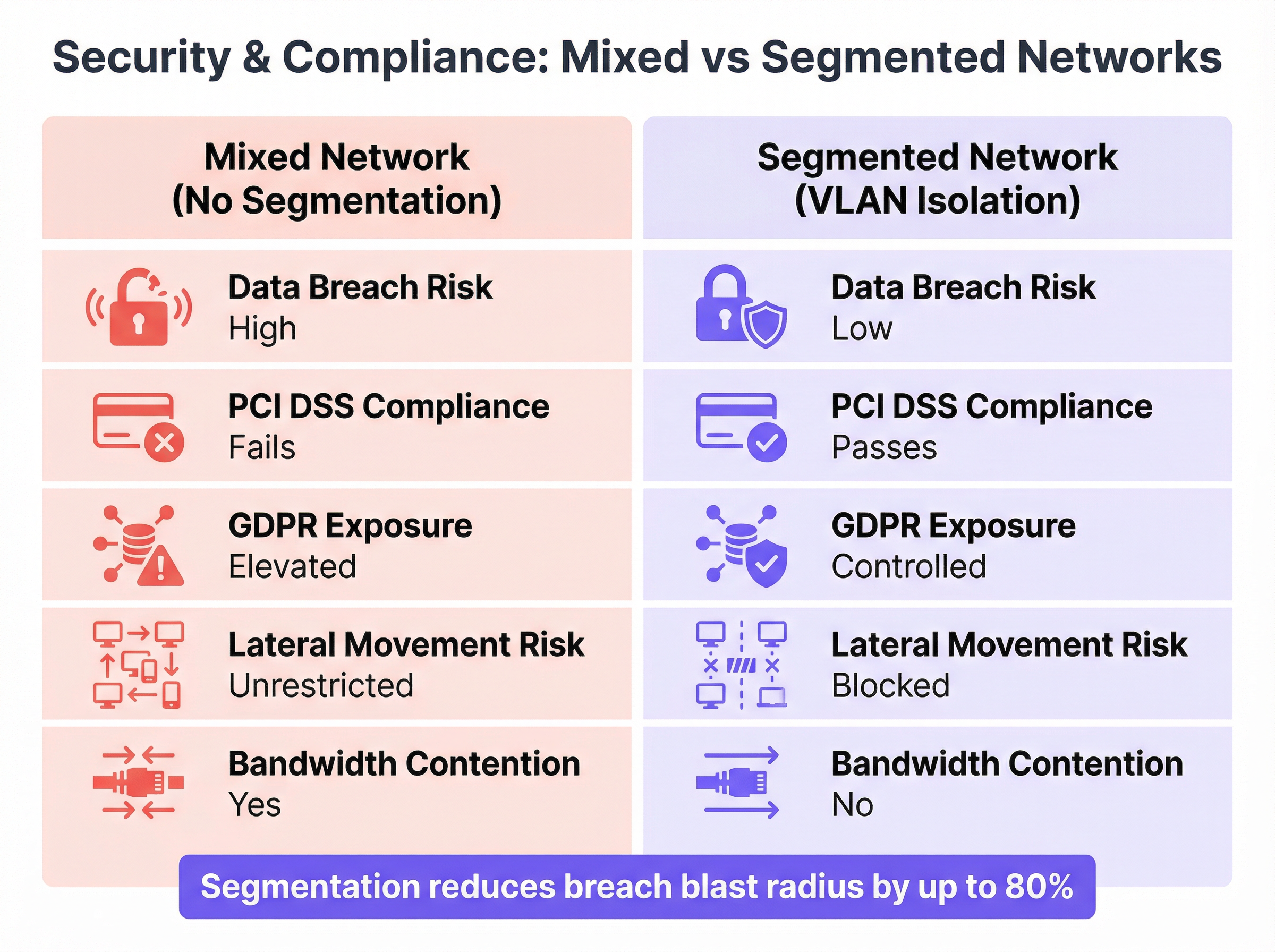
A comparação acima ilustra a forte diferença na postura de segurança e conformidade entre uma rede mista e uma rede adequadamente segmentada. Os seguintes princípios devem orientar todas as decisões de implantação.
O Princípio do Menor Privilégio é a regra fundamental: comece sempre com a política de acesso mais restritiva e abra apenas o que for absolutamente necessário para o funcionamento de uma determinada função. Cada permissão concedida é uma superfície de ataque potencial.
A Separação Física e Lógica deve ser considerada para ambientes altamente sensíveis. Embora as VLANs forneçam uma separação lógica robusta, as organizações que processam dados de cartões de pagamento podem optar por usar hardware fisicamente separado (APs e switches dedicados) para o Ambiente de Dados do Titular do Cartão (CDE) a fim de simplificar o escopo da auditoria PCI DSS sob o Requisito 1.2.
A Limitação de Largura de Banda na rede de convidados protege as operações críticas de negócios dos funcionários. A aplicação de limites de download e upload por usuário impede que um pequeno número de convidados sature a conexão de internet compartilhada, o que poderia atrasar as transações de PDV ou chamadas VoIP.
As Auditorias Regulares são um controle operacional inegociável. As regras de firewall, as configurações de VLAN e os logs de acesso de usuários devem ser revisados periodicamente para garantir que a segmentação permaneça eficaz à medida que os negócios evoluem e novas ameaças surgem.
O Gerenciamento Centralizado reduz significativamente a sobrecarga operacional de uma implantação segmentada em vários locais. Plataformas como a Purple fornecem um painel unificado para gerenciar o acesso de convidados, visualizar análises em tempo real e aplicar políticas consistentes em todo um parque distribuído.
Solução de Problemas e Mitigação de Riscos
A Configuração Incorreta de VLAN é o modo de falha mais comum em implantações segmentadas. Uma única porta de switch configurada incorretamente — por exemplo, uma porta de acesso definida como trunk ou atribuída à VLAN errada — pode levar ao VLAN hopping, onde o tráfego vaza entre os segmentos, anulando completamente a arquitetura de segurança. A mitigação é rigorosa: use um modelo de configuração consistente e documentado para todas as portas de switch, implemente o VLAN pruning em links trunk para restringir quais VLANs são propagadas e use ferramentas de monitoramento de rede para detectar tráfego inter-VLAN inesperado.
Os Erros de Regra de Firewall são igualmente perigosos. Uma regra excessivamente permissiva — como ALLOW ANY ANY — pode minar silenciosamente toda a estratégia de segmentação. Implemente um processo rigoroso de controle de mudanças para todas as modificações de regras de firewall. Cada regra deve ter uma justificativa de negócios documentada, um proprietário nomeado e uma data de revisão. Use ferramentas de análise de políticas de firewall para identificar regras ocultas, redundantes ou excessivamente amplas.
O Vazamento de SSID (SSID Bleed) pode ocorrer em implantações densas onde os APs não estão configurados corretamente para os níveis de potência de RF, fazendo com que os dispositivos se associem a um AP distante em uma rede não intencional. O planejamento adequado de RF — incluindo o ajuste da potência de transmissão do AP para criar células de cobertura bem definidas — e o uso de recursos de assistência de roaming IEEE 802.11k/v/r garantirão que os dispositivos se conectem e façam roaming entre os APs corretos.
ROI e Impacto nos Negócios
A implementação de uma rede WiFi adequadamente segmentada não é um centro de custos; é um investimento mensurável na mitigação de riscos e na eficiência operacional.
A Redução do Custo de uma Violação é a justificativa financeira mais significativa. O custo médio de uma violação de dados chega a milhões de dólares quando se consideram multas regulatórias, custos legais, notificação de clientes e danos à reputação. O custo total da implementação da segmentação — hardware, licenciamento e tempo de engenharia — é uma fração dessa responsabilidade potencial. Ao conter uma violação na rede de convidados de baixo impacto, o raio de alcance é drasticamente reduzido.
O Alcance da Conformidade afeta diretamente os resultados de qualquer local que processe pagamentos. A conformidade com o PCI DSS é um pré-requisito para aceitar pagamentos com cartão, e a segmentação de rede é um controle técnico essencial. A não conformidade resulta em multas e taxas elevadas de processamento de transações pelas bandeiras de cartão. A conformidade com o GDPR, viabilizada por um Captive Portal de convidados adequadamente gerenciado, evita penalidades regulatórias que podem chegar a quatro por cento do faturamento anual global.
A Melhoria do Desempenho Operacional se traduz diretamente na proteção da receita. Ao garantir a Qualidade de Serviço (QoS) para aplicativos críticos da equipe — terminais de PDV, gerenciamento de estoque, VoIP e sistemas de gerenciamento de propriedades —, a empresa evita falhas dispendiosas de transações e lentidão operacional durante os períodos de pico de vendas.
A Experiência do Convidado e Monetização de Dados representam a vantagem estratégica. Uma rede WiFi de convidados segura, confiável e rápida é um impulsionador mensurável dos índices de satisfação do cliente. Plataformas como a Purple se baseiam nessa fundação, permitindo que os locais aproveitem a jornada de integração do WiFi de convidados para automação de marketing, integração de programas de fidelidade e análise de fluxo de pessoas — transformando uma necessidade de segurança em um ativo direto de geração de receita.
Termos-Chave e Definições
Network Segmentation
The practice of dividing a computer network into smaller, logically isolated subnetworks to control the flow of traffic between them, thereby limiting the potential impact of a security breach.
IT teams implement segmentation as a primary security control to prevent a compromised device on a low-trust network (such as Guest WiFi) from accessing high-trust resources (such as payment systems or corporate file servers). It is a core requirement of PCI DSS and a recommended control under GDPR.
VLAN (Virtual LAN)
A logical grouping of network devices that communicate as if they are on the same physical network segment, regardless of their actual physical location. VLANs are defined by the IEEE 802.1Q standard, which specifies how VLAN tags are added to Ethernet frames.
VLANs are the primary technical mechanism for network segmentation. A network architect assigns separate VLAN IDs to guest and staff traffic, and the network infrastructure (switches and firewalls) uses these IDs to enforce traffic isolation and access control policies.
SSID (Service Set Identifier)
The human-readable name of a wireless network, broadcast by an access point to allow devices to discover and connect to it. A single access point can broadcast multiple SSIDs simultaneously.
The SSID is the user-facing entry point to the network. While broadcasting separate SSIDs for guests and staff creates a logical separation visible to users, the SSID alone provides no security isolation. True security requires each SSID to be mapped to a separate, firewalled VLAN.
Client Isolation
A wireless access point feature that prevents devices connected to the same SSID from communicating directly with each other at Layer 2 of the OSI model.
This is a mandatory configuration for any guest-facing SSID. Without client isolation, a malicious actor connected to the guest network can conduct peer-to-peer attacks against other guests' devices — a common threat in public hotspot environments such as hotels, cafes, and conference centres.
IEEE 802.1X
An IEEE standard for port-based Network Access Control (PNAC) that provides an authentication framework for devices connecting to a LAN or WLAN. It requires each user or device to present valid credentials before network access is granted.
802.1X is the enterprise standard for securing staff WiFi networks. It eliminates the security risk of shared network passwords by requiring individual, revocable credentials for each user. When an employee leaves the organisation, their access is revoked in the directory service (e.g., Active Directory) and immediately takes effect on the network.
RADIUS Server
A centralised server that provides Authentication, Authorisation, and Accounting (AAA) services for network access. In a WiFi context, it validates user credentials presented during 802.1X authentication.
When a staff member connects to the enterprise WiFi using 802.1X, the access point forwards the credentials to the RADIUS server, which checks them against the user directory and returns an access-granted or access-denied response. This centralised model provides a complete audit trail of all network authentication events.
PCI DSS (Payment Card Industry Data Security Standard)
A set of security standards mandated by the major card schemes (Visa, Mastercard, Amex) for all organisations that store, process, or transmit payment card data. Requirement 1.2 specifically mandates network segmentation to isolate the Cardholder Data Environment (CDE).
For any venue that accepts card payments — which includes virtually all hotels, retailers, and stadiums — PCI DSS compliance is a contractual obligation. Failure to properly segment the network that handles card data from other networks (including guest WiFi) results in automatic audit failure, financial penalties, and potential loss of the ability to accept card payments.
Captive Portal
A web page that users of a public-access network are required to interact with before being granted internet access. It is typically used to display terms and conditions, collect user information, and authenticate users.
The captive portal is the primary onboarding mechanism for guest WiFi. Beyond its security function, it is a significant business tool: platforms like Purple use the captive portal to capture GDPR-compliant marketing consent, integrate with loyalty programmes, and generate rich visitor analytics that inform venue operations and marketing strategy.
Estudos de Caso
A 200-room luxury hotel needs to upgrade its WiFi to provide secure access for guests, corporate staff (front desk, housekeeping, management), and a new fleet of IoT-enabled minibars that report stock levels. The hotel must comply with PCI DSS as its booking system handles credit card data.
The recommended architecture uses four VLANs to achieve strict isolation across all user groups. VLAN 10 is assigned to guests, VLAN 20 to corporate staff, VLAN 30 to the PCI Cardholder Data Environment (CDE) for booking terminals, and VLAN 40 to IoT devices. Three SSIDs are broadcast: 'HotelGuest' mapped to VLAN 10, 'HotelServices' mapped to VLAN 20 using WPA3-Enterprise with 802.1X, and a hidden SSID for IoT devices mapped to VLAN 40 using MAC-based authentication. The PCI VLAN (30) is served via wired connections where possible, with port-level MAC address locking. Firewall policy enforces strict isolation: VLAN 10 receives internet access only; VLAN 20 is permitted access to the Property Management System and internal email server; VLAN 30 is restricted to outbound HTTPS traffic to the payment gateway provider's specific IP addresses on port 443; VLAN 40 is permitted only to communicate with the cloud-based minibar inventory API. All inter-VLAN traffic is denied by default. Guests are onboarded via a Purple-powered captive portal on VLAN 10, providing GDPR-compliant data capture and marketing consent.
A retail chain with 500 stores wants to deploy guest WiFi across its entire estate while ensuring POS systems and inventory scanners remain secure. The deployment must be centrally manageable, scalable, and consistent across all locations.
The solution is built on a template-based deployment model using Zero-Touch Provisioning (ZTP). A single, standardised network configuration template is designed for a reference store: two VLANs (VLAN 100 for Guests, VLAN 200 for Store Operations), two SSIDs ('BrandGuestWiFi' on VLAN 100 with client isolation and 5 Mbps per-user throttling, and a hidden 'StoreOps' SSID on VLAN 200 with WPA3-Enterprise), and a standardised firewall policy (VLAN 100 internet-only; VLAN 200 permitted access to the central POS and inventory servers at the corporate data centre via an IPsec VPN tunnel). This template is uploaded to a cloud-based network management platform supporting ZTP. When new APs and switches are shipped to a store, they are plugged in and automatically download the correct configuration, requiring no on-site engineering expertise. The guest captive portal is managed centrally by Purple, providing the marketing team with unified footfall analytics, campaign management, and customer engagement tools across all 500 locations from a single dashboard.
Análise de Cenário
Q1. A stadium hosting a major concert expects 50,000 concurrent guest WiFi users. The operations team requires guaranteed, low-latency connectivity for ticketing scanners, security radio over IP, and access control systems — all running on a separate staff network. How would you architect the bandwidth management and QoS strategy to protect operational systems during peak load?
💡 Dica:Consider the interaction between per-user bandwidth throttling on the guest network and QoS traffic prioritisation for staff traffic. Think about what happens at the internet gateway when both networks are competing for the same upstream bandwidth.
Mostrar Abordagem Recomendada
The solution requires a two-layer approach. First, apply strict per-user bandwidth throttling on the Guest SSID — a limit of 3-5 Mbps per user is typical for a high-density event environment. This prevents any single user from consuming a disproportionate share of the available bandwidth and limits the aggregate impact of 50,000 concurrent users. Second, implement QoS policies at the switch and firewall level. Tag all traffic originating from the Staff VLAN (VLAN 20) with a high-priority DSCP marking (e.g., DSCP EF — Expedited Forwarding for VoIP, or DSCP AF41 for critical data). Tag guest traffic as Best Effort (DSCP BE). Configure the firewall and upstream router to honour these DSCP markings and service high-priority queues first. This ensures that even when the internet link is heavily loaded by guest traffic, the ticketing and security systems receive preferential treatment. Additionally, consider provisioning a dedicated, physically separate internet circuit for the Staff VLAN to provide complete bandwidth isolation for mission-critical operations.
Q2. A small independent cafe has a single business-grade router/AP combination. The owner uses the same network for customer WiFi and their single POS terminal. They have a very limited budget and no dedicated IT support. What is the minimum viable segmentation you would recommend, and what are its limitations?
💡 Dica:Most modern business-grade all-in-one routers include a built-in 'Guest Network' feature. Evaluate what this provides and where it falls short of a full enterprise segmentation deployment.
Mostrar Abordagem Recomendada
The recommended minimum viable solution is to enable the built-in 'Guest Network' feature on the existing router. When properly activated, this feature creates a second SSID, enables client isolation, and implements basic firewall rules that prevent guest devices from accessing the primary LAN (where the POS terminal resides). This provides a critical layer of separation at zero additional hardware cost. However, the limitations must be clearly understood: the implementation quality varies significantly by vendor and firmware version; it does not provide the granular ACL control of a dedicated firewall; it does not support 802.1X authentication for the staff network; and it may not satisfy a formal PCI DSS audit, which may require the POS to be on a wired, physically isolated connection. For a growing business, this is a temporary measure. The medium-term recommendation is to upgrade to a dedicated business-grade AP and a separate router/firewall appliance that supports full VLAN configuration.
Q3. Your organisation is acquiring a new office building. You discover the previous tenant operated a completely flat network — a single SSID and a single shared password used by all employees, visitors, contractors, and IoT building management devices. What are your first three priority actions regarding the wireless network, and what is your rationale for their ordering?
💡 Dica:Think about the sequence of discover, contain, and redesign. Consider the risk of leaving the existing network operational while you plan the replacement.
Mostrar Abordagem Recomendada
Priority 1 — Disable the existing SSID immediately. The shared password is a known credential that may have been distributed to an unknown number of former employees, contractors, and visitors. Every minute the network remains operational with this credential is a window of unauthorised access. This is a containment action that accepts a temporary loss of connectivity in exchange for eliminating an unquantifiable security risk. Priority 2 — Conduct a full wireless and network survey. Use a wireless analysis tool to identify all active access points (including any rogue APs installed by the previous tenant), map the physical hardware, and identify all devices that were connected to the flat network — particularly IoT and building management devices, which may have been configured with hardcoded credentials. This discovery phase defines the scope of the redesign. Priority 3 — Design and deploy a new, properly segmented network architecture from scratch. Based on the hardware inventory from Priority 2, design a multi-VLAN architecture (Corporate, Guest, IoT/BMS as a minimum) with appropriate SSIDs, authentication methods, and firewall policies. Do not attempt to patch or 'fix' the existing flat network; a complete redesign is the only way to establish a secure, auditable foundation.
Principais Conclusões
- ✓Running guest and staff WiFi on a single, flat network is a critical security risk that enables lateral movement from a compromised guest device to corporate systems.
- ✓True network segmentation is achieved by mapping separate SSIDs to isolated VLANs, with the firewall as the central enforcement point for inter-VLAN traffic policies.
- ✓Staff networks must use WPA3-Enterprise with IEEE 802.1X authentication for individual, revocable credentials; guest networks require a captive portal with client isolation enabled.
- ✓Network segmentation is a core technical requirement for PCI DSS compliance (Requirement 1.2) and a key control for managing GDPR data exposure risk.
- ✓Bandwidth throttling on the guest network and QoS prioritisation for staff traffic are essential to protect business-critical applications during peak load.
- ✓The most common failure mode is VLAN misconfiguration — a single incorrectly configured switch port can silently bridge network segments and negate the entire security architecture.
- ✓Properly segmented guest WiFi is not merely a cost centre: it is the foundation for a guest analytics and marketing platform that generates measurable business value.




