

OFDMA Explicado: Como o WiFi 6 Lida com Ambientes Densos
This guide provides an advanced technical deep-dive into OFDMA (Orthogonal Frequency Division Multiple Access), the foundational multi-user technology of the IEEE 802.11ax (WiFi 6) standard. It explains how OFDMA differs from legacy OFDM, why it is critical for high-density venue deployments, and delivers actionable implementation guidance for network architects and IT directors. Venue operators in hospitality, retail, healthcare, and events will find concrete deployment strategies, client-side requirements, and ROI frameworks to justify and execute a WiFi 6 infrastructure refresh.
🎧 Ouça este Guia
Ver Transcrição
Resumo Executivo
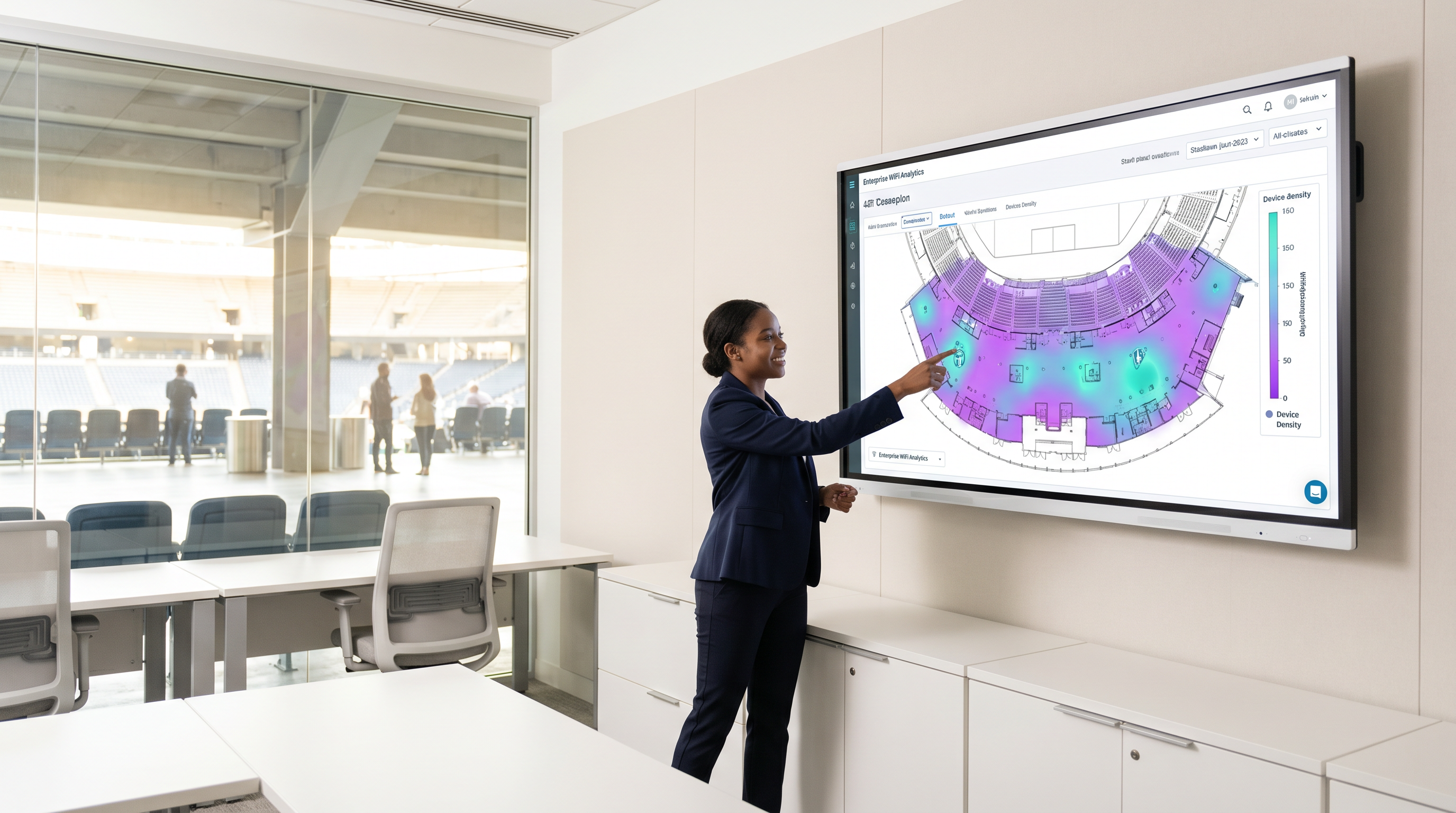
Para locais corporativos — seja um estádio com 50.000 lugares, um amplo campus hospitalar ou um ambiente de varejo denso — o principal desafio para as redes sem fio não é mais a velocidade pura, mas a eficiência espectral. O Acesso Múltiplo por Divisão de Frequência Ortogonal (OFDMA) é a tecnologia fundamental do padrão IEEE 802.11ax (WiFi 6) que resolve exatamente esse problema. Ao permitir que uma única transmissão se comunique com vários clientes simultaneamente, o OFDMA reduz drasticamente a latência, minimiza a sobrecarga de contenção e aumenta a capacidade geral da rede em implantações de alta densidade.
Este guia explora a mecânica técnica do OFDMA, como ele difere do OFDM legado e fornece orientações práticas para diretores de TI e arquitetos de rede que estão planejando sua infraestrutura de Guest WiFi de próxima geração. Quer você esteja gerenciando um centro de conferências, uma rede de varejo ou um campus do setor público, entender o OFDMA é o pré-requisito para qualquer estratégia de implantação de WiFi 6 confiável.
Análise Técnica Aprofundada: Do OFDM ao OFDMA
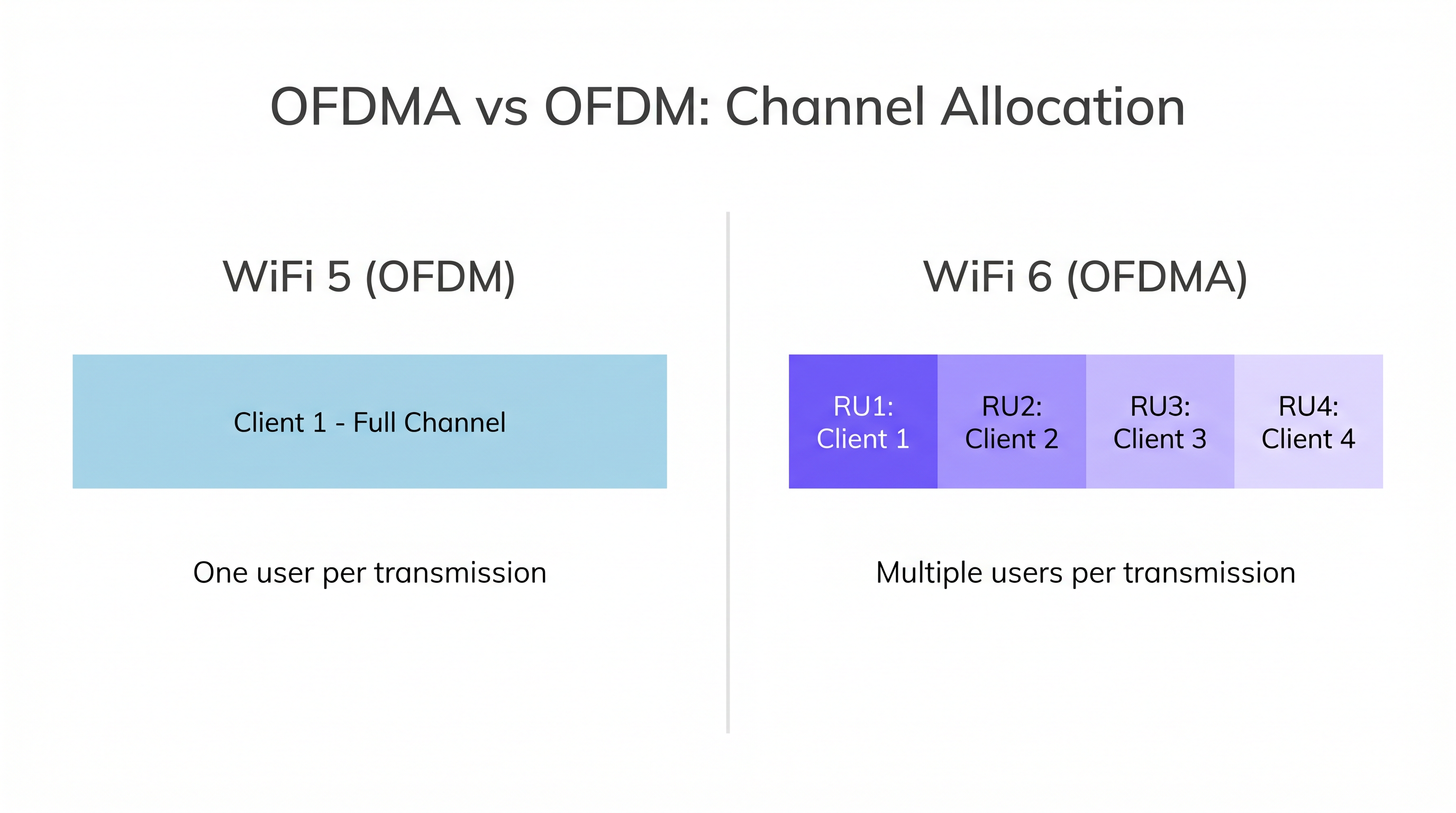
Para entender o OFDMA, devemos primeiro examinar as limitações de seu antecessor. No WiFi 5 (802.11ac) e em padrões anteriores, as redes utilizavam a Multiplexação por Divisão de Frequência Ortogonal (OFDM). O OFDM aloca toda a largura de banda do canal — seja 20MHz, 40MHz ou 80MHz — para um único cliente em uma transmissão específica. Mesmo que o cliente precise transmitir apenas um pequeno pacote de dados, como uma solicitação DNS, uma confirmação TCP ou um ping de sensor IoT, ele monopoliza todo o canal durante esse período.
Em ambientes densos como Varejo ou Hospitalidade , isso cria um enorme gargalo. Centenas de dispositivos na fila para transmitir pequenos pacotes resultam em uma sobrecarga de contenção significativa e picos de latência. O problema não é a largura de banda insuficiente — é que o protocolo é fundamentalmente para um único usuário.
A Solução OFDMA: Unidades de Recurso (RUs)
O OFDMA muda fundamentalmente esse paradigma ao dividir o canal em subcanais menores conhecidos como Unidades de Recurso (RUs). Em vez de dedicar um canal de 20MHz a um usuário, um Access Point (AP) WiFi 6 pode subdividir esse canal de 20MHz em até nove RUs distintos (usando RUs de 26 tons). Isso permite que o AP se comunique com até nove clientes simultaneamente em uma única Oportunidade de Transmissão (TXOP).
| Largura do Canal | Máx. de RUs (26 tons) | Máx. de Clientes Simultâneos |
|---|---|---|
| 20 MHz | 9 | 9 |
| 40 MHz | 18 | 18 |
| 80 MHz | 37 | 37 |
| 160 MHz | 74 | 74 |
O AP atua como o controlador de tráfego, usando Quadros de Gatilho (Trigger Frames) — um novo tipo de quadro de gerenciamento introduzido no 802.11ax — para orquestrar todas as transmissões OFDMA de uplink. O Quadro de Gatilho aloca RUs específicos para clientes específicos, dita a potência de transmissão e sincroniza o uplink para que todos os sinais dos clientes cheguem ao AP simultaneamente. Essa mudança de um modelo baseado em contenção (CSMA/CA) para um modelo programado e orquestrado é o principal motivo pelo qual o OFDMA oferece melhorias tão drásticas na latência sob carga.
Arquitetura de Subportadora
O WiFi 6 reduz o espaçamento da subportadora de 312,5 kHz (WiFi 5) para 78,125 kHz — uma redução de quatro vezes. Esse espaçamento mais estreito permite durações de símbolo mais longas (12,8μs vs 3,2μs), o que melhora a robustez contra o desvanecimento por múltiplos caminhos (multipath fading). Em ambientes como armazéns, centros de Transporte ou grandes pisos de varejo em plano aberto, onde os sinais refletem em prateleiras de metal e estruturas de concreto, essa é uma melhoria significativa na confiabilidade do link.
BSS Coloring
Embora não seja estritamente parte do OFDMA, o BSS Coloring funciona em conjunto com ele. Ele adiciona um identificador de 6 bits aos cabeçalhos PHY, permitindo que os rádios diferenciem entre as transmissões em sua própria rede (intra-BSS) e em redes vizinhas (inter-BSS). Esse mecanismo de reutilização espacial mitiga significativamente a interferência co-canal em implantações densas, onde vários APs operam no mesmo canal em áreas adjacentes.
Guia de Implantação
A implantação de redes compatíveis com OFDMA exige uma mudança na filosofia de design. As redes legadas foram projetadas para cobertura; as redes modernas de alta densidade devem ser projetadas para capacidade.
1. Prontidão do Ecossistema de Clientes
A armadilha mais comum nas implantações de WiFi 6 é presumir ganhos imediatos de desempenho sem considerar o mix de clientes. O OFDMA requer hardware 802.11ax em ambas as extremidades. Se um local tiver uma base de clientes legada de 70% (WiFi 4/5), o AP deverá reverter frequentemente para o OFDM padrão para atendê-los, anulando os benefícios do OFDMA.
Use o WiFi Analytics para traçar o perfil do ecossistema de clientes antes de se comprometer com uma atualização de arquitetura. Para ambientes que dependem de Sensores ou dispositivos IoT, certifique-se de que as novas aquisições exijam conformidade com o WiFi 6. Implemente o direcionamento de banda (band steering) agressivo e o isolamento de clientes para empurrar os dispositivos compatíveis para as bandas de 5GHz ou 6GHz.
2. Estratégia de Largura de Canal
Em ambientes densos, canais mais largos (80MHz ou 160MHz) são geralmente prejudiciais. Eles reduzem o número de canais não sobrepostos disponíveis, aumentando a interferência co-canal.
Recomendação: Padronize em canais de 20MHz para implantações ultradensas (estádios, auditórios, salas de conferência). Isso maximiza a reutilização de canais e permite que o BSS Coloring funcione de maneira ideal. Um canal de 20MHz utilizando OFDMA frequentemente fornecerá um throughput agregado melhor e menor latência para 50 usuários simultâneos do que um canal de 80MHz lutando contra a contenção.
3. Considerações sobre Energia e PoE
Os APs WiFi 6 possuem rádios sofisticados que exigem mais energia. Muitos APs corporativos requerem 802.3at (PoE+) ou até mesmo 802.3bt (PoE++) para operar todos os fluxos espaciais e recursos de forma completa.
Recomendação: Audite sua infraestrutura de switching antes da implantação. Conectar APs WiFi 6 de ponta a switches 802.3af legados fará com que os APs reduzam suas capacidades — normalmente desativando fluxos espaciais ou reduzindo a potência de transmissão — limitando severamente o retorno sobre o investimento em hardware.
Melhores Práticas
1. Priorize 6GHz (WiFi 6E) para Aplicações de Missão Crítica. O WiFi 6E traz todos os benefícios do OFDMA para o espectro intocado de 6GHz, totalmente livre de clientes WiFi 4/5 legados. Isso é particularmente valioso para aplicações de missão crítica na área de Saúde , onde dispositivos médicos legados em 2,4GHz e 5GHz não devem interferir nas comunicações clínicas.
2. Exija o WPA3 em Todas as Novas Implantações. O WPA3 é obrigatório para a certificação WiFi 6 e fornece melhorias significativas na força criptográfica por meio da Autenticação Simultânea de Iguais (SAE). Isso se alinha aos requisitos do PCI DSS e do GDPR e deve ser um padrão inegociável em qualquer nova implantação. Para obter orientações sobre a integração de rede no contexto de autenticação segura, consulte Network Onboarding UX: Projetando uma Experiência de Configuração de WiFi Sem Atritos .
3. Integre a Estratégia Wireless e WAN. Uma borda sem fio de alto desempenho requer uma borda WAN robusta. Certifique-se de que seu backhaul possa lidar com o aumento do throughput agregado que uma rede OFDMA funcionando adequadamente irá gerar. Revise Os Principais Benefícios do SD WAN para Empresas Modernas para estratégias de integração que alinham seus investimentos em wireless e WAN.
4. Implante o Wayfinding na Mesma Infraestrutura. As características de baixa latência do OFDMA tornam o WiFi 6 um excelente substrato para serviços de localização em tempo real e wayfinding. O mesmo investimento em infraestrutura que melhora a conectividade dos visitantes pode alimentar simultaneamente a navegação interna, reduzindo o custo total de propriedade.
Solução de Problemas e Mitigação de Riscos
Sintoma: Alta latência, apesar da implantação de APs WiFi 6.
A causa raiz mais provável é uma alta porcentagem de clientes legados forçando o AP para o modo OFDM legado, ou sobreposição excessiva de canais entre APs adjacentes. Comece auditando o mix de clientes usando sua plataforma de gerenciamento de rede. Se os clientes legados forem o problema, implemente o direcionamento de banda (band steering) e considere acelerar o ciclo de atualização dos endpoints. Se a sobreposição de canais for o problema, reduza as larguras de canal para 20MHz e ative o BSS Coloring.
Sintoma: APs reiniciando, rádios sendo desativados ou desempenho muito abaixo da especificação.
Isso é quase sempre um problema de falta de energia PoE. Verifique a alocação de energia da porta do switch por meio dos logs de negociação LLDP. Verifique se o AP está operando em um modo de energia reduzida. A correção requer a atualização para switches PoE+ ou PoE++, ou a implantação de injetores PoE mid-span como medida provisória.
Sintoma: Métricas de utilização do OFDMA mostrando uso próximo a zero no painel de gerenciamento.
Isso indica que o AP não está encontrando clientes WiFi 6 suficientes para programar as transmissões OFDMA. Revise a tabela de associação de clientes. Se a maioria dos clientes associados for de dispositivos legados, o OFDMA permanecerá inativo. Este é um problema do ecossistema de clientes, não um problema de configuração do AP.
ROI e Impacto nos Negócios
Para CTOs e operadores de locais, o ROI do OFDMA é medido na experiência do usuário, na eficiência operacional e na extensão do ciclo de vida da infraestrutura.
Em um ambiente de Varejo , menor latência significa transações de ponto de venda mais rápidas, leitura de estoque confiável e aplicativos de Wayfinding responsivos que melhoram a jornada do cliente. Em um ambiente de Hospitalidade , o OFDMA garante que os hóspedes que transmitem vídeos em 4K não afetem a latência das chamadas VoIP feitas pela equipe do hotel — uma reclamação comum em implantações legadas de WiFi 5. Para obter orientações detalhadas sobre estratégias de implantação específicas para hospitalidade, consulte Soluções Modernas de WiFi para Hospitalidade que Seus Hóspedes Merecem .
Ao aumentar a capacidade do espectro de RF, o OFDMA estende o ciclo de vida da infraestrutura sem fio, adiando a necessidade de futuras atualizações completas (forklift upgrades) e fornecendo uma base robusta para a expansão da IoT. Uma rede que pode atender eficientemente a 200 clientes simultâneos hoje pode acomodar 400 amanhã — não adicionando mais APs, mas utilizando o espectro de forma mais inteligente.
Para obter orientações sobre a seleção de hardware, consulte nosso Guia Definitivo de 2026 sobre a Definição de Wireless Access Points . Para uma compreensão mais ampla de como o WiFi 6 se integra à sua estratégia de integração e experiência do usuário, o guia Network Onboarding UX: Projetando uma Experiência de Configuração de WiFi Sem Atritos fornece contexto de implantação multilíngue.
Termos-Chave e Definições
OFDMA (Orthogonal Frequency Division Multiple Access)
A multi-user technology introduced in IEEE 802.11ax (WiFi 6) that subdivides a WiFi channel into smaller frequency allocations called Resource Units (RUs), allowing an AP to communicate with multiple clients simultaneously within a single transmission opportunity.
The core feature of WiFi 6 that reduces latency and increases spectral efficiency in dense deployments. IT teams should understand OFDMA as the primary justification for WiFi 6 upgrades in high-density venues.
Resource Unit (RU)
A specific subset of subcarriers within an OFDMA channel allocated to a single client for a given transmission. RU sizes range from 26 tones (smallest, for IoT/small packets) to 996 tones (full channel, for high-throughput clients).
IT teams must understand RUs to grasp how bandwidth is dynamically allocated to clients based on their traffic needs. A client sending a DNS query gets a small RU; a client streaming 4K video gets a larger RU.
Trigger Frame
A management frame sent by the AP to orchestrate uplink OFDMA transmissions. It allocates specific RUs to specific clients, specifies transmission power levels, and synchronises client timing so all uplink signals arrive at the AP simultaneously.
Crucial for understanding how the AP acts as the traffic controller in a WiFi 6 network. Without Trigger Frames, uplink OFDMA cannot function — the AP must actively schedule clients rather than waiting for them to contend for airtime.
BSS Coloring
A spatial reuse technique in IEEE 802.11ax that adds a 6-bit colour identifier to PHY headers, allowing radios to distinguish between transmissions from their own network (intra-BSS) and neighbouring networks on the same channel (inter-BSS).
Essential for mitigating co-channel interference in ultra-dense environments like stadiums, retail malls, or multi-floor office buildings. Works in concert with OFDMA to improve overall spectral efficiency.
Subcarrier
A narrow frequency band within a larger WiFi channel used to carry data. WiFi 6 uses subcarrier spacing of 78.125 kHz, compared to 312.5 kHz in WiFi 5, quadrupling the number of subcarriers and enabling finer-grained frequency allocation.
The tighter subcarrier spacing in WiFi 6 is what makes OFDMA's fine-grained RU allocation possible, and also improves multipath resilience in complex RF environments.
TXOP (Transmission Opportunity)
A bounded time interval during which a device has the right to initiate frame exchanges on the wireless medium. In WiFi 6, OFDMA maximises the efficiency of each TXOP by packing data for multiple users into a single transmission.
Understanding TXOPs helps IT teams appreciate why OFDMA reduces overhead: instead of each client requiring its own TXOP (with associated contention and backoff delays), multiple clients share a single TXOP.
Spatial Streams (MIMO)
Independent data signals transmitted simultaneously using Multiple-Input Multiple-Output (MIMO) antenna technology. WiFi 6 APs support up to 8 spatial streams (8x8 MIMO), which work in conjunction with OFDMA to increase overall capacity.
High-density deployments require APs with sufficient spatial stream support. However, spatial streams require adequate PoE power — a key infrastructure consideration when specifying hardware.
WPA3
The latest WiFi security certification, featuring Simultaneous Authentication of Equals (SAE) to protect against offline dictionary attacks, and Forward Secrecy to protect past sessions if a key is later compromised. Mandatory for all WiFi 6 certified devices.
Mandatory for WiFi 6 certification. For organisations subject to PCI DSS (payment card environments) or GDPR (personal data processing), WPA3 is a compliance requirement, not merely a best practice.
PoE+ (802.3at) and PoE++ (802.3bt)
IEEE standards for Power over Ethernet that define the maximum power delivered per port. 802.3at delivers up to 30W; 802.3bt delivers up to 90W. Both exceed the legacy 802.3af standard (15.4W) required by modern WiFi 6 APs.
A critical infrastructure consideration for any WiFi 6 deployment. Failing to provision adequate PoE power is the most common cause of underperforming WiFi 6 installations.
Estudos de Caso
A 500-room resort hotel is experiencing severe guest complaints regarding WiFi performance during the evening 'Netflix hour' (8 PM to 11 PM). They currently use 802.11ac (WiFi 5) APs configured with 80MHz channels on the 5GHz band. The network team has already deployed a high AP density — one AP per floor section — but performance remains poor. How should the network architect redesign the RF environment using WiFi 6 and OFDMA?
Step 1 — Client Ecosystem Audit: Before any hardware change, use WiFi Analytics to profile the client mix. Identify what percentage of connected devices are WiFi 6 capable. In a typical hotel, this will range from 40% to 70% depending on guest demographics. Step 2 — Channel Width Reduction: Immediately reduce 5GHz channel widths from 80MHz to 20MHz on the existing APs. This alone will reduce co-channel interference and improve aggregate performance, even before the WiFi 6 upgrade. Step 3 — WiFi 6 AP Deployment: Replace existing APs with WiFi 6 (802.11ax) models. Ensure the switching infrastructure supports PoE+ (802.3at). Configure OFDMA and BSS Coloring on all APs. Step 4 — Band Steering and QoS: Implement aggressive band steering to push 5GHz-capable clients off the 2.4GHz band. Configure QoS policies to prioritise latency-sensitive traffic (VoIP, interactive applications) over bulk streaming traffic. Step 5 — Monitoring: Deploy real-time monitoring to track OFDMA utilisation, client distribution per AP, and per-client throughput. Adjust AP placement if any single AP is serving more than 40 concurrent active clients.
A stadium IT director needs to deploy connectivity for a dense concourse area where up to 8,000 fans congregate during halftime. They plan to deploy high-density WiFi 6 APs rated for 8x8 MIMO but are constrained by legacy PoE (802.3af) switches in the intermediate distribution frames (IDFs). The project budget does not currently include switch replacement. What is the critical risk, and how should it be mitigated within the existing budget constraint?
The critical risk is power starvation. High-density WiFi 6 APs with 8x8 MIMO typically require 802.3at (PoE+, up to 30W) or 802.3bt (PoE++, up to 90W) to fully power their radios, dedicated scanning radios, and onboard processors. If connected to 802.3af switches (maximum 15.4W), the APs will enter a power-saving mode. Typical degradation includes: dropping from 8x8 to 4x4 or 2x2 MIMO, disabling the dedicated scanning radio (which handles security monitoring and analytics), and reducing transmit power. Mitigation within budget: Deploy mid-span PoE injectors between the 802.3af switch and each AP. A mid-span injector takes the existing PoE feed and supplements it to deliver PoE+ or PoE++ levels. This is significantly cheaper than replacing the switches and can be deployed without any changes to the IDF. Budget the injector cost into the AP deployment line item. Document this as a temporary measure and include switch replacement in the next capital expenditure cycle.
Análise de Cenário
Q1. You are designing a high-density WiFi network for a university lecture hall seating 300 students. The primary use case is concurrent online examination, where all students must maintain a stable, low-latency connection simultaneously. The hall has a dropped ceiling with regular grid tiles. Which channel width configuration is most appropriate for the 5GHz band, and why?
💡 Dica:Consider the impact of co-channel interference and the number of non-overlapping 5GHz channels available in a confined space. Also consider what happens to OFDMA efficiency as channel width increases.
Mostrar Abordagem Recomendada
20MHz channels are the most appropriate configuration. While 80MHz channels offer higher peak speeds for individual users, they reduce the number of non-overlapping 5GHz channels from approximately 24 (at 20MHz) to just 6 (at 80MHz) in the UNII-1 through UNII-3 bands. In a lecture hall requiring multiple APs, this leads to severe co-channel interference. 20MHz channels maximise channel reuse, allowing more APs to operate cleanly in adjacent areas. Within those 20MHz channels, OFDMA efficiently handles the concurrent client load by allocating Resource Units to each student's device simultaneously, delivering low latency and high aggregate throughput — exactly what an online examination environment requires.
Q2. A retail chain is upgrading 50 stores to WiFi 6 to support new IoT shelf sensors, mobile POS terminals, and a customer-facing Guest WiFi service. The project budget covers new WiFi 6 APs but does not include switch replacement. The existing switches are all 802.3af (PoE). The IT director insists the project can proceed without switch upgrades. What is the likely outcome, and what is your recommendation?
💡 Dica:Review the power requirements for modern 802.11ax radios compared to legacy 802.3af limits. Consider what features are typically disabled when an AP enters power-saving mode.
Mostrar Abordagem Recomendada
The likely outcome is that the new WiFi 6 APs will operate in a degraded power-saving mode. To remain within the 15.4W limit of 802.3af, the APs will typically disable spatial streams (dropping from 4x4 to 2x2), reduce transmit power, and disable auxiliary radios such as dedicated BLE scanning radios. This severely limits the expected performance gains and may render the IoT sensor integration unreliable if it depends on the BLE radio. The recommendation is to either include mid-span PoE injectors in the project budget (a cost-effective interim solution) or to phase the switch upgrade alongside the AP deployment, prioritising the highest-density stores first.
Q3. During a post-deployment review of a newly installed WiFi 6 network in a 1,200-bed hospital, the network team observes that OFDMA utilisation metrics in the management dashboard are consistently below 10%, and average client latency has not improved significantly compared to the previous WiFi 5 deployment. The APs are correctly configured and receiving full PoE+ power. What is the most likely root cause, and what remediation steps would you recommend?
💡 Dica:Consider the requirements for OFDMA to activate, the typical composition of device types in a hospital environment, and what the management dashboard's client association table would reveal.
Mostrar Abordagem Recomendada
The most likely root cause is a high percentage of legacy (WiFi 4/WiFi 5) clients on the network. Hospitals typically have a large installed base of legacy medical devices — infusion pumps, patient monitoring systems, nurse call systems, and older clinical workstations — many of which are on long replacement cycles and are not WiFi 6 capable. OFDMA requires 802.11ax hardware on both the AP and the client. If the majority of associated clients are legacy, the AP operates predominantly in OFDM mode, and OFDMA remains dormant. Remediation steps: (1) Use WiFi Analytics to generate a full client device report, segmented by WiFi generation. (2) Identify which device categories represent the largest legacy population. (3) Work with clinical engineering to accelerate the refresh cycle for high-volume legacy devices. (4) In the interim, implement band steering to segregate legacy devices onto dedicated 2.4GHz SSIDs, freeing the 5GHz band for WiFi 6 clients where OFDMA can operate effectively. (5) For new clinical device procurement, mandate WiFi 6 compliance as a purchasing requirement.
Principais Conclusões
- ✓OFDMA is the core technology of WiFi 6 that shifts the focus from peak single-user throughput to multi-user spectral efficiency, allowing an AP to serve multiple clients simultaneously within a single channel.
- ✓Unlike legacy OFDM, OFDMA divides channels into Resource Units (RUs), enabling up to nine concurrent transmissions within a single 20MHz channel — dramatically reducing latency and contention overhead.
- ✓Maximum OFDMA benefits require a high percentage of WiFi 6-capable clients; legacy devices force the network back into less efficient OFDM mode, making a client ecosystem audit essential before deployment.
- ✓High-density designs should standardise on 20MHz channels to maximise frequency reuse and minimise co-channel interference — wider channels reduce available non-overlapping channels and increase contention.
- ✓Upgrading to WiFi 6 APs almost always necessitates upgrading switching infrastructure to support PoE+ (802.3at) or PoE++ (802.3bt); power starvation is the most common cause of underperforming WiFi 6 deployments.
- ✓BSS Coloring works in concert with OFDMA to mitigate co-channel interference in dense venues by allowing radios to distinguish and deprioritise transmissions from neighbouring networks.
- ✓The ROI of OFDMA is measured in user experience, operational efficiency, and infrastructure lifecycle extension — not just headline throughput figures.




