

Cloud RADIUS vs. On-Premise RADIUS: Entscheidungsleitfaden für IT-Teams
Dieser Leitfaden bietet IT-Leitern, Netzwerkarchitekten und Venue-Operations-Teams einen fundierten Rahmen für die Entscheidung zwischen Cloud-basierten RADIUS-Diensten und herkömmlichen On-Premise RADIUS-Servern. Er behandelt die technische Architektur, Abwägungen zwischen Latenz und Zuverlässigkeit, die Gesamtbetriebskosten (TCO) sowie Compliance-Aspekte für standortübergreifende Bereitstellungen in den Bereichen Gastgewerbe, Einzelhandel und öffentlicher Sektor. Am Ende verfügen die Leser über ein klares Entscheidungsmodell, das auf ihre spezifischen Infrastrukturbeschränkungen und die Risikobereitschaft ihres Unternehmens abgestimmt ist.
🎧 Diesen Leitfaden anhören
Transkript anzeigen
Management-Zusammenfassung
Die RADIUS-Authentifizierung bildet das Herzstück jeder WiFi-Bereitstellung in Unternehmen. Ganz gleich, ob Sie den Mitarbeiterzugang über IEEE 802.1X absichern oder das Guest Onboarding in einem standortübergreifenden Venue-Portfolio verwalten – die Entscheidung darüber, wo Sie Ihre RADIUS-Infrastruktur hosten, hat direkte Auswirkungen auf die Betriebszeit, den operativen Aufwand und die Gesamtbetriebskosten.
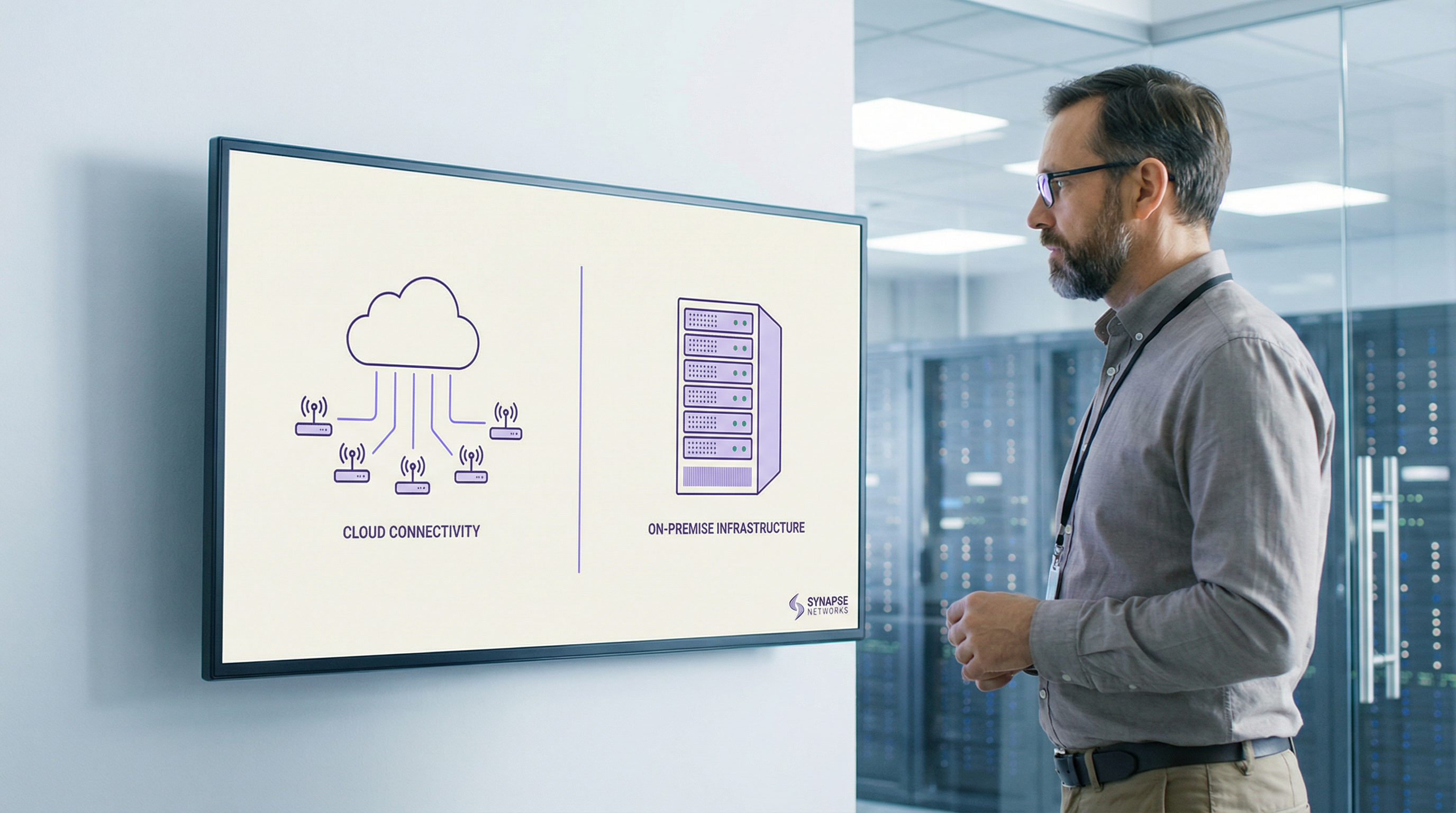
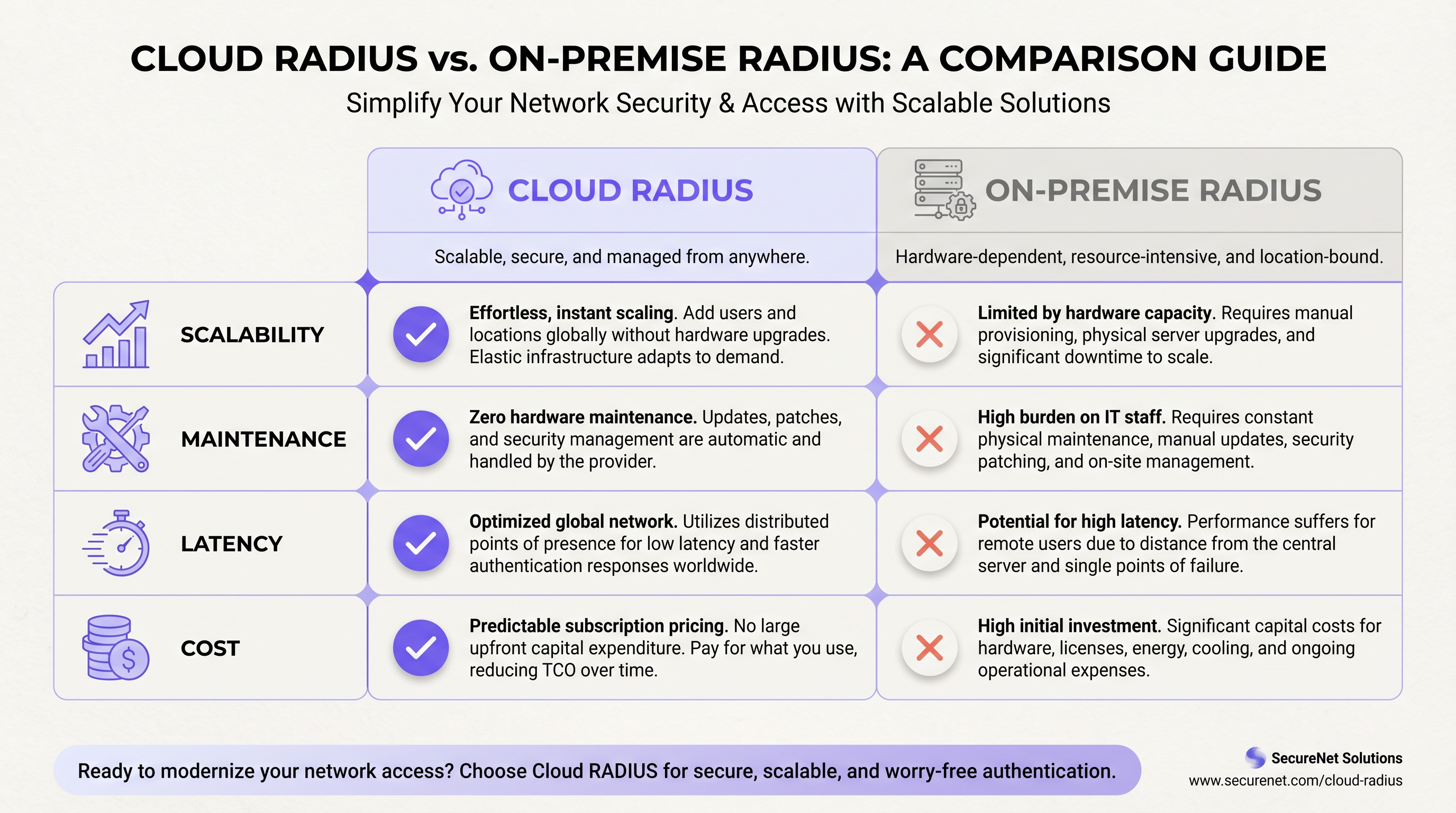
Cloud RADIUS-Dienste bieten eine verwaltete, global verteilte Authentifizierungsinfrastruktur mit integrierter Hochverfügbarkeit, automatischer Zertifikatsrotation und elastischer Skalierbarkeit. Dadurch entfällt der Wartungsaufwand pro Standort, der verteilte On-Premise-Bereitstellungen oft belastet. On-Premise RADIUS, ob mit FreeRADIUS oder Microsoft NPS betrieben, bietet lokale Authentifizierung im Sub-Millisekundenbereich, volle Datensouveränität und Unabhängigkeit von der WAN-Konnektivität – Vorteile, die in spezifischen High-Density- oder regulierten Umgebungen weiterhin entscheidend sind.
Für die meisten Multi-Site-Betreiber – Hotelgruppen, Einzelhandelsketten, Konferenzzentren – liefert Cloud RADIUS ein besseres operatives Ergebnis bei niedrigeren Gesamtbetriebskosten über einen Zeitraum von fünf Jahren. Die Ausnahmen sind klar definiert: Air-Gapped-Umgebungen, strikte Vorgaben zur Datenresidenz und sehr große Einzelstandort-Bereitstellungen, bei denen die lokale LAN-Performance an erster Stelle steht. Dieser Leitfaden bietet Ihnen den Rahmen, um zu bestimmen, in welche Kategorie Ihre Bereitstellung fällt und wie Sie auf Basis dieser Entscheidung handeln sollten.
Technischer Deep-Dive
Das RADIUS-Protokoll und seine Rolle in der 802.1X-Infrastruktur
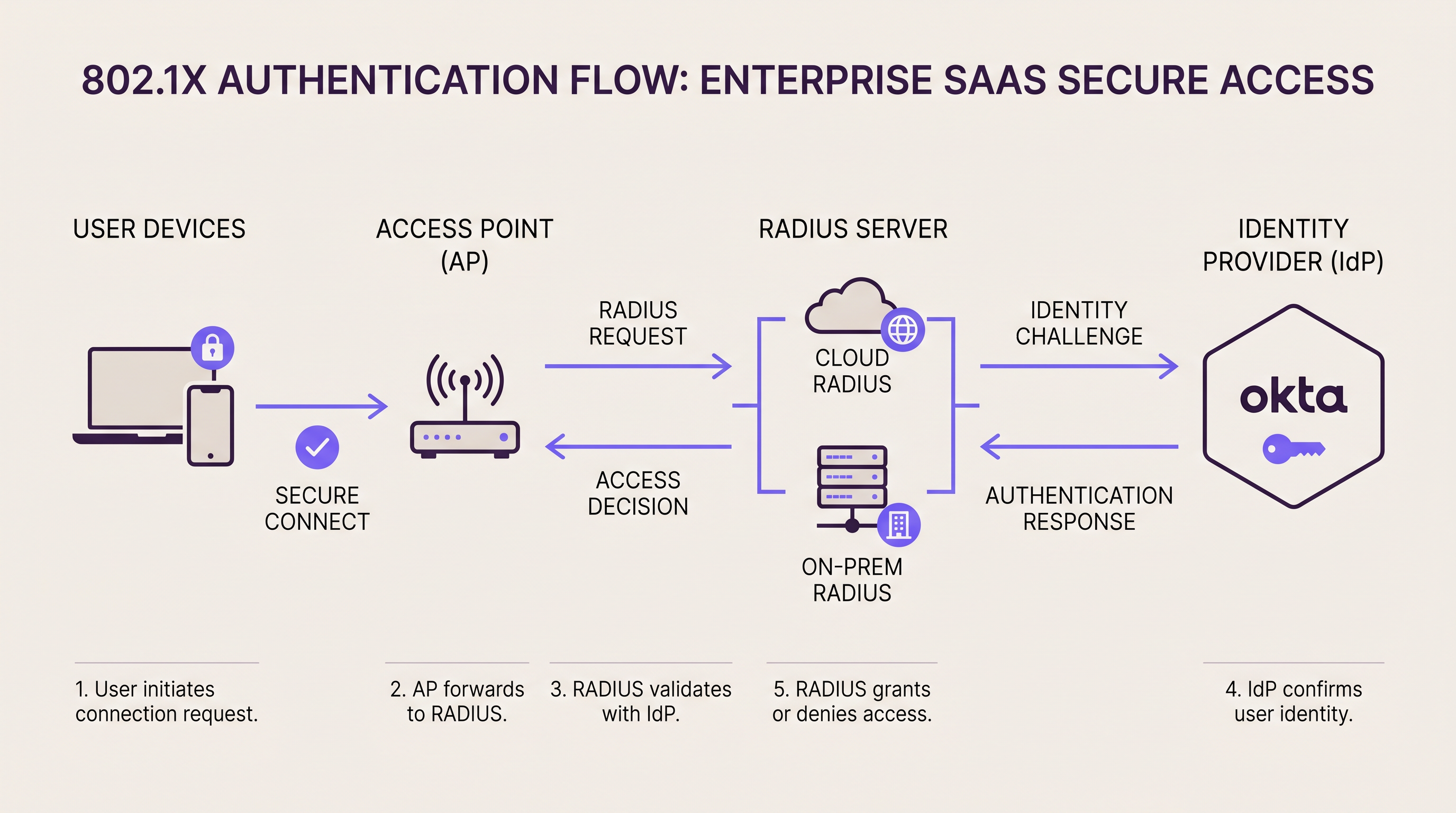
RADIUS (Remote Authentication Dial-In User Service, RFC 2865) fungiert als Authentifizierungs-Broker zwischen Ihrer Netzwerkzugriffsschicht und Ihrem Identitätsverzeichnis. In einer 802.1X -Bereitstellung fungiert der Access Point oder Switch als Network Access Server (NAS) und leitet EAP-Authentifizierungs-Frames über UDP (Port 1812 für Authentifizierung, Port 1813 für Accounting) an den RADIUS-Server weiter. Der RADIUS-Server validiert die Anmeldedaten des Supplicants gegenüber einem Backend-Verzeichnis – Active Directory, LDAP oder einem Cloud-Identity-Provider – und gibt eine Access-Accept- oder Access-Reject-Antwort zurück, optional einschließlich Attributen zur VLAN-Zuweisung.
Diese Architektur ist im Grunde dieselbe, egal ob Ihr RADIUS-Server eine Rack-Appliance in Ihrem Serverraum oder ein global verteilter Cloud-Dienst ist. Der Unterschied liegt darin, wo dieser Server betrieben wird, wer ihn wartet und wie er skaliert.
On-Premise RADIUS: Architektur und Abwägungen
Die beiden dominierenden On-Premise RADIUS-Plattformen sind FreeRADIUS und Microsoft Network Policy Server (NPS). FreeRADIUS ist der weltweit am häufigsten eingesetzte RADIUS-Server und unterstützt eine breite Palette von EAP-Methoden, darunter EAP-TLS, PEAP-MSCHAPv2, EAP-TTLS und EAP-PWD. Er lässt sich über LDAP, SQL oder REST in praktisch jedes Backend-Verzeichnis integrieren und ist ohne Lizenzkosten verfügbar. Er erfordert jedoch eine fachkundige Administration: Die Konfiguration ist dateibasiert, das Debugging erfordert Expertise in der Log-Analyse und die Skalierung über Dutzende von Standorten hinweg erfordert eine sorgfältige Replikations- und Failover-Planung.
Microsoft NPS lässt sich nativ in Active Directory integrieren und ist die Standardwahl für Windows-zentrierte Umgebungen. Es unterstützt PEAP-MSCHAPv2 und EAP-TLS standardmäßig und wird über die vertraute Windows Server-Oberfläche verwaltet. Der Nachteil ist die enge Kopplung an die Windows Server-Lizenzierung und ein eingeschränkterer Satz an EAP-Methoden im Vergleich zu FreeRADIUS.
Für hochverfügbare On-Premise-Bereitstellungen setzen Unternehmen in der Regel Active-Active- oder Active-Passive-RADIUS-Cluster ein. Access Points werden mit einer primären und sekundären RADIUS-Serveradresse konfiguriert; wenn der primäre Server nicht innerhalb des konfigurierten Timeouts (normalerweise 3–5 Sekunden) antwortet, führt der NAS ein Failover zum sekundären Server durch. Diese Architektur erfordert entweder geografisch verteilte Server – was eigene Komplexität mit sich bringt – oder ein Serverpaar in derselben Einrichtung, was jedoch nicht vor einem Ausfall auf Standortebene schützt.
Latenzprofil: On-Premise RADIUS liefert Authentifizierungs-Round-Trips von unter 1 Millisekunde über ein lokales LAN. Für High-Density-Umgebungen, die Tausende von gleichzeitigen Authentifizierungen verarbeiten – zum Beispiel ein Stadion mit 68.000 Plätzen während einer ausverkauften Veranstaltung –, ist diese lokale Verarbeitungsfähigkeit ein echter operativer Vorteil.
Cloud RADIUS: Architektur und Abwägungen
Cloud RADIUS-Plattformen hosten die RADIUS-Infrastruktur über mehrere geografisch verteilte Verfügbarkeitszonen hinweg. Wenn ein Access Point eine Authentifizierungsanfrage sendet, wird diese zum nächstgelegenen Cloud-Edge-Knoten geroutet, was in der Regel eine Round-Trip-Latenz von 5–50 Millisekunden hinzufügt, abhängig von der Nähe des Point-of-Presence des Anbieters zum Standort. Für die überwiegende Mehrheit der Authentifizierungs-Anwendungsfälle ist diese Latenz für Endbenutzer nicht wahrnehmbar.
Das Hochverfügbarkeitsmodell unterscheidet sich grundlegend von On-Premise. Anstatt ein Primär/Sekundär-Paar zu konfigurieren, leitet der Load Balancer der Cloud-Plattform Anfragen automatisch von ausgefallenen Knoten weg. Enterprise Cloud RADIUS-Anbieter veröffentlichen in der Regel SLAs von 99,99 % Betriebszeit, abgesichert durch Multi-Region-Redundanz. Um eine gleichwertige Redundanz On-Premise zu erreichen, müssen Active-Active-Cluster über mehrere geografisch verteilte Rechenzentren hinweg bereitgestellt werden – eine erhebliche technische und finanzielle Investition.
Cloud RADIUS-Plattformen lassen sich nativ in Cloud-Identity-Provider integrieren. Wenn Ihr Unternehmen Okta oder Azure Active Directory nutzty oder Google Workspace: Ein Cloud RADIUS-Dienst verbindet sich über SAML, LDAP-over-TLS oder proprietäre API-Connectoren. Eine detaillierte Anleitung speziell zur Okta-Integration finden Sie in unserem Leitfaden: Okta und RADIUS: Erweiterung Ihres Identity Providers auf die WiFi-Authentifizierung .
Zertifikatsmanagement ist eines der überzeugendsten betrieblichen Argumente für Cloud RADIUS. EAP-TLS und PEAP basieren beide auf serverseitigen digitalen Zertifikaten. On-Premise ist der Ablauf von Zertifikaten eine Hauptursache für Authentifizierungsausfälle – ein ablaufendes Zertifikat auf einem FreeRADIUS-Server führt dazu, dass jeder verbundene Client die Identität des Servers ablehnt, was zu einem vollständigen WiFi-Ausfall führt, bis das Zertifikat erneuert und bereitgestellt wird. Cloud RADIUS-Anbieter automatisieren die Zertifikatsrotation vollständig und eliminieren so diese Fehlerquelle.
WPA3-Enterprise und Protokollüberlegungen
Die WPA3-Enterprise-Spezifikation der WiFi Alliance führt einen 192-Bit-Sicherheitsmodus ein, der EAP-TLS mit Suite-B-Kryptografie (ECDHE, ECDSA, AES-256-GCM) vorschreibt. Dies ist zunehmend relevant für Implementierungen im Gesundheitswesen, im Finanzsektor und im öffentlichen Dienst. Die meisten modernen Cloud RADIUS-Plattformen unterstützen WPA3-Enterprise nativ. On-Premise-Bereitstellungen mit älteren FreeRADIUS-Versionen (vor 3.0.x) oder veralteten NPS-Konfigurationen erfordern möglicherweise Upgrades, bevor WPA3-Enterprise implementiert werden kann. Wenn WPA3-Enterprise auf Ihrer Roadmap steht, validieren Sie die Unterstützung Ihrer RADIUS-Plattform, bevor Sie sich auf einen Infrastrukturpfad festlegen.
Für Unternehmen, die die SD-WAN-Ebene in Betracht ziehen, die Multi-Site-Cloud-RADIUS-Bereitstellungen unterstützt, bietet unser Leitfaden zu den Kernvorteilen von SD-WAN für moderne Unternehmen ergänzenden Kontext zur WAN-Resilienz-Architektur.
Implementierungsleitfaden
Schritt 1: Audit Ihrer aktuellen Authentifizierungsabhängigkeiten
Bevor Sie ein Bereitstellungsmodell auswählen, dokumentieren Sie jede SSID, jedes VLAN, jede EAP-Methode und jedes Backend-Verzeichnis, das Ihre aktuelle Authentifizierungsinfrastruktur berührt. Berücksichtigen Sie auch MAC Authentication Bypass (MAB)-Richtlinien für Headless-Geräte – Drucker, IoT-Sensoren, Point-of-Sale-Terminals –, da diese bei Migrationen häufig übersehen werden und nach der Umstellung erhebliche Vorfälle verursachen können.
Schritt 2: Bewertung der Identity Provider-Bereitschaft
Wenn Ihr Benutzerverzeichnis ein On-Premise Active Directory ist und nicht mit einem Cloud-IdP synchronisiert werden kann, sind Ihre Cloud RADIUS-Optionen auf Plattformen beschränkt, die LDAP-Proxying zu On-Premise-Verzeichnissen unterstützen. Wenn Sie Azure AD Connect oder ein ähnliches Synchronisierungstool einsetzen können, steht Ihnen die gesamte Palette der Cloud RADIUS-Plattformen zur Verfügung. Diese eine Entscheidung – Cloud-IdP versus On-Premise-Verzeichnis – ist oft der ausschlaggebende Faktor bei der Wahl zwischen Cloud- und On-Premise-RADIUS.
Schritt 3: Bewertung der WAN-Resilienz an jedem Standort
Cloud RADIUS ist nur so zuverlässig wie die Internetverbindung an jedem Standort. Überprüfen Sie vor der Migration die WAN-Konnektivität an jedem Standort. Standorte mit einer einzigen ISP-Verbindung ohne Failover stellen ein erhebliches Risiko dar. Implementieren Sie eine Dual-ISP-Konnektivität oder ein SD-WAN-Failover, bevor Sie Cloud RADIUS als primäre Authentifizierungsinfrastruktur bereitstellen. Für Einzelhandelsumgebungen , in denen Point-of-Sale-Systeme von der Netzwerkauthentifizierung abhängen, ist WAN-Resilienz unverzichtbar.
Schritt 4: Planung der Zertifikatsmigration (On-Premise-Bereitstellungen)
Wenn Sie On-Premise-RADIUS mit EAP-TLS bereitstellen oder warten, etablieren Sie einen Prozess für das Zertifikats-Lifecycle-Management. Implementieren Sie Monitoring-Alarme 90, 60 und 30 Tage vor Ablauf des Zertifikats. Erwägen Sie die Bereitstellung einer internen PKI (wie Microsoft ADCS oder HashiCorp Vault), um die Ausstellung und Erneuerung von Zertifikaten zu automatisieren. Verlassen Sie sich in Produktionsumgebungen niemals allein auf Kalendererinnerungen für das Zertifikatsmanagement.
Schritt 5: Konfiguration von Survivability-Richtlinien
Konfigurieren Sie für Cloud RADIUS-Bereitstellungen eine lokale Survivability-Richtlinie auf Ihren Wireless-Controllern oder Access Points. Zu den Optionen gehören: Caching des zuletzt bekannten Authentifizierungsstatus für einen konfigurierbaren Zeitraum, Rückgriff auf MAC Authentication Bypass für vorab genehmigte Gerätelisten oder Routing kritischer Mitarbeiter-SSIDs über einen sekundären Authentifizierungspfad. Stellen Sie für Betreiber im Gastgewerbe sicher, dass das Gäste-WiFi-Onboarding über Plattformen wie Purples Guest WiFi ein definiertes Fallback-Verhalten bei RADIUS-Nichtverfügbarkeit aufweist.
Schritt 6: Durchführung einer Parallelbereitstellung
Stellen Sie die neue RADIUS-Plattform parallel zur bestehenden Infrastruktur bereit. Erstellen Sie eine dedizierte Test-SSID, die dem neuen RADIUS-Server zugewiesen ist, und validieren Sie alle EAP-Methoden, VLAN-Zuweisungen und Richtliniendurchsetzungen, bevor Sie produktive SSIDs migrieren. Dieser Parallelbetrieb sollte bei einer Einzelstandort-Bereitstellung mindestens zwei Wochen und bei einer Multi-Site-Migration vier bis sechs Wochen dauern.
Schritt 7: Durchführung einer schrittweisen Standort-für-Standort-Migration
Migrieren Sie bei Multi-Site-Bereitstellungen die Standorte nacheinander statt gleichzeitig. Beginnen Sie mit Standorten mit geringerem Risiko – kleinere Standorte mit weniger Datenverkehr und toleranteren Benutzern –, bevor Sie Standorte mit hoher Priorität wie Flagship-Stores oder Hotelimmobilien mit hohem Konferenzaufkommen migrieren. Dokumentieren Sie das Rollback-Verfahren für jeden Standort, bevor Sie mit der Umstellung beginnen.
Best Practices
Hygiene bei Shared Secrets: RADIUS-Shared-Secrets zwischen Access Points und dem RADIUS-Server müssen mindestens 32 Zeichen lang, zufällig generiert und pro NAS-Gerät eindeutig sein. Die Wiederverwendung von Shared Secrets über alle Access Points hinweg bedeutet, dass die Kompromittierung eines Geräts die gesamte Authentifizierungsinfrastruktur gefährdet. Rotieren Sie Shared Secrets jährlich oder nach jeder vermuteten Kompromittierung.
VLAN-Segmentierung: Verwenden Sie RADIUS-zugewiesene VLANs (über die Attribute Tunnel-Type, Tunnel-Medium-Type und Tunnel-Private-Group-ID), um den Datenverkehr dynamisch nach Benutzerrolle zu segmentieren. Gastgeräte sollten in einem isolierten VLAN mit reinem Internetzugang landen; Unternehmens- Geräte im Produktions-VLAN; IoT-Geräte in einem dedizierten, eingeschränkten VLAN. Diese Segmentierung ist eine PCI DSS-Anforderung für jedes Netzwerk, das Karteninhaberdaten verarbeitet.
Accounting und Audit-Protokollierung: Aktivieren Sie RADIUS-Accounting (Port 1813) und bewahren Sie Accounting-Protokolle für mindestens 12 Monate auf. Diese Protokolle erfassen Sitzungsstart-/-endzeiten, Datenvolumen und zugewiesene IP-Adressen – unerlässlich für die Untersuchung von Sicherheitsvorfällen und die GDPR-Compliance. Cloud-RADIUS-Plattformen exportieren Accounting-Daten in der Regel über Syslog oder API an SIEM-Systeme; On-Premise-Bereitstellungen sollten Accounting-Daten an eine zentralisierte Protokollmanagement-Plattform leiten.
Auswahl der EAP-Methode: Für Unternehmensnetzwerke bietet EAP-TLS (zertifikatsbasiert) das höchste Sicherheitsniveau und wird für PCI DSS- und Gesundheitsumgebungen empfohlen. PEAP-MSCHAPv2 ist für Umgebungen mit geringerem Risiko akzeptabel, ist jedoch anfällig für Credential-Harvesting-Angriffe, wenn das Serverzertifikat nicht ordnungsgemäß von den Supplicants validiert wird. Vermeiden Sie EAP-MD5 vollständig – es ist veraltet und bietet keine gegenseitige Authentifizierung.
RadSec (RADIUS über TLS): Das herkömmliche RADIUS-Protokoll überträgt Daten über UDP, wobei nur das User-Password-Attribut verschlüsselt ist. RadSec (RFC 6614) kapselt RADIUS in TLS ein und bietet so eine vollständige Transportverschlüsselung und gegenseitige Authentifizierung zwischen NAS und RADIUS-Server. Die meisten modernen Cloud-RADIUS-Plattformen unterstützen RadSec. Bei Neuinstallationen sollte RadSec die Standardwahl für den Transport sein.
Für Implementierungen im Gesundheitswesen und im Transportwesen , wo die Verpflichtungen zur Datenverarbeitung gemäß GDPR und branchenspezifischen Vorschriften besonders streng sind, stellen Sie sicher, dass Ihre RADIUS-Plattform einen Auftragsverarbeitungsvertrag bereitstellt und die regionale Datenresidenz unterstützt.
Fehlerbehebung & Risikominderung
Häufiges Fehlerszenario 1: Zertifikatsablauf (On-Premise)
Symptom: Alle Clients schlagen plötzlich bei der Authentifizierung fehl; RADIUS-Protokolle zeigen TLS-Handshake-Fehler.
Ursache: Das serverseitige Zertifikat auf dem RADIUS-Server ist abgelaufen. Client-Supplicants lehnen die Identität des Servers ab.
Abhilfe: Implementieren Sie eine automatisierte Zertifikatsüberwachung mit Warnmeldungen bei 90/60/30 Tagen. Verwenden Sie eine interne CA mit automatischer Erneuerung. Cloud-RADIUS eliminiert dieses Fehlerszenario durch automatisierte Zertifikatsrotation vollständig.
Häufiges Fehlerszenario 2: WAN-Ausfall blockiert Cloud-RADIUS
Symptom: Die Authentifizierung schlägt an einem bestimmten Standort fehl; andere Standorte sind nicht betroffen. Das lokale Netzwerk ist betriebsbereit.
Ursache: Die Internetverbindung des Standorts ist ausgefallen, wodurch Access Points den Cloud-RADIUS-Dienst nicht erreichen können.
Abhilfe: Implementieren Sie Dual-ISP-Konnektivität oder SD-WAN mit automatischem Failover. Konfigurieren Sie Survivability-Richtlinien für Access Points, um Anmeldedaten zwischenzuspeichern oder für kritische Geräte auf MAB zurückzugreifen.
Häufiges Fehlerszenario 3: Diskrepanz beim Shared Secret
Symptom: Authentifizierungsanfragen werden lautlos verworfen; RADIUS-Protokolle zeigen Fehler wie „invalid authenticator“ oder „message authenticator“.
Ursache: Das auf dem Access Point konfigurierte Shared Secret stimmt nicht mit dem auf dem RADIUS-Server konfigurierten Secret überein.
Abhilfe: Verwenden Sie ein zentralisiertes Secret-Management-System (HashiCorp Vault, AWS Secrets Manager), um Konsistenz zu gewährleisten. Validieren Sie Shared Secrets nach jeder Konfigurationsänderung am NAS oder RADIUS-Server.
Häufiges Fehlerszenario 4: Fehlkonfiguration des Supplicants
Symptom: Einzelne Geräte schlagen bei der Authentifizierung fehl, während andere in derselben SSID erfolgreich sind.
Ursache: Der 802.1X-Supplicant auf dem fehlerhaften Gerät ist nicht so konfiguriert, dass er dem Zertifikat des RADIUS-Servers vertraut, oder er ist für eine inkompatible EAP-Methode konfiguriert.
Abhilfe: Rollen Sie die Supplicant-Konfiguration über MDM oder Gruppenrichtlinien aus, um Konsistenz zu gewährleisten. Stellen Sie für BYOD-Umgebungen eine klare Onboarding-Anleitung bereit. Die WiFi Analytics -Plattform von Purple kann dabei helfen, Muster bei Authentifizierungsfehlern in Ihrem Gerätebestand zu identifizieren.
Häufiges Fehlerszenario 5: RADIUS-Timeout unter Last
Symptom: Verzögerungen oder Fehler bei der Authentifizierung während Spitzenzeiten (Veranstaltungsbeginn, Schichtwechsel).
Ursache: Der RADIUS-Server ist durch gleichzeitige Authentifizierungsanfragen überlastet; der NAS-Timeout wird überschritten, bevor eine Antwort empfangen wird.
Abhilfe: On-Premise: Skalieren Sie die RADIUS-Serverkapazität vor bekannten Spitzenereignissen; implementieren Sie Verbindungsratenbegrenzung auf den Access Points. Cloud-RADIUS: Überprüfen Sie, ob Ihr Abonnement-Tarif Ihren Spitzen-Authentifizierungsdurchsatz unterstützt; die meisten Enterprise-Cloud-Plattformen skalieren automatisch.
ROI & geschäftliche Auswirkungen
Total Cost of Ownership: Fünfjahresvergleich
Die folgende Analyse basiert auf einer repräsentativen Einzelhandelskette mit 20 Standorten, etwa 50 Access Points pro Standort und 200 gleichzeitig authentifizierten Geräten pro Standort zu Spitzenzeiten.
| Kostenkomponente | On-Premise RADIUS (20 Standorte) | Cloud RADIUS (20 Standorte) |
|---|---|---|
| Hardware (Server, HA-Paare) | £80.000–£120.000 | £0 |
| Betriebssystem- & Softwarelizenzierung | £10.000–£30.000 | £0 |
| Jährliches Abonnement | £0 | £18.000–£40.000/Jahr |
| Strom & Kühlung (5 J.) | £15.000–£25.000 | £0 |
| Technikaufwand (5 J.) | £60.000–£100.000 | £10.000–£20.000 |
| Gesamtkosten über 5 Jahre | £165.000–£275.000 | £100.000–£220.000 |
Der Unterschied beim Technikaufwand ist der bedeutendste Faktor. On-Premise RADIUS an 20 Standorten erfordert laufendes Patching, Zertifikatsmanagement, Überwachung und Incident Response. Cloud-RADIUS reduziert dies auf Richtlinienmanagement und Integrationswartung – ein Bruchteil des Aufwands.
Erfolg messen
Zu den Key Performance Indicators für Ihre RADIUS-Bereitstellung sollten gehören: Authentifizierungserfolgsrate (Ziel: >99,5 % für Produktionsumgebungen), durchschnittliche Authentifizierungslatenz (Ziel: <100 ms für Cloud, <5 ms für On-Premise LAN), mittlere Wiederherstellungszeit (MTTR) bei Authentifizierungsausfällen (Ziel: <15 Minuten) und Zertifikatsablauf-Vorfälle (Ziel: Null, erreichbar durch angemessene Automatisierung).
Für Betreiber im Gastgewerbe , die das Guest WiFi von Purple nutzen/guest-wifi)-Plattform wirkt sich die Zuverlässigkeit der Authentifizierungsinfrastruktur direkt auf die Gästezufriedenheitswerte aus. Eine Authentifizierungsverzögerung von 2 Sekunden während der Stoßzeiten beim Check-in ist im Gäste-Feedback messbar. Cloud RADIUS mit korrekt konfigurierten Survivability-Richtlinien übertrifft ad-hoc On-Premise-Bereitstellungen bei dieser Kennzahl konsistent.
Unternehmen, die von verteilten On-Premise-FreeRADIUS-Bereitstellungen zu Cloud RADIUS migriert sind, berichten konsistent von einer Reduzierung der authentifizierungsbezogenen IT-Vorfälle um 30–50 % und einer signifikanten Verringerung der für die RADIUS-Wartung aufgewendeten Engineering-Stunden – Stunden, die für strategische Netzwerkverbesserungsprojekte neu zugewiesen werden. Die Plattform von Purple, die sich in beide Bereitstellungsmodelle integrieren lässt, liefert die WiFi Analytics - und Sensors -Daten, um diese Verbesserungen gegenüber den vor der Migration erfassten Baseline-Metriken zu quantifizieren.
Für Standortbetreiber, die den breiteren Kontext der Netzwerkmodernisierung betrachten, stellen die Wayfinding -Funktionen von Purple und die Integration von Authentifizierungsdaten mit Besucherstromanalysen die nächste Wertschöpfungsebene dar, die eine gut architektonierte RADIUS-Infrastruktur ermöglicht. Authentifizierungsereignisse sind im Kern Präsenzdaten – und wenn sie über die Analyseebene von Purple aufbereitet werden, werden sie zu einem leistungsstarken Werkzeug, um Besucherverhalten, Verweildauer und Wiederkehrraten an Ihren Standorten zu verstehen.
Schlüsselbegriffe & Definitionen
RADIUS (Remote Authentication Dial-In User Service)
A networking protocol (RFC 2865) that provides centralised authentication, authorisation, and accounting (AAA) for users connecting to a network. RADIUS operates over UDP and acts as the broker between network access equipment (access points, switches) and the identity directory (Active Directory, LDAP, cloud IdP).
IT teams encounter RADIUS whenever deploying 802.1X authentication for WiFi or wired networks. It is the foundational protocol for enterprise network access control and is required for WPA2-Enterprise and WPA3-Enterprise deployments.
802.1X
An IEEE standard for port-based network access control that defines the framework for EAP-based authentication. In a WiFi context, 802.1X requires three components: the supplicant (client device), the authenticator (access point), and the authentication server (RADIUS). The access point blocks all traffic from the client until RADIUS returns an Access-Accept.
802.1X is the authentication mechanism for WPA2-Enterprise and WPA3-Enterprise networks. IT teams use it to ensure that only authorised devices and users can connect to the corporate WiFi, with dynamic VLAN assignment based on user identity.
EAP (Extensible Authentication Protocol)
A flexible authentication framework used within 802.1X that supports multiple authentication methods. Common EAP methods include EAP-TLS (certificate-based, strongest security), PEAP-MSCHAPv2 (password-based with server certificate validation), and EAP-TTLS (tunnelled password authentication).
The choice of EAP method directly impacts security posture and deployment complexity. EAP-TLS requires client certificates on every device, making it more complex to deploy but significantly more resistant to credential theft attacks. IT teams in regulated industries (healthcare, finance) should default to EAP-TLS.
FreeRADIUS
The world's most widely deployed open-source RADIUS server, powering authentication for hundreds of millions of users globally. FreeRADIUS supports an extensive range of EAP methods and backend integrations, is available at no licensing cost, and runs on Linux. It requires skilled administration and file-based configuration.
FreeRADIUS is the default choice for on-premise RADIUS deployments in non-Microsoft environments. IT teams evaluating the cloud versus on-premise decision should assess whether they have the in-house expertise to operate FreeRADIUS effectively, as misconfiguration is a leading cause of authentication incidents.
NPS (Network Policy Server)
Microsoft's built-in RADIUS server, included with Windows Server. NPS integrates natively with Active Directory and supports PEAP-MSCHAPv2 and EAP-TLS. It is managed through the Windows Server GUI and is the default RADIUS choice for Microsoft-centric environments.
IT teams running Windows Server infrastructure typically deploy NPS as their on-premise RADIUS server. NPS is tightly coupled to Windows Server licensing and Active Directory, which simplifies deployment in Microsoft environments but limits flexibility in heterogeneous or cloud-native environments.
MAC Authentication Bypass (MAB)
An authentication method that uses a device's MAC address as its credential, allowing headless devices (printers, IoT sensors, point-of-sale terminals) that cannot run an 802.1X supplicant to authenticate to the network. The MAC address is checked against an allow-list on the RADIUS server.
MAB is essential for any network with IoT devices or legacy equipment. IT teams must maintain accurate MAC address inventories and implement processes for adding new devices. Cloud RADIUS platforms typically provide a centralised dashboard for MAB list management across all sites, which is significantly more efficient than per-site configuration file management on FreeRADIUS.
RadSec (RADIUS over TLS)
An extension of the RADIUS protocol (RFC 6614) that transports RADIUS packets over TLS rather than UDP. RadSec provides full transport encryption and mutual authentication between the NAS and RADIUS server, addressing several well-documented security vulnerabilities in the traditional UDP-based RADIUS protocol.
Traditional RADIUS encrypts only the User-Password attribute; all other attributes, including usernames and session data, are transmitted in plaintext. RadSec is the modern, secure transport mechanism for RADIUS and is supported by most enterprise Cloud RADIUS platforms and modern access point vendors. IT teams deploying new RADIUS infrastructure should evaluate RadSec as the default transport.
VLAN Assignment (RADIUS-assigned VLAN)
A RADIUS capability that dynamically assigns a connecting device to a specific VLAN based on authentication outcome. The RADIUS server returns Tunnel-Type (13=VLAN), Tunnel-Medium-Type (6=802), and Tunnel-Private-Group-ID (VLAN ID) attributes in the Access-Accept response, and the access point places the device in the specified VLAN.
Dynamic VLAN assignment is the mechanism by which IT teams implement network segmentation based on user identity. A single SSID can serve multiple user types — guests, employees, contractors, IoT devices — with each type automatically placed in the appropriate VLAN based on their RADIUS authentication result. This is a PCI DSS requirement for networks that handle cardholder data.
High Availability (HA) RADIUS
A RADIUS deployment architecture that ensures authentication services remain available despite individual server failures. Common HA patterns include active-active clustering (both servers handle traffic simultaneously, with load balancing), active-passive failover (secondary server takes over when primary fails), and geographically distributed redundancy (servers in separate physical locations).
HA is a critical design consideration for any production RADIUS deployment. IT teams must define their Recovery Time Objective (RTO) — how quickly authentication must be restored after a failure — and design their HA architecture accordingly. Cloud RADIUS providers deliver HA as a built-in service; on-premise HA requires explicit architectural design and ongoing maintenance.
Fallstudien
A European hotel group operates 45 properties across six countries. Each property has 150–400 guest rooms plus conference facilities. The central IT team consists of three network engineers. They currently run FreeRADIUS on virtual machines at each property — 45 separate instances. A certificate expiry at one property caused a complete guest WiFi outage during a major conference. The CTO wants to eliminate this class of incident and reduce maintenance overhead. What is the recommended architecture?
Recommended Architecture: Cloud RADIUS with Purple Guest WiFi Integration
Select a Cloud RADIUS provider with European data residency (to satisfy GDPR obligations) and native integration with your existing IdP. If the hotel group uses Azure AD for staff identity, select a platform with Azure AD LDAP connector support.
Migrate guest WiFi SSIDs first. Guest authentication is the highest-volume, lowest-risk migration target. Configure Purple's captive portal to handle guest onboarding (data capture, consent, branded splash page) and pass authenticated sessions to the Cloud RADIUS backend. This immediately eliminates per-property FreeRADIUS maintenance for the guest network.
Migrate staff SSIDs property by property, beginning with smaller properties. For each property, run a two-week parallel deployment with a test SSID before cutting over production traffic.
Configure WAN survivability at each property. Implement SD-WAN or dual-ISP connectivity. Configure the wireless controller to cache staff credentials locally for up to 8 hours, ensuring hotel operations staff can authenticate even during brief internet outages.
Decommission FreeRADIUS VMs at each property post-migration. Retain VM snapshots for 30 days as a rollback safety net.
Centralise policy management through the Cloud RADIUS dashboard. Define VLAN assignment policies once and apply them across all 45 properties — a task that previously required per-property configuration file edits.
Expected outcomes: Elimination of certificate expiry incidents (automated rotation), reduction of RADIUS-related engineering time by approximately 40%, and improved authentication latency at properties in countries where the cloud provider has local edge nodes.
A national sports stadium with 68,000 seats hosts 30 major events per year. Peak concurrent WiFi users exceed 25,000 during sold-out matches. The stadium has a dedicated 10Gbps internet connection, but the IT security team has a hard requirement: all authentication logs must remain on UK soil and must not traverse the public internet. The stadium also operates a PCI DSS-compliant point-of-sale network for concessions. What RADIUS architecture is appropriate?
Recommended Architecture: On-Premise RADIUS with Active-Active Cluster and Co-Location DR
Deploy a primary active-active RADIUS cluster within the stadium's on-site data room. Use two physical servers running FreeRADIUS in active-active configuration, load-balanced via the wireless controller's RADIUS server list. Each server should be capable of handling the full authentication load independently — size for 3,000+ authentications per minute at peak event ingress.
Deploy a secondary cluster at a UK co-location facility within 30 miles of the stadium, connected via a dedicated private WAN link (not the public internet). This provides site-level disaster recovery without violating the data sovereignty requirement.
Segment the PCI DSS environment with a dedicated RADIUS policy for the point-of-sale SSID. Assign POS devices to a dedicated VLAN via RADIUS attributes. Ensure RADIUS accounting logs for POS authentication are retained for 12 months minimum, stored on-premise in compliance with PCI DSS Requirement 10.
Implement EAP-TLS for all staff and POS device authentication. Deploy an internal Certificate Authority (Microsoft ADCS or equivalent) to issue and manage client certificates. Configure automated certificate renewal with 90-day advance alerts.
Deploy RadSec (RADIUS over TLS) between access points and the on-premise RADIUS cluster to encrypt authentication traffic on the internal network — particularly important given the high-density public environment.
Pre-provision capacity before major events. Work with the stadium's event operations team to receive confirmed attendance figures 72 hours in advance, and validate RADIUS server capacity against expected peak authentication rates.
Expected outcomes: Sub-millisecond authentication latency during peak event ingress, full data sovereignty compliance, PCI DSS-compliant authentication logging, and 99.99%+ availability via the active-active cluster architecture.
Szenarioanalyse
Q1. A national pharmacy chain operates 320 stores across the UK. Each store has a single internet connection from a major ISP with no failover. The chain uses Microsoft 365 and Azure Active Directory for all staff identity. The IT team of 8 engineers currently manages FreeRADIUS instances on a virtual machine at each store. The CISO has flagged that 23% of stores have RADIUS certificates that will expire within 90 days. The CTO wants to resolve this and reduce ongoing maintenance overhead. What RADIUS architecture do you recommend, and what is the single most critical infrastructure change required before migration?
💡 Hinweis:Consider the WAN resilience requirement carefully — what happens to in-store operations if the internet connection fails after Cloud RADIUS is deployed?
Empfohlenen Ansatz anzeigen
Recommended architecture: Cloud RADIUS integrated with Azure Active Directory, replacing the 320 FreeRADIUS instances. The Azure AD integration is straightforward given the existing Microsoft 365 deployment, and Cloud RADIUS eliminates the certificate management crisis immediately through automated rotation.
Critical infrastructure change before migration: WAN resilience. Each store currently has a single ISP connection with no failover. Cloud RADIUS is entirely dependent on internet connectivity. Before migrating any store, implement SD-WAN with dual-ISP failover, or at minimum configure the wireless controller to cache staff credentials locally for 8–12 hours. Without this, a store that loses internet connectivity cannot authenticate staff to the corporate network — potentially blocking access to point-of-sale systems, inventory management, and other network-dependent operations.
Migration sequence: (1) Deploy SD-WAN or credential caching at all 320 stores. (2) Migrate the 23% of stores with imminent certificate expiry first — this addresses the immediate risk. (3) Migrate remaining stores in batches of 20–30 per week. (4) Decommission FreeRADIUS VMs post-migration. Expected outcome: zero certificate expiry incidents, 60–70% reduction in RADIUS-related engineering time, centralised policy management across all 320 stores.
Q2. A conference centre operator runs a single flagship venue with a capacity of 5,000 delegates. The venue hosts 200 events per year, ranging from small board meetings to large international conferences. Peak concurrent WiFi users reach 4,500 during major events. The venue has a 1Gbps dedicated internet connection with 99.9% SLA. The IT team consists of two network engineers. There are no specific data sovereignty requirements. The current on-premise FreeRADIUS server is approaching end-of-life. Should they replace it with a new on-premise deployment or migrate to Cloud RADIUS?
💡 Hinweis:Consider both the peak load profile and the team size. Is 4,500 concurrent users at a single site a strong argument for on-premise, or does the team size and management overhead tip the balance?
Empfohlenen Ansatz anzeigen
Recommended architecture: Cloud RADIUS. Despite the single-site, high-density profile, the combination of a small IT team (2 engineers), no data sovereignty requirements, and a reliable dedicated internet connection makes Cloud RADIUS the stronger choice.
Reasoning: The peak load of 4,500 concurrent users is well within the throughput capacity of enterprise Cloud RADIUS platforms, which are designed for far higher volumes. The 5–20ms additional latency from cloud routing is imperceptible in a conference environment. The 1Gbps dedicated internet connection with a 99.9% SLA provides sufficient WAN reliability for Cloud RADIUS dependence.
The decisive factor is team size. Two engineers managing an on-premise FreeRADIUS replacement — including hardware procurement, OS hardening, certificate management, EAP configuration, and ongoing maintenance — represents a significant ongoing overhead for a small team. Cloud RADIUS reduces this to policy management, freeing both engineers for the venue's broader network infrastructure needs.
Implementation note: Configure credential caching on the wireless controller for the venue operations staff SSID, providing survivability during any brief internet disruption. Ensure the Cloud RADIUS provider has a UK or European edge node to minimise authentication latency for the high-density event scenario.
Q3. A regional NHS trust operates 12 hospital sites across a county. Authentication requirements include: (1) staff access to the clinical network via 802.1X with EAP-TLS, (2) guest/patient WiFi via captive portal, and (3) medical device authentication via MAC Authentication Bypass. The trust's information governance team has mandated that all patient-related data, including authentication logs, must remain within NHS-approved data centres in England. The trust uses on-premise Active Directory with no current plans to migrate to Azure AD. What architecture do you recommend?
💡 Hinweis:This scenario has multiple hard constraints. Identify each one and determine whether it eliminates cloud RADIUS entirely or only partially.
Empfohlenen Ansatz anzeigen
Recommended architecture: Hybrid — On-Premise RADIUS for clinical staff and medical device authentication; Cloud RADIUS (NHS-compliant) or on-premise for guest/patient WiFi.
Analysis of constraints:
- Data sovereignty (NHS-approved English data centres): This eliminates most commercial Cloud RADIUS providers unless they offer NHS-compliant data residency. Some providers offer NHS-specific deployments; these should be evaluated. If no compliant cloud option exists, on-premise is required for all authentication.
- On-premise Active Directory with no cloud sync: This is a hard constraint for Cloud RADIUS integration. Without Azure AD Connect or equivalent, Cloud RADIUS cannot query the trust's staff directory. On-premise RADIUS is required for staff authentication.
- EAP-TLS for clinical staff: Supported by both on-premise FreeRADIUS and NPS. Requires an internal PKI (Microsoft ADCS recommended for an AD-integrated environment).
Recommended deployment: Deploy on-premise RADIUS (NPS or FreeRADIUS) at each of the 12 hospital sites in active-passive pairs, integrated with the trust's on-premise Active Directory. Use RADIUS-assigned VLANs to segment clinical, administrative, and medical device traffic. For guest/patient WiFi, deploy Purple's captive portal for GDPR-compliant data capture and consent management — this does not require RADIUS for guest authentication and sidesteps the data sovereignty constraint for the guest network entirely. Medical device MAB policies are managed on the on-premise RADIUS server with MAC address lists maintained centrally via a configuration management tool.
Key risk to mitigate: Certificate management for EAP-TLS across 12 sites. Deploy Microsoft ADCS with automated certificate enrolment via Group Policy to ensure all clinical devices receive and renew certificates automatically.
Wichtigste Erkenntnisse
- ✓Cloud RADIUS delivers built-in high availability, automatic certificate rotation, and elastic scalability — making it operationally superior for multi-site deployments with distributed footprints and small central IT teams.
- ✓On-premise RADIUS remains the correct choice for air-gapped environments, deployments with hard data sovereignty requirements that no cloud provider can satisfy, and very large single-site venues where sub-millisecond local LAN authentication is operationally critical.
- ✓The 10-Site Rule: organisations with more than 10 sites and fewer than 5 network engineers almost always achieve a positive ROI from Cloud RADIUS within 18 months, driven primarily by the elimination of per-site maintenance overhead.
- ✓WAN resilience is the non-negotiable prerequisite for Cloud RADIUS deployment. Implement dual-ISP connectivity or SD-WAN failover, and configure credential caching on wireless controllers before migrating any production authentication traffic to the cloud.
- ✓Certificate expiry is the leading cause of on-premise RADIUS outages and is entirely preventable — either through Cloud RADIUS (automated rotation) or through a properly implemented certificate lifecycle management process with proactive monitoring at 90/60/30-day intervals.
- ✓The hybrid model — Cloud RADIUS for guest and IoT networks, on-premise RADIUS for corporate employee networks — is a common and pragmatic architecture that applies the right tool to each use case without forcing a binary choice.
- ✓Purple's platform integrates with both cloud and on-premise RADIUS backends, and authentication event data surfaced through Purple's analytics layer transforms RADIUS accounting records into actionable footfall intelligence for venue operators.




