
Veterinary practice group WiFi providers checklist: client waiting rooms, clinical devices and multi-site rollout
You will be able to shortlist veterinary practice WiFi providers against nine concrete questions and separate client, staff and clinical devices at every site. You can then apply one group template to each practice you acquire. The guide also gives you an acceptance test, a troubleshooting list and the cost lines to budget for.
By Tom HackettPublished
📖 14 min read3,216 words3 worked examples12 key definitions
Video overview
Part of our core series: Enterprise WiFi security and authentication: the complete guide →
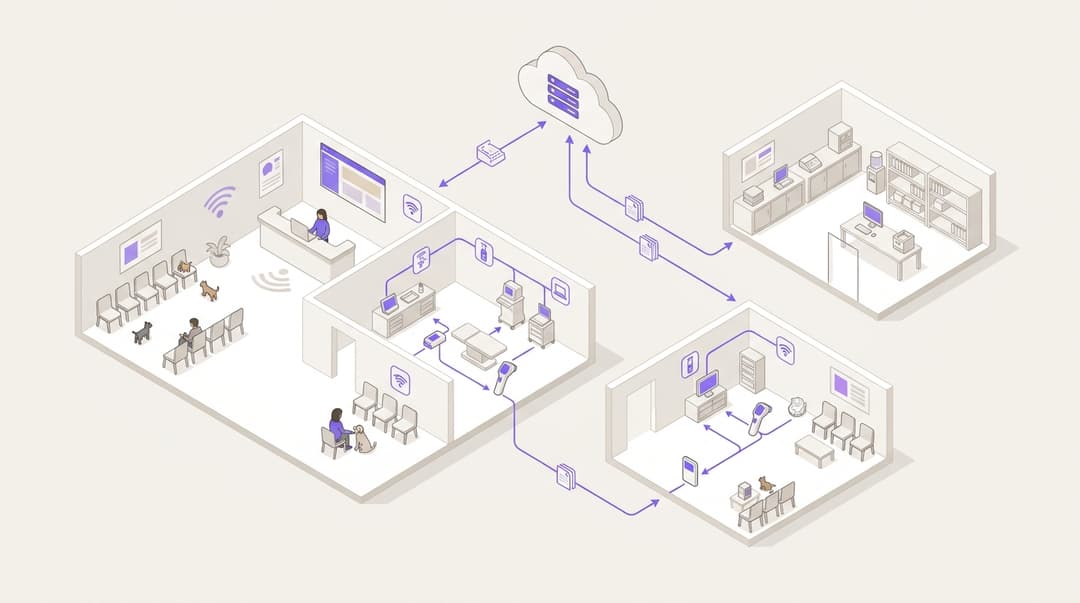
A veterinary practice group needs three separate networks at every site. Client WiFi serves the waiting room. Staff WiFi serves vets, nurses and reception. A locked-down network carries imaging, lab and practice management devices. Choose a provider that separates them by identity, filters the client network and applies one template to every practice you acquire.
What does a veterinary practice WiFi set-up need to do?
A vet practice is a small clinical site with a public waiting room at the front. Clients sit with anxious pets and a phone in hand. Behind reception sit the systems that run the practice:
- practice management software
- digital radiography and ultrasound
- in-house lab analysers
- label printers and card terminals
The waiting room and the prep room share a building and often the same access points. They must never share a network.
That is the core test for veterinary practice WiFi providers. Your provider has to give each group of people and devices its own network, with its own sign-in method, its own reach and its own filtering. It then has to repeat that design across every practice in the group, including the ones you have not bought yet.
A phone in the waiting room is an unmanaged device. You do not know what is on it. A flat network, where every device can see every other device, lets a compromised phone probe your X-ray console or practice management server. Segmentation removes that path.
It also supports the five technical controls in the UK government's Cyber Essentials scheme, which include firewalls and user access control. The same principle applies across clinical settings, as covered on our Healthcare page.
Which networks does a veterinary practice need, and who uses each?
| Network | Who uses it | How they join | What it can reach | Filtering |
|---|---|---|---|---|
| Client WiFi | Pet owners and visitors in the waiting room | Captive portal sign-in with conscious-choice opt-ins | Internet only, with client isolation | Purple Shield, family-safe categories plus threat blocking |
| Staff WiFi | Vets, nurses, reception, locums | IEEE 802.1X with work identity, or a personal iPSK | Practice management system, email, internet | Purple Shield, work-appropriate categories plus threat blocking |
| Clinical devices | Digital X-ray, ultrasound, lab analysers, label printers | Unique key per device on a dedicated network name, or a wired port | Practice management system and named vendor support endpoints only | Firewall allow-list, no general internet |
| Payments | Card terminals | Wired, cellular or a dedicated network | Payment provider only | Kept outside all three networks above |
A few terms need defining here:
- IEEE 802.1X is the standard for port-based network access control. Each person signs in with their own credentials, checked by a RADIUS (Remote Authentication Dial-In User Service) server.
- A captive portal is the sign-in page a visitor sees before getting internet access.
- iPSK and PPSK (identity or private pre-shared key) give each person or device a unique password on the same network name.
- A VLAN (virtual local area network) separates traffic logically on shared switches and access points.
What do you need before you choose a provider?
Gather five things before you talk to any provider. They decide what you can deploy and how fast.
- A hardware inventory per practice. Record the access points, switches, firewall and broadband line at each site. Purple is hardware-agnostic. It runs as a cloud overlay on Cisco Meraki, HPE Aruba, Ruckus, Juniper Mist, Ubiquiti UniFi, Cambium, Extreme and Fortinet. If your practices already run any of these, no rip and replace is required. Our blog on why your next WiFi upgrade doesn't need new hardware covers the reasoning.
- A clinical device list. For every imaging console, analyser and printer, note whether it connects by cable or WiFi. Note whether it supports 802.1X, and which vendor supports it remotely.
- Your identity provider. Purple integrates with Microsoft Entra ID, Okta and Google Workspace. Staff access should follow the accounts you already manage there.
- Your joiners, movers and leavers process. Know where a new starter, a transfer between practices and a leaver are recorded. Include how you engage locums.
- A data owner for client sign-in. Someone must own the privacy notice and the consent wording on the client WiFi sign-in page under UK GDPR.
The provider checklist
Put these questions to every provider on your shortlist. A "no" on any of the first five is a reason to walk away.
- Does it run on the access points already in every practice, and on the brands you are likely to inherit?
- Can it place client, staff and clinical devices on separate networks from one central template?
- Does staff access follow identity from Microsoft Entra ID, Okta or Google Workspace, so a vet working at four practices has one sign-in?
- Can you revoke a leaver once, for every site, in one action?
- Can devices that cannot run 802.1X get unique keys instead of a shared password?
- Does it filter the client and staff networks, with family-safe categories for the waiting room?
- Is client sign-in GDPR compliant, with conscious-choice opt-ins rather than pre-ticked boxes?
- Does the provider hold ISO 27001 and Cyber Essentials certification? Purple holds both, plus B Corp certification.
- Can you add a newly acquired site from the template without rebuilding policy by hand?
How do you set up client, staff and clinical networks?
Purple Access delivers the client, staff and clinical device networks, with separation between them at every practice. Purple Shield filters the client and staff networks. The step-by-step configuration differs by access point vendor, so follow Purple's support documentation for your hardware. The design decisions below apply whatever you run.
Step 1: build the client waiting room network
Broadcast one client network name, branded with the group or practice name. Route it to its own VLAN with internet access only. Turn on client isolation, so one phone in the waiting room cannot see another.
Use a captive portal for sign-in. Purple Guest WiFi collects consent through conscious-choice opt-ins, so a client chooses whether to hear from the practice. Consent-based first-party data is useful for a vet group: booster reminders, new practice openings and health plan offers. Our guide to a first party data strategy for UK venues explains how to build that list lawfully.
Keep the sign-in short. A worried owner holding a dog lead will not fill in a long form.
Step 2: give vets and nurses access that moves with them
Vets, nurses and locums often work across several practices in a week. A shared staff password per site fails them. They collect a list of passwords, the passwords end up on reception whiteboards, and nobody changes them when someone leaves.
Purple's Identity-Based Networks tie access to the person, not the building. With SecurePass, staff sign in through IEEE 802.1X against your identity provider using cloud RADIUS. The same credentials work at every practice. Use WPA3-Enterprise where devices support it.
The strongest method is EAP-TLS (Extensible Authentication Protocol - Transport Layer Security), which uses a certificate on the device instead of a password. PEAP (Protected EAP) uses a username and password inside an encrypted tunnel. It is easier to roll out to personal phones, but credentials can be phished.
| Staff access method | How someone joins | Revoking a leaver | Works across practices | Best for |
|---|---|---|---|---|
| Shared password per site | One password, known to everyone at that site | Change the password at every site and tell everyone else | No, one password per practice | Nothing in a clinical group |
| iPSK or PPSK | A unique key per person or device | Delete that one key centrally | Yes, if keys are issued centrally | Personal phones and devices without 802.1X |
| 802.1X with PEAP via SecurePass | Work username and password | Disable the account in your identity provider | Yes, same sign-in everywhere | Mixed estates moving towards certificates |
| 802.1X with EAP-TLS via SecurePass | Certificate issued to a managed device | Disable the account or revoke the certificate | Yes, automatic at every site | Group-managed laptops and tablets |
For locums, issue time-limited access that ends when the engagement ends. Movers need no change at all, because their access follows them to the new practice.
Step 3: isolate imaging, lab and practice management devices
Clinical kit is where the risk sits. Older analysers and imaging consoles often run dated operating systems and cannot run an 802.1X supplicant, the software a device needs to join an 802.1X network. Do not put them on the staff network for convenience.
Give the clinical devices their own network name and VLAN. Issue each device a unique key through iPSK, so you can remove one device without disturbing the rest. Wire what you can. Then set firewall rules that let this VLAN reach only:
- the practice management system, on site or in the cloud
- the named remote support endpoints of each device vendor
- the DICOM (Digital Imaging and Communications in Medicine) image store, if your imaging uses one
Nothing on the client network should route to this VLAN at all. Our guide to securing a business network covers segmentation principles in more depth.
Keep card terminals separate from all three networks. PCI DSS treats properly segmented networks as out of scope for cardholder data assessment. A terminal sitting on the client network brings the whole client network into scope.
Step 4: apply filtering that suits a waiting room
Children sit in vet waiting rooms. Set Purple Shield on the client network to block adult content, gambling, malware and phishing domains. Set it on the staff network to block malware and phishing, with category rules your practice managers agree.
The family-safe logic matches what pub groups apply to their bars. Our pub group WiFi providers checklist covers it in detail. Agree one filtering policy at group level and apply it everywhere. Do not let each practice invent its own.
Got questions about your specific setup?
Our team works with venue operators, IT managers, and network engineers across 80,000 venues. Book a 20-minute call and we will show you how others like you solved it.
How do you roll one standard out to every practice you acquire?
Veterinary group WiFi breaks down at acquisition. Each new practice arrives with its own router, its own password and its own forgotten X-ray console. Treat the network as part of the integration plan, alongside the practice management system migration.
Build one template containing:
- the three network names
- the VLAN design and firewall rules
- the client sign-in page
- the Shield filtering policies
- the staff access policy
Then follow the same sequence at every new site:
- Survey. Record the hardware and every connected clinical device in the first week.
- Decide on hardware. Adopt existing access points if they are on the supported list. Replace consumer-grade broadband routers and unmanaged kit with a supported brand.
- Apply the template. Create the site in Purple and assign the group template. No local rebuild.
- Move clinical devices. Issue each device a unique key and move it to the clinical VLAN. Test each one with the practice team before you retire the old network.
- Switch staff to identity. Staff sign in with their group accounts from day one. The old shared password is retired.
- Retire the old networks. Turn off every legacy network name the practice used before.
Hotel groups that buy properties face the same problem, and the same template approach works for them, as our Hotels page shows.
How do you check the separation works?
Run the same acceptance test at every practice and record the result.
- From the client network, try to reach the practice management server, each imaging console and each analyser. Every attempt should fail.
- From one client phone, try to reach a second phone on the client network. Client isolation should block it.
- From the client network, load a test page in a blocked category. Shield should block it.
- From the staff network, sign in as a vet from another practice. Access should work with no new credentials.
- Disable a test account in your identity provider. Confirm it can no longer join the staff network at any site.
- From the clinical VLAN, confirm each device reaches the practice management system and its vendor support endpoint, and nothing else.
Repeat the test after any firewall or access point change, and once a year as part of your Cyber Essentials renewal.
What goes wrong, and how do you fix it?
A lab analyser drops off after the move
The device was probably using a fixed address or a hard-coded network name. Check the vendor's documentation, reconfigure the device for its unique key, and confirm the firewall allows its vendor support endpoint. Agree a time with the practice when the analyser is not in use.
A locum cannot join at their second practice
Access was assigned per site, not per identity. Move the locum's access to a group-wide policy tied to their account, with an end date, so it works everywhere.
Label printers are on the client network
Printers often get added by whoever was nearest. Move them to the clinical VLAN, issue unique keys, and update the practice management system's printer settings.
The captive portal does not appear on some phones
Filtering or firewall rules can block the domains phones use to detect a sign-in page. Confirm the sign-in domains are allowed before authentication. Then retest on iOS and Android.
The old shared password still works
An acquired practice's legacy network name is still broadcasting from a forgotten router. Find it with a WiFi scan of the building, then remove the device or turn the network off.
A card terminal turns up on the client WiFi
Move it to a wired port, cellular or its own network immediately. Then check your PCI DSS scoping with your acquirer.
What does this look like in practice?
The three worked examples below are illustrative designs, not named deployments. They show how the approach applies in retail, the public sector and a growing vet group.
Worked example: a pet retailer with in-store clinics
Situation. A Retail chain runs 40 stores, 12 of them with a vet clinic on the shop floor. Shoppers use in-store WiFi. The clinic's imaging and lab kit sit on the same building network.
What was done. Each store's access points broadcast three networks: shopper WiFi, staff WiFi and clinic devices, each on its own VLAN. Clinic devices moved to unique keys. Shield filtering went onto the shopper network. The pattern mirrors the tenant separation in our guide to shopping centre WiFi platforms.
Outcome. In the acceptance test at all 12 clinics, a laptop on shopper WiFi reached none of the clinic devices. Store and clinic networks are now managed from one dashboard instead of two separate set-ups.
Worked example: a university veterinary teaching hospital
Situation. A university veterinary school runs a small-animal hospital open to the public. Students, clinicians, pet owners and imaging equipment share one building. Each year a new cohort of 150 students rotates through on placement.
What was done. Students and clinicians joined staff WiFi through 802.1X, tied to the university's Microsoft Entra ID accounts. Pet owners used a captive portal on a filtered client network. Imaging and lab devices moved to their own VLAN with unique keys.
Outcome. When a placement ends, 150 students lose clinical network access as their accounts change status. That takes no password changes and no visits from the IT team.
Worked example: a vet group acquiring a practice every two months
Situation. A group of 18 practices buys roughly six more a year. Each practice ran its own router and password. A nurse covering three sites carried three passwords.
What was done. The group built one template and applied it to every existing site. It then made the six-step acquisition sequence a standard line in each integration plan.
Outcome. Revoking a leaver went from 18 password changes to one action in the identity provider. Every new practice reaches the group standard during its integration visit.
What does it cost, and what do you get back?
Your costs fall into three lines:
- Licensing. Ask for per-site pricing that scales with acquisitions.
- Hardware. Spend only where a practice runs unsupported or consumer-grade kit.
- Onboarding time. Budget for the device survey and clinical device moves at each site.
Because Purple layers on top of existing infrastructure, practices already running a supported brand need no access point spend.
The return is easier to see than to price:
- Leaver revocation drops from one change per site to one action.
- Locums and roaming vets stop calling reception for passwords.
- Segmented card terminals keep the client network out of PCI DSS scope.
- Consented client sign-ins build a first-party list for reminders and health plans.
- WiFi Analytics shows visit patterns across the group.
Purple runs at 80,000+ live venues in over 90 countries and sees 500 million users and logins a year. The same platform carries a 20-practice vet group.
Frequently asked questions
Does Purple work with the access points our practices already have?
Yes, if they are on Purple's supported list. Purple is hardware-agnostic and runs as a cloud overlay on Cisco Meraki, HPE Aruba, Ruckus, Juniper Mist, Ubiquiti UniFi, Cambium, Extreme and Fortinet. Practices already running any of these need no access point replacement. Acquired practices on consumer-grade broadband routers or unmanaged kit usually need new access points from one of these brands before you apply the group template.
Can we keep imaging and lab analysers off the client WiFi without replacing them?
Yes. Put clinical devices on their own VLAN and network name, and issue each device a unique key through iPSK. That works for devices that cannot run 802.1X. Firewall rules then limit the clinical VLAN to the practice management system and named vendor support endpoints. Nothing on the client network routes to it, so older analysers stay isolated without a hardware upgrade.
How do locum vets get WiFi access without a shared password?
Locums get time-limited access tied to their own identity. With Purple SecurePass, they sign in through IEEE 802.1X using an account in Microsoft Entra ID, Okta or Google Workspace. The same sign-in works at every practice they cover. When the engagement ends, access ends with it, and no shared password ever needs changing or circulating between sites.
Is client WiFi sign-in in the waiting room GDPR compliant?
Yes, when consent is collected properly. Purple Guest WiFi uses conscious-choice opt-ins, so clients actively choose whether to receive marketing from the practice. Nothing is pre-ticked. Purple is GDPR compliant and ISO 27001 certified. You still need your own privacy notice on the sign-in page, owned by a named person in your group, explaining how the practice will use client details.
Does separating the networks help with PCI DSS?
Yes. PCI DSS treats properly segmented networks as out of scope for cardholder data assessment. Card terminals on their own wired, cellular or dedicated network keep the client and staff WiFi out of scope. A terminal left on the client network pulls that whole network into scope. Confirm your final scoping with your acquirer or qualified security assessor.
How long does it take to bring an acquired practice onto the group standard?
On supported hardware, it is a configuration task, not a build project. You create the site in Purple and assign the group template. Then you move each clinical device to its unique key. Most effort goes into surveying and testing clinical devices with the practice team. Sites on unsupported routers need new access points first, which adds an installation visit.
What filtering should a vet waiting room network use?
Use family-safe filtering. Children sit in vet waiting rooms, so Purple Shield should block adult content and gambling on the client network, plus malware and phishing domains. Apply one group-wide policy to every practice, not a local version at each site. The staff network gets threat blocking and work-appropriate categories agreed by your practice managers.
Key Definitions
IEEE 802.1X
The IEEE standard for port-based network access control. It defines how a supplicant on the device, an authenticator such as an access point and an authentication server exchange EAP messages before network access is granted.
This is how vets, nurses and locums sign in with their own work credentials through SecurePass. It decides whether one leaver revocation covers every practice in the group.
RADIUS
Remote Authentication Dial-In User Service, specified in IETF RFC 2865. It carries authentication, authorisation and attribute data between a network access server and a central server over UDP.
Purple uses cloud RADIUS to check staff credentials against your identity provider, so you avoid running a RADIUS server at each practice.
EAP-TLS
Extensible Authentication Protocol - Transport Layer Security, specified in IETF RFC 5216. It uses mutual certificate-based authentication over the EAP framework in RFC 3748, so no password crosses the network.
The strongest staff access method for group-managed laptops and tablets. Revoking the certificate or disabling the account removes access at every site.
PEAP
Protected Extensible Authentication Protocol, documented in Microsoft's MS-PEAP specification. It wraps an inner username and password exchange, typically MSCHAPv2, inside a server-authenticated TLS tunnel.
Easier to roll out to personal phones than certificates, but credentials can be phished. Suited to mixed estates moving towards EAP-TLS.
iPSK and PPSK
Identity or private pre-shared keys: a vendor implementation on top of IEEE 802.11 WPA2 or WPA3 Personal. Each person or device gets its own passphrase on one network name, mapped to its own policy or VLAN.
The answer for analysers, imaging consoles and printers that cannot run an 802.1X supplicant. You can remove one device without disturbing the rest.
VLAN
Virtual local area network, defined in IEEE 802.1Q. A 12-bit VLAN ID tag in the Ethernet frame logically separates traffic on shared switches and access points.
Client, staff and clinical traffic each sit on their own VLAN, even when the waiting room and prep room share access points.
Captive portal
A web page intercepted before internet access is granted. Devices detect it by probing known operating system test domains, which must be reachable before authentication.
The client sign-in page in the waiting room, where conscious-choice opt-ins collect consent under UK GDPR. Blocked detection domains are a common reason it fails to appear.
Client isolation
An access point setting that blocks Layer 2 traffic between wireless devices on the same SSID. Each device can reach only the gateway and permitted upstream destinations.
Stops one phone in the waiting room from reaching another, and forms part of the acceptance test at every practice.
WPA3-Enterprise
The WPA3 security certification for enterprise networks, built on IEEE 802.11 and IEEE 802.1X authentication. It mandates Protected Management Frames and offers an optional 192-bit security mode.
Use it on the staff network wherever devices support it, alongside SecurePass sign-in.
DICOM
Digital Imaging and Communications in Medicine, the standard maintained by NEMA (ISO 12052). It defines the file format and network protocol for storing and exchanging medical images.
If your imaging uses a DICOM image store, add it to the clinical VLAN's firewall allow-list and nothing more.
PCI DSS
The Payment Card Industry Data Security Standard from the PCI Security Standards Council. Its scoping guidance treats properly segmented networks as out of scope for cardholder data assessment.
A card terminal on the client WiFi pulls that whole network into scope. Keep terminals on wired, cellular or dedicated networks.
Cyber Essentials
The UK government scheme run by the NCSC. It certifies five technical controls: firewalls, secure configuration, user access control, malware protection and security update management.
Network segmentation supports its firewall and user access controls. Rerun the separation test each year as part of your renewal.
Worked Examples
A pet retailer runs 40 stores, 12 of them with a vet clinic on the shop floor. Shoppers use in-store WiFi, and the clinic's imaging and lab kit sit on the same building network. How do you keep shoppers away from clinical devices?
Each store's access points broadcast three networks: shopper WiFi, staff WiFi and clinic devices, each on its own VLAN. Clinic devices moved to unique keys, so each one can be removed without touching the rest. Shield filtering went onto the shopper network. In the acceptance test at all 12 clinics, a laptop on shopper WiFi reached none of the clinic devices. Store and clinic networks are now managed from one dashboard instead of two separate set-ups. This design is illustrative, not a named deployment.
A university veterinary teaching hospital is open to the public. Students, clinicians, pet owners and imaging equipment share one building, and a new cohort of 150 students rotates through on placement each year. How do you manage access without constant password changes?
Students and clinicians joined staff WiFi through IEEE 802.1X, tied to the university's Microsoft Entra ID accounts. Pet owners used a captive portal on a filtered client network. Imaging and lab devices moved to their own VLAN with unique keys. When a placement ends, 150 students lose clinical network access as their accounts change status. That takes no password changes and no visits from the IT team. Access follows identity, so the network follows the university's existing account lifecycle. This design is illustrative.
A group of 18 practices buys roughly six more a year. Each practice ran its own router and password, and a nurse covering three sites carried three passwords. How do you bring every site to one standard?
The group built one template covering the three network names, VLAN design, firewall rules, client sign-in page, Shield policies and staff access policy. It applied the template to every existing site. It then made the six-step acquisition sequence a standard line in each integration plan, alongside the practice management system migration. Revoking a leaver went from 18 password changes to one action in the identity provider. Every new practice reaches the group standard during its integration visit. This design is illustrative, not a named deployment.
Frequently asked questions
Does Purple work with the access points our practices already have?
Yes, if they are on Purple's supported list. Purple is hardware-agnostic and runs as a cloud overlay on Cisco Meraki, HPE Aruba, Ruckus, Juniper Mist, Ubiquiti UniFi, Cambium, Extreme and Fortinet. Practices already running any of these need no access point replacement. Acquired practices on consumer-grade broadband routers or unmanaged kit usually need new access points from one of these brands before you apply the group template.
Can we keep imaging and lab analysers off the client WiFi without replacing them?
Yes. Put clinical devices on their own VLAN and network name, and issue each device a unique key through iPSK. That works for devices that cannot run 802.1X. Firewall rules then limit the clinical VLAN to the practice management system and named vendor support endpoints. Nothing on the client network routes to it, so older analysers stay isolated without a hardware upgrade.
How do locum vets get WiFi access without a shared password?
Locums get time-limited access tied to their own identity. With Purple SecurePass, they sign in through IEEE 802.1X using an account in Microsoft Entra ID, Okta or Google Workspace. The same sign-in works at every practice they cover. When the engagement ends, access ends with it, and no shared password ever needs changing or circulating between sites.
Is client WiFi sign-in in the waiting room GDPR compliant?
Yes, when consent is collected properly. Purple Guest WiFi uses conscious-choice opt-ins, so clients actively choose whether to receive marketing from the practice. Nothing is pre-ticked. Purple is GDPR compliant and ISO 27001 certified. You still need your own privacy notice on the sign-in page, owned by a named person in your group, explaining how the practice will use client details.
Does separating the networks help with PCI DSS?
Yes. PCI DSS treats properly segmented networks as out of scope for cardholder data assessment. Card terminals on their own wired, cellular or dedicated network keep the client and staff WiFi out of scope. A terminal left on the client network pulls that whole network into scope. Confirm your final scoping with your acquirer or qualified security assessor.
How long does it take to bring an acquired practice onto the group standard?
On supported hardware, it is a configuration task, not a build project. You create the site in Purple and assign the group template. Then you move each clinical device to its unique key. Most effort goes into surveying and testing clinical devices with the practice team. Sites on unsupported routers need new access points first, which adds an installation visit.
What filtering should a vet waiting room network use?
Use family-safe filtering. Children sit in vet waiting rooms, so Purple Shield should block adult content and gambling on the client network, plus malware and phishing domains. Apply one group-wide policy to every practice, not a local version at each site. The staff network gets threat blocking and work-appropriate categories agreed by your practice managers.
Continue reading in this series
Dental group WiFi providers checklist: patient WiFi, clinical networks and multi-practice rollout
Use this checklist to shortlist a dental practice WiFi provider that separates patient, staff, clinical and payment networks identically at every practice. You can then pilot the design at one practice, run seven isolation checks and roll it out in batches. You will also know which WiFi evidence to keep for PCI DSS, UK GDPR, NHS DSPT and Cyber Essentials.
Construction site WiFi providers checklist: contractor access, site cabins and content filtering
Use this checklist to split a construction site into separate worker, office, project device and site systems networks, plus optional visitor access. You can then tie each worker's WiFi pass to their CDM 2015 induction, filter welfare cabins, isolate CCTV and biometrics, and clone the set-up to every project. It ends with 10 questions to put to construction site WiFi providers.
Council WiFi procurement checklist: public WiFi, staff 802.1X and filtering across council buildings
Use this checklist to write a council WiFi tender that you can score: four separated networks, staff access tied to your identity provider, certificates on council-owned devices, filtering on every public site and plain-English ward reports. You will also know which evidence to request from bidders and which eight tests to run before go-live.
Got questions about your specific setup?
Our team works with venue operators, IT managers, and network engineers across 80,000 venues. Book a 20-minute call and we will show you how others like you solved it.