
20MHz vs 40MHz vs 80MHz: Which Channel Width Should You Use?
This guide provides a definitive, vendor-neutral technical reference for IT managers, network architects, and venue operations directors on selecting the correct WiFi channel width - 20MHz, 40MHz, or 80MHz - across enterprise deployments in hospitality, retail, events, and public-sector environments. It covers the underlying IEEE 802.11 mechanics, real-world capacity trade-offs, and step-by-step deployment guidance to help teams make the right call this quarter. Understanding channel width selection is one of the highest-leverage decisions in any wireless LAN design, directly impacting throughput, interference, client density support, and the reliability of guest-facing services.
Video overview
Listen to this guide
View podcast transcript
Part of our core series: WiFi RF Engineering Guide →
WiFi channel width and co-channel interference planner
Calculate the optimal channel width (20MHz, 40MHz, 80MHz, or 160MHz) for your wireless deployment based on frequency spectrum, access point density, and traffic requirements.
Optimising Enterprise WiFi Channel Planning & Guest Access?
Purple integrates with Cisco Meraki, Aruba, Ruckus, UniFi, and Mist networks to deliver enterprise guest WiFi, cloud RADIUS authentication, and real-time venue footfall analytics across 80,000+ venues.
Executive Summary
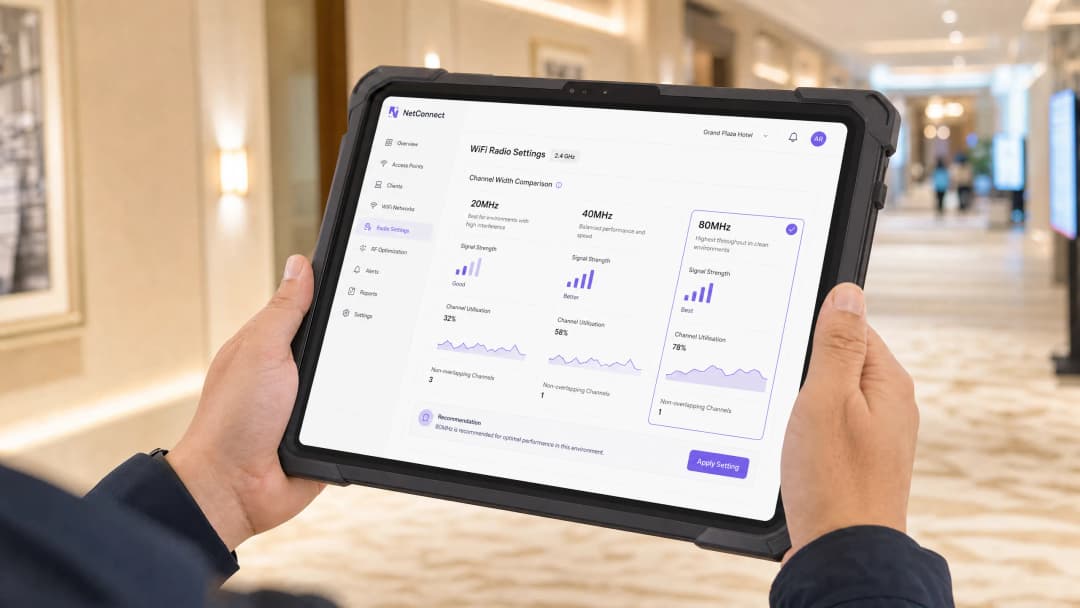
Channel width selection is one of the most consequential — and most frequently misconfigured — parameters in enterprise wireless LAN design. The choice between 20MHz, 40MHz, and 80MHz channels directly governs the trade-off between per-client throughput and aggregate network capacity. Wider channels deliver higher theoretical speeds but consume more spectrum, reducing the number of non-overlapping channels available and increasing co-channel interference (CCI) in dense deployments.
The practical guidance is straightforward: 20MHz on 2.4GHz is non-negotiable in any multi-AP deployment. On 5GHz, the decision depends on client density, venue type, and spectrum availability. High-density environments — hotels, retail floors, stadiums, conference centres — should default to 20MHz on 5GHz to maximise channel reuse. Mixed-use enterprise offices and medium-density venues can leverage 40MHz for a balanced throughput-capacity trade-off. 80MHz should be reserved for isolated, low-density, high-bandwidth scenarios where spectrum is genuinely available.
For venue operators running Guest WiFi at scale, this decision directly impacts the reliability of captive portal authentication, the accuracy of WiFi Analytics data, and the overall guest experience that drives repeat engagement and loyalty.
Technical Deep-Dive
The Physics of Channel Width
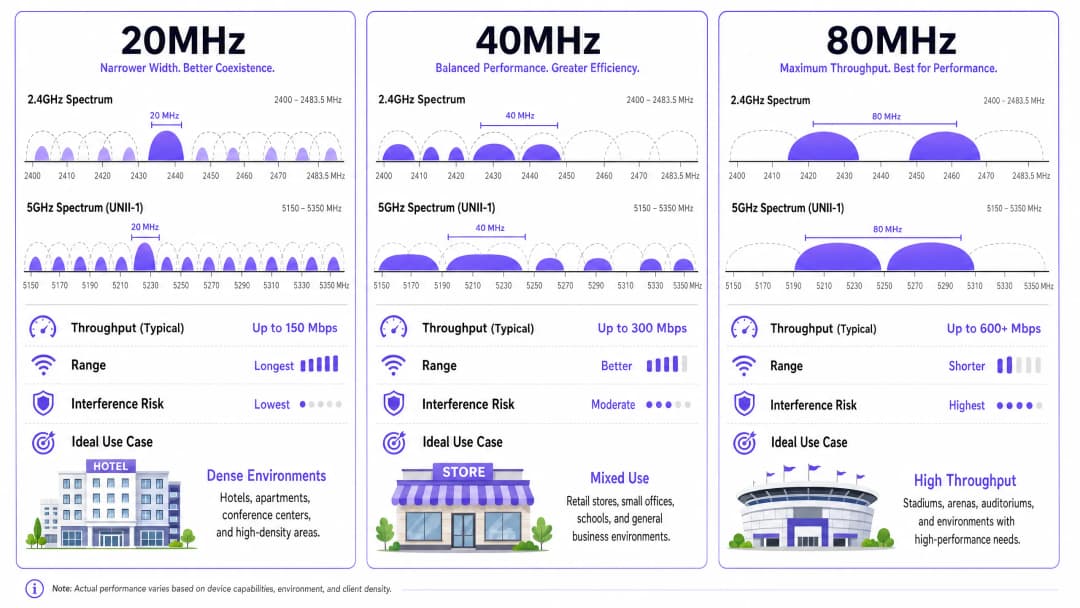
In IEEE 802.11 wireless networking, a channel is a defined slice of radio frequency spectrum. The width of that slice — measured in megahertz — determines how much data can be transmitted simultaneously. This relationship is governed by the Shannon-Hartley theorem: channel capacity scales with bandwidth. Doubling the channel width from 20MHz to 40MHz approximately doubles the theoretical maximum data rate, all else being equal.
However, "all else being equal" is the critical qualifier. In a real-world multi-AP deployment, spectrum is a shared, finite resource. Every megahertz you allocate to one channel is a megahertz unavailable to adjacent channels. This creates the central tension in channel width selection: wider channels increase per-client throughput but reduce the number of non-overlapping channels, increasing the probability of co-channel interference.
The 2.4GHz Band: A Closed Case
The 2.4GHz ISM band spans 83.5MHz in the UK and most of Europe (2400–2483.5MHz). With 20MHz channels and the standard 5MHz channel spacing, there are only three non-overlapping channels: 1, 6, and 11. This is already a severely constrained environment in any multi-AP deployment.
Attempting to use 40MHz channels in 2.4GHz is a deployment anti-pattern. A single 40MHz channel in 2.4GHz occupies the equivalent of two 20MHz channels plus their guard bands, meaning it overlaps with at least two of the three non-overlapping channels. In practice, this destroys the channel plan entirely. The IEEE 802.11n specification technically permits 40MHz in 2.4GHz, but the Wi-Fi Alliance's enterprise certification programmes and every credible wireless design methodology advise against it.
Rule: Always use 20MHz in the 2.4GHz band in any enterprise or multi-AP deployment. No exceptions.
The 5GHz Band: Where the Real Decision Lives
The 5GHz band (5150–5850MHz in the UK, subject to Ofcom regulation) provides significantly more usable spectrum. With 20MHz channels, there are up to 25 non-overlapping channels available, though the exact number depends on regulatory domain and whether Dynamic Frequency Selection (DFS) channels are enabled.
DFS channels (U-NII-2A and U-NII-2C sub-bands) require access points to detect and avoid radar signals, introducing a mandatory Channel Availability Check (CAC) period of up to 60 seconds before transmission. In practice, most enterprise-grade APs handle DFS gracefully, and enabling DFS channels is strongly recommended as it nearly doubles the available 5GHz spectrum.
| Channel Width | 5GHz Non-Overlapping Channels (with DFS) | Typical Max Throughput (802.11ac/Wi-Fi 5, 2SS) | Noise Floor Increase vs 20MHz |
|---|---|---|---|
| 20MHz | ~25 | ~300 Mbps | Baseline |
| 40MHz | ~12 | ~600 Mbps | +3 dB |
| 80MHz | ~6 | ~1300 Mbps | +6 dB |
| 160MHz | ~2–3 | ~2600 Mbps | +9 dB |
The noise floor increase is critical. Every time you double channel width, the noise floor rises by 3dB. This directly degrades the Signal-to-Noise Ratio (SNR) for all clients, reducing the effective range at which a given Modulation and Coding Scheme (MCS) index can be sustained. An AP configured for 80MHz channels will have a materially shorter effective range than the same AP on 20MHz, which has significant implications for coverage planning in large venues.
Co-Channel Interference: The Dominant Failure Mode
Co-Channel Interference occurs when two or more APs transmit on the same channel within range of each other. Unlike Adjacent Channel Interference (ACI), CCI cannot be mitigated by guard bands — it is an inherent consequence of the CSMA/CA (Carrier Sense Multiple Access with Collision Avoidance) medium access mechanism that 802.11 uses.
When an AP detects another transmission on its channel, it must defer its own transmission. In a dense deployment where multiple APs are operating on the same wide channel, this deferral overhead accumulates rapidly, reducing effective throughput and increasing latency. This is why a network with 20 APs all on 80MHz channels will frequently perform worse in aggregate than the same 20 APs on 20MHz channels — despite the theoretical throughput advantage of 80MHz.
WiFi 6, WiFi 6E, and the 6GHz Opportunity
IEEE 802.11ax (Wi-Fi 6) introduces OFDMA (Orthogonal Frequency Division Multiple Access), which partially mitigates the channel width dilemma by allowing a single channel to be subdivided into Resource Units (RUs) serving multiple clients simultaneously. This improves spectral efficiency in dense environments and reduces the penalty of wider channels.
Wi-Fi 6E extends 802.11ax into the 6GHz band (5925–6425MHz in the UK), providing up to 500MHz of additional, largely uncongested spectrum. In 6GHz, 80MHz channels become significantly more viable because the interference environment is cleaner and there are more non-overlapping channels available. However, as of 2026, 6GHz client device penetration in typical enterprise environments remains partial, and the 5GHz design principles above remain the dominant operational reality for most deployments.
For organisations exploring passwordless access and modern onboarding, the underlying radio layer design remains foundational — no amount of authentication sophistication compensates for a poorly designed RF environment.
Implementation Guide
Step 1: Conduct a Pre-Deployment Spectrum Analysis
Before configuring any channel widths, perform a passive spectrum analysis using a dedicated tool (Ekahau, NetAlly AirCheck, or equivalent). Document existing channel utilisation, noise floor levels, and interfering sources (microwave ovens, DECT phones, Bluetooth devices) across both 2.4GHz and 5GHz. This baseline is essential for validating your channel plan post-deployment.
Step 2: Define Your Deployment Tier
Classify your venue against one of three deployment tiers:
Tier 1 — High Density: Hotels (>100 rooms), retail flagships (>500 concurrent users), stadiums, conference centres, transport hubs. Default channel width: 20MHz on both 2.4GHz and 5GHz.
Tier 2 — Medium Density: Corporate offices (50–500 users), medium retail, public sector buildings, smaller hospitality venues. Default channel width: 20MHz on 2.4GHz, 40MHz on 5GHz.
Tier 3 — Low Density: Small offices (<50 users), executive suites, dedicated AV/streaming rooms, single-AP remote sites. Default channel width: 20MHz on 2.4GHz, 80MHz on 5GHz (only where spectrum analysis confirms availability).
Step 3: Design Your Channel Plan
For Tier 1 deployments, assign 20MHz channels across the three non-overlapping 2.4GHz channels and up to 25 non-overlapping 5GHz channels (with DFS enabled). Aim for a minimum of 19dB co-channel separation between APs on the same channel. For Tier 2, design your 40MHz channel plan using the 12 available non-overlapping 40MHz channels on 5GHz. Ensure adjacent APs use different primary channels.

Step 4: Configure Your Wireless LAN Controller
In your WLC or cloud management platform, set channel width policies at the radio profile level rather than per-AP. This ensures consistency and simplifies ongoing management. Key configuration parameters:
- Channel Width: Set explicitly; do not rely on auto-selection without validation.
- Maximum TX Power: Reduce transmit power to match your coverage cell design — over-powered APs increase CCI.
- Band Steering: Enable to push dual-band clients to 5GHz, reducing 2.4GHz congestion.
- RRM (Radio Resource Management): If using vendor RRM (Cisco RRM, Aruba ARM, Ruckus SmartZone), set a maximum channel width cap to prevent automatic escalation to 80MHz.
For organisations managing complex multi-site deployments, the principles around centralised control are well covered in our guide on What is a WLC (Wireless LAN Controller) and Do You Still Need One?.
Step 5: Validate and Iterate
Post-deployment, run a predictive validation survey against your as-built configuration. Key metrics to validate: channel utilisation per AP (target <70% at peak), client SNR distribution (target >25dB for >80% of clients), and retry rates (target <10%). Use your WiFi Analytics platform to correlate RF performance metrics with guest experience data — connection duration, session counts, and portal completion rates are leading indicators of RF quality.
Got questions about your specific setup?
Our team works with venue operators, IT managers, and network engineers across 80,000 venues. Book a 20-minute call and we will show you how others like you solved it.
Real-World Case Studies
Case Study 1: 350-Room Hotel — Hilton-Category Property, UK
A 350-room full-service hotel was experiencing persistent guest WiFi complaints: slow speeds in corridors, frequent disconnections during check-in peak hours, and poor performance in the conference suite. The existing deployment used 80MHz channels on 5GHz across all 140 APs.
Spectrum analysis revealed severe co-channel interference throughout the guest room floors, with channel utilisation exceeding 85% on multiple APs during peak hours. The channel plan had effectively collapsed — APs were deferring constantly, and actual throughput was a fraction of theoretical capacity.
The remediation involved reconfiguring all guest room and corridor APs to 20MHz on 5GHz, redesigning the channel plan to use 22 of the 25 available non-overlapping 5GHz channels, and reducing transmit power by 3dB to tighten coverage cells. Conference suite APs were retained at 40MHz given their lower density and higher per-session bandwidth requirements.
Post-remediation results: average client throughput increased by 34%, channel utilisation dropped to below 55% at peak, and helpdesk tickets related to WiFi fell by 61% in the following quarter. The Guest WiFi portal completion rate improved from 67% to 84%, directly increasing the volume of first-party data captured for the property's CRM integration. This aligns with the broader principle that network reliability is a prerequisite for improving guest satisfaction at scale.
Case Study 2: 120-Store Retail Chain — UK Fashion Retailer
A national fashion retailer with 120 stores was rolling out a unified Retail WiFi platform to support both customer-facing guest access and back-of-house operational systems (EPOS, stock management, digital signage). Store sizes ranged from 2,000 to 15,000 square feet, with AP counts of 4–18 per site.
The initial configuration used 80MHz channels on 5GHz across all stores, driven by a vendor recommendation focused on maximising throughput for the digital signage use case. In the 12 largest stores (>8,000 sq ft, >10 APs), this created significant CCI, with EPOS terminals experiencing intermittent connectivity during peak trading hours — a direct operational and PCI DSS compliance risk, as transaction timeouts were triggering manual fallback procedures.
The solution was a tiered channel width policy deployed via the central WLC: stores with >8 APs were configured to 20MHz on 5GHz; stores with 5–8 APs to 40MHz; stores with <5 APs retained 80MHz. Digital signage APs in all stores were placed on a dedicated 5GHz radio with 40MHz channels, isolated from the guest and EPOS SSIDs via VLAN segmentation.
Post-deployment, EPOS connectivity incidents dropped by 78% across the large-store estate, and the guest WiFi engagement rate (measured via the captive portal analytics) increased by 22% as connection reliability improved. The segmented approach also simplified PCI DSS scope management by ensuring cardholder data environments were on dedicated, non-shared radio resources.
Best Practices
The following vendor-neutral best practices represent the consensus of IEEE 802.11 working group guidance, Wi-Fi Alliance certification requirements, and operational experience across enterprise deployments.
Always enable DFS channels. Regulatory reluctance to use DFS channels is understandable but counterproductive. Modern enterprise APs handle radar detection reliably, and the additional spectrum is essential for any 40MHz or 80MHz channel plan to be viable. Verify your regulatory domain settings are correctly configured for your country of deployment.
Separate guest and corporate traffic at the radio level where possible. Using dedicated SSIDs on separate VLANs is standard practice, but in high-density environments, consider dedicating specific radios or APs to guest traffic. This prevents guest device behaviour (aggressive roaming, legacy 802.11b/g clients) from degrading corporate network performance.
Implement minimum RSSI thresholds. Configure your WLC to reject client associations below a minimum Received Signal Strength Indicator (RSSI) threshold (typically -75 to -70 dBm). This prevents "sticky client" behaviour where devices hold onto distant APs at low data rates, consuming airtime inefficiently.
Audit your channel plan quarterly. The RF environment changes as new APs are deployed in neighbouring premises, building usage patterns shift, and new interference sources are introduced. A channel plan that was optimal at deployment may be suboptimal 12 months later. Quarterly spectrum audits are a low-cost, high-value operational practice.
For Healthcare and public-sector deployments, additional constraints apply. Medical devices often use 2.4GHz exclusively and may be sensitive to channel changes. Coordinate channel plan changes with clinical engineering teams and schedule them during low-activity windows. GDPR and NHS data security requirements also mandate network segmentation that should be reflected in your SSID and VLAN architecture.
For Transport hubs and stadiums, the combination of extremely high client density and rapid client turnover (passengers boarding/alighting, crowds entering/exiting) creates unique RF challenges. 20MHz channels on 5GHz are essentially mandatory, and directional antenna patterns should be used to tighten coverage cells and reduce inter-AP interference.
Troubleshooting and Risk Mitigation
Symptom: High Channel Utilisation Despite Low Client Count
This typically indicates CCI from neighbouring APs on the same channel. Verify your channel plan using a spectrum analyser — look for APs (yours or neighbouring) on the same channel within range. Remediation: reassign channels to increase separation, or reduce transmit power to shrink coverage cells.
Symptom: Good RSSI but Poor Throughput
High RSSI with low throughput is a classic CCI signature. Clients are receiving a strong signal from their associated AP but are experiencing high retry rates due to medium contention. Check retry rates in your WLC dashboard (target <10%). If retries are high, reduce channel width or redesign the channel plan.
Symptom: Clients Failing to Roam Between APs
This is often caused by mismatched channel widths between APs, or by minimum RSSI thresholds that are too aggressive. Verify that all APs in a roaming domain use consistent channel width configurations, and that 802.11r (Fast BSS Transition) and 802.11k (Neighbour Reports) are enabled to facilitate smooth roaming.
Symptom: DFS Channel Instability
If APs on DFS channels are frequently changing channels (visible in WLC logs as radar detection events), verify that the interference source is genuine radar (airport, weather station, military) rather than a false positive from another AP or device. Some enterprise APs have known false-positive issues with specific DFS channels — consult vendor release notes and consider excluding problematic channels from your DFS pool.
Risk: Automatic Channel Width Escalation
Many enterprise WLC platforms include Radio Resource Management (RRM) algorithms that can automatically increase channel width during low-utilisation periods. This is a known risk: the algorithm may escalate to 80MHz during off-peak hours, and the wider channel plan may persist into peak hours when it causes CCI. Set a maximum channel width cap in your RRM policy to prevent this. This is one of the most common misconfiguration patterns seen in enterprise deployments.
ROI and Business Impact
The business case for correct channel width configuration is compelling and measurable. The cost of remediation — primarily engineer time for spectrum analysis and WLC reconfiguration — is typically 1–3 days of effort for a medium-sized deployment. The returns are immediate and multi-dimensional.
Reduced helpdesk overhead: WiFi connectivity complaints are among the highest-volume helpdesk categories in hospitality and retail. A well-configured channel plan typically reduces WiFi-related tickets by 40–70%, freeing IT resource for higher-value activities.
Improved guest data capture: For venues running Guest WiFi with captive portal authentication, network reliability directly drives portal completion rates. A 10-percentage-point improvement in completion rate across a 1,000-daily-user venue translates to 36,500 additional data records per year — each representing a marketable, consented customer profile.
Operational continuity: For retail environments where EPOS, inventory management, and digital signage depend on WiFi, CCI-induced connectivity failures carry direct revenue impact. A single EPOS outage during peak trading can cost a large-format retailer thousands of pounds per hour.
Analytics fidelity: WiFi Analytics platforms that use probe request data for dwell time analysis and footfall measurement are directly dependent on AP radio performance. CCI increases the noise floor, reducing the effective range at which probe requests are captured and degrading the accuracy of location analytics. Correct channel width configuration is therefore a prerequisite for reliable venue intelligence.
For public-sector organisations exploring smart city and digital inclusion initiatives — an area Purple is actively investing in — the same RF design principles apply at infrastructure scale. Reliable, well-designed public WiFi is the foundation on which digital services are delivered, as explored in our recent announcement around public sector growth.
Related Resources
Key Definitions
Channel Width
The amount of frequency spectrum (measured in megahertz) allocated to a single WiFi transmission channel.
Common channel widths are 20MHz, 40MHz, 80MHz, and 160MHz (or 320MHz in WiFi 7).
Co-Channel Interference (CCI)
Degradation occurring when multiple access points transmit on the same wireless channel, forcing devices to share airtime via CSMA/CA contention.
Wider channel bonding increases CCI in dense AP deployments.
Channel Bonding
The technique of combining adjacent 20MHz sub-channels into a single wider radio channel to multiply peak data rates.
Combining four 20MHz channels creates an 80MHz channel block.
Dynamic Frequency Selection (DFS)
Regulatory mandate in 5GHz spectrum requiring access points to vacate channels upon detecting radar signals.
Spanning across DFS sub-channels increases radar eviction probability.
Worked Examples
An IT administrator at a university campus deploys 80MHz channel widths across 150 access points in a 5-story building. Users experience high latency, packet loss, and frequent disconnections during peak hours. How should the network team resolve this issue?
- Audit RF spectrum environment using a WiFi analyzer to measure Co-Channel Interference (CCI) and channel utilization. 2. Recognize that 80MHz bonding in 5GHz provides only 2 to 6 non-overlapping channel options, causing adjacent APs on different floors to overlap on the same primary/secondary channels. 3. Reconfigure radio resource management (RRM) to use 20MHz channels (or 40MHz on 6GHz radios), expanding available non-overlapping channels to 25. 4. Verify latency drops and airtime efficiency improves as contention slots decrease.
When is 160MHz channel width recommended in enterprise networks versus 20MHz?
- 160MHz width is recommended ONLY in 6GHz (WiFi 6E / WiFi 7) low-density environments (such as executive suites or dedicated media production studios) where pristine spectrum is available without CCI. 2. 20MHz width is mandatory in high-density venues (stadiums, auditoriums, convention centers) and dense office floors to ensure maximum channel reuse and minimal contention.
Practice Questions
Q1. What is the main drawback of using 80MHz channel width in 5GHz WiFi?
Hint: Consider how many 20MHz sub-channels are combined and the impact of DFS radar detection.
View model answer
The main drawback of 80MHz channels in 5GHz is spectrum consumption. An 80MHz channel requires four 20MHz sub-channels, limiting non-overlapping channel choices down to 2-6 channels. Furthermore, almost all 80MHz blocks overlap 5GHz DFS spectrum; if a radar strike is detected on any single sub-channel, the entire 80MHz radio link must immediately vacate the frequency.
Q2. How does 6GHz WiFi (WiFi 6E and WiFi 7) change channel width planning?
Hint: Think about the extra 1,200 MHz of spectrum available in the 6GHz band.
View model answer
The 6GHz band introduces up to 1,200 MHz of new, pristine spectrum, offering up to 59 non-overlapping 20MHz channels, 29 40MHz channels, 14 80MHz channels, and 7 160MHz channels. This massive increase in spectrum allows enterprise networks to deploy 40MHz or 80MHz channels with far lower risk of co-channel interference compared to 5GHz.
Continue reading in this series
Understanding RSSI and Signal Strength for Optimal Channel Planning
This guide provides a comprehensive technical deep-dive into RSSI, Signal-to-Noise Ratio (SNR), and RF propagation principles for optimal channel planning. It equips IT managers, network architects, and venue operations directors with actionable strategies to mitigate Co-Channel and Adjacent Channel Interference, optimize AP placement, and leverage analytics for measurable business impact across hospitality, retail, and public-sector environments.
WiFi 6 vs WiFi 5: Does it Solve Channel Interference?
This guide provides a technical deep dive into how WiFi 6 (802.11ax) addresses channel interference in high-density enterprise environments through OFDMA and BSS Coloring. It equips IT managers, network architects, and CTOs with actionable deployment strategies, real-world case studies from hospitality and healthcare, and a framework for evaluating the ROI of infrastructure upgrades in venues where wireless performance is business-critical.
5GHz DFS WiFi Channels: When to Use & Avoid in Enterprise
Learn how 5GHz DFS WiFi channels work, radar interference risks, CAC wait times, weather radar channels, and enterprise channel planning best practices.
Got questions about your specific setup?
Our team works with venue operators, IT managers, and network engineers across 80,000 venues. Book a 20-minute call and we will show you how others like you solved it.