
20MHz vs 40MHz vs 80MHz: आपण कोणती Channel Width वापरली पाहिजे?
ही मार्गदर्शिका हॉस्पिटॅलिटी, रिटेल, इव्हेंट्स आणि सार्वजनिक क्षेत्रातील वातावरणात एंटरप्राइझ डिप्लॉयमेंटमध्ये योग्य WiFi channel width - 20MHz, 40MHz, किंवा 80MHz - निवडण्यासाठी IT व्यवस्थापक, नेटवर्क आर्किटेक्ट्स आणि व्हेन्यू ऑपरेशन्स डायरेक्टर्ससाठी एक निश्चित, विक्रेता-तटस्थ तांत्रिक संदर्भ प्रदान करते. यामध्ये अंतर्निहित IEEE 802.11 मेकॅनिक्स, रिअल-वर्ल्ड कॅपेसिटी ट्रेड-ऑफ आणि स्टेप बाय स्टेप डिप्लॉयमेंट मार्गदर्शनाचा समावेश आहे जेणेकरून टीम्सना या तिमाहीत योग्य निर्णय घेण्यास मदत होईल. channel width निवडणे हा कोणत्याही वायरलेस LAN डिझाइनमधील सर्वोच्च-लाभकारक निर्णयांपैकी एक आहे, ज्याचा थेट परिणाम थ्रुपुट, इंटरफेरियन्स, क्लायंट डेन्सिटी सपोर्ट आणि अतिथी-अनुकूल सेवांच्या विश्वासार्हतेवर होतो.
Video overview
हे मार्गदर्शक ऐका
पॉडकास्ट ट्रान्सक्रिप्ट पहा
आमच्या मुख्य मालिकेचा भाग: WiFi RF Engineering Guide →
WiFi channel width and co-channel interference planner
Calculate the optimal channel width (20MHz, 40MHz, 80MHz, or 160MHz) for your wireless deployment based on frequency spectrum, access point density, and traffic requirements.
Optimising Enterprise WiFi Channel Planning & Guest Access?
Purple integrates with Cisco Meraki, Aruba, Ruckus, UniFi, and Mist networks to deliver enterprise guest WiFi, cloud RADIUS authentication, and real-time venue footfall analytics across 80,000+ venues.
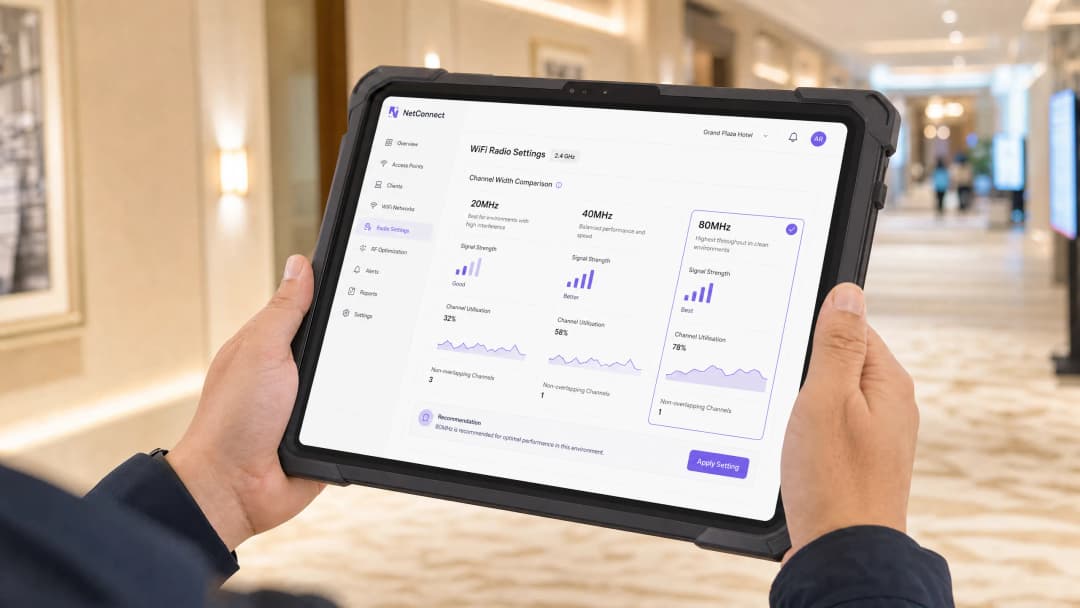
कार्यकारी सारांश (Executive Summary)
चॅनेल विड्थ निवड हा एंटरप्राइझ वायरलेस LAN डिझाइनमधील सर्वात महत्त्वाचा - आणि बऱ्याचदा चुकीचा कॉन्फिगर केला जाणारा - पॅरामीटर आहे. 20MHz, 40MHz आणि 80MHz चॅनेलमधील निवड थेट प्रति-क्लायंट थ्रुपुट आणि एकूण नेटवर्क क्षमता यामधील समतोलावर नियंत्रण ठेवते. विस्तीर्ण चॅनेल्स उच्च सैद्धांतिक गती देतात परंतु अधिक स्पेक्ट्रम वापरतात, ज्यामुळे उपलब्ध नॉन-ओव्हरलॅपिंग चॅनेल्सची संख्या कमी होते आणि दाट उपयोजनांमध्ये को-चॅनेल इंटरफेरन्स (CCI) वाढतो.
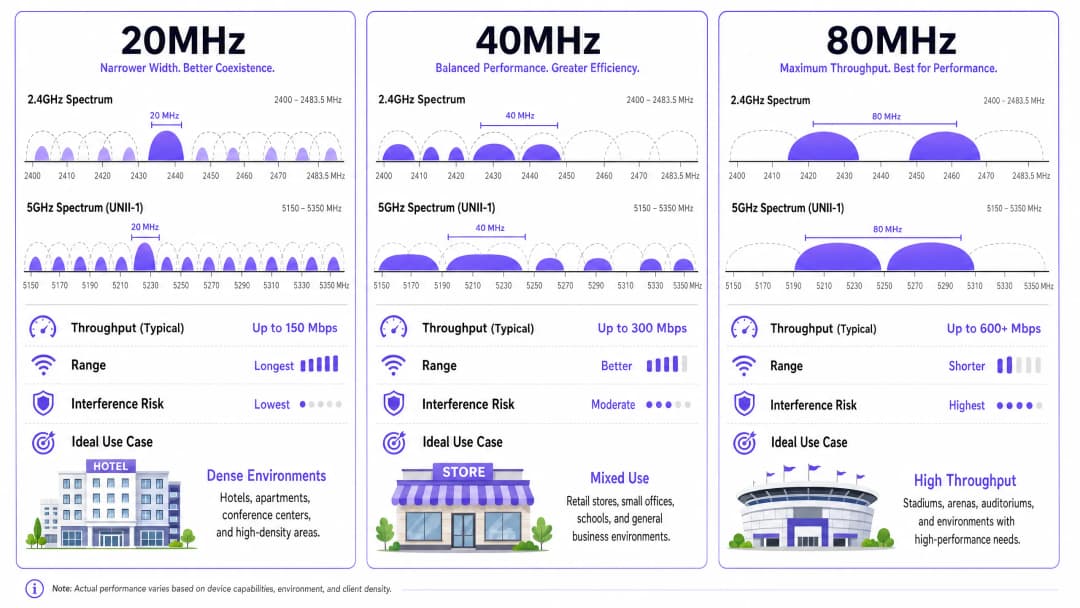
व्यावहारिक मार्गदर्शन अगदी सोपे आहे: कोणत्याही multi-AP उपयोजनामध्ये 2.4GHz वर 20MHz असणे बंधनकारक आहे. 5GHz वर, हा निर्णय क्लायंटची घनता, ठिकाणाचा प्रकार आणि स्पेक्ट्रमच्या उपलब्धतेवर अवलंबून असतो. उच्च-घनतेची ठिकाणे - हॉटेल्स, रिटेल फ्लोर्स, स्टेडियम, कॉन्फरन्स सेंटर्स - येथे चॅनेलचा जास्तीत जास्त पुनर्वापर करण्यासाठी 5GHz वर 20MHz हा डिफॉल्ट पर्याय असावा. मिश्र-वापर असणारी एंटरप्राइझ कार्यालये आणि मध्यम-घनतेची ठिकाणे संतुलित थ्रुपुट-क्षमता समतोलासाठी 40MHz चा वापर करू शकतात. 80MHz केवळ अशा वेगळ्या, कमी-घनतेच्या आणि उच्च-बँडविड्थच्या परिस्थितीसाठी राखून ठेवले पाहिजे जेथे स्पेक्ट्रम खरोखरच उपलब्ध आहे.
मोठ्या प्रमाणावर Guest WiFi चालवणाऱ्या ठिकाणच्या ऑपरेटरसाठी, या निर्णयाचा थेट परिणाम Captive Portal प्रमाणीकरणाची विश्वासार्हता, WiFi Analytics डेटाची अचूकता आणि पुन्हा येणाऱ्या ग्राहकांना आकर्षित करणाऱ्या एकूण अतिथी अनुभवावर होतो.
तांत्रिक सखोल विश्लेषण (Technical Deep-Dive)
चॅनेल विड्थचे भौतिकशास्त्र
IEEE 802.11 वायरलेस नेटवर्किंगमध्ये, चॅनेल हा रेडिओ फ्रिक्वेन्सी स्पेक्ट्रमचा एक परिभाषित भाग असतो. त्या भागाची रुंदी - जी मेगाहर्ट्झमध्ये मोजली जाते - एकाच वेळी किती डेटा ट्रान्समिट केला जाऊ शकतो हे ठरवते. हा संबंध शॅनन-हार्टले सिद्धांताद्वारे नियंत्रित केला जातो: चॅनेल क्षमता बँडविड्थसह वाढते. चॅनेलची रुंदी 20MHz वरून 40MHz पर्यंत दुप्पट केल्यास, इतर सर्व गोष्टी समान असताना, सैद्धांतिक कमाल डेटा दर अंदाजे दुप्पट होतो.
तथापि, "इतर सर्व गोष्टी समान असताना" हा सर्वात महत्त्वाचा निकष आहे. प्रत्यक्षात वापरल्या जाणाऱ्या multi-AP उपयोजनामध्ये, स्पेक्ट्रम हा एक सामायिक आणि मर्यादित स्रोत आहे. आपण एका चॅनेलला दिलेला प्रत्येक मेगाहर्ट्झ शेजारच्या चॅनेलसाठी उपलब्ध नसतो. यामुळे चॅनेल विड्थच्या निवडीमध्ये मुख्य तणाव निर्माण होतो: अधिक रुंद चॅनेल्स प्रति-क्लायंट थ्रुपुट वाढवतात परंतु नॉन-ओव्हरलॅपिंग चॅनेल्सची संख्या कमी करतात, ज्यामुळे को-चॅनेल इंटरफेरन्सची शक्यता वाढते.
2.4GHz बँड: एक स्पष्ट प्रकरण
UK आणि बहुतांश युरोपमध्ये 2.4GHz ISM बँड 83.5MHz (2400-2483.5MHz) चा असतो. 20MHz चॅनेल्स आणि मानक 5MHz चॅनेल स्पेसिंगसह, येथे फक्त तीन ओव्हरलॅप न होणारे चॅनेल्स आहेत: 1, 6 आणि 11. कोणत्याही मल्टी-AP डिप्लॉयमेंटमध्ये हे आधीच अत्यंत मर्यादित वातावरण असते.
2.4GHz मध्ये 40MHz चॅनेल्स वापरण्याचा प्रयत्न करणे हा एक चुकीचा डिप्लॉयमेंट प्रकार आहे. 2.4GHz मधील एकच 40MHz चॅनेल दोन 20MHz चॅनेल्स आणि त्यांच्या गार्ड बँड्सच्या समतुल्य जागा व्यापतो, याचा अर्थ तो तीनपैकी किमान दोन ओव्हरलॅप न होणाऱ्या चॅनेल्ससोबत ओव्हरलॅप करतो. व्यावहारिकदृष्ट्या, यामुळे संपूर्ण चॅनेल प्लॅन विस्कळीत होतो. IEEE 802.11n स्पेसिफिकेशन तांत्रिकदृष्ट्या 2.4GHz मध्ये 40MHz ची परवानगी देते, परंतु WiFi अलायन्सचे एंटरप्राइझ सर्टिफिकेशन प्रोग्राम्स आणि प्रत्येक विश्वासार्ह वायरलेस डिझाइन पद्धत याच्या विरोधात सल्ला देतात.
नियम: कोणत्याही एंटरप्राइझ किंवा मल्टी-AP डिप्लॉयमेंटमध्ये 2.4GHz बँडमध्ये नेहमी 20MHz वापरा. कोणताही अपवाद नाही.
5GHz बँड: जिथे खरा निर्णय घ्यायचा असतो
5GHz बँड (UK मध्ये Ofcom च्या नियमांच्या अधीन 5150-5850MHz) लक्षणीयरीत्या अधिक वापरण्यायोग्य स्पेक्ट्रम प्रदान करतो. 20MHz चॅनेल्ससह, तब्बल 25 पर्यंत ओव्हरलॅप न होणारे चॅनेल्स उपलब्ध असतात, जरी अचूक संख्या ही रेग्युलेटरी डोमेन आणि डायनॅमिक फ्रिक्वेन्सी सिलेक्शन (DFS) चॅनेल्स सक्षम आहेत की नाही यावर अवलंबून असते.
DFS चॅनेल्सना (U-NII-2A आणि U-NII-2C सब-बँड्स) ऍक्सेस पॉईंट्सनी रडार सिग्नल्स शोधणे आणि ते टाळणे आवश्यक असते, ज्यामुळे ट्रान्समिशन करण्यापूर्वी 60 सेकंदांपर्यंतचा अनिवार्य चॅनेल अव्हेलेबिलिटी चेक (CAC) कालावधी लागू होतो. व्यवहारात, बहुतांश एंटरप्राइझ-ग्रेड APs हे DFS सुरळीतपणे हाताळतात आणि DFS चॅनेल्स सक्षम करण्याची जोरदार शिफारस केली जाते कारण यामुळे उपलब्ध 5GHz स्पेक्ट्रम जवळपास दुप्पट होतो.
| चॅनेल रुंदी | 5GHz ओव्हरलॅप न होणारे चॅनेल्स (DFS सह) | सामान्य कमाल थ्रूपूट (802.11ac/Wi-Fi 5, 2SS) | 20MHz च्या तुलनेत नॉइझ फ्लोअर वाढ |
|---|---|---|---|
| 20MHz | ~25 | ~300 Mbps | बेसलाइन |
| 40MHz | ~12 | ~600 Mbps | +3 dB |
| 80MHz | ~6 | ~1300 Mbps | +6 dB |
| 160MHz | ~2-3 | ~2600 Mbps | +9 dB |
नॉइझ फ्लोअर वाढणे अत्यंत गंभीर आहे. जेव्हा तुम्ही चॅनेलची रुंदी दुप्पट करता, तेव्हा नॉइझ फ्लोअर 3dB ने वाढतो. हे सर्व क्लायंट्ससाठी थेट सिग्नल-टू-नॉइझ रेशो (SNR) कमी करते, ज्यामुळे विशिष्ट मॉड्यूलेशन अँड कोडिंग स्कीम (MCS) इंडेक्स टिकवून ठेवण्याची प्रभावी रेंज कमी होते. 80MHz चॅनेल्ससाठी कॉन्फिगर केलेल्या AP ची प्रभावी रेंज 20MHz वरील त्याच AP पेक्षा लक्षणीयरीत्या कमी असेल, ज्याचा मोठ्या ठिकाणी कव्हरेजच्या नियोजनावर मोठा परिणाम होतो.
को-चॅनेल इंटरफेरियन्स: अपयशाचे मुख्य कारण
जेव्हा दोन किंवा अधिक APs एकमेकांच्या रेंजमध्ये एकाच चॅनेलवर ट्रान्समिट करतात तेव्हा को-चॅनेल इंटरफेरियन्स होतो. ॲडजसंट चॅनेल इंटरफेरियन्स (ACI) च्या विपरीत, CCI हा गार्ड बँड्सद्वारे कमी केला जाऊ शकत नाही - हा CSMA/CA (कॅरियर सेन्स मल्टिपल ऍक्सेस विथ कोलिजन अव्हॉइडन्स) मीडियम ऍक्सेस मेकॅनिझमचा एक अंगभूत परिणाम आहे जो 802.11 वापरतो.
जेव्हा एखादा AP त्याच्या चॅनेलवर दुसरे ट्रान्समिशन शोधतो, तेव्हा त्याने स्वतःचे ट्रान्समिशन पुढे ढकलले पाहिजे. ज्या ठिकाणी एकाच रुंद चॅनेलवर अनेक AP कार्यरत आहेत अशा दाट डेव्हलपमेंटमध्ये, हे ट्रान्समिशन पुढे ढकलण्याचे ओव्हरहेड वेगाने वाढते, ज्यामुळे प्रभावी थ्रूपुट कमी होतो आणि लेटन्सी वाढते. याच कारणामुळे 80MHz चॅनेल्सवरील 20 APs असणारे नेटवर्क - 80MHz च्या सैद्धांतिक थ्रूपुट फायद्याचा दावा असूनही - 20MHz चॅनेल्सवरील समान 20 APs च्या तुलनेत बरेचदा खराब कामगिरी करते.
WiFi 6, WiFi 6E, आणि 6GHz ची संधी
IEEE 802.11ax (WiFi 6) मध्ये OFDMA (ऑर्थोगोनल फ्रिक्वेन्सी डिव्हिजन मल्टिपल ऍक्सेस) सादर केले गेले आहे, जे एकाच चॅनेलला रिसोर्स युनिट्समध्ये (RUs) उपविभाजित करून एकाच वेळी अनेक ग्राहकांना सेवा देण्याची परवानगी देते आणि चॅनेलच्या रुंदीच्या समस्येचे अंशतः निवारण करते. हे दाट वातावरणात स्पेक्ट्रल कार्यक्षमता सुधारते आणि रुंद चॅनेलचा होणारा तोटा कमी करते.
WiFi 6E हे 802.11ax ला 6GHz बँडमध्ये (यूकेमध्ये 5925-6425MHz) विस्तारित करते, ज्यामुळे 500MHz पर्यंत अतिरिक्त आणि मुख्यत्वे विना-गर्दीचा स्पेक्ट्रम मिळतो. 6GHz मध्ये, 80MHz चॅनेल्स लक्षणीयरित्या अधिक व्यवहार्य बनतात कारण येथील इंटरफेअरेन्सचे वातावरण अधिक स्वच्छ असते आणि जास्त नॉन-ओव्हरलॅपिंग चॅनेल्स उपलब्ध असतात. तथापि, 2026 पर्यंत, सामान्य एंटरप्राइझ वातावरणात 6GHz क्लायंट उपकरणांचा वापर मर्यादित आहे, आणि वरील 5GHz डिझाइन तत्त्वे बऱ्याच डेव्हलपमेंट्ससाठी प्रमुख व्यावहारिक वास्तव राहिली आहेत.
ज्या संस्था पासवर्डलेस ऍक्सेस आणि आधुनिक ऑनबोर्डिंग शोधत आहेत, त्यांच्यासाठी पायाभूत रेडिओ लेयर डिझाइन महत्त्वाचे ठरते - प्रमाणीकरणाची कितीही अत्याधुनिक पद्धत असली तरी ती खराब डिझाइन केलेल्या RF वातावरणाची भरपाई करू शकत नाही.
अंमलबजावणी मार्गदर्शक
पायरी 1: डेव्हलपमेंटपूर्वी स्पेक्ट्रम विश्लेषण करा
कोणतीही चॅनेल रुंदी कॉन्फिगर करण्यापूर्वी, एका समर्पित साधनाद्वारे (Ekahau, NetAlly AirCheck किंवा समतुल्य) पॅसिव्ह स्पेक्ट्रम विश्लेषण करा. 2.4GHz आणि 5GHz दोन्हीवर विद्यमान चॅनेलचा वापर, नॉइज फ्लोअर पातळी आणि व्यत्यय आणणारे स्त्रोत (मायक्रोवेव्ह ओव्हन, DECT फोन, ब्लूटूथ उपकरणे) दस्तऐवजीकरण करा. डेव्हलपमेंटनंतर तुमच्या चॅनेल योजनेची पडताळणी करण्यासाठी हा पाया आवश्यक आहे.
पायरी 2: तुमचे डेव्हलपमेंट स्तर परिभाषित करा
तुमच्या ठिकाणाचे वर्गीकरण या तीन डेव्हलपमेंट स्तरांपैकी एका स्तरामध्ये करा:
स्तर 1 - उच्च घनता (High Density): हॉटेल्स (>100 खोल्या), रिटेल फ्लॅगशिप्स (>500 एकाच वेळी वापरणारे युजर्स), स्टेडियम, कॉन्फरन्स सेंटर्स, ट्रान्सपोर्ट हब. डीफॉल्ट चॅनेल रुंदी: 2.4GHz आणि 5GHz दोन्हीवर 20MHz.
स्तर 2 - मध्यम घनता (Medium Density): कॉर्पोरेट कार्यालये (50-500 युजर्स), मध्यम रिटेल, सार्वजनिक क्षेत्रातील इमारती, लहान आदरातिथ्य ठिकाणे. डीफॉल्ट चॅनेल रुंदी: 2.4GHz वर 20MHz, 5GHz वर 40MHz.
स्तर 3 - कमी घनता (Low Density): लहान कार्यालये (<50 युजर्स), एक्झिक्युटिव्ह सूट्स, समर्पित AV/स्ट्रीमिंग रूम, सिंगल-AP रिमोट साइट्स. डीफॉल्ट चॅनेल रुंदी: 2.4GHz वर 20MHz, 5GHz वर 80MHz (केवळ जेथे स्पेक्ट्रम विश्लेषणाद्वारे उपलब्धता निश्चित होते).
पायरी 3: तुमची चॅनेल योजना डिझाइन करा
Tier 1 उपयोजनांसाठी, तीन नॉन-ओव्हरलॅपिंग 2.4GHz चॅनेलवर 20MHz चॅनेल आणि २५ पर्यंत नॉन-ओव्हरलॅपिंग 5GHz चॅनेल (DFS सुरू ठेवून) नियुक्त करा. एकाच चॅनेलवरील APs मध्ये किमान 19dB सह-चॅनेल (co-channel) विलगीकरण राखण्याचे लक्ष्य ठेवा. Tier 2 साठी, 5GHz वरील १२ उपलब्ध नॉन-ओव्हरलॅपिंग 40MHz चॅनेलचा वापर करून तुमच्या 40MHz चॅनेल योजनेची रचना करा. शेजारील APs वेगवेगळ्या प्राथमिक चॅनेल्सचा वापर करत असल्याची खात्री करा.

पायरी ४: तुमचे वायरलेस LAN कंट्रोलर कॉन्फिगर करा
तुमच्या WLC किंवा क्लाउड मॅनेजमेंट प्लॅटफॉर्ममध्ये, प्रत्येक AP नुसार करण्याऐवजी रेडिओ प्रोफाइल स्तरावर चॅनेल विड्थ धोरणे सेट करा. हे सुसंगतता सुनिश्चित करते आणि चालू असलेले व्यवस्थापन सुलभ करते. मुख्य कॉन्फिगरेशन पॅरामीटर्स:
- चॅनेल विड्थ (Channel Width): स्पष्टपणे सेट करा; पडताळणी केल्याशिवाय ऑटो-सिलेक्शनवर अवलंबून राहू नका.
- कमाल TX पॉवर (Maximum TX Power): तुमच्या कव्हरेज सेल रचनेशी जुळण्यासाठी ट्रान्समिट पॉवर कमी करा - जास्त पॉवर असलेले APs CCI वाढवतात.
- बँड स्टीअरिंग (Band Steering): ड्युअल-बँड क्लायंटना 5GHz कडे वळवण्यासाठी हे सुरू करा, ज्यामुळे 2.4GHz वरील गर्दी कमी होईल.
- RRM (Radio Resource Management): विक्रेता RRM (Cisco RRM, Aruba ARM, Ruckus SmartZone) वापरत असल्यास, स्वयंचलितपणे 80MHz पर्यंत वाढ रोखण्यासाठी कमाल चॅनेल विड्थची मर्यादा सेट करा.
ज्या संस्था जटिल बहु-साइट उपयोजनांचे व्यवस्थापन करतात, त्यांच्यासाठी केंद्रीकृत नियंत्रणाचे नियम आमच्या WLC (Wireless LAN Controller) म्हणजे काय आणि तुम्हाला अजूनही त्याची गरज आहे का? या मार्गदर्शकामध्ये तपशीलवार समाविष्ट केले आहेत.
पायरी ५: पडताळणी करा आणि पुनरावृत्ती करा
उपयोजनानंतर, तुमच्या प्रत्यक्ष रचनेच्या विरूद्ध प्रेडिक्टिव्ह व्हॅलिडेशन सर्व्हे चालवा. पडताळणी करण्यासाठी मुख्य मेट्रिक्स: प्रति AP चॅनेलचा वापर (पीक वेळेत लक्ष्य <७०%), क्लायंट SNR वितरण (>८०% क्लायंटसाठी लक्ष्य >25dB), आणि रिट्राय रेट (लक्ष्य <१०%). RF परफॉर्मन्स मेट्रिक्सचा अतिथींच्या अनुभवाच्या डेटाशी परस्परसंबंध जोडण्यासाठी तुमचे WiFi Analytics प्लॅटफॉर्म वापरा - कनेक्शनचा कालावधी, सेशन संख्या आणि पोर्टल पूर्ण होण्याचे दर हे RF गुणवत्तेचे प्रमुख दर्शक आहेत.
तुमच्या विशिष्ट सेटअपबद्दल काही प्रश्न आहेत का?
आमची टीम ८०,००० हून अधिक वेन्यूजमधील वेन्यू ऑपरेटर्स, IT मॅनेजर्स आणि नेटवर्क इंजिनिअर्ससोबत काम करते. २० मिनिटांचा कॉल बुक करा आणि तुमच्यासारख्या इतरांनी ही समस्या कशी सोडवली हे आम्ही तुम्हाला दाखवू.
वास्तविक जगातील केस स्टडीज
केस स्टडी १: ३५० खोल्यांचे हॉटेल - हिल्टन-श्रेणी मालमत्ता, UK
एका ३५० खोल्यांच्या पूर्ण-सेवा हॉटेलमध्ये अतिथींकडून सातत्याने WiFi च्या तक्रारी येत होत्या: कॉरिडॉरमध्ये कमी वेग, चेक-इनच्या पीक वेळेत वारंवार डिस्कनेक्ट होणे आणि कॉन्फरन्स सूटमध्ये खराब कामगिरी. सध्याच्या उपयोजनात सर्व १४० APs वर 5GHz वर 80MHz चॅनेल वापरले जात होते.
स्पेक्ट्रम विश्लेषणामध्ये असे दिसून आले की अतिथींच्या रूम फ्लोअर्सवर तीव्र सह-चॅनेल हस्तक्षेप (co-channel interference) होत होता, ज्यामध्ये पीक वेळेत एकाधिक APs वर चॅनेलचा वापर ८५% पेक्षा जास्त होता. चॅनेल योजना पूर्णपणे कोलमडली होती - APs सातत्याने विलंब करत होते आणि प्रत्यक्ष थ्रूपुट हे सैद्धांतिक क्षमतेच्या केवळ एक अंश होते.
दुरुस्तीच्या प्रक्रियेमध्ये सर्व गेस्ट रूम आणि कॉरिडॉरमधील APs चे 5GHz वर 20MHz वर पुन्हा कॉन्फिगरेशन करणे, उपलब्ध २५ नॉन-ओव्हरलॅपिंग 5GHz चॅनेलपैकी २२ चॅनेल वापरण्यासाठी चॅनेल प्लॅनची पुन्हा रचना करणे आणि कव्हरेज सेल्स अधिक घट्ट करण्यासाठी ट्रान्समिट पॉवर 3dB ने कमी करणे यांचा समावेश होता. कॉन्फरन्स सूट APs ची कमी डेन्सिटी आणि जास्त प्रति-सत्र बँडविड्थ आवश्यकता लक्षात घेऊन ते 40MHz वरच ठेवण्यात आले.
दुरुस्तीनंतरचे परिणाम: सरासरी क्लायंट थ्रुपुट ३४% ने वाढला, पीक अवर्स दरम्यान चॅनेलचा वापर ५५% पेक्षा खाली आला आणि पुढील तिमाहीत WiFi शी संबंधित हेल्पडेस्क तिकिटांमध्ये ६१% घसरण झाली. Guest WiFi पोर्टल पूर्ण होण्याचा दर ६७% वरून ८४% वर सुधारला, ज्यामुळे प्रॉपर्टीच्या CRM इंटिग्रेशनसाठी कॅप्चर केलेल्या फर्स्ट-पार्टी डेटाचे प्रमाण थेट वाढले. हे नेटवर्कची विश्वासार्हता ही मोठ्या प्रमाणावर पाहुण्यांचे समाधान सुधारण्यासाठी एक आवश्यक पूर्वअट आहे या व्यापक तत्त्वाशी सुसंगत आहे.
केस स्टडी २: १२०-स्टोअर रिटेल चेन - UK फॅशन रिटेलर
१२० स्टोअर्स असलेले एक राष्ट्रीय फॅशन रिटेलर ग्राहकाभिमुख गेस्ट ॲक्सेस आणि बॅक-ऑफ-हाऊस ऑपरेशनल सिस्टीम्स (EPOS, स्टॉक मॅनेजमेंट, डिजिटल साइनेज) या दोन्हीला सपोर्ट करण्यासाठी युनिफाइड Retail WiFi प्लॅटफॉर्म लागू करत होते. स्टोअरचे आकार २,००० ते १५,००० स्क्वेअर फूट होते, ज्यामध्ये प्रति साइट AP ची संख्या ४ ते १८ होती.
डिजिटल साइनेजच्या वापरासाठी थ्रुपुट जास्तीत जास्त वाढवण्यावर लक्ष केंद्रित करणाऱ्या एका व्हेंडरच्या शिफारसीनुसार, सुरुवातीच्या कॉन्फिगरेशनमध्ये सर्व स्टोअर्समध्ये 5GHz वर 80MHz चॅनेल वापरले गेले. १२ सर्वात मोठ्या स्टोअर्समध्ये (>८,००० स्क्वेअर फूट, >१० APs), यामुळे लक्षणीय CCI निर्माण झाले, ज्यामुळे पीक ट्रेडिंग अवर्स दरम्यान EPOS टर्मिनल्सना मधूनमधून कनेक्टिव्हिटीच्या समस्या भेडसावत होत्या - हा एक थेट ऑपरेशनल आणि PCI DSS अनुपालन धोका होता, कारण ट्रान्झॅक्शन टाईमआऊटमुळे मॅन्युअल फॉलबॅक प्रक्रिया सुरू होत होत्या.
यावर उपाय म्हणून सेंट्रल WLC द्वारे टायर्ड चॅनेल विड्थ पॉलिसी लागू करण्यात आली: >८ APs असलेल्या स्टोअर्समध्ये 5GHz वर 20MHz कॉन्फिगर केले गेले; ५ ते ८ APs असलेल्या स्टोअर्समध्ये 40MHz; आणि <५ APs असलेल्या स्टोअर्समध्ये 80MHz कायम ठेवले गेले. सर्व स्टोअर्समधील डिजिटल साइनेज APs हे एका समर्पित 5GHz रेडिओवर 40MHz चॅनेलसह ठेवण्यात आले, जे VLAN सेगमेंटेशनद्वारे गेस्ट आणि EPOS SSIDs पासून वेगळे केले गेले.
लागू केल्यानंतर, मोठ्या स्टोअरच्या मालमत्तेमध्ये EPOS कनेक्टिव्हिटीच्या घटनांमध्ये ७८% घट झाली, आणि कनेक्टिव्हिटीची विश्वासार्हता सुधारल्यामुळे गेस्ट WiFi एंगेजमेंट दर (कॅप्टिव्ह पोर्टल ॲनालिटिक्सद्वारे मोजलेला) २२% ने वाढला. सेगमेंटेड दृष्टिकोनाने कार्डधारक डेटाचे वातावरण समर्पित, नॉन-शेअर्ड रेडिओ रिसोर्सेसवर असल्याची खात्री करून PCI DSS स्कोप मॅनेजमेंट देखील सोपे केले.
सर्वोत्तम पद्धती
खालील व्हेंडर-तटस्थ सर्वोत्तम पद्धती या IEEE 802.11 वर्किंग ग्रुपचे मार्गदर्शन, Wi-Fi Alliance सर्टिफिकेशन आवश्यकता आणि एंटरप्राइझ डिप्लॉयमेंटमधील ऑपरेशनल अनुभवाचे प्रतिनिधित्व करतात.
DFS चॅनेल नेहमी सुरू ठेवा. DFS चॅनेल वापरण्यास नियामक अनिच्छा समजण्यासारखी आहे पण ती प्रतिकूल ठरू शकते. आधुनिक एंटरप्राइझ APs रडार शोधणे विश्वसनीयपणे हाताळतात, आणि कोणताही 40MHz किंवा 80MHz चॅनेल प्लॅन व्यवहार्य असण्यासाठी अतिरिक्त स्पेक्ट्रम आवश्यक आहे. तुमच्या देशामधील उपयोजनासाठी तुमचे नियामक डोमेन सेटिंग्ज योग्यरित्या कॉन्फिगर केल्याची खात्री करा.
शक्य असेल तिथे रेडिओ स्तरावर गेस्ट आणि कॉर्पोरेट ट्रॅफिक वेगळे करा. स्वतंत्र VLANs वर समर्पित SSIDs वापरणे ही मानक पद्धत आहे, परंतु हाय-डेन्सिटी वातावरणात, विशिष्ट रेडिओ किंवा APs केवळ गेस्ट ट्रॅफिकसाठी समर्पित करण्याचा विचार करा. हे गेस्ट डिव्हाइसचे वर्तन (आक्रमक रोमिंग, जुने 802.11b/g क्लायंट) कॉर्पोरेट नेटवर्कच्या कामगिरीला खराब करण्यापासून रोखते.
किमान RSSI थ्रेशोल्ड लागू करा. किमान रिसीव्ह्ड सिग्नल स्ट्रेंथ इंडिकेटर (RSSI) थ्रेशोल्डच्या खाली (सामान्यतः -75 ते -70 dBm) क्लायंटचे असोसिएशन नाकारण्यासाठी तुमचे WLC कॉन्फिगर करा. हे "स्टिकी क्लायंट" वर्तन प्रतिबंधित करते जिथे डिव्हाइसेस कमी डेटा दरांवर दूरच्या APs ला धरून ठेवतात आणि एअरटाइम अकार्यक्षमतेने वापरतात.
तुमच्या चॅनेल प्लॅनचे त्रैमासिक ऑडिट करा. शेजारील आवारात नवीन APs तैनात केल्यामुळे, इमारतीच्या वापराचे पॅटर्न बदलल्यामुळे आणि नवीन हस्तक्षेपाचे स्रोत आल्यामुळे RF वातावरण बदलते. उपयोजनाच्या वेळी अनुकूल असलेला चॅनेल प्लॅन 12 महिन्यांनंतर खराब असू शकतो. त्रैमासिक स्पेक्ट्रम ऑडिट ही कमी खर्चिक, उच्च-मूल्य असणारी ऑपरेशनल पद्धत आहे.
Healthcare आणि सार्वजनिक क्षेत्रातील उपयोजनांसाठी, अतिरिक्त मर्यादा लागू होतात. वैद्यकीय उपकरणे अनेकदा केवळ 2.4GHz वापरतात आणि चॅनेल बदलांसाठी संवेदनशील असू शकतात. क्लिनिकल इंजिनिअरिंग टीम्ससोबत चॅनेल प्लॅनच्या बदलांचे समन्वय साधा आणि कमी क्रियाकलापांच्या वेळेत त्यांचे नियोजन करा. GDPR आणि NHS डेटा सुरक्षा आवश्यकता देखील नेटवर्क सेगमेंटेशन अनिवार्य करतात जे तुमच्या SSID आणि VLAN आर्किटेक्चरमध्ये प्रतिबिंबित झाले पाहिजे.
Transport हब्स आणि स्टेडियम्ससाठी, अत्यंत उच्च क्लायंट डेन्सिटी आणि वेगवान क्लायंट टर्नओव्हरचे (प्रवासी चढणे/उतरणे, गर्दी येणे/जाणे) संयोजन अद्वितीय RF आव्हाने निर्माण करते. 5GHz वर 20MHz चॅनेल्स पूर्णपणे अनिवार्य आहेत, आणि कव्हरेज सेल्स अधिक घट्ट करण्यासाठी आणि AP-मधील हस्तक्षेप कमी करण्यासाठी डायरेक्शनल अँटेना पॅटर्न वापरले पाहिजेत.
-
ट्रबलशूटिंग आणि जोखीम कमी करणे
लक्षण: कमी क्लायंट संख्या असूनही उच्च चॅनेल वापर
हे सहसा एकाच चॅनेलवरील शेजारील APs कडून CCI दर्शवते. स्पेक्ट्रम विश्लेषक वापरून तुमच्या चॅनेल प्लॅनची पडताळणी करा - रेंजमधील एकाच चॅनेलवरील APs (तुमचे किंवा शेजारील) शोधा. उपाय: वेगळेपणा वाढवण्यासाठी चॅनेल पुन्हा नियुक्त करा किंवा कव्हरेज सेल्स संकुचित करण्यासाठी ट्रान्समिट पॉवर कमी करा.
लक्षण: चांगले RSSI परंतु कमी थ्रुपुट
कमी थ्रुपुटसह उच्च RSSI हे एक क्लासिक CCI चे लक्षण आहे. क्लायंटना त्यांच्या संबंधित AP कडून मजबूत सिग्नल मिळत आहे परंतु माध्यम संघर्षामुळे उच्च रीट्राय दरांचा सामना करावा लागत आहे. तुमच्या WLC डॅशबोर्डमध्ये रीट्राय दर तपासा (लक्ष्य <10%). जर रीट्राय दर जास्त असतील, तर चॅनेलची रुंदी कमी करा किंवा चॅनेल प्लॅनची पुन्हा रचना करा.
लक्षण: क्लायंट APs दरम्यान Roam करण्यास अपयशी ठरत आहेत
हे सहसा APs मधील विसंगत चॅनेलच्या रुंदीमुळे किंवा खूप आक्रमक असलेल्या किमान RSSI थ्रेशोल्डमुळे होते. Roaming डोमेन मधील सर्व APs सुसंगत चॅनेल रुंदी कॉन्फिगरेशन वापरत असल्याची आणि सुरळीत roaming सुलभ करण्यासाठी 802.11r (Fast BSS Transition) आणि 802.11k (Neighbour Reports) सक्षम असल्याची खात्री करा.
लक्षण: DFS चॅनेल अस्थिरता
जर DFS चॅनेलवरील APs वारंवार चॅनेल बदलत असतील (WLC लॉगमध्ये रडार शोध इव्हेंट म्हणून दृश्यमान), तर हस्तक्षेपाचे स्त्रोत इतर AP किंवा डिव्हाइसवरून चुकीच्या सकारात्मकतेऐवजी खरे रडार (विमानतळ, हवामान केंद्र, लष्करी) असल्याची खात्री करा. काही एंटरप्राइझ APs मध्ये विशिष्ट DFS चॅनेलसह ज्ञात चुकीच्या-सकारात्मक समस्या आहेत - विक्रेता रिलीज नोट्सचा सल्ला घ्या आणि आपल्या DFS पूलधून समस्याप्रधान चॅनेल वगळण्याचा विचार करा.
धोका: स्वयंचलित चॅनेल रुंदी वाढवणे
अनेक एंटरप्राइझ WLC प्लॅटफॉर्ममध्ये Radio Resource Management (RRM) अल्गोरिदम समाविष्ट असतात जे कमी वापराच्या कालावधीत चॅनेलची रुंदी स्वयंचलितपणे वाढवू शकतात. हा एक ज्ञात धोका आहे: अल्गोरिदम ऑफ-पीक अवर्स दरम्यान 80MHz पर्यंत वाढू शकतो आणि विस्तीर्ण चॅनेल योजना पीक अवर्समध्ये कायम राहू शकते जेव्हा यामुळे CCI होतो. हे टाळण्यासाठी तुमच्या RRM पॉलिसीमध्ये कमाल चॅनेल रुंदीची मर्यादा सेट करा. एंटरप्राइझ उपयोजनांमध्ये दिसणाऱ्या सर्वात सामान्य चुकीच्या कॉन्फिगरेशन नमुन्यांपैकी हा एक आहे.
ROI आणि व्यावसायिक प्रभाव
योग्य चॅनेल रुंदी कॉन्फिगरेशनसाठी व्यावसायिक केस आकर्षक आणि मोजण्यायोग्य आहे. उपाययोजनेची किंमत - प्रामुख्याने स्पेक्ट्रम विश्लेषण आणि WLC रीकॉन्फिगरेशनसाठी अभियंता वेळ - मध्यम आकाराच्या उपयोजनासाठी सामान्यतः 1 - 3 दिवसांचा प्रयत्न असतो. परतावा त्वरित आणि बहुआयामी आहेत.
कमी झालेला हेल्पडेस्क ओव्हरहेड: हॉस्पिटॅलिटी आणि रिटेलमध्ये हेल्पडेस्क श्रेणींमध्ये WiFi कनेक्टिव्हिटीच्या तक्रारी सर्वाधिक प्रमाणात असतात. एक चांगला कॉन्फिगर केलेला चॅनेल प्लॅन सामान्यतः WiFi संबंधित तिकिटे 40 - 70% ने कमी करतो, ज्यामुळे उच्च मूल्याच्या क्रियाकलापांसाठी IT संसाधने मोकळी होतात.
सुधारित अतिथी डेटा संकलन: कॅप्टिव्ह पोर्टल प्रमाणीकरणासह Guest WiFi चालवणाऱ्या ठिकाणांसाठी, नेटवर्कची विश्वासार्हता थेट पोर्टल पूर्णत्वाचे दर वाढवते. 1,000-दैनिक-वापरकर्ते असलेल्या ठिकाणी पूर्णत्वाच्या दरामध्ये 10-टक्केवारी गुणांची सुधारणा दरवर्षी 36,500 अतिरिक्त डेटा रेकॉर्डमध्ये रूपांतरित करते - प्रत्येक एक विपणन करण्यायोग्य, संमती मिळालेले ग्राहक प्रोफाइल दर्शवते.
ऑपरेशनल सातत्य: रिटेल वातावरणासाठी जेथे EPOS, इन्व्हेंटरी व्यवस्थापन आणि डिजिटल साइनेज WiFi वर अवलंबून असतात, CCI-प्रेरित कनेक्टिव्हिटी अपयशाचा थेट महसूल प्रभाव पडतो. पीक ट्रेडिंग दरम्यान एका सिंगल EPOS आउटेजमुळे मोठ्या स्वरूपाच्या किरकोळ विक्रेत्याला प्रति तास हजारो पौंडांचे नुकसान होऊ शकते. अॅनालिटिक्सची अचूकता: WiFi Analytics प्लॅटफॉर्म जे ड्वेल टाईम विश्लेषण आणि फूटफॉल मोजमापासाठी प्रोब रिक्वेस्ट डेटा वापरतात ते थेट AP रेडिओ कार्यक्षमतेवर अवलंबून असतात. CCI मुळे नॉईज फ्लोर वाढतो, ज्यामुळे प्रोब रिक्वेस्ट्स कॅप्चर होण्याची प्रभावी श्रेणी कमी होते आणि लोकेशन अॅनालिटिक्सच्या अचूकतेवर परिणाम होतो. म्हणून, विश्वसनीय वेन्यू इंटेलिजन्ससाठी चॅनेल विड्थचे योग्य कॉन्फिगरेशन ही एक आवश्यक अट आहे.
स्मार्ट सिटी आणि डिजिटल इन्क्लुजन उपक्रम शोधणाऱ्या सार्वजनिक क्षेत्रातील संस्थांसाठी - ज्या क्षेत्रात Purple सक्रियपणे गुंतवणूक करत आहे - हेच RF डिझाईनचे नियम पायाभूत सुविधांच्या पातळीवर लागू होतात. विश्वसनीय, उत्तम डिझाईन केलेले सार्वजनिक WiFi हा असा पाया आहे ज्यावर डिजिटल सेवा प्रदान केल्या जातात, जसे की आमच्या सार्वजनिक क्षेत्रातील वाढीविषयीच्या अलीकडील घोषणेमध्ये स्पष्ट केले आहे.
संबंधित संसाधने
महत्वाच्या व्याख्या
Channel Width
एकाच WiFi ट्रान्समिशन चॅनेलसाठी वाटप केलेले फ्रिक्वेन्सी स्पेक्ट्रमचे प्रमाण (मेगाहर्ट्झमध्ये मोजलेले).
सामान्य channel widths 20MHz, 40MHz, 80MHz, आणि 160MHz (किंवा WiFi 7 मध्ये 320MHz) आहेत.
Co-Channel Interference (CCI)
जेव्हा मल्टिपल ऍक्सेस पॉइंट्स एकाच वायरलेस चॅनेलवर ट्रान्समिट करतात, ज्यामुळे डिव्हाइसेसना CSMA/CA कंटेंशनद्वारे एअरटाइम शेअर करण्यास भाग पाडले जाते, तेव्हा होणारी घट.
डेंस AP डिप्लॉयमेंटमध्ये विस्तीर्ण चॅनेल बाँडिंग CCI वाढवते.
Channel Bonding
पीक डेटा रेट वाढवण्यासाठी लगतच्या 20MHz सब-चॅनेल्सना एकाच विस्तीर्ण रेडिओ चॅनेलमध्ये एकत्रित करण्याचे तंत्र.
चार 20MHz चॅनेल्स एकत्र केल्याने एक 80MHz चॅनेल ब्लॉक तयार होतो.
Dynamic Frequency Selection (DFS)
5GHz स्पेक्ट्रममधील नियामक आदेश ज्यानुसार ऍक्सेस पॉइंट्सना रडार सिग्नल शोधल्यास चॅनेल रिकामे करणे आवश्यक आहे.
DFS सब-चॅनेल्समध्ये विस्तार केल्याने रडार इव्हिक्शनची शक्यता वाढते.
सोडवलेली उदाहरणे
एका युनिव्हर्सिटी कॅम्पसमधील IT प्रशासक 5-मजली इमारतीमध्ये 150 ऍक्सेस पॉइंट्सवर 80MHz channel widths डिप्लॉय करतो. पीक अवर्स दरम्यान युजर्सना हाय लेटन्सी, पॅकेट लॉस आणि वारंवार डिस्कनेक्शन्सचा अनुभव येतो. नेटवर्क टीमने या समस्येचे निराकरण कसे करावे?
- Co-Channel Interference (CCI) आणि चॅनेलचा वापर मोजण्यासाठी WiFi ॲनालायझर वापरून RF स्पेक्ट्रम वातावरणाचे ऑडिट करा. 2. हे समजून घ्या की 5GHz मध्ये 80MHz बाँडिंग केवळ 2 ते 6 नॉन-ओव्हरलॅपिंग चॅनेलचे पर्याय प्रदान करते, ज्यामुळे वेगवेगळ्या मजल्यांवरील लगतचे APs एकाच प्रायमरी/सेकंडरी चॅनेलवर ओव्हरलॅप होतात. 3. 20MHz चॅनेल्स (किंवा 6GHz रेडिओवर 40MHz) वापरण्यासाठी रेडिओ रिसोर्स मॅनेजमेंट (RRM) पुन्हा कॉन्फिगर करा, ज्यामुळे उपलब्ध नॉन-ओव्हरलॅपिंग चॅनेल्स 25 पर्यंत वाढतील. 4. कंटेंशन स्लॉट्स कमी झाल्यामुळे लेटन्सी कमी झाल्याची आणि एअरटाइम कार्यक्षमता सुधारल्याची खात्री करा.
एंटरप्राइझ नेटवर्क्समध्ये 20MHz च्या तुलनेत 160MHz channel width ची शिफारस केव्हा केली जाते?
- 160MHz विड्थची शिफारस केवळ 6GHz (WiFi 6E / WiFi 7) लो-डेन्सिटी वातावरणात (जसे की एक्झिक्युटिव्ह सूट्स किंवा डेडिकेटेड मीडिया प्रोडक्शन स्टुडिओ) केली जाते जेथे CCI शिवाय स्वच्छ स्पेक्ट्रम उपलब्ध असतो. 2. कमाल चॅनेलचा पुनर्वापर आणि किमान कंटेंशन सुनिश्चित करण्यासाठी हाय-डेन्सिटी व्हेन्यूज (स्टेडियम, ऑडिटोरियम, कन्व्हेन्शन सेंटर्स) आणि दाट ऑफिस फ्लोर्समध्ये 20MHz विड्थ अनिवार्य आहे.
सराव प्रश्न
Q1. 5GHz WiFi मध्ये 80MHz channel width वापरण्याचा मुख्य तोटा काय आहे?
टीप: किती 20MHz सब-चॅनेल्स एकत्र केले आहेत आणि DFS रडार डिटेक्शनचा काय परिणाम होतो याचा विचार करा.
नमुना उत्तर पहा
5GHz मधील 80MHz चॅनेल्सचा मुख्य तोटा म्हणजे स्पेक्ट्रमचा वापर. 80MHz चॅनेलसाठी चार 20MHz सब-चॅनेल्स आवश्यक असतात, ज्यामुळे नॉन-ओव्हरलॅपिंग चॅनेलचे पर्याय केवळ 2 - 6 चॅनेल्सपर्यंत मर्यादित होतात. शिवाय, जवळजवळ सर्व 80MHz ब्लॉक्स 5GHz DFS स्पेक्ट्रम ओव्हरलॅप करतात; जर कोणत्याही एका सब-चॅनेलवर रडार स्ट्राइक आढळला, तर संपूर्ण 80MHz रेडिओ लिंक ताबडतोब ती फ्रिक्वेन्सी रिकामी करणे आवश्यक आहे.
Q2. 6GHz WiFi (WiFi 6E आणि WiFi 7) channel width प्लॅनिंगमध्ये कसा बदल करते?
टीप: 6GHz बँडमध्ये उपलब्ध असलेल्या अतिरिक्त 1,200 MHz स्पेक्ट्रमचा विचार करा.
नमुना उत्तर पहा
6GHz बँड 1,200 MHz पर्यंतचे नवीन, मूळ स्पेक्ट्रम सादर करतो, ज्यामध्ये 59 नॉन-ओव्हरलॅपिंग 20MHz चॅनेल्स, 29 40MHz चॅनेल्स, 14 80MHz चॅनेल्स आणि 7 160MHz चॅनेल्स मिळतात. स्पेक्ट्रममधील या प्रचंड वाढीमुळे एंटरप्राइझ नेटवर्क्सना 5GHz च्या तुलनेत को-चॅनेल इंटरफेयरेन्सचा खूप कमी धोका पत्करून 40MHz किंवा 80MHz चॅनेल्स तैनात करणे शक्य होते.
या मालिकेमध्ये पुढे वाचा
उत्कृष्ट चॅनेल प्लॅनिंगसाठी RSSI आणि सिग्नल स्ट्रेंथ समजून घेणे
हे मार्गदर्शक उत्कृष्ट चॅनेल प्लॅनिंगसाठी RSSI, सिग्नल - टू - नॉईज रेशो (SNR) आणि RF प्रोपॅगेशन सिद्धांतांचा सखोल तांत्रिक अभ्यास प्रदान करते. हे IT मॅनेजर्स, नेटवर्क आर्किटेक्ट्स आणि व्हेन्यू ऑपरेशन्स डायरेक्टर्सना को - चॅनेल आणि ॲडजेसेंट चॅनेल इंटरफेरन्स कमी करण्यासाठी, AP प्लेसमेंट सुधारण्यासाठी आणि हॉस्पिटॅलिटी, रिटेल आणि सार्वजनिक क्षेत्रातील वातावरणात मोजता येण्याजोग्या व्यावसायिक प्रभावासाठी ॲनालिटिक्सचा लाभ घेण्यासाठी कृतीयोग्य धोरणे प्रदान करते.
WiFi 6 विरुद्ध WiFi 5: हे चॅनेल इंटरफेरन्स सोडवते का?
हे मार्गदर्शक WiFi 6 (802.11ax) हे OFDMA आणि BSS Coloring द्वारे हाय-डेन्सिटी एंटरप्राइझ वातावरणात चॅनेल इंटरफेरन्सचे निवारण कसे करते याचे तांत्रिक सखोल विश्लेषण प्रदान करते. हे IT व्यवस्थापक, network architects, आणि CTOs ना व्यावहारिक अंमलबजावणी धोरणे, हॉस्पिटॅलिटी आणि हेल्थकेअरमधील वास्तविक केस स्टडीज आणि ज्या ठिकाणी वायरलेस कामगिरी व्यवसायासाठी अत्यंत महत्त्वाची आहे अशा ठिकाणी इन्फ्रास्ट्रक्चर अपग्रेडच्या ROI चे मूल्यमापन करण्यासाठी एक फ्रेमवर्क प्रदान करते.
5GHz DFS WiFi Channels: एंटरप्राइजमध्ये कधी वापरावे आणि कधी टाळावे
5GHz DFS WiFi चॅनेल्स कसे काम करतात, रडार हस्तक्षेपाचे धोके, CAC प्रतीक्षा वेळ, हवामान रडार चॅनेल्स आणि एंटरप्राइझ चॅनेल नियोजनाच्या सर्वोत्तम पद्धतींबद्दल जाणून घ्या.
तुमच्या विशिष्ट सेटअपबद्दल काही प्रश्न आहेत का?
आमची टीम ८०,००० हून अधिक वेन्यूजमधील वेन्यू ऑपरेटर्स, IT मॅनेजर्स आणि नेटवर्क इंजिनिअर्ससोबत काम करते. २० मिनिटांचा कॉल बुक करा आणि तुमच्यासारख्या इतरांनी ही समस्या कशी सोडवली हे आम्ही तुम्हाला दाखवू.