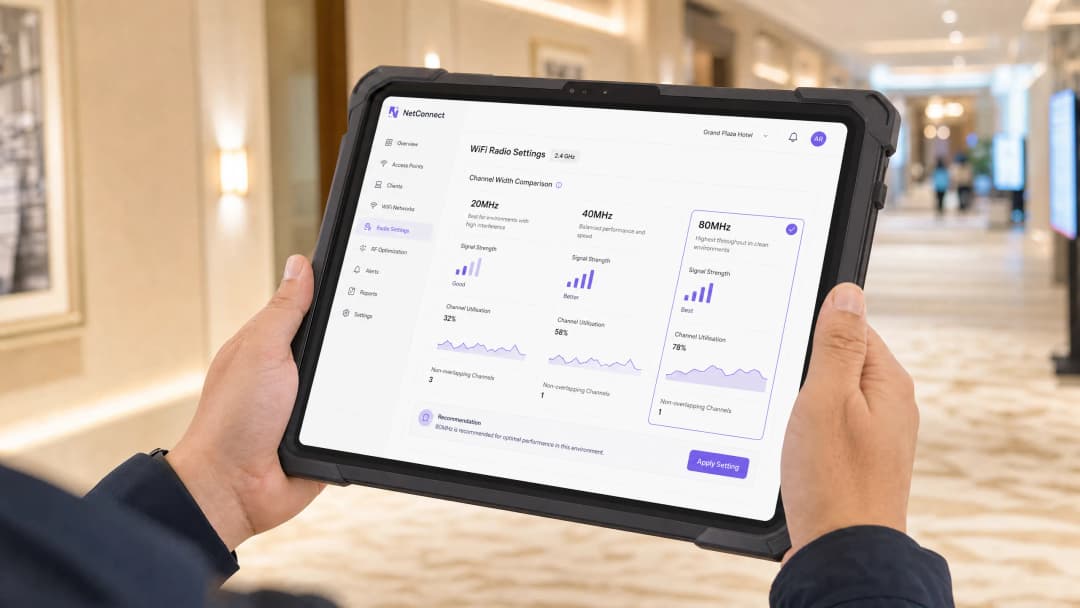
20MHz vs 40MHz vs 80MHz:您應該使用哪種頻道寬度?
本指南為 IT 經理、網路架構師和場域營運總監提供了一個權威且不限廠商的技術參考,協助他們在餐旅、零售、活動和公共部門環境的企業級部署中,選擇正確的 WiFi 頻道寬度(20MHz、40MHz 或 80MHz)。內容涵蓋底層的 IEEE 802.11 機制、實際的容量權衡,以及逐步部署指南,以協助團隊在本季度做出正確的決策。在任何無線 LAN 設計中,理解頻道寬度的選擇都是最具槓桿效應的決策之一,這會直接影響吞吐量、干擾、用戶端密度支援以及面向顧客服務的可靠性。
收聽此指南
查看播客逐字稿
- Executive Summary
- Technical Deep-Dive
- The Physics of Channel Width
- The 2.4GHz Band: A Closed Case
- The 5GHz Band: Where the Real Decision Lives
- Co-Channel Interference: The Dominant Failure Mode
- WiFi 6, WiFi 6E, and the 6GHz Opportunity
- Implementation Guide
- Step 1: Conduct a Pre-Deployment Spectrum Analysis
- Step 2: Define Your Deployment Tier
- Step 3: Design Your Channel Plan
- Step 4: Configure Your Wireless LAN Controller
- Step 5: Validate and Iterate
- Real-World Case Studies
- Case Study 1: 350-Room Hotel — Hilton-Category Property, UK
- Case Study 2: 120-Store Retail Chain — UK Fashion Retailer
- Best Practices
- Troubleshooting and Risk Mitigation
- Symptom: High Channel Utilisation Despite Low Client Count
- Symptom: Good RSSI but Poor Throughput
- Symptom: Clients Failing to Roam Between APs
- Symptom: DFS Channel Instability
- Risk: Automatic Channel Width Escalation
- ROI and Business Impact
- Related Resources

Executive Summary
Channel width selection is one of the most consequential — and most frequently misconfigured — parameters in enterprise wireless LAN design. The choice between 20MHz, 40MHz, and 80MHz channels directly governs the trade-off between per-client throughput and aggregate network capacity. Wider channels deliver higher theoretical speeds but consume more spectrum, reducing the number of non-overlapping channels available and increasing co-channel interference (CCI) in dense deployments.
The practical guidance is straightforward: 20MHz on 2.4GHz is non-negotiable in any multi-AP deployment. On 5GHz, the decision depends on client density, venue type, and spectrum availability. High-density environments — hotels, retail floors, stadiums, conference centres — should default to 20MHz on 5GHz to maximise channel reuse. Mixed-use enterprise offices and medium-density venues can leverage 40MHz for a balanced throughput-capacity trade-off. 80MHz should be reserved for isolated, low-density, high-bandwidth scenarios where spectrum is genuinely available.
For venue operators running Guest WiFi at scale, this decision directly impacts the reliability of captive portal authentication, the accuracy of WiFi Analytics data, and the overall guest experience that drives repeat engagement and loyalty.
Technical Deep-Dive
The Physics of Channel Width
In IEEE 802.11 wireless networking, a channel is a defined slice of radio frequency spectrum. The width of that slice — measured in megahertz — determines how much data can be transmitted simultaneously. This relationship is governed by the Shannon-Hartley theorem: channel capacity scales with bandwidth. Doubling the channel width from 20MHz to 40MHz approximately doubles the theoretical maximum data rate, all else being equal.
However, "all else being equal" is the critical qualifier. In a real-world multi-AP deployment, spectrum is a shared, finite resource. Every megahertz you allocate to one channel is a megahertz unavailable to adjacent channels. This creates the central tension in channel width selection: wider channels increase per-client throughput but reduce the number of non-overlapping channels, increasing the probability of co-channel interference.

The 2.4GHz Band: A Closed Case
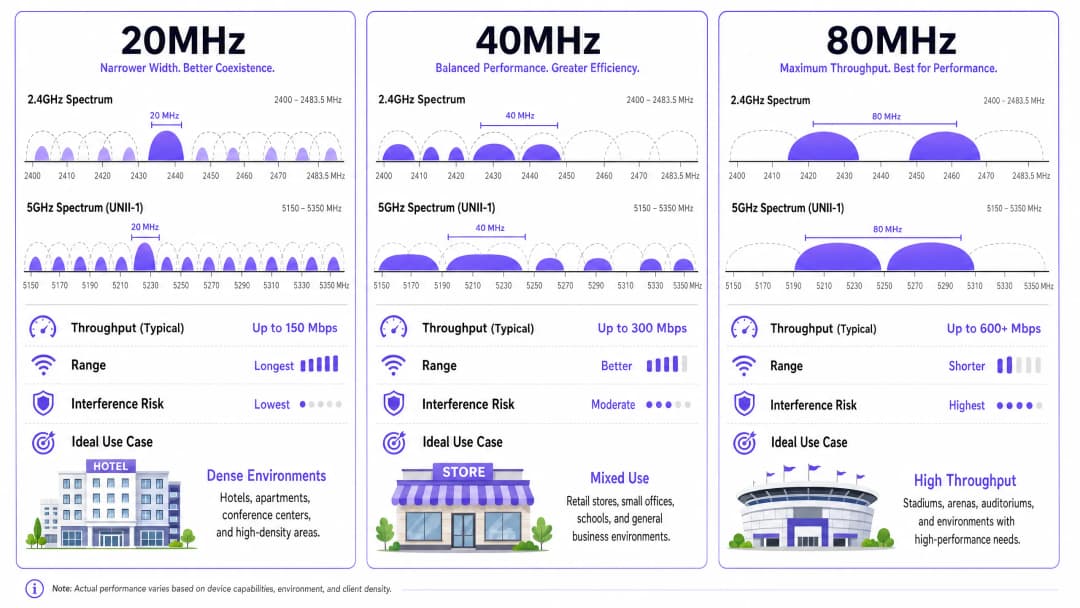
The 2.4GHz ISM band spans 83.5MHz in the UK and most of Europe (2400–2483.5MHz). With 20MHz channels and the standard 5MHz channel spacing, there are only three non-overlapping channels: 1, 6, and 11. This is already a severely constrained environment in any multi-AP deployment.
Attempting to use 40MHz channels in 2.4GHz is a deployment anti-pattern. A single 40MHz channel in 2.4GHz occupies the equivalent of two 20MHz channels plus their guard bands, meaning it overlaps with at least two of the three non-overlapping channels. In practice, this destroys the channel plan entirely. The IEEE 802.11n specification technically permits 40MHz in 2.4GHz, but the Wi-Fi Alliance's enterprise certification programmes and every credible wireless design methodology advise against it.
Rule: Always use 20MHz in the 2.4GHz band in any enterprise or multi-AP deployment. No exceptions.
The 5GHz Band: Where the Real Decision Lives
The 5GHz band (5150–5850MHz in the UK, subject to Ofcom regulation) provides significantly more usable spectrum. With 20MHz channels, there are up to 25 non-overlapping channels available, though the exact number depends on regulatory domain and whether Dynamic Frequency Selection (DFS) channels are enabled.
DFS channels (U-NII-2A and U-NII-2C sub-bands) require access points to detect and avoid radar signals, introducing a mandatory Channel Availability Check (CAC) period of up to 60 seconds before transmission. In practice, most enterprise-grade APs handle DFS gracefully, and enabling DFS channels is strongly recommended as it nearly doubles the available 5GHz spectrum.
| Channel Width | 5GHz Non-Overlapping Channels (with DFS) | Typical Max Throughput (802.11ac/Wi-Fi 5, 2SS) | Noise Floor Increase vs 20MHz |
|---|---|---|---|
| 20MHz | ~25 | ~300 Mbps | Baseline |
| 40MHz | ~12 | ~600 Mbps | +3 dB |
| 80MHz | ~6 | ~1300 Mbps | +6 dB |
| 160MHz | ~2–3 | ~2600 Mbps | +9 dB |
The noise floor increase is critical. Every time you double channel width, the noise floor rises by 3dB. This directly degrades the Signal-to-Noise Ratio (SNR) for all clients, reducing the effective range at which a given Modulation and Coding Scheme (MCS) index can be sustained. An AP configured for 80MHz channels will have a materially shorter effective range than the same AP on 20MHz, which has significant implications for coverage planning in large venues.
Co-Channel Interference: The Dominant Failure Mode
Co-Channel Interference occurs when two or more APs transmit on the same channel within range of each other. Unlike Adjacent Channel Interference (ACI), CCI cannot be mitigated by guard bands — it is an inherent consequence of the CSMA/CA (Carrier Sense Multiple Access with Collision Avoidance) medium access mechanism that 802.11 uses.
When an AP detects another transmission on its channel, it must defer its own transmission. In a dense deployment where multiple APs are operating on the same wide channel, this deferral overhead accumulates rapidly, reducing effective throughput and increasing latency. This is why a network with 20 APs all on 80MHz channels will frequently perform worse in aggregate than the same 20 APs on 20MHz channels — despite the theoretical throughput advantage of 80MHz.
WiFi 6, WiFi 6E, and the 6GHz Opportunity
IEEE 802.11ax (Wi-Fi 6) introduces OFDMA (Orthogonal Frequency Division Multiple Access), which partially mitigates the channel width dilemma by allowing a single channel to be subdivided into Resource Units (RUs) serving multiple clients simultaneously. This improves spectral efficiency in dense environments and reduces the penalty of wider channels.
Wi-Fi 6E extends 802.11ax into the 6GHz band (5925–6425MHz in the UK), providing up to 500MHz of additional, largely uncongested spectrum. In 6GHz, 80MHz channels become significantly more viable because the interference environment is cleaner and there are more non-overlapping channels available. However, as of 2026, 6GHz client device penetration in typical enterprise environments remains partial, and the 5GHz design principles above remain the dominant operational reality for most deployments.
For organisations exploring passwordless access and modern onboarding , the underlying radio layer design remains foundational — no amount of authentication sophistication compensates for a poorly designed RF environment.
Implementation Guide
Step 1: Conduct a Pre-Deployment Spectrum Analysis
Before configuring any channel widths, perform a passive spectrum analysis using a dedicated tool (Ekahau, NetAlly AirCheck, or equivalent). Document existing channel utilisation, noise floor levels, and interfering sources (microwave ovens, DECT phones, Bluetooth devices) across both 2.4GHz and 5GHz. This baseline is essential for validating your channel plan post-deployment.
Step 2: Define Your Deployment Tier
Classify your venue against one of three deployment tiers:
Tier 1 — High Density: Hotels (>100 rooms), retail flagships (>500 concurrent users), stadiums, conference centres, transport hubs. Default channel width: 20MHz on both 2.4GHz and 5GHz.
Tier 2 — Medium Density: Corporate offices (50–500 users), medium retail, public sector buildings, smaller hospitality venues. Default channel width: 20MHz on 2.4GHz, 40MHz on 5GHz.
Tier 3 — Low Density: Small offices (<50 users), executive suites, dedicated AV/streaming rooms, single-AP remote sites. Default channel width: 20MHz on 2.4GHz, 80MHz on 5GHz (only where spectrum analysis confirms availability).
Step 3: Design Your Channel Plan
For Tier 1 deployments, assign 20MHz channels across the three non-overlapping 2.4GHz channels and up to 25 non-overlapping 5GHz channels (with DFS enabled). Aim for a minimum of 19dB co-channel separation between APs on the same channel. For Tier 2, design your 40MHz channel plan using the 12 available non-overlapping 40MHz channels on 5GHz. Ensure adjacent APs use different primary channels.

Step 4: Configure Your Wireless LAN Controller
In your WLC or cloud management platform, set channel width policies at the radio profile level rather than per-AP. This ensures consistency and simplifies ongoing management. Key configuration parameters:
- Channel Width: Set explicitly; do not rely on auto-selection without validation.
- Maximum TX Power: Reduce transmit power to match your coverage cell design — over-powered APs increase CCI.
- Band Steering: Enable to push dual-band clients to 5GHz, reducing 2.4GHz congestion.
- RRM (Radio Resource Management): If using vendor RRM (Cisco RRM, Aruba ARM, Ruckus SmartZone), set a maximum channel width cap to prevent automatic escalation to 80MHz.
For organisations managing complex multi-site deployments, the principles around centralised control are well covered in our guide on What is a WLC (Wireless LAN Controller) and Do You Still Need One? .
Step 5: Validate and Iterate
Post-deployment, run a predictive validation survey against your as-built configuration. Key metrics to validate: channel utilisation per AP (target <70% at peak), client SNR distribution (target >25dB for >80% of clients), and retry rates (target <10%). Use your WiFi Analytics platform to correlate RF performance metrics with guest experience data — connection duration, session counts, and portal completion rates are leading indicators of RF quality.
Real-World Case Studies
Case Study 1: 350-Room Hotel — Hilton-Category Property, UK
A 350-room full-service hotel was experiencing persistent guest WiFi complaints: slow speeds in corridors, frequent disconnections during check-in peak hours, and poor performance in the conference suite. The existing deployment used 80MHz channels on 5GHz across all 140 APs.
Spectrum analysis revealed severe co-channel interference throughout the guest room floors, with channel utilisation exceeding 85% on multiple APs during peak hours. The channel plan had effectively collapsed — APs were deferring constantly, and actual throughput was a fraction of theoretical capacity.
The remediation involved reconfiguring all guest room and corridor APs to 20MHz on 5GHz, redesigning the channel plan to use 22 of the 25 available non-overlapping 5GHz channels, and reducing transmit power by 3dB to tighten coverage cells. Conference suite APs were retained at 40MHz given their lower density and higher per-session bandwidth requirements.
Post-remediation results: average client throughput increased by 34%, channel utilisation dropped to below 55% at peak, and helpdesk tickets related to WiFi fell by 61% in the following quarter. The Guest WiFi portal completion rate improved from 67% to 84%, directly increasing the volume of first-party data captured for the property's CRM integration. This aligns with the broader principle that network reliability is a prerequisite for improving guest satisfaction at scale.
Case Study 2: 120-Store Retail Chain — UK Fashion Retailer
A national fashion retailer with 120 stores was rolling out a unified Retail WiFi platform to support both customer-facing guest access and back-of-house operational systems (EPOS, stock management, digital signage). Store sizes ranged from 2,000 to 15,000 square feet, with AP counts of 4–18 per site.
The initial configuration used 80MHz channels on 5GHz across all stores, driven by a vendor recommendation focused on maximising throughput for the digital signage use case. In the 12 largest stores (>8,000 sq ft, >10 APs), this created significant CCI, with EPOS terminals experiencing intermittent connectivity during peak trading hours — a direct operational and PCI DSS compliance risk, as transaction timeouts were triggering manual fallback procedures.
The solution was a tiered channel width policy deployed via the central WLC: stores with >8 APs were configured to 20MHz on 5GHz; stores with 5–8 APs to 40MHz; stores with <5 APs retained 80MHz. Digital signage APs in all stores were placed on a dedicated 5GHz radio with 40MHz channels, isolated from the guest and EPOS SSIDs via VLAN segmentation.
Post-deployment, EPOS connectivity incidents dropped by 78% across the large-store estate, and the guest WiFi engagement rate (measured via the captive portal analytics) increased by 22% as connection reliability improved. The segmented approach also simplified PCI DSS scope management by ensuring cardholder data environments were on dedicated, non-shared radio resources.
Best Practices
The following vendor-neutral best practices represent the consensus of IEEE 802.11 working group guidance, Wi-Fi Alliance certification requirements, and operational experience across enterprise deployments.
Always enable DFS channels. Regulatory reluctance to use DFS channels is understandable but counterproductive. Modern enterprise APs handle radar detection reliably, and the additional spectrum is essential for any 40MHz or 80MHz channel plan to be viable. Verify your regulatory domain settings are correctly configured for your country of deployment.
Separate guest and corporate traffic at the radio level where possible. Using dedicated SSIDs on separate VLANs is standard practice, but in high-density environments, consider dedicating specific radios or APs to guest traffic. This prevents guest device behaviour (aggressive roaming, legacy 802.11b/g clients) from degrading corporate network performance.
Implement minimum RSSI thresholds. Configure your WLC to reject client associations below a minimum Received Signal Strength Indicator (RSSI) threshold (typically -75 to -70 dBm). This prevents "sticky client" behaviour where devices hold onto distant APs at low data rates, consuming airtime inefficiently.
Audit your channel plan quarterly. The RF environment changes as new APs are deployed in neighbouring premises, building usage patterns shift, and new interference sources are introduced. A channel plan that was optimal at deployment may be suboptimal 12 months later. Quarterly spectrum audits are a low-cost, high-value operational practice.
For Healthcare and public-sector deployments, additional constraints apply. Medical devices often use 2.4GHz exclusively and may be sensitive to channel changes. Coordinate channel plan changes with clinical engineering teams and schedule them during low-activity windows. GDPR and NHS data security requirements also mandate network segmentation that should be reflected in your SSID and VLAN architecture.
For Transport hubs and stadiums, the combination of extremely high client density and rapid client turnover (passengers boarding/alighting, crowds entering/exiting) creates unique RF challenges. 20MHz channels on 5GHz are essentially mandatory, and directional antenna patterns should be used to tighten coverage cells and reduce inter-AP interference.
Troubleshooting and Risk Mitigation
Symptom: High Channel Utilisation Despite Low Client Count
This typically indicates CCI from neighbouring APs on the same channel. Verify your channel plan using a spectrum analyser — look for APs (yours or neighbouring) on the same channel within range. Remediation: reassign channels to increase separation, or reduce transmit power to shrink coverage cells.
Symptom: Good RSSI but Poor Throughput
High RSSI with low throughput is a classic CCI signature. Clients are receiving a strong signal from their associated AP but are experiencing high retry rates due to medium contention. Check retry rates in your WLC dashboard (target <10%). If retries are high, reduce channel width or redesign the channel plan.
Symptom: Clients Failing to Roam Between APs
This is often caused by mismatched channel widths between APs, or by minimum RSSI thresholds that are too aggressive. Verify that all APs in a roaming domain use consistent channel width configurations, and that 802.11r (Fast BSS Transition) and 802.11k (Neighbour Reports) are enabled to facilitate smooth roaming.
Symptom: DFS Channel Instability
If APs on DFS channels are frequently changing channels (visible in WLC logs as radar detection events), verify that the interference source is genuine radar (airport, weather station, military) rather than a false positive from another AP or device. Some enterprise APs have known false-positive issues with specific DFS channels — consult vendor release notes and consider excluding problematic channels from your DFS pool.
Risk: Automatic Channel Width Escalation
Many enterprise WLC platforms include Radio Resource Management (RRM) algorithms that can automatically increase channel width during low-utilisation periods. This is a known risk: the algorithm may escalate to 80MHz during off-peak hours, and the wider channel plan may persist into peak hours when it causes CCI. Set a maximum channel width cap in your RRM policy to prevent this. This is one of the most common misconfiguration patterns seen in enterprise deployments.
ROI and Business Impact
The business case for correct channel width configuration is compelling and measurable. The cost of remediation — primarily engineer time for spectrum analysis and WLC reconfiguration — is typically 1–3 days of effort for a medium-sized deployment. The returns are immediate and multi-dimensional.
Reduced helpdesk overhead: WiFi connectivity complaints are among the highest-volume helpdesk categories in hospitality and retail. A well-configured channel plan typically reduces WiFi-related tickets by 40–70%, freeing IT resource for higher-value activities.
Improved guest data capture: For venues running Guest WiFi with captive portal authentication, network reliability directly drives portal completion rates. A 10-percentage-point improvement in completion rate across a 1,000-daily-user venue translates to 36,500 additional data records per year — each representing a marketable, consented customer profile.
Operational continuity: For retail environments where EPOS, inventory management, and digital signage depend on WiFi, CCI-induced connectivity failures carry direct revenue impact. A single EPOS outage during peak trading can cost a large-format retailer thousands of pounds per hour.
Analytics fidelity: WiFi Analytics platforms that use probe request data for dwell time analysis and footfall measurement are directly dependent on AP radio performance. CCI increases the noise floor, reducing the effective range at which probe requests are captured and degrading the accuracy of location analytics. Correct channel width configuration is therefore a prerequisite for reliable venue intelligence.
For public-sector organisations exploring smart city and digital inclusion initiatives — an area Purple is actively investing in — the same RF design principles apply at infrastructure scale. Reliable, well-designed public WiFi is the foundation on which digital services are delivered, as explored in our recent announcement around public sector growth .
Related Resources
關鍵定義
頻道寬度
單個 WiFi 頻道所佔用的無線電頻率頻寬(以 MHz 為單位)。較寬的頻道可同時傳輸更多數據,但會消耗更多頻譜,從而減少給定頻段內可用的非重疊頻道數量。
在任何無線區域網路設計中,主導「吞吐量與容量」權衡的核心配置參數。在企業級 WLC 中,此參數是在無線電設定檔(Radio Profile)層級進行配置。
同頻干擾 (CCI)
當兩個或多個存取點(AP)在彼此訊號覆蓋範圍內,並於相同頻道上進行傳輸時所產生的干擾。與鄰頻干擾不同,CCI 無法透過保護頻帶(Guard Band)來緩解,它會迫使 AP 透過 CSMA/CA 機制延遲傳輸,進而降低實際吞吐量並增加延遲。
高密度企業 WiFi 部署中主要的效能失效模式。CCI 是在多 AP 環境中,儘管較寬頻道擁有較高的理論吞吐量,卻仍會降低效能的主因。
動態頻率選擇 (DFS)
一種 IEEE 802.11h 機制,允許存取點透過偵測並避開雷達訊號,來使用受雷達保護的 5GHz 頻道(U-NII-2A 和 U-NII-2C 子頻段)。DFS 頻道在投入使用前,需要長達 60 秒的頻道可用性檢查(CAC)時間。
啟用 DFS 頻道幾乎能使大多數監管區域中可用的 5GHz 頻譜翻倍,這對於任何 40MHz 或 80MHz 頻道規劃的實行至關重要。企業級 AP 能可靠地處理 DFS;消費級 AP 則通常會完全避開 DFS 頻道。
訊噪比 (SNR)
接收端接收到的有用訊號功率與背景雜訊功率的比值,以分貝(dB)為單位。較高的 SNR 可支援較高的調變與編碼策略(MCS)索引,進而實現更高的數據傳輸速率。
較寬的頻道會提高雜訊基底(每當寬度翻倍即增加 3dB),從而降低所有用戶端的 SNR。在任何企業部署中,IT 團隊應將目標設定為讓 80% 以上的用戶端達到 >25dB 的 SNR。
調變與編碼策略 (MCS) 索引
一個數值索引(在 802.11ax/Wi-Fi 6 中為 0–11),定義了特定傳輸所使用的調變技術與前向糾錯編碼率的組合。較高的 MCS 索引可提供更高的數據傳輸速率,但需要更好的 SNR。
MCS 索引是 AP 與用戶端根據當前 SNR 進行動態協商的結果。降低 SNR 的頻道寬度變更會導致用戶端降級使用較低的 MCS 索引,即使頻道在理論上較寬,也會降低實際的吞吐量。
OFDMA (正交頻分多址)
IEEE 802.11ax (Wi-Fi 6) 中引入的多用戶版本 OFDM,它將頻道細分為資源單元(RU),允許單個 AP 在單次傳輸機會中同時為多個用戶端提供服務。
OFDMA 是 Wi-Fi 6 在高密度環境中提升效能的核心機制。它透過提高給定頻道寬度內的頻譜效率,部分緩解了頻道寬度的兩難困境,從而減輕了為了追求吞吐量而必須使用較寬頻道的壓力。
BSS 著色技術 (BSS Colouring)
一項 IEEE 802.11ax 功能,可為每個基本服務集(BSS)分配一個顏色識別碼。AP 和用戶端可以透過顏色識別來自重疊 BSS 的傳輸,若訊號低於特定閾值,則可繼續進行自身的傳輸而無需延遲,從而有效實現空間複用。
BSS 著色技術是 Wi-Fi 6 針對高密度部署的一項關鍵功能。它無需進行物理頻道隔離,即可降低重疊覆蓋單元(Cell)的 CCI 懲罰,這在頻道規劃受限的環境中特別有價值。
無線電資源管理 (RRM)
企業無線區域網路控制器中的自動化系統,可根據觀測到的射頻(RF)狀況,動態調整 AP 的無線電參數,包括頻道分配、發射功率和頻道寬度。
RRM 是一項強大的工具,但需要仔細配置策略。若沒有限制最大頻道寬度,RRM 演算法可能會在低負載期間將頻道提升至 80MHz,從而在尖峰時段引發 CCI 問題。請務必對照頻譜分析數據來驗證 RRM 的決策。
非重疊頻道
頻率範圍互不重疊的頻道,允許同時傳輸而不會產生相互干擾。在 2.4GHz 頻段且頻道寬度為 20MHz 時,僅有三個非重疊頻道(1、6、11)。在 5GHz 頻段且頻道寬度為 20MHz 並啟用 DFS 時,非重疊頻道可多達 25 個。
可用非重疊頻道的數量是頻道規劃設計的根本限制。它決定了在沒有 CCI 的情況下可以同時運作的 AP 數量,進而決定了無線部署所能達到的最大密度。
範例
一間擁有 350 間客房的全服務型酒店正面臨廣泛的賓客 WiFi 投訴:走廊速度慢、登記入住高峰期頻繁斷線,以及 800 座會議套房效能低下。現有的部署有 140 個 AP,全部在 5GHz 上配置為 80MHz。網路團隊應如何進行此項修復?
步驟 1:在高峰時段(酒店通常為 08:00–10:00 和 18:00–21:00)對所有樓層進行被動頻譜分析。記錄每個 AP 的頻道利用率、底噪和重試率。步驟 2:識別頻道利用率 >70% 的 AP,這些是主要的 CCI 受害者。在擁有 140 個 AP 的 80MHz 部署中,預計會發現客房樓層的廣泛利用率超過 80%。步驟 3:重新設計頻道規劃。對於客房走廊和樓層,將所有 AP 重新配置為 5GHz 上的 20MHz。啟用 DFS 頻道以存取最多 25 個不重疊的 20MHz 頻道。使用至少 19dB 的同頻道隔離度來分配頻道。步驟 4:對於會議套房,在專用會議 AP(而非走廊 AP)上保留 40MHz。會議套房具有受控的存取權限和較低的並行 AP 密度。步驟 5:將客房 AP 的發射功率降低 3dB,以收緊覆蓋範圍並減少 AP 間的干擾。步驟 6:啟用 802.11r 和 802.11k 以支援快速漫遊。步驟 7:在部署後進行調查驗證:目標為高峰期頻道利用率 <55%、>80% 的用戶端 SNR >25dB、重試率 <10%。
一家擁有 120 家門市的英國時尚零售商正在部署一個統一的 WiFi 平台,涵蓋賓客存取和營運系統(EPOS、庫存管理、數位看板)。門市面積從 2,000 到 15,000 平方英尺不等,每個站點有 4–18 個 AP。EPOS 終端機在 12 家最大的門市中遇到間歇性連線問題。應如何在整個物業中建構頻道寬度原則?
步驟 1:按 AP 數量對物業進行細分,以此代表密度:<5 個 AP(小型門市)、5–8 個 AP(中型門市)、>8 個 AP(大型門市)。步驟 2:透過中央 WLC 應用分層頻道寬度原則:大型門市(>8 個 AP)— 5GHz 上為 20MHz;中型門市(5–8 個 AP)— 5GHz 上為 40MHz;小型門市(<5 個 AP)— 5GHz 上為 80MHz。步驟 3:在所有門市中,將 EPOS 和持卡人資料流量配置在對應到獨立 VLAN 的專用 SSID 上,與賓客流量隔離。這是 PCI DSS 的要求(要求 1.3:將入站和出站流量限制在必要的範圍內)。步驟 4:對於數位看板,在 40MHz 上部署專用的 5GHz 無線電(在 AP 支援三頻或雙 5GHz 配置的情況下),與賓客和 EPOS SSID 隔離。步驟 5:在 EPOS SSID 上實施 -72 dBm 的最小 RSSI 閾值,以防止 EPOS 終端機上的黏性用戶端行為。步驟 6:透過 WLC 範本部署配置,以確保所有 120 個站點的一致性,僅在頻譜分析證明有偏差時才進行每家門市的覆蓋。
英國一家主要的交通樞紐(大型鐵路終點站,每日客流量超過 50,000 人次)正在計劃進行 WiFi 基礎設施升級。現有的部署在覆蓋大廳、月台和零售單位的 200 個 AP 上使用 5GHz 的 40MHz 頻道。營運團隊希望升級到 WiFi 6 硬體,並詢問是否應該移動到 80MHz,以利用新硬體的吞吐量功能。
建議:不要增加到 80MHz。所有大廳和月台 AP 在 5GHz 上保留 20MHz,並且僅在用戶端密度較低且每工作階段頻寬較高的零售單位 AP 上考慮 40MHz。理由:每日客流量達 50,000 人次的交通樞紐代表了企業界中密度最高的 WiFi 環境之一。在高峰時段,月台上的用戶端密度可能會超過每個 AP 覆蓋區域 500 個並行裝置。在此密度下,CCI 是主要的效能限制因素,而不是每個用戶端的吞吐量。WiFi 6 的 OFDMA 功能是適用於此環境的正確工具:它允許單個 20MHz 頻道透過資源單元(RU)分配同時為多個用戶端提供服務,從而在不需要更寬頻道的情況下提高頻譜效率。配置具有 20MHz 頻道的 WiFi 6 AP,並啟用 OFDMA、BSS 著色(以透過空間重用減少 CCI)和目標喚醒時間(TWT)以減少競爭。對於零售單位,鑑於密度較低且需要支援更高頻寬的應用程式(行動支付、庫存掃描),5GHz 上的 40MHz 是合適的。確保所有 AP 支援 802.11r、802.11k 和 802.11v,以便在旅客穿過航廈時進行無縫漫遊。
練習題
Q1. 您是一家擁有 500 間客房的會議酒店的網路架構師。該物業在客房樓層、走廊、一個 1,200 座位的宴會廳、20 個分組會議室和一個商務中心部署了 220 個 AP。目前的配置在整個物業的 5GHz 上使用 40MHz 通道。在一次大型會議活動(800 名代表)期間,賓客反映客房樓層的網速緩慢且頻繁斷線,而宴會廳的 WiFi 運作良好。最可能的原因是什麼?您會推薦進行哪些通道寬度調整?
提示:考慮客房樓層與宴會廳的 AP 密度。兩者的通道利用率可能各是多少?5GHz 上有多少個不重疊的 40MHz 通道可用?
查看標準答案
最可能的原因是客房樓層的同通道干擾(CCI)。在整個物業部署 220 個 AP 的情況下,客房樓層將具有最高的 AP 密度——在擁有 500 間客房的酒店中,每層樓可能部署 15-20 個 AP。在 5GHz 上使用 40MHz 通道時,僅有 12 個不重疊通道可用(含 DFS)。在每層 15-20 個 AP 的情況下,多個 AP 勢必會共用通道,從而產生 CCI,在高負載下降低效能。宴會廳運作良好是因為其 AP 密度較低(在大型開放空間中可能只有 2-4 個 AP),且可以維持 40MHz 通道規劃而不會產生顯著的 CCI。建議的變更:將所有客房樓層和走廊的 AP 重新配置為 5GHz 上的 20MHz,從而啟用多達 25 個不重疊通道。宴會廳 AP(低密度、高單一工作階段頻寬,用於視訊會議和簡報)和會議室則保留 40MHz。鑑於商務中心的並行使用者數量通常較低,可以保持 40MHz。變更後,進行以尖峰時段通道利用率 <60% 為目標的頻譜調查以進行驗證。
Q2. 一位零售營運總監詢問,為什麼自從最近進行 AP 韌體升級並啟用「自動通道最佳化」以來,公司 20,000 平方英尺旗艦店的 WiFi 效能變差了。該商店擁有 16 個 AP。在升級之前,所有 AP 都使用 5GHz 上的 40MHz 通道。升級後,WLC 記錄顯示大多數 AP 已被自動重新配置為 80MHz。這是怎麼回事,您該如何解決?
提示:自動通道最佳化演算法是針對什麼進行最佳化?5GHz 上有多少個不重疊的 80MHz 通道可用?這對 CCI 的可能影響是什麼?
查看標準答案
自動通道最佳化演算法將通道寬度從 40MHz 提升到了 80MHz,這很可能發生在低利用率期間,當時演算法偵測到閒置容量並優先考慮吞吐量。在單一商店中部署 16 個 AP 的情況下,80MHz 通道會產生嚴重的 CCI:5GHz 上只有 6 個不重疊的 80MHz 通道(含 DFS),這意味著多個 AP 勢必會共用通道。在負載下,這些 AP 會不斷相互避讓,導致總吞吐量降至先前 40MHz 配置所達到的水準之下。解決方案:立即在該商店的 WLC RRM 策略中設定 40MHz 的最大通道寬度限制。將所有 AP 還原為 40MHz 通道,並使用 12 個可用的不重疊 40MHz 通道重新設計通道規劃。在站點配置標準中記錄此 RRM 限制,以防止未來韌體升級後再次發生此問題。考慮是否應針對高密度商店完全停用自動通道最佳化功能,而改用手動通道分配。
Q3. 您正在為一家公共部門機構提供諮詢,該機構正在全市圖書館網路(8 個分館,每個分館有 6-10 個 AP)部署免費公共 WiFi。IT 團隊指定使用 WiFi 6 AP,並希望使用 160MHz 通道來「迎合未來需求」,並為存取數位服務的使用者提供最大網速。您會如何回應?您會推薦什麼通道寬度?
提示:5GHz 上有多少個不重疊的 160MHz 通道可用?用戶端裝置對 160MHz 的可能支援情況如何?這對底噪和有效範圍有何影響?
查看標準答案
強烈建議不要使用 160MHz 通道。在 5GHz 上,僅有 2-3 個不重疊的 160MHz 通道可用,這對於部署 6-10 個 AP 的環境來說完全不夠——分館中的每個 AP 都會處於相同的通道上,從而產生災難性的 CCI。此外,與 20MHz 相比,160MHz 會使底噪增加 9dB,從而嚴重縮短所有用戶端的有效範圍和信噪比(SNR)。在 2026 年,用戶端裝置對 5GHz 上 160MHz 的支援仍然有限,這意味著大多數使用者將無法獲得任何好處。對於這些分館,推薦的配置是 5GHz 上的 40MHz。在每個分館有 6-10 個 AP 且啟用 DFS 的情況下,40MHz 可提供 12 個不重疊通道——這足以進行具有良好隔離度的乾淨通道規劃。WiFi 6 在此環境中的真正價值來自於 OFDMA 和 BSS 着色技術,它們提高了 40MHz 通道內的效率,而不是來自更寬的通道。如果未來支援 6GHz 的用戶端裝置普及,屆時可以考慮在 6GHz 上使用 80MHz——但 5GHz 160MHz 並非解決方案。向 IT 團隊這樣說明:在此環境中,使用 40MHz 通道的 WiFi 6 效能將優於使用 80MHz 通道的 WiFi 5,因為 OFDMA 和 BSS 着色技術解決了真正的瓶頸(頻譜效率和 CCI),而不是單純的通道寬度。
繼續閱讀本系列
理解 RSSI 與訊號強度以實現最佳頻道規劃
本指南深入探討 RSSI、訊噪比 (SNR) 及射頻 (RF) 傳播原理,以實現最佳頻道規劃。本指南為 IT 經理、網路架構師和場所營運總監提供實用策略,以減少同頻道與鄰頻道干擾、最佳化 AP 部署,並利用數據分析在旅宿、零售和公共部門環境中創造可衡量的商業效益。
WiFi 6 對決 WiFi 5:能否解決通道干擾問題?
本指南深入探討 WiFi 6 (802.11ax) 如何透過 OFDMA 與 BSS Coloring 技術,解決高密度企業環境中的通道干擾問題。本指南為 IT 經理、網路架構師和 CTO 提供具體的部署策略、來自旅宿業與醫療保健業的實際案例研究,以及一套在無線網路效能至關重要的場域中評估基礎架構升級 ROI 的框架。
DFS 頻道:它們是什麼以及何時應避免使用
這份權威指南詳細解析了 5 GHz 頻段中動態頻率選擇 (DFS) 頻道的技術與運營實況。場地營運商和 IT 團隊將學習如何評估雷達風險、配置頻道可用性檢查 (CAC),並部署穩健的備用方案,以保護高密度無線環境免受突發連線中斷的影響。