
為什麼 5GHz 速度更快,但 2.4GHz 更穩定
本綜合技術指南探討了 2.4GHz 與 5GHz 無線頻段之間的架構權衡,為 IT 經理和網絡架構師提供具體可行的部署策略。內容涵蓋頻率傳播的物理特性、通道規劃、頻段導向以及在餐旅、零售和公共部門環境中的實際部署案例。場所營運商和 CTO 將獲得有關優化覆蓋範圍、減少干擾以及衡量其無線基礎設施投資 ROI 的具體指導。
Video overview
收聽此指南
查看播客逐字稿
核心系列的一部分:Guest WiFi 指南 →
Dual-Band WiFi RF Propagation & Capacity Planner
Simulate how 2.4GHz and 5GHz radio frequencies propagate through distance and physical obstacles. Calculate received RSSI, co-channel contention risk, and recommended transmit power offsets.
Standard office partition wall causing mild high-frequency absorption.
2.4 GHz Frequency Band
Higher Range & Penetration5 GHz Frequency Band
Higher Speed & Clean AirRecommended Dual-Band RF Architecture Settings
Setting 5GHz TX power 6 dBm higher than 2.4GHz equalizes physical cell boundaries, eliminating sticky 2.4GHz associations.
Direct dual-band clients to 5GHz when signal exceeds -70 dBm. Allow devices falling below -75 dBm to roam onto 2.4GHz.
Balanced density allows 40MHz channel bonding on 5GHz for doubled single-client throughput.
Need an Enterprise RF Predictive Model for Your Facility?
Purple works with leading network vendors to design, optimise, and secure dual-band and tri-band enterprise WiFi networks. Speak with our wireless specialists for an RF heat map and capacity consultation.

執行摘要
對於管理企業級無線部署的 CTO 與網路架構師而言,在 2.4GHz 與 5GHz 之間做選擇並非非黑即白的二分法 - 這是一項基礎的架構策略。5GHz 可提供高密度環境與複雜應用程式所需的海量吞吐量,而 2.4GHz 則提供了穿透物理障礙物與支援傳統 IoT 裝置所需的關鍵覆蓋層。本指南剖析了這兩個頻段背後的物理學原理,解釋了為何 5GHz 能提供指數級的速度提升,以及為何 2.4GHz 對於基準可靠性仍然不可或缺。我們針對通道規劃、傳輸功率調整以及智慧頻段引導,提供與廠商無關且具體可行的建議。透過實施由 Guest WiFi 等強大分析平台支援、經過妥善調校的雙頻策略,場所營運商可以降低風險、最佳化 ROI,並在 Hospitality、Retail、Healthcare 與 Transport 環境中提供無縫的連線體驗。
技術深度解析
頻率的物理學:為何波長決定一切
2.4GHz 與 5GHz 之間的根本區別在於其波長。2.4GHz 頻段以較長的波長(約 12.5 公分)運作,這對於穿透實體物體(例如混凝土牆、鋼門,甚至擁擠場所中的人體)非常有效。這種物理特性正是 2.4GHz 提供更廣泛覆蓋範圍的原因,且當使用者在複雜環境中移動或遠離存取點時,通常會覺得它更具可靠性。
然而,這種較長的傳輸距離伴隨著重大的權衡。2.4GHz 頻譜極為狹窄,在大多數監管網域中僅提供三個互不重疊的通道(1、6 和 11)。在密集部署中(例如飯店樓層、零售商店、會議中心),這不可避免地會導致嚴重的同通道干擾 (CCI)。此外,2.4GHz 頻段是一個共享且擁擠的資源:它與 Bluetooth 裝置、微波爐、嬰兒監視器以及日益成長的傳統 IoT 硬體生態系統相互競爭,這些都會拉低網路上每個裝置的整體吞吐量。
相反地,5GHz 頻段在較短的波長(約 6 公分)上運作。雖然這限制了其穿透物理障礙的能力 - 在 2.4GHz 上能輕鬆穿過牆壁的訊號,在 5GHz 上可能會被完全阻擋 - 但它提供了更寬廣的頻譜。憑藉高達 24 個可用的非重疊通道(取決於法規網域和 DFS 通道的可用性),5GHz 允許更寬的通道綁定:在 IEEE 802.11ac(Wi-Fi 5)和 802.11ax(Wi-Fi 6/6E)下可達 40MHz、80MHz 甚至 160MHz。這種更寬的通道是實現高密度環境、高畫質視訊串流和現代企業應用程式所需的大量吞吐量的關鍵。當設備在具有清晰視線的 5GHz 上連接時,可達到的速度呈指數級高於 2.4GHz 所能提供的速度。
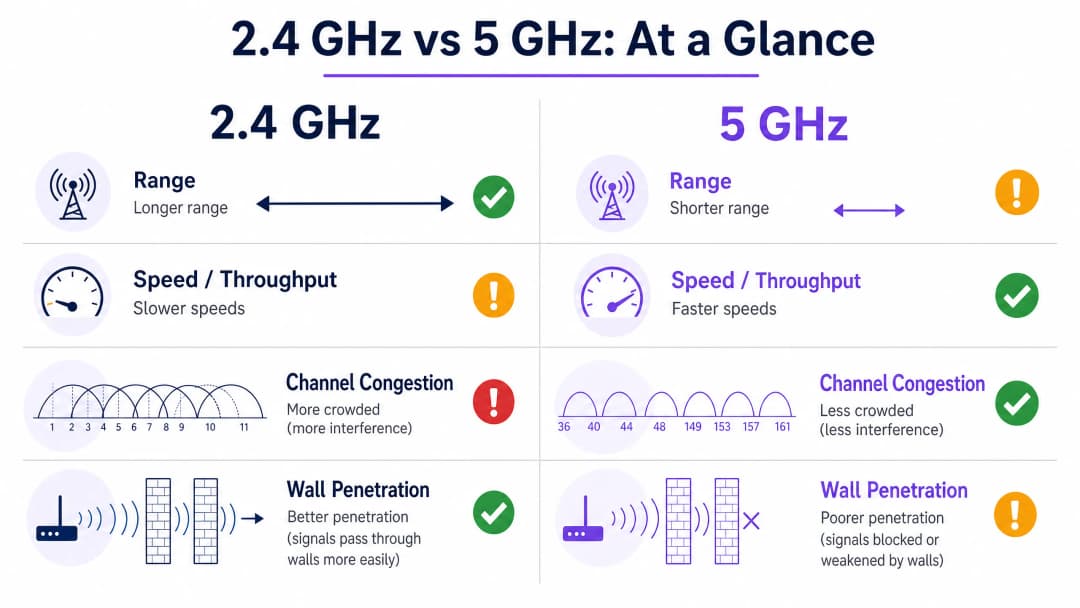
通道架構與干擾模型
瞭解通道架構對於任何企業部署都至關重要。在 2.4GHz 上,IEEE 802.11 標準定義了 14 個通道(儘管法規網域有所不同),但只有通道 1、6 和 11 是真正不重疊的。這意味著在任何給定區域中,最多只能有三個無線基地台同時運作而不會引起相鄰通道干擾。在多層樓的飯店或密集的零售環境中,這種限制成為網路容量的硬性上限。
在 5GHz 上,情況大不相同。UNII-1 (5.15 - 5.25 GHz)、UNII-2 (5.25 - 5.35 GHz)、UNII-2 Extended (5.47 - 5.725 GHz) 和 UNII-3 (5.725 - 5.85 GHz) 頻段總共提供了多達 24 個非重疊的 20MHz 通道。架構師可以在相同的物理空間中部署明顯更多的無線基地台而不會產生干擾,從而實現體育場、會議中心和大型零售環境所需的高密度設計。
動態頻率選擇 (DFS) 通道屬於 UNII-2 和 UNII-2 Extended 頻段,可進一步擴展可用頻譜,但需要仔細考慮。這些通道必須與雷達系統共享,且偵測到雷達訊號的無線基地台必須在 10 秒內撤離該通道,並在該通道上保持關閉 30 分鐘。在靠近機場或氣象站的環境中,DFS 通道的不穩定性可能會中斷關鍵服務,因此架構師應相應地規劃備用通道。
實作指南
雙頻架構與頻段導引
現代無線架構的業界標準做法是具有積極頻段導引的雙頻部署。無線基地台必須配置為積極引導具備雙頻功能的裝置(例如現代智慧型手機、筆記型電腦和平板電腦)至 5GHz 頻段。此策略可為舊型裝置、關鍵 IoT 感測器以及 5GHz 無法覆蓋的邊緣涵蓋區域騰出 2.4GHz 的空間。
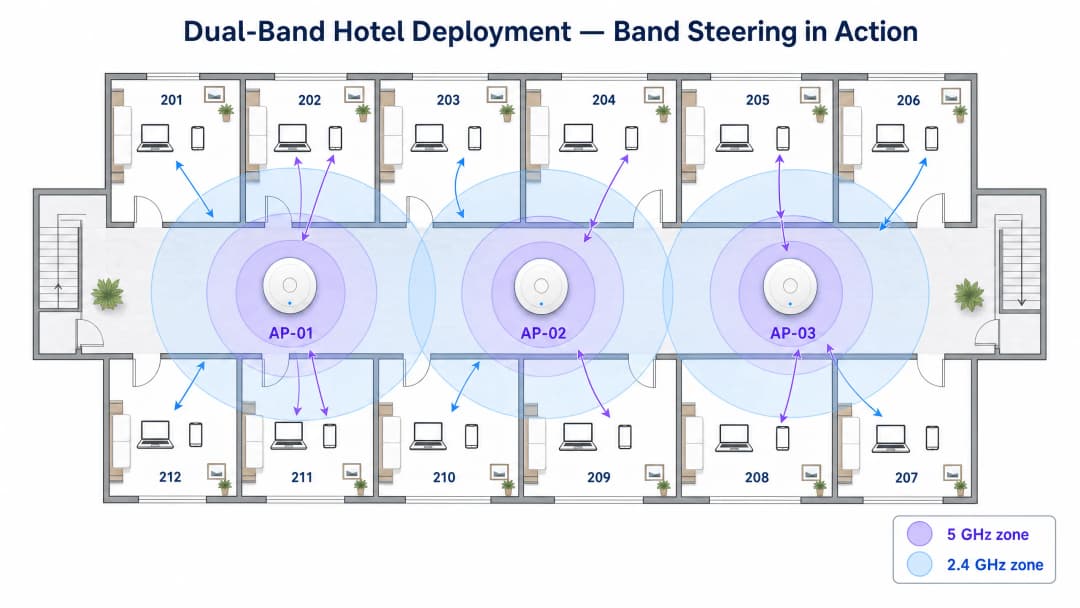
頻段導引(Band steering)的工作原理是抑制具備雙頻能力用戶端的 2.4GHz 探測回應,直到他們關聯至 5GHz,或在定義的嘗試次數後未能在 5GHz 回應為止。大多數企業級基礎架構廠商都原生實作了此功能,但導引策略的積極度必須根據環境進行調整。在有許多舊裝置的場所(例如公共部門建築或醫療保健設施)中,過於積極的頻段導引可能會導致合法的僅支援 2.4GHz 裝置完全無法連線。
針對容量而非覆蓋範圍進行設計
在 Hospitality 和 Retail 部署中,一個常見且代價高昂的陷阱是提高 5GHz 無線電的傳輸功率,試圖匹配 2.4GHz 的覆蓋範圍。這種做法會產生「粘性用戶端(sticky client)」問題:裝置會抓著微弱的 5GHz 訊號不放,而不是漫遊到訊號更強的存取點,進而導致受影響用戶端的效能下降,並消耗空口時間,降低該網元內所有其他用戶端的效能。
正確的方法是透過部署更多傳輸功率設定較低的存取點,來針對容量進行設計。較小、定義明確的覆蓋網元可確保無縫漫遊、最佳通道重用以及整個網路的平衡負載。實務上的規則是,5GHz 傳輸功率通常應設定為比 2.4GHz 傳輸功率高 6 - 9 dBm,從而創造出自然的覆蓋差異,鼓勵用戶端在靠近 AP 時優先選擇 5GHz,並在網元邊緣降級至 2.4GHz。
整合像 Purple 的 WiFi Analytics 這類與硬體無關的平台,可讓場所營運商擷取兩個頻段的效能資料,提供識別粘性用戶端、高干擾區域和效能不佳的存取點所需的能見度。這種以資料驅動的網路優化方法,在活動場館等射頻(RF)環境在活動之間會發生劇烈變化的動態環境中特別有價值。
逐步部署檢查清單
| 階段 | 行動 | 標準 / 參考 |
|---|---|---|
| 1. 射頻勘測 | 進行被動和主動現場勘測,以繪製現有干擾源地圖 | IEEE 802.11-2020 |
| 2. 通道規劃 | 分配不重疊的通道;在 2.4GHz 上使用 1、6、11;在 5GHz 上謹慎分配 DFS 通道 | Wi-Fi Alliance 最佳實踐 |
| 3. 功率調整 | 將 5GHz 傳輸功率設定為高於 2.4GHz 6 - 9 dBm;避免最大功率設定 | 廠商特定的 RRM 指南 |
| 4. 頻段導引 | 啟用頻段導引;根據裝置組合調整積極度 | IEEE 802.11v (BSS 轉換) |
| 5. 最小 RSSI | 設定最小 RSSI 閾值以防止粘性用戶端 | 廠商特定 |
| 6. Security | 在訪客網路實施 WPA3-SAE;在企業 SSID 實施 WPA3-Enterprise (IEEE 802.1X) | WPA3 規範、GDPR |
| 7. Analytics | 部署 WiFi Analytics 以監控頻段利用率、用戶端數量和漫遊事件 | Purple 平台 |
對於您的特定設置有任何疑問嗎?
我們的團隊與超過 80,000 個場域的場域營運商、IT 經理和網路工程師合作。立即預約 20 分鐘的通話,我們將向您展示其他與您相似的用戶是如何解決此問題的。
最佳實踐
嚴格的頻道規劃是不可妥協的。在 2.4GHz 頻段上請遵循使用頻道 1、6 和 11,以避免鄰頻干擾。在 5GHz 頻段上,在環境允許的情況下利用 DFS 頻道,但對於雷達觸發的頻道變更,必須保持一份有記錄的備用計劃。
停用舊版數據速率。在兩個頻段上,移除對 2.4GHz 上 802.11b 數據速率 (1, 2, 5.5, 11 Mbps) 的支援,可以顯著減少管理開銷,並強制訊號不佳的用戶端漫遊到較近的存取點,而不是維持在降級的連線上。在密集環境中,單是這一項設定變更就可以將整體網路效率提高 20 - 30%。
實施 802.11r (快速 BSS 轉換) 以實現存取點之間的無縫漫遊。在使用者處於移動狀態的環境中 - 零售賣場、醫院病房、交通樞紐 - 802.11r 將漫遊切換時間從數百毫秒縮短到 50 毫秒以下,這對於語音 over WiFi 和即時應用程式至關重要。
依用途區隔 SSID。避免將所有流量都在單一 SSID 上執行的誘惑。一個經過適當區隔的網路會將訪客流量(透過 Guest WiFi 進行管理,並配有適當的 Captive Portal 和資料收集)、企業流量(使用 IEEE 802.1X 和 WPA3-Enterprise 進行保護)以及 IoT 設備(隔離在專用 VLAN 上)分開。這種區隔也有助於處理卡片支付的零售環境符合 PCI-DSS 規範。
疑難排解與風險緩釋
同頻干擾 (CCI)
風險:多個存取點在彼此的接收範圍內運作於同一個頻道,導致裝置在傳輸前必須等待空閒的無線電時間。這是企業環境中 WiFi 效能不佳最常見的單一原因。
緩釋措施:實施自動化無線電資源管理 (RRM),或每季手動審計頻道分配。使用頻譜分析工具來識別惡意存取點和非 WiFi 干擾源。在多租戶大樓中,盡可能與鄰近租戶協調頻道計劃。
粘性用戶端 (Sticky Clients)
風險:裝置即使在有更強訊號可用時,仍保持連接到訊號微弱的存取點,這會消耗無線電時間並降低網路資料格效能。
緩釋措施:設定最小 RSSI 閾值(通常為 - 70 至 - 75 dBm),以溫和地中斷與訊號不佳用戶端的關聯。結合 802.11v BSS 轉換管理,在必須中斷關聯之前引導用戶端前往更好的存取點。
DFS 頻道不穩定性
風險:雷達偵測事件迫使基地台離開 DFS 頻道,進而導致關聯的用戶端出現短暫的連線中斷。
緩解措施:在機場、軍事設施或氣象站附近的環境中,請完全避免使用 DFS 頻道。在其他環境中,請確保將基地台設定為移動至預先定義的備用頻道,而不是動態選擇新頻道,因為後者可能會導致無法預測的干擾。
IoT 裝置相容性
風險:舊型 IoT 裝置 - 包括環境感測器、付款終端機、門禁讀卡機 - 可能僅支援 2.4GHz 和較舊的安全性協定,若這些裝置與訪客或企業流量共用同一個網路,將會產生漏洞。
緩解措施:將 IoT 裝置隔離在專屬的 SSID 和 VLAN 中。請勿為了簡化網路而停用 2.4GHz 無線電,因為這會導致這些裝置無法運作。如需在高密度 IoT 環境中管理網路位址限制的指引,請參閱我們的 在學生宿舍中管理公共 IP 耗盡 指南。
投資報酬率與商業效益
架構完善的雙頻網路可在各個垂直產業中提供可衡量的商業成果。在 旅宿業 中,可靠的高速 WiFi 一直是訪客滿意度評分中名列前茅的因素,直接影響著評論評等和重複訂房率。調整良好的 5GHz 佈署可確保訪客能夠毫無中斷地串流內容、進行視訊通話以及使用雲端應用程式,而 2.4GHz 層則可確保即使在距離基地台最遠的客房內也能維持連線。
在 零售業 環境中,商業效益更為直接。可靠的 5GHz 網路可確保銷售點系統在沒有延遲的情況下處理交易,而 2.4GHz 網路則支援走道深處的庫存掃描器。因射頻環境設計不佳而導致的停機時間會直接轉化為營收損失。透過利用 WiFi Analytics,零售營運商還可以測量停留時間和人流量模式,將網路基礎設施轉化為第一方數據資產。
對於公共部門組織和交通營運商而言,投資報酬率的計算不僅包括直接營收,還包括風險緩解。在需求高峰期 - 例如體育場活動、尖峰時段通勤 - 發生故障的網路會造成難以量化但透過適當架構即可輕鬆避免的信譽損害。Purple 在此領域的工作,包括任命公共部門數位包容性專業主管(詳見 Iain Fox 聲明),反映出人們越來越意識到企業 WiFi 是關鍵的公共基礎設施。無密碼驗證技術的興起(詳見我們的 WiFi 助手如何在 2026 年實現無密碼存取 指南),透過減少支援開銷並改善訪客登入體驗,進一步提高了精心設計的網路的投資報酬率。離線復原能力(例如 Purple's Offline Maps Mode 中所述的功能)可確保即使在上游連線中斷或變差時,使用者體驗也保持完好。
妥善調整雙頻部署後的預期成效:
| 指標 | 典型改善幅度 |
|---|---|
| 訪客 WiFi 滿意度評分 | +15-25% |
| 網路相關支援工單 | - 30-40% |
| 高峰時段每用戶端吞吐量 | +40-60% |
| 漫遊切換時間(搭配 802.11r) | - 80%(從約 300 毫秒降至 <50 毫秒) |
| 2.4GHz 空中時間利用率 | - 20-30%(分流至 5GHz) |
關鍵定義
頻段導向(Band Steering)
一種機制,存取點藉此抑制對具備雙頻功能之用戶端的 2.4GHz 探測回應(probe responses),進而引導其關聯至 5GHz 頻段。
這對於在密集環境中最佳化空閒時間(airtime)利用率至關重要。必須仔細調整以避免阻斷合法的僅限 2.4GHz 裝置。
同頻道干擾(CCI)
當運作在相同頻道的兩個或多個存取點處於彼此可接收訊號的範圍內時,所發生的干擾,這會導致 CSMA/CA 協定強制裝置必須等待空閒時間才能進行傳輸。
這是企業部署中 WiFi 效能不佳的主要原因。可透過仔細的頻道規劃和適當的 AP 密度來緩解。
頻道綁定(Channel Bonding)
將相鄰的 20MHz 頻道結合以建立更寬頻道(40MHz、80MHz、160MHz)的做法,以增加關聯用戶端的可用吞吐量。
在 5GHz 上對高頻寬應用非常有效。由於可用頻譜有限,應避免在 2.4GHz 上使用。
動態頻率選擇(DFS)
一項監管要求,強制在特定 5GHz 頻道上運作的 WiFi 裝置偵測並規避雷達訊號,若偵測到雷達,必須在 10 秒內空出該頻道。
擴大了可用的 5GHz 頻道集,但在雷達偵測事件期間會帶來頻道變更的風險。在機場和軍事設施附近需要進行仔細的規劃。
接收訊號強度指示(RSSI)
對接收到的無線電訊號中存在之功率的測量值,通常以 dBm 表示(負值,越接近 0 表示訊號越強)。
用於判斷用戶端健全狀況、觸發漫遊事件,以及在場地勘測期間驗證覆蓋範圍。為了確保企業 WiFi 的可靠運作,通常需要至少 - 70 dBm 的強度。
黏性用戶端(Sticky Client)
儘管訊號微弱(低 RSSI),但在有更強訊號的存取點可用時,仍保持與目前存取點關聯的裝置。發生這種情況是因為 802.11 標準賦予用戶端對漫遊決策的完全控制權。
這會降低受影響用戶端的效能,並消耗空閒時間,從而降低該儲存格中所有其他用戶端的效能。可透過最小 RSSI 閾值和 802.11v BSS 轉換管理(BSS Transition Management)來緩解。
吞吐量(Throughput)
在特定時間內,成功在網路上傳輸的實際數據量,這與無線基地台宣稱的理論最大數據速率(PHY 速率)不同。
使用者體驗的實際衡量指標。由於協定開銷、重傳和共享空閒時間,吞吐量總是低於物理層速率(PHY rate)。
無線電資源管理 (RRM)
一種自動化系統,可動態調整一組無線基地台之間的通道分配與傳輸功率等級,以將干擾降至最低並優化覆蓋範圍。
大多數企業級無線控制器均提供此功能。它能減少手動通道規劃的營運開銷,但仍應定期進行驗證,因為在複雜環境中,RRM 的決策並不總是最佳選擇。
IEEE 802.11r (快速 BSS 轉換)
802.11 標準的修正案,可讓用戶端與相鄰的無線基地台進行預先驗證,將漫遊轉換時間從數百毫秒縮短至 50 毫秒以下。
對於語音 WiFi、即時應用程式,以及零售賣場和醫院病房等行動工作者環境至關重要。
範例
一間擁有 200 間客房的酒店在晚間尖峰時段(18:00 - 22:00)遇到廣泛的 WiFi 速度緩慢投訴。目前的部署採用安裝在走廊的存取點,其 2.4GHz 和 5GHz 無線電均設為最大發射功率。現場勘測顯示,大多數客房距離最近的 AP 約 8 - 12 公尺,且裝置與 AP 之間隔著兩面混凝土牆。
步驟 1 - 降低兩個頻段的發射功率。將 5GHz 設為 17 dBm,2.4GHz 設為 10 dBm。這會產生自然的覆蓋範圍差異,促使終端裝置在靠近 AP 時優先選擇 5GHz,並在蜂巢邊緣降級使用 2.4GHz,減少黏性用戶端事件。
步驟 2 - 啟用積極的頻段導向(band steering)。配置基礎設施以針對支援雙頻的裝置抑制 2.4GHz 探測回應(probe response)至少 200 毫秒,優先讓 5GHz 連接。透過分析平台監控頻段利用率;目標是在尖峰時段讓 70 - 80% 的用戶端使用 5GHz。
步驟 3 - 停用 2.4GHz 上的舊版 802.11b 數據速率(1, 2, 5.5, 11 Mbps)。這能減少管理開銷,並強制訊號不佳的用戶端進行漫遊,而不是維持已降級的連線。
步驟 4 - 實作 802.11r 快速 BSS 轉換,並將最小 RSSI 閾值設定為 - 72 dBm,以確保用戶端在訊號品質降至可用水準以下之前進行漫遊。
步驟 5 - 規劃分階段升級,為頂部三個樓層(投訴密度最高)改裝客房內存取點。房內 AP 可為房客裝置提供直接的 5GHz 視線傳播,完全解決這些樓層的穿牆衰減問題。
一間大型零售倉庫(15,000 平方公尺)需要為企業辦公區(50 名使用筆記型電腦和視訊會議的員工)和倉庫區域(200 台穿梭在 8 公尺高金屬貨架間的舊型條碼掃描器)提供 WiFi 連線。現有網路在兩個頻段上均使用單一 SSID。
步驟 1 - 進行網路區隔。建立三個 SSID:CORP(WPA3-Enterprise、802.1X,以 5GHz 優先)、WAREHOUSE(WPA2-PSK、僅 2.4GHz、隔離的 VLAN)以及 GUEST(透過 Purple 客戶 WiFi 的 Captive Portal,支援雙頻)。
步驟 2 - 針對 5GHz 容量設計辦公區域。部署存取點,間距保持在 10 至 12 公尺,並在 5GHz 上使用 80MHz 頻道綁定(Channel Bonding),以提供高吞吐量的視訊會議。在辦公區域的 AP 上停用 2.4GHz 或將其功率調至最低。
步驟 3 - 專為 2.4GHz 的可靠性來設計倉庫樓層。金屬貨架會對 5GHz 造成嚴重的多路徑傳輸環境,進而導致訊號快速衰減。在每條通道的盡頭部署 AP,並採用針對 2.4GHz 最佳化的功率級別。在通道之間以嚴格交替的模式使用頻道 1、6 和 11,以最大限度地減少 CCI。
步驟 4 - 透過走動測試驗證掃描器的連線性,測量每條通道最遠端的 RSSI。目標是維持在至少 - 65 dBm,以確保掃描器可靠運作。
步驟 5 - 整合 Purple WiFi Analytics 來監控掃描器的漫遊事件,並找出任何存在覆蓋漏洞的通道。
練習題
Q1. 您正在為一個預計容納 300 名學生、每人攜帶 2 到 3 台裝置的新大學階梯教室設計 WiFi 網路。該教室天花板高度為 4 公尺,呈平面且無內部牆壁。您的主要頻率策略與無線基地台部署方法為何?
提示:請考量裝置密度、物理環境,以及將同通道干擾降至最低的需求。
查看標準答案
主要策略是提供高密度的 5GHz 覆蓋。由於單一房間內有多達 900 台裝置,2.4GHz 頻段會因其三個通道的限制而立即飽和。在天花板上部署 6 到 8 台配備定向天線的無線基地台,以建立小型、不重疊的 5GHz 覆蓋資料格。將傳輸功率設低(5GHz 上設為 12 - 15 dBm),以界定緊密的資料格邊界並防止黏性用戶端。啟用積極的頻段轉向,並在大多數無線基地台上升級禁用 2.4GHz,僅在教室後方的 1 到 2 台無線基地台保持啟用,以供任何舊型裝置使用。在 5GHz 上使用 40MHz 通道綁定,以平衡吞吐量與通道重複使用率。
Q2. 醫院 IT 主管反映,醫療遠端監測推車在病房之間移動時,經常會斷開 WiFi 連線。該網路為雙頻,且已啟用頻段轉向。最可能的可能原因是什麼?您推薦的補救措施為何?
提示:請考量漫遊行為、醫院建築的物理特性,以及頻段轉向對行動裝置的影響。
查看標準答案
最可能的原因是黏性用戶端行為與過於積極的頻段轉向相結合。當推車穿過水泥牆時,可能仍緊抓著微弱的 5GHz 訊號,而不是漫遊到訊號更強的無線基地台。當它們最終進行漫遊時,切換延遲會導致應用程式中斷連線。補救措施:(1) 稽核傳輸功率設定 - 確保 2.4GHz 設定低於 5GHz,以建立清晰的資料格邊界。(2) 設定最小 RSSI 閾值為 - 70 dBm,以便在訊號衰減至無法使用前觸發漫遊。(3) 實作 802.11r 快速 BSS 轉換,將漫遊轉換時間縮短至 50 毫秒以下。(4) 如果監測應用程式僅需要低頻寬,可考慮將推車設定為僅連接 2.4GHz,這將透過醫院的水泥牆提供更穩定的覆蓋範圍。
Q3. 某零售連鎖店希望在 50 家門市部署基於 WiFi 的定位分析,以衡量停留時間並繪製顧客旅程地圖。該分析平台應主要依賴 2.4GHz 還是 5GHz 的探測數據?為什麼?
提示:請考量裝置最常在哪個頻率上進行探測、範圍對三角定位精確度的影響,以及 Purple WiFi Analytics 等平台所扮演的角色。
查看標準答案
位置分析應主要依賴 2.4GHz 探測資料,原因有二。首先,2.4GHz 的傳輸距離較長,這意味著無線存取點可以從更遠的距離偵測到裝置的探測請求,從而為三角測量提供更多數據點並提高準確度。其次,許多智慧型手機在 2.4GHz 上仍會進行更積極的探測以節省電池電量,從而產生更大量的探測資料。然而,像 Purple 的 WiFi 分析這樣強大的平台會彙整來自這兩個頻段的探測資料,以最大化覆蓋範圍和準確度。同樣重要的是,iOS 14+ 和 Android 10+ 對探測請求實施了 MAC 位址隨機化,這需要分析平台使用統計指紋技術,而不是僅依賴基於 MAC 的追蹤。
常見問題
Why is 5GHz WiFi faster than 2.4GHz WiFi?
5GHz WiFi is faster primarily because of wider channel availability and lower radio congestion. While 2.4GHz is constrained to three non-overlapping 20MHz channels (1, 6, 11), 5GHz offers up to 25 non-overlapping channels in UNII bands. This allows 5GHz to bond multiple channels into 40MHz, 80MHz, or 160MHz blocks, dramatically increasing PHY data rates without causing co-channel interference.
Why does 2.4GHz WiFi have better range and wall penetration than 5GHz?
Radio waves at lower frequencies experience less Free Space Path Loss (FSPL) and lower attenuation through solid materials. Because 2.4GHz has a longer wavelength (~12.5 cm vs ~6 cm for 5GHz), it passes through drywall, wood, and concrete with significantly lower absorption and scattering. 5GHz signals attenuate roughly 6 to 8 dB faster in free space and lose substantially more power traversing dense obstacles.
What is the recommended transmit power difference between 2.4GHz and 5GHz access points?
In enterprise dual-band deployments, network engineers recommend configuring 5GHz transmit power 6 to 9 dBm higher than 2.4GHz (for example, setting 2.4GHz to 11 dBm and 5GHz to 17 dBm). Because 2.4GHz signals propagate further at equal power, setting identical transmit levels causes clients at cell edges to cling to 2.4GHz, degrading overall network airtime efficiency. The 6-9 dBm offset equalizes the physical coverage boundaries of both radios.
How does band steering work to optimize enterprise client distribution?
Band steering is an access point feature that detects whether an associating client is dual-band capable. When a dual-band client probes on both frequencies, the AP intentionally delays or suppresses probe responses on the 2.4GHz radio while responding immediately on 5GHz. Standard-compliant networks also utilize 802.11v BSS Transition Management frames to steer capable devices to 5GHz when signal strength exceeds -70 dBm.
繼續閱讀本系列
深入瞭解 RSSI 與訊號強度以實現最佳頻道規劃
本指南提供有關 RSSI、訊號雜訊比 (SNR) 及射頻 (RF) 傳播原理的全面技術深入剖析,以實現最佳頻道規劃。它為 IT 經理、網路架構師和場所營運總監提供實用策略,以減輕同頻道干擾與相鄰頻道干擾、最佳化 AP 部署,並利用分析工具在旅宿、零售和公共部門環境中產生可衡量的業務影響。
WiFi 6 對決 WiFi 5:它能解決通道干擾嗎?
本指南深入探討 WiFi 6 (802.11ax) 如何透過 OFDMA 與 BSS Coloring 技術,解決高密度企業環境中的通道干擾問題。它為 IT 經理、網路架構師和 CTO 提供了實用的部署策略、來自旅宿業與醫療業的真實案例研究,以及一個用於評估在無線網路效能至關重要的場所中進行基礎設施升級 ROI 的框架。
高密度場域的最佳 WiFi 頻道
為體育館、競技場和大型公共場所等高密度環境選擇和優化 WiFi 頻道的權威技術參考。內容涵蓋射頻(RF)物理學、5 GHz 與 6 GHz 頻段的頻道複用策略,以及為 IT 主管提供的實用部署指南。
對於您的特定設置有任何疑問嗎?
我們的團隊與超過 80,000 個場域的場域營運商、IT 經理和網路工程師合作。立即預約 20 分鐘的通話,我們將向您展示其他與您相似的用戶是如何解決此問題的。