
一款整合路徑分析、交換器偵測與安全終端機的離線應用程式。
Netforge 將持續路徑分析、Layer 2 交換器偵測、IP 與子網路計算機,以及加密終端機整合至單一桌面應用程式中。無需帳戶、無需訂閱,且所有資料絕不外流。
它取代了 PuTTY、WinMTR 和 LDWin,以及 Tftpd64、Kiwi Syslog Server,還有您加入書籤、充斥廣告的網頁計算機。

支援 Windows、macOS 和 Linux,完全免費。大小約 5 至 10 MB。
As seen in




為什麼我們這樣設計它

免費,無廣告或追蹤
免費下載與使用。無訂閱、無付費牆、無廣告,且無追蹤。

離線優先,預設私密
計算、掃描和憑證保存庫皆在本地執行。任何資料都不會離開您的裝置。保存庫採用 Argon2 金鑰衍生與 AES-GCM 加密技術進行安全保護。

僅 5 到 10 MB,而非 500 MB
基於 Tauri 2 和 Rust 建構,因此安裝程式僅 5 到 10 MB,而非 Electron 應用程式動輒數百 MB。它能瞬間開啟,且佔用極少記憶體。

單一視窗,而非八個分頁
路徑分析、交換器探索、掃描、裝置管理、拓撲繪製、終端機和 IP 計算皆整合在單一應用程式中。無需在多個單一用途的工具之間頻繁切換。
內建功能

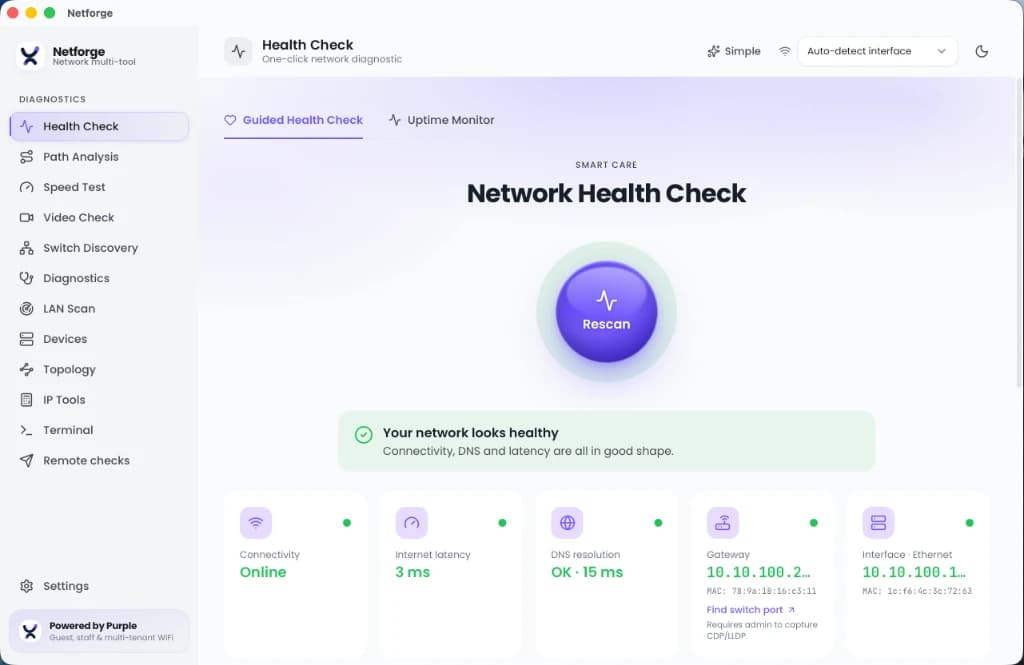
引導式健康檢查
一鍵掃描,快速進行分流診斷,免去繁雜資訊。
- 一次性檢查作用中的介面卡、閘道器延遲、DNS 解析和 HTTP 出口時間。
- 基準對比:儲存已知良好的快照,並與日後的掃描進行比較以查看變更。
- 佐證資料匯出:為客戶、ISP 或您自己的工單產生 PDF 健康報告。

路徑分析
精確找出路由上開始發生封包遺失或延遲的位置。
- 基於 Rust trippy 引擎構建,提供即時、逐跳(hop-by-hop)統計表的持續 traceroute。
- 互動式延遲時間軸,可擷取負載下的間歇性高峰。
- 顯示每個躍點(hop)的封包遺失百分比。

交換器探索 (Layer 2)
無需尋找交換器主控台,即可找出裝置所在的實體連接埠。
- 解碼 CDP 和 LLDP 廣播,以讀取交換器名稱、連接埠、原生 VLAN、管理 IP 以及宣告的功能。
- 選擇要接聽的有線介面卡。需要有線連線。

終端機與加密保存庫
進行連線和驗證,無需將密碼留在文字檔案中。
- 支援 SSH、Telnet 和序列主控台,同時適用於現代設備和舊型裝置。
- 憑證、SSH 金鑰和儲存的設定皆儲存在使用 Argon2 和 AES-GCM 加密的本機資料庫中。
- 完全不與雲端同步。即使檔案被複製,保存庫仍保持受保護狀態。

LAN 掃描與診斷
繪製子網路地圖並探測其上執行的內容。
- 對子網路進行 Ping 掃描以尋找作用中的主機。
- 探索 mDNS 和 SSDP 服務、探測 DHCP 伺服器並檢查 WiFi 頻道。
- 執行針對性探測:DNS 記錄、TCP 連接埠掃描、SSL/TLS 憑證檢查、WHOIS 和 Wake-on-LAN。

IP 與子網路工具
快速的網路運算,完全離線運作。
- 適用於 IPv4 和 IPv6 的子網路及 VLSM 計算機。
- 離線 OUI 廠商查詢,將 MAC 位址對應至製造商,每週在背景自動更新。
- 範圍檢查器:檢查位址的 RFC 狀態(公用、專用或保留)和格式。
- 設定對比:並排比較執行中(running)與啟動(startup)的路由器設定。
- 編碼/雜湊基準測試與 CSPRNG 產生器,用於快速的一次性查詢。

裝置管理
無需架設管理平台即可與交換器和路由器進行通訊。
- 對任何裝置進行 SNMP get 和 walk,無需獨立的 MIB 瀏覽器即可讀取結果。
- 內建 TFTP 伺服器,用於推送和拉取設定及韌體,無需安裝 Tftpd64。
- syslog 和 SNMP trap 接收器,用於快速查看裝置記錄和警示。

網路拓撲圖
直觀呈現網路,而不僅僅是裝置清單。
- 在執行時,根據路徑分析、交換器探索和 LAN 掃描結果建立即時的節點連結圖。
- 發現新的躍點、鄰近裝置和主機時,會自動新增至地圖中。無需手動繪製圖表。
它如何取代一整套工具
讓您免於在傳統桌面應用程式與充斥廣告的網頁計算機之間來回切換。
| 功能 | Netforge | 傳統桌面工具 | 網頁版工具 |
|---|---|---|---|
| 路徑分析 | 內建,即時動態 MTR | 需要 WinMTR 或 Ping Plotter | 不支援 |
| 交換器探索 | 內建,CDP 與 LLDP | 需要 LDWin | 不支援 |
| 認證資料儲存 | 加密本地保存庫 (Argon2, AES-GCM) | 文字檔或 PuTTY 登錄檔 | 非為此設計 |
| 安裝程式大小 | 5 至 10 MB | 50 MB 以上 | 無需安裝 |
| 離線支援 | 完全離線 | 視工具而定 | 需要網路連線 |
| 廣告與追蹤 | 無 | 有時隨附 | 通常含有廣告 |
| 裝置管理 (SNMP, TFTP, syslog) | 內建,三者皆備 | 需要 Tftpd64、Kiwi Syslog Server 與 MIB 瀏覽器 | 不支援 |
| 網路拓撲繪製 | 內建,即時節點連結圖 | 需要 LanTopoLog 或付費 NMS | 不支援 |
| 費用 | 免費 | 商業版或有限試用 | 廣告支援 |
下載 Netforge
支援 Windows、macOS 和 Linux,完全免費。大小約 5 至 10 MB。無需帳戶。
基於 Tauri 2 與 Rust 建構。
正在診斷企業場所的 WiFi 問題嗎?了解 Purple 的員工 WiFi 平台如何以憑證型存取取代共享密碼,並減少 80% 的 IT 工單。
Master Network Diagnostics & Troubleshooting
Explore in-depth technical guides covering every diagnostic discipline embedded in Netforge Network Multi-Tool.
Network Health Diagnostics
Step-by-step methodology for gateway, DNS, and TCP/UDP port checks to pinpoint connectivity failures.
Read Technical Guide →Path & Route Troubleshooting
Diagnose MTR, traceroute, hop latency variations, and packet loss across complex WAN connections.
Read Technical Guide →Speed & Bufferbloat Testing
Measure bandwidth throughput, latency under load, TCP window sizes, and active queue management.
Read Technical Guide →LAN Discovery & Topology
Learn how LLDP, CDP, mDNS, and MAC OUI vendor resolution map switches, APs, and endpoint devices.
Read Technical Guide →VoIP & Video Stream Quality
Evaluate MOS scores, RTP packet loss bounds, and SIP latency to ensure clear voice and video calls.
Read Technical Guide →Remote Worker Troubleshooting
Helpdesk guide for diagnosing home Wi-Fi bottlenecks, VPN tunnel overhead, and ISP throttling.
Read Technical Guide →常見問答
Netforge 是免費的嗎?
是的。它可以免費下載和使用,無訂閱費用、無廣告且無追蹤。
它可以在離線狀態下工作嗎?
是的。計算、掃描和憑證操作均在您的本機上執行,任何資料都不會外流。
它支援哪些平台?
Windows、macOS 和 Linux。它基於 Tauri 2 和 Rust 建構,因此安裝程式大小僅約 5 到 10 MB。
我的憑證是如何儲存的?
儲存在本機加密資料庫中。金鑰透過 Argon2 衍生,資料則使用 AES-GCM 進行封裝加密,因此即使檔案被複製出該機器,保險箱依然受到保護。
它能取代哪些工具?
PuTTY 以及其他 SSH、Telnet 或序列用戶端;用於路徑分析的 WinMTR 或 Ping Plotter;用於 CDP 和 LLDP 交換器探索的 LDWin;用於裝置管理的 Tftpd64 和 Kiwi Syslog Server,以及各種網頁版子網路和 IP 計算機。
它可以直接管理交換器和路由器嗎?
是的。它包含 SNMP get 和 walk、用於設定檔和韌體的內建 TFTP 伺服器,以及 syslog 和 trap 接收器,並提供可根據您的路徑分析、交換器探索和 LAN 掃描結果自動產生的即時拓撲圖。