
一款集路径分析、交换机发现和安全终端于一体的离线应用。
Netforge 将持续路径分析、Layer 2 交换机发现、IP 和子网计算器以及加密终端整合到单个桌面应用中。无需账户,无需订阅,所有数据均不离开您的设备。
它取代了 PuTTY、WinMTR 和 LDWin,以及 Tftpd64、Kiwi Syslog Server 和您收藏的那些广告繁多的网页计算器。

免费支持 Windows、macOS 和 Linux。大小约 5 到 10 MB。
As seen in




为什么采用这种设计

完全免费,无广告与跟踪
免费下载和使用。无订阅、无付费墙、无广告、无跟踪。

离线优先,默认私密
计算、扫描和凭据保险库均在本地运行。任何数据都不会离开您的设备。保险库采用 Argon2 密钥派生和 AES-GCM 加密进行安全封装。

5 到 10 MB,而非 500 MB
基于 Tauri 2 和 Rust 构建,因此安装包仅为 5 到 10 MB,而非 Electron 应用动辄数百兆的大小。即开即用,内存占用极低。

一个窗口,无需八个标签页
路径分析、交换机发现、扫描、设备管理、拓扑映射、终端和 IP 计算全部集成在同一个应用中。无需在半打单一用途的工具之间来回切换。
内置功能

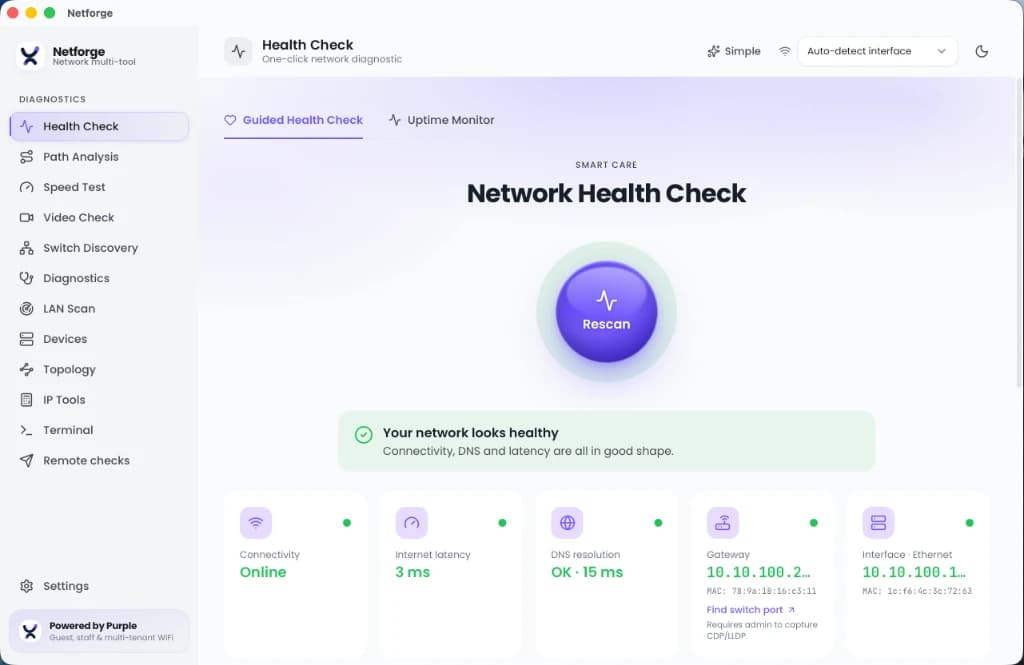
引导式健康检查
一键扫描,快速排查,告别繁杂信息。
- 一次性检查活动适配器、网关延迟、DNS解析和HTTP出口耗时。
- 基线对比:保存已知良好的快照,并与后续扫描进行对比以查看变化。
- 凭证导出:为客户、ISP或您自己的工单生成PDF健康报告。

路径分析
精确查找路由中开始出现丢包或延迟的位置。
- 基于Rust trippy引擎构建,提供包含实时逐跳统计表的持续路由跟踪。
- 交互式延迟时间线,捕获负载下的间歇性峰值。
- 显示每个跃点的丢包百分比。

交换机发现(第2层)
无需寻找交换机控制台,即可查找设备所在的物理端口。
- 解码CDP和LLDP广播,以读取交换机名称、端口、原生VLAN、管理IP和宣告的功能。
- 选择要监听的有线适配器。需要有线连接。

终端与加密保险库
进行连接和身份验证,无需在文本文件中留存密码。
- 支持SSH、Telnet和串口控制台,兼容现代设备和传统硬件。
- 凭据、SSH密钥和保存的配置存储在通过Argon2和AES-GCM加密的本地数据库中。
- 无需同步到云端。即使文件被复制,保险库依然安全。

局域网扫描与诊断
绘制子网地图并探测其中运行的服务。
- 对子网进行Ping扫描以查找活动主机。
- 发现mDNS and SSDP服务,探测DHCP服务器,并检查WiFi信道。
- 运行针对性探测:DNS记录、TCP端口扫描、SSL/TLS证书检查、WHOIS和网络唤醒(Wake-on-LAN)。

IP与子网工具
快速网络计算,完全离线运行。
- 适用于IPv4和IPv6的子网及VLSM计算器。
- 离线OUI厂商查询,将MAC地址映射到制造商,每周在后台自动更新。
- 范围检查器:检查地址的RFC状态(公网、私网或保留地址)和格式。
- 配置对比:并排对比路由器的运行配置和启动配置。
- 编码/哈希基准测试和CSPRNG生成器,用于快速单次查询。

设备管理
无需搭建管理平台,即可与交换机和路由器进行通信。
- 对任何设备执行SNMP get和walk操作,无需独立的MIB浏览器即可读取结果。
- 内置TFTP服务器,用于推送和拉取配置及固件,无需安装Tftpd64。
- Syslog和SNMP trap接收器,用于快速查看设备日志和告警。

网络拓扑图
直观呈现网络,而不仅仅是设备列表。
- 在运行时,根据路径分析、交换机发现和局域网扫描结果构建实时的节点链路图。
- 发现新的跃点、邻居和主机时,它们会自动添加到地图中。无需手动绘图。
如何替代一整套工具
无需再在传统桌面应用和广告繁多的网页计算器之间来回切换。
| 功能 | Netforge | 传统桌面工具 | 网页端工具 |
|---|---|---|---|
| 路径分析 | 内置,实时动态 MTR | 需要 WinMTR 或 Ping Plotter | 不支持 |
| 交换机发现 | 内置,CDP 和 LLDP | 需要 LDWin | 不支持 |
| 凭据存储 | 加密本地保险库 (Argon2, AES-GCM) | 文本文件或 PuTTY 注册表 | 并非为此设计 |
| 安装包大小 | 5 至 10 MB | 50 MB 及以上 | 无需安装 |
| 离线支持 | 完全离线 | 因工具而异 | 需要网络连接 |
| 广告与追踪 | 无 | 有时捆绑 | 通常含有广告 |
| 设备管理 (SNMP, TFTP, syslog) | 内置,支持全部三项 | 需要 Tftpd64、Kiwi Syslog Server 和 MIB 浏览器 | 不支持 |
| 网络拓扑映射 | 内置,实时节点链路图 | 需要 LanTopoLog 或付费 NMS | 不支持 |
| 费用 | 免费 | 商业收费或有限试用 | 广告支持 |
下载 Netforge
免费支持 Windows、macOS 和 Linux。大小约 5 到 10 MB。无需账户。
基于 Tauri 2 和 Rust 构建。
正在诊断企业场所的 WiFi 问题?了解 Purple 的员工 WiFi 平台如何通过基于证书的访问取代共享密码,并将 IT 工单减少 80%。
Master Network Diagnostics & Troubleshooting
Explore in-depth technical guides covering every diagnostic discipline embedded in Netforge Network Multi-Tool.
Network Health Diagnostics
Step-by-step methodology for gateway, DNS, and TCP/UDP port checks to pinpoint connectivity failures.
Read Technical Guide →Path & Route Troubleshooting
Diagnose MTR, traceroute, hop latency variations, and packet loss across complex WAN connections.
Read Technical Guide →Speed & Bufferbloat Testing
Measure bandwidth throughput, latency under load, TCP window sizes, and active queue management.
Read Technical Guide →LAN Discovery & Topology
Learn how LLDP, CDP, mDNS, and MAC OUI vendor resolution map switches, APs, and endpoint devices.
Read Technical Guide →VoIP & Video Stream Quality
Evaluate MOS scores, RTP packet loss bounds, and SIP latency to ensure clear voice and video calls.
Read Technical Guide →Remote Worker Troubleshooting
Helpdesk guide for diagnosing home Wi-Fi bottlenecks, VPN tunnel overhead, and ISP throttling.
Read Technical Guide →常见问题解答
Netforge 是免费的吗?
是的。它可以免费下载和使用,无订阅、无广告、无跟踪。
它支持离线工作吗?
是的。计算、扫描和凭据操作均在您的本地机器上运行,任何数据都不会离开您的设备。
它支持哪些平台?
Windows、macOS 和 Linux。它基于 Tauri 2 和 Rust 构建,因此安装包大小仅约 5 到 10 MB。
我的凭据是如何存储的?
存储在本地加密数据库中。密钥通过 Argon2 派生,数据采用 AES-GCM 加密密封,因此即使文件被复制出机器,保险库依然安全受保护。
它能替代哪些工具?
PuTTY 及其他 SSH、Telnet 或串口客户端,用于路径分析的 WinMTR 或 Ping Plotter,用于 CDP 和 LLDP 交换机发现的 LDWin,用于设备管理的 Tftpd64 和 Kiwi Syslog Server,以及各种基于 Web 的子网和 IP 计算器。
它能直接管理交换机和路由器吗?
是的。它包含 SNMP get 和 walk、用于配置和固件的内置 TFTP 服务器、syslog 和 trap 接收器,以及一个可根据您的路径分析、交换机发现和 LAN 扫描结果自动生成的实时拓扑图。