
为什么 5GHz 速度更快,而 2.4GHz 更可靠
本综合技术指南深入探讨了 2.4GHz 和 5GHz 无线频段之间的架构权衡,为 IT 经理和网络架构师提供可操作的部署策略。内容涵盖频段传播物理学、信道规划、频段导航(Band Steering)以及酒店、零售和公共部门环境中的实际部署场景。场所运营者和 CTO 将获得有关优化覆盖范围、减少干扰以及衡量无线基础设施投资 ROI 的具体指导。
Video overview
收听本指南
查看播客转录
核心系列的一部分:访客 WiFi 指南 →
Dual-Band WiFi RF Propagation & Capacity Planner
Simulate how 2.4GHz and 5GHz radio frequencies propagate through distance and physical obstacles. Calculate received RSSI, co-channel contention risk, and recommended transmit power offsets.
Standard office partition wall causing mild high-frequency absorption.
2.4 GHz Frequency Band
Higher Range & Penetration5 GHz Frequency Band
Higher Speed & Clean AirRecommended Dual-Band RF Architecture Settings
Setting 5GHz TX power 6 dBm higher than 2.4GHz equalizes physical cell boundaries, eliminating sticky 2.4GHz associations.
Direct dual-band clients to 5GHz when signal exceeds -70 dBm. Allow devices falling below -75 dBm to roam onto 2.4GHz.
Balanced density allows 40MHz channel bonding on 5GHz for doubled single-client throughput.
Need an Enterprise RF Predictive Model for Your Facility?
Purple works with leading network vendors to design, optimise, and secure dual-band and tri-band enterprise WiFi networks. Speak with our wireless specialists for an RF heat map and capacity consultation.

执行摘要
对于管理企业级无线部署的 CTO 和网络架构师而言,在 2.4GHz 与 5GHz 之间进行抉择并非非此即彼的简单选择,而是一项基础性的架构策略。5GHz 能够提供高密度环境和复杂应用所需的海量吞吐量,而 2.4GHz 则提供了穿透物理障碍和支持传统 IoT 设备所需的关键覆盖层。本指南深入剖析了这两个频段背后的物理原理,解释了为什么 5GHz 能带来指数级的速度提升,以及为什么 2.4GHz 对于基础可靠性而言依然不可或缺。我们针对信道规划、发射功率调优以及智能频段导航提供了与厂商无关的、可操作的建议。通过实施由强大的分析平台(如 Guest WiFi)支持且经过妥善调优的双频策略,场所运营者可以降低风险、优化 ROI,并在 Hospitality、Retail、Healthcare 和 Transport 环境中提供无缝的连接体验。
技术深度剖析
频率的物理学:为什么波长决定一切
2.4GHz 与 5GHz 之间的根本区别在于它们的波长。2.4GHz 频段工作在较长的波长(约 12.5 厘米)上,这使其能够高效穿透实体对象,例如混凝土墙、钢门,甚至是拥挤场所中的人体。这种物理特性正是 2.4GHz 能够提供更广泛的覆盖范围,并且在用户穿过复杂环境或距离接入点较远时通常被认为更可靠的原因。
然而,这种更远的传输距离也伴随着重大的权衡。2.4GHz 频谱极其狭窄,在大多数监管区域中仅提供三个互不重叠的信道(1、6 和 11)。在密集部署的环境中 - 例如酒店楼层、零售商店、会议中心 - 这不可避免地会导致严重的同信道干扰(CCI)。此外,2.4GHz 频段是一项共享且拥挤的资源:它会与 Bluetooth 设备、微波炉、婴儿监视器以及日益庞大的传统 IoT 硬件生态系统发生冲突,所有这些都会拖累网络上每个设备的整体吞吐量。相反,5GHz频段在较短的波长(大约6厘米)上运行。虽然这限制了其穿透物理障碍的能力 - 在2.4GHz下可以轻松穿过墙壁的信号在5GHz下可能会被完全阻挡 - 但它提供了极宽的频谱。由于有多达24个非重叠信道可用(取决于监管区域和DFS信道的可用性),5GHz允许更宽的信道绑定:在IEEE 802.11ac(Wi-Fi 5)和802.11ax(Wi-Fi 6/6E)下可达到40MHz、80MHz甚至160MHz。这种更宽的信道是实现高密度环境、高清视频流和现代企业级应用所需的大吞吐量的关键。当设备在视线无遮挡的情况下连接到5GHz时,可实现的速度呈指数级高于2.4GHz所能提供的速度。
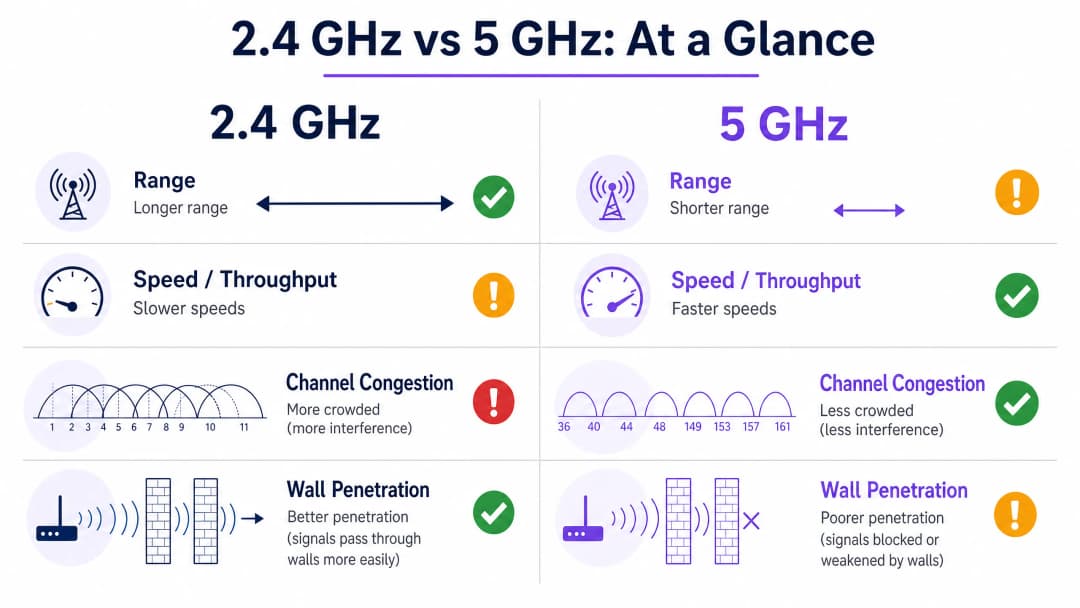
信道架构与干扰模型
理解信道架构对任何企业级部署都至关重要。在2.4GHz上,IEEE 802.11标准定义了14个信道(尽管监管区域有所不同),但只有信道1、6和11是真正非重叠的。这意味着在任何给定的区域内,最多只能有三个AP同时运行而不会引起邻频干扰。在多层酒店或密集的零售环境中,这种限制成为了网络容量的硬上限。
在5GHz上,情况则大不相同。UNII-1 (5.15-5.25 GHz)、UNII-2 (5.25-5.35 GHz)、UNII-2 Extended (5.47-5.725 GHz) 和 UNII-3 (5.725-5.85 GHz) 频段共同提供了多达24个非重叠的20MHz信道。网络架构师可以在同一物理空间内部署明显更多的AP而不会产生干扰,从而实现体育馆、会议中心和大型零售环境所需的高密度设计。
动态频率选择(DFS)信道属于UNII-2和UNII-2 Extended频段,它们进一步扩大了可用频谱,但需要仔细权衡。这些信道必须与雷达系统共享,检测到雷达信号的AP必须在10秒内腾出该信道,并保持脱离该信道30分钟。在靠近机场或气象站的环境中,DFS信道的不稳定性可能会中断关键服务,因此架构师应相应地规划备用信道。
实施指南
双频架构与频段引导
现代无线架构的行业标准方法是采用具有强力频段引导的双频部署。必须配置AP以积极引导具备双频能力的设备 - 如现代智能手机、笔记本电脑和平板电脑 - 接入5GHz频段。这一策略为传统设备、关键的IoT传感器以及5GHz无法触及的边缘覆盖区域腾出了2.4GHz的空间。
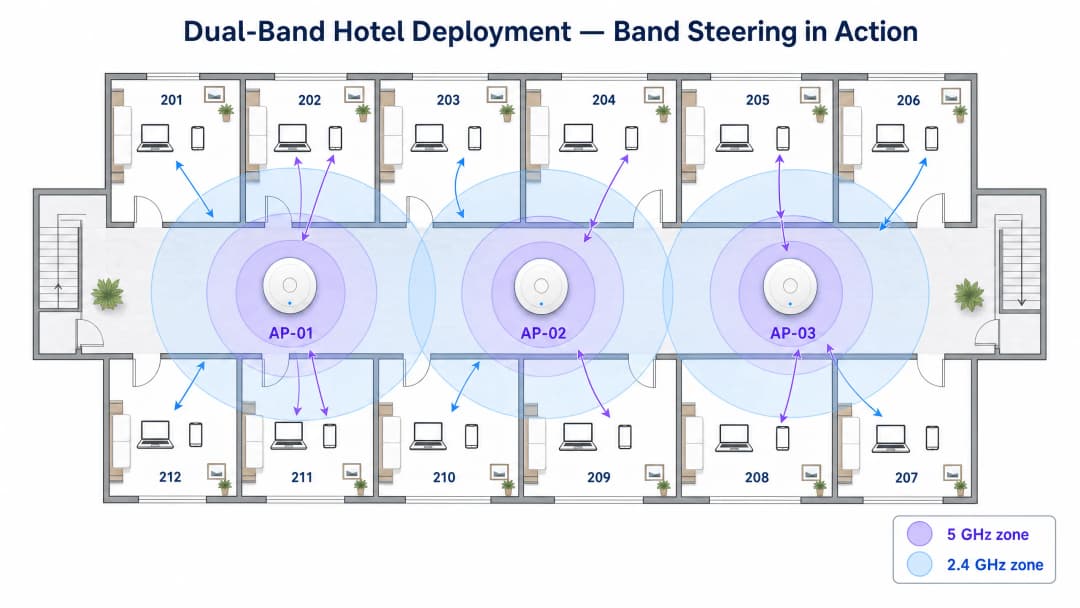
双频引导的工作原理是:对具备双频能力的客户端抑制 2.4GHz 探测响应,直到它们在 5GHz 上进行关联,或者在达到定义的尝试次数后仍未响应。大多数企业级基础设施厂商都原生实现了这一功能,但引导策略的积极程度必须根据环境进行调整。在存在较多老旧设备的场所 - 例如公共部门建筑或医疗机构 - 过于积极的双频引导可能会导致合法的仅支持 2.4GHz 的设备完全无法连接。
针对容量而非覆盖范围进行设计
在 酒店住宿 和 零售零售 部署中,一个常见且代价高昂的误区是提高 5GHz 射频的发射功率,以试图匹配 2.4GHz 的覆盖范围。这种方法会产生“粘性客户端”问题:设备会紧紧抓住微弱的 5GHz 信号,而不是漫游到更强的接入点,从而导致受影响客户端的性能下降,并消耗空口时间,进而降低该信道内所有其他客户端的性能。
正确的方法是通过部署更多低发射功率设置的接入点,针对容量进行设计。较小且定义明确的覆盖信道可确保无缝漫游、最佳信道复用以及跨网络的均衡负载。作为一个实用的规则,5GHz 发射功率通常应设置为比 2.4GHz 发射功率高 6 - 9 dBm,从而创造一个自然的覆盖差异,鼓励客户端在靠近 AP 时优先选择 5GHz,并在信道边缘时回退到 2.4GHz。
集成像 Purple 的 WiFi Analytics 这样与硬件无关的平台,可以让场所运营商捕获这两个频段的性能数据,提供识别粘性客户端、高干扰区域和性能不佳的接入点所需的可见性。这种数据驱动的网络优化方法在活动场馆等动态环境中特别有价值,因为这些环境的射频环境在不同活动之间会发生剧烈变化。
逐步部署清单
| 阶段 | 操作 | 标准 / 参考 |
|---|---|---|
| 1. 射频勘测 | 进行被动和主动站点勘测,以绘制现有干扰源的地图 | IEEE 802.11-2020 |
| 2. 信道规划 | 分配不重叠的信道;在 2.4GHz 上使用 1、6、11 信道;谨慎在 5GHz 上分配 DFS 信道 | Wi-Fi Alliance 最佳实践 |
| 3. 功率调整 | 将 5GHz 发射功率设置为高于 2.4GHz 6 - 9 dBm;避免使用最大功率设置 | 厂商特定 RRM 指南 |
| 4. 双频引导 | 启用双频引导;根据设备组合调整积极程度 | IEEE 802.11v (BSS 转换) |
| 5. 最小 RSSI | 配置最小 RSSI 阈值以防止粘性客户端 | 厂商特定 |
| 6. 安全性 | 在访客网络上部署 WPA3-SAE;在企业 SSID 上部署 WPA3-Enterprise (IEEE 802.1X) | WPA3 规范、GDPR |
| 7. 数据分析 | 部署 WiFi Analytics 以监控频段利用率、客户端数量和漫游事件 | Purple Platform |
对您的具体配置有疑问吗?
我们的团队与 80,000 多个场所的运营方、IT 经理和网络工程师保持合作。预约 20 分钟的通话,我们将为您展示同行是如何解决类似问题的。
最佳实践
严格的信道规划是必不可少的。在 2.4GHz 频段上坚持使用 1、6 和 11 信道,以避免相邻信道干扰。在 5GHz 频段上,在环境允许的情况下利用 DFS 信道,但针对雷达触发的信道变更需保持一份记录在册的备用方案。
在两个频段上禁用传统数据速率。在 2.4GHz 上移除对 802.11b 数据速率(1、2、5.5 和 11 Mbps)的支持,可显著减少管理开销,并迫使信号较差的客户端漫游到更近的接入点,而不是维持在已降级的连接上。在密集环境中,仅这一项配置更改就可以将整体网络效率提高 20 - 30%。
部署 802.11r (快速 BSS 切换) 以实现接入点之间的无缝漫游。在用户移动的环境中 - 如零售卖场、医院病房、交通枢纽 - 802.11r 将漫游切换时间从几百毫秒缩短到 50 毫秒以下,这对于 voice-over-WiFi 和实时应用至关重要。
按用途划分 SSID。避免将所有流量运行在单个 SSID 上的做法。一个合理划分的网络应将访客流量(通过配备相应 Captive Portal 和数据捕获的 Guest WiFi 进行管理)、企业流量(使用 IEEE 802.1X 和 WPA3-Enterprise 进行安全保护)以及 IoT 设备(隔离在专用 VLAN 上)分离开来。这种划分还支持处理卡支付的零售环境符合 PCI-DSS 合规性。
故障排除与风险缓解
同信道干扰 (CCI)
风险:在彼此覆盖范围内的多个接入点在同一信道上运行,导致设备在传输前必须等待空闲信道时间。这是企业环境中导致 WiFi 性能不佳的最常见单一原因。
缓解措施:部署自动无线电资源管理 (RRM) 或每季度手动审计信道分配。使用频谱分析工具识别流氓接入点和非 WiFi 干扰源。在多租户大楼中,尽可能与邻近租户协调信道规划。
粘性客户端
风险:设备即使在有更强信号可用时,仍保持连接到信号较弱的接入点,从而消耗信道时间并降低小区性能。
缓解措施:配置最小 RSSI 阈值(通常为 - 70 至 - 75 dBm)以温和地断开信号较差的客户端连接。结合 802.11v BSS 切换管理,在必须进行断开连接之前引导客户端连接到更好的接入点。
DFS 信道不稳定性
风险:雷达探测事件迫使接入点离开 DFS 信道,导致关联的客户端出现短暂的连接中断。
缓解措施:在靠近机场、军事设施或气象站的环境中,请完全避免使用 DFS 信道。在其他环境中,确保将接入点配置为移至预定义的备用信道,而不是动态选择新信道,因为后者可能导致不可预测的干扰。
IoT 设备兼容性
风险:传统 IoT 设备 - 如环境传感器、支付终端、门禁读卡器 - 可能仅支持 2.4GHz 和较旧的安全协议,如果这些设备与访客或企业流量共享同一网络,则会带来安全漏洞。
缓解措施:将 IoT 设备隔离在专用的 SSID 和 VLAN 上。确保不要为了简化网络而禁用 2.4GHz 无线电频段,否则会导致这些设备无法工作。有关在高密度 IoT 环境中管理网络地址限制的指导,请参阅我们的指南:在学生公寓中管理公网 IP 枯竭。
投资回报率(ROI)与业务影响
架构合理的双频网络可在各个行业带来可衡量的业务成果。在 酒店业,可靠的高速 WiFi 一直是宾客满意度评分的首要因素之一,直接影响着点评评级和重复预订率。经过精心调优的 5GHz 部署可确保宾客能够毫无中断地流式传输内容、进行视频通话并使用云应用程序,而 2.4GHz 层则可确保即使在距离接入点最远的客房内也能保持连接。
在 零售业 环境中,商业案例更为直接。可靠的 5GHz 网络可确保销售终端系统在无延迟的情况下处理交易,而 2.4GHz 网络则支持货架深处的库存扫描枪。由于射频环境设计不佳而导致的停机时间会直接转化为收入损失。通过利用 WiFi Analytics,零售运营商还可以测量停留时间和客流量模式,将网络基础设施转化为第一方数据资产。
对于公共部门组织和交通运营商,ROI 的计算既包括风险控制,也包括直接收入。在高峰需求期间(例如体育场活动、通勤早晚高峰)发生故障的网络会造成难以量化但通过合理架构极易避免的名誉损失。Purple 在该领域的工作,包括任命专门负责公共部门数字包容性的专业领导人(详见 Iain Fox 声明),反映出人们日益认识到企业级 WiFi 是关键的公共基础设施。无密码认证技术的出现(正如我们在 WiFi助手如何在2026年实现无密码访问 指南中所探讨的)通过减少支持开销和改善访客入网体验,进一步提高了精心设计的网络的ROI。离线弹性功能(例如 Purple的离线地图模式 中所述的功能)可确保即使在上行链路连接降级时,用户体验也能保持完好。
合理调优的双频部署的预期效果:
| 指标 | 典型提升 |
|---|---|
| 访客 WiFi 满意度得分 | +15 - 25% |
| 网络相关的支持工单 | - 30 - 40% |
| 峰值时段单客户端吞吐量 | +40 - 60% |
| 漫游切换时间(使用 802.11r) | - 80%(从约 300ms 降至 <50ms) |
| 2.4GHz 空口占用率 | - 20 - 30%(分流至 5GHz) |
关键定义
频段导航 (Band Steering)
一种接入点抑制双频客户端 2.4GHz 探测响应的机制,从而鼓励其关联到 5GHz 频段。
对于在密集环境中优化空口时间利用率至关重要。必须仔细调整以避免阻止合法的仅限 2.4GHz 设备。
共信道干扰 (CCI)
当两个或多个在相同信道上运行的接入点处于彼此能接收到信号的距离内时发生的干扰,这会导致 CSMA/CA 协议强制设备在传输前等待空闲的空口时间。
企业部署中导致 WiFi 性能不佳的主要原因。通过精细的信道规划和适当的 AP 密度可缓解此问题。
信道绑定
将相邻的 20MHz 信道组合以创建更宽信道(40MHz、80MHz、160MHz)的做法,从而提高关联客户端的可用吞吐量。
在 5GHz 上对高带宽应用非常有效。由于可用频谱有限,在 2.4GHz 上应避免使用。
动态频率选择 (DFS)
一项监管要求,强制在某些 5GHz 信道上运行的 WiFi 设备探测并避开雷达信号,如果探测到雷达,则必须在 10 秒内腾出该信道。
扩展了可用的 5GHz 信道集,但在雷达探测事件期间引入了信道变更的风险。在机场和军事设施附近需要进行仔细规划。
接收信号强度指示 (RSSI)
对接收到的无线电信号中存在的功率的测量,通常以 dBm 表示(负值,越接近 0 表示信号越强)。
用于确定客户端健康状况、触发漫游事件以及在站点勘测期间验证覆盖范围。可靠的企业 WiFi 运行通常需要至少 - 70 dBm 的强度。
粘性客户端 (Sticky Client)
尽管存在更强信号的接入点,但设备在信号较弱(低 RSSI)时仍保持与当前接入点关联。发生这种情况是因为 802.11 标准赋予了客户端对漫游决策的完全控制权。
会降低受影响客户端的性能,并消耗空口时间,从而降低小区内所有其他客户端的性能。可通过最小 RSSI 阈值和 802.11v BSS 转换管理来缓解此问题。
吞吐量
在特定时间段内通过网络成功传输的实际数据量,与接入点宣传 transition 到的理论最大数据速率(PHY速率)不同。
用户体验的实际衡量指标。由于协议开销、重传和共享空口时间,吞吐量总是低于物理层速率 (PHY rate)。
无线电资源管理 (RRM)
一种自动系统,可动态调整一组接入点的信道分配和发射功率水平,以最大限度地减少干扰并优化覆盖范围。
适用于大多数企业级无线控制器。减少了手动信道规划的运营开销,但应定期进行验证,因为在复杂环境中 RRM 的决策并不总是最优的。
IEEE 802.11r (快速 BSS 过渡)
802.11标准的一项修正案,可对邻近接入点的客户端进行预身份验证,将漫游切换时间从几百毫秒缩短至50毫秒以内。
对于 voice-over-WiFi、实时应用以及零售卖场和医院病房等移动员工环境至关重要。
应用实例
一家拥有 200 间客房的酒店在晚上高峰期(18:00 - 22:00)频繁收到 WiFi 网速慢的投诉。目前的部署采用走廊安装的接入点,2.4GHz 和 5GHz 射频均设置为最大发射功率。现场调查显示,大多数客房距离最近的 AP 有 8 - 12 米,且设备与 AP 之间隔着两堵混凝土墙。
步骤 1 - 降低两个频段的发射功率。将 5GHz 设置为 17 dBm,2.4GHz 设置为 10 dBm。这创造了自然的覆盖差异,鼓励客户端在靠近 AP 时优先选择 5GHz,并在信道边缘回退到 2.4GHz,从而减少粘性客户端事件。
步骤 2 - 启用强力频段导航。配置基础设施,对支持双频的设备抑制 2.4GHz 探测响应至少 200 毫秒,从而给予 5GHz 优先级。通过分析平台监控频段利用率,目标是在高峰时段将 70 - 80% 的客户端引导至 5GHz。
步骤 3 - 禁用 2.4GHz 上的传统 802.11b 速率(1, 2, 5.5, 11 Mbps)。这减少了管理开销,并迫使信号较差的客户端进行漫游,而不是继续保持已降级的连接。
步骤 4 - 实施 802.11r 快速 BSS 过渡,并配置最小 RSSI 阈值为 - 72 dBm,以确保客户端在信号质量降至可用水平以下之前进行漫游。
步骤 5 - 计划对前三个楼层(投诉最密集的楼层)进行分阶段升级,改用客房内接入点。房内 AP 为访客设备提供直接的 5GHz 视线传播,彻底解决这些楼层的穿墙问题。
一个大型零售仓库(15,000 平方米)需要为企业办公区域(50 名员工使用笔记本电脑和视频会议)和仓库地面(200 个在 8 米高的金属货架间穿梭的传统条码扫描枪)提供 WiFi 连接。现有网络在两个频段上使用同一个 SSID。
步骤 1 - 进行网络分段。创建三个 SSID:CORP(WPA3-Enterprise,802.1X,优先使用 5GHz)、WAREHOUSE(WPA2-PSK,仅限 2.4GHz,隔离 VLAN)以及 GUEST(通过 Purple 访客 WiFi 的 Captive Portal,双频)。
步骤 2 - 针对 5GHz 容量设计办公区域。以 10 - 12 米的间距部署接入点,并在 5GHz 上使用 80MHz 信道绑定,以满足高吞吐量视频会议的需求。禁用办公区域 AP 的 2.4GHz 频段,或将其功率降至最低。
步骤 3 - 专门针对 2.4GHz 可靠性设计仓库区域。金属货架会给 5GHz 带来严重的多径效应环境,导致信号迅速衰减。在每条通道的尽头部署 AP,并采用针对 2.4GHz 优化的功率水平。在各个通道间严格交替使用信道 1、6 和 11,以最大限度减少 CCI。
步骤 4 - 通过步行测试测量每条通道远端的 RSSI,以验证扫描枪的连接性。目标是达到至少 - 65 dBm,以确保扫描枪的可靠运行。
步骤 5 - 整合 Purple WiFi Analytics 以监控扫描枪漫游事件,并识别任何存在覆盖盲区的通道。
练习题
Q1. 您正在为一间预计容纳 300 名学生、每人携带 2 - 3 台设备的新大学阶梯教室设计 WiFi 网络。该大厅天花板平整,高度为 4 米,无内墙。您的主要频率策略和 AP 部署方法是什么?
提示:考虑设备的密度、物理环境以及减少同信道干扰的需求。
查看标准答案
主要策略是高密度 5GHz 覆盖。由于单个房间内有多达 900 台设备,2.4GHz 频段因其三信道限制会立即饱和。在天花板上部署 6 - 8 个带有定向天线的接入点,创建小型、非重叠的 5GHz 覆盖信道单元。将发射功率设低(5GHz 上为 12 - 15 dBm),以确定紧凑的信道单元边界并防止粘性客户端。启用积极的频段引导,并在大多数 AP 上禁用 2.4GHz,仅在教室后方的 1 - 2 个 AP 上保持其处于活动状态,以供任何传统设备使用。在 5GHz 上使用 40MHz 信道绑定,以平衡吞吐量和信道复用。
Q2. 一位医院 IT 主管报告称,医疗遥测推车在病房之间移动时经常断开 WiFi 连接。该网络是双频网络,且启用了频段引导。最可能的原因是什么?您推荐的补救措施是什么?
提示:考虑漫游行为、医院建筑的物理特征以及频段引导对移动设备的影响。
查看标准答案
最可能的原因是粘性客户端行为和过于积极的频段引导相结合。推车在穿过混凝土墙时可能仍保持微弱的 5GHz 信号,而不是漫游到更强的 AP。当它们最终进行漫游时,切换延迟导致应用程序连接中断。补救措施:(1) 审计发射功率设置 - 确保 2.4GHz 设置低于 5GHz,以创建清晰的信道单元边界。(2) 配置最小 RSSI 阈值为 - 70 dBm,以便在信号降至无法使用的水平之前触发漫游。(3) 实施 802.11r 快速 BSS 过渡,将漫游切换时间缩短至 50毫秒以内。(4) 如果遥测应用程序只需要低带宽,可以考虑将推车配置为仅连接到 2.4GHz,这将通过医院的混凝土墙提供更稳定的覆盖。
Q3. 一家零售连锁店希望在 50 家门店部署基于 WiFi 的位置分析,以衡量停留时间和客户路径规划。该分析平台应该主要依赖 2.4GHz 还是 5GHz 的探测数据?为什么?
提示:考虑设备最频繁探测的频率、对三角定位精度产生的影响范围,以及类似 Purple WiFi Analytics 等平台的作用。
查看标准答案
位置分析应主要依靠 2.4GHz 探测数据,原因有两点。第一,2.4GHz 的覆盖范围更广,这意味着接入点可以检测到更远距离的设备探测请求,从而为三角定位提供更多的数据点并提高准确性。第二,许多智能手机在 2.4GHz 上仍会更积极地进行探测以节省电量,从而产生更大数量的探测数据。然而,像 Purple 的 WiFi Analytics 这样强大的平台会汇总来自这两个频段的探测数据,以实现最大化的覆盖范围和准确性。同样重要的是,iOS 14+ 和 Android 10+ 对探测请求实施了 MAC 地址随机化,这要求分析平台使用统计指纹识别技术,而不是仅仅依赖基于 MAC 的跟踪。
常见问题
Why is 5GHz WiFi faster than 2.4GHz WiFi?
5GHz WiFi is faster primarily because of wider channel availability and lower radio congestion. While 2.4GHz is constrained to three non-overlapping 20MHz channels (1, 6, 11), 5GHz offers up to 25 non-overlapping channels in UNII bands. This allows 5GHz to bond multiple channels into 40MHz, 80MHz, or 160MHz blocks, dramatically increasing PHY data rates without causing co-channel interference.
Why does 2.4GHz WiFi have better range and wall penetration than 5GHz?
Radio waves at lower frequencies experience less Free Space Path Loss (FSPL) and lower attenuation through solid materials. Because 2.4GHz has a longer wavelength (~12.5 cm vs ~6 cm for 5GHz), it passes through drywall, wood, and concrete with significantly lower absorption and scattering. 5GHz signals attenuate roughly 6 to 8 dB faster in free space and lose substantially more power traversing dense obstacles.
What is the recommended transmit power difference between 2.4GHz and 5GHz access points?
In enterprise dual-band deployments, network engineers recommend configuring 5GHz transmit power 6 to 9 dBm higher than 2.4GHz (for example, setting 2.4GHz to 11 dBm and 5GHz to 17 dBm). Because 2.4GHz signals propagate further at equal power, setting identical transmit levels causes clients at cell edges to cling to 2.4GHz, degrading overall network airtime efficiency. The 6-9 dBm offset equalizes the physical coverage boundaries of both radios.
How does band steering work to optimize enterprise client distribution?
Band steering is an access point feature that detects whether an associating client is dual-band capable. When a dual-band client probes on both frequencies, the AP intentionally delays or suppresses probe responses on the 2.4GHz radio while responding immediately on 5GHz. Standard-compliant networks also utilize 802.11v BSS Transition Management frames to steer capable devices to 5GHz when signal strength exceeds -70 dBm.
继续阅读本系列
深入理解 RSSI 与信号强度以实现最佳信道规划
本指南对 RSSI、信噪比 (SNR) 和射频 (RF) 传播原理进行了全面的技术深度探讨,以实现最佳信道规划。它为 IT 经理、网络架构师和场所运营总监提供了切实可行的策略,以减轻同频干扰和邻频干扰、优化 AP 部署,并利用分析在酒店、零售和公共部门环境中实现可衡量的业务效益。
WiFi 6 对比 WiFi 5:它能否解决信道干扰问题?
本指南深入探讨了 WiFi 6 (802.11ax) 如何通过 OFDMA 和 BSS Coloring 技术,解决高密度企业环境中的信道干扰问题。它为 IT 经理、网络架构师和 CTO 提供了可操作的部署策略、来自酒店和医疗行业的真实案例研究,以及一套用于评估无线性能至关重要的场所中基础设施升级投资回报率 (ROI) 的框架。
高密度场馆最佳 WiFi 信道选择
在体育场、体育馆和大型公共场所等高密度环境中选择和优化 WiFi 信道的确定性技术参考。它涵盖了射频物理学、5 GHz 和 6 GHz 频段的信道复用策略,以及为 IT 领导者提供的可行部署指南。
对您的具体配置有疑问吗?
我们的团队与 80,000 多个场所的运营方、IT 经理和网络工程师保持合作。预约 20 分钟的通话,我们将为您展示同行是如何解决类似问题的。