

Autenticación EAP-TLS explicada: Seguridad WiFi basada en certificados
EAP-TLS es el estándar de oro para la seguridad WiFi empresarial, sustituyendo la vulnerable autenticación basada en contraseñas por certificados digitales robustos con autenticación mutua. Esta guía ofrece a los gerentes de TI y arquitectos de red un análisis técnico profundo sobre el handshake de EAP-TLS, los requisitos de arquitectura y las estrategias prácticas de implementación para entornos de dispositivos mixtos.
🎧 Escucha esta guía
Ver transcripción
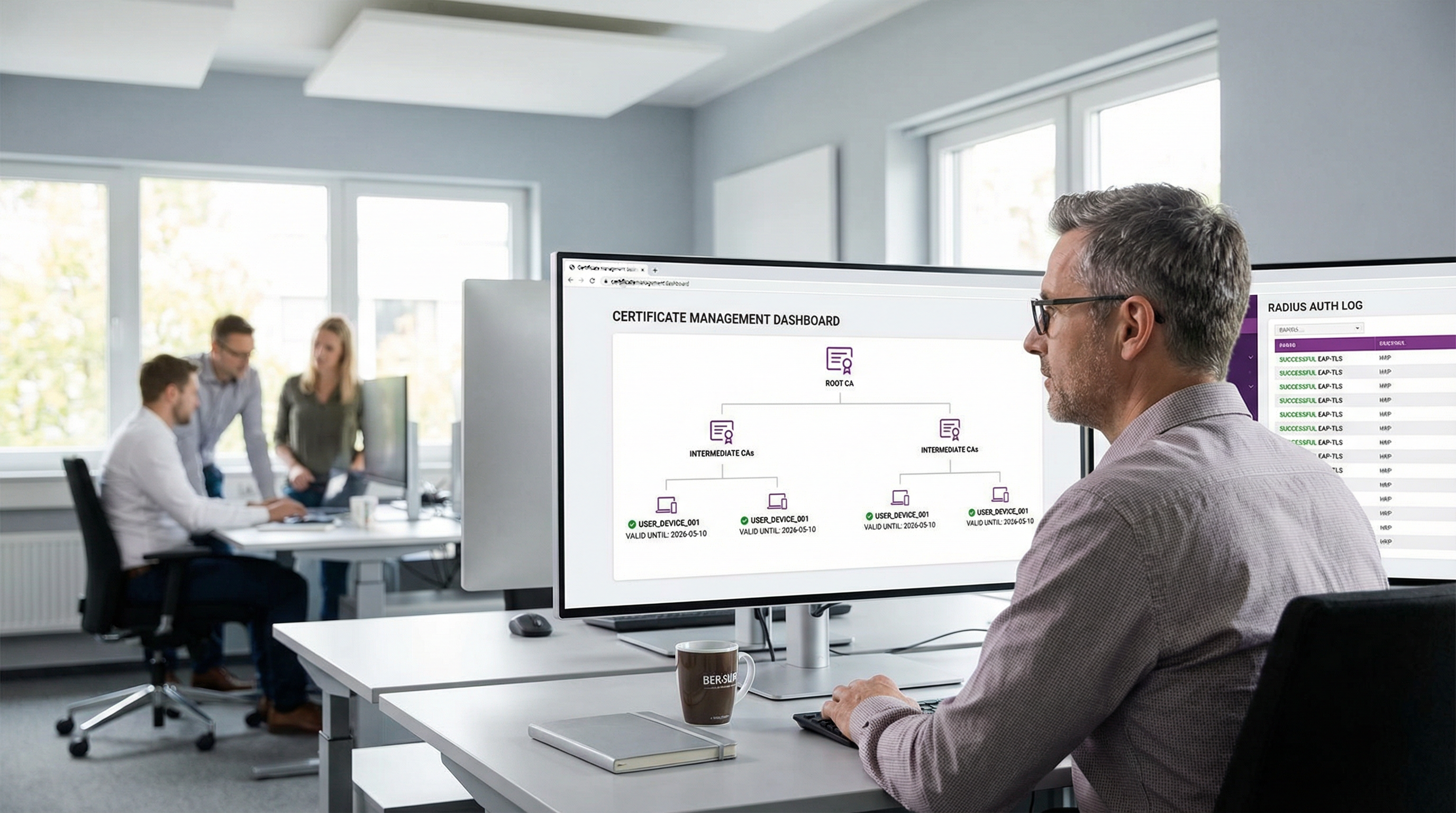
Resumen ejecutivo
Para los entornos empresariales, que van desde sedes corporativas hasta cadenas de Retail e instalaciones del Sector salud , proteger el acceso inalámbrico ya no es solo un requisito operativo: es un mandato crítico de cumplimiento. Históricamente, las organizaciones han confiado en PEAP-MSCHAPv2, que protege un nombre de usuario y una contraseña dentro de un túnel TLS. Sin embargo, en una era de recolección de credenciales desenfrenada y ataques de phishing sofisticados, la autenticación basada en contraseñas a través de WiFi representa una vulnerabilidad significativa.
Aquí entra EAP-TLS (Extensible Authentication Protocol - Transport Layer Security). EAP-TLS representa el estándar de oro en el control de acceso a la red 802.1X. En lugar de depender de contraseñas generadas por el usuario, EAP-TLS exige la autenticación mutua mediante certificados digitales X.509. Tanto el dispositivo cliente como el servidor de autenticación deben demostrar su identidad antes de que se conceda cualquier acceso a la red. Este enfoque elimina el riesgo de robo de credenciales, mitiga los ataques de man-in-the-middle (MitM) y proporciona una experiencia de conexión zero-touch fluida para los dispositivos gestionados. Esta guía de referencia técnica explora la mecánica del handshake de EAP-TLS, lo compara con los métodos heredados y describe una arquitectura de despliegue práctica para las empresas modernas.
Escuche nuestro podcast complementario de información técnica para obtener una visión ejecutiva:
Análisis técnico profundo
El handshake de EAP-TLS explicado
La ventaja fundamental de EAP-TLS reside en su rigor criptográfico. El proceso de autenticación es una conversación de varios pasos entre el Suplicante (el dispositivo cliente), el Autenticador (el Punto de acceso WiFi o switch) y el Servidor de autenticación (normalmente un servidor RADIUS).
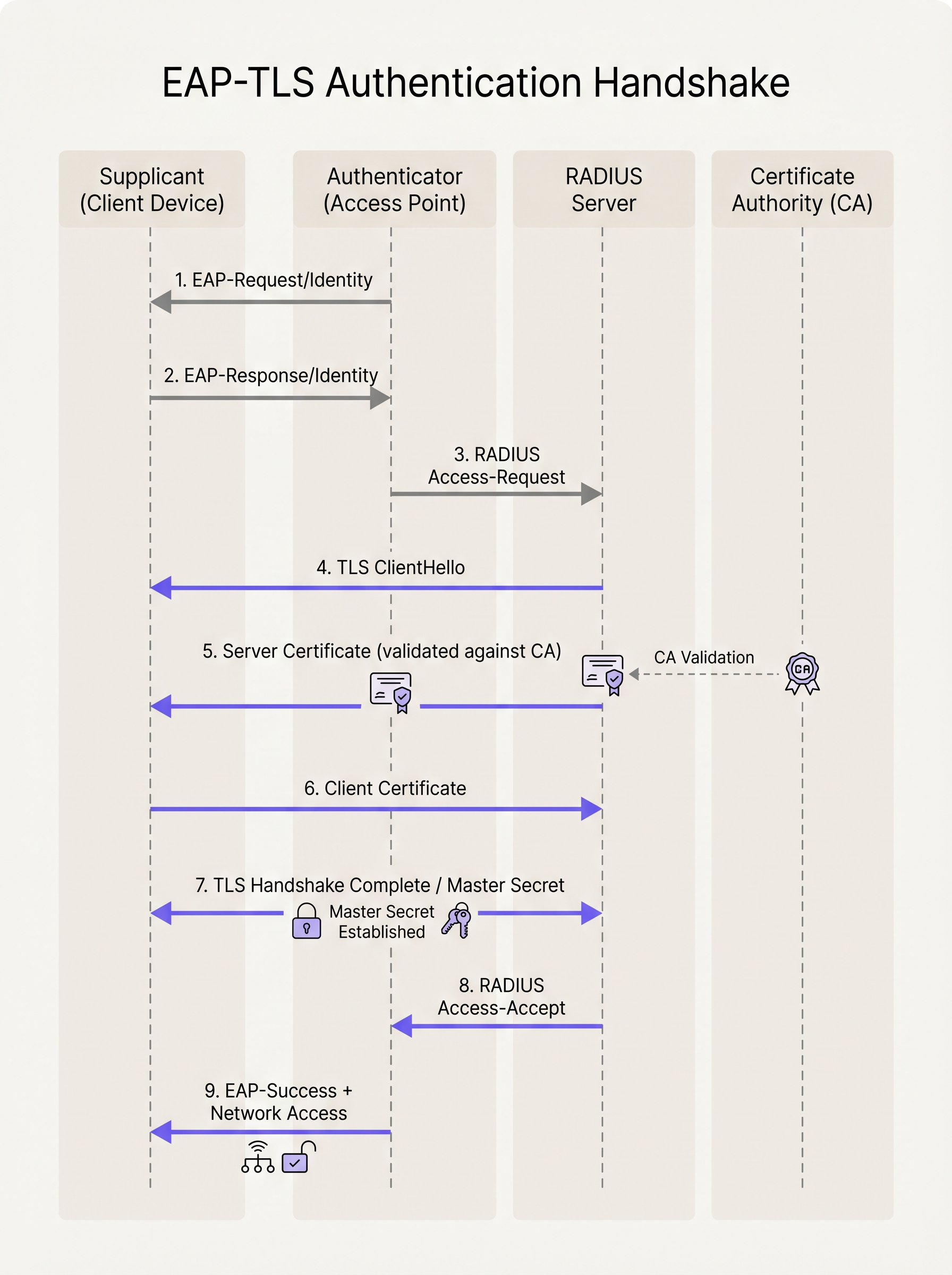
- Inicialización: Cuando un dispositivo intenta conectarse al SSID, el Punto de acceso bloquea todo el tráfico excepto las tramas EAP sobre LAN (EAPoL). El AP envía un
EAP-Request/Identityal dispositivo. - Respuesta de identidad: El dispositivo responde con un
EAP-Response/Identity(a menudo una identidad externa anónima por privacidad), que el AP reenvía al servidor RADIUS. - Establecimiento del túnel TLS: El servidor RADIUS inicia el handshake TLS enviando un
TLS ServerHellojunto con su propio certificado digital. - Validación del servidor: El dispositivo cliente examina el certificado del servidor. Comprueba las fechas de validez, el nombre alternativo del sujeto (SAN) y, fundamentalmente, verifica que el certificado haya sido firmado por una Autoridad de Certificación (CA) Raíz de confianza instalada en su almacén de confianza local.
- Presentación del certificado del cliente: Una vez validado el servidor, el dispositivo cliente envía su propio certificado X.509 (y opcionalmente su cadena de certificados) de vuelta al servidor RADIUS.
- Autenticación mutua: El servidor RADIUS valida el certificado del cliente frente a su integración con la CA o el Proveedor de Identidad (IdP). Comprueba la revocación (vía CRL u OCSP) y verifica la identidad del usuario o dispositivo.
- Derivación de claves: Tras una validación mutua exitosa, se completa el handshake TLS. Ambas partes derivan de forma independiente una Clave Maestra de Sesión (MSK).
- Acceso a la red: El servidor RADIUS envía un mensaje
RADIUS Access-Acceptal AP, que contiene la MSK. El AP utiliza esta clave para establecer las claves de cifrado finales WPA2/WPA3 (PTK/GTK) con el cliente y abre el puerto de red para el tráfico IP estándar.
EAP-TLS frente a PEAP-MSCHAPv2
Comprender la distinción entre EAP-TLS y PEAP es fundamental para los arquitectos de red que planean una migración.
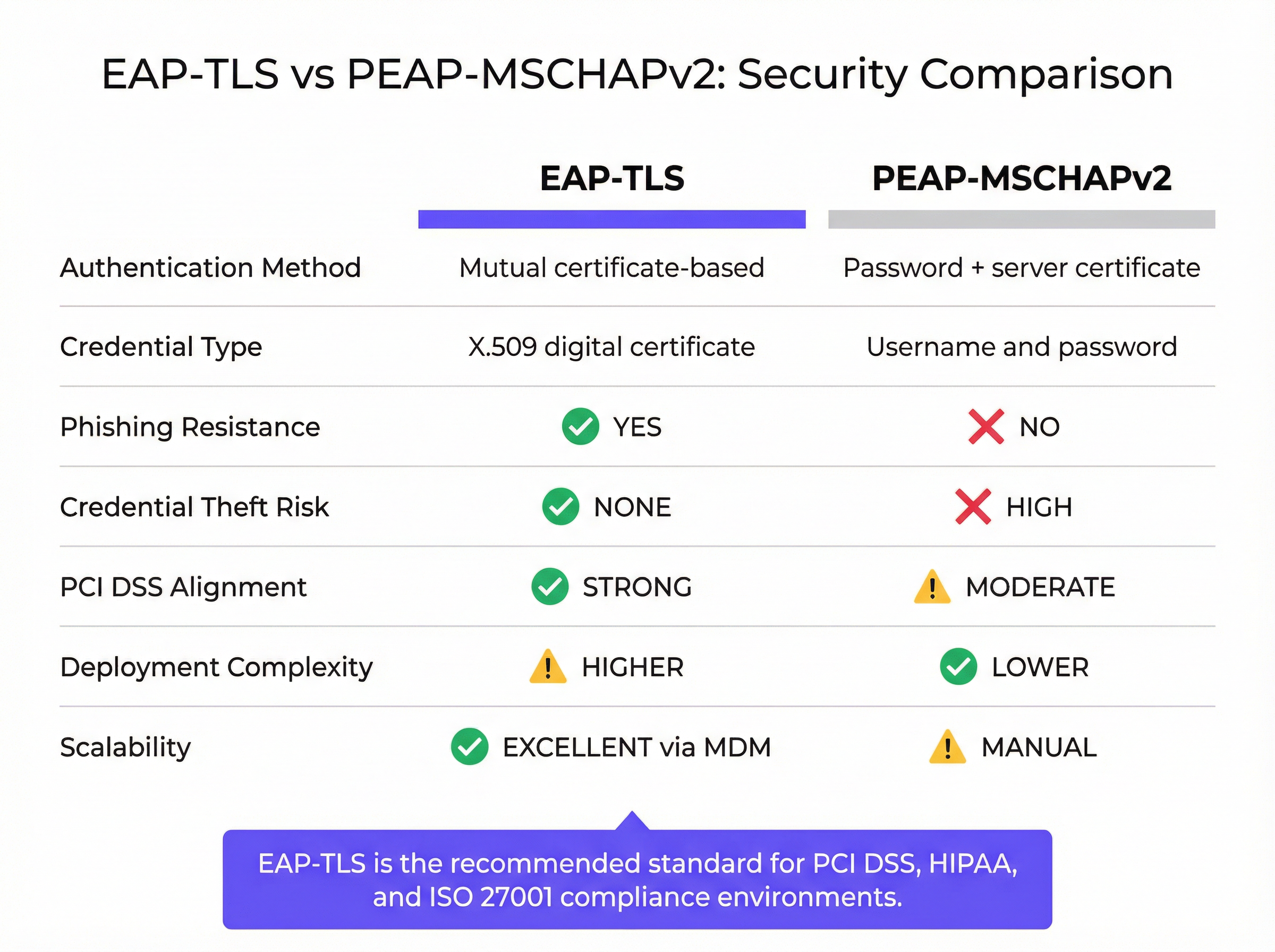
Mientras que PEAP establece un túnel TLS seguro (autenticación del lado del servidor), la autenticación interna sigue dependiendo de MSCHAPv2, un protocolo basado en contraseñas. Si un usuario se conecta a un Punto de acceso malicioso "Evil Twin" e ignora la advertencia del certificado del servidor, su contraseña cifrada puede ser capturada y descifrada fuera de línea. EAP-TLS elimina este vector por completo; sin la clave privada correspondiente al certificado del cliente, un atacante no puede autenticarse, incluso si posee la contraseña del usuario.
Guía de implementación
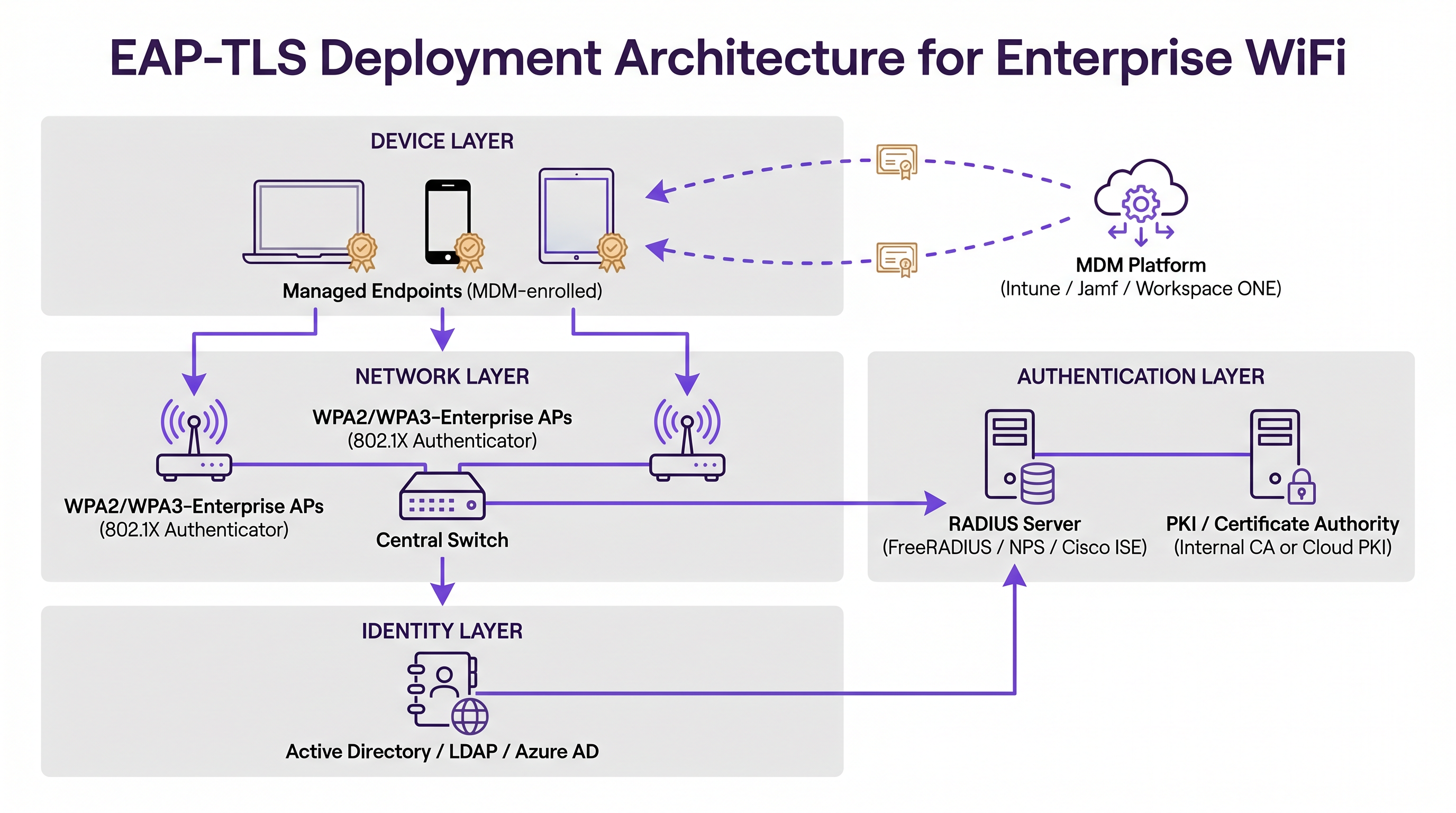
El despliegue de EAP-TLS requiere la orquestación de tres pilares de infraestructura principales: la Capa de Red, la Capa de Autenticación y la Capa de Gestión de Identidad/Endpoints.
1. Infraestructura de clave pública (PKI)
Debe contar con un mecanismo para emitir y gestionar certificados X.509. Históricamente, esto significaba desplegar un entorno de Microsoft Active Directory Certificate Services (AD CS) on-premise. Hoy en día, las arquitecturas modernas aprovechan las soluciones de Cloud PKI integradas con Proveedores de Identidad (IdPs) como Azure AD, Okta o Google Workspace. Estas CAs nativas de la nube simplifican el ciclo de vida de emisión y revocación.
2. Servidor de autenticación RADIUS
El servidor RADIUS (por ejemplo, FreeRADIUS, Cisco ISE, Aruba ClearPass o RADIUS basado en la nube) debe estar configurado para admitir EAP-TLS. Requiere su propio certificado de servidor, firmado por una CA en la que confíen todos los dispositivos cliente. Si se está integrando con un IdP moderno, nuestra guía sobre Okta y RADIUS: Extensión de su proveedor de identidad a la autenticación WiFi le resultará especialmente útil para conectar la identidad en la nube con el hardware de red on-premise.
3. Gestión de dispositivos móviles (MDM)
El obstáculo más significativo en el despliegue de EAP-TLS es la provisión de certificados a los dispositivos cliente. La instalación manual no es escalable. Debe aprovechar una plataforma MDM (como Microsoft Intune, Jamf Pro o VMware Workspace ONE) para automatizar este proceso. El perfil MDM debe desplegar:
- El certificado de la CA Raíz (para confiar en el servidor RADIUS).
- El certificado de cliente individual (a menudo generado mediante protocolos SCEP o EST).
- El perfil WiFi configurado para usar WPA2/WPA3-Enterprise, EAP-TLS, y haciendo referencia específica a los certificados desplegados.
Mejores prácticas
- Automatice la gestión del ciclo de vida de los certificados: Los certificados caducan. Si carece de un mecanismo de renovación automatizado (como SCEP/EST a través de MDM), los dispositivos se desconectarán silenciosamente de la red cuando sus certificados caduquen, lo que provocará picos masivos de tickets de soporte. Establezca periodos de validez que equilibren la seguridad (por ejemplo, 1 año) con la carga operativa.
- Aplique una validación estricta del servidor: Configure los perfiles WiFi de los clientes para que validen estrictamente el certificado del servidor RADIUS. Especifique los nombres exactos de los servidores y las CAs Raíz de confianza en el perfil. No permita que los usuarios omitan las advertencias de certificados.
- Implemente una revocación robusta: Asegúrese de que su servidor RADIUS compruebe las Listas de Revocación de Certificados (CRLs) o utilice el Protocolo de Estado de Certificados en Línea (OCSP). Cuando un empleado se marcha o se pierde un dispositivo, la revocación del certificado debe terminar inmediatamente el acceso a la red.
- Gestione la flota de dispositivos mixtos: EAP-TLS es perfecto para dispositivos corporativos gestionados. Sin embargo, se encontrará con dispositivos BYOD (Bring Your Own Device) no gestionados y dispositivos de invitados. Para los invitados, despliegue una solución de Captive Portal robusta como Guest WiFi de Purple. Para el BYOD del personal, considere un portal de incorporación que proporcione temporalmente un certificado, o utilice un SSID independiente con un método de autenticación diferente, aislado de la red corporativa principal.
Resolución de problemas y mitigación de riesgos
Cuando EAP-TLS falla, los síntomas suelen ser opacos para el usuario final. El dispositivo simplemente no se conecta. Los equipos de TI deben confiar en los registros de RADIUS para el diagnóstico.
- Error: "CA desconocida" o "Raíz no confiable": El dispositivo cliente no tiene el certificado de la CA Raíz que firmó el certificado del servidor RADIUS en su almacén de confianza. Verifique el payload del MDM.
- Error: "Certificado caducado": El certificado del cliente o el del servidor han superado su fecha
NotAfter. Compruebe la automatización del ciclo de vida de los certificados. - Error: "Certificado de cliente no encontrado": El dispositivo está intentando EAP-TLS pero no puede localizar un certificado válido que coincida con los criterios especificados en el perfil WiFi. Asegúrese de que el certificado se haya desplegado correctamente mediante el MDM y que el Nombre Alternativo del Sujeto (SAN) coincida con el formato esperado (por ejemplo, Nombre Principal de Usuario o dirección MAC).
- Desfase horario: TLS depende de un cronometraje preciso. Si el reloj del sistema de un dispositivo está significativamente desincronizado con el servidor RADIUS, la validación del certificado fallará porque los certificados parecerán "aún no válidos" o "caducados".
ROI e impacto empresarial
La transición a EAP-TLS representa una maduración significativa de la postura de seguridad de una organización. El principal Retorno de Inversión (ROI) es la mitigación de riesgos. Al eliminar la autenticación WiFi basada en contraseñas, se reduce drásticamente la superficie de ataque para el robo de credenciales y el movimiento lateral dentro de la red. Esto es especialmente crítico en la Hospitalidad y en entornos empresariales donde la segmentación de la red es primordial.
Además, EAP-TLS mejora la experiencia del usuario final. Una vez aprovisionada a través de MDM, la conexión es totalmente zero-touch. Los usuarios nunca tienen que actualizar las contraseñas de WiFi cuando caduca su contraseña corporativa, lo que reduce las llamadas al helpdesk relacionadas con problemas de conectividad. Al combinar EAP-TLS para los dispositivos del personal gestionado con WiFi Analytics inteligente y Captive Portals para invitados, los establecimientos pueden lograr un entorno inalámbrico seguro y de alto rendimiento que respalde tanto la seguridad operativa como el compromiso del cliente.
Términos clave y definiciones
EAP-TLS (Extensible Authentication Protocol - Transport Layer Security)
An 802.1X authentication method that requires mutual authentication using digital certificates on both the client and the server, eliminating the need for passwords.
The most secure standard for enterprise WiFi authentication, widely mandated for compliance in high-security environments.
Supplicant
The client device (laptop, smartphone, tablet) attempting to connect to the secure network.
The supplicant software must support EAP-TLS and have access to the device's certificate store.
Authenticator
The network device (typically a WiFi Access Point or network switch) that facilitates the authentication process by passing EAP messages between the Supplicant and the Authentication Server.
The AP does not perform the authentication itself; it acts as a gatekeeper until the RADIUS server issues an Access-Accept.
RADIUS Server
Remote Authentication Dial-In User Service. The central server that validates the credentials (certificates in the case of EAP-TLS) and authorizes network access.
The RADIUS server integrates with the PKI or Identity Provider to verify the validity and revocation status of the client certificate.
PKI (Public Key Infrastructure)
The framework of roles, policies, hardware, software, and procedures needed to create, manage, distribute, use, store, and revoke digital certificates.
You need a PKI (either on-premise or cloud-based) to issue the certificates required for EAP-TLS.
X.509 Certificate
A standard format for public key certificates, digital documents that securely associate cryptographic key pairs with identities such as websites, individuals, or organizations.
This is the 'digital passport' used in EAP-TLS instead of a password.
SCEP / EST
Simple Certificate Enrollment Protocol / Enrollment over Secure Transport. Protocols used by MDM platforms to automate the request and installation of certificates onto client devices.
Crucial for scaling EAP-TLS deployments, ensuring devices receive and renew certificates without user intervention.
Evil Twin Attack
A rogue WiFi access point that masquerades as a legitimate corporate network to eavesdrop on wireless communications or harvest credentials.
EAP-TLS defeats Evil Twin attacks because the rogue AP cannot present a valid server certificate signed by the company's trusted Root CA.
Casos de éxito
A large [Retail](/industries/retail) chain with 500 locations needs to secure WiFi access for their corporate-issued point-of-sale (POS) tablets. They currently use a single Pre-Shared Key (PSK) across all stores, which was recently leaked. They use Microsoft Intune for device management. How should they secure the network?
- Deploy a Cloud PKI integrated with their Azure AD environment.
- Configure Intune to use SCEP (Simple Certificate Enrollment Protocol) to automatically generate and push unique device certificates to each POS tablet.
- Push a new WiFi profile via Intune configured for WPA3-Enterprise and EAP-TLS, specifying the new client certificate and the trusted Root CA.
- Configure the central RADIUS server to authenticate the tablets based on these certificates.
- Once all tablets are successfully authenticating via EAP-TLS, disable the legacy PSK SSID.
A [Transport](/industries/transport) hub (airport) wants to provide secure WiFi for its operational staff (baggage handlers, security) using managed iPads, while keeping guest traffic completely separate.
- Implement EAP-TLS on a dedicated, hidden SSID (e.g., 'Airport-Ops-Secure') for the managed iPads, pushing certificates via their MDM platform.
- Ensure the RADIUS server maps these authenticated devices to a specific, restricted VLAN that only has access to necessary operational servers.
- Deploy a separate, open SSID (e.g., 'Airport-Free-WiFi') for passengers, utilizing a captive portal for terms-of-service acceptance and bandwidth limiting.
Análisis de escenarios
Q1. Your organisation is migrating from PEAP to EAP-TLS. During the pilot phase, several Windows laptops fail to connect. The RADIUS logs show 'Unknown CA' errors during the TLS handshake. What is the most likely cause?
💡 Sugerencia:Think about the 'Mutual' part of mutual authentication. What does the client need to trust the server?
Mostrar enfoque recomendado
The client devices are missing the Root CA certificate in their local trust store that signed the RADIUS server's certificate. The MDM payload needs to be updated to ensure the Root CA is pushed to the devices alongside the client certificate.
Q2. A hotel wants to use EAP-TLS for all devices, including guest smartphones, to ensure maximum security. Is this a viable strategy?
💡 Sugerencia:Consider the provisioning process for EAP-TLS.
Mostrar enfoque recomendado
No, this is not a viable strategy. EAP-TLS requires client certificates to be installed on the device. While this is easy for managed corporate devices via MDM, you cannot force guests to install certificates or MDM profiles on their personal devices. For guests, a captive portal (like Purple Guest WiFi) combined with WPA2/WPA3-Personal (or OWE) is the industry standard.
Q3. You have successfully deployed EAP-TLS. An employee reports their corporate laptop was stolen. What is the immediate technical action required to secure the network?
💡 Sugerencia:How do you invalidate a digital certificate before its expiration date?
Mostrar enfoque recomendado
You must revoke the client certificate associated with that specific laptop within your PKI/CA. Ensure that your RADIUS server is configured to check the Certificate Revocation List (CRL) or use OCSP, so that the revoked certificate is immediately rejected upon the next connection attempt.
Conclusiones clave
- ✓EAP-TLS is the most secure 802.1X authentication method, replacing passwords with mutual certificate-based authentication.
- ✓It eliminates the risk of credential theft and Evil Twin attacks inherent in password-based protocols like PEAP-MSCHAPv2.
- ✓A successful deployment requires coordination between a PKI (to issue certificates), a RADIUS server (to authenticate), and an MDM platform (to provision devices).
- ✓Automated certificate lifecycle management (via SCEP/EST) is critical to prevent mass connectivity outages when certificates expire.
- ✓EAP-TLS is ideal for managed corporate devices; unmanaged BYOD and guest devices require separate onboarding or captive portal strategies.
- ✓Implementing EAP-TLS strongly aligns with compliance mandates like PCI DSS and ISO 27001 by securing network access control.




