

Spiegazione dell'autenticazione EAP-TLS: sicurezza WiFi basata su certificati
EAP-TLS è il gold standard per la sicurezza WiFi aziendale, sostituendo la vulnerabile autenticazione basata su password con certificati digitali robusti e reciprocamente autenticati. Questa guida offre ai responsabili IT e agli architetti di rete un approfondimento tecnico completo sull'handshake EAP-TLS, i requisiti architetturali e le strategie pratiche di implementazione per ambienti con dispositivi misti.
🎧 Ascolta questa guida
Visualizza trascrizione
Sintesi esecutiva
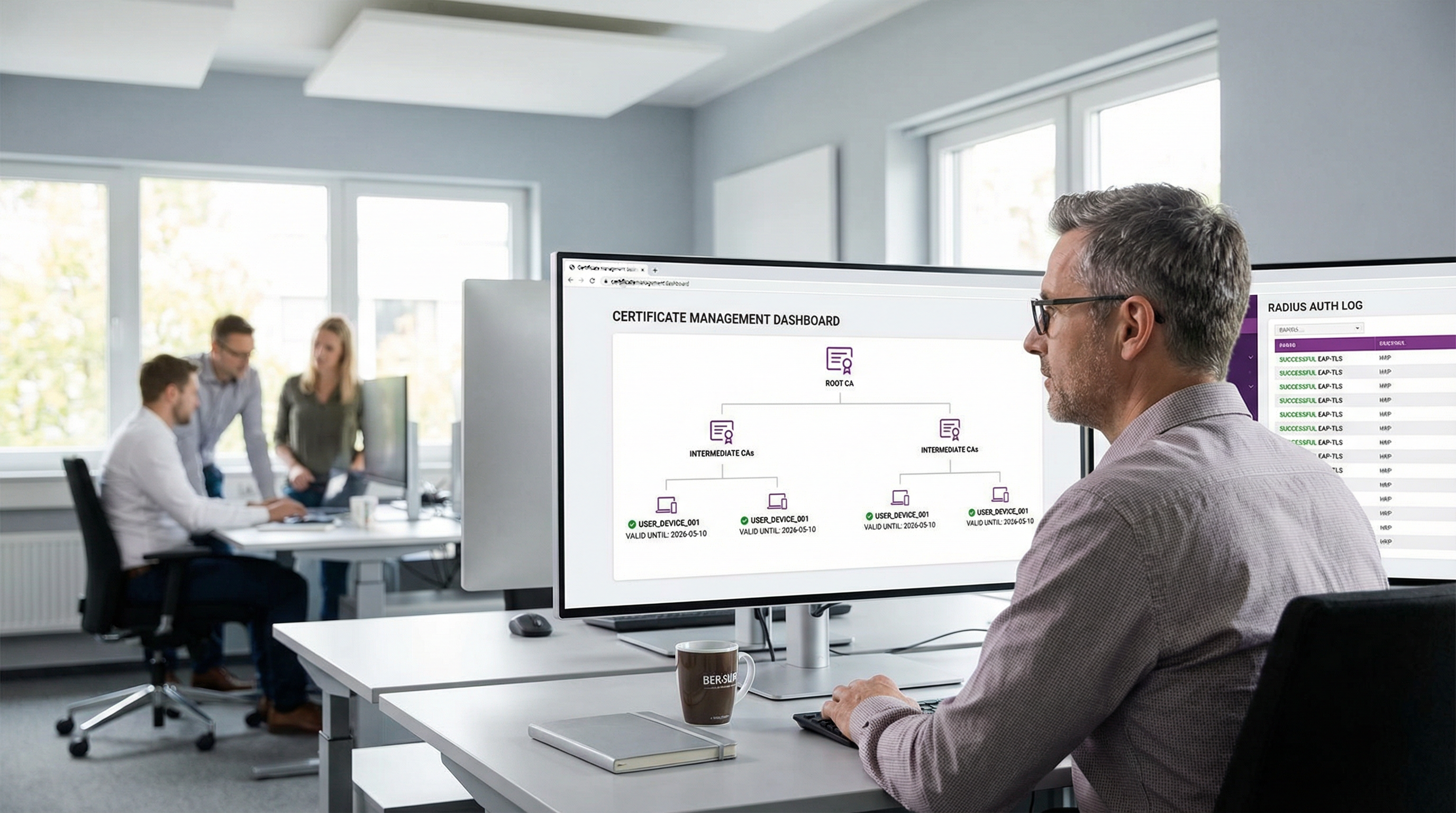
Per gli ambienti aziendali, dalle sedi centrali alle catene Retail e alle strutture Healthcare , la protezione dell'accesso wireless non è più solo un requisito operativo: è un mandato di conformità critico. Storicamente, le organizzazioni si sono affidate a PEAP-MSCHAPv2, che protegge nome utente e password all'interno di un tunnel TLS. Tuttavia, in un'era di raccolta dilagante di credenziali e attacchi di phishing sofisticati, l'autenticazione basata su password tramite WiFi rappresenta una vulnerabilità significativa.
Ecco l'EAP-TLS (Extensible Authentication Protocol - Transport Layer Security). L'EAP-TLS rappresenta il gold standard nel controllo dell'accesso alla rete 802.1X. Invece di affidarsi a password generate dagli utenti, l'EAP-TLS impone l'autenticazione reciproca tramite certificati digitali X.509. Sia il dispositivo client che il server di autenticazione devono dimostrare la propria identità prima che venga concesso qualsiasi accesso alla rete. Questo approccio elimina il rischio di furto di credenziali, mitiga gli attacchi man-in-the-middle (MitM) e offre un'esperienza di connessione fluida e zero-touch per i dispositivi gestiti. Questa guida tecnica di riferimento esplora i meccanismi dell'handshake EAP-TLS, lo confronta con i metodi legacy e delinea un'architettura di implementazione pratica per le imprese moderne.
Ascolta il nostro podcast tecnico di approfondimento per una panoramica esecutiva:
Approfondimento tecnico
Spiegazione dell'handshake EAP-TLS
Il vantaggio fondamentale dell'EAP-TLS risiede nel suo rigore crittografico. Il processo di autenticazione è una conversazione in più fasi tra il Supplicant (il dispositivo client), l'Authenticator (l'Access Point WiFi o lo switch) e l'Authentication Server (tipicamente un server RADIUS).
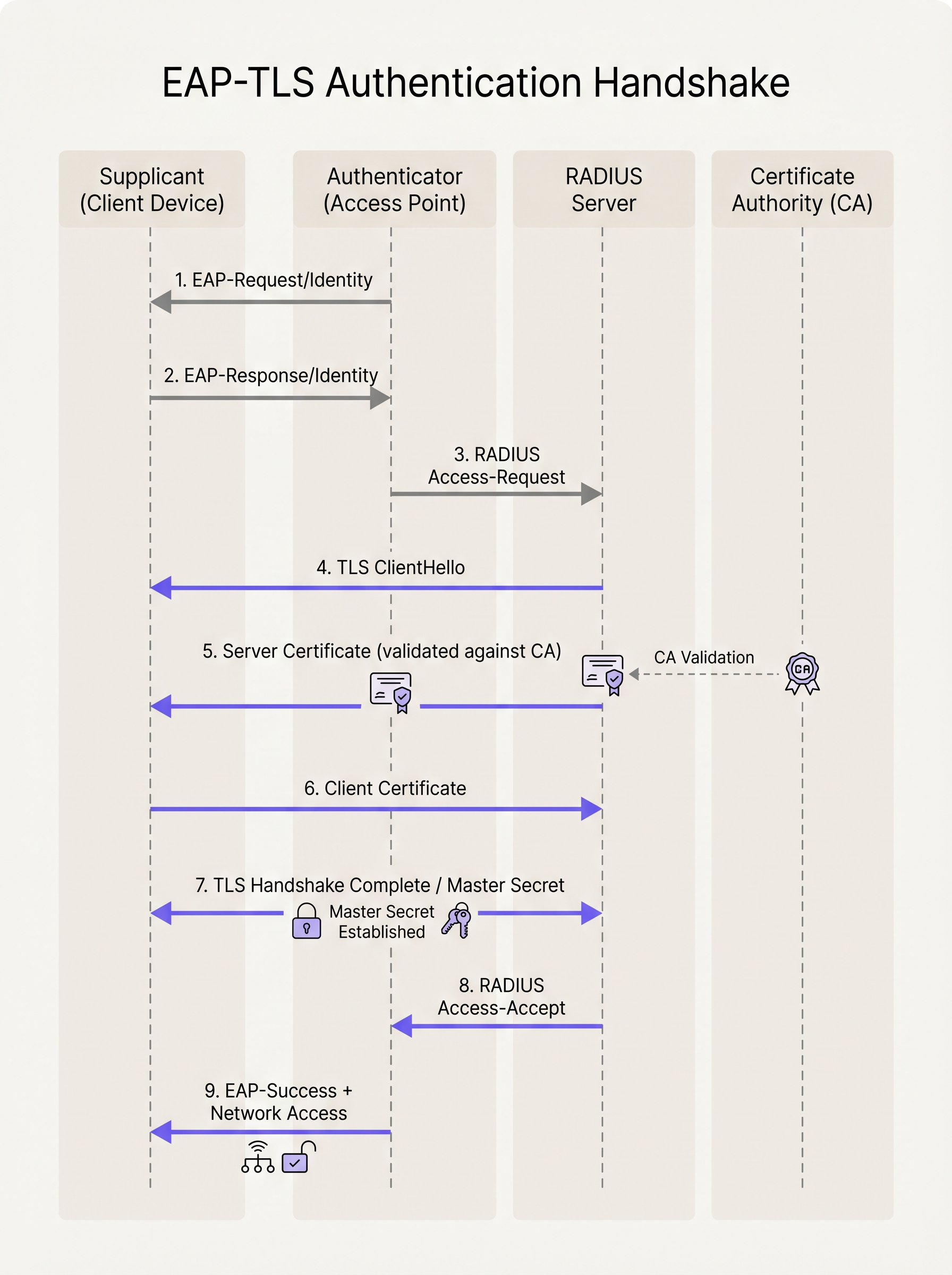
- Inizializzazione: Quando un dispositivo tenta di connettersi all'SSID, l'Access Point blocca tutto il traffico tranne i frame EAP over LAN (EAPoL). L'AP invia un
EAP-Request/Identityal dispositivo. - Risposta di identità: Il dispositivo risponde con un
EAP-Response/Identity(spesso un'identità esterna anonima per la privacy), che l'AP inoltra al server RADIUS. - Stabilimento del tunnel TLS: Il server RADIUS avvia l'handshake TLS inviando un
TLS ServerHelloinsieme al proprio certificato digitale. - Validazione del server: Il dispositivo client esamina il certificato del server. Controlla le date di validità, il subject alternative name (SAN) e, cosa fondamentale, verifica che il certificato sia stato firmato da una Root Certificate Authority (CA) attendibile installata nel suo trust store locale.
- Presentazione del certificato client: Una volta convalidato il server, il dispositivo client invia il proprio certificato X.509 (e opzionalmente la sua catena di certificati) al server RADIUS.
- Autenticazione reciproca: Il server RADIUS convalida il certificato del client rispetto alla sua CA o all'integrazione con l'Identity Provider (IdP). Controlla la revoca (tramite CRL o OCSP) e verifica l'identità dell'utente o del dispositivo.
- Derivazione della chiave: Al termine della convalida reciproca, l'handshake TLS si completa. Entrambe le parti derivano indipendentemente una Master Session Key (MSK).
- Accesso alla rete: Il server RADIUS invia un messaggio
RADIUS Access-Acceptall'AP, contenente la MSK. L'AP utilizza questa chiave per stabilire le chiavi di crittografia WPA2/WPA3 finali (PTK/GTK) con il client e apre la porta di rete per il traffico IP standard.
EAP-TLS vs. PEAP-MSCHAPv2
Comprendere la distinzione tra EAP-TLS e PEAP è fondamentale per gli architetti di rete che pianificano una migrazione.
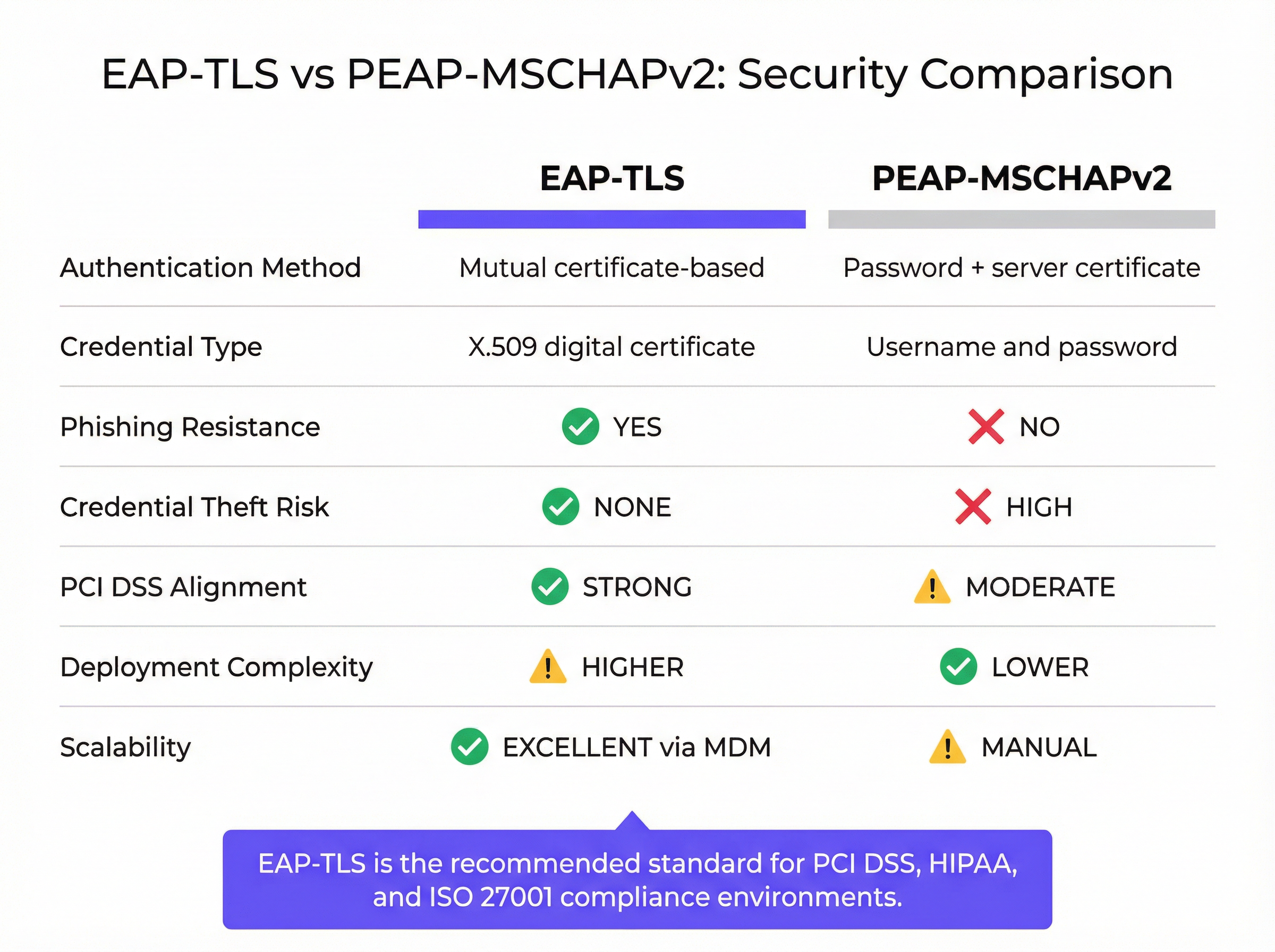
Mentre il PEAP stabilisce un tunnel TLS sicuro (autenticazione lato server), l'autenticazione interna si affida ancora a MSCHAPv2, un protocollo basato su password. Se un utente si connette a un Access Point malevolo "Evil Twin" e ignora l'avviso del certificato del server, la sua password hashata può essere catturata e decifrata offline. L'EAP-TLS elimina completamente questo vettore; senza la chiave privata corrispondente al certificato client, un utente malintenzionato non può autenticarsi, anche se possiede la password dell'utente.
Guida all'implementazione
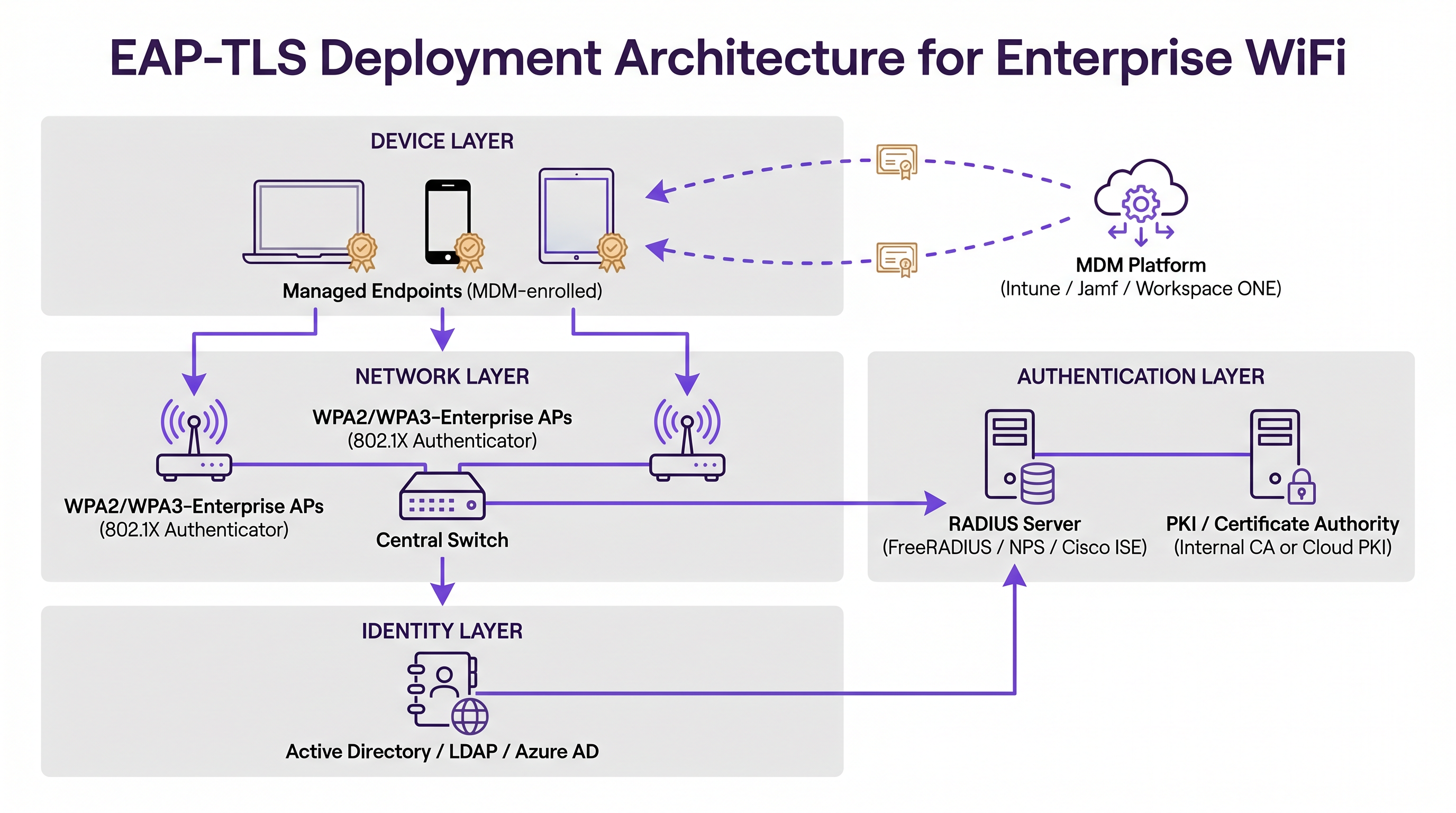
L'implementazione dell'EAP-TLS richiede il coordinamento tra tre pilastri infrastrutturali primari: il Network Layer, l'Authentication Layer e l'Identity/Endpoint Management Layer.
1. Public Key Infrastructure (PKI)
È necessario disporre di un meccanismo per emettere e gestire i certificati X.509. Storicamente, ciò significava implementare un ambiente Microsoft Active Directory Certificate Services (AD CS) on-premise. Oggi, le architetture moderne sfruttano soluzioni Cloud PKI integrate con Identity Provider (IdP) come Azure AD, Okta o Google Workspace. Queste CA cloud-native semplificano il ciclo di vita di emissione e revoca.
2. Server di autenticazione RADIUS
Il server RADIUS (ad esempio, FreeRADIUS, Cisco ISE, Aruba ClearPass o RADIUS basato su cloud) deve essere configurato per supportare l'EAP-TLS. Richiede il proprio certificato server, firmato da una CA fidata da tutti i dispositivi client. Se ti stai integrando con un IdP moderno, potresti trovare particolarmente utile la nostra guida su Okta e RADIUS: estendere il tuo Identity Provider all'autenticazione WiFi per collegare l'identità cloud con l'hardware di rete on-premise.
3. Mobile Device Management (MDM)
L'ostacolo più significativo nell'implementazione dell'EAP-TLS è il provisioning dei certificati sui dispositivi client. L'installazione manuale non è scalabile. È necessario sfruttare una piattaforma MDM (come Microsoft Intune, Jamf Pro o VMware Workspace ONE) per automatizzare questo processo. Il profilo MDM deve distribuire:
- Il certificato della Root CA (per considerare attendibile il server RADIUS).
- Il certificato client individuale (spesso generato tramite protocolli SCEP o EST).
- Il profilo WiFi configurato per utilizzare WPA2/WPA3-Enterprise, EAP-TLS e che faccia riferimento specifico ai certificati distribuiti.
Best Practice
- Automatizzare la gestione del ciclo di vita dei certificati: I certificati scadono. Se manca un meccanismo di rinnovo automatico (come SCEP/EST tramite MDM), i dispositivi si disconnetteranno silenziosamente dalla rete alla scadenza dei certificati, causando picchi massicci di ticket di assistenza. Imposta periodi di validità che bilancino la sicurezza (ad esempio, 1 anno) con il carico operativo.
- Imporre una validazione rigorosa del server: Configura i profili WiFi dei client per convalidare rigorosamente il certificato del server RADIUS. Specifica i nomi esatti dei server e le Root CA attendibili nel profilo. Non consentire agli utenti di ignorare gli avvisi sui certificati.
- Implementare una revoca robusta: Assicurati che il tuo server RADIUS controlli le Certificate Revocation Lists (CRL) o utilizzi l'Online Certificate Status Protocol (OCSP). Quando un dipendente se ne va o un dispositivo viene smarrito, la revoca del certificato deve interrompere immediatamente l'accesso alla rete.
- Gestire una flotta di dispositivi misti: L'EAP-TLS è perfetto per i dispositivi aziendali gestiti. Tuttavia, incontrerai dispositivi BYOD (Bring Your Own Device) non gestiti e dispositivi guest. Per gli ospiti, implementa una soluzione di Captive Portal robusta come Guest WiFi di Purple. Per il BYOD del personale, considera un portale di onboarding che fornisca temporaneamente un certificato, oppure utilizza un SSID separato con un metodo di autenticazione diverso, isolato dalla rete aziendale principale.
Risoluzione dei problemi e mitigazione dei rischi
Quando l'EAP-TLS fallisce, i sintomi sono spesso opachi per l'utente finale. Il dispositivo semplicemente non riesce a connettersi. I team IT devono fare affidamento sui log RADIUS per la diagnostica.
- Errore: "Unknown CA" o "Untrusted Root": Il dispositivo client non ha nel suo trust store il certificato della Root CA che ha firmato il certificato del server RADIUS. Verifica il payload MDM.
- Errore: "Certificate Expired": Il certificato client o il certificato server ha superato la data
NotAfter. Controlla l'automazione del ciclo di vita del certificato. - Errore: "Client Certificate Not Found": Il dispositivo sta tentando l'EAP-TLS ma non riesce a trovare un certificato valido corrispondente ai criteri specificati nel profilo WiFi. Assicurati che il certificato sia stato distribuito correttamente dall'MDM e che il Subject Alternative Name (SAN) corrisponda al formato previsto (ad esempio, User Principal Name o indirizzo MAC).
- Disallineamento dell'orologio: Il TLS si basa su un cronometraggio accurato. Se l'orologio di sistema di un dispositivo è significativamente fuori sincrono con il server RADIUS, la convalida del certificato fallirà perché i certificati appariranno come "non ancora validi" o "scaduti."
ROI e impatto sul business
Il passaggio all'EAP-TLS rappresenta una maturazione significativa della postura di sicurezza di un'organizzazione. Il principale ritorno sull'investimento (ROI) è la mitigazione del rischio. Eliminando l'autenticazione WiFi basata su password, si riduce drasticamente la superficie di attacco per il furto di credenziali e il movimento laterale all'interno della rete. Ciò è particolarmente critico nel settore Hospitality e negli ambienti aziendali dove la segmentazione della rete è fondamentale.
Inoltre, l'EAP-TLS migliora l'esperienza dell'utente finale. Una volta fornito tramite MDM, la connessione è interamente zero-touch. Gli utenti non devono mai aggiornare le password WiFi alla scadenza della loro password aziendale, riducendo le chiamate all'helpdesk relative a problemi di connettività. Combinando l'EAP-TLS per i dispositivi del personale gestiti con WiFi Analytics intelligenti e Captive Portal per gli ospiti, le sedi possono ottenere un ambiente wireless sicuro e ad alte prestazioni che supporta sia la sicurezza operativa che il coinvolgimento dei clienti.
Termini chiave e definizioni
EAP-TLS (Extensible Authentication Protocol - Transport Layer Security)
An 802.1X authentication method that requires mutual authentication using digital certificates on both the client and the server, eliminating the need for passwords.
The most secure standard for enterprise WiFi authentication, widely mandated for compliance in high-security environments.
Supplicant
The client device (laptop, smartphone, tablet) attempting to connect to the secure network.
The supplicant software must support EAP-TLS and have access to the device's certificate store.
Authenticator
The network device (typically a WiFi Access Point or network switch) that facilitates the authentication process by passing EAP messages between the Supplicant and the Authentication Server.
The AP does not perform the authentication itself; it acts as a gatekeeper until the RADIUS server issues an Access-Accept.
RADIUS Server
Remote Authentication Dial-In User Service. The central server that validates the credentials (certificates in the case of EAP-TLS) and authorizes network access.
The RADIUS server integrates with the PKI or Identity Provider to verify the validity and revocation status of the client certificate.
PKI (Public Key Infrastructure)
The framework of roles, policies, hardware, software, and procedures needed to create, manage, distribute, use, store, and revoke digital certificates.
You need a PKI (either on-premise or cloud-based) to issue the certificates required for EAP-TLS.
X.509 Certificate
A standard format for public key certificates, digital documents that securely associate cryptographic key pairs with identities such as websites, individuals, or organizations.
This is the 'digital passport' used in EAP-TLS instead of a password.
SCEP / EST
Simple Certificate Enrollment Protocol / Enrollment over Secure Transport. Protocols used by MDM platforms to automate the request and installation of certificates onto client devices.
Crucial for scaling EAP-TLS deployments, ensuring devices receive and renew certificates without user intervention.
Evil Twin Attack
A rogue WiFi access point that masquerades as a legitimate corporate network to eavesdrop on wireless communications or harvest credentials.
EAP-TLS defeats Evil Twin attacks because the rogue AP cannot present a valid server certificate signed by the company's trusted Root CA.
Casi di studio
A large [Retail](/industries/retail) chain with 500 locations needs to secure WiFi access for their corporate-issued point-of-sale (POS) tablets. They currently use a single Pre-Shared Key (PSK) across all stores, which was recently leaked. They use Microsoft Intune for device management. How should they secure the network?
- Deploy a Cloud PKI integrated with their Azure AD environment.
- Configure Intune to use SCEP (Simple Certificate Enrollment Protocol) to automatically generate and push unique device certificates to each POS tablet.
- Push a new WiFi profile via Intune configured for WPA3-Enterprise and EAP-TLS, specifying the new client certificate and the trusted Root CA.
- Configure the central RADIUS server to authenticate the tablets based on these certificates.
- Once all tablets are successfully authenticating via EAP-TLS, disable the legacy PSK SSID.
A [Transport](/industries/transport) hub (airport) wants to provide secure WiFi for its operational staff (baggage handlers, security) using managed iPads, while keeping guest traffic completely separate.
- Implement EAP-TLS on a dedicated, hidden SSID (e.g., 'Airport-Ops-Secure') for the managed iPads, pushing certificates via their MDM platform.
- Ensure the RADIUS server maps these authenticated devices to a specific, restricted VLAN that only has access to necessary operational servers.
- Deploy a separate, open SSID (e.g., 'Airport-Free-WiFi') for passengers, utilizing a captive portal for terms-of-service acceptance and bandwidth limiting.
Analisi degli scenari
Q1. Your organisation is migrating from PEAP to EAP-TLS. During the pilot phase, several Windows laptops fail to connect. The RADIUS logs show 'Unknown CA' errors during the TLS handshake. What is the most likely cause?
💡 Suggerimento:Think about the 'Mutual' part of mutual authentication. What does the client need to trust the server?
Mostra l'approccio consigliato
The client devices are missing the Root CA certificate in their local trust store that signed the RADIUS server's certificate. The MDM payload needs to be updated to ensure the Root CA is pushed to the devices alongside the client certificate.
Q2. A hotel wants to use EAP-TLS for all devices, including guest smartphones, to ensure maximum security. Is this a viable strategy?
💡 Suggerimento:Consider the provisioning process for EAP-TLS.
Mostra l'approccio consigliato
No, this is not a viable strategy. EAP-TLS requires client certificates to be installed on the device. While this is easy for managed corporate devices via MDM, you cannot force guests to install certificates or MDM profiles on their personal devices. For guests, a captive portal (like Purple Guest WiFi) combined with WPA2/WPA3-Personal (or OWE) is the industry standard.
Q3. You have successfully deployed EAP-TLS. An employee reports their corporate laptop was stolen. What is the immediate technical action required to secure the network?
💡 Suggerimento:How do you invalidate a digital certificate before its expiration date?
Mostra l'approccio consigliato
You must revoke the client certificate associated with that specific laptop within your PKI/CA. Ensure that your RADIUS server is configured to check the Certificate Revocation List (CRL) or use OCSP, so that the revoked certificate is immediately rejected upon the next connection attempt.
Punti chiave
- ✓EAP-TLS is the most secure 802.1X authentication method, replacing passwords with mutual certificate-based authentication.
- ✓It eliminates the risk of credential theft and Evil Twin attacks inherent in password-based protocols like PEAP-MSCHAPv2.
- ✓A successful deployment requires coordination between a PKI (to issue certificates), a RADIUS server (to authenticate), and an MDM platform (to provision devices).
- ✓Automated certificate lifecycle management (via SCEP/EST) is critical to prevent mass connectivity outages when certificates expire.
- ✓EAP-TLS is ideal for managed corporate devices; unmanaged BYOD and guest devices require separate onboarding or captive portal strategies.
- ✓Implementing EAP-TLS strongly aligns with compliance mandates like PCI DSS and ISO 27001 by securing network access control.




