

EAP-TLS ऑथेंटिकेशन स्पष्ट केले: सर्टिफिकेट-आधारित WiFi सुरक्षा
EAP-TLS हे एंटरप्राइझ WiFi सुरक्षेसाठी सुवर्ण मानक आहे, जे असुरक्षित पासवर्ड-आधारित ऑथेंटिकेशनला मजबूत, परस्पर ऑथेंटिकेटेड डिजिटल सर्टिफिकेट्ससह बदलते. हे मार्गदर्शक IT मॅनेजर्स आणि नेटवर्क आर्किटेक्ट्सना EAP-TLS हँडशेक, आर्किटेक्चरल आवश्यकता आणि मिश्र-डिव्हाइस वातावरणासाठी व्यावहारिक उपयोजन धोरणांमध्ये सर्वसमावेशक तांत्रिक सखोल माहिती प्रदान करते.
🎧 हे मार्गदर्शक ऐका
ट्रान्सक्रिप्ट पहा
कार्यकारी सारांश
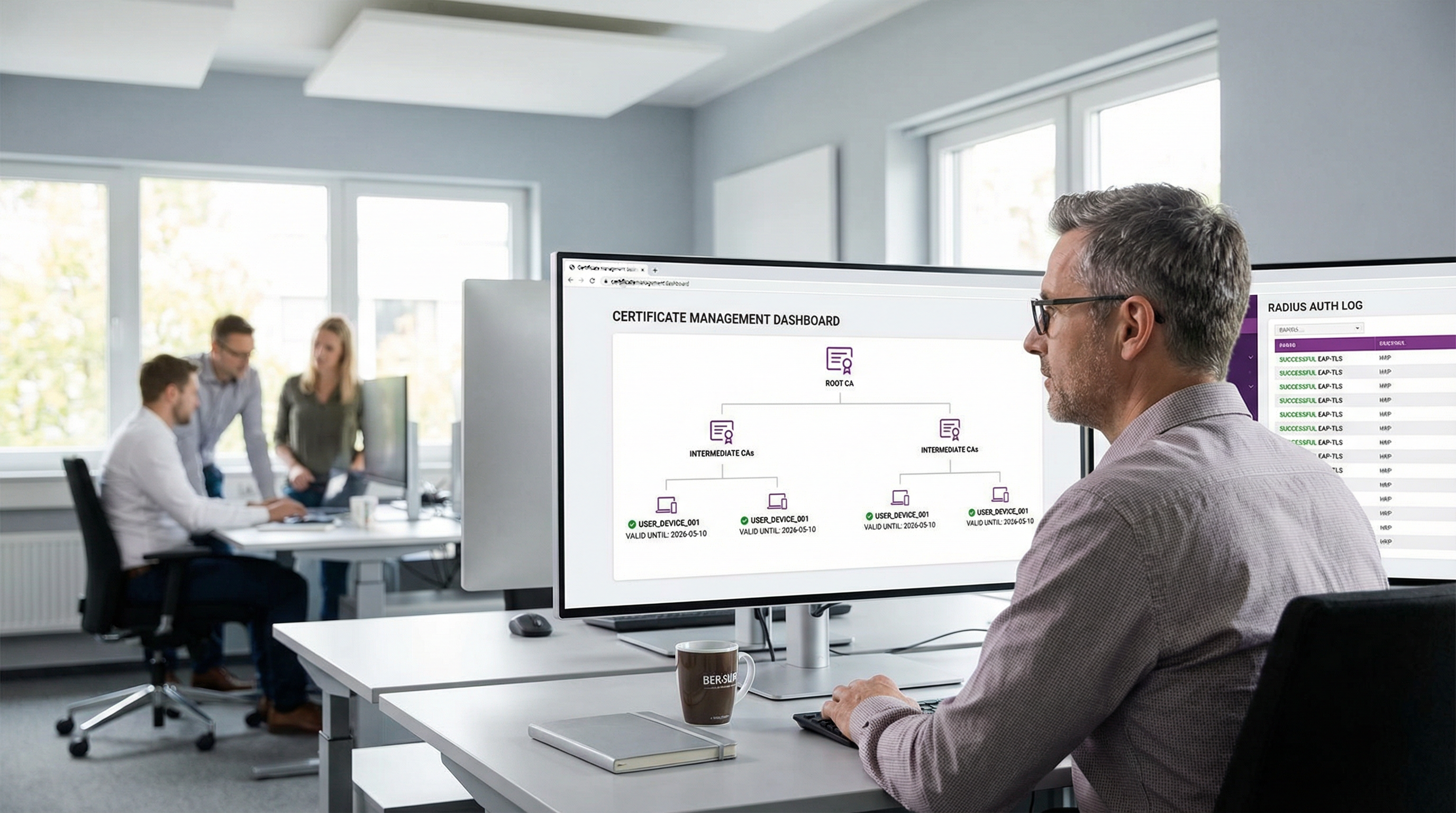
कॉर्पोरेट मुख्यालयांपासून ते Retail साखळी आणि Healthcare सुविधांपर्यंतच्या एंटरप्राइझ वातावरणासाठी, वायरलेस ॲक्सेस सुरक्षित करणे ही आता केवळ ऑपरेशनल गरज राहिलेली नाही—हे एक महत्त्वपूर्ण अनुपालन (compliance) आदेश आहे. ऐतिहासिकदृष्ट्या, संस्थांनी PEAP-MSCHAPv2 वर अवलंबून राहिले आहे, जे TLS टनेलमध्ये युजरनेम आणि पासवर्ड सुरक्षित करते. तथापि, क्रेडेंशियल हार्वेस्टिंग आणि अत्याधुनिक फिशिंग हल्ल्यांच्या युगात, WiFi वर पासवर्ड-आधारित ऑथेंटिकेशन एक मोठी असुरक्षितता दर्शवते.
EAP-TLS (Extensible Authentication Protocol - Transport Layer Security) सादर करत आहोत. EAP-TLS हे 802.1X नेटवर्क ॲक्सेस कंट्रोलमधील सुवर्ण मानक दर्शवते. युजर-जनरेटेड पासवर्डवर अवलंबून राहण्याऐवजी, EAP-TLS X.509 डिजिटल सर्टिफिकेट्स वापरून परस्पर ऑथेंटिकेशन अनिवार्य करते. नेटवर्क ॲक्सेस मिळण्यापूर्वी क्लायंट डिव्हाइस आणि ऑथेंटिकेशन सर्व्हर या दोघांनाही त्यांची ओळख सिद्ध करावी लागते. हा दृष्टिकोन क्रेडेंशियल चोरीचा धोका काढून टाकतो, मॅन-इन-द-मिडल (MitM) हल्ले कमी करतो आणि व्यवस्थापित डिव्हाइसेससाठी अखंड, झिरो-टच कनेक्शन अनुभव प्रदान करतो. हे तांत्रिक संदर्भ मार्गदर्शक EAP-TLS हँडशेकची यंत्रणा एक्सप्लोर करते, जुन्या पद्धतींशी त्याची तुलना करते आणि आधुनिक उपक्रमांसाठी व्यावहारिक उपयोजन आर्किटेक्चरची रूपरेषा मांडते.
कार्यकारी विहंगावलोकनासाठी आमचे तांत्रिक ब्रीफिंग पॉडकास्ट ऐका:
तांत्रिक सखोल माहिती
EAP-TLS हँडशेक स्पष्ट केला
EAP-TLS चा मूलभूत फायदा त्याच्या क्रिप्टोग्राफिक कठोरतेमध्ये आहे. ऑथेंटिकेशन प्रक्रिया ही सप्लिकंट (क्लायंट डिव्हाइस), ऑथेंटिकेटर (WiFi ॲक्सेस पॉइंट किंवा स्विच), आणि ऑथेंटिकेशन सर्व्हर (सामान्यतः RADIUS सर्व्हर) यांच्यातील बहु-चरण संवाद आहे.
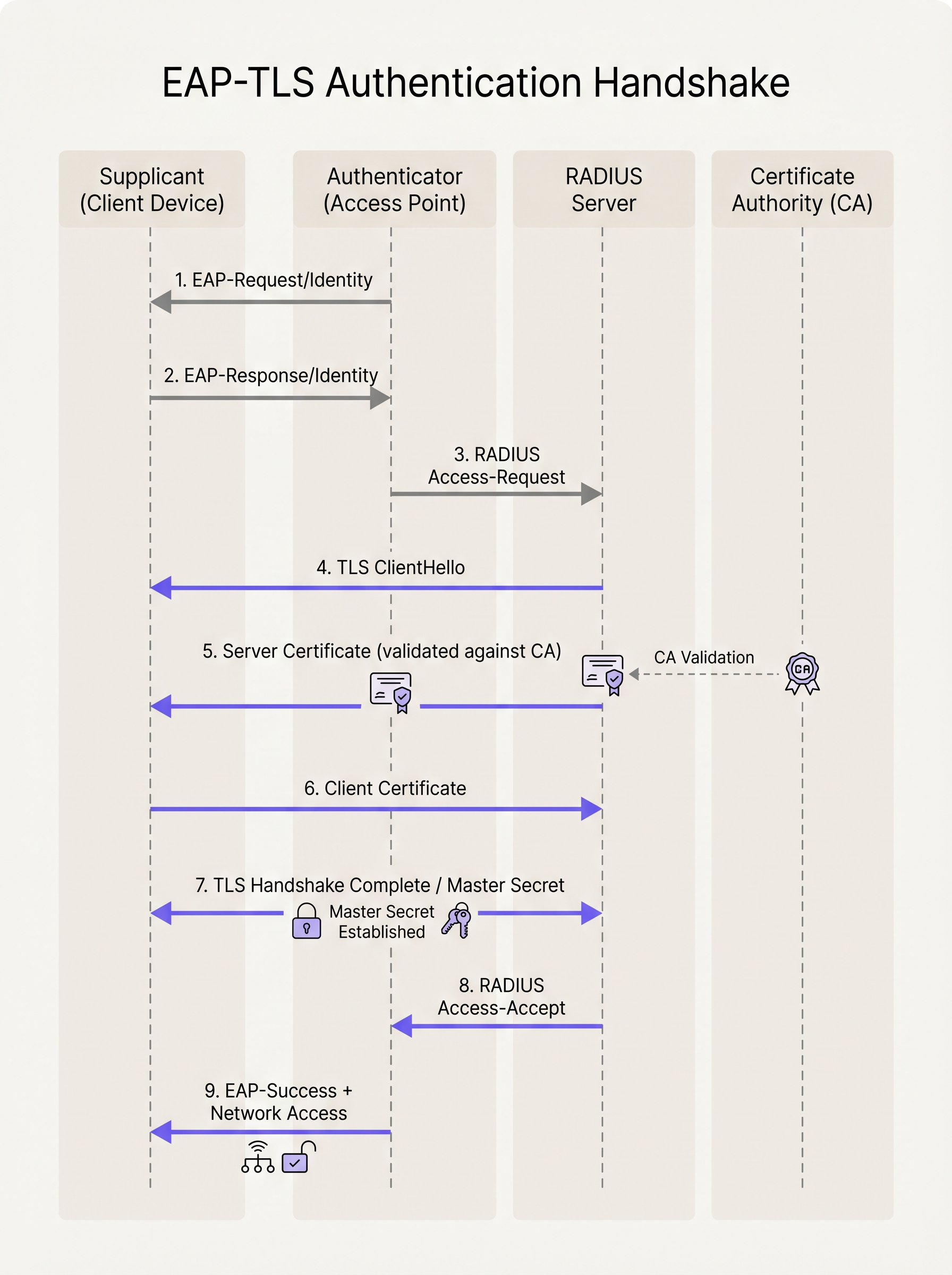
- प्रारंभीकरण (Initialization): जेव्हा एखादे डिव्हाइस SSID शी कनेक्ट करण्याचा प्रयत्न करते, तेव्हा ॲक्सेस पॉइंट EAP over LAN (EAPoL) फ्रेम्स व्यतिरिक्त सर्व ट्रॅफिक ब्लॉक करतो. AP डिव्हाइसला
EAP-Request/Identityपाठवते. - ओळख प्रतिसाद (Identity Response): डिव्हाइस
EAP-Response/Identityसह प्रतिसाद देते (गोपनीयतेसाठी अनेकदा निनावी बाह्य ओळख), जे AP RADIUS सर्व्हरकडे फॉरवर्ड करते. - TLS टनेल स्थापना: RADIUS सर्व्हर स्वतःच्या डिजिटल सर्टिफिकेटसह
TLS ServerHelloपाठवून TLS हँडशेक सुरू करतो. - सर्व्हर व्हॅलिडेशन: क्लायंट डिव्हाइस सर्व्हरच्या सर्टिफिकेटची तपासणी करते. ते वैधतेच्या तारखा, सब्जेक्ट अल्टरनेटिव्ह नेम (SAN) तपासते आणि महत्त्वाचे म्हणजे, सर्टिफिकेट त्याच्या स्थानिक ट्रस्ट स्टोअरमध्ये स्थापित विश्वसनीय रूट सर्टिफिकेट ऑथॉरिटी (CA) द्वारे स्वाक्षरित असल्याचे सत्यापित करते.
- क्लायंट सर्टिफिकेट सादरीकरण: एकदा सर्व्हर सत्यापित झाल्यानंतर, क्लायंट डिव्हाइस स्वतःचे X.509 सर्टिफिकेट (आणि पर्यायाने त्याची सर्टिफिकेट चेन) RADIUS सर्व्हरला परत पाठवते.
- परस्पर ऑथेंटिकेशन: RADIUS सर्व्हर त्याच्या CA किंवा आयडेंटिटी प्रोव्हायडर (IdP) इंटिग्रेशनसह क्लायंटचे सर्टिफिकेट व्हॅलिडेट करतो. तो रिव्होकेशन (CRL किंवा OCSP द्वारे) तपासतो आणि युजर किंवा डिव्हाइसची ओळख सत्यापित करतो.
- की डे रिव्हेशन (Key Derivation): यशस्वी परस्पर व्हॅलिडेशनवर, TLS हँडशेक पूर्ण होतो. दोन्ही बाजू स्वतंत्रपणे मास्टर सेशन की (MSK) मिळवतात.
- नेटवर्क ॲक्सेस: RADIUS सर्व्हर AP ला MSK असलेला
RADIUS Access-Acceptमेसेज पाठवतो. AP या की चा वापर क्लायंटसह अंतिम WPA2/WPA3 एन्क्रिप्शन की (PTK/GTK) स्थापित करण्यासाठी करतो आणि मानक IP ट्रॅफिकसाठी नेटवर्क पोर्ट उघडतो.
EAP-TLS विरुद्ध PEAP-MSCHAPv2
स्थलांतराचे नियोजन करणाऱ्या नेटवर्क आर्किटेक्ट्ससाठी EAP-TLS आणि PEAP मधील फरक समजून घेणे महत्त्वाचे आहे.
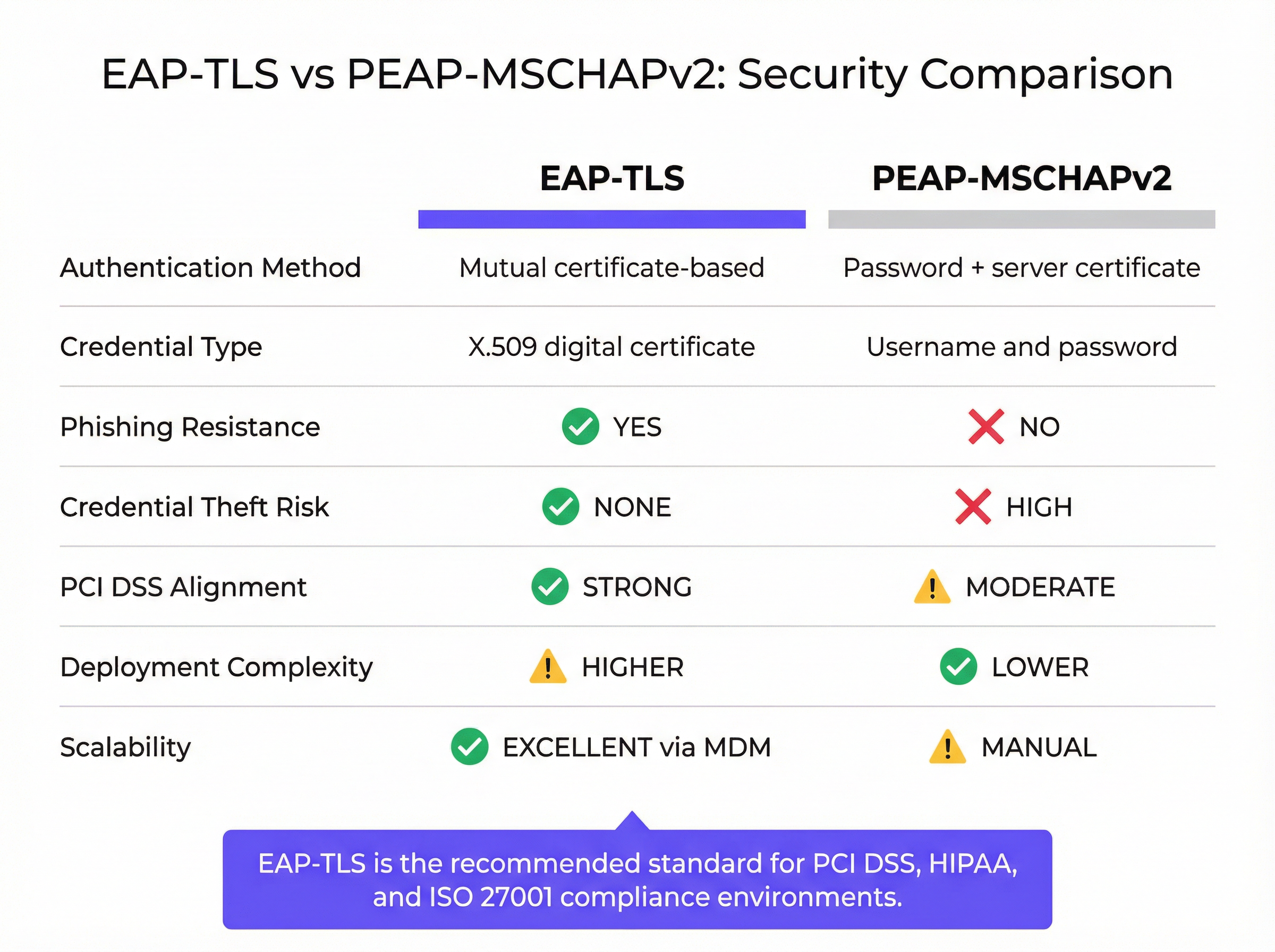
PEAP एक सुरक्षित TLS टनेल (सर्व्हर-साइड ऑथेंटिकेशन) स्थापित करत असताना, अंतर्गत ऑथेंटिकेशन अजूनही MSCHAPv2 या पासवर्ड-आधारित प्रोटोकॉलवर अवलंबून असते. जर एखादा युजर दुर्भावनापूर्ण "Evil Twin" ॲक्सेस पॉइंटशी कनेक्ट झाला आणि सर्व्हर सर्टिफिकेट वॉर्निंगकडे दुर्लक्ष केले, तर त्यांचा हॅश केलेला पासवर्ड कॅप्चर केला जाऊ शकतो आणि ऑफलाइन क्रॅक केला जाऊ शकतो. EAP-TLS हा धोका पूर्णपणे काढून टाकते; क्लायंट सर्टिफिकेटशी संबंधित प्रायव्हेट की शिवाय, अटॅकरकडे युजरचा पासवर्ड असला तरीही तो ऑथेंटिकेट करू शकत नाही.
अंमलबजावणी मार्गदर्शक
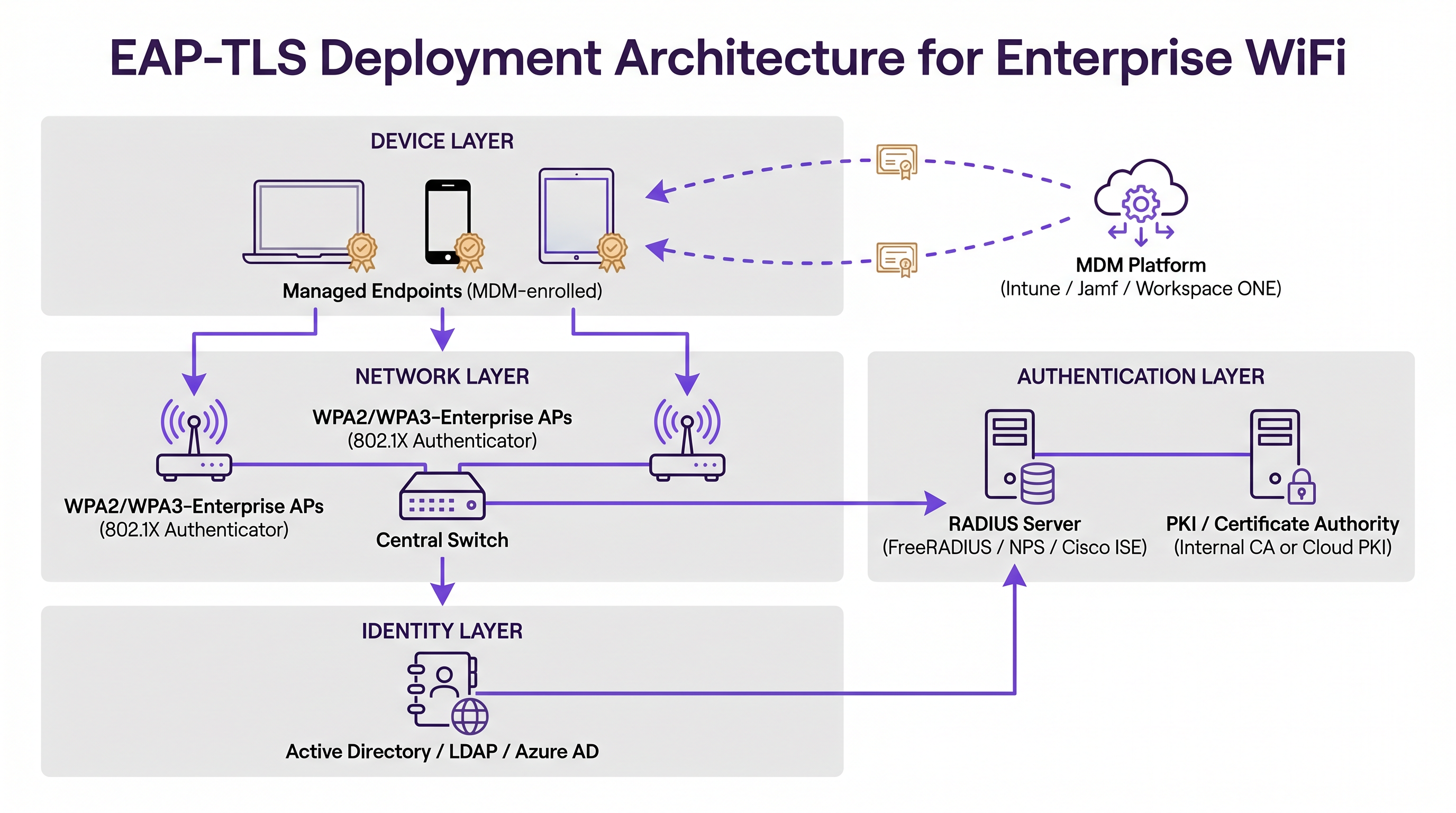
EAP-TLS तैनात करण्यासाठी तीन प्राथमिक इन्फ्रास्ट्रक्चर स्तंभांमध्ये समन्वय आवश्यक आहे: नेटवर्क लेयर, ऑथेंटिकेशन लेयर आणि आयडेंटिटी/एंडपॉइंट मॅनेजमेंट लेयर.
1. पब्लिक की इन्फ्रास्ट्रक्चर (PKI)
तुमच्याकडे X.509 सर्टिफिकेट्स जारी करण्यासाठी आणि व्यवस्थापित करण्यासाठी एक यंत्रणा असणे आवश्यक आहे. ऐतिहासिकदृष्ट्या, याचा अर्थ ऑन-प्रिमाइसेस Microsoft Active Directory Certificate Services (AD CS) वातावरण तैनात करणे असा होता. आज, आधुनिक आर्किटेक्चर Azure AD, Okta किंवा Google Workspace सारख्या आयडेंटिटी प्रोव्हायडर्स (IdPs) सह एकत्रित क्लाउड PKI सोल्यूशन्सचा लाभ घेतात. हे क्लाउड-नेटिव्ह CAs सर्टिफिकेट जारी करणे आणि रद्द करणे सोपे करतात.
2. RADIUS ऑथेंटिकेशन सर्व्हर
RADIUS सर्व्हर (उदा. FreeRADIUS, Cisco ISE, Aruba ClearPass, किंवा क्लाउड-आधारित RADIUS) EAP-TLS ला सपोर्ट करण्यासाठी कॉन्फिगर केलेला असणे आवश्यक आहे. यासाठी सर्व क्लायंट डिव्हाइसेसद्वारे विश्वसनीय असलेल्या CA द्वारे स्वाक्षरित स्वतःचे सर्व्हर सर्टिफिकेट आवश्यक आहे. जर तुम्ही आधुनिक IdP सह एकत्रित होत असाल, तर तुम्हाला आमचे Okta and RADIUS: Extending Your Identity Provider to WiFi Authentication वरील मार्गदर्शक क्लाउड आयडेंटिटीला ऑन-प्रिमाइसेस नेटवर्क हार्डवेअरशी जोडण्यासाठी विशेषतः उपयुक्त वाटू शकते.
3. मोबाईल डिव्हाइस मॅनेजमेंट (MDM)
EAP-TLS उपयोजनातील सर्वात मोठा अडथळा म्हणजे क्लायंट डिव्हाइसेसना सर्टिफिकेट्स प्रोव्हिजन करणे. मॅन्युअल इन्स्टॉलेशन स्केलेबल नाही. ही प्रक्रिया स्वयंचलित करण्यासाठी तुम्ही MDM प्लॅटफॉर्मचा (जसे की Microsoft Intune, Jamf Pro, किंवा VMware Workspace ONE) लाभ घेतला पाहिजे. MDM प्रोफाइलने खालील गोष्टी तैनात केल्या पाहिजेत:
- रूट CA सर्टिफिकेट (RADIUS सर्व्हरवर विश्वास ठेवण्यासाठी).
- वैयक्तिक क्लायंट सर्टिफिकेट (अनेकदा SCEP किंवा EST प्रोटोकॉलद्वारे व्युत्पन्न केलेले).
- WPA2/WPA3-Enterprise, EAP-TLS वापरण्यासाठी कॉन्फिगर केलेले WiFi प्रोफाइल आणि विशेषतः तैनात केलेल्या सर्टिफिकेट्सचा संदर्भ देणारे.
सर्वोत्तम पद्धती
- सर्टिफिकेट लाइफसायकल मॅनेजमेंट स्वयंचलित करा: सर्टिफिकेट्स कालबाह्य होतात. तुमच्याकडे स्वयंचलित नूतनीकरण यंत्रणा (MDM द्वारे SCEP/EST सारखी) नसल्यास, सर्टिफिकेट्स कालबाह्य झाल्यावर डिव्हाइसेस नेटवर्कवरून डिस्कनेक्ट होतील, ज्यामुळे सपोर्ट तिकिटांमध्ये मोठी वाढ होईल. सुरक्षेचा (उदा. 1 वर्ष) आणि ऑपरेशनल ओव्हरहेडचा समतोल राखणारे वैधता कालावधी सेट करा.
- कडक सर्व्हर व्हॅलिडेशन लागू करा: RADIUS सर्व्हरच्या सर्टिफिकेटचे कडकपणे व्हॅलिडेशन करण्यासाठी क्लायंट WiFi प्रोफाइल कॉन्फिगर करा. प्रोफाइलमध्ये अचूक सर्व्हर नावे आणि विश्वसनीय रूट CAs निर्दिष्ट करा. युजर्सना सर्टिफिकेट वॉर्निंग बायपास करण्याची परवानगी देऊ नका.
- मजबूत रिव्होकेशन लागू करा: तुमचा RADIUS सर्व्हर सर्टिफिकेट रिव्होकेशन लिस्ट (CRLs) तपासतो किंवा ऑनलाइन सर्टिफिकेट स्टेटस प्रोटोकॉल (OCSP) वापरतो याची खात्री करा. जेव्हा एखादा कर्मचारी सोडून जातो किंवा डिव्हाइस हरवते, तेव्हा सर्टिफिकेट रद्द केल्याने नेटवर्क ॲक्सेस त्वरित समाप्त झाला पाहिजे.
- मिश्र-डिव्हाइस फ्लीट हाताळा: EAP-TLS व्यवस्थापित कॉर्पोरेट डिव्हाइसेससाठी योग्य आहे. तथापि, तुम्हाला अव्यवस्थापित BYOD (Bring Your Own Device) आणि गेस्ट डिव्हाइसेसचा सामना करावा लागेल. पाहुण्यांसाठी, Purple च्या Guest WiFi सारखे मजबूत Captive Portal सोल्यूशन तैनात करा. स्टाफ BYOD साठी, ऑनबोर्डिंग पोर्टलचा विचार करा जे तात्पुरते सर्टिफिकेट प्रोव्हिजन करते किंवा कोअर कॉर्पोरेट नेटवर्कपासून वेगळ्या ऑथेंटिकेशन पद्धतीसह स्वतंत्र SSID वापरा.
ट्रबलशूटिंग आणि जोखीम कमी करणे
जेव्हा EAP-TLS अयशस्वी होते, तेव्हा त्याची लक्षणे अनेकदा एंड-युजरसाठी अस्पष्ट असतात. डिव्हाइस फक्त कनेक्ट होण्यास अपयशी ठरते. IT टीम्सनी निदानासाठी RADIUS लॉगवर अवलंबून राहणे आवश्यक आहे.
- त्रुटी: "Unknown CA" किंवा "Untrusted Root": क्लायंट डिव्हाइसच्या ट्रस्ट स्टोअरमध्ये RADIUS सर्व्हरच्या सर्टिफिकेटवर स्वाक्षरी करणारे रूट CA सर्टिफिकेट नाही. MDM पेलोड सत्यापित करा.
- त्रुटी: "Certificate Expired": एकतर क्लायंट सर्टिफिकेट किंवा सर्व्हर सर्टिफिकेट त्याच्या
NotAfterतारखेच्या पुढे गेले आहे. सर्टिफिकेट लाइफसायकल ऑटोमेशन तपासा. - त्रुटी: "Client Certificate Not Found": डिव्हाइस EAP-TLS चा प्रयत्न करत आहे परंतु WiFi प्रोफाइलमध्ये निर्दिष्ट केलेल्या निकषांशी जुळणारे वैध सर्टिफिकेट शोधू शकत नाही. MDM द्वारे सर्टिफिकेट यशस्वीरित्या तैनात केले गेले आहे आणि सब्जेक्ट अल्टरनेटिव्ह नेम (SAN) अपेक्षित फॉरमॅटशी (उदा. युजर प्रिन्सिपल नेम किंवा MAC ॲड्रेस) जुळत असल्याची खात्री करा.
- क्लॉक स्क्यू (Clock Skew): TLS अचूक वेळेवर अवलंबून असते. जर डिव्हाइसचे सिस्टम क्लॉक RADIUS सर्व्हरशी लक्षणीयरीत्या सिंक नसेल, तर सर्टिफिकेट व्हॅलिडेशन अयशस्वी होईल कारण सर्टिफिकेट्स "अद्याप वैध नाहीत" किंवा "कालबाह्य" दिसतील.
ROI आणि व्यवसायावर होणारा परिणाम
EAP-TLS कडे संक्रमण हे संस्थेच्या सुरक्षा स्थितीच्या महत्त्वपूर्ण परिपक्वतेचे प्रतिनिधित्व करते. प्राथमिक रिटर्न ऑन इन्व्हेस्टमेंट (ROI) म्हणजे जोखीम कमी करणे. पासवर्ड-आधारित WiFi ऑथेंटिकेशन काढून टाकून, तुम्ही क्रेडेंशियल चोरी आणि नेटवर्कमधील लॅटरल मूव्हमेंटसाठी अटॅक सरफेस मोठ्या प्रमाणात कमी करता. हे विशेषतः Hospitality आणि एंटरप्राइझ वातावरणात गंभीर आहे जिथे नेटवर्क सेगमेंटेशन सर्वोपरि आहे.
शिवाय, EAP-TLS एंड-युजर अनुभव सुधारते. एकदा MDM द्वारे प्रोव्हिजन केल्यावर, कनेक्शन पूर्णपणे झिरो-टच असते. जेव्हा युजर्सचा कॉर्पोरेट पासवर्ड कालबाह्य होतो तेव्हा त्यांना कधीही WiFi पासवर्ड अपडेट करावा लागत नाही, ज्यामुळे कनेक्टिव्हिटी समस्यांशी संबंधित हेल्पडेस्क कॉल्स कमी होतात. व्यवस्थापित स्टाफ डिव्हाइसेससाठी EAP-TLS ला इंटेलिजेंट WiFi Analytics आणि पाहुण्यांसाठी Captive Portal सह एकत्रित करून, ठिकाणे एक सुरक्षित, उच्च-कार्यक्षमता वायरलेस वातावरण प्राप्त करू शकतात जे ऑपरेशनल सुरक्षा आणि ग्राहक प्रतिबद्धता दोन्हीला समर्थन देते.
महत्त्वाच्या संज्ञा आणि व्याख्या
EAP-TLS (Extensible Authentication Protocol - Transport Layer Security)
An 802.1X authentication method that requires mutual authentication using digital certificates on both the client and the server, eliminating the need for passwords.
The most secure standard for enterprise WiFi authentication, widely mandated for compliance in high-security environments.
Supplicant
The client device (laptop, smartphone, tablet) attempting to connect to the secure network.
The supplicant software must support EAP-TLS and have access to the device's certificate store.
Authenticator
The network device (typically a WiFi Access Point or network switch) that facilitates the authentication process by passing EAP messages between the Supplicant and the Authentication Server.
The AP does not perform the authentication itself; it acts as a gatekeeper until the RADIUS server issues an Access-Accept.
RADIUS Server
Remote Authentication Dial-In User Service. The central server that validates the credentials (certificates in the case of EAP-TLS) and authorizes network access.
The RADIUS server integrates with the PKI or Identity Provider to verify the validity and revocation status of the client certificate.
PKI (Public Key Infrastructure)
The framework of roles, policies, hardware, software, and procedures needed to create, manage, distribute, use, store, and revoke digital certificates.
You need a PKI (either on-premise or cloud-based) to issue the certificates required for EAP-TLS.
X.509 Certificate
A standard format for public key certificates, digital documents that securely associate cryptographic key pairs with identities such as websites, individuals, or organizations.
This is the 'digital passport' used in EAP-TLS instead of a password.
SCEP / EST
Simple Certificate Enrollment Protocol / Enrollment over Secure Transport. Protocols used by MDM platforms to automate the request and installation of certificates onto client devices.
Crucial for scaling EAP-TLS deployments, ensuring devices receive and renew certificates without user intervention.
Evil Twin Attack
A rogue WiFi access point that masquerades as a legitimate corporate network to eavesdrop on wireless communications or harvest credentials.
EAP-TLS defeats Evil Twin attacks because the rogue AP cannot present a valid server certificate signed by the company's trusted Root CA.
केस स्टडीज
A large [Retail](/industries/retail) chain with 500 locations needs to secure WiFi access for their corporate-issued point-of-sale (POS) tablets. They currently use a single Pre-Shared Key (PSK) across all stores, which was recently leaked. They use Microsoft Intune for device management. How should they secure the network?
- Deploy a Cloud PKI integrated with their Azure AD environment.
- Configure Intune to use SCEP (Simple Certificate Enrollment Protocol) to automatically generate and push unique device certificates to each POS tablet.
- Push a new WiFi profile via Intune configured for WPA3-Enterprise and EAP-TLS, specifying the new client certificate and the trusted Root CA.
- Configure the central RADIUS server to authenticate the tablets based on these certificates.
- Once all tablets are successfully authenticating via EAP-TLS, disable the legacy PSK SSID.
A [Transport](/industries/transport) hub (airport) wants to provide secure WiFi for its operational staff (baggage handlers, security) using managed iPads, while keeping guest traffic completely separate.
- Implement EAP-TLS on a dedicated, hidden SSID (e.g., 'Airport-Ops-Secure') for the managed iPads, pushing certificates via their MDM platform.
- Ensure the RADIUS server maps these authenticated devices to a specific, restricted VLAN that only has access to necessary operational servers.
- Deploy a separate, open SSID (e.g., 'Airport-Free-WiFi') for passengers, utilizing a captive portal for terms-of-service acceptance and bandwidth limiting.
परिस्थिती विश्लेषण
Q1. Your organisation is migrating from PEAP to EAP-TLS. During the pilot phase, several Windows laptops fail to connect. The RADIUS logs show 'Unknown CA' errors during the TLS handshake. What is the most likely cause?
💡 संकेत:Think about the 'Mutual' part of mutual authentication. What does the client need to trust the server?
शिफारस केलेला दृष्टिकोन दाखवा
The client devices are missing the Root CA certificate in their local trust store that signed the RADIUS server's certificate. The MDM payload needs to be updated to ensure the Root CA is pushed to the devices alongside the client certificate.
Q2. A hotel wants to use EAP-TLS for all devices, including guest smartphones, to ensure maximum security. Is this a viable strategy?
💡 संकेत:Consider the provisioning process for EAP-TLS.
शिफारस केलेला दृष्टिकोन दाखवा
No, this is not a viable strategy. EAP-TLS requires client certificates to be installed on the device. While this is easy for managed corporate devices via MDM, you cannot force guests to install certificates or MDM profiles on their personal devices. For guests, a captive portal (like Purple Guest WiFi) combined with WPA2/WPA3-Personal (or OWE) is the industry standard.
Q3. You have successfully deployed EAP-TLS. An employee reports their corporate laptop was stolen. What is the immediate technical action required to secure the network?
💡 संकेत:How do you invalidate a digital certificate before its expiration date?
शिफारस केलेला दृष्टिकोन दाखवा
You must revoke the client certificate associated with that specific laptop within your PKI/CA. Ensure that your RADIUS server is configured to check the Certificate Revocation List (CRL) or use OCSP, so that the revoked certificate is immediately rejected upon the next connection attempt.
महत्त्वाचे निष्कर्ष
- ✓EAP-TLS is the most secure 802.1X authentication method, replacing passwords with mutual certificate-based authentication.
- ✓It eliminates the risk of credential theft and Evil Twin attacks inherent in password-based protocols like PEAP-MSCHAPv2.
- ✓A successful deployment requires coordination between a PKI (to issue certificates), a RADIUS server (to authenticate), and an MDM platform (to provision devices).
- ✓Automated certificate lifecycle management (via SCEP/EST) is critical to prevent mass connectivity outages when certificates expire.
- ✓EAP-TLS is ideal for managed corporate devices; unmanaged BYOD and guest devices require separate onboarding or captive portal strategies.
- ✓Implementing EAP-TLS strongly aligns with compliance mandates like PCI DSS and ISO 27001 by securing network access control.




