

Autenticação EAP-TLS Explicada: Segurança WiFi Baseada em Certificados
O EAP-TLS é o padrão ouro para segurança WiFi empresarial, substituindo a autenticação vulnerável baseada em senha por certificados digitais robustos e mutuamente autenticados. Este guia oferece aos gerentes de TI e arquitetos de rede um aprofundamento técnico abrangente no handshake EAP-TLS, requisitos de arquitetura e estratégias práticas de implantação para ambientes de dispositivos mistos.
🎧 Ouça este Guia
Ver Transcrição
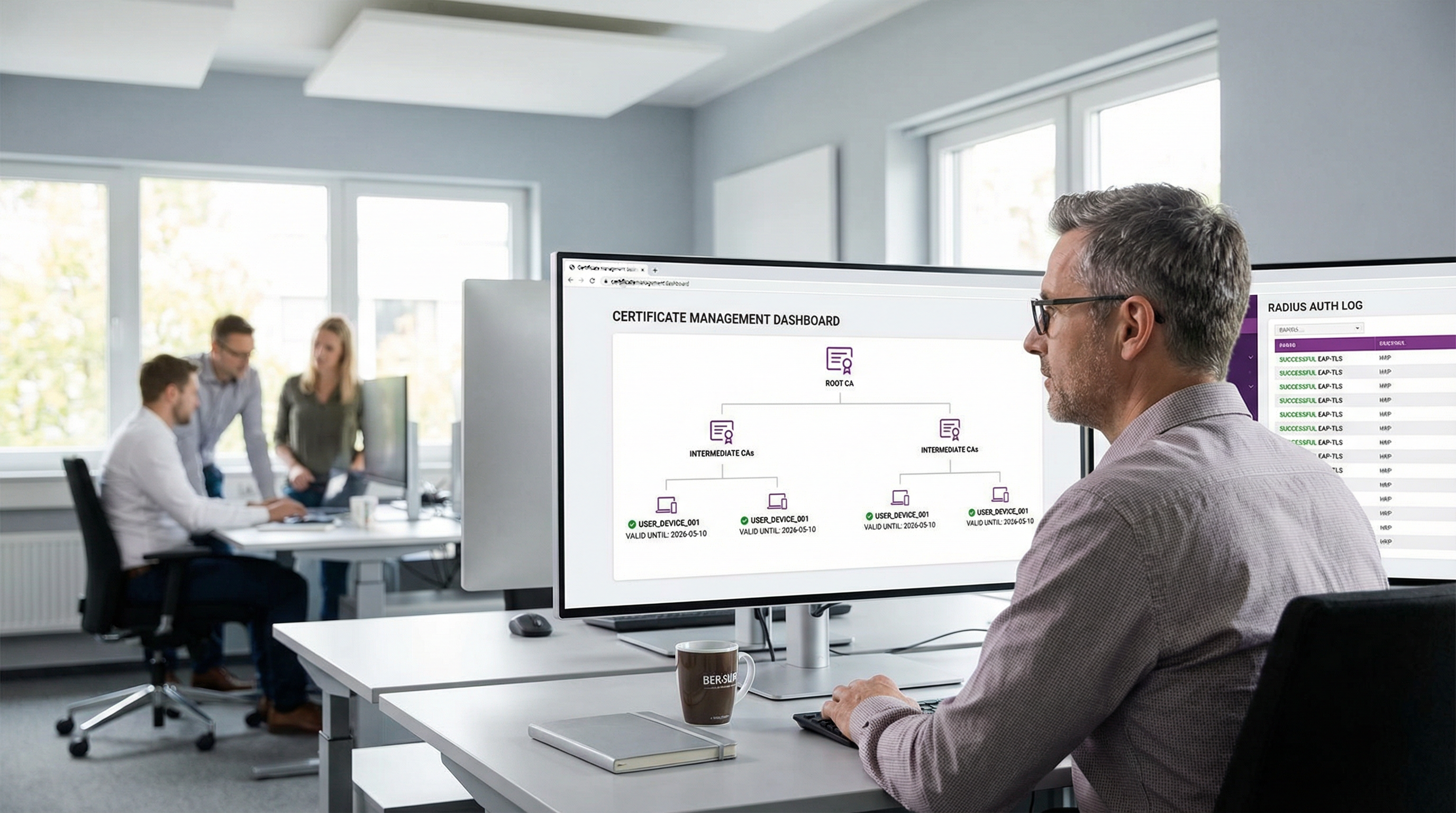
Resumo Executivo
Para ambientes empresariais que variam de sedes corporativas a redes de Varejo e instalações de Saúde , proteger o acesso sem fio não é mais apenas um requisito operacional — é um mandato crítico de conformidade. Historicamente, as organizações dependiam do PEAP-MSCHAPv2, que protege um nome de usuário e senha dentro de um túnel TLS. No entanto, em uma era de coleta desenfreada de credenciais e ataques de phishing sofisticados, a autenticação baseada em senha via WiFi representa uma vulnerabilidade significativa.
Apresentamos o EAP-TLS (Extensible Authentication Protocol - Transport Layer Security). O EAP-TLS representa o padrão ouro no controle de acesso à rede 802.1X. Em vez de depender de senhas geradas pelo usuário, o EAP-TLS exige autenticação mútua usando certificados digitais X.509. Tanto o dispositivo cliente quanto o servidor de autenticação devem provar sua identidade antes que qualquer acesso à rede seja concedido. Essa abordagem elimina o risco de roubo de credenciais, mitiga ataques man-in-the-middle (MitM) e oferece uma experiência de conexão contínua e zero-touch para dispositivos gerenciados. Este guia de referência técnica explora a mecânica do handshake EAP-TLS, compara-o com métodos legados e descreve uma arquitetura de implantação prática para empresas modernas.
Ouça nosso podcast de briefing técnico complementar para uma visão geral executiva:
Aprofundamento Técnico
O Handshake EAP-TLS Explicado
A vantagem fundamental do EAP-TLS reside em seu rigor criptográfico. O processo de autenticação é uma conversa de várias etapas entre o Suplicante (o dispositivo cliente), o Autenticador (o Ponto de Acesso WiFi ou switch) e o Servidor de Autenticação (geralmente um servidor RADIUS).
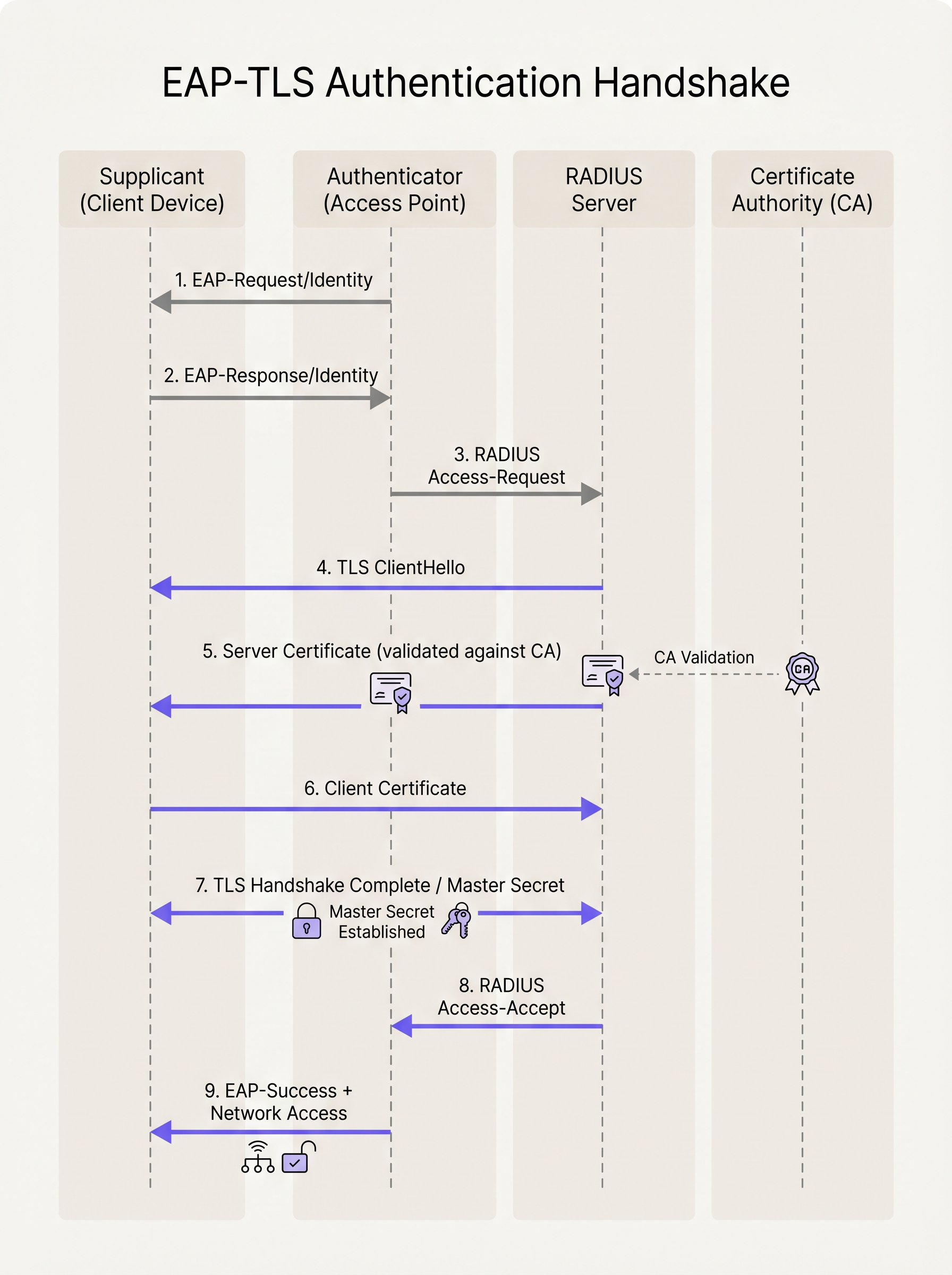
- Inicialização: Quando um dispositivo tenta se conectar ao SSID, o Ponto de Acesso bloqueia todo o tráfego, exceto os quadros EAP over LAN (EAPoL). O AP envia um
EAP-Request/Identitypara o dispositivo. - Resposta de Identidade: O dispositivo responde com um
EAP-Response/Identity(geralmente uma identidade externa anônima para privacidade), que o AP encaminha para o servidor RADIUS. - Estabelecimento do Túnel TLS: O servidor RADIUS inicia o handshake TLS enviando um
TLS ServerHellojunto com seu próprio certificado digital. - Validação do Servidor: O dispositivo cliente examina o certificado do servidor. Ele verifica as datas de validade, o nome alternativo do assunto (SAN) e, crucialmente, verifica se o certificado foi assinado por uma Autoridade Certificadora (CA) Raiz confiável instalada em seu repositório de confiança local.
- Apresentação do Certificado do Cliente: Uma vez que o servidor é validado, o dispositivo cliente envia seu próprio certificado X.509 (e opcionalmente sua cadeia de certificados) de volta para o servidor RADIUS.
- Autenticação Mútua: O servidor RADIUS valida o certificado do cliente em relação à sua integração com a CA ou Provedor de Identidade (IdP). Ele verifica a revogação (via CRL ou OCSP) e verifica a identidade do usuário ou dispositivo.
- Derivação de Chave: Após a validação mútua bem-sucedida, o handshake TLS é concluído. Ambos os lados derivam independentemente uma Master Session Key (MSK).
- Acesso à Rede: O servidor RADIUS envia uma mensagem
RADIUS Access-Acceptpara o AP, contendo a MSK. O AP usa essa chave para estabelecer as chaves de criptografia finais WPA2/WPA3 (PTK/GTK) com o cliente e abre a porta de rede para o tráfego IP padrão.
EAP-TLS vs. PEAP-MSCHAPv2
Compreender a distinção entre EAP-TLS e PEAP é crítico para arquitetos de rede que planejam uma migração.
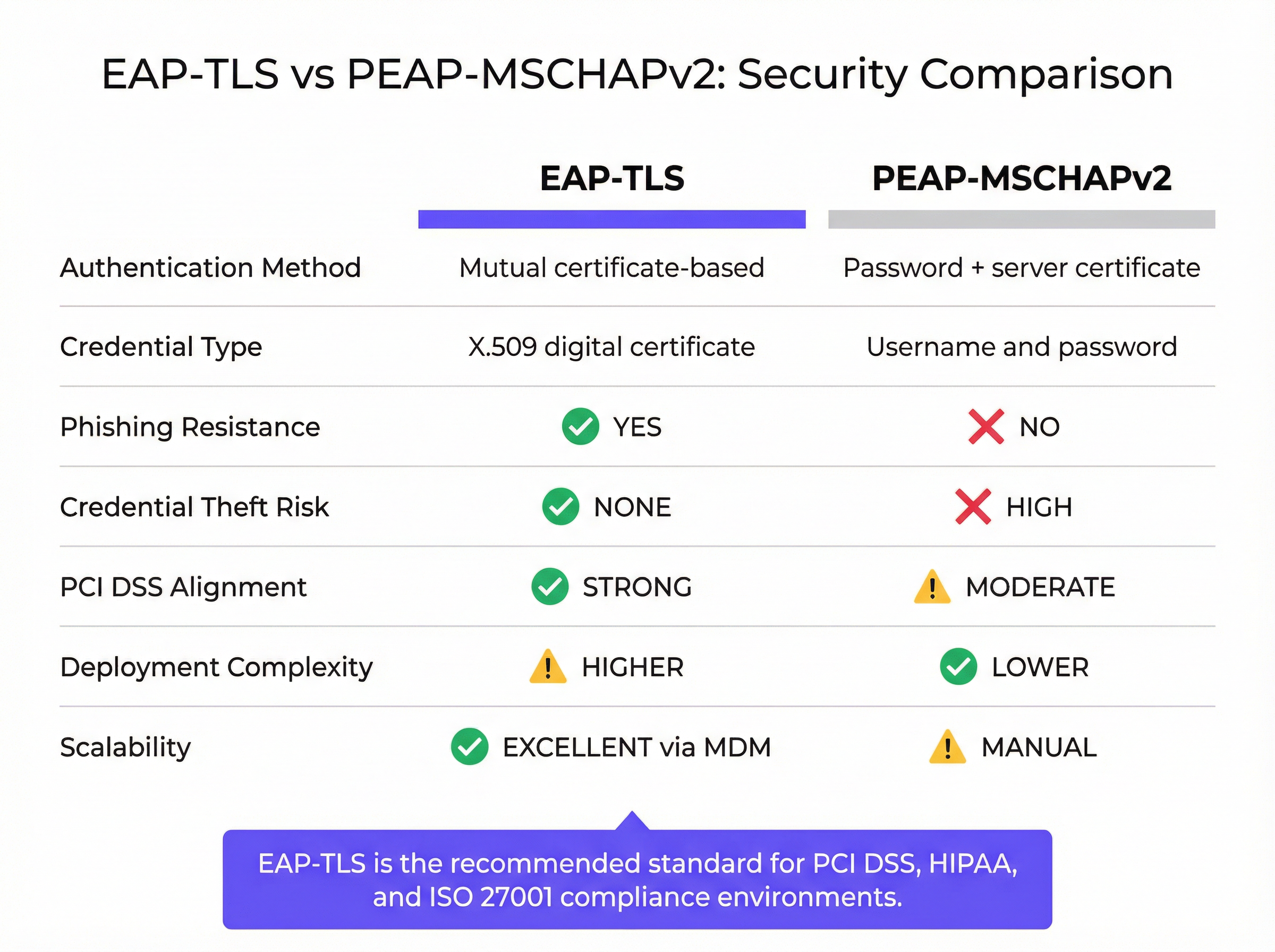
Embora o PEAP estabeleça um túnel TLS seguro (autenticação do lado do servidor), a autenticação interna ainda depende do MSCHAPv2, um protocolo baseado em senha. Se um usuário se conectar a um Ponto de Acesso malicioso "Evil Twin" e ignorar o aviso do certificado do servidor, sua senha com hash pode ser capturada e quebrada offline. O EAP-TLS elimina esse vetor inteiramente; sem a chave privada correspondente ao certificado do cliente, um invasor não pode se autenticar, mesmo que possua a senha do usuário.
Guia de Implementação
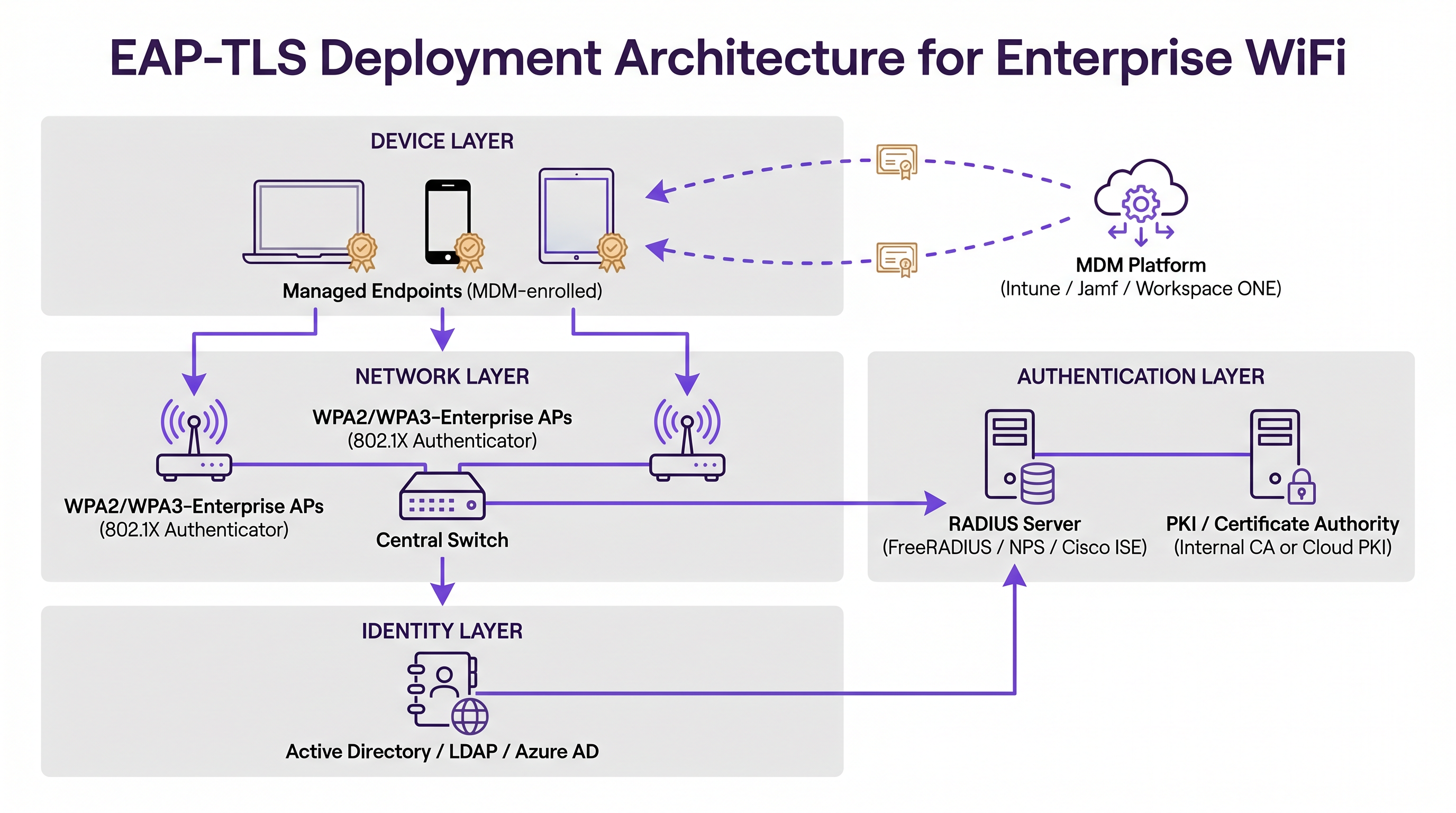
A implantação do EAP-TLS requer orquestração em três pilares principais de infraestrutura: a Camada de Rede, a Camada de Autenticação e a Camada de Gerenciamento de Identidade/Endpoint.
1. Infraestrutura de Chaves Públicas (PKI)
Você deve ter um mecanismo para emitir e gerenciar certificados X.509. Historicamente, isso significava implantar um ambiente local do Microsoft Active Directory Certificate Services (AD CS). Hoje, as arquiteturas modernas aproveitam as soluções de Cloud PKI integradas a Provedores de Identidade (IdPs) como Azure AD, Okta ou Google Workspace. Essas CAs nativas da nuvem simplificam o ciclo de vida de emissão e revogação.
2. Servidor de Autenticação RADIUS
O servidor RADIUS (por exemplo, FreeRADIUS, Cisco ISE, Aruba ClearPass ou RADIUS baseado em nuvem) deve ser configurado para suportar EAP-TLS. Ele requer seu próprio certificado de servidor, assinado por uma CA confiável para todos os dispositivos cliente. Se você estiver integrando com um IdP moderno, poderá encontrar nosso guia sobre Okta e RADIUS: Estendendo seu Provedor de Identidade para Autenticação WiFition particularmente útil para conectar a identidade na nuvem com hardware de rede local.
3. Mobile Device Management (MDM)
O obstáculo mais significativo na implementação do EAP-TLS é o provisionamento de certificados para os dispositivos clientes. A instalação manual não é escalável. Você deve utilizar uma plataforma de MDM (como Microsoft Intune, Jamf Pro ou VMware Workspace ONE) para automatizar esse processo. O perfil de MDM deve implantar:
- O certificado da CA Raiz (para confiar no servidor RADIUS).
- O Certificado de Cliente individual (frequentemente gerado via protocolos SCEP ou EST).
- O perfil de WiFi configurado para usar WPA2/WPA3-Enterprise, EAP-TLS e referenciando especificamente os certificados implantados.
Melhores Práticas
- Automatize o Gerenciamento do Ciclo de Vida de Certificados: Certificados expiram. Se você não tiver um mecanismo de renovação automatizado (como SCEP/EST via MDM), os dispositivos perderão a conexão com a rede silenciosamente quando seus certificados expirarem, levando a picos massivos de chamados de suporte. Defina períodos de validade que equilibrem segurança (ex: 1 ano) com a carga operacional.
- Imponha Validação Estrita de Servidor: Configure os perfis de WiFi dos clientes para validar estritamente o certificado do servidor RADIUS. Especifique os nomes exatos dos servidores e as CAs Raiz confiáveis no perfil. Não permita que os usuários ignorem avisos de certificado.
- Implemente Revogação Robusta: Certifique-se de que seu servidor RADIUS verifique as Listas de Revogação de Certificados (CRLs) ou use o Online Certificate Status Protocol (OCSP). Quando um funcionário sai ou um dispositivo é perdido, a revogação do certificado deve encerrar imediatamente o acesso à rede.
- Gerencie a Frota de Dispositivos Mistos: O EAP-TLS é perfeito para dispositivos corporativos gerenciados. No entanto, você encontrará dispositivos BYOD (Bring Your Own Device) não gerenciados e dispositivos de convidados. Para convidados, implante uma solução robusta de Captive Portal como o Guest WiFi da Purple. Para BYOD de funcionários, considere um portal de integração que provisione temporariamente um certificado ou utilize um SSID separado com um método de autenticação diferente, isolado da rede corporativa principal.
Solução de Problemas e Mitigação de Riscos
Quando o EAP-TLS falha, os sintomas costumam ser opacos para o usuário final. O dispositivo simplesmente não consegue se conectar. As equipes de TI devem contar com os logs do RADIUS para diagnósticos.
- Erro: "CA Desconhecida" ou "Raiz Não Confiável": O dispositivo cliente não possui o certificado da CA Raiz que assinou o certificado do servidor RADIUS em seu repositório de confiança. Verifique o payload do MDM.
- Erro: "Certificado Expirado": O certificado do cliente ou o certificado do servidor ultrapassou a data
NotAfter. Verifique a automação do ciclo de vida do certificado. - Erro: "Certificado de Cliente Não Encontrado": O dispositivo está tentando o EAP-TLS, mas não consegue localizar um certificado válido que corresponda aos critérios especificados no perfil de WiFi. Certifique-se de que o certificado foi implantado com sucesso pelo MDM e que o Subject Alternative Name (SAN) corresponde ao formato esperado (ex: User Principal Name ou endereço MAC).
- Desvio de Relógio (Clock Skew): O TLS depende de uma cronometragem precisa. Se o relógio do sistema de um dispositivo estiver significativamente fora de sincronia com o servidor RADIUS, a validação do certificado falhará porque os certificados parecerão "ainda não válidos" ou "expirados".
ROI e Impacto nos Negócios
A transição para o EAP-TLS representa um amadurecimento significativo da postura de segurança de uma organização. O principal Retorno sobre o Investimento (ROI) é a mitigação de riscos. Ao eliminar a autenticação WiFi baseada em senha, você reduz drasticamente a superfície de ataque para roubo de credenciais e movimentação lateral dentro da rede. Isso é particularmente crítico em ambientes de Hospitalidade e corporativos, onde a segmentação de rede é primordial.
Além disso, o EAP-TLS melhora a experiência do usuário final. Uma vez provisionada via MDM, a conexão é totalmente zero-touch. Os usuários nunca precisam atualizar as senhas de WiFi quando sua senha corporativa expira, reduzindo as chamadas ao helpdesk relacionadas a problemas de conectividade. Ao combinar o EAP-TLS para dispositivos de funcionários gerenciados com WiFi Analytics inteligente e Captive Portals para convidados, os locais podem alcançar um ambiente sem fio seguro e de alto desempenho que suporta tanto a segurança operacional quanto o engajamento do cliente.
Termos-Chave e Definições
EAP-TLS (Extensible Authentication Protocol - Transport Layer Security)
An 802.1X authentication method that requires mutual authentication using digital certificates on both the client and the server, eliminating the need for passwords.
The most secure standard for enterprise WiFi authentication, widely mandated for compliance in high-security environments.
Supplicant
The client device (laptop, smartphone, tablet) attempting to connect to the secure network.
The supplicant software must support EAP-TLS and have access to the device's certificate store.
Authenticator
The network device (typically a WiFi Access Point or network switch) that facilitates the authentication process by passing EAP messages between the Supplicant and the Authentication Server.
The AP does not perform the authentication itself; it acts as a gatekeeper until the RADIUS server issues an Access-Accept.
RADIUS Server
Remote Authentication Dial-In User Service. The central server that validates the credentials (certificates in the case of EAP-TLS) and authorizes network access.
The RADIUS server integrates with the PKI or Identity Provider to verify the validity and revocation status of the client certificate.
PKI (Public Key Infrastructure)
The framework of roles, policies, hardware, software, and procedures needed to create, manage, distribute, use, store, and revoke digital certificates.
You need a PKI (either on-premise or cloud-based) to issue the certificates required for EAP-TLS.
X.509 Certificate
A standard format for public key certificates, digital documents that securely associate cryptographic key pairs with identities such as websites, individuals, or organizations.
This is the 'digital passport' used in EAP-TLS instead of a password.
SCEP / EST
Simple Certificate Enrollment Protocol / Enrollment over Secure Transport. Protocols used by MDM platforms to automate the request and installation of certificates onto client devices.
Crucial for scaling EAP-TLS deployments, ensuring devices receive and renew certificates without user intervention.
Evil Twin Attack
A rogue WiFi access point that masquerades as a legitimate corporate network to eavesdrop on wireless communications or harvest credentials.
EAP-TLS defeats Evil Twin attacks because the rogue AP cannot present a valid server certificate signed by the company's trusted Root CA.
Estudos de Caso
A large [Retail](/industries/retail) chain with 500 locations needs to secure WiFi access for their corporate-issued point-of-sale (POS) tablets. They currently use a single Pre-Shared Key (PSK) across all stores, which was recently leaked. They use Microsoft Intune for device management. How should they secure the network?
- Deploy a Cloud PKI integrated with their Azure AD environment.
- Configure Intune to use SCEP (Simple Certificate Enrollment Protocol) to automatically generate and push unique device certificates to each POS tablet.
- Push a new WiFi profile via Intune configured for WPA3-Enterprise and EAP-TLS, specifying the new client certificate and the trusted Root CA.
- Configure the central RADIUS server to authenticate the tablets based on these certificates.
- Once all tablets are successfully authenticating via EAP-TLS, disable the legacy PSK SSID.
A [Transport](/industries/transport) hub (airport) wants to provide secure WiFi for its operational staff (baggage handlers, security) using managed iPads, while keeping guest traffic completely separate.
- Implement EAP-TLS on a dedicated, hidden SSID (e.g., 'Airport-Ops-Secure') for the managed iPads, pushing certificates via their MDM platform.
- Ensure the RADIUS server maps these authenticated devices to a specific, restricted VLAN that only has access to necessary operational servers.
- Deploy a separate, open SSID (e.g., 'Airport-Free-WiFi') for passengers, utilizing a captive portal for terms-of-service acceptance and bandwidth limiting.
Análise de Cenário
Q1. Your organisation is migrating from PEAP to EAP-TLS. During the pilot phase, several Windows laptops fail to connect. The RADIUS logs show 'Unknown CA' errors during the TLS handshake. What is the most likely cause?
💡 Dica:Think about the 'Mutual' part of mutual authentication. What does the client need to trust the server?
Mostrar Abordagem Recomendada
The client devices are missing the Root CA certificate in their local trust store that signed the RADIUS server's certificate. The MDM payload needs to be updated to ensure the Root CA is pushed to the devices alongside the client certificate.
Q2. A hotel wants to use EAP-TLS for all devices, including guest smartphones, to ensure maximum security. Is this a viable strategy?
💡 Dica:Consider the provisioning process for EAP-TLS.
Mostrar Abordagem Recomendada
No, this is not a viable strategy. EAP-TLS requires client certificates to be installed on the device. While this is easy for managed corporate devices via MDM, you cannot force guests to install certificates or MDM profiles on their personal devices. For guests, a captive portal (like Purple Guest WiFi) combined with WPA2/WPA3-Personal (or OWE) is the industry standard.
Q3. You have successfully deployed EAP-TLS. An employee reports their corporate laptop was stolen. What is the immediate technical action required to secure the network?
💡 Dica:How do you invalidate a digital certificate before its expiration date?
Mostrar Abordagem Recomendada
You must revoke the client certificate associated with that specific laptop within your PKI/CA. Ensure that your RADIUS server is configured to check the Certificate Revocation List (CRL) or use OCSP, so that the revoked certificate is immediately rejected upon the next connection attempt.
Principais Conclusões
- ✓EAP-TLS is the most secure 802.1X authentication method, replacing passwords with mutual certificate-based authentication.
- ✓It eliminates the risk of credential theft and Evil Twin attacks inherent in password-based protocols like PEAP-MSCHAPv2.
- ✓A successful deployment requires coordination between a PKI (to issue certificates), a RADIUS server (to authenticate), and an MDM platform (to provision devices).
- ✓Automated certificate lifecycle management (via SCEP/EST) is critical to prevent mass connectivity outages when certificates expire.
- ✓EAP-TLS is ideal for managed corporate devices; unmanaged BYOD and guest devices require separate onboarding or captive portal strategies.
- ✓Implementing EAP-TLS strongly aligns with compliance mandates like PCI DSS and ISO 27001 by securing network access control.




