

Aleatorización de direcciones MAC: qué es y cómo gestionarla
This guide provides IT leaders and network architects with a comprehensive technical overview of MAC address randomisation. It details the impact on enterprise and guest WiFi networks and presents actionable strategies, including Purple's SecurePass technology, to mitigate risks and maintain robust analytics and security.
🎧 Escucha esta guía
Ver transcripción

Resumen ejecutivo
La aleatorización de direcciones MAC, una función de privacidad que ahora es estándar en iOS, Android y otros sistemas operativos, representa un desafío crítico para la gestión de WiFi empresarial. Al cambiar periódicamente el identificador de hardware de un dispositivo, interrumpe las operaciones centrales de la red que dependen de una dirección MAC estática para la autenticación, la seguridad y los análisis. Para los gerentes de TI y operadores de recintos en los sectores de hotelería, comercio minorista y grandes espacios públicos, esto se traduce en métricas de visitantes poco confiables, experiencias de usuario frustrantes y una postura de seguridad debilitada. Los métodos tradicionales como el control de acceso basado en MAC (MAC-ACL) y las listas blancas se vuelven ineficaces, mientras que las plataformas de análisis tienen dificultades para distinguir a los visitantes nuevos de los recurrentes, lo que afecta gravemente la medición de la afluencia, el tiempo de permanencia y la lealtad. Esta guía ofrece un análisis técnico profundo sobre cómo funciona la aleatorización, describe los impactos operativos y comerciales específicos, y ofrece un marco de mitigación claro y procesable. Detalla cómo evolucionar de los controles heredados basados en MAC a una estrategia de autenticación moderna centrada en la identidad, utilizando estándares como IEEE 802.1X y soluciones innovadoras como SecurePass de Purple, que está diseñado para proporcionar un acceso seguro y sin interrupciones en la era de la aleatorización de MAC.
Análisis técnico profundo
La aleatorización de direcciones MAC es el proceso mediante el cual un dispositivo falsifica su dirección MAC real integrada en el hardware (la Dirección Administrada Universalmente o UAA) y utiliza una temporal generada aleatoriamente (una Dirección Administrada Localmente o LAA) al conectarse a redes WiFi. Esta función que mejora la privacidad, introducida por primera vez por Apple en 2014, es ahora un comportamiento predeterminado en todos los principales sistemas operativos móviles.
Técnicamente, una LAA se identifica estableciendo el segundo bit menos significativo del primer octeto de la dirección MAC en '1'. Si bien esto hace que las direcciones aleatorizadas sean programáticamente identificables, el desafío central radica en su naturaleza transitoria. El comportamiento de aleatorización varía según el sistema operativo y la versión:
- Aleatorización por red: La implementación más común, donde un dispositivo genera y utiliza una MAC aleatorizada y persistente para cada red WiFi (SSID) específica a la que se conecta. Este fue el estándar para iOS 14 y Android 10 en adelante.
- Rotación basada en el tiempo: Una evolución más reciente y disruptiva, vista en iOS 18 y versiones posteriores, donde el dispositivo cambiará periódicamente la dirección MAC aleatorizada para la misma red. Esta rotación puede ocurrir cada dos semanas o incluso con mayor frecuencia si un usuario 'olvida' manualmente la red o el dispositivo borra su caché.
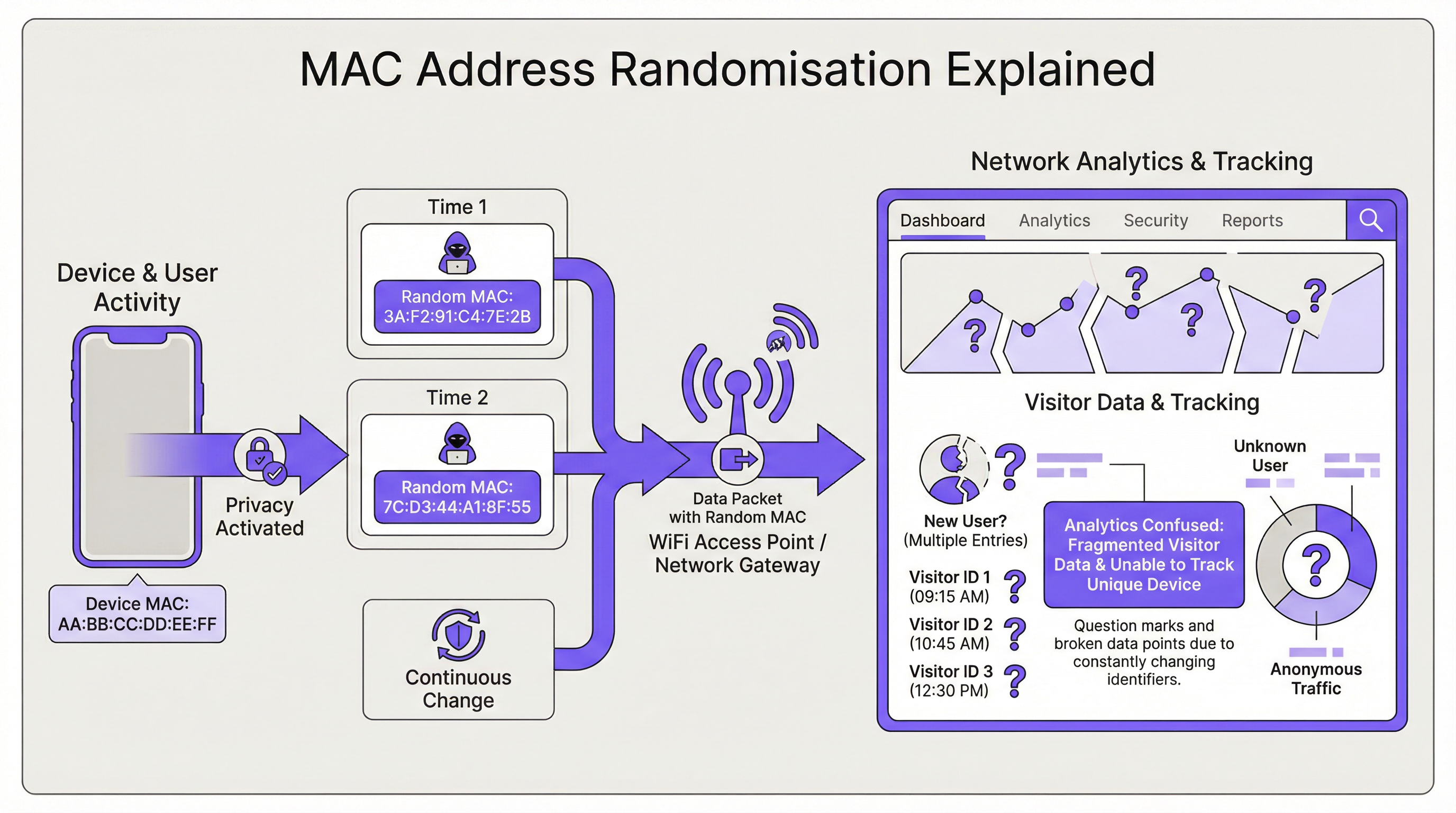
La consecuencia directa para la infraestructura de red es la pérdida de un identificador de dispositivo estable. Esto impacta varias áreas clave:
| Función de red | Impacto de la aleatorización de MAC |
|---|---|
| Autenticación | La omisión de autenticación MAC (MAB) y las listas blancas fallan. Los dispositivos requieren reautenticación tras la rotación de MAC, interrumpiendo el acceso sin fricciones. |
| Análisis e Inteligencia de Negocios (BI) | Los análisis de visitantes se sesgan gravemente. Un solo dispositivo recurrente aparece como múltiples visitantes 'nuevos', inflando los recuentos de presencia y haciendo que las métricas de visitas repetidas pierdan sentido. |
| Seguridad | Las listas negras basadas en MAC se eluden fácilmente. Rastrear la actividad de un dispositivo malicioso a través de múltiples sesiones se vuelve difícil, complicando el análisis forense. |
| Cumplimiento | Los sistemas que dependen de direcciones MAC para la segmentación de red o el registro (por ejemplo, para PCI DSS) pueden incumplir las normativas debido a la incapacidad de identificar dispositivos de manera consistente. |
Guía de implementación
La solución fundamental es pasar de una identidad basada en el dispositivo (la dirección MAC) a una identidad basada en el usuario. Esto requiere una nueva arquitectura de autenticación.
Paso 1: Evalúe su entorno Primero, segmente su base de usuarios. ¿Está gestionando dispositivos corporativos, dispositivos de invitados o una combinación de ambos? La estrategia será diferente para cada caso.
- Dispositivos corporativos/gestionados: Estos ofrecen mayor control. El objetivo es una conexión altamente segura y sin intervención (zero-touch).
- Dispositivos de invitados/BYOD: La prioridad es un proceso de incorporación seguro y de baja fricción que establezca una identidad persistente sin requerir la gestión del dispositivo.
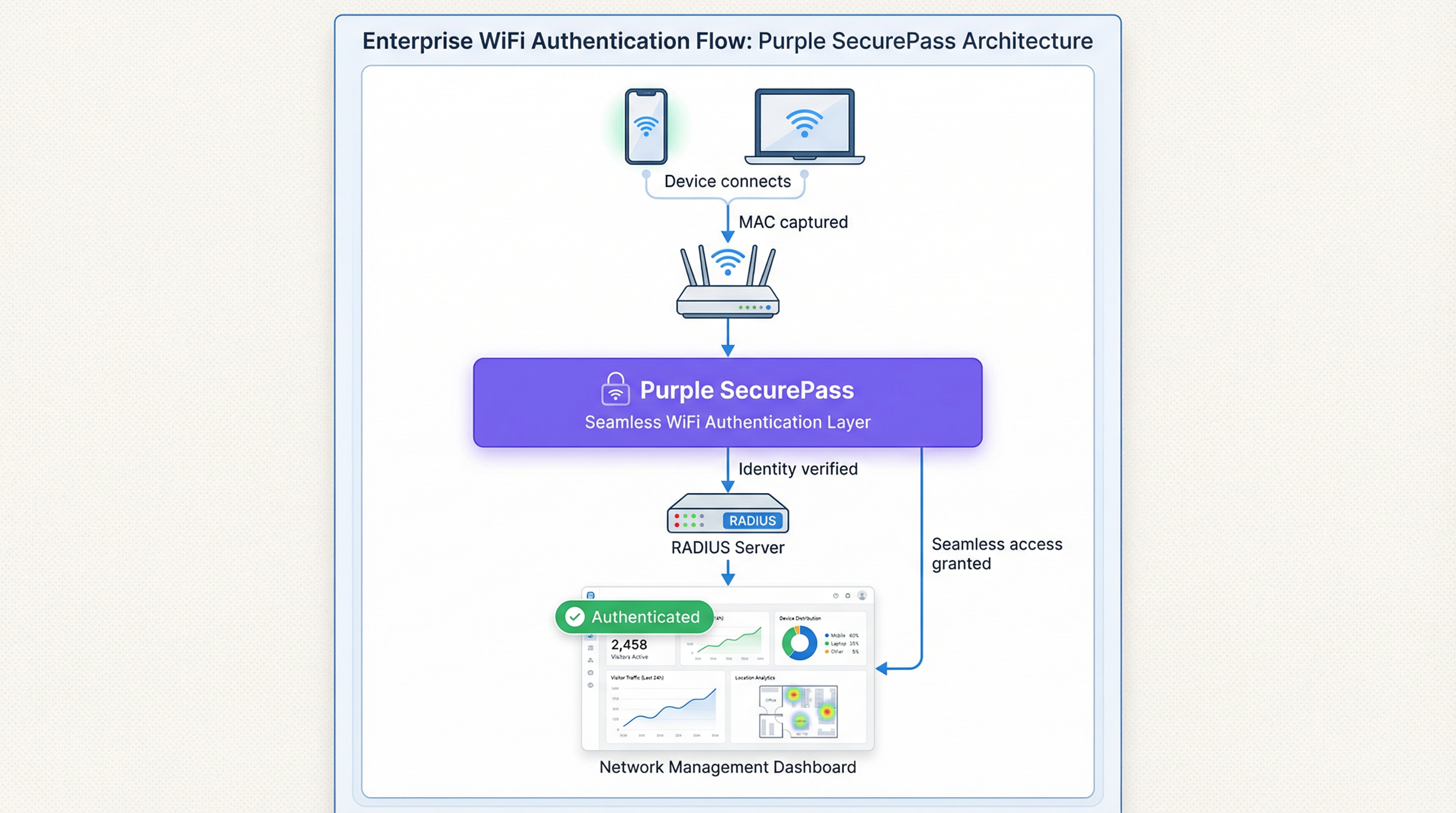
Paso 2: Implemente IEEE 802.1X para dispositivos gestionados Para entornos corporativos, la solución estándar de la industria es el Control de acceso a la red basado en puertos IEEE 802.1X. En lugar de verificar la dirección MAC, la red autentica el dispositivo o usuario mediante una credencial, generalmente un certificado digital. El flujo es el siguiente:
- Un dispositivo intenta conectarse a un SSID habilitado para 802.1X.
- El punto de acceso (el Autenticador) solicita credenciales al dispositivo (el Suplicante).
- El dispositivo presenta su certificado, el cual se reenvía a un servidor RADIUS (el Servidor de Autenticación).
- El servidor RADIUS valida el certificado contra una Autoridad de Certificación (CA) de confianza. Si es válido, otorga el acceso. Este método es inmune a la aleatorización de MAC, ya que el certificado proporciona un identificador estable a largo plazo. Es la mejor práctica recomendada para proteger redes internas.
Paso 3: Implemente un Captive Portal avanzado para el acceso de invitados Para las redes de invitados, la implementación de certificados no es factible. Aquí, la solución es una capa de autenticación inteligente como SecurePass de Purple. Esta tecnología va más allá de la simple autenticación MAC para crear un perfil de usuario persistente.
- Autenticación por primera vez: Un usuario se conecta al WiFi de invitados y es dirigido a un Captive Portal. Se autentica utilizando una cuenta de redes sociales, completando un formulario o con un código de acceso preasignado.
- Creación de identidad: Purple crea un perfil único para este usuario, vinculando su método de autenticación a su sesión inicial.
- Reautenticación sin interrupciones: En visitas posteriores, incluso si el dispositivo presenta una nueva dirección MAC aleatorizada, SecurePass puede reconocer al usuario a través de otros identificadores persistentes (como una cookie en el navegador o un perfil instalado a través de nuestra aplicación). Luego, los reautentica sin problemas y sin requerir un nuevo inicio de sesión. Este enfoque restaura la capacidad de reconocer a los visitantes recurrentes y proporciona una experiencia de usuario sin fricciones, resolviendo eficazmente el problema de la aleatorización para las redes de invitados.
Mejores prácticas
- No bloquee las MAC aleatorizadas: Si bien es posible configurar algunos equipos de red para denegar el acceso a dispositivos que utilizan LAA, esta es una estrategia contraproducente. Bloqueará a la mayoría de los dispositivos modernos, lo que provocará una mala experiencia de usuario y una pesadilla para el soporte técnico.
- Priorice la experiencia del usuario: El objetivo es la seguridad y la comodidad. Las soluciones deben minimizar la fricción de inicio de sesión para los usuarios recurrentes. Una conexión sin interrupciones es un impulsor clave de la adopción y satisfacción del WiFi.
- Intégrelo con su stack tecnológico: Su solución de autenticación debe alimentar con datos a sus plataformas de CRM e Inteligencia de Negocios. Purple proporciona API robustas para garantizar que los valiosos datos de los visitantes que capture sean procesables en toda su empresa.
- Manténgase informado: El comportamiento de la aleatorización de MAC continúa evolucionando con cada nuevo lanzamiento de sistema operativo. Asóciese con un proveedor como Purple, que está comprometido a mantenerse a la vanguardia de estos cambios y actualizar su plataforma en consecuencia.
Solución de problemas y mitigación de riesgos
Falla común: el bucle de inicio de sesión interminable
- Síntoma: Un usuario se queja de que tiene que iniciar sesión en el WiFi cada vez que lo visita, incluso en el mismo día.
- Causa: Es probable que la red esté utilizando una autenticación simple basada en MAC o un Captive Portal que trata cada nueva MAC aleatorizada como un dispositivo nuevo, forzando la reautenticación.
- Mitigación: Implemente una solución como SecurePass que establezca una identidad persistente más allá de la dirección MAC. Esto garantiza que los usuarios recurrentes sean reconocidos y se les otorgue acceso automáticamente.
Riesgo: evasión de listas negras
- Síntoma: Un dispositivo que fue bloqueado de la red por actividad maliciosa puede volver a conectarse.
- Causa: El dispositivo simplemente generó una nueva dirección MAC aleatorizada, eludiendo la lista negra basada en MAC.
- Mitigación: Su política de seguridad debe pasar de bloquear direcciones MAC a bloquear cuentas de usuario o huellas digitales de dispositivos. Una plataforma avanzada puede identificar dispositivos basándose en un conjunto de atributos, lo que dificulta la evasión de un bloqueo.
Retorno de inversión (ROI) e impacto comercial
Resolver el desafío de la aleatorización de MAC no es solo un problema de TI; es un imperativo comercial. El ROI se mide en varias áreas clave:
- Mayor precisión de los datos: Al distinguir con precisión a los visitantes nuevos de los recurrentes, las empresas pueden tomar decisiones más inteligentes sobre el gasto en marketing, los niveles de personal y la distribución de las tiendas. Para una cadena minorista, comprender la verdadera lealtad del cliente puede influir directamente en la estrategia promocional e impulsar los ingresos.
- Mejor experiencia del cliente: Una conexión automática y sin interrupciones para los visitantes recurrentes es un poderoso impulsor de lealtad. En un hotel, esto significa que un huésped se conecta instantáneamente desde el momento en que entra, mejorando la satisfacción y fomentando el uso de los servicios digitales del hotel.
- Mayor seguridad y menor riesgo: Un marco de autenticación robusto reduce el riesgo de acceso no autorizado y proporciona datos más confiables para el análisis forense, disminuyendo el costo potencial de una brecha de seguridad.
- Eficiencia operativa: La automatización del proceso de autenticación tanto para dispositivos gestionados como para invitados reduce la cantidad de tickets de soporte técnico relacionados con la conectividad WiFi, liberando recursos de TI para iniciativas más estratégicas.
Términos clave y definiciones
MAC Address Randomisation
A privacy feature where a device temporarily replaces its permanent, factory-assigned MAC address with a randomly generated one when connecting to WiFi networks.
IT teams encounter this as the root cause of failing MAC-based access controls and skewed visitor analytics. It matters because it breaks legacy network management paradigms.
Private WiFi Address
Apple's specific terminology for its implementation of MAC address randomisation in iOS, iPadOS, and watchOS.
When users or junior IT staff report issues with an 'Apple Private Address', this is the feature they are referring to. It's crucial for support teams to recognise this term.
Locally Administered Address (LAA)
A MAC address where the second-least-significant bit of the first octet is set to 1, indicating it is not the globally unique, factory-assigned address. Randomised MACs are a type of LAA.
Network architects can use this technical property to create policies or filters that specifically identify randomised traffic, although blocking it is generally not recommended.
Universally Administered Address (UAA)
The permanent, globally unique MAC address assigned to a network interface by its manufacturer.
This is the 'real' MAC address that randomisation is designed to hide. In high-security contexts, solutions may aim to verify the UAA after an initial secure handshake.
MAC Authentication Bypass (MAB)
A method where a network switch or access point uses a device's MAC address as its authentication credential, checking it against a list of approved addresses on a RADIUS server.
This is a common legacy authentication method for devices that don't support 802.1X (like printers or IoT devices). It is highly vulnerable to MAC randomisation and spoofing.
IEEE 802.1X
An IEEE standard for port-based Network Access Control (PNAC) that provides a robust and secure method for authenticating devices or users, typically using certificates or credentials.
This is the industry-standard solution for securing corporate networks and is the primary alternative to MAC-based authentication for managed devices.
Purple SecurePass
Purple's proprietary technology that provides seamless and secure WiFi authentication for guest networks, designed to overcome the challenges of MAC address randomisation.
For venue operators, SecurePass is the key to maintaining a high-quality user experience and reliable analytics by creating a persistent user identity that is independent of the device's MAC address.
Captive Portal
A web page that a user is required to view and interact with before being granted access to a public WiFi network.
Modern captive portals, like those powered by Purple, are no longer just a simple login page. They are sophisticated tools for creating user identity, driving marketing engagement, and enforcing terms of service.
Casos de éxito
A 500-room luxury hotel wants to provide seamless WiFi for returning guests to enhance their loyalty program. However, their existing system relies on MAC whitelisting for repeat visitors, which has stopped working due to MAC randomisation. How can they restore this functionality?
The hotel should deploy Purple's Guest WiFi with SecurePass. On their first visit, guests will authenticate via a branded captive portal, perhaps with an option to log in using their loyalty program credentials. Purple creates a persistent profile for the guest. On subsequent visits, SecurePass recognises the guest's device and automatically connects them to the WiFi, bypassing the need for a static MAC address. The login event is then pushed via API to the hotel's CRM, updating the guest's loyalty profile and providing valuable data on their visit patterns.
A large retail chain with 200 stores uses WiFi analytics to measure footfall and customer dwell time. Since the widespread adoption of MAC randomisation, their 'new vs. repeat' customer reports are wildly inaccurate, showing almost 90% new visitors, which they know is incorrect. How can they regain accurate visitor metrics?
The retail chain should implement Purple's analytics platform across their estate. While Purple cannot definitively reverse all randomisation, its sophisticated engine is designed to handle it. It filters out probe requests from non-connecting devices and uses advanced algorithms to correlate sessions, providing a much more accurate picture of visitor behaviour. By using a persistent login via a captive portal, the system can tie sessions from the same user together, even if their MAC changes between visits. This allows for the reconstruction of the customer journey and provides far more reliable metrics for new vs. repeat visits and true dwell time.
Análisis de escenarios
Q1. You are the Network Architect for a chain of conference centres. A major event is approaching, and you need to provide WiFi for 5,000 attendees. Your sponsor requires analytics on how many attendees visit their booth. How does MAC randomisation affect this, and what is your primary mitigation strategy?
💡 Sugerencia:Consider the transient nature of the attendees and the need for reliable analytics.
Mostrar enfoque recomendado
MAC randomisation will make it impossible to use device MACs to track unique visitors to the sponsor's booth. A single attendee's phone could generate multiple MACs throughout the day, appearing as multiple visitors. The primary mitigation strategy is to implement a guest WiFi solution with a captive portal for the event. By requiring a simple, one-time registration (e.g., email address), I can establish a session-based identity for each attendee. Using Purple's location analytics, I can then track the movement of these authenticated sessions to the sponsor's booth zone, providing accurate data on unique visitor counts to the sponsor.
Q2. Your CFO has questioned the investment in a new guest WiFi platform, asking why the existing, cheaper solution that uses MAC whitelisting for repeat customers is no longer sufficient. How do you explain the business case in terms of ROI?
💡 Sugerencia:Focus on the financial and business impact, not just the technical details.
Mostrar enfoque recomendado
The existing MAC whitelisting system is now obsolete due to MAC randomisation, a standard feature in all modern smartphones. This means we can no longer recognise our repeat customers, which has two major financial impacts. First, our customer loyalty data is now inaccurate, so we are making poor marketing decisions based on bad data. Second, the frustrating re-login experience for our best customers is damaging our brand and reducing engagement. Investing in a new platform like Purple with SecurePass will provide a direct ROI by: 1) Restoring accurate customer analytics, allowing us to optimise marketing spend. 2) Increasing customer satisfaction and loyalty through a seamless experience, which drives repeat business. 3) Reducing IT support overhead from WiFi-related complaints.
Q3. An IT administrator at one of your venues suggests a 'quick fix' by creating a script to block all devices that use a Locally Administered Address (LAA). Why is this a bad idea, and what is the more strategic alternative?
💡 Sugerencia:Think about the prevalence of LAAs and the user impact.
Mostrar enfoque recomendado
Blocking all LAAs is a terrible idea because the vast majority of modern smartphones and laptops use them by default for privacy. This 'quick fix' would effectively ban almost all of our visitors from using the WiFi, leading to a massive drop in service availability and a surge in customer complaints. It's a classic case of treating the symptom, not the disease. The strategic alternative is to embrace the reality that the MAC address is no longer a reliable identifier. We must upgrade our architecture to be identity-centric. For our corporate network, this means accelerating our planned rollout of 802.1X with certificates. For our guest network, it means implementing an intelligent authentication layer like Purple's SecurePass that can create a persistent user identity through a captive portal, making the MAC address irrelevant.
Conclusiones clave
- ✓MAC address randomisation is a default privacy feature in modern devices that breaks traditional WiFi management.
- ✓It severely impacts visitor analytics, making metrics like 'new vs. repeat' unreliable.
- ✓MAC-based authentication and security controls (whitelists, blacklists) are no longer effective.
- ✓The solution is to shift from device-based identity to user-based identity.
- ✓For corporate networks, use IEEE 802.1X with digital certificates.
- ✓For guest networks, use an advanced platform like Purple SecurePass to create persistent user profiles.
- ✓Do not simply block randomised MACs; this will deny service to most of your users.




