

Randomização de Endereço MAC: O Que É e Como Lidar Com Isso
This guide provides IT leaders and network architects with a comprehensive technical overview of MAC address randomisation. It details the impact on enterprise and guest WiFi networks and presents actionable strategies, including Purple's SecurePass technology, to mitigate risks and maintain robust analytics and security.
🎧 Ouça este Guia
Ver Transcrição

Resumo Executivo
A randomização de endereço MAC, um recurso de privacidade agora padrão no iOS, Android e outros sistemas operacionais, apresenta um desafio crítico para o gerenciamento de WiFi corporativo. Ao alterar periodicamente o identificador de hardware de um dispositivo, ela interrompe as principais operações de rede que dependem de um endereço MAC estático para autenticação, segurança e analytics. Para gerentes de TI e operadores de locais em hospitalidade, varejo e grandes espaços públicos, isso se traduz em métricas de visitantes não confiáveis, experiências de usuário frustrantes e uma postura de segurança enfraquecida. Métodos tradicionais, como controle de acesso baseado em MAC (MAC-ACL) e whitelisting, tornam-se ineficazes, enquanto as plataformas de analytics lutam para distinguir visitantes novos dos recorrentes, impactando severamente a medição de fluxo de pessoas (footfall), tempo de permanência e fidelidade. Este guia fornece um aprofundamento técnico sobre como a randomização funciona, descreve os impactos operacionais e de negócios específicos e oferece uma estrutura clara e acionável para mitigação. Ele detalha como evoluir de controles legados baseados em MAC para uma estratégia de autenticação moderna e centrada na identidade, usando padrões como IEEE 802.1X e soluções inovadoras como o SecurePass da Purple, que é projetado para fornecer acesso contínuo e seguro na era da randomização de MAC.
Aprofundamento Técnico
A randomização de endereço MAC é o processo pelo qual um dispositivo mascara seu endereço MAC real, incorporado no hardware (o Endereço Administrado Universalmente ou UAA), e usa um temporário, gerado aleatoriamente (um Endereço Administrado Localmente ou LAA) ao se conectar a redes WiFi. Esse recurso de aprimoramento de privacidade, introduzido pela primeira vez pela Apple em 2014, agora é um comportamento padrão em todos os principais sistemas operacionais móveis.
Tecnicamente, um LAA é identificado definindo o segundo bit menos significativo do primeiro octeto do endereço MAC como '1'. Embora isso torne os endereços randomizados programaticamente identificáveis, o principal desafio reside em sua natureza transitória. O comportamento de randomização varia de acordo com o sistema operacional e a versão:
- Randomização por Rede: A implementação mais comum, onde um dispositivo gera e usa um MAC persistente e randomizado para cada rede WiFi (SSID) específica à qual se conecta. Este foi o padrão para iOS 14 e Android 10 em diante.
- Rotação Baseada em Tempo: Uma evolução mais recente e disruptiva, vista no iOS 18 e posteriores, onde o dispositivo altera periodicamente o endereço MAC randomizado para a mesma rede. Essa rotação pode ocorrer a cada duas semanas ou com ainda mais frequência se um usuário 'esquecer' manualmente a rede ou se o dispositivo limpar seu cache.
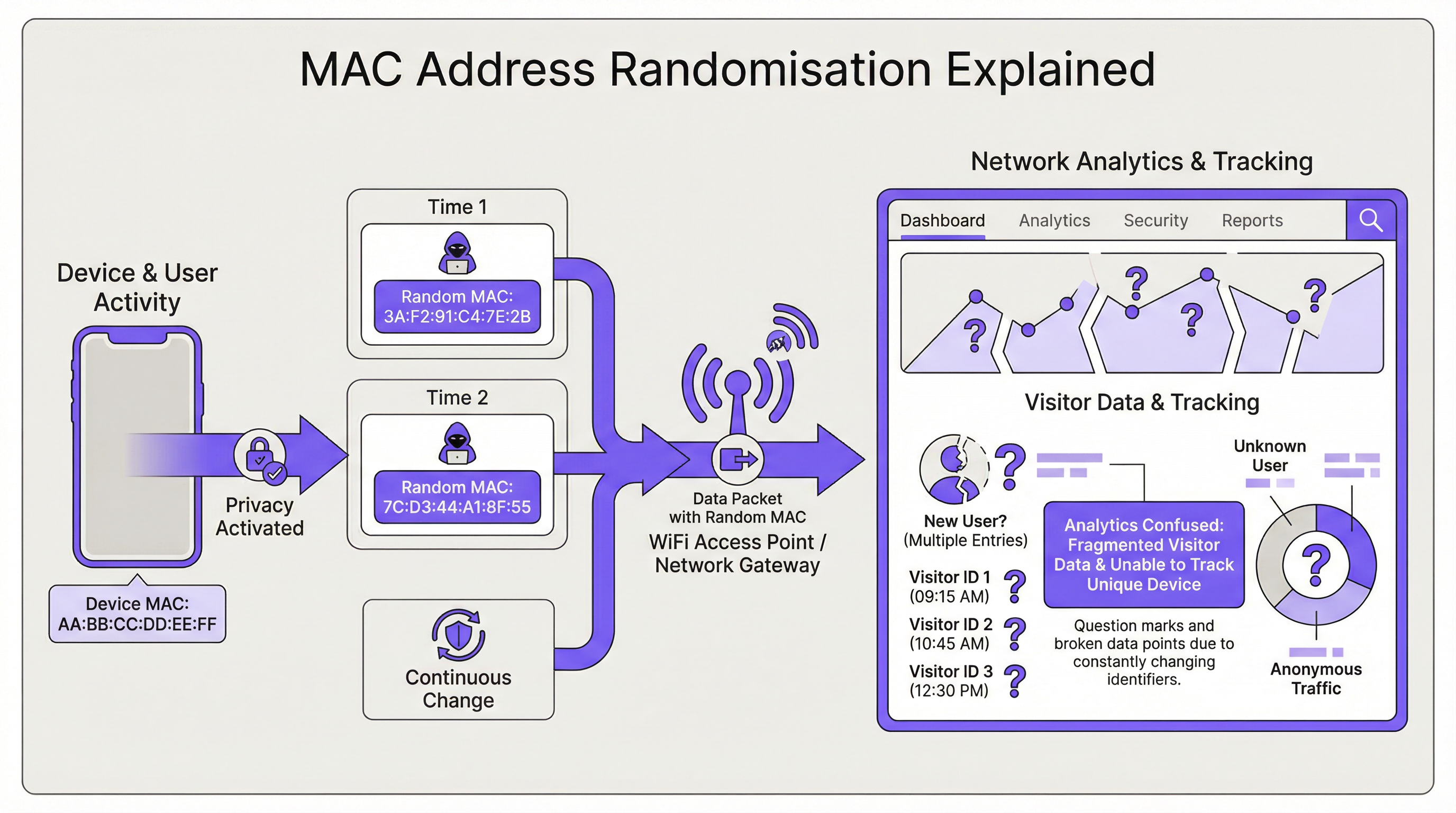
A consequência direta para a infraestrutura de rede é a perda de um identificador de dispositivo estável. Isso impacta várias áreas-chave:
| Função de Rede | Impacto da Randomização de MAC |
|---|---|
| Autenticação | O MAC Authentication Bypass (MAB) e o whitelisting falham. Os dispositivos exigem reautenticação após a rotação do MAC, interrompendo o acesso contínuo. |
| Analytics e BI | O analytics de visitantes fica severamente distorcido. Um único dispositivo recorrente aparece como vários 'novos' visitantes, inflando as contagens de presença e tornando as métricas de visitas repetidas sem sentido. |
| Segurança | O blacklisting baseado em MAC é facilmente contornado. Rastrear a atividade de um dispositivo malicioso em várias sessões torna-se difícil, complicando a análise forense. |
| Compliance | Sistemas que dependem de endereços MAC para segmentação de rede ou registro de logs (por exemplo, para PCI DSS) podem ficar fora de conformidade devido à incapacidade de identificar dispositivos de forma consistente. |
Guia de Implementação
A solução fundamental é mudar da identidade baseada no dispositivo (o endereço MAC) para a identidade baseada no usuário. Isso requer uma nova arquitetura de autenticação.
Passo 1: Avalie Seu Ambiente Primeiro, segmente sua base de usuários. Você está gerenciando dispositivos corporativos, dispositivos de convidados ou uma mistura de ambos? A estratégia será diferente para cada um.
- Dispositivos Corporativos/Gerenciados: Estes oferecem mais controle. O objetivo é uma conexão zero-touch e altamente segura.
- Dispositivos de Convidados/BYOD: A prioridade é um processo de integração (onboarding) seguro e de baixo atrito, que estabeleça uma identidade persistente sem exigir o gerenciamento do dispositivo.
Passo 2: Implante o IEEE 802.1X para Dispositivos Gerenciados Para ambientes corporativos, a solução padrão do setor é o Controle de Acesso à Rede Baseado em Porta IEEE 802.1X. Em vez de verificar o endereço MAC, a rede autentica o dispositivo ou usuário por meio de uma credencial, geralmente um certificado digital. O fluxo é o seguinte:
- Um dispositivo tenta se conectar a um SSID habilitado para 802.1X.
- O ponto de acesso (o Autenticador) solicita as credenciais ao dispositivo (o Suplicante).
- O dispositivo apresenta seu certificado, que é encaminhado para um servidor RADIUS (o Servidor de Autenticação).
- O servidor RADIUS valida o certificado em uma Autoridade Certificadora (CA) confiável. Se válido, ele concede o acesso. Este método é imune à randomização de MAC, pois o certificado fornece um identificador estável e de longo prazo. É a melhor prática recomendada para proteger redes internas.
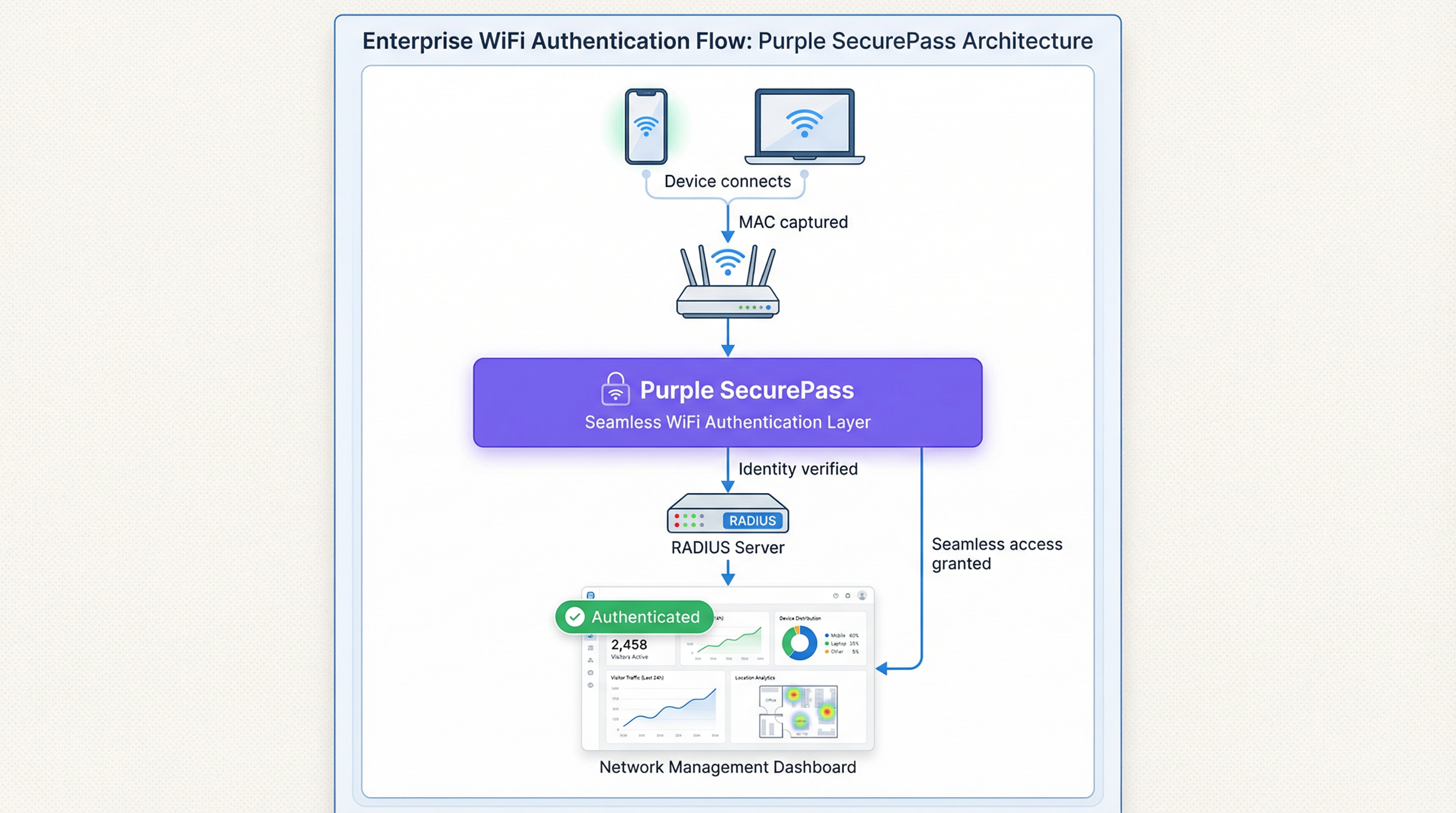
Passo 3: Implemente um Captive Portal Avançado para Acesso de Convidados Para redes de convidados, a implantação de certificados não é viável. Aqui, a solução é uma camada de autenticação inteligente como o SecurePass da Purple. Essa tecnologia vai além da simples autenticação MAC para criar um perfil de usuário persistente.
- Primeira Autenticação: Um usuário se conecta ao WiFi de convidados e é direcionado a um Captive Portal. Ele se autentica usando uma conta de mídia social, preenchimento de formulário ou um código de acesso pré-provisionado.
- Criação de Identidade: A Purple cria um perfil exclusivo para esse usuário, vinculando seu método de autenticação à sua sessão inicial.
- Reautenticação Contínua: Em visitas subsequentes, mesmo que o dispositivo apresente um novo endereço MAC randomizado, o SecurePass pode reconhecer o usuário por meio de outros identificadores persistentes (como um cookie no navegador ou um perfil instalado por meio de nosso aplicativo). Em seguida, ele os reautentica perfeitamente, sem exigir outro login. Essa abordagem restaura a capacidade de reconhecer visitantes recorrentes e fornece uma experiência de usuário sem atritos, resolvendo efetivamente o problema de randomização para redes de convidados.
Melhores Práticas
- Não Bloqueie MACs Randomizados: Embora seja possível configurar alguns hardwares de rede para negar acesso a dispositivos usando LAAs, essa é uma estratégia contraproducente. Ela bloqueará a maioria dos dispositivos modernos, levando a uma experiência de usuário ruim e a um pesadelo de suporte.
- Priorize a Experiência do Usuário: O objetivo é segurança e conveniência. As soluções devem minimizar o atrito de login para usuários recorrentes. Uma conexão contínua é um fator-chave para a adoção e satisfação do WiFi.
- Integre com Seu Tech Stack: Sua solução de autenticação deve alimentar dados em suas plataformas de CRM e Business Intelligence. A Purple fornece APIs ricas para garantir que os valiosos dados de visitantes que você captura sejam acionáveis em toda a sua empresa.
- Mantenha-se Informado: O comportamento da randomização de MAC continua a evoluir a cada novo lançamento de sistema operacional. Faça parceria com um fornecedor como a Purple, que está comprometido em se manter à frente dessas mudanças e atualizar sua plataforma de acordo.
Solução de Problemas e Mitigação de Riscos
Modo de Falha Comum: O Loop de Login Infinito
- Sintoma: Um usuário reclama que precisa fazer login no WiFi toda vez que visita, mesmo no mesmo dia.
- Causa: A rede provavelmente está usando uma autenticação simples baseada em MAC ou um Captive Portal que trata cada novo MAC randomizado como um novo dispositivo, forçando a reautenticação.
- Mitigação: Implemente uma solução como o SecurePass, que estabelece uma identidade persistente além do endereço MAC. Isso garante que os usuários recorrentes sejam reconhecidos e tenham acesso concedido automaticamente.
Risco: Evasão de Blacklist
- Sintoma: Um dispositivo que foi bloqueado da rede por atividade maliciosa consegue se reconectar.
- Causa: O dispositivo simplesmente gerou um novo endereço MAC randomizado, contornando a blacklist baseada em MAC.
- Mitigação: Sua política de segurança deve mudar do bloqueio de endereços MAC para o bloqueio de contas de usuários ou impressões digitais (fingerprints) de dispositivos. Uma plataforma avançada pode identificar dispositivos com base em um conjunto de atributos, tornando mais difícil contornar um bloqueio.
ROI e Impacto nos Negócios
Resolver o desafio da randomização de MAC não é apenas uma questão de TI; é um imperativo de negócios. O ROI é medido em várias áreas-chave:
- Maior Precisão de Dados: Ao distinguir com precisão visitantes novos e recorrentes, as empresas podem tomar decisões mais inteligentes sobre gastos com marketing, níveis de equipe e layouts de lojas. Para uma rede de varejo, entender a verdadeira fidelidade do cliente pode influenciar diretamente a estratégia promocional e impulsionar a receita.
- Experiência do Cliente Aprimorada: Uma conexão contínua e automática para visitantes recorrentes é um poderoso impulsionador de fidelidade. Em um hotel, isso significa que um hóspede é conectado instantaneamente a partir do momento em que entra, melhorando a satisfação e incentivando o uso dos serviços digitais do hotel.
- Maior Segurança e Risco Reduzido: Uma estrutura de autenticação robusta reduz o risco de acesso não autorizado e fornece dados mais confiáveis para análise forense, diminuindo o custo potencial de uma violação de segurança.
- Eficiência Operacional: Automatizar o processo de autenticação para dispositivos gerenciados e de convidados reduz o número de chamados de helpdesk relacionados à conectividade WiFi, liberando recursos de TI para iniciativas mais estratégicas.
Termos-Chave e Definições
MAC Address Randomisation
A privacy feature where a device temporarily replaces its permanent, factory-assigned MAC address with a randomly generated one when connecting to WiFi networks.
IT teams encounter this as the root cause of failing MAC-based access controls and skewed visitor analytics. It matters because it breaks legacy network management paradigms.
Private WiFi Address
Apple's specific terminology for its implementation of MAC address randomisation in iOS, iPadOS, and watchOS.
When users or junior IT staff report issues with an 'Apple Private Address', this is the feature they are referring to. It's crucial for support teams to recognise this term.
Locally Administered Address (LAA)
A MAC address where the second-least-significant bit of the first octet is set to 1, indicating it is not the globally unique, factory-assigned address. Randomised MACs are a type of LAA.
Network architects can use this technical property to create policies or filters that specifically identify randomised traffic, although blocking it is generally not recommended.
Universally Administered Address (UAA)
The permanent, globally unique MAC address assigned to a network interface by its manufacturer.
This is the 'real' MAC address that randomisation is designed to hide. In high-security contexts, solutions may aim to verify the UAA after an initial secure handshake.
MAC Authentication Bypass (MAB)
A method where a network switch or access point uses a device's MAC address as its authentication credential, checking it against a list of approved addresses on a RADIUS server.
This is a common legacy authentication method for devices that don't support 802.1X (like printers or IoT devices). It is highly vulnerable to MAC randomisation and spoofing.
IEEE 802.1X
An IEEE standard for port-based Network Access Control (PNAC) that provides a robust and secure method for authenticating devices or users, typically using certificates or credentials.
This is the industry-standard solution for securing corporate networks and is the primary alternative to MAC-based authentication for managed devices.
Purple SecurePass
Purple's proprietary technology that provides seamless and secure WiFi authentication for guest networks, designed to overcome the challenges of MAC address randomisation.
For venue operators, SecurePass is the key to maintaining a high-quality user experience and reliable analytics by creating a persistent user identity that is independent of the device's MAC address.
Captive Portal
A web page that a user is required to view and interact with before being granted access to a public WiFi network.
Modern captive portals, like those powered by Purple, are no longer just a simple login page. They are sophisticated tools for creating user identity, driving marketing engagement, and enforcing terms of service.
Estudos de Caso
A 500-room luxury hotel wants to provide seamless WiFi for returning guests to enhance their loyalty program. However, their existing system relies on MAC whitelisting for repeat visitors, which has stopped working due to MAC randomisation. How can they restore this functionality?
The hotel should deploy Purple's Guest WiFi with SecurePass. On their first visit, guests will authenticate via a branded captive portal, perhaps with an option to log in using their loyalty program credentials. Purple creates a persistent profile for the guest. On subsequent visits, SecurePass recognises the guest's device and automatically connects them to the WiFi, bypassing the need for a static MAC address. The login event is then pushed via API to the hotel's CRM, updating the guest's loyalty profile and providing valuable data on their visit patterns.
A large retail chain with 200 stores uses WiFi analytics to measure footfall and customer dwell time. Since the widespread adoption of MAC randomisation, their 'new vs. repeat' customer reports are wildly inaccurate, showing almost 90% new visitors, which they know is incorrect. How can they regain accurate visitor metrics?
The retail chain should implement Purple's analytics platform across their estate. While Purple cannot definitively reverse all randomisation, its sophisticated engine is designed to handle it. It filters out probe requests from non-connecting devices and uses advanced algorithms to correlate sessions, providing a much more accurate picture of visitor behaviour. By using a persistent login via a captive portal, the system can tie sessions from the same user together, even if their MAC changes between visits. This allows for the reconstruction of the customer journey and provides far more reliable metrics for new vs. repeat visits and true dwell time.
Análise de Cenário
Q1. You are the Network Architect for a chain of conference centres. A major event is approaching, and you need to provide WiFi for 5,000 attendees. Your sponsor requires analytics on how many attendees visit their booth. How does MAC randomisation affect this, and what is your primary mitigation strategy?
💡 Dica:Consider the transient nature of the attendees and the need for reliable analytics.
Mostrar Abordagem Recomendada
MAC randomisation will make it impossible to use device MACs to track unique visitors to the sponsor's booth. A single attendee's phone could generate multiple MACs throughout the day, appearing as multiple visitors. The primary mitigation strategy is to implement a guest WiFi solution with a captive portal for the event. By requiring a simple, one-time registration (e.g., email address), I can establish a session-based identity for each attendee. Using Purple's location analytics, I can then track the movement of these authenticated sessions to the sponsor's booth zone, providing accurate data on unique visitor counts to the sponsor.
Q2. Your CFO has questioned the investment in a new guest WiFi platform, asking why the existing, cheaper solution that uses MAC whitelisting for repeat customers is no longer sufficient. How do you explain the business case in terms of ROI?
💡 Dica:Focus on the financial and business impact, not just the technical details.
Mostrar Abordagem Recomendada
The existing MAC whitelisting system is now obsolete due to MAC randomisation, a standard feature in all modern smartphones. This means we can no longer recognise our repeat customers, which has two major financial impacts. First, our customer loyalty data is now inaccurate, so we are making poor marketing decisions based on bad data. Second, the frustrating re-login experience for our best customers is damaging our brand and reducing engagement. Investing in a new platform like Purple with SecurePass will provide a direct ROI by: 1) Restoring accurate customer analytics, allowing us to optimise marketing spend. 2) Increasing customer satisfaction and loyalty through a seamless experience, which drives repeat business. 3) Reducing IT support overhead from WiFi-related complaints.
Q3. An IT administrator at one of your venues suggests a 'quick fix' by creating a script to block all devices that use a Locally Administered Address (LAA). Why is this a bad idea, and what is the more strategic alternative?
💡 Dica:Think about the prevalence of LAAs and the user impact.
Mostrar Abordagem Recomendada
Blocking all LAAs is a terrible idea because the vast majority of modern smartphones and laptops use them by default for privacy. This 'quick fix' would effectively ban almost all of our visitors from using the WiFi, leading to a massive drop in service availability and a surge in customer complaints. It's a classic case of treating the symptom, not the disease. The strategic alternative is to embrace the reality that the MAC address is no longer a reliable identifier. We must upgrade our architecture to be identity-centric. For our corporate network, this means accelerating our planned rollout of 802.1X with certificates. For our guest network, it means implementing an intelligent authentication layer like Purple's SecurePass that can create a persistent user identity through a captive portal, making the MAC address irrelevant.
Principais Conclusões
- ✓MAC address randomisation is a default privacy feature in modern devices that breaks traditional WiFi management.
- ✓It severely impacts visitor analytics, making metrics like 'new vs. repeat' unreliable.
- ✓MAC-based authentication and security controls (whitelists, blacklists) are no longer effective.
- ✓The solution is to shift from device-based identity to user-based identity.
- ✓For corporate networks, use IEEE 802.1X with digital certificates.
- ✓For guest networks, use an advanced platform like Purple SecurePass to create persistent user profiles.
- ✓Do not simply block randomised MACs; this will deny service to most of your users.




