

Randomisation de l'adresse MAC : ce que c'est et comment la gérer
This guide provides IT leaders and network architects with a comprehensive technical overview of MAC address randomisation. It details the impact on enterprise and guest WiFi networks and presents actionable strategies, including Purple's SecurePass technology, to mitigate risks and maintain robust analytics and security.
🎧 Écouter ce guide
Voir la transcription

Synthèse
La randomisation de l'adresse MAC, une fonctionnalité de confidentialité désormais standard sous iOS, Android et d'autres systèmes d'exploitation, représente un défi critique pour la gestion du WiFi d'entreprise. En modifiant périodiquement l'identifiant matériel d'un appareil, elle perturbe les opérations réseau de base qui s'appuient sur une adresse MAC statique pour l'authentification, la sécurité et les analyses. Pour les responsables informatiques et les exploitants de sites dans l'hôtellerie, la vente au détail et les grands lieux publics, cela se traduit par des indicateurs de fréquentation peu fiables, des expériences utilisateur frustrantes et une posture de sécurité affaiblie. Les méthodes traditionnelles telles que le contrôle d'accès basé sur l'adresse MAC (MAC-ACL) et la mise sur liste blanche sont rendues inefficaces, tandis que les plateformes d'analyse peinent à distinguer les nouveaux visiteurs de ceux qui reviennent, ce qui a un impact sévère sur la mesure de la fréquentation, du temps de séjour et de la fidélité. Ce guide propose une analyse technique approfondie du fonctionnement de la randomisation, souligne les impacts opérationnels et commerciaux spécifiques, et offre un cadre d'atténuation clair et exploitable. Il détaille comment évoluer des contrôles obsolètes basés sur l'adresse MAC vers une stratégie d'authentification moderne et centrée sur l'identité, utilisant des normes telles que IEEE 802.1X et des solutions innovantes comme SecurePass de Purple, conçu pour fournir un accès fluide et sécurisé à l'ère de la randomisation MAC.
Analyse technique approfondie
La randomisation de l'adresse MAC est le processus par lequel un appareil usurpe sa véritable adresse MAC intégrée au matériel (l'adresse administrée universellement ou UAA) et utilise une adresse temporaire générée aléatoirement (une adresse administrée localement ou LAA) lors de la connexion aux réseaux WiFi. Cette fonctionnalité améliorant la confidentialité, introduite pour la première fois par Apple en 2014, est désormais un comportement par défaut dans tous les principaux systèmes d'exploitation mobiles.
Techniquement, une LAA est identifiée en définissant l'avant-dernier bit de poids faible du premier octet de l'adresse MAC sur « 1 ». Bien que cela rende les adresses randomisées identifiables par programmation, le défi principal réside dans leur nature éphémère. Le comportement de randomisation varie selon le système d'exploitation et la version :
- Randomisation par réseau : l'implémentation la plus courante, où un appareil génère et utilise une adresse MAC randomisée et persistante pour chaque réseau WiFi (SSID) spécifique auquel il se connecte. C'était la norme à partir d'iOS 14 et d'Android 10.
- Rotation temporelle : une évolution plus récente et perturbatrice, observée dans iOS 18 et versions ultérieures, où l'appareil modifie périodiquement l'adresse MAC randomisée pour le même réseau. Cette rotation peut se produire toutes les deux semaines ou même plus fréquemment si un utilisateur « oublie » manuellement le réseau ou si l'appareil vide son cache.
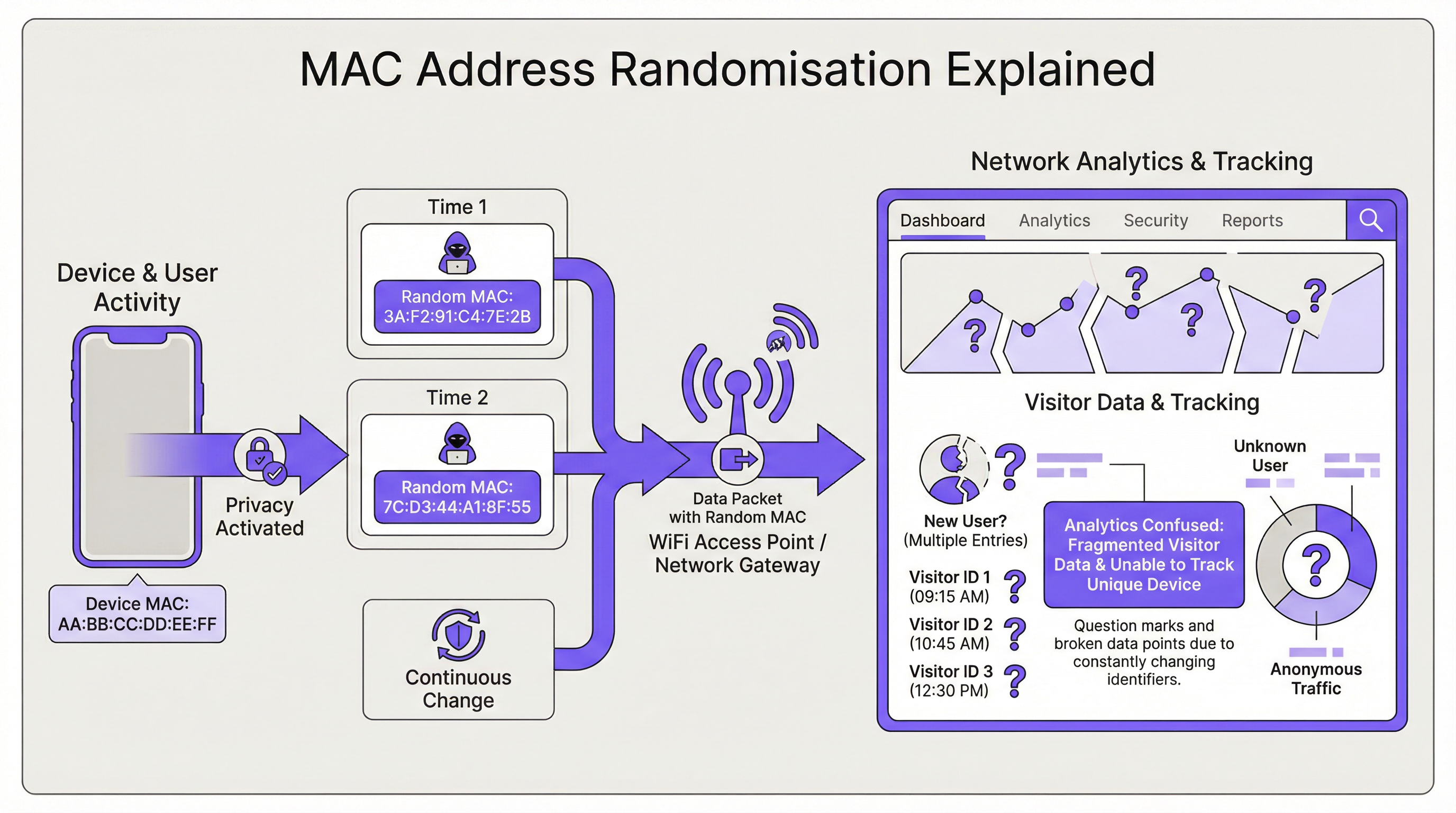
La conséquence directe pour l'infrastructure réseau est la perte d'un identifiant d'appareil stable. Cela a un impact sur plusieurs domaines clés :
| Fonction réseau | Impact de la randomisation MAC |
|---|---|
| Authentification | Le contournement de l'authentification MAC (MAB) et la mise sur liste blanche échouent. Les appareils nécessitent une réauthentification lors de la rotation MAC, perturbant l'accès fluide. |
| Analyses et BI | Les analyses des visiteurs sont gravement faussées. Un seul appareil qui revient apparaît comme plusieurs « nouveaux » visiteurs, gonflant les chiffres de présence et rendant les indicateurs de visites répétées dénués de sens. |
| Sécurité | La mise sur liste noire basée sur l'adresse MAC est facilement contournée. Le traçage de l'activité d'un appareil malveillant d'une session à l'autre devient difficile, compliquant l'analyse forensique. |
| Conformité | Les systèmes s'appuyant sur les adresses MAC pour la segmentation du réseau ou la journalisation (par exemple, pour la norme PCI DSS) peuvent devenir non conformes en raison de l'incapacité à identifier les appareils de manière cohérente. |
Guide de mise en œuvre
La solution fondamentale consiste à passer d'une identité basée sur l'appareil (l'adresse MAC) à une identité basée sur l'utilisateur. Cela nécessite une nouvelle architecture d'authentification.
Étape 1 : Évaluez votre environnement Tout d'abord, segmentez votre base d'utilisateurs. Gérez-vous des appareils d'entreprise, des appareils invités ou un mélange des deux ? La stratégie différera pour chacun.
- Appareils d'entreprise/gérés : ils offrent plus de contrôle. L'objectif est une connexion hautement sécurisée et sans intervention (zero-touch).
- Appareils invités/BYOD : la priorité est un processus d'intégration sécurisé et sans friction qui établit une identité persistante sans nécessiter la gestion des appareils.
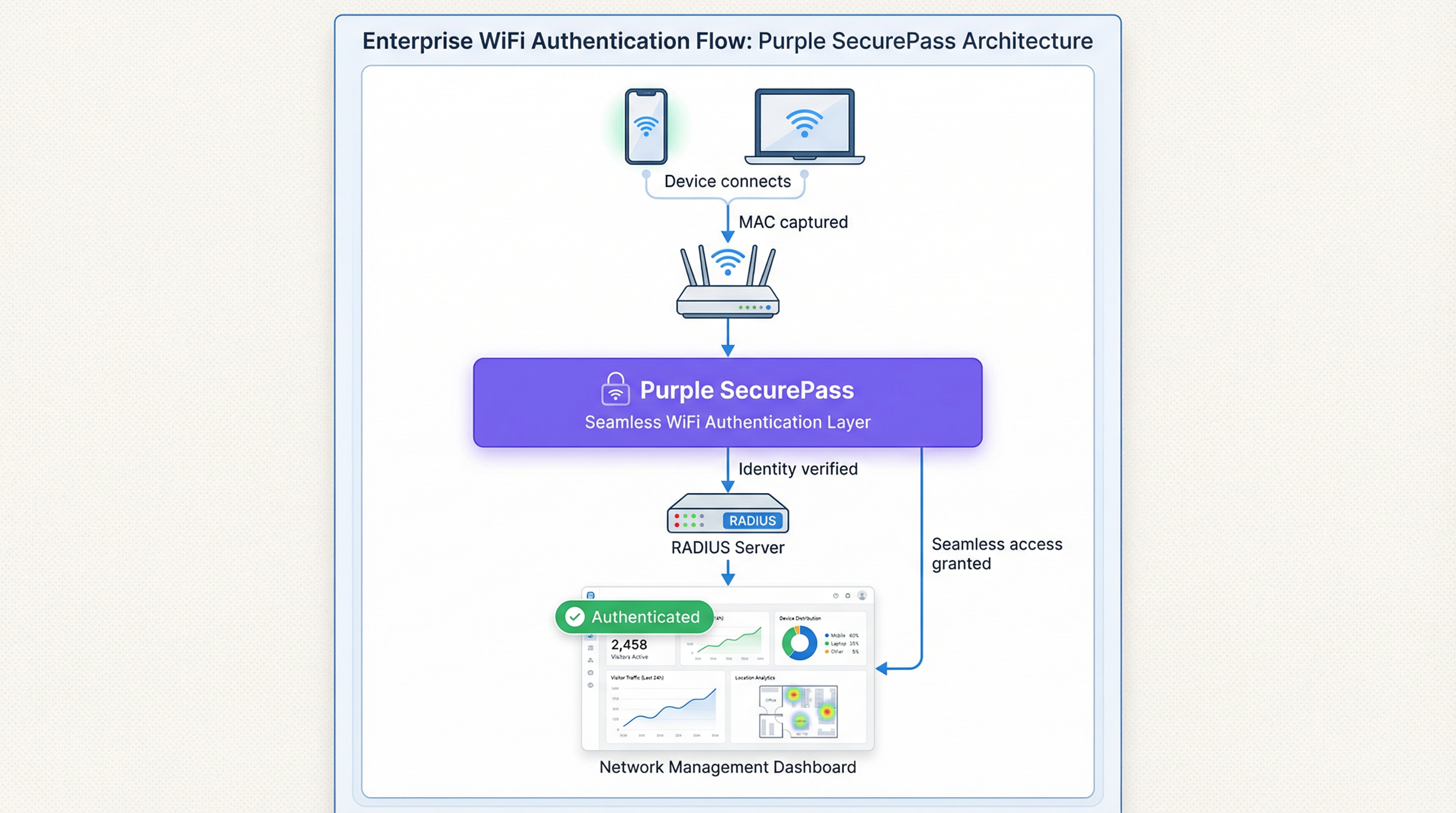
Étape 2 : Déployez IEEE 802.1X pour les appareils gérés Pour les environnements d'entreprise, la solution standard de l'industrie est le contrôle d'accès réseau basé sur les ports IEEE 802.1X. Au lieu de vérifier l'adresse MAC, le réseau authentifie l'appareil ou l'utilisateur via un identifiant, généralement un certificat numérique. Le flux est le suivant :
- Un appareil tente de se connecter à un SSID compatible 802.1X.
- Le point d'accès (l'Authentificateur) demande à l'appareil (le Suppliant) ses identifiants.
- L'appareil présente son certificat, qui est transmis à un serveur RADIUS (le Serveur d'authentification).
- Le serveur RADIUS valide le certificat auprès d'une autorité de certification (CA) de confiance. S'il est valide, il accorde l'accès. Cette méthode est immunisée contre la randomisation MAC car le certificat fournit un identifiant stable à long terme. C'est la meilleure pratique recommandée pour sécuriser les réseaux internes.
Étape 3 : Implémentez un Captive Portal avancé pour l'accès invité Pour les réseaux invités, le déploiement de certificats n'est pas réalisable. Ici, la solution est une couche d'authentification intelligente comme SecurePass de Purple. Cette technologie va au-delà de la simple authentification MAC pour créer un profil utilisateur persistant.
- Première authentification : un utilisateur se connecte au WiFi invité et est dirigé vers un Captive Portal. Il s'authentifie à l'aide d'un compte de réseau social, en remplissant un formulaire ou avec un code d'accès pré-provisionné.
- Création d'identité : Purple crée un profil unique pour cet utilisateur, reliant sa méthode d'authentification à sa session initiale.
- Réauthentification fluide : lors des visites ultérieures, même si l'appareil présente une nouvelle adresse MAC randomisée, SecurePass peut reconnaître l'utilisateur grâce à d'autres identifiants persistants (comme un cookie dans le navigateur ou un profil installé via notre application). Il les réauthentifie ensuite de manière transparente sans nécessiter de nouvelle connexion. Cette approche restaure la capacité de reconnaître les visiteurs réguliers et offre une expérience utilisateur sans friction, résolvant efficacement le problème de randomisation pour les réseaux invités.
Bonnes pratiques
- Ne bloquez pas les adresses MAC randomisées : bien qu'il soit possible de configurer certains matériels réseau pour refuser l'accès aux appareils utilisant des LAA, il s'agit d'une stratégie contre-productive. Cela bloquera la majorité des appareils modernes, entraînant une mauvaise expérience utilisateur et un cauchemar pour le support technique.
- Donnez la priorité à l'expérience utilisateur : l'objectif est la sécurité et la commodité. Les solutions doivent minimiser les frictions de connexion pour les utilisateurs réguliers. Une connexion fluide est un moteur clé de l'adoption et de la satisfaction du WiFi.
- Intégrez-vous à votre pile technologique : votre solution d'authentification doit alimenter en données vos plateformes CRM et de Business Intelligence. Purple fournit des API riches pour garantir que les précieuses données visiteurs que vous capturez sont exploitables dans l'ensemble de votre entreprise.
- Restez informé : le comportement de la randomisation MAC continue d'évoluer avec chaque nouvelle version du système d'exploitation. Associez-vous à un fournisseur comme Purple qui s'engage à anticiper ces changements et à mettre à jour sa plateforme en conséquence.
Dépannage et atténuation des risques
Mode de défaillance courant : la boucle de connexion sans fin
- Symptôme : un utilisateur se plaint de devoir se connecter au WiFi à chaque visite, même le même jour.
- Cause : le réseau utilise probablement une simple authentification basée sur l'adresse MAC ou un Captive Portal qui traite chaque nouvelle adresse MAC randomisée comme un nouvel appareil, forçant la réauthentification.
- Atténuation : implémentez une solution comme SecurePass qui établit une identité persistante au-delà de l'adresse MAC. Cela garantit que les utilisateurs réguliers sont reconnus et se voient accorder l'accès automatiquement.
Risque : contournement de la liste noire
- Symptôme : un appareil qui a été bloqué du réseau pour activité malveillante parvient à se reconnecter.
- Cause : l'appareil a simplement généré une nouvelle adresse MAC randomisée, contournant la liste noire basée sur l'adresse MAC.
- Atténuation : votre politique de sécurité doit passer du blocage des adresses MAC au blocage des comptes d'utilisateurs ou des empreintes d'appareils. Une plateforme avancée peut identifier les appareils en fonction d'un ensemble d'attributs, ce qui rend plus difficile le contournement d'un blocage.
ROI et impact commercial
Résoudre le défi de la randomisation MAC n'est pas seulement un problème informatique ; c'est un impératif commercial. Le ROI se mesure dans plusieurs domaines clés :
- Amélioration de la précision des données : en distinguant avec précision les nouveaux visiteurs de ceux qui reviennent, les entreprises peuvent prendre des décisions plus intelligentes concernant les dépenses marketing, les effectifs et l'agencement des magasins. Pour une chaîne de vente au détail, comprendre la véritable fidélité des clients peut influencer directement la stratégie promotionnelle et stimuler les revenus.
- Amélioration de l'expérience client : une connexion fluide et automatique pour les visiteurs réguliers est un puissant moteur de fidélité. Dans un hôtel, cela signifie qu'un client est instantanément connecté dès son arrivée, ce qui améliore sa satisfaction et encourage l'utilisation des services numériques de l'hôtel.
- Sécurité accrue et réduction des risques : un cadre d'authentification robuste réduit le risque d'accès non autorisé et fournit des données plus fiables pour l'analyse forensique, diminuant ainsi le coût potentiel d'une faille de sécurité.
- Efficacité opérationnelle : l'automatisation du processus d'authentification pour les appareils gérés et invités réduit le nombre de tickets d'assistance liés à la connectivité WiFi, libérant ainsi des ressources informatiques pour des initiatives plus stratégiques.
Termes clés et définitions
MAC Address Randomisation
A privacy feature where a device temporarily replaces its permanent, factory-assigned MAC address with a randomly generated one when connecting to WiFi networks.
IT teams encounter this as the root cause of failing MAC-based access controls and skewed visitor analytics. It matters because it breaks legacy network management paradigms.
Private WiFi Address
Apple's specific terminology for its implementation of MAC address randomisation in iOS, iPadOS, and watchOS.
When users or junior IT staff report issues with an 'Apple Private Address', this is the feature they are referring to. It's crucial for support teams to recognise this term.
Locally Administered Address (LAA)
A MAC address where the second-least-significant bit of the first octet is set to 1, indicating it is not the globally unique, factory-assigned address. Randomised MACs are a type of LAA.
Network architects can use this technical property to create policies or filters that specifically identify randomised traffic, although blocking it is generally not recommended.
Universally Administered Address (UAA)
The permanent, globally unique MAC address assigned to a network interface by its manufacturer.
This is the 'real' MAC address that randomisation is designed to hide. In high-security contexts, solutions may aim to verify the UAA after an initial secure handshake.
MAC Authentication Bypass (MAB)
A method where a network switch or access point uses a device's MAC address as its authentication credential, checking it against a list of approved addresses on a RADIUS server.
This is a common legacy authentication method for devices that don't support 802.1X (like printers or IoT devices). It is highly vulnerable to MAC randomisation and spoofing.
IEEE 802.1X
An IEEE standard for port-based Network Access Control (PNAC) that provides a robust and secure method for authenticating devices or users, typically using certificates or credentials.
This is the industry-standard solution for securing corporate networks and is the primary alternative to MAC-based authentication for managed devices.
Purple SecurePass
Purple's proprietary technology that provides seamless and secure WiFi authentication for guest networks, designed to overcome the challenges of MAC address randomisation.
For venue operators, SecurePass is the key to maintaining a high-quality user experience and reliable analytics by creating a persistent user identity that is independent of the device's MAC address.
Captive Portal
A web page that a user is required to view and interact with before being granted access to a public WiFi network.
Modern captive portals, like those powered by Purple, are no longer just a simple login page. They are sophisticated tools for creating user identity, driving marketing engagement, and enforcing terms of service.
Études de cas
A 500-room luxury hotel wants to provide seamless WiFi for returning guests to enhance their loyalty program. However, their existing system relies on MAC whitelisting for repeat visitors, which has stopped working due to MAC randomisation. How can they restore this functionality?
The hotel should deploy Purple's Guest WiFi with SecurePass. On their first visit, guests will authenticate via a branded captive portal, perhaps with an option to log in using their loyalty program credentials. Purple creates a persistent profile for the guest. On subsequent visits, SecurePass recognises the guest's device and automatically connects them to the WiFi, bypassing the need for a static MAC address. The login event is then pushed via API to the hotel's CRM, updating the guest's loyalty profile and providing valuable data on their visit patterns.
A large retail chain with 200 stores uses WiFi analytics to measure footfall and customer dwell time. Since the widespread adoption of MAC randomisation, their 'new vs. repeat' customer reports are wildly inaccurate, showing almost 90% new visitors, which they know is incorrect. How can they regain accurate visitor metrics?
The retail chain should implement Purple's analytics platform across their estate. While Purple cannot definitively reverse all randomisation, its sophisticated engine is designed to handle it. It filters out probe requests from non-connecting devices and uses advanced algorithms to correlate sessions, providing a much more accurate picture of visitor behaviour. By using a persistent login via a captive portal, the system can tie sessions from the same user together, even if their MAC changes between visits. This allows for the reconstruction of the customer journey and provides far more reliable metrics for new vs. repeat visits and true dwell time.
Analyse de scénario
Q1. You are the Network Architect for a chain of conference centres. A major event is approaching, and you need to provide WiFi for 5,000 attendees. Your sponsor requires analytics on how many attendees visit their booth. How does MAC randomisation affect this, and what is your primary mitigation strategy?
💡 Astuce :Consider the transient nature of the attendees and the need for reliable analytics.
Afficher l'approche recommandée
MAC randomisation will make it impossible to use device MACs to track unique visitors to the sponsor's booth. A single attendee's phone could generate multiple MACs throughout the day, appearing as multiple visitors. The primary mitigation strategy is to implement a guest WiFi solution with a captive portal for the event. By requiring a simple, one-time registration (e.g., email address), I can establish a session-based identity for each attendee. Using Purple's location analytics, I can then track the movement of these authenticated sessions to the sponsor's booth zone, providing accurate data on unique visitor counts to the sponsor.
Q2. Your CFO has questioned the investment in a new guest WiFi platform, asking why the existing, cheaper solution that uses MAC whitelisting for repeat customers is no longer sufficient. How do you explain the business case in terms of ROI?
💡 Astuce :Focus on the financial and business impact, not just the technical details.
Afficher l'approche recommandée
The existing MAC whitelisting system is now obsolete due to MAC randomisation, a standard feature in all modern smartphones. This means we can no longer recognise our repeat customers, which has two major financial impacts. First, our customer loyalty data is now inaccurate, so we are making poor marketing decisions based on bad data. Second, the frustrating re-login experience for our best customers is damaging our brand and reducing engagement. Investing in a new platform like Purple with SecurePass will provide a direct ROI by: 1) Restoring accurate customer analytics, allowing us to optimise marketing spend. 2) Increasing customer satisfaction and loyalty through a seamless experience, which drives repeat business. 3) Reducing IT support overhead from WiFi-related complaints.
Q3. An IT administrator at one of your venues suggests a 'quick fix' by creating a script to block all devices that use a Locally Administered Address (LAA). Why is this a bad idea, and what is the more strategic alternative?
💡 Astuce :Think about the prevalence of LAAs and the user impact.
Afficher l'approche recommandée
Blocking all LAAs is a terrible idea because the vast majority of modern smartphones and laptops use them by default for privacy. This 'quick fix' would effectively ban almost all of our visitors from using the WiFi, leading to a massive drop in service availability and a surge in customer complaints. It's a classic case of treating the symptom, not the disease. The strategic alternative is to embrace the reality that the MAC address is no longer a reliable identifier. We must upgrade our architecture to be identity-centric. For our corporate network, this means accelerating our planned rollout of 802.1X with certificates. For our guest network, it means implementing an intelligent authentication layer like Purple's SecurePass that can create a persistent user identity through a captive portal, making the MAC address irrelevant.
Points clés à retenir
- ✓MAC address randomisation is a default privacy feature in modern devices that breaks traditional WiFi management.
- ✓It severely impacts visitor analytics, making metrics like 'new vs. repeat' unreliable.
- ✓MAC-based authentication and security controls (whitelists, blacklists) are no longer effective.
- ✓The solution is to shift from device-based identity to user-based identity.
- ✓For corporate networks, use IEEE 802.1X with digital certificates.
- ✓For guest networks, use an advanced platform like Purple SecurePass to create persistent user profiles.
- ✓Do not simply block randomised MACs; this will deny service to most of your users.




