

Randomizzazione del MAC Address: cos'è e come gestirla
This guide provides IT leaders and network architects with a comprehensive technical overview of MAC address randomisation. It details the impact on enterprise and guest WiFi networks and presents actionable strategies, including Purple's SecurePass technology, to mitigate risks and maintain robust analytics and security.
🎧 Ascolta questa guida
Visualizza trascrizione

Executive Summary
La randomizzazione del MAC Address, una funzionalità per la privacy ormai standard in iOS, Android e altri sistemi operativi, rappresenta una sfida critica per la gestione del WiFi aziendale. Modificando periodicamente l'identificatore hardware di un dispositivo, interrompe le operazioni di rete principali che si basano su un MAC Address statico per l'autenticazione, la sicurezza e l'analisi. Per i responsabili IT e gli operatori di strutture nel settore alberghiero, retail e nei grandi spazi pubblici, ciò si traduce in metriche dei visitatori inaffidabili, esperienze utente frustranti e una postura di sicurezza indebolita. I metodi tradizionali come il controllo degli accessi basato su MAC (MAC-ACL) e le whitelist vengono resi inefficaci, mentre le piattaforme di analisi faticano a distinguere i nuovi visitatori da quelli di ritorno, compromettendo gravemente la misurazione dell'affluenza, del tempo di permanenza e della fidelizzazione. Questa guida fornisce un approfondimento tecnico su come funziona la randomizzazione, delinea gli impatti operativi e aziendali specifici e offre un framework chiaro e attuabile per la mitigazione. Illustra in dettaglio come evolvere dai controlli legacy basati su MAC a una moderna strategia di autenticazione incentrata sull'identità, utilizzando standard come IEEE 802.1X e soluzioni innovative come SecurePass di Purple, progettato per fornire un accesso fluido e sicuro nell'era della randomizzazione del MAC.
Approfondimento tecnico
La randomizzazione del MAC Address è il processo attraverso il quale un dispositivo maschera il suo vero MAC Address integrato nell'hardware (l'Indirizzo Amministrato Universalmente o UAA) e ne utilizza uno temporaneo generato casualmente (un Indirizzo Amministrato Localmente o LAA) quando si connette alle reti WiFi. Questa funzionalità per il miglioramento della privacy, introdotta per la prima volta da Apple nel 2014, è ora un comportamento predefinito in tutti i principali sistemi operativi mobili.
Tecnicamente, un LAA viene identificato impostando a '1' il penultimo bit meno significativo del primo ottetto del MAC Address. Sebbene ciò renda gli indirizzi randomizzati identificabili a livello di programmazione, la sfida principale risiede nella loro natura transitoria. Il comportamento di randomizzazione varia in base al sistema operativo e alla versione:
- Randomizzazione per rete: L'implementazione più comune, in cui un dispositivo genera e utilizza un MAC randomizzato e persistente per ogni specifica rete WiFi (SSID) a cui si connette. Questo è stato lo standard da iOS 14 e Android 10 in poi.
- Rotazione basata sul tempo: Un'evoluzione più recente e dirompente, presente in iOS 18 e versioni successive, in cui il dispositivo cambia periodicamente il MAC Address randomizzato per la stessa rete. Questa rotazione può avvenire ogni due settimane o anche più frequentemente se un utente "dimentica" manualmente la rete o se il dispositivo cancella la propria cache.
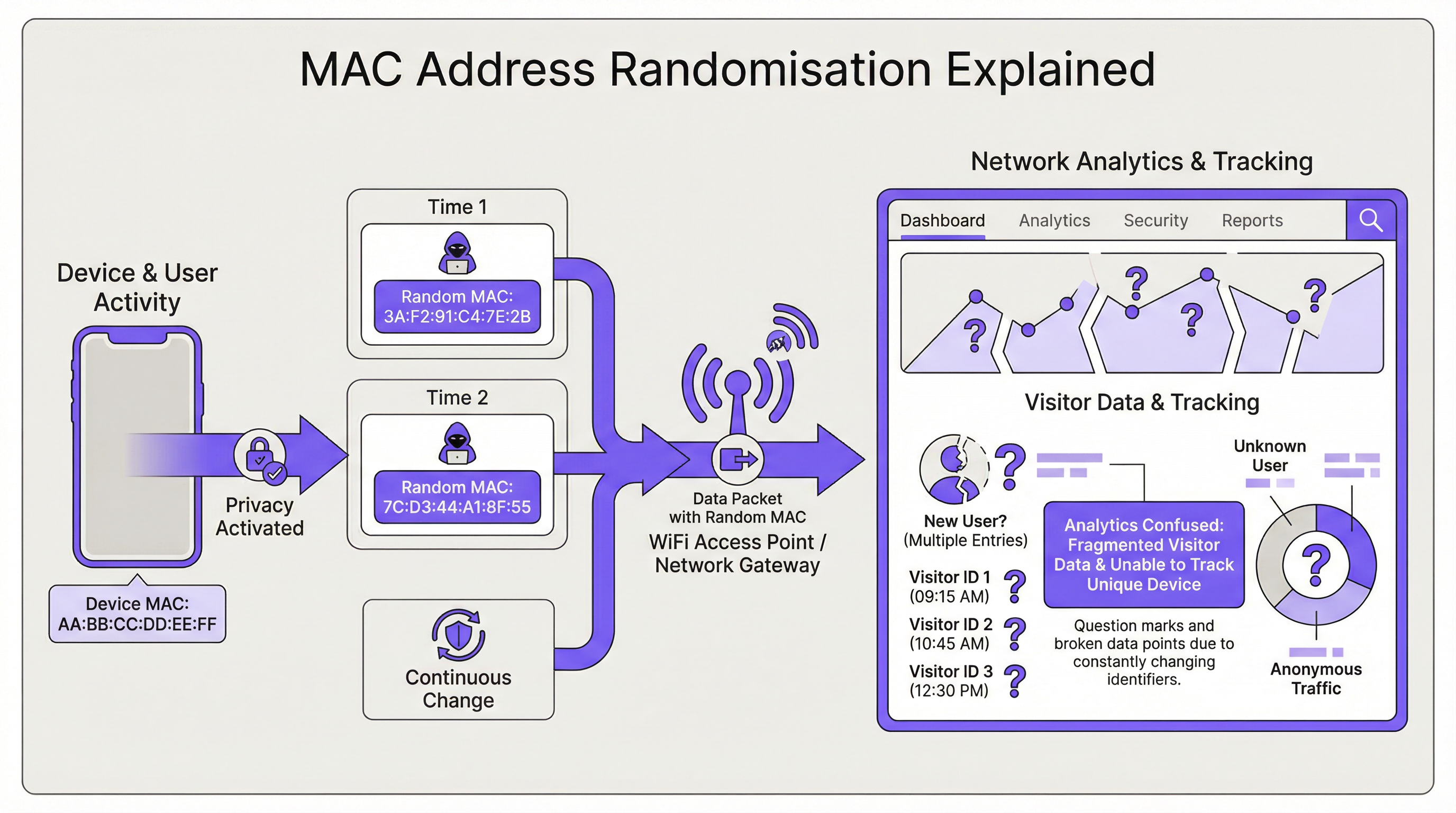
La conseguenza diretta per l'infrastruttura di rete è la perdita di un identificatore di dispositivo stabile. Ciò ha un impatto su diverse aree chiave:
| Funzione di rete | Impatto della randomizzazione del MAC |
|---|---|
| Autenticazione | Il MAC Authentication Bypass (MAB) e le whitelist falliscono. I dispositivi richiedono una riautenticazione in seguito alla rotazione del MAC, interrompendo l'accesso continuo. |
| Analytics e BI | Le analisi dei visitatori risultano gravemente distorte. Un singolo dispositivo di ritorno appare come molteplici "nuovi" visitatori, gonfiando i conteggi delle presenze e rendendo prive di significato le metriche delle visite ripetute. |
| Sicurezza | Le blacklist basate su MAC vengono facilmente aggirate. Tracciare l'attività di un dispositivo dannoso attraverso le sessioni diventa difficile, complicando l'analisi forense. |
| Conformità | I sistemi che si basano sui MAC Address per la segmentazione della rete o il logging (ad es. per PCI DSS) potrebbero non essere più conformi a causa dell'incapacità di identificare in modo coerente i dispositivi. |
Guida all'implementazione
La soluzione fondamentale consiste nel passare da un'identità basata sul dispositivo (il MAC Address) a un'identità basata sull'utente. Ciò richiede una nuova architettura di autenticazione.
Fase 1: Valutare l'ambiente Innanzitutto, segmenta la tua base utenti. Stai gestendo dispositivi aziendali, dispositivi guest o un mix di entrambi? La strategia sarà diversa per ciascuno.
- Dispositivi aziendali/gestiti: Offrono un maggiore controllo. L'obiettivo è una connessione zero-touch e altamente sicura.
- Dispositivi guest/BYOD: La priorità è un processo di onboarding sicuro e a basso attrito che stabilisca un'identità persistente senza richiedere la gestione del dispositivo.
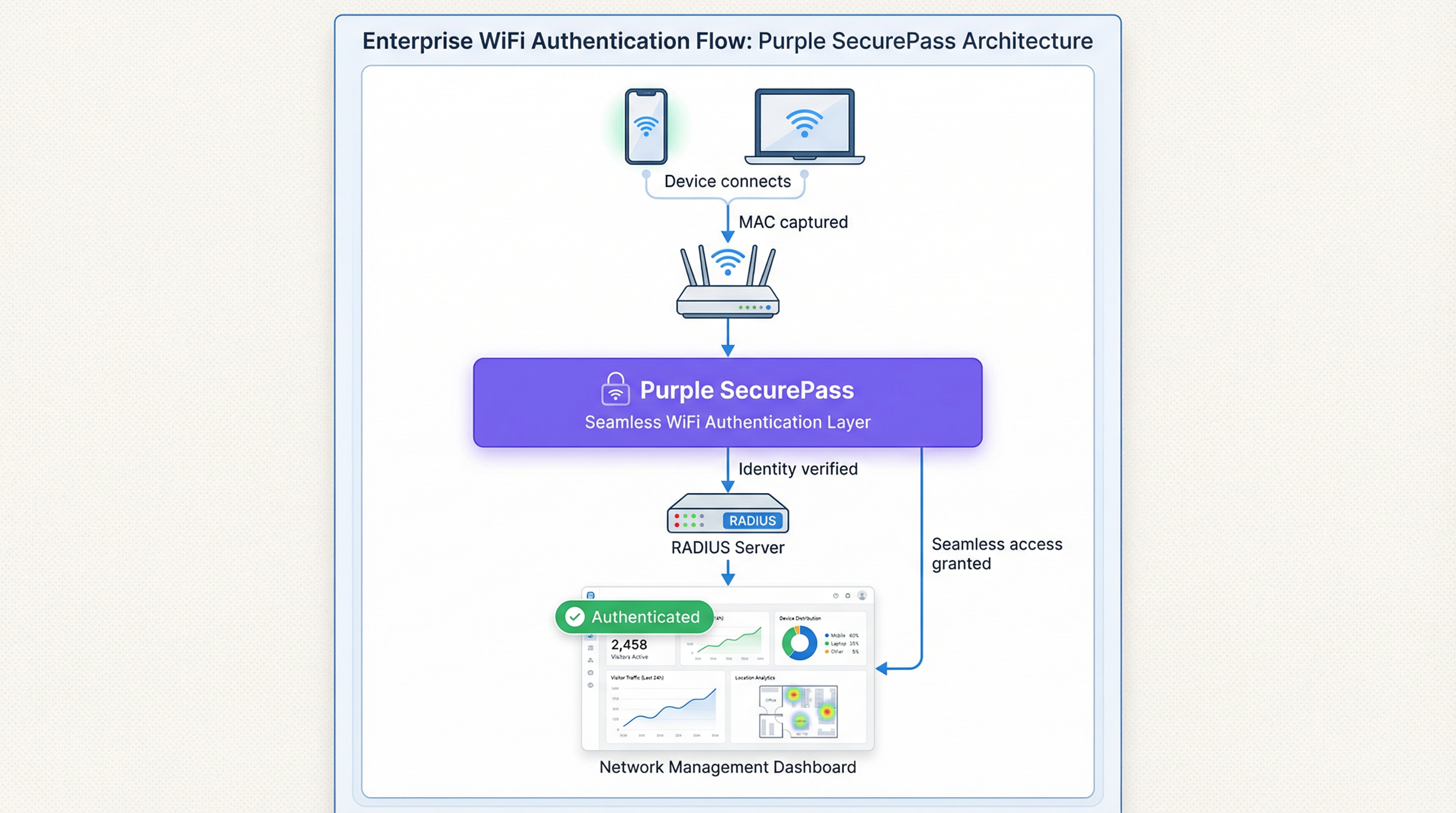
Fase 2: Implementare IEEE 802.1X per i dispositivi gestiti Per gli ambienti aziendali, la soluzione standard del settore è il Controllo degli accessi di rete basato su porta IEEE 802.1X. Invece di controllare il MAC Address, la rete autentica il dispositivo o l'utente tramite una credenziale, in genere un certificato digitale. Il flusso è il seguente:
- Un dispositivo tenta di connettersi a un SSID abilitato per 802.1X.
- L'access point (l'Authenticator) richiede le credenziali al dispositivo (il Supplicant).
- Il dispositivo presenta il proprio certificato, che viene inoltrato a un server RADIUS (l'Authentication Server).
- Il server RADIUS convalida il certificato rispetto a un'Autorità di Certificazione (CA) attendibile. Se valido, concede l'accesso. Questo metodo è immune alla randomizzazione del MAC poiché il certificato fornisce un identificatore stabile a lungo termine. È la best practice consigliata per proteggere le reti interne.
Fase 3: Implementare un Captive Portal avanzato per l'accesso guest Per le reti guest, l'implementazione di certificati non è fattibile. In questo caso, la soluzione è un livello di autenticazione intelligente come SecurePass di Purple. Questa tecnologia va oltre la semplice autenticazione MAC per creare un profilo utente persistente.
- Prima autenticazione: Un utente si connette al WiFi guest e viene indirizzato a un Captive Portal. Si autentica utilizzando un account social, compilando un modulo o tramite un codice di accesso pre-fornito.
- Creazione dell'identità: Purple crea un profilo univoco per questo utente, collegando il suo metodo di autenticazione alla sessione iniziale.
- Riautenticazione continua: Nelle visite successive, anche se il dispositivo presenta un nuovo MAC Address randomizzato, SecurePass può riconoscere l'utente attraverso altri identificatori persistenti (come un cookie nel browser o un profilo installato tramite la nostra app). Quindi, lo riautentica in modo fluido senza richiedere un nuovo login. Questo approccio ripristina la capacità di riconoscere i visitatori di ritorno e fornisce un'esperienza utente senza attriti, risolvendo efficacemente il problema della randomizzazione per le reti guest.
Best Practice
- Non bloccare i MAC randomizzati: Sebbene sia possibile configurare alcuni hardware di rete per negare l'accesso ai dispositivi che utilizzano LAA, questa è una strategia controproducente. Bloccherà la maggior parte dei dispositivi moderni, portando a una pessima esperienza utente e a un incubo per l'assistenza.
- Dare priorità all'esperienza utente: L'obiettivo è la sicurezza e la comodità. Le soluzioni dovrebbero ridurre al minimo l'attrito di login per gli utenti di ritorno. Una connessione continua è un fattore chiave per l'adozione e la soddisfazione del WiFi.
- Integrazione con lo stack tecnologico: La soluzione di autenticazione dovrebbe alimentare i dati nelle piattaforme CRM e di Business Intelligence. Purple fornisce API avanzate per garantire che i preziosi dati dei visitatori acquisiti siano fruibili in tutta l'azienda.
- Rimanere informati: Il comportamento della randomizzazione del MAC continua a evolversi con ogni nuova versione del sistema operativo. Collabora con un fornitore come Purple, impegnato a rimanere al passo con questi cambiamenti e ad aggiornare la propria piattaforma di conseguenza.
Risoluzione dei problemi e mitigazione dei rischi
Modalità di errore comune: il loop di login infinito
- Sintomo: Un utente lamenta di dover accedere al WiFi ogni singola volta che visita la struttura, anche nello stesso giorno.
- Causa: La rete sta probabilmente utilizzando una semplice autenticazione basata su MAC o un Captive Portal che tratta ogni nuovo MAC randomizzato come un nuovo dispositivo, forzando la riautenticazione.
- Mitigazione: Implementare una soluzione come SecurePass che stabilisca un'identità persistente oltre il MAC Address. Ciò garantisce che gli utenti di ritorno vengano riconosciuti e che l'accesso venga concesso automaticamente.
Rischio: elusione della blacklist
- Sintomo: Un dispositivo che era stato bloccato dalla rete per attività dannose è in grado di riconnettersi.
- Causa: Il dispositivo ha semplicemente generato un nuovo MAC Address randomizzato, aggirando la blacklist basata su MAC.
- Mitigazione: La policy di sicurezza deve passare dal blocco dei MAC Address al blocco degli account utente o delle impronte digitali dei dispositivi. Una piattaforma avanzata può identificare i dispositivi in base a un insieme di attributi, rendendo più difficile eludere un blocco.
ROI e impatto aziendale
Risolvere la sfida della randomizzazione del MAC non è solo un problema IT; è un imperativo aziendale. Il ROI si misura in diverse aree chiave:
- Migliore accuratezza dei dati: Distinguendo accuratamente i nuovi visitatori da quelli di ritorno, le aziende possono prendere decisioni più intelligenti in merito alla spesa di marketing, ai livelli di personale e al layout dei negozi. Per una catena di vendita al dettaglio, comprendere la vera fedeltà dei clienti può influenzare direttamente la strategia promozionale e incrementare i ricavi.
- Esperienza cliente migliorata: Una connessione continua e automatica per i visitatori di ritorno è un potente fattore di fidelizzazione. In un hotel, ciò significa che un ospite è connesso istantaneamente dal momento in cui entra, migliorando la soddisfazione e incoraggiando l'uso dei servizi digitali della struttura.
- Maggiore sicurezza e riduzione dei rischi: Un solido framework di autenticazione riduce il rischio di accessi non autorizzati e fornisce dati più affidabili per l'analisi forense, abbassando il costo potenziale di una violazione della sicurezza.
- Efficienza operativa: L'automazione del processo di autenticazione sia per i dispositivi gestiti che per quelli guest riduce il numero di ticket di helpdesk relativi alla connettività WiFi, liberando risorse IT per iniziative più strategiche.
Termini chiave e definizioni
MAC Address Randomisation
A privacy feature where a device temporarily replaces its permanent, factory-assigned MAC address with a randomly generated one when connecting to WiFi networks.
IT teams encounter this as the root cause of failing MAC-based access controls and skewed visitor analytics. It matters because it breaks legacy network management paradigms.
Private WiFi Address
Apple's specific terminology for its implementation of MAC address randomisation in iOS, iPadOS, and watchOS.
When users or junior IT staff report issues with an 'Apple Private Address', this is the feature they are referring to. It's crucial for support teams to recognise this term.
Locally Administered Address (LAA)
A MAC address where the second-least-significant bit of the first octet is set to 1, indicating it is not the globally unique, factory-assigned address. Randomised MACs are a type of LAA.
Network architects can use this technical property to create policies or filters that specifically identify randomised traffic, although blocking it is generally not recommended.
Universally Administered Address (UAA)
The permanent, globally unique MAC address assigned to a network interface by its manufacturer.
This is the 'real' MAC address that randomisation is designed to hide. In high-security contexts, solutions may aim to verify the UAA after an initial secure handshake.
MAC Authentication Bypass (MAB)
A method where a network switch or access point uses a device's MAC address as its authentication credential, checking it against a list of approved addresses on a RADIUS server.
This is a common legacy authentication method for devices that don't support 802.1X (like printers or IoT devices). It is highly vulnerable to MAC randomisation and spoofing.
IEEE 802.1X
An IEEE standard for port-based Network Access Control (PNAC) that provides a robust and secure method for authenticating devices or users, typically using certificates or credentials.
This is the industry-standard solution for securing corporate networks and is the primary alternative to MAC-based authentication for managed devices.
Purple SecurePass
Purple's proprietary technology that provides seamless and secure WiFi authentication for guest networks, designed to overcome the challenges of MAC address randomisation.
For venue operators, SecurePass is the key to maintaining a high-quality user experience and reliable analytics by creating a persistent user identity that is independent of the device's MAC address.
Captive Portal
A web page that a user is required to view and interact with before being granted access to a public WiFi network.
Modern captive portals, like those powered by Purple, are no longer just a simple login page. They are sophisticated tools for creating user identity, driving marketing engagement, and enforcing terms of service.
Casi di studio
A 500-room luxury hotel wants to provide seamless WiFi for returning guests to enhance their loyalty program. However, their existing system relies on MAC whitelisting for repeat visitors, which has stopped working due to MAC randomisation. How can they restore this functionality?
The hotel should deploy Purple's Guest WiFi with SecurePass. On their first visit, guests will authenticate via a branded captive portal, perhaps with an option to log in using their loyalty program credentials. Purple creates a persistent profile for the guest. On subsequent visits, SecurePass recognises the guest's device and automatically connects them to the WiFi, bypassing the need for a static MAC address. The login event is then pushed via API to the hotel's CRM, updating the guest's loyalty profile and providing valuable data on their visit patterns.
A large retail chain with 200 stores uses WiFi analytics to measure footfall and customer dwell time. Since the widespread adoption of MAC randomisation, their 'new vs. repeat' customer reports are wildly inaccurate, showing almost 90% new visitors, which they know is incorrect. How can they regain accurate visitor metrics?
The retail chain should implement Purple's analytics platform across their estate. While Purple cannot definitively reverse all randomisation, its sophisticated engine is designed to handle it. It filters out probe requests from non-connecting devices and uses advanced algorithms to correlate sessions, providing a much more accurate picture of visitor behaviour. By using a persistent login via a captive portal, the system can tie sessions from the same user together, even if their MAC changes between visits. This allows for the reconstruction of the customer journey and provides far more reliable metrics for new vs. repeat visits and true dwell time.
Analisi degli scenari
Q1. You are the Network Architect for a chain of conference centres. A major event is approaching, and you need to provide WiFi for 5,000 attendees. Your sponsor requires analytics on how many attendees visit their booth. How does MAC randomisation affect this, and what is your primary mitigation strategy?
💡 Suggerimento:Consider the transient nature of the attendees and the need for reliable analytics.
Mostra l'approccio consigliato
MAC randomisation will make it impossible to use device MACs to track unique visitors to the sponsor's booth. A single attendee's phone could generate multiple MACs throughout the day, appearing as multiple visitors. The primary mitigation strategy is to implement a guest WiFi solution with a captive portal for the event. By requiring a simple, one-time registration (e.g., email address), I can establish a session-based identity for each attendee. Using Purple's location analytics, I can then track the movement of these authenticated sessions to the sponsor's booth zone, providing accurate data on unique visitor counts to the sponsor.
Q2. Your CFO has questioned the investment in a new guest WiFi platform, asking why the existing, cheaper solution that uses MAC whitelisting for repeat customers is no longer sufficient. How do you explain the business case in terms of ROI?
💡 Suggerimento:Focus on the financial and business impact, not just the technical details.
Mostra l'approccio consigliato
The existing MAC whitelisting system is now obsolete due to MAC randomisation, a standard feature in all modern smartphones. This means we can no longer recognise our repeat customers, which has two major financial impacts. First, our customer loyalty data is now inaccurate, so we are making poor marketing decisions based on bad data. Second, the frustrating re-login experience for our best customers is damaging our brand and reducing engagement. Investing in a new platform like Purple with SecurePass will provide a direct ROI by: 1) Restoring accurate customer analytics, allowing us to optimise marketing spend. 2) Increasing customer satisfaction and loyalty through a seamless experience, which drives repeat business. 3) Reducing IT support overhead from WiFi-related complaints.
Q3. An IT administrator at one of your venues suggests a 'quick fix' by creating a script to block all devices that use a Locally Administered Address (LAA). Why is this a bad idea, and what is the more strategic alternative?
💡 Suggerimento:Think about the prevalence of LAAs and the user impact.
Mostra l'approccio consigliato
Blocking all LAAs is a terrible idea because the vast majority of modern smartphones and laptops use them by default for privacy. This 'quick fix' would effectively ban almost all of our visitors from using the WiFi, leading to a massive drop in service availability and a surge in customer complaints. It's a classic case of treating the symptom, not the disease. The strategic alternative is to embrace the reality that the MAC address is no longer a reliable identifier. We must upgrade our architecture to be identity-centric. For our corporate network, this means accelerating our planned rollout of 802.1X with certificates. For our guest network, it means implementing an intelligent authentication layer like Purple's SecurePass that can create a persistent user identity through a captive portal, making the MAC address irrelevant.
Punti chiave
- ✓MAC address randomisation is a default privacy feature in modern devices that breaks traditional WiFi management.
- ✓It severely impacts visitor analytics, making metrics like 'new vs. repeat' unreliable.
- ✓MAC-based authentication and security controls (whitelists, blacklists) are no longer effective.
- ✓The solution is to shift from device-based identity to user-based identity.
- ✓For corporate networks, use IEEE 802.1X with digital certificates.
- ✓For guest networks, use an advanced platform like Purple SecurePass to create persistent user profiles.
- ✓Do not simply block randomised MACs; this will deny service to most of your users.




