

Cómo configurar Purple WiFi por primera vez: un resumen técnico
This technical reference guide provides IT managers, network architects, and CTOs with a comprehensive overview of the Purple WiFi platform's initial setup process. It covers the core technical architecture, hardware integration, portal configuration, and best practices for a successful deployment in enterprise environments like hotels, retail, and stadiums. Following this guide, IT teams can confidently deploy a secure, GDPR-compliant guest WiFi solution that delivers both seamless connectivity and actionable business intelligence.
🎧 Escucha esta guía
Ver transcripción
Resumen ejecutivo
Implementar una nueva solución de WiFi para invitados en un entorno empresarial requiere una comprensión clara de la arquitectura técnica, los pasos de implementación y el posible retorno de inversión. Esta guía sirve como un resumen técnico para los profesionales de TI encargados de configurar la plataforma de inteligencia de Purple WiFi por primera vez. Detalla el modelo de implementación basado en la nube de siete fases, el cual aprovecha la infraestructura de red existente para minimizar la presencia de hardware local (on-premise). El proceso comienza con el registro de la cuenta y culmina en una red WiFi para invitados activa y de captura de datos. Las consideraciones clave que se abordan incluyen la segmentación de la red para mayor seguridad, la autenticación basada en RADIUS para el control de acceso y la configuración del walled garden para una experiencia de usuario fluida. La guía también explora la amplia compatibilidad de hardware de la plataforma, que admite más de 50 proveedores líderes, incluidos Cisco, Aruba y Ruckus. Al seguir los pasos descritos, las organizaciones pueden esperar implementar una solución de WiFi para invitados segura, escalable y que cumpla con las normativas, la cual no solo proporciona una conectividad fluida, sino que también ofrece análisis detallados e inteligencia empresarial para impulsar la eficiencia operativa y mejorar la interacción con el cliente. El resultado esperado es una red WiFi para invitados robusta que cumpla con las estrictas exigencias de seguridad y cumplimiento de la empresa moderna, al mismo tiempo que revela información valiosa basada en datos sobre el comportamiento de los visitantes.
Análisis técnico detallado
En su esencia, Purple es una plataforma alojada en la nube que actúa como una capa superpuesta inteligente para su hardware de WiFi existente. A diferencia de las soluciones locales tradicionales que requieren infraestructura de servidores dedicados para RADIUS, alojamiento de portales y análisis, la arquitectura de Purple centraliza todas estas funciones en la nube. Este modelo reduce significativamente la complejidad y el costo total de propiedad de la implementación, ya que no hay necesidad de servidores locales dedicados. Los componentes técnicos principales son la plataforma en la nube de Purple (que aloja el motor de análisis, el servidor RADIUS y el sistema de gestión del portal), la infraestructura de red local de la ubicación y los dispositivos de los usuarios invitados.
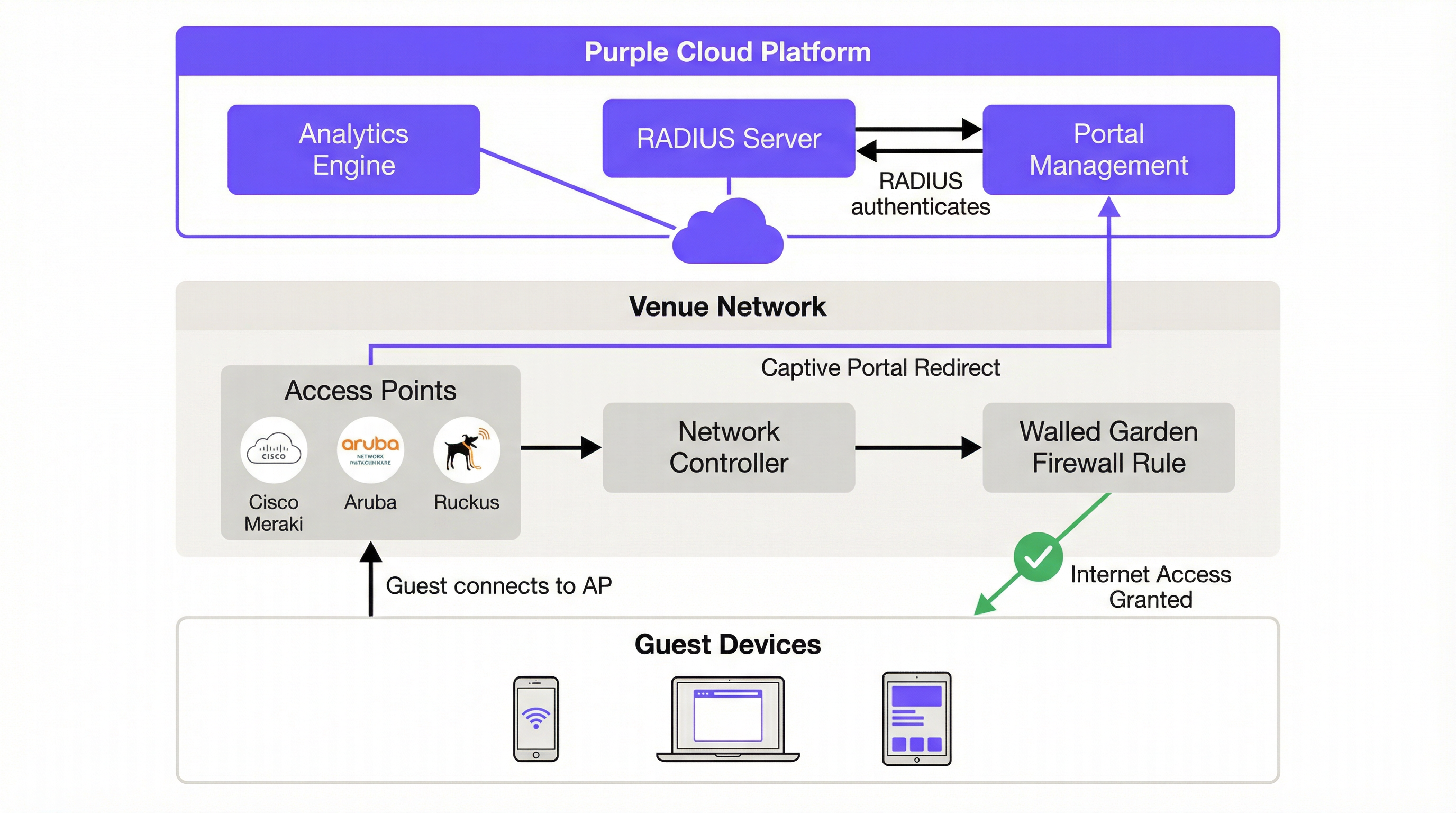
El flujo de autenticación comienza en el momento en que un invitado se conecta al SSID designado. El Asistente de red cautiva (CNA) del dispositivo intenta automáticamente contactar una URL predefinida (captive.apple.com en iOS o connectivitycheck.gstatic.com en Android) para determinar si la red proporciona acceso a Internet sin restricciones. El controlador de red local intercepta esta solicitud y, según las reglas del Captive Portal que configure, redirige el navegador del usuario a la página de inicio (splash page) alojada en la nube de Purple. Esta redirección HTTP 302 es el mecanismo fundamental que inicia el recorrido de autenticación del invitado.
Antes de la autenticación, el usuario se encuentra en un entorno de 'walled garden' (una política de firewall que restringe su acceso a un conjunto específico de dominios en la lista blanca). Este walled garden debe incluir el dominio del portal de Purple, cualquier proveedor de inicio de sesión social (Facebook, Google) y sus redes de entrega de contenido (CDN) asociadas. La precisión de esta configuración es fundamental. Un walled garden incompleto es la causa más común de fallas en la implementación, ya que impide que el portal se cargue o interrumpe el flujo de OAuth para los inicios de sesión sociales.
La autenticación en sí es manejada por el servidor RADIUS (Remote Authentication Dial-In User Service) basado en la nube de Purple, que opera de acuerdo con el estándar IEEE 802.1X. Cuando un usuario envía sus credenciales a través del Captive Portal (ya sea mediante un inicio de sesión social, completando un formulario, un código de cupón o simplemente aceptando los términos y condiciones), la solicitud es procesada por la plataforma de Purple. El servidor RADIUS en la nube valida la solicitud y envía un mensaje de 'Access-Accept' de vuelta al controlador de red local, el cual luego abre la regla del firewall y otorga al dispositivo acceso completo a Internet. Se asigna una clave de sesión única a cada sesión autenticada, lo que evita el rastreo de la red (sniffing) y protege los datos del usuario en tránsito. Todo este flujo es transparente para el usuario final, quien simplemente ve una página de inicio de sesión y, momentos después, un dispositivo conectado.
Para implementaciones empresariales que requieren una postura de seguridad más alta, Purple también es compatible con SecurePass, que aprovecha WPA2-Enterprise (IEEE 802.1X con EAP) para la autenticación basada en certificados o credenciales sin un Captive Portal. Esto es particularmente relevante para las redes corporativas de invitados donde la política de TI exige una autenticación más sólida que simplemente completar un formulario.
Guía de implementación
La implementación de Purple WiFi sigue un proceso estructurado de siete pasos diseñado para brindar claridad y eficiencia. Seguir estos pasos de manera metódica garantiza una implementación fluida y exitosa, ya sea que esté configurando una sola ubicación o realizando un despliegue en múltiples sitios.
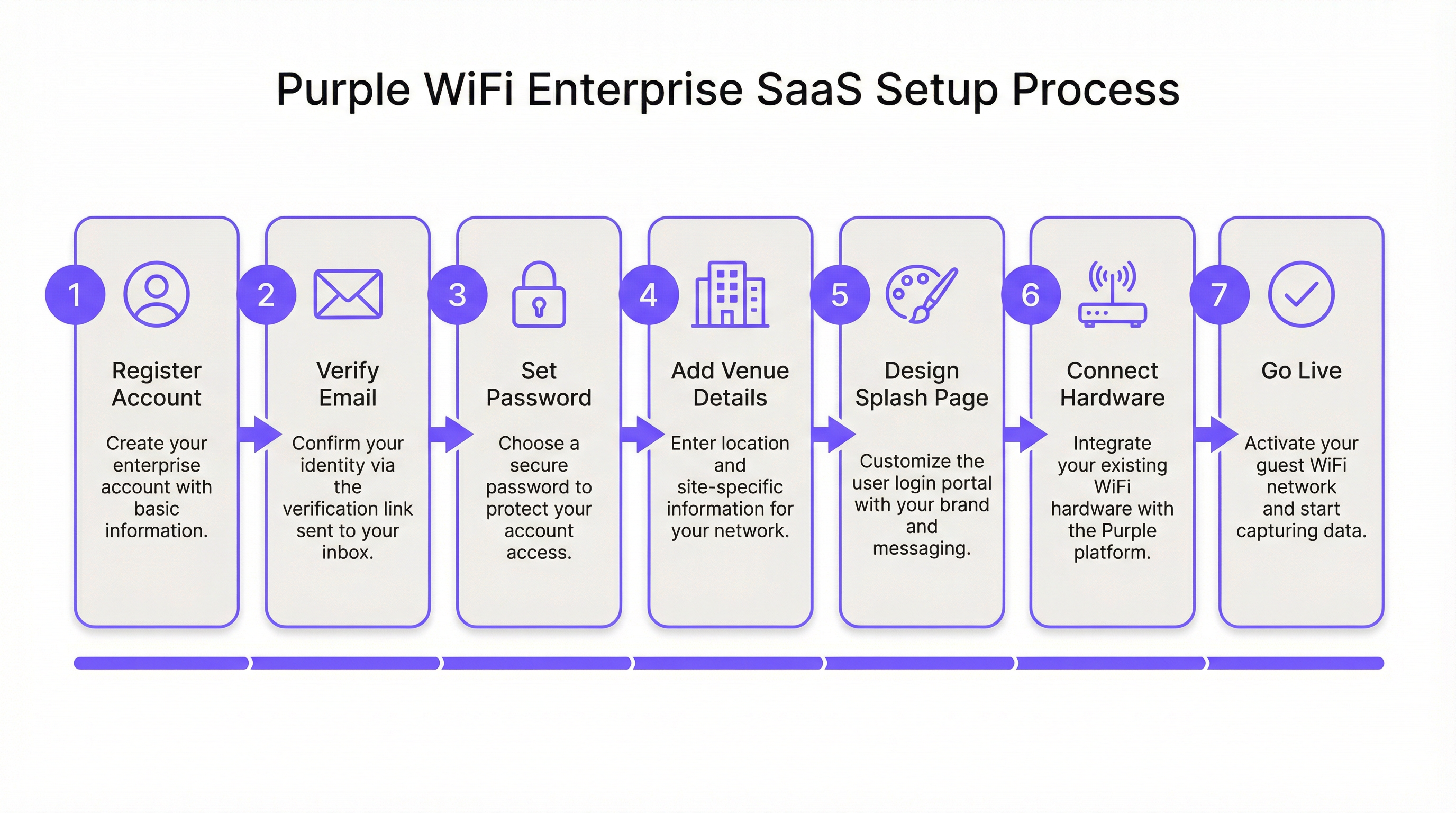
Paso 1: Registro y verificación de la cuenta. El proceso comienza en purple.ai, donde debe completar el formulario de registro de cliente. Se envía un correo electrónico de verificación de inmediato; se debe hacer clic en este enlace dentro de las 24 horas, ya que caduca automáticamente. Tras la verificación, un segundo correo electrónico proporciona el enlace 'Comenzar' para iniciar el asistente de incorporación. En esta etapa, creará una contraseña segura para el portal. Es recomendable utilizar un administrador de contraseñas y configurar la autenticación multifactor si la política de seguridad de su organización lo exige.
Paso 2: Configuración de ubicaciones y grupos. La primera tarea importante dentro del portal de Purple es crear una Ubicación (Venue): la entidad lógica que se asigna a una ubicación física. Deberá ingresar el nombre de la ubicación, la dirección y la categoría (hotel, tienda minorista, estadio, centro de conferencias, etc.). Estos metadatos no son meramente administrativos; el motor de análisis de Purple los utiliza para contextualizar los datos de los visitantes y permitir comparaciones significativas en todas sus instalaciones. Para los operadores de múltiples sitios, los Grupos proporcionan una capa de gestión jerárquica, lo que le permite aplicar políticas coherentes, plantillas de recorrido de acceso y configuraciones de informes en múltiples ubicaciones simultáneamente. Una cadena minorista con 50 tiendas, por ejemplo, crearía un solo Grupo y luego agregaría cada tienda como una Ubicación secundaria, lo que permite tanto la gestión centralizada como el análisis granular por tienda.
Paso 3: Diseño de la página de inicio (Splash Page). Purple ofrece dos tipos distintos de páginas de inicio que cumplen diferentes propósitos en el recorrido del usuario. La Página de inicio sin conexión (Offline Splash Page) es el Captive Portal en sí: lo primero que ve un invitado al conectarse al SSID, antes de autenticarse. Esta página debe cargarse rápidamente, presentar su marca con claridad y hacer que la acción de autenticación sea obvia. La Página de inicio en línea (Online Splash Page) se muestra después de una autenticación exitosa, sirviendo como una página de destino que confirma la conectividad y se puede utilizar para enviar mensajes promocionales, información del programa de lealtad o una redirección a una URL específica, como el motor de reservas del hotel o la página promocional de un minorista. El editor estándar de arrastrar y soltar de Purple es suficiente para la gran mayoría de las implementaciones. El editor HTML personalizado está disponible para los equipos que requieren una alineación de marca perfecta al píxel, lógica de formularios avanzada o integración con scripts de seguimiento de terceros.
Paso 4: Configuración del recorrido de acceso. Un Recorrido de acceso (Access Journey) es la capa de orquestación que vincula la página de inicio, el método de autenticación, los requisitos de captura de datos, los términos y condiciones, las políticas de sesión y la redirección posterior a la autenticación. Aquí es donde se define la lógica empresarial de su WiFi para invitados. Una sola ubicación puede admitir múltiples Recorridos de acceso simultáneos, lo que permite experiencias diferenciadas para distintos segmentos de usuarios. Un centro de conferencias, por ejemplo, podría configurar un recorrido para los visitantes del público en general (clic de acceso con captura de datos mínima), otro para los delegados del evento (basado en formularios con captura de datos completa y consentimiento para comunicaciones de marketing) y un tercero para los expositores (basado en cupones con mayor asignación de ancho de banda). Cada recorrido se publica de forma independiente, lo que brinda a los equipos de TI y de marketing la flexibilidad de iterar sobre la experiencia del usuario sin interrumpir las implementaciones activas.
Paso 5: Integración de hardware. Esta es la fase más exigente a nivel técnico para los ingenieros de redes. Purple es compatible con más de 50 proveedores de hardware, abarcando todo el espectro de la infraestructura de WiFi empresarial. El enfoque de integración es coherente en todos los proveedores: usted registra su punto de acceso o controlador de LAN inalámbrica (WLC) en el portal de Purple especificando el proveedor, el modelo y la dirección MAC. Luego, Purple genera un conjunto de configuraciones de marcadores de posición específicas del proveedor (incluida la dirección IP del servidor RADIUS, el secreto compartido, la URL del Captive Portal y la lista de dominios del walled garden), las cuales debe aplicar a la interfaz de configuración de su hardware.
Para las implementaciones de Cisco Meraki, la configuración se realiza en el panel de Meraki: cree un nuevo SSID para invitados, configure el tipo de página de inicio en 'Sign-on with Purple', ingrese los detalles del servidor RADIUS y complete el walled garden con los dominios proporcionados por Purple. Para los Aruba Instant APs, el proceso implica configurar un perfil de Captive Portal externo en el clúster IAP, apuntando a la URL del portal de Purple y configurando los ajustes del servidor RADIUS. Para Ruckus SmartZone, la configuración se realiza a nivel del controlador, creando un perfil WLAN con configuraciones externas de Captive Portal y RADIUS. Cada proveedor tiene una guía dedicada paso a paso disponible en el portal de soporte de Purple y, lo que es más importante, accesible directamente desde el portal de Purple en Management > Venues > Hardware (Gestión > Ubicaciones > Hardware).
Paso 6: Pruebas y validación. Antes del lanzamiento, es indispensable realizar una prueba exhaustiva de todo el recorrido del invitado. Conecte un dispositivo de prueba al SSID de invitados y verifique lo siguiente: el Captive Portal se carga de manera correcta y rápida en iOS, Android y Windows (cada uno maneja el CNA de manera diferente y puede requerir entradas específicas en el walled garden); cada método de autenticación configurado se completa con éxito; la URL de redirección posterior a la autenticación funciona como se espera; y las sesiones autenticadas aparecen en el panel de análisis de Purple casi en tiempo real. También es recomendable probar el recorrido en un dispositivo que se haya conectado previamente, para verificar que el comportamiento del usuario recurrente se maneje correctamente.
Paso 7: Lanzamiento y monitoreo continuo. Una vez completadas las pruebas, publique el Recorrido de acceso en el portal de Purple. A partir de este momento, todo el tráfico de invitados en el SSID designado es administrado por Purple. El panel de bienvenida (Welcome Dashboard) proporciona acceso inmediato a análisis en vivo, incluidas las sesiones activas actuales, el desglose del método de autenticación y las proporciones de visitantes nuevos frente a los recurrentes. Establezca una cadencia regular para revisar los informes de análisis: el panel de Purple admite informes personalizados y se puede configurar para enviar informes programados a las partes interesadas.

Mejores prácticas
La segmentación de la red es el requisito de seguridad fundamental para cualquier implementación de WiFi para invitados. El SSID de invitados debe colocarse en una VLAN dedicada, con estrictas reglas de firewall que impidan que cualquier tráfico del segmento de invitados llegue a las redes corporativas, operativas o dentro del alcance de PCI. Esta no es simplemente una recomendación de mejores prácticas; es un requisito de cumplimiento bajo PCI DSS 4.0 para cualquier organización que procese pagos con tarjeta en la misma infraestructura de red física, y se alinea con los principios de minimización de datos de GDPR. En entornos hoteleros, esto significa que el sistema de gestión de propiedades (PMS), las terminales de punto de venta y los sistemas administrativos (back-office) deben estar en segmentos de red completamente separados.
Para implementaciones en múltiples sitios, se recomienda encarecidamente el enfoque de prueba piloto inicial. Seleccione una sola ubicación que sea representativa de sus instalaciones en general, complete el ciclo completo de implementación y pruebas, y utilice la configuración resultante como una plantilla validada para implementaciones posteriores. Este enfoque reduce el riesgo, acelera la implementación general y proporciona un entorno de referencia para la resolución de problemas.
Al configurar los métodos de autenticación, considere las implicaciones en la calidad de los datos de cada opción. El inicio de sesión social proporciona datos demográficos valiosos, pero está sujeto a la precisión del perfil social del usuario. La autenticación basada en formularios le permite capturar campos específicos, pero introduce fricción que puede reducir las tasas de finalización. La autenticación mediante clics (click-through) maximiza las tasas de conexión, pero produce datos mínimos. La elección óptima depende del equilibrio entre los objetivos de captura de datos y los requisitos de la experiencia del usuario, y este equilibrio debe acordarse entre las partes interesadas de TI y marketing antes de que comience la implementación.
Resolución de problemas y mitigación de riesgos
| Problema común | Causa raíz | Estrategia de mitigación |
|---|---|---|
| El Captive Portal no aparece en iOS | iOS 14+ utiliza la aleatorización de MAC de forma predeterminada, y la sonda CNA puede estar bloqueada por reglas de DNS o firewall. | Verifique que la resolución de DNS para captive.apple.com no esté bloqueada en la VLAN de invitados. Asegúrese de que la regla de redirección del Captive Portal se aplique correctamente en el controlador de red. |
| Los botones de inicio de sesión social no responden | Los dominios de CDN y API requeridos para el proveedor social no están incluidos en el walled garden. | Agregue todos los dominios relacionados con la autenticación de la documentación de Purple a la lista blanca del walled garden. Para Facebook, esto incluye connect.facebook.net, graph.facebook.com y los dominios de CDN asociados. |
| Se pide a los usuarios con frecuencia que se vuelvan a autenticar | Configuraciones de tiempo de espera de sesión cortos o el impacto de la aleatorización de la dirección MAC que hace que la red trate al dispositivo como nuevo. | Revise y extienda el tiempo de espera de la sesión en la configuración del Recorrido de acceso. Para un reconocimiento persistente, anime a los usuarios a utilizar la aplicación de Purple o la autenticación basada en correo electrónico. |
| Velocidades de conexión lentas después de la autenticación | Ancho de banda de Internet insuficiente o limitación de ancho de banda por dispositivo demasiado restrictiva en el Recorrido de acceso. | Realice una evaluación de la capacidad del ancho de banda. Ajuste los límites de ancho de banda por dispositivo en el Recorrido de acceso para equilibrar la experiencia del usuario con el uso justo en todos los dispositivos conectados. |
| El panel de análisis no se completa | Los paquetes de contabilidad de RADIUS no llegan a la plataforma en la nube de Purple, o el hardware no está configurado para enviar datos de contabilidad. | Verifique que la contabilidad de RADIUS esté habilitada en el controlador de red y que la IP y el puerto del servidor de contabilidad coincidan con la configuración proporcionada por Purple. Verifique las reglas del firewall para asegurarse de que el puerto UDP 1813 esté abierto para la salida desde el controlador. |
ROI e impacto comercial
El caso de negocio para implementar Purple va mucho más allá de la provisión de acceso a Internet. La plataforma transforma la red WiFi para invitados en un activo de datos estratégico. Para los operadores del sector hotelero, los análisis sobre la demografía de los visitantes, los tiempos de permanencia y la frecuencia de las visitas recurrentes informan directamente la gestión de ingresos y las estrategias de marketing. Un hotel que comprende qué segmentos de huéspedes regresan con mayor frecuencia puede adaptar los incentivos del programa de lealtad en consecuencia. Una cadena minorista que puede medir la correlación entre el tiempo de permanencia en el WiFi y el valor de la transacción puede optimizar el diseño de la tienda y la dotación de personal.
Las capacidades de integración de la plataforma amplifican aún más este valor. Los conectores nativos de Purple para Salesforce, HubSpot y otras plataformas CRM líderes permiten el enriquecimiento automático de los registros de clientes con datos de visitas de WiFi, creando una vista unificada del cliente que abarca interacciones tanto digitales como físicas. Esta integración de datos es la base de un marketing omnicanal eficaz.
Desde una perspectiva operativa de TI, la arquitectura basada en la nube ofrece mejoras de eficiencia medibles. Una importante cadena mundial de comida rápida informó una reducción del 90 % en la necesidad de visitas de ingenieros de TI in situ después de implementar Purple, ya que la gestión centralizada y las capacidades de diagnóstico remoto permitieron al equipo de TI resolver la mayoría de los problemas de red sin asistencia física. Para una cadena con cientos de ubicaciones, esto representa una reducción sustancial en los gastos operativos. El SLA de tiempo de actividad del 99.99 % proporcionado por la infraestructura en la nube de Purple reduce aún más el riesgo de interrupción del servicio y los costos asociados del soporte reactivo.
Para las organizaciones del sector público que implementan WiFi para invitados en bibliotecas, edificios municipales o centros de transporte, el cálculo del ROI se enmarca de manera diferente: en términos de inclusión digital, participación ciudadana y cumplimiento de las obligaciones de acceso público. Las capacidades de captura de datos y filtrado de contenido (Shield) de Purple, que cumplen con GDPR, la convierten en una plataforma adecuada para estos entornos, donde el cumplimiento normativo es primordial.
Términos clave y definiciones
Captive Portal
A web page that a user is obligated to view and interact with before being granted access to the internet. It intercepts the initial web traffic from a newly connected device and presents an authentication or consent interface.
This is the core mechanism for user authentication and for presenting terms and conditions. IT teams configure their network hardware to redirect unauthenticated users to the captive portal hosted on Purple's cloud platform.
RADIUS (Remote Authentication Dial-In User Service)
A client/server networking protocol that provides centralised Authentication, Authorization, and Accounting (AAA) management for users connecting to a network service. Defined in RFC 2865.
Purple uses a cloud-based RADIUS server to authenticate guest users. Your access points and controllers act as RADIUS clients, forwarding authentication requests to Purple's cloud server, which eliminates the need for an on-premise RADIUS server and its associated maintenance overhead.
Walled Garden
A firewall policy that restricts a user's network access to a limited set of pre-approved domains and IP addresses before they have completed the authentication process on a captive portal network.
This is a critical firewall configuration step. If the walled garden does not include all the domains required for the captive portal and its authentication providers to function, the login process will fail. IT teams must configure this on their network gateway or firewall using the domain list provided by Purple.
SSID (Service Set Identifier)
The public name of a wireless local area network (WLAN) that is broadcast to nearby devices. It is the network name that appears in a device's list of available WiFi connections.
IT teams create a specific SSID for guest access (e.g., 'Hotel_Guest_WiFi') and associate it with the captive portal redirect, the VLAN, and the RADIUS configuration for the Purple service. This SSID should be kept separate from any corporate or operational SSIDs.
VLAN (Virtual Local Area Network)
A method of creating logically independent network segments over a single physical network infrastructure. Devices on different VLANs cannot communicate with each other without being explicitly routed through a firewall or router.
For security and compliance, the guest WiFi SSID must be placed on its own dedicated VLAN. This isolates guest traffic from sensitive corporate or operational network traffic. This is a prerequisite for PCI DSS compliance and aligns with GDPR data minimisation principles.
MAC Address (Media Access Control Address)
A unique hardware identifier assigned to a network interface card (NIC). It is a 48-bit address, typically displayed as six groups of two hexadecimal digits (e.g., 00:1A:2B:3C:4D:5E).
Purple uses the MAC address to identify unique devices and track returning visitors. However, MAC address randomisation in modern iOS and Android devices means this identifier changes on each connection, which can affect the accuracy of return visitor analytics. This limitation should be communicated to marketing stakeholders.
Access Journey
A Purple platform-specific term for the complete, configurable end-to-end authentication flow that a guest user experiences when connecting to the WiFi network. It encompasses the splash page, authentication method, data capture forms, session policies, and post-authentication redirect.
This is the primary configuration object within the Purple portal. IT managers and marketing teams collaborate to define Access Journeys that balance security requirements, data capture objectives, and user experience. Multiple journeys can be active simultaneously for different user segments.
IEEE 802.1X
An IEEE standard for port-based Network Access Control (PNAC). It provides an authentication mechanism to devices wishing to attach to a LAN or WLAN, using the Extensible Authentication Protocol (EAP) framework.
This is the enterprise-grade authentication standard that underpins WPA2-Enterprise and WPA3-Enterprise. Purple's RADIUS-based authentication aligns with this standard. For deployments requiring the highest security posture, Purple's SecurePass feature leverages 802.1X for certificate or credential-based authentication without a captive portal.
Casos de éxito
A 250-room luxury hotel needs to replace its legacy guest WiFi system. They have existing Cisco WLC (AireOS) infrastructure and require a solution that offers tiered access: free standard access for all guests and a premium, high-speed option for conference attendees and VIP guests. They also need to ensure full compliance with GDPR for all data captured.
The hotel would deploy Purple as an overlay on their existing Cisco WLC infrastructure, avoiding any capital expenditure on new hardware. Two separate Access Journeys would be configured in the Purple portal. The 'Standard Guest' journey would use form-based authentication, capturing the guest's name and email address, with clearly worded consent checkboxes for GDPR compliance (separate consents for terms of service and marketing communications). This journey would have bandwidth limits of 5 Mbps per device and a session duration of 24 hours. The 'Premium Access' journey would be configured with voucher-based authentication. The hotel's event coordination team would generate batches of unique, time-limited vouchers from the Purple portal and distribute them to conference organisers. This journey would offer higher bandwidth limits (25 Mbps per device) and a 72-hour session duration. Both journeys would be linked to the same guest SSID, and the captive portal would present guests with a clear choice between the free tier and the premium voucher entry field. All captured data would be automatically synchronised to the hotel's CRM via Purple's integration connector.
A retail chain with 50 stores across the UK wants to understand customer loyalty and in-store behaviour. They have a mix of Cisco Meraki and Aruba IAP hardware across their estate. The marketing team wants to integrate the WiFi analytics with their Salesforce CRM to enable targeted re-engagement campaigns.
The retail chain would use Purple's multi-venue management capabilities to create a 'Group' for their entire estate, with each of the 50 stores configured as a separate child 'Venue'. This enables both centralised management and per-store analytics. A single, standardised Access Journey template would be configured and applied across all venues, using social login (Facebook or Google) as the primary authentication method to gather rich demographic data with minimal friction. The hardware integration would be performed in two batches: the Meraki stores would be configured via the Meraki Dashboard using Purple's SSID and RADIUS settings, while the Aruba IAP stores would be configured via the Aruba Central or Instant AP controller. The key integration step is activating the Purple Salesforce Connector. In the Purple portal, the data fields captured during WiFi authentication (name, email, age, gender, visit frequency) would be mapped to the corresponding fields on the Contact object in Salesforce. This would automatically create or update a contact record in Salesforce for every user who authenticates, enriching the CRM with physical visit data that can be used to trigger automated re-engagement campaigns.
Análisis de escenarios
Q1. You are deploying Purple in a 20,000-capacity stadium with high-density WiFi requirements. During peak event times, you anticipate over 12,000 concurrent authenticated users. What is your primary technical consideration regarding the underlying network infrastructure, and how does Purple's architecture mitigate or exacerbate this challenge?
💡 Sugerencia:Consider the path of both the authentication traffic and the subsequent internet traffic, and where the bottlenecks are most likely to occur.
Mostrar enfoque recomendado
The primary consideration is the capacity and performance of the on-premise Wireless LAN Controller (WLC) and the internet gateway. While Purple's authentication is cloud-based, all guest traffic — including the initial captive portal redirect, the RADIUS accounting packets, and the subsequent internet traffic — must pass through the venue's own network hardware. The WLC must be able to handle the high volume of RADIUS authentication and accounting packets during peak connection events (e.g., when gates open and thousands of devices connect simultaneously). The internet gateway must have sufficient bandwidth and processing power to manage 12,000+ concurrent sessions. Purple's cloud architecture mitigates the server-side load by handling the portal and RADIUS processing in the cloud, but the on-premise hardware remains the critical bottleneck. The recommended approach is to ensure the WLC is properly sized, the internet uplink has sufficient headroom, and bandwidth-per-device limits are configured in the Access Journey to prevent any single user from consuming a disproportionate share of capacity.
Q2. Your marketing team wants to use a highly stylised, graphically-intensive video on the captive portal splash page to promote a new product launch. What is the main technical risk associated with this request, and how would you advise them to achieve their marketing objective without compromising the user experience?
💡 Sugerencia:Consider the user's network state and available bandwidth at the precise moment the splash page is displayed.
Mostrar enfoque recomendado
The main risk is poor user experience and high abandonment rates. Before authentication, the user is on a restricted network with limited bandwidth — they are in the walled garden, and only the portal's whitelisted domains are accessible. A large video file will load slowly or fail to load entirely, leading to user frustration and a high proportion of guests abandoning the connection attempt. I would advise the marketing team to use a lightweight, optimised static image on the Offline Splash Page (the captive portal) to ensure a fast loading time and a high authentication completion rate. The video would be far more effective on the Online Splash Page, which is displayed after the user has successfully authenticated and has full, high-speed internet access. This approach achieves the marketing objective without compromising the critical first-impression user experience.
Q3. A public-sector client wants to provide free WiFi in a city library. They are concerned about their legal obligations regarding illegal content and the safeguarding of vulnerable users, including children. Which Purple feature would you highlight to address this concern, and what additional steps would you recommend to ensure the client has a defensible compliance position?
💡 Sugerencia:Think about both the technical controls available and the policy and legal framework that must surround them.
Mostrar enfoque recomendado
I would highlight Purple's Shield content filtering feature, which allows the organisation to block access to specific categories of websites — including adult content, gambling, extremist material, and malware sites — at the network level. This provides a meaningful technical control. However, I would strongly advise the client that technical filtering alone is not sufficient for a defensible compliance position. Additional steps should include: publishing a clear Acceptable Use Policy (AUP) that users must accept before connecting; configuring the Access Journey to require explicit acceptance of the AUP; retaining session logs for a legally appropriate period in accordance with data retention policies; and conducting a Data Protection Impact Assessment (DPIA) under GDPR Article 35, given the likelihood of processing data relating to children. The client should also be advised that no content filtering system is 100% effective, and that the AUP acceptance creates a clear record of the user's agreement to the terms of use.
Conclusiones clave
- ✓Purple WiFi is a cloud-hosted overlay platform that integrates with your existing network hardware from over 50 vendors, requiring no on-premise server infrastructure.
- ✓The setup is a seven-step process: Register, Verify, Configure Venue, Design Splash Pages, Set Up Access Journeys, Integrate Hardware, and Go Live.
- ✓Proper network segmentation — placing guest traffic on a dedicated, isolated VLAN — is the most critical security and compliance measure before any Purple configuration begins.
- ✓Correctly configuring the Walled Garden in your firewall is essential for the captive portal and social logins to function; an incomplete walled garden is the most common cause of deployment failures.
- ✓Authentication is handled by Purple's cloud-based RADIUS server, aligned with IEEE 802.1X standards, eliminating the need for on-premise AAA infrastructure.
- ✓The platform delivers significant business value through rich visitor analytics and CRM integrations (Salesforce, HubSpot), transforming guest WiFi from an amenity into a data asset.
- ✓MAC address randomisation in modern iOS and Android devices affects return visitor tracking accuracy; communicate this limitation to marketing stakeholders and consider the Purple App for persistent user identification.




