

Come configurare Purple WiFi per la prima volta: una panoramica tecnica
This technical reference guide provides IT managers, network architects, and CTOs with a comprehensive overview of the Purple WiFi platform's initial setup process. It covers the core technical architecture, hardware integration, portal configuration, and best practices for a successful deployment in enterprise environments like hotels, retail, and stadiums. Following this guide, IT teams can confidently deploy a secure, GDPR-compliant guest WiFi solution that delivers both seamless connectivity and actionable business intelligence.
🎧 Ascolta questa guida
Visualizza trascrizione
Riepilogo esecutivo
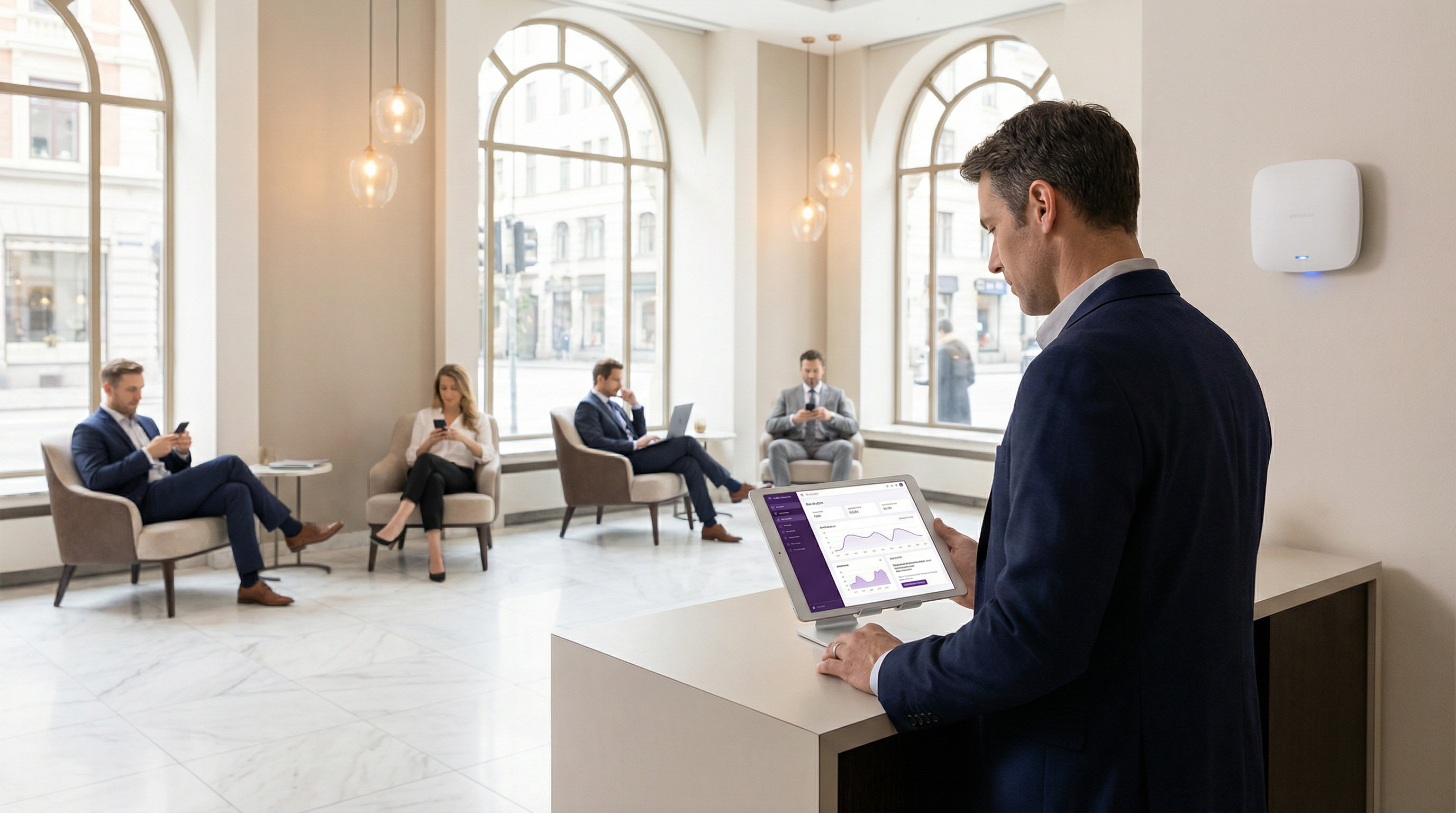
L'implementazione di una nuova soluzione WiFi per gli ospiti in un ambiente enterprise richiede una chiara comprensione dell'architettura tecnica, delle fasi di implementazione e del potenziale ritorno sull'investimento. Questa guida funge da panoramica tecnica per i professionisti IT incaricati di configurare la piattaforma di intelligence Purple WiFi per la prima volta. Illustra in dettaglio il modello di implementazione basato su cloud in sette fasi, che sfrutta l'infrastruttura di rete esistente per ridurre al minimo l'ingombro dell'hardware on-premise. Il processo inizia con la registrazione dell'account e culmina in una rete WiFi per gli ospiti attiva e in grado di acquisire dati. Le considerazioni chiave trattate includono la segmentazione della rete per la sicurezza, l'autenticazione basata su RADIUS per il controllo degli accessi e la configurazione del walled garden per un'esperienza utente fluida. La guida esplora inoltre l'ampia compatibilità hardware della piattaforma, che supporta oltre 50 fornitori leader tra cui Cisco, Aruba e Ruckus. Seguendo i passaggi descritti, le organizzazioni possono aspettarsi di implementare una soluzione WiFi per gli ospiti sicura, conforme e scalabile che non solo fornisce una connettività fluida, ma offre anche analisi avanzate e business intelligence per guidare l'efficienza operativa e migliorare il coinvolgimento dei clienti. Il risultato atteso è una solida rete WiFi per gli ospiti che soddisfa i rigorosi requisiti di sicurezza e conformità delle aziende moderne, sbloccando al contempo preziose informazioni basate sui dati relative al comportamento dei visitatori.
Approfondimento tecnico
Fondamentalmente, Purple è una piattaforma ospitata nel cloud che funge da overlay intelligente per l'hardware WiFi esistente. A differenza delle tradizionali soluzioni on-premise che richiedono un'infrastruttura server dedicata per RADIUS, hosting del portale e analisi, l'architettura di Purple centralizza tutte queste funzioni nel cloud. Questo modello riduce significativamente la complessità e il costo totale di proprietà (TCO) dell'implementazione, poiché non vi è alcuna necessità di server in loco dedicati. I componenti tecnici principali sono la Purple Cloud Platform (che ospita il motore di analisi, il server RADIUS e il sistema di gestione del portale), l'infrastruttura di rete locale della sede e i dispositivi degli ospiti (utenti finali).
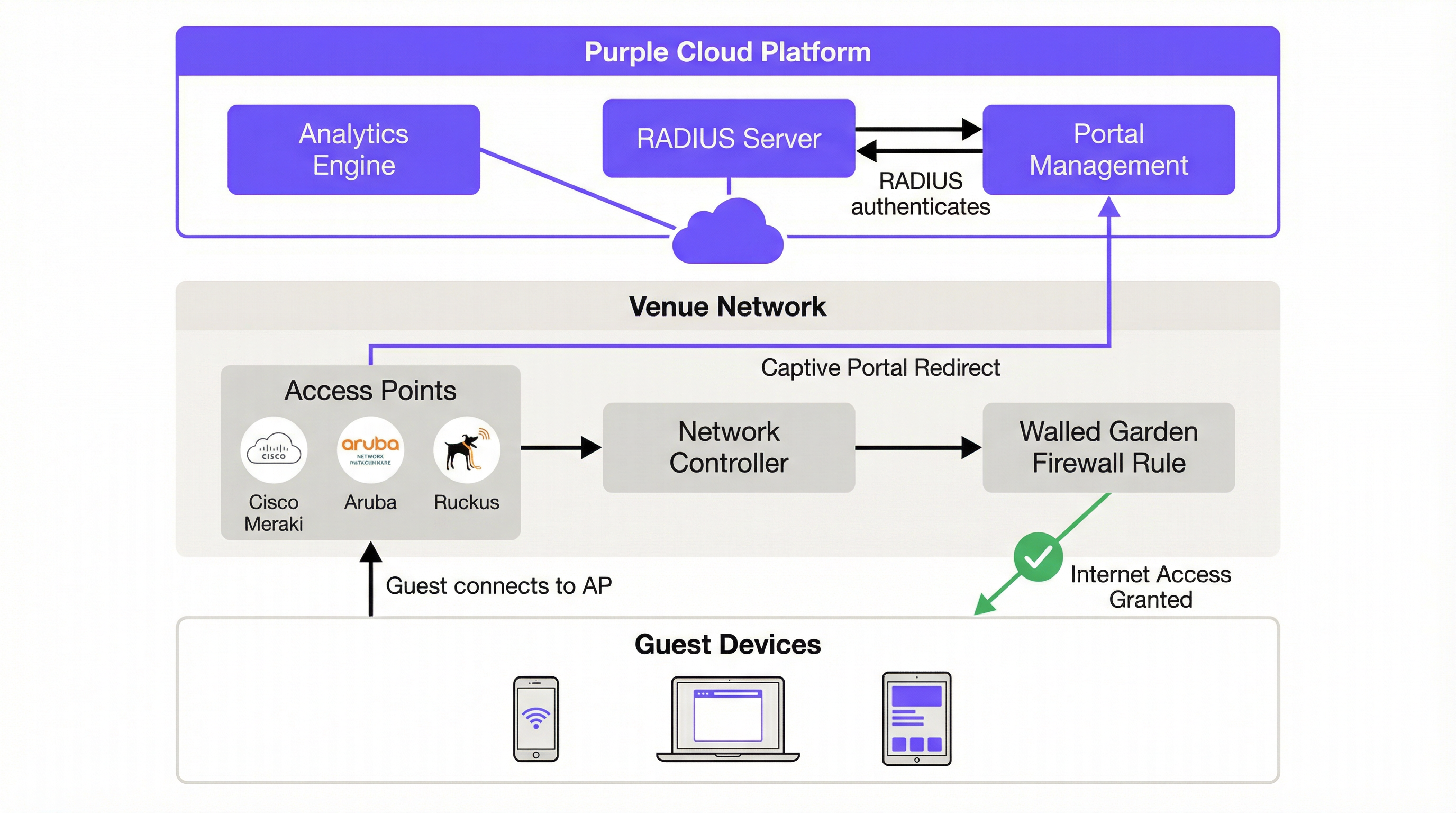
Il flusso di autenticazione inizia nel momento in cui un ospite si connette al SSID designato. Il Captive Network Assistant (CNA) del dispositivo tenta automaticamente di contattare un URL predefinito (captive.apple.com su iOS o connectivitycheck.gstatic.com su Android) per determinare se la rete fornisce un accesso a Internet illimitato. Il controller di rete on-premise intercetta questa richiesta e, in base alle regole del Captive Portal configurate, reindirizza il browser dell'utente alla splash page ospitata nel cloud di Purple. Questo reindirizzamento HTTP 302 è il meccanismo fondamentale che avvia il percorso di autenticazione dell'ospite.
Prima dell'autenticazione, l'utente si trova in un ambiente 'walled garden': una policy del firewall che limita l'accesso a un set specifico di domini inseriti in whitelist. Questo walled garden deve includere il dominio del portale di Purple, eventuali provider di social login (Facebook, Google) e le relative reti di distribuzione dei contenuti (CDN). La precisione di questa configurazione è fondamentale. Un walled garden incompleto è la causa più comune di errori di implementazione, poiché impedisce il caricamento del portale o interrompe il flusso OAuth per i social login.
L'autenticazione stessa è gestita dal server RADIUS (Remote Authentication Dial-In User Service) basato su cloud di Purple, che opera in conformità con lo standard IEEE 802.1X. Quando un utente invia le proprie credenziali tramite il Captive Portal (che si tratti di un social login, della compilazione di un modulo, di un codice voucher o semplicemente dell'accettazione di termini e condizioni), la richiesta viene elaborata dalla piattaforma di Purple. Il server RADIUS cloud convalida la richiesta e invia un messaggio 'Access-Accept' al controller di rete on-premise, che a sua volta apre la regola del firewall e concede al dispositivo l'accesso completo a Internet. A ogni sessione autenticata viene assegnata una chiave di sessione univoca, che impedisce lo sniffing della rete e protegge i dati dell'utente in transito. L'intero flusso è trasparente per l'utente finale, che vede semplicemente una pagina di login e, pochi istanti dopo, un dispositivo connesso.
Per le implementazioni enterprise che richiedono un livello di sicurezza superiore, Purple supporta anche SecurePass, che sfrutta WPA2-Enterprise (IEEE 802.1X con EAP) per l'autenticazione basata su certificati o credenziali senza un Captive Portal. Ciò è particolarmente rilevante per le reti per gli ospiti aziendali in cui la policy IT impone un'autenticazione più forte rispetto alla semplice compilazione di un modulo.
Guida all'implementazione
L'implementazione di Purple WiFi segue un processo strutturato in sette fasi progettato per garantire chiarezza ed efficienza. Seguire questi passaggi in modo metodico garantisce un'implementazione fluida e di successo, sia che si stia configurando una singola sede o effettuando un rollout su una proprietà multi-sito.
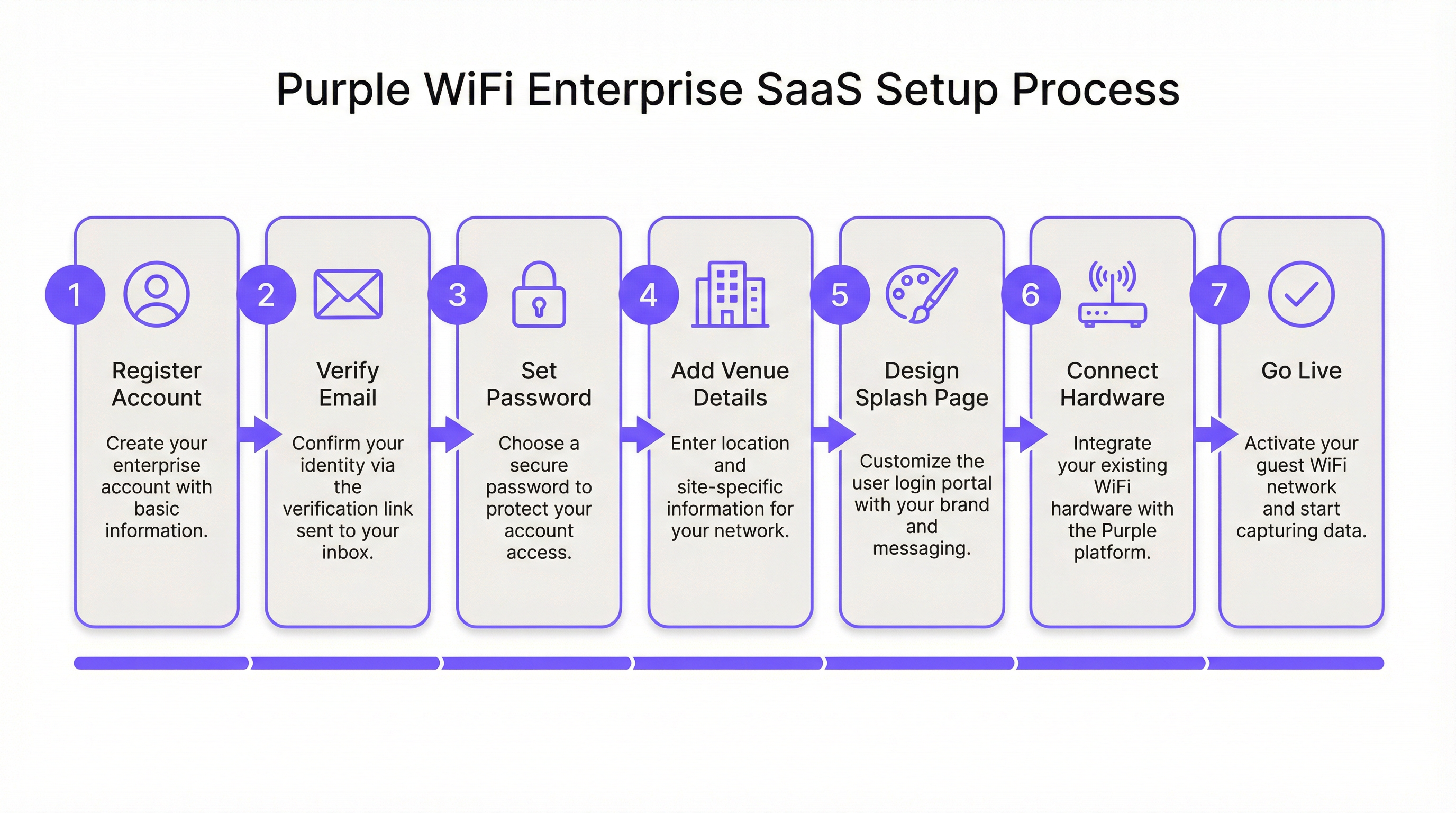
Fase 1: Registrazione e verifica dell'account. Il processo inizia su purple.ai, dove si compila il modulo di registrazione cliente. Viene inviata immediatamente un'e-mail di verifica; questo link deve essere utilizzato entro 24 ore, poiché scade automaticamente. Dopo la verifica, una seconda e-mail fornisce il link 'Get Started' per avviare la procedura guidata di onboarding. In questa fase, si creerà una password sicura per il portale. È consigliabile utilizzare un gestore di password e configurare l'autenticazione a più fattori se la policy di sicurezza dell'organizzazione lo richiede.
Fase 2: Configurazione di sedi e gruppi. La prima attività sostanziale all'interno del portale Purple è la creazione di una Sede (Venue), l'entità logica che corrisponde a una posizione fisica. Verranno inseriti il nome della sede, l'indirizzo e la categoria (hotel, retail, stadio, centro congressi, ecc.). Questi metadati non sono puramente amministrativi; il motore di analisi di Purple li utilizza per contestualizzare i dati dei visitatori e consentire confronti significativi all'interno della proprietà. Per gli operatori multi-sito, i Gruppi forniscono un livello di gestione gerarchico, consentendo di applicare policy coerenti, modelli di Access Journey e configurazioni di reportistica su più sedi contemporaneamente. Una catena di negozi al dettaglio con 50 punti vendita, ad esempio, creerebbe un singolo Gruppo e poi aggiungerebbe ogni negozio come Sede secondaria, consentendo sia una gestione centralizzata sia analisi granulari per singolo negozio.
Fase 3: Progettazione della Splash Page. Purple fornisce due tipi distinti di splash page che servono a scopi diversi nel percorso dell'utente. La Splash Page Offline è il Captive Portal stesso: la prima cosa che un ospite vede al momento della connessione al SSID, prima di essersi autenticato. Questa pagina deve caricarsi rapidamente, presentare chiaramente il brand e rendere ovvia l'azione di autenticazione. La Splash Page Online viene visualizzata dopo l'avvenuta autenticazione, fungendo da landing page che conferma la connettività e può essere utilizzata per trasmettere messaggi promozionali, informazioni sui programmi fedeltà o un reindirizzamento a un URL specifico, come il motore di prenotazione dell'hotel o la pagina promozionale di un rivenditore. L'editor drag-and-drop standard di Purple è sufficiente per la stragrande maggioranza delle implementazioni. L'editor HTML personalizzato è disponibile per i team che richiedono un allineamento del brand pixel-perfect, logiche di modulo avanzate o l'integrazione con script di tracciamento di terze parti.
Fase 4: Configurazione dell'Access Journey. Un Access Journey è il livello di orchestrazione che unisce la splash page, il metodo di autenticazione, i requisiti di acquisizione dei dati, i termini e le condizioni, le policy di sessione e il reindirizzamento post-autenticazione. È qui che viene definita la logica di business del WiFi per gli ospiti. Una singola sede può supportare più Access Journey simultanei, consentendo esperienze differenziate per diversi segmenti di utenti. Un centro congressi, ad esempio, potrebbe configurare un percorso per i visitatori generici (click-through con acquisizione dati minima), un altro per i delegati dell'evento (basato su modulo con acquisizione dati completa e consenso per le comunicazioni di marketing) e un terzo per gli espositori (basato su voucher con maggiore allocazione di larghezza di banda). Ogni percorso viene pubblicato in modo indipendente, offrendo ai team IT e di marketing la flessibilità di iterare sull'esperienza utente senza interrompere le implementazioni attive.
Fase 5: Integrazione hardware. Questa è la fase tecnicamente più impegnativa per gli ingegneri di rete. Purple supporta oltre 50 fornitori di hardware, coprendo l'intero spettro dell'infrastruttura WiFi enterprise. L'approccio all'integrazione è coerente tra i vari fornitori: si registra l'access point o il Wireless LAN Controller (WLC) nel portale Purple specificando fornitore, modello e indirizzo MAC. Purple genera quindi una serie di impostazioni segnaposto specifiche per il fornitore (tra cui l'indirizzo IP del server RADIUS, il segreto condiviso, l'URL del Captive Portal e l'elenco dei domini del walled garden) che andranno applicate all'interfaccia di configurazione dell'hardware.
Per le implementazioni Cisco Meraki, la configurazione viene eseguita nella Meraki Dashboard: si crea un nuovo SSID per gli ospiti, si imposta il tipo di splash page su 'Sign-on with Purple', si inseriscono i dettagli del server RADIUS e si popola il walled garden con i domini forniti da Purple. Per gli Aruba Instant AP, il processo prevede la configurazione di un profilo Captive Portal esterno sul cluster IAP, puntando all'URL del portale di Purple e configurando le impostazioni del server RADIUS. Per Ruckus SmartZone, la configurazione viene eseguita a livello di controller, creando un profilo WLAN con Captive Portal esterno e impostazioni RADIUS. Ogni fornitore dispone di una guida passo-passo dedicata disponibile nel portale di supporto Purple e, cosa fondamentale, accessibile direttamente dall'interno del portale Purple in Management > Venues > Hardware.
Fase 6: Test e convalida. Prima del go-live, un test completo dell'intero percorso dell'ospite è assolutamente necessario. Collegare un dispositivo di test al SSID per gli ospiti e verificare quanto segue: il Captive Portal si carica correttamente e tempestivamente su iOS, Android e Windows (ognuno gestisce il CNA in modo diverso e potrebbe richiedere voci specifiche nel walled garden); ogni metodo di autenticazione configurato viene completato con successo; l'URL di reindirizzamento post-autenticazione funziona come previsto; e le sessioni autenticate appaiono nella dashboard di analisi di Purple quasi in tempo reale. È inoltre consigliabile testare il percorso su un dispositivo che si è precedentemente connesso, per verificare che il comportamento degli utenti di ritorno sia gestito correttamente.
Fase 7: Go-Live e monitoraggio continuo. Una volta completati i test, pubblicare l'Access Journey nel portale Purple. Da questo momento, tutto il traffico degli ospiti sul SSID designato è gestito da Purple. La Welcome Dashboard fornisce accesso immediato alle analisi in tempo reale, incluse le sessioni attive correnti, la ripartizione dei metodi di autenticazione e il rapporto tra visitatori nuovi e di ritorno. Stabilire una cadenza regolare per la revisione dei report di analisi: la dashboard di Purple supporta report personalizzati e può essere configurata per inviare report programmati agli stakeholder.
Best Practice
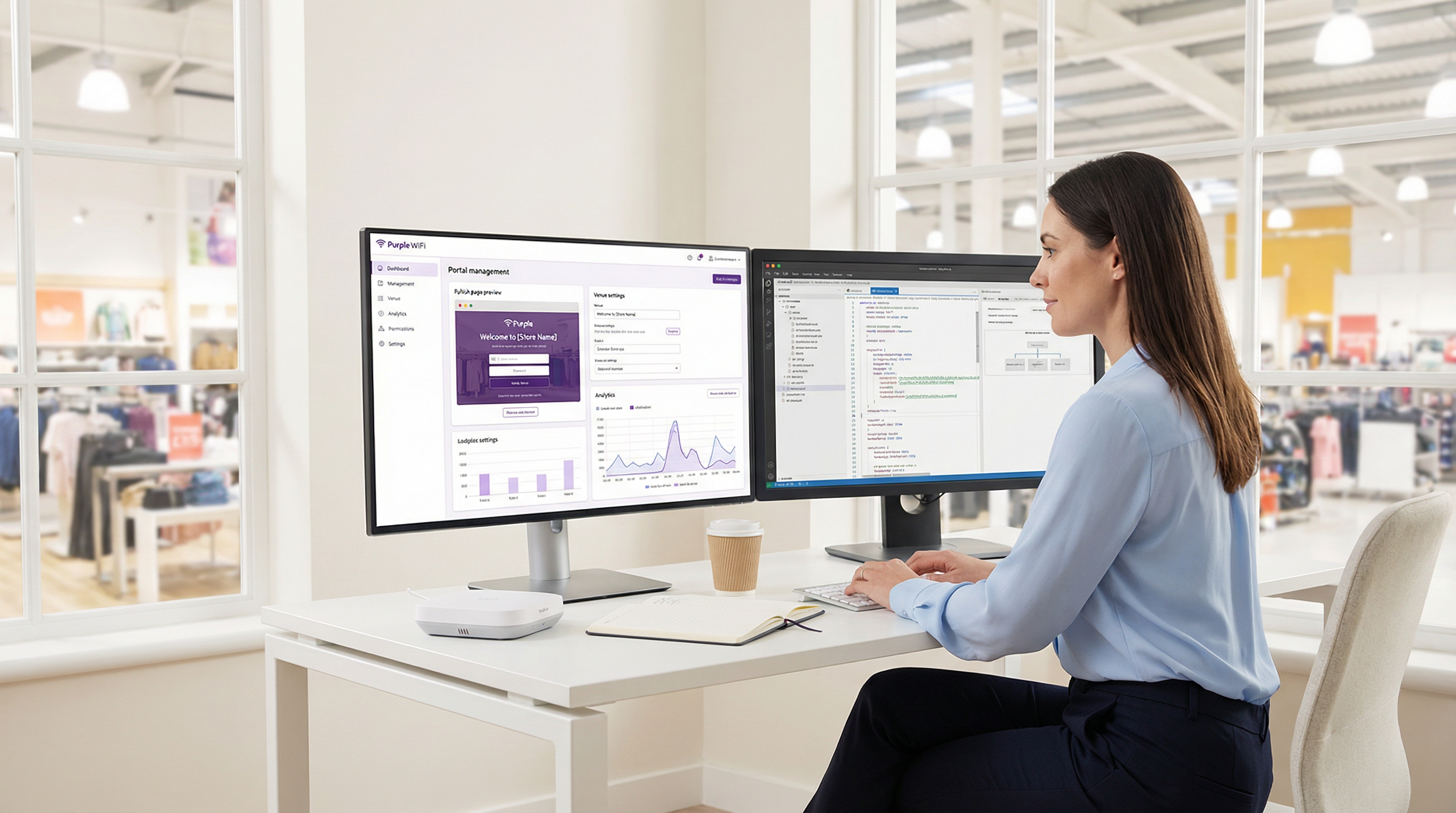
La segmentazione della rete è il requisito di sicurezza fondamentale per qualsiasi implementazione WiFi per gli ospiti. Il SSID per gli ospiti deve essere posizionato su una VLAN dedicata, con rigide regole del firewall che impediscano a qualsiasi traffico proveniente dal segmento ospiti di raggiungere le reti aziendali, operative o soggette a PCI. Questa non è solo una raccomandazione di best practice; è un requisito di conformità ai sensi del PCI DSS 4.0 per qualsiasi organizzazione che elabori pagamenti con carta sulla stessa infrastruttura di rete fisica, ed è in linea con i principi di minimizzazione dei dati del GDPR. Negli ambienti alberghieri, ciò significa che il sistema di gestione della proprietà (PMS), i terminali point-of-sale e i sistemi di back-office devono trovarsi su segmenti di rete completamente separati.
Per le implementazioni multi-sito, si consiglia vivamente l'approccio pilot-first. Selezionare una singola sede che sia rappresentativa della proprietà più ampia, completare l'intero ciclo di implementazione e test e utilizzare la configurazione risultante come modello convalidato per i successivi rollout. Questo approccio riduce i rischi, accelera l'implementazione più ampia e fornisce un ambiente di riferimento per la risoluzione dei problemi.
Quando si configurano i metodi di autenticazione, considerare le implicazioni sulla qualità dei dati di ciascuna opzione. Il social login fornisce ricchi dati demografici, ma è soggetto all'accuratezza del profilo social dell'utente. L'autenticazione basata su modulo consente di acquisire campi specifici, ma introduce attriti che possono ridurre i tassi di completamento. L'autenticazione click-through massimizza i tassi di connessione ma produce dati minimi. La scelta ottimale dipende dall'equilibrio tra gli obiettivi di acquisizione dei dati e i requisiti dell'esperienza utente, e questo equilibrio dovrebbe essere concordato tra gli stakeholder IT e di marketing prima dell'inizio dell'implementazione.
Risoluzione dei problemi e mitigazione dei rischi
| Problema comune | Causa principale | Strategia di mitigazione |
|---|---|---|
| Il Captive Portal non viene visualizzato su iOS | iOS 14+ utilizza la randomizzazione MAC per impostazione predefinita e il probe CNA potrebbe essere bloccato da regole DNS o firewall. | Verificare che la risoluzione DNS per captive.apple.com non sia bloccata sulla VLAN degli ospiti. Assicurarsi che la regola di reindirizzamento del Captive Portal sia applicata correttamente nel controller di rete. |
| I pulsanti di social login non rispondono | I domini CDN e API richiesti per il provider social non sono inclusi nel walled garden. | Aggiungere tutti i domini relativi all'autenticazione dalla documentazione di Purple alla whitelist del walled garden. Per Facebook, questo include connect.facebook.net, graph.facebook.com e i domini CDN associati. |
| Agli utenti viene richiesto frequentemente di riautenticarsi | Impostazioni di timeout della sessione brevi o l'impatto della randomizzazione dell'indirizzo MAC che porta la rete a trattare il dispositivo come nuovo. | Rivedere ed estendere il timeout della sessione nelle impostazioni dell'Access Journey. Per un riconoscimento persistente, incoraggiare gli utenti a utilizzare l'App Purple o l'autenticazione basata su e-mail. |
| Velocità di connessione lente dopo l'autenticazione | Larghezza di banda Internet insufficiente o limitazione della larghezza di banda per dispositivo eccessivamente restrittiva nell'Access Journey. | Condurre una valutazione della capacità della larghezza di banda. Regolare i limiti di larghezza di banda per dispositivo nell'Access Journey per bilanciare l'esperienza utente con un utilizzo equo su tutti i dispositivi connessi. |
| La dashboard di analisi non si popola | I pacchetti di accounting RADIUS non raggiungono la piattaforma cloud di Purple, oppure l'hardware non è configurato per inviare dati di accounting. | Verificare che l'accounting RADIUS sia abilitato sul controller di rete e che l'IP e la porta del server di accounting corrispondano alle impostazioni fornite da Purple. Controllare le regole del firewall per assicurarsi che la porta UDP 1813 sia aperta in uscita dal controller. |
ROI e impatto sul business
Il business case per l'implementazione di Purple va ben oltre la fornitura dell'accesso a Internet. La piattaforma trasforma la rete WiFi per gli ospiti in un asset di dati strategico. Per gli operatori dell'ospitalità, le analisi sui dati demografici dei visitatori, sui tempi di permanenza e sulla frequenza delle visite di ritorno informano direttamente le strategie di revenue management e di marketing. Un hotel che comprende quali segmenti di ospiti ritornano più frequentemente può personalizzare di conseguenza gli incentivi del programma fedeltà. Una catena di negozi al dettaglio in grado di misurare la correlazione tra il tempo di permanenza sul WiFi e il valore della transazione può ottimizzare il layout del negozio e il personale.
Le capacità di integrazione della piattaforma amplificano ulteriormente questo valore. I connettori nativi di Purple per Salesforce, HubSpot e altre piattaforme CRM leader consentono l'arricchimento automatico dei record dei clienti con i dati delle visite WiFi, creando una visione unificata del cliente che abbraccia sia le interazioni digitali che quelle fisiche. Questa integrazione dei dati è il fondamento di un marketing omnicanale efficace.
Da una prospettiva operativa IT, l'architettura basata su cloud offre guadagni di efficienza misurabili. Una grande catena globale di fast-food ha segnalato una riduzione del 90% della necessità di visite in loco da parte di ingegneri IT dopo l'implementazione di Purple, poiché la gestione centralizzata e le funzionalità di diagnostica remota hanno consentito al team IT di risolvere la maggior parte dei problemi di rete senza presenza fisica. Per una catena con centinaia di sedi, ciò rappresenta una sostanziale riduzione delle spese operative. Lo SLA di uptime del 99,99% fornito dall'infrastruttura cloud di Purple riduce ulteriormente il rischio di interruzione del servizio e i costi associati al supporto reattivo.
Per le organizzazioni del settore pubblico che implementano il WiFi per gli ospiti in biblioteche, edifici comunali o snodi di trasporto, il calcolo del ROI è inquadrato in modo diverso: in termini di inclusione digitale, coinvolgimento dei cittadini e conformità agli obblighi di accesso pubblico. Le funzionalità di acquisizione dati e filtraggio dei contenuti (Shield) conformi al GDPR di Purple la rendono una piattaforma adatta a questi ambienti, in cui la conformità normativa è fondamentale.
Termini chiave e definizioni
Captive Portal
A web page that a user is obligated to view and interact with before being granted access to the internet. It intercepts the initial web traffic from a newly connected device and presents an authentication or consent interface.
This is the core mechanism for user authentication and for presenting terms and conditions. IT teams configure their network hardware to redirect unauthenticated users to the captive portal hosted on Purple's cloud platform.
RADIUS (Remote Authentication Dial-In User Service)
A client/server networking protocol that provides centralised Authentication, Authorization, and Accounting (AAA) management for users connecting to a network service. Defined in RFC 2865.
Purple uses a cloud-based RADIUS server to authenticate guest users. Your access points and controllers act as RADIUS clients, forwarding authentication requests to Purple's cloud server, which eliminates the need for an on-premise RADIUS server and its associated maintenance overhead.
Walled Garden
A firewall policy that restricts a user's network access to a limited set of pre-approved domains and IP addresses before they have completed the authentication process on a captive portal network.
This is a critical firewall configuration step. If the walled garden does not include all the domains required for the captive portal and its authentication providers to function, the login process will fail. IT teams must configure this on their network gateway or firewall using the domain list provided by Purple.
SSID (Service Set Identifier)
The public name of a wireless local area network (WLAN) that is broadcast to nearby devices. It is the network name that appears in a device's list of available WiFi connections.
IT teams create a specific SSID for guest access (e.g., 'Hotel_Guest_WiFi') and associate it with the captive portal redirect, the VLAN, and the RADIUS configuration for the Purple service. This SSID should be kept separate from any corporate or operational SSIDs.
VLAN (Virtual Local Area Network)
A method of creating logically independent network segments over a single physical network infrastructure. Devices on different VLANs cannot communicate with each other without being explicitly routed through a firewall or router.
For security and compliance, the guest WiFi SSID must be placed on its own dedicated VLAN. This isolates guest traffic from sensitive corporate or operational network traffic. This is a prerequisite for PCI DSS compliance and aligns with GDPR data minimisation principles.
MAC Address (Media Access Control Address)
A unique hardware identifier assigned to a network interface card (NIC). It is a 48-bit address, typically displayed as six groups of two hexadecimal digits (e.g., 00:1A:2B:3C:4D:5E).
Purple uses the MAC address to identify unique devices and track returning visitors. However, MAC address randomisation in modern iOS and Android devices means this identifier changes on each connection, which can affect the accuracy of return visitor analytics. This limitation should be communicated to marketing stakeholders.
Access Journey
A Purple platform-specific term for the complete, configurable end-to-end authentication flow that a guest user experiences when connecting to the WiFi network. It encompasses the splash page, authentication method, data capture forms, session policies, and post-authentication redirect.
This is the primary configuration object within the Purple portal. IT managers and marketing teams collaborate to define Access Journeys that balance security requirements, data capture objectives, and user experience. Multiple journeys can be active simultaneously for different user segments.
IEEE 802.1X
An IEEE standard for port-based Network Access Control (PNAC). It provides an authentication mechanism to devices wishing to attach to a LAN or WLAN, using the Extensible Authentication Protocol (EAP) framework.
This is the enterprise-grade authentication standard that underpins WPA2-Enterprise and WPA3-Enterprise. Purple's RADIUS-based authentication aligns with this standard. For deployments requiring the highest security posture, Purple's SecurePass feature leverages 802.1X for certificate or credential-based authentication without a captive portal.
Casi di studio
A 250-room luxury hotel needs to replace its legacy guest WiFi system. They have existing Cisco WLC (AireOS) infrastructure and require a solution that offers tiered access: free standard access for all guests and a premium, high-speed option for conference attendees and VIP guests. They also need to ensure full compliance with GDPR for all data captured.
The hotel would deploy Purple as an overlay on their existing Cisco WLC infrastructure, avoiding any capital expenditure on new hardware. Two separate Access Journeys would be configured in the Purple portal. The 'Standard Guest' journey would use form-based authentication, capturing the guest's name and email address, with clearly worded consent checkboxes for GDPR compliance (separate consents for terms of service and marketing communications). This journey would have bandwidth limits of 5 Mbps per device and a session duration of 24 hours. The 'Premium Access' journey would be configured with voucher-based authentication. The hotel's event coordination team would generate batches of unique, time-limited vouchers from the Purple portal and distribute them to conference organisers. This journey would offer higher bandwidth limits (25 Mbps per device) and a 72-hour session duration. Both journeys would be linked to the same guest SSID, and the captive portal would present guests with a clear choice between the free tier and the premium voucher entry field. All captured data would be automatically synchronised to the hotel's CRM via Purple's integration connector.
A retail chain with 50 stores across the UK wants to understand customer loyalty and in-store behaviour. They have a mix of Cisco Meraki and Aruba IAP hardware across their estate. The marketing team wants to integrate the WiFi analytics with their Salesforce CRM to enable targeted re-engagement campaigns.
The retail chain would use Purple's multi-venue management capabilities to create a 'Group' for their entire estate, with each of the 50 stores configured as a separate child 'Venue'. This enables both centralised management and per-store analytics. A single, standardised Access Journey template would be configured and applied across all venues, using social login (Facebook or Google) as the primary authentication method to gather rich demographic data with minimal friction. The hardware integration would be performed in two batches: the Meraki stores would be configured via the Meraki Dashboard using Purple's SSID and RADIUS settings, while the Aruba IAP stores would be configured via the Aruba Central or Instant AP controller. The key integration step is activating the Purple Salesforce Connector. In the Purple portal, the data fields captured during WiFi authentication (name, email, age, gender, visit frequency) would be mapped to the corresponding fields on the Contact object in Salesforce. This would automatically create or update a contact record in Salesforce for every user who authenticates, enriching the CRM with physical visit data that can be used to trigger automated re-engagement campaigns.
Analisi degli scenari
Q1. You are deploying Purple in a 20,000-capacity stadium with high-density WiFi requirements. During peak event times, you anticipate over 12,000 concurrent authenticated users. What is your primary technical consideration regarding the underlying network infrastructure, and how does Purple's architecture mitigate or exacerbate this challenge?
💡 Suggerimento:Consider the path of both the authentication traffic and the subsequent internet traffic, and where the bottlenecks are most likely to occur.
Mostra l'approccio consigliato
The primary consideration is the capacity and performance of the on-premise Wireless LAN Controller (WLC) and the internet gateway. While Purple's authentication is cloud-based, all guest traffic — including the initial captive portal redirect, the RADIUS accounting packets, and the subsequent internet traffic — must pass through the venue's own network hardware. The WLC must be able to handle the high volume of RADIUS authentication and accounting packets during peak connection events (e.g., when gates open and thousands of devices connect simultaneously). The internet gateway must have sufficient bandwidth and processing power to manage 12,000+ concurrent sessions. Purple's cloud architecture mitigates the server-side load by handling the portal and RADIUS processing in the cloud, but the on-premise hardware remains the critical bottleneck. The recommended approach is to ensure the WLC is properly sized, the internet uplink has sufficient headroom, and bandwidth-per-device limits are configured in the Access Journey to prevent any single user from consuming a disproportionate share of capacity.
Q2. Your marketing team wants to use a highly stylised, graphically-intensive video on the captive portal splash page to promote a new product launch. What is the main technical risk associated with this request, and how would you advise them to achieve their marketing objective without compromising the user experience?
💡 Suggerimento:Consider the user's network state and available bandwidth at the precise moment the splash page is displayed.
Mostra l'approccio consigliato
The main risk is poor user experience and high abandonment rates. Before authentication, the user is on a restricted network with limited bandwidth — they are in the walled garden, and only the portal's whitelisted domains are accessible. A large video file will load slowly or fail to load entirely, leading to user frustration and a high proportion of guests abandoning the connection attempt. I would advise the marketing team to use a lightweight, optimised static image on the Offline Splash Page (the captive portal) to ensure a fast loading time and a high authentication completion rate. The video would be far more effective on the Online Splash Page, which is displayed after the user has successfully authenticated and has full, high-speed internet access. This approach achieves the marketing objective without compromising the critical first-impression user experience.
Q3. A public-sector client wants to provide free WiFi in a city library. They are concerned about their legal obligations regarding illegal content and the safeguarding of vulnerable users, including children. Which Purple feature would you highlight to address this concern, and what additional steps would you recommend to ensure the client has a defensible compliance position?
💡 Suggerimento:Think about both the technical controls available and the policy and legal framework that must surround them.
Mostra l'approccio consigliato
I would highlight Purple's Shield content filtering feature, which allows the organisation to block access to specific categories of websites — including adult content, gambling, extremist material, and malware sites — at the network level. This provides a meaningful technical control. However, I would strongly advise the client that technical filtering alone is not sufficient for a defensible compliance position. Additional steps should include: publishing a clear Acceptable Use Policy (AUP) that users must accept before connecting; configuring the Access Journey to require explicit acceptance of the AUP; retaining session logs for a legally appropriate period in accordance with data retention policies; and conducting a Data Protection Impact Assessment (DPIA) under GDPR Article 35, given the likelihood of processing data relating to children. The client should also be advised that no content filtering system is 100% effective, and that the AUP acceptance creates a clear record of the user's agreement to the terms of use.
Punti chiave
- ✓Purple WiFi is a cloud-hosted overlay platform that integrates with your existing network hardware from over 50 vendors, requiring no on-premise server infrastructure.
- ✓The setup is a seven-step process: Register, Verify, Configure Venue, Design Splash Pages, Set Up Access Journeys, Integrate Hardware, and Go Live.
- ✓Proper network segmentation — placing guest traffic on a dedicated, isolated VLAN — is the most critical security and compliance measure before any Purple configuration begins.
- ✓Correctly configuring the Walled Garden in your firewall is essential for the captive portal and social logins to function; an incomplete walled garden is the most common cause of deployment failures.
- ✓Authentication is handled by Purple's cloud-based RADIUS server, aligned with IEEE 802.1X standards, eliminating the need for on-premise AAA infrastructure.
- ✓The platform delivers significant business value through rich visitor analytics and CRM integrations (Salesforce, HubSpot), transforming guest WiFi from an amenity into a data asset.
- ✓MAC address randomisation in modern iOS and Android devices affects return visitor tracking accuracy; communicate this limitation to marketing stakeholders and consider the Purple App for persistent user identification.




