

पहिल्यांदा Purple WiFi कसे सेट करावे: एक तांत्रिक आढावा
This technical reference guide provides IT managers, network architects, and CTOs with a comprehensive overview of the Purple WiFi platform's initial setup process. It covers the core technical architecture, hardware integration, portal configuration, and best practices for a successful deployment in enterprise environments like hotels, retail, and stadiums. Following this guide, IT teams can confidently deploy a secure, GDPR-compliant guest WiFi solution that delivers both seamless connectivity and actionable business intelligence.
🎧 हे मार्गदर्शक ऐका
ट्रान्सक्रिप्ट पहा
कार्यकारी सारांश
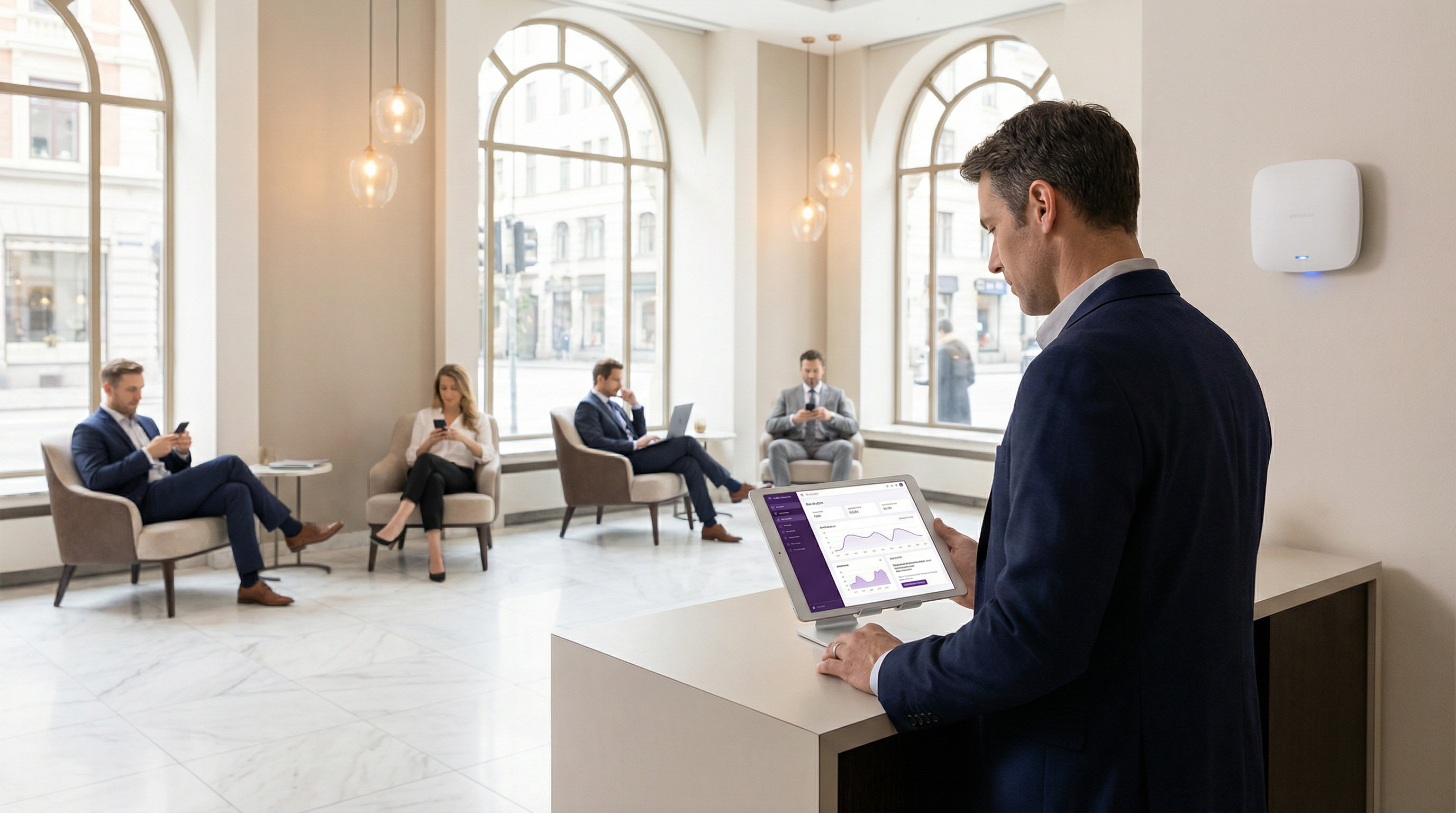
एंटरप्राइझ वातावरणात नवीन अतिथी WiFi सोल्यूशन तैनात करण्यासाठी तांत्रिक आर्किटेक्चर, अंमलबजावणीच्या पायऱ्या आणि गुंतवणुकीवरील संभाव्य परतावा (ROI) स्पष्टपणे समजून घेणे आवश्यक आहे. हे मार्गदर्शक पहिल्यांदा Purple WiFi इंटेलिजन्स प्लॅटफॉर्म सेट करण्याचे काम सोपवलेल्या IT व्यावसायिकांसाठी एक तांत्रिक आढावा म्हणून काम करते. हे सात-टप्प्यांच्या क्लाउड-आधारित डिप्लॉयमेंट मॉडेलचा तपशील देते, जे ऑन-प्रिमाइसेस हार्डवेअर फूटप्रिंट कमी करण्यासाठी विद्यमान नेटवर्क इन्फ्रास्ट्रक्चरचा फायदा घेते. ही प्रक्रिया खाते नोंदणीपासून सुरू होते आणि थेट, डेटा-कॅप्चरिंग अतिथी WiFi नेटवर्कमध्ये समाप्त होते. यामध्ये समाविष्ट असलेल्या प्रमुख बाबींमध्ये सुरक्षिततेसाठी नेटवर्क सेगमेंटेशन, ॲक्सेस कंट्रोलसाठी RADIUS-आधारित ऑथेंटिकेशन आणि अखंड वापरकर्ता अनुभवासाठी वॉल्ड गार्डन कॉन्फिगरेशन यांचा समावेश आहे. हे मार्गदर्शक प्लॅटफॉर्मच्या विस्तृत हार्डवेअर सुसंगततेचा देखील शोध घेते, जे Cisco, Aruba आणि Ruckus सह 50 हून अधिक आघाडीच्या व्हेंडर्सना सपोर्ट करते. नमूद केलेल्या पायऱ्यांचे अनुसरण करून, संस्था एक सुरक्षित, कंप्लायंट आणि स्केलेबल अतिथी WiFi सोल्यूशन तैनात करण्याची अपेक्षा करू शकतात जे केवळ अखंड कनेक्टिव्हिटी प्रदान करत नाही तर ऑपरेशनल कार्यक्षमता वाढवण्यासाठी आणि ग्राहकांचा सहभाग वाढवण्यासाठी समृद्ध ॲनालिटिक्स आणि बिझनेस इंटेलिजन्स देखील प्रदान करते. याचा अपेक्षित परिणाम म्हणजे एक मजबूत अतिथी WiFi नेटवर्क जे आधुनिक एंटरप्राइझच्या कठोर सुरक्षा आणि कंप्लायन्स मागण्या पूर्ण करते आणि त्याच वेळी अभ्यागतांच्या वर्तनाबद्दल मौल्यवान डेटा-चालित इनसाइट्स अनलॉक करते.
तांत्रिक सखोल माहिती
मुळात, Purple हे एक क्लाउड-होस्टेड प्लॅटफॉर्म आहे जे तुमच्या विद्यमान WiFi हार्डवेअरसाठी एक इंटेलिजंट ओव्हरले म्हणून काम करते. RADIUS, पोर्टल होस्टिंग आणि ॲनालिटिक्ससाठी समर्पित सर्व्हर इन्फ्रास्ट्रक्चरची आवश्यकता असलेल्या पारंपारिक ऑन-प्रिमाइसेस सोल्यूशन्सच्या विपरीत, Purple चे आर्किटेक्चर या सर्व कार्यांना क्लाउडमध्ये केंद्रित करते. हे मॉडेल डिप्लॉयमेंटची गुंतागुंत आणि मालकीची एकूण किंमत लक्षणीयरीत्या कमी करते, कारण समर्पित ऑन-साइट सर्व्हरची आवश्यकता नसते. प्राथमिक तांत्रिक घटकांमध्ये Purple क्लाउड प्लॅटफॉर्म — ज्यामध्ये ॲनालिटिक्स इंजिन, RADIUS सर्व्हर आणि पोर्टल मॅनेजमेंट सिस्टीम आहे — ठिकाणाची स्थानिक नेटवर्क इन्फ्रास्ट्रक्चर आणि अंतिम वापरकर्त्याची अतिथी उपकरणे यांचा समावेश होतो.
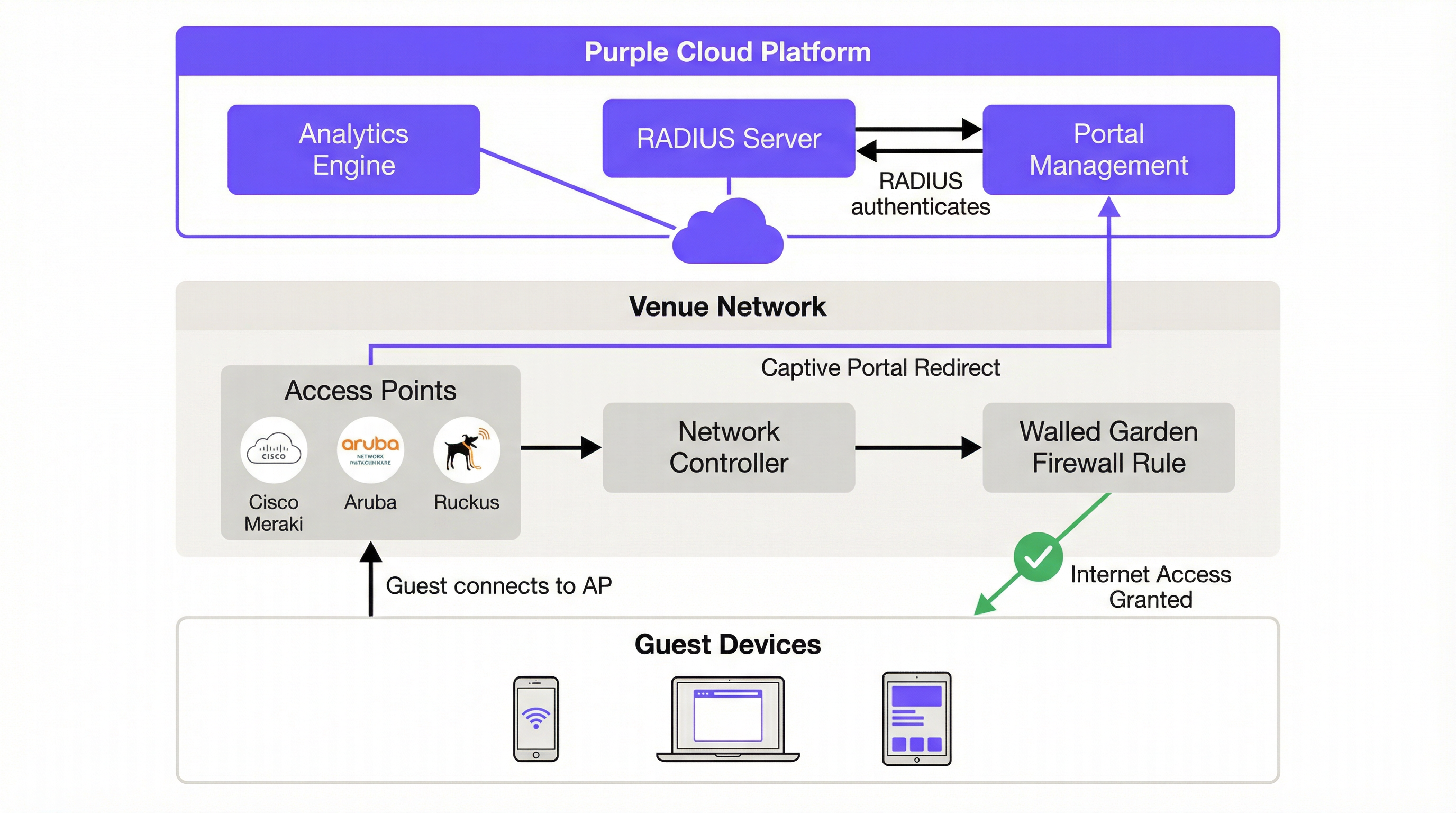
जेव्हा एखादा अतिथी नियुक्त केलेल्या SSID शी कनेक्ट होतो तेव्हा ऑथेंटिकेशन फ्लो सुरू होतो. नेटवर्क अनिर्बंध इंटरनेट ॲक्सेस प्रदान करते की नाही हे निर्धारित करण्यासाठी डिव्हाइसचे कॅप्टिव्ह नेटवर्क असिस्टंट (CNA) स्वयंचलितपणे पूर्वनिर्धारित URL — iOS वर captive.apple.com, किंवा Android वर connectivitycheck.gstatic.com — शी संपर्क साधण्याचा प्रयत्न करते. ऑन-प्रिमाइसेस नेटवर्क कंट्रोलर या विनंतीला अडवतो आणि तुम्ही कॉन्फिगर केलेल्या Captive Portal नियमांवर आधारित, वापरकर्त्याच्या ब्राउझरला Purple च्या क्लाउड-होस्टेड स्प्लॅश पेजवर रीडायरेक्ट करतो. हे HTTP 302 रीडायरेक्ट हे मूलभूत मेकॅनिझम आहे जे अतिथीचा ऑथेंटिकेशन प्रवास सुरू करते.
ऑथेंटिकेशनपूर्वी, वापरकर्ता 'वॉल्ड गार्डन' (walled garden) वातावरणात असतो — एक फायरवॉल पॉलिसी जी त्यांचा ॲक्सेस व्हाईटलिस्ट केलेल्या डोमेनच्या विशिष्ट संचापुरता मर्यादित करते. या वॉल्ड गार्डनमध्ये Purple चे पोर्टल डोमेन, कोणतेही सोशल लॉगिन प्रदाते (Facebook, Google) आणि त्यांच्याशी संबंधित कंटेंट डिलिव्हरी नेटवर्क्स (CDNs) समाविष्ट असणे आवश्यक आहे. या कॉन्फिगरेशनची अचूकता अत्यंत महत्त्वाची आहे. अपूर्ण वॉल्ड गार्डन हे डिप्लॉयमेंट अयशस्वी होण्याचे सर्वात सामान्य कारण आहे, कारण ते पोर्टल लोड होण्यापासून प्रतिबंधित करते किंवा सोशल लॉगिनसाठी OAuth फ्लो खंडित करते.
ऑथेंटिकेशन स्वतः Purple च्या क्लाउड-आधारित RADIUS (रिमोट ऑथेंटिकेशन डायल-इन यूजर सर्व्हिस) सर्व्हरद्वारे हाताळले जाते, जे IEEE 802.1X मानकांनुसार कार्य करते. जेव्हा एखादा वापरकर्ता Captive Portal द्वारे त्यांचे क्रेडेंशियल्स सबमिट करतो — मग ते सोशल लॉगिन, फॉर्म भरणे, व्हाउचर कोड किंवा फक्त अटी आणि शर्ती स्वीकारून असो — विनंतीवर Purple च्या प्लॅटफॉर्मद्वारे प्रक्रिया केली जाते. क्लाउड RADIUS सर्व्हर विनंती प्रमाणित करतो आणि ऑन-प्रिमाइसेस नेटवर्क कंट्रोलरला 'Access-Accept' संदेश परत पाठवतो, जो नंतर फायरवॉल नियम उघडतो आणि डिव्हाइसला पूर्ण इंटरनेट ॲक्सेस देतो. प्रत्येक ऑथेंटिकेटेड सेशनला एक युनिक सेशन की नियुक्त केली जाते, जी नेटवर्क स्निफिंगला प्रतिबंधित करते आणि ट्रान्झिटमधील वापरकर्त्याच्या डेटाचे संरक्षण करते. हा संपूर्ण फ्लो अंतिम वापरकर्त्यासाठी पारदर्शक असतो, ज्याला फक्त एक लॉगिन पेज दिसते आणि काही क्षणांनंतर, एक कनेक्ट केलेले डिव्हाइस दिसते.
उच्च सुरक्षा आवश्यक असलेल्या एंटरप्राइझ डिप्लॉयमेंटसाठी, Purple SecurePass ला देखील सपोर्ट करते, जे Captive Portal शिवाय प्रमाणपत्र-आधारित किंवा क्रेडेंशियल-आधारित ऑथेंटिकेशनसाठी WPA2-Enterprise (EAP सह IEEE 802.1X) चा फायदा घेते. हे कॉर्पोरेट अतिथी नेटवर्कसाठी विशेषतः संबंधित आहे जेथे IT पॉलिसी साध्या फॉर्म भरण्यापेक्षा मजबूत ऑथेंटिकेशन अनिवार्य करते.
अंमलबजावणी मार्गदर्शक
Purple WiFi ची अंमलबजावणी स्पष्टता आणि कार्यक्षमतेसाठी डिझाइन केलेल्या संरचित, सात-टप्प्यांच्या प्रक्रियेचे अनुसरण करते. या पायऱ्यांचे पद्धतशीरपणे पालन केल्याने एक सुरळीत आणि यशस्वी डिप्लॉयमेंट सुनिश्चित होते, मग तुम्ही एकच ठिकाण कॉन्फिगर करत असाल किंवा मल्टी-साइट इस्टेटमध्ये रोल आउट करत असाल.
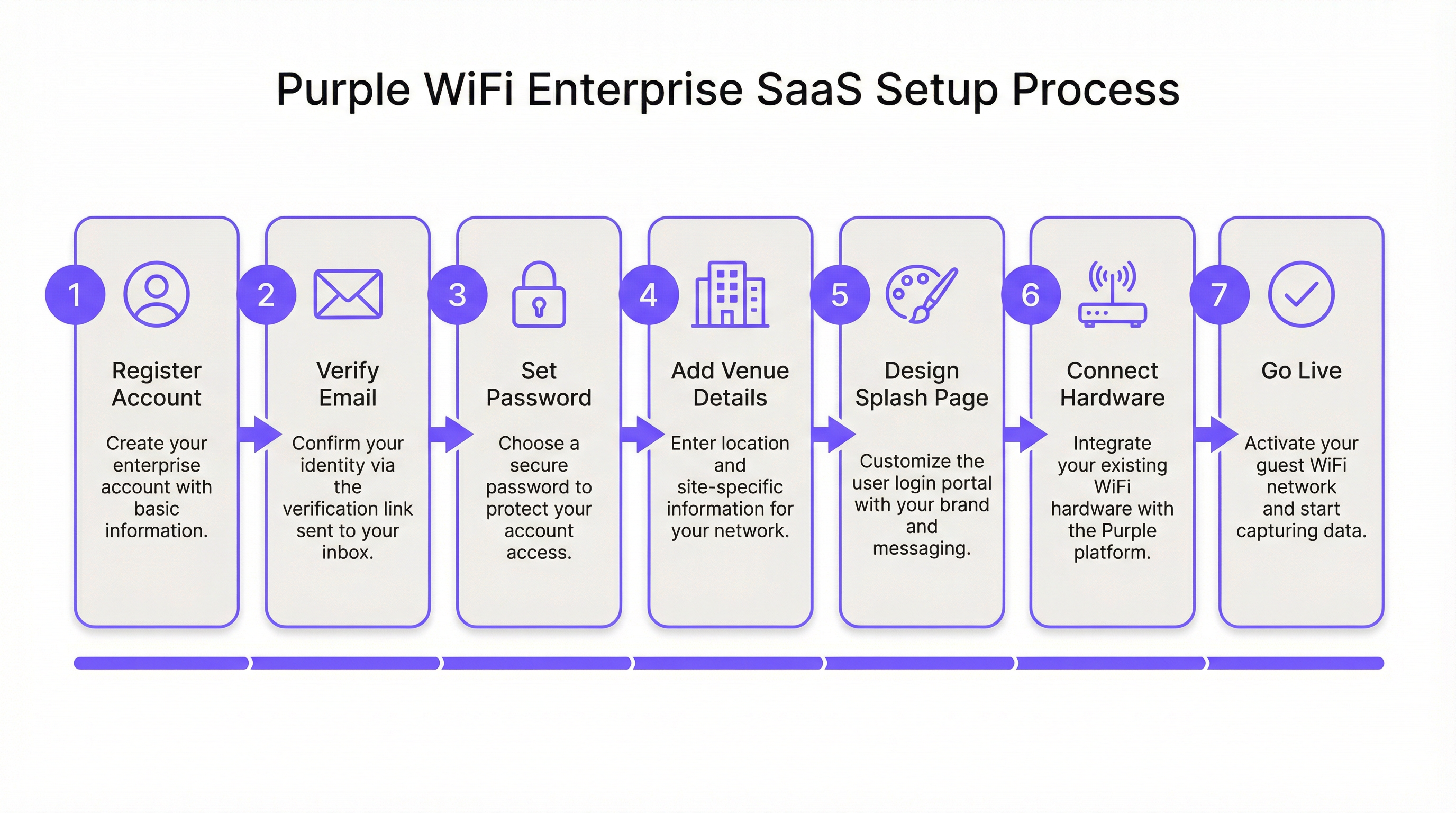
पायरी 1: खाते नोंदणी आणि पडताळणी. ही प्रक्रिया purple.ai वर सुरू होते, जिथे तुम्ही ग्राहक नोंदणी फॉर्म पूर्ण करता. एक पडताळणी ईमेल त्वरित पाठविला जातो; या लिंकवर 24 तासांच्या आत कारवाई करणे आवश्यक आहे, कारण ती स्वयंचलितपणे कालबाह्य होते. पडताळणीनंतर, दुसरा ईमेल ऑनबोर्डिंग विझार्ड सुरू करण्यासाठी 'Get Started' लिंक प्रदान करतो. या टप्प्यावर, तुम्ही एक सुरक्षित पोर्टल पासवर्ड तयार कराल. पासवर्ड मॅनेजर वापरण्याचा आणि तुमच्या संस्थेची सुरक्षा पॉलिसी अनिवार्य करत असल्यास मल्टी-फॅक्टर ऑथेंटिकेशन कॉन्फिगर करण्याचा सल्ला दिला जातो.
पायरी 2: ठिकाण (Venue) आणि गट (Group) कॉन्फिगरेशन. Purple पोर्टल मधील पहिले महत्त्वाचे काम म्हणजे एक ठिकाण (Venue) तयार करणे — एक लॉजिकल एंटिटी जी भौतिक स्थानाशी मॅप करते. तुम्ही ठिकाणाचे नाव, पत्ता आणि श्रेणी (हॉटेल, रिटेल, स्टेडियम, कॉन्फरन्स सेंटर इ.) प्रविष्ट कराल. हा मेटाडेटा केवळ प्रशासकीय नाही; Purple चे ॲनालिटिक्स इंजिन अभ्यागतांच्या डेटाला संदर्भासहित करण्यासाठी आणि तुमच्या इस्टेटमध्ये अर्थपूर्ण तुलना सक्षम करण्यासाठी त्याचा वापर करते. मल्टी-साइट ऑपरेटर्ससाठी, गट (Groups) एक श्रेणीबद्ध व्यवस्थापन स्तर प्रदान करतात, ज्यामुळे तुम्हाला एकाच वेळी अनेक ठिकाणांवर सुसंगत पॉलिसी, ॲक्सेस जर्नी टेम्पलेट्स आणि रिपोर्टिंग कॉन्फिगरेशन लागू करण्याची अनुमती मिळते. उदाहरणार्थ, 50 स्टोअर्स असलेली रिटेल चेन एकच गट तयार करेल आणि नंतर प्रत्येक स्टोअरला चाइल्ड व्हेन्यू म्हणून जोडेल, ज्यामुळे केंद्रीकृत व्यवस्थापन आणि प्रत्येक स्टोअरचे सविस्तर ॲनालिटिक्स दोन्ही सक्षम होतील.
पायरी 3: स्प्लॅश पेज डिझाइन. Purple दोन भिन्न स्प्लॅश पेज प्रकार प्रदान करते जे वापरकर्त्याच्या प्रवासात भिन्न उद्देश पूर्ण करतात. ऑफलाइन स्प्लॅश पेज हे स्वतः Captive Portal आहे — ऑथेंटिकेट होण्यापूर्वी, SSID शी कनेक्ट झाल्यावर अतिथीला दिसणारी पहिली गोष्ट. हे पेज लवकर लोड झाले पाहिजे, तुमचा ब्रँड स्पष्टपणे सादर केला पाहिजे आणि ऑथेंटिकेशनची कृती स्पष्ट केली पाहिजे. ऑनलाइन स्प्लॅश पेज यशस्वी ऑथेंटिकेशननंतर प्रदर्शित केले जाते, जे कनेक्टिव्हिटीची पुष्टी करणारे लँडिंग पेज म्हणून काम करते आणि प्रचारात्मक संदेश, लॉयल्टी प्रोग्राम माहिती किंवा हॉटेलचे बुकिंग इंजिन किंवा रिटेलरचे प्रमोशनल पेज यासारख्या विशिष्ट URL वर रीडायरेक्ट करण्यासाठी वापरले जाऊ शकते. Purple चे स्टँडर्ड ड्रॅग-अँड-ड्रॉप एडिटर बहुतांश डिप्लॉयमेंटसाठी पुरेसे आहे. पिक्सेल-परफेक्ट ब्रँड अलाइनमेंट, प्रगत फॉर्म लॉजिक किंवा थर्ड-पार्टी ट्रॅकिंग स्क्रिप्ट्ससह इंटिग्रेशन आवश्यक असलेल्या टीम्ससाठी कस्टम HTML एडिटर उपलब्ध आहे.
पायरी 4: ॲक्सेस जर्नी कॉन्फिगरेशन. ॲक्सेस जर्नी हा एक ऑर्केस्ट्रेशन लेयर आहे जो स्प्लॅश पेज, ऑथेंटिकेशन पद्धत, डेटा कॅप्चर आवश्यकता, अटी आणि शर्ती, सेशन पॉलिसी आणि ऑथेंटिकेशन-नंतरचे रीडायरेक्ट एकत्र बांधतो. येथेच तुमच्या अतिथी WiFi चे बिझनेस लॉजिक परिभाषित केले जाते. एकच ठिकाण एकाधिक समवर्ती ॲक्सेस जर्नींना सपोर्ट करू शकते, ज्यामुळे भिन्न वापरकर्ता विभागांसाठी भिन्न अनुभव सक्षम होतात. उदाहरणार्थ, कॉन्फरन्स सेंटर सामान्य सार्वजनिक अभ्यागतांसाठी एक जर्नी (किमान डेटा कॅप्चरसह क्लिक-थ्रू), इव्हेंट प्रतिनिधींसाठी दुसरी (संपूर्ण डेटा कॅप्चरसह फॉर्म-आधारित आणि मार्केटिंग कम्युनिकेशन्ससाठी संमती) आणि प्रदर्शकांसाठी तिसरी (उच्च बँडविड्थ वाटपासह व्हाउचर-आधारित) कॉन्फिगर करू शकते. प्रत्येक जर्नी स्वतंत्रपणे प्रकाशित केली जाते, ज्यामुळे IT टीम्स आणि मार्केटिंग टीम्सना लाइव्ह डिप्लॉयमेंटमध्ये व्यत्यय न आणता वापरकर्त्याच्या अनुभवावर पुनरावृत्ती करण्याची लवचिकता मिळते.
पायरी 5: हार्डवेअर इंटिग्रेशन. नेटवर्क इंजिनिअर्ससाठी हा तांत्रिकदृष्ट्या सर्वात आव्हानात्मक टप्पा आहे. Purple 50 हून अधिक हार्डवेअर व्हेंडर्सना सपोर्ट करते, ज्यामध्ये एंटरप्राइझ WiFi इन्फ्रास्ट्रक्चरचा संपूर्ण स्पेक्ट्रम समाविष्ट आहे. इंटिग्रेशनचा दृष्टीकोन सर्व व्हेंडर्समध्ये सुसंगत आहे: तुम्ही व्हेंडर, मॉडेल आणि MAC ॲड्रेस निर्दिष्ट करून Purple पोर्टलमध्ये तुमचा ॲक्सेस पॉइंट किंवा वायरलेस LAN कंट्रोलर (WLC) नोंदणीकृत करता. त्यानंतर Purple व्हेंडर-विशिष्ट प्लेसहोल्डर सेटिंग्जचा संच तयार करते — ज्यामध्ये RADIUS सर्व्हर IP ॲड्रेस, शेअर्ड सिक्रेट, Captive Portal URL आणि वॉल्ड गार्डन डोमेन सूची समाविष्ट आहे — जे तुम्ही तुमच्या हार्डवेअरच्या कॉन्फिगरेशन इंटरफेसवर लागू करता.
Cisco Meraki डिप्लॉयमेंटसाठी, कॉन्फिगरेशन Meraki डॅशबोर्डमध्ये केले जाते: एक नवीन अतिथी SSID तयार करा, स्प्लॅश पेज प्रकार 'Sign-on with Purple' वर सेट करा, RADIUS सर्व्हर तपशील प्रविष्ट करा आणि Purple द्वारे प्रदान केलेल्या डोमेन्ससह वॉल्ड गार्डन पॉप्युलेट करा. Aruba Instant APs साठी, प्रक्रियेमध्ये IAP क्लस्टरवर बाह्य Captive Portal प्रोफाइल कॉन्फिगर करणे, Purple च्या पोर्टल URL कडे निर्देशित करणे आणि RADIUS सर्व्हर सेटिंग्ज कॉन्फिगर करणे समाविष्ट आहे. Ruckus SmartZone साठी, कॉन्फिगरेशन कंट्रोलर स्तरावर केले जाते, बाह्य Captive Portal आणि RADIUS सेटिंग्जसह WLAN प्रोफाइल तयार केले जाते. प्रत्येक व्हेंडरसाठी Purple सपोर्ट पोर्टलमध्ये एक समर्पित, चरण-दर-चरण मार्गदर्शक उपलब्ध आहे आणि महत्त्वाचे म्हणजे, Purple पोर्टलमध्ये Management > Venues > Hardware अंतर्गत थेट प्रवेशयोग्य आहे.
पायरी 6: चाचणी आणि प्रमाणीकरण. लाइव्ह जाण्यापूर्वी, संपूर्ण अतिथी प्रवासाची सर्वसमावेशक चाचणी करणे अनिवार्य आहे. अतिथी SSID शी एक चाचणी डिव्हाइस कनेक्ट करा आणि खालील गोष्टींची पडताळणी करा: Captive Portal iOS, Android आणि Windows वर योग्यरित्या आणि त्वरित लोड होते (प्रत्येकजण CNA वेगळ्या प्रकारे हाताळतो आणि विशिष्ट वॉल्ड गार्डन एंट्रीची आवश्यकता असू शकते); प्रत्येक कॉन्फिगर केलेली ऑथेंटिकेशन पद्धत यशस्वीरित्या पूर्ण होते; ऑथेंटिकेशन-नंतरची रीडायरेक्ट URL अपेक्षेप्रमाणे कार्य करते; आणि ऑथेंटिकेटेड सेशन्स Purple ॲनालिटिक्स डॅशबोर्डमध्ये रिअल-टाइमच्या जवळपास दिसतात. परत येणाऱ्या वापरकर्त्याचे वर्तन योग्यरित्या हाताळले जाते हे सत्यापित करण्यासाठी, पूर्वी कनेक्ट केलेल्या डिव्हाइसवर जर्नीची चाचणी घेण्याचा सल्ला दिला जातो.
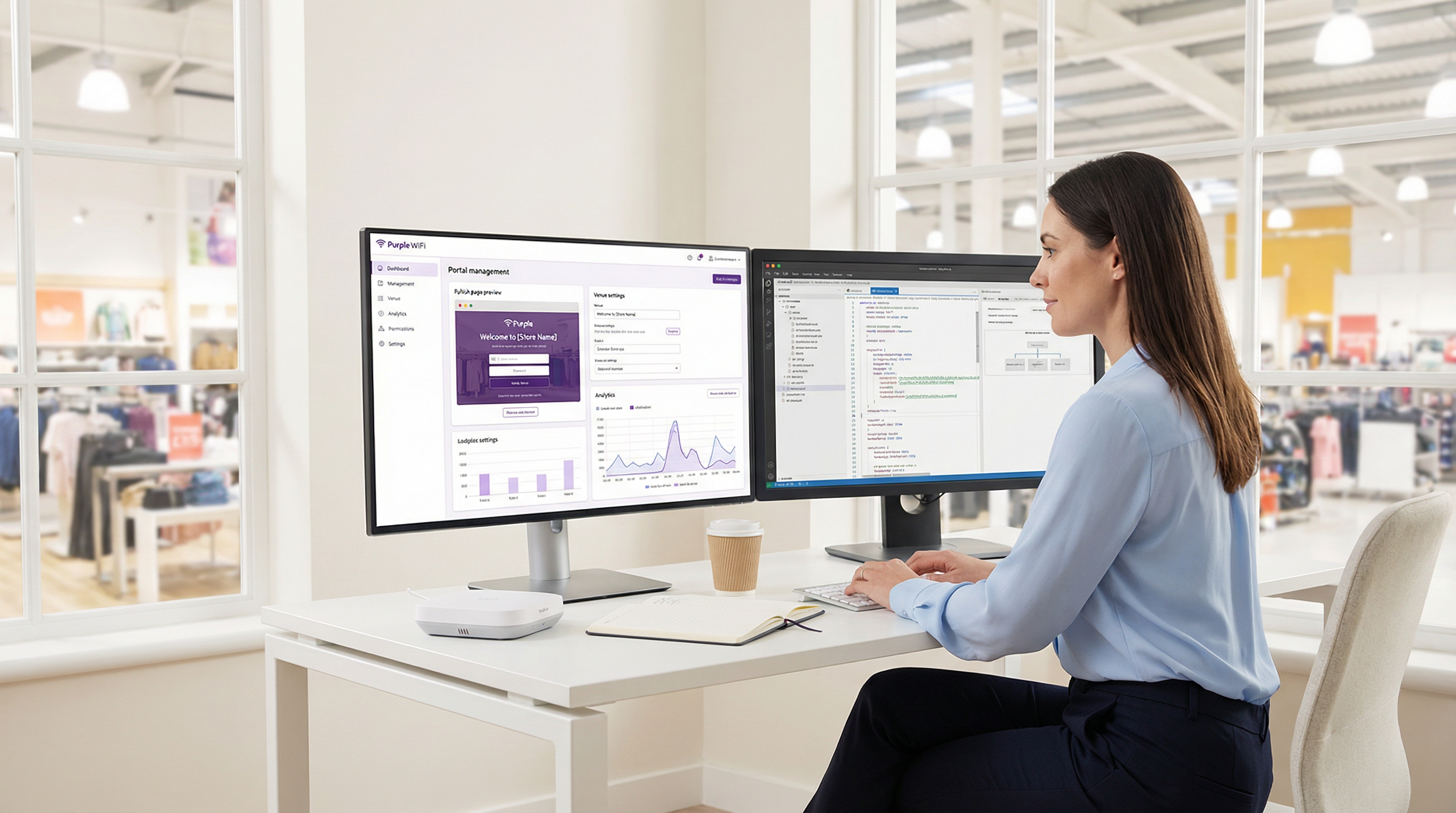
पायरी 7: गो-लाइव्ह आणि चालू मॉनिटरिंग. चाचणी पूर्ण झाल्यावर, Purple पोर्टलमध्ये ॲक्सेस जर्नी प्रकाशित करा. या टप्प्यापासून, नियुक्त केलेल्या SSID वरील सर्व अतिथी ट्रॅफिक Purple द्वारे व्यवस्थापित केले जाते. वेलकम डॅशबोर्ड थेट ॲनालिटिक्समध्ये त्वरित प्रवेश प्रदान करतो, ज्यामध्ये वर्तमान सक्रिय सेशन्स, ऑथेंटिकेशन पद्धतीचे ब्रेकडाउन आणि नवीन विरुद्ध परत येणाऱ्या अभ्यागतांचे प्रमाण समाविष्ट आहे. ॲनालिटिक्स रिपोर्ट्सचे पुनरावलोकन करण्यासाठी नियमित वेळ निश्चित करा — Purple चे डॅशबोर्ड कस्टम रिपोर्टिंगला सपोर्ट करते आणि स्टेकहोल्डर्सना शेड्युल्ड रिपोर्ट्स वितरीत करण्यासाठी कॉन्फिगर केले जाऊ शकते.
सर्वोत्तम पद्धती
नेटवर्क सेगमेंटेशन ही कोणत्याही अतिथी WiFi डिप्लॉयमेंटसाठी मूलभूत सुरक्षा आवश्यकता आहे. अतिथी SSID एका समर्पित VLAN वर ठेवले पाहिजे, ज्यामध्ये अतिथी सेगमेंटमधील कोणताही ट्रॅफिक कॉर्पोरेट, ऑपरेशनल किंवा PCI-स्कोप केलेल्या नेटवर्कपर्यंत पोहोचण्यापासून रोखणारे कठोर फायरवॉल नियम असावेत. ही केवळ सर्वोत्तम पद्धतीची शिफारस नाही; समान भौतिक नेटवर्क इन्फ्रास्ट्रक्चरवर कार्ड पेमेंटवर प्रक्रिया करणाऱ्या कोणत्याही संस्थेसाठी PCI DSS 4.0 अंतर्गत ही एक कंप्लायन्स आवश्यकता आहे आणि ती GDPR च्या डेटा मिनिमायझेशन तत्त्वांशी संरेखित आहे. हॉटेलच्या वातावरणात, याचा अर्थ प्रॉपर्टी मॅनेजमेंट सिस्टीम (PMS), पॉइंट-ऑफ-सेल टर्मिनल्स आणि बॅक-ऑफिस सिस्टीम्स पूर्णपणे वेगळ्या नेटवर्क सेगमेंटवर असणे आवश्यक आहे.
मल्टी-साइट डिप्लॉयमेंटसाठी, पायलट-फर्स्ट दृष्टिकोनाची जोरदार शिफारस केली जाते. तुमच्या विस्तृत इस्टेटचे प्रतिनिधीत्व करणारे एकच ठिकाण निवडा, संपूर्ण डिप्लॉयमेंट आणि चाचणी सायकल पूर्ण करा आणि परिणामी कॉन्फिगरेशनचा वापर पुढील रोलआउट्ससाठी प्रमाणित टेम्पलेट म्हणून करा. हा दृष्टिकोन जोखीम कमी करतो, व्यापक डिप्लॉयमेंटला गती देतो आणि ट्रबलशूटिंगसाठी संदर्भ वातावरण प्रदान करतो.
ऑथेंटिकेशन पद्धती कॉन्फिगर करताना, प्रत्येक पर्यायाच्या डेटा गुणवत्तेच्या परिणामांचा विचार करा. सोशल लॉगिन समृद्ध डेमोग्राफिक डेटा प्रदान करते परंतु ते वापरकर्त्याच्या सोशल प्रोफाइलच्या अचूकतेच्या अधीन असते. फॉर्म-आधारित ऑथेंटिकेशन तुम्हाला विशिष्ट फील्ड्स कॅप्चर करण्याची अनुमती देते परंतु अडथळा निर्माण करते ज्यामुळे पूर्ण होण्याचे प्रमाण कमी होऊ शकते. क्लिक-थ्रू ऑथेंटिकेशन कनेक्शन दर वाढवते परंतु कमीतकमी डेटा देते. इष्टतम निवड डेटा कॅप्चर उद्दिष्टे आणि वापरकर्ता अनुभव आवश्यकता यांच्यातील समतोलावर अवलंबून असते आणि डिप्लॉयमेंट सुरू होण्यापूर्वी IT आणि मार्केटिंग स्टेकहोल्डर्समध्ये या समतोलावर सहमती झाली पाहिजे.
ट्रबलशूटिंग आणि जोखीम निवारण
| सामान्य समस्या | मूळ कारण | निवारण धोरण |
|---|---|---|
| iOS वर Captive Portal दिसत नाही | iOS 14+ डीफॉल्टनुसार MAC रँडमायझेशन वापरते आणि CNA प्रोब DNS किंवा फायरवॉल नियमांद्वारे ब्लॉक केले जाऊ शकते. | अतिथी VLAN वर captive.apple.com साठी DNS रिझोल्यूशन ब्लॉक केलेले नाही याची पडताळणी करा. नेटवर्क कंट्रोलरमध्ये Captive Portal रीडायरेक्ट नियम योग्यरित्या लागू केला आहे याची खात्री करा. |
| सोशल लॉगिन बटणे प्रतिसाद देत नाहीत | सोशल प्रदात्यासाठी आवश्यक CDN आणि API डोमेन्स वॉल्ड गार्डनमध्ये समाविष्ट केलेले नाहीत. | Purple च्या दस्तऐवजीकरणातील सर्व ऑथेंटिकेशन-संबंधित डोमेन्स वॉल्ड गार्डन व्हाईटलिस्टमध्ये जोडा. Facebook साठी, यामध्ये connect.facebook.net, graph.facebook.com आणि संबंधित CDN डोमेन्स समाविष्ट आहेत. |
| वापरकर्त्यांना वारंवार पुन्हा ऑथेंटिकेट करण्यास सांगितले जाते | शॉर्ट सेशन टाइमआउट सेटिंग्ज किंवा MAC ॲड्रेस रँडमायझेशनचा प्रभाव ज्यामुळे नेटवर्क डिव्हाइसला नवीन मानते. | ॲक्सेस जर्नी सेटिंग्जमध्ये सेशन टाइमआउटचे पुनरावलोकन करा आणि वाढवा. सतत ओळखीसाठी, वापरकर्त्यांना Purple ॲप किंवा ईमेल-आधारित ऑथेंटिकेशन वापरण्यास प्रोत्साहित करा. |
| ऑथेंटिकेशननंतर संथ कनेक्शन गती | अपुरी इंटरनेट बँडविड्थ किंवा ॲक्सेस जर्नीमध्ये प्रति-डिव्हाइस बँडविड्थ थ्रॉटलिंगवर जास्त निर्बंध. | बँडविड्थ क्षमतेचे मूल्यांकन करा. सर्व कनेक्ट केलेल्या उपकरणांमध्ये योग्य वापरासह वापरकर्ता अनुभवाचा समतोल साधण्यासाठी ॲक्सेस जर्नीमध्ये प्रति-डिव्हाइस बँडविड्थ मर्यादा समायोजित करा. |
| ॲनालिटिक्स डॅशबोर्ड पॉप्युलेट होत नाही | RADIUS अकाउंटिंग पॅकेट्स Purple च्या क्लाउड प्लॅटफॉर्मवर पोहोचत नाहीत किंवा हार्डवेअर अकाउंटिंग डेटा पाठवण्यासाठी कॉन्फिगर केलेले नाही. | नेटवर्क कंट्रोलरवर RADIUS अकाउंटिंग सक्षम केले आहे आणि अकाउंटिंग सर्व्हर IP आणि पोर्ट Purple च्या प्रदान केलेल्या सेटिंग्जशी जुळत आहेत याची पडताळणी करा. कंट्रोलरकडून UDP पोर्ट 1813 आउटबाउंड उघडे असल्याची खात्री करण्यासाठी फायरवॉल नियम तपासा. |
ROI आणि व्यावसायिक प्रभाव
Purple तैनात करण्यासाठी बिझनेस केस इंटरनेट ॲक्सेसच्या तरतुदीच्या पलीकडे विस्तारते. प्लॅटफॉर्म अतिथी WiFi नेटवर्कला धोरणात्मक डेटा मालमत्तेत रूपांतरित करते. हॉस्पिटॅलिटी ऑपरेटर्ससाठी, अभ्यागतांचे डेमोग्राफिक्स, ड्वेल टाइम्स आणि परतीच्या भेटीची वारंवारता यावरील ॲनालिटिक्स थेट महसूल व्यवस्थापन आणि विपणन धोरणांची माहिती देतात. कोणते अतिथी विभाग वारंवार परत येतात हे समजून घेणारे हॉटेल त्यानुसार लॉयल्टी प्रोग्राम इन्सेंटिव्ह तयार करू शकते. WiFi ड्वेल टाइम आणि ट्रान्झॅक्शन व्हॅल्यू यांच्यातील परस्परसंबंध मोजू शकणारी रिटेल चेन स्टोअर लेआउट आणि कर्मचाऱ्यांची नियुक्ती ऑप्टिमाइझ करू शकते.
प्लॅटफॉर्मच्या इंटिग्रेशन क्षमता हे मूल्य आणखी वाढवतात. Salesforce, HubSpot आणि इतर आघाडीच्या CRM प्लॅटफॉर्मसाठी Purple चे नेटिव्ह कनेक्टर्स WiFi भेट डेटासह ग्राहक रेकॉर्डचे स्वयंचलित संवर्धन सक्षम करतात, ज्यामुळे डिजिटल आणि भौतिक दोन्ही संवादांमध्ये पसरलेला ग्राहकाचा एकत्रित दृष्टिकोन तयार होतो. हे डेटा इंटिग्रेशन प्रभावी ओम्निचॅनेल मार्केटिंगचा पाया आहे.
IT ऑपरेशनल दृष्टीकोनातून, क्लाउड-आधारित आर्किटेक्चर मोजता येण्याजोगे कार्यक्षमता लाभ देते. एका प्रमुख जागतिक फास्ट-फूड चेनने Purple तैनात केल्यानंतर ऑन-साइट IT इंजिनिअरच्या भेटींच्या गरजेत 90% घट नोंदवली, कारण केंद्रीकृत व्यवस्थापन आणि रिमोट डायग्नोस्टिक्स क्षमतांमुळे IT टीमला भौतिक उपस्थितीशिवाय बहुतांश नेटवर्क समस्यांचे निराकरण करण्याची अनुमती मिळाली. शेकडो स्थाने असलेल्या चेनसाठी, हे ऑपरेशनल खर्चात लक्षणीय घट दर्शवते. Purple च्या क्लाउड इन्फ्रास्ट्रक्चरद्वारे प्रदान केलेले 99.99% अपटाइम SLA सेवा व्यत्ययाचा धोका आणि रिॲक्टिव्ह सपोर्टचा संबंधित खर्च आणखी कमी करते.
लायब्ररी, कौन्सिल इमारती किंवा ट्रान्सपोर्ट हबमध्ये अतिथी WiFi तैनात करणाऱ्या सार्वजनिक-क्षेत्रातील संस्थांसाठी, ROI ची गणना वेगळ्या प्रकारे केली जाते — डिजिटल समावेश, नागरिकांचा सहभाग आणि सार्वजनिक ॲक्सेसच्या दायित्वांचे पालन या संदर्भात. Purple चे GDPR-कंप्लायंट डेटा कॅप्चर आणि कंटेंट फिल्टरिंग (Shield) क्षमता याला अशा वातावरणासाठी एक योग्य प्लॅटफॉर्म बनवतात, जिथे नियामक कंप्लायन्स सर्वोपरि आहे.
महत्त्वाच्या संज्ञा आणि व्याख्या
Captive Portal
A web page that a user is obligated to view and interact with before being granted access to the internet. It intercepts the initial web traffic from a newly connected device and presents an authentication or consent interface.
This is the core mechanism for user authentication and for presenting terms and conditions. IT teams configure their network hardware to redirect unauthenticated users to the captive portal hosted on Purple's cloud platform.
RADIUS (Remote Authentication Dial-In User Service)
A client/server networking protocol that provides centralised Authentication, Authorization, and Accounting (AAA) management for users connecting to a network service. Defined in RFC 2865.
Purple uses a cloud-based RADIUS server to authenticate guest users. Your access points and controllers act as RADIUS clients, forwarding authentication requests to Purple's cloud server, which eliminates the need for an on-premise RADIUS server and its associated maintenance overhead.
Walled Garden
A firewall policy that restricts a user's network access to a limited set of pre-approved domains and IP addresses before they have completed the authentication process on a captive portal network.
This is a critical firewall configuration step. If the walled garden does not include all the domains required for the captive portal and its authentication providers to function, the login process will fail. IT teams must configure this on their network gateway or firewall using the domain list provided by Purple.
SSID (Service Set Identifier)
The public name of a wireless local area network (WLAN) that is broadcast to nearby devices. It is the network name that appears in a device's list of available WiFi connections.
IT teams create a specific SSID for guest access (e.g., 'Hotel_Guest_WiFi') and associate it with the captive portal redirect, the VLAN, and the RADIUS configuration for the Purple service. This SSID should be kept separate from any corporate or operational SSIDs.
VLAN (Virtual Local Area Network)
A method of creating logically independent network segments over a single physical network infrastructure. Devices on different VLANs cannot communicate with each other without being explicitly routed through a firewall or router.
For security and compliance, the guest WiFi SSID must be placed on its own dedicated VLAN. This isolates guest traffic from sensitive corporate or operational network traffic. This is a prerequisite for PCI DSS compliance and aligns with GDPR data minimisation principles.
MAC Address (Media Access Control Address)
A unique hardware identifier assigned to a network interface card (NIC). It is a 48-bit address, typically displayed as six groups of two hexadecimal digits (e.g., 00:1A:2B:3C:4D:5E).
Purple uses the MAC address to identify unique devices and track returning visitors. However, MAC address randomisation in modern iOS and Android devices means this identifier changes on each connection, which can affect the accuracy of return visitor analytics. This limitation should be communicated to marketing stakeholders.
Access Journey
A Purple platform-specific term for the complete, configurable end-to-end authentication flow that a guest user experiences when connecting to the WiFi network. It encompasses the splash page, authentication method, data capture forms, session policies, and post-authentication redirect.
This is the primary configuration object within the Purple portal. IT managers and marketing teams collaborate to define Access Journeys that balance security requirements, data capture objectives, and user experience. Multiple journeys can be active simultaneously for different user segments.
IEEE 802.1X
An IEEE standard for port-based Network Access Control (PNAC). It provides an authentication mechanism to devices wishing to attach to a LAN or WLAN, using the Extensible Authentication Protocol (EAP) framework.
This is the enterprise-grade authentication standard that underpins WPA2-Enterprise and WPA3-Enterprise. Purple's RADIUS-based authentication aligns with this standard. For deployments requiring the highest security posture, Purple's SecurePass feature leverages 802.1X for certificate or credential-based authentication without a captive portal.
केस स्टडीज
A 250-room luxury hotel needs to replace its legacy guest WiFi system. They have existing Cisco WLC (AireOS) infrastructure and require a solution that offers tiered access: free standard access for all guests and a premium, high-speed option for conference attendees and VIP guests. They also need to ensure full compliance with GDPR for all data captured.
The hotel would deploy Purple as an overlay on their existing Cisco WLC infrastructure, avoiding any capital expenditure on new hardware. Two separate Access Journeys would be configured in the Purple portal. The 'Standard Guest' journey would use form-based authentication, capturing the guest's name and email address, with clearly worded consent checkboxes for GDPR compliance (separate consents for terms of service and marketing communications). This journey would have bandwidth limits of 5 Mbps per device and a session duration of 24 hours. The 'Premium Access' journey would be configured with voucher-based authentication. The hotel's event coordination team would generate batches of unique, time-limited vouchers from the Purple portal and distribute them to conference organisers. This journey would offer higher bandwidth limits (25 Mbps per device) and a 72-hour session duration. Both journeys would be linked to the same guest SSID, and the captive portal would present guests with a clear choice between the free tier and the premium voucher entry field. All captured data would be automatically synchronised to the hotel's CRM via Purple's integration connector.
A retail chain with 50 stores across the UK wants to understand customer loyalty and in-store behaviour. They have a mix of Cisco Meraki and Aruba IAP hardware across their estate. The marketing team wants to integrate the WiFi analytics with their Salesforce CRM to enable targeted re-engagement campaigns.
The retail chain would use Purple's multi-venue management capabilities to create a 'Group' for their entire estate, with each of the 50 stores configured as a separate child 'Venue'. This enables both centralised management and per-store analytics. A single, standardised Access Journey template would be configured and applied across all venues, using social login (Facebook or Google) as the primary authentication method to gather rich demographic data with minimal friction. The hardware integration would be performed in two batches: the Meraki stores would be configured via the Meraki Dashboard using Purple's SSID and RADIUS settings, while the Aruba IAP stores would be configured via the Aruba Central or Instant AP controller. The key integration step is activating the Purple Salesforce Connector. In the Purple portal, the data fields captured during WiFi authentication (name, email, age, gender, visit frequency) would be mapped to the corresponding fields on the Contact object in Salesforce. This would automatically create or update a contact record in Salesforce for every user who authenticates, enriching the CRM with physical visit data that can be used to trigger automated re-engagement campaigns.
परिस्थिती विश्लेषण
Q1. You are deploying Purple in a 20,000-capacity stadium with high-density WiFi requirements. During peak event times, you anticipate over 12,000 concurrent authenticated users. What is your primary technical consideration regarding the underlying network infrastructure, and how does Purple's architecture mitigate or exacerbate this challenge?
💡 संकेत:Consider the path of both the authentication traffic and the subsequent internet traffic, and where the bottlenecks are most likely to occur.
शिफारस केलेला दृष्टिकोन दाखवा
The primary consideration is the capacity and performance of the on-premise Wireless LAN Controller (WLC) and the internet gateway. While Purple's authentication is cloud-based, all guest traffic — including the initial captive portal redirect, the RADIUS accounting packets, and the subsequent internet traffic — must pass through the venue's own network hardware. The WLC must be able to handle the high volume of RADIUS authentication and accounting packets during peak connection events (e.g., when gates open and thousands of devices connect simultaneously). The internet gateway must have sufficient bandwidth and processing power to manage 12,000+ concurrent sessions. Purple's cloud architecture mitigates the server-side load by handling the portal and RADIUS processing in the cloud, but the on-premise hardware remains the critical bottleneck. The recommended approach is to ensure the WLC is properly sized, the internet uplink has sufficient headroom, and bandwidth-per-device limits are configured in the Access Journey to prevent any single user from consuming a disproportionate share of capacity.
Q2. Your marketing team wants to use a highly stylised, graphically-intensive video on the captive portal splash page to promote a new product launch. What is the main technical risk associated with this request, and how would you advise them to achieve their marketing objective without compromising the user experience?
💡 संकेत:Consider the user's network state and available bandwidth at the precise moment the splash page is displayed.
शिफारस केलेला दृष्टिकोन दाखवा
The main risk is poor user experience and high abandonment rates. Before authentication, the user is on a restricted network with limited bandwidth — they are in the walled garden, and only the portal's whitelisted domains are accessible. A large video file will load slowly or fail to load entirely, leading to user frustration and a high proportion of guests abandoning the connection attempt. I would advise the marketing team to use a lightweight, optimised static image on the Offline Splash Page (the captive portal) to ensure a fast loading time and a high authentication completion rate. The video would be far more effective on the Online Splash Page, which is displayed after the user has successfully authenticated and has full, high-speed internet access. This approach achieves the marketing objective without compromising the critical first-impression user experience.
Q3. A public-sector client wants to provide free WiFi in a city library. They are concerned about their legal obligations regarding illegal content and the safeguarding of vulnerable users, including children. Which Purple feature would you highlight to address this concern, and what additional steps would you recommend to ensure the client has a defensible compliance position?
💡 संकेत:Think about both the technical controls available and the policy and legal framework that must surround them.
शिफारस केलेला दृष्टिकोन दाखवा
I would highlight Purple's Shield content filtering feature, which allows the organisation to block access to specific categories of websites — including adult content, gambling, extremist material, and malware sites — at the network level. This provides a meaningful technical control. However, I would strongly advise the client that technical filtering alone is not sufficient for a defensible compliance position. Additional steps should include: publishing a clear Acceptable Use Policy (AUP) that users must accept before connecting; configuring the Access Journey to require explicit acceptance of the AUP; retaining session logs for a legally appropriate period in accordance with data retention policies; and conducting a Data Protection Impact Assessment (DPIA) under GDPR Article 35, given the likelihood of processing data relating to children. The client should also be advised that no content filtering system is 100% effective, and that the AUP acceptance creates a clear record of the user's agreement to the terms of use.
महत्त्वाचे निष्कर्ष
- ✓Purple WiFi is a cloud-hosted overlay platform that integrates with your existing network hardware from over 50 vendors, requiring no on-premise server infrastructure.
- ✓The setup is a seven-step process: Register, Verify, Configure Venue, Design Splash Pages, Set Up Access Journeys, Integrate Hardware, and Go Live.
- ✓Proper network segmentation — placing guest traffic on a dedicated, isolated VLAN — is the most critical security and compliance measure before any Purple configuration begins.
- ✓Correctly configuring the Walled Garden in your firewall is essential for the captive portal and social logins to function; an incomplete walled garden is the most common cause of deployment failures.
- ✓Authentication is handled by Purple's cloud-based RADIUS server, aligned with IEEE 802.1X standards, eliminating the need for on-premise AAA infrastructure.
- ✓The platform delivers significant business value through rich visitor analytics and CRM integrations (Salesforce, HubSpot), transforming guest WiFi from an amenity into a data asset.
- ✓MAC address randomisation in modern iOS and Android devices affects return visitor tracking accuracy; communicate this limitation to marketing stakeholders and consider the Purple App for persistent user identification.




