

¿Qué es un Captive Portal y cómo funciona?
A comprehensive technical reference for IT managers and venue operators on the architecture, deployment, and business impact of captive portals. This guide provides actionable insights into device detection, the Captive Network Assistant (CNA), and best practices for implementation in enterprise environments.
🎧 Escucha esta guía
Ver transcripción
Resumen ejecutivo
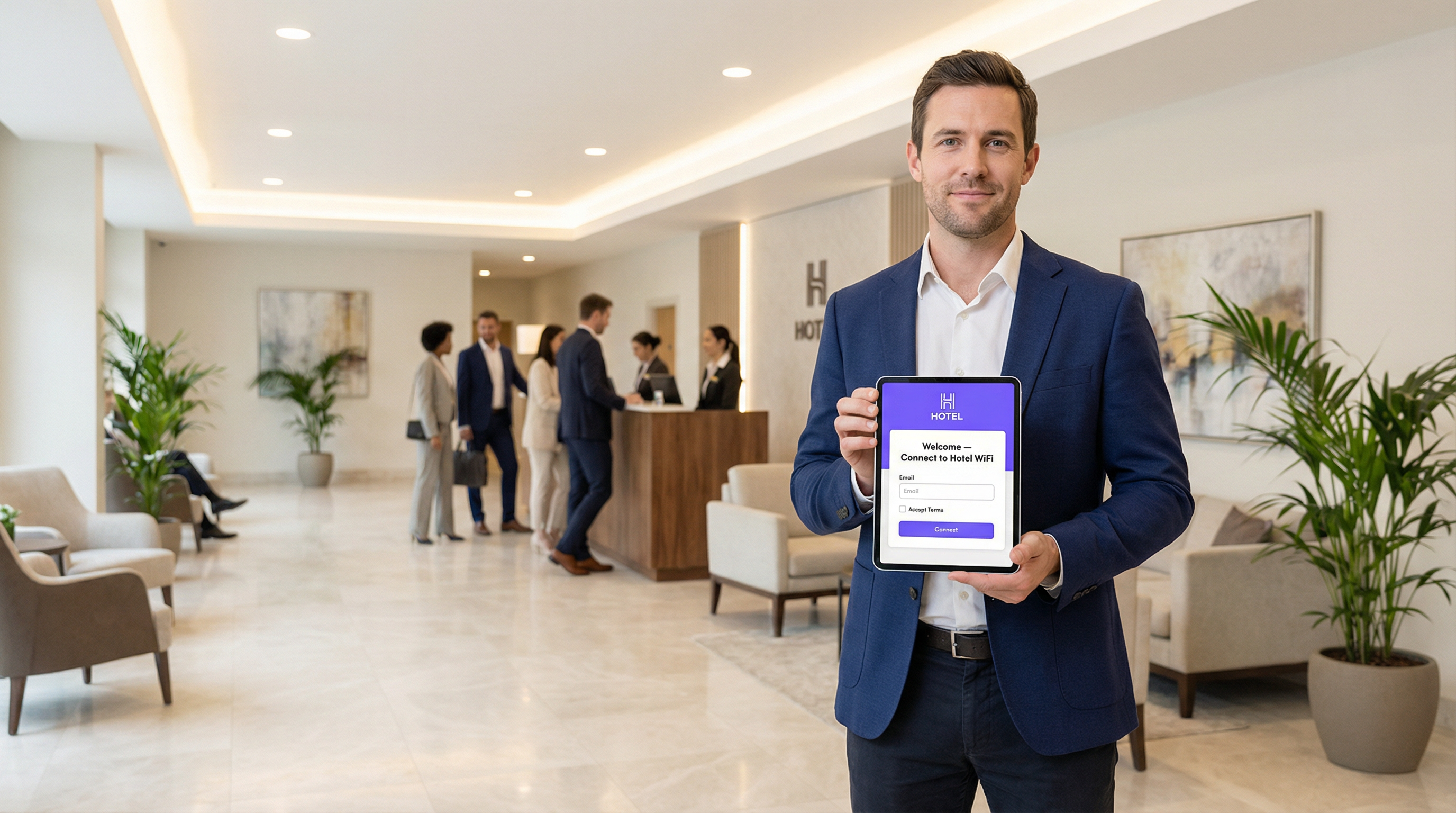
Un Captive Portal es la página web que intercepta la conexión de un usuario a una red WiFi pública o de invitados, requiriendo que realice una acción (como aceptar términos, ingresar un correo electrónico o autenticarse con una cuenta de redes sociales) antes de otorgar acceso completo a Internet. Para los gerentes de TI, arquitectos de redes y operadores de recintos, el Captive Portal es un punto de control crítico para la seguridad de la red, el cumplimiento legal y la interacción con el usuario. Implementado correctamente, transforma una simple utilidad en un activo poderoso para recopilar inteligencia empresarial, impulsar iniciativas de marketing y mejorar la experiencia del visitante. Esta guía ofrece un análisis técnico profundo de la arquitectura subyacente de los Captive Portals, incluyendo los mecanismos de intercepción (secuestro de DNS y redirección HTTP), el papel del Captive Network Assistant (CNA) en los sistemas operativos modernos y los estándares (RADIUS, WISPr) que rigen la autenticación. Ofrece orientación práctica y neutral en cuanto a proveedores para la implementación en entornos empresariales como hoteles, cadenas minoristas y estadios, centrándose en las mejores prácticas de seguridad, la mitigación de riesgos y las estrategias para medir el retorno de inversión (ROI). Al comprender los matices técnicos y el valor estratégico de los Captive Portals, los líderes de TI pueden garantizar que sus implementaciones de WiFi para invitados sean seguras, cumplan con las normativas y estén alineadas con los objetivos comerciales generales.
Análisis técnico profundo
Arquitectura central: El Walled Garden
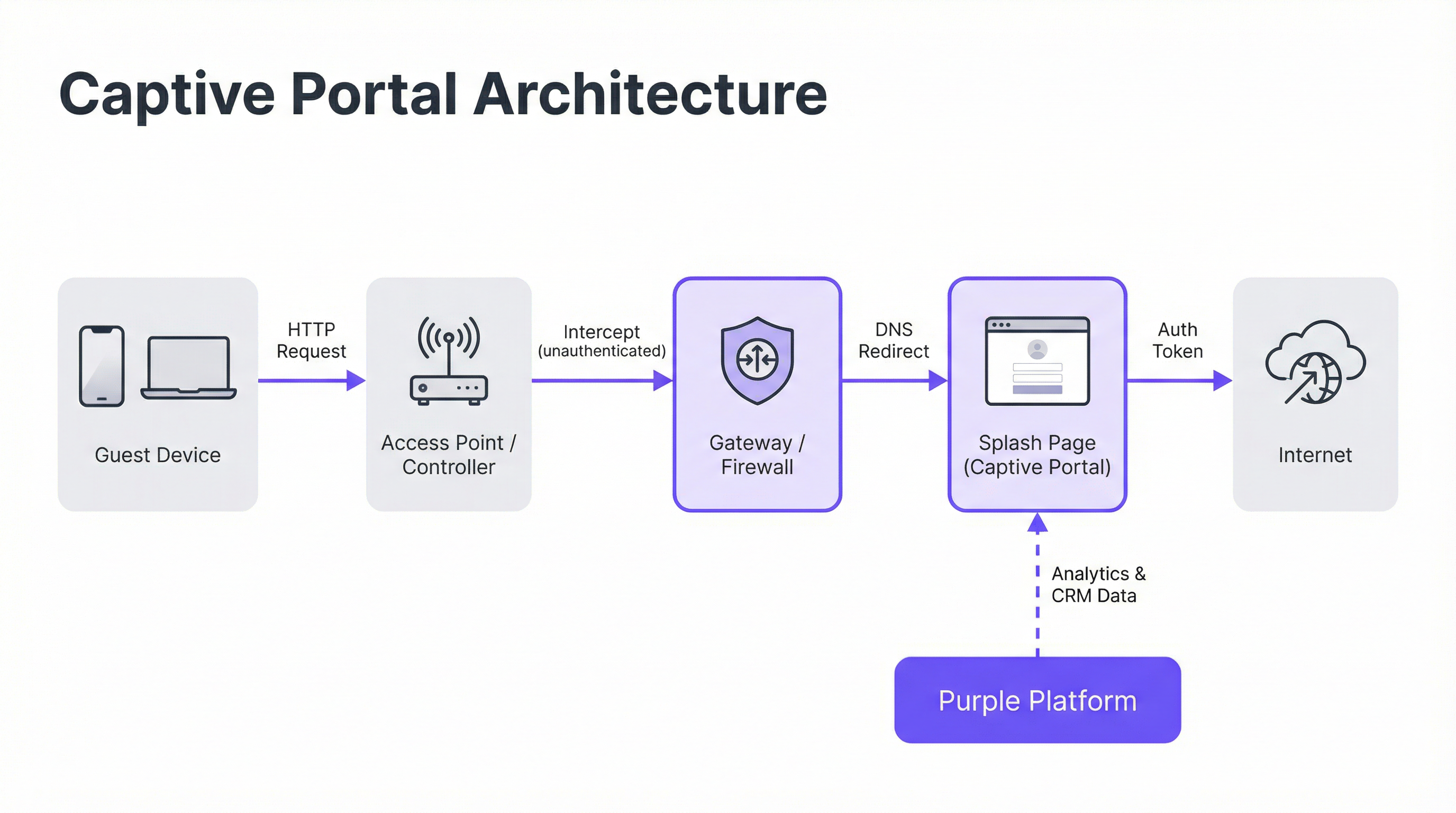
Un Captive Portal funciona creando un 'walled garden' (entorno cerrado), un estado de red restringido donde un dispositivo recién conectado tiene su acceso a Internet limitado hasta que completa un proceso de autenticación. Esto se logra mediante dos técnicas principales de intercepción implementadas a nivel de la puerta de enlace (gateway) de la red o del controlador inalámbrico.
Secuestro de DNS (DNS Hijacking): Cuando un dispositivo no autenticado intenta resolver un nombre de dominio (por ejemplo,
google.com), el gateway de la red intercepta la consulta DNS. En lugar de devolver la dirección IP pública correcta, responde con la dirección IP del servidor del Captive Portal. El navegador del dispositivo inicia entonces una conexión con el portal, creyendo que es el destino previsto. Este es el método más común, ya que intercepta eficazmente el tráfico independientemente del protocolo.Redirección HTTP: En este modelo, el gateway permite que la consulta DNS se resuelva correctamente. Sin embargo, cuando el dispositivo envía su solicitud HTTP inicial, el gateway la intercepta y responde con un código de estado HTTP 302 'Found', redirigiendo el navegador a la URL del Captive Portal. La principal limitación de este método es su ineficacia frente al tráfico HTTPS, ya que los protocolos de seguridad del navegador impedirán la redirección y mostrarán una advertencia de certificado. Los sistemas modernos utilizan un enfoque híbrido, dependiendo del secuestro de DNS como mecanismo principal.
El Captive Network Assistant (CNA)
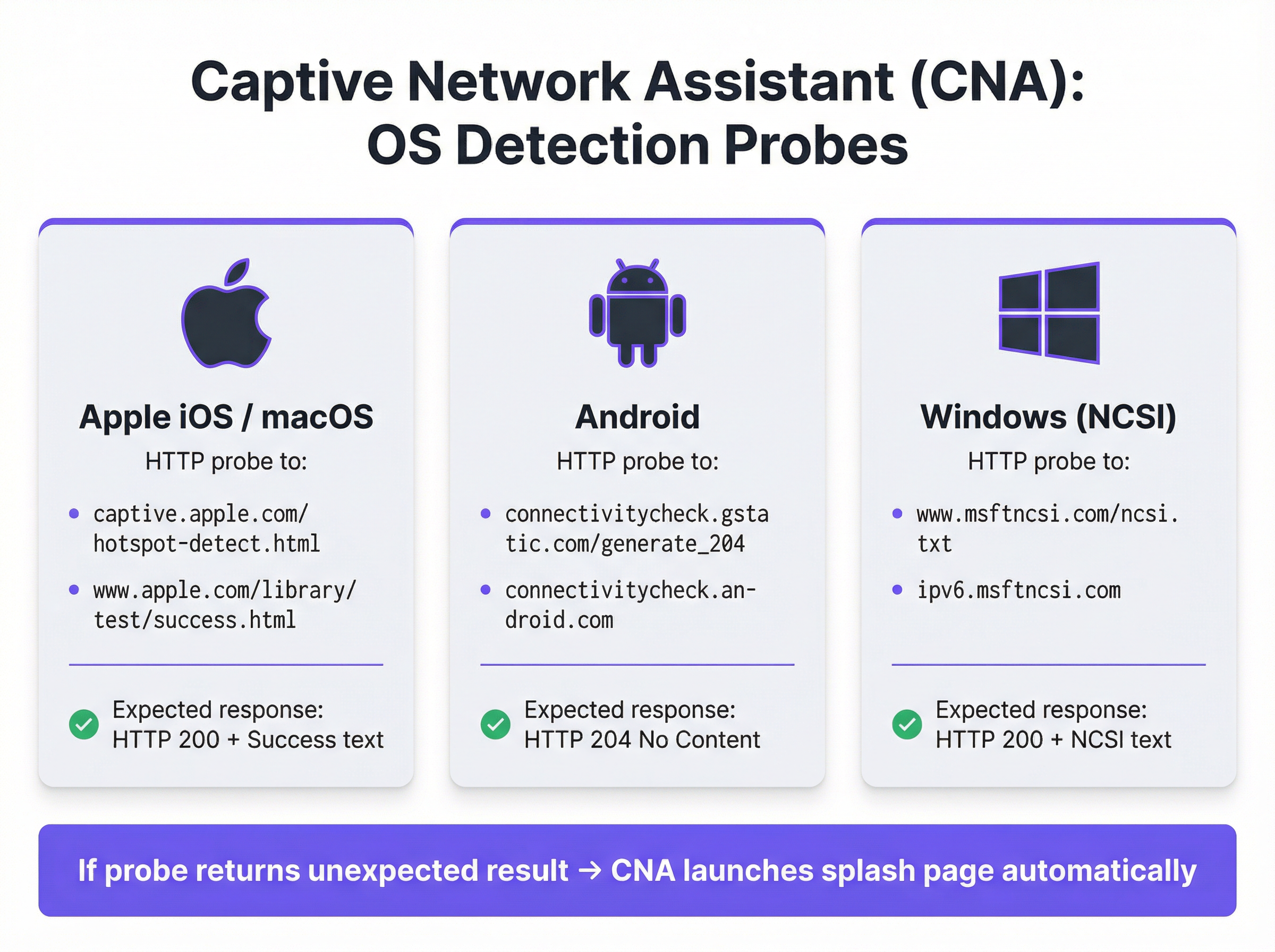
La aparición automática y fluida de la página de inicio (splash page) en los dispositivos modernos es orquestada por el Captive Network Assistant (CNA), una función integrada en todos los sistemas operativos principales. En el momento en que un dispositivo se conecta a una nueva red WiFi, el sistema operativo realiza una prueba de 'actividad' enviando un sondeo HTTP a un endpoint preprogramado.
- Apple (iOS y macOS): Sondea
captive.apple.com/hotspot-detect.htmly espera una respuesta HTTP 200 que contenga la palabra 'Success'. - Android: Sondea
connectivitycheck.gstatic.com/generate_204y espera una respuesta HTTP 204 'No Content'. - Windows (NCSI): El Indicador de estado de conectividad de red sondea
www.msftncsi.com/ncsi.txty espera una respuesta HTTP 200 con el texto 'Microsoft NCSI'.
Si el gateway intercepta este sondeo y devuelve cualquier cosa que no sea la respuesta esperada, el sistema operativo concluye que está detrás de un Captive Portal y lanza automáticamente el CNA (un 'mini-navegador' ligero y aislado) para mostrar la página de inicio. Este proceso elimina la necesidad de que los usuarios abran manualmente su navegador, mejorando significativamente la experiencia del usuario.
Autenticación y concesión de acceso
Una vez que el usuario interactúa con la página de inicio (por ejemplo, enviando un formulario), el servidor del portal se comunica con el gateway de la red para autorizar el dispositivo. Esto generalmente se maneja a través de uno de tres protocolos:
- RADIUS (Remote Authentication Dial-In User Service): El estándar más común (RFC 2865), donde el portal actúa como un cliente RADIUS, enviando una solicitud de autenticación con la dirección MAC del dispositivo al gateway (que actúa como servidor RADIUS).
- WISPr (Wireless Internet Service Provider roaming): Un protocolo basado en XML para la autenticación de hotspots, aunque su adopción está menos extendida que RADIUS.
- API propietarias: Muchos proveedores modernos de hardware de red (como Cisco Meraki, Aruba y Ruckus) proporcionan API RESTful que permiten un control más flexible y granular sobre la autorización de dispositivos, el cual es el método de integración utilizado por Purple.
Tras una autenticación exitosa, el gateway cambia la dirección MAC del dispositivo del estado 'no autenticado' al estado 'autenticado', elimina las restricciones del walled garden y otorga acceso completo a Internet por una duración de sesión predefinida.
Guía de implementación
La implementación de un Captive Portal de nivel empresarial requiere una planificación cuidadosa que va más allá del diseño de la página de inicio. Siga estos pasos neutrales en cuanto a proveedores para una implementación exitosa.
Definir políticas de acceso: Determine los métodos de autenticación (por ejemplo, inicio de sesión social, verificación por correo electrónico/SMS, códigos de cupones), la duración de la sesión, los tiempos de espera por inactividad y los límites de ancho de banda. Para un hotel, una sesión de 24 horas con un límite de 10 Mbps podría ser adecuada. Para un estadio de alta densidad, una sesión de 4 horas con un límite de 2 Mbps y un modelado de tráfico agresivo es más realista.
Configurar el Walled Garden: Cree una lista blanca exhaustiva de todos los dominios y direcciones IP a los que un dispositivo no autenticado debe poder acceder. Esto incluye el propio servidor del portal, su CDN para recursos (imágenes, CSS) y los endpoints para cualquier proveedor de autenticación de terceros (por ejemplo, los dominios OAuth de Google y Facebook). Un walled garden incompleto es la causa principal de fallas en las implementaciones de portales.
Diseñar una página de inicio optimizada para CNA: La página de inicio debe ser ligera y responsiva. Debe cargar en menos de 3 segundos en una conexión celular y evitar JavaScript complejo o frameworks grandes que puedan fallar dentro del entorno aislado del CNA. Todas las acciones del usuario deben poder realizarse en una sola vista de página para evitar problemas con el cierre prematuro del CNA.
Integrar con el hardware de red: Configure su controlador inalámbrico o gateway para que apunte a su servidor de Captive Portal. Esto implica configurar la URL del portal, definir los parámetros de autenticación RADIUS o API y especificar el comportamiento de redirección. Purple proporciona integraciones preconstruidas que automatizan este proceso para todos los principales proveedores de hardware.
Garantizar el cumplimiento de datos: Si recopila datos personales, el flujo de su portal debe incorporar mecanismos de consentimiento explícitos y granulares que cumplan con regulaciones como GDPR y CCPA. El consentimiento para marketing debe estar separado de la aceptación de los términos de servicio. La plataforma Purple incluye un marco de gestión de consentimiento totalmente compatible con registros auditables.
Mejores prácticas
- Priorizar la seguridad con WPA2/WPA3: Ejecute siempre su SSID de invitados con, como mínimo, cifrado WPA2-Personal. Un Captive Portal es un control de capa de aplicación y no cifra el tráfico inalámbrico. Combinar el cifrado con un portal proporciona seguridad en capas.
- Implementar segmentación de red: Utilice VLAN para segregar estrictamente el tráfico de invitados de su red corporativa interna. Un Captive Portal proporciona separación lógica, pero se requiere segmentación física o virtual para cumplir con estándares como PCI DSS.
- Abordar la aleatorización de direcciones MAC: Los sistemas operativos móviles modernos aleatorizan las direcciones MAC de forma predeterminada para evitar el rastreo. Depender únicamente de las direcciones MAC para el reconocimiento de visitantes recurrentes ya no es viable. Aproveche plataformas como Purple que utilizan huellas digitales de dispositivos más avanzadas y autenticación basada en perfiles para identificar a los usuarios recurrentes.
- Monitorear y probar regularmente: Las actualizaciones del sistema operativo, especialmente de Apple, pueden cambiar el comportamiento del CNA sin previo aviso. Establezca un protocolo de pruebas trimestral para validar la funcionalidad de su portal en las últimas versiones de iOS, Android y Windows.
Solución de problemas y mitigación de riesgos
| Modo de fallo común | Causa raíz | Estrategia de mitigación |
|---|---|---|
| La página de inicio no carga | Walled garden incompleto que bloquea el acceso a los recursos del portal (CSS, JS, imágenes) o fallo en la resolución DNS. | Pruebe y valide exhaustivamente todos los dominios requeridos para el walled garden. Asegúrese de que el DNS esté configurado correctamente en la VLAN de invitados. |
| Fallo en los inicios de sesión sociales | Los dominios del proveedor OAuth (por ejemplo, accounts.google.com) no están incluidos en el walled garden. |
Agregue todos los dominios de autenticación de terceros requeridos al walled garden. Utilice las herramientas de desarrollador del navegador para rastrear las solicitudes de red durante el flujo de inicio de sesión. |
| La ventana del CNA se cierra inesperadamente | La página de inicio intenta una redirección compleja o trata de abrir una nueva pestaña, lo cual no es compatible con el CNA. | Diseñe un flujo de autenticación de una sola página. Asegúrese de que todas las interacciones ocurran dentro de la página inicial del portal. |
| Usuarios no redirigidos (HTTPS) | El gateway está intentando una redirección HTTP en un sitio HTTPS, causando un error de seguridad en el navegador. | Asegúrese de que el gateway esté configurado para el secuestro de DNS, lo cual es efectivo tanto para el tráfico HTTP como HTTPS. |
| Rendimiento deficiente / Inicio de sesión lento | La página de inicio es demasiado grande (imágenes de alta resolución, frameworks de JavaScript pesados). | Optimice todos los recursos y apunte a un peso total de página inferior a 500 KB. Posponga la carga de scripts no esenciales. |
ROI e impacto comercial
El valor comercial de un Captive Portal va mucho más allá de proporcionar acceso a Internet. El ROI se mide a través de su capacidad para convertir visitantes anónimos en clientes conocidos e impulsar resultados comerciales tangibles.
- Adquisición de datos: Al capturar direcciones de correo electrónico, perfiles sociales o respuestas a encuestas en el punto de inicio de sesión, los recintos pueden construir perfiles de CRM enriquecidos. Una cadena minorista puede atribuir una visita a la tienda física a un cliente específico en su base de datos de marketing, cerrando la brecha entre el mundo online y offline.
- Mayor interacción: La página de inicio es un cartel digital de alta visibilidad. Los hoteles pueden promocionar servicios de spa o reservas de restaurantes. Los centros de conferencias pueden mostrar horarios de eventos y mensajes de patrocinadores. Este canal de comunicación directa puede generar ingresos incrementales.
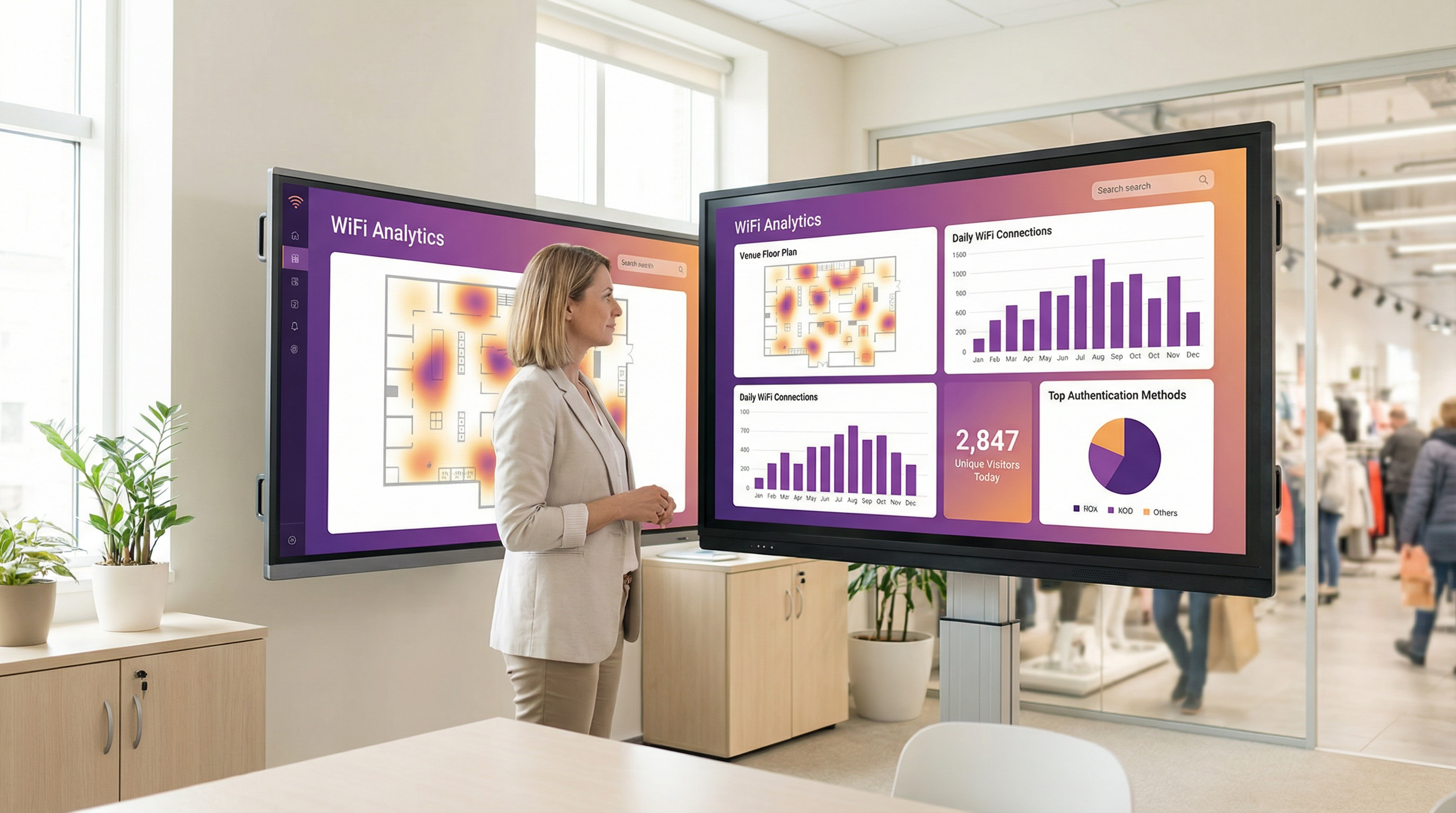
- Inteligencia operativa: Las plataformas de análisis de WiFi como Purple utilizan datos de autenticación para proporcionar información profunda sobre el comportamiento de los visitantes. Los mapas de calor revelan patrones de afluencia, el análisis del tiempo de permanencia muestra los niveles de interacción y las métricas de visitantes recurrentes ayudan a medir la lealtad. Un estadio puede usar estos datos para optimizar la dotación de personal en los puestos de comida, mientras que un museo puede analizar la popularidad de las exhibiciones.
Al aprovechar una plataforma como Purple, el Captive Portal se convierte en la base de la estrategia de inteligencia de ubicación de un recinto, ofreciendo retornos medibles en la efectividad del marketing, la eficiencia operativa y la satisfacción del cliente.
Términos clave y definiciones
Captive Portal
A web page that intercepts a newly connected user's browser, requiring them to perform a specific action before being granted full internet access.
This is the primary mechanism IT teams use to control access to guest and public WiFi networks, serving as a gateway for authentication, compliance, and user engagement.
Splash Page
The specific web page or user interface that is displayed to the user by the captive portal for authentication.
This is the main user-facing component. Its design and performance are critical for user experience and for achieving business goals like data capture or marketing.
Captive Network Assistant (CNA)
A built-in operating system feature (also known as a 'mini-browser') that automatically detects a captive portal and displays the splash page.
IT teams must design splash pages specifically for the CNA's limited, sandboxed environment, as it behaves differently from a standard web browser and is a common point of failure.
Walled Garden
The list of whitelisted IP addresses and domain names that an unauthenticated user is allowed to access before completing the captive portal authentication.
A misconfigured walled garden is the most common reason for portal failures. Network architects must ensure it includes all necessary endpoints for the portal and any third-party login providers.
DNS Hijacking
An interception technique where a network gateway provides a false IP address (that of the portal server) in response to a DNS query from an unauthenticated device.
This is the core mechanism that makes captive portals work, allowing the network to redirect users to the splash page regardless of the website they are trying to visit.
RADIUS (RFC 2865)
A standard networking protocol for centralized Authentication, Authorization, and Accounting (AAA) management.
In a captive portal context, it's a common way for the portal server to tell the network gateway that a user has been authenticated and should be granted internet access.
MAC Address Randomization
An OS-level privacy feature where a device uses a different, randomly generated MAC address for each WiFi network it connects to.
This feature makes it difficult for IT teams to track unique devices over time using traditional methods. It necessitates a shift towards profile-based authentication for accurate visitor analytics.
IEEE 802.1X
An IEEE standard for port-based Network Access Control (PNAC) that provides authenticated network access to Ethernet networks and WLANs.
This is the enterprise-grade alternative to captive portals, often used for corporate devices. It offers higher security but requires client-side configuration, making it unsuitable for guest access scenarios where simplicity is key.
Casos de éxito
A 200-room luxury hotel needs to replace its outdated guest WiFi system. The goal is to provide a seamless, branded login experience, offer tiered bandwidth (free for basic access, paid for premium streaming), and promote hotel amenities like the spa and restaurant directly on the splash page. The hotel uses Cisco Meraki access points.
- Deployment with Purple & Meraki: Leverage Purple's native API integration with the Cisco Meraki dashboard. Create a new SSID for guest access (e.g., 'Hotel_Guest_WiFi') and configure it with WPA2-Personal encryption. In the Meraki dashboard, set the 'Splash Page' option to 'Sign-on with' and select 'Purple'.
- Tiered Access Configuration: Within the Purple platform, create two access tiers. The 'Free' tier is configured with a 5 Mbps bandwidth cap and a 24-hour session time. The 'Premium' tier is set to 25 Mbps with no cap and requires payment via an integrated Stripe gateway.
- Splash Page Design: Use Purple's drag-and-drop editor to design the splash page. The initial view presents the 'Free' option (login with email or social media) and a prominent 'Upgrade to Premium' button. Upon successful free login, the user is redirected to a welcome page featuring a carousel of promotions for the hotel's restaurant and spa, with direct links to the booking engine.
- Compliance: Enable Purple's GDPR/CCPA consent module, ensuring separate checkboxes for 'Terms of Service' and 'Marketing Communications'.
A national retail chain with 500 stores wants to offer free guest WiFi to understand in-store customer behavior and build its marketing database. They need a scalable solution that provides centralized management and delivers analytics on footfall, dwell time, and repeat visits. The existing hardware is a mix of Aruba and Ruckus.
- Centralized Management: Deploy Purple across all 500 stores. The platform's hardware-agnostic nature allows for consistent configuration across both Aruba and Ruckus controllers from a single cloud dashboard.
- Authentication & Data Capture: Configure the splash page to require social login (Facebook or Google) or email address submission. This captures valuable demographic data and a marketing contact for every user who connects.
- Analytics & Integration: Leverage Purple's WiFi analytics suite. The platform will automatically generate dashboards for each store and at the corporate level, showing metrics like unique visitors, dwell times by zone (if location services are enabled), and repeat visitor rates. Set up a daily data export via API to feed the captured email addresses and visitor metrics directly into the company's master CRM (e.g., Salesforce).
- Scalable Deployment: Create a single splash page template and apply it to all locations. Any updates to branding or promotions can be pushed to all 500 stores simultaneously from the central dashboard.
Análisis de escenarios
Q1. You are deploying a new guest WiFi network in a conference center. A key requirement is that attendees can log in using their LinkedIn profile to facilitate networking. During testing, the LinkedIn login button on the splash page does nothing when clicked on an iPhone. What is the most likely cause and how would you troubleshoot it?
💡 Sugerencia:Consider the sandboxed environment of the CNA and its network restrictions.
Mostrar enfoque recomendado
The most likely cause is an incomplete walled garden. The LinkedIn OAuth flow requires the device to access several domains (e.g., linkedin.com, static-exp1.licdn.com) to load its authentication scripts and display the login pop-up. Because the iPhone is in an unauthenticated state, the CNA is blocking these requests. To troubleshoot, I would connect a laptop to the guest SSID, open the browser's developer tools, and monitor the 'Network' tab while attempting to log in. This will reveal all the blocked domains, which must then be added to the gateway's walled garden whitelist.
Q2. A retail client wants to measure the loyalty of their in-store shoppers by tracking how many of them are repeat visitors. Their current captive portal only identifies devices by MAC address. Why is this approach flawed and what alternative strategy should you propose?
💡 Sugerencia:Think about modern mobile OS privacy features.
Mostrar enfoque recomendado
This approach is flawed due to MAC address randomization, a default privacy feature in iOS, Android, and Windows that assigns a different MAC address for each WiFi network. A returning customer's phone will appear as a new device on each visit, making MAC-based loyalty tracking highly inaccurate. I would propose a shift to a profile-based authentication strategy using Purple. By requiring a social login or an email/phone number verification, we can create a persistent user profile that is independent of the device's MAC address. This allows for accurate tracking of repeat visits and builds a much richer CRM profile for the client.
Q3. A hotel is receiving complaints that its premium paid WiFi tier, which is supposed to be faster, feels no different from the free tier. The network is configured with a 5 Mbps cap on the 'Free' user profile and a 50 Mbps cap on the 'Premium' profile. Where in the network architecture would you investigate to diagnose this issue?
💡 Sugerencia:Consider the entire data path from the access point to the internet egress.
Mostrar enfoque recomendado
The issue is likely not with the captive portal profiles themselves, but with a bottleneck further up the network chain. I would investigate in this order: 1. Wireless Controller/Gateway: Verify that the bandwidth shaping or Quality of Service (QoS) policies are being correctly applied to the user roles associated with the 'Free' and 'Premium' profiles. 2. Firewall: Check the firewall for any global traffic shaping policies that might be overriding the per-user rules from the controller. 3. Internet Circuit: Run a speed test from the gateway's LAN interface to confirm the total available internet bandwidth. It's possible the entire property's internet connection is saturated or performing below its subscribed speed, making the per-user caps irrelevant. 4. Access Point Saturation: In high-density areas, check the client load and channel utilization on the specific APs the complaining users are connected to. RF interference or an overloaded AP can also be a bottleneck.
Conclusiones clave
- ✓A captive portal is a web page that intercepts user traffic on a guest WiFi network to enforce authentication and policy.
- ✓The automatic pop-up is handled by the Captive Network Assistant (CNA), a mini-browser in all major operating systems.
- ✓Core interception works via DNS hijacking or HTTP redirect at the network gateway.
- ✓Splash pages must be designed to be lightweight and functional within the limited, sandboxed CNA environment.
- ✓A correctly configured 'walled garden' is critical for ensuring third-party social logins work correctly.
- ✓Modern OS privacy features like MAC address randomization make profile-based authentication essential for accurate visitor analytics.
- ✓A captive portal platform like Purple transforms a network access tool into a powerful asset for business intelligence, marketing, and compliance.




