

O que é um Captive Portal e como ele funciona?
A comprehensive technical reference for IT managers and venue operators on the architecture, deployment, and business impact of captive portals. This guide provides actionable insights into device detection, the Captive Network Assistant (CNA), and best practices for implementation in enterprise environments.
🎧 Ouça este Guia
Ver Transcrição
Resumo Executivo
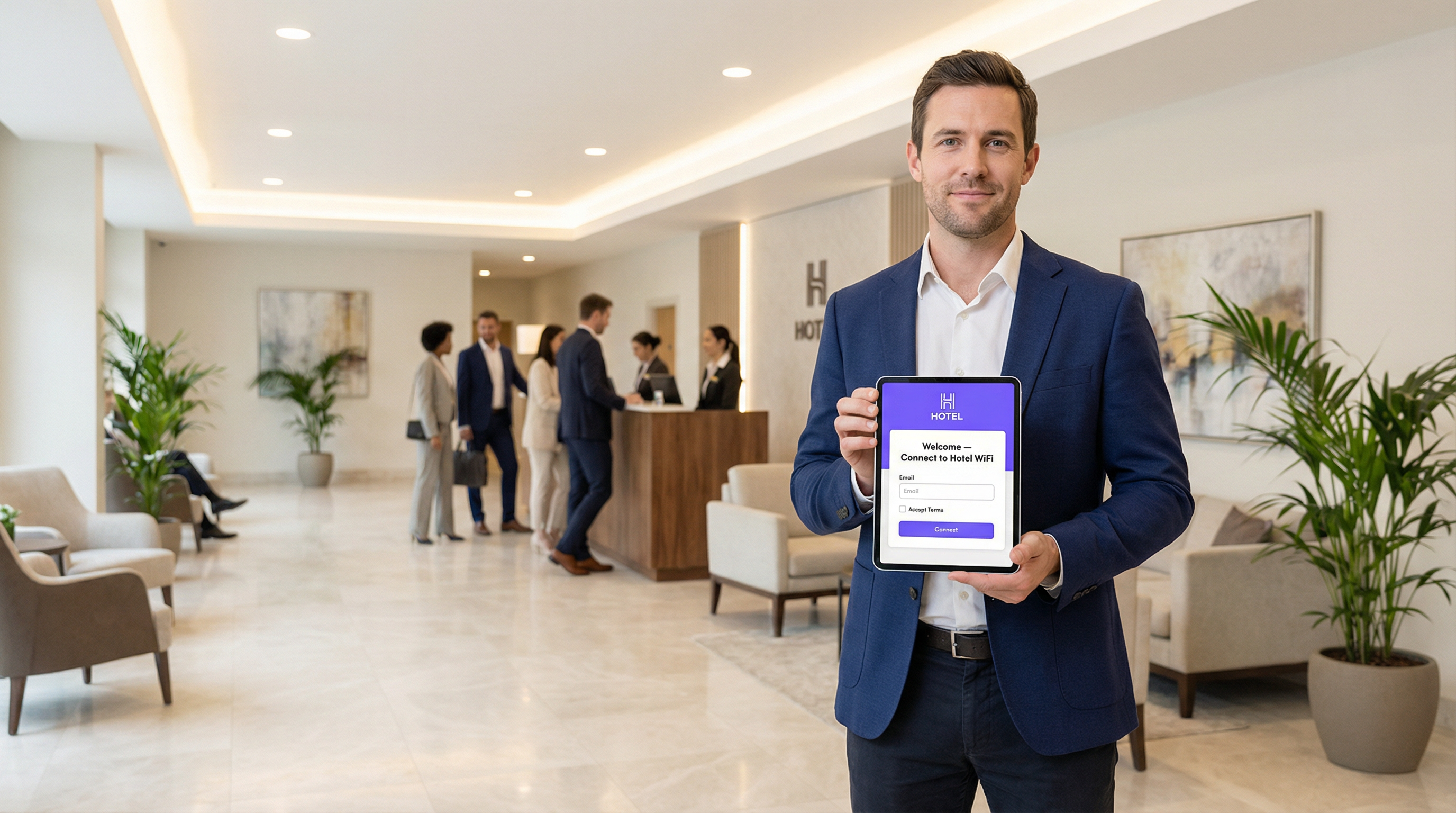
Um Captive Portal é a página da web que intercepta a conexão de um usuário a uma rede WiFi pública ou de visitantes, exigindo que ele realize uma ação — como aceitar os termos, inserir um e-mail ou autenticar-se com uma conta de rede social — antes de conceder acesso total à internet. Para gerentes de TI, arquitetos de rede e operadores de locais, o Captive Portal é um ponto de controle crítico para a segurança da rede, conformidade legal e engajamento do usuário. Implantado corretamente, ele transforma um utilitário simples em um ativo poderoso para a coleta de business intelligence, impulsionamento de iniciativas de marketing e aprimoramento da experiência do visitante. Este guia fornece uma análise técnica aprofundada da arquitetura subjacente dos Captive Portals, incluindo os mecanismos de interceptação (sequestro de DNS e redirecionamento HTTP), o papel do Captive Network Assistant (CNA) em sistemas operacionais modernos e os padrões (RADIUS, WISPr) que regem a autenticação. Ele oferece orientações práticas e independentes de fornecedor para a implementação em ambientes corporativos, como hotéis, redes de varejo e estádios, com foco nas melhores práticas de segurança, mitigação de riscos e estratégias para medir o retorno sobre o investimento (ROI). Ao compreender as nuances técnicas e o valor estratégico dos Captive Portals, os líderes de TI podem garantir que suas implantações de WiFi para visitantes sejam seguras, estejam em conformidade e alinhadas aos objetivos de negócios mais amplos.
Análise Técnica Aprofundada
Arquitetura Principal: O Walled Garden
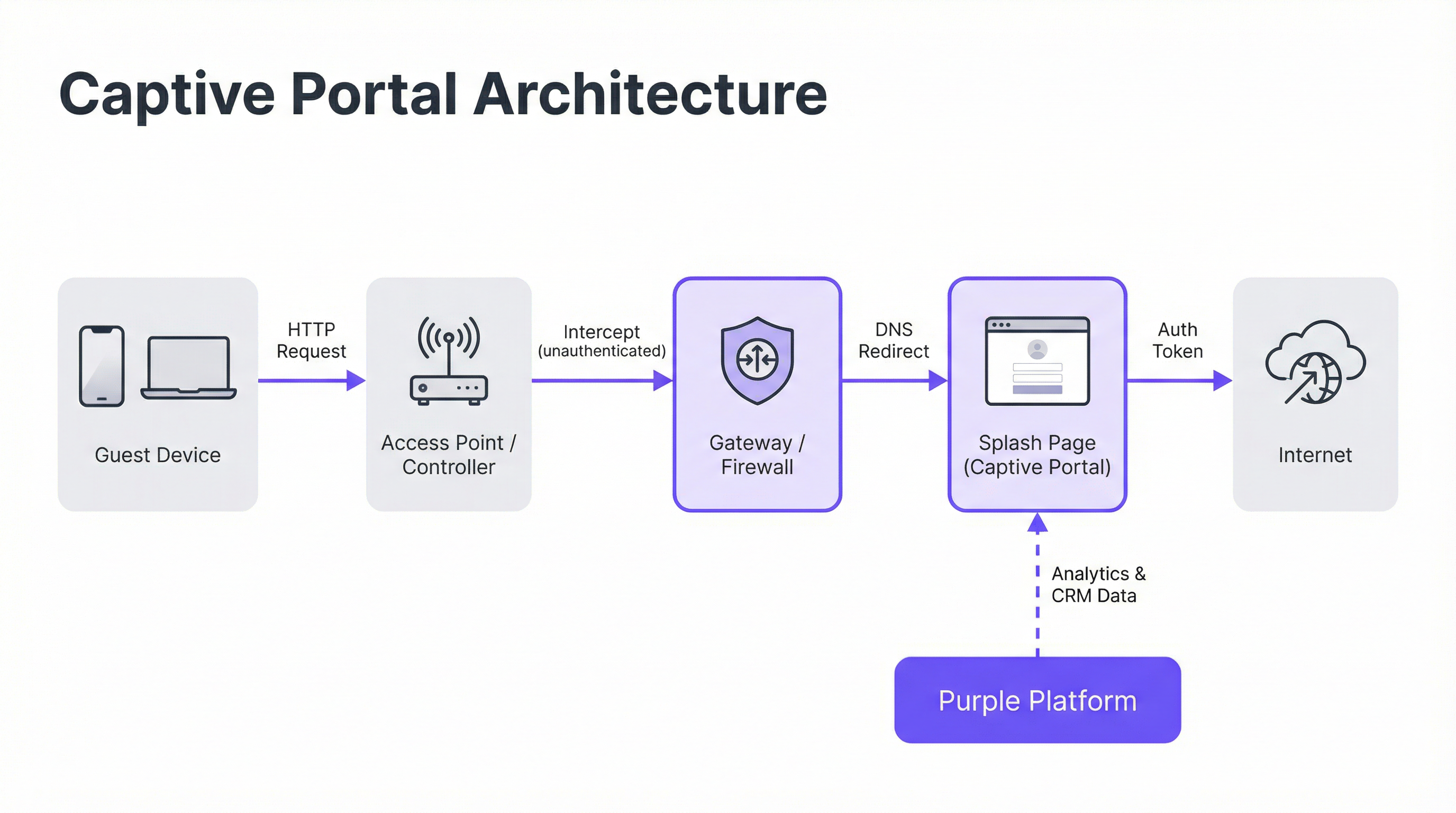
Um Captive Portal opera criando um 'walled garden' (jardim murado), um estado de rede restrito onde um dispositivo recém-conectado tem seu acesso à internet limitado até concluir um processo de autenticação. Isso é alcançado por meio de duas técnicas principais de interceptação implantadas no nível do gateway de rede ou da controladora wireless.
Sequestro de DNS (DNS Hijacking): Quando um dispositivo não autenticado tenta resolver um nome de domínio (por exemplo,
google.com), o gateway de rede intercepta a consulta DNS. Em vez de retornar o endereço IP público correto, ele responde com o endereço IP do servidor do Captive Portal. O navegador do dispositivo então inicia uma conexão com o portal, acreditando ser o destino pretendido. Este é o método mais comum, pois intercepta o tráfego de forma eficaz, independentemente do protocolo.Redirecionamento HTTP: Neste modelo, o gateway permite que a consulta DNS seja resolvida corretamente. No entanto, quando o dispositivo envia sua solicitação HTTP inicial, o gateway a intercepta e responde com um código de status HTTP 302 'Found', redirecionando o navegador para a URL do Captive Portal. A principal limitação deste método é sua ineficácia contra o tráfego HTTPS, pois os protocolos de segurança do navegador impedirão o redirecionamento e exibirão um aviso de certificado. Sistemas modernos usam uma abordagem híbrida, dependendo do sequestro de DNS como mecanismo principal.
O Captive Network Assistant (CNA)
O surgimento automático e contínuo da splash page em dispositivos modernos é orquestrado pelo Captive Network Assistant (CNA), um recurso integrado a todos os principais sistemas operacionais. No momento em que um dispositivo se conecta a uma nova rede WiFi, o sistema operacional realiza um teste de 'vivacidade' (liveness) enviando uma sondagem HTTP (probe) para um endpoint codificado.
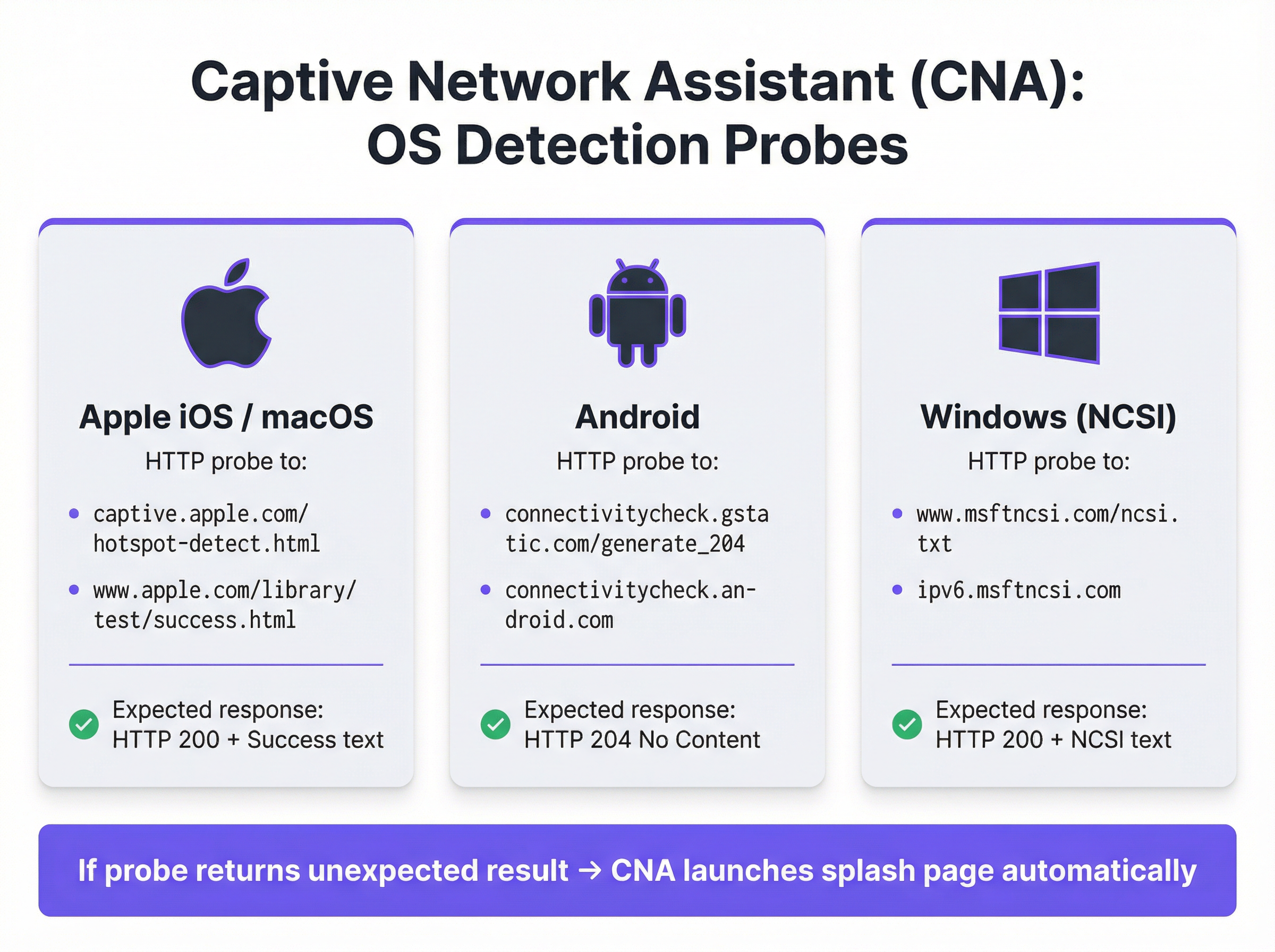
- Apple (iOS e macOS): Sonda
captive.apple.com/hotspot-detect.htmle espera uma resposta HTTP 200 contendo a palavra 'Success'. - Android: Sonda
connectivitycheck.gstatic.com/generate_204e espera uma resposta HTTP 204 'No Content'. - Windows (NCSI): O Network Connectivity Status Indicator sonda
www.msftncsi.com/ncsi.txte espera uma resposta HTTP 200 com o texto 'Microsoft NCSI'.
Se o gateway interceptar essa sondagem e retornar qualquer coisa diferente da resposta esperada, o sistema operacional conclui que está atrás de um Captive Portal e inicia automaticamente o CNA — um 'mini-navegador' leve e em sandbox — para exibir a splash page. Esse processo elimina a necessidade de os usuários abrirem o navegador manualmente, melhorando significativamente a experiência do usuário.
Autenticação e Concessão de Acesso
Assim que o usuário interage com a splash page (por exemplo, enviando um formulário), o servidor do portal se comunica com o gateway de rede para autorizar o dispositivo. Isso geralmente é feito por meio de um de três protocolos:
- RADIUS (Remote Authentication Dial-In User Service): O padrão mais comum (RFC 2865), onde o portal atua como um cliente RADIUS, enviando uma solicitação de autenticação com o endereço MAC do dispositivo para o gateway (atuando como o servidor RADIUS).
- WISPr (Wireless Internet Service Provider roaming): Um protocolo baseado em XML para autenticação de hotspot, embora sua adoção seja menos difundida do que o RADIUS.
- APIs proprietárias: Muitos fornecedores modernos de hardware de rede (como Cisco Meraki, Aruba e Ruckus) fornecem APIs RESTful que permitem um controle mais flexível e granular sobre a autorização de dispositivos, que é o método de integração usado pela Purple.
Após a autenticação bem-sucedida, o gateway move o endereço MAC do dispositivo do estado 'não autenticado' para o estado 'autenticado', remove as restrições do walled garden e concede acesso total à internet por uma duração de sessão predefinida.
Guia de Implementação
A implantação de um Captive Portal de nível corporativo requer um planejamento cuidadoso que vai além do design da splash page. Siga estas etapas independentes de fornecedor para uma implementação bem-sucedida.
Defina as Políticas de Acesso: Determine os métodos de autenticação (por exemplo, login social, verificação por e-mail/SMS, códigos de voucher), duração da sessão, tempos limite de inatividade e limites de largura de banda. Para um hotel, uma sessão de 24 horas com um limite de 10 Mbps pode ser apropriada. Para um estádio de alta densidade, uma sessão de 4 horas com um limite de 2 Mbps e modelagem de tráfego agressiva é mais realista.
Configure o Walled Garden: Crie uma lista de permissões (whitelist) abrangente de todos os domínios e endereços IP que um dispositivo não autenticado deve ser capaz de acessar. Isso inclui o próprio servidor do portal, sua CDN para ativos (imagens, CSS) e os endpoints para quaisquer provedores de autenticação de terceiros (por exemplo, domínios OAuth do Google e do Facebook). Um walled garden incompleto é a principal causa de falhas em implantações de portal.
Crie uma Splash Page Otimizada para CNA: A splash page deve ser leve e responsiva. Ela deve carregar em menos de 3 segundos em uma conexão de celular e evitar JavaScript complexo ou grandes frameworks que possam falhar no ambiente em sandbox do CNA. Todas as ações do usuário devem ser realizáveis em uma única visualização de página para evitar problemas com o fechamento prematuro do CNA.
Integre com o Hardware de Rede: Configure sua controladora wireless ou gateway para apontar para o servidor do seu Captive Portal. Isso envolve definir a URL do portal, os parâmetros de autenticação RADIUS ou API e especificar o comportamento de redirecionamento. A Purple fornece integrações pré-construídas que automatizam esse processo para todos os principais fornecedores de hardware.
Garanta a Conformidade de Dados: Se estiver coletando dados pessoais, o fluxo do seu portal deve incorporar mecanismos de consentimento explícitos e granulares que estejam em conformidade com regulamentações como a GDPR e a CCPA. O consentimento para marketing deve ser separado da aceitação dos termos de serviço. A plataforma Purple inclui um framework de gerenciamento de consentimento totalmente em conformidade com logs auditáveis.
Melhores Práticas
- Priorize a Segurança com WPA2/WPA3: Sempre execute seu SSID de visitantes com, no mínimo, criptografia WPA2-Personal. Um Captive Portal é um controle de camada de aplicativo e não criptografa o tráfego over-the-air. Combinar criptografia com um portal fornece segurança em camadas.
- Implemente a Segmentação de Rede: Use VLANs para segregar estritamente o tráfego de visitantes da sua rede corporativa interna. Um Captive Portal fornece separação lógica, mas a segmentação física ou virtual é necessária para atender a padrões como o PCI DSS.
- Lide com a Randomização de Endereços MAC: Os sistemas operacionais móveis modernos randomizam os endereços MAC por padrão para evitar o rastreamento. Depender exclusivamente de endereços MAC para o reconhecimento de visitantes recorrentes não é mais viável. Aproveite plataformas como a Purple, que usam fingerprinting de dispositivos mais avançado e autenticação baseada em perfil para identificar usuários recorrentes.
- Monitore e Teste Regularmente: Atualizações de sistema operacional, especialmente da Apple, podem alterar o comportamento do CNA sem aviso prévio. Estabeleça um protocolo de testes trimestral para validar a funcionalidade do seu portal nas versões mais recentes do iOS, Android e Windows.
Solução de Problemas e Mitigação de Riscos
| Modo de Falha Comum | Causa Raiz | Estratégia de Mitigação |
|---|---|---|
| A Splash Page Não Carrega | Walled garden incompleto bloqueando o acesso aos ativos do portal (CSS, JS, imagens) ou falha na resolução de DNS. | Teste e valide minuciosamente todos os domínios necessários para o walled garden. Certifique-se de que o DNS esteja configurado corretamente na VLAN de visitantes. |
| Falha nos Logins Sociais | Os domínios do provedor OAuth (por exemplo, accounts.google.com) não estão incluídos no walled garden. |
Adicione todos os domínios de autenticação de terceiros necessários ao walled garden. Use as ferramentas de desenvolvedor do navegador para rastrear as solicitações de rede durante o fluxo de login. |
| A Janela do CNA Fecha Inesperadamente | A splash page tenta um redirecionamento complexo ou tenta abrir uma nova guia, o que não é suportado no CNA. | Projete um fluxo de autenticação de página única. Certifique-se de que todas as interações ocorram na página inicial do portal. |
| Usuários Não Redirecionados (HTTPS) | O gateway está tentando um redirecionamento HTTP em um site HTTPS, causando um erro de segurança no navegador. | Certifique-se de que o gateway esteja configurado para sequestro de DNS, que é eficaz para tráfego HTTP e HTTPS. |
| Baixo Desempenho / Login Lento | A splash page é muito grande (imagens de alta resolução, frameworks JavaScript pesados). | Otimize todos os ativos e busque um peso total de página inferior a 500 KB. Adie o carregamento de scripts não essenciais. |
ROI e Impacto nos Negócios
O valor comercial de um Captive Portal vai muito além de fornecer acesso à internet. O ROI é medido por sua capacidade de converter visitantes anônimos em clientes conhecidos e impulsionar resultados de negócios tangíveis.
- Aquisição de Dados: Ao capturar endereços de e-mail, perfis sociais ou respostas de pesquisas no momento do login, os locais podem construir perfis de CRM ricos. Uma rede de varejo pode atribuir uma visita à loja física a um cliente específico em seu banco de dados de marketing, preenchendo a lacuna entre o online e o offline.
- Aumento do Engajamento: A splash page é um outdoor digital de alta visibilidade. Hotéis podem promover serviços de spa ou reservas em restaurantes. Centros de conferências podem exibir programações de eventos e mensagens de patrocinadores. Esse canal de comunicação direta pode gerar receita incremental.
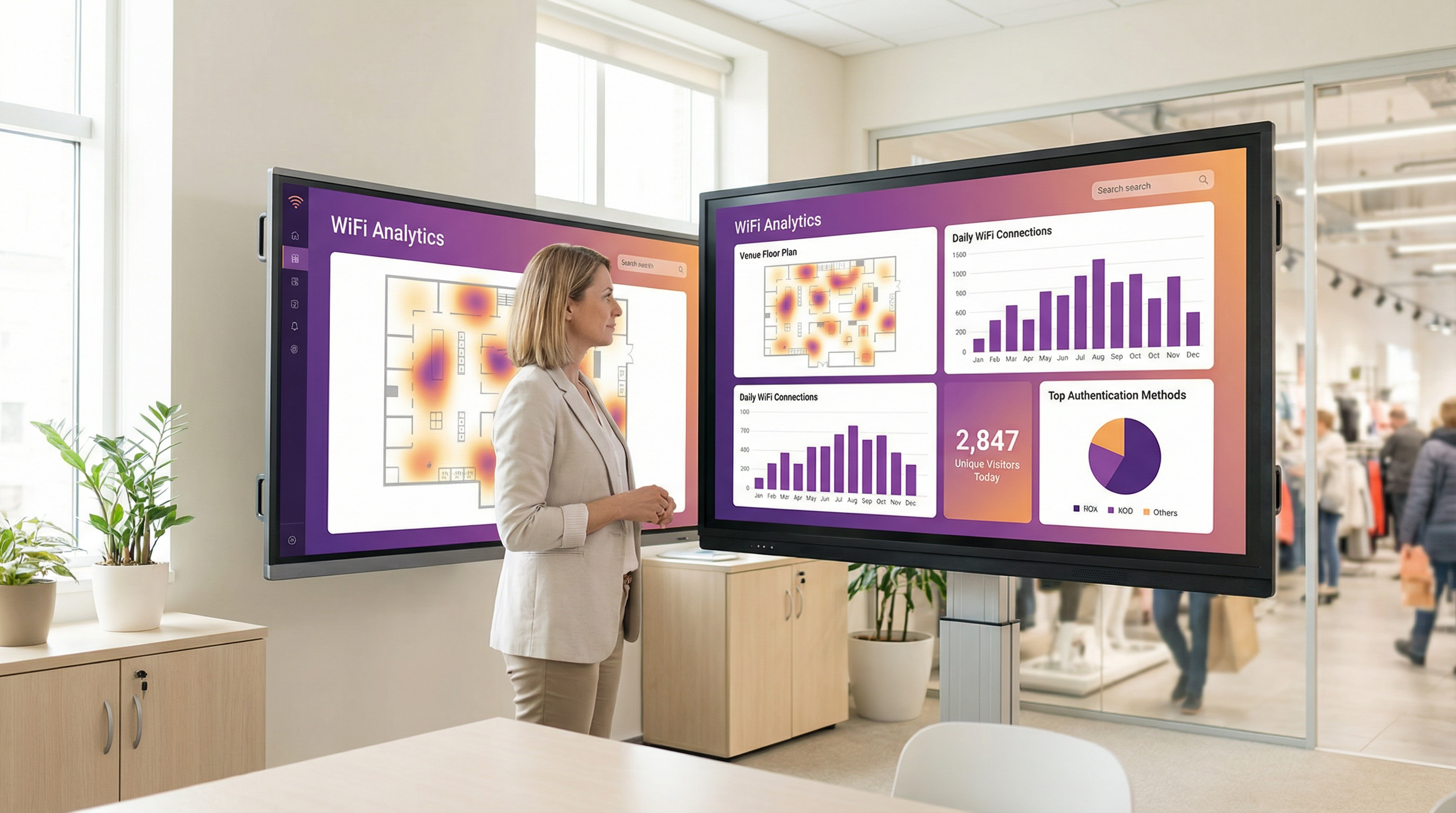
- Inteligência Operacional: Plataformas de análise de WiFi como a Purple usam dados de autenticação para fornecer insights profundos sobre o comportamento do visitante. Mapas de calor revelam padrões de tráfego de pessoas, a análise do tempo de permanência mostra os níveis de engajamento e as métricas de visitantes recorrentes ajudam a medir a lealdade. Um estádio pode usar esses dados para otimizar a equipe das lanchonetes, enquanto um museu pode analisar a popularidade das exposições.
Ao aproveitar uma plataforma como a Purple, o Captive Portal se torna a base da estratégia de inteligência de localização de um estabelecimento, entregando retornos mensuráveis na eficácia do marketing, eficiência operacional e satisfação do cliente.
Termos-Chave e Definições
Captive Portal
A web page that intercepts a newly connected user's browser, requiring them to perform a specific action before being granted full internet access.
This is the primary mechanism IT teams use to control access to guest and public WiFi networks, serving as a gateway for authentication, compliance, and user engagement.
Splash Page
The specific web page or user interface that is displayed to the user by the captive portal for authentication.
This is the main user-facing component. Its design and performance are critical for user experience and for achieving business goals like data capture or marketing.
Captive Network Assistant (CNA)
A built-in operating system feature (also known as a 'mini-browser') that automatically detects a captive portal and displays the splash page.
IT teams must design splash pages specifically for the CNA's limited, sandboxed environment, as it behaves differently from a standard web browser and is a common point of failure.
Walled Garden
The list of whitelisted IP addresses and domain names that an unauthenticated user is allowed to access before completing the captive portal authentication.
A misconfigured walled garden is the most common reason for portal failures. Network architects must ensure it includes all necessary endpoints for the portal and any third-party login providers.
DNS Hijacking
An interception technique where a network gateway provides a false IP address (that of the portal server) in response to a DNS query from an unauthenticated device.
This is the core mechanism that makes captive portals work, allowing the network to redirect users to the splash page regardless of the website they are trying to visit.
RADIUS (RFC 2865)
A standard networking protocol for centralized Authentication, Authorization, and Accounting (AAA) management.
In a captive portal context, it's a common way for the portal server to tell the network gateway that a user has been authenticated and should be granted internet access.
MAC Address Randomization
An OS-level privacy feature where a device uses a different, randomly generated MAC address for each WiFi network it connects to.
This feature makes it difficult for IT teams to track unique devices over time using traditional methods. It necessitates a shift towards profile-based authentication for accurate visitor analytics.
IEEE 802.1X
An IEEE standard for port-based Network Access Control (PNAC) that provides authenticated network access to Ethernet networks and WLANs.
This is the enterprise-grade alternative to captive portals, often used for corporate devices. It offers higher security but requires client-side configuration, making it unsuitable for guest access scenarios where simplicity is key.
Estudos de Caso
A 200-room luxury hotel needs to replace its outdated guest WiFi system. The goal is to provide a seamless, branded login experience, offer tiered bandwidth (free for basic access, paid for premium streaming), and promote hotel amenities like the spa and restaurant directly on the splash page. The hotel uses Cisco Meraki access points.
- Deployment with Purple & Meraki: Leverage Purple's native API integration with the Cisco Meraki dashboard. Create a new SSID for guest access (e.g., 'Hotel_Guest_WiFi') and configure it with WPA2-Personal encryption. In the Meraki dashboard, set the 'Splash Page' option to 'Sign-on with' and select 'Purple'.
- Tiered Access Configuration: Within the Purple platform, create two access tiers. The 'Free' tier is configured with a 5 Mbps bandwidth cap and a 24-hour session time. The 'Premium' tier is set to 25 Mbps with no cap and requires payment via an integrated Stripe gateway.
- Splash Page Design: Use Purple's drag-and-drop editor to design the splash page. The initial view presents the 'Free' option (login with email or social media) and a prominent 'Upgrade to Premium' button. Upon successful free login, the user is redirected to a welcome page featuring a carousel of promotions for the hotel's restaurant and spa, with direct links to the booking engine.
- Compliance: Enable Purple's GDPR/CCPA consent module, ensuring separate checkboxes for 'Terms of Service' and 'Marketing Communications'.
A national retail chain with 500 stores wants to offer free guest WiFi to understand in-store customer behavior and build its marketing database. They need a scalable solution that provides centralized management and delivers analytics on footfall, dwell time, and repeat visits. The existing hardware is a mix of Aruba and Ruckus.
- Centralized Management: Deploy Purple across all 500 stores. The platform's hardware-agnostic nature allows for consistent configuration across both Aruba and Ruckus controllers from a single cloud dashboard.
- Authentication & Data Capture: Configure the splash page to require social login (Facebook or Google) or email address submission. This captures valuable demographic data and a marketing contact for every user who connects.
- Analytics & Integration: Leverage Purple's WiFi analytics suite. The platform will automatically generate dashboards for each store and at the corporate level, showing metrics like unique visitors, dwell times by zone (if location services are enabled), and repeat visitor rates. Set up a daily data export via API to feed the captured email addresses and visitor metrics directly into the company's master CRM (e.g., Salesforce).
- Scalable Deployment: Create a single splash page template and apply it to all locations. Any updates to branding or promotions can be pushed to all 500 stores simultaneously from the central dashboard.
Análise de Cenário
Q1. You are deploying a new guest WiFi network in a conference center. A key requirement is that attendees can log in using their LinkedIn profile to facilitate networking. During testing, the LinkedIn login button on the splash page does nothing when clicked on an iPhone. What is the most likely cause and how would you troubleshoot it?
💡 Dica:Consider the sandboxed environment of the CNA and its network restrictions.
Mostrar Abordagem Recomendada
The most likely cause is an incomplete walled garden. The LinkedIn OAuth flow requires the device to access several domains (e.g., linkedin.com, static-exp1.licdn.com) to load its authentication scripts and display the login pop-up. Because the iPhone is in an unauthenticated state, the CNA is blocking these requests. To troubleshoot, I would connect a laptop to the guest SSID, open the browser's developer tools, and monitor the 'Network' tab while attempting to log in. This will reveal all the blocked domains, which must then be added to the gateway's walled garden whitelist.
Q2. A retail client wants to measure the loyalty of their in-store shoppers by tracking how many of them are repeat visitors. Their current captive portal only identifies devices by MAC address. Why is this approach flawed and what alternative strategy should you propose?
💡 Dica:Think about modern mobile OS privacy features.
Mostrar Abordagem Recomendada
This approach is flawed due to MAC address randomization, a default privacy feature in iOS, Android, and Windows that assigns a different MAC address for each WiFi network. A returning customer's phone will appear as a new device on each visit, making MAC-based loyalty tracking highly inaccurate. I would propose a shift to a profile-based authentication strategy using Purple. By requiring a social login or an email/phone number verification, we can create a persistent user profile that is independent of the device's MAC address. This allows for accurate tracking of repeat visits and builds a much richer CRM profile for the client.
Q3. A hotel is receiving complaints that its premium paid WiFi tier, which is supposed to be faster, feels no different from the free tier. The network is configured with a 5 Mbps cap on the 'Free' user profile and a 50 Mbps cap on the 'Premium' profile. Where in the network architecture would you investigate to diagnose this issue?
💡 Dica:Consider the entire data path from the access point to the internet egress.
Mostrar Abordagem Recomendada
The issue is likely not with the captive portal profiles themselves, but with a bottleneck further up the network chain. I would investigate in this order: 1. Wireless Controller/Gateway: Verify that the bandwidth shaping or Quality of Service (QoS) policies are being correctly applied to the user roles associated with the 'Free' and 'Premium' profiles. 2. Firewall: Check the firewall for any global traffic shaping policies that might be overriding the per-user rules from the controller. 3. Internet Circuit: Run a speed test from the gateway's LAN interface to confirm the total available internet bandwidth. It's possible the entire property's internet connection is saturated or performing below its subscribed speed, making the per-user caps irrelevant. 4. Access Point Saturation: In high-density areas, check the client load and channel utilization on the specific APs the complaining users are connected to. RF interference or an overloaded AP can also be a bottleneck.
Principais Conclusões
- ✓A captive portal is a web page that intercepts user traffic on a guest WiFi network to enforce authentication and policy.
- ✓The automatic pop-up is handled by the Captive Network Assistant (CNA), a mini-browser in all major operating systems.
- ✓Core interception works via DNS hijacking or HTTP redirect at the network gateway.
- ✓Splash pages must be designed to be lightweight and functional within the limited, sandboxed CNA environment.
- ✓A correctly configured 'walled garden' is critical for ensuring third-party social logins work correctly.
- ✓Modern OS privacy features like MAC address randomization make profile-based authentication essential for accurate visitor analytics.
- ✓A captive portal platform like Purple transforms a network access tool into a powerful asset for business intelligence, marketing, and compliance.




