

Cos'è un Captive Portal e come funziona?
A comprehensive technical reference for IT managers and venue operators on the architecture, deployment, and business impact of captive portals. This guide provides actionable insights into device detection, the Captive Network Assistant (CNA), and best practices for implementation in enterprise environments.
🎧 Ascolta questa guida
Visualizza trascrizione
Sintesi esecutiva
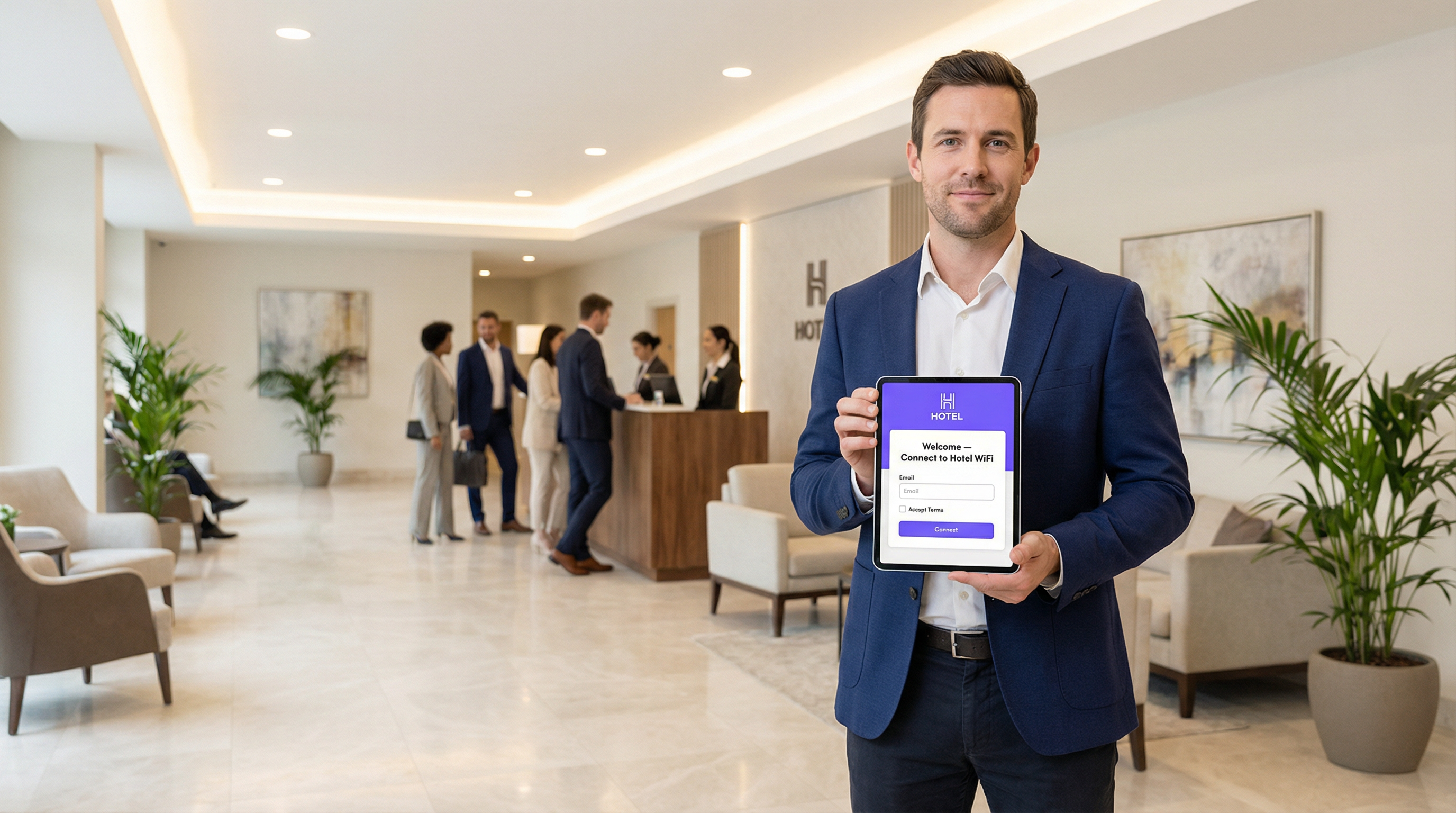
Un Captive Portal è la pagina web che intercetta la connessione di un utente a una rete WiFi pubblica o ospite, richiedendo di eseguire un'azione (come accettare i termini, inserire un'email o autenticarsi con un account social) prima di concedere l'accesso completo a Internet. Per i responsabili IT, gli architetti di rete e i gestori delle strutture, il Captive Portal rappresenta un punto di controllo critico per la sicurezza della rete, la conformità legale e il coinvolgimento degli utenti. Se implementato correttamente, trasforma una semplice utility in un potente strumento per raccogliere business intelligence, promuovere iniziative di marketing e migliorare l'esperienza dei visitatori. Questa guida fornisce un approfondimento tecnico sull'architettura alla base dei Captive Portal, inclusi i meccanismi di intercettazione (DNS hijacking e HTTP redirect), il ruolo del Captive Network Assistant (CNA) nei moderni sistemi operativi e gli standard (RADIUS, WISPr) che regolano l'autenticazione. Offre indicazioni pratiche e indipendenti dal fornitore per l'implementazione in ambienti enterprise come hotel, catene di vendita al dettaglio e stadi, concentrandosi sulle best practice di sicurezza, sulla mitigazione dei rischi e sulle strategie per misurare il ritorno sull'investimento (ROI). Comprendendo le sfumature tecniche e il valore strategico dei Captive Portal, i leader IT possono garantire che le loro implementazioni WiFi per gli ospiti siano sicure, conformi e allineate agli obiettivi aziendali più ampi.
Approfondimento tecnico
Architettura principale: il Walled Garden
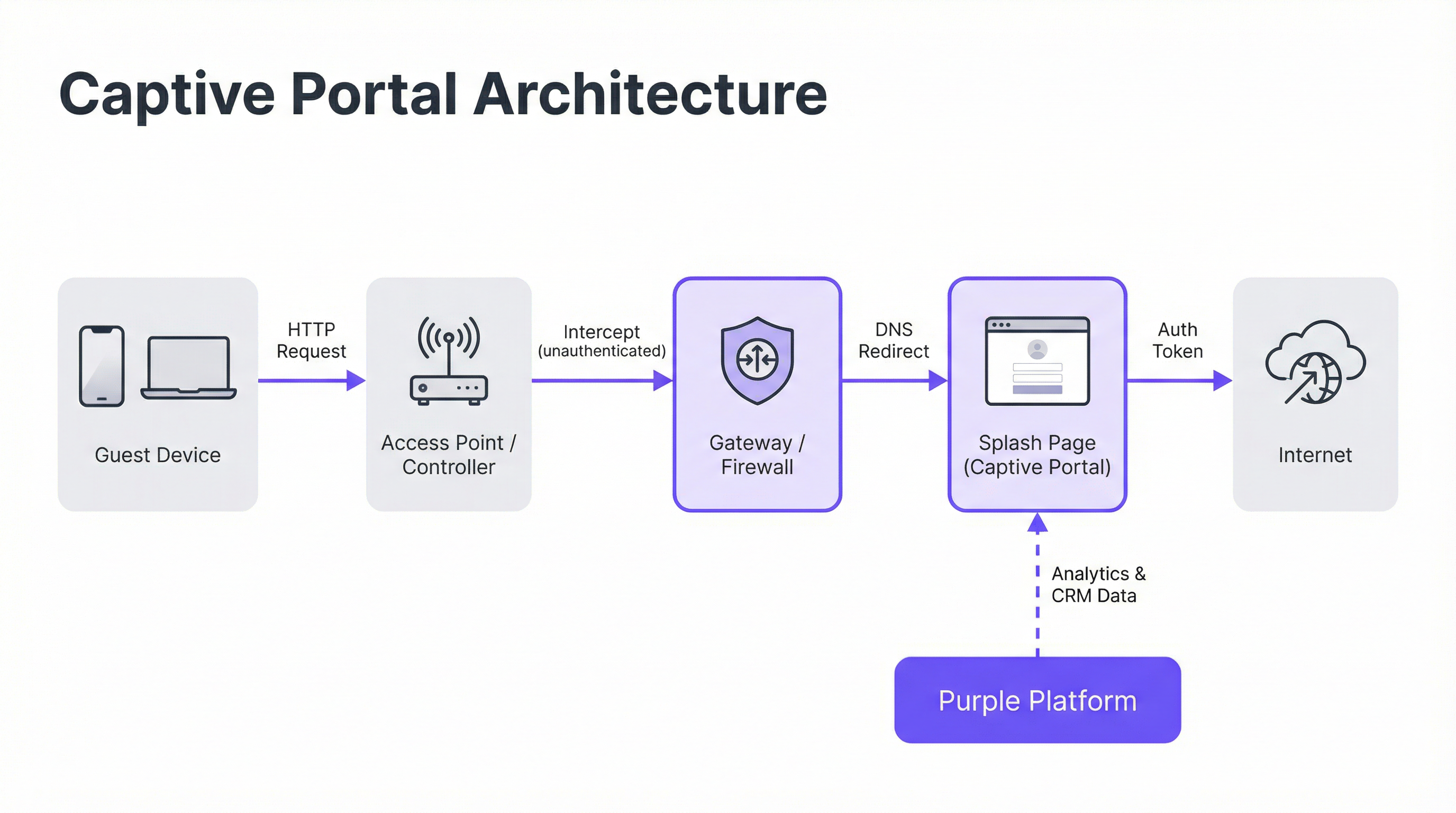
Un Captive Portal opera creando un "walled garden" (giardino recintato), uno stato di rete limitato in cui un dispositivo appena connesso ha l'accesso a Internet bloccato fino al completamento di un processo di autenticazione. Ciò si ottiene attraverso due tecniche di intercettazione principali implementate a livello di gateway di rete o controller wireless.
DNS Hijacking: Quando un dispositivo non autenticato tenta di risolvere un nome di dominio (es.
google.com), il gateway di rete intercetta la query DNS. Invece di restituire l'indirizzo IP pubblico corretto, risponde con l'indirizzo IP del server del Captive Portal. Il browser del dispositivo avvia quindi una connessione al portale, credendo che sia la destinazione prevista. Questo è il metodo più comune in quanto intercetta efficacemente il traffico indipendentemente dal protocollo.HTTP Redirect: In questo modello, il gateway consente alla query DNS di risolversi correttamente. Tuttavia, quando il dispositivo invia la sua richiesta HTTP iniziale, il gateway la intercetta e risponde con un codice di stato HTTP 302 "Found", reindirizzando il browser all'URL del Captive Portal. Il limite principale di questo metodo è la sua inefficacia contro il traffico HTTPS, poiché i protocolli di sicurezza del browser impediranno il reindirizzamento e mostreranno un avviso di certificato. I sistemi moderni utilizzano un approccio ibrido, affidandosi al DNS hijacking come meccanismo principale.
Il Captive Network Assistant (CNA)
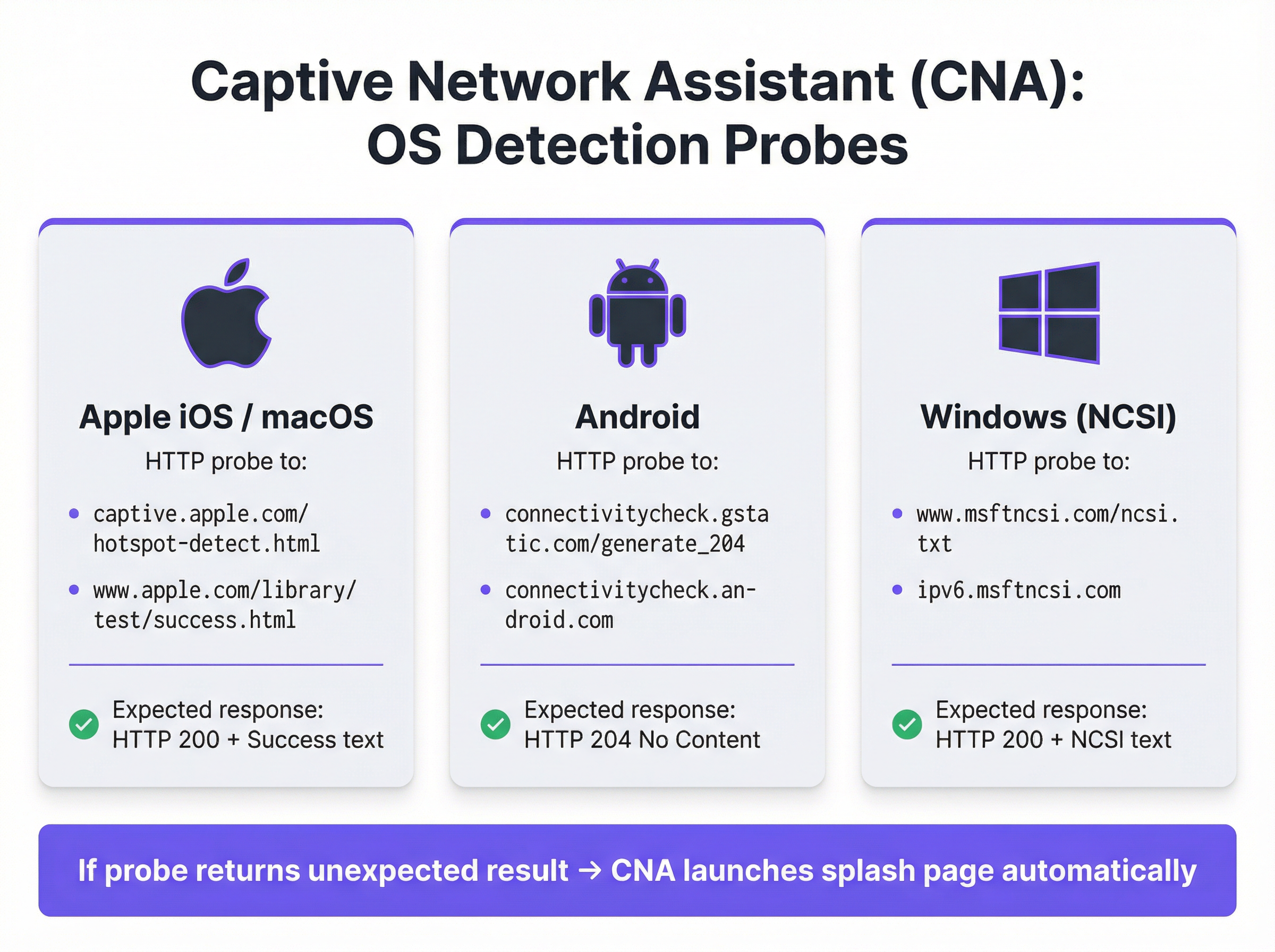
La comparsa fluida e automatica della splash page sui dispositivi moderni è orchestrata dal Captive Network Assistant (CNA), una funzionalità integrata in tutti i principali sistemi operativi. Nel momento in cui un dispositivo si connette a una nuova rete WiFi, il sistema operativo esegue un test di "liveness" inviando un probe HTTP a un endpoint predefinito.
- Apple (iOS e macOS): Invia un probe a
captive.apple.com/hotspot-detect.htmle si aspetta una risposta HTTP 200 contenente la parola "Success". - Android: Invia un probe a
connectivitycheck.gstatic.com/generate_204e si aspetta una risposta HTTP 204 "No Content". - Windows (NCSI): Il Network Connectivity Status Indicator invia un probe a
www.msftncsi.com/ncsi.txte si aspetta una risposta HTTP 200 con il testo "Microsoft NCSI".
Se il gateway intercetta questo probe e restituisce qualcosa di diverso dalla risposta prevista, il sistema operativo deduce di trovarsi dietro un Captive Portal e avvia automaticamente il CNA (un "mini-browser" leggero e in sandbox) per visualizzare la splash page. Questo processo elimina la necessità per gli utenti di aprire manualmente il browser, migliorando significativamente l'esperienza utente.
Autenticazione e concessione dell'accesso
Una volta che l'utente interagisce con la splash page (ad esempio, inviando un modulo), il server del portale comunica con il gateway di rete per autorizzare il dispositivo. Questo processo è tipicamente gestito tramite uno dei tre protocolli seguenti:
- RADIUS (Remote Authentication Dial-In User Service): Lo standard più comune (RFC 2865), in cui il portale agisce come client RADIUS, inviando una richiesta di autenticazione con l'indirizzo MAC del dispositivo al gateway (che funge da server RADIUS).
- WISPr (Wireless Internet Service Provider roaming): Un protocollo basato su XML per l'autenticazione hotspot, sebbene la sua adozione sia meno diffusa rispetto a RADIUS.
- API proprietarie: Molti fornitori moderni di hardware di rete (come Cisco Meraki, Aruba e Ruckus) forniscono API RESTful che consentono un controllo più flessibile e granulare sull'autorizzazione dei dispositivi; questo è il metodo di integrazione utilizzato da Purple.
A seguito di un'autenticazione riuscita, il gateway sposta l'indirizzo MAC del dispositivo dallo stato "non autenticato" a quello "autenticato", rimuove le restrizioni del walled garden e concede l'accesso completo a Internet per una durata della sessione predefinita.
Guida all'implementazione
L'implementazione di un Captive Portal di livello enterprise richiede un'attenta pianificazione che va oltre il design della splash page. Segui questi passaggi indipendenti dal fornitore per un'implementazione di successo.
Definire le policy di accesso: Determina i metodi di autenticazione (es. social login, verifica email/SMS, codici voucher), la durata della sessione, i timeout di inattività e i limiti di larghezza di banda. Per un hotel, potrebbe essere appropriata una sessione di 24 ore con un limite di 10 Mbps. Per uno stadio ad alta densità, è più realistica una sessione di 4 ore con un limite di 2 Mbps e un traffic shaping aggressivo.
Configurare il Walled Garden: Crea una whitelist completa di tutti i domini e gli indirizzi IP a cui un dispositivo non autenticato deve poter accedere. Ciò include il server del portale stesso, la sua CDN per gli asset (immagini, CSS) e gli endpoint per eventuali provider di autenticazione di terze parti (es. i domini OAuth di Google e Facebook). Un walled garden incompleto è la causa principale dei fallimenti nelle implementazioni dei portali.
Progettare una splash page ottimizzata per il CNA: La splash page deve essere leggera e reattiva. Dovrebbe caricarsi in meno di 3 secondi su una connessione cellulare ed evitare JavaScript complessi o framework pesanti che potrebbero non funzionare nell'ambiente sandbox del CNA. Tutte le azioni dell'utente dovrebbero essere realizzabili all'interno di un'unica visualizzazione di pagina per evitare problemi di chiusura prematura del CNA.
Integrazione con l'hardware di rete: Configura il controller wireless o il gateway per puntare al server del tuo Captive Portal. Ciò comporta l'impostazione dell'URL del portale, la definizione dei parametri di autenticazione RADIUS o API e la specifica del comportamento di reindirizzamento. Purple fornisce integrazioni predefinite che automatizzano questo processo per tutti i principali fornitori di hardware.
Garantire la conformità dei dati: Se raccogli dati personali, il flusso del tuo portale deve incorporare meccanismi di consenso espliciti e granulari conformi a normative come il GDPR e il CCPA. Il consenso per il marketing deve essere separato dall'accettazione dei termini di servizio. La piattaforma Purple include un framework di gestione del consenso completamente conforme con log verificabili.
Best practice
- Dare priorità alla sicurezza con WPA2/WPA3: Esegui sempre il tuo SSID ospite con, come minimo, la crittografia WPA2-Personal. Un Captive Portal è un controllo a livello di applicazione e non crittografa il traffico over-the-air. La combinazione della crittografia con un portale fornisce una sicurezza a più livelli.
- Implementare la segmentazione di rete: Utilizza le VLAN per separare rigorosamente il traffico degli ospiti dalla rete aziendale interna. Un Captive Portal fornisce una separazione logica, ma è necessaria una segmentazione fisica o virtuale per soddisfare standard come il PCI DSS.
- Gestire la randomizzazione degli indirizzi MAC: I moderni sistemi operativi mobili randomizzano gli indirizzi MAC per impostazione predefinita per impedire il tracciamento. Affidarsi esclusivamente agli indirizzi MAC per il riconoscimento dei visitatori di ritorno non è più praticabile. Sfrutta piattaforme come Purple che utilizzano il device fingerprinting avanzato e l'autenticazione basata sul profilo per identificare gli utenti di ritorno.
- Monitorare e testare regolarmente: Gli aggiornamenti del sistema operativo, in particolare da parte di Apple, possono modificare il comportamento del CNA senza preavviso. Stabilisci un protocollo di test trimestrale per convalidare la funzionalità del tuo portale sulle versioni più recenti di iOS, Android e Windows.
Risoluzione dei problemi e mitigazione dei rischi
| Modalità di guasto comune | Causa principale | Strategia di mitigazione |
|---|---|---|
| Mancato caricamento della splash page | Walled garden incompleto che blocca l'accesso agli asset del portale (CSS, JS, immagini) o errore di risoluzione DNS. | Testa e convalida accuratamente tutti i domini richiesti per il walled garden. Assicurati che il DNS sia configurato correttamente sulla VLAN ospite. |
| Fallimento dei social login | I domini dei provider OAuth (es. accounts.google.com) non sono inclusi nel walled garden. |
Aggiungi tutti i domini di autenticazione di terze parti richiesti al walled garden. Utilizza gli strumenti per sviluppatori del browser per tracciare le richieste di rete durante il flusso di accesso. |
| Chiusura imprevista della finestra del CNA | La splash page tenta un reindirizzamento complesso o cerca di aprire una nuova scheda, operazione non supportata nel CNA. | Progetta un flusso di autenticazione a pagina singola. Assicurati che tutte le interazioni avvengano all'interno della pagina iniziale del portale. |
| Utenti non reindirizzati (HTTPS) | Il gateway sta tentando un reindirizzamento HTTP su un sito HTTPS, causando un errore di sicurezza del browser. | Assicurati che il gateway sia configurato per il DNS hijacking, che è efficace sia per il traffico HTTP che HTTPS. |
| Scarse prestazioni / Accesso lento | La splash page è troppo pesante (immagini ad alta risoluzione, framework JavaScript pesanti). | Ottimizza tutti gli asset e punta a un peso totale della pagina inferiore a 500 KB. Ritarda il caricamento degli script non essenziali. |
ROI e impatto aziendale
Il valore aziendale di un Captive Portal va ben oltre la fornitura dell'accesso a Internet. Il ROI si misura attraverso la sua capacità di convertire visitatori anonimi in clienti noti e di generare risultati aziendali tangibili.
- Acquisizione dati: Acquisendo indirizzi email, profili social o risposte a sondaggi al momento dell'accesso, le strutture possono creare ricchi profili CRM. Una catena di vendita al dettaglio può attribuire la visita a un negozio fisico a un cliente specifico nel proprio database di marketing, colmando il divario tra online e offline.
- Maggiore coinvolgimento: La splash page è un cartellone digitale ad alta visibilità. Gli hotel possono promuovere servizi spa o prenotazioni di ristoranti. I centri congressi possono mostrare i programmi degli eventi e i messaggi degli sponsor. Questo canale di comunicazione diretta può generare entrate incrementali.
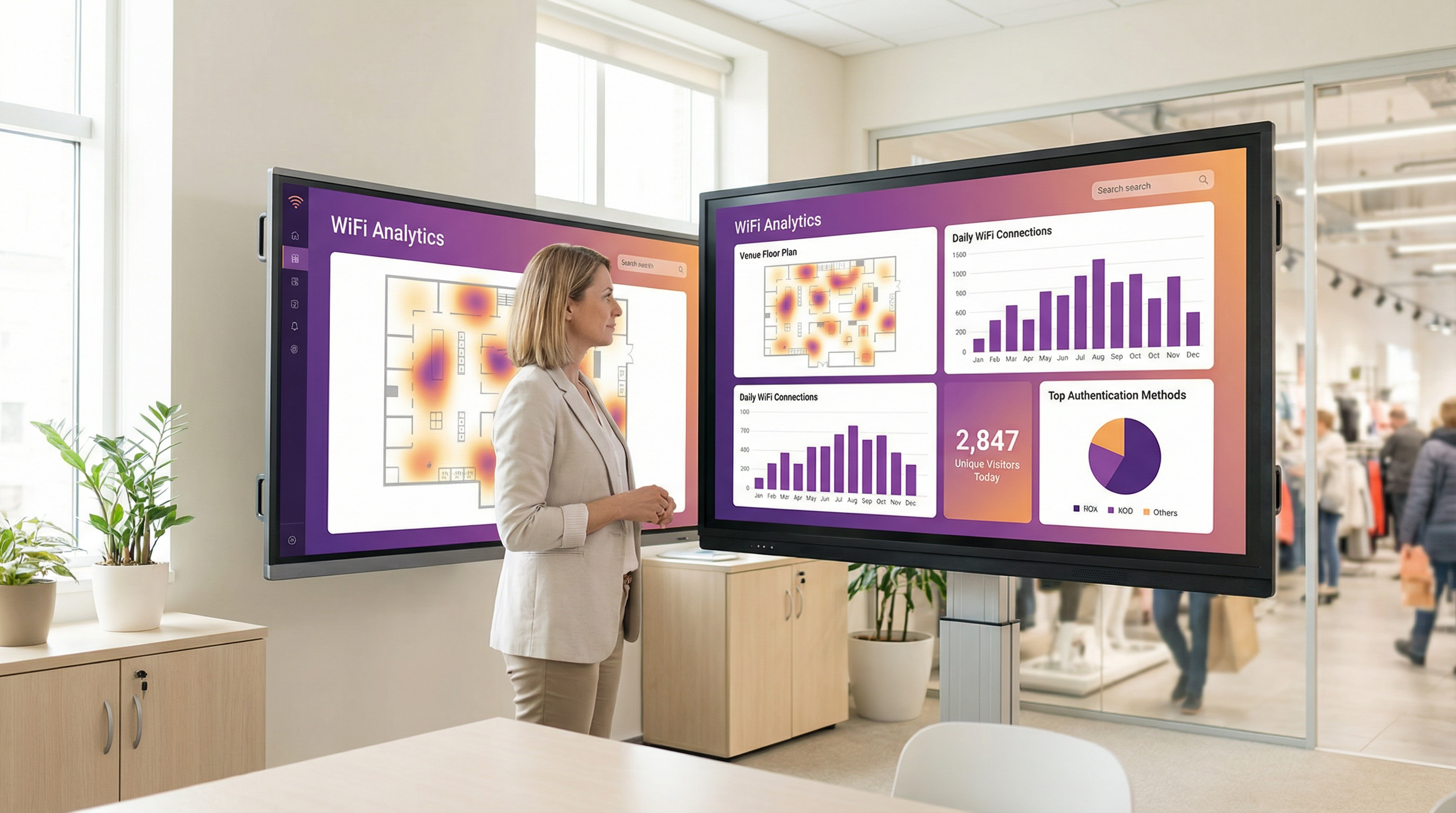
- Intelligenza operativa: Le piattaforme di analisi WiFi come Purple utilizzano i dati di autenticazione per fornire approfondimenti dettagliati sul comportamento dei visitatori. Le mappe di calore rivelano i modelli di affluenza, l'analisi del tempo di permanenza mostra i livelli di coinvolgimento e le metriche sui visitatori di ritorno aiutano a misurare la fedeltà. Uno stadio può utilizzare questi dati per ottimizzare il personale dei punti ristoro, mentre un museo può analizzare la popolarità delle mostre.
Sfruttando una piattaforma come Purple, il Captive Portal diventa il fondamento della strategia di location intelligence di una struttura, offrendo ritorni misurabili in termini di efficacia del marketing, efficienza operativa e soddisfazione del cliente.
Termini chiave e definizioni
Captive Portal
A web page that intercepts a newly connected user's browser, requiring them to perform a specific action before being granted full internet access.
This is the primary mechanism IT teams use to control access to guest and public WiFi networks, serving as a gateway for authentication, compliance, and user engagement.
Splash Page
The specific web page or user interface that is displayed to the user by the captive portal for authentication.
This is the main user-facing component. Its design and performance are critical for user experience and for achieving business goals like data capture or marketing.
Captive Network Assistant (CNA)
A built-in operating system feature (also known as a 'mini-browser') that automatically detects a captive portal and displays the splash page.
IT teams must design splash pages specifically for the CNA's limited, sandboxed environment, as it behaves differently from a standard web browser and is a common point of failure.
Walled Garden
The list of whitelisted IP addresses and domain names that an unauthenticated user is allowed to access before completing the captive portal authentication.
A misconfigured walled garden is the most common reason for portal failures. Network architects must ensure it includes all necessary endpoints for the portal and any third-party login providers.
DNS Hijacking
An interception technique where a network gateway provides a false IP address (that of the portal server) in response to a DNS query from an unauthenticated device.
This is the core mechanism that makes captive portals work, allowing the network to redirect users to the splash page regardless of the website they are trying to visit.
RADIUS (RFC 2865)
A standard networking protocol for centralized Authentication, Authorization, and Accounting (AAA) management.
In a captive portal context, it's a common way for the portal server to tell the network gateway that a user has been authenticated and should be granted internet access.
MAC Address Randomization
An OS-level privacy feature where a device uses a different, randomly generated MAC address for each WiFi network it connects to.
This feature makes it difficult for IT teams to track unique devices over time using traditional methods. It necessitates a shift towards profile-based authentication for accurate visitor analytics.
IEEE 802.1X
An IEEE standard for port-based Network Access Control (PNAC) that provides authenticated network access to Ethernet networks and WLANs.
This is the enterprise-grade alternative to captive portals, often used for corporate devices. It offers higher security but requires client-side configuration, making it unsuitable for guest access scenarios where simplicity is key.
Casi di studio
A 200-room luxury hotel needs to replace its outdated guest WiFi system. The goal is to provide a seamless, branded login experience, offer tiered bandwidth (free for basic access, paid for premium streaming), and promote hotel amenities like the spa and restaurant directly on the splash page. The hotel uses Cisco Meraki access points.
- Deployment with Purple & Meraki: Leverage Purple's native API integration with the Cisco Meraki dashboard. Create a new SSID for guest access (e.g., 'Hotel_Guest_WiFi') and configure it with WPA2-Personal encryption. In the Meraki dashboard, set the 'Splash Page' option to 'Sign-on with' and select 'Purple'.
- Tiered Access Configuration: Within the Purple platform, create two access tiers. The 'Free' tier is configured with a 5 Mbps bandwidth cap and a 24-hour session time. The 'Premium' tier is set to 25 Mbps with no cap and requires payment via an integrated Stripe gateway.
- Splash Page Design: Use Purple's drag-and-drop editor to design the splash page. The initial view presents the 'Free' option (login with email or social media) and a prominent 'Upgrade to Premium' button. Upon successful free login, the user is redirected to a welcome page featuring a carousel of promotions for the hotel's restaurant and spa, with direct links to the booking engine.
- Compliance: Enable Purple's GDPR/CCPA consent module, ensuring separate checkboxes for 'Terms of Service' and 'Marketing Communications'.
A national retail chain with 500 stores wants to offer free guest WiFi to understand in-store customer behavior and build its marketing database. They need a scalable solution that provides centralized management and delivers analytics on footfall, dwell time, and repeat visits. The existing hardware is a mix of Aruba and Ruckus.
- Centralized Management: Deploy Purple across all 500 stores. The platform's hardware-agnostic nature allows for consistent configuration across both Aruba and Ruckus controllers from a single cloud dashboard.
- Authentication & Data Capture: Configure the splash page to require social login (Facebook or Google) or email address submission. This captures valuable demographic data and a marketing contact for every user who connects.
- Analytics & Integration: Leverage Purple's WiFi analytics suite. The platform will automatically generate dashboards for each store and at the corporate level, showing metrics like unique visitors, dwell times by zone (if location services are enabled), and repeat visitor rates. Set up a daily data export via API to feed the captured email addresses and visitor metrics directly into the company's master CRM (e.g., Salesforce).
- Scalable Deployment: Create a single splash page template and apply it to all locations. Any updates to branding or promotions can be pushed to all 500 stores simultaneously from the central dashboard.
Analisi degli scenari
Q1. You are deploying a new guest WiFi network in a conference center. A key requirement is that attendees can log in using their LinkedIn profile to facilitate networking. During testing, the LinkedIn login button on the splash page does nothing when clicked on an iPhone. What is the most likely cause and how would you troubleshoot it?
💡 Suggerimento:Consider the sandboxed environment of the CNA and its network restrictions.
Mostra l'approccio consigliato
The most likely cause is an incomplete walled garden. The LinkedIn OAuth flow requires the device to access several domains (e.g., linkedin.com, static-exp1.licdn.com) to load its authentication scripts and display the login pop-up. Because the iPhone is in an unauthenticated state, the CNA is blocking these requests. To troubleshoot, I would connect a laptop to the guest SSID, open the browser's developer tools, and monitor the 'Network' tab while attempting to log in. This will reveal all the blocked domains, which must then be added to the gateway's walled garden whitelist.
Q2. A retail client wants to measure the loyalty of their in-store shoppers by tracking how many of them are repeat visitors. Their current captive portal only identifies devices by MAC address. Why is this approach flawed and what alternative strategy should you propose?
💡 Suggerimento:Think about modern mobile OS privacy features.
Mostra l'approccio consigliato
This approach is flawed due to MAC address randomization, a default privacy feature in iOS, Android, and Windows that assigns a different MAC address for each WiFi network. A returning customer's phone will appear as a new device on each visit, making MAC-based loyalty tracking highly inaccurate. I would propose a shift to a profile-based authentication strategy using Purple. By requiring a social login or an email/phone number verification, we can create a persistent user profile that is independent of the device's MAC address. This allows for accurate tracking of repeat visits and builds a much richer CRM profile for the client.
Q3. A hotel is receiving complaints that its premium paid WiFi tier, which is supposed to be faster, feels no different from the free tier. The network is configured with a 5 Mbps cap on the 'Free' user profile and a 50 Mbps cap on the 'Premium' profile. Where in the network architecture would you investigate to diagnose this issue?
💡 Suggerimento:Consider the entire data path from the access point to the internet egress.
Mostra l'approccio consigliato
The issue is likely not with the captive portal profiles themselves, but with a bottleneck further up the network chain. I would investigate in this order: 1. Wireless Controller/Gateway: Verify that the bandwidth shaping or Quality of Service (QoS) policies are being correctly applied to the user roles associated with the 'Free' and 'Premium' profiles. 2. Firewall: Check the firewall for any global traffic shaping policies that might be overriding the per-user rules from the controller. 3. Internet Circuit: Run a speed test from the gateway's LAN interface to confirm the total available internet bandwidth. It's possible the entire property's internet connection is saturated or performing below its subscribed speed, making the per-user caps irrelevant. 4. Access Point Saturation: In high-density areas, check the client load and channel utilization on the specific APs the complaining users are connected to. RF interference or an overloaded AP can also be a bottleneck.
Punti chiave
- ✓A captive portal is a web page that intercepts user traffic on a guest WiFi network to enforce authentication and policy.
- ✓The automatic pop-up is handled by the Captive Network Assistant (CNA), a mini-browser in all major operating systems.
- ✓Core interception works via DNS hijacking or HTTP redirect at the network gateway.
- ✓Splash pages must be designed to be lightweight and functional within the limited, sandboxed CNA environment.
- ✓A correctly configured 'walled garden' is critical for ensuring third-party social logins work correctly.
- ✓Modern OS privacy features like MAC address randomization make profile-based authentication essential for accurate visitor analytics.
- ✓A captive portal platform like Purple transforms a network access tool into a powerful asset for business intelligence, marketing, and compliance.




