

Captive Portal क्या है और यह कैसे काम करता है?
A comprehensive technical reference for IT managers and venue operators on the architecture, deployment, and business impact of captive portals. This guide provides actionable insights into device detection, the Captive Network Assistant (CNA), and best practices for implementation in enterprise environments.
🎧 इस गाइड को सुनें
ट्रांसक्रिप्ट देखें
कार्यकारी सारांश
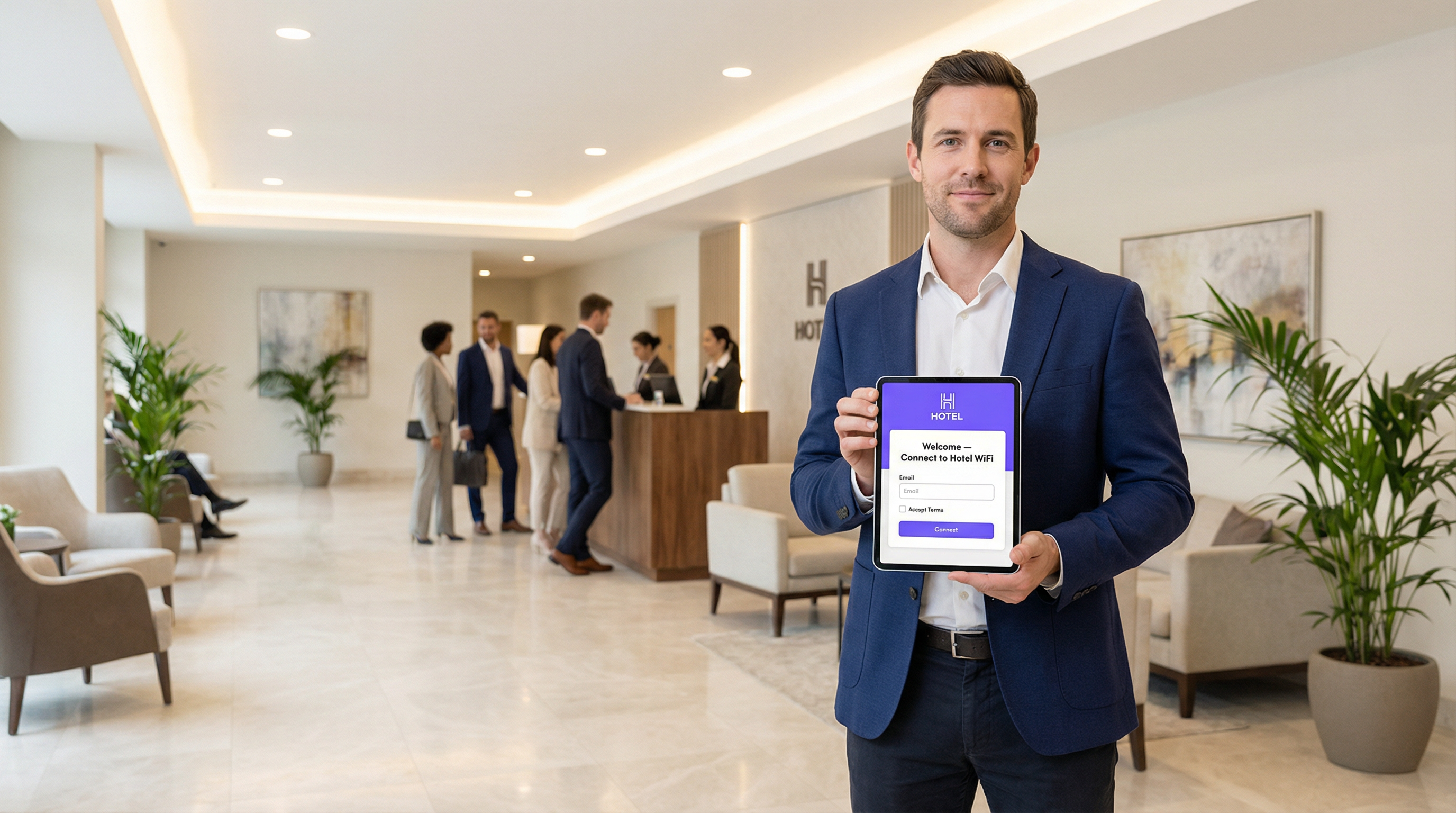
Captive Portal वह वेब पेज है जो किसी सार्वजनिक या गेस्ट WiFi नेटवर्क से उपयोगकर्ता के कनेक्शन को इंटरसेप्ट करता है, और पूर्ण इंटरनेट एक्सेस देने से पहले उन्हें कोई कार्रवाई करने—जैसे शर्तें स्वीकार करना, ईमेल दर्ज करना, या सोशल मीडिया अकाउंट से प्रमाणित करना—के लिए कहता है। IT प्रबंधकों, नेटवर्क आर्किटेक्ट्स और वेन्यू ऑपरेटरों के लिए, Captive Portal नेटवर्क सुरक्षा, कानूनी अनुपालन और उपयोगकर्ता जुड़ाव के लिए एक महत्वपूर्ण नियंत्रण बिंदु है। यदि इसे सही ढंग से डिप्लॉय किया जाए, तो यह एक साधारण उपयोगिता को बिजनेस इंटेलिजेंस इकट्ठा करने, मार्केटिंग पहलों को चलाने और आगंतुक अनुभव को बेहतर बनाने के लिए एक शक्तिशाली संपत्ति में बदल देता है। यह मार्गदर्शिका Captive Portal के अंतर्निहित आर्किटेक्चर में एक तकनीकी डीप-डाइव प्रदान करती है, जिसमें इंटरसेप्शन तंत्र (DNS हाइजैकिंग और HTTP रीडायरेक्ट), आधुनिक ऑपरेटिंग सिस्टम में Captive Network Assistant (CNA) की भूमिका, और प्रमाणीकरण को नियंत्रित करने वाले मानक (RADIUS, WISPr) शामिल हैं। यह होटल, रिटेल चेन और स्टेडियम जैसे एंटरप्राइज़ वातावरण के लिए व्यावहारिक, वेंडर-न्यूट्रल कार्यान्वयन मार्गदर्शन प्रदान करता है, जो सुरक्षा सर्वोत्तम प्रथाओं, जोखिम शमन और निवेश पर रिटर्न (ROI) मापने की रणनीतियों पर केंद्रित है। Captive Portal की तकनीकी बारीकियों और रणनीतिक मूल्य को समझकर, IT लीडर्स यह सुनिश्चित कर सकते हैं कि उनके गेस्ट WiFi डिप्लॉयमेंट सुरक्षित, अनुपालन-युक्त और व्यापक व्यावसायिक उद्देश्यों के अनुरूप हैं。
तकनीकी डीप-डाइव
कोर आर्किटेक्चर: द वॉल्ड गार्डन
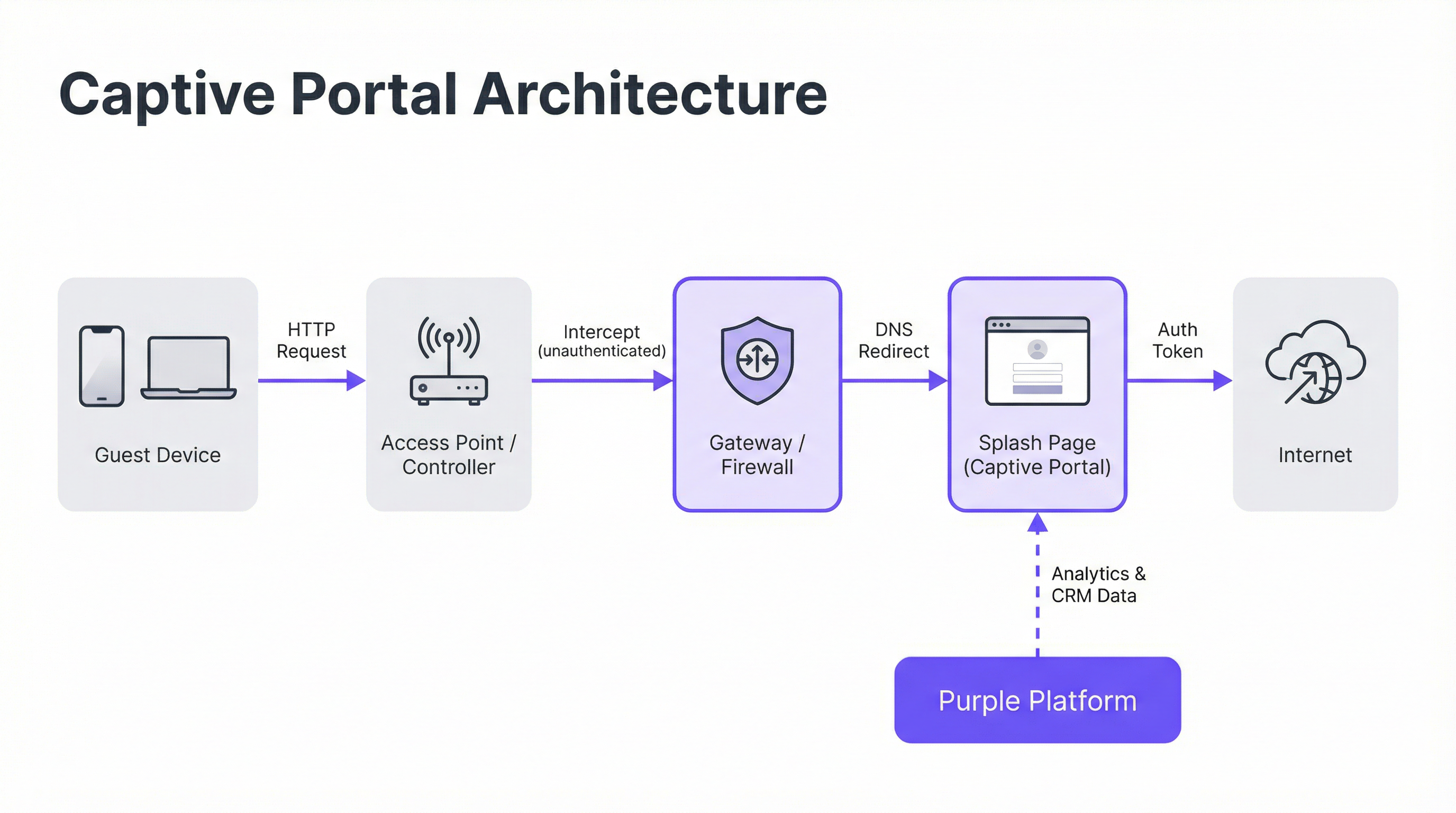
एक Captive Portal 'वॉल्ड गार्डन' (walled garden) बनाकर काम करता है, जो एक प्रतिबंधित नेटवर्क स्थिति है जहाँ एक नए कनेक्टेड डिवाइस का इंटरनेट एक्सेस तब तक सीमित रहता है जब तक कि वह प्रमाणीकरण प्रक्रिया पूरी नहीं कर लेता। इसे नेटवर्क गेटवे या वायरलेस कंट्रोलर स्तर पर डिप्लॉय की गई दो प्राथमिक इंटरसेप्शन तकनीकों के माध्यम से प्राप्त किया जाता है।
DNS हाइजैकिंग (DNS Hijacking): जब कोई अप्रमाणित डिवाइस किसी डोमेन नाम (उदा.
google.com) को रिज़ॉल्व करने का प्रयास करता है, तो नेटवर्क गेटवे DNS क्वेरी को इंटरसेप्ट करता है। सही सार्वजनिक IP पता लौटाने के बजाय, यह Captive Portal सर्वर के IP पते के साथ प्रतिक्रिया देता है। इसके बाद डिवाइस का ब्राउज़र पोर्टल से कनेक्शन शुरू करता है, यह मानते हुए कि यही उसका इच्छित गंतव्य है। यह सबसे आम तरीका है क्योंकि यह प्रोटोकॉल की परवाह किए बिना ट्रैफ़िक को प्रभावी ढंग से इंटरसेप्ट करता है।HTTP रीडायरेक्ट (HTTP Redirect): इस मॉडल में, गेटवे DNS क्वेरी को सही ढंग से रिज़ॉल्व होने देता है। हालाँकि, जब डिवाइस अपना प्रारंभिक HTTP अनुरोध भेजता है, तो गेटवे उसे इंटरसेप्ट करता है और HTTP 302 'Found' स्टेटस कोड के साथ प्रतिक्रिया देता है, जिससे ब्राउज़र Captive Portal के URL पर रीडायरेक्ट हो जाता है। इस पद्धति की प्राथमिक सीमा HTTPS ट्रैफ़िक के विरुद्ध इसकी अप्रभावीता है, क्योंकि ब्राउज़र के सुरक्षा प्रोटोकॉल रीडायरेक्ट को रोक देंगे और एक प्रमाणपत्र चेतावनी दिखाएंगे। आधुनिक सिस्टम एक हाइब्रिड दृष्टिकोण का उपयोग करते हैं, जो प्राथमिक तंत्र के रूप में DNS हाइजैकिंग पर निर्भर करते हैं।
Captive Network Assistant (CNA)
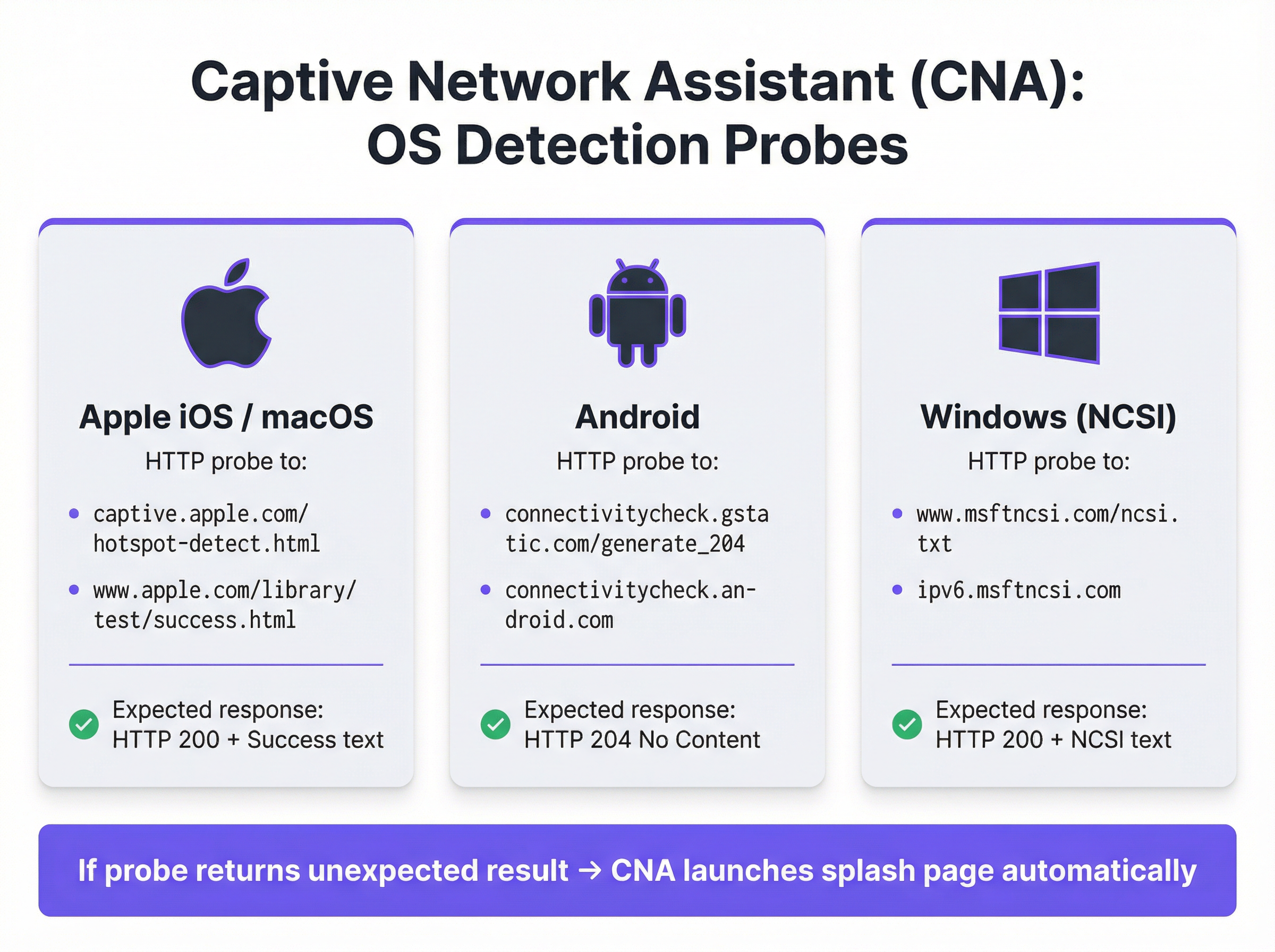
आधुनिक उपकरणों पर स्प्लैश पेज का निर्बाध, स्वचालित रूप से दिखाई देना Captive Network Assistant (CNA) द्वारा संचालित होता है, जो सभी प्रमुख ऑपरेटिंग सिस्टम में निर्मित एक सुविधा है। जैसे ही कोई डिवाइस किसी नए WiFi नेटवर्क से कनेक्ट होता है, OS एक हार्डकोडेड एंडपॉइंट पर HTTP प्रोब भेजकर 'लाइवनेस' (liveness) परीक्षण करता है।
- Apple (iOS और macOS):
captive.apple.com/hotspot-detect.htmlको प्रोब करता है और 'Success' शब्द वाले HTTP 200 रिस्पॉन्स की अपेक्षा करता है। - Android:
connectivitycheck.gstatic.com/generate_204को प्रोब करता है और HTTP 204 'No Content' रिस्पॉन्स की अपेक्षा करता है। - Windows (NCSI): नेटवर्क कनेक्टिविटी स्टेटस इंडिकेटर
www.msftncsi.com/ncsi.txtको प्रोब करता है और 'Microsoft NCSI' टेक्स्ट के साथ HTTP 200 रिस्पॉन्स की अपेक्षा करता है।
यदि गेटवे इस प्रोब को इंटरसेप्ट करता है और अपेक्षित रिस्पॉन्स के अलावा कुछ भी लौटाता है, तो OS यह निष्कर्ष निकालता है कि यह एक Captive Portal के पीछे है और स्प्लैश पेज प्रदर्शित करने के लिए स्वचालित रूप से CNA—एक सैंडबॉक्स्ड, हल्का 'मिनी-ब्राउज़र'—लॉन्च करता है। यह प्रक्रिया उपयोगकर्ताओं को मैन्युअल रूप से अपना ब्राउज़र खोलने की आवश्यकता को समाप्त करती है, जिससे उपयोगकर्ता अनुभव में काफी सुधार होता है।
प्रमाणीकरण और एक्सेस ग्रांट
एक बार जब उपयोगकर्ता स्प्लैश पेज के साथ इंटरैक्ट करता है (उदा. फॉर्म सबमिट करके), तो पोर्टल सर्वर डिवाइस को अधिकृत करने के लिए नेटवर्क गेटवे के साथ संचार करता है। इसे आमतौर पर तीन प्रोटोकॉल में से किसी एक के माध्यम से नियंत्रित किया जाता है:
- RADIUS (Remote Authentication Dial-In User Service): सबसे आम मानक (RFC 2865), जहाँ पोर्टल एक RADIUS क्लाइंट के रूप में कार्य करता है, जो डिवाइस के MAC पते के साथ गेटवे (RADIUS सर्वर के रूप में कार्य करते हुए) को प्रमाणीकरण अनुरोध भेजता है।
- WISPr (Wireless Internet Service Provider roaming): हॉटस्पॉट प्रमाणीकरण के लिए एक XML-आधारित प्रोटोकॉल, हालाँकि इसे RADIUS की तुलना में कम व्यापक रूप से अपनाया गया है।
- प्रोपराइटरी APIs: कई आधुनिक नेटवर्क हार्डवेयर वेंडर (जैसे Cisco Meraki, Aruba, और Ruckus) RESTful APIs प्रदान करते हैं जो डिवाइस प्राधिकरण पर अधिक लचीले और विस्तृत नियंत्रण की अनुमति देते हैं, जो कि Purple द्वारा उपयोग की जाने वाली एकीकरण विधि है।
सफल प्रमाणीकरण पर, गेटवे डिवाइस के MAC पते को 'अप्रमाणित' से 'प्रमाणित' स्थिति में ले जाता है, वॉल्ड गार्डन प्रतिबंधों को हटा देता है, और पूर्व-निर्धारित सत्र अवधि के लिए पूर्ण इंटरनेट एक्सेस प्रदान करता है।
कार्यान्वयन मार्गदर्शिका
एंटरप्राइज़-ग्रेड Captive Portal को डिप्लॉय करने के लिए सावधानीपूर्वक योजना बनाने की आवश्यकता होती है जो स्प्लैश पेज डिज़ाइन से परे है। सफल कार्यान्वयन के लिए इन वेंडर-न्यूट्रल चरणों का पालन करें।
एक्सेस नीतियां परिभाषित करें: प्रमाणीकरण विधियां (उदा. सोशल लॉगिन, ईमेल/SMS सत्यापन, वाउचर कोड), सत्र अवधि, आइडल टाइमआउट और बैंडविड्थ सीमाएं निर्धारित करें। एक होटल के लिए, 10 Mbps कैप के साथ 24 घंटे का सत्र उपयुक्त हो सकता है। उच्च-घनत्व वाले स्टेडियम के लिए, 2 Mbps कैप और आक्रामक ट्रैफ़िक शेपिंग के साथ 4 घंटे का सत्र अधिक यथार्थवादी है।
वॉल्ड गार्डन कॉन्फ़िगर करें: उन सभी डोमेन और IP पतों की एक व्यापक श्वेतसूची (whitelist) बनाएं जिन तक एक अप्रमाणित डिवाइस की पहुंच होनी चाहिए। इसमें स्वयं पोर्टल सर्वर, एसेट्स (चित्र, CSS) के लिए इसका CDN, और किसी भी तृतीय-पक्ष प्रमाणीकरण प्रदाताओं (उदा. Google और Facebook के OAuth डोमेन) के एंडपॉइंट शामिल हैं। एक अधूरा वॉल्ड गार्डन विफल पोर्टल डिप्लॉयमेंट का प्रमुख कारण है।
CNA-अनुकूलित स्प्लैश पेज डिज़ाइन करें: स्प्लैश पेज हल्का और उत्तरदायी (responsive) होना चाहिए। इसे सेलुलर कनेक्शन पर 3 सेकंड से कम समय में लोड होना चाहिए और जटिल JavaScript या बड़े फ्रेमवर्क से बचना चाहिए जो सैंडबॉक्स्ड CNA वातावरण में विफल हो सकते हैं। CNA के समय से पहले बंद होने की समस्याओं को रोकने के लिए सभी उपयोगकर्ता कार्रवाइयां एक ही पेज व्यू के भीतर प्राप्त करने योग्य होनी चाहिए।
नेटवर्क हार्डवेयर के साथ एकीकृत करें: अपने Captive Portal सर्वर को इंगित करने के लिए अपने वायरलेस कंट्रोलर या गेटवे को कॉन्फ़िगर करें। इसमें पोर्टल URL सेट करना, RADIUS या API प्रमाणीकरण मापदंडों को परिभाषित करना और रीडायरेक्ट व्यवहार निर्दिष्ट करना शामिल है। Purple पूर्व-निर्मित एकीकरण प्रदान करता है जो सभी प्रमुख हार्डवेयर वेंडरों के लिए इस प्रक्रिया को स्वचालित करता है।
डेटा अनुपालन सुनिश्चित करें: यदि व्यक्तिगत डेटा एकत्र कर रहे हैं, तो आपके पोर्टल प्रवाह में स्पष्ट, विस्तृत सहमति तंत्र शामिल होना चाहिए जो GDPR और CCPA जैसे नियमों का अनुपालन करते हों। मार्केटिंग के लिए सहमति सेवा की शर्तों की स्वीकृति से अलग होनी चाहिए। Purple प्लेटफ़ॉर्म में ऑडिट योग्य लॉग के साथ पूरी तरह से अनुपालन करने वाला सहमति प्रबंधन ढांचा शामिल है।
सर्वोत्तम प्रथाएं
- WPA2/WPA3 के साथ सुरक्षा को प्राथमिकता दें: अपने गेस्ट SSID को हमेशा कम से कम WPA2-Personal एन्क्रिप्शन के साथ चलाएं। Captive Portal एक एप्लिकेशन-लेयर नियंत्रण है और यह ओवर-द-एयर ट्रैफ़िक को एन्क्रिप्ट नहीं करता है। पोर्टल के साथ एन्क्रिप्शन का संयोजन स्तरित सुरक्षा (layered security) प्रदान करता है।
- नेटवर्क सेगमेंटेशन लागू करें: गेस्ट ट्रैफ़िक को अपने आंतरिक कॉर्पोरेट नेटवर्क से सख्ती से अलग करने के लिए VLAN का उपयोग करें। एक Captive Portal तार्किक अलगाव प्रदान करता है, लेकिन PCI DSS जैसे मानकों को पूरा करने के लिए भौतिक या आभासी सेगमेंटेशन आवश्यक है।
- MAC एड्रेस रैंडमाइज़ेशन को संबोधित करें: आधुनिक मोबाइल ऑपरेटिंग सिस्टम ट्रैकिंग को रोकने के लिए डिफ़ॉल्ट रूप से MAC पतों को रैंडमाइज़ करते हैं। लौटने वाले आगंतुकों की पहचान के लिए केवल MAC पतों पर निर्भर रहना अब व्यवहार्य नहीं है। Purple जैसे प्लेटफ़ॉर्म का लाभ उठाएं जो लौटने वाले उपयोगकर्ताओं की पहचान करने के लिए अधिक उन्नत डिवाइस फ़िंगरप्रिंटिंग और प्रोफ़ाइल-आधारित प्रमाणीकरण का उपयोग करते हैं।
- नियमित रूप से निगरानी और परीक्षण करें: OS अपडेट, विशेष रूप से Apple से, बिना किसी चेतावनी के CNA व्यवहार को बदल सकते हैं। iOS, Android और Windows के नवीनतम संस्करणों पर अपने पोर्टल की कार्यक्षमता को मान्य करने के लिए एक त्रैमासिक परीक्षण प्रोटोकॉल स्थापित करें।
समस्या निवारण और जोखिम शमन
| सामान्य विफलता मोड | मूल कारण | शमन रणनीति |
|---|---|---|
| स्प्लैश पेज लोड नहीं हो रहा है | अधूरा वॉल्ड गार्डन पोर्टल एसेट्स (CSS, JS, चित्र) तक पहुंच को अवरुद्ध कर रहा है या DNS रिज़ॉल्यूशन विफलता। | वॉल्ड गार्डन के लिए सभी आवश्यक डोमेन का पूरी तरह से परीक्षण और सत्यापन करें। सुनिश्चित करें कि गेस्ट VLAN पर DNS सही ढंग से कॉन्फ़िगर किया गया है। |
| सोशल लॉगिन विफल हो रहे हैं | OAuth प्रदाता डोमेन (उदा. accounts.google.com) वॉल्ड गार्डन में शामिल नहीं हैं। |
वॉल्ड गार्डन में सभी आवश्यक तृतीय-पक्ष प्रमाणीकरण डोमेन जोड़ें। लॉगिन प्रवाह के दौरान नेटवर्क अनुरोधों को ट्रेस करने के लिए ब्राउज़र डेवलपर टूल का उपयोग करें। |
| CNA विंडो अप्रत्याशित रूप से बंद हो जाती है | स्प्लैश पेज एक जटिल रीडायरेक्ट का प्रयास करता है या एक नया टैब खोलने की कोशिश करता है, जो CNA में समर्थित नहीं है। | सिंगल-पेज प्रमाणीकरण प्रवाह डिज़ाइन करें। सुनिश्चित करें कि सभी इंटरैक्शन प्रारंभिक पोर्टल पेज के भीतर हों। |
| उपयोगकर्ता रीडायरेक्ट नहीं हुए (HTTPS) | गेटवे HTTPS साइट पर HTTP रीडायरेक्ट का प्रयास कर रहा है, जिससे ब्राउज़र सुरक्षा त्रुटि हो रही है। | सुनिश्चित करें कि गेटवे DNS हाइजैकिंग के लिए कॉन्फ़िगर किया गया है, जो HTTP और HTTPS दोनों ट्रैफ़िक के लिए प्रभावी है। |
| खराब प्रदर्शन / धीमा लॉगिन | स्प्लैश पेज बहुत बड़ा है (उच्च-रिज़ॉल्यूशन वाले चित्र, भारी JavaScript फ्रेमवर्क)। | सभी एसेट्स को अनुकूलित करें और कुल पेज का वजन 500KB से कम रखने का लक्ष्य रखें। गैर-आवश्यक स्क्रिप्ट की लोडिंग को टालें। |
ROI और व्यावसायिक प्रभाव
Captive Portal का व्यावसायिक मूल्य इंटरनेट एक्सेस प्रदान करने से कहीं आगे तक फैला हुआ है। ROI को अनाम आगंतुकों को ज्ञात ग्राहकों में बदलने और ठोस व्यावसायिक परिणाम प्राप्त करने की इसकी क्षमता के माध्यम से मापा जाता है।
- डेटा अधिग्रहण: लॉगिन के समय ईमेल पते, सोशल प्रोफ़ाइल या सर्वेक्षण प्रतिक्रियाओं को कैप्चर करके, वेन्यू समृद्ध CRM प्रोफ़ाइल बना सकते हैं। एक रिटेल चेन अपने मार्केटिंग डेटाबेस में किसी विशिष्ट ग्राहक को भौतिक स्टोर विज़िट का श्रेय दे सकती है, जिससे ऑनलाइन-ऑफ़लाइन अंतर कम हो जाता है।
- बढ़ा हुआ जुड़ाव: स्प्लैश पेज एक उच्च-दृश्यता वाला डिजिटल बिलबोर्ड है। होटल स्पा सेवाओं या रेस्तरां बुकिंग को बढ़ावा दे सकते हैं। सम्मेलन केंद्र इवेंट शेड्यूल और प्रायोजक संदेश प्रदर्शित कर सकते हैं। यह सीधा संचार चैनल वृद्धिशील राजस्व (incremental revenue) बढ़ा सकता है।
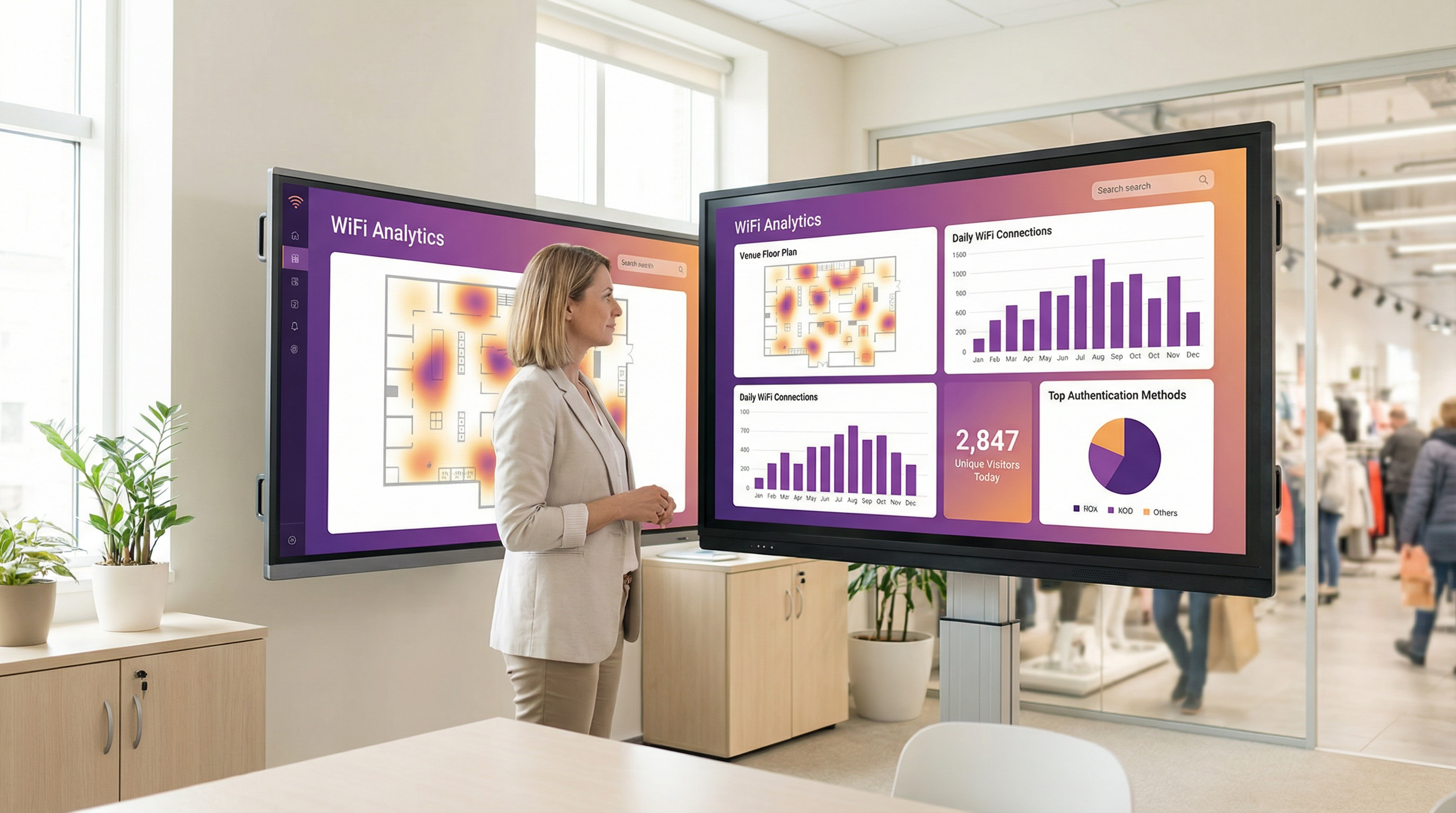
- ऑपरेशनल इंटेलिजेंस: Purple जैसे WiFi एनालिटिक्स प्लेटफ़ॉर्म आगंतुक व्यवहार में गहरी अंतर्दृष्टि प्रदान करने के लिए प्रमाणीकरण डेटा का उपयोग करते हैं। हीटमैप्स फुटफॉल पैटर्न को प्रकट करते हैं, ड्वेल टाइम (dwell time) विश्लेषण जुड़ाव के स्तर को दर्शाता है, और बार-बार आने वाले आगंतुक मेट्रिक्स वफादारी मापने में मदद करते हैं। एक स्टेडियम इस डेटा का उपयोग रियायती स्टैंड स्टाफिंग को अनुकूलित करने के लिए कर सकता है, जबकि एक संग्रहालय प्रदर्शनी की लोकप्रियता का विश्लेषण कर सकता है।
Purple जैसे प्लेटफ़ॉर्म का लाभ उठाकर, Captive Portal किसी वेन्यू की लोकेशन इंटेलिजेंस रणनीति की नींव बन जाता है, जो मार्केटिंग प्रभावशीलता, परिचालन दक्षता और ग्राहकों की संतुष्टि में मापने योग्य रिटर्न प्रदान करता है।
मुख्य शब्द और परिभाषाएं
Captive Portal
A web page that intercepts a newly connected user's browser, requiring them to perform a specific action before being granted full internet access.
This is the primary mechanism IT teams use to control access to guest and public WiFi networks, serving as a gateway for authentication, compliance, and user engagement.
Splash Page
The specific web page or user interface that is displayed to the user by the captive portal for authentication.
This is the main user-facing component. Its design and performance are critical for user experience and for achieving business goals like data capture or marketing.
Captive Network Assistant (CNA)
A built-in operating system feature (also known as a 'mini-browser') that automatically detects a captive portal and displays the splash page.
IT teams must design splash pages specifically for the CNA's limited, sandboxed environment, as it behaves differently from a standard web browser and is a common point of failure.
Walled Garden
The list of whitelisted IP addresses and domain names that an unauthenticated user is allowed to access before completing the captive portal authentication.
A misconfigured walled garden is the most common reason for portal failures. Network architects must ensure it includes all necessary endpoints for the portal and any third-party login providers.
DNS Hijacking
An interception technique where a network gateway provides a false IP address (that of the portal server) in response to a DNS query from an unauthenticated device.
This is the core mechanism that makes captive portals work, allowing the network to redirect users to the splash page regardless of the website they are trying to visit.
RADIUS (RFC 2865)
A standard networking protocol for centralized Authentication, Authorization, and Accounting (AAA) management.
In a captive portal context, it's a common way for the portal server to tell the network gateway that a user has been authenticated and should be granted internet access.
MAC Address Randomization
An OS-level privacy feature where a device uses a different, randomly generated MAC address for each WiFi network it connects to.
This feature makes it difficult for IT teams to track unique devices over time using traditional methods. It necessitates a shift towards profile-based authentication for accurate visitor analytics.
IEEE 802.1X
An IEEE standard for port-based Network Access Control (PNAC) that provides authenticated network access to Ethernet networks and WLANs.
This is the enterprise-grade alternative to captive portals, often used for corporate devices. It offers higher security but requires client-side configuration, making it unsuitable for guest access scenarios where simplicity is key.
केस स्टडीज
A 200-room luxury hotel needs to replace its outdated guest WiFi system. The goal is to provide a seamless, branded login experience, offer tiered bandwidth (free for basic access, paid for premium streaming), and promote hotel amenities like the spa and restaurant directly on the splash page. The hotel uses Cisco Meraki access points.
- Deployment with Purple & Meraki: Leverage Purple's native API integration with the Cisco Meraki dashboard. Create a new SSID for guest access (e.g., 'Hotel_Guest_WiFi') and configure it with WPA2-Personal encryption. In the Meraki dashboard, set the 'Splash Page' option to 'Sign-on with' and select 'Purple'.
- Tiered Access Configuration: Within the Purple platform, create two access tiers. The 'Free' tier is configured with a 5 Mbps bandwidth cap and a 24-hour session time. The 'Premium' tier is set to 25 Mbps with no cap and requires payment via an integrated Stripe gateway.
- Splash Page Design: Use Purple's drag-and-drop editor to design the splash page. The initial view presents the 'Free' option (login with email or social media) and a prominent 'Upgrade to Premium' button. Upon successful free login, the user is redirected to a welcome page featuring a carousel of promotions for the hotel's restaurant and spa, with direct links to the booking engine.
- Compliance: Enable Purple's GDPR/CCPA consent module, ensuring separate checkboxes for 'Terms of Service' and 'Marketing Communications'.
A national retail chain with 500 stores wants to offer free guest WiFi to understand in-store customer behavior and build its marketing database. They need a scalable solution that provides centralized management and delivers analytics on footfall, dwell time, and repeat visits. The existing hardware is a mix of Aruba and Ruckus.
- Centralized Management: Deploy Purple across all 500 stores. The platform's hardware-agnostic nature allows for consistent configuration across both Aruba and Ruckus controllers from a single cloud dashboard.
- Authentication & Data Capture: Configure the splash page to require social login (Facebook or Google) or email address submission. This captures valuable demographic data and a marketing contact for every user who connects.
- Analytics & Integration: Leverage Purple's WiFi analytics suite. The platform will automatically generate dashboards for each store and at the corporate level, showing metrics like unique visitors, dwell times by zone (if location services are enabled), and repeat visitor rates. Set up a daily data export via API to feed the captured email addresses and visitor metrics directly into the company's master CRM (e.g., Salesforce).
- Scalable Deployment: Create a single splash page template and apply it to all locations. Any updates to branding or promotions can be pushed to all 500 stores simultaneously from the central dashboard.
परिदृश्य विश्लेषण
Q1. You are deploying a new guest WiFi network in a conference center. A key requirement is that attendees can log in using their LinkedIn profile to facilitate networking. During testing, the LinkedIn login button on the splash page does nothing when clicked on an iPhone. What is the most likely cause and how would you troubleshoot it?
💡 संकेत:Consider the sandboxed environment of the CNA and its network restrictions.
अनुशंसित दृष्टिकोण दिखाएं
The most likely cause is an incomplete walled garden. The LinkedIn OAuth flow requires the device to access several domains (e.g., linkedin.com, static-exp1.licdn.com) to load its authentication scripts and display the login pop-up. Because the iPhone is in an unauthenticated state, the CNA is blocking these requests. To troubleshoot, I would connect a laptop to the guest SSID, open the browser's developer tools, and monitor the 'Network' tab while attempting to log in. This will reveal all the blocked domains, which must then be added to the gateway's walled garden whitelist.
Q2. A retail client wants to measure the loyalty of their in-store shoppers by tracking how many of them are repeat visitors. Their current captive portal only identifies devices by MAC address. Why is this approach flawed and what alternative strategy should you propose?
💡 संकेत:Think about modern mobile OS privacy features.
अनुशंसित दृष्टिकोण दिखाएं
This approach is flawed due to MAC address randomization, a default privacy feature in iOS, Android, and Windows that assigns a different MAC address for each WiFi network. A returning customer's phone will appear as a new device on each visit, making MAC-based loyalty tracking highly inaccurate. I would propose a shift to a profile-based authentication strategy using Purple. By requiring a social login or an email/phone number verification, we can create a persistent user profile that is independent of the device's MAC address. This allows for accurate tracking of repeat visits and builds a much richer CRM profile for the client.
Q3. A hotel is receiving complaints that its premium paid WiFi tier, which is supposed to be faster, feels no different from the free tier. The network is configured with a 5 Mbps cap on the 'Free' user profile and a 50 Mbps cap on the 'Premium' profile. Where in the network architecture would you investigate to diagnose this issue?
💡 संकेत:Consider the entire data path from the access point to the internet egress.
अनुशंसित दृष्टिकोण दिखाएं
The issue is likely not with the captive portal profiles themselves, but with a bottleneck further up the network chain. I would investigate in this order: 1. Wireless Controller/Gateway: Verify that the bandwidth shaping or Quality of Service (QoS) policies are being correctly applied to the user roles associated with the 'Free' and 'Premium' profiles. 2. Firewall: Check the firewall for any global traffic shaping policies that might be overriding the per-user rules from the controller. 3. Internet Circuit: Run a speed test from the gateway's LAN interface to confirm the total available internet bandwidth. It's possible the entire property's internet connection is saturated or performing below its subscribed speed, making the per-user caps irrelevant. 4. Access Point Saturation: In high-density areas, check the client load and channel utilization on the specific APs the complaining users are connected to. RF interference or an overloaded AP can also be a bottleneck.
मुख्य निष्कर्ष
- ✓A captive portal is a web page that intercepts user traffic on a guest WiFi network to enforce authentication and policy.
- ✓The automatic pop-up is handled by the Captive Network Assistant (CNA), a mini-browser in all major operating systems.
- ✓Core interception works via DNS hijacking or HTTP redirect at the network gateway.
- ✓Splash pages must be designed to be lightweight and functional within the limited, sandboxed CNA environment.
- ✓A correctly configured 'walled garden' is critical for ensuring third-party social logins work correctly.
- ✓Modern OS privacy features like MAC address randomization make profile-based authentication essential for accurate visitor analytics.
- ✓A captive portal platform like Purple transforms a network access tool into a powerful asset for business intelligence, marketing, and compliance.




