
43% of UK businesses reported at least one cyber security breach or attack in the previous 12 months, according to the government's Cyber Security Breaches Survey 2025. That's roughly 612,000 organisations, from corner shops and dental surgeries to hotel groups and housing providers.
Very few of them will be breached by something clever. Most will be breached through a device nobody listed, an account nobody disabled, or a guest network that looked separate and wasn't. Getting the sequence right removes more risk than buying anything.
The controls that stop most attacks in the right order
The same survey makes clear this is not a large-enterprise problem. Small businesses appear throughout the reports, and the incidents themselves are mostly ordinary: unauthorised access, malware and attacks on internet-facing systems, with ransomware a small but steady share.
That spread is the point. No single product carries the load, and the order you apply controls in matters more than the brand on the box.
| Priority | Control | What it stops | Done when |
|---|---|---|---|
| 1 | Separate staff, guest, IoT and tenant traffic | Lateral movement from one compromised device to the rest | Each group reaches only its own segment, and the isolation test is recorded with a date |
| 2 | Individual identities with MFA | Reuse of shared passwords and stolen credentials | Every account has its own identity and MFA is enforced at sign-in |
| 3 | Least-privilege administrator rights | Attackers, and careless staff, using broad admin access | Standing admin accounts are removed or reviewed monthly |
| 4 | Encryption on wireless and remote links | Eavesdropping on shared or open networks | Staff and guest traffic is encrypted over the air and over VPN |
| 5 | Central logging and alerts | Unnoticed unusual logins and east-west movement | Logs from access points, firewalls and directories reach one place |
| 6 | Tested revocation and offline restore | Leavers keeping access, and ransomware locking you out of backups | Leaver removal is tested and a restore has been proved |
Every "done when" names a test rather than a purchase. A firewall that exists has proved nothing. A ruleset that a colleague can demonstrate blocks traffic from the guest VLAN to the payroll printer has. Treat a separate guest network as the first boundary to prove: from a device on guest WiFi, try to reach a staff machine, a printer and the access point admin page, then repeat the same checks from the IoT and tenant segments. Log every result with a date, and run the checks again after any change to the ruleset. Isolation you cannot demonstrate on demand is configuration, not control.
The rule that sets your order: if you cannot remove a leaver's access on the same working day, fix identity before anything else.
One control sits outside the network entirely. Segmentation and least privilege keep people away from systems they shouldn't reach, and they still leave one gap: an authorised person can be talked into moving money. Pair the network work with board-level controls against fraudulent wires, meaning a second approver on payment changes and a call-back to a number you already hold before new bank details are used.
None of the six can be verified on equipment you have not listed, and unknown devices fail every column at once.
Map your network before locking anything down
A firewall rule that looks tight on a whiteboard fails because a label printer kept a static address on the staff VLAN, or because the door controllers were installed by a contractor in 2019 and never mentioned again. The map has to catch those survivors before you write policy.
Treat the guest SSID as the first boundary to document and the first proof point for isolation. Record where visitors, staff devices, legacy kit and tenant equipment land, then test later whether each group can only reach what it should.
Mapping should take days, not months. Six passes, in this order.
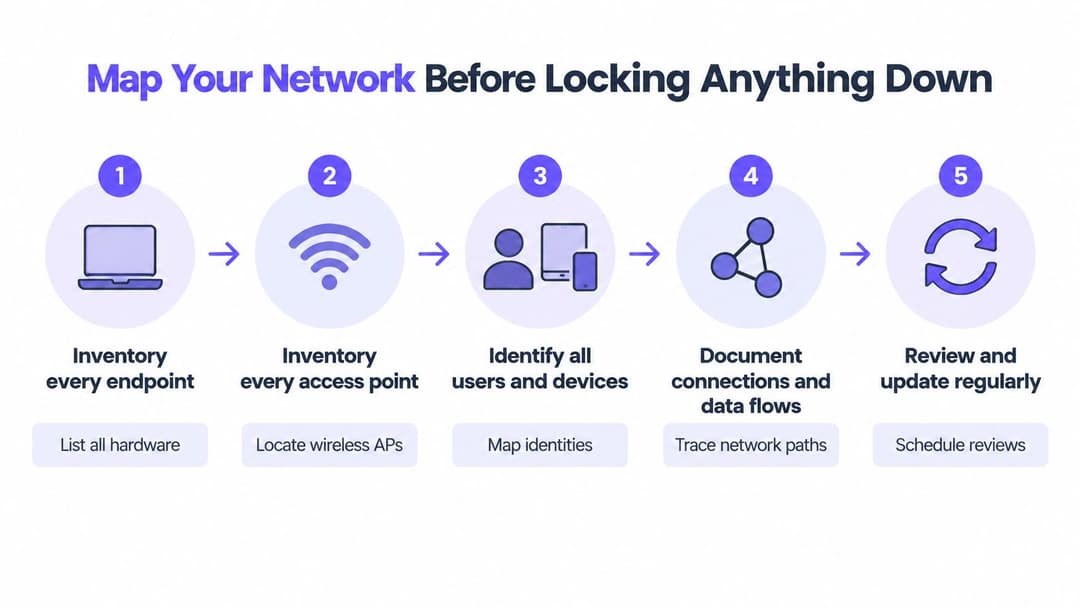
1. Inventory every endpoint. Access points, switches, printers, cameras, tills, building-management controllers, door entry, lifts, and every application that touches the network. Forgotten devices are the usual route in, because nobody patches what nobody remembers.
2. Record who connects to what. Then flag the systems that cannot take multi-factor authentication or current encryption, such as an older time clock or a lab analyser. You need that list early because it shapes every later decision.
3. Classify the data on each system. Customer records, payroll, card data, clinical systems and building controls do not deserve the same protection, and treating them identically wastes your first three weeks.
4. Draw the data flows and user journeys. Mark where guests, contractors and suppliers enter, and what they touch on the way through. Include browserless devices such as TVs and consoles, because they often sit outside the identity plan.
5. Threat-model each group's most likely misuse. Say a guest laptop reaches a printer that holds scanned payroll forms in its memory. That single realisation justifies a VLAN more convincingly than any policy document.
6. Agree the baseline and assign an owner. Every entry gets a name against it and a review date, or the map is stale within a quarter.
Before you write subnet ranges into the inventory, a subnet calculator showing usable host ranges settles arguments about whether a /22 has room for the camera block without re-addressing the site.
The finishing check is simple. Hand the map to a colleague who didn't build it and ask them to find every device in one of the buildings. If they can't, it isn't finished.
Replace shared passwords with individual identities
UK resilience is uneven, and the gaps show up in how networks are governed rather than in what's installed. In the government's visual summary of the 2025 labour market and sectoral analysis, only around 27% of businesses had board-level responsibility for cyber security, down from 38% in 2021, though large businesses sat at 66%. A separate assessment estimated 699,000 businesses, or 49%, had a basic technical cyber security skills gap, up from 18% in 2021. And 32% of businesses that hadn't outsourced cyber security lacked confidence in dealing with a breach.
Read those together and the design principle falls out. Controls have to be enforceable and centrally managed, because they cannot depend on every site manager making a perfect judgement on a busy Tuesday.

From passphrase to certificate in six moves
- Join sign-in to your directory. Entra ID, Google Workspace or Okta. Once accounts live there, joiners and leavers flow through automatically instead of arriving by email.
- Enforce MFA everywhere, and use a phishing-resistant method such as passkeys or FIDO2 keys for administrators.
- Move managed laptops and phones to device certificates. With EAP-TLS, nobody holds a secret that has to be rotated after every leaver.
- Split admin accounts from daily accounts. Elevate for a task and a time window, then let the elevation expire on its own.
- Take passwords off remote access. Identity-based sign-in on the VPN or zero-trust gateway beats a shared PSK that half the company has on a sticky note.
- Test revocation quarterly. Disable a test account and time how long WiFi, email and file shares keep letting it in.
Two things make this stick. The first is scope: identity-based networking ties policy to the person rather than the port or SSID they connected through, which is what identity-based networking means in practice. The second is habit. Staff who use a second factor daily for work tend to keep it switched on where it protects their own money, and protecting banking logins from fraud covers the reasoning you can share in an internal note.
Legacy kit will resist. A label printer or an old access controller may have no certificate support at all. Don't drop it back onto the staff network. Give it a filtered segment and a replacement date, and write both down.
Split traffic by group and test the boundaries
A separate guest SSID is not isolation. It's the first inch of it.
The 2025/2026 technical report counts separate staff and visitor WiFi among core architectural controls, alongside firewalls, restricted admin rights and device controls. That framing is helpful but incomplete, because misconfigured VLANs, flat switch paths, printers, building-management systems, cameras and cheap IoT devices all create routes around a well-meant SSID. The NCSC position is blunter still: assume the network is hostile, verify every request, and protect traffic cryptographically even on internal links.
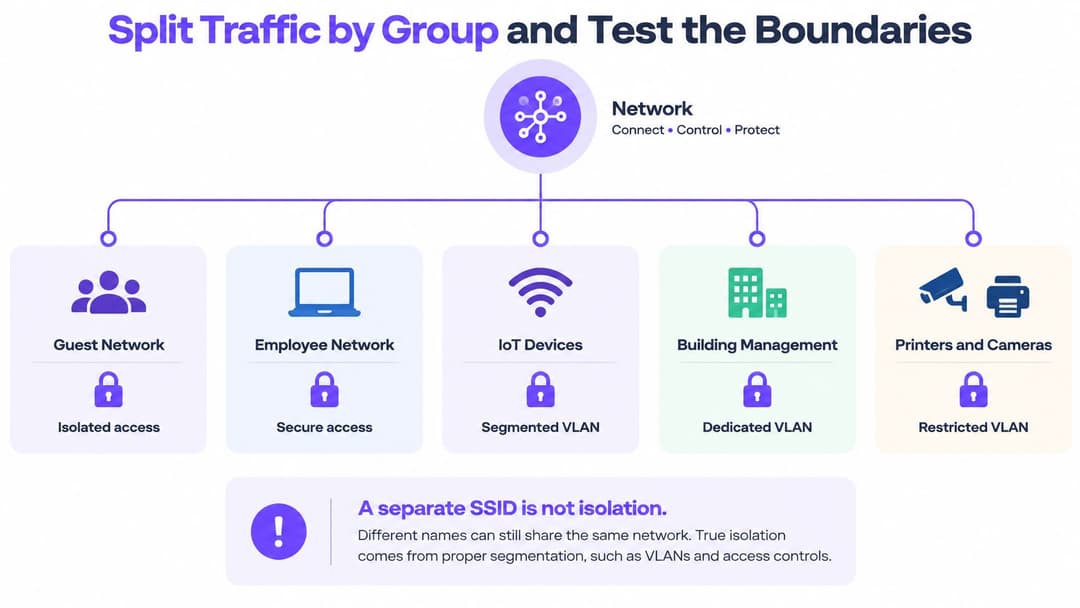
| Group | How it joins | Must not reach |
|---|---|---|
| Staff laptops and phones | Directory sign-in with managed device certificates | Guest segment, IoT and building controls |
| Guests and visitors | Isolated guest access with captive portal or Passpoint | Any staff, admin or IoT address |
| Contractors and suppliers | Named accounts with time-limited access | Admin segment and payroll or customer data |
| IoT, cameras and building systems | Dedicated segment with a device allow-list | Staff file shares and internet-facing admin panels |
| Administrators | Separate admin accounts with MFA and session logging | Guest and general staff segments without a reason on record |
| Residents or tenants | Private network per tenant with isolated devices | Any other tenant, and shared building systems |
Six checks that prove the boundary holds
- Guest to guest. Two devices on the same site, same SSID. Confirm neither can see the other.
- Guest to everything else. Attempt to reach the staff subnet, a printer's web page, and a camera address. All three should fail.
- East-west rules. Read the firewall policy between segments rather than trusting the diagram. Look for any rule with a source of "any".
- Tenant boundaries. On multi-tenant sites, confirm one flat cannot see another's devices, including consoles and TVs that broadcast for pairing.
- Evidence. Record the date, the rule you tested, the result and who signed it off. An untested VLAN is a guess.
- Rollback. Remove one test rule and confirm access returns to the previous state, so you know a bad change can be undone at 2am.
If your team still argues about tagged and untagged ports, start with a plain explanation of what a VLAN is before anyone opens a switch config.
Devices that cannot join the right segment belong on their own tightly filtered segment, with a purchase order behind them.
Encrypt, Log and measure whether controls hold
The 2025 Cyber Security Breaches Survey shows how lopsided UK coverage is. 72% of businesses used firewalls across the whole IT network and individual devices, 68% restricted IT administrator rights, and 71% backed up securely through cloud services. Yet only 40% required two-factor authentication, 31% used a VPN for remote staff, and 30% monitored users. Fewer than four in ten private-sector businesses had separate WiFi networks for staff and visitors, and only 33% monitored user activity.
So the foundations are in place and the evidence layer isn't. That's the gap to close.

Encryption first, because it's cheap and it's absolute. Use WPA3-Enterprise (or WPA2-Enterprise where hardware forces it) on every SSID that carries a login, TLS on every remote path, and encryption for staff traffic on the office LAN too, not just on public WiFi. Treat the wired network as readable by anyone who plugs in.
Then logging. Send access-point, firewall, VPN and directory logs to one place, and alert on three things only to start: sign-ins outside normal hours, a new device joining a staff segment, and traffic crossing between segments that have no business talking. Three good alerts get acted on. Forty get muted.
Report numbers a manager can check
| Metric | Target | How often |
|---|---|---|
| Assets inventoried | All listed devices and applications | Monthly |
| Privileged accounts reviewed | Every admin account | Monthly |
| Staff accounts with MFA | All staff accounts | Quarterly |
| Mean time to revoke a leaver | Same working day | Each leaver |
| Segment isolation tests passed | All segments | Quarterly |
| Backup restores tested | Within your recovery objective | Quarterly |
A claim that a firewall exists is an inventory line. A tested percentage is a control.
Set a monthly review with a named owner and put the six numbers in front of them. Numbers nobody reads decay into fiction within two quarters.
Fix Access drift before it becomes an incident
Most incidents trace back to drift rather than to a clever attack. Accounts outlive their purpose, a rule gets loosened during a Friday fix, and devices never get enrolled in the first place.
| Symptom | Likely cause | Fix |
|---|---|---|
| Former staff still reach shared drives | Account not linked to the leavers process | Automate removal from the directory and test one leaver monthly |
| Guests can reach printers or staff devices | Guest network shares a VLAN with the office | Move guests to an isolated VLAN and block local subnets |
| Devices fail to connect after an MFA change | Certificate expired or device never enrolled | Re-enrol the device and set certificate renewal reminders |
| Legacy device cannot join the secure network | Hardware without 802.1X or current encryption | Place it on a filtered segment and set a replacement date |
| Admin rights creep back over time | Temporary elevated access never expired | Set an expiry date on every elevated grant and review monthly |
The leaver case deserves first attention because it's the most common and the least excusable. If HR and IT don't share a trigger, the account survives the person. Wire the directory to the HR record and test one departure each month rather than trusting memory.
Guest reaching printers is almost always a shared VLAN rather than a firewall mistake. Move the guests, block the local subnets, then retest with the six checks from the segmentation section.
For everything else, one concrete change per row. Re-enrol the device. Set the expiry. Give the legacy kit a date. Record the results in the monthly metrics review rather than a separate checklist nobody opens.
Patch exposed systems and Rehearse response
Segmentation contains a bad day. Patching and rehearsal decide whether you have one.
- List every internet-facing service. Remote access gateways, admin panels, cameras, anything with a public address. Remove what you don't use.
- Patch on a fixed clock. Critical vendor fixes and access-point firmware within 14 days, with the patch date recorded per device.
- Close and change. Shut unused ports, and change default logins on routers, access points and cameras on day one of installation.
- Write a one-page plan. Name who isolates a segment, who calls the supplier, and who decides on reporting.
- Include ransomware. Disconnect the affected segment, confirm offline backups are intact, restore from the most recent clean copy.
- Rehearse twice a year in a tabletop exercise, and refresh the contact list after every leaver or supplier change.
The final check on the plan: can it run without the one person who knows the network best?
Confirm your Access plan this quarter
Ninety days, sequenced so the riskiest gaps close first and every later step has something to enforce.
Week 1. Name one owner and list every device and application. Nothing else starts until that exists.
Weeks 2 to 3. Move staff sign-in to the directory and enforce MFA on all accounts. This is the highest-risk gap in most small networks and the fastest to close.
Weeks 4 to 6. Split guest, staff, IoT and tenant traffic, then run the six isolation checks and record the results. A guest network on its own SSID is the start of segmentation, not proof of it. The checks are what show the boundary holds across every device type, including legacy kit that ignores newer standards.
Weeks 7 to 9. Turn on central logging and agree the six metrics with their targets.
Weeks 10 to 12. Test a leaver's revocation and a backup restore, then report the numbers to whoever holds the budget.
Before buying any managed WiFi or access service, check that the site controller supports RADIUS, change-of-authorisation and walled-garden features. The certificate and guest steps both depend on them, and without change-of-authorisation a revoked device can keep its session until it expires rather than dropping straight away.
The first action is the same in every organisation: put one name against the inventory and one date against it. Everything else in this guide gets easier once that person exists.
Purple gives you the identity layer that makes the rest of this plan enforceable. Staff devices join with managed EAP-TLS certificates through cloud RADIUS, multi-tenant sites keep each resident's network isolated from the others, and everything is managed from one platform without standing up your own PKI. If you're working through the segmentation and revocation steps above, visit Purple to see how the certificate and guest onboarding pieces fit the hardware you already run.