

WiFi Multi-Locataire : Architecture et Gestion
This authoritative technical reference guide provides IT managers, network architects, and venue operators with a comprehensive framework for designing, deploying, and managing multi-tenant WiFi networks across complex environments such as hotels, retail centres, stadiums, and multi-dwelling units (MDUs). It covers the critical architectural differences between single-venue and multi-tenant deployments, with a focus on tenant isolation, bandwidth management, and compliance. By leveraging Purple's enterprise WiFi intelligence platform, organisations can transform shared network infrastructure into a secure, scalable, and commercially valuable service.
🎧 Écouter ce guide
Voir la transcription
Synthèse
Ce guide propose une analyse technique approfondie de l'architecture, de la gestion et de l'impact commercial des réseaux WiFi multi-locataires. Il est conçu pour les responsables informatiques, les architectes réseau et les exploitants de sites chargés de fournir une connectivité sans fil sécurisée et performante dans des environnements complexes à occupants multiples tels que les hôtels, les centres commerciaux, les stades et les résidences gérées (MDU). Nous explorerons les différences fondamentales entre les déploiements sur site unique et multi-locataires, en nous concentrant sur les impératifs architecturaux que sont l'isolation des locataires, la gestion granulaire de la bande passante et le contrôle centralisé. Le contenu va au-delà de la théorie académique pour offrir des conseils pratiques et exploitables pour la conception, le déploiement et la monétisation d'une infrastructure WiFi partagée, tout en atténuant les risques de sécurité et en garantissant la conformité aux normes telles que PCI DSS et GDPR. En s'appuyant sur une plateforme de gestion sophistiquée comme Purple, les propriétaires immobiliers peuvent transformer un service partagé en une valeur ajoutée significative, améliorant la satisfaction des locataires, créant de nouvelles sources de revenus et obtenant des informations opérationnelles approfondies grâce à des analyses détaillées.
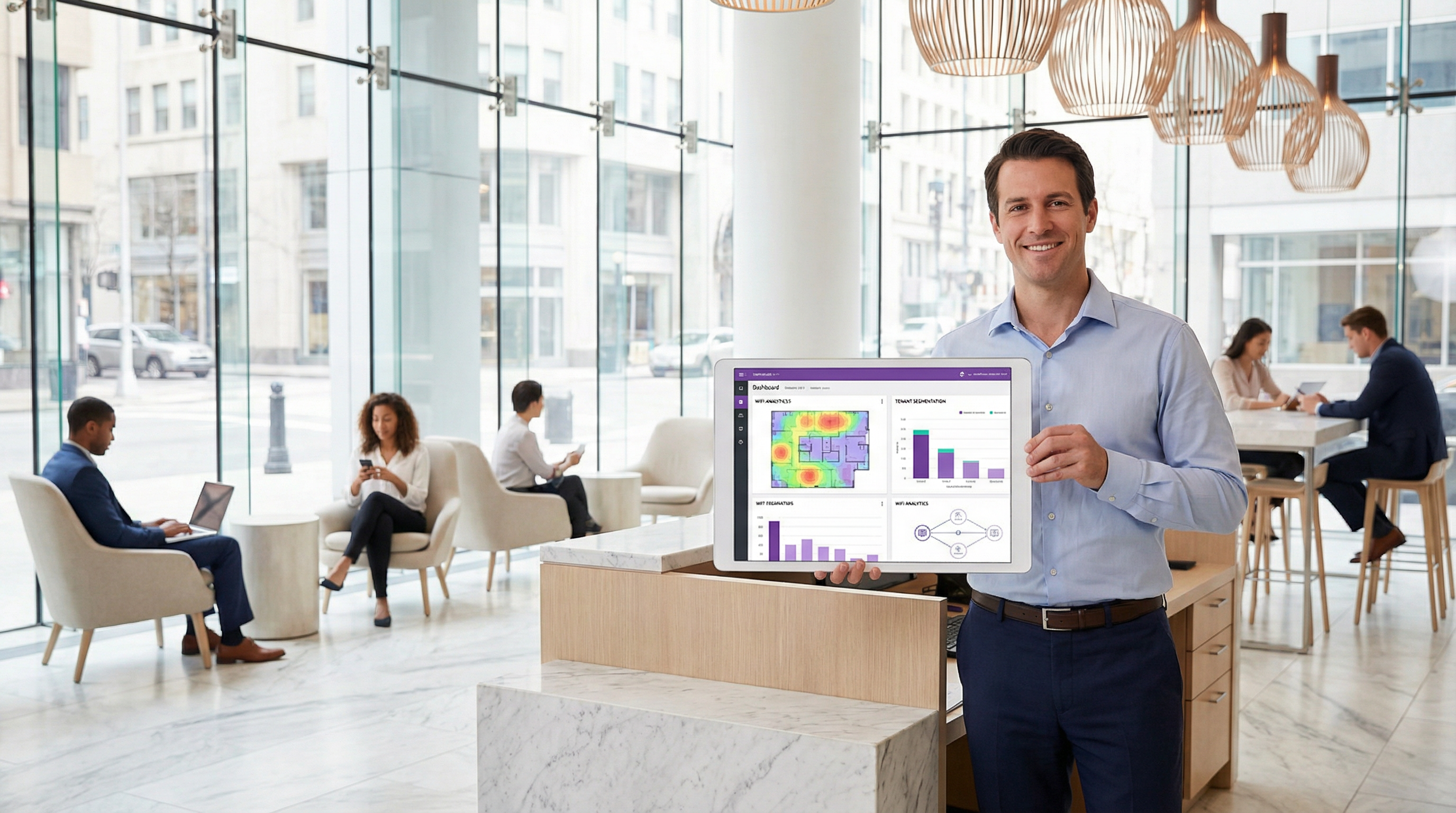
Analyse Technique Approfondie
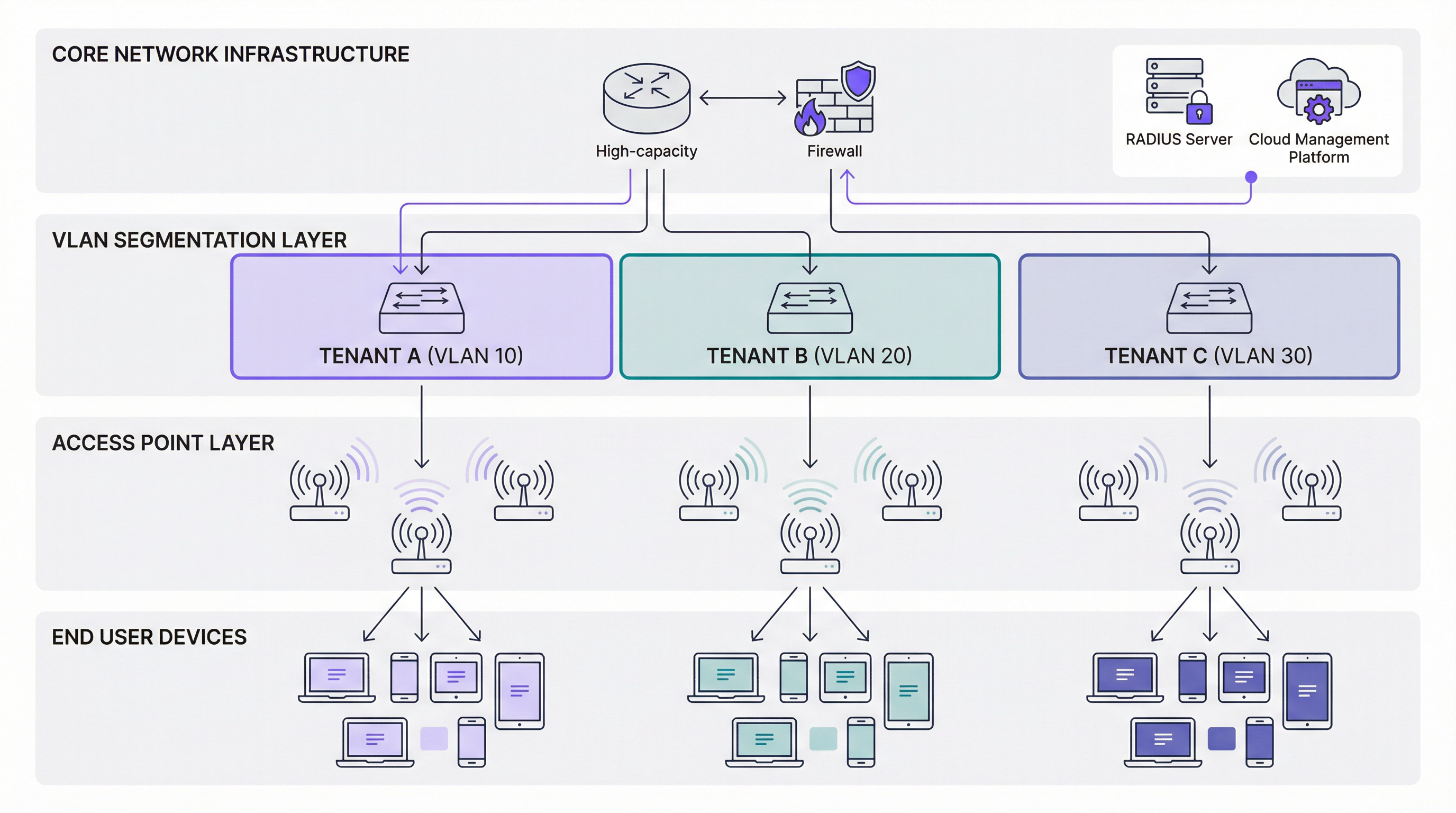
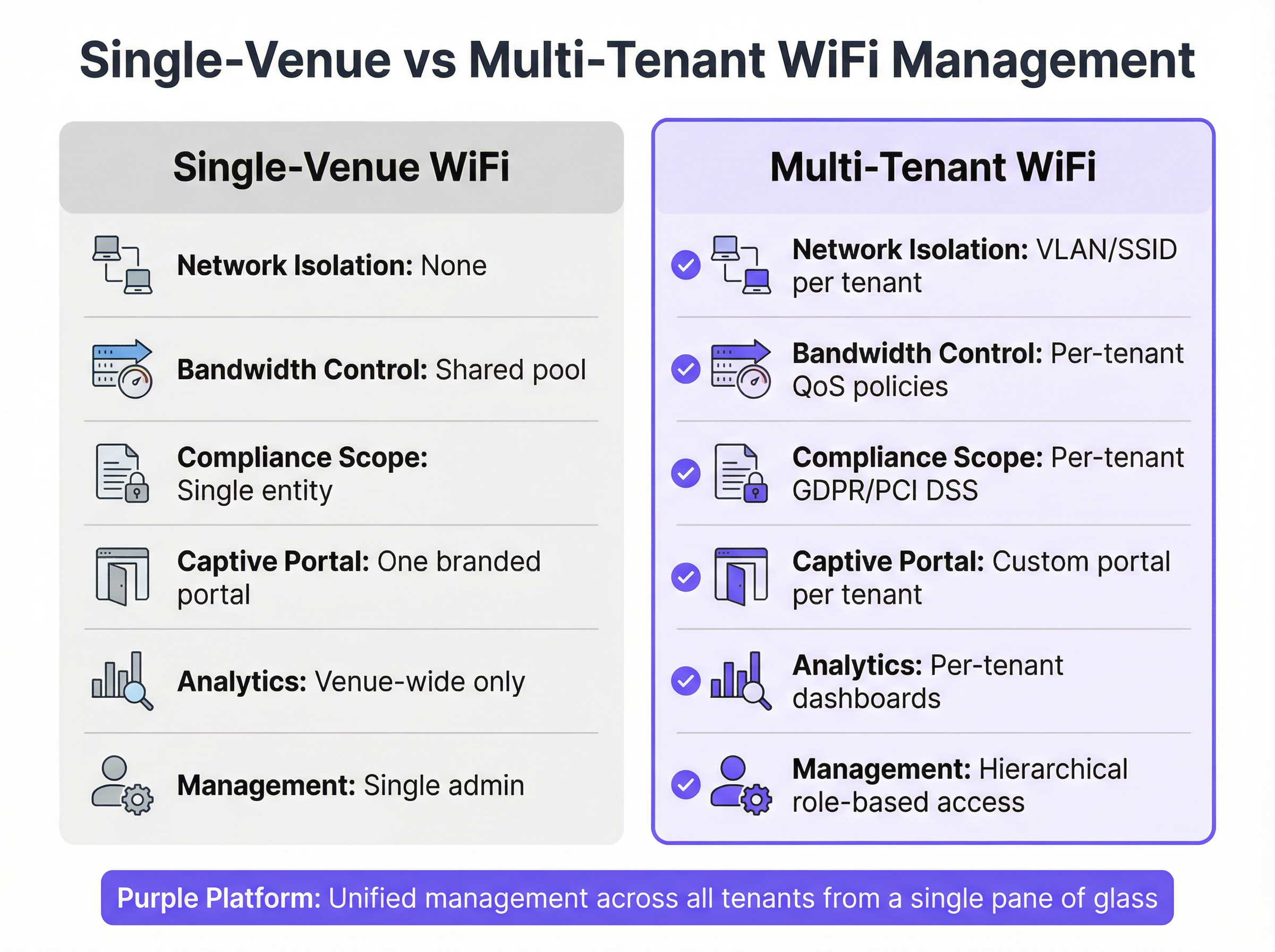
La transition d'une architecture WiFi à occupant unique vers une architecture multi-locataire nécessite un changement fondamental dans la philosophie de conception du réseau : passer d'un environnement plat et de confiance à un cadre segmenté de type Zero Trust. L'objectif principal est de garantir que plusieurs locataires indépendants coexistent sur une infrastructure physique unique sans compromettre la sécurité, les performances ou la confidentialité. Cet objectif est atteint grâce à une approche par couches de l'isolation et du contrôle.
Le Rôle Fondamental des VLAN et de la Segmentation
La pierre angulaire de tout réseau multi-locataire est le Virtual Local Area Network (VLAN). Tel que défini par la norme IEEE 802.1Q, les VLAN permettent de partitionner un commutateur réseau physique unique en plusieurs domaines de diffusion logiquement séparés. En pratique, cela signifie que le trafic d'un locataire — par exemple, un magasin de détail sur le VLAN 10 — est totalement invisible et inaccessible au trafic d'un autre locataire, tel qu'un bureau d'entreprise sur le VLAN 20, même lorsque leurs appareils sont connectés au même point d'accès physique.
Principe Clé : Sans une implémentation adéquate des VLAN, la séparation des locataires n'est que cosmétique. De multiples SSID sur un réseau local plat unique n'offrent aucune sécurité significative, car tous les appareils restent dans le même domaine de diffusion, permettant un mouvement latéral potentiel par des acteurs malveillants.
Authentification et Contrôle d'Accès : Au-delà du Mot de Passe Unique
Dans un environnement multi-locataire, une approche universelle de l'authentification est totalement inadéquate. Les différents locataires ont des exigences de sécurité très diverses, et une architecture robuste doit prendre en charge simultanément plusieurs méthodes d'authentification. Pour les entreprises ou les locataires exigeant une haute sécurité, le WPA3-Enterprise avec authentification IEEE 802.1X est la référence absolue. Il exige que chaque utilisateur s'authentifie avec des identifiants uniques — un nom d'utilisateur et un mot de passe, ou un certificat numérique — auprès d'un serveur RADIUS (Remote Authentication Dial-In User Service). Cela permet une responsabilisation par utilisateur, une journalisation d'audit détaillée et une attribution dynamique de politiques basée sur l'identité de l'utilisateur ou son appartenance à un groupe.
Pour les réseaux invités, les espaces publics ou les locataires du secteur de la vente au détail, un Captive Portal est le mécanisme principal d'intégration des utilisateurs. Les portails modernes, intégrés à des plateformes comme Purple, vont bien au-delà de simples pages d'accueil. Ils peuvent être entièrement personnalisés par locataire avec une image de marque distincte, appliquer des conditions générales, capturer des données utilisateur à des fins marketing de manière conforme au GDPR, et s'intégrer aux connexions sociales ou aux passerelles de paiement. Pour les appareils sans interface tels que les capteurs IoT, des Pre-Shared Keys (PSK) uniques ou dynamiques peuvent être attribuées pour fournir un accès au sein du segment réseau isolé d'un locataire sans nécessiter une infrastructure 802.1X complète.
| Méthode d'Authentification | Idéal Pour | Norme | Avantage Principal |
|---|---|---|---|
| WPA3-Enterprise + 802.1X | Entreprises locataires, services financiers | IEEE 802.1X, RFC 2865 | Identité par utilisateur, politique dynamique |
| Captive Portal (Enhanced Open) | WiFi invité, vente au détail, accès public | WPA3-OWE | Intégration personnalisée, capture de données |
| PSK Dynamique | Appareils IoT, accès temporaire | WPA3-Personal | Déploiement simple, clé par appareil |
Garantir les Performances avec une QoS Granulaire
L'isolation des performances est tout aussi critique que l'isolation de la sécurité. Un seul locataire exécutant une application gourmande en bande passante — streaming vidéo, transferts de fichiers volumineux ou déploiement de mises à jour logicielles — ne doit pas pouvoir dégrader le service pour tous les autres locataires. Cela est géré par des politiques de Qualité de Service (QoS) appliquées au niveau de la couche réseau. Une plateforme multi-locataire sophistiquée permet aux administrateurs de définir des contrôles de bande passante précis par locataire, par utilisateur ou même par application. La limitation de débit plafonne la bande passante maximale montante et descendante disponible pour le SSID de chaque locataire, tandis que les garanties de bande passante réservent une allocation minimale pour les locataires critiques, comme une entreprise cliente hébergeant un événement diffusé en direct. Le Traffic Shaping affine encore cela en priorisant les protocoles sensibles au temps — VoIP, visioconférence — par rapport aux transferts de données moins urgents. Ces politiques garantissent une distribution prévisible et équitable des ressources réseau, ce qui est essentiel pour respecter les accords de niveau de service (SLA) conclus avec les locataires.
Guide de Mise en Œuvre
Le déploiement d'un réseau WiFi multi-locataire est un processus structuré qui se déroule en cinq phases distinctes, de la planification initiale à la validation post-déploiement.
La première phase est l'Analyse des Besoins et le Profilage des Locataires. Avant l'achat ou la configuration de tout matériel, menez un processus de découverte approfondi avec chaque locataire potentiel. L'objectif est de comprendre leur posture de sécurité (ont-ils besoin du 802.1X ? sont-ils soumis aux normes PCI DSS ou HIPAA ?), leurs exigences de performance (quelles sont leurs demandes de pointe en bande passante ? exécutent-ils des applications sensibles à la latence ?) et leurs préférences d'intégration (ont-ils besoin d'un Captive Portal personnalisé ? combien d'utilisateurs simultanés prévoient-ils ?). Ces informations orientent directement chaque décision de conception ultérieure.
La deuxième phase est la Sélection du Matériel et la Conception du Réseau. Les points d'accès et les commutateurs gérés de niveau entreprise sont non négociables. Les points d'accès doivent prendre en charge plusieurs SSID avec le marquage VLAN 802.1Q et des capacités QoS avancées. Les commutateurs doivent être entièrement gérés, avec une densité de ports suffisante et la prise en charge des ports d'accès et trunk 802.1Q. Une passerelle ou un pare-feu à haut débit se situe à la périphérie du réseau, gérant les politiques de routage inter-VLAN et appliquant les règles de sécurité. Parallèlement à la sélection du matériel, concevez un schéma d'adressage IP logique et évolutif, en attribuant un ID VLAN unique et le sous-réseau IP correspondant à chaque locataire, et documentez ce schéma méticuleusement.
La troisième phase est la Configuration de la Plateforme de Gestion Centralisée. À l'aide de la plateforme Purple, les administrateurs définissent les profils des locataires, créent des SSID mappés à leurs VLAN correspondants, configurent les méthodes d'authentification, établissent les politiques de QoS et de limitation de débit, et conçoivent des Captive Portals personnalisés. Il s'agit du cœur opérationnel du déploiement : le tableau de bord unique à partir duquel l'ensemble de l'environnement multi-locataire est gouverné.
La quatrième phase est le Déploiement Physique et le Lancement Progressif. Installez les points d'accès et les commutateurs conformément au plan RF, en garantissant une couverture et une capacité adéquates pour chaque zone locataire. Appliquez les configurations depuis la plateforme de gestion et effectuez un déploiement progressif, en activant un locataire à la fois pour isoler tout problème de configuration avant qu'il n'affecte l'environnement global.
La cinquième et dernière phase est la Validation et la Surveillance Continue. Menez un processus de test rigoureux pour chaque locataire, en vérifiant que l'isolation, les performances et l'authentification fonctionnent toutes comme prévu. Utilisez des outils de capture de paquets pour confirmer qu'un appareil sur le VLAN d'un locataire ne peut pas atteindre un appareil sur celui d'un autre. Établissez des tableaux de bord de surveillance continue et des seuils d'alerte au sein de la plateforme de gestion pour détecter les anomalies en temps réel.

Bonnes Pratiques
Les déploiements multi-locataires les plus efficaces partagent un ensemble commun de principes opérationnels. Adopter un modèle Zero Trust dès le premier jour est primordial : partez du principe qu'aucun utilisateur ou appareil n'est digne de confiance par défaut, et appliquez une authentification et une autorisation strictes pour chaque connexion, quelle que soit son origine sur le réseau.
Le Contrôle d'Accès Basé sur les Rôles (RBAC) est tout aussi critique. Une plateforme de gestion prenant en charge l'administration hiérarchique permet à l'équipe informatique du propriétaire de conserver les droits d'administration globaux tout en accordant aux locataires individuels un accès limité et ciblé pour consulter leurs propres analyses ou gérer leur propre Captive Portal. Ce modèle respecte l'autonomie des locataires sans compromettre l'intégrité de l'infrastructure partagée.
Des audits réguliers et des vérifications de conformité doivent être planifiés, et non réactifs. Pour les locataires soumis à la norme PCI DSS, conservez des journaux d'accès détaillés et soyez prêt à démontrer que les environnements de données des titulaires de cartes sont correctement isolés. Pour tout locataire capturant des données utilisateur via un Captive Portal, assurez-vous que les pratiques de collecte, de stockage et de traitement des données sont entièrement conformes au GDPR, y compris une politique de confidentialité claire et accessible présentée au moment de l'authentification.
Enfin, l'automatisation de l'intégration et du départ des locataires via les API de la plateforme de gestion réduit considérablement les frais opérationnels, minimise le risque d'erreur de configuration humaine et garantit que l'accès est révoqué rapidement et complètement lorsqu'un locataire quitte les lieux.
Dépannage et Atténuation des Risques
Même les réseaux multi-locataires bien conçus rencontrent des défis opérationnels. Le tableau suivant associe les modes de défaillance les plus courants à leurs causes profondes et aux mesures d'atténuation recommandées.
| Symptôme | Cause Profonde Probable | Atténuation Recommandée |
|---|---|---|
| Performances dégradées pour tous les locataires | Saturation de la liaison montante Internet principale ou goulot d'étranglement du pare-feu | Surveiller l'utilisation globale de la bande passante ; implémenter une QoS de haut niveau au niveau de la passerelle ; envisager une mise à niveau de la liaison montante |
| Les utilisateurs ne peuvent pas s'authentifier sur un SSID spécifique | PSK incorrecte, identifiants 802.1X invalides ou serveur RADIUS mal configuré | Inspecter les journaux d'authentification des clients dans la plateforme de gestion ; examiner les journaux d'événements du serveur RADIUS pour les tentatives échouées |
| Trafic inter-VLAN détecté lors d'un audit de sécurité | Port trunk du commutateur mal configuré ou ACL du pare-feu trop permissive | Examiner toutes les configurations des ports du commutateur ; appliquer des règles de pare-feu inter-VLAN de refus par défaut ; auditer les ACL |
| Le Captive Portal ne s'affiche pas correctement pour un locataire | Échec de la résolution DNS ou configuration incorrecte de l'URL du portail | Vérifier les paramètres DNS pour le VLAN du locataire ; tester la résolution de l'URL du portail depuis le sous-réseau du locataire |
| Le locataire signale une connectivité intermittente | Interférences RF, congestion co-canal ou surcharge du point d'accès | Examiner les cartes thermiques RF dans la plateforme de gestion ; ajuster les attributions de canaux et la puissance de transmission ; envisager une couverture de points d'accès supplémentaire |
Le risque le plus important dans un environnement multi-locataire est le mouvement latéral : la capacité d'un appareil compromis sur le réseau d'un locataire à pivoter et à attaquer les appareils d'un autre. Une segmentation VLAN adéquate, combinée à des règles strictes de pare-feu inter-VLAN, constitue le principal contrôle contre cette menace. Des tests d'intrusion réguliers des limites de segmentation sont fortement recommandés pour tout environnement hébergeant des locataires ayant des exigences de sécurité élevées.
ROI et Impact Commercial
Un réseau WiFi multi-locataire correctement architecturé n'est pas un centre de coûts ; c'est un atout stratégique offrant des retours multiples et quantifiables. L'opportunité de revenus la plus directe est la monétisation du réseau : proposer aux locataires des forfaits de bande passante échelonnés, facturer la connectivité d'événements premium ou facturer l'accès à des portails personnalisés et à des tableaux de bord d'analyse. Pour un exploitant de biens immobiliers gérés, cela peut transformer une dépense d'investissement en une source de revenus récurrents.
Au-delà de la monétisation directe, un WiFi géré de haute qualité est un puissant différenciateur sur des marchés concurrentiels. Dans le secteur des résidences à logements multiples (MDU WiFi), une infrastructure WiFi partagée, fiable et gérée par des professionnels est de plus en plus un facteur décisif dans l'acquisition et la fidélisation des locataires. Dans le secteur de l'immobilier commercial, les locataires s'attendent à une connectivité de niveau entreprise comme équipement de base ; ne pas la fournir crée un risque de désabonnement.
Les gains d'efficacité opérationnelle liés à la gestion centralisée sont également significatifs. Une seule équipe informatique peut gérer un portefeuille de propriétés — chacune avec plusieurs locataires — à partir d'un tableau de bord unique, éliminant ainsi le besoin de visites sur site pour les modifications de configuration de routine. Cela réduit les dépenses opérationnelles et accélère les temps de réponse.
L'avantage stratégique le plus précieux est peut-être l'information basée sur les données. En agrégeant des données anonymisées et basées sur le consentement de tous les locataires, les propriétaires immobiliers obtiennent des informations inestimables sur les modèles de fréquentation, les temps de séjour des visiteurs, les périodes de pointe d'utilisation et l'utilisation de l'espace. Ces données éclairent les décisions concernant les investissements immobiliers, la composition des locataires et la planification opérationnelle, offrant un rendement qui s'étend bien au-delà du réseau lui-même.
Termes clés et définitions
Multi-Tenant WiFi
A wireless network architecture in which a single physical infrastructure — access points, switches, and uplinks — is logically partitioned to serve multiple independent organisations or user groups, each with their own isolated network segment, authentication method, and management controls.
IT teams encounter this term when managing properties with multiple occupants, such as shopping centres, hotels, office parks, or multi-dwelling units. It is the foundational concept that distinguishes enterprise venue networking from a simple shared hotspot.
VLAN (Virtual Local Area Network)
A logical network segment created within a physical switched network, as defined by the IEEE 802.1Q standard. VLANs create separate broadcast domains, ensuring that traffic on one VLAN cannot be seen or accessed by devices on another VLAN without explicit routing and firewall permission.
VLANs are the primary mechanism for tenant isolation in a multi-tenant WiFi deployment. Network architects must assign a unique VLAN ID to each tenant and ensure that all switches and access points are correctly configured to tag and carry traffic for each VLAN.
IEEE 802.1X
An IEEE standard for port-based network access control that provides an authentication framework for devices attempting to connect to a LAN or WLAN. It uses the Extensible Authentication Protocol (EAP) and requires a supplicant (the client device), an authenticator (the access point or switch), and an authentication server (typically a RADIUS server).
802.1X is the recommended authentication standard for corporate tenants and any environment requiring individual user accountability. It eliminates the security risks of shared passwords and enables dynamic policy assignment based on user identity.
RADIUS (Remote Authentication Dial-In User Service)
A networking protocol and server infrastructure that provides centralised Authentication, Authorisation, and Accounting (AAA) management for users connecting to a network. In a multi-tenant WiFi context, the RADIUS server validates user credentials for 802.1X-authenticated SSIDs and can dynamically assign users to specific VLANs based on their identity or group membership.
Network architects must plan for RADIUS server redundancy (at least two servers in an active-passive configuration) to prevent authentication failures from causing a network outage. Cloud-hosted RADIUS services are increasingly common in multi-tenant deployments.
Captive Portal
A web page that intercepts a user's initial HTTP/HTTPS request when they connect to a WiFi network, requiring them to complete an action — such as accepting terms of service, entering credentials, or providing contact information — before granting full internet access. In a multi-tenant context, each tenant can have a fully customised captive portal with their own branding and data capture requirements.
Captive portals are the primary onboarding mechanism for guest and public WiFi networks. When deploying portals that capture personal data (email addresses, social login profiles), operators must ensure compliance with GDPR, including providing a clear privacy notice and obtaining explicit consent for marketing communications.
QoS (Quality of Service)
A set of network management techniques that prioritise certain types of traffic or allocate specific bandwidth resources to defined users, applications, or network segments. In a multi-tenant WiFi deployment, QoS policies are used to enforce per-tenant bandwidth limits (rate limiting), guarantee minimum throughput for premium tenants, and prioritise latency-sensitive applications such as VoIP.
QoS configuration is essential for preventing the 'noisy neighbour' problem, where a single tenant's high-bandwidth usage degrades the experience for all other tenants on the shared infrastructure. Network architects should define QoS policies as part of the tenant onboarding process, not as a reactive measure after complaints arise.
MDU WiFi (Multi-Dwelling Unit WiFi)
A specific application of multi-tenant WiFi architecture in residential properties such as apartment blocks, student accommodation, and managed housing developments. In an MDU context, each residential unit or floor is treated as a tenant, with isolated network segments providing privacy between residents and a centralised management platform enabling the property operator to deliver a managed connectivity service.
MDU WiFi deployments have specific regulatory considerations, particularly around data privacy for residential users. Property operators must be especially careful to ensure that residents cannot see each other's network traffic, and that any data captured through the network is handled in strict compliance with GDPR.
WPA3-Enterprise
The latest generation of the Wi-Fi Protected Access enterprise security protocol, introduced by the Wi-Fi Alliance. WPA3-Enterprise mandates the use of 192-bit cryptographic strength (in its highest security mode) and eliminates the vulnerabilities present in WPA2-Enterprise, including susceptibility to PMKID attacks and dictionary attacks against captured handshakes. It is used in conjunction with IEEE 802.1X for user authentication.
Network architects should specify WPA3-Enterprise as the minimum security standard for any SSID serving corporate tenants, financial services, healthcare, or any environment with elevated data sensitivity. Legacy devices that do not support WPA3 may require a separate, isolated SSID with WPA2-Enterprise as a transitional measure.
RBAC (Role-Based Access Control)
An access control model in which permissions are assigned to roles rather than to individual users, and users are assigned to roles based on their responsibilities. In a multi-tenant WiFi management platform, RBAC enables a hierarchical administration model where property owners have global access, while individual tenants have scoped access only to their own network segment and analytics data.
RBAC is a critical governance control in any multi-tenant management platform. Without it, a tenant administrator could potentially view or modify the configurations of neighbouring tenants, creating both a security risk and a significant liability for the property operator.
Lateral Movement
A cyberattack technique in which an attacker who has compromised one device on a network uses that foothold to move horizontally across the network, accessing other devices and systems. In a multi-tenant WiFi context, inadequate VLAN segmentation or overly permissive inter-VLAN firewall rules can enable lateral movement from a compromised device in one tenant's network to devices in another tenant's network.
Preventing lateral movement is the primary security objective of tenant isolation in a multi-tenant WiFi architecture. Network architects must validate that VLAN boundaries are impermeable through regular penetration testing and that firewall rules enforce a default-deny policy for all inter-VLAN traffic.
Études de cas
A 350-room full-service hotel needs to provide WiFi to four distinct groups simultaneously: hotel guests in rooms and public areas, a 1,200-capacity conference centre that hosts multiple concurrent events from different corporate clients, a ground-floor retail tenant (a coffee shop) that processes card payments, and the hotel's own back-of-house operational network used for PMS, CCTV, and POS systems. How should the network be architected to meet the security, performance, and compliance requirements of each group?
This deployment requires a minimum of four isolated network segments, each with distinct security and performance profiles. The hotel guest network (VLAN 10) should use a captive portal with WPA3-Enhanced Open, with a rate limit of 20 Mbps per device and a Purple-managed splash page for branded onboarding and GDPR-compliant data capture. The conference centre (VLAN 20) requires a more sophisticated approach: it should be sub-segmented using dynamic VLANs assigned at authentication time via 802.1X, so that delegates from Event A (VLAN 21) are isolated from delegates from Event B (VLAN 22). Each event organiser can be given a temporary admin credential in Purple to manage their own captive portal and view their own analytics. Bandwidth guarantees of 50 Mbps per event should be configured, with burst allowances up to 100 Mbps if capacity is available. The retail coffee shop (VLAN 30) processes card payments, placing it within PCI DSS scope. This segment must be strictly isolated with no inter-VLAN routing permitted under any circumstances. The POS terminals should be on a dedicated sub-VLAN (VLAN 31) with a whitelist-only firewall policy permitting traffic only to the payment processor's IP range. The back-of-house operational network (VLAN 40) should have no internet access whatsoever, operating as a fully air-gapped private LAN for internal systems. All four VLANs are configured and monitored from a single Purple dashboard, with RBAC ensuring that the conference manager can only see their own event data, the retail tenant can only see their own network, and the hotel IT team has full visibility across all segments.
A large urban shopping centre with 120 retail units across three floors wants to deploy a shared WiFi infrastructure managed centrally by the property management company. Each retail tenant should have their own branded guest WiFi for customers, their own analytics dashboard showing visitor dwell times and return visit rates, and their own bandwidth allocation. The property management company also wants to offer a premium 'anchor tenant' tier with guaranteed throughput and priority support. How should this be structured using Purple's multi-tenant platform?
The deployment begins with a hierarchical management structure in Purple. The property management company holds the top-level 'Organisation' account, with each retail tenant provisioned as a sub-account with scoped permissions. Each tenant receives a dedicated SSID mapped to a unique VLAN, with a Purple-managed captive portal fully branded with their own logo, colour scheme, and promotional messaging. The portal is configured to capture email addresses and opt-in marketing consent in compliance with GDPR, with the data flowing into the tenant's own Purple analytics dashboard. Standard tenants are allocated a 10 Mbps per-device rate limit with a 50 Mbps SSID cap, sufficient for typical retail customer browsing. Anchor tenants — large department stores or flagship brands — are provisioned on a premium tier with a 100 Mbps guaranteed bandwidth allocation, a dedicated SSID with WPA3-Enterprise for their own staff devices, and a separate guest SSID for customers. The property management company's IT team monitors the entire estate from the top-level Purple dashboard, with alerts configured for any tenant whose network utilisation exceeds 80% of their allocation (a signal to upsell to a higher tier) or drops below 10% (a signal of a potential configuration issue). Monthly analytics reports are automatically generated per tenant, showing visitor counts, dwell times, and return visit rates, which the property management company packages as a value-added service in the tenant's lease agreement.
Analyse de scénario
Q1. A university campus wants to deploy a shared WiFi infrastructure serving four groups: undergraduate students, postgraduate researchers, visiting conference delegates, and the university's own administrative staff. The research network handles sensitive grant data and must meet Cyber Essentials Plus requirements. The conference delegate network needs to be provisioned and decommissioned on a per-event basis. How would you architect the VLAN structure and authentication model to meet these requirements?
💡 Astuce :Consider the compliance requirements of the research network carefully — Cyber Essentials Plus mandates specific access control and patch management requirements. Also consider how the conference network's temporary nature should influence your provisioning approach: can you use a template-based deployment model?
Afficher l'approche recommandée
The architecture requires a minimum of four VLANs: VLAN 10 for undergraduate students (captive portal with social login, 10 Mbps rate limit), VLAN 20 for postgraduate researchers (WPA3-Enterprise with 802.1X, integrated with the university's Active Directory, access restricted to authorised devices via certificate-based authentication to meet Cyber Essentials Plus), VLAN 30 for conference delegates (captive portal, provisioned from a pre-built template in Purple that can be activated and deactivated on demand with a custom event SSID and branded portal), and VLAN 40 for administrative staff (WPA3-Enterprise with 802.1X, integrated with AD, with access to internal university systems via a site-to-site VPN or private routing). The research VLAN must have a default-deny firewall policy with explicit whitelist rules for required services, and all access must be logged for audit purposes. The conference VLAN template approach in Purple allows the IT team to onboard a new event in under 30 minutes without touching switch or firewall configurations.
Q2. You are the network architect for a managed office provider with 50 buildings across the UK, each hosting between 10 and 40 small business tenants. You need to design a scalable multi-tenant WiFi service that can be managed by a central IT team of five people. What management architecture and automation strategy would you recommend to make this operationally viable?
💡 Astuce :With 50 buildings and up to 2,000 tenants, manual configuration is not viable. Consider how Purple's API and hierarchical management model can be used to automate tenant provisioning, and how you would structure the management hierarchy to delegate appropriate access to building managers without compromising central governance.
Afficher l'approche recommandée
The solution requires a three-tier management hierarchy in Purple: the managed office provider at the top level with full administrative access, building managers at the second level with access scoped to their specific building, and individual tenants at the third level with access only to their own captive portal design and analytics dashboard. Tenant provisioning must be fully automated via Purple's API, integrated with the company's CRM or property management system. When a new tenant signs a lease, the CRM triggers an API call to Purple that creates the tenant profile, provisions the SSID, assigns the VLAN (from a pre-allocated pool per building), sets the bandwidth tier based on the contracted service level, and generates a branded captive portal from a template. When a tenant vacates, the offboarding workflow automatically deactivates the SSID and releases the VLAN back to the pool. This automation reduces the per-tenant provisioning time from hours to minutes and eliminates the risk of orphaned configurations. The central IT team's role shifts from manual configuration to policy governance, exception handling, and performance monitoring across the estate.
Q3. A stadium operator hosts 40 events per year, ranging from 20,000-capacity football matches to 5,000-capacity corporate conferences. During a football match, the primary use case is fan engagement (social media, team apps, live stats). During corporate conferences, the primary use case is business productivity (video conferencing, cloud applications). How would you configure the QoS and bandwidth management policies to optimise the network for each event type, and how would you switch between configurations efficiently?
💡 Astuce :Consider that the two event types have fundamentally different traffic profiles: football matches generate massive concurrent bursts of social media uploads and streaming, while conferences require consistent, low-latency throughput for video calls. A single QoS policy cannot optimise for both. Think about how event-type templates in the management platform could solve this.
Afficher l'approche recommandée
The solution is to create two distinct QoS policy templates in Purple: a 'Fan Engagement' template and a 'Corporate Conference' template. The Fan Engagement template prioritises high-throughput, burst-tolerant traffic by setting a relatively high per-device rate limit (e.g., 5 Mbps) to accommodate simultaneous social media uploads, while deprioritising or throttling streaming video to prevent any single user from consuming disproportionate bandwidth during peak moments (e.g., a goal). The Corporate Conference template inverts these priorities: it sets a lower per-device rate limit for general browsing (e.g., 2 Mbps) but implements strict QoS prioritisation for DSCP-marked video conferencing traffic (e.g., Zoom, Teams), ensuring that video calls receive consistent, low-latency throughput even under load. Switching between templates is handled through Purple's event management workflow: the operations team selects the event type when creating the event in the platform, and the appropriate QoS template is automatically applied to all relevant SSIDs. This eliminates the risk of a corporate conference running on a fan engagement QoS profile, which would result in degraded video call quality.
Points clés à retenir
- ✓Multi-tenant WiFi requires VLAN-based network segmentation as its foundational security control — multiple SSIDs without proper VLAN tagging provide no meaningful tenant isolation and create a significant security liability.
- ✓Authentication must be matched to tenant type: WPA3-Enterprise with IEEE 802.1X for corporate and regulated tenants; GDPR-compliant captive portals for guest and public access; dynamic PSKs for IoT and headless devices.
- ✓QoS and rate-limiting policies are not optional — they are essential for preventing the 'noisy neighbour' problem and for meeting SLA commitments with tenants who have contracted for specific bandwidth tiers.
- ✓Compliance requirements must be assessed per-tenant at onboarding: PCI DSS mandates strict isolation and default-deny firewall policies for any tenant processing card payments; GDPR governs all captive portal data capture.
- ✓Centralised, cloud-based management platforms like Purple are the operational enabler for multi-tenant WiFi at scale — they provide the single pane of glass for configuration, monitoring, RBAC, and analytics across an entire property portfolio.
- ✓Lateral movement prevention is the primary security benefit of proper tenant isolation — VLAN boundaries and default-deny inter-VLAN firewall rules contain the blast radius of any compromised device to a single tenant segment.
- ✓A well-architected multi-tenant WiFi network is a revenue-generating asset, not a cost centre — it enables tiered service monetisation, provides tenants with valuable visitor analytics, and is a demonstrable differentiator in competitive property markets.




