

Ubiquiti UniFi और Purple WiFi: इंटीग्रेशन गाइड
This guide provides a definitive technical reference for integrating the Purple WiFi intelligence platform with Ubiquiti UniFi network deployments, covering architecture, step-by-step controller configuration, and GDPR-compliant data capture. It is designed for IT managers, network architects, and operations directors who need to deploy a secure, feature-rich guest WiFi experience across hospitality, retail, events, and public-sector environments. By correctly configuring the UniFi Network Controller to leverage Purple's external captive portal, organisations can transform a standard cost centre into a valuable source of visitor analytics and marketing intelligence.
🎧 इस गाइड को सुनें
ट्रांसक्रिप्ट देखें

कार्यकारी सारांश
Ubiquiti UniFi दुनिया में सबसे व्यापक रूप से तैनात एंटरप्राइज़ WiFi प्लेटफ़ॉर्म में से एक है, जिस पर होटल, रिटेल चेन, स्टेडियम और सार्वजनिक क्षेत्र के संगठन इसके प्रदर्शन, स्केलेबिलिटी और लागत-प्रभावशीलता के लिए भरोसा करते हैं। हालाँकि, इसकी मूल गेस्ट पोर्टल क्षमताएं सीमित हैं। Purple का WiFi इंटेलिजेंस प्लेटफ़ॉर्म अपने एक्सटर्नल पोर्टल सर्वर (External Portal Server) फीचर के माध्यम से सीधे UniFi नेटवर्क कंट्रोलर के साथ इंटीग्रेट करके इस कमी को दूर करता है, जो बिना किसी अतिरिक्त हार्डवेयर के पूरी तरह से ब्रांडेड, एनालिटिक्स-समृद्ध Captive Portal अनुभव प्रदान करता है。
यह गाइड उस इंटीग्रेशन के लिए एक संपूर्ण तकनीकी संदर्भ प्रदान करती है। इसमें अंतर्निहित आर्किटेक्चर, वर्तमान (v7.4+) और लिगेसी (v7.3 और उससे नीचे) दोनों UniFi संस्करणों के लिए चरण-दर-चरण कॉन्फ़िगरेशन प्रक्रिया, सुरक्षा और अनुपालन के लिए सर्वोत्तम अभ्यास, और एक संरचित समस्या निवारण (troubleshooting) ढांचा शामिल है। जो संगठन इस इंटीग्रेशन को पूरा करते हैं, वे रीयल-टाइम विज़िटर एनालिटिक्स, GDPR-अनुपालक डेटा कैप्चर, CRM इंटीग्रेशन और लक्षित मार्केटिंग संचार प्रदान करने की क्षमता तक पहुंच प्राप्त करते हैं — जो गेस्ट WiFi को एक लागत केंद्र से एक मापने योग्य व्यावसायिक संपत्ति में बदल देता है।
तकनीकी डीप-डाइव
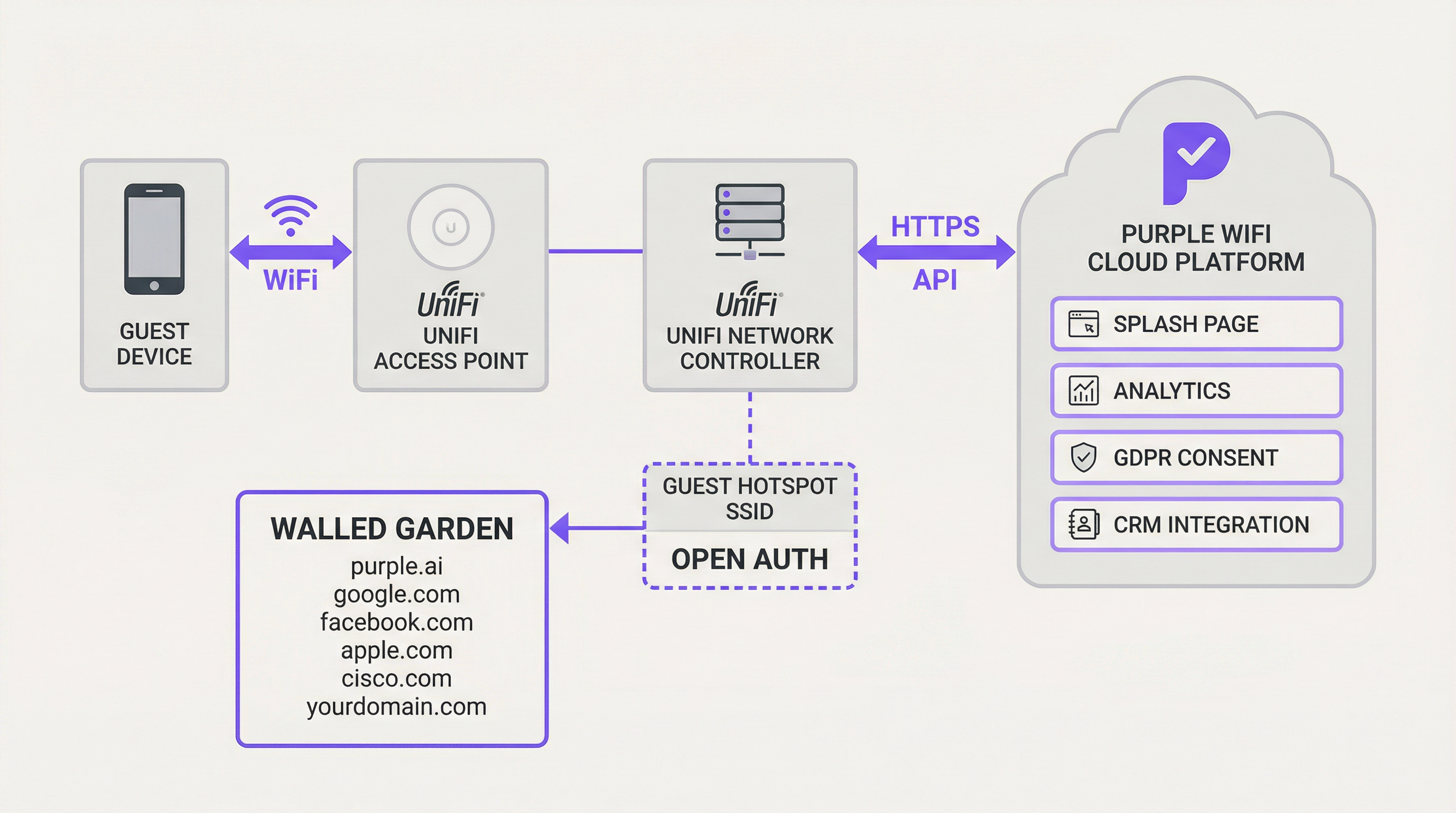
Ubiquiti UniFi और Purple के बीच का इंटीग्रेशन UniFi की एक्सटर्नल पोर्टल सर्वर कार्यक्षमता पर निर्भर करता है। यह सुविधा गेस्ट उपयोगकर्ताओं को स्थानीय UniFi कंट्रोलर से एक निर्दिष्ट थर्ड-पार्टी Captive Portal — इस मामले में, Purple प्लेटफ़ॉर्म — पर रीडायरेक्ट करती है। अंतर्निहित तंत्र HTTP रीडायरेक्ट और API कॉल की एक श्रृंखला पर निर्भर करता है जो गेस्ट ऑथराइजेशन जीवनचक्र का प्रबंधन करते हैं।
जब कोई गेस्ट निर्दिष्ट ओपन-ऑथेंटिकेशन SSID से कनेक्ट होता है, तो UniFi कंट्रोलर उनके डिवाइस को 'पेंडिंग' (pending) स्थिति में रखता है। इस स्थिति में, सभी HTTP ट्रैफ़िक को इंटरसेप्ट किया जाता है और Purple स्प्लैश पेज URL पर रीडायरेक्ट किया जाता है, जिसमें URL क्वेरी स्ट्रिंग में प्रमुख पैरामीटर जोड़े जाते हैं: गेस्ट का MAC एड्रेस, AP MAC एड्रेस और साइट आइडेंटिफ़ायर। Purple प्लेटफ़ॉर्म इन मापदंडों को कैप्चर करता है, उचित लॉगिन अनुभव प्रस्तुत करता है, और सफल उपयोगकर्ता प्रमाणीकरण पर — चाहे वह सोशल लॉगिन, ईमेल फ़ॉर्म या वाउचर के माध्यम से हो — एक निर्दिष्ट सत्र अवधि के लिए गेस्ट के MAC एड्रेस को अधिकृत करने के लिए UniFi नेटवर्क कंट्रोलर को वापस एक सुरक्षित HTTPS API कॉल करता है। यह ऑथराइजेशन डिवाइस को 'पेंडिंग' से 'ऑथराइज्ड' (authorised) स्थिति में ले जाता है, जिससे उसे इंटरनेट एक्सेस मिल जाता है।
इस आर्किटेक्चर का एक महत्वपूर्ण घटक वॉल्ड गार्डन (Walled Garden) है — IP एड्रेस और डोमेन की एक श्वेतसूची (whitelist) जिसे गेस्ट डिवाइस प्रमाणीकरण से पहले एक्सेस कर सकते हैं। यह Purple के अपने डोमेन, सोशल लॉगिन प्रदाताओं (Facebook, Google), Apple के CNA डिटेक्शन एंडपॉइंट्स और किसी भी अन्य आवश्यक बाहरी सेवाओं तक पहुंच की अनुमति देने के लिए आवश्यक है। सही ढंग से कॉन्फ़िगर किए गए वॉल्ड गार्डन के बिना, Captive Portal पूरी तरह से लोड होने में विफल हो जाएगा।
अधिक उन्नत डिप्लॉयमेंट के लिए, Purple का PurpleConnex फीचर पासपॉइंट (Passpoint - IEEE 802.11u) सपोर्ट पेश करता है, जो लौटने वाले उपयोगकर्ताओं के लिए निर्बाध, क्रेडेंशियल-मुक्त रीकनेक्शन के लिए RADIUS सर्वर का उपयोग करता है। इसके लिए UniFi के भीतर एक RADIUS प्रोफ़ाइल कॉन्फ़िगर करने की आवश्यकता होती है जो पोर्ट 1812 (प्रमाणीकरण) और 1813 (अकाउंटिंग) पर IP 34.150.158.147 पर Purple के प्रमाणीकरण सर्वर को इंगित करता है।
कार्यान्वयन गाइड
यह अनुभाग Purple के साथ इंटीग्रेट करने के लिए आपके UniFi नेटवर्क कंट्रोलर को कॉन्फ़िगर करने के लिए चरण-दर-चरण मार्गदर्शिका प्रदान करता है। निम्नलिखित निर्देश UniFi नेटवर्क एप्लिकेशन संस्करण 7.4 या उसके बाद के संस्करण पर लागू होते हैं। लिगेसी संस्करणों (v7.3 और नीचे) के लिए, कॉन्फ़िगरेशन सिद्धांत समान हैं लेकिन नेविगेशन पथ थोड़ा भिन्न है, जो हॉटस्पॉट मैनेजर के बजाय Profiles > Guest Hotspot का उपयोग करता है।
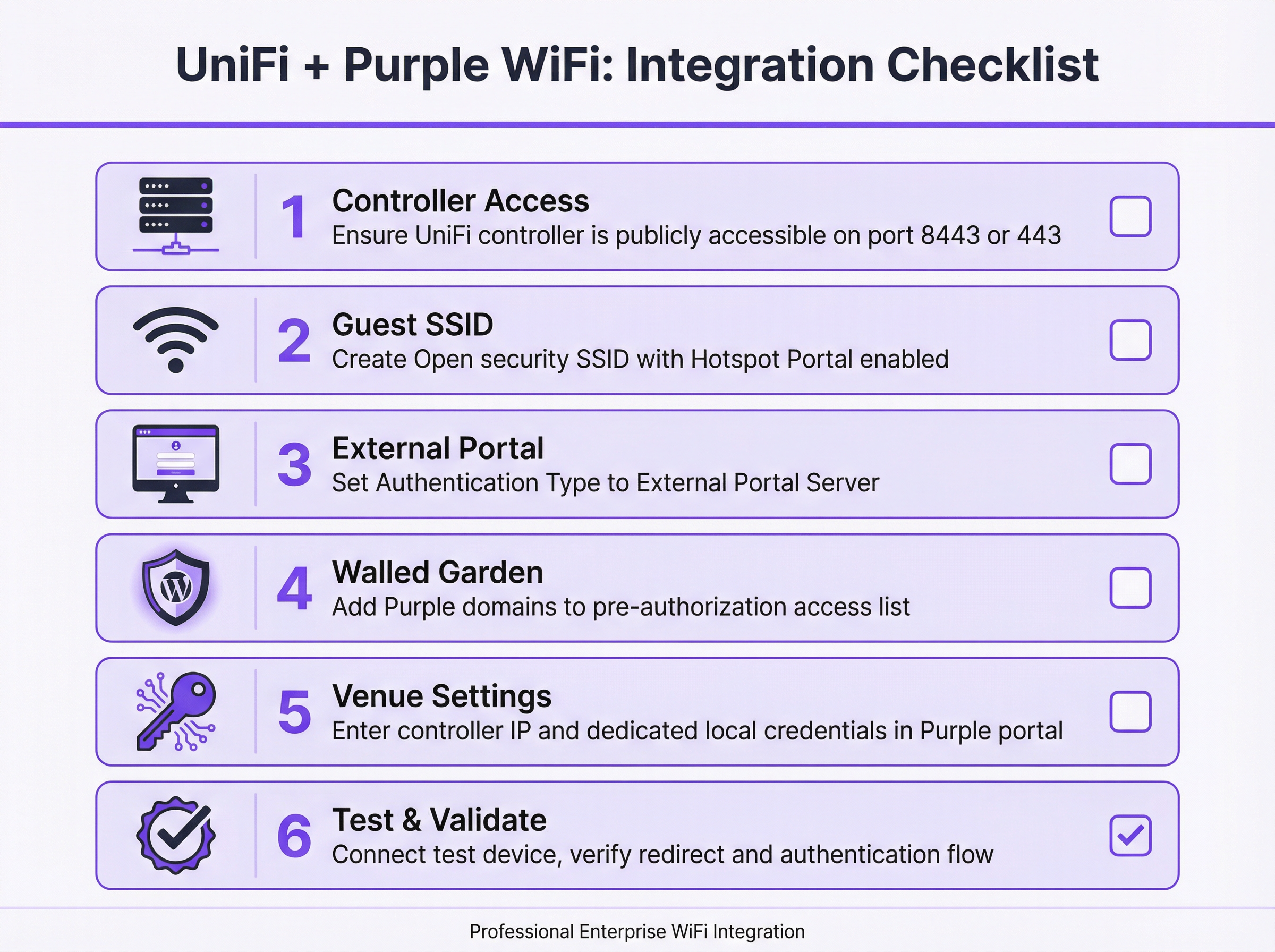
चरण 1: कंट्रोलर एक्सेसिबिलिटी को सत्यापित और स्थापित करें। कोई भी कॉन्फ़िगरेशन शुरू करने से पहले, पुष्टि करें कि आपका UniFi नेटवर्क कंट्रोलर सार्वजनिक इंटरनेट से एक्सेस किया जा सकता है। गेस्ट सत्रों को अधिकृत करने के लिए Purple का क्लाउड प्लेटफ़ॉर्म आपके कंट्रोलर के API के साथ संचार करने में सक्षम होना चाहिए। सॉफ़्टवेयर-आधारित UniFi कंट्रोलर्स के लिए, इसके लिए आपके फ़ायरवॉल पर TCP पोर्ट 8443 को कंट्रोलर के आंतरिक LAN IP एड्रेस पर मैप करने वाले पोर्ट फ़ॉरवर्ड नियम की आवश्यकता होती है। हार्डवेयर-आधारित डिप्लॉयमेंट के लिए — जिसमें UniFi Dream Machine Pro (UDM Pro), UDM Special Edition, UDR और CloudKey Gen2+ शामिल हैं — प्रासंगिक पोर्ट TCP 443 है।
चरण 2: एक समर्पित स्थानीय व्यवस्थापक (Local Administrator) खाता बनाएँ। सुरक्षा कारणों से, Purple API इंटीग्रेशन के लिए कभी भी अपने प्राथमिक Ubiquiti सुपर-एडमिन या क्लाउड अकाउंट क्रेडेंशियल्स का उपयोग न करें। विशेष रूप से इस उद्देश्य के लिए अपने UniFi कंट्रोलर पर एक नया, समर्पित स्थानीय (local) व्यवस्थापक खाता बनाएँ। इस खाते के पास संबंधित साइट के लिए पूर्ण प्रशासनिक विशेषाधिकार होने चाहिए। एक समर्पित खाते का उपयोग करने से किसी भी संभावित क्रेडेंशियल समझौते का प्रभाव सीमित हो जाता है और यह सुनिश्चित होता है कि आपके प्राथमिक खाते में बदलाव से इंटीग्रेशन बाधित न हो।
चरण 3: गेस्ट WiFi SSID बनाएँ। UniFi नेटवर्क एप्लिकेशन में, Settings > WiFi पर जाएँ और Create New पर क्लिक करें। एक सार्वजनिक नाम असाइन करें (उदा., 'Hotel Guest WiFi')। Security Protocol को Open पर सेट करें — Captive Portal रीडायरेक्ट तंत्र के काम करने के लिए यह अनिवार्य है। SSID को अपने निर्दिष्ट गेस्ट VLAN को असाइन करें। Hotspot Portal टॉगल को सक्षम करें।
चरण 4: हॉटस्पॉट पोर्टल और एक्सटर्नल सर्वर कॉन्फ़िगर करें। Hotspot Manager > Landing Page पर जाएँ। Authentication के अंतर्गत, External Portal Server चुनें और Purple द्वारा प्रदान किया गया एक्सटर्नल पोर्टल IP एड्रेस दर्ज करें। Settings के अंतर्गत, इस प्रकार कॉन्फ़िगर करें: Secure Portal सक्षम करें, Redirect using Hostname सक्षम करें और Purple द्वारा प्रदान किया गया एक्सेस डोमेन दर्ज करें, और सुनिश्चित करें कि HTTPS Redirection को Disabled पर सेट किया गया है। सत्र का Default Expiration 8 घंटे पर सेट होना चाहिए।
चरण 5: वॉल्ड गार्डन कॉन्फ़िगर करें। हॉटस्पॉट मैनेजर सेटिंग्स में, Pre-Authorization Access अनुभाग खोजें। Purple द्वारा प्रदान की गई सूची से सभी डोमेन जोड़ें। इस सूची में आमतौर पर Purple के अपने प्लेटफ़ॉर्म डोमेन, सोशल लॉगिन प्रदाता डोमेन (facebook.com, google.com, accounts.google.com), Apple के Captive Network Assistant (CNA) डिटेक्शन एंडपॉइंट्स और आपके स्प्लैश पेज पर उपयोग की जाने वाली कोई भी अन्य थर्ड-पार्टी सेवाएँ शामिल होती हैं। यह चरण डिप्लॉयमेंट विफलताओं का सबसे आम स्रोत है और इसे सटीकता के साथ पूरा किया जाना चाहिए।
चरण 6: Purple पोर्टल में कंट्रोलर विवरण दर्ज करें। अपने Purple खाते में लॉग इन करें और संबंधित वेन्यू (Venue) की सेटिंग्स पर जाएँ। अपने UniFi कंट्रोलर का सार्वजनिक IP एड्रेस या होस्टनाम और चरण 2 में बनाए गए समर्पित स्थानीय व्यवस्थापक खाते के क्रेडेंशियल दर्ज करें। कॉन्फ़िगरेशन सहेजें। Purple कनेक्शन को मान्य करने का प्रयास करेगा।
चरण 7: परीक्षण और सत्यापन करें। नेटवर्क से पहले कनेक्ट न हुए मोबाइल डिवाइस का उपयोग करके, नए गेस्ट SSID से कनेक्ट करें। आपको स्वचालित रूप से Purple Captive Portal पर रीडायरेक्ट किया जाना चाहिए। कॉन्फ़िगर की गई विधियों में से किसी एक का उपयोग करके प्रमाणित करें। सफलता पर, आपको इंटरनेट एक्सेस दिया जाना चाहिए। यदि रीडायरेक्ट विफल हो जाता है या प्रमाणीकरण के बाद इंटरनेट एक्सेस नहीं दिया जाता है, तो नीचे दिए गए समस्या निवारण (Troubleshooting) अनुभाग को देखें।
सर्वोत्तम अभ्यास
नेटवर्क सेगमेंटेशन किसी भी गेस्ट WiFi डिप्लॉयमेंट के लिए मूलभूत सुरक्षा आवश्यकता है। गेस्ट SSID को एक समर्पित VLAN को असाइन किया जाना चाहिए जो सभी कॉर्पोरेट और प्रशासनिक नेटवर्क से फ़ायरवॉल द्वारा सुरक्षित हो। यह गेस्ट डिवाइसों को आंतरिक संसाधनों तक पहुँचने से रोकता है, PCI DSS नेटवर्क आइसोलेशन आवश्यकताओं को पूरा करता है, और गेस्ट नेटवर्क पर किसी भी सुरक्षा घटना के प्रभाव को सीमित करता है।
उच्च-घनत्व वाले वातावरण में बैंडविड्थ प्रबंधन भी उतना ही महत्वपूर्ण है। गेस्ट उपयोगकर्ताओं के लिए उचित अपलोड और डाउनलोड सीमा निर्धारित करने के लिए UniFi के प्रति-उपयोगकर्ता रेट लिमिटिंग (per-user rate limiting) फीचर को कॉन्फ़िगर किया जाना चाहिए। यह कम संख्या में उच्च-बैंडविड्थ उपयोगकर्ताओं को सभी मेहमानों के अनुभव को खराब करने से रोकता है, जो विशेष रूप से होटल और सम्मेलन केंद्र डिप्लॉयमेंट में प्रासंगिक है।
वॉल्ड गार्डन को निरंतर रखरखाव की आवश्यकता होती है। सोशल लॉगिन प्रदाता और अन्य थर्ड-पार्टी सेवाएँ समय-समय पर अपनी डोमेन संरचनाओं को अपडेट करती हैं। Purple की नवीनतम अनुशंसित डोमेन सूची के विरुद्ध क्रॉस-रेफरेंस करते हुए, वॉल्ड गार्डन कॉन्फ़िगरेशन की त्रैमासिक समीक्षा एक ठोस परिचालन अभ्यास है। इस सूची को बनाए रखने में विफलता डिप्लॉयमेंट के बाद पोर्टल विफलताओं का प्रमुख कारण है।
API इंटीग्रेशन के लिए, हमेशा क्लाउड-लिंक्ड खाते के बजाय एक समर्पित स्थानीय व्यवस्थापक खाते का उपयोग करें। यह एक सुरक्षा सर्वोत्तम अभ्यास और विश्वसनीयता उपाय दोनों है — क्लाउड खाता क्रेडेंशियल मल्टी-फैक्टर ऑथेंटिकेशन (MFA) प्रवाह के अधीन होते हैं जो मेहमानों को अधिकृत करने के लिए Purple द्वारा किए जाने वाले स्वचालित API कॉल को बाधित कर सकते हैं।
समस्या निवारण और जोखिम न्यूनीकरण
सबसे आम विफलता मोड एक Captive Portal है जो लोड होने में विफल रहता है। जब कोई गेस्ट SSID से कनेक्ट होता है लेकिन कोई रीडायरेक्ट नहीं देखता है, या पोर्टल पेज रेंडर होने में विफल रहता है, तो मूल कारण लगभग हमेशा एक अधूरा वॉल्ड गार्डन होता है। एक परीक्षण डिवाइस को कनेक्ट करके और एक ज्ञात HTTP URL पर नेविगेट करने का प्रयास करके समस्या निवारण शुरू करें। यदि रीडायरेक्ट होता है लेकिन पेज लोड होने में विफल रहता है, तो वॉल्ड गार्डन में लापता डोमेन जोड़ें। यह भी सत्यापित करें कि बाहरी होस्टनामों को हल (resolve) करने के लिए गेस्ट नेटवर्क का DNS सही ढंग से कॉन्फ़िगर किया गया है।
दूसरी सबसे आम विफलता एक ऐसा परिदृश्य है जहां गेस्ट Purple पोर्टल पर सफलतापूर्वक प्रमाणित हो जाता है लेकिन उसे इंटरनेट एक्सेस नहीं दिया जाता है। यह Purple और UniFi कंट्रोलर के बीच API संचार में विफलता को इंगित करता है। नैदानिक चरण हैं: पहला, बाहरी नेटवर्क से उस तक पहुंचने का प्रयास करके पुष्टि करें कि कंट्रोलर सही पोर्ट पर सार्वजनिक रूप से सुलभ है; दूसरा, सत्यापित करें कि Purple पोर्टल में दर्ज किए गए स्थानीय व्यवस्थापक क्रेडेंशियल सही हैं और खाता लॉक नहीं किया गया है; तीसरा, किसी भी API प्रमाणीकरण त्रुटियों के लिए UniFi कंट्रोलर के इवेंट लॉग की समीक्षा करें।
उत्पादन (production) डिप्लॉयमेंट के लिए, कंट्रोलर की उपलब्धता एक महत्वपूर्ण जोखिम कारक है। यदि UniFi कंट्रोलर ऑफ़लाइन हो जाता है, तो नए गेस्ट ऑथराइजेशन विफल हो जाएंगे। न्यूनीकरण रणनीतियों में क्लाउड-होस्टेड UniFi कंट्रोलर (जो अंतर्निहित अतिरेक/redundancy प्रदान करता है) को तैनात करना, एक उच्च-उपलब्धता (high-availability) कंट्रोलर जोड़ी को लागू करना, या कंट्रोलर की उपलब्धता पर निगरानी और अलर्टिंग कॉन्फ़िगर करना शामिल है। Purple का प्लेटफ़ॉर्म ऑथराइजेशन प्रयासों को कतारबद्ध करेगा और पुनः प्रयास करेगा, लेकिन विस्तारित कंट्रोलर डाउनटाइम के परिणामस्वरूप गेस्ट अनुभव खराब होगा।
अनुपालन के दृष्टिकोण से, Captive Portal के माध्यम से एकत्र किया गया डेटा GDPR और समकक्ष डेटा संरक्षण नियमों के अधीन है। Purple का प्लेटफ़ॉर्म अनुपालन के लिए आर्किटेक्ट किया गया है, जो सहमति प्रबंधन, डेटा सब्जेक्ट एक्सेस रिक्वेस्ट (DSAR) टूलिंग और कॉन्फ़िगर करने योग्य डेटा प्रतिधारण (retention) नीतियां प्रदान करता है। हालाँकि, वैध डेटा प्रोसेसिंग की कानूनी जिम्मेदारी वेन्यू ऑपरेटर की ही होती है। सुनिश्चित करें कि आपकी गोपनीयता नीति स्प्लैश पेज पर स्पष्ट रूप से लिंक की गई है, कि आपके पास डेटा संग्रह के लिए एक प्रलेखित कानूनी आधार है, और यह कि आपकी डेटा प्रतिधारण सेटिंग्स आपकी संगठनात्मक नीति के साथ संरेखित हैं।
ROI और व्यावसायिक प्रभाव
Purple को UniFi के साथ इंटीग्रेट करना केवल एक तकनीकी अपग्रेड नहीं है; यह एक रणनीतिक व्यावसायिक निर्णय है जो गेस्ट WiFi को लागत केंद्र से एक शक्तिशाली संपत्ति में बदल देता है। निवेश पर प्रतिफल (ROI) को कई प्रमुख आयामों में मापा जा सकता है।
बिज़नेस इंटेलिजेंस प्राथमिक मूल्य चालक है। Purple विज़िटर के व्यवहार पर समृद्ध, अनाम डेटा कैप्चर करता है — जिसमें फुटफॉल, ड्वेल टाइम (रुकने का समय), विज़िट की आवृत्ति और मूवमेंट पैटर्न शामिल हैं। एक रिटेल चेन के लिए, यह डेटा सीधे स्टोर लेआउट निर्णयों, स्टाफिंग स्तरों और प्रचार के समय को सूचित कर सकता है। एक होटल के लिए, यह प्रकट कर सकता है कि किन सुविधाओं का सबसे अधिक और किस समय उपयोग किया जाता है, जिससे अधिक लक्षित अपसेलिंग और परिचालन दक्षता सक्षम होती है।
मार्केटिंग और एंगेजमेंट क्षमताएं एक महत्वपूर्ण द्वितीयक लाभ का प्रतिनिधित्व करती हैं। सहमति के साथ गेस्ट संपर्क विवरण कैप्चर करके, संगठन एक फर्स्ट-पार्टी मार्केटिंग डेटाबेस बना सकते हैं जो थर्ड-पार्टी कुकी मूल्यह्रास (deprecation) की सीमाओं के अधीन नहीं है। विज़िट के बाद के ईमेल अभियान, संतुष्टि सर्वेक्षण और लॉयल्टी प्रोग्राम आमंत्रण सीधे Purple प्लेटफ़ॉर्म से स्वचालित किए जा सकते हैं, जिससे बार-बार विज़िट दरों और ग्राहक आजीवन मूल्य (customer lifetime value) में मापने योग्य सुधार होता है।
स्टेडियमों, सम्मेलन केंद्रों और शॉपिंग सेंटरों जैसे बड़े स्थानों के लिए, रीयल-टाइम फुटफॉल एनालिटिक्स और हीटमैप से प्राप्त परिचालन बुद्धिमत्ता सार्थक दक्षता लाभ ला सकती है — जो मान्यताओं के बजाय वास्तविक विज़िटर मूवमेंट डेटा के आधार पर सफाई कार्यक्रम, सुरक्षा डिप्लॉयमेंट और रिटेल रियायत प्लेसमेंट को अनुकूलित करती है।
कुछ संदर्भों में, गेस्ट WiFi इन्फ्रास्ट्रक्चर को टियर एक्सेस मॉडल, प्रायोजित स्प्लैश पेज या लक्षित विज्ञापन के माध्यम से मुद्रीकृत (monetised) किया जा सकता है, जिससे एक प्रत्यक्ष राजस्व स्ट्रीम बनती है जो इन्फ्रास्ट्रक्चर निवेश की लागत की भरपाई करती है।
मुख्य शब्द और परिभाषाएं
Captive Portal
A web page displayed to newly connected users of a WiFi network before they are granted broader internet access. It controls access, authenticates users, and/or presents terms of service and marketing content.
In a UniFi/Purple integration, the UniFi controller redirects the guest to the Purple-hosted captive portal, which manages the entire guest experience including authentication, consent capture, and branding.
External Portal Server
A UniFi configuration option that delegates the captive portal experience to a third-party web application, rather than using UniFi's built-in portal. The UniFi controller redirects guests to the specified external URL and relies on that system to handle authentication and to call back to the controller's API to authorise the guest.
This is the core UniFi setting that enables the Purple integration. It is found under Hotspot Manager > Landing Page > Authentication in UniFi Network v7.4+.
Walled Garden
A whitelist of IP addresses, hostnames, and domains that a guest device is permitted to access before it has been authenticated by the captive portal. Traffic to non-whitelisted destinations is blocked until the guest completes the authentication flow.
This is critical for allowing the device to load the Purple splash page itself, as well as any third-party resources it relies on, such as social login providers or payment gateways. An incomplete Walled Garden is the leading cause of captive portal failures.
RADIUS (Remote Authentication Dial-In User Service)
A networking protocol (RFC 2865) that provides centralised Authentication, Authorisation, and Accounting (AAA) management for users connecting to a network service.
While the standard Purple integration uses the UniFi API for guest authorisation, the PurpleConnex (Passpoint) feature uses RADIUS to provide a more secure and seamless connection experience for returning users, eliminating the need to re-authenticate via the captive portal.
Passpoint (IEEE 802.11u / Hotspot 2.0)
A WiFi Alliance certification programme that enables automatic, secure authentication to WiFi networks without requiring the user to manually select a network or enter credentials. Devices with a Passpoint profile connect automatically and securely using EAP-based authentication.
Purple's PurpleConnex feature leverages Passpoint to provide a seamless reconnection experience for returning guests. Once a user has authenticated once via the captive portal, subsequent visits can connect automatically without seeing the splash page again.
SSID (Service Set Identifier)
The public name of a wireless local area network (WLAN) — the network name that appears when a user searches for available WiFi connections on their device.
For a guest network integration, a dedicated SSID is created with Open security and linked to the captive portal. This is kept separate from the corporate SSID, which uses WPA2/WPA3-Enterprise authentication.
VLAN (Virtual Local Area Network)
A method of creating logically separate networks on the same physical network infrastructure. Devices on different VLANs cannot communicate with each other without a router, providing network segmentation and security isolation.
Security best practice and PCI DSS compliance require that the guest SSID be placed on its own VLAN, completely isolated from the corporate, management, and POS networks. This prevents guest devices from accessing internal resources.
WISPr (Wireless Internet Service Provider Roaming)
An industry-standard protocol that defines how a client device discovers and authenticates to a WiFi hotspot captive portal. It uses HTTP redirects and XML-based authentication messages to manage the portal interaction.
UniFi's external portal functionality is based on WISPr principles. Understanding this protocol helps network engineers troubleshoot redirect failures and understand why certain client devices (particularly iOS and Android) behave differently when connecting to captive portal networks.
Port Forwarding
A network address translation (NAT) technique that maps an external port on a router or firewall to a specific internal IP address and port, allowing external services to initiate connections to devices on a private network.
If your UniFi controller is hosted on a local network, a port forward rule must be configured to allow the Purple cloud platform to reach the controller's API. The required port is 8443 for software controllers or 443 for hardware-based controllers.
PurpleConnex
Purple's implementation of the Passpoint (IEEE 802.11u) standard, which provides a secure, seamless WiFi connection for returning users using EAP-TTLS authentication via a dedicated RADIUS server. It eliminates the need for repeat visitors to re-authenticate via the captive portal.
PurpleConnex requires additional configuration in UniFi: a RADIUS profile pointing to Purple's authentication server and a separate Passpoint-enabled SSID. It is particularly valuable in hospitality and retail environments where repeat visitors are common.
केस स्टडीज
A 250-room boutique hotel wants to replace its basic, unreliable guest WiFi with a premium, branded experience. Their goals are to capture guest email addresses for post-stay marketing, promote their spa and restaurant on the login page, and ensure seamless connectivity for guests with multiple devices. Their infrastructure consists of a UniFi Dream Machine Pro and 40 UniFi U6 Pro access points.
The recommended deployment integrates the UDM Pro with Purple via the External Portal Server method. A new 'Hotel Guest WiFi' SSID is created with Open security and assigned to a dedicated Guest VLAN (e.g., VLAN 20), which is firewalled from the hotel's management and POS networks. The Hotspot Portal is enabled and configured to use Purple as the external portal server. Since the UDM Pro uses port 443, a port forward rule is created on the UDM Pro's WAN interface mapping TCP 443 to the UDM Pro's LAN IP. A dedicated local administrator account ('purple-api') is created on the UDM Pro with full site privileges. In the Purple portal, a custom-branded splash page is designed featuring the hotel's logo, a simple email capture form with GDPR consent checkbox, and a prominent banner advertising the spa with a direct booking link. The Walled Garden is configured to include all Purple domains, Facebook, Google, and Apple CNA endpoints. The hotel's marketing team is given access to the Purple analytics dashboard, enabling them to track daily guest counts, peak connection times, and email capture rates. Within the first quarter, the hotel captures an average of 180 new email addresses per week, which are automatically synced to their CRM for post-stay campaign automation.
A retail chain with 20 stores across the UK, each equipped with UniFi APs managed by a single cloud-hosted UniFi controller, wants to use guest WiFi data to understand customer behaviour. The operations director needs to measure footfall, dwell time, and repeat visitor rates across all stores to inform a store layout redesign programme and evaluate the performance of in-store promotional campaigns.
The cloud-hosted UniFi controller already has a public hostname, so no port forwarding is required — this is a significant simplification of the deployment. A single guest SSID ('Brand WiFi') is configured and applied to all 20 sites via the UniFi controller's site management capabilities. The Hotspot Portal is configured to use Purple's external portal server. In the Purple portal, each of the 20 stores is configured as a separate venue, allowing for granular, store-level analytics. The splash page is designed for maximum adoption: a single 'Connect' button with a brief privacy notice, minimising friction. Within the Purple analytics platform, the operations director can view a comparative dashboard showing footfall, dwell time, and new vs. returning visitor ratios for each store. After 90 days of data collection, the analytics reveal that three stores have significantly higher dwell times than the others, correlating with a specific store layout. This insight directly informs the layout redesign programme, with the high-performing layout rolled out to all 20 stores. A promotional campaign is run across all stores simultaneously, and the Purple dashboard provides a clear before-and-after comparison of footfall and dwell time, demonstrating measurable campaign uplift.
परिदृश्य विश्लेषण
Q1. A hotel IT manager has completed the UniFi/Purple integration configuration and tested it successfully in the office. However, after deploying to the live hotel environment, guests report that the captive portal page loads but the 'Login with Facebook' button does not work. What is the most likely cause and how should it be resolved?
💡 संकेत:Consider what resources the Facebook login button needs to load and function, and whether those resources are accessible to a guest device before authentication.
अनुशंसित दृष्टिकोण दिखाएं
The most likely cause is that the Facebook login domains are not included in the Walled Garden (pre-authorisation access list). When a guest device is in the 'pending' state, it can only access domains explicitly whitelisted in the Walled Garden. The Facebook login flow requires access to facebook.com, fbcdn.net, and related domains. The resolution is to add all required Facebook domains to the Walled Garden in the UniFi Hotspot Manager settings. Purple provides a maintained list of required domains for each social login provider. After updating the Walled Garden, test the Facebook login flow again with a fresh device connection.
Q2. A network architect is planning a guest WiFi deployment for a 5,000-seat conference centre that will host events with up to 3,000 simultaneous WiFi users. The venue uses a software-based UniFi controller hosted on a server in the venue's server room. What are the three most critical infrastructure considerations for ensuring the Purple integration remains reliable during peak events?
💡 संकेत:Think about the single points of failure in the integration architecture — what happens if the controller goes offline, if the internet connection is saturated, or if the controller's hardware is underpowered?
अनुशंसित दृष्टिकोण दिखाएं
The three most critical considerations are: First, controller availability and performance — the UniFi controller is a critical component in every guest authorisation. At 3,000 simultaneous users, the controller must have sufficient CPU and RAM to handle the load. Consider upgrading to a high-specification server or migrating to a cloud-hosted controller for inherent redundancy. Second, internet connectivity and port forwarding reliability — Purple's API calls to the controller must traverse the venue's internet connection. Ensure the port forward rule is on a resilient firewall and that the internet connection has sufficient capacity. A secondary internet connection with automatic failover is advisable for mission-critical events. Third, bandwidth management — with 3,000 users, implement strict per-user rate limits in UniFi to prevent bandwidth exhaustion. Without rate limiting, a small number of high-bandwidth users can degrade the experience for all guests.
Q3. An IT manager at a retail chain is asked by the legal team to ensure the guest WiFi data collection is fully GDPR-compliant. The current splash page has a simple 'Connect' button with no explicit consent mechanism. What changes need to be made to the Purple configuration, and what ongoing operational processes should be implemented?
💡 संकेत:GDPR requires a lawful basis for processing personal data, transparency about how data will be used, and mechanisms for data subjects to exercise their rights.
अनुशंसित दृष्टिकोण दिखाएं
The following changes and processes are required: On the splash page, the 'Connect' button must be replaced with an explicit opt-in mechanism. This means adding a clearly worded consent checkbox (unchecked by default) that states what data is being collected, how it will be used, and who it will be shared with. A link to the full privacy policy must be prominently displayed. The legal basis for processing should be explicit consent for marketing communications and legitimate interest for anonymised analytics. Within the Purple portal, configure data retention settings to align with the organisation's data retention policy — typically no longer than 24 months for marketing data. Enable Purple's GDPR tooling to handle data subject access requests (DSARs) and right-to-erasure requests. Operationally, implement a quarterly review process to ensure the privacy policy remains accurate, the consent wording is up to date, and data retention settings are enforced. Maintain a record of processing activities (ROPA) entry for the guest WiFi data collection.
Q4. A network engineer has configured the UniFi/Purple integration following all documented steps. When testing, the guest device connects to the SSID and is redirected to the Purple portal. The guest successfully authenticates, but is not granted internet access. The Purple portal shows the authentication as successful. What is the diagnostic process?
💡 संकेत:If Purple shows a successful authentication but the guest has no internet access, the issue lies in the communication path between Purple and the UniFi controller.
अनुशंसित दृष्टिकोण दिखाएं
This symptom indicates that Purple's API call to the UniFi controller — the call that moves the guest device from 'pending' to 'authorised' — is failing. The diagnostic process is as follows: First, verify that the UniFi controller is publicly accessible on the correct port (8443 for software, 443 for hardware) by attempting to reach the controller's management interface from an external network or using an online port checker tool. Second, log in to the Purple portal and verify that the controller IP/hostname and local admin credentials are correct. A common error is entering the controller's internal LAN IP rather than its public IP, or using cloud account credentials instead of local admin credentials. Third, check the UniFi controller's event log for any API authentication errors or failed login attempts from Purple's IP addresses. Fourth, verify that the firewall rule or port forward is correctly configured and that Purple's source IP addresses are not being blocked by any upstream security appliance.
मुख्य निष्कर्ष
- ✓The UniFi/Purple integration uses UniFi's External Portal Server feature to redirect guests to the Purple captive portal, which handles authentication and calls back to the UniFi API to authorise guest access — no additional hardware is required.
- ✓The Walled Garden (pre-authorisation access list) is the most critical and most frequently misconfigured element of the deployment. It must include all Purple domains, social login provider domains, and Apple CNA endpoints before the portal will function correctly.
- ✓Always use a dedicated local administrator account on the UniFi controller for the Purple API integration — never use your primary Ubiquiti cloud account credentials. This is both a security best practice and a reliability requirement.
- ✓The correct API port depends on the controller type: TCP 8443 for software-based controllers, TCP 443 for hardware-based controllers (UDM Pro, UDM SE, UDR, CloudKey Gen2+). Configuring the wrong port is a common cause of API communication failures.
- ✓Network segmentation is non-negotiable: the guest SSID must be on a dedicated VLAN, firewalled from all corporate and management networks. This is required for both security and PCI DSS compliance.
- ✓The ROI of the Purple integration extends well beyond connectivity: visitor analytics, GDPR-compliant data capture, CRM integration, and targeted marketing communications transform guest WiFi into a measurable business asset.
- ✓For returning users, Purple's PurpleConnex (Passpoint/IEEE 802.11u) feature provides a seamless, credential-free reconnection experience using RADIUS-based EAP-TTLS authentication, eliminating the need to re-authenticate via the captive portal on subsequent visits.




