

Ubiquiti UniFi e Purple WiFi: Guida all'integrazione
This guide provides a definitive technical reference for integrating the Purple WiFi intelligence platform with Ubiquiti UniFi network deployments, covering architecture, step-by-step controller configuration, and GDPR-compliant data capture. It is designed for IT managers, network architects, and operations directors who need to deploy a secure, feature-rich guest WiFi experience across hospitality, retail, events, and public-sector environments. By correctly configuring the UniFi Network Controller to leverage Purple's external captive portal, organisations can transform a standard cost centre into a valuable source of visitor analytics and marketing intelligence.
🎧 Ascolta questa guida
Visualizza trascrizione

Sintesi esecutiva
Ubiquiti UniFi è una delle piattaforme WiFi aziendali più diffuse al mondo, scelta da hotel, catene di vendita al dettaglio, stadi e organizzazioni del settore pubblico per le sue prestazioni, scalabilità e convenienza. Tuttavia, le sue funzionalità native per il portale ospiti sono limitate. La piattaforma di intelligence WiFi di Purple colma questa lacuna integrandosi direttamente con l'UniFi Network Controller tramite la sua funzione External Portal Server, offrendo un'esperienza Captive Portal completamente personalizzata e ricca di analisi senza richiedere hardware aggiuntivo.
Questa guida fornisce un riferimento tecnico completo per tale integrazione. Copre l'architettura sottostante, un processo di configurazione passo-passo per le versioni UniFi attuali (v7.4+) e precedenti (v7.3 e inferiori), le best practice per la sicurezza e la conformità e un framework strutturato per la risoluzione dei problemi. Le organizzazioni che completano questa integrazione ottengono l'accesso ad analisi dei visitatori in tempo reale, all'acquisizione di dati conforme al GDPR, all'integrazione CRM e alla capacità di inviare comunicazioni di marketing mirate, trasformando il WiFi per gli ospiti da un centro di costo a un asset aziendale misurabile.
Approfondimento tecnico
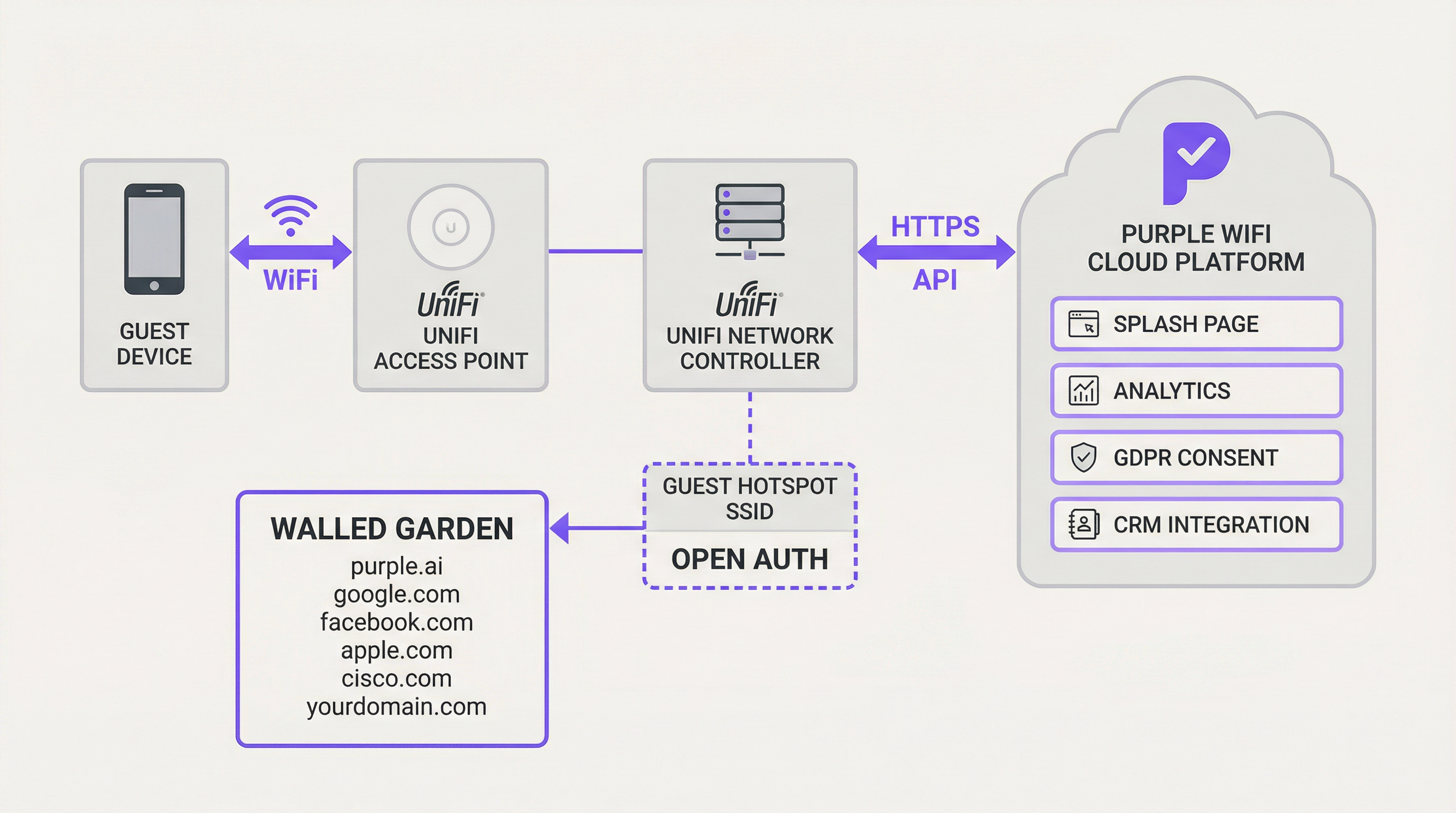
L'integrazione tra Ubiquiti UniFi e Purple si basa sulla funzionalità External Portal Server di UniFi. Questa funzione reindirizza gli utenti ospiti dal controller UniFi locale a un Captive Portal di terze parti designato, in questo caso la piattaforma Purple. Il meccanismo sottostante si affida a una serie di reindirizzamenti HTTP e chiamate API che gestiscono il ciclo di vita dell'autorizzazione degli ospiti.
Quando un ospite si connette all'SSID con autenticazione aperta designato, il controller UniFi pone il suo dispositivo in uno stato "in sospeso" (pending). In questo stato, tutto il traffico HTTP viene intercettato e reindirizzato all'URL della splash page di Purple, con i parametri chiave aggiunti alla stringa di query dell'URL: l'indirizzo MAC dell'ospite, l'indirizzo MAC dell'AP e l'identificatore del sito. La piattaforma Purple acquisisce questi parametri, presenta l'esperienza di accesso appropriata e, in seguito all'autenticazione riuscita dell'utente (tramite social login, modulo e-mail o voucher), effettua una chiamata API HTTPS sicura all'UniFi Network Controller per autorizzare l'indirizzo MAC dell'ospite per una durata di sessione specificata. Questa autorizzazione sposta il dispositivo dallo stato "in sospeso" a quello "autorizzato", concedendogli l'accesso a Internet.
Un componente critico di questa architettura è il Walled Garden: una whitelist di indirizzi IP e domini a cui i dispositivi ospiti sono autorizzati ad accedere prima dell'autenticazione. Ciò è essenziale per consentire l'accesso ai domini di Purple, ai provider di social login (Facebook, Google), agli endpoint di rilevamento CNA di Apple e a qualsiasi altro servizio esterno richiesto. Senza un Walled Garden configurato correttamente, il Captive Portal non verrà caricato affatto.
Per implementazioni più avanzate, la funzione PurpleConnex di Purple introduce il supporto Passpoint (IEEE 802.11u), utilizzando un server RADIUS per una riconnessione fluida e senza credenziali per gli utenti di ritorno. Ciò richiede la configurazione di un profilo RADIUS all'interno di UniFi che punti al server di autenticazione di Purple all'IP 34.150.158.147, sulle porte 1812 (autenticazione) e 1813 (accounting).
Guida all'implementazione
Questa sezione fornisce una guida passo-passo per configurare l'UniFi Network Controller per l'integrazione con Purple. Le seguenti istruzioni si applicano all'UniFi Network Application versione 7.4 o successiva. Per le versioni precedenti (v7.3 e inferiori), i principi di configurazione sono identici ma il percorso di navigazione differisce leggermente, utilizzando Profiles > Guest Hotspot anziché l'Hotspot Manager.
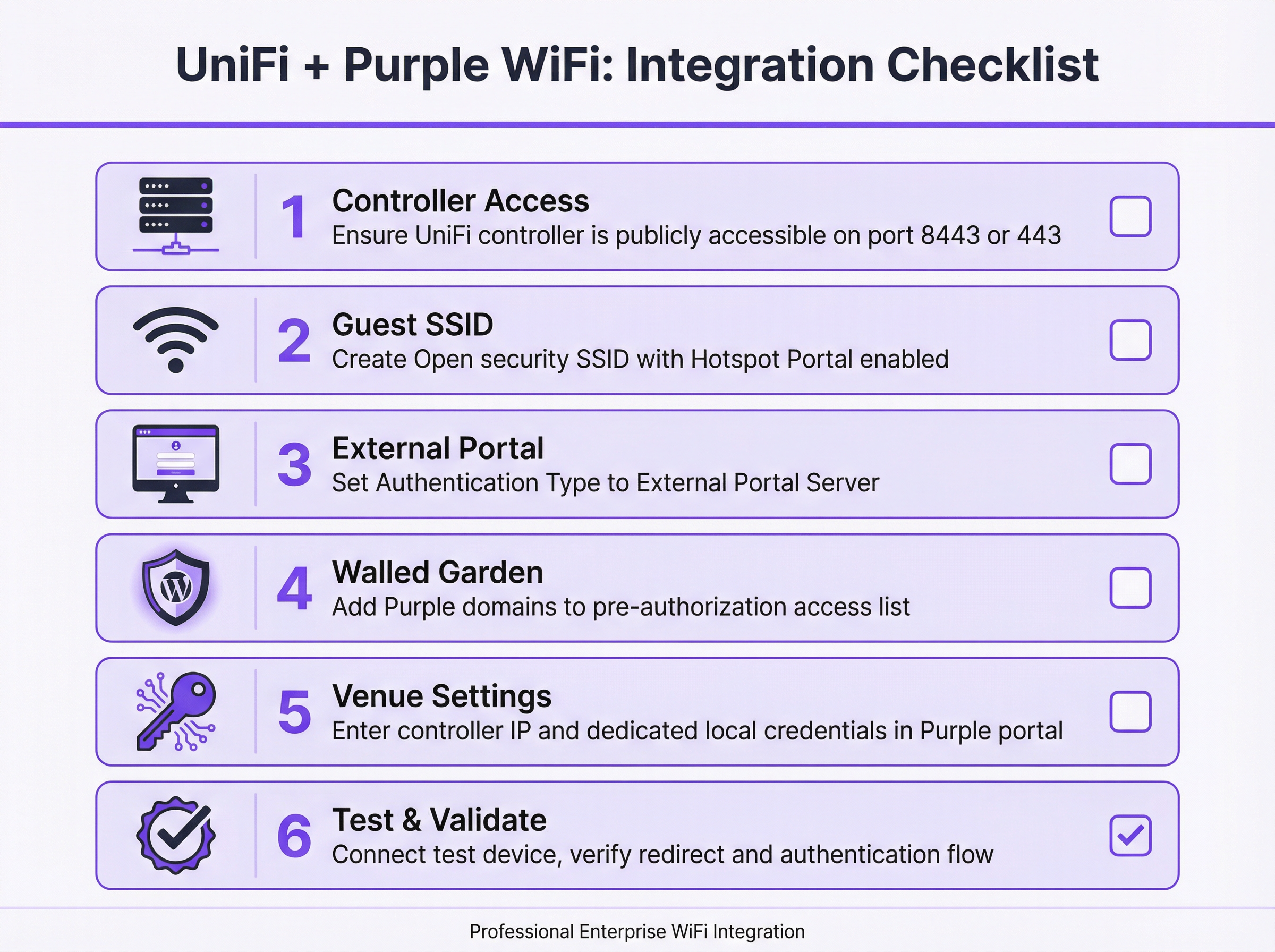
Passaggio 1: Verificare e stabilire l'accessibilità del controller. Prima di iniziare qualsiasi configurazione, confermare che l'UniFi Network Controller sia accessibile da Internet pubblico. La piattaforma cloud di Purple deve essere in grado di comunicare con le API del controller per autorizzare le sessioni degli ospiti. Per i controller UniFi basati su software, ciò richiede una regola di port forwarding sul firewall che mappi la porta TCP 8443 all'indirizzo IP LAN interno del controller. Per le implementazioni basate su hardware, tra cui UniFi Dream Machine Pro (UDM Pro), UDM Special Edition, UDR e CloudKey Gen2+, la porta pertinente è la TCP 443.
Passaggio 2: Creare un account amministratore locale dedicato. Per l'igiene della sicurezza, non utilizzare mai le credenziali dell'account cloud o super-admin Ubiquiti principale per l'integrazione API di Purple. Creare un nuovo account amministratore locale dedicato sul controller UniFi specificamente per questo scopo. Questo account deve avere privilegi amministrativi completi per il sito pertinente. L'utilizzo di un account dedicato limita il raggio d'azione di qualsiasi potenziale compromissione delle credenziali e garantisce che l'integrazione non venga interrotta da modifiche all'account principale.
Passaggio 3: Creare l'SSID del WiFi per gli ospiti. Nell'UniFi Network Application, accedere a Settings > WiFi e fare clic su Create New. Assegnare un nome pubblico (ad es. "Hotel Guest WiFi"). Impostare il Security Protocol su Open: questo è obbligatorio affinché il meccanismo di reindirizzamento del Captive Portal funzioni. Assegnare l'SSID alla VLAN ospiti designata. Abilitare l'interruttore Hotspot Portal.
Passaggio 4: Configurare l'Hotspot Portal e l'External Server. Accedere a Hotspot Manager > Landing Page. Sotto Authentication, selezionare External Portal Server e inserire l'indirizzo IP dell'External Portal fornito da Purple. Sotto Settings, configurare come segue: abilitare Secure Portal, abilitare Redirect using Hostname e inserire l'Access Domain fornito da Purple, e assicurarsi che HTTPS Redirection sia impostato su Disabled. La scadenza predefinita della sessione (Default Expiration) deve essere impostata su 8 ore.
Passaggio 5: Configurare il Walled Garden. Nelle impostazioni dell'Hotspot Manager, individuare la sezione Pre-Authorization Access. Aggiungere tutti i domini dall'elenco fornito da Purple. Questo elenco in genere include i domini della piattaforma di Purple, i domini dei provider di social login (facebook.com, google.com, accounts.google.com), gli endpoint di rilevamento Captive Network Assistant (CNA) di Apple e qualsiasi altro servizio di terze parti utilizzato sulla splash page. Questo passaggio è la fonte più comune di errori di implementazione e deve essere completato con precisione.
Passaggio 6: Inserire i dettagli del controller nel portale Purple. Accedere al proprio account Purple e navigare fino alle impostazioni della Venue pertinente. Inserire l'indirizzo IP pubblico o l'hostname dell'UniFi Controller e le credenziali per l'account amministratore locale dedicato creato nel Passaggio 2. Salvare la configurazione. Purple tenterà di convalidare la connessione.
Passaggio 7: Testare e convalidare. Utilizzando un dispositivo mobile non precedentemente connesso alla rete, connettersi al nuovo SSID per gli ospiti. Si dovrebbe essere reindirizzati automaticamente al Captive Portal di Purple. Autenticarsi utilizzando uno dei metodi configurati. In caso di successo, dovrebbe essere concesso l'accesso a Internet. Se il reindirizzamento non riesce o l'accesso a Internet non viene concesso dopo l'autenticazione, fare riferimento alla sezione Risoluzione dei problemi di seguito.
Best practice
La segmentazione della rete è il requisito di sicurezza fondamentale per qualsiasi implementazione WiFi per gli ospiti. L'SSID per gli ospiti deve essere assegnato a una VLAN dedicata protetta da firewall rispetto a tutte le reti aziendali e amministrative. Ciò impedisce ai dispositivi ospiti di accedere alle risorse interne, soddisfa i requisiti di isolamento della rete PCI DSS e limita l'impatto di qualsiasi incidente di sicurezza sulla rete ospiti.
La gestione della larghezza di banda è altrettanto importante in ambienti ad alta densità. La funzione di limitazione della velocità per utente di UniFi dovrebbe essere configurata per impostare limiti ragionevoli di upload e download per gli utenti ospiti. Ciò impedisce a un piccolo numero di utenti con un elevato consumo di banda di degradare l'esperienza per tutti gli ospiti, il che è particolarmente rilevante nelle implementazioni in hotel e centri congressi.
Il Walled Garden richiede una manutenzione continua. I provider di social login e altri servizi di terze parti aggiornano periodicamente le loro strutture di dominio. Una revisione trimestrale della configurazione del Walled Garden, incrociata con l'ultimo elenco di domini consigliato da Purple, è una solida pratica operativa. La mancata manutenzione di questo elenco è la causa principale dei guasti del portale post-implementazione.
Per l'integrazione API, utilizzare sempre un account amministratore locale dedicato anziché un account collegato al cloud. Questa è sia una best practice di sicurezza che una misura di affidabilità: le credenziali dell'account cloud sono soggette a flussi di autenticazione a più fattori che possono interrompere le chiamate API automatizzate che Purple effettua per autorizzare gli ospiti.
Risoluzione dei problemi e mitigazione dei rischi
La modalità di errore più comune è un Captive Portal che non si carica. Quando un ospite si connette all'SSID ma non vede alcun reindirizzamento, o la pagina del portale non viene renderizzata, la causa principale è quasi invariabilmente un Walled Garden incompleto. Iniziare la risoluzione dei problemi connettendo un dispositivo di test e tentando di navigare verso un URL HTTP noto. Se il reindirizzamento avviene ma la pagina non si carica, aggiungere i domini mancanti al Walled Garden. Verificare inoltre che il DNS della rete ospiti sia configurato correttamente per risolvere gli hostname esterni.
Il secondo errore più comune è uno scenario in cui l'ospite si autentica con successo sul portale Purple ma non gli viene concesso l'accesso a Internet. Ciò indica un errore nella comunicazione API tra Purple e il controller UniFi. I passaggi diagnostici sono: primo, confermare che il controller sia accessibile pubblicamente sulla porta corretta tentando di raggiungerlo da una rete esterna; secondo, verificare che le credenziali dell'amministratore locale inserite nel portale Purple siano corrette e che l'account non sia stato bloccato; terzo, esaminare i log degli eventi del controller UniFi per eventuali errori di autenticazione API.
Per le implementazioni in produzione, la disponibilità del controller è un fattore di rischio critico. Se il controller UniFi va offline, le nuove autorizzazioni degli ospiti falliranno. Le strategie di mitigazione includono l'implementazione di un controller UniFi ospitato nel cloud (che fornisce ridondanza intrinseca), l'implementazione di una coppia di controller ad alta disponibilità o la configurazione del monitoraggio e degli avvisi sulla disponibilità del controller. La piattaforma di Purple metterà in coda i tentativi di autorizzazione e riproverà, ma un tempo di inattività prolungato del controller comporterà un'esperienza degradata per gli ospiti.
Dal punto di vista della conformità, i dati raccolti tramite il Captive Portal sono soggetti al GDPR e a normative equivalenti sulla protezione dei dati. La piattaforma di Purple è progettata per la conformità, fornendo gestione del consenso, strumenti per le richieste di accesso degli interessati (DSAR) e policy di conservazione dei dati configurabili. Tuttavia, la responsabilità legale per il trattamento lecito dei dati rimane dell'operatore della struttura. Assicurarsi che l'informativa sulla privacy sia chiaramente collegata sulla splash page, di avere una base giuridica documentata per la raccolta dei dati e che le impostazioni di conservazione dei dati siano in linea con la policy organizzativa.
ROI e impatto aziendale
L'integrazione di Purple con UniFi non è semplicemente un aggiornamento tecnico; è una decisione aziendale strategica che trasforma il WiFi per gli ospiti da un centro di costo a un potente asset. Il ritorno sull'investimento è misurabile in diverse dimensioni chiave.
La business intelligence è il principale motore di valore. Purple acquisisce dati ricchi e anonimizzati sul comportamento dei visitatori, tra cui affluenza, tempi di permanenza, frequenza delle visite e modelli di movimento. Per una catena di vendita al dettaglio, questi dati possono informare direttamente le decisioni sul layout del negozio, i livelli di personale e le tempistiche promozionali. Per un hotel, possono rivelare quali servizi sono più utilizzati e in quali orari, consentendo un upselling più mirato e un'efficienza operativa.
Le capacità di marketing e coinvolgimento rappresentano un significativo vantaggio secondario. Acquisendo i dettagli di contatto degli ospiti con il loro consenso, le organizzazioni possono creare un database di marketing di prima parte che non è soggetto alle limitazioni della deprecazione dei cookie di terze parti. Le campagne e-mail post-visita, i sondaggi sulla soddisfazione e gli inviti ai programmi fedeltà possono essere automatizzati direttamente dalla piattaforma Purple, portando a miglioramenti misurabili nei tassi di visite ripetute e nel customer lifetime value.
Per grandi strutture come stadi, centri congressi e centri commerciali, l'intelligenza operativa derivata dall'analisi dell'affluenza in tempo reale e dalle mappe di calore può portare a significativi guadagni di efficienza: ottimizzando i programmi di pulizia, l'impiego della sicurezza e il posizionamento delle concessioni di vendita al dettaglio in base ai dati effettivi sui movimenti dei visitatori anziché su supposizioni.
In determinati contesti, l'infrastruttura WiFi per gli ospiti stessa può essere monetizzata attraverso modelli di accesso a livelli, splash page sponsorizzate o pubblicità mirata, creando un flusso di entrate diretto che compensa il costo dell'investimento infrastrutturale.
Termini chiave e definizioni
Captive Portal
A web page displayed to newly connected users of a WiFi network before they are granted broader internet access. It controls access, authenticates users, and/or presents terms of service and marketing content.
In a UniFi/Purple integration, the UniFi controller redirects the guest to the Purple-hosted captive portal, which manages the entire guest experience including authentication, consent capture, and branding.
External Portal Server
A UniFi configuration option that delegates the captive portal experience to a third-party web application, rather than using UniFi's built-in portal. The UniFi controller redirects guests to the specified external URL and relies on that system to handle authentication and to call back to the controller's API to authorise the guest.
This is the core UniFi setting that enables the Purple integration. It is found under Hotspot Manager > Landing Page > Authentication in UniFi Network v7.4+.
Walled Garden
A whitelist of IP addresses, hostnames, and domains that a guest device is permitted to access before it has been authenticated by the captive portal. Traffic to non-whitelisted destinations is blocked until the guest completes the authentication flow.
This is critical for allowing the device to load the Purple splash page itself, as well as any third-party resources it relies on, such as social login providers or payment gateways. An incomplete Walled Garden is the leading cause of captive portal failures.
RADIUS (Remote Authentication Dial-In User Service)
A networking protocol (RFC 2865) that provides centralised Authentication, Authorisation, and Accounting (AAA) management for users connecting to a network service.
While the standard Purple integration uses the UniFi API for guest authorisation, the PurpleConnex (Passpoint) feature uses RADIUS to provide a more secure and seamless connection experience for returning users, eliminating the need to re-authenticate via the captive portal.
Passpoint (IEEE 802.11u / Hotspot 2.0)
A WiFi Alliance certification programme that enables automatic, secure authentication to WiFi networks without requiring the user to manually select a network or enter credentials. Devices with a Passpoint profile connect automatically and securely using EAP-based authentication.
Purple's PurpleConnex feature leverages Passpoint to provide a seamless reconnection experience for returning guests. Once a user has authenticated once via the captive portal, subsequent visits can connect automatically without seeing the splash page again.
SSID (Service Set Identifier)
The public name of a wireless local area network (WLAN) — the network name that appears when a user searches for available WiFi connections on their device.
For a guest network integration, a dedicated SSID is created with Open security and linked to the captive portal. This is kept separate from the corporate SSID, which uses WPA2/WPA3-Enterprise authentication.
VLAN (Virtual Local Area Network)
A method of creating logically separate networks on the same physical network infrastructure. Devices on different VLANs cannot communicate with each other without a router, providing network segmentation and security isolation.
Security best practice and PCI DSS compliance require that the guest SSID be placed on its own VLAN, completely isolated from the corporate, management, and POS networks. This prevents guest devices from accessing internal resources.
WISPr (Wireless Internet Service Provider Roaming)
An industry-standard protocol that defines how a client device discovers and authenticates to a WiFi hotspot captive portal. It uses HTTP redirects and XML-based authentication messages to manage the portal interaction.
UniFi's external portal functionality is based on WISPr principles. Understanding this protocol helps network engineers troubleshoot redirect failures and understand why certain client devices (particularly iOS and Android) behave differently when connecting to captive portal networks.
Port Forwarding
A network address translation (NAT) technique that maps an external port on a router or firewall to a specific internal IP address and port, allowing external services to initiate connections to devices on a private network.
If your UniFi controller is hosted on a local network, a port forward rule must be configured to allow the Purple cloud platform to reach the controller's API. The required port is 8443 for software controllers or 443 for hardware-based controllers.
PurpleConnex
Purple's implementation of the Passpoint (IEEE 802.11u) standard, which provides a secure, seamless WiFi connection for returning users using EAP-TTLS authentication via a dedicated RADIUS server. It eliminates the need for repeat visitors to re-authenticate via the captive portal.
PurpleConnex requires additional configuration in UniFi: a RADIUS profile pointing to Purple's authentication server and a separate Passpoint-enabled SSID. It is particularly valuable in hospitality and retail environments where repeat visitors are common.
Casi di studio
A 250-room boutique hotel wants to replace its basic, unreliable guest WiFi with a premium, branded experience. Their goals are to capture guest email addresses for post-stay marketing, promote their spa and restaurant on the login page, and ensure seamless connectivity for guests with multiple devices. Their infrastructure consists of a UniFi Dream Machine Pro and 40 UniFi U6 Pro access points.
The recommended deployment integrates the UDM Pro with Purple via the External Portal Server method. A new 'Hotel Guest WiFi' SSID is created with Open security and assigned to a dedicated Guest VLAN (e.g., VLAN 20), which is firewalled from the hotel's management and POS networks. The Hotspot Portal is enabled and configured to use Purple as the external portal server. Since the UDM Pro uses port 443, a port forward rule is created on the UDM Pro's WAN interface mapping TCP 443 to the UDM Pro's LAN IP. A dedicated local administrator account ('purple-api') is created on the UDM Pro with full site privileges. In the Purple portal, a custom-branded splash page is designed featuring the hotel's logo, a simple email capture form with GDPR consent checkbox, and a prominent banner advertising the spa with a direct booking link. The Walled Garden is configured to include all Purple domains, Facebook, Google, and Apple CNA endpoints. The hotel's marketing team is given access to the Purple analytics dashboard, enabling them to track daily guest counts, peak connection times, and email capture rates. Within the first quarter, the hotel captures an average of 180 new email addresses per week, which are automatically synced to their CRM for post-stay campaign automation.
A retail chain with 20 stores across the UK, each equipped with UniFi APs managed by a single cloud-hosted UniFi controller, wants to use guest WiFi data to understand customer behaviour. The operations director needs to measure footfall, dwell time, and repeat visitor rates across all stores to inform a store layout redesign programme and evaluate the performance of in-store promotional campaigns.
The cloud-hosted UniFi controller already has a public hostname, so no port forwarding is required — this is a significant simplification of the deployment. A single guest SSID ('Brand WiFi') is configured and applied to all 20 sites via the UniFi controller's site management capabilities. The Hotspot Portal is configured to use Purple's external portal server. In the Purple portal, each of the 20 stores is configured as a separate venue, allowing for granular, store-level analytics. The splash page is designed for maximum adoption: a single 'Connect' button with a brief privacy notice, minimising friction. Within the Purple analytics platform, the operations director can view a comparative dashboard showing footfall, dwell time, and new vs. returning visitor ratios for each store. After 90 days of data collection, the analytics reveal that three stores have significantly higher dwell times than the others, correlating with a specific store layout. This insight directly informs the layout redesign programme, with the high-performing layout rolled out to all 20 stores. A promotional campaign is run across all stores simultaneously, and the Purple dashboard provides a clear before-and-after comparison of footfall and dwell time, demonstrating measurable campaign uplift.
Analisi degli scenari
Q1. A hotel IT manager has completed the UniFi/Purple integration configuration and tested it successfully in the office. However, after deploying to the live hotel environment, guests report that the captive portal page loads but the 'Login with Facebook' button does not work. What is the most likely cause and how should it be resolved?
💡 Suggerimento:Consider what resources the Facebook login button needs to load and function, and whether those resources are accessible to a guest device before authentication.
Mostra l'approccio consigliato
The most likely cause is that the Facebook login domains are not included in the Walled Garden (pre-authorisation access list). When a guest device is in the 'pending' state, it can only access domains explicitly whitelisted in the Walled Garden. The Facebook login flow requires access to facebook.com, fbcdn.net, and related domains. The resolution is to add all required Facebook domains to the Walled Garden in the UniFi Hotspot Manager settings. Purple provides a maintained list of required domains for each social login provider. After updating the Walled Garden, test the Facebook login flow again with a fresh device connection.
Q2. A network architect is planning a guest WiFi deployment for a 5,000-seat conference centre that will host events with up to 3,000 simultaneous WiFi users. The venue uses a software-based UniFi controller hosted on a server in the venue's server room. What are the three most critical infrastructure considerations for ensuring the Purple integration remains reliable during peak events?
💡 Suggerimento:Think about the single points of failure in the integration architecture — what happens if the controller goes offline, if the internet connection is saturated, or if the controller's hardware is underpowered?
Mostra l'approccio consigliato
The three most critical considerations are: First, controller availability and performance — the UniFi controller is a critical component in every guest authorisation. At 3,000 simultaneous users, the controller must have sufficient CPU and RAM to handle the load. Consider upgrading to a high-specification server or migrating to a cloud-hosted controller for inherent redundancy. Second, internet connectivity and port forwarding reliability — Purple's API calls to the controller must traverse the venue's internet connection. Ensure the port forward rule is on a resilient firewall and that the internet connection has sufficient capacity. A secondary internet connection with automatic failover is advisable for mission-critical events. Third, bandwidth management — with 3,000 users, implement strict per-user rate limits in UniFi to prevent bandwidth exhaustion. Without rate limiting, a small number of high-bandwidth users can degrade the experience for all guests.
Q3. An IT manager at a retail chain is asked by the legal team to ensure the guest WiFi data collection is fully GDPR-compliant. The current splash page has a simple 'Connect' button with no explicit consent mechanism. What changes need to be made to the Purple configuration, and what ongoing operational processes should be implemented?
💡 Suggerimento:GDPR requires a lawful basis for processing personal data, transparency about how data will be used, and mechanisms for data subjects to exercise their rights.
Mostra l'approccio consigliato
The following changes and processes are required: On the splash page, the 'Connect' button must be replaced with an explicit opt-in mechanism. This means adding a clearly worded consent checkbox (unchecked by default) that states what data is being collected, how it will be used, and who it will be shared with. A link to the full privacy policy must be prominently displayed. The legal basis for processing should be explicit consent for marketing communications and legitimate interest for anonymised analytics. Within the Purple portal, configure data retention settings to align with the organisation's data retention policy — typically no longer than 24 months for marketing data. Enable Purple's GDPR tooling to handle data subject access requests (DSARs) and right-to-erasure requests. Operationally, implement a quarterly review process to ensure the privacy policy remains accurate, the consent wording is up to date, and data retention settings are enforced. Maintain a record of processing activities (ROPA) entry for the guest WiFi data collection.
Q4. A network engineer has configured the UniFi/Purple integration following all documented steps. When testing, the guest device connects to the SSID and is redirected to the Purple portal. The guest successfully authenticates, but is not granted internet access. The Purple portal shows the authentication as successful. What is the diagnostic process?
💡 Suggerimento:If Purple shows a successful authentication but the guest has no internet access, the issue lies in the communication path between Purple and the UniFi controller.
Mostra l'approccio consigliato
This symptom indicates that Purple's API call to the UniFi controller — the call that moves the guest device from 'pending' to 'authorised' — is failing. The diagnostic process is as follows: First, verify that the UniFi controller is publicly accessible on the correct port (8443 for software, 443 for hardware) by attempting to reach the controller's management interface from an external network or using an online port checker tool. Second, log in to the Purple portal and verify that the controller IP/hostname and local admin credentials are correct. A common error is entering the controller's internal LAN IP rather than its public IP, or using cloud account credentials instead of local admin credentials. Third, check the UniFi controller's event log for any API authentication errors or failed login attempts from Purple's IP addresses. Fourth, verify that the firewall rule or port forward is correctly configured and that Purple's source IP addresses are not being blocked by any upstream security appliance.
Punti chiave
- ✓The UniFi/Purple integration uses UniFi's External Portal Server feature to redirect guests to the Purple captive portal, which handles authentication and calls back to the UniFi API to authorise guest access — no additional hardware is required.
- ✓The Walled Garden (pre-authorisation access list) is the most critical and most frequently misconfigured element of the deployment. It must include all Purple domains, social login provider domains, and Apple CNA endpoints before the portal will function correctly.
- ✓Always use a dedicated local administrator account on the UniFi controller for the Purple API integration — never use your primary Ubiquiti cloud account credentials. This is both a security best practice and a reliability requirement.
- ✓The correct API port depends on the controller type: TCP 8443 for software-based controllers, TCP 443 for hardware-based controllers (UDM Pro, UDM SE, UDR, CloudKey Gen2+). Configuring the wrong port is a common cause of API communication failures.
- ✓Network segmentation is non-negotiable: the guest SSID must be on a dedicated VLAN, firewalled from all corporate and management networks. This is required for both security and PCI DSS compliance.
- ✓The ROI of the Purple integration extends well beyond connectivity: visitor analytics, GDPR-compliant data capture, CRM integration, and targeted marketing communications transform guest WiFi into a measurable business asset.
- ✓For returning users, Purple's PurpleConnex (Passpoint/IEEE 802.11u) feature provides a seamless, credential-free reconnection experience using RADIUS-based EAP-TTLS authentication, eliminating the need to re-authenticate via the captive portal on subsequent visits.




