

Fondamenti PKI per amministratori WiFi: certificati, CA e catene di fiducia
Questa guida tecnica di riferimento spiega i concetti fondamentali della Public Key Infrastructure (PKI) per gli amministratori WiFi aziendali, coprendo le autorità di certificazione, le catene di fiducia e i certificati X.509. Dettaglia come la PKI supporti l'autenticazione reciproca EAP-TLS e fornisce indicazioni operative per l'implementazione per i team IT nei settori hospitality, retail e pubblico. La comprensione della PKI è un prerequisito obbligatorio per l'implementazione dell'autenticazione WiFi basata su certificati per il personale con Purple.
🎧 Ascolta questa guida
Visualizza trascrizione

Sintesi operativa
Per i responsabili IT, gli architetti di rete e i direttori delle operazioni delle sedi, la protezione delle reti WiFi aziendali e del personale è un requisito operativo e di conformità critico. I metodi di autenticazione legacy come le Pre-Shared Keys (PSK) o il filtraggio degli indirizzi MAC sono insufficienti per i moderni ambienti aziendali, lasciando le reti vulnerabili al furto di credenziali e allo spoofing dei dispositivi. Per ottenere una sicurezza robusta e verificabile, le organizzazioni devono passare all'autenticazione basata su certificati — nello specifico EAP-TLS (Extensible Authentication Protocol-Transport Layer Security).
L'implementazione di EAP-TLS richiede una solida comprensione della Public Key Infrastructure (PKI). Questa guida demistifica la PKI per gli amministratori WiFi, spiegando i ruoli delle Certificate Authorities (CA), i meccanismi della catena di fiducia e le differenze pratiche tra certificati server e client. Padroneggiando questi concetti fondamentali, i team IT possono progettare e implementare con sicurezza soluzioni di accesso alla rete sicure e scalabili in settori come Hospitality , Retail e sedi del settore pubblico, garantendo la conformità a standard come PCI DSS e GDPR e fornendo al contempo una connettività fluida e senza password per i dispositivi gestiti. La comprensione della PKI è anche il prerequisito fondamentale per l'implementazione dell'autenticazione WiFi basata su certificati per il personale con Purple.
Approfondimento tecnico
L'architettura della fiducia: cos'è la Public Key Infrastructure?
La Public Key Infrastructure (PKI) è un framework crittografico che consente comunicazioni sicure e autenticazione reciproca su una rete non affidabile. Nel contesto del WiFi aziendale, la PKI funge da sistema di passaporto digitale, verificando l'identità sia del dispositivo client (il supplicant) che del server di autenticazione di rete (il server RADIUS) prima che avvenga qualsiasi scambio di dati.
Questo sistema si basa sui certificati X.509, che legano una chiave pubblica a un'identità verificata — come l'hostname di un server o l'indirizzo email di un utente — e sono firmati digitalmente da una terza parte fidata nota come Certificate Authority (CA). La firma della CA è la garanzia crittografica che la dichiarazione di identità sia legittima.
La gerarchia dei certificati e la catena di fiducia
La forza della PKI risiede nella sua struttura gerarchica, nota come catena di fiducia. Questa gerarchia garantisce che qualsiasi certificato presentato da un dispositivo o server possa essere tracciato crittograficamente fino a una fonte universalmente fidata. I tre livelli sono i seguenti.
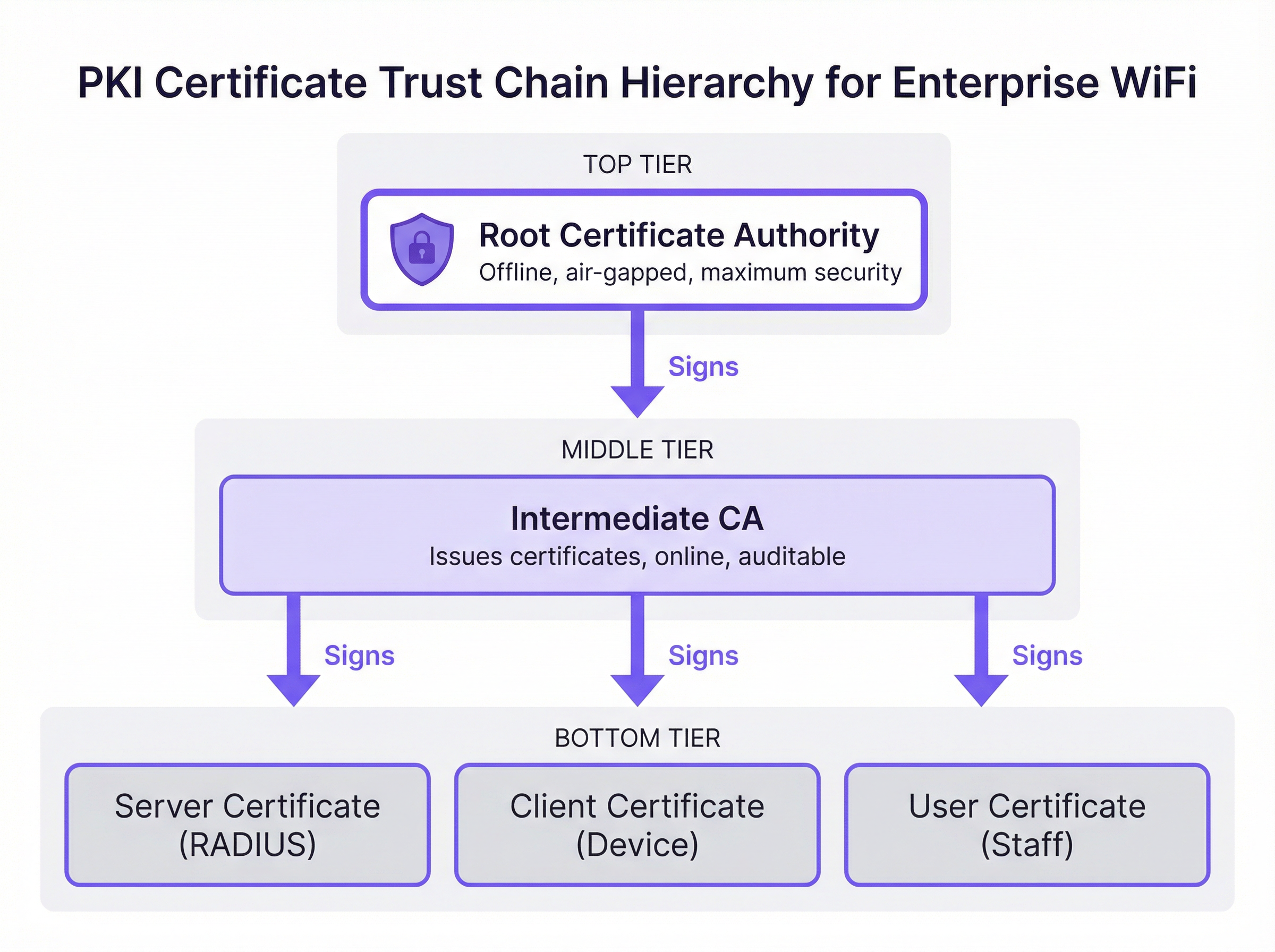
Root Certificate Authority (Root CA): La Root CA è l'ancora crittografica dell'intero ecosistema PKI. Rilascia un certificato autofirmato ed è intrinsecamente fidata dai dispositivi client e dai server. In un'implementazione aziendale sicura, la Root CA viene mantenuta offline e isolata (air-gapped) per proteggere la sua chiave privata da compromissioni basate sulla rete. Il suo unico scopo operativo è firmare i certificati delle Intermediate CA.
Intermediate Certificate Authority (Intermediate CA): La Intermediate CA funge da cuscinetto tra la Root CA altamente sicura e l'ambiente operativo. È online e gestisce il rilascio e la revoca quotidiana dei certificati foglia (leaf certificates). Questa separazione è una strategia critica di mitigazione del rischio: se una Intermediate CA viene compromessa, può essere revocata dalla Root CA senza invalidare l'intera infrastruttura PKI o richiedere la riconfigurazione di ogni dispositivo client.
Certificati foglia (End-Entity Certificates): Questi sono i certificati installati sui singoli server e dispositivi client. Si trovano alla base della catena di fiducia e non possono a loro volta firmare altri certificati. Esistono due tipi principali rilevanti per l'implementazione WiFi. Il Certificato Server è installato sul server RADIUS, consentendo ai dispositivi client di verificare che si stiano connettendo alla rete aziendale legittima. Il Certificato Client è installato sui laptop del personale, sui dispositivi mobili o sui terminali point-of-sale, consentendo al server RADIUS di verificare l'identità di ogni specifico dispositivo o utente.
Come la PKI supporta l'autenticazione EAP-TLS
EAP-TLS è il gold standard per l'autenticazione WiFi sicura perché impone l'autenticazione reciproca basata su certificati. Ciò significa che sia il dispositivo client che il server RADIUS devono dimostrare le proprie identità l'uno all'altro utilizzando certificati convalidati rispetto alla catena di fiducia PKI — eliminando i rischi inerenti agli approcci basati su password.
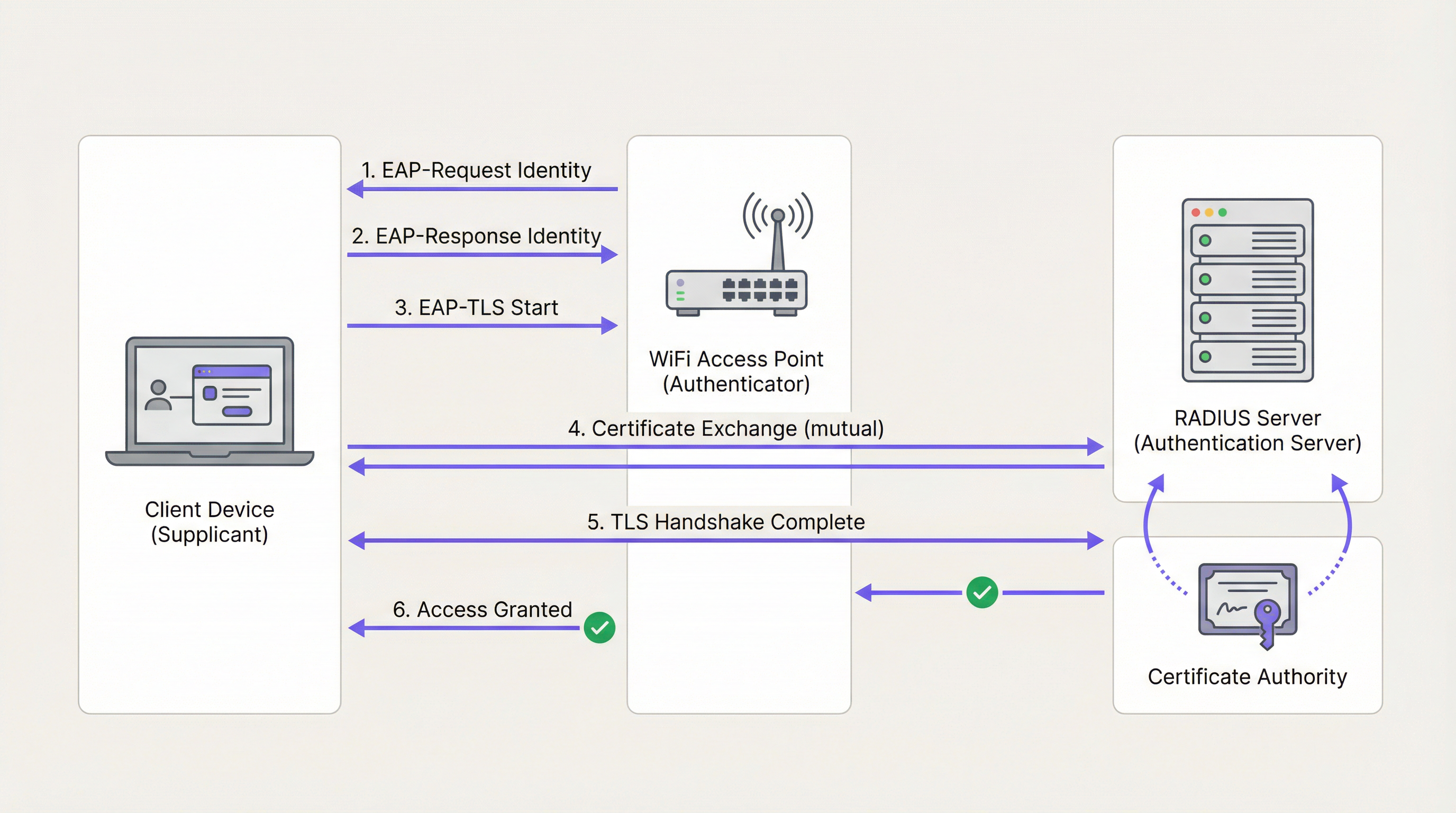
Durante l'handshake EAP-TLS, che opera all'interno del framework IEEE 802.1X, il server RADIUS presenta innanzitutto il proprio certificato server al dispositivo client. Il dispositivo convalida la firma del certificato rispetto al proprio archivio Root CA fidato. Se valido, il dispositivo ha la prova crittografica che si sta connettendo alla rete aziendale legittima — non a un access point contraffatto o a un evil twin. Il dispositivo client presenta quindi il proprio certificato client al server RADIUS, che lo convalida rispetto alla CA. Una volta autenticate entrambe le parti, viene stabilito un tunnel TLS sicuro e viene concesso l'accesso alla rete. Non vengono trasmesse password e non esistono segreti condivisi che possano essere rubati.
Questa architettura è anche la base di WPA3-Enterprise, che impone la modalità di sicurezza a 192 bit e si basa sugli stessi fondamenti PKI e 802.1X. Per le organizzazioni che implementano Wireless Access Points in ambienti ad alta sicurezza, WPA3-Enterprise con EAP-TLS rappresenta l'attuale best practice.
CA pubblica vs. CA privata: la decisione di implementazione
Una delle una delle decisioni architettoniche più importanti in un'implementazione PKI è la scelta tra una CA Pubblica e una CA Privata. La tabella seguente riassume i compromessi.
| Criterio | CA Pubblica | CA Privata |
|---|---|---|
| Costo | Tariffa per certificato (praticabile per un numero limitato di server) | Costo dell'infrastruttura, ma nessuna tariffa per certificato su larga scala |
| Fiducia del dispositivo | Attendibile per impostazione predefinita sulla maggior parte dei sistemi operativi e dei dispositivi | Richiede l'invio della Root CA a tutti i dispositivi tramite MDM |
| Controllo | Limitato; la CA controlla le policy di emissione | Controllo completo su emissione, revoca e ciclo di vita |
| Miglior caso d'uso | Certificato del server RADIUS | Certificati client per dispositivi aziendali gestiti |
| Conformità | Verificabile tramite log CT pubblici | Richiede processi di audit interni |
L'approccio consigliato per la maggior parte delle implementazioni WiFi aziendali è un modello ibrido: utilizzare una CA Pubblica per il certificato del server RADIUS per garantire un'ampia compatibilità e implementare una CA Privata (come Microsoft Active Directory Certificate Services o un provider PKI basato su cloud) per l'emissione di certificati client ai dispositivi gestiti su larga scala.
Guida all'implementazione
Passaggio 1: Progettazione dell'architettura della CA
Inizia mappando i requisiti dei certificati. Identifica il numero di dispositivi gestiti, i sistemi operativi in uso e la piattaforma MDM disponibile. Determina se una gerarchia a due livelli (Root CA + CA Intermedia) o a tre livelli è appropriata per le dimensioni e il profilo di rischio della tua organizzazione.
Passaggio 2: Implementazione e protezione delle CA Root e Intermedie
Configura la Root CA offline su una macchina dedicata e isolata (air-gapped). Usa la Root CA per firmare il certificato della CA Intermedia. Assicurati che la CA Intermedia sia implementata in modo sicuro nel tuo data center o ambiente cloud e integrata con il tuo identity provider (IdP) o la tua soluzione MDM. Conserva la chiave privata della Root CA in un Hardware Security Module (HSM) laddove il budget lo consenta.
Passaggio 3: Configurazione del server RADIUS
Installa il certificato del server sul tuo server RADIUS. Configura il server per richiedere EAP-TLS per l'SSID aziendale sicuro. Assicurati che il server RADIUS consideri attendibile la CA Intermedia che ha emesso i certificati client e configuralo per eseguire il controllo della revoca tramite OCSP.
Passaggio 4: Distribuzione dei certificati tramite MDM
Non tentare mai l'installazione manuale dei certificati su larga scala. Utilizza una piattaforma MDM come Microsoft Intune o Jamf per inviare il certificato della Root CA, il certificato della CA Intermedia e i certificati client univoci a tutti i dispositivi gestiti tramite policy automatizzate. Ciò garantisce un'implementazione coerente e consente il rinnovo automatico.
Passaggio 5: Implementazione e test dei meccanismi di revoca
Configura le Certificate Revocation Lists (CRL) o l'Online Certificate Status Protocol (OCSP). Testa il workflow di revoca end-to-end revocando un certificato di test e confermando che il server RADIUS neghi l'accesso entro i tempi previsti. Per gli ambienti che richiedono una revoca quasi istantanea — come le reti POS del settore Retail — l'OCSP è obbligatorio.
Passaggio 6: Monitoraggio e automazione della gestione del ciclo di vita
Implementa il monitoraggio automatizzato per la scadenza dei certificati in tutti i livelli della gerarchia. Configura avvisi a 90, 60 e 30 giorni prima della scadenza. Automatizza il rinnovo a 60 giorni. Questo è il singolo passaggio operativo più efficace per prevenire interruzioni di rete.
Best Practice
Imporre l'autenticazione reciproca senza eccezioni: Assicurati che i dispositivi client siano configurati per convalidare rigorosamente il certificato del server RADIUS. La disattivazione della convalida del certificato del server — una scorciatoia comune durante l'implementazione iniziale — rende i dispositivi vulnerabili agli attacchi man-in-the-middle e alla raccolta di credenziali, oltre a violare i requisiti PCI DSS.
Segregare le reti per metodo di autenticazione: Utilizza EAP-TLS per i dispositivi aziendali e del personale su un SSID dedicato. Per l'accesso dei visitatori pubblici, implementa una soluzione di Captive Portal robusta come Guest WiFi su una rete completamente segregata. Non tentare di implementare la PKI su dispositivi guest non gestiti.
Sottoporre l'infrastruttura PKI a controlli regolari: Esegui audit trimestrali dei controlli di accesso alla CA, delle liste di revoca e dei log di emissione dei certificati. Negli ambienti della Sanità e del Retail , questo è un requisito di conformità rispettivamente ai sensi di HIPAA e PCI DSS.
Integrazione con Network Analytics: Una volta implementata l'autenticazione sicura, aggiungi WiFi Analytics per ottenere visibilità sul comportamento dei dispositivi, sui modelli di connessione e sulle potenziali anomalie. Una rete sicura è la base per dati affidabili.
Considerare l'integrazione SD-WAN: Per le implementazioni multi-sito in catene alberghiere o complessi commerciali, la PKI si integra naturalmente con le architetture SD-WAN. Per informazioni su come queste tecnologie si completano a vicenda, consulta I principali vantaggi della SD-WAN per le aziende moderne .
Risoluzione dei problemi e mitigazione dei rischi
La tabella seguente associa le comuni modalità di guasto alle relative cause principali e alle mitigazioni raccomandate.
| Sintomo | Causa principale | Mitigazione |
|---|---|---|
| I dispositivi non riescono a connettersi; i log RADIUS mostrano 'CA sconosciuta' | Il dispositivo client non considera attendibile la CA che ha emesso il certificato del server RADIUS | Invia la Root CA a tutti i dispositivi tramite MDM |
| Improvvisa interruzione della rete per tutti i dispositivi aziendali | Il certificato del server RADIUS o il certificato della CA Intermedia è scaduto | Implementa il monitoraggio e il rinnovo automatizzati; avvisi a 90/60/30 giorni |
| Un laptop rubato può ancora accedere alla rete | La CRL è obsoleta o l'OCSP non è configurato | Passa all'OCSP per il controllo della revoca in tempo reale |
| I nuovi dispositivi non riescono a connettersi dopo la registrazione MDM | Certificato client non ancora inviato dalla policy MDM | Verifica l'assegnazione della policy MDM e forza la sincronizzazione del dispositivo |
| Errori di autenticazione intermittenti | Disallineamento dell'orologio tra il client e il server RADIUS | Assicurati che tutti i dispositivi utilizzino la sincronizzazione dell'ora NTP |
Per una comprensione più approfondita della configurazione e della risoluzione dei problemi 802.1X, la guida Autenticazione 802.1X: Protezione dell'accesso alla rete sui dispositivi moderni fornisce una guida dettagliata alla configurazione indipendente dal fornitore.
ROI e impatto aziendale
Il passaggio a un'architettura EAP-TLS basata su PKI offre un valore aziendale misurabile per i gestori delle sedi su più dimensioni.
Mitigazione del rischio e conformità: L'eliminazione dell'autenticazione basata su password rimuove il vettore di attacco più comune per la compromissione della rete. Ciò riduce direttamente la probabilità di costose violazioni dei dati e semplifica la conformità con PCI DSS (richiesto per l'elaborazione dei pagamenti), GDPR (per la protezione dei dati) e le normative specifiche del settore. Per le sedi che implementano Sensors IoT o sistemi di Wayfinding basati sulla posizione, una rete protetta crittograficamente è un prerequisito per l'integrità dei dati affidabile.
Efficienza operativa: L'automazione della distribuzione dei certificati tramite MDM elimina il sovraccarico operativo della gestione delle password, riducendo i ticket dell'helpdesk IT relativi alla connettività WiFi. In ambienti ad alto turnover come hotel e retail, dove l'onboarding e l'offboarding del personale sono frequenti, l'emissione e la revoca automatizzata dei certificati offrono un notevole risparmio di tempo rispetto alla gestione delle credenziali condivise.
Fondamenta per servizi avanzati: Una rete aziendale sicura e autenticata è la base affidabile su cui vengono costruiti servizi operativi avanzati. Sia che si implementino WiFi Analytics per l'analisi dei flussi, Sensors per i dati di occupazione in tempo reale o Wayfinding per grandi sedi, ciascuna di queste funzionalità beneficia delle garanzie di integrità fornite dalla PKI.
Per gli operatori del settore Hospitality in particolare, la combinazione di una rete sicura per il personale e un portale per gli ospiti ben progettato — come esplorato in Modern Hospitality WiFi Solutions Your Guests Deserve — rappresenta l'architettura WiFi aziendale completa. Per gli hub di Transport e le grandi sedi pubbliche, gli stessi principi si applicano su scala.
Termini chiave e definizioni
Public Key Infrastructure (PKI)
A framework of roles, policies, hardware, software, and procedures needed to create, manage, distribute, use, store, and revoke digital certificates and manage public-key encryption.
The foundational architecture that must be in place before an IT team can deploy secure, certificate-based WiFi authentication using EAP-TLS.
Certificate Authority (CA)
A trusted entity that issues digital certificates, verifying the identity of the certificate subject and binding that identity to a public key with a cryptographic signature.
The central authority in your network that acts as the source of truth for all device and server identities. Without a trusted CA, no certificate-based authentication is possible.
X.509 Certificate
The standard format for public key certificates, defined in RFC 5280. Contains the subject identity, public key, issuer identity, validity period, and the CA's digital signature.
The actual digital passport installed on a laptop or server that proves its identity during the EAP-TLS handshake.
EAP-TLS (Extensible Authentication Protocol-Transport Layer Security)
An 802.1X authentication method that requires mutual certificate-based authentication between the client device (supplicant) and the authentication server (RADIUS). Defined in RFC 5216.
The most secure method for authenticating corporate devices to a WiFi network. Eliminates the need for passwords and provides cryptographic proof of identity for both parties.
Trust Chain
A hierarchical sequence of certificates used to authenticate an entity, starting from the leaf certificate and tracing upward through the Intermediate CA to the Root CA.
The mechanism by which a laptop verifies that a RADIUS server's certificate is legitimate. Each link in the chain is validated until a trusted Root CA is reached.
Certificate Revocation List (CRL)
A periodically published list of digital certificates that have been revoked by the issuing CA before their scheduled expiration date and should no longer be trusted.
A mechanism for blocking access from lost or stolen devices. CRLs are cached and updated on a schedule, meaning revocation may not be immediate — a limitation addressed by OCSP.
Online Certificate Status Protocol (OCSP)
An internet protocol (RFC 6960) used for obtaining the real-time revocation status of an X.509 digital certificate by querying the CA's OCSP responder.
The preferred revocation mechanism for high-security environments. Enables the RADIUS server to check certificate validity in real-time during each authentication attempt, providing near-instant revocation enforcement.
RADIUS (Remote Authentication Dial-In User Service)
A networking protocol that provides centralised Authentication, Authorisation, and Accounting (AAA) management for users and devices connecting to a network.
The central server in an enterprise WiFi deployment that validates certificates and makes the final access control decision. The RADIUS server is the operational core of an EAP-TLS deployment.
IEEE 802.1X
An IEEE standard for port-based Network Access Control (PNAC) that provides an authentication mechanism for devices wishing to attach to a LAN or WLAN.
The overarching framework within which EAP-TLS operates. Understanding 802.1X is essential for configuring access points and switches to enforce certificate-based authentication.
Mobile Device Management (MDM)
A software platform used by IT administrators to remotely manage, configure, and secure mobile devices and laptops across an organisation.
The essential operational tool for deploying certificates at scale. MDM platforms such as Microsoft Intune and Jamf automate the distribution of Root CA certificates, Intermediate CA certificates, and Client Certificates to all managed devices.
Casi di studio
A 500-room luxury hotel in London needs to secure its staff WiFi network for housekeeping tablets and point-of-sale (POS) terminals. Currently, they use a single Pre-Shared Key (PSK) that has not been rotated in three years and is known to all permanent and agency staff. The IT Director has been tasked with transitioning to a certificate-based architecture before the next PCI DSS audit. How should this be approached?
Phase 1 — Architecture Design: Deploy a cloud-based Private PKI (e.g., Microsoft NDES via Intune, or a dedicated cloud PKI provider) integrated with the hotel's MDM platform. Obtain a RADIUS Server Certificate from a Public CA such as DigiCert.
Phase 2 — Infrastructure Deployment: Configure the RADIUS server with the new Server Certificate and enable EAP-TLS on a new hidden SSID designated for staff devices. Configure OCSP for real-time revocation checking.
Phase 3 — Device Enrolment: Use the MDM platform to push the Private Root CA, the Intermediate CA, and unique Client Certificates to all housekeeping tablets and POS terminals. Verify successful certificate installation on a pilot group of 20 devices before full rollout.
Phase 4 — Migration and Decommission: Migrate all devices to the new EAP-TLS SSID via MDM policy. Confirm connectivity across all device types. After a two-week parallel running period, decommission the legacy PSK network.
Phase 5 — Operational Handover: Document the certificate lifecycle, revocation procedures, and MDM policies. Configure automated expiry alerts and schedule quarterly PKI audits.
A national retail chain is deploying EAP-TLS across 200 stores. During pilot testing across five stores, the IT team discovers that when a store manager's laptop is reported stolen and the certificate is revoked in the PKI system, the device can still successfully authenticate to the corporate WiFi for up to 18 hours after revocation. The security team considers this an unacceptable risk given that the device may have access to inventory management systems. How should this be resolved?
The 18-hour delay is caused by the RADIUS server relying on a cached, infrequently downloaded Certificate Revocation List (CRL). CRLs are typically published on a schedule (e.g., every 24 hours) and cached by the RADIUS server, meaning revocation is not reflected in real-time.
The resolution is to reconfigure the RADIUS server to use the Online Certificate Status Protocol (OCSP) as the primary revocation checking mechanism. OCSP allows the RADIUS server to query the CA's OCSP responder in real-time during each EAP-TLS handshake, receiving an immediate 'good', 'revoked', or 'unknown' response for the specific certificate being presented.
Configuration steps: (1) Ensure the Private CA is configured with an OCSP responder endpoint. (2) Update the RADIUS server configuration to query the OCSP endpoint for every authentication attempt. (3) Configure OCSP stapling where supported to reduce latency. (4) Test by revoking a certificate and confirming the RADIUS server denies access within 60 seconds.
Analisi degli scenari
Q1. Your organisation is migrating from PEAP-MSCHAPv2 (username and password) to EAP-TLS for the corporate WiFi. The network team proposes using the existing Active Directory Certificate Services (AD CS) infrastructure to issue certificates to both the RADIUS servers and all corporate laptops. A member of the team points out that the organisation also has 50 contractor laptops that are not domain-joined. What is the primary compatibility risk, and how should it be addressed?
💡 Suggerimento:Consider how non-domain joined devices will validate the RADIUS server's identity when it presents a certificate signed by your Private AD CS Root CA.
Mostra l'approccio consigliato
The primary risk is that the 50 non-domain joined contractor laptops will not have the private AD CS Root CA in their trusted certificate store. When the RADIUS server presents its Server Certificate during the EAP-TLS handshake, these devices will receive an 'Untrusted Certificate' error and fail to connect. The recommended resolution is to obtain the RADIUS Server Certificate from a Public CA (such as DigiCert or Sectigo) rather than the private AD CS. Public CA roots are pre-installed in the trust stores of all major operating systems, ensuring compatibility with both domain-joined and non-domain joined devices. The private AD CS should be retained solely for issuing Client Certificates to managed, domain-joined devices.
Q2. During a compliance audit for a large NHS hospital trust, the auditor notes that the Root CA is running as a virtual machine in the primary data centre and is permanently connected to the hospital's internal network. The auditor flags this as a critical finding. What architectural change must be implemented, and why is the current configuration a significant risk?
💡 Suggerimento:Consider what would happen to every certificate in the organisation if the Root CA's private key were compromised by a ransomware attack or insider threat.
Mostra l'approccio consigliato
The Root CA must be immediately taken offline and air-gapped. The current configuration is a critical risk because the Root CA's private key is exposed to network-based attacks, including ransomware, lateral movement from a compromised domain account, or insider threats. If the Root CA's private key is stolen or used to sign malicious certificates, the entire PKI infrastructure — and therefore every certificate-authenticated system in the trust — is compromised. Recovery would require revoking the Root CA and re-issuing every certificate in the organisation, a catastrophic operational event. The correct architecture requires the Root CA to be powered on only when signing or revoking an Intermediate CA certificate, with all day-to-day issuance handled by an online Intermediate CA. The Root CA's private key should be stored in a Hardware Security Module (HSM).
Q3. A large conference centre operator wants to implement certificate-based authentication for both their permanent IT staff and the thousands of exhibitors and visitors who attend events. They ask you to design a single PKI infrastructure to serve both groups. What is your recommendation, and why?
💡 Suggerimento:Consider the operational feasibility of distributing certificates to thousands of unmanaged, temporary visitors who may attend an event for a single day.
Mostra l'approccio consigliato
You should strongly advise against using PKI and EAP-TLS for public visitors and exhibitors. Certificate-based authentication requires installing a Client Certificate and often a Root CA profile on the end-user device, which is operationally impossible for unmanaged, temporary devices and creates an extremely poor user experience. EAP-TLS should be strictly reserved for permanent IT staff using managed corporate devices enrolled in the organisation's MDM platform. For exhibitors and visitors, a captive portal solution should be deployed on a completely separate, segregated SSID. This two-network architecture — secure EAP-TLS for staff, captive portal for guests — is the industry standard for venue operators and is the model supported by Purple's platform.
Q4. An IT manager at a retail chain has successfully deployed EAP-TLS across all 150 stores. Six months later, the RADIUS server at 12 stores simultaneously stops accepting client connections. Investigation reveals no certificate revocations have occurred. What is the most likely cause, and what process failure allowed this to happen?
💡 Suggerimento:Consider what all 12 affected stores might have in common from a certificate perspective, and what event could cause simultaneous failures.
Mostra l'approccio consigliato
The most likely cause is that the Intermediate CA certificate — or the RADIUS Server Certificate — has expired. If all 12 stores were configured using the same Intermediate CA or the same batch of RADIUS Server Certificates issued at the same time, they would all expire simultaneously. This is a lifecycle management failure: the organisation did not implement automated certificate expiry monitoring and alerting. The resolution requires renewing the expired certificate(s) and immediately implementing automated monitoring with alerts at 90, 60, and 30 days before expiry for all certificates in the hierarchy, including the Intermediate CA, the RADIUS Server Certificate, and the Root CA.
Punti chiave
- ✓PKI is the cryptographic trust framework that must be in place before deploying EAP-TLS or WPA3-Enterprise certificate-based WiFi authentication.
- ✓The trust chain has three tiers: an offline Root CA (the trust anchor), an online Intermediate CA (the operational issuer), and Leaf Certificates installed on servers and client devices.
- ✓EAP-TLS provides mutual authentication — the client verifies the network and the network verifies the client — eliminating the password-based attack surface entirely.
- ✓Use a Public CA for your RADIUS Server Certificate (for broad device compatibility) and a Private CA for Client Certificates (for cost control and lifecycle management at scale).
- ✓Always keep the Root CA offline and air-gapped; if it is compromised, the entire PKI infrastructure must be rebuilt from scratch.
- ✓Implement OCSP for real-time certificate revocation checking — CRL-based revocation introduces unacceptable delays in high-security environments.
- ✓Automate certificate lifecycle management via MDM and monitoring tools; expired certificates are the leading cause of EAP-TLS network outages.




