

Best Practice per il Design della Splash Page del Guest WiFi
This guide provides IT managers, network architects, and venue operations directors with a definitive technical reference for designing and deploying high-performance guest WiFi splash pages. It covers the four core pillars of effective captive portal design — brand identity, user experience, data capture, and legal compliance — and translates them into actionable deployment guidance. By following these best practices, organisations can expect measurable improvements in guest connection rates, marketing database growth, and demonstrable ROI from their guest WiFi infrastructure.
🎧 Ascolta questa guida
Visualizza trascrizione
Sintesi Esecutiva
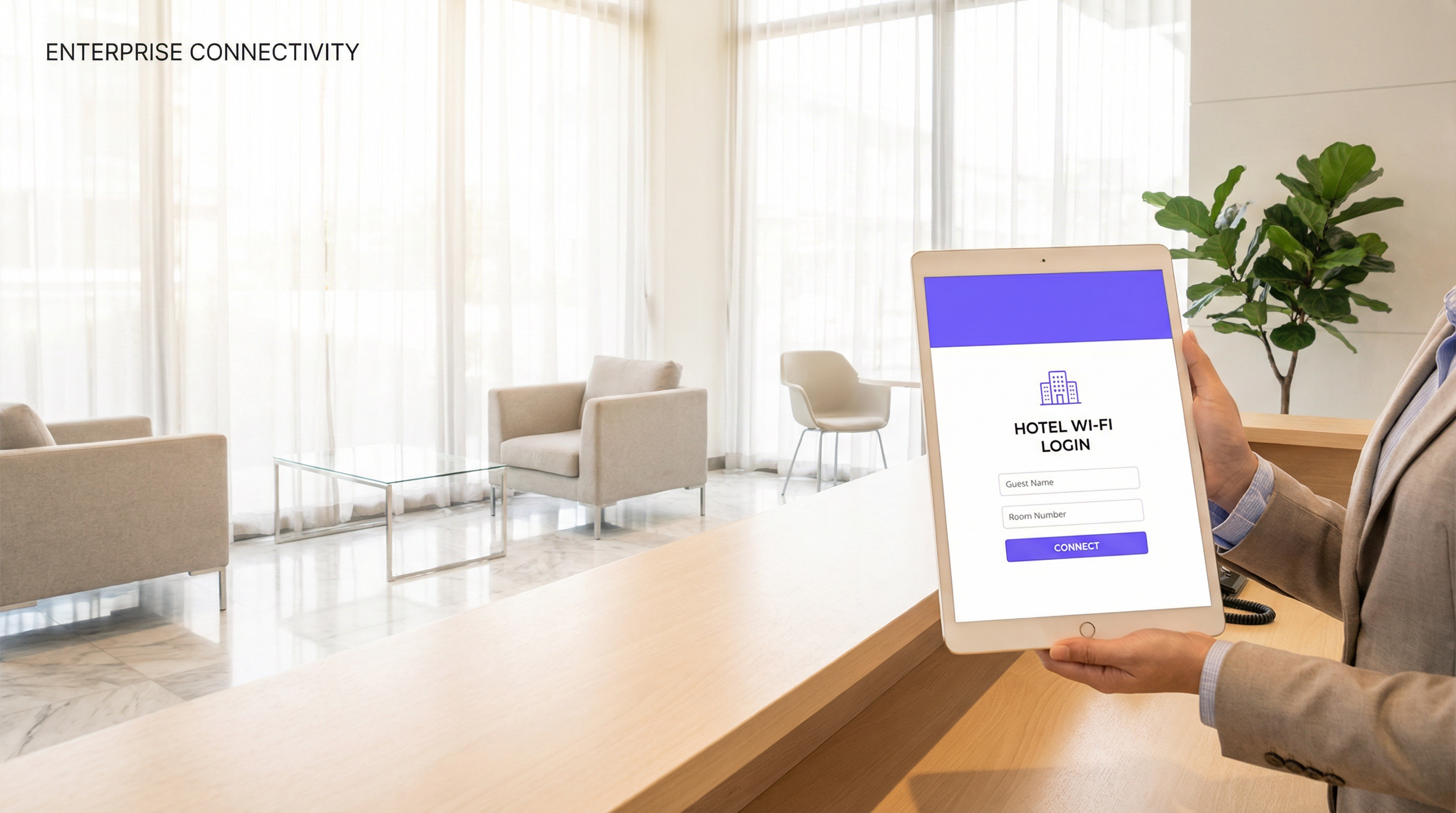
La splash page del guest WiFi — o Captive Portal — è il touchpoint più rilevante nell'implementazione wireless di qualsiasi struttura. È la prima interazione che un ospite ha con la rete e determina se si connetterà o meno. Tuttavia, rimane uno dei componenti costantemente meno curati dell'infrastruttura WiFi aziendale. Una splash page mal progettata non si limita a frustrare gli utenti; distrugge attivamente il valore commerciale di un investimento di rete che può ammontare a centinaia di migliaia di euro.
Questa guida è strutturata per i professionisti senior dell'IT e delle operations che devono prendere decisioni di implementazione immediate. Copre l'architettura tecnica dell'autenticazione del Captive Portal, i principi di UX che guidano la conversione, gli obblighi legali e di conformità previsti dal GDPR e dai framework correlati, e i requisiti di branding che trasformano una schermata di login in un asset in grado di generare profitti. Sono inclusi scenari di implementazione reali nei settori dell'ospitalità, del retail e degli eventi per ancorare ogni raccomandazione alla realtà operativa. L'argomento centrale è semplice: la vostra splash page non è una casella di controllo per la sicurezza. È uno strumento di business strategico e deve essere progettata di conseguenza.
Approfondimento Tecnico
Come Funziona l'Autenticazione del Captive Portal
Un Captive Portal opera a livello di accesso alla rete, intercettando tutto il traffico HTTP e HTTPS da un dispositivo client non autenticato e reindirizzandolo all'URL della splash page. Il meccanismo sottostante si basa sul DNS hijacking e sui reindirizzamenti HTTP 302. Quando un dispositivo si associa all'SSID guest, l'access point o il controller wireless gli assegna un indirizzo IP limitato e instrada tutto il traffico in uscita verso il server del portale. Finché l'utente non completa il flusso di autenticazione sulla splash page, il dispositivo viene mantenuto in una VLAN di quarantena, con accesso limitato all'indirizzo IP del portale e a qualsiasi dominio walled-garden pre-autorizzato (come i provider di social login).
A seguito di un'autenticazione riuscita — tramite invio di email, social login, SMS OTP o codice voucher — il controller o il server RADIUS aggiorna lo stato di autorizzazione del client, lo sposta nella VLAN di accesso appropriata e concede la connettività internet. L'intero flusso deve essere trasparente e veloce. Qualsiasi latenza nel reindirizzamento del portale o nella risposta di autenticazione verrà percepita dall'utente come un malfunzionamento del WiFi.
Dal punto di vista degli standard, l'architettura del Captive Portal è vendor-neutral e opera in modo indipendente dal protocollo di sicurezza wireless sottostante. Tuttavia, l'SSID stesso dovrebbe essere configurato con WPA3-Personal o WPA3-Enterprise dove la compatibilità del dispositivo lo consente, in conformità con la specifica IEEE 802.11ax (Wi-Fi 6). Il livello del Captive Portal gestisce l'identity and access management, mentre il protocollo wireless sottostante gestisce la sicurezza della trasmissione. Si tratta di funzioni distinte e devono essere strutturate separatamente.
Metodi di Autenticazione: Un'Analisi Comparativa
La scelta del metodo di autenticazione è la decisione di design più rilevante per qualsiasi implementazione di splash page. Ogni metodo comporta implicazioni diverse in termini di attrito per l'utente, ricchezza dei dati, oneri di conformità e postura di sicurezza.
| Metodo di Autenticazione | Livello di Attrito | Qualità dei Dati | Complessità GDPR | Tipo di Struttura Ideale |
|---|---|---|---|---|
| Click-through (solo T&C) | Molto Basso | Minima | Bassa | Aeroporti, trasporti pubblici, biblioteche |
| Inserimento Email | Basso | Alta (email, frequenza visite) | Media | Hotel, retail, ristoranti |
| Social login (Facebook/Google) | Basso-Medio | Molto Alta (dati demografici) | Alta | Bar, luoghi di intrattenimento, retail |
| SMS / OTP | Medio | Alta (numero di cellulare verificato) | Media | Ospitalità premium, sanità |
| Voucher / Codice PIN | Basso | Nessuna (anonimo) | Molto Bassa | Centri congressi, spazi di co-working |
| RADIUS / Active Directory | Molto Basso (SSO) | Livello Enterprise | Bassa (utenti interni) | Campus aziendali, istruzione |
Per la maggior parte delle implementazioni commerciali, l'inserimento dell'email rappresenta l'equilibrio ottimale. Acquisisce un identificatore duraturo e commercializzabile con il minimo attrito ed è semplice da gestire secondo i requisiti di base giuridica del GDPR. Il social login è interessante per la ricchezza dei dati, ma richiede un framework di consenso più complesso e introduce una dipendenza da provider OAuth di terze parti: un rischio che vale la pena valutare attentamente in contesti enterprise.
Configurazione del Walled Garden
Un walled garden è l'insieme di domini e indirizzi IP a cui un client non autenticato è autorizzato ad accedere prima di completare il flusso della splash page. Questo è un elemento di configurazione critico. Come minimo, il walled garden deve includere il server del portale stesso, eventuali endpoint CDN che forniscono gli asset del portale e gli endpoint OAuth per qualsiasi provider di social login in uso. L'errata configurazione del walled garden è la causa più comune dei fallimenti del social login ed è una fonte frequente di ticket di supporto nelle nuove implementazioni.
Gestione di HTTPS e Certificati
Tutte le splash page devono essere servite tramite HTTPS. I moderni sistemi operativi mobili, inclusi iOS 14+ e Android 11+, mostreranno avvisi di sicurezza o bloccheranno le connessioni ai Captive Portal HTTP. Il server del portale deve presentare un certificato TLS valido emesso da una Certificate Authority attendibile. I certificati autofirmati non sono accettabili nelle implementazioni in produzione. La scadenza del certificato è una modalità di guasto operativo comune; il rinnovo automatico tramite Let's Encrypt o il servizio di certificati gestiti del provider della piattaforma dovrebbe essere una pratica standard.
Guida all'Implementazione
Fase 1: Definizione dei Requisiti
Prima di aprire uno strumento di design, il team di progetto deve allinearsi su quattro parametri: il metodo di autenticazione (basato sull'analisi comparativa precedente), i campi dati da acquisire (applicare il principio di minimizzazione dei dati: raccogliere solo ciò che si utilizzerà attivamente), il modello di consenso marketing (opt-in vs. opt-out, con l'opt-in fortemente raccomandato per la conformità al GDPR) e gli asset del brand da incorporare (file del logo in formato SVG, codici colore esadecimali, font approvati).
Fase 2: Design della Splash Page
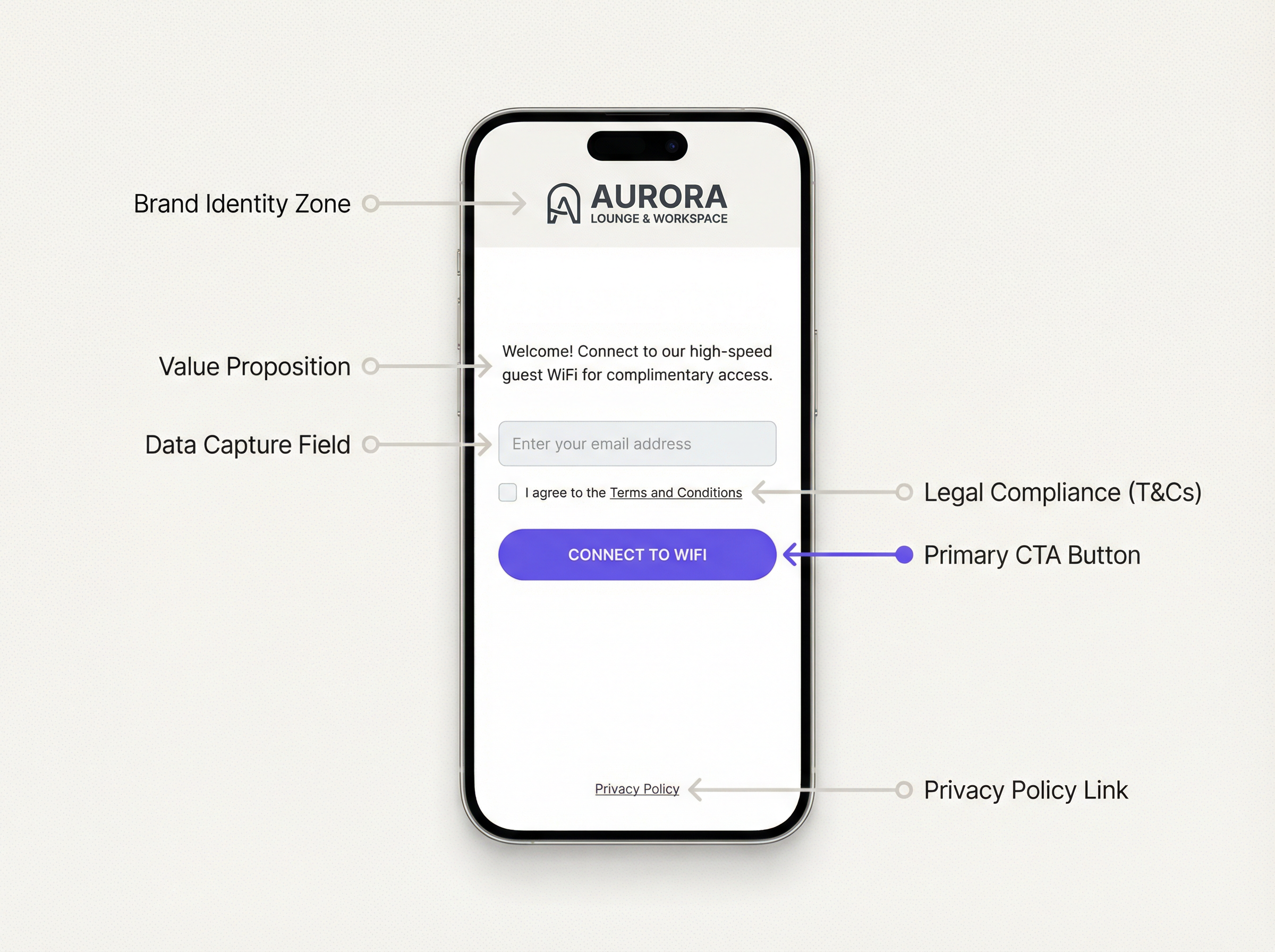
Un design efficace della splash page del WiFi segue una chiara gerarchia visiva. L'area dell'identità del brand occupa la parte superiore della pagina e deve caricarsi per prima. Segue immediatamente una value proposition concisa, non più di una frase. Il modulo di autenticazione è l'elemento centrale e deve essere il componente interattivo visivamente più prominente. Gli elementi di conformità legale (casella di controllo dei T&C, link alla privacy policy) si trovano sotto il modulo. Il pulsante di call-to-action è l'elemento finale e deve essere grande, ad alto contrasto e inequivocabile.
Il peso della pagina è una variabile di performance critica. La dimensione totale non compressa di tutti gli asset della splash page — HTML, CSS, JavaScript, immagini — non dovrebbe superare i 200KB. Le immagini di sfondo, se utilizzate, devono essere compresse e servite in formati moderni (preferibilmente WebP). Una pagina che impiega più di tre secondi per caricarsi su una connessione 4G registrerà un aumento misurabile dei tassi di abbandono. Testate le performance utilizzando strumenti come Google PageSpeed Insights e puntate a un Largest Contentful Paint (LCP) inferiore a 2,5 secondi.
Il responsive design non è negoziabile. La maggior parte delle connessioni guest WiFi proviene da smartphone. La splash page deve essere renderizzata correttamente con larghezze della viewport da 320px a 1440px. Utilizzate le media query CSS e un approccio di design mobile-first. Evitate layout a larghezza fissa.
Fase 3: Configurazione della Piattaforma
Implementate la splash page tramite la vostra piattaforma di gestione del guest WiFi. Una piattaforma di livello production come Purple fornisce un editor basato su template che consente ai team di marketing di gestire gli aggiornamenti del brand senza l'intervento degli ingegneri. Configurate l'SSID per reindirizzare all'URL del portale, impostate il timeout della sessione e le policy di larghezza di banda, e definite i domini del walled garden. Conducete test end-to-end su almeno tre tipi di dispositivi (iOS, Android, laptop Windows) prima del go-live.
Fase 4: Analisi e Ottimizzazione
Dopo l'implementazione, dotate la splash page del monitoraggio delle conversioni. Le metriche chiave sono: Impression Rate (dispositivi che hanno rilevato l'SSID), Portal View Rate (dispositivi che hanno caricato la splash page), Completion Rate (dispositivi che si sono autenticati con successo) e Drop-off Rate (il delta tra visualizzazioni e completamenti). Un Completion Rate ottimale per un flusso di acquisizione email è superiore al 65%. Tassi inferiori al 50% indicano un problema di UX o di performance che merita di essere indagato.
Best Practice
Le seguenti raccomandazioni rappresentano la sintesi delle linee guida derivanti da implementazioni enterprise in ambienti dell'ospitalità, del retail e del settore pubblico.
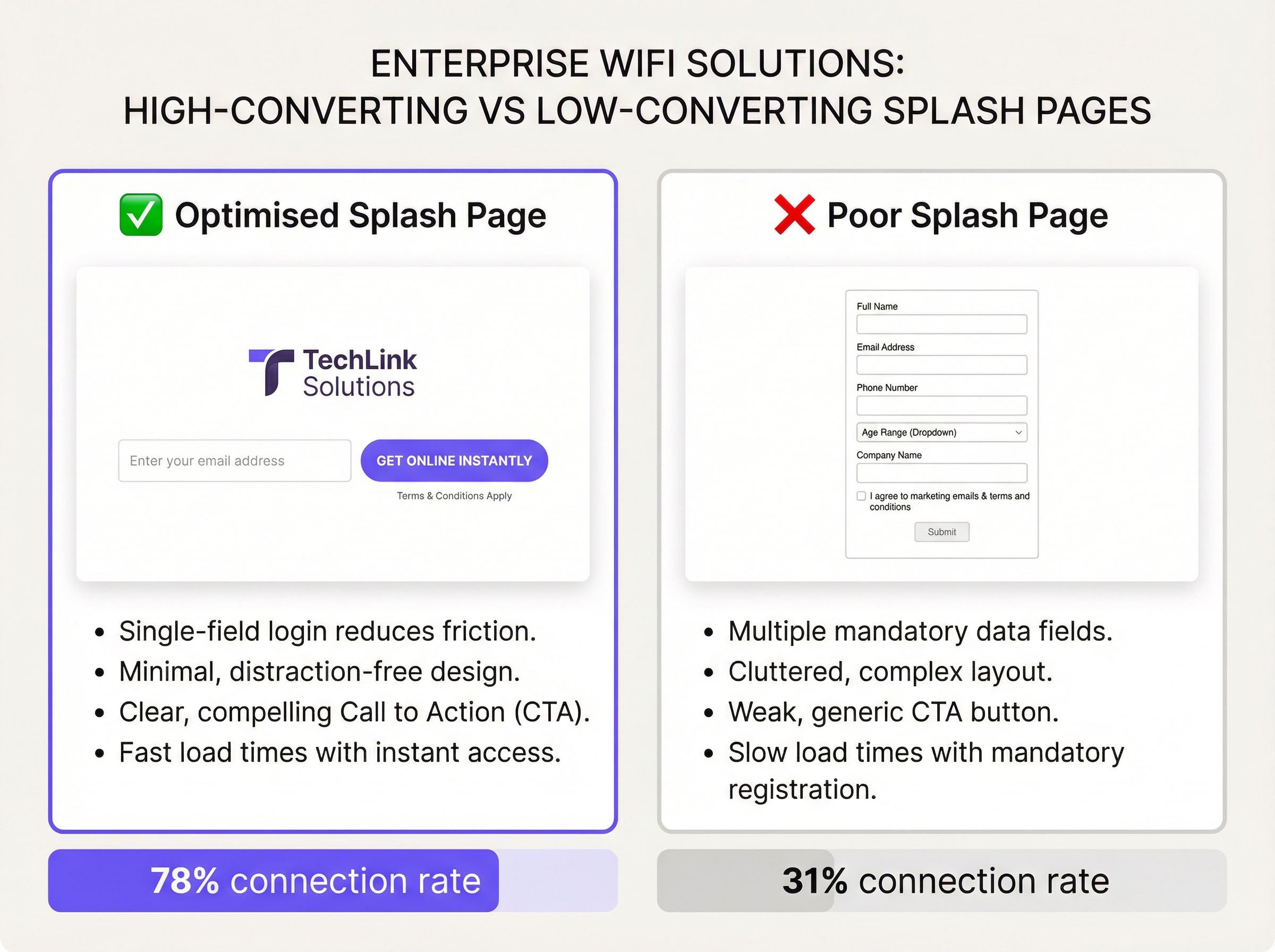
Minimizzare i campi del modulo. Ogni campo aggiuntivo riduce i tassi di completamento. Numerosi test A/B su implementazioni su larga scala mostrano costantemente che passare da un modulo a due campi (nome + email) a un modulo a campo singolo (solo email) aumenta i tassi di completamento di 15-25 punti percentuali. A meno che uno specifico business case non giustifichi un'ulteriore raccolta di dati, un singolo campo email è l'impostazione predefinita corretta.
Rendere esplicita la value proposition. Gli utenti non completeranno un modulo senza capire cosa riceveranno in cambio. Un titolo come "Connettiti al WiFi gratuito e ad alta velocità" o "Vai online in pochi secondi" direttamente sopra il campo del modulo migliora significativamente la conversione. Value proposition vaghe o assenti sono una delle cause principali degli alti tassi di abbandono.
Conformità al GDPR by design. La splash page deve presentare un meccanismo di consenso chiaro e separato per le comunicazioni di marketing, distinto dall'accettazione dei T&C richiesta per l'accesso alla rete. Le caselle di controllo del consenso marketing preselezionate non sono conformi all'Articolo 7 del GDPR. La privacy policy deve essere accessibile tramite un link chiaramente etichettato e deve descrivere accuratamente come i dati derivati dal WiFi vengono elaborati, archiviati e condivisi.
Implementare correttamente la gestione delle sessioni. Definire timeout di sessione e intervalli di riautenticazione appropriati. Una sessione di 24 ore per gli ospiti di un hotel è lo standard. Una sessione di 2 ore per una caffetteria è appropriata. Forzare la riautenticazione ogni 30 minuti in una struttura in cui gli ospiti rimangono per ore è un grave errore di UX e una lamentela comune negli ambienti dell'ospitalità.
Testare su diversi sistemi operativi. Il Captive Network Assistant (CNA) di iOS e il meccanismo di rilevamento del Captive Portal di Android si comportano in modo diverso. iOS apre una finestra mini-browser (il CNA) per visualizzare il portale, che presenta limitazioni tra cui l'assenza di supporto JavaScript nelle versioni precedenti e una gestione limitata dei cookie. Assicuratevi che il vostro portale si adatti in modo fluido (graceful degradation) nell'ambiente CNA. Testate sulle versioni correnti e N-1 sia di iOS che di Android.
Isolare il traffico guest. La VLAN guest deve essere protetta da firewall rispetto a tutte le reti aziendali interne, alle interfacce di gestione e ai sistemi POS. Questo è un requisito fondamentale per la sicurezza della rete ed è obbligatorio ai sensi del Requisito 1.3 del PCI DSS per qualsiasi struttura che elabori pagamenti con carta. La mancata segmentazione del traffico guest è una vulnerabilità di sicurezza critica.
Risoluzione dei Problemi e Mitigazione dei Rischi
Modalità di Guasto Comuni
La tabella seguente cataloga i problemi riscontrati più frequentemente nelle implementazioni di Captive Portal e le relative cause principali.
| Sintomo | Causa Principale | Risoluzione |
|---|---|---|
| La pagina del portale non appare | DNS hijacking non configurato; il client utilizza DoH/DoT | Assicurarsi che il controller intercetti il DNS; bloccare DNS-over-HTTPS sul firewall |
| Il social login fallisce | Provider OAuth non nel walled garden | Aggiungere tutti gli endpoint OAuth e i domini CDN al walled garden |
| Avviso HTTPS sul portale | Certificato TLS scaduto o autofirmato | Implementare un certificato valido; attivare il rinnovo automatico |
| Il CNA di iOS mostra una pagina bianca | Dipendenza JavaScript nel portale; restrizioni JS del CNA | Verificare la compatibilità del portale con il CNA; utilizzare il server-side rendering |
| Alto tasso di abbandono | Troppi campi nel modulo; caricamento lento della pagina; CTA poco chiara | Ridurre i campi; ottimizzare gli asset; eseguire test A/B sul copy della CTA |
| Gli utenti non riescono a riconnettersi dopo la scadenza della sessione | Token di sessione non cancellato; indirizzo MAC non rivalutato | Rivedere la configurazione della gestione delle sessioni nel controller |
| Rilievo durante l'audit GDPR | Caselle di consenso preselezionate; link alla privacy policy mancante | Correggere la UX del consenso; aggiungere un link conforme alla privacy policy |
Mitigazione dei Rischi: La Checklist per l'Audit di Conformità
Prima che qualsiasi implementazione di guest WiFi vada in produzione, devono essere verificati i seguenti elementi di conformità: la privacy policy è aggiornata e riflette accuratamente le attività di elaborazione dei dati; il consenso marketing è opt-in e separato dai T&C; i periodi di conservazione dei dati sono definiti e applicati; esiste un processo per la gestione delle Richieste di Accesso dell'Interessato (SAR) per i dati derivati dal WiFi; e il traffico guest è completamente isolato dalle reti interne e dai sistemi in ambito PCI.
ROI e Impatto sul Business
Il business case per investire in una splash page ben progettata è semplice. I dati del guest WiFi — principalmente indirizzi email e dati sulla frequenza delle visite — sono tra i dati di prima parte più preziosi che un'organizzazione possa raccogliere. Con la deprecazione dei cookie di terze parti sui principali browser e le crescenti restrizioni sugli identificatori pubblicitari mobili, l'indirizzo email acquisito al momento del login al WiFi rappresenta un asset di marketing di proprietà, duraturo e basato sul consenso.
Consideriamo l'aspetto economico di una catena retail con 200 sedi. Se ogni sede serve 300 utenti unici di guest WiFi al giorno e l'attuale tasso di completamento è del 35%, la catena acquisisce circa 21.000 indirizzi email al giorno. Ottimizzando la splash page per raggiungere un tasso di completamento del 70% — un obiettivo realistico con le pratiche descritte in questa guida — tale cifra raddoppia a 42.000 al giorno. In un anno, ciò rappresenta ulteriori 7,6 milioni di contatti opt-in che entrano nel database di marketing. Con un'attribuzione prudente dei ricavi dell'email marketing di 0,10 € per contatto all'anno, questa ottimizzazione vale 760.000 € di ricavi annuali incrementali — derivanti da una modifica di design che costa una frazione di tale importo per essere implementata.
Oltre al valore di marketing diretto, la splash page è il punto di ingresso a una più ampia piattaforma di guest intelligence. Le analisi del tempo di permanenza (dwell time), la frequenza delle visite ripetute, la mappatura dei picchi di affluenza e l'analisi del customer journey hanno tutte origine dall'evento di autenticazione. Questi dati informano le decisioni operative — livelli di personale, layout del negozio, tempistiche promozionali — che hanno un impatto misurabile sull'efficienza operativa e sui ricavi per metro quadrato.
Il calcolo del ROI per l'ottimizzazione della splash page non è quindi un esercizio di marketing. È un investimento nell'infrastruttura dei dati con rendimenti composti.
Termini chiave e definizioni
Captive Portal
A network access control mechanism that intercepts all HTTP/HTTPS traffic from an unauthenticated client and redirects it to an authentication web page before granting internet access. Operates at the access layer via DNS hijacking and HTTP 302 redirects.
IT teams encounter this term when configuring wireless controllers, access points, and network management platforms. It is the technical term for what marketing teams call a 'splash page' or 'WiFi login page'. Understanding the distinction between the portal mechanism and the page design is essential for effective troubleshooting.
Splash Page
The web page presented to a guest WiFi user via the captive portal mechanism. It is the user-facing interface for authentication and is the primary point of brand expression, data capture, and legal consent in a guest WiFi deployment.
The term is used interchangeably with 'captive portal' in commercial contexts, though strictly speaking the splash page is the front-end design layer and the captive portal is the underlying network mechanism. IT managers should be precise about this distinction when briefing design agencies or platform vendors.
Walled Garden
A defined set of IP addresses, domains, and URLs that an unauthenticated client device is permitted to access before completing the splash page authentication flow. Configured at the wireless controller or firewall level.
Encountered during initial deployment configuration and whenever the splash page design changes. An incorrectly configured walled garden is the most common cause of social login failures and broken portal page rendering. Must be reviewed and updated whenever new authentication methods or third-party scripts are added to the splash page.
GDPR (General Data Protection Regulation)
EU Regulation 2016/679, applicable in the UK as the UK GDPR post-Brexit. Governs the collection, processing, storage, and transfer of personal data. Requires a lawful basis for processing, explicit and unbundled consent for marketing communications, and the right for individuals to access, rectify, and erase their data.
Directly applicable to any splash page that collects personal data (email addresses, names, device identifiers). IT and marketing teams must ensure the splash page's consent mechanism, privacy policy, and data retention practices are compliant. Non-compliance carries fines of up to 4% of global annual turnover under Article 83.
WPA3 (Wi-Fi Protected Access 3)
The current generation wireless security protocol defined by the Wi-Fi Alliance, superseding WPA2. Introduces Simultaneous Authentication of Equals (SAE) for stronger password-based authentication, enhanced protection against offline dictionary attacks, and mandatory use of Protected Management Frames (PMF).
Relevant when specifying SSID security configuration for guest networks. WPA3-Personal is recommended for guest SSIDs where device compatibility allows. Note that WPA3 governs transmission security and is distinct from the captive portal authentication layer, which operates at the application layer.
RADIUS (Remote Authentication Dial-In User Service)
A networking protocol providing centralised Authentication, Authorisation, and Accounting (AAA) management for users connecting to a network. Defined in RFC 2865. Used in enterprise WiFi deployments to validate credentials against a central directory (e.g., Active Directory, LDAP) and enforce access policies.
Encountered in enterprise and education deployments where guest WiFi must integrate with existing identity infrastructure. For pure guest WiFi with email capture, RADIUS is typically not required. It becomes relevant when deploying 802.1X-authenticated SSIDs for staff or when integrating with a centralised policy management platform.
PCI DSS (Payment Card Industry Data Security Standard)
A set of security standards defined by the PCI Security Standards Council, mandating controls for any organisation that stores, processes, or transmits cardholder data. Requirement 1.3 mandates network segmentation to isolate cardholder data environments from all other networks, including guest WiFi.
Directly applicable to hotels, retailers, and any venue that processes card payments on the same physical network infrastructure as the guest WiFi. IT teams must ensure the guest VLAN is fully isolated from POS systems, payment terminals, and any system in scope for PCI DSS. Failure to segment is a critical finding in PCI audits.
Progressive Profiling
A data collection strategy in which additional user attributes are requested incrementally across multiple sessions, rather than all at once during the initial authentication. Each subsequent interaction presents a short, optional prompt to enrich the user's profile.
Highly relevant for retail and hospitality deployments where richer demographic data is commercially valuable but front-loading a long form would suppress connection rates. Implemented at the platform level, with conditional logic that detects returning devices and presents appropriate prompts. Must be clearly disclosed in the privacy policy.
Conversion Rate (WiFi Context)
The percentage of devices that load the splash page and successfully complete the authentication flow, expressed as: (Authenticated Sessions / Portal Page Views) x 100. A key performance indicator for splash page effectiveness.
The primary metric for evaluating splash page performance. IT and marketing teams should establish a baseline conversion rate at deployment and track it continuously. A rate below 50% for an email-capture flow indicates a significant UX or performance issue. Rates above 70% are achievable with optimised single-field designs and clear value propositions.
Casi di studio
A 350-room business hotel in central London is deploying a new guest WiFi infrastructure across its property. The hotel's marketing team wants to capture guest email addresses for post-stay communications, while the IT team is concerned about GDPR compliance and network security. The hotel also hosts corporate events and needs to support conference delegates who expect seamless, fast connectivity. How should the splash page be designed and configured to meet all of these requirements?
The deployment should use a tiered SSID architecture: a primary guest SSID with an email-capture splash page for hotel residents and general guests, and a separate event SSID with voucher-code authentication for conference delegates. This separation allows the marketing team to collect opted-in email addresses from hotel guests without forcing conference delegates — who may be attending a third-party event — through a data-capture flow that could create GDPR complications for the event organiser.
For the primary guest splash page, the design should feature the hotel's logo and brand colours prominently, a single email input field, a clearly labelled opt-in checkbox for marketing communications (unchecked by default), a mandatory T&Cs acceptance checkbox, and a high-contrast 'Connect' CTA button. The page should load in under 2 seconds and be fully responsive. The session timeout should be set to 24 hours, with automatic re-authentication suppressed for returning devices within a 30-day window to reduce friction for repeat guests.
For the event SSID, the hotel's IT team should pre-generate a batch of single-use or time-limited voucher codes that the events coordinator distributes to delegates. This provides controlled access without data capture obligations. The event VLAN should be firewalled from the hotel's PMS (Property Management System) and POS infrastructure in compliance with PCI DSS Requirement 1.3.
All guest traffic must traverse a dedicated guest VLAN, isolated from the hotel's operational network. The splash page must be served over HTTPS with a valid certificate. The privacy policy linked from the splash page must explicitly reference WiFi data collection, retention periods (recommend 24 months), and the right to unsubscribe from marketing communications.
A national retail chain with 180 stores wants to use its guest WiFi network to build a first-party marketing database and gain footfall analytics. The current splash page — provided by the ISP — is unbranded, asks for name, email, date of birth, and postcode, and has a connection rate of 28%. The marketing director has set a target of 65% connection rate and 500,000 new email opt-ins within 12 months. What changes should be made to the splash page, and what supporting infrastructure is required?
The immediate priority is to replace the ISP-provided portal with a branded, platform-managed solution. The form must be reduced to a single email field. Removing name, date of birth, and postcode will be the single most impactful change. These fields add friction without providing data that is immediately actionable in a retail context; email address alone is sufficient to trigger a welcome journey, attribute future purchases, and measure visit frequency.
The new splash page design should incorporate the retailer's brand identity — logo, primary brand colour, approved typeface — and include a value proposition headline such as 'Free WiFi. Connect in seconds.' The T&Cs and privacy policy links must be present and compliant. The marketing opt-in checkbox should be unchecked by default with clear copy such as 'Yes, I'd like to receive exclusive offers by email.'
To achieve the 500,000 opt-in target, the chain should also implement a progressive profiling strategy: on a user's second or third visit, the splash page can present an optional prompt to complete their profile (e.g., add a name or confirm their postcode for localised offers). This approach collects richer data without compromising the initial connection rate.
The supporting infrastructure requires a centralised guest WiFi management platform with multi-site management capabilities, a CRM integration to push captured emails and consent flags directly into the marketing automation platform, and a real-time analytics dashboard to monitor per-store connection rates and identify underperforming locations. A/B testing capability at the platform level is highly desirable to allow ongoing optimisation of CTA copy and page layout.
Projected outcome: based on comparable deployments, moving from a five-field form to a single-field form with a branded design typically increases completion rates from 28% to 65-75%. At 180 stores averaging 250 unique daily visitors, a 65% completion rate generates approximately 29,000 new email opt-ins per day, reaching the 500,000 target in approximately 17 days of operation — well within the 12-month window.
Analisi degli scenari
Q1. You are the IT Manager for a 500-seat stadium that hosts 40 events per year, ranging from football matches (general public) to corporate hospitality events (premium guests). The commercial team wants to use guest WiFi to build a marketing database, while the security team insists on minimal data exposure. The stadium's existing network uses a flat guest VLAN with no segmentation. How do you design the splash page strategy and supporting network architecture to satisfy both teams?
💡 Suggerimento:Consider whether a single splash page design can serve both use cases, and think carefully about what network segmentation changes are required before any splash page optimisation is meaningful.
Mostra l'approccio consigliato
The correct approach is a dual-SSID architecture: a public SSID for general admission guests with an email-capture splash page, and a separate corporate SSID for hospitality guests with a voucher-code or pre-shared key authentication. This satisfies the commercial team's data capture requirement for the general public cohort while giving the security team a controlled, low-data-exposure path for corporate guests. Before any splash page work begins, the flat guest VLAN must be segmented: general guest traffic, corporate guest traffic, and operational/POS traffic must each occupy separate VLANs with appropriate firewall rules between them. This is a prerequisite, not an optional enhancement. The email-capture splash page should use a single field (email), an unchecked marketing opt-in checkbox, and a clear T&Cs link. The privacy policy must reference the stadium operator as data controller and describe the marketing use of captured data. Post-event, the captured emails should be exported to the CRM platform within 24 hours to enable timely follow-up communications.
Q2. A regional library authority is deploying free public WiFi across 22 branches. The authority's legal team has flagged that collecting email addresses from library users may conflict with the authority's obligations under the Public Sector Equality Duty and data minimisation principles. The IT team is under pressure to deploy quickly. What authentication method should be used, and what are the key splash page design requirements for this public-sector context?
💡 Suggerimento:Consider the principle of data minimisation under UK GDPR and the specific obligations of a public-sector body. Is email capture necessary to achieve the authority's objectives?
Mostra l'approccio consigliato
For a public library context, a click-through authentication — requiring only T&Cs acceptance with no data capture — is the most appropriate and legally defensible approach. The authority's primary obligation is to provide equitable access to information; data collection is not a core objective and introduces compliance risk without commensurate benefit. The splash page should be simple and accessible: the authority's branding, a brief welcome message, a T&Cs acceptance checkbox, and a 'Connect' button. The T&Cs must include an acceptable use policy that prohibits illegal activity, in compliance with the authority's obligations under the Computer Misuse Act 1990. If the authority wishes to collect usage analytics, this should be done at the network level (aggregate throughput, peak usage times) rather than at the individual user level. If email capture is later deemed necessary for a specific programme (e.g., a digital skills initiative), it must be implemented as a separate, clearly optional flow with a documented lawful basis under UK GDPR Article 6(1)(e) (public task) or Article 6(1)(a) (consent).
Q3. Your organisation's guest WiFi splash page has a completion rate of 42% against a target of 65%. Analytics show that 85% of users load the splash page, but 43% abandon before clicking 'Connect'. The page currently asks for first name, last name, email address, and date of birth, and includes a 400KB background image. The marketing team does not want to remove the date of birth field as it is used for age verification for an alcohol-related promotion. How do you diagnose and resolve the drop-off issue?
💡 Suggerimento:Separate the performance problem from the UX problem. Address them in sequence. Consider whether the age verification requirement can be met by a different mechanism that does not require a form field.
Mostra l'approccio consigliato
The diagnosis identifies two distinct problems: a performance problem (the 400KB background image is likely causing slow load times, contributing to early abandonment) and a UX problem (four form fields is significantly above the optimal one-field design). Address the performance problem first: compress the background image to under 50KB using WebP format, or replace it with a CSS gradient that loads instantly. This alone may recover 5-10 percentage points of completion rate. For the UX problem, negotiate with the marketing team to remove first name, last name, and date of birth from the standard flow. The age verification requirement for the alcohol promotion can be met more effectively by a separate age-gate mechanism (a simple 'I confirm I am 18 or over' checkbox) rather than a date-of-birth field, which is disproportionate data collection for this purpose and creates a GDPR data minimisation issue. Implement progressive profiling to request additional data on subsequent visits if richer profiling is genuinely required. After these changes, re-measure the completion rate over a 30-day period. If it remains below 65%, conduct user testing to identify any remaining friction points in the authentication flow.
Punti chiave
- ✓A guest WiFi splash page is a strategic business asset, not a technical formality — its design directly determines the ROI of your entire guest WiFi investment through connection rates and first-party data capture.
- ✓Apply the One-Field Rule as your default: a single email field consistently outperforms multi-field forms, often doubling completion rates from below 35% to above 70% in comparable deployments.
- ✓Legal compliance is non-negotiable and must be designed in from the start — GDPR requires unbundled, opt-in marketing consent, an accurate privacy policy, and a documented lawful basis for all data processing activities.
- ✓Network segmentation is a prerequisite, not an optional enhancement — guest traffic must be isolated from corporate and POS systems in compliance with PCI DSS Requirement 1.3 before any splash page optimisation work begins.
- ✓Page performance is as important as visual design — a splash page that takes more than three seconds to load will see measurable abandonment; target a total asset weight under 200KB and an LCP under 2.5 seconds.
- ✓Choose your authentication method based on venue type and business objective — email capture is optimal for most commercial venues, while click-through is appropriate for public-sector and high-throughput environments where data collection is not a primary objective.
- ✓Instrument your splash page with conversion analytics from day one — without baseline data on impression rate, portal view rate, and completion rate, you cannot measure the impact of optimisation changes or identify underperforming locations in a multi-site deployment.




