

LAN विरुद्ध WAN: WiFi डिप्लॉयमेंट्समधील फरक समजून घेणे
A technical reference for IT leaders and venue operators on the critical differences between LAN and WAN in enterprise WiFi deployments. This guide provides actionable architectural insights, implementation best practices, and clarifies how understanding this distinction drives ROI for guest WiFi and operational intelligence.
🎧 हे मार्गदर्शक ऐका
ट्रान्सक्रिप्ट पहा
कार्यकारी सारांश
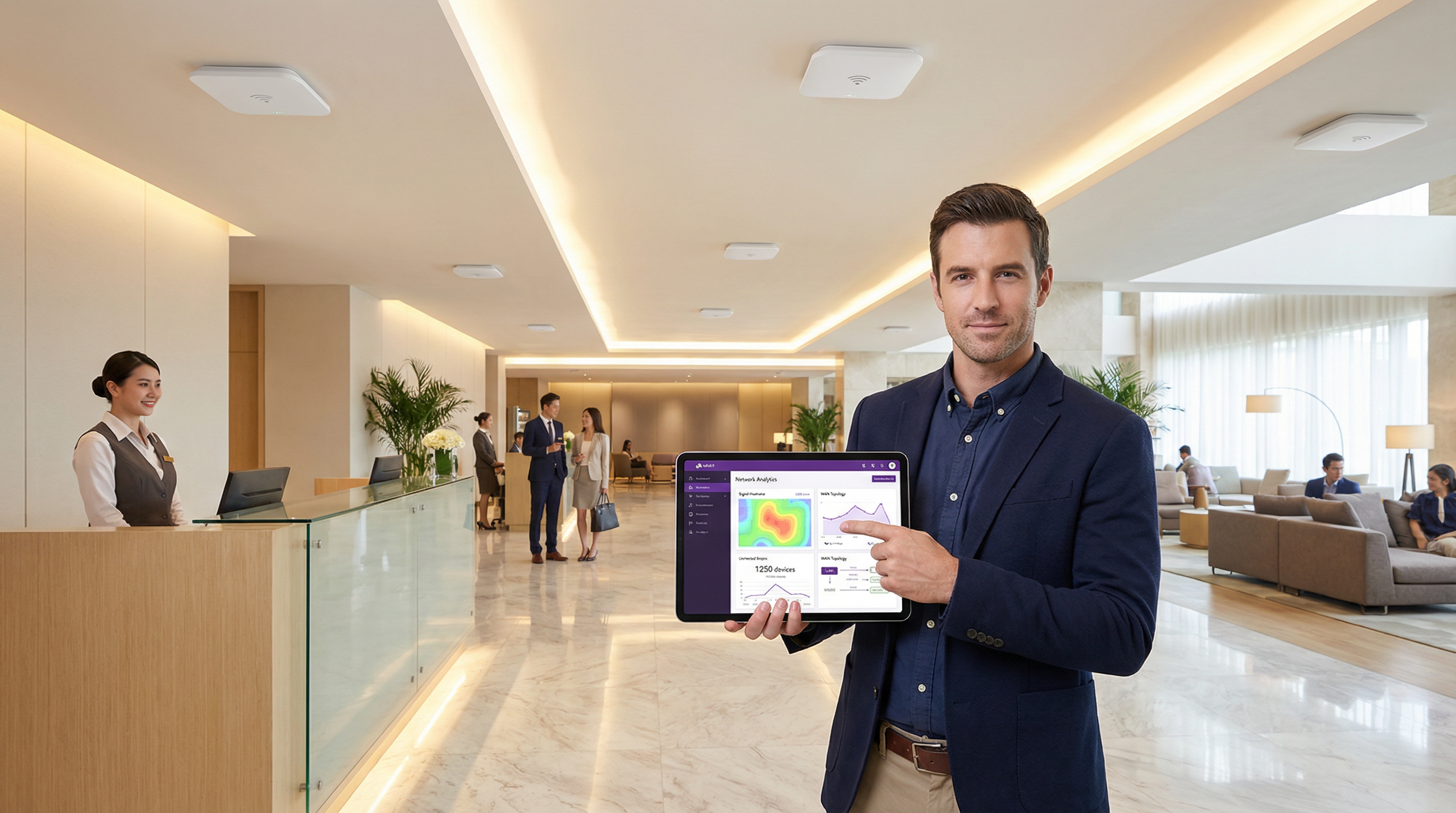
IT एक्झिक्युटिव्ह आणि नेटवर्क आर्किटेक्ट्ससाठी, लोकल एरिया नेटवर्क (LAN) आणि वाईड एरिया नेटवर्क (WAN) मधील फरक मूलभूत आहे, तरीही मोठ्या प्रमाणावरील WiFi डिप्लॉयमेंट्समध्ये त्याचा व्यावहारिक वापर अनेकदा लक्षणीय गुंतागुंत आणि बजेट ओव्हररन्सचे (अतिरिक्त खर्चाचे) कारण ठरतो. LAN मर्यादित भौतिक क्षेत्रात—जसे की एखादे हॉटेल, रिटेल स्टोअर किंवा कॉन्फरन्स फ्लोअर—हाय-स्पीड, लो-लॅटेन्सी कनेक्टिव्हिटी प्रदान करते. याउलट, WAN मोठ्या भौगोलिक अंतरावरील एकाधिक LAN ला जोडते, ज्यामुळे रिटेल चेनला तिची स्टोअर्स जोडता येतात किंवा हॉटेल ग्रुपला त्यांच्या प्रॉपर्टीज मध्यवर्ती डेटा सेंटरशी जोडता येतात. ही सीमा चुकीची समजल्यास नेटवर्क डिझाइन खराब होते, परिणामी परफॉर्मन्स बॉटलनेक्स, सुरक्षा भेद्यता आणि युझर एक्सपिरियन्सशी तडजोड करावी लागते. हे मार्गदर्शक एक व्यावहारिक संदर्भ म्हणून काम करते, जे मूळ संकल्पना स्पष्ट करते आणि एंटरप्राइझ-ग्रेड WiFi नेटवर्क्स डिझाइन, डिप्लॉय आणि व्यवस्थापित करण्यासाठी एक धोरणात्मक फ्रेमवर्क प्रदान करते. आम्ही आर्किटेक्चरल निर्णय, WPA3 आणि PCI DSS सारख्या मानकांनुसार सुरक्षिततेचा विचार आणि चांगल्या प्रकारे डिझाइन केलेल्या नेटवर्कचा व्यावसायिक प्रभाव एक्सप्लोर करू. तसेच, महसूल वाढवण्यासाठी आणि ग्राहकांचे वर्तन समजून घेण्यासाठी Purple सारखे WiFi इंटेलिजन्स प्लॅटफॉर्म कशाप्रकारे महत्त्वपूर्ण मूल्य जोडते, हे देखील स्पष्ट करू.
तांत्रिक सखोल माहिती (Technical Deep-Dive)
प्रभावी WiFi नेटवर्क डिझाइनसाठी LAN/WAN ची सीमा समजून घेणे अत्यंत महत्त्वाचे आहे. LAN हे तुमचे अंतर्गत नियंत्रणाचे क्षेत्र आहे, ज्यामध्ये सर्व ऑन-साइट हार्डवेअर समाविष्ट असते, तर WAN हे तुमच्या साइट्सना जोडणारे बाह्य नेटवर्क आहे, जे सामान्यतः इंटरनेट सर्व्हिस प्रोव्हायडर (ISP) किंवा टेलिकॉम कॅरियरद्वारे व्यवस्थापित केले जाते.
लोकल एरिया नेटवर्क (LAN): ऑन-साइट पॉवरहाऊस
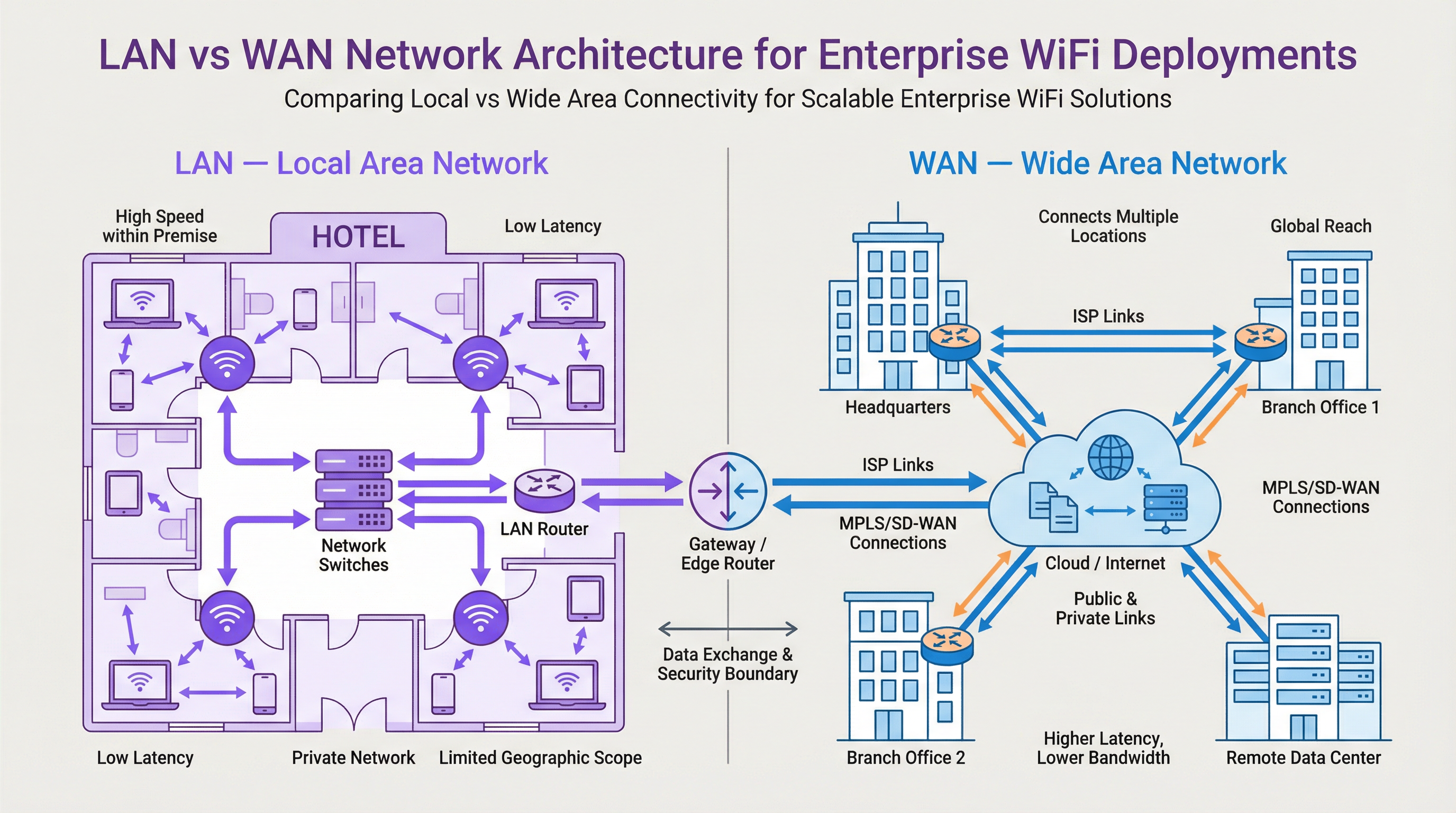
LAN हे एकाच भौगोलिक स्थानापुरते मर्यादित असलेले खाजगी नेटवर्क आहे, जसे की ऑफिस बिल्डिंग, स्टेडियम किंवा हॉटेल. त्याचा मुख्य उद्देश त्या परिमितीतील इंटरकनेक्टेड उपकरणांमध्ये हाय-स्पीड डेटा एक्सचेंज सुलभ करणे हा आहे. आधुनिक WiFi डिप्लॉयमेंटमध्ये, LAN म्हणजे केवळ केबल्स नसून, ती एकत्रितपणे काम करणाऱ्या घटकांची एक अत्याधुनिक इकोसिस्टम आहे.
- घटक (Components): प्रमुख हार्डवेअरमध्ये वायरलेस ॲक्सेस पॉइंट्स (APs) समाविष्ट आहेत जे WiFi सिग्नल ब्रॉडकास्ट करतात (उदा. IEEE 802.11ax/Wi-Fi 6 मानकांवर चालणारे), नेटवर्क स्विचेस जे APs आणि इतर वायर्ड उपकरणांमधील ट्रॅफिक एकत्रित करतात, आणि एक मध्यवर्ती राउटर किंवा लेयर 3 स्विच जे ट्रॅफिक फ्लो व्यवस्थापित करते आणि WAN गेटवेसह डेटा त्याच्या गंतव्यस्थानाकडे निर्देशित करते.
- परफॉर्मन्स (Performance): LANs अतिशय उच्च बँडविड्थ (सामान्यतः इथरनेटवर 1 Gbps ते 10 Gbps किंवा अधिक) आणि अत्यंत कमी लॅटेन्सी (अनेकदा सब-मिलिसेकंद) द्वारे वैशिष्ट्यीकृत आहेत. कॉन्फरन्स सेंटर्ससारख्या हाय-डेन्सिटी वातावरणास किंवा रिटेलमधील पॉइंट-ऑफ-सेल (POS) सिस्टीम्ससारख्या रिअल-टाइम डेटाची आवश्यकता असलेल्या ॲप्लिकेशन्सना सपोर्ट करण्यासाठी हे आवश्यक आहे.
- नियंत्रण आणि सुरक्षा (Control & Security): LAN खाजगी मालकीचे असल्याने, IT टीम्सचे त्याच्या आर्किटेक्चर आणि सुरक्षा स्थितीवर पूर्ण नियंत्रण असते. यामुळे IEEE 802.1X वापरून ग्रॅन्युलर ॲक्सेस कंट्रोल्स लागू करणे, कॉर्पोरेट ट्रॅफिकपासून गेस्ट ट्रॅफिक वेगळे करण्यासाठी VLANs सह नेटवर्क सेगमेंटेशन करणे आणि ट्रान्झिटमधील डेटा संरक्षित करण्यासाठी WPA3 सारखे मजबूत एन्क्रिप्शन प्रोटोकॉल लागू करणे शक्य होते.
वाईड एरिया नेटवर्क (WAN): एंटरप्राइझला जोडणे
WAN काही मैलांपासून ते जगभरातील विस्तृत भौगोलिक क्षेत्रांमधील एकाधिक LANs ला एकमेकांशी जोडते. इंटरनेट हे स्वतःच सर्वात मोठे WAN आहे, परंतु एंटरप्रायजेससाठी, WAN म्हणजे सामान्यतः वितरित साइट्सना जोडण्यासाठी वापरल्या जाणाऱ्या खाजगी किंवा सार्वजनिक लिंक्स होय.
- कनेक्टिव्हिटी (Connectivity): WAN लिंक्स थर्ड-पार्टी सर्व्हिस प्रोव्हायडर्सकडून मिळवल्या जातात आणि त्यामध्ये फायबर ऑप्टिक लाइन्स, MPLS (मल्टी-प्रोटोकॉल लेबल स्विचिंग) किंवा वाढत्या प्रमाणात SD-WAN (सॉफ्टवेअर-डिफाइन्ड WAN) सारख्या विविध तंत्रज्ञानांचा समावेश असू शकतो. SD-WAN हे WAN कनेक्टिव्हिटी व्यवस्थापित करण्यासाठी अधिक लवचिक, किफायतशीर आणि ॲप्लिकेशन-अवेअर दृष्टीकोन देते, ज्यामुळे IT टीम्सना ॲप्लिकेशनच्या प्राधान्यानुसार एकाधिक लिंक प्रकारांवर (उदा. MPLS, ब्रॉडबँड, 4G/5G) डायनॅमिकपणे ट्रॅफिक राउट करण्याची अनुमती मिळते.
- परफॉर्मन्स (Performance): WAN परफॉर्मन्स सर्व्हिस प्रोव्हायडर लिंक्सची किंमत आणि उपलब्धतेमुळे मर्यादित असतो. LAN च्या तुलनेत बँडविड्थ लक्षणीयरीत्या कमी आणि अधिक महाग असते, आणि भौगोलिक अंतरामुळे लॅटेन्सी खूप जास्त असते. क्रॉस-कंट्री लिंकची लॅटेन्सी 50-100ms असू शकते, जी LAN वरील सब-1ms लॅटेन्सीच्या अगदी विरुद्ध आहे.
- सुरक्षा आणि व्यवस्थापन (Security & Management): WAN सुरक्षित करण्यामध्ये नेटवर्क एजवर फायरवॉल्स, VPNs (व्हर्च्युअल प्रायव्हेट नेटवर्क्स) आणि इंट्रूजन डिटेक्शन सिस्टीम्सचा समावेश असतो. WAN चे व्यवस्थापन करणे गुंतागुंतीचे असते, कारण यामध्ये एकाधिक कॅरियर्सशी समन्वय साधणे आणि सर्व साइट्सवर सातत्यपूर्ण पॉलिसी अंमलबजावणी सुनिश्चित करणे समाविष्ट असते. हे आणखी एक क्षेत्र आहे जिथे SD-WAN केंद्रीकृत नियंत्रण आणि सुलभ पॉलिसी ऑर्केस्ट्रेशनद्वारे महत्त्वपूर्ण फायदे प्रदान करते.
स्टॅकमध्ये Purple चे स्थान
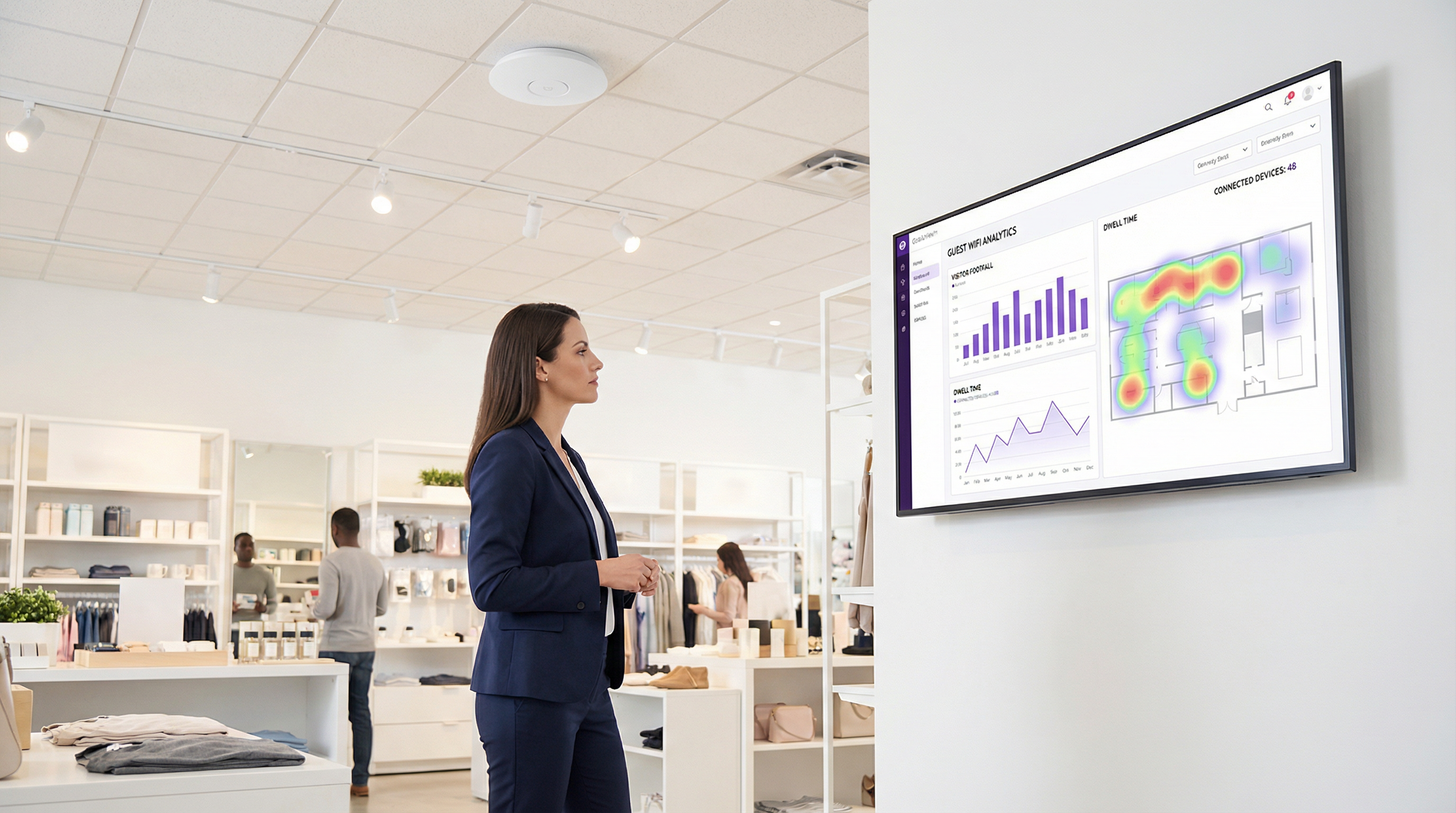
Purple हे एक ओव्हरले प्लॅटफॉर्म आहे जे तुमच्या विद्यमान LAN आणि WAN इन्फ्रास्ट्रक्चरवर कार्य करते. Captive Portal द्वारे गेस्ट युझर एक्सपिरियन्स व्यवस्थापित करण्यासाठी ते तुमच्या LAN वरील WiFi APs सह इंटिग्रेट होते. जेव्हा एखादा अतिथी (guest) कनेक्ट होतो, तेव्हा त्यांचे ऑथेंटिकेशन आणि त्यानंतरचे वेब ट्रॅफिक Purple च्या क्लाउड प्लॅटफॉर्मद्वारे व्यवस्थापित केले जाते, ज्याचा ॲक्सेस तुमच्या साइटच्या WAN कनेक्शनद्वारे मिळवला जातो. त्यानंतर Purple निनावी (anonymized) लोकेशन आणि प्रेझेन्स ॲनालिटिक्स डेटा कॅप्चर करते, क्लाउडमध्ये त्यावर प्रक्रिया करते आणि डॅशबोर्डद्वारे व्हेन्यू ऑपरेटर्सना सादर करते. हा इंटेलिजन्स लेयर तुमच्या LAN किंवा WAN इन्फ्रास्ट्रक्चरची जागा घेत नाही, तर अभ्यागतांच्या वर्तनाविषयी शक्तिशाली इनसाइट्स अनलॉक करण्यासाठी त्याचा फायदा घेतो, ज्यामुळे तुम्हाला लॉयल्टी वाढवणे, महसूल वाढवणे आणि ऑपरेशनल कार्यक्षमता सुधारणे शक्य होते.
अंमलबजावणी मार्गदर्शक (Implementation Guide)
- साइटच्या आवश्यकता परिभाषित करा: प्रत्येक स्थानासाठी, भौतिक क्षेत्र, अपेक्षित डिव्हाइस डेन्सिटी आणि ॲप्लिकेशन परफॉर्मन्सच्या गरजा डॉक्युमेंट करा. हॉटेलला रूम्स आणि कॉमन एरियाजमध्ये अखंड कव्हरेजची आवश्यकता असते, तर रिटेल स्टोअरला POS सिस्टीम्स, गेस्ट WiFi आणि स्टाफच्या उपकरणांना सपोर्ट करणे आवश्यक असते.
- LAN डिझाइन आणि AP प्लेसमेंट: APs ची इष्टतम संख्या आणि प्लेसमेंट निश्चित करण्यासाठी वायरलेस साइट सर्व्हे करा. तुमच्या विशिष्ट बिल्डिंग लेआउटसाठी RF प्रोपोगेशन मॉडेल करू शकणाऱ्या टूल्सचा वापर करा. सर्व APs ला सपोर्ट करण्यासाठी तुमच्या स्विचिंग इन्फ्रास्ट्रक्चरमध्ये पुरेशी पोर्ट क्षमता आणि पॉवर ओव्हर इथरनेट (PoE) बजेट असल्याची खात्री करा.
- नेटवर्क सेगमेंटेशन स्ट्रॅटेजी: विविध ट्रॅफिक प्रकार लॉजिकल पद्धतीने वेगळे करण्यासाठी VLANs लागू करा. स्टँडर्ड मॉडेलमध्ये खालील गोष्टींसाठी स्वतंत्र VLANs समाविष्ट असतात: गेस्ट WiFi, कॉर्पोरेट वायरलेस, IoT उपकरणे (उदा. स्मार्ट थर्मोस्टॅट्स, सिक्युरिटी कॅमेरे) आणि मॅनेजमेंट ट्रॅफिक.
- WAN कनेक्टिव्हिटी प्रोक्युअरमेंट: साइटचे महत्त्व आणि बँडविड्थच्या गरजांवर आधारित WAN पर्यायांचे मूल्यांकन करा. फ्लॅगशिप रिटेल स्टोअरसाठी, SD-WAN द्वारे 4G/5G बॅकअपसह प्रायमरी फायबर लिंक उच्च उपलब्धता प्रदान करते. छोट्या सॅटेलाइट ऑफिसेससाठी, एकच बिझनेस ब्रॉडबँड कनेक्शन पुरेसे असू शकते.
- एज सिक्युरिटी कॉन्फिगरेशन: प्रत्येक LAN च्या WAN एजवर नेक्स्ट-जनरेशन फायरवॉल (NGFW) डिप्लॉय करा. ॲक्सेस कंट्रोल्स लागू करण्यासाठी, घुसखोरी (intrusions) रोखण्यासाठी आणि पेमेंट कार्ड डेटा हाताळला जात असल्यास PCI DSS सारख्या मानकांचे पालन सुनिश्चित करण्यासाठी पॉलिसीज कॉन्फिगर करा.
- Purple इंटिग्रेट करा: एकदा अंडरलाइंग नेटवर्क स्थिर झाले की, तुमचे WiFi कंट्रोलर किंवा APs Purple क्लाउड प्लॅटफॉर्मसह इंटिग्रेट करा. यामध्ये सामान्यतः Captive Portal किंवा RADIUS ऑथेंटिकेशन सेटिंग्ज Purple च्या सर्व्हिस एंडपॉइंट्सकडे पॉइंट करणे समाविष्ट असते. कनेक्शनपासून ते ऑथेंटिकेशन आणि इंटरनेट ॲक्सेसपर्यंत गेस्ट जर्नीची कसून चाचणी करा.
सर्वोत्तम पद्धती (Best Practices)
- केंद्रीकृत व्यवस्थापन (Centralized Management): सर्व साइट्सवरील तुमचे APs, स्विचेस आणि फायरवॉल्स कॉन्फिगर आणि मॉनिटर करण्यासाठी क्लाउड-आधारित नेटवर्क मॅनेजमेंट प्लॅटफॉर्म वापरा. हे पॉलिसी अपडेट्स सुलभ करते आणि ट्रबलशूटिंगसाठी सिंगल पेन ऑफ ग्लास (एकच डॅशबोर्ड) प्रदान करते.
- रोल-बेस्ड ॲक्सेस कंट्रोल (RBAC): प्रिन्सिपल ऑफ लीस्ट प्रिव्हिलेज (किमान विशेषाधिकाराचे तत्त्व) लागू करा. युझर्स आणि उपकरणांना ऑथेंटिकेट करण्यासाठी IEEE 802.1X वापरा, त्यांना योग्य VLAN नियुक्त करा आणि त्यांच्या भूमिकेवर आधारित विशिष्ट ॲक्सेस पॉलिसीज लागू करा.
- कम्प्लायन्स बाय डिझाइन (Compliance by Design): तुमचे नेटवर्क डिझाइन करताना, सुरुवातीपासूनच नियामक आवश्यकता पूर्ण करण्यासाठी कंट्रोल्स तयार करा. GDPR साठी, याचा अर्थ Captive Portal वर गेस्टची संमती योग्यरित्या कॅप्चर केली गेली आहे याची खात्री करणे. PCI DSS साठी, कार्डहोल्डर डेटा एन्व्हायरन्मेंटला गेस्ट WiFi सह इतर सर्व नेटवर्क्सपासून काटेकोरपणे वेगळे करणे आवश्यक आहे.
- नियमित ऑडिट्स (Regular Audits): संभाव्य सुरक्षा त्रुटी किंवा चुकीचे कॉन्फिगरेशन ओळखण्यासाठी तुमच्या नेटवर्क कॉन्फिगरेशन, फायरवॉल रूल्स आणि ॲक्सेस लॉग्सचे वेळोवेळी ऑडिट करा. स्वयंचलित टूल्स ही प्रक्रिया सुव्यवस्थित करण्यात मदत करू शकतात.
ट्रबलशूटिंग आणि रिस्क मिटिगेशन (Troubleshooting & Risk Mitigation)
- सामान्य बिघाड प्रकार (Common Failure Mode): WAN लिंक सॅच्युरेशन. एक सामान्य समस्या म्हणजे जेव्हा गेस्ट WiFi ट्रॅफिक प्रायमरी WAN लिंक सॅच्युरेट करते, ज्यामुळे महत्त्वपूर्ण बिझनेस ॲप्लिकेशन्सवर परिणाम होतो. उपाय (Mitigation): गेस्ट ट्रॅफिकपेक्षा बिझनेस-क्रिटिकल ट्रॅफिकला (उदा. POS, व्हॉइस) प्राधान्य देण्यासाठी तुमच्या एज राउटर/फायरवॉलवर क्वालिटी ऑफ सर्व्हिस (QoS) पॉलिसीज लागू करा. गेस्ट युझर्सना वाजवी बँडविड्थ कॅपपर्यंत रेट-लिमिट करा.
- सामान्य बिघाड प्रकार (Common Failure Mode): IP ॲड्रेस एक्झॉशन. गर्दीच्या ठिकाणी, गेस्ट VLAN साठी DHCP स्कोपमधील उपलब्ध IP ॲड्रेसेस संपू शकतात, ज्यामुळे नवीन युझर्सना कनेक्ट होण्यापासून रोखले जाते. उपाय (Mitigation): हजारो उपलब्ध ॲड्रेसेस प्रदान करण्यासाठी तुमच्या गेस्ट VLAN साठी /22 किंवा /21 सबनेट वापरा. DHCP स्कोप युटिलायझेशनचे निरीक्षण करा आणि ते 80% पेक्षा जास्त झाल्यावर अलर्ट्स सेट करा.
- धोका (Risk): असुरक्षित गेस्ट नेटवर्क. खराब कॉन्फिगर केलेले गेस्ट नेटवर्क हे हल्लेखोरासाठी कॉर्पोरेट LAN मध्ये प्रवेश मिळवण्याचा एक पिव्होट पॉइंट असू शकते. उपाय (Mitigation): खात्री करा की
महत्त्वाच्या संज्ञा आणि व्याख्या
Local Area Network (LAN)
A private computer network covering a small physical area, like a home, office, or a single building in a campus.
This is your on-site network. IT teams have full control over the LAN, making it the domain for high-speed, secure, internal communications and WiFi access.
Wide Area Network (WAN)
A computer network that extends over a large geographical distance, connecting multiple LANs together.
This is how your different sites (e.g., multiple stores or hotels) connect to each other and to the internet. Performance and cost are key considerations, as it relies on third-party carriers.
Access Point (AP)
A hardware device that allows other Wi-Fi devices to connect to a wired network. An AP acts as a central transmitter and receiver of wireless radio signals.
These are the devices that create your WiFi network. Proper placement and configuration of APs are critical for ensuring good coverage and performance.
Router
A network device that forwards data packets between computer networks. Routers perform the traffic directing functions on the internet.
The router is the gateway of your LAN. It connects your internal network to the external WAN (the internet) and makes decisions about where to send traffic.
Switch
A network device that connects devices together on a computer network by using packet switching to receive, process, and forward data to the destination device.
Switches are the backbone of your wired LAN, connecting your APs, servers, and other wired devices together at high speed.
VLAN (Virtual LAN)
A virtual local area network is any broadcast domain that is partitioned and isolated in a computer network at the data link layer (OSI layer 2).
VLANs are a critical security tool. They allow you to create separate, isolated networks on the same physical hardware, for example, to keep guest traffic completely separate from your corporate traffic.
SD-WAN (Software-Defined WAN)
A software-defined wide area network is a virtual WAN architecture that allows enterprises to leverage any combination of transport services – including MPLS, LTE, and broadband internet services – to securely connect users to applications.
For businesses with multiple sites, SD-WAN offers a more intelligent, cost-effective, and resilient way to manage WAN connectivity compared to traditional approaches.
Captive Portal
A web page that the user of a public-access network is obliged to view and interact with before access is granted.
This is the login page guests see when they connect to your WiFi. Purple uses the captive portal to manage authentication, present terms and conditions, and offer marketing opt-ins.
केस स्टडीज
A 200-room luxury hotel wants to upgrade its WiFi to provide a seamless, high-performance experience for guests while securely separating this traffic from its internal property management system (PMS). The hotel group also wants to centralize guest data analytics across its 10 properties.
The solution involves a two-pronged approach. On the LAN, each hotel will deploy a high-density Wi-Fi 6 (802.11ax) network with APs in every room and common area. A core switch aggregates traffic, and VLANs are used to create logically separate networks: VLAN 10 for Guests, VLAN 20 for Staff, VLAN 30 for IoT (smart locks, minibars), and VLAN 40 for the PMS. An on-site firewall inspects all traffic. For the WAN, each hotel is connected to the internet via a primary 1Gbps fiber link and a secondary 5G wireless link, managed by an SD-WAN appliance. The SD-WAN is configured to route Purple guest analytics data and PMS data over the secure, low-latency fiber link, while general guest internet traffic can be backhauled or routed directly to the internet at the local site. Purple is integrated with the on-site WiFi controller, using RADIUS to authenticate guests against its cloud platform, allowing the hotel group to view analytics for all 10 properties in a single dashboard.
A retail chain with 50 stores across the UK needs to deploy guest WiFi to drive its loyalty app adoption. The stores have limited on-site IT staff and the company needs to ensure a consistent, secure deployment across all locations.
A template-based, zero-touch provisioning model is the optimal solution. For the LAN, each store gets a standardized set of hardware: 5-10 APs and a single integrated security gateway appliance that combines routing, switching, and firewalling. The configuration is standardized via a cloud management platform. For the WAN, a dual-broadband solution at each site, managed by an SD-WAN overlay, provides a cost-effective and resilient connection. The key is the centralized configuration: a single network template is created in the cloud controller. This template defines the SSIDs, VLANs (Guest, Corporate, POS), firewall rules, and QoS policies. When a new store is brought online, a local staff member simply plugs in the gateway, which then automatically downloads its entire configuration from the cloud. Purple is integrated at the template level, so every store automatically uses the same branded captive portal, which prominently features a link to download the loyalty app.
परिस्थिती विश्लेषण
Q1. You are designing the network for a new 5-floor conference centre. The venue will host multiple events simultaneously, with up to 1,000 concurrent users per floor. How would you structure your VLAN and IP addressing strategy for the guest network?
💡 संकेत:Consider the number of devices, broadcast traffic, and the need for isolation between different events.
शिफारस केलेला दृष्टिकोन दाखवा
A single, large VLAN for all guests would be inefficient and create a massive broadcast domain. A better approach is to use a separate VLAN for each floor (e.g., VLAN 101 for Floor 1, VLAN 102 for Floor 2). Each VLAN would be assigned a /21 subnet (e.g., 10.101.0.0/21), providing 2,046 usable IP addresses, which is more than sufficient for 1,000 users. To provide isolation between different events on the same floor, you could use Private VLANs or simply rely on AP client isolation. All guest VLANs would be routed through a common firewall policy that strictly limits their access to the internet only.
Q2. A retail chain is experiencing slow point-of-sale (POS) transaction times at its stores during peak hours. They have a single 100 Mbps broadband connection at each site, which is shared by the POS terminals, staff devices, and the free guest WiFi. What is the most likely cause and what immediate steps should you take?
💡 संकेत:Think about traffic contention on the WAN link.
शिफारस केलेला दृष्टिकोन दाखवा
The most likely cause is WAN link saturation, where the high volume of guest WiFi traffic is consuming all available bandwidth, leaving little for the latency-sensitive POS transactions. The immediate steps are: 1) Implement a Quality of Service (QoS) policy on the edge router to guarantee a certain percentage of bandwidth for the POS system's traffic and give it the highest priority. 2) Apply a bandwidth limit (e.g., 5 Mbps per user) to the guest WiFi users to prevent them from monopolizing the connection. A long-term solution would be to add a secondary WAN link and use SD-WAN to route POS traffic over the more reliable link.
Q3. Your company is deploying a guest WiFi solution across 100 stadium venues. The CISO is concerned about the security risks of allowing 50,000+ unknown devices onto the network per event. What key security control must be enabled on the wireless infrastructure to mitigate a significant portion of this risk?
💡 संकेत:How do you prevent connected guests from attacking each other or other devices on the same network?
शिफारस केलेला दृष्टिकोन दाखवा
The single most critical security control in this high-density, public-facing scenario is Client Isolation (also known as AP Isolation or Port Isolation). When enabled on the guest SSID, this feature prevents wireless clients from communicating directly with each other at Layer 2. Each device can only communicate with the gateway (the router), not with any other device on the same WiFi network. This effectively neutralizes the risk of a compromised guest device attempting to scan, attack, or infect other users' devices, dramatically reducing the internal attack surface of the guest network.
महत्त्वाचे निष्कर्ष
- ✓A LAN is your private, on-site network (a building); a WAN connects your sites together (a highway).
- ✓Effective WiFi design depends on understanding the LAN/WAN boundary to manage performance and cost.
- ✓Use VLANs to segment traffic for security (e.g., Guest vs. Corporate).
- ✓Use QoS on your WAN link to prioritize critical business traffic over guest browsing.
- ✓SD-WAN provides a flexible and resilient way to manage connectivity for multi-site businesses.
- ✓Client Isolation is a critical security feature for any public-facing guest WiFi network.
- ✓WiFi analytics platforms like Purple are an overlay service that leverages your LAN/WAN to provide business intelligence.




