

LAN vs WAN: comprendere la differenza nelle implementazioni WiFi
A technical reference for IT leaders and venue operators on the critical differences between LAN and WAN in enterprise WiFi deployments. This guide provides actionable architectural insights, implementation best practices, and clarifies how understanding this distinction drives ROI for guest WiFi and operational intelligence.
🎧 Ascolta questa guida
Visualizza trascrizione
Executive Summary
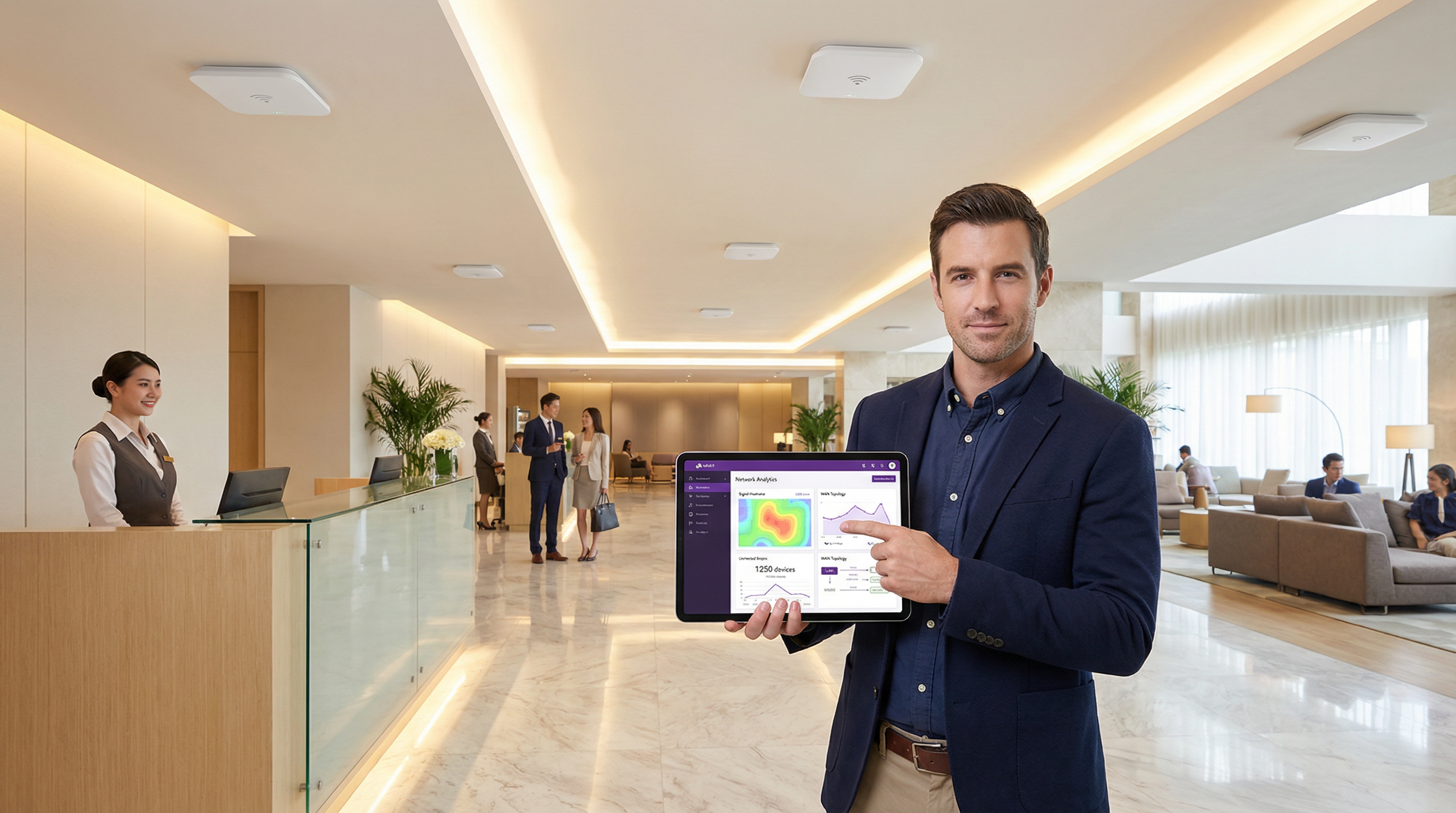
Per i dirigenti IT e gli architetti di rete, la distinzione tra Local Area Network (LAN) e Wide Area Network (WAN) è fondamentale, eppure la sua applicazione pratica nelle implementazioni WiFi su larga scala è spesso fonte di notevole complessità e sforamenti di budget. Una LAN fornisce connettività ad alta velocità e bassa latenza all'interno di un'area fisica limitata: un singolo hotel, un negozio al dettaglio, un piano di conferenze. Una WAN, al contrario, collega più LAN su una vasta distanza geografica, consentendo a una catena di negozi di collegare i propri punti vendita o a un gruppo alberghiero di connettere le proprie strutture a un data center centrale. Fraintendere questo confine porta a una progettazione di rete inadeguata, con conseguenti colli di bottiglia nelle prestazioni, vulnerabilità di sicurezza e un'esperienza utente compromessa. Questa guida funge da riferimento pratico, chiarendo i concetti fondamentali e fornendo un framework strategico per la progettazione, l'implementazione e la gestione di reti WiFi di livello enterprise. Esploreremo le decisioni architetturali, le considerazioni sulla sicurezza in base a standard come WPA3 e PCI DSS, e l'impatto aziendale di una rete ben strutturata, contestualizzando il modo in cui una piattaforma di intelligence WiFi come Purple aggiunge un livello critico di valore per incrementare i ricavi e comprendere il comportamento dei clienti.
Approfondimento tecnico
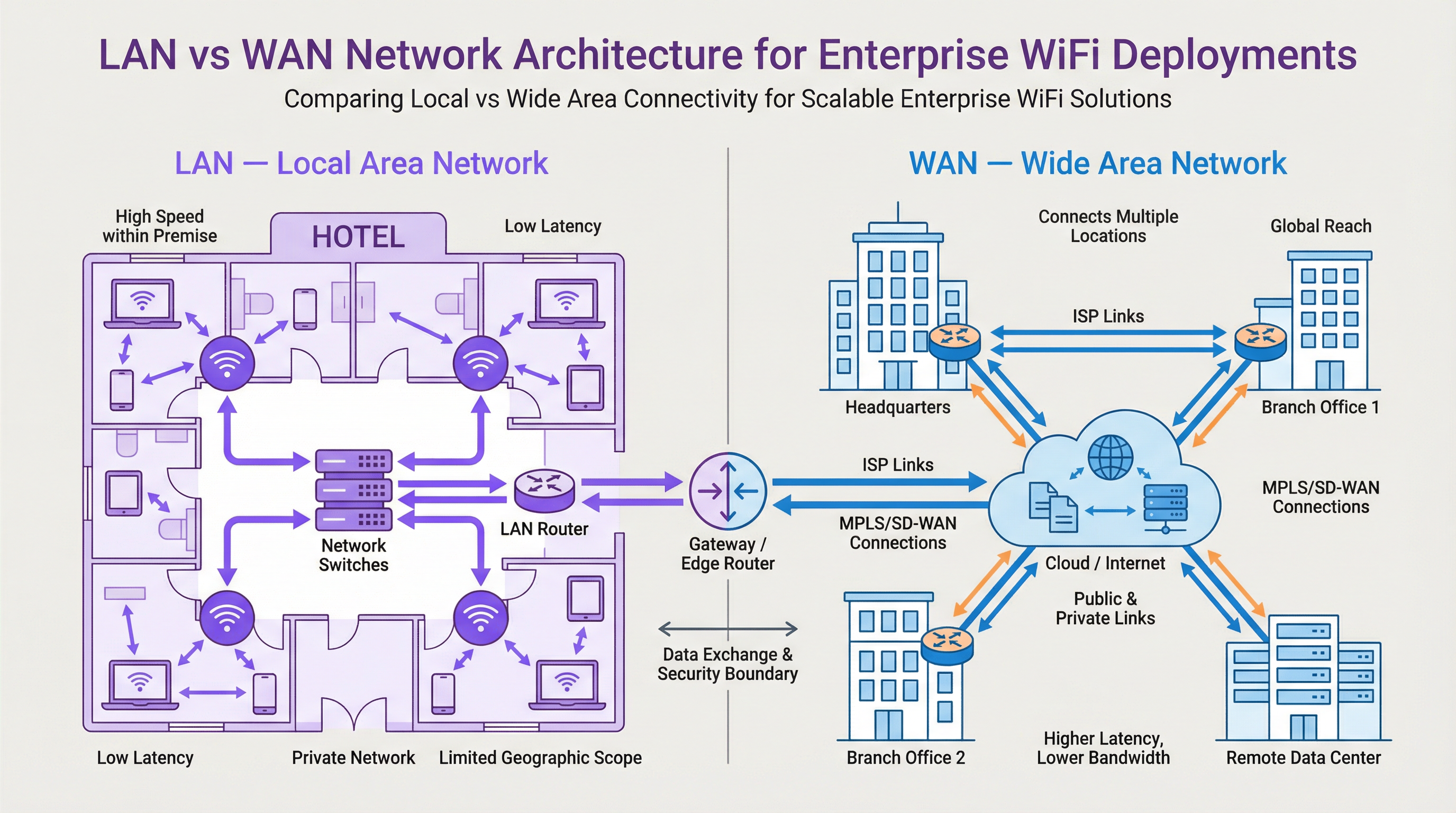
Comprendere il confine tra LAN e WAN è fondamentale per una progettazione efficace della rete WiFi. La LAN è il dominio di controllo interno, che comprende tutto l'hardware in loco, mentre la WAN è la struttura esterna che collega le sedi, tipicamente gestita da un Internet Service Provider (ISP) o da un operatore di telecomunicazioni.
Local Area Network (LAN): il motore in loco
Una LAN è una rete privata confinata in una singola posizione geografica, come un edificio per uffici, uno stadio o un hotel. Il suo scopo principale è facilitare lo scambio di dati ad alta velocità tra dispositivi interconnessi all'interno di quel perimetro. In una moderna implementazione WiFi, la LAN non riguarda solo i cavi; è un sofisticato ecosistema di componenti che lavorano in sinergia.
- Componenti: l'hardware chiave include i Wireless Access Point (AP) che trasmettono il segnale WiFi (ad es., operanti sugli standard IEEE 802.11ax/Wi-Fi 6), gli Switch di rete che aggregano il traffico dagli AP e da altri dispositivi cablati, e un Router centrale o switch Layer 3 che gestisce il flusso di traffico e indirizza i dati verso la loro destinazione, incluso il gateway WAN.
- Prestazioni: le LAN sono caratterizzate da una larghezza di banda molto elevata (tipicamente da 1 Gbps a 10 Gbps o più su Ethernet) e da una latenza estremamente bassa (spesso inferiore al millisecondo). Ciò è essenziale per supportare ambienti ad alta densità come i centri congressi o applicazioni che richiedono dati in tempo reale, come i sistemi point-of-sale (POS) nel retail.
- Controllo e sicurezza: poiché la LAN è di proprietà privata, i team IT hanno il pieno controllo sulla sua architettura e sulla postura di sicurezza. Ciò consente l'implementazione di controlli di accesso granulari utilizzando IEEE 802.1X, la segmentazione della rete con VLAN per isolare il traffico guest da quello aziendale e robusti protocolli di crittografia come WPA3 per proteggere i dati in transito.
Wide Area Network (WAN): connettere l'azienda
Una WAN interconnette più LAN su vaste aree geografiche, da pochi chilometri fino a coprire l'intero globo. Internet stesso è la WAN più grande, ma per le aziende, una WAN si riferisce tipicamente ai collegamenti privati o pubblici utilizzati per connettere sedi distribuite.
- Connettività: i collegamenti WAN vengono acquisiti da service provider di terze parti e possono includere varie tecnologie come linee in fibra ottica, MPLS (Multi-Protocol Label Switching) o, sempre più spesso, SD-WAN (Software-Defined WAN). L'SD-WAN offre un approccio più flessibile, conveniente e application-aware per la gestione della connettività WAN, consentendo ai team IT di instradare dinamicamente il traffico su più tipi di collegamento (ad es., MPLS, banda larga, 4G/5G) in base alla priorità dell'applicazione.
- Prestazioni: le prestazioni della WAN sono limitate dal costo e dalla disponibilità dei collegamenti del service provider. La larghezza di banda è significativamente inferiore e più costosa rispetto alla LAN, e la latenza è molto più elevata a causa delle distanze fisiche coinvolte. Un collegamento transnazionale potrebbe avere una latenza di 50-100 ms, in netto contrasto con la latenza inferiore a 1 ms della LAN.
- Sicurezza e gestione: la protezione della WAN prevede firewall, VPN (Virtual Private Network) e sistemi di rilevamento delle intrusioni ai margini della rete. Gestire una WAN è complesso, poiché implica il coordinamento con più operatori e la garanzia di un'applicazione coerente delle policy in tutte le sedi. Questo è un altro ambito in cui l'SD-WAN offre vantaggi significativi attraverso il controllo centralizzato e l'orchestrazione semplificata delle policy.
Il posizionamento di Purple nello stack
Purple è una piattaforma overlay che opera al di sopra dell'infrastruttura LAN e WAN esistente. Si integra con gli AP WiFi sulla LAN per gestire l'esperienza dell'utente guest tramite un Captive Portal. Quando un ospite si connette, la sua autenticazione e il successivo traffico web vengono gestiti dalla piattaforma cloud di Purple, a cui si accede tramite la connessione WAN della sede. Purple acquisisce quindi dati analitici anonimizzati sulla posizione e sulla presenza, li elabora nel cloud e li presenta agli operatori della struttura tramite una dashboard. Questo livello di intelligence non sostituisce l'infrastruttura LAN o WAN, ma la sfrutta per sbloccare informazioni preziose sul comportamento dei visitatori, consentendo di promuovere la fidelizzazione, incrementare i ricavi e migliorare l'efficienza operativa.
Guida all'implementazione
- Definire i requisiti della sede: per ogni posizione, documentare l'area fisica, la densità di dispositivi prevista e le esigenze di prestazioni delle applicazioni. Un hotel richiede una copertura continua tra le camere e le aree comuni, mentre un negozio al dettaglio deve supportare i sistemi POS, il WiFi per gli ospiti e i dispositivi del personale.
- Progettazione LAN e posizionamento degli AP: condurre un site survey wireless per determinare il numero e il posizionamento ottimali degli AP. Utilizzare strumenti in grado di modellare la propagazione RF per il layout specifico dell'edificio. Assicurarsi che l'infrastruttura di switching disponga di una capacità di porte e di un budget Power over Ethernet (PoE) sufficienti per supportare tutti gli AP.
- Strategia di segmentazione della rete: implementare le VLAN per separare logicamente i diversi tipi di traffico. Un modello standard include VLAN separate per: WiFi guest, wireless aziendale, dispositivi IoT (ad es., termostati intelligenti, telecamere di sicurezza) e traffico di gestione.
- Acquisizione della connettività WAN: valutare le opzioni WAN in base alla criticità della sede e alle esigenze di larghezza di banda. Per un flagship store nel retail, un collegamento primario in fibra con un backup 4G/5G tramite SD-WAN offre un'elevata disponibilità. Per uffici satellite più piccoli, potrebbe essere sufficiente una singola connessione a banda larga aziendale.
- Configurazione della sicurezza edge: implementare un firewall di nuova generazione (NGFW) al margine WAN di ogni LAN. Configurare le policy per applicare i controlli di accesso, prevenire le intrusioni e garantire la conformità a standard come il PCI DSS se vengono gestiti i dati delle carte di pagamento.
- Integrare Purple: una volta che la rete sottostante è stabile, integrare il controller WiFi o gli AP con la piattaforma cloud di Purple. Ciò comporta in genere l'indirizzamento del Captive Portal o delle impostazioni di autenticazione RADIUS verso gli endpoint del servizio di Purple. Testare accuratamente il percorso dell'ospite, dalla connessione all'autenticazione fino all'accesso a Internet.
Best practice
- Gestione centralizzata: utilizzare una piattaforma di gestione della rete basata su cloud per configurare e monitorare AP, switch e firewall in tutte le sedi. Ciò semplifica gli aggiornamenti delle policy e fornisce un unico pannello di controllo per la risoluzione dei problemi.
- Controllo degli accessi basato sui ruoli (RBAC): applicare il principio del privilegio minimo. Utilizzare IEEE 802.1X per autenticare utenti e dispositivi, assegnandoli alla VLAN appropriata e applicando policy di accesso specifiche in base al loro ruolo.
- Conformità by design: durante la progettazione della rete, integrare i controlli per soddisfare i requisiti normativi fin dall'inizio. Per il GDPR, ciò significa garantire che il consenso degli ospiti venga acquisito correttamente nel Captive Portal. Per il PCI DSS, richiede una rigorosa separazione dell'ambiente dei dati dei titolari di carta da tutte le altre reti, incluso il WiFi per gli ospiti.
- Audit regolari: controllare periodicamente la configurazione della rete, le regole del firewall e i log di accesso per identificare potenziali lacune di sicurezza o configurazioni errate. Gli strumenti automatizzati possono aiutare a semplificare questo processo.

Risoluzione dei problemi e mitigazione dei rischi
- Modalità di guasto comune: Saturazione del collegamento WAN. Un problema frequente si verifica quando il traffico WiFi degli ospiti satura il collegamento WAN primario, con un impatto sulle applicazioni aziendali critiche. Mitigazione: implementare policy di Quality of Service (QoS) sul router/firewall edge per dare priorità al traffico business-critical (ad es., POS, voce) rispetto al traffico guest. Limitare la velocità degli utenti guest a un tetto di larghezza di banda ragionevole.
- Modalità di guasto comune: Esaurimento degli indirizzi IP. In una struttura affollata, l'ambito DHCP per la VLAN guest può esaurire gli indirizzi IP disponibili, impedendo la connessione di nuovi utenti. Mitigazione: utilizzare una sottorete /22 o /21 per la VLAN guest per fornire migliaia di indirizzi disponibili. Monitorare l'utilizzo dell'ambito DHCP e impostare avvisi per quando supera l'80%.
- Rischio: Rete guest non sicura. Una rete guest configurata in modo inadeguato può essere un punto di snodo per un utente malintenzionato per accedere alla LAN aziendale. Mitigazione: assicurarsi
Termini chiave e definizioni
Local Area Network (LAN)
A private computer network covering a small physical area, like a home, office, or a single building in a campus.
This is your on-site network. IT teams have full control over the LAN, making it the domain for high-speed, secure, internal communications and WiFi access.
Wide Area Network (WAN)
A computer network that extends over a large geographical distance, connecting multiple LANs together.
This is how your different sites (e.g., multiple stores or hotels) connect to each other and to the internet. Performance and cost are key considerations, as it relies on third-party carriers.
Access Point (AP)
A hardware device that allows other Wi-Fi devices to connect to a wired network. An AP acts as a central transmitter and receiver of wireless radio signals.
These are the devices that create your WiFi network. Proper placement and configuration of APs are critical for ensuring good coverage and performance.
Router
A network device that forwards data packets between computer networks. Routers perform the traffic directing functions on the internet.
The router is the gateway of your LAN. It connects your internal network to the external WAN (the internet) and makes decisions about where to send traffic.
Switch
A network device that connects devices together on a computer network by using packet switching to receive, process, and forward data to the destination device.
Switches are the backbone of your wired LAN, connecting your APs, servers, and other wired devices together at high speed.
VLAN (Virtual LAN)
A virtual local area network is any broadcast domain that is partitioned and isolated in a computer network at the data link layer (OSI layer 2).
VLANs are a critical security tool. They allow you to create separate, isolated networks on the same physical hardware, for example, to keep guest traffic completely separate from your corporate traffic.
SD-WAN (Software-Defined WAN)
A software-defined wide area network is a virtual WAN architecture that allows enterprises to leverage any combination of transport services – including MPLS, LTE, and broadband internet services – to securely connect users to applications.
For businesses with multiple sites, SD-WAN offers a more intelligent, cost-effective, and resilient way to manage WAN connectivity compared to traditional approaches.
Captive Portal
A web page that the user of a public-access network is obliged to view and interact with before access is granted.
This is the login page guests see when they connect to your WiFi. Purple uses the captive portal to manage authentication, present terms and conditions, and offer marketing opt-ins.
Casi di studio
A 200-room luxury hotel wants to upgrade its WiFi to provide a seamless, high-performance experience for guests while securely separating this traffic from its internal property management system (PMS). The hotel group also wants to centralize guest data analytics across its 10 properties.
The solution involves a two-pronged approach. On the LAN, each hotel will deploy a high-density Wi-Fi 6 (802.11ax) network with APs in every room and common area. A core switch aggregates traffic, and VLANs are used to create logically separate networks: VLAN 10 for Guests, VLAN 20 for Staff, VLAN 30 for IoT (smart locks, minibars), and VLAN 40 for the PMS. An on-site firewall inspects all traffic. For the WAN, each hotel is connected to the internet via a primary 1Gbps fiber link and a secondary 5G wireless link, managed by an SD-WAN appliance. The SD-WAN is configured to route Purple guest analytics data and PMS data over the secure, low-latency fiber link, while general guest internet traffic can be backhauled or routed directly to the internet at the local site. Purple is integrated with the on-site WiFi controller, using RADIUS to authenticate guests against its cloud platform, allowing the hotel group to view analytics for all 10 properties in a single dashboard.
A retail chain with 50 stores across the UK needs to deploy guest WiFi to drive its loyalty app adoption. The stores have limited on-site IT staff and the company needs to ensure a consistent, secure deployment across all locations.
A template-based, zero-touch provisioning model is the optimal solution. For the LAN, each store gets a standardized set of hardware: 5-10 APs and a single integrated security gateway appliance that combines routing, switching, and firewalling. The configuration is standardized via a cloud management platform. For the WAN, a dual-broadband solution at each site, managed by an SD-WAN overlay, provides a cost-effective and resilient connection. The key is the centralized configuration: a single network template is created in the cloud controller. This template defines the SSIDs, VLANs (Guest, Corporate, POS), firewall rules, and QoS policies. When a new store is brought online, a local staff member simply plugs in the gateway, which then automatically downloads its entire configuration from the cloud. Purple is integrated at the template level, so every store automatically uses the same branded captive portal, which prominently features a link to download the loyalty app.
Analisi degli scenari
Q1. You are designing the network for a new 5-floor conference centre. The venue will host multiple events simultaneously, with up to 1,000 concurrent users per floor. How would you structure your VLAN and IP addressing strategy for the guest network?
💡 Suggerimento:Consider the number of devices, broadcast traffic, and the need for isolation between different events.
Mostra l'approccio consigliato
A single, large VLAN for all guests would be inefficient and create a massive broadcast domain. A better approach is to use a separate VLAN for each floor (e.g., VLAN 101 for Floor 1, VLAN 102 for Floor 2). Each VLAN would be assigned a /21 subnet (e.g., 10.101.0.0/21), providing 2,046 usable IP addresses, which is more than sufficient for 1,000 users. To provide isolation between different events on the same floor, you could use Private VLANs or simply rely on AP client isolation. All guest VLANs would be routed through a common firewall policy that strictly limits their access to the internet only.
Q2. A retail chain is experiencing slow point-of-sale (POS) transaction times at its stores during peak hours. They have a single 100 Mbps broadband connection at each site, which is shared by the POS terminals, staff devices, and the free guest WiFi. What is the most likely cause and what immediate steps should you take?
💡 Suggerimento:Think about traffic contention on the WAN link.
Mostra l'approccio consigliato
The most likely cause is WAN link saturation, where the high volume of guest WiFi traffic is consuming all available bandwidth, leaving little for the latency-sensitive POS transactions. The immediate steps are: 1) Implement a Quality of Service (QoS) policy on the edge router to guarantee a certain percentage of bandwidth for the POS system's traffic and give it the highest priority. 2) Apply a bandwidth limit (e.g., 5 Mbps per user) to the guest WiFi users to prevent them from monopolizing the connection. A long-term solution would be to add a secondary WAN link and use SD-WAN to route POS traffic over the more reliable link.
Q3. Your company is deploying a guest WiFi solution across 100 stadium venues. The CISO is concerned about the security risks of allowing 50,000+ unknown devices onto the network per event. What key security control must be enabled on the wireless infrastructure to mitigate a significant portion of this risk?
💡 Suggerimento:How do you prevent connected guests from attacking each other or other devices on the same network?
Mostra l'approccio consigliato
The single most critical security control in this high-density, public-facing scenario is Client Isolation (also known as AP Isolation or Port Isolation). When enabled on the guest SSID, this feature prevents wireless clients from communicating directly with each other at Layer 2. Each device can only communicate with the gateway (the router), not with any other device on the same WiFi network. This effectively neutralizes the risk of a compromised guest device attempting to scan, attack, or infect other users' devices, dramatically reducing the internal attack surface of the guest network.
Punti chiave
- ✓A LAN is your private, on-site network (a building); a WAN connects your sites together (a highway).
- ✓Effective WiFi design depends on understanding the LAN/WAN boundary to manage performance and cost.
- ✓Use VLANs to segment traffic for security (e.g., Guest vs. Corporate).
- ✓Use QoS on your WAN link to prioritize critical business traffic over guest browsing.
- ✓SD-WAN provides a flexible and resilient way to manage connectivity for multi-site businesses.
- ✓Client Isolation is a critical security feature for any public-facing guest WiFi network.
- ✓WiFi analytics platforms like Purple are an overlay service that leverages your LAN/WAN to provide business intelligence.




