

Como Integrar os Dados do WiFi de Visitantes ao seu CRM
This guide provides a comprehensive technical reference for IT managers, network architects, and marketing leaders on integrating guest WiFi analytics with CRM platforms such as Salesforce and HubSpot. It covers the strategic rationale, core architectural patterns (Direct API and Webhooks), available data fields, and step-by-step deployment guidance. Venue operators in hospitality, retail, and events will find actionable frameworks for building a compliant, scalable, first-party data pipeline that drives measurable marketing ROI.
🎧 Ouça este Guia
Ver Transcrição
Resumo Executivo
Conectar a infraestrutura de WiFi de visitantes a um sistema de Gestão de Relacionamento com o Cliente (CRM) não é mais uma tática de nicho — é um componente crítico de uma estratégia moderna de engajamento digital para qualquer espaço físico. Para gerentes de TI, arquitetos de rede e diretores de operações em hotéis, redes de varejo, estádios e grandes locais públicos, essa integração representa um método poderoso para converter o tráfego anônimo de visitantes em um rico ativo de dados primários (first-party data).
Ao capturar e analisar dados de usuários do WiFi de visitantes — como frequência de visitas, tempo de permanência e detalhes demográficos básicos — as organizações podem desbloquear um ROI significativo por meio de uma melhor personalização de marketing, maior fidelidade do cliente e decisões operacionais baseadas em dados. Este guia fornece um projeto técnico neutro em relação a fornecedores para alcançar uma integração bem-sucedida. Ele descreve os principais padrões arquitetônicos, desde conexões diretas de API até o streaming de eventos baseado em webhooks, e detalha os campos de dados normalmente disponíveis para sincronização. Exploramos as melhores práticas para garantir a qualidade dos dados, manter a conformidade com a GDPR e o PCI DSS, e mitigar riscos comuns de segurança. O objetivo é equipar os líderes técnicos com o conhecimento prático necessário para projetar, implantar e gerenciar uma integração robusta, escalável e segura entre o WiFi de visitantes e o CRM, entregando um impacto de negócios mensurável.
Ouça nosso briefing em áudio de 10 minutos sobre a integração do WiFi de visitantes com o CRM — a perspectiva de um consultor sênior sobre estratégia, arquitetura e implementação.
Aprofundamento Técnico
A integração de dados do WiFi de visitantes com um CRM envolve vários componentes técnicos e decisões arquitetônicas fundamentais. Em sua essência, o processo consiste em capturar a autenticação do usuário e os dados de sessão do controlador de acesso da rede WiFi ou do Captive Portal e enviá-los ao CRM em um formato estruturado e validado. Os principais mecanismos para isso são integrações diretas de API, webhooks e conectores de dados intermediários.
Padrões Arquitetônicos
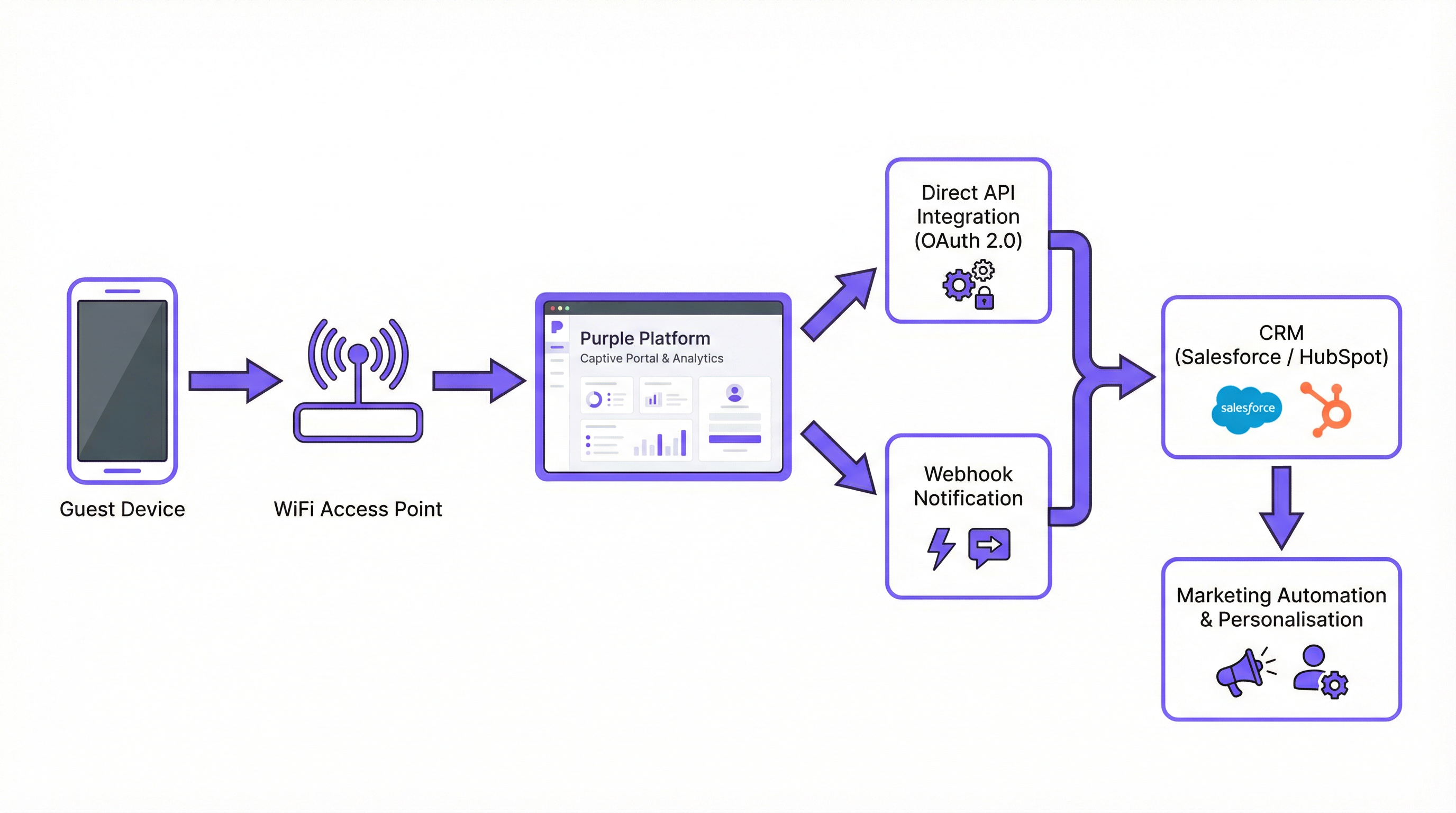
A Integração Direta de API é o método mais comum e recomendado para implantações corporativas modernas. A plataforma de WiFi — como a Purple — faz chamadas de API autenticadas diretamente para a API REST do CRM. Esta é uma conexão servidor a servidor. Quando um usuário se autentica no WiFi de visitantes, o controlador WiFi coleta os dados e os envia ao CRM em tempo real. Esse padrão é ideal para implantações onde a atualização dos dados é crítica, como o acionamento de um e-mail de boas-vindas imediato ou a atualização do saldo de um programa de fidelidade.
Os Webhooks oferecem uma alternativa leve e orientada a eventos. Neste modelo, a plataforma de WiFi envia uma notificação HTTP POST em tempo real para uma URL pré-configurada — um endpoint no CRM ou um serviço intermediário — no momento em que um evento específico ocorre. Um evento guest_connected, por exemplo, pode acionar um webhook que cria ou atualiza um contato no CRM. Isso é altamente eficiente e adequado para sistemas construídos em torno de uma arquitetura orientada a eventos.
Os Conectores de Middleware, como Zapier, MuleSoft ou uma camada de integração personalizada, são apropriados para cenários complexos onde a integração direta não está disponível ou onde é necessária uma transformação significativa de dados antes que eles cheguem ao CRM. Essa abordagem adiciona complexidade operacional, mas oferece flexibilidade máxima.
| Padrão | Latência | Complexidade | Melhor Para |
|---|---|---|---|
| API Direta | Tempo real | Baixa–Média | Maioria dos CRMs modernos (Salesforce, HubSpot) |
| Webhooks | Tempo real | Baixa | Arquiteturas orientadas a eventos |
| Middleware | Quase tempo real | Alta | CRMs personalizados, transformações complexas |
Campos de Dados e Payloads
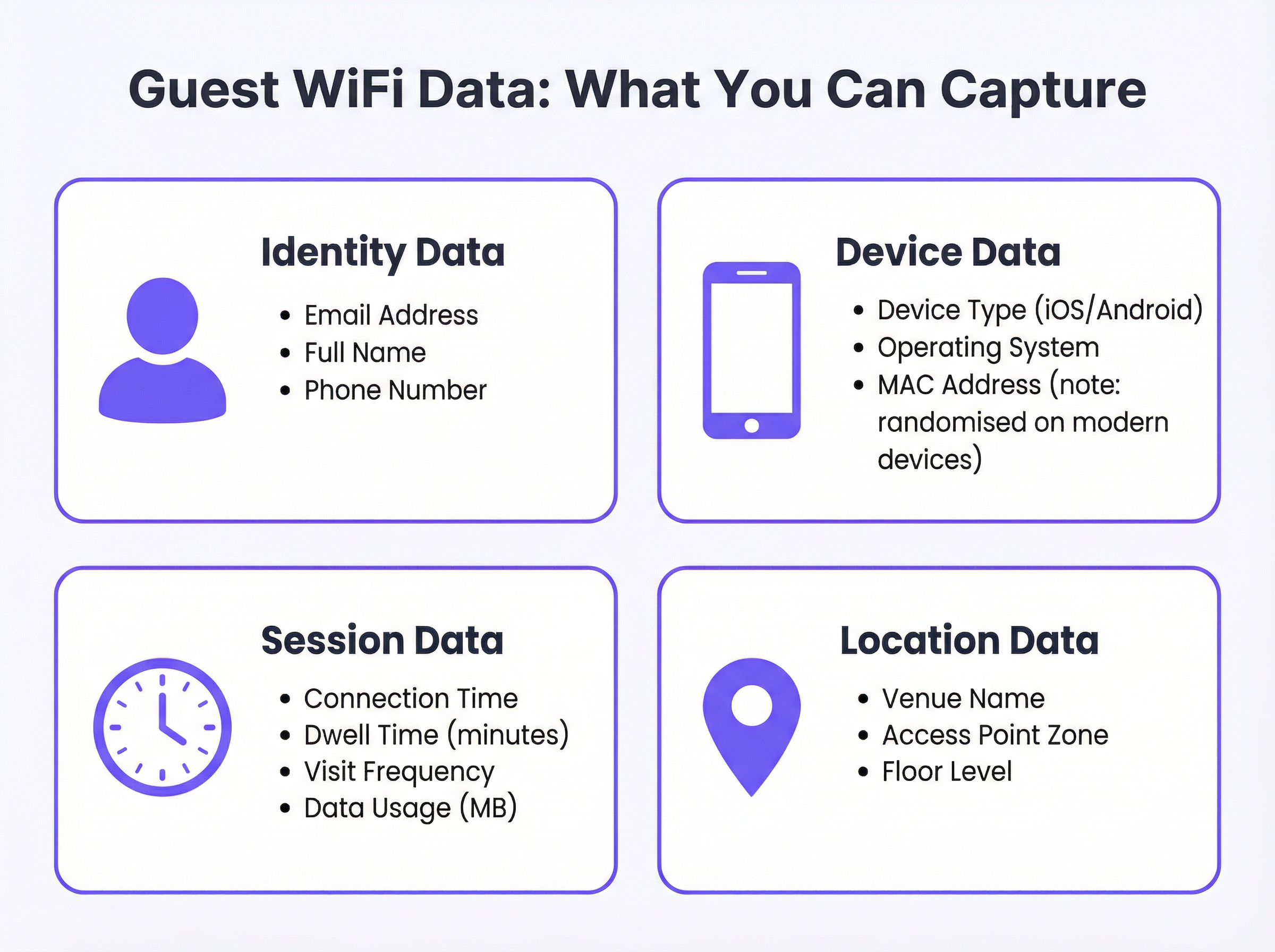
Os dados disponíveis a partir da autenticação no WiFi de visitantes são consideravelmente mais ricos do que um simples endereço de e-mail. Um payload JSON típico enviado a um CRM após a conexão de um novo visitante inclui as seguintes categorias:
Um payload de API representativo pode ser estruturado da seguinte forma:
{
  "email": "guest@example.com",
  "full_name": "Jane Smith",
  "phone": "+44 7700 900000",
  "device_type": "iPhone",
  "os": "iOS 17",
  "connect_time": "2025-03-15T14:32:00Z",
  "dwell_time_minutes": 47,
  "visit_count": 3,
  "venue_name": "The Grand Hotel - Manchester",
  "access_point_zone": "Lobby",
  "marketing_consent": true
}
Observe o campo booleano marketing_consent. Este é um campo obrigatório em qualquer implantação em conformidade com a GDPR e deve ser definido explicitamente com base na ação do usuário no Captive Portal.
Arquitetura de Autenticação e Segurança
A segurança é inegociável. Toda transmissão de dados deve ocorrer via HTTPS usando TLS 1.2 ou superior. A autenticação com a API do CRM deve usar OAuth 2.0, que fornece acesso seguro e delegado sem expor credenciais. Chaves de API e tokens OAuth devem ser armazenados em um sistema dedicado de gerenciamento de segredos — nunca codificados (hardcoded) em arquivos de configuração ou variáveis de ambiente em servidores compartilhados.
No lado da rede, a adesão ao IEEE 802.1X para controle de acesso à rede baseado em porta e ao WPA3 para criptografia do WiFi garante que os dados do usuário sejam protegidos no ponto de conexão. Para locais que processam dados de cartões de pagamento, a segmentação de rede exigida pelo PCI DSS deve ser mantida, garantindo que a rede WiFi de visitantes seja isolada de qualquer ambiente de dados do titular do cartão.
Guia de Implementação
Passo 1: Descoberta e Alinhamento de Requisitos
Antes do início de qualquer configuração técnica, reúna um grupo de trabalho interdepartamental composto por TI, Marketing e Jurídico/Compliance. O Marketing deve definir os campos de dados específicos necessários e os casos de uso pretendidos. A TI deve avaliar as capacidades da infraestrutura de WiFi existente e do CRM de destino. O Jurídico deve revisar o texto proposto para o Captive Portal e o mecanismo de consentimento para garantir a conformidade com a GDPR. Documente os resultados desta reunião como uma especificação formal de requisitos.
Passo 2: Selecione seu Padrão de Integração
Com base nas capacidades da API do CRM e na sua infraestrutura, selecione o padrão arquitetônico apropriado. Para o Salesforce, use a API REST com OAuth 2.0 e o framework Connected App. Para o HubSpot, use o conector nativo da Purple, que aproveita a API de Contatos do HubSpot. Para outras plataformas, avalie se existe um conector nativo; caso contrário, avalie as opções de middleware.
Passo 3: Configure a Plataforma de WiFi
No portal da Purple, navegue até Connectors & Integrations (Conectores e Integrações). Selecione o CRM de destino. Você será solicitado a:
- Autenticar: Clique em 'Connect' (Conectar) para iniciar o fluxo do OAuth 2.0. Você será redirecionado para a página de autorização do seu CRM para conceder à Purple permissão para criar e atualizar contatos.
- Configurar o Mapeamento de Dados: Defina quais campos de dados da Purple são mapeados para quais campos do CRM. Preste atenção especial aos campos personalizados. Por exemplo,
dwell_time_minutespode precisar ser mapeado para um campo personalizado que você criou no seu CRM, comoLast_Visit_Duration__cno Salesforce. - Definir Condições de Acionamento: Defina quais eventos acionam uma sincronização de dados. Normalmente, isso é
on_login(quando um usuário se autentica pela primeira vez) e, opcionalmente,on_return_visit(para visitas subsequentes de um usuário conhecido).
Passo 4: Teste e Valide
Usando um dispositivo de teste, conecte-se à rede WiFi de visitantes e conclua o login no Captive Portal. Navegue até o seu CRM e confirme se um novo contato foi criado com os valores de campo corretos. Teste os seguintes casos extremos (edge cases): um usuário recorrente (deve atualizar, não duplicar), um usuário que recusa o consentimento de marketing (deve ser criado, mas não adicionado a listas de marketing) e um evento de conexão durante um cenário simulado de limite de taxa (rate limit) da API.
Passo 5: Implante e Monitore
Habilite a integração para os locais de produção. Estabeleça painéis de monitoramento que rastreiem as métricas de integridade da integração: taxa de sucesso das chamadas de API, taxa de erro, latência média de sincronização e o número de novos contatos criados por dia. Configure alertas para taxas de erro que excedam um limite definido (por exemplo, mais de 1% das tentativas de sincronização falhando). Revise a qualidade dos dados no CRM semanalmente durante o primeiro mês após a implantação.
Melhores Práticas
Minimização de Dados e Consentimento. Colete apenas os dados estritamente necessários para os casos de uso definidos. Seu Captive Portal deve apresentar um aviso de privacidade claro e em linguagem simples, além de uma caixa de seleção explícita e desmarcada para o consentimento de marketing. Caixas pré-marcadas não estão em conformidade com a GDPR. O registro de consentimento — incluindo o carimbo de data/hora (timestamp) e o texto exato da declaração de consentimento — deve ser armazenado junto com o registro do contato no seu CRM.
Qualidade e Higiene de Dados. Implemente a validação no lado do servidor antes que os dados sejam gravados no CRM. No mínimo, valide se os endereços de e-mail estão em conformidade com o formato RFC 5322. Implemente uma estratégia de desduplicação para evitar a criação de vários registros de contato para o mesmo indivíduo. Uma abordagem comum é usar o endereço de e-mail como o identificador exclusivo principal e configurar a integração do CRM para realizar um 'upsert' (atualizar se existir, criar se não existir) em vez de uma simples criação.
Planejamento de Escalabilidade. Projete para o tráfego de pico desde o primeiro dia. Um estádio sediando um evento com ingressos esgotados pode ter dezenas de milhares de conexões simultâneas. Implemente o processamento em lote (batching) para chamadas de API — a maioria das APIs de CRM suporta operações em massa que permitem criar ou atualizar vários contatos em uma única solicitação, reduzindo significativamente o número de chamadas de API necessárias. Considere uma fila de processamento assíncrono (como AWS SQS ou RabbitMQ) para armazenar eventos em buffer durante picos de tráfego.
Conformidade e Auditabilidade. Mantenha um mapa de dados abrangente que documente todos os sistemas nos quais os dados do WiFi de visitantes são armazenados. Isso é essencial para responder às solicitações de acesso do titular dos dados e às solicitações de direito ao esquecimento da GDPR dentro do prazo legal de 30 dias. Automatize o fluxo de trabalho de exclusão em todos os sistemas — CRM, plataforma de WiFi, ferramentas de e-mail marketing — para garantir uma exclusão completa e auditável.
Solução de Problemas e Mitigação de Riscos
Limitação de Taxa da API (Rate Limiting). O modo de falha técnica mais comum. Os CRMs impõem limites rígidos de chamadas de API — o Salesforce, por exemplo, impõe limites com base no nível da sua licença. Exceder esses limites resulta em erros HTTP 429 e perda de dados. Mitigação: Implemente o processamento em lote e a lógica de repetição com recuo exponencial (exponential back-off). Monitore o uso da sua API em relação aos limites alocados em tempo real.
Mapeamento de Dados Incorreto. Um mapeamento de campo mal configurado pode fazer com que os dados sejam gravados no campo errado do CRM ou que a sincronização falhe silenciosamente. Mitigação: Use uma camada de validação de esquema que verifique o payload de saída em relação às definições de campo do CRM antes da transmissão. Implemente um registro (logging) abrangente de todas as solicitações e respostas da API.
Dados Desatualizados ou Conflitantes. Se um cliente atualizar seus detalhes diretamente no CRM (por exemplo, um novo número de telefone), um login subsequente no WiFi pode sobrescrever isso com dados desatualizados. Mitigação: Defina uma 'fonte da verdade' clara para cada campo de dados. Para dados de identidade, como e-mail e nome, o CRM geralmente é o mestre. Para dados comportamentais, como tempo de permanência e frequência de visitas, a plataforma de WiFi é o mestre. Configure sua integração para atualizar apenas os campos em que a plataforma de WiFi é a fonte autoritativa.
Falhas de Exclusão da GDPR. Uma solicitação de direito ao esquecimento que não é totalmente executada em todos os sistemas cria um risco legal significativo. Mitigação: Implemente um fluxo de trabalho de exclusão automatizado de ponta a ponta, acionado a partir de um portal central de gerenciamento de privacidade. O fluxo de trabalho deve fazer chamadas de API de exclusão para todos os sistemas no mapa de dados e registrar a confirmação de cada exclusão.
ROI e Impacto nos Negócios
A principal justificativa para esse investimento em integração é a geração de um retorno positivo e mensurável. As organizações que implantaram com sucesso uma integração do WiFi de visitantes com o CRM normalmente relatam resultados em várias dimensões.
Aumento do Valor do Tempo de Vida do Cliente (CLV). Ao usar os dados do WiFi para identificar visitantes fiéis e frequentes e enviar-lhes ofertas personalizadas, os locais podem aumentar a frequência e o valor das visitas repetidas. Uma rede de hotéis que identifica um hóspede que se hospedou três vezes em seis meses pode oferecer proativamente uma tarifa de fidelidade, convertendo um hóspede temporário em um cliente fiel.
Melhoria na Atribuição de Marketing. Para operadores de varejo, a capacidade de correlacionar a conexão WiFi de um visitante com sua exposição anterior a uma campanha de publicidade digital fornece evidências concretas de conversão online para offline — uma das métricas mais valiosas e difíceis de alcançar no marketing moderno. Esses dados informam diretamente as decisões de alocação de orçamento de publicidade.
Eficiência Operacional. Os dados de tempo de permanência e fluxo de pessoas (footfall), derivados da análise de sessão do WiFi, podem ser usados para otimizar os níveis de equipe, os layouts das lojas e a prestação de serviços. Um local que identifica um pico consistente no tempo de permanência entre 12:00 e 14:00 pode garantir uma equipe adequada durante essa janela.
Valor do Ativo de Dados. Um banco de dados de CRM bem mantido, baseado em consentimento e preenchido com dados primários (first-party data) do WiFi é um ativo estratégico de longo prazo. À medida que os cookies de terceiros são descontinuados e a publicidade digital se torna mais cara, os dados primários tornam-se cada vez mais valiosos como base para todas as atividades de marketing.
Termos-Chave e Definições
Captive Portal
The web page that a user is redirected to and must interact with before being granted access to a public or guest WiFi network. It is the primary point of data capture, consent collection, and brand presentation.
IT teams configure the captive portal to enforce network access policies and present authentication options. Marketing teams design its user experience to maximise data capture rates while maintaining brand consistency. Legal teams review its copy to ensure the privacy notice and consent mechanism are compliant with GDPR.
Guest WiFi CRM Integration
The technical process of connecting a venue's guest WiFi platform to a Customer Relationship Management system, enabling the automated transfer of visitor authentication and session data to build and enrich customer profiles.
This is the central topic of this guide. It is the mechanism by which anonymous venue visitors are converted into known, actionable contacts in the organisation's marketing and sales systems.
API (Application Programming Interface)
A defined set of protocols and data formats that allows different software systems to communicate with each other programmatically. In this context, it refers to the CRM's REST API, which the WiFi platform uses to create and update contact records.
The CRM's API is the technical gateway for your guest WiFi data. Understanding the API's capabilities — particularly its rate limits, supported operations, and authentication requirements — is essential for designing a reliable integration.
Webhook
An automated, event-driven HTTP POST notification sent from one application to another when a specific event occurs. Unlike polling (where one system repeatedly asks another for updates), webhooks push data in real-time only when there is something to report.
Webhooks are an efficient alternative to direct API polling for real-time event notification. A 'guest_connected' webhook, for example, allows the WiFi platform to instantly notify the CRM or a middleware system the moment a new visitor authenticates, without the CRM needing to continuously query the WiFi platform.
OAuth 2.0
An industry-standard authorisation protocol that allows a user or application to grant a third-party service limited, scoped access to resources on another service, without exposing the primary credentials (username and password).
When connecting your WiFi platform to your CRM, OAuth 2.0 is the mandatory authentication mechanism. It ensures that the WiFi platform can create and update contacts in the CRM without ever having access to your CRM administrator's password. Always use OAuth 2.0; never use basic authentication for production integrations.
GDPR (General Data Protection Regulation)
A regulation in EU law (effective May 2018) governing the collection, processing, storage, and transfer of personal data for all individuals within the European Union and the European Economic Area. It applies to any organisation that processes the data of EU residents, regardless of where the organisation is based.
GDPR is the primary legal framework governing guest WiFi data collection in the UK and EU. Key requirements include lawful basis for processing (typically consent for marketing), data minimisation, the right of access, and the right to erasure. Non-compliance can result in fines of up to €20 million or 4% of global annual turnover, whichever is higher.
Dwell Time
The duration for which a specific device, and by extension a visitor, remains connected to the WiFi network within a venue. Measured in minutes or hours.
Dwell time is one of the most operationally valuable metrics derived from guest WiFi data. In retail, it correlates with customer engagement and purchase likelihood. In hospitality, it can indicate satisfaction levels. In transport hubs, it supports passenger flow analysis and resource optimisation.
MAC Address Randomisation
A privacy feature implemented in modern mobile operating systems (iOS 14+ and Android 10+) that causes the device to present a different, randomly generated MAC address to each WiFi network it connects to, rather than its permanent hardware MAC address.
This feature significantly limits the ability to use MAC addresses as a persistent identifier for tracking individual users across sessions. IT teams and data architects must account for this when designing analytics pipelines. The correct response is to rely on authenticated identifiers — specifically, the email address provided during captive portal login — rather than device-level identifiers.
Upsert
A database and API operation that combines 'update' and 'insert'. It updates an existing record if one is found matching a specified key (e.g., email address), or creates a new record if no match is found.
Configuring your CRM integration to use upsert operations rather than simple inserts is a critical data quality practice. It prevents the creation of duplicate contact records for returning visitors, which is one of the most common and damaging issues in WiFi-to-CRM integrations.
Estudos de Caso
A 250-room luxury hotel wants to increase direct bookings and build a loyalty programme. The majority of their guests book through online travel agencies (OTAs), meaning the hotel has no direct relationship with them. How can they use guest WiFi to populate their new Salesforce CRM and begin building that direct relationship?
1. Infrastructure and Portal Design. The hotel deploys Purple across the property. The captive portal is designed to reflect the hotel's premium brand identity. It offers two login options: a quick-access option requiring only an email address and acceptance of the terms of service, and a 'Loyalty Club' sign-up option that offers premium, higher-speed internet in exchange for additional details — name, birthday, and marketing consent. This tiered approach creates a tangible incentive for guests to share more data.
2. Salesforce Integration. In the Purple dashboard, the Salesforce connector is configured using OAuth 2.0. A custom 'Guest WiFi' record type is created in Salesforce, linked to the standard Contact object. Data mapping is configured as follows: email maps to Email, full_name maps to Name, connect_time maps to First_WiFi_Connect_Date__c, and dwell_time_minutes is aggregated to a Total_Stay_Duration__c field.
3. Marketing Automation. A Salesforce Flow is triggered upon the creation of a new Guest record with marketing_consent = true. The flow sends a branded 'Welcome to our Loyalty Club' email within 15 minutes of check-in, containing a special offer for their next direct booking — bypassing the OTA commission entirely.
4. Measurement. The hotel tracks new CRM contacts generated per month, the open rate and conversion rate of the welcome email, and the revenue attributable to direct bookings made by guests who were first acquired via the WiFi loyalty programme.
A large retail chain with 100 stores wants to measure the effectiveness of their digital advertising campaigns in driving in-store visits. They are using HubSpot for marketing automation. How can they leverage guest WiFi data to build an online-to-offline attribution model?
1. Goal Definition. The primary objective is to determine whether customers who were exposed to a digital ad campaign subsequently visited a physical store. This requires correlating an online event (ad click or impression) with an offline event (in-store WiFi connection).
2. HubSpot Integration. The chain activates Purple's native HubSpot connector. Authentication is completed via OAuth 2.0. The integration is configured to create or update a HubSpot Contact upon each guest WiFi login, with the venue_name mapped to a custom contact property called Last_Visited_Store.
3. Attribution Workflow. In HubSpot, a workflow is configured as follows: when a contact connects to in-store WiFi (trigger: Last_Visited_Store property is set), the workflow checks whether the contact's email address exists in the active list of users who clicked on the current Facebook or Google ad campaign. If a match is found, the contact is enrolled in a 'Confirmed In-Store Visitor — Ad Attributed' list. This list is then used to calculate the campaign's true cost-per-store-visit.
4. Post-Visit Engagement. A second workflow sends a post-visit survey 24 hours after the WiFi connection, asking about the in-store experience and offering a discount code for the next visit. This closes the loop between the digital campaign and in-store behaviour.
5. Reporting. The marketing team builds a HubSpot report comparing the in-store visit rate for contacts who were exposed to the ad campaign versus those who were not. This provides a clear, data-driven view of the campaign's incremental impact.
Análise de Cenário
Q1. Your organisation is a fast-food chain with 500 small locations. You want to build a simple, opt-in email marketing list of customers. Your CRM is a custom-built system with a basic REST API that supports a single endpoint for creating new contacts. Which integration pattern would you recommend, and what is the most critical technical risk to mitigate at this scale?
💡 Dica:Consider both the simplicity of the CRM's API and the aggregate volume of connections across 500 locations during peak hours.
Mostrar Abordagem Recomendada
A direct API integration is the most suitable pattern. The custom CRM has a REST API for creating contacts, which is exactly what the Purple platform's direct API connector requires. Middleware would add unnecessary cost and complexity for a straightforward contact creation task.
However, the most critical risk at this scale is API rate limiting. With 500 locations, even a modest average of 20 new opt-in connections per hour per location generates 10,000 API calls per hour. Most APIs cannot sustain this volume of individual calls. The mitigation is to implement batching — configuring the integration to accumulate connections over a short window (e.g., 60 seconds) and then submit them as a single bulk API request. This reduces the call volume by orders of magnitude and is the single most important architectural decision for a deployment of this scale.
Q2. You are the IT Director for a large conference centre. You are hosting a major technology conference with 8,000 attendees over two days. You need to provide guest WiFi and also want to share attendee connection data with three event sponsors in near real-time. What are the key scalability and compliance challenges you must address before the event?
💡 Dica:Consider both the burst traffic pattern of a conference registration period and the legal requirements for sharing personal data with third-party sponsors.
Mostrar Abordagem Recomendada
Scalability: The primary challenge is the burst traffic pattern. At a conference, the majority of attendees will attempt to connect within the first 30–60 minutes of the event opening. This creates a massive, simultaneous spike — potentially thousands of authentication events in minutes. A synchronous, direct API integration will almost certainly hit rate limits and cause data loss during this window.
The correct architecture is asynchronous: implement a message queue (e.g., AWS SQS) between the Purple platform and the downstream systems. Authentication events are written to the queue immediately, and a consumer process reads from the queue and makes API calls at a controlled, sustainable rate. This decouples the ingestion rate from the processing rate and ensures no data is lost during the spike.
Compliance: Sharing personal data with sponsors is a significant GDPR risk. You cannot share attendee data with sponsors simply because they have agreed to it commercially. You must have explicit, granular consent from each attendee. The captive portal must present a separate, clearly labelled, unticked checkbox for each sponsor (e.g., 'I consent to my data being shared with [Sponsor Name] for marketing purposes'). You cannot bundle this into the general terms of service. You must also have a Data Processing Agreement (DPA) in place with each sponsor before any data is shared, clearly defining their obligations as a data processor or controller.
Q3. A hotel guest who previously consented to marketing and logged into your guest WiFi three months ago now submits a formal 'right to erasure' request under GDPR Article 17. Describe the complete technical process you must execute to fulfil this request within the 30-day statutory deadline.
💡 Dica:The erasure must be comprehensive and auditable. Consider every system in which this individual's data may reside as a result of the WiFi integration.
Mostrar Abordagem Recomendada
The process must be systematic, automated where possible, and fully auditable.
1. Intake and Verification. The request is received via the designated privacy channel. The individual's identity is verified against the email address used for the WiFi login.
2. Data Discovery. Using the centralised data map, identify every system in which this individual's data resides as a result of the WiFi integration. This will typically include: the Purple platform (authentication history, profile data), the CRM (contact record, interaction history), the email marketing platform (contact record, campaign history), and any analytics or data warehouse systems.
3. Automated Deletion Workflow. Trigger an automated workflow that makes deletion API calls to each identified system in sequence: a) Purple platform: delete the user's authentication history and profile via the Purple API. b) CRM (e.g., Salesforce): delete the Contact record via the REST API. c) Email marketing platform (e.g., Mailchimp): delete the subscriber record via the API. d) Analytics/data warehouse: execute a DELETE statement targeting the user's email address across all relevant tables.
4. Confirmation and Audit Log. Each system must return a confirmation of deletion. These confirmations are logged in the privacy management system with timestamps, creating an auditable record that the erasure was completed. A confirmation email is sent to the individual.
5. Deadline Management. The entire process must be completed within 30 calendar days of the request. Automated workflows with SLA monitoring should alert the Data Protection Officer if any step fails or is approaching the deadline.
Principais Conclusões
- ✓A guest WiFi CRM integration converts anonymous venue visitors into first-party CRM contacts, enabling personalised marketing, loyalty programme development, and online-to-offline advertising attribution.
- ✓The two primary integration patterns are Direct API Integration (real-time, server-to-server, ideal for Salesforce and HubSpot) and Webhooks (event-driven, lightweight, ideal for event-based architectures).
- ✓Available data fields span four categories: Identity (email, name, phone), Device (type, OS), Session (dwell time, visit frequency, data usage), and Location (venue, access point zone, floor level).
- ✓GDPR compliance is non-negotiable: your captive portal must present explicit, unticked marketing consent checkboxes, and you must have an automated, auditable process for handling right-to-erasure requests across all integrated systems.
- ✓Design for peak traffic from the outset: implement API call batching and asynchronous message queuing to prevent data loss during high-traffic events such as conferences or stadium events.
- ✓Use 'upsert' operations (not simple inserts) in your CRM integration to prevent duplicate contact records for returning visitors — the most common data quality failure in WiFi-to-CRM deployments.
- ✓Measure ROI through downstream commercial metrics: direct booking conversion rates, cost-per-store-visit from ad campaigns, and customer lifetime value growth among WiFi-acquired contacts.




